1
VX6060 AMI BIOS User Manual
EFI SHELL
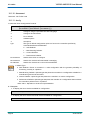
10.1.2
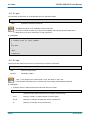
amlview
View ACPI1.0b, ACPI2.0, or ACPI3.0 AML in EFI Shell Environment.
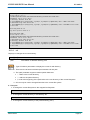
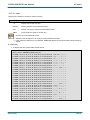
usage: AMLView [<AML file>]
Also AmlView propose its own shell syntax
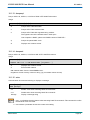
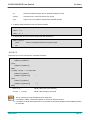
fs0:\> AmlView
Welcome to AmlView on EFI Shell (Version 0.01)
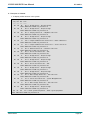
DefinitionBlock (”Dsdt.aml”, ”DSDT”, 1, ”ALASKA”, ”A M I”, 0)
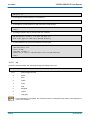
AmlView > help
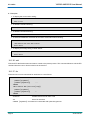
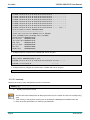
EXEC
<NodeName>
: Print the result of the method node.
CAT
<NodeName>
: Print the node content.
LS [-R] [<NodeName>]
: List the node name. (-R means recursive)
CD
: Change current node dir.
[<NodeName>]
: Quit Current Command Prompt.
QUIT
: Print Help Information.
HELP
(NodeName format - [\]AAAA[.BBBB[...]])
10.1.3
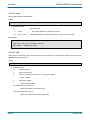
bcfg
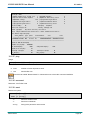
bcfg is an utility for boot configuration.
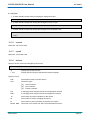
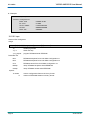
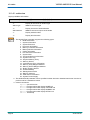
bcfg driver|boot [dump [-v]][add # file ”desc”][rm #] [mv # #]
driver
boot
dump
-v
add
addp
addh
rm
mv
selects boot driver list
selects boot option list
dumps selected list
dumps verbose (includes load options)
add 'file' with 'desc' at position #
add 'file' with 'desc' at position #.Use hard drive path
add 'handle' with 'desc' at position #.Use Handle
remove #
move # to #
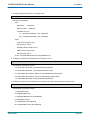
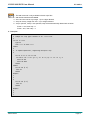
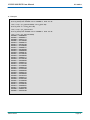
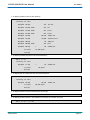
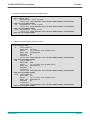
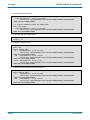
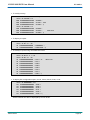
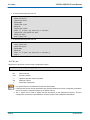
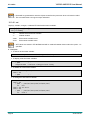
> Example:
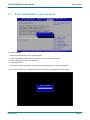
The following example shows the ability to change boot device order without entering in BIOS setup.
Page 60
SD.DT.F69-4e