1
Techline News
continued from page 1
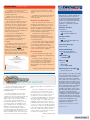
The website home page is shown here.
You can make your choices from the
thumbtabs at the top of the screen or from
the bulleted list below.
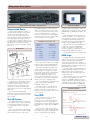
Whether you are accessing the
application from the CD or the web, you
will see the page shown here.
The top half of the page allows you to
“build” the vehicle for which you want
information. The major change is that you
can now do this on one page instead of
three separate pages. In some cases, you
may also want to click the Optional Vehicle
Information button to further describe the
vehicle you’re working on.
If you choose to view Bulletins,
Campaigns and Preliminary Information,
the release date is now listed.
TIP: Dashes are not required when
searching directly for a bulletin or
campaign.
The buttons in the bottom half of the
page look and perform exactly as they
always have, with one exception. There is
a new button marked Y+P+K , This button
allows you to search for bulletins by
specifying a year range, the vehicle
platform, and a keyword. This is handy if
you remember a bulletin, but are not sure
of the exact year it was issued. If it falls
within the range you specify, you’ll find it
quickly.
And finally, document printouts will now
include the year, make and model of the
vehicle specified.
New Features Being Added
Once the vehicle has been “built,” you
will have the opportunity to choose from
the available service information. For now,
the first choice is Service Manual and
Bulletins. As 2003 vehicles are added, you
will also be able to view the warranty book,
owner’s manual and supplements.
Although much of this information is
taken from owner literature, it is
reformatted for the web. This means you
can select just the page(s) you need, and
they will load quickly.
The Labor Time Guide will be integrated
into SI by the 4th quarter of 2002. Because
the new version will be presented in
service manual style, there is no longer a
need for a separate PDF version. And it will
include a keyword search capability.
Update Schedule
SI, Owners Manuals, and Labor Time
Guide will be updated on a regular basis as
a package.
Currently SI (web) is updated once a
week. SI updates to the GM ACCESS
server will occur every second Monday. If
there are updates to the LTG or the
Owners Manual, they will be included with
SI updates.
– Thanks to Bob Savo and Tom Tippen
The Class 2 bus can be wired in one of
two ways, Star configuration and Loop
configuration. Both have their advantages
and disadvantages.
The Star configuration connects each
controller using a single wire from each
computer. The wires are spliced together at a
single location using a Splice Pack (also
called a Star Connector). A splice pack is a
connector-like component that uses a
removable bus bar that connects all of the
controllers together. The advantage of the
Star configuration lies in its relative ease of
diagnosis. The splice pack provides a
convenient location in which to diagnose
electrical problems associated with the Class
2 bus. The disadvantage is that there is no
built-in redundancy to the system. If an open
occurs on one of these wires, the controller
will no longer be able to communicate on the
bus.
The Loop configuration uses two wires
connected to each controller. One of the
wires will connect to the next controller on
the loop while the second wire connects to
the previous one. This creates a loop of
controllers all holding hands, as it were. Each
wire carries identical information, so there is
no specific “input” or “output” wire. The
advantage is that with two wires, there is
redundancy built into the system. If an open
occurs on one wire, the message can still be
sent via the second one. The disadvantage is
in the relative difficulty of diagnosis. Because
there is no central location where the bus
comes together, you must isolate sections of
the bus to do electrical checks.
– Thanks to Mark Harris
2
GM TechLink is a monthly magazine for
all GM retail technicians and service
consultants providing timely information
to help increase knowledge about GM
products and improve the performance
of the service department. This
magazine is a companion to the GM
Edge publication.
Publisher & Editor:
Mark Stesney
GM Service Operations
[email protected]
Technical Editor:
Jim Horner
[email protected]
1-248-816-3641
Production Manager:
Marie Meredith
Desktop Publishing:
Greg Szpaichler, MediaWurks
[email protected]
FAX number:
1-248-649-5465
Write to:
TechLink
PO Box 500
Troy, MI 48007-0500
GM TechLink on the Web:
http://service.gm.com
General Motors service tips are intended
for use by professional technicians, not a
"do-it-yourselfer." They are written to
inform those technicians of conditions
that may occur on some vehicles, or to
provide information that could assist in
the proper service of a vehicle. Properly
trained technicians have the equipment,
tools, safety instructions and know-how
to do a job properly and safely. If a
condition is described, do not assume
that the bulletin applies to your vehicle
or that your vehicle will have that
condition. See a General Motors dealer
servicing your brand of General Motors
vehicle for information on whether your
vehicle may benefit from the information.
Inclusion in this publication is not
necessarily an endorsement of the
individual or the company.
Copyright© 2002 General Motors Corporation
All rights reserved.
Return to page 1