1
Creating Expressions
Using Logical Operators in Expressions
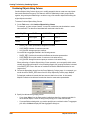
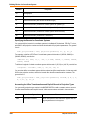
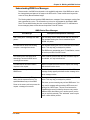
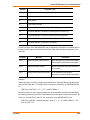
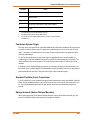
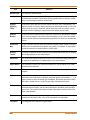
“And”, “or”, and “not” are logical operators. You use them to combine expressions in Select and the
Where Condition clause of SQL Select. MapInfo Professional treats each such an expression as a
test, which it applies to each record in the table. For each test it gets a yes/no (true/false) answer.
MapInfo Professional uses the logical operators to tell it how to combine the individual yes/no
answers into an overall yes/no answer: Does the current record meet the selection condition?
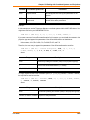
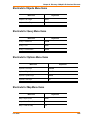
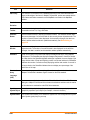
Operator
Description
and
is “true” if (and only if) both of its arguments (the expressions it joins together) are
true. A record must satisfy both of these conditions if it is to be selected.
or
is “true” if either one, or both, of its arguments (the expressions it joins together)
are true. A record need satisfy only one of these conditions if it is to be selected. It
is also selected if both of its conditions are satisfied.
not
is “true” if its argument (the expression it applies to) is false. A record is selected if
it does not meet the stated condition.
Suppose you want to select all properties that are worth $250,000 or more and are in Columbia
county. Each record has to meet two criteria, each of which can be formulated as a simple
expression:
18. VALUE >= 250000
19. COUNTY = “Columbia”
You could perform one selection for all properties worth $250,000 or more. Then you could perform
another selection on that result, looking for all properties in Columbia county. However, it is easier to
combine the two operations into one using the logical operator “and”.
20. COUNTY = “Columbia” and VALUE >= 250000
When MapInfo Professional examines a record to see whether or not it meets the condition set by
this expression, it makes the two tests: Does COUNTY equal Columbia? Is the VALUE equal to or
greater than 250000? When the answer to both of these questions is true (or yes), then the record is
accepted into the current selection. When the answer to one or both of the questions is no (or false),
then the record is not accepted into the current selection.
Now, what if you want all properties worth $250,000 or more and not in Columbia county? You can
use “not” to negate the first clause of expression 33, yielding expression 34:
21. not (COUNTY=”Columbia”) and VALUE>=250000
Only records where the county is not Columbia satisfy the first clause of expression 34. Now
consider expression 35:
22. not (COUNTY=”Columbia” and VALUE>=250000)
Expression 35 is simply the negation of expression 33. Any record that would satisfy 33 does not
satisfy 35. Any record that does not satisfy 33 satisfies 35.
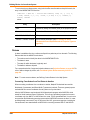
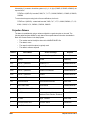
You can use “or” when you want to specify alternative conditions, such as:
390
MapInfo Professional 10