1
Contents
Note: ...................................................................................................................................................................................................... 2
Connections ........................................................................................................................................................................................... 2
CN4-BBB Header.............................................................................................................................................................................. 2
DC Power Input ................................................................................................................................................................................. 2
5V Power ........................................................................................................................................................................................... 2
Dimmer Outputs ................................................................................................................................................................................ 2
LEDS ..................................................................................................................................................................................................... 3
PIXEL OUTPUTS ................................................................................................................................................................................. 3
RS485 OUTPUTS ................................................................................................................................................................................. 3
USING THE BBB36+ ........................................................................................................................................................................... 3
How it works ..................................................................................................................................................................................... 3
Data ................................................................................................................................................................................................... 3
Power ................................................................................................................................................................................................. 3
DC Output configuration within Falcon Player (FPP) ....................................................................................................................... 3
Clock configuration within Falcon Player (FPP) ............................................................................................................................... 3
Test Mode .......................................................................................................................................................................................... 4
Temperature Switch........................................................................................................................................................................... 4
User Headers ..................................................................................................................................................................................... 4
BeagleBoneBlack IO STUFF ................................................................................................................................................................ 4
FAULTFINDING .................................................................................................................................................................................. 5
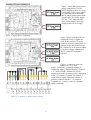
CONNECTION EXAMPLES ............................................................................................................................................................... 6
WARRANTY ........................................................................................................................................................................................ 8
Note:
Throughout this manual the BeagleBoneBlack is referred to as BBB for the sake of brevity.
Connections
CN4-BBB Header
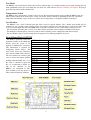
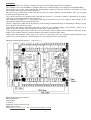
The connector CN4 on the BBB36+ connects to a BeagleBoneBlack (BBB) via a 46 way ribbon cable. This is the only
connection between the 2 boards. The ribbon cable should be connected to the BBB36+, then the BBB and then the
BBB attached to the 4 standoffs on the BBB36+. See page 4 for location.
DC Power Input
The 2 large 2 way green connectors (CN13, CN14) are the DC inputs from your power supply/s. The +V terminal is
positive and the GND terminal is negative or ground. Any DC voltage in the range of 7V to 36V can be used. There is a
standard ATO (automotive) fuse adjacent to the power terminals. The board comes supplied with 10A fuses fitted.
Fuses up to 30A can be used. It is recommended changing the fuse to the closest size for the total current that the board
is controlling. See page 4 for locations.
5V Power
If both DC dimmer banks are running off 5V then it is necessary to connect a voltage supply of between 7V and 36V
DC to CN26 the PWR connector. If either of the DC dimmer banks has a supply of greater than 7V it isn’t necessary to
connect to CN26. See page 4 for location.
Dimmer Outputs
There are 36 channel outputs. The maximum load per channel is 3 Amps, but the overall limit is 30 Amps per bank of
18. This means that you can't turn on all 18 outputs with the maximum load. In reality, this should not be a problem as
most loads will be less than 2 Amps.
Each group of 3 outputs is grouped into 4 terminals. These are the 3 outputs and a common positive. RGB lights with a
single common anode should have the common wire connected to the terminal +V and the red, green and blue wires to
2