1
channels 1,2,3 (or 4,5,6 etc). The order and specific channels is actually dependant on what is configured in your
sequencing software. For lights that have single colours (or single channels) per pair of wires then 1 wire gets connected
to the +V and 1 gets connected to the channel output. For led lights which require the polarity to be around the right
way then the anode (positive) gets connected to +V and the cathode (negative) goes to the channel. For lights that do
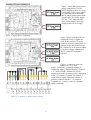
not have three channels commoned then 3 wires will be joined and fitted to the +V for the 3 channels. See connection
examples later in the manual for examples.
LEDS
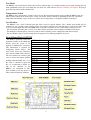
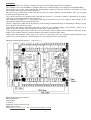
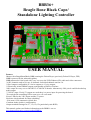
There are 4 LEDs on the BBB36+ as well as a number on the BBB. See the falconchristmas website for details on the
LEDs on the BBB. The leds on the BBB36+ are 2 for the power for the 2 banks of DC dimmers. These are labelled
PWR1 and PWR2. There is 1 to indicate that there is a regulated 5V on the board and there is 1 to indicate that test
mode is running.
PIXEL OUTPUTS
There are 2 pixel outputs on the BBB36+. Under control of the Falcon Player these can be configured as a combination
of 2 or 4 wire pixel outputs. The outputs are labelled as A and B rather than Data and Clock as they can both potentially
be configured as Data.
RS485 OUTPUTS
There are 2 electrically isolated RS485 outputs on the BBB36+. Both of these outputs have the optocoupler (6N137)
and RS485 driver chip (MAX1483 or compatible) in IC sockets to allow replacement if they are damaged. The 2
outputs can be configured as DMX or alternatively as Pixelnet from within Falcon Player. The 2 outputs are labelled as
DMX1 and DMX2 and they are wired to an RJ45 socket as per ESTA standard (Data + 1,
Data - 2, Common
7+8). The universe/s for each output are configured within Falcon Player. See page 4 for locations.
USING THE BBB36+
How it works
The smarts of the BBB36+ are actually within the BBB and the Falcon Player software. Sequences are created and
copied to the USB thumbdrive and the BBB either runs by itself as a standalone playback device with the onboard
scheduler in the Falcon Player. Alternately it can be configured as an E1.31 device with the sequence playback
occurring on a computer or another Raspberry Pi, BeagleBoneBlack or similar. This is in bridge mode within the Falcon
Player.
The official home of the Falcon Player software is falconchristmas.com. Information on configuring the Falcon Player,
downloads etc are hosted there.
Data
The pcb has a terminal block (CN5) for getting the data out of the pcb to expansion DC boards. It is a removable screw
terminal and the wire that goes into each position is marked on the pcb. The data into the pcb goes out to other boards or
pixels.
Power
The pcb can be powered by any DC voltage in the range of 7V to 36V from either the DC dimmer bank/s or CN26. If
all the LEDs on the DC dimmer outputs are 5V then the user must connect 7-36V to the terminals on CN26 (PWR). The
BBB is powered via the BBB36+ board via the expansion GPIO header of the BBB and it doesn’t need 5V connected
via the BBB power connector.
DC Output configuration within Falcon Player (FPP)
The 36 outputs of the BBB36+ are connected to the XXXX connection of the BBB. Within the FPP you need to go to the XXXX
tab, go down to XXXX and select XXXX. To enable more than the 36 channels on the BBB36+ if a 2801DC15, 2801DC30, 2801
pixels or a combination of the previous then the required number of channels should be selected.
Clock configuration within Falcon Player (FPP)
The BBB36+ has a battery backed real time clock on it. The 2302 battery used is specified to give about 12 years of battery backup.
If the battery isn’t installed or if the battery is flat/failed the time in the BBB will be lost and schedules will not run on time. The
clock is configured as a DX1307 within Falcon Player and the time is set somewhere.
3