1
BackyardEOS – User's Guide
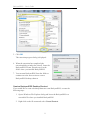
3. Look down the list of files near the bottom and you will see a file named
BackyardEOS.exe - Shortcut. Click of this file and drag it to a location on your
desktop.
4. If you would like to rename the shortcut, right click on the shortcut on the desktop
and select Rename.
5. Enter the new name for the shortcut and press the Enter key.
6. You're done. You can reposition the BackyardEOS shortcut where it is most
convenient for you.
10