1
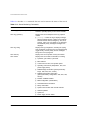
ExtremeWare Software
User Guide
Extreme Networks, Inc.
10460 Bandley Drive
Cupertino, California 95014
(888) 257-3000
http://www.extremenetworks.com
Published: April 1999
Part number: 100000-00 Rev. C
Copyright © Extreme Networks, Inc., 1999. All rights reserved. No part of this documentation may be
reproduced in any form or by any means or used to make any derivative work (such as translation,
transformation, or adaptation) without permission from Extreme Networks, Inc.
Extreme Networks, ExtremeWare, BlackDiamond, Summit, SummitLink, ExtremeWare Vista, Summit
Virtual Chassis, Intra-Subnet QoS, and the Extreme Networks logo are trademarks of Extreme
Networks.
NetWare and Novell are registered is a trademarks of Novell, Inc. PACE is a trademark of 3Com
Corporation. 3Com is a registered trademark of 3Com Corporation. All other brand and product
names are registered trademarks or trademarks of their respective holders.
II
Contents
PREFACE
Introduction xxi
Terminology xxii
Conventions xxii
Related Publications xxiii
1
EXTREMEWARE OVERVIEW
Summary of Features 1-1
Virtual LANs (VLANs) 1-2
Spanning Tree Protocol (STP) 1-3
Quality of Service (QoS) 1-3
Unicast Routing 1-3
IP Multicast Routing 1-4
Load Sharing 1-4
Memory Requirements 1-4
Network Configuration Example 1-5
Software Factory Defaults 1-6
2
ACCESSING
THE
SWITCH
Understanding the Command Syntax 2-2
Syntax Helper 2-2
Command Completion with Syntax Helper
Abbreviated Syntax 2-3
Command Shortcuts 2-3
BlackDiamond Numerical Ranges 2-3
2-2
III
Summit Numerical Ranges 2-4
Names 2-4
Symbols 2-5
Line-Editing Keys 2-6
Command History 2-6
Common Commands 2-7
Configuring Management Access 2-9
Default Accounts 2-10
Changing the Default Password 2-10
Creating a Management Account 2-11
Viewing Accounts 2-12
Deleting an Account 2-12
Methods of Managing the Switch 2-12
Using the Console Interface 2-13
Using Telnet 2-13
Connecting to Another Host Using Telnet 2-13
Configuring Switch IP Parameters 2-14
Using a BOOTP Server 2-14
Manually Configuring the IP Settings 2-15
Disconnecting a Telnet Session 2-16
Disabling Telnet Access 2-17
IP Host Configuration Commands 2-17
Domain Name Service Client Services 2-18
Using the Simple Network Time Protocol 2-19
Configuring and Using SNTP 2-19
SNTP Configuration Commands 2-23
SNTP Example 2-23
Using ExtremeWare Vista 2-24
Disabling Web Access 2-24
Using SNMP 2-25
Accessing Switch Agents 2-25
Supported MIBs 2-25
Configuring SNMP Settings 2-25
Displaying SNMP Settings 2-27
Resetting and Disabling SNMP 2-28
Checking Basic Connectivity 2-28
Ping 2-28
Traceroute 2-29
IV
3
CONFIGURING BLACKDIAMOND SLOTS
AND
PORTS
Configuring a Slot 3-1
F32F Module Considerations 3-3
Specifying One or More BlackDiamond Ports 3-3
Enabling and Disabling BlackDiamond Ports 3-4
Configuring BlackDiamond Port Speed and Duplex Setting
Turning Off Autonegotiation for a Gigabit Ethernet Port
BlackDiamond Port Commands 3-5
Load Sharing on the BlackDiamond 3-7
Configuring BlackDiamond Load Sharing 3-8
Load-Sharing Example 3-9
Verifying the Load-Sharing Configuration 3-10
BlackDiamond Port-Mirroring 3-10
Port-Mirroring Commands 3-11
BlackDiamond Port-Mirroring Example 3-11
4
3-4
3-5
CONFIGURING SUMMIT PORTS
Enabling and Disabling Summit Ports 4-1
Configuring Summit Port Speed and Duplex Setting 4-2
Turning Off Autonegotiation for a Gigabit Ethernet Port 4-3
Summit Port Commands 4-3
Load Sharing on the Summit Switch 4-5
Configuring Summit Load Sharing 4-5
Load-Sharing Example 4-7
Verifying the Load Sharing Configuration 4-8
Summit Switch Port-Mirroring 4-8
Port-Mirroring Commands 4-9
Summit Port-Mirroring Example 4-9
Summit Virtual Chassis 4-9
Summit Switch Port Connections 4-10
Extreme Discovery Protocol 4-11
Summit Virtual Chassis Commands 4-11
Configuring the Summit for Use with the Summit Virtual
Chassis 4-12
VLANs and Summit Switches Using the Virtual Chassis 4-13
V
5
VIRTUAL LANS (VLANS)
Overview of Virtual LANs 5-1
Benefits 5-1
Types of VLANs 5-2
Port-Based VLANs 5-2
Spanning Switches with Port-Based VLANs 5-3
Tagged VLANs 5-6
Uses of Tagged VLANs 5-6
Assigning a VLAN Tag 5-6
Mixing Port-Based and Tagged VLANs 5-9
Generic VLAN Registration Protocol 5-9
GVRP and Spanning Tree Domains 5-10
GVRP Commands 5-11
Protocol-Based VLANs 5-11
Predefined Protocol Filters 5-12
Defining Protocol Filters 5-13
Deleting a Protocol Filter 5-14
Precedence of Tagged Packets Over Protocol Filters 5-14
VLAN Names 5-14
Default VLAN 5-14
Configuring VLANs on the Switch 5-15
VLAN Configuration Examples 5-16
Displaying VLAN Settings 5-18
Deleting VLANs 5-19
6
FORWARDING DATABASE (FDB)
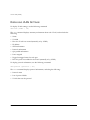
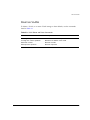
Overview of the FDB 6-1
FDB Contents 6-1
FDB Entry Types 6-1
How FDB Entries Get Added 6-2
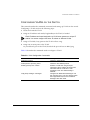
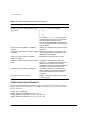
Associating a QoS Profile with an FDB Entry
Configuring FDB Entries 6-3
FDB Configuration Examples 6-4
Displaying FDB Entries 6-5
Removing FDB Entries 6-5
VI
6-3
7
SPANNING TREE PROTOCOL (STP)
Overview of the Spanning Tree Protocol 7-1
Spanning Tree Domains 7-1
STPD Status for GVRP-Added Ports 7-2
Defaults 7-2
STP Configurations 7-3
Configuring STP on the Switch 7-6
STP Configuration Example 7-8
Displaying STP Settings 7-8
Disabling and Resetting STP 7-9
8
QUALITY
OF
SERVICE (QOS)
Overview of Quality of Service 8-1
Building Blocks 8-1
QoS Mode 8-2
QoS Profiles 8-2
Modifying a QoS Profile 8-3
Creating and Deleting a QoS Profile 8-4
QoS Profiles and QoS Mode Details 8-4
The Blackhole QoS Profile 8-5
Traffic Groupings and Creating a QoS Policy 8-5
IPQoS Traffic Groupings 8-6
IPQoS Implementation Rules 8-8
IPQOS PRECEDENCE 8-9
IPQoS Examples 8-10
IPQoS and Multicast Addresses 8-11
Verifying IPQoS settings 8-11
Intra-Subnet QoS 8-12
MAC-Based Traffic Groupings 8-12
Permanent MAC addresses 8-13
Dynamic MAC Addresses 8-13
Blackhole 8-13
Broadcast/Unknown Rate Limiting 8-13
Verifying MAC-Based QoS Settings 8-14
Packet Groupings 8-14
802.1p Packets 8-14
PACE 8-15
VII
Physical and logical groupings 8-15
Source port 8-15
VLAN 8-16
Verifying Physical and Logical Groupings
Verifying Configuration and Performance 8-16
Displaying QoS Information 8-16
QoS Monitor 8-17
Modifying a QoS Policy 8-18
Configuring QoS 8-19
9
8-16
EXTREME STANDBY ROUTER PROTOCOL
Overview 9-1
ESRP-Aware Switches 9-2
ESRP Basics 9-2
Determining the ESRP Master 9-3
Master Switch Behavior 9-4
Standby Switch Behavior 9-4
Electing the Master Switch 9-4
Failover Time 9-5
Grouping Blocks of 10/100 Ports 9-5
Configuring ESRP and Multinetting 9-8
ESRP Commands 9-8
ESRP Examples 9-8
Single VLAN Using layer 2 and layer 3 Redundancy
Multiple VLANs Using Layer 2 Redundancy 9-10
10
IP UNICAST ROUTING
Overview of IP Unicast Routing 10-1
Router Interfaces 10-2
Populating the Routing Table 10-3
Dynamic Routes 10-3
Static Routes 10-3
Multiple Routes 10-4
IP Route Sharing 10-4
Proxy ARP 10-5
ARP-Incapable Devices 10-5
Proxy ARP Between Subnets 10-5
VIII
9-8
Relative Route Priorities 10-6
IP Multinetting 10-7
IP Multinetting Operation 10-7
IP Multinetting Examples 10-8
Configuring IP Unicast Routing 10-10
Verifying the IP Unicast Routing Configuration 10-10
Configuring DHCP/BOOTP Relay 10-11
Verifying the DHCP/BOOTP Relay Configuration 10-11
UDP-Forwarding 10-12
Configuring UDP-Forwarding 10-12
UPD-Forwarding Example 10-12
UDP-Forwarding commands 10-13
IP Commands 10-14
Routing Configuration Example 10-18
Displaying Router Settings 10-20
Resetting and Disabling Router Settings 10-21
11
RIP
AND
OSPF
Overview 11-1
RIP Versus OSPF 11-2
Overview of RIP 11-3
Routing Table 11-3
Split Horizon 11-3
Poison Reverse 11-3
Triggered Updates 11-4
Route Advertisement of VLANs 11-4
RIP Version 1 Versus RIP Version 2 11-4
Overview of OSPF 11-4
Link-State Database 11-5
Areas 11-5
Area 0 11-6
Stub Areas 11-6
Not-So-Stubby-Areas (NSSA) 11-6
Normal Area 11-7
Virtual Links 11-7
Route Re-distribution 11-9
Configuring Route Re-Distribution 11-10
IX
Re-Distributing Routes into OSPF 11-10
Re-Distributing Routes into RIP 11-11
OSPF Timers and Authentication 11-11
Configuring RIP 11-11
RIP Configuration Example 11-14
Displaying RIP Settings 11-16
Resetting and Disabling RIP 11-17
Configuring OSPF 11-17
OSPF Configuration Example 11-21
Configuration for ABR1 11-23
Configuration for IR1 11-23
Displaying OSPF Settings 11-24
Resetting and Disabling OSPF Settings 11-24
12
IP MULTICAST ROUTING
Overview 12-1
DVMRP Overview 12-2
PIM-DM Overview 12-2
IGMP Overview 12-2
IIGMP Snooping 12-3
Configuring IP Multicasting Routing 12-3
Configuration Example 12-7
Configuration for IR1 12-8
Displaying IP Multicast Routing Settings 12-8
Deleting and Resetting IP Multicast Settings 12-9
13
IPX ROUTING
Overview of IPX 13-1
Router Interfaces 13-1
IPX Routing Performance 13-3
IPX Encapsulation Types 13-3
Populating the Routing Table 13-3
Dynamic Routes 13-3
Static Routes 13-4
IPX/RIP Routing 13-4
GNS Support 13-5
Routing SAP Advertisements 13-5
X
Configuring IPX 13-5
Verifying IPX Router Configuration 13-6
Protocol-Based VLANs for IPX 13-7
IPX Commands 13-7
IPX Configuration Example 13-11
Displaying IPX Settings 13-12
Resetting and Disabling IPX 13-13
14
ACCESS POLICIES
Overview of Access Policies 14-1
Using Access Policies 14-2
Creating an Access Profile 14-2
Configuring an Access Profile 14-2
Applying Access Profiles 14-3
Access Policies for RIP 14-3
Examples 14-4
Access Policies for OSPF 14-5
Example 14-6
Access Policies for DVMRP 14-7
Example 14-7
Access Policies for PIM-DM 14-8
Example 14-8
Access Policies for BlackDiamond VLAN to VLAN Traffic
Example 14-9
Making Changes to an Access Profile 14-10
Removing an Access Policy 14-10
Access Policy Commands 14-10
15
STATUS MONITORING
AND
14-9
STATISTICS
Status Monitoring 15-1
Slot Diagnostics 15-3
Port Statistics 15-4
Port Errors 15-5
Port Monitoring Display Keys 15-6
Logging 15-6
Local Logging 15-8
Real-Time Display 15-8
XI
Remote Logging 15-8
Logging Commands 15-9
RMON 15-11
About RMON 15-11
RMON Features of the Switch
Statistics 15-12
History 15-12
Alarms 15-12
Events 15-12
Configuring RMON 15-13
Event Actions 15-13
16
15-11
USING EXTREMEWARE VISTA
Enabling and Disabling Web Access 16-1
Setting Up Your Browser 16-2
Accessing ExtremeWare Vista 16-3
Navigating ExtremeWare Vista 16-3
Task Frame 16-4
Content Frame 16-4
Browser Controls 16-4
Status Messages 16-5
Standalone Buttons 16-5
Saving Changes 16-5
Filtering Information 16-6
Do a GET When Configuring a VLAN 16-6
Sending Screen Output to Extreme Networks
17
SOFTWARE UPGRADE
AND
16-7
BOOT OPTIONS
Downloading a New Image 17-1
Rebooting the Switch 17-2
Saving Configuration Changes 17-2
Returning to Factory Defaults 17-3
Using TFTP to Upload the Configuration 17-3
Using TFTP to Download the Configuration 17-4
Synchronizing MSMs 17-5
Upgrading and Accessing BootROM 17-5
Upgrading BootROM 17-5
XII
Accessing the BootROM menu
Boot Option Commands 17-6
A
SUPPORTED STANDARDS
B
TROUBLESHOOTING
LEDs B-1
Using the Command-Line Interface
Port Configuration B-5
VLANs B-6
STP B-7
Debug Tracing B-8
17-5
B-3
INDEX
INDEX
OF
COMMANDS
XIII
XIV
Figures
1-1
5-1
5-2
5-3
5-4
5-5
5-6
5-7
7-1
7-2
9-1
9-2
9-3
9-4
9-5
9-6
9-7
10-1
10-2
11-1
11-2
11-3
11-4
11-5
12-1
Network configuration example 1-5
Example of a port-based VLAN on the BlackDiamond 5-3
Single port-based VLAN spanning two switches 5-4
Two port-based VLANs spanning two BlackDiamond
switches 5-5
Physical diagram of tagged and untagged traffic 5-7
Logical diagram of tagged and untagged traffic 5-8
Network example using GVRP 5-9
Protocol-based VLANs 5-12
Multiple Spanning Tree Domains 7-4
Tag-based STP configuration 7-5
F32T and F32F ESRP port blocks 9-6
Summit24 ESRP port blocks 9-6
Summit4 ESRP port blocks 9-7
Summit4/FX ESRP port blocks 9-7
Summit48 ESRP port blocks 9-7
ESRP example using layer 2 and layer 3 redundancy 9-9
ESRP example using layer 2 redundancy 9-11
Routing between VLANs 10-2
Unicast routing configuration example 10-19
Virtual link for stub area 11-8
Virtual link providing redundancy 11-8
Route Re-distribution 11-9
RIP configuration example 11-15
OSPF configuration example 11-21
IP multicast routing configuration example 12-7
XV
13-1
13-2
14-1
14-2
14-3
XVI
IPX VLAN configuration 13-2
IPX routing configuration example 13-11
RIP access policy example 14-4
OSPF access policy example 14-6
VLAN-to-VLAN access policy example 14-9
Tables
1
2
1-1
2-1
2-2
2-3
2-4
2-5
2-6
2-7
2-8
2-9
2-10
2-11
3-1
3-2
3-3
3-4
3-5
4-1
4-2
4-3
4-4
4-5
4-6
Notice Icons xxii
Text Conventions
xxiii
ExtremeWare Global Factory Defaults
1-6
Command Syntax Symbols
2-5
Line-Editing Keys
2-6
Common Commands
2-7
Default Accounts 2-10
IP Host Configuration Commands
2-17
DNS Commands
2-18
Greenwich Mean Time Offsets
2-20
SNTP Configuration Commands
2-23
SNMP Configuration Commands
2-26
SNMP Reset and Disable Commands
2-28
Ping Command Parameters
2-28
BlackDiamond Port Commands
3-5
Port Combinations for the G4X Module 3-8
Port Combinations for the G6X Module 3-9
Port Combinations for the F32T and F32F Modules 3-9
BlackDiamond Port-Mirroring Configuration Commands 3-11
Summit Port Commands
4-3
Port Combinations for the Summit1 4-6
Port Combinations for the Summit24 4-6
Port Combinations for the Summit4 and Summit4/FX 4-6
Port Combinations for the Summit48 4-7
Summit Port-Mirroring Configuration Commands
4-9
XVII
4-7
4-8
5-1
5-2
5-3
6-1
6-2
7-1
7-2
8-1
8-2
8-3
8-4
8-5
8-6
9-1
10-1
10-2
10-3
10-4
10-5
10-6
10-7
11-1
11-2
11-3
11-4
11-5
11-6
11-7
12-1
12-2
12-3
12-4
13-1
13-2
13-3
XVIII
Summit Ports to Use to Connect to the Summit Virtual
Chassis
4-10
Summit Virtual Chassis Commands
4-11
GVRP Commands
5-11
VLAN Configuration Commands
5-15
VLAN Delete and Reset Commands 5-19
FDB Configuration Commands
6-3
Removing FDB Entry Commands 6-5
STP Configuration Commands
7-7
STP Disable and Reset Commands 7-9
Default QoS Profiles 8-3
Traffic Groupings by QoS Mode 8-6
Config IPQoS Command Options
8-7
802.1p Values and Associated QoS Profiles
8-14
QoS Monitor Commands
8-18
QoS Configuration Commands
8-19
ESRP Commands
9-8
Relative Route Priorities
10-6
UDP-Forwarding Commands
10-13
Basic IP Commands
10-14
Route Table Configuration Commands
10-16
ICMP Configuration Commands
10-17
Router Show Commands
10-20
Router Reset and Disable Commands
10-21
LSA Type Numbers 11-5
RIP Configuration Commands
11-11
RIP Show Commands
11-16
RIP Reset and Disable Commands
11-17
OSPF Configuration Commands
11-18
OSPF Show Commands
11-24
OSPF Reset and Disable Commands 11-24
IP Multicast Routing Configuration Commands
12-4
IGMP Configuration Commands
12-5
IP Multicast Routing Show Commands
12-8
IP Multicast Routing Reset and Disable Commands
12-9
IPX Encapsulation Types 13-3
IPX Protocol Filters and Encapsulation Types 13-7
Basic IPX Commands
13-7
13-4
13-5
13-6
13-7
14-1
15-1
15-2
15-3
15-4
15-5
15-6
16-1
17-1
IPX/RIP Configuration Commands
13-9
IPX/SAP Configuration Commands
13-10
IPX Show Commands
13-12
IPX Reset and Disable Commands
13-13
Access Policy Configuration Commands
14-10
Status Monitoring Commands
15-2
Port Monitoring Display Keys
15-6
Fault Levels Assigned by the Switch 15-7
Fault Log Subsystems
15-7
Logging Commands
15-9
Event Actions
15-13
Multi-Select List Box Key Definitions
16-4
Boot Option Commands
17-6
XIX
XX
Preface
This Preface provides an overview of this guide, describes guide conventions, and lists
other publications that may be useful.
INTRODUCTION
This guide provides the required information to configure ExtremeWare™ software
running on either a BlackDiamond™ or Summit™ switch.
This guide is intended for use by network administrators who are responsible for
installing and setting up network equipment. It assumes a basic working knowledge of
the following:
• Local area networks (LANs)
• Ethernet concepts
• Ethernet switching and bridging concepts
• Routing concepts
• Internet Protocol (IP) concepts
• Routing Information Protocol (RIP) and Open Shortest Path First (OSPF)
• IP Multicast concepts
• Distance Vector Multicast Routing Protocol (DVMRP) concepts
• Protocol Independent Multicast-Dense Mode (PIM-DM) concepts
EXTREMEWARE SOFTWARE USER GUIDE
XXI
PREFACE
• Internet Packet Exchange (IPX) concepts
• Simple Network Management Protocol (SNMP)
If the information in the “Release Notes” shipped with your switch differs from the
information in this guide, follow the “Release Notes.”
TERMINOLOGY
When features, functionality, or operation is specific to either the Summit or
BlackDiamond switch family, the family name is used. Explanations about features and
operations that are the same across both the Summit and BlackDiamond product
families simply refer to the product as the “switch.”
CONVENTIONS
Table 1 and Table 2 list conventions that are used throughout this guide.
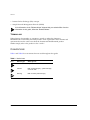
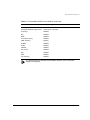
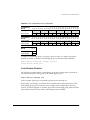
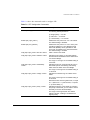
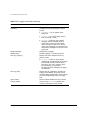
Table 1: Notice Icons
Icon
XXII
Notice Type
Alerts you to...
Note
Important features or instructions.
Caution
Risk of personal injury, system damage,
or loss of data.
Warning
Risk of severe personal injury.
EXTREMEWARE SOFTWARE USER GUIDE
RELATED PUBLICATIONS
Table 2: Text Conventions
Convention
Description
Screen displays
This typeface indicates command syntax, or represents information
as it appears on the screen.
Screen displays
bold
This typeface indicates how you would type a particular command.
The words “enter”
and “type”
When you see the word “enter” in this guide, you must type
something, and then press the Return or Enter key. Do not press the
Return or Enter key when an instruction simply says “type.”
[Key] names
Key names are written with brackets, such as [Return] or [Esc].
If you must press two or more keys simultaneously, the key names
are linked with a plus sign (+). Example:
Press [Ctrl]+[Alt]+[Del].
Words in italicized type
Italics emphasize a point or denote new terms at the place where
they are defined in the text.
The command syntax is explained in Chapter 2.
RELATED PUBLICATIONS
The following is a list of related publications:
• ExtremeWare Command Reference
• ExtremeWare Quick Reference Guide
• ExtremeWare “Release Notes”
• BlackDiamond Hardware Installation Guide
• Summit Hardware Installation Guide
Documentation for Extreme Networks products is available on the World Wide Web at
the following location:
• Extreme Networks home page http://www.extremenetworks.com/
EXTREMEWARE SOFTWARE USER GUIDE
XXIII
PREFACE
XXIV
EXTREMEWARE SOFTWARE USER GUIDE
1
ExtremeWare Overview
ExtremeWare is the full-featured software operating system that is designed to run on
the BlackDiamond and Summit families of Gigabit Ethernet switches.
This chapter describes the following:
• ExtremeWare features
• How to use the BlackDiamond and Summit switch in your network configuration
• Software factory default settings
SUMMARY OF FEATURES
The features of ExtremeWare include the following:
• Virtual local area networks (VLANs) including support for IEEE 802.1Q and IEEE
802.1p
• Spanning Tree Protocol (STP) (IEEE 802.1D) with multiple STP domains
• Policy-Based Quality of Service (PB-QoS)
• Wire-speed Internet Protocol (IP) routing
• IP Multinetting
• DHCP/BOOTP Relay
• Routing Information Protocol (RIP) version 1 and RIP version 2
• Open Shortest Path First (OSPF) routing protocol
EXTREMEWARE SOFTWARE USER GUIDE
1-1
EXTREMEWARE OVERVIEW
• Wire-speed IP multicast routing support
• IGMP snooping to control IP multicast traffic
• Distance Vector Multicast Routing Protocol (DVMRP)
• Protocol Independent Multicast-Dense Mode (PIM-DM)
• IPX, IPX/RIP, and IPX/SAP support
• Load sharing on multiple ports
• Console command-line interface (CLI) connection
• Telnet CLI connection
• ExtremeWare Vista Web-based management interface
• Simple Network Management Protocol (SNMP) support
• Remote Monitoring (RMON)
• Traffic mirroring for all ports
For more information on BlackDiamond components, refer to the BlackDiamond
Hardware Installation Guide. For more information on Summit components, refer
to the Summit Hardware Installation Guide.
VIRTUAL LANS (VLANS)
ExtremeWare has a VLAN feature that enables you to construct your broadcast domains
without being restricted by physical connections. Up to 255 VLANs can be defined on
the switch. A VLAN is a group of location- and topology-independent devices that
communicate as if they were on the same physical local area network (LAN).
Implementing VLANs on your network has the following three advantages:
• It helps to control broadcast traffic. If a device in VLAN Marketing transmits a
broadcast frame, only VLAN Marketing devices receive the frame.
• It provides extra security. Devices in VLAN Marketing can only communicate with
devices on VLAN Sales using routing services.
• It eases the change and movement of devices on networks. If a device in VLAN
Marketing is moved to a port in another part of the network, all you must do is
specify that the new port belongs to VLAN Marketing.
For more information on VLANs, refer to Chapter 5.
1-2
EXTREMEWARE SOFTWARE USER GUIDE
SUMMARY
OF
FEATURES
SPANNING TREE PROTOCOL (STP)
The switch supports the IEEE 802.1D Spanning Tree Protocol (STP), which is a
bridge-based mechanism for providing fault tolerance on networks. STP enables you to
implement parallel paths for network traffic, and ensure the following:
• Redundant paths are disabled when the main paths are operational.
• Redundant paths are enabled if the main traffic paths fail.
The switch supports up to 64 Spanning Tree Domains (STPDs).
For more information on STP, refer to Chapter 7.
QUALITY OF SERVICE (QOS)
ExtremeWare has Policy-Based Quality of Service (QoS) features that enable you to
specify service levels for different traffic groups. By default, all traffic is assigned the
“normal” QoS policy profile. If needed, you can create other QoS policies and apply
them to different traffic types so that they have different guaranteed minimum
bandwidth, maximum bandwidth, and priority.
For more information on Quality of Service, refer to Chapter 8.
UNICAST ROUTING
The switch can route IP or IPX traffic between the VLANs that are configured as virtual
router interfaces. Both dynamic and static IP routes are maintained in the routing table.
The following routing protocols are supported:
• RIP version 1
• RIP version 2
• OSPF
• IPX/RIP
For more information on IP unicast routing, refer to Chapter 10. For more
information on IPX/RIP, refer to Chapter 13.
EXTREMEWARE SOFTWARE USER GUIDE
1-3
EXTREMEWARE OVERVIEW
IP MULTICAST ROUTING
The switch can use IP multicasting to allow a single IP host to transmit a packet to a
group of IP hosts. ExtremeWare supports multicast routes that are learned by way of the
Distance Vector Multicast Routing Protocol (DVMRP) or Protocol Independent
Multicast-Dense Mode (PIM-DM).
For more information on IP multicast routing, refer to Chapter 12.
LOAD SHARING
Load sharing allows you to increase bandwidth and resilience by using a group of ports
to carry traffic in parallel between systems. The sharing algorithm allows the switch to
use multiple ports as a single logical port. For example, VLANs see the load-sharing
group as a single virtual port. The algorithm also guarantees packet sequencing
between clients.
For information on load sharing, refer to Chapter 3 and Chapter 4.
MEMORY REQUIREMENTS
Your Summit switch must have 32MB of DRAM in order to support the features in
ExtremeWare version 4.0 and above. This is not an issue for BlackDiamond, Summit24
and Summit48 models, and all currently shipping switches contain 32MB. Earlier
models of the Summit switch shipped with 16MB, and must be upgraded to support
ExtremeWare version 4.0 and above.
To determine the memory size in your switch, use the following command:
show memory
For Summit switches running ExtremeWare 4.0, the switch indicates the total DRAM
size in megabytes as part of the output. For Summit switches running previous
ExtremeWare releases, you must calculate the memory by taking the sum of the bytes
listed under current free and adding to it the bytes listed under current alloc. If
the sum is greater than 16,000,000, there is no need to upgrade the memory on the
switch. If this is not the case, please contact your supplier.
1-4
EXTREMEWARE SOFTWARE USER GUIDE
NETWORK CONFIGURATION EXAMPLE
NETWORK CONFIGURATION EXAMPLE
Using Summit and BlackDiamond switches, you can build a complete end-to-end LAN
switching infrastructure that consistently delivers the same functionality, features, and
management interface throughout. Functionality includes non-blocking switch fabric,
wire-speed routing, and Policy-Based QoS. Features include IP routing with RIP, RIP v2,
and OSPF, IP multicast routing support with IGMP, DVMRP, and PIM-DM, VLAN
support by way of IEEE 802.1Q (including the Generic VLAN Registration Protocol, or
GVRP), and standard packet prioritization using IEEE 802.1p (also known as IEEE
802.1D-1998).
Summit switches deliver the maximum price performance in a small, 3.5 inch-high
package. The needs of smaller networks can be satisfied with Summit24 and Summit48
Enterprise desktop switches aggregated by Summit1 core switches or Summit4 server
switches.
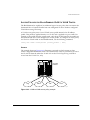
In most networks, Summit desktop switches at the edge of the network are aggregated
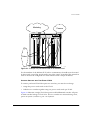
with BlackDiamond core and segment switches. An example of this configuration is
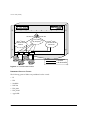
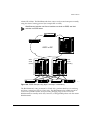
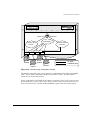
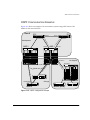
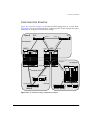
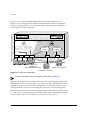
illustrated in Figure 1-1.
Intranet Switching Architecture
Enterprise Desktop
Switching
Distributed Core
Switching
Routers
Core
Switching
Data Center
Integrated Server
Switching
ISA_2
Figure 1-1: Network configuration example
EXTREMEWARE SOFTWARE USER GUIDE
1-5
EXTREMEWARE OVERVIEW
The BlackDiamond is used as a high-speed core switch to aggregate Gigabit Ethernet
links from several Summit switches and fast Ethernet links from access routers.
In this diagram, Summit switches are used for enterprise desktop connectivity, segment
switching, and server switching. The Summit48 and Summit24 are used for enterprise
desktop connectivity; a combination of the Summit1 and Summit24 is used for segment
switching; and the Summit4 is used for server switching.
A unique feature of Summit and BlackDiamond switches is that all provide full layer 3
switching or routing. By enabling core and server switches to route, the performance
penalty of traditional software-based routers can be removed, and those routers can be
used primarily for WAN and access routing applications. At the desktop, enabling
routing on enterprise desktop switches can increase reliability by dual-homing the
switch to the backbone. In addition, routing on desktop switches increases the efficiency
of the LAN by properly handling IP multicast packets that are destined for desktops.
Segment switches that deliver wire-speed IP routing can permit easy network migration
with no change to the existing subnet structure.
SOFTWARE FACTORY DEFAULTS
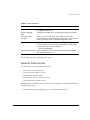
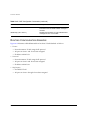
Table 1-1 shows factory defaults for global ExtremeWare features.
Table 1-1: ExtremeWare Global Factory Defaults
Item
Default Setting
Serial or Telnet user account
admin with no password and user with no password
Web network management
Enabled
SNMP read community string
public
SNMP write community string
private
RMON
Disabled
BOOTP
Enabled on the default VLAN (default)
QoS
All traffic is part of the default queue in ingress mode
QoS monitoring
Automatic roving
802.1p priority
Recognition enabled
802.3x flow control
Enabled on Gigabit Ethernet ports
Virtual LANs
One VLAN named default; all ports belong to the default
VLAN; the default VLAN belongs to the STPD named s0
802.1Q tagging
All packets are untagged on the default VLAN (default)
1-6
EXTREMEWARE SOFTWARE USER GUIDE
SOFTWARE FACTORY DEFAULTS
Table 1-1: ExtremeWare Global Factory Defaults (continued)
Item
Default Setting
Spanning Tree Protocol
Disabled for the switch; enabled for each port in the STPD
Forwarding database aging period
300 seconds (5 minutes)
IP Routing
Disabled
RIP
Disabled
OSPF
Disabled
IP multicast routing
Disabled
IGMP snooping
Enabled
DVMRP
Disabled
GVRP
Disabled
PIM-DM
Disabled
IPX routing
Disabled
NTP
Disabled
DNS
Disabled
Port mirroring
Disabled
For default settings of individual ExtremeWare features, refer to individual
chapters in this guide.
EXTREMEWARE SOFTWARE USER GUIDE
1-7
EXTREMEWARE OVERVIEW
1-8
EXTREMEWARE SOFTWARE USER GUIDE
2
Accessing the Switch
This chapter provides the following required information to begin managing the
BlackDiamond or Summit switch:
• Understanding the command syntax
• Line-editing commands
• Command history substitution
• Configuring the switch for management
• Switch management methods
• Configuring SNMP
• Checking basic connectivity
• Using the Simple Network Time Protocol (SNTP)
For configuration changes to be retained through a power cycle or reboot, you
must issue a SAVE command after you have made the change. For more
information on the SAVE command, refer to Chapter 17.
EXTREMEWARE SOFTWARE USER GUIDE
2-1
ACCESSING
THE
SWITCH
UNDERSTANDING THE COMMAND SYNTAX
This section describes the steps to take when entering a command. Refer to the sections
that follow for detailed information on using the command-line interface.
To use the command-line interface (CLI), follow these steps:
1 When entering a command at the prompt, ensure that you have the appropriate
privilege level.
Most configuration commands require you to have the administrator privilege level.
2 Enter the command name.
If the command does not include a parameter or values, skip to Step 3. If the
command requires more information, continue to Step 2a.
a If the command includes a parameter, enter the parameter name and values.
b The value part of the command specifies how you want the parameter to be set.
Values include numerics, strings, or addresses, depending on the parameter.
3 After entering the complete command, press [Return].
If an asterisk (*) appears in front of the command-line prompt, it indicates that
you have outstanding configuration changes that have not been saved. For more
information on saving configuration changes, refer to Chapter 17.
SYNTAX HELPER
The CLI has a built-in syntax helper. If you are unsure of the complete syntax for a
particular command, enter as much of the command as possible and press [Return]. The
syntax helper provides a list of options for the remainder of the command.
The syntax helper also provides assistance if you have entered an incorrect command.
COMMAND COMPLETION WITH SYNTAX HELPER
ExtremeWare provides command completion by way of the [Tab] key. If you enter a
partial command, pressing the [Tab] key posts a list of available options, and places the
cursor at the end of the command.
2-2
EXTREMEWARE SOFTWARE USER GUIDE
UNDERSTANDING
THE
COMMAND SYNTAX
ABBREVIATED SYNTAX
Abbreviated syntax is the shortest, most unambiguous, allowable abbreviation of a
command or parameter. Typically, this is the first three letters of the command.
When using abbreviated syntax, you must enter enough characters to make the
command unambiguous, and distinguishable to the switch.
COMMAND SHORTCUTS
All named components of the switch configuration must have a unique name.
Components are named using the create command. When you enter a command to
configure a named component, you do not need to use the keyword of the component.
For example, to create a VLAN, you must enter a unique VLAN name:
create vlan engineering
Once you have created the VLAN with a unique name, you can then eliminate the
keyword vlan from all other commands that require the name to be entered. For
example, instead of entering the BlackDiamond command
config vlan engineering delete port 1:3,4:6
you could enter the following shortcut:
config engineering delete port 1:3,4:6
Similarly, on the Summit, instead of entering the command
config vlan engineering delete port 1-3,6
you could enter the following shortcut:
config engineering delete port 1-3,6
BLACKDIAMOND NUMERICAL RANGES
Commands that require you to enter one or more port numbers on a BlackDiamond
system use the parameter <portlist> in the syntax. A <portlist> can be one port on
a particular slot. For example,
port 3:1
EXTREMEWARE SOFTWARE USER GUIDE
2-3
ACCESSING
THE
SWITCH
A <portlist> can be a range of numbers. For example,
port 3:1-3:3
You can add additional slot and port numbers to the list, separated by a comma:
port 3:1,4:8,6:10
You can specify all ports on a particular slot. For example,
port 3:*
indicates all ports on slot 3.
You can specify a range of slots and ports. For example,
port 2:3-4:5
indicates slot 2, port 3 through slot 4, port 5.
SUMMIT NUMERICAL RANGES
Commands that require you to enter one or more port numbers on a Summit switch use
the parameter <portlist> in the syntax. A portlist can be a range of numbers, for
example:
port 1-3
You can add additional port numbers to the list, separated by a comma:
port 1-3,6,8
NAMES
All named components of the switch configuration must have a unique name. Names
must begin with an alphabetical character and are delimited by whitespace, unless
enclosed in quotation marks.
2-4
EXTREMEWARE SOFTWARE USER GUIDE
UNDERSTANDING
THE
COMMAND SYNTAX
SYMBOLS
You may see a variety of symbols shown as part of the command syntax. These symbols
explain how to enter the command, and you do not type them as part of the command
itself. Table 2-1 summarizes command syntax symbols.
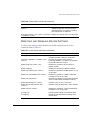
Table 2-1: Command Syntax Symbols
Symbol
Description
angle brackets < >
Enclose a variable or value. You must specify the variable or value. For
example, in the syntax
config vlan <name> ipaddress <ip_address>
you must supply a VLAN name for <name> and an address for
<ip_address> when entering the command. Do not type the angle
brackets.
square brackets [ ]
Enclose a required value or list of required arguments. One or more
values or arguments can be specified. For example, in the syntax
disable vlan [<name> | all]
you must specify either the VLAN name for <name>, or the keyword all
when entering the command. Do not type the square brackets.
vertical bar |
Separates mutually exclusive items in a list, one of which must be
entered. For example, in the syntax
config snmp community [readonly | readwrite] <string>
you must specify either the read or write community string in the
command. Do not type the vertical bar.
braces { }
Enclose an optional value or a list of optional arguments. One or more
values or arguments can be specified. For example, in the syntax
show vlan {<name> | all}
you can specify either a particular VLAN or the keyword all. If you do
not specify an argument, the command will show all VLANs. Do not type
the braces.
EXTREMEWARE SOFTWARE USER GUIDE
2-5
ACCESSING
THE
SWITCH
LINE-EDITING KEYS
Table 2-2 describes the line-editing keys available using the CLI.
Table 2-2: Line-Editing Keys
Key(s)
Description
Backspace
Deletes character to the left of cursor and shifts the remainder of line to
left.
Delete or [Ctrl] + D
Deletes character under cursor and shifts the remainder of line to left.
[Ctrl] + K
Deletes characters from under cursor to the end of the line.
Insert
Toggles on and off. When toggled on, inserts text and shifts previous
text to right.
Left Arrow
Moves cursor to left.
Right Arrow
Moves cursor to right.
Home or [Ctrl] + A
Moves cursor to first character in line.
End or [Ctrl] + E
Moves cursor to last character in line.
[Ctrl] + L
Clears the screen and movers the cursor to the beginning of the line.
[Ctrl] + U
Clears all characters typed from the cursor to the beginning of the line.
[Ctrl] + W
Deletes the previous word.
Up Arrow
Displays the previous command in the command history buffer and places
cursor at end of command.
Down Arrow
Displays the next command in the command history buffer and places
cursor at end of command.
COMMAND HISTORY
ExtremeWare “remembers” the last 49 commands you enter. You can display a list of
these commands by using the following command:
history
2-6
EXTREMEWARE SOFTWARE USER GUIDE
COMMON COMMANDS
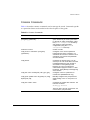
COMMON COMMANDS
Table 2-3 describes common commands used to manage the switch. Commands specific
to a particular feature are described in the other chapters of this guide.
Table 2-3: Common Commands
Command
Description
create account [admin | user] <username>
{encrypted} {<password>}
Creates a user account. The encrypted
option should only be used by the switch
to generate an ASCII configuration (using
the upload configuration command),
and parsing a switch-generated
configuration (using the download
configuration command).
create vlan <name>
Creates a VLAN.
config account <username> {encrypted}
{<password>}
Configures a user account password.
Passwords must have a minimum of 4
characters and can have a maximum of 12
characters. User names and passwords
are case-sensitive.
config banner
Configures the banner string. You can
enter up to 24 rows of 80-column text that
is displayed before the login prompt of
each session. Press [Return] at the
beginning of a line to terminate the
command and apply the banner. To clear
the banner, press [Return] at the beginning
of the first line.
config slot <slot> module [f32t | f32f | g4x | g6x]
Configures a slot for a particular I/O
module card. (BlackDiamond only)
config ports <portlist> auto off {speed [10 | 100]}
duplex [half | full]
Manually configures the port speed and
duplex setting of one or more ports on a
switch.
config time <date> <time>
Configures the system date and time. The
format is as follows:
mm/dd/yyyy hh:mm:ss
The time uses a 24-hour clock format. You
cannot set the year past 2023.
EXTREMEWARE SOFTWARE USER GUIDE
2-7
ACCESSING
THE
SWITCH
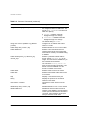
Table 2-3: Common Commands (continued)
Command
Description
config timezone <gmt_offset> {autodst | noautodst}
Configures the time zone information to
the configured offset from GMT time. The
format of gmt_offset is +/- minutes from
GMT time. Specify:
■
autodst — Enables automatic
Daylight Savings Time change.
■
nosautodst — Disables automatic
Daylight Savings Time change.
The default setting is autodst.
config vlan <name> ipaddress <ip_address>
{<mask>}
Configures an IP address and subnet
mask for a VLAN.
enable bootp vlan [<name> | all]
Enables BOOTP for one or more VLANs.
enable idletimeout
Enables a timer that disconnects all
sessions (both Telnet and console) after
20 minutes of inactivity. The default setting
is disabled.
enable license [basic_L3 | advanced_L3]
<license_key>
Enables a particular software feature
license. Specify <license_key> as an
integer. This command is available only on
the Summit48 and Summit24.
The command unconfig switch all
does not clear licensing information. This
feature cannot be disabled once the
license is enabled on the switch.
enable telnet
Enables Telnet access to the switch.
enable web
Enables ExtremeWare Vista Web access
to the switch.
help
Displays a command summary list.
history
Displays the previous 49 commands
entered on the switch.
clear session <number>
Terminates a Telnet session from the
switch.
disable bootp vlan [<name> | all]
Disables BOOTP for one or more VLANs.
disable idletimeout
Disables the timer that disconnects all
sessions. Once disabled, console sessions
remain open until the switch is rebooted or
you logoff. Telnet sessions remain open
until you close the Telnet client.
2-8
EXTREMEWARE SOFTWARE USER GUIDE
CONFIGURING MANAGEMENT ACCESS
Table 2-3: Common Commands (continued)
Command
Description
disable port <portlist>
Disables a port on the switch.
disable telnet
Disables Telnet access to the switch.
disable web
Disables Web access to the switch.
delete account <username>
Deletes a user account.
delete vlan <name>
Deletes a VLAN.
unconfig switch {all}
Resets all switch parameters (with the
exception of defined user accounts, and
date and time information) to the factory
defaults. If you specify the keyword all,
the user account information is reset as
well.
show banner
Displays the user-configured banner.
CONFIGURING MANAGEMENT ACCESS
ExtremeWare supports the following two level levels of management:
• User
• Administrator
A user-level account has viewing access to all manageable parameters, with the
exception of the following:
• User account database
• SNMP community strings
A user-level account can use the ping command to test device reachability, and change
the password assigned to the account name. If you have logged on with user
capabilities, the command-line prompt ends with a (>) sign. For example:
Summit1:2>
An administrator-level account can view and change all switch parameters. It can also
add and delete users, and change the password associated with any account name. The
administrator can disconnect a management session that has been established by way of
a Telnet connection. If this happens, the user logged on by way of the Telnet connection
is notified that the session has been terminated.
EXTREMEWARE SOFTWARE USER GUIDE
2-9
ACCESSING
THE
SWITCH
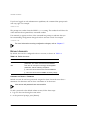
If you have logged on with administrator capabilities, the command-line prompt ends
with a (#) sign. For example:
Summit1:18#
The prompt text is taken from the SNMP sysname setting. The number that follows the
colon indicates the sequential line/command number.
If an asterisk (*) appears in front of the command-line prompt, it indicates that you
have outstanding configuration changes that have not been saved. For example:
*Summit1:19#
For more information on saving configuration changes, refer to Chapter 17.
DEFAULT ACCOUNTS
By default, the switch is configured with two accounts, as shown in Table 2-4.
Table 2-4: Default Accounts
Account Name
Access Level
admin
This user can access and change all manageable
parameters. The admin account cannot be deleted.
user
This user can view (but not change) all manageable
parameters, with the following exceptions:
CHANGING
THE
■
This user cannot view the user account database.
■
This user cannot view the SNMP community strings.
DEFAULT PASSWORD
Default accounts do not have passwords assigned to them. Passwords must have a
minimum of 4 characters and can have a maximum of 12 characters.
User names and passwords are case-sensitive.
To add a password to the default admin account, follow these steps:
1 Log in to the switch using the name admin.
2 At the password prompt, press [Return].
2-10
EXTREMEWARE SOFTWARE USER GUIDE
CONFIGURING MANAGEMENT ACCESS
3 Add a default admin password by typing the following:
config account admin
4 Enter the new password at the prompt.
5 Re-enter the new password at the prompt.
To add a password to the default user account, follow these steps:
1 Log in to the switch using the name admin.
2 At the password prompt, press [Return], or enter the password that you have
configured for the admin account.
3 Add a default user password by typing the following:
config account user
4 Enter the new password at the prompt.
5 Re-enter the new password at the prompt.
If you forget your password while logged out of the command-line interface,
contact your local technical support representative, who will advise on your next
course of action.
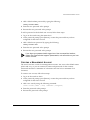
CREATING A MANAGEMENT ACCOUNT
The switch can have a total of 16 management accounts. You can use the default names
(admin and user), or you can create new names and passwords for the accounts.
Passwords must have a minimum of 4 characters and can have a maximum of 12
characters.
To create a new account, follow these steps:
1 Log in to the switch as admin.
2 At the password prompt, press [Return], or enter the password that you have
configured for the admin account.
3 Add a new user by using the following command:
create account [admin | user] <username> {encrypted}
4 Enter the password at the prompt.
5 Re-enter the password at the prompt.
EXTREMEWARE SOFTWARE USER GUIDE
2-11
ACCESSING
THE
SWITCH
VIEWING ACCOUNTS
To view the accounts that have been created, you must have administrator privileges.
Use the following command to see the accounts:
show accounts
DELETING
AN
ACCOUNT
To delete a account, you must have administrator privileges. Use the following
command to delete an account:
delete account <username>
The account name admin cannot be deleted.
METHODS OF MANAGING THE SWITCH
You can manage the switch using the following methods:
• Access the CLI by connecting a terminal (or workstation with terminal-emulation
software) to the console port.
• Access the CLI over a TCP/IP network using a Telnet connection.
• Access the Web interface over a TCP/IP network, using a standard Web browser
(such as Netscape Navigator 3.0 or greater, or Microsoft Internet Explorer 3.0 or
greater).
• Use an SNMP Network Manager over a network running the IP protocol.
The switch can support up to multiple user sessions concurrently, as follows:
• One console sessions
— Two console sessions are available on a BlackDiamond that has two Management
Switch Fabric Modules (MSMs) installed.
• Eight Telnet sessions
• One Web session
2-12
EXTREMEWARE SOFTWARE USER GUIDE
USING TELNET
USING THE CONSOLE INTERFACE
The CLI built into the switch is accessible by way of the 9-pin, RS-232 port labelled
console, located on the back of the Summit Switch, or on the front of either of the
BlackDiamond MSMs.
For more information on the console port pinouts, refer to the BlackDiamond
Hardware Installation Guide or the Summit Hardware Installation Guide.
Once the connection is established, you will see the switch prompt and you may log in.
USING TELNET
Any workstation with a Telnet facility should be able to communicate with the switch
over a TCP/IP network.
Up to eight active Telnet sessions can access the switch concurrently. If idle timeouts
are enabled, the Telnet connection will time out after 20 minutes of inactivity. If a
connection to a Telnet session is lost inadvertently, the switch terminates the session
within two hours.
Before you can start a Telnet session, you must set up the IP parameters described in
the section “Configuring Switch IP Parameters,” later in this chapter. Telnet is enabled
by default.
To open the Telnet session, you must specify the IP address of the device that you want
to manage. Check the user manual supplied with the Telnet facility if you are unsure of
how to do this.
Once the connection is established, you will see the switch prompt and you may log in.
CONNECTING TO ANOTHER HOST USING TELNET
You can Telnet from the current CLI session to another host using the following
command:
telnet [<ipaddress> | <hostname>] {<port_number>}
If the TCP port number is not specified, the Telnet session defaults to port 23. Only
VT100 emulation is supported.
EXTREMEWARE SOFTWARE USER GUIDE
2-13
ACCESSING
THE
SWITCH
CONFIGURING SWITCH IP PARAMETERS
To manage the switch by way of a Telnet connection or by using an SNMP Network
Manager, you must first configure the switch IP parameters.
USING
A
BOOTP SERVER
If you are using IP and you have a Bootstrap Protocol (BOOTP) server set up correctly
on your network, you must add the following information to the BOOTP server:
• Switch Media Access Control (MAC) address
• IP address
• Subnet address mask (optional)
The switch MAC address is found on the rear label of the switch.
Once this is done, the IP address and subnetwork mask for the switch will be
downloaded automatically. You can then start managing the switch without further
configuration.
You can enable BOOTP on a per-VLAN basis by using the following command:
enable bootp vlan [<name> | all]
By default, BOOTP is enabled on the default VLAN.
If you configure the switch to use BOOTP, the switch IP address is not retained through
a power cycle, even if the configuration has been saved. To retain the IP address
through a power cycle, you must configure the IP address of the VLAN using the
command-line interface, Telnet, or Web interface.
All VLANs within a switch that are configured to use BOOTP to get their IP address
use the same MAC address. Therefore, if you are using BOOTP relay through a router,
the BOOTP server must be capable of differentiating its relay based on the gateway
portion of the BOOTP packet.
For more information on DHCP/BOOTP relay, refer to Chapter 10.
2-14
EXTREMEWARE SOFTWARE USER GUIDE
USING TELNET
MANUALLY CONFIGURING
THE
IP SETTINGS
If you are using IP without a BOOTP server, you must enter the IP parameters for the
switch in order for the SNMP Network Manager, Telnet software, or Web interface to
communicate with the device. To assign IP parameters to the switch, you must do the
following:
• Log in to the switch with administrator privileges.
• Assign an IP address and subnetwork mask to a VLAN.
The switch comes configured with a default VLAN named default. To use Telnet or
an SNMP Network Manager, you must have at least one VLAN on the switch, and it
must be assigned an IP address and subnetwork mask. IP addresses are always
assigned to a VLAN. The switch can be assigned multiple IP addresses.
For information on creating and configuring VLANs, refer to Chapter 5.
To manually configure the IP settings, perform the following steps:
1 Connect a terminal or workstation running terminal-emulation software to the
console port.
2 At your terminal, press [Return] one or more times until you see the login prompt.
3 At the login prompt, enter your user name and password. Note that they are both
case-sensitive. Ensure that you have entered a user name and password with
administrator privileges.
— If you are logging in for the first time, use the default user name admin to log in
with administrator privileges. For example:
login: admin
Administrator capabilities enable you to access all switch functions. The default
user names have no passwords assigned.
— If you have been assigned a user name and password with administrator
privileges, enter them at the login prompt.
4 At the password prompt, enter the password and press [Return].
When you have successfully logged in to the switch, the command-line prompt
displays the name of the switch in its prompt.
5 Assign an IP address and subnetwork mask for the default VLAN by using the
following command:
config vlan <name> ipaddress <ipaddress> {<subnet_mask>}
EXTREMEWARE SOFTWARE USER GUIDE
2-15
ACCESSING
THE
SWITCH
For example:
config vlan default ipaddress 123.45.67.8 255.255.255.0
Your changes take effect immediately.
As a general rule, when configuring any IP addresses for the switch, you can
express a subnet mask by using dotted decimal notation, or by using classless
inter-domain routing notation (CIDR). CIDR uses a forward slash plus the number
of bits in the subnet mask. Using CIDR notation, the command identical to the
one above would be:
config vlan default ipaddress 123.45.67.8 / 24
6 Configure the default route for the switch using the following command:
config iproute add default <ipaddress> {<metric>}
For example:
config iproute add default 123.45.67.1
7 Save your configuration changes so that they will be in effect after the next switch
reboot, by typing
save
For more information on saving configuration changes, refer to Chapter 17.
8 When you are finished using the facility, log out of the switch by typing
logout or quit
DISCONNECTING A TELNET SESSION
An administrator-level account can disconnect a management session that has been
established by way of a Telnet connection. If this happens, the user logged in by way of
the Telnet connection is notified that the session has been terminated.
To terminate a Telnet session, follow these steps:
1 Log in to the switch with administrator privileges.
2 Determine the session number of the session you want to terminate by using the
following command:
show session
2-16
EXTREMEWARE SOFTWARE USER GUIDE
IP HOST CONFIGURATION COMMANDS
3 Terminate the session by using the following command:
clear session <session_number>
DISABLING TELNET ACCESS
By default, Telnet services are enabled on the switch. You can choose to disable Telnet
by entering
disable telnet
To re-enable Telnet on the switch, at the console port enter
enable telnet
You must be logged in as an administrator to enable or disable Telnet.
IP HOST CONFIGURATION COMMANDS
Table 2-5 describes the commands that are used to configure IP settings on the switch.
Table 2-5: IP Host Configuration Commands
Command
Description
config iparp add <ipaddress> <mac_address>
Adds a permanent entry to the Address
Resolution Protocol (ARP) table. Specify
the IP address and MAC address of the
entry.
config iparp delete <ipaddress>
Deletes an entry from the ARP table.
Specify the IP address of the entry.
clear iparp {<ipaddress> | vlan <name>}
Removes dynamic entries in the IP ARP
table. Permanent IP ARP entries are not
affected.
config iproute add <ipaddress> <mask> <gateway> Adds a static address to the routing table.
{<metric>}
Use a value of 255.255.255.255 for mask
to indicate a host entry.
config iproute delete <ipaddress> <mask>
<gateway>
Deletes a static address from the routing
table.
config iproute add default <gateway> {<metric>}
Adds a default gateway to the routing
table. A default gateway must be located
on a configured IP interface. If no metric is
specified, the default metric of 1 is used.
EXTREMEWARE SOFTWARE USER GUIDE
2-17
ACCESSING
THE
SWITCH
Table 2-5: IP Host Configuration Commands (continued)
Command
Description
config iproute delete default <gateway>
Deletes a default gateway from the routing
table.
show ipconfig {vlan <name>}
Displays configuration information for one
or all VLANs.
show ipstats {vlan <name>}
Displays IP statistics for the CPU of the
switch or for a particular VLAN.
show iproute {priority | vlan <name> | permanent |
<ipaddress> <mask>}
Displays the contents of the IP routing
table.
show iparp {<ipaddress | vlan <name> | permanent} Displays the IP ARP table. You can filter
the display by IP address, VLAN, or
permanent entries.
DOMAIN NAME SERVICE CLIENT SERVICES
The Domain Name Service (DNS) client in ExtremeWare augments the following
commands to allow them to accept either IP addresses or host names:
•
telnet
•
download [image | configuration | bootrom]
•
upload configuration
•
ping
•
traceroute
In addition, the nslookup utility can be used to return the IP address of a hostname.
Table 2-6 describes the commands used to configure DNS.
Table 2-6: DNS Commands
Command
Description
config dns-client default-domain <domain_name>
Configures the domain that the DNS client
uses if a fully qualified domain name is not
entered. For example, if the default
domain is configured to be foo.com,
executing ping bar searches for
bar.foo.com.
2-18
EXTREMEWARE SOFTWARE USER GUIDE
USING
THE
SIMPLE NETWORK TIME PROTOCOL
Table 2-6: DNS Commands (continued)
Command
Description
config dns-client add <ipaddress>
Adds a DNS name server(s) to the
available server list for the DNS client. Up
to three name servers can be configured.
config dns-client delete <ipaddress>
Removes a DNS server.
nslookup <hostname>
Displays the IP address of the requested
host.
show dns-client
Displays the DNS configuration.
USING THE SIMPLE NETWORK TIME PROTOCOL
ExtremeWare supports the client portion of the Simple Network Time Protocol (SNTP)
Version 3 based on RFC1769. SNTP can be used by the switch to update and
synchronize its internal clock from a Network Time Protocol (NTP) server. When
enabled, the switch sends out a periodic query to the indicated NTP server, or the
switch listens to broadcast NTP updates. In addition, the switch supports the
configured setting for Greenwich Mean time (GMT) offset and the use of Daylight
Savings Time. These features have been tested for year 2000 compliance.
CONFIGURING AND USING SNTP
To use SNTP, follow these steps:
1 Identify the host(s) that are configured as NTP server(s). Additionally, identify the
preferred method for obtaining NTP updates. The options are for the NTP server to
send out broadcasts, or for switches using NTP to query the NTP server(s) directly.
A combination of both methods is possible. You must identify the method that
should be used for the switch being configured.
2 Configure the Greenwich Mean Time (GMT) offset and Daylight Savings Time
preference. NTP updates are distributed using GMT time. To properly display the
local time in logs and other timestamp information, the switch should be configured
with the appropriate offset to GMT based on geographical location. Table 2-7
describes GMT offsets.
EXTREMEWARE SOFTWARE USER GUIDE
2-19
ACCESSING
THE
SWITCH
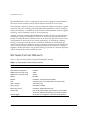
Table 2-7: Greenwich Mean Time Offsets
GMT
Offset in
Hours
GMT Offset Common Time Zone
in Minutes References
+0:00
+0
GMT - Greenwich Mean
UT or UTC - Universal
(Coordinated)
Cities
London, England; Dublin, Ireland;
Edinburgh, Scotland ; Lisbon,
Portugal; Reykjavik, Iceland ;
Casablanca, Morocco
WET - Western European
-1:00
-60
WAT - West Africa
Azores, Cape Verde Islands
-2:00
-120
AT - Azores
-3:00
-180
-4:00
-240
AST - Atlantic Standard
Caracas ; La Paz
-5:00
-300
EST - Eastern Standard
Bogota, Columbia; Lima, Peru;
New York, NY, Trevor City, MI
USA
-6:00
-360
CST - Central Standard
Mexico City, Mexico
Brasilia, Brazil ; Buenos Aires,
Argentina; Georgetown, Guyana;
Saskatchewan, Canada
-7:00
-420
MST - Mountain Standard
-8:00
-480
PST - Pacific Standard
-9:00
-540
YST - Yukon Standard
-10:00
-600
AHST - Alaska-Hawaii Standard
Los Angeles, CA, Cupertino, CA,
Seattle, WA USA
CAT - Central Alaska
HST - Hawaii Standard
-11:00
-660
NT - Nome
-12:00
-720
IDLW - International Date Line
West
+1:00
+60
CET - Central European
2-20
Paris, France ; Berlin, Germany;
Amsterdam, The Netherlands ;
FWT - French Winter
Brussels, Belgium ; Vienna,
Austria ; Madrid, Spain; Rome,
MET - Middle European
Italy; Bern, Switzerland;
MEWT - Middle European Winter
Stockholm, Sweden; Oslo,
Norway
SWT - Swedish Winter
EXTREMEWARE SOFTWARE USER GUIDE
USING
THE
SIMPLE NETWORK TIME PROTOCOL
Table 2-7: Greenwich Mean Time Offsets (continued)
GMT
Offset in
Hours
GMT Offset Common Time Zone
in Minutes References
+2:00
+120
EET - Eastern European, Russia Athens, Greece; Helsinki, Finland;
Zone 1
Istanbul, Turkey; Jerusalem,
Israel; Harare, Zimbabwe
+3:00
+180
BT - Baghdad, Russia Zone 2
Kuwait; Nairobi, Kenya; Riyadh,
Saudi Arabia; Moscow, Russia;
Tehran, Iran
+4:00
+240
ZP4 - Russia Zone 3
Abu Dhabi, UAE; Muscat; Tblisi;
Volgograd; Kabul
+5:00
+300
ZP5 - Russia Zone 4
+5:30
+330
IST – India Standard Time
+6:00
+360
ZP6 - Russia Zone 5
+7:00
+420
WAST - West Australian
Standard
+8:00
+480
CCT - China Coast, Russia Zone
7
+9:00
+540
JST - Japan Standard, Russia
Zone 8
+10:00
+600
EAST - East Australian Standard
Cities
New Delhi, Pune, Allahabad,
India
GST - Guam Standard
Russia Zone 9
+11:00
+660
+12:00
+720
IDLE - International Date Line
East
Wellington, New Zealand; Fiji,
Marshall Islands
NZST - New Zealand Standard
NZT - New Zealand
The command syntax to configure GMT offset and usage of Daylight Savings is as
follows:
config timezone <GMT_offset> {autodst | noautodst}
The GMT_OFFSET is in +/- minutes from the GMT time. Automatic Daylight
Savings Time (DST) changes can be enabled or disabled. The default setting is
enabled.
EXTREMEWARE SOFTWARE USER GUIDE
2-21
ACCESSING
THE
SWITCH
3 Enable the SNTP client using the following command:
enable sntp-client
Once enabled, the switch sends out a periodic query to the NTP servers defined later
(if configured) or listens to broadcast NTP updates from the network. The network
time information is automatically saved into the on-board real-time clock.
4 If you would like this switch to use a directed query to the NTP server, configure the
switch to use the NTP server(s). If the switch listens to NTP broadcasts, skip this
step. To configure the switch to use a directed query, use the following command:
config sntp-client [primary | secondary] server [<ip_address> |
<hostname>]
NTP queries are first sent to the primary server. If the primary server does not
respond within 1 second, or if it is not synchronized, the switch queries the
secondary server (if one is configured). If the switch cannot obtain the time, it
restarts the query process. Otherwise, the switch waits for the sntp-client update
interval before querying again.
5 Optionally, the interval for which the SNTP client updates the real-time clock of the
switch can be changed using the following command:
config sntp-client update-interval <seconds>
The default sntp-client update-interval value is 64 seconds.
6 You can verify the configuration using the following commands:
—
show sntp-client
This command provides configuration and statistics associated with SNTP and its
connectivity to the NTP server.
—
show switch
This command indicates the GMT offset, Daylight Savings Time, and the current
local time.
2-22
EXTREMEWARE SOFTWARE USER GUIDE
USING
THE
SIMPLE NETWORK TIME PROTOCOL
SNTP CONFIGURATION COMMANDS
Table 2-8 describes SNTP configuration commands.
Table 2-8: SNTP Configuration Commands
Command
Description
enable sntp-client
Enables Simple Network Time Protocol
(SNTP) client functions.
disable sntp-client
Disables SNTP client functions.
config sntp-client [primary | secondary] server
[<ipaddress> | <host_name>]
Configures an NTP server for the switch to
obtain time information. Queries are first
sent to the primary server. If the primary
server does not respond within 1 second,
or if it is not synchronized, the switch
queries the second server.
config sntp-client update-interval <seconds>
Configures the interval between polling for
time information from SNTP servers. The
default setting is 64 seconds.
show sntp-client
Displays configuration and statistics for the
SNTP client.
SNTP EXAMPLE
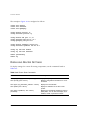
In this example, the switch queries a specific NTP server and a backup NTP server . The
switch is located in Cupertino, CA, and an update occurs every 20 minutes. The
commands to configure the switch are as follows:
config
enable
config
config
timezone -240 autodst
sntp-client
sntp-client primary server 10.0.1.1
sntp-client secondary server 10.0.1.2
EXTREMEWARE SOFTWARE USER GUIDE
2-23
ACCESSING
THE
SWITCH
USING EXTREMEWARE VISTA
ExtremeWare Vista is device-management software running in the switch that enables
you to access the switch over a TCP/IP network using a standard Web browser. Any
properly configured standard Web browser that supports frames (such as Netscape
Navigator 3.0 or Microsoft Internet Explorer 3.0) can manage the switch over a TCP/IP
network.
For more information on assigning an IP address, refer to the section,
“Configuring Switch IP Parameters,” on page 2-14.
The default home page of the switch can be accessed using the following command:
http://<ipaddress>
When you access the home page of the switch, you are presented with the Logon
screen.
For more information on using ExtremeWare Vista, refer to Chapter 16.
DISABLING WEB ACCESS
By default, Web access is enabled on the switch. To disable it, enter the following
command:
disable web
To re-enable Web access, enter the following command:
enable web
Reboot the switch for these changes to take effect.
For more information on rebooting the switch, refer to Chapter 17.
2-24
EXTREMEWARE SOFTWARE USER GUIDE
USING SNMP
USING SNMP
Any Network Manager running the Simple Network Management Protocol (SNMP) can
manage the switch, provided the Management Information Base (MIB) is installed
correctly on the management station. Each Network Manager provides its own user
interface to the management facilities.
The following sections describe how to get started if you want to use an SNMP
manager. It assumes you are already familiar with SNMP management. If not, refer to
the following publication:
The Simple Book
by Marshall T. Rose
ISBN 0-13-8121611-9
Published by Prentice Hall
ACCESSING SWITCH AGENTS
To have access to the SNMP agent residing in the switch, at least one VLAN must have
an IP address assigned to it.
For more information on assigning IP addresses, refer to Table 2-3.
SUPPORTED MIBS
Any Network Manager running SNMP can manage the switch, provided the MIB is
installed correctly on the management station. In addition to private MIBs, the switch
supports the standard MIBs listed in Appendix A.
CONFIGURING SNMP SETTINGS
The following SNMP parameters can be configured on the switch:
• Authorized trap receivers — An authorized trap receiver can be one or more
network management stations on your network. The switch sends SNMP traps to all
trap receivers. You can have a maximum of six trap receivers configured for each
switch. Entries in this list can be created, modified, and deleted using the RMON2
trapDestTable MIB variable, as described in RFC 2021.
• Authorized managers — An authorized manager can be either a single network
management station, or a range of addresses (for example, a complete subnet)
EXTREMEWARE SOFTWARE USER GUIDE
2-25
ACCESSING
THE
SWITCH
specified by a prefix and a mask. The switch can have a maximum of eight
authorized managers.
• Community strings — The community strings allow a simple method of
authentication between the switch and the remote Network Manager. There are two
types of community strings on the switch. Read community strings provide
read-only access to the switch. The default read-only community string is public.
Read-write community strings provide read and write access to the switch. The
default read-write community string is private. A total of eight community strings
can be configured on the switch. The community string for all authorized trap
receivers must be configured on the switch for the trap receiver to receive
switch-generated traps. SNMP community strings can contain up to 126 characters.
• System contact (optional) — The system contact is a text field that enables you to
enter the name of the person(s) responsible for managing the switch.
• System name — The system name is the name that you have assigned to this switch.
The default name is the model name of the switch (for example, Summit1).
• System location (optional) — Using the system location field, you can enter an
optional location for this switch.
Table 2-9 describes SNMP configuration commands.
Table 2-9: SNMP Configuration Commands
Command
Description
enable snmp access
Turns on SNMP support for the switch.
enable snmp traps
Turns on SNMP trap support.
config snmp add <ipaddress> {<mask>}
Adds the IP address of an SNMP
management station to the access list. Up
to 32 addresses can be specified.
config snmp add trapreceiver <ipaddress>
community <string>
Adds the IP address of a specified trap
receiver. The IP address can be a unicast,
multicast, or broadcast. A maximum of six
trap receivers is allowed.
config snmp community [readonly | readwrite]
<string>
Adds an SNMP read or read/write
community string. The default readonly
community string is public. The default
readwrite community string is private.
Each community string can have a
maximum of 126 characters, and can be
enclosed by double quotation marks.
2-26
EXTREMEWARE SOFTWARE USER GUIDE
USING SNMP
Table 2-9: SNMP Configuration Commands (continued)
Command
Description
config snmp delete [<ipaddress> {<mask>} | all]
Deletes the IP address of a specified
SNMP management station or all SNMP
management stations. If you delete all
addresses, any machine can have SNMP
management access to the switch.
config snmp delete trapreceiver [<ip_address>
community <string> | all]
Deletes the IP address of a specified trap
receiver or all authorized trap receivers.
config snmp syscontact <string>
Configures the name of the system
contact. A maximum of 255 characters is
allowed.
config snmp sysname <string>
Configures the name of the switch. A
maximum of 32 characters is allowed. The
default sysname is the model name of the
device (for example, Summit1). The
sysname appears in the switch prompt.
config snmp syslocation <string>
Configures the location of the switch. A
maximum of 255 characters is allowed.
DISPLAYING SNMP SETTINGS
To display the SNMP settings configured on the switch, enter the following command:
show management
This command displays the following information:
• Enable/disable state for Telnet, SNMP, and Web access
• SNMP community strings
• Authorized SNMP station list
• SNMP trap receiver list
• RMON polling configuration
• Login statistics
EXTREMEWARE SOFTWARE USER GUIDE
2-27
ACCESSING
THE
SWITCH
RESETTING AND DISABLING SNMP
To reset and disable SNMP settings, use the commands in Table 2-10.
Table 2-10: SNMP Reset and Disable Commands
Command
Description
disable snmp access
Disables SNMP on the switch. Disabling SNMP access
does not affect the SNMP configuration (for example,
community strings).
disable snmp traps
Prevents SNMP traps from being sent from the switch.
Does not clear the SNMP trap receivers that have been
configured.
unconfig management
Restores default values to all SNMP-related entries.
CHECKING BASIC CONNECTIVITY
The switch offers the following commands for checking basic connectivity:
• ping
• traceroute
PING
The ping command enables you to send Internet Control Message Protocol (ICMP) echo
messages to a remote IP device. The ping command is available for both the user and
administrator privilege level.
The ping command syntax is
ping {continuous} {size <n>} [<ip_address> | <hostname>]
Options for the ping command are described in Table 2-11.
Table 2-11: Ping Command Parameters
Parameter
Description
continuous
Specifies ICMP echo messages to be sent continuously.
This option can be interrupted by pressing any key.
size <n>
Specifies the size of the packet.
2-28
EXTREMEWARE SOFTWARE USER GUIDE
CHECKING BASIC CONNECTIVITY
Table 2-11: Ping Command Parameters (continued)
Parameter
Description
<ipaddress>
Specifies the IP address of the host.
<hostname>
Specifies the name of the host. To use the hostname,
you must first configure DNS.
If a ping request fails, the switch continues to send ping messages until interrupted.
Press any key to interrupt a ping request.
TRACEROUTE
The traceroute command enables you to trace the routed path between the switch and
a destination endstation. The traceroute command syntax is
traceroute [<ip_address> | <hostname>]
where:
• ip_address is the IP address of the destination endstation.
• hostname is the hostname of the destination endstation. To use the hostname, you
must first configure DNS.
EXTREMEWARE SOFTWARE USER GUIDE
2-29
ACCESSING
2-30
THE
SWITCH
EXTREMEWARE SOFTWARE USER GUIDE
3
Configuring BlackDiamond Slots
and Ports
This chapter describes how to configure ports on the BlackDiamond. For information on
configuring ports on the Summit switch, refer to Chapter 4.
Ports on the BlackDiamond can be configured in the following ways:
• Configuring a slot for a particular I/O module
• Enabling and disabling individual ports
• Configuring the port speed (Fast Ethernet ports only)
• Configuring half- or full-duplex mode
• Creating load-sharing groups on multiple ports
• Changing the Quality or Service (QoS) setting for individual ports
For more information on QoS, refer to Chapter 8.
CONFIGURING A SLOT
If a slot has not been configured for a particular type of I/O module, then any type of
module is accepted in that slot, and a default port and VLAN configuration is
automatically generated.
EXTREMEWARE SOFTWARE USER GUIDE
3-1
CONFIGURING BLACKDIAMOND SLOTS
AND
PORTS
Once any of the ports on the module is configured (for example, a VLAN association, a
VLAN tag configuration, or port parameters), all the port information and the module
type for that slot must be saved to non-volatile storage. Otherwise, if the BlackDiamond
is rebooted or the module is removed from the slot, the port, VLAN, and module
configuration information is not saved.
For information on saving the configuration, refer to Chapter 17.
You can configure the BlackDiamond with the type of I/O module that is installed in
each I/O slot. To do this, use the following command:
config slot <slot> module [f32t | f32f | g4x | g6x]
You can also pre-configure the slot before inserting the module card. This allows you to
begin configuring the module and ports before installing the card in the chassis.
If a slot is configured for one type of module, and a different type of module is inserted,
the inserted module is put into a mismatch state, and is not brought online. To use the
new module type in a slot, the slot configuration must be cleared or configured for the
new module type. To clear the slot of a previously assigned I/O module type, use the
following command:
clear slot <slot>
All configuration information related to the slot and the ports on the module is erased.
If a module is present when you issue this command, the module is reset to default
settings.
To display information about a particular slot, use the following command:
show slot {<slot>}
Information displayed includes the following:
• Card type, serial number, part number
• Current state (power down, operational, diagnostic, mismatch)
• Port information
If no slot is specified, information for all slots is displayed.
3-2
EXTREMEWARE SOFTWARE USER GUIDE
SPECIFYING ONE
OR
MORE BLACKDIAMOND PORTS
F32F MODULE CONSIDERATIONS
Due to unique power requirements of the F32F module, and to ensure fully redundant
power capabilities, some restrictions exist on the number of F32F modules that can be
used in a BlackDiamond 6800 chassis. It is recommended that no more than four F32F
modules be used as part of a fully loaded (all eight I/O slots used) BlackDiamond 6800
configuration. A maximum of six F32F modules can be used in a single chassis with one
G4X, G6X, or F32T module for a total of seven I/O modules. This configuration leaves one
I/O slot empty.
Upon powering up the chassis or when an I/O module is hot-swapped, ExtremeWare
automatically determines the system power budget and protects the BlackDiamond
switch from any potential overpower configurations. If there is available power budget,
ExtremeWare powers on and initializes the module. When ExtremeWare detects that a
module will cause an over-power condition, the module remains powered down, and is
not initialized. An entry is made to the system log indicating the condition.
SPECIFYING ONE OR MORE BLACKDIAMOND PORTS
On the BlackDiamond, the port number is a combination of the slot number and the
port number. The nomenclature for the port number is as follows:
slot:port
For example, if a G4X I/O module (having a total of four ports) is installed in slot 2 of
the BlackDiamond chassis, the following ports are valid:
• 2:1
• 2:2
• 2:3
• 2:4
EXTREMEWARE SOFTWARE USER GUIDE
3-3
CONFIGURING BLACKDIAMOND SLOTS
AND
PORTS
You can also use wildcard combinations (*) to specify multiple BlackDiamond slot and
port combinations. The following wildcard combinations are allowed:
• slot:* — Specifies all ports on a particular I/O module.
• slot:x-slot:y — Specifies a contiguous series of ports on a particular I/O
module.
• slota:x - slotb:y — Specifies a contiguous series of ports that begin on one I/O
module and end on another I/O module.
ENABLING AND DISABLING BLACKDIAMOND PORTS
By default, all ports are enabled. To enable or disable one or more ports, use the
following command:
[enable | disable] port <portlist>
For example, to disable slot 7, ports 3, 5, and 12 through 15 on the BlackDiamond, enter
the following:
disable port 7:3,7:5,7:12-7:15
Even though a port is disabled, the link remains enabled for diagnostic purposes.
CONFIGURING BLACKDIAMOND PORT SPEED AND DUPLEX
SETTING
By default, the BlackDiamond is configured to use autonegotiation to determine the
port speed and duplex setting for each port. You can select to manually configure the
duplex setting and the speed of 10/100 Mbps ports, and you can manually configure
the duplex setting on Gigabit Ethernet ports.
10BASE-T and 100BASE-TX ports can connect to either 10BASE-T or 100BASE-T
networks. By default, the ports autonegotiate port speed. You can also configure each
port for a particular speed (either 10 Mbps or 100 Mbps).
Gigabit Ethernet ports are statically set to 1 Gbps, and their speed cannot be modified.
3-4
EXTREMEWARE SOFTWARE USER GUIDE
BLACKDIAMOND PORT COMMANDS
To configure port speed and duplex setting, use the following command:
config ports <portlist> auto off {speed [10 | 100]} duplex [half |
full]
To configure the system to autonegotiate, use the following command:
config ports <portlist> auto on
Flow control is supported only on Gigabit Ethernet ports. It is enabled or disabled as
part of autonegotiation.
TURNING OFF AUTONEGOTIATION FOR A GIGABIT ETHERNET PORT
In certain interoperability situations, you may need to turn autonegotiation off on a
Gigabit Ethernet port. Even though a Gigabit Ethernet port runs only at full duplex, you
must specify the duplex setting.
The following example turns autonegotiation off for port 1 on a G4X or G6X module
located in slot 1:
config ports 1:1 auto off duplex full
BLACKDIAMOND PORT COMMANDS
Table 3-1 describes the BlackDiamond port commands.
Table 3-1: BlackDiamond Port Commands
Command
Description
enable learning port <portlist>
Enables MAC address learning on one or more
ports. The default setting is enabled.
enable port <portlist>
Enables a port.
enable sharing <master_port> grouping
<portlist>
Defines a load-sharing group of ports. The ports
specified in <portlist> are grouped to the
master port.
config ports <portlist> auto on
Enables autonegotiation for the particular port
type; 802.3u for 10/100 Mbps ports or 802.3z for
Gigabit Ethernet ports.
EXTREMEWARE SOFTWARE USER GUIDE
3-5
CONFIGURING BLACKDIAMOND SLOTS
AND
PORTS
Table 3-1: BlackDiamond Port Commands (continued)
Command
Description
config ports <portlist> auto off {speed [10 |
100]} duplex [half | full]
Changes the configuration of a group of ports.
Specify the following:
config ports <portlist> display-string <string>
■
auto off — The port will not autonegotiate
the settings.
■
speed — The speed of the port (for 10/100
Mbps ports only).
■
duplex — The duplex setting (half- or
full-duplex).
Configures a user-defined string for a port. The
string is displayed in certain show commands (for
example, show port all info). The string
can be up to 16 characters.
config ports <portlist> qosprofile <qosname> Configures one or more ports to use a particular
QoS profile.
config slot <slot> module [f32t | f32f | g4x |
g6x]
Configures a slot for a particular I/O module card.
disable learning port <portlist>
Disables MAC address learning on one or more
ports for security purposes. If MAC address
learning is disabled, only broadcast traffic,
Extreme Discovery Protocol (EDP) traffic, and
packets destined to a permanent MAC address
matching that port number are forwarded. The
default setting is enabled.
disable port <portlist>
Disables a port. Even when disabled, the link is
available for diagnostic purposes.
disable sharing <master_port>
Disables a load-sharing group of ports.
clear slot <slot>
Clears a slot of a previously assigned module
type.
unconfig ports <portlist> display-string
<string>
Clears the user-defined display string from a port.
unconfig slot <slot>
Clears a slot of a previously assigned module
type.
restart port <portlist>
Resets autonegotiation for one or more ports by
resetting the physical link.
show ports {<portlist>} collisions
Displays real-time collision statistics.
show ports {<portlist>} configuration
Displays the port configuration.
show ports {<portlist>} info
Displays detailed system-related information.
show ports {<portlist>} packet
Displays a histogram of packet statistics.
3-6
EXTREMEWARE SOFTWARE USER GUIDE
LOAD SHARING
ON THE
BLACKDIAMOND
Table 3-1: BlackDiamond Port Commands (continued)
Command
Description
show ports {<portlist>} qosmonitor
Displays real-time QoS statistics. For more
information on QoS, refer to Chapter 8.
show ports {<portlist>} rxerrors
Displays real-time receive error statistics. For
more information on error statistics, refer to
Chapter 15.
show ports {<portlist>} stats
Displays real-time port statistics. For more
information on port statistics, refer to Chapter 15.
show ports {<portlist>} txerrors
Displays real-time transmit error statistics. For
more information on error statistics, refer to
Chapter 15.
show ports {<portlist>} utilization
Displays real-time port utilization information. Use
the [Spacebar] to toggle between packet, byte,
and bandwidth utilization information.
show slot {<slot>}
Displays slot-specific information, including the
following:
■
Card type, serial number, part number
■
Current state
■
Port information
If not slot is specified, information for all slots is
displayed.
LOAD SHARING ON THE BLACKDIAMOND
Load sharing with BlackDiamond systems allows you to increase bandwidth and
resilience by using a group of ports to carry traffic in parallel between switches. The
sharing algorithm allows the BlackDiamond to use multiple ports as a single logical
port. For example, VLANs see the load-sharing group as a single logical port. The
algorithm also guarantees packet sequencing between clients.
If a port in a load-sharing group fails, traffic is redistributed to the remaining ports in
the load-sharing group. If the failed port becomes active again, traffic is redistributed to
include that port.
Load sharing must be enabled on both ends of the link, or a network loop will
result.
EXTREMEWARE SOFTWARE USER GUIDE
3-7
CONFIGURING BLACKDIAMOND SLOTS
AND
PORTS
Load sharing is most useful in cases where the traffic transmitted from the
BlackDiamond to the load-sharing group is sourced from an equal or greater number of
ports on the system. For example, traffic transmitted to a two-port load-sharing group
should originate from a minimum of two other ports on the same system.
This feature is supported between BlackDiamond systems and Summit switches only,
but may be compatible with third-party “trunking” or link-aggregation algorithms.
Check with an Extreme Networks technical representative for more information.
CONFIGURING BLACKDIAMOND LOAD SHARING
To set up the BlackDiamond to load share among ports, you must create a load-sharing
group of ports. Load-sharing groups are defined according to the following rules:
• Ports on the I/O module are divided into groups of two or four.
• Port in a load-sharing group must be part of the same I/O module.
• Ports in a load-sharing group must be contiguous.
• Follow the outlined boxes in Table 3-2, Table 3-3, and Table 3-4 to determine the valid
port combinations.
• The first port in the load-sharing group is configured to be the “master” logical port.
This is the reference port used in configuration commands. It can be thought of as
the logical port representing the entire port group.
Table 3-2, Table 3-3, and Table 3-4 show the possible load-sharing port group
combinations for the G4X module, the G6X module, and the F32T and F32F modules,
respectively.
Table 3-2: Port Combinations for the G4X Module
Load-Sharing
Group
1
2
3
4
4-port groups
x
x
x
x
2-port groups
x
x
x
x
3-8
EXTREMEWARE SOFTWARE USER GUIDE
LOAD SHARING
ON THE
BLACKDIAMOND
Table 3-3: Port Combinations for the G6X Module
Load-Sharing
Group
1
2
3
4
4-port groups
x
x
x
x
2-port groups
x
x
x
x
5
6
x
x
Table 3-4: Port Combinations for the F32T and F32F Modules
Load-Sharing
Group
1 1 1 1 1 1 1
1 2 3 4 5 6 7 8 9 0 1 2 3 4 5 6
4-port groups
x
x
x
x
x
x
x
x
x
x
x
x
x
x
x
x
2-port groups
x
x
x
x
x
x
x
x
x
x
x
x
x
x
x
x
Load-Sharing
Group
1 1 1 2 2 2 2 2 2 2 2 2 2 3 3 3
7 8 9 0 1 2 3 4 5 6 7 8 9 0 1 2
4-port groups
x
x
x
x
x
x
x
x
x
x
x
x
x
x
x
x
2-port groups
x
x
x
x
x
x
x
x
x
x
x
x
x
x
x
x
To define a load-sharing group, you assign a group of ports to a single, logical port
number. To enable or disable a load-sharing group, use the following commands:
enable sharing <master_port> grouping <portlist>
disable sharing <master_port>
The ports assigned to a load-sharing group cannot be members of a Spanning
Tree Domain (STPD). For information on STPDs, refer to Chapter 7.
LOAD-SHARING EXAMPLE
The following example defines a load-sharing group on slot 3 that contains ports 9
through 12, and uses the first port in the group as the master logical port 9:
enable sharing 3:9 grouping 3:9-3:12
In this example, logical port 3:9 represents physical ports 3:9 through 3:12.
EXTREMEWARE SOFTWARE USER GUIDE
3-9
CONFIGURING BLACKDIAMOND SLOTS
AND
PORTS
When using load sharing, you should always reference the master logical port of the
load-sharing group (port 3:9 in the previous example) when configuring or viewing
VLANs. VLANs configured to use other ports in the load-sharing group will have those
ports deleted from the VLAN when load sharing becomes enabled.
Do not disable a port that is part of a load-sharing group. Disabling the port
prevents it from forwarding traffic, but still allows the link to initialize. As a result,
a partner switch does receive a valid indication that the port is not in a forwarding
state, and the partner switch will continue to forward packets.
VERIFYING THE LOAD-SHARING CONFIGURATION
The screen output resulting from the show ports configuration command indicates
the ports that are involved in load sharing and the master logical port identity.
BLACKDIAMOND PORT-MIRRORING
Port-mirroring configures the BlackDiamond to copy all traffic associated with one or
more ports on a particular slot to a monitor port on the same slot. The monitor port can
be connected to a network analyzer or RMON probe for packet analysis. The system
uses a traffic filter that copies a group of traffic to the monitor port. The traffic filter can
be defined based on one of the following criteria:
• MAC source address/destination address — All data sent to or received from a
particular source or destination MAC address is copied to the monitor port.
For MAC mirroring to work correctly, the MAC address must already be present
in the forwarding database (FDB). For more information on the FDB, refer to
Chapter 6.
• Physical port — All data that traverses the port, regardless of VLAN configuration,
is copied to the monitor port.
• VLAN — All data to and from a particular VLAN, regardless of the physical port
configuration, is copied to the monitor port.
• Virtual port — All data specific to a VLAN on a specific port is copied to the
monitor port.
3-10
EXTREMEWARE SOFTWARE USER GUIDE
BLACKDIAMOND PORT-MIRRORING
Up to eight mirroring filters and one monitor port can be configured. Once a port is
specified as a monitor port, it cannot be used for any other function.
Frames that contain errors are not mirrored.
PORT-MIRRORING COMMANDS
BlackDiamond port-mirroring commands are described in Table 3-5.
Table 3-5: BlackDiamond Port-Mirroring Configuration Commands
Command
Description
enable mirroring to <port>
Dedicates a port to be the mirror output port.
config mirroring add [mac <mac_address> Adds a single mirroring filter definition. Up to eight
| vlan <name> | port <port> | vlan <name> mirroring definitions can be added. You can mirror
port <portlist>]
traffic from a MAC address, a VLAN, a physical
port, or a specific VLAN/port combination.
config mirroring delete [mac
<mac_address> | vlan <name> | port
<slot:port> | vlan <name> port <portlist> |
all}
Deletes a particular mirroring filter definition, or all
mirroring filter definitions.
disable mirroring
Disables port-mirroring.
show mirroring
Displays the port-mirroring configuration.
BLACKDIAMOND PORT-MIRRORING EXAMPLE
The following example selects port 3 on slot 7 as the mirror port, and sends all traffic
coming into or out of the BlackDiamond on slot 7, port 1 to the mirror port:
enable mirroring port 7:3
config mirroring add port 7:1
The following example sends all traffic coming into or out of the system on slot 8, port
1 and the VLAN default to the mirror port:
config mirroring add port 8:1 vlan default
EXTREMEWARE SOFTWARE USER GUIDE
3-11
CONFIGURING BLACKDIAMOND SLOTS
3-12
AND
PORTS
EXTREMEWARE SOFTWARE USER GUIDE
4
Configuring Summit Ports
This chapter describes how to configure ports on the Summit switch. For information
on how to configure ports on the BlackDiamond, refer to Chapter 3.
Ports on the Summit switch can be configured in the following ways:
• Enabling and disabling individual ports
• Configuring the port speed (Fast Ethernet ports only)
• Configuring half- or full-duplex mode
• Creating load-sharing groups on multiple ports
• Configuring a port to connect to the Summit Virtual Chassis
• Changing the Quality or Service (QoS) setting for individual ports
For more information on QoS, refer to Chapter 8.
ENABLING AND DISABLING SUMMIT PORTS
By default, all ports are enabled. To enable or disable one or more ports, use the
following command:
[enable | disable] port <portlist>
EXTREMEWARE SOFTWARE USER GUIDE
4-1
CONFIGURING SUMMIT PORTS
For example, to disable ports 3, 5, and 12 through 15 on the Summit2, enter the
following:
disable port 3,5,12-15
Even though a port is disabled, the link remains enabled for diagnostic purposes.
CONFIGURING SUMMIT PORT SPEED AND DUPLEX
SETTING
By default, the Summit is configured to use autonegotiation to determine the port speed
and duplex setting for each port. You can select to manually configure the duplex
setting and the speed of 10/100 Mbps ports, and you can manually configure the
duplex setting on Gigabit Ethernet ports.
Fast Ethernet ports can connect to either 10Base-T or 100Base-T networks. By default,
the ports autonegotiate port speed. You can also configure each port for a particular
speed (either 10 Mbps or 100 Mbps).
Gigabit Ethernet ports are statically set to 1 Gbps, and their speed cannot be modified.
All ports on the Summit can be configured for half-duplex or full-duplex operation. By
default, the ports autonegotiate the duplex setting.
To configure port speed and duplex setting, use the following command:
config ports <portlist> auto off {speed [10 | 100]} duplex [half |
full]
To configure the switch to autonegotiate, use the following command:
config ports <portlist> auto on
Flow control is supported only on Gigabit Ethernet ports. It is enabled or disabled as
part of autonegotiation. If autonegotiation is set to off, flow control is disabled. When
autonegotiation is turned on, flow control is enabled.
4-2
EXTREMEWARE SOFTWARE USER GUIDE
SUMMIT PORT COMMANDS
TURNING OFF AUTONEGOTIATION FOR A GIGABIT ETHERNET PORT
In certain interoperability situations, it is necessary to turn autonegotiation off on a
Gigabit Ethernet port. Even though a Gigabit Ethernet port runs only at full duplex and
gigabit speeds, the command that turns off autonegotiation must still include the
duplex setting.
The following example turns autonegotiation off for port 4 (a Gigabit Ethernet port);
config ports 4 auto off duplex full
SUMMIT PORT COMMANDS
Table 4-1 describes the Summit port commands.
Table 4-1: Summit Port Commands
Command
Description
enable learning port <portlist>
Enables MAC address learning on one or more
ports. The default setting is enabled.
enable port <portlist>
Enables a port.
enable sharing <master_port> grouping
<portlist>
Defines a load-sharing group of ports. The ports
specified in <portlist> are grouped to the
master port.
enable smartredundancy <portlist>
Enables the smart redundancy feature on the
redundant Gigabit Ethernet port. When the Smart
Redundancy feature is enabled, the switch
always uses the primary link when the primary
link is available. The default setting is enabled.
config ports <portlist> auto on
Enables autonegotiation for the particular port
type; 802.3u for 10/100 Mbps ports or 802.3z for
Gigabit Ethernet ports.
config ports <portlist> auto off {speed [10 |
100]} duplex [half | full]
Changes the configuration of a group of ports.
Specify the following:
EXTREMEWARE SOFTWARE USER GUIDE
■
auto off — The port will not autonegotiate
the settings.
■
speed — The speed of the port (for 10/100
Mbps ports only).
■
duplex — The duplex setting (half- or
full-duplex).
4-3
CONFIGURING SUMMIT PORTS
Table 4-1: Summit Port Commands (continued)
Command
Description
config ports <portlist> display-string <string>
Configures a user-defined string for a port. The
string is displayed in certain show commands (for
example, show port all info). The string
can be up to 16 characters.
config ports <portlist> qosprofile <qosname> Configures one or more ports to use a particular
QoS profile.
unconfig ports <portlist> display-string
<string>
Clears the user-defined display string from a port.
disable learning port <portlist>
Disables MAC address learning on one or more
ports for security purposes. If MAC address
learning is disabled, only broadcast traffic, EDP
traffic, and packets destined to a permanent MAC
address matching that port number, are
forwarded. The default setting is enabled.
disable port <portlist>
Disables a port. Even when disabled, the link is
available for diagnostic purposes.
disable sharing <master_port>
Disables a load-sharing group of ports.
disable smartredundancy <portlist>
Disables the smart redundancy feature. If the
feature is disabled, the switch changes the active
link only when the current active link becomes
inoperable.
restart port <portlist>
Resets autonegotiation for one or more ports by
resetting the physical link.
show ports {<portlist>} collisions
Displays real-time collision statistics.
show ports {<portlist>} configuration
Displays the port configuration.
show ports {<portlist>} info
Displays detailed system-related information.
show ports {<portlist>} packet
Displays a histogram of packet statistics.
show ports {<portlist>} qosmonitor
Displays real-time QoS statistics. For more
information on QoS, refer to Chapter 8.
show ports {<portlist>} rxerrors
Displays real-time receive error statistics. For
more information on error statistics, refer to
Chapter 15.
show ports {<portlist>} stats
Displays real-time port statistics. For more
information on port statistics, refer to Chapter 15.
show ports {<portlist>} txerrors
Displays real-time transmit error statistics. For
more information on error statistics, refer to
Chapter 15.
4-4
EXTREMEWARE SOFTWARE USER GUIDE
LOAD SHARING
ON THE
SUMMIT SWITCH
Table 4-1: Summit Port Commands (continued)
Command
Description
show ports {<portlist>} utilization
Displays real-time port utilization information. Use
the [Spacebar] to toggle between packet, byte,
and bandwidth utilization information.
LOAD SHARING ON THE SUMMIT SWITCH
Load sharing with Summit switches allows you to increase bandwidth and resilience
between switches by using a group of ports to carry traffic in parallel between switches.
The sharing algorithm allows the switch to use multiple ports as a single logical port.
For example, VLANs see the load-sharing group as a single logical port. The algorithm
also guarantees packet sequencing between clients.
If a port in a load-sharing group fails, traffic is redistributed to the remaining ports in
the load-sharing group. If the failed port becomes active again, traffic is redistributed to
include that port.
Load sharing must be enabled on both ends of the link, or a network loop will
result.
Load sharing is most useful in cases where the traffic transmitted from the switch to the
load-sharing group is sourced from an equal or greater number of ports on the switch.
For example, traffic transmitted to a two-port load-sharing group should originate from
a minimum of two other ports on the same switch.
This feature is supported between Summit switches only, but may be compatible with
third-party “trunking” or sharing algorithms. Check with an Extreme Networks
technical representative for more information.
CONFIGURING SUMMIT LOAD SHARING
To set up the Summit to load share among ports, you must create a load-sharing group
of ports. Load-sharing groups are defined according to the following rules:
• Ports on the switch are divided into groups of two or four.
• Ports in a load-sharing group must be contiguous.
• Follow the outlined boxes in Table 4-2 through Table 4-5 to determine the valid port
combinations.
EXTREMEWARE SOFTWARE USER GUIDE
4-5
CONFIGURING SUMMIT PORTS
• The first port in the load-sharing group is configured to be the “master” logical port.
This is the reference port used in configuration commands. It can be thought of as
the logical port representing the entire port group.
Table 4-2, Table 4-3, Table 4-4, and Table 4-5 show the possible load-sharing port group
combinations for the Summit1, Summit24, Summit4 and Summit4/FX, and Summit48,
respectively.
Table 4-2: Port Combinations for the Summit1
Load-Sharing
Group
1
2
3
4-port groups
2-port groups
*
x
x
4
5
6
7
x
x
x
x
x
x
x
x
8
*
* In addition, ports 1 and 8 can be combined into a two-port load sharing group on the
Summit1.
Table 4-3: Port Combinations for the Summit24
Load-Sharing
Group
1 1 1 1 1 1 1 1 1 1 2 2 2 2 2 2
1 2 3 4 5 6 7 8 9 0 1 2 3 4 5 6 7 8 9 0 1 2 3 4 5
4-port groups
x x x x x x x x x x x x x x x x x x x x x x x x
2-port groups
x x x x x x x x x x x x x x x x x x x x x x x x
Table 4-4: Port Combinations for the Summit4 and Summit4/FX
Load-Sharing
Group
1
2
3
4
5
6
7
8
9
1
0
1
1
1
2
1
3
1
4
1
5
1
6
4-port groups
x
x
x
x
x
x
x
x
x
x
x
x
x
x
x
x
2-port groups
x
x
x
x
x
x
x
x
x
x
x
x
x
x
x
x
4-6
1
7
1
8
x
x
1
9
2
0
2
1
2
2
x
x
x
x
x
x
x
x
EXTREMEWARE SOFTWARE USER GUIDE
LOAD SHARING
ON THE
SUMMIT SWITCH
Table 4-5: Port Combinations for the Summit48
Load-Sharing
Group
1 1 1 1 1 1 1 1 1 1 2 2 2 2 2
1 2 3 4 5 6 7 8 9 0 1 2 3 4 5 6 7 8 9 0 1 2 3 4
4-port groups
x
x
x
x
x
x
x
x
x
x
x
x
x
x
x
x
x
x
x
x
x
x
x
x
2-port groups
x
x
x
x
x
x
x
x
x
x
x
x
x
x
x
x
x
x
x
x
x
x
x
x
Load-Sharing
Group
2 2 2 2 2 3 3 3 3 3 3 3 3 3 3 4 4 4 4 4 4 4 4 4
5 6 7 8 9 0 1 2 3 4 5 6 7 8 9 0 1 2 3 4 5 6 7 8
4-port groups
x
x
x
x
x
x
x
x
x
x
x
x
x
x
x
x
x
x
x
x
x
x
x
x
2-port groups
x
x
x
x
x
x
x
x
x
x
x
x
x
x
x
x
x
x
x
x
x
x
x
x
Load-Sharing
Group
4 5
9 0
4-port groups
2-port groups
x
x
To define a load-sharing group, you assign a group of ports to a single, logical port
number. To enable or disable a load-sharing group, use the following commands:
enable sharing <master_port> grouping <portlist>
disable sharing <master_port>
LOAD-SHARING EXAMPLE
The following example defines a load-sharing group that contains ports 9 through 12,
and uses the first port in the group as the master logical port 9:
enable sharing 9 grouping 9-12
In this example, logical port 9 represents physical ports 9 through 12.
When using load sharing, you should always reference the master logical port of the
load-sharing group (port 9 in the previous example) when configuring or viewing
VLANs. VLANs configured to use other ports in the load-sharing group will have those
ports deleted from the VLAN when load sharing becomes enabled.
EXTREMEWARE SOFTWARE USER GUIDE
4-7
CONFIGURING SUMMIT PORTS
Do not disable a port that is part of a load-sharing group. Disabling the port
prevents it from forwarding traffic, but still allows the link to initialize. As a result,
a partner switch does receive a valid indication that the port is not in a forwarding
state, and the partner switch will continue to forward packets.
VERIFYING THE LOAD SHARING CONFIGURATION
The screen output resulting from the show ports configuration command indicates
the ports are involved in load sharing and the master logical port identity.
SUMMIT SWITCH PORT-MIRRORING
Port-mirroring configures the switch to copy all traffic associated with one or more
ports to a monitor port on the switch. The monitor port can be connected to a network
analyzer or RMON probe for packet analysis. The switch uses a traffic filter that copies
a group of traffic to the monitor port.
The traffic filter can be defined based on one of the following criteria:
• MAC source address/destination address — All data sent to or received from a
particular source or destination MAC address is copied to the monitor port.
For MAC mirroring to work correctly, the MAC address must already be present
in the forwarding database (FDB). For more information on the FDB, refer to
Chapter 6.
• Physical port — All data that traverses the port, regardless of VLAN configuration,
is copied to the monitor port.
• VLAN — All data to and from a particular VLAN, regardless of the physical port
configuration, is copied to the monitor port.
• Virtual port — All data specific to a VLAN on a specific port is copied to the
monitor port.
Up to eight mirroring filters and one monitor port can be configured on the switch.
Once a port is specified as a monitor port, it cannot be used for any other function.
Frames that contain errors are not mirrored.
4-8
EXTREMEWARE SOFTWARE USER GUIDE
SUMMIT VIRTUAL CHASSIS
PORT-MIRRORING COMMANDS
Summit port-mirroring commands are described in Table 4-6.
Table 4-6: Summit Port-Mirroring Configuration Commands
Command
Description
enable mirroring to <port>
Dedicates a port to be the mirror output port.
config mirroring add [mac <mac_address> Adds a single mirroring filter definition. Up to eight
| vlan <name> | port <port> | vlan <name> mirroring definitions can be added. You can mirror
port <port>]
traffic from a MAC address, a VLAN, a physical
port, or a specific VLAN/port combination.
config mirroring delete [mac
<mac_address> | vlan <name> | port
<port> | vlan <name> port <port> | all}
Deletes a particular mirroring filter definition, or all
mirroring filter definitions.
disable mirroring
Disables port-mirroring.
show mirroring
Displays the port-mirroring configuration.
SUMMIT PORT-MIRRORING EXAMPLE
The following example selects port 3 as the mirror port, and sends all traffic coming
into or out of the switch on port 1 to the mirror port:
enable mirroring port 3
config mirroring add port 1
The following example sends all traffic coming into or out of the switch on port 1 and
the VLAN default to the mirror port:
config mirroring add port 1 vlan default
SUMMIT VIRTUAL CHASSIS
The Summit Virtual Chassis is a low-cost external backplane that connects up to eight
stacked or distributed Summit switches into one cohesive system.
The Summit Virtual Chassis can not be used with the BlackDiamond switch.
EXTREMEWARE SOFTWARE USER GUIDE
4-9
CONFIGURING SUMMIT PORTS
Features of the Summit Virtual Chassis include the following:
• Increased port density
• Load-sharing links
• Extensive fault-tolerant capabilities
— Redundant power supplies
— Hot-swappable switches
• How-swappable virtual chassis
— Environmental sensors
The Summit Virtual Chassis has eight SummitLink ports. A SummitLink port is a
proprietary backplane channel used to connect Summit switches to the Summit Virtual
Chassis.
For detailed information about the Summit Virtual Chassis, refer to the Summit
Virtual Chassis Design and Installation Guide.
SUMMIT SWITCH PORT CONNECTIONS
Table 4-7 describes the Summit switch ports that can be used to connect to one, two, or
four Summit Virtual Chassis units.
Table 4-7: Summit Ports to Use to Connect to the Summit Virtual Chassis
One Virtual Chassis
Two Virtual Chassis
Four Virtual Chassis
Summit1
Any of ports 1 - 8
Ports 2 and 3, or
Ports 4 and 5, or
Ports 6 and 7
Ports 4, 5, 6, and 7
Summit24
Port 25
Summit4
Any of ports 17 - 22
Ports 17 and 18, or
Ports 19 and 20, or
Ports 21 and 22
Ports 19, 20, 21, and 22
Summit4/FX
Any of ports 17 - 22
Ports 17 and 18, or
Ports 19 and 20, or
Ports 21 and 22
Ports 19, 20, 21, and 22
Summit48
Port 49 or Port 50
Ports 49 and 50
4-10
EXTREMEWARE SOFTWARE USER GUIDE
SUMMIT VIRTUAL CHASSIS
EXTREME DISCOVERY PROTOCOL
The Extreme Discovery Protocol (EDP) is used to locate neighbor Extreme Networks
switches connected to the Summit Virtual Chassis. When running on a normal switch
port, EDP is used to by the Summit switches to exchange topology information with
each other. Information communicated using EDP includes the following:
• Switch MAC address (switch ID)
• Switch software version information
• Switch IP address
• Switch VLAN-IP information
• Switch port number
• Summit Virtual Chassis identifier and port number
• Listing of all virtual chassis identifiers
EDP cannot be disabled on ports that are connected to a Summit Virtual
Chassis.
When a Gigabit Ethernet port is configured to be connected to a SummitLink port on a
Summit Virtual Chassis, the Activity LED on the Summit flashes once per second, even
when no traffic is present on the network. The flashing Activity LED indicates that EDP
is running successfully between all the Summit switches connected to the Summit
Virtual Chassis.
SUMMIT VIRTUAL CHASSIS COMMANDS
Table 4-8 lists commands that are used on the Summit switch to connect it to a Summit
Virtual Chassis.
Table 4-8: Summit Virtual Chassis Commands
Command
Description
show edp
Displays connectivity information for neighboring
Summit switches.
enable summitlink port <portlist>
Enables the port to connect to a SummitLink port
on the Summit Virtual Chassis. SummitLink cannot
be enabled if multiple STPDs are configured on the
port. The default setting is disabled.
EXTREMEWARE SOFTWARE USER GUIDE
4-11
CONFIGURING SUMMIT PORTS
Table 4-8: Summit Virtual Chassis Commands (continued)
Command
Description
disable summitlink port <portlist>
Disables the connection to the SummitLink port on
the Summit Virtual Chassis.
enable edp port <portlist>
Enables the generation and processing of EDP
messages on one or more ports. The default setting
is enabled.
disable edp port <portlist>
Disables the EDP on one or more ports. EDP
cannot be disabled on a port that has SummitLInk
enabled.
CONFIGURING THE SUMMIT FOR USE WITH THE SUMMIT VIRTUAL
CHASSIS
Be sure to read the Summit Virtual Chassis documentation for acceptable system
designs. The Summit Virtual Chassis requires no configuration, and has no user
interface. Instead, you must configure the Summit switch port(s) that will be attached to
a Summit Virtual Chassis. This must be done prior to attaching to the Virtual Chassis.
To configure a Summit switch for connection to the Summit Virtual Chassis follow the
steps below:
1 Each connected port must be configured as a SummitLink port using the following
command:
enable summitlink port <portlist>
2 If you are using a parallel Virtual Chassis Stack, you must configure load sharing on
the Summit, after the ports are designated as SummitLink ports. This is done using
the following command:
enable sharing <master port> grouping <portlist>
3 Verify that EDP is enabled and running on the Summit Switch by using the show
port <portlist> info or show edp command. The command to enable EDP is
enable EDP <portlist>. The default setting is enabled on all ports.
4 Connect the ports to the Virtual Chassis.
4-12
EXTREMEWARE SOFTWARE USER GUIDE
SUMMIT VIRTUAL CHASSIS
VLANS
AND
SUMMIT SWITCHES USING
THE
VIRTUAL CHASSIS
Summit switches exchange information using EDP across Virtual Chassis links. The
information exchanged allows the switches to automatically join VLANs. A VLAN is
automatically joined between Summit switches that are members of the same Virtual
Chassis stack if the VLAN name and configured 802.1Q tag values are identical.
The VLAN default is joined by all Summit switches that are connected to a
Summit Virtual Chassis stack. This is because the VLAN name default exists on
all Summits, and the explicit 802.1Q tag value is 1 on each switch.
EXTREMEWARE SOFTWARE USER GUIDE
4-13
CONFIGURING SUMMIT PORTS
4-14
EXTREMEWARE SOFTWARE USER GUIDE
5
Virtual LANs (VLANs)
Setting up Virtual Local Area Networks (VLANs) on the switch eases many
time-consuming tasks of network administration while increasing efficiency in network
operations.
This chapter describes the concept of VLANs and explains how to implement VLANs
on the switch.
OVERVIEW OF VIRTUAL LANS
The term “VLAN” is used to refer to a collection of devices that communicate as if they
were on the same physical LAN. Any set of ports (including all ports on the switch) is
considered a VLAN. LAN segments are not restricted by the hardware that physically
connects them. The segments are defined by flexible user groups you create with the
command-line interface.
BENEFITS
Implementing VLANs on your networks has the following advantages:
• VLANs help to control traffic.
With traditional networks, congestion can be caused by broadcast traffic that is
directed to all network devices, regardless of whether they require it. VLANs
increase the efficiency of your network because each VLAN can be set up to contain
only those devices that must communicate with each other.
EXTREMEWARE SOFTWARE USER GUIDE
5-1
VIRTUAL LANS (VLANS)
• VLANs provide extra security.
Devices within each VLAN can only communicate with member devices in the same
VLAN. If a device in VLAN Marketing must communicate with devices in VLAN
Sales, the traffic must cross a routing device.
• VLANs ease the change and movement of devices.
With traditional networks, network administrators spend much of their time dealing
with moves and changes. If users move to a different subnetwork, the addresses of
each endstation must be updated manually.
For example, with a VLAN, if an endstation in VLAN Marketing is moved to a port
in another part of the network, and retains its original subnet membership; you must
only specify that the new port is in VLAN Marketing.
TYPES OF VLANS
The switch supports a maximum of 256 VLANs. VLANs can be created according to the
following criteria:
• Physical port
• 802.1Q tag
• Ethernet, LLC SAP, or LLC/SNAP Ethernet protocol type
• A combination of these criteria
PORT-BASED VLANS
In a port-based VLAN, a VLAN name is given to a group of one or more ports on the
switch. A port can be a member of only one port-based VLAN.
For example, on the G6X module in Figure 5-1, ports 1, 2, and 5 are part of VLAN
Marketing; ports 3 and 4 are part of VLAN Sales; and port 6 is in VLAN Finance. On the
F32T module, ports 1 through 4 and ports 17 through 20 are part of VLAN Marketing;
ports 9 through 12 and ports 21 through 24 are part of VLAN Sales; and ports 9 through
16 and ports 25 through 32 are part of VLAN Finance.
5-2
EXTREMEWARE SOFTWARE USER GUIDE
TYPES
Marketing
1
2
3
4
G6X
OF
VLANS
Finance
A
MSM
B
5
6
7
8
F32T
1
17
4
20
5
21
1
2
3
Sales
8
24
9
25
12
28
13
29
16
32
4
5
6
BD_001
Figure 5-1: Example of a port-based VLAN on the BlackDiamond
For the members of the different IP VLANs to communicate, the traffic must be routed
by the switch, even if they are physically part of the same I/O module. This means that
each VLAN must be configured as a router interface with a unique IP address.
SPANNING SWITCHES
WITH
PORT-BASED VLANS
To create a port-based VLAN that spans two switches, you must do two things:
• Assign the port on each switch to the VLAN.
• Cable the two switches together using one port on each switch per VLAN.
Figure 5-2 illustrates a single VLAN that spans two BlackDiamond switches. All ports
on both switches belong to VLAN Sales. The two switches are connected using slot 8,
port 4 on System 1, and slot 1, port 1 on System 2.
EXTREMEWARE SOFTWARE USER GUIDE
5-3
VIRTUAL LANS (VLANS)
Sales
System 1
1
2
3
System 2
4
A
MSM
B
5
6
8
1
G4X
G6X
7
2
3
4
A
B
5
6
7
8
MSM
1
2
1
3
2
4
3
5
4
6
BD_002
Figure 5-2: Single port-based VLAN spanning two switches
To create multiple VLANs that span two switches in a port-based VLAN, a port on
System 1 must be cabled to a port on System 2 for each VLAN you want to have span
across the switches. At least one port on each BlackDiamond must be a member of the
corresponding VLANs, as well.
Figure 5-3 illustrates two VLANs spanning two switches. On System 1, all ports on slot
1 are part of VLAN Accounting; all port on slot 8 are part of VLAN Engineering. On
System 2, all port on slot 3 are part of VLAN Accounting; all ports on slot 7 are part of
VLAN Engineering.
5-4
EXTREMEWARE SOFTWARE USER GUIDE
TYPES
OF
VLANS
System 1
1
2
3
4
G6X
Accounting
A
B
5
6
7
MSM
8
G6X
1
1
2
2
3
3
4
4
5
5
6
6
Engineering
1
2
3
G4X
4
A
MSM
B
5
6
7
1
1
2
2
3
3
4
4
System 2
8
G4X
BD_003
Figure 5-3: Two port-based VLANs spanning two BlackDiamond switches
VLAN Accounting spans System 1 and System 2 by way of a connection between
System 1, slot 1, port 6 and System 2, slot 3, port 1. VLAN Engineering spans System 1
and System 2 by way of a connection between System 1, slot 8, port 6 and System 2, slot
7, port 1.
Using is configuration, you can create multiple VLANs that span multiple switches, in a
daisy-chained fashion. Each switch must have a dedicated port for each VLAN. Each
dedicated port must be connected to a port that is a member of its VLAN on the next
switch.
EXTREMEWARE SOFTWARE USER GUIDE
5-5
VIRTUAL LANS (VLANS)
TAGGED VLANS
Tagging is a process that inserts a marker (called a tag) into the Ethernet frame. The tag
contains the identification number of a specific VLAN, called the VLANid.
The use of 802.1Q tagged packets may lead to the appearance of packets
slightly bigger than the current IEEE 802.3/Ethernet maximum of 1,518 bytes.
This may affect packet error counters in other devices, and may also lead to
connectivity problems if non-802.1Q bridges or routers are placed in the path.
USES
OF
TAGGED VLANS
Tagging is most commonly used to create VLANs that span switches. The
switch-to-switch connections are typically called trunks. Using tags, multiple VLANs
can span multiple switches using one or more trunks. In a port-based VLAN, each
VLAN requires its own pair of trunk ports, as shown in Figure 5-3. Using tags, multiple
VLANs can span two switches with a single trunk.
Another benefit of tagged VLANs is the ability to have a port be a member of multiple
VLANs. This is particularly useful if you have a device (such as a server) that must
belong to multiple VLANs. The device must have a NIC that supports 802.1Q tagging.
A single port can be a member of only one port-based VLAN. All additional VLAN
membership for the port must be accompanied by tags. In addition to configuring the
VLAN tag for the port, the server must have a Network Interface Card (NIC) that
supports 802.1Q tagging.
ASSIGNING
A
VLAN TAG
Each VLAN may be assigned an 802.1Q VLAN tag. As ports are added to a VLAN with
an 802.1Q tag defined, you decide whether each port will use tagging for that VLAN.
The default mode of the switch is to have all ports assigned to the VLAN named default
with an 802.1Q VLAN tag (VLANid) of 1 assigned.
Not all ports in the VLAN must be tagged. As traffic from a port is forwarded out of
the switch, the switch determines (in real time) if each destination port should use
tagged or untagged packet formats for that VLAN. The switch adds and strips tags, as
required, by the port configuration for that VLAN.
Packets arriving tagged with a VLANid that is not configured in the switch will be
discarded.
5-6
EXTREMEWARE SOFTWARE USER GUIDE
TYPES
OF
VLANS
Figure 5-4 illustrates the physical view of a network that uses tagged and untagged
traffic.
System 1
M = Marketing
S = Sales
= Tagged port
Marketing & Sales
1
2
3
4
A
B
5
6
MSM
G4X
7
8
F32T
M
M
1
M
S
2
S
3
S
802.1Q
Tagged server
4
1
2
G4X
3
4
A
MSM
B
5
6
7
8
F32T
M
M
1
M
2
S
S
3
S
S
4
System 2
BD_004
Figure 5-4: Physical diagram of tagged and untagged traffic
EXTREMEWARE SOFTWARE USER GUIDE
5-7
VIRTUAL LANS (VLANS)
Figure 5-5 shows a logical diagram of the same network.
Marketing
Sales
System 1
Slot 1, Port 2
Slot 2, Ports 1-8 & 17-24
System 1
Slot 1, Port 1 *
Slot 1, Port 4 *
System 1
Slot 1, Port 3
Slot 2, Ports 9-16 & 25-32
System 2
Slot 1, Port 2
Slot 2, Ports 1-8 & 17-24
System 2
Slot 1, Port 1 *
System 2
Slot 1, Port 3
Slot 1, Port 4
Slot 2, Ports 9-16 & 25-32
*Tagged Ports
BD_005
Figure 5-5: Logical diagram of tagged and untagged traffic
In Figure 5-4 and Figure 5-5:
• The trunk port on each switch carries traffic for both VLAN Marketing and VLAN
Sales.
• The trunk port on each switch is tagged.
• The server connected to slot 1, port 1 on System 1 has a NIC that supports 802.1Q
tagging.
• The server connected to slot 1, port 1 on System 1 is a member of both VLAN
Marketing and VLAN Sales.
• All other stations use untagged traffic.
As data passes out of the switch, the switch determines if the destination port requires
the frames to be tagged or untagged. All traffic coming from and going to the server is
tagged. Traffic coming from and going to the trunk ports is tagged. The traffic that
comes from and goes to the other stations on this network is not tagged.
5-8
EXTREMEWARE SOFTWARE USER GUIDE
TYPES
MIXING PORT-BASED
AND
OF
VLANS
TAGGED VLANS
You can configure the switch using a combination of port-based and tagged VLANs. A
given port can be a member of multiple VLANs, with the stipulation that only one of its
VLANs uses untagged traffic. In other words, a port can simultaneously be a member of
one port-based VLAN and multiple tag-based VLANs.
For the purposes of VLAN classification, packets arriving on a port with an
802.1Q tag containing a VLANid of zero are treated as untagged.
GENERIC VLAN REGISTRATION PROTOCOL
The Generic VLAN Registration Protocol (GVRP) allows a LAN device to signal other
neighboring devices that it wishes to receive packets for one or more VLANs. The
GVRP protocol is defined as part of the IEEE 802.1Q Virtual LANs draft standard. The
main purpose of the protocol is to allow switches to automatically discover some of the
VLAN information that would otherwise have to be manually configured in each
switch. GVRP can also be run by network servers. These servers are usually configured
to join several VLANs, and then signal the network switches of the VLANs of which
they want to be part.
Figure 5-6 illustrates a network using GVRP.
VLAN
Untag Red,
ged
d,
Re d
N
e
A g
VL ntag
U
Switch A VLAN Red, Tag 10
GVRP: "Send
me traffic for
VLAN tag 10."
GVRP: "Send
me traffic for
VLAN tag 10."
Switch B
GVRP: "Send
me traffic for
VLAN tag 10."
Figure 5-6: Network example using GVRP
EXTREMEWARE SOFTWARE USER GUIDE
5-9
VIRTUAL LANS (VLANS)
In Figure 5-6, Switch A is a member of VLAN Red. VLAN Red has the VLANid 10. Port
1 and port 2 on Switch A are added to the VLAN as untagged.
The configuration for Switch A is as follows:
create
config
config
enable
vlan red
vlan red tag 10
vlan red add port 1-2 untagged
gvrp
Switch B does not need to be configured with VLAN or tagging information. Instead,
using GVRP, the server connected to Switch B, and the remainder of the network
connected to Switch B provides Switch B with the information it needs to forward
traffic. Switch A automatically adds port 3 to VLAN Red because Switch A now knows
that there are other devices on port 3 that need access to VLAN Red.
VLANs that are automatically created using GVRP with the VLANid 10 are given
names in the format
gvrp vlan xxxx
where xxxx is the VLANid (in decimal) that is discovered by GVRP. These VLANs are
not permanently stored in nonvolatile storage, and you cannot add or remove ports
from these VLANs.
GVRP assumes that the VLANs for which it carries information operate using VLAN
tags, unless explicitly configured otherwise. Typically, you must configure any untagged
VLANs on the switches at the edges of the network, and the GVRP protocol is used
across the core of the network to automatically configure other switches using tagged
VLANs.
You cannot assign an IP address to a VLAN learned by way of GVRP.
GVRP
AND
SPANNING TREE DOMAINS
Because GVRP-learned VLANs are dynamic, all VLANs created by GVRP use the
system defaults and become members of the default Spanning Tree Domain (STPD), s0.
Because two STPDs cannot exist on the same physical port, if two GVRP clients attempt
to join two different VLANs that belong to two different STPDs, the second client is
refused. You should configure all potential GVRP VLANs to be members of the same
STPD. This configuration is done automatically, if you have not configured additional
STPDs.
5-10
EXTREMEWARE SOFTWARE USER GUIDE
TYPES
OF
VLANS
GVRP COMMANDS
Table 5-1 describes GVRP commands.
Table 5-1: GVRP Commands
Command
Description
enable gvrp
Enables the Generic VLAN Registration
Protocol (GVRP). The default setting is
disabled.
config gvrp {listen | send | both | none} {port
<portlist>}
Configures the sending and receiving GVRP
information one or all a ports. Options include
the following:
■
listen — Receive GVRP packets.
■
send — Send GVRP packets.
■
both — Send and receive GVRP packets.
■
none — Disable the port from participating
in GVRP operation.
The default setting is both.
disable gvrp
Disables the Generic VLAN Registration
Protocol (GVRP).
show gvrp
Displays the current configuration and status of
GVRP.
PROTOCOL-BASED VLANS
Protocol-based VLANs enable you to define a packet filter that the switch uses as the
matching criteria to determine if a particular packet belongs to a particular VLAN.
Protocol-based VLANs are most often used in situations where network segments
contain hosts running multiple protocols. For example, in Figure 5-7, the hosts are
running both the IP and NetBIOS protocols.
The IP traffic has been divided into two IP subnets, 192.207.35.0 and 192.207.36.0. The
subnets are internally routed by the switch. The subnets are assigned different VLAN
names, Finance and Personnel, respectively. The remainder of the traffic belongs to the
VLAN named MyCompany. All ports are members of the VLAN MyCompany.
EXTREMEWARE SOFTWARE USER GUIDE
5-11
VIRTUAL LANS (VLANS)
1
2
3
4
A
192.207.35.1
B
5
6
7
8
192.207.36.1
My Company
192.207.35.0
Finance
1
2
192.207.36.0
Personnel
3
4
= IP traffic
= All other traffic
BD_007
Figure 5-7: Protocol-based VLANs
PREDEFINED PROTOCOL FILTERS
The following protocol filters are predefined on the switch:
• IP
• IPX
• NetBIOS
• DECNet
• IPX_8022
• IPX_SNAP
• AppleTalk
5-12
EXTREMEWARE SOFTWARE USER GUIDE
TYPES
OF
VLANS
DEFINING PROTOCOL FILTERS
If necessary, you can define a customized protocol filter based on EtherType, Logical
Link Control (LLC), and/or Subnetwork Access Protocol (SNAP). Up to six protocols
may be part of a protocol filter. To define a protocol filter, do the following:
1 Create a protocol using the following command:
create protocol <protocol_name>
For example:
create protocol fred
The protocol name can have a maximum of 31 characters.
2 Configure the protocol using the following command:
config protocol <protocol_name> add <protocol_type> <hex_value>
Supported protocol types include:
— etype — EtherType
The values for etype are four-digit hexadecimal numbers taken from a list
maintained by the IEEE. This list can be found at the following URL:
http://standards.ieee.org/regauth/ethertype/index.html
— llc — LLC Service Advertising Protocol (SAP)
The values for llc are four-digit hexadecimal numbers that are created by
concatenating a two-digit LLC Destination SAP (DSAP) and a two-digit LLC
Source SAP (SSAP).
— snap — Ethertype inside an IEEE SNAP packet encapsulation.
The values for snap are the same as the values for etype, described previously.
For example:
config protocol fred add llc feff
config protocol fred add snap 9999
A maximum of fifteen protocol filters, each containing a maximum of six protocols, can
be defined. However, no more than seven protocols can be active and configured for
use.
For more information on SNAP for Ethernet protocol types, see
TR 11802-5:1997 (ISO/IEC) [ANSI/IEEE std. 802.1H, 1997 Edition].
EXTREMEWARE SOFTWARE USER GUIDE
5-13
VIRTUAL LANS (VLANS)
DELETING
A
PROTOCOL FILTER
If a protocol filter is deleted from a VLAN, the VLAN is assigned a protocol filter of
none. You can continue to configure the VLAN. However, no traffic is forwarded to the
VLAN until a protocol is assigned to it.
PRECEDENCE OF TAGGED PACKETS OVER PROTOCOL FILTERS
If a VLAN is configured to accept tagged packets on a particular port, incoming packets
that match the tag configuration take precedence over any protocol filters associated
with the VLAN.
VLAN NAMES
The switch supports up to 256 different VLANs. Each VLAN is given a name that can
be up to 32 characters. VLAN names can use standard alphanumeric characters. The
following characters are not permitted in a VLAN name:
• Space
• Comma
• Quotation mark
VLAN names must begin with an alphabetical letter. Quotation marks can be used to
enclose a VLAN name that does not begin with an alphabetical character, or that
contains a space, comma, or other special character.
VLAN names are locally significant. That is, VLAN names used on one switch are only
meaningful to that switch. If another switch is connected to it, the VLAN names have
no significance to the other switch.
You should use VLAN names consistently across your entire network.
DEFAULT VLAN
The switch ships with one default VLAN that has the following properties:
• The VLAN name is default.
• It contains all the ports on a new or initialized switch.
• The default VLAN is untagged on all ports. It has an internal VLANid of 1.
5-14
EXTREMEWARE SOFTWARE USER GUIDE
CONFIGURING VLANS
ON THE
SWITCH
CONFIGURING VLANS ON THE SWITCH
This section describes the commands associated with setting up VLANs on the switch.
Configuring a VLAN involves the following steps:
1 Create and name the VLAN.
2 Assign an IP address and mask (if applicable) to the VLAN, if needed.
Each IP address and mask assigned to a VLAN must represent a unique IP
subnet. You cannot configure the same IP subnet on different VLANs.
3 Assign a VLANid, if any ports in this VLAN will use a tag.
4 Assign one or more ports to the VLAN.
As you add each port to the VLAN, decide if the port will use an 802.1Q tag.
Table 5-2 describes the commands used to configure a VLAN.
Table 5-2: VLAN Configuration Commands
Command
Description
create vlan <name>
Creates a named VLAN.
create protocol <protocol_name>
Creates a user-defined protocol.
enable ignore-stp vlan <name>
Enables a VLAN from using STP port
information. When enabled, all virtual ports
associated with the VLAN are in STP
forwarding mode. The default setting is
disabled.
config dot1p ethertype <ethertype>
Configures an IEEE 802.1Q Ethertype. Use
this command only if you have another switch
that supports 802.1Q, but uses a different
Ethertype value than 8100.
EXTREMEWARE SOFTWARE USER GUIDE
5-15
VIRTUAL LANS (VLANS)
Table 5-2: VLAN Configuration Commands (continued)
Command
Description
config protocol <protocol_name> [add | delete] Configures a protocol filter. Supported
<protocol_type> <hex_value> {<protocol_type> <protocol_type> values include:
<hex_value>} ...
■
etype
■
llc
■
snap
The variable <hex_value> is a hexadecimal
number between 0 and FFFF that represents
either the Ethernet protocol type (for
EtherType), the DSAP/SSAP combination (for
LLC), or the SNAP-encoded Ethernet protocol
type (for SNAP).
config vlan <name> ipaddress <ipaddress>
{<mask>}
Assigns an IP address and an optional mask to
the VLAN.
config vlan <name> add port <portlist> {tagged Adds one or more ports to a VLAN. You can
| untagged}
specify tagged port(s), untagged port(s). By
default, ports are untagged.
config vlan <name> delete port <portlist>
{tagged | untagged}
Deletes one or more ports from a VLAN.
config vlan <name> protocol [<protocol_name> Configures a protocol-based VLAN. If the
| any]
keyword any is specified, then it becomes the
default VLAN. All packets that cannot be
classified into other protocol-based VLANs are
assigned to the default VLAN of that port.
config vlan <name> qosprofile <qosname>
Configures a VLAN to use a particular QoS
profile. Dynamic FDB entries associated with
the VLAN are flushed once the change is
committed.
config vlan <name> tag <vlanid>
Assigns a numerical VLANid. The valid range
is from 1 to 4095.
VLAN CONFIGURATION EXAMPLES
The following BlackDiamond example creates a port-based VLAN named accounting,
assigns the IP address 132.15.121.1, and assigns slot 2, ports 1, 2, 3, and 6, and slot 4,
ports 1 and 2 to it:
create
config
config
config
5-16
vlan accounting
accounting ipaddress 132.15.121.1
default delete port 2:1-2:3,2:6,4:1,4:2
accounting add port 2:1-2:3,2:6,4:1,4:2
EXTREMEWARE SOFTWARE USER GUIDE
CONFIGURING VLANS
ON THE
SWITCH
Because VLAN names are unique, you do not need to enter the keyword vlan
after you have created the unique VLAN name. You can use the VLAN name
alone.
The following Summit example creates a tag-based VLAN named video. It assigns the
VLANid 1000. Ports 4 through 8 are added as tagged ports to the VLAN.
create vlan video
config video tag 1000
config video add port 4-8 tagged
The following Summit example creates a VLAN named sales, with the VLANid 120. The
VLAN uses both tagged and untagged ports. Ports 1 through 3 are tagged, and ports 4
and 7 are untagged. Note that when not explicitly specified, ports are added as
untagged.
create
config
config
config
vlan sales
sales tag 120
sales add port 1-3 tagged
sales add port 4,7
The following BlackDiamond example creates a protocol-based VLAN named ipsales.
Slot 5, ports 6 through 8, and slot 6, ports 1, 3, and 4-6 are assigned to the VLAN.
create vlan ipsales
config ipsales protocol ip
config ipsales add port 5:6-5:8,6:1,6:3-6:6
The following BlackDiamond example defines a protocol filter, myprotocol and applies it
to the VLAN named myvlan. This is an example only, and has no real-world application.
create
config
config
create
config
protocol myprotocol
protocol myprotocol add etype 0xf0f0
protocol myprotocol add etype 0xffff
vlan myvlan
myvlan protocol myprotocol
EXTREMEWARE SOFTWARE USER GUIDE
5-17
VIRTUAL LANS (VLANS)
DISPLAYING VLAN SETTINGS
To display VLAN settings, use the following command:
show vlan {<name> | all}
The show command displays summary information about each VLAN, and includes the
following:
• Name
• VLANid
• How the VLAN was created (manually or by GVRP)
• IP address
• STPD information
• Protocol information
• QoS profile information
• Ports assigned
• Tagged/untagged status for each port
• How the ports were added to the VLAN (manually or by GVRP)
To display protocol information, use the following command:
show protocol {<protocol> | all}
This show command displays protocol information, including the following:
• Protocol name
• List of protocol fields
• VLANs that use the protocol
5-18
EXTREMEWARE SOFTWARE USER GUIDE
DELETING VLANS
DELETING VLANS
To delete a VLAN, or to return VLAN settings to their defaults, use the commands
listed in Table 5-3.
Table 5-3: VLAN Delete and Reset Commands
Command
Description
disable ignore-stp vlan <name>
Allows a VLAN to use STP port information.
unconfig vlan <name> ipaddress
Resets the IP address of the VLAN.
delete vlan <name>
Removes a VLAN.
delete protocol <protocol>
Removes a protocol.
EXTREMEWARE SOFTWARE USER GUIDE
5-19
VIRTUAL LANS (VLANS)
5-20
EXTREMEWARE SOFTWARE USER GUIDE
6
Forwarding Database (FDB)
This chapter describes the contents of the forwarding database (FDB), how the FDB
works, and how to configure the FDB.
OVERVIEW OF THE FDB
The switch maintains a database of all media access control (MAC) addresses received
on all of its ports. It uses the information in this database to decide whether a frame
should be forwarded or filtered.
FDB CONTENTS
The database holds up to a maximum of 128K entries. Each entry consists of the MAC
address of the device, an identifier for the port on which it was received, and an
identifier for the VLAN to which the device belongs. Frames destined for devices that
are not in the FDB are flooded to all members of the VLAN.
FDB ENTRY TYPES
The following are three types of entries in the FDB:
• Dynamic entries — Initially, all entries in the database are dynamic. Entries in the
database are removed (aged-out) if, after a period of time (aging time), the device
has not transmitted. This prevents the database from becoming full with obsolete
entries by ensuring that when a device is removed from the network, its entry is
deleted from the database. Dynamic entries are deleted from the database if the
EXTREMEWARE SOFTWARE USER GUIDE
6-1
FORWARDING DATABASE (FDB)
switch is reset or a power off/on cycle occurs. For more information about setting
the aging time, refer to the section “Configuring FDB Entries,” later in this chapter.
• Non-aging entries — If the aging time is set to zero, all aging entries in the database
are defined as static, non-aging entries. This means that they do not age, but they are
still deleted if the switch is reset.
• Permanent entries — Permanent entries are retained in the database if the switch is
reset or a power off/on cycle occurs. The system administrator must make entries
permanent. A permanent entry can either be a unicast or multicast MAC address.
All entries entered by way of the command-line interface are stored as permanent.
The switch can support a maximum of 64 permanent entries.
Once created, permanent entries stay the same as when they were created. For
example. the permanent entry store is not updated when any of the following take
place:
— A VLAN is deleted.
— A VLANid is changed.
— A port mode is changed (tagged/untagged).
— A port is deleted from a VLAN.
— A port is disabled.
— A port enters blocking state.
— A port QoS setting is changed.
— A port goes down (link down).
• Blackhole entries — A blackhole entry configures packets with a specified MAC
destination address to be discarded. Blackhole entries are useful as a security
measure or in special circumstances where a specific destination address must be
discarded. Blackhole entries are treated like permanent entries in the event of a
switch reset or power off/on cycle. Blackhole entries are never aged out of the
database.
HOW FDB ENTRIES GET ADDED
Entries are added into the FDB in the following two ways:
• The switch can learn entries. The system updates its FDB with the source MAC
address from a packet, the VLAN, and the port identifier on which the source packet
is received.
• You can enter and update entries using a MIB browser, an SNMP Network Manager,
or the command-line interface (CLI).
6-2
EXTREMEWARE SOFTWARE USER GUIDE
CONFIGURING FDB ENTRIES
ASSOCIATING A QOS PROFILE WITH AN FDB ENTRY
You can associate a QoS profile with a MAC address (and VLAN) of a device that will
be dynamically learned. The FDB treats the entry like a dynamic entry (it is learned, it
can be aged out of the database, and so on). The switch applies the QoS profile as soon
as the FDB entry is learned.
For more information on QoS, refer to Chapter 8.
CONFIGURING FDB ENTRIES
To configure entries in the FDB, use the commands listed in Table 6-1.
Table 6-1: FDB Configuration Commands
Command
Description
create fdbentry <mac_address> vlan
<name> [blackhole | <portlist> | dynamic]
{qosprofile <qosname>}
Creates an FDB entry. Specify the following:
■
mac_address — Device MAC address, using
colon separated bytes.
■
name — VLAN associated with MAC address.
■
blackhole — Configures the MAC address as
a blackhole entry.
■
portlist — Port numbers associated with
MAC address.
■
dynamic — Specifies that the entry will be
learned dynamically. Used to associated a QoS
profile with a dynamically learned entry.
■
qosname — QoS profile associated with MAC
address.
If more than one port number is associated with a
permanent MAC entry, packets are multicast to the
multiple destinations.
config fdb agingtime <number>
Configures the FDB aging time. The range is 15
through 1,000,000 seconds. The default value is
300 seconds. A value of 0 indicates that the entry
should never be aged out.
enable learning port <portlist>
Enables MAC address learning on one or more
ports.
EXTREMEWARE SOFTWARE USER GUIDE
6-3
FORWARDING DATABASE (FDB)
Table 6-1: FDB Configuration Commands (continued)
Command
Description
disable learning port <portlist>
Disables MAC address learning on one or more
ports for security purposes. If MAC address
learning is disabled, only broadcast traffic, EDP
traffic, and packets destined to a permanent MAC
address matching that port number, are forwarded.
The default setting is enabled.
FDB CONFIGURATION EXAMPLES
The following example adds a permanent entry to the FDB:
create fdbentry 00:E0:2B:12:34:56 vlan marketing port 3:4
The permanent entry has the following characteristics:
• MAC address is 00E02B123456.
• VLAN name is marketing.
• Slot number for this device is 3.
• Port number for this device is 4.
This example associates the QoS profile qp2 with a dynamic entry that will be learned
by the FDB:
create fdbentry 00:A0:23:12:34:56 vlan net34 dynamic qosprofile qp2
This entry has the following characteristics:
• MAC address is 00A023123456.
• VLAN name is net34.
• The entry will be learned dynamically.
• QoS profile qp2 will be applied when the entry is learned.
6-4
EXTREMEWARE SOFTWARE USER GUIDE
DISPLAYING FDB ENTRIES
DISPLAYING FDB ENTRIES
To display FDB entries, use the command
show fdb {<mac_address> | vlan <name> | <portlist> | permanent | qos}
where the following is true:
• mac_address — Displays the entry for a particular MAC address.
• vlan <name> — Displays the entries for a VLAN.
• portlist — Displays the entries for a slot and port combination.
• permanent — Displays all permanent entries.
• qos — Displays all entries that are associated with a QoS profile.
With no options, the command displays all FDB entries.
REMOVING FDB ENTRIES
You can remove one or more specific entries from the FDB, or you can clear the entire
FDB of all entries by using the commands listed in Table 6-2.
Table 6-2: Removing FDB Entry Commands
Command
Description
delete fdbentry <mac_address> vlan <name>
Deletes a permanent FDB entry.
clear fdb {<mac_address> | vlan <name> |
<portlist>}
Clears dynamic FDB entries that match the
filter. When no options are specified, the
command clears all FDB entries.
EXTREMEWARE SOFTWARE USER GUIDE
6-5
FORWARDING DATABASE (FDB)
6-6
EXTREMEWARE SOFTWARE USER GUIDE
7
Spanning Tree Protocol (STP)
Using the Spanning Tree Protocol (STP) functionality of the switch makes your network
more fault tolerant. The following sections explain more about STP and the STP features
supported by ExtremeWare.
STP is a part of the 802.1D bridge specification defined by the IEEE Computer
Society. To explain STP in terms used by the 802.1D specification, the Summit
and BlackDiamond will be referred to as a bridge.
OVERVIEW OF THE SPANNING TREE PROTOCOL
STP is a bridge-based mechanism for providing fault tolerance on networks. STP allows
you to implement parallel paths for network traffic, and ensure that
• Redundant paths are disabled when the main paths are operational.
• Redundant paths are enabled if the main path fails.
SPANNING TREE DOMAINS
The switch can be partitioned into multiple virtual bridges. Each virtual bridge can run
an independent Spanning Tree instance. Each Spanning Tree instance is called a
Spanning Tree Domain (STPD). Each STPD has its own Root Bridge and active path. Once
the STPD is created, one or more VLANs can be assigned to it.
EXTREMEWARE SOFTWARE USER GUIDE
7-1
SPANNING TREE PROTOCOL (STP)
A port can belong to only one STPD. If a port is a member of multiple VLANs, then all
those VLANs must belong to the same STPD.
The key points to remember when configuring VLANs and STP are the following:
• Each VLAN forms an independent broadcast domain.
• STP blocks paths to create a loop-free environment.
• When STP blocks a path, no data can be transmitted or received on the blocked port.
• Within any given STPD, all VLANs belonging to it use the same spanning tree.
Care must be taken to ensure that multiple STPD instances within a single
switch do not see each other in the same broadcast domain. This could happen
if, for example, another external bridge is used to connect VLANs belonging to
separate STPDs.
If you delete a STPD, the VLANs that were members of that STPD are also deleted. You
must remove all VLANs associated with the STP before deleting the STPD.
If no VLANs are configured to use the protocol filter any on a particular port,
STP BPDUs are not flooded within a VLAN when STP is turned off. If you need
STP to operate on this type of port, enable STP on the associated VLAN, so
that it can participate.
STPD STATUS FOR GVRP-ADDED PORTS
If a port is added to a VLAN by GVRP, the newly added port reflects the SPTD
membership and status of the VLAN to which it is added. For example, if VLAN Red is
a member of STPD s0, and s0 is enabled, then all ports added to VLAN Red by GVRP
have s0 enabled on those ports, as well. The command for disabling STP on a port basis
has no permanent affect on ports controlled by GVRP.
For more information on GVRP, refer to Chapter 5.
DEFAULTS
The default device configuration contains a single STPD called s0. The default VLAN is
a member of STPD s0.
All STP parameters default to the IEEE 802.1D values, as appropriate.
7-2
EXTREMEWARE SOFTWARE USER GUIDE
STP CONFIGURATIONS
STP CONFIGURATIONS
When you assign VLANs to an STPD, pay careful attention to the STP configuration
and its effect on the forwarding of VLAN traffic.
Figure 7-1 illustrates a network that uses VLAN tagging for trunk connections. The
following four VLANs have been defined:
• Sales is defined on Switch A, Switch B, and Switch M.
• Personnel is defined on Switch A, Switch B, and Switch M.
• Manufacturing is defined on Switch Y, Switch Z, and Switch M.
• Engineering is defined on Switch Y, Switch Z, and Switch M.
• Marketing is defined on all switches (Switch A, Switch B, Switch Y, Switch Z, and
Switch M).
Two STPDs are defined:
• STPD1 contains VLANs Sales and Personnel.
• STPD2 contains VLANs Manufacturing and Engineering.
The VLAN Marketing is a member of the default STPD, but not assigned to either
STPD1 or STPD2.
EXTREMEWARE SOFTWARE USER GUIDE
7-3
SPANNING TREE PROTOCOL (STP)
Sales, Personnel, Marketing
Manufacturing, Engineering, Marketing
Switch A
Switch Y
Switch B
STPD 1
Switch Z
Switch M
STPD 2
Sales, Personnel, Manufacturing, Engineering, Marketing
BD_008
Figure 7-1: Multiple Spanning Tree Domains
When the switches in this configuration start up, STP configures each STPD such that
there are no active loops in the topology. STP could configure the topology in a number
of ways to make it loop-free.
In Figure 7-1, the connection between Switch A and Switch B is put into blocking state,
and the connection between Switch Y and Switch Z is put into blocking state. After STP
converges, all the VLANs can communicate, and all bridging loops are prevented.
The VLAN Marketing, which has not been assigned to either STPD1 or STPD2,
communicates using all five switches. The topology has no loops, because STP has
already blocked the port connection between Switch A and Switch B, and between
Switch Y and Switch Z.
Within a single STPD, you must be extra careful when configuring your VLANs.
Figure 7-2 illustrates a network that has been incorrectly set up using a single STPD so
that the STP configuration disables the ability of the switches to forward VLAN traffic.
7-4
EXTREMEWARE SOFTWARE USER GUIDE
STP CONFIGURATIONS
Marketing & Sales
Marketing, Sales & Engineering
Switch 1
Switch 3
Switch 2
Sales & Engineering
BD_009
Figure 7-2: Tag-based STP configuration
The tag-based network in Figure 7-2 has the following configuration:
• Switch 1 contains VLAN Marketing and VLAN Sales.
• Switch 2 contains VLAN Engineering and VLAN Sales.
• Switch 3 contains VLAN Marketing, VLAN Engineering, and VLAN Sales.
• The tagged trunk connections for three switches form a triangular loop that is not
permitted in an STP topology.
• All VLANs in each switch are members of the same STPD.
STP may block traffic between Switch 1 and Switch 3 by disabling the trunk ports for
that connection on each switch.
Switch 2 has no ports assigned to VLAN marketing. Therefore, if the trunk for VLAN
marketing on Switches 1 and 3 is blocked, the traffic for VLAN marketing will not be
able to traverse the switches.
EXTREMEWARE SOFTWARE USER GUIDE
7-5
SPANNING TREE PROTOCOL (STP)
CONFIGURING STP ON THE SWITCH
STP configuration involves the following actions:
• Create one or more STP domains using the following command:
create stpd <stpd_name>
STPD, VLAN, and QoS profile names must all be unique. For example, a name
used to identify a VLAN cannot be used when you create an STPD or a QoS
profile.
• Add one or more VLANs to the STPD using the following command:
config stpd <stpd_name> add vlan <name>
• Enable STP for one or more STP domains using the following command:
enable stpd {<stpd_name>}
All VLANs belong to a STPD. If you do not want to run STP on a VLAN, you
must add the VLAN to a STPD that is disabled.
Once you have created the STPD, you can optionally configure STP parameters for the
STPD.
You should not configure any STP parameters unless you have considerable
knowledge and experience with STP. The default STP parameters are adequate
for most networks.
The following parameters can be configured on each STPD:
• Hello time
• Forward delay
• Max age
• Bridge priority
The following parameters can be configured on each port:
• Path cost
• Port priority
The device supports the RFC 1493 Bridge MIB. Parameters of only the s0 default
STPD are accessible through this MIB.
7-6
EXTREMEWARE SOFTWARE USER GUIDE
CONFIGURING STP
ON THE
SWITCH
Table 7-1 shows the commands used to configure STP.
Table 7-1: STP Configuration Commands
Command
Description
create stpd <stpd_name>
Creates an STPD. When created, an STPD has
the following default parameters:
■
Bridge priority — 32,768
■
Hello time — 2 seconds
■
Forward delay — 15 seconds
enable stpd {<stpd_name>}
Enables the STP protocol for one or all STPDs.
The default setting is disabled.
enable stpd port {<portlist>}
Enables the STP protocol on one or more ports.
If STPD is enabled for a port, Bridge protocol
Data Units (BPDUs) will be generated on that
port if STP is enabled for the associated STPD.
The default setting is enabled.
config stpd <stpd_name> add vlan <name>
Adds a VLAN to the STPD.
config stpd <stpd_name> hellotime <value>
Specifies the time delay (in seconds) between
the transmission of BPDUs from this STPD when
it is the Root Bridge.
The range is 1 through 10. The default setting is
2 seconds.
config stpd <stpd_name> forwarddelay
<value>
Specifies the time (in seconds) that the ports in
this STPD spend in the listening and learning
states when the switch is the Root Bridge.
The range is 4 through 30. The default setting is
15 seconds.
config stpd <stpd_name> maxage <value>
Specifies the maximum age of a BPDU in this
STPD.
The range is 6 through 40. The default setting is
20 seconds.
Note that the time must be greater than, or equal
to 2 * (Hello Time + 1) and less than, or equal to
2 * (Forward Delay –1).
config stpd <stpd_name> priority <value>
Specifies the priority of the STPD. By changing
the priority of the STPD, you can make it more or
less likely to become the Root Bridge.
The range is 0 through 65,535. The default
setting is 32,768. A setting of 0 indicates the
highest priority.
EXTREMEWARE SOFTWARE USER GUIDE
7-7
SPANNING TREE PROTOCOL (STP)
Table 7-1: STP Configuration Commands (continued)
Command
Description
config stpd <stpd_name> port cost <value>
<portlist>
Specifies the path cost of the port in this STPD.
config stpd <stpd_name> port priority
<value> <portlist>
The range is 1 through 65,535. The switch
automatically assigns a default path cost based
on the speed of the port, as follows:
■
For a 10Mbps port, the default cost is 100.
■
For a 100Mbps port, the default cost is 19.
■
For a 1000Mbps port, the default cost is 4.
Specifies the priority of the port in this STPD. By
changing the priority of the port, you can make it
more or less likely to become the Root Port.
The range is 0 through 255. The default setting
is 128. A setting of 0 indicates the lowest priority.
STP CONFIGURATION EXAMPLE
The following BlackDiamond example creates and enables an STPD named Backbone_st.
It assigns the Manufacturing VLAN to the STPD. It disables STP on slot 2, ports 1
through 7, and slot 3 port 12.
create stpd backbone_st
config stpd backbone_st add vlan manufacturing
enable stpd backbone_st
disable stpd backbone_st port 2:1-2:7,3:12
DISPLAYING STP SETTINGS
To display STP settings, use the following command:
show stpd {<stpd_name>}
This command displays the following information:
• STPD name
• Bridge ID
• STPD configuration information
7-8
EXTREMEWARE SOFTWARE USER GUIDE
DISABLING
AND
RESETTING STP
To display the STP state of a port, use the following command:
show stpd <stpd_name> port <portlist>
This command displays the following:
• STPD port configuration
• STPD state (Root Bridge, and so on)
• STPD port state (forwarding, blocking, and so on)
DISABLING AND RESETTING STP
To disable STP or return STP settings to their defaults, use the commands listed in
Table 7-2.
Table 7-2: STP Disable and Reset Commands
Command
Description
delete stpd <stpd_name>
Removes an STPD. An STPD can only be removed if
all VLANs have been deleted from it. The default
STPD, s0, cannot be deleted.
disable stpd [<stpd_name> | all]
Disables the STP mechanism on a particular STPD,
or for all STPDs.
disable stpd port <portlist>
Disables STP on one or more ports. Disabling STP
on one or more ports puts those ports in forwarding
state; all BPDUs received on those ports will be
disregarded.
unconfig stpd {<stpd_name>}
Restores default STP values to a particular STPD or
to all STPDs.
EXTREMEWARE SOFTWARE USER GUIDE
7-9
SPANNING TREE PROTOCOL (STP)
7-10
EXTREMEWARE SOFTWARE USER GUIDE
8
Quality of Service (QoS)
This chapter describes the concept of Quality of Service (QoS) and explains how to
configure QoS on the switch.
OVERVIEW OF QUALITY OF SERVICE
QoS is a feature of ExtremeWare that allows you to specify different service levels for
traffic traversing the switch. QoS is an effective control mechanism for networks that
have heterogeneous traffic patterns. Using QoS, you can specify the service that a traffic
type receives.
The main benefit of QoS is that it allows you to have control over the types of traffic
that receive enhanced service from the system. For example, if video traffic requires a
higher priority than data traffic, using QoS you can assign a different QoS profile to
those VLANs that are transmitting video traffic.
BUILDING BLOCKS
The service that a particular type of traffic receives is determined by assigning a QoS
profile to a traffic grouping or classification. The building blocks are defined as follows:
• QoS profile — Defines bandwidth and prioritization parameters.
• Traffic grouping — A method of classifying or grouping traffic that has one or more
attributes in common.
EXTREMEWARE SOFTWARE USER GUIDE
8-1
QUALITY
OF
SERVICE (QOS)
• QoS policy — The combination that results from assigning a QoS profile to a traffic
grouping.
QoS profiles are assigned to traffic groupings to modify switch forwarding behavior.
When assigned to a traffic grouping, the combination of the traffic grouping and the
QoS profile comprise an example of a single policy that is part of Policy-Based QoS.
The next sections describe how QoS profiles are used and modified. After this, various
traffic groupings are explained and QoS profiles are assigned to the traffic groupings.
QOS MODE
There are two modes of QoS: ingress and egress. The default mode is ingress mode.
Ingress mode can use the widest variety of traffic groupings, but limits the number of
QoS profiles that can be used to four. These four QoS profiles are predefined on the
switch. You can modify the bandwidth and priority parameters of the four provided
default QoS profiles. Typically, it is not necessary to modify the QoS mode from the
default.
Using egress mode, you can define additional QoS profiles (explained in the section,
“QoS Profiles”). However, a smaller selection of traffic classifications is available for use.
The QoS mode of the switch is controlled by the following command:
config qosmode [ingress | egress]
If you change the QoS mode setting from the default, you must save and reboot the
switch in order for the changes to take effect. You can verify the QoS mode settings by
using the show switch command.
QOS PROFILES
Four default QoS profiles are provided that cannot be deleted. The default QoS profile
names are as follows:
• qp1
• qp2
• qp3
• qp4
8-2
EXTREMEWARE SOFTWARE USER GUIDE
QOS PROFILES
The default QoS profiles exist in either ingress or egress mode. In ingress mode, only
the default QoS profiles are used. In egress mode, up to 28 additional custom profiles
may be defined, for a total of 32. You cannot create custom profiles in ingress mode.
The parameters that make up a QoS profile include the following:
• Minimum bandwidth—The minimum percentage of link bandwidth that the traffic
requires. The system is required to provide the minimum amount of bandwidth to
the traffic. The lowest possible value is 0%.
• Maximum bandwidth—The maximum percentage of link bandwidth that the traffic
is permitted to use.
• Priority—The level of priority used by the switch to service traffic. Choices include:
— Low
— Normal
— Medium
— High
A QoS profile does not alter the behavior of the switch until it is assigned to a traffic
grouping. The settings of the default profiles are shown in Table 8-1.
Table 8-1: Default QoS Profiles
Profile Name
Priority
Minimum Bandwidth
Maximum Bandwidth
qp1
Low
0%
100%
qp2
Normal
0%
100%
qp3
Medium
0%
100%
qp4
High
0%
100%
MODIFYING A QOS PROFILE
You can modify the default profiles as desired. To modify the parameters of an existing
QoS profile, use the following command:
config qosprofile <qosname> {minbw <percent>} {maxbw <percent>}
{priority <level>}
EXTREMEWARE SOFTWARE USER GUIDE
8-3
QUALITY
OF
SERVICE (QOS)
CREATING AND DELETING A QOS PROFILE
In egress mode, up to 28 additional custom QoS profiles can be created on the switch.
Because ingress mode (the default) uses the four pre-defined QoS profiles, you cannot
create custom QoS profiles when using ingress mode.
To create a QoS profile in egress mode, use the following command:
create qosprofile <qosname>
A new QoS profile is created with the following default values:
• Minimum bandwidth — 0%
• Maximum bandwidth — 100%
• Priority — low
These parameters can then be modified, as described previously.
To delete a QoS profile created in egress mode, use the following command:
delete qosprofile <qosname>
When a QoS profile is removed, all entries previously associated with the QoS profile
are changed to use the settings of the default QoS profile named qp1.
QOS PROFILES AND QOS MODE DETAILS
As indicated previously, changing the default QoS mode from ingress to egress is
typically not necessary. In ingress mode, the QoS profiles qp1 through qp4 are mapped
directly to the four hardware queues on every switch port. Any changes to parameters
of the four pre-defined QoS profiles have the corresponding effect on the ports. The
direct mapping is straight-forward to understand and configure.
In egress mode, there is no fixed mapping of Qos profiles to hardware queues, except
for the default QoS profile qp1, which is mapped to the first of the four hardware
queues. Qos profiles qp2 through qp4, and any user-defined QoS profiles, are mapped to
the remaining 3 queues in the order in which they are defined.
8-4
EXTREMEWARE SOFTWARE USER GUIDE
THE BLACKHOLE QOS PROFILE
The default profiles cannot be deleted, but they can be redefined. If more than 4 profiles
are in use, then the additional profiles share the existing hardware queues of the same
priority. For example, if qp5 is created with a priority of medium, this causes qp5 to
share the same hardware queue being used by qp3. IPQoS policy-to-hardware queue
mapping occurs when a QoS profile is defined and assigned to a QoS traffic grouping.
In egress mode, the setting of minimum and maximum bandwidth parameters on a
switch port is managed dynamically. Queue setting at any instant at a port depends on
the QoS profiles associated with the traffic through that port. The minimum bandwidth
is the sum of all the minimum values of the QoS profiles sharing a queue. The
maximum bandwidth setting is equal to the highest bandwidth setting of all the profiles
that are sharing that queue.
THE BLACKHOLE QOS PROFILE
In the description of various options for configuring Policy-Based QoS, there is an
option to specify blackhole in place of a named QoS profile. As its name implies, a
traffic grouping assigned to the “blackhole” goes nowhere, and is not forwarded by the
switch. There are noted exceptions. For example, any QoS profile including blackhole
cannot apply to traffic that is normally handled by the switch management processor,
including all ICMP traffic and packets associated with routing protocols (such as OSPF,
RIP, DVMRP, and so on). The blackhole profile can be used as a flexible security or
performance measure to effectively terminate a particular traffic grouping.
TRAFFIC GROUPINGS AND CREATING A QOS POLICY
Once a QoS profile is modified to the desired settings for bandwidth and priority, you
can assign the profile to a particular traffic grouping. A traffic grouping is a classification
of traffic that has one or more attributes in common.
Traffic groupings are separated into the following categories for discussion:
• IP information (the IPQoS groupings)
• Destination MAC (MAC QoS groupings)
• Packet priority information, such as 802.1p or PACE™
• Physical/logical configuration (physical source port or VLAN association)
EXTREMEWARE SOFTWARE USER GUIDE
8-5
QUALITY
OF
SERVICE (QOS)
A QoS profile is assigned to a desired traffic grouping to form a QoS Policy. In the event
that a given packet matches two or more grouping criteria, there is a predetermined
precedence for which traffic grouping will apply. In general, the more specific traffic
grouping takes precedence. By default, all traffic groupings are placed in the QoS profile
named qp1. The supported traffic groupings and their options by QoS mode are listed in
Table 8-2. The groupings are listed in order of precedence (highest to lowest).
Table 8-2: Traffic Groupings by QoS Mode
Ingress Mode
Egress Mode
IPQoS groupings
IPQoS groupings
■
IP source
■
IP destination
■
TCP/UDP/other port (source or
destination)
■
IP source
■
IP destination
■
TCP/UDP/other port (source or
destination)
Destination Address MAC-based
groupings
Destination Address MAC-based
groupings
■
Permanent
■
Permanent
■
Dynamic
■
Dynamic
■
Blackhole
■
Blackhole
■
Broadcast/unknown rate limiting
■
Broadcast/unknown rate limiting
Packet priority groupings
Packet priority groupings
■
802.1p prioritization bits
■
N/A
■
PACE
■
N/A
Physical/logical groupings
Physical/logical groupings
■
Source port
■
N/A
■
VLAN
■
VLAN
IPQOS TRAFFIC GROUPINGS
You can apply a set of destination IP addresses to an IPQoS traffic grouping by
specifying a network address and subnet mask. IPQoS traffic groupings can optionally
include other components of IP packets, such as IP source address, and destination or
source TCP/UDP port information.
There are two forms, short and long, of the command-line interface (CLI) command for
defining an IPQoS traffic grouping. The shorter form can be used to define a grouping
and assign a QoS profile for a destination IP network. The longer form (also known as a
8-6
EXTREMEWARE SOFTWARE USER GUIDE
TRAFFIC GROUPINGS
AND
CREATING
A
QOS POLICY
flow) is used for specifying additional criteria, such as TCP/UDP port numbers and
source IP address.
The short form syntax to add or delete an IPQoS traffic grouping is as follows:
config ipqos [add | delete] <dest_ipaddress>/<mask_length> [qosprofile
<qosname> | blackhole]
The long form syntax is as follows:
config ipqos [add | delete] [tcp | udp | other | all]
<ip_dest_addr>/<mask_length> {l4-dstport <tcp/udp_port_number>}
{<ip_src_address>/<mask_length>} {l4-srcport <tcp/udp_port_number>}
[qosprofile <qosname> | blackhole]
Table 8-3 describes the options for the long form syntax.
Table 8-3: Config IPQoS Command Options
Command Option
Description
[add | delete]
Adds or deletes an IPQoS traffic grouping.
[tcp | udp | other | all]
The protocol selection for the traffic grouping. Specify one
of the following:
<ip_dest_addr>/<mask_length>
■
tcp — The TCP protocol is used for this traffic grouping.
■
udp — The User Datagram Protocol (UDP) is used for
this traffic grouping.
■
other — An IP protocol other than TCP or UDP is used
for this traffic grouping.
■
all — Any IP protocol is used for this traffic grouping.
The destination IP address (or group of IP addresses) to
which the QoS profile is applied.
{l4-dstport <tcp/udp_port_number>} The layer 4 destination port number. This is the IP port
number associated with the protocol specified in the
command string. If TCP is used as the protocol, the layer 4
port number is a TCP port number. If UDP is used, the
layer 4 port number is a UDP port number. If not specified
all port numbers used by the IP protocol (TCP or UDP) are
implied.
{<ip_src_address>/<mask_length>} The source IP address (or group of IP addresses) to which
the QoS profile is applied.
EXTREMEWARE SOFTWARE USER GUIDE
8-7
QUALITY
OF
SERVICE (QOS)
Table 8-3: Config IPQoS Command Options (continued)
Command Option
Description
{l4-srcport <tcp/udp_port_number>} The layer 4 source port number. This is the IP port number
associated with the protocol specified in the command
string. If TCP is used as the protocol, the layer 4 port
number is a TCP port. If UDP is used, the layer 4 port
number is a UDP port.
[qosprofile <qosname> | blackhole] The name of the QoS profile that is used by this traffic
grouping.
IPQOS IMPLEMENTATION RULES
When using the config ipqos command, the following rules apply:
• The short form of the command only accepts a unicast <dest_ipaddr>.
• An IP addr of 0.0.0.0 /0 can be used as a wildcard unicast destination.
• Unless the IntraSubnet QoS (ISQ) feature is enabled, the traffic groupings defined
within IPQoS apply to traffic being routed (not layer 2 switched) to the destination
IPQoS traffic grouping within the switch.
• IPQoS does not apply to traffic that is normally handled by the switch management
processor, including ICMP traffic and packets associated with routing protocols such
as OSPF, RIP, DVMRP, and so on.
• Traffic groupings on source IP addresses may utilize a variable subnet mask when an
IP multicast destination is specified, but must be a wildcard or specific destination
(32 bits of mask) if an IP unicast destination is specified.
• If you are defining a grouping within IPQoS, and you are using the other protocol
option, the switch filters on the 32 bits after the IP header.
• If you are defining a grouping within IPQoS, and you are using the all protocol
option, the switch creates three groupings: one grouping for TCP, one grouping for
UDP, and one grouping for other.
• The IPQoS policies are programmed when a station is added to the forwarding
database (FDB). If the station already exists in the IP forwarding database (IPFDB),
clear it so that it may be added again using the CLI command clear ipfdb all.
8-8
EXTREMEWARE SOFTWARE USER GUIDE
TRAFFIC GROUPINGS
AND
CREATING
A
QOS POLICY
IPQOS PRECEDENCE
As previously mentioned, there are two types of IPQoS command formats, a short form
and a long form (also called a flow). A long form multicast and unicast entry (flow) has
higher precedence over a matching short form multicast and unicast entry (non-flow).
Also, as indicated in Table 8-2, all forms of IPQoS have higher precedence than
destination MAC-based groupings.
Within the IPQoS short form, a higher granularity subnet mask takes precedence over a
subnet mask with less granularity. For example, of the following two IPQoS policies:
config ipqos add 10.1.2.3/32 qp4
config ipqos add 10.1.2.0/24 qp3
All traffic containing 10.1.2.3 as the first 32 bits of the destination IP address are
assigned to the QoS profile qp4. All traffic containing 10.1.2 as the first 24 bits of the
destination IP address, with the exception of 10.1.2.3, are assigned to the profile qp3.
Within the IPQoS long form (flow), precedence is determined by the traffic grouping
information provided. For example, an IP QoS policy that includes a specified source IP
address has higher precedence than an IP QoS policy that includes a layer 4 source port
(but no source IP address). An IP QoS policy containing a layer 4 destination port (but
no source IP or layer 4 port number) has the lowest precedence.
As a further example, IPQoS commands that vary in the traffic grouping information
provided are listed below in order of precedence from highest to lowest. A source IP
address has the highest precedence, followed by layer 4 source port, then by a layer 4
destination port. Assume the following precedes each command:
config ipqos add tcp 10.1.2.0/24
and is followed by one of the following (listed in highest to lowest precedence):
• l4_dstport 80 11.12.0.0/16 l4_srcport 80 qosprofile qp3
• 11.12.0.0/16 l4_srcport 80 qosprofile qp3
• l4_dstport 80 11.12.0.0/16 qosprofile qp3
• 11.12.0.0/16 qosprofile qp3
• l4_srcport 80 qosprofile qp3
• l4_dstport 80 qosprofile qp3
EXTREMEWARE SOFTWARE USER GUIDE
8-9
QUALITY
OF
SERVICE (QOS)
IPQOS EXAMPLES
This section contains several examples of IPQoS, and illustrates some of the many
configuration options available for IPQoS. The section begins with an example that uses
the short form of the config ipqos command. The section then provides an additional
example (that builds on the first examples), which details using the long form of the
command.
A QoS profile can be associated with a specific destination IP address, or range of IP
addresses by using a subnet mask. Using the short form of the IPQoS command, the
following example defines a traffic grouping for traffic destined to the 10.1.2.X network
and assigns it to the qp2 QoS profile:
config ipqos add 10.1.2.3/24 qosprofile qp2
By using the long form of the IPQoS command, a specific source IP address (10.1.1.1)
can be identified as part of the traffic grouping. Using the desired options in the long
form of the IP command, the syntax is as follows:
config ipqos add all 10.1.2.3/24 10.1.1.1/32 qp2
Instead of the previous example, the following command groups all TCP traffic
destined to the 10.1.2.X network from any source and assigns the QoS profile qp3:
config ipqos add tcp 10.1.2.3/24 qosprofile qp3
This example groups all UDP traffic destined to the 10.1.2.x network from the host
10.1.1.1 and assigns it to qp3:
config ipqos add udp 10.1.2.3/24 10.1.1.1/32 qosprofile qp3
This example specifies a particular UDP source port (port 30) under the same
circumstances as the previous example:
config ipqos add udp 10.1.2.3/24 10.1.1.1/32 l4-srcport 30
qp3
qosprofile
Finally, to add full detail, the last example groups all traffic to TCP destination port 80
destined for the 10.1.2.x network from 10.1.1.1 using TCP source port 20 and assigns it
to qp4:
config ipqos add tcp 10.1.2.3/24 l4-dstport 80 10.1.1.1/32 l4-srcport
20 qosprofile qp4
8-10
EXTREMEWARE SOFTWARE USER GUIDE
TRAFFIC GROUPINGS
AND
CREATING
A
QOS POLICY
The following example illustrates basic precedence within IPQoS. It configures the
following two IPQoS groupings:
config ipqos add 10.1.2.3/32 qp4
config ipqos add 10.1.2.0/24 qp3
All traffic containing 10.1.2 as the first 24 bits of the destination IP address are assigned
to the QoS profile qp3, except traffic that is destined for the station 10.1.2.3, which is
assigned to the profile qp4.
The following example provides a more detailed illustration of precedence within
IPQoS. The following two groupings are configured:
config ipqos add tcp 10.1.2.3/32 10.2.3.4/32 qp4
config ipqos add tcp 10.1.2.0/24 10.2.3.5/32 qp5
In this example, all TCP traffic from 10.2.3.4 destined for 10.1.2.3 uses the profile qp4.
All TCP traffic from 10.2.3.5 destined for 10.1.2.3 uses the profile qp3.
IPQOS
AND
MULTICAST ADDRESSES
IP multicast addresses can be used as a traffic grouping by specifying the long form of
the IPQoS command. For example, suppose any destination multicast address to
227.x.x.x using UDP packets from a particular server (IP address 10.2.3.4) needs to be
prevented from being routed. The example command is as follows:
config ipqos add udp 227.0.0.0/8 10.2.3.4/32 blackhole
Because this is using an IP multicast destination, it is also possible to define a range of
source IP addresses. Using the previous example, assume, instead, anything from a
subnet starting with 10.x.x.x must be prevented. The example command is as follows:
config ipqos add udp 227.0.0.0/8 10.2.3.4/8 blackhole
The ability to configure a traffic grouping for the 224.0.0.x set of reserved IP
multicast streams is not allowed.
VERIFYING IPQOS
SETTINGS
To verify settings made for IPQoS traffic groupings, use the command:
show ipqos
EXTREMEWARE SOFTWARE USER GUIDE
8-11
QUALITY
OF
SERVICE (QOS)
INTRA-SUBNET QOS
Intra-Subnet QoS™ (ISQ) allows the application of any IPQoS commands to be effective
within a subnet (VLAN) instead of only applying the QoS when traversing a routed
subnet. The command syntax for all IPQoS commands remains the same; ISQ is simply
enabled on a per VLAN basis.
Because ISQ instructs the switch to look at IP addresses within a VLAN, the normal
MAC-based learning and refreshing for layer 2 switching is altered for traffic that
matches an IPQoS traffic grouping. Instead, learning and refreshing is done based on IP
information in the packets. As a result, it is necessary to increase the FDB aging timer
comfortably above a normal ARP table refresh time to 50 minutes (3,000 seconds). This
occurs automatically when ISQ is enabled. ISQ should not be used on VLANs with
clients that have statically defined ARP tables. To verify the FDB timer, use the
following command:
show fdb
The aging time is displayed at the end of the table.
MAC-BASED TRAFFIC GROUPINGS
QoS profiles can be assigned to destination MAC addresses. The various options that
fall into this category are as follows:
• Permanent
• Dynamic
• Blackhole
• Broadcast/unknown rate limiting
8-12
EXTREMEWARE SOFTWARE USER GUIDE
TRAFFIC GROUPINGS
AND
CREATING
A
QOS POLICY
MAC-based traffic groupings are configured using the following command:
create fdbentry <mac_address> vlan <name> [blackhole | port <portlist>
| dynamic] qosprofile <qosname>
PERMANENT MAC
ADDRESSES
Permanent MAC addresses can be assigned a QoS profile whenever traffic is destined to
the MAC address. This can be done when you create a permanent FDB entry. For
example:
create fdbentry 00:11:22:33:44:55 vlan default port 4:1 qosprofile qp2
DYNAMIC MAC ADDRESSES
Dynamic MAC addresses can be assigned a QoS profile whenever traffic is destined to
the MAC address. For any port on which the specified MAC address is learned in the
specified VLAN, the port is assigned the specified QoS profile. For example:
create fdbentry 00:11:22:33:44:55 vlan default dynamic qosprofile qp3
The QoS profile is assigned when the MAC address is learned. If the MAC address
entry already exists in the FDB, you can clear the forwarding database so that the QoS
profile can be applied when the entry is added again. The command to clear the FDB is
as follows:
clear fdb
BLACKHOLE
Using the blackhole option configures the switch to not forward any packets to the
destination MAC address on any ports for the VLAN specified. The blackhole option
is configured using the following command:
create fdbentry 00:11:22:33:44:55 vlan default blackhole
BROADCAST/UNKNOWN RATE LIMITING
It is possible to assign broadcast and unknown destination packets to a QoS profile that
has the desired priority and bandwidth parameters. Broadcast/unknown rate limiting is
an extension of the QoS feature used for destination MAC addresses.
EXTREMEWARE SOFTWARE USER GUIDE
8-13
QUALITY
OF
SERVICE (QOS)
For example, if you want to limit broadcast and unknown traffic on the VLAN default to
the bandwidth and priority defined in QoS profile qp3, the command is:
create fdbentry ff:ff:ff:ff:ff:ff vlan default dynamic qp3
IP multicast traffic is subject to broadcast and unknown rate limiting only when
IGMP snooping is disabled.
VERIFYING MAC-BASED QOS SETTINGS
To verify any of the MAC-based QoS settings, use either the command
show fdb perm
or the command
show qosprofile <qosname>
PACKET GROUPINGS
This category of traffic groupings consists of the following:
• Prioritization bits used in IEEE 802.1p packets
• PACE packets
802.1P PACKETS
When traffic that contains 802.1p prioritization bits is seen, the traffic is mapped to the
four default QoS profiles. No user configuration is required for this type of traffic
grouping. This grouping is available only in ingress mode. Table 8-4 describes 802.1p
values and their associated QoS profiles.
Table 8-4: 802.1p Values and Associated QoS Profiles
8021.p Value
QoS Profile
0
qp1
1
qp1
2
qp2
3
qp2
8-14
EXTREMEWARE SOFTWARE USER GUIDE
TRAFFIC GROUPINGS
AND
CREATING
A
QOS POLICY
Table 8-4: 802.1p Values and Associated QoS Profiles (continued)
8021.p Value
QoS Profile
4
qp3
5
qp3
6
qp4
7
qp4
PACE
When 3Com PACE traffic is seen, it is mapped to the profile named qp3. Observance of
PACE can be controlled by using the following command:
[enable | disable] pace
The default setting disabled. This option is available only in ingress mode.
PHYSICAL AND LOGICAL GROUPINGS
Two traffic groupings exist in this category:
• Source port
• VLAN
SOURCE
PORT
A source port traffic grouping implies that any traffic sourced from this physical port
uses the indicated QoS profile when the traffic is transmitted out any other port. To
configure a source port traffic grouping, use the following command:
config ports <portlist> qosprofile <qosname>
In the following BlackDiamond example, all traffic sourced from slot 5 port 7 uses the
QoS profile named qp3 when being transmitted.
config ports 5:7 qosprofile qp3
This option is available only in ingress mode.
EXTREMEWARE SOFTWARE USER GUIDE
8-15
QUALITY
OF
SERVICE (QOS)
VLAN
A VLAN traffic grouping indicates that all intra-VLAN switched traffic and all routed
traffic sourced from the named VLAN uses the indicated QoS profile. To configure a
VLAN traffic grouping, use the following command:
config vlan <name> qosprofile <qosname>
For example, all devices on VLAN servnet require use of QoS profile qp4 for both traffic
between devices on follows, as well as traffic sourced on servnet that is routed to other
VLANs within the switch. The command to configure this example is as follows:
config vlan servnet qosprofile qp4
VERIFYING PHYSICAL
AND
LOGICAL GROUPINGS
To verify settings on port or VLANs, use the command
show qosprofile <qosname>
The same information is also available using the command
show ports info
for ports and
show vlan
for VLANs
VERIFYING CONFIGURATION AND PERFORMANCE
The following information is used to verify the QoS configuration and monitor the use
of the QoS policies that are in place.
DISPLAYING QOS INFORMATION
To display QoS information on the switch, use the following command:
show qosprofile <qosname>
8-16
EXTREMEWARE SOFTWARE USER GUIDE
VERIFYING CONFIGURATION
AND
PERFORMANCE
Information displayed includes:
• QoS profile name
• Minimum bandwidth
• Maximum bandwidth
• Priority
• A list of all traffic groups to which the QoS profile is applied
Additionally, QoS information can be displayed from the traffic grouping perspective by
using one or more of the following applicable commands:
• show fdb permanent — Displays destination MAC entries and their QoS profiles.
• show switch — Displays information including PACE enable/disable information.
• show vlan — Displays the QoS profile assignments to the VLAN.
• show ports info — Displays information including QoS information for the port.
• show ipqos — Displays the IPQoS table.
QOS MONITOR
The QOS monitor is a utility that monitors the hardware queues associated with any
port(s). The QOS monitor keeps track of the number of frames and the frames per
second that a specific queue is responsible for transmitting on a physical port. Two
options are available: a real-time display, and a separate option for retrieving
information in the background and writing it to the log.
The real-time display scrolls through the given portlist to provide statistics. The
particular port being monitored at that time is indicated by an asterisk (*) appearing
after the port number in the display. The command for real-time viewing is as follows:
show ports {<portlist>} qosmonitor
QoS monitor sampling is configured as follows:
• The port is monitored for 20 seconds before the switch moves on to the next port in
the list.
• A port is sampled for 5 seconds before the packets per second (pps) value is
displayed on the screen.
EXTREMEWARE SOFTWARE USER GUIDE
8-17
QUALITY
OF
SERVICE (QOS)
Monitoring QoS in the background places transmit counter and any “overflow”
information into the switch log. The log notification appears if one of the queues
experiences an overflow condition since the last time it was sampled. An overflow entry
indicates that a queue was over-subscribed at least temporarily, and is useful for
determining correct QoS settings and potential over-subscription issues. Table 8-5
describes the QoS monitor commands.
Table 8-5: QoS Monitor Commands
Command
Description
enable qosmonitor {port <port>}
Enables the QoS monitoring capability on
the switch. When no port is specified, the
QoS monitor automatically samples all the
ports. Error messages are logged to the
syslog if the traffic exceeds the parameters
of the QoS profile(s). The default setting is
disabled.
disable qosmonitor
Disables the QoS monitoring capability.
show ports {<portlist>} qosmonitor
Displays real-time QoS statistics for one or
more ports.
MODIFYING A QOS POLICY
If you make a change to the parameters of a QoS profile after a QoS policy has already
been formed (by applying a QoS profile to a traffic grouping), the timing of the
configuration change depends on the traffic grouping involved. To have a change in
QoS profile effect a change in the QoS policy, the following rules apply:
• For IPQoS groupings, clear the IP FDB using the command clear ipfdb. This
command should also be issued after a policy is first formed, as the policy must be
in place before an entry is made in the IP FDB.
• For destination MAC-based grouping (other than permanent), clear the MAC FDB
using the command clear fdb. This command should also be issued after a policy
is first formed, as the policy must be in place before an entry is made in the MAC
FDB. For permanent destination MAC-based grouping, re-apply the QoS profile to
the static FDB entry, as document. You can also save and reboot the switch.
• For physical and logical groupings of a source port or VLAN, re-apply the QoS
profile to the source port or Vlan, as document. You can also save and reboot the
switch.
8-18
EXTREMEWARE SOFTWARE USER GUIDE
CONFIGURING QOS
CONFIGURING QOS
Table 8-6 describes the commands used to configure QoS.
Table 8-6: QoS Configuration Commands
Command
Description
enable pace
Enables recognition of the PACE bit.
Available only in ingress mode.
enable isq vlan <name>
Enables ISQ on a per-VLAn basis. If the
FDB aging timer is shorter than 3,000
seconds, this command automatically
changes the FDB aging timer to 3,000
seconds.
create qosprofile <qosname>
Creates a QoS profile. The default values
assigned to a created QoS profile are
■
Minimum bandwidth — 0%
■
Maximum bandwidth — 100%
■
Priority — low
config qosmode [ingress | egress]
Changes the QoS mode to ingress mode
or egress mode.
config qosprofile <qosname> {minbw <percent>}
{maxbw <percent>} {priority <level>}
Configures a QoS profile. Specify:
■
minbw — The minimum bandwidth
percentage guaranteed to be available
to this queue. The default setting is 0.
■
maxbw — The maximum bandwidth
percentage this queue is permitted to
use. The default setting is 100.
■
priority — The service priority for
this queue. Settings include low, normal,
medium, and high. The default setting is
low. Available only in egress mode.
config ports <portlist> qosprofile <qosname>
Allows you to configure one or more ports
to use a particular QoS profile. Available
only in ingress mode.
config vlan <name> qosprofile <qosname>
Allows you to configure a VLAN to use a
particular QoS profile.
disable isq vlan <name>
Disables ISQ on a VLAN.
disable pace
Disables recognition of the PACE bit.
Available only in ingress mode.
EXTREMEWARE SOFTWARE USER GUIDE
8-19
QUALITY
8-20
OF
SERVICE (QOS)
EXTREMEWARE SOFTWARE USER GUIDE
9
Extreme Standby Router Protocol
This chapter describes the Extreme Standby Router Protocol (ESRP). It covers the
following:
• Overview of ESRP
• ESRP basics
• Determining the ESRP master
• Configuring ESRP
OVERVIEW
ESRP is a feature of ExtremeWare that allows multiple switches to provide redundant
routing services to users. From the workstation’s perspective, there is only one default
router (that has one IP address and one MAC address), so ARP cache entries in client
workstations do not need to be refreshed or timed-out.
In addition to providing layer 3 routing redundancy, ESRP also provides for layer 2
redundancy. These “layered” redundancy features can be used in combination or
independently. You do not have to configure the switch for routing to make valuable
use of ESRP. The layer 2 redundancy features of ESRP offer fast failure recovery (usually
4 to 9 seconds) and provide for dual-homed system design. In some instances,
depending on network system design, ESRP can provide better resiliency than using the
Spanning Tree Protocol (STP).
EXTREMEWARE SOFTWARE USER GUIDE
9-1
EXTREME STANDBY ROUTER PROTOCOL
ESRP can be used instead of, but not with, STP. STP can be enabled on other
switches for the VLAN, but the switch configured for ESRP cannot participate in
STP for the configured VLAN. For more information on STP, refer to Chapter 7.
ESRP-AWARE SWITCHES
Extreme switches that are not running ESRP, but are connected on a network that has
other Extreme switches running ESRP are ESRP-aware. This means that when Extreme
switches are attached to the ESRP-enabled switches, the non-ESRP switches reliably
perform fail-over and fail-back scenarios in the prescribed recovery times. No
configuration of this feature is necessary.
If Extreme switches running ESRP are connected to layer 2 switches that are not
manufactured by Extreme Networks (or Extreme switches that are not running
ExtremeWare 4.0 or above), the fail-over times seen for traffic local to the segment may
appear longer, depending on the application involved and the FDB timer used by the
other vendor’s layer 2 switch.
The VLANs associated with the ports connecting an ESRP-aware switch to an
ESRP-enabled switch must be configured using an 802.1Q tag on the connecting port,
or, if only a single VLAN is involved, as untagged using the protocol filter any. ESRP
will not function correctly if the ESRP-aware switch interconnection port is configured
for a protocol-sensitive VLAN using untagged traffic.
For more information on configuring VLANs, refer to Chapter 5.
ESRP BASICS
ESRP is configured on a per-VLAN basis on each switch. A maximum of four switches
can participate in providing redundant layer 3 or layer 2 services to a single VLAN. A
maximum of 24 VLANs can run ESRP simultaneously on a single switch. The switches
exchange keep-alive packets for each VLAN independently. Only one switch can
actively provide layer 3 routing and/or layer 2 switching for each VLAN. The switch
performing the forwarding for a particular VLAN is considered the “master” for that
VLAN. Other participating switches for the VLAN are in standby mode.
9-2
EXTREMEWARE SOFTWARE USER GUIDE
DETERMINING
THE
ESRP MASTER
For a VLAN with ESRP enabled, each participating switch uses the same MAC address
and must be configured with the same IP address. It is possible for one switch to be
master for one or more VLANs while being in standby for others, thus allowing the
load to be split across participating switches.
If you configure OSPF and ESRP, you must manually configure an OSPF router
identifies. Be sure that you configured a unique OSPF router ID on each switch
running ESRP. For more information on configuring OSPF, refer to Chapter 11.
To have two or more switches participate in ESRP, the following must be true:
• For each VLAN to be made redundant, the switches must have the ability to
exchange packets on the same layer 2 broadcast domain for that VLAN. Multiple
paths of exchange can be used, and typically exist in most network system designs
that take advantage of ESRP.
• In order for a VLAN to be recognized as participating in ESRP, the assigned IP
address or the IPX NETid for the separate switches must be identical. Other aspects
of the VLAN, including its name, are ignored.
• ESRP must be enabled on the desired VLANs for each switch.
ESRP cannot be enabled on the VLAN default.
• Extreme Discovery Protocol (EDP) must be enabled on the ports that are members of
the ESRP VLANs (The default setting is enabled.).
To verify EDP status, use the following command:
show port <portlist> info
DETERMINING THE ESRP MASTER
The ESRP master switch (providing layer 3 routing and/or layer 2 switching services
for a VLAN) is determined by the following factors, listed in order of precedence:
1 The number of active physical links involved with servicing that particular
VLAN—The switch that has the greatest number of links takes highest precedence.
A load-sharing port group is considered a single link. If the number of links are
equal, the next factor is used.
EXTREMEWARE SOFTWARE USER GUIDE
9-3
EXTREME STANDBY ROUTER PROTOCOL
2 Priority—This is a user-defined field. The range of the priority value is 0 to 255; a
higher number has higher priority. The default priority setting is 0. If priorities are
equal, the last factor is used.
3 The internal MAC address of the switch—The higher MAC address has priority.
MASTER SWITCH BEHAVIOR
If a switch is master, it actively provides layer 3 routing services to other VLANs, and
layer 2 switching between all the ports of that VLAN. Additionally, the switch
exchanges ESRP packets with other switches that are in standby mode.
STANDBY SWITCH BEHAVIOR
If a switch is in standby more, it exchanges ESRP packets with other switches on that
same VLAN. When a switch is in standby, it does not perform layer 3 routing or layer 2
switching services for the VLAN. From a layer 3 routing protocol perspective (for
example, RIP or OSPF), when in standby for the VLAN, the switch marks the router
interface associated with the VLAN as down. From a layer 2 switching perspective, no
forwarding is occurs between the member ports of the VLAN; this prevents loops and
maintains redundancy.
ELECTING THE MASTER SWITCH
A new master can be elected in one of the following ways:
• A communicated parameter change
• Loss of communication between master and slave(s).
If a parameter that determines the master changes (for example, link loss or priority
change), the election of the new master typically occurs within one timer cycle (2
seconds by default). If a switch in standby mode loses its connection with the master, a
new election (using the same precedence order indicated previously) occurs. The new
election typically takes place in three times the defined timer cycle (6 seconds by
default).
9-4
EXTREMEWARE SOFTWARE USER GUIDE
GROUPING BLOCKS
OF
10/100 PORTS
FAILOVER TIME
Failover time is largely determined by the following factors:
• The ESRP timer setting.
• The routing protocol being used for inter-router connectivity if layer 3 redundancy is
used. OSPF fail-over time is faster than RIP fail-over time.
The failover time associated with the ESRP protocol is dependent on the timer setting
and the nature of the failure. The default timer setting is 2 seconds; the range is 1 to 255
seconds. Default settings usually result in a failover time of 5 to 8 seconds.
If routing is configured, the failover of the particular routing protocol (such as RIP V1,
RIP V2, or OSPF) is added to the failover time associated with ESRP.
GROUPING BLOCKS OF 10/100 PORTS
If you enable ESRP on a VLAN that contains 10/100 ports, a specific block of
neighboring ports must also be participating in a VLAN running ESRP, or must not be
used. The blocks of ports are physically adjacent, regardless of the switch module. For
example, the blocks on a BlackDiamond F32T module consist of the following:
• Ports 1-4 and 17-20
• Ports 5-8 and 21-24
• Ports 9-12 and 25-28
• Ports 13-16 and 29-32
Figure 9-1 through Figure 9-5 illustrate the port blocks for each Extreme switch.
EXTREMEWARE SOFTWARE USER GUIDE
9-5
EXTREME STANDBY ROUTER PROTOCOL
52010
52020
G
DIA US
T
STA
G
DIA US
T
STA
1
9
17
25
1
9
2
10 18
26
2
10 18
3
11 19
27
3
11 19
17
25
26
27
4
12
20
28
4
12
20
28
5
13
21
29
5
13
21
29
6
14
22
30
6
14
22
30
7
15
23
31
7
15
23
31
8
16
24
32
8
16
24
32
= ACTIVITY
AMBER
= LINK OK
GREEN
FLASHING GREEN = DISABLED
1
= ACTIVITY
AMBER
= LINK OK
GREEN
FLASHING GREEN = DISABLED
17
1
Block
of 8
ports
17
Block
of 8
ports
4
20
5
21
Block
of 8
ports
4
20
5
21
8
24
9
25
Block
of 8
ports
8
24
9
25
Block
of 8
ports
Block
of 8
ports
12
28
12
28
13
29
13
29
16
32
Block
of 8
ports
Block
of 8
ports
16
32
BD_F32T8
BD_F32F8
Figure 9-1: F32T and F32F ESRP port blocks
Block of
8 ports
Block of
8 ports
Block of
8 ports
= ACTIVITY
AMBER
= LINK OK
GREEN
FLASHING GREEN = DISABLED
1
1
2
3
4
5
7
8
9
10 11 12
2
3
4
5
6
7
8
9
10
11
12
10/100BASE-TX
MDI-X
POWER
6
A 25 25R 13 14 15 16 17 18
1000BASE-X
L 25 25R 19 20 21 22 23 24
25
25R
13
14
15
16
17
18
19
20
21
22
23
24
MGMT.
Sum24_8
Figure 9-2: Summit24 ESRP port blocks
9-6
EXTREMEWARE SOFTWARE USER GUIDE
GROUPING BLOCKS
Block of 8
10/100 Mbps ports
1
2
3
4
5
OF
10/100 PORTS
Block of 8
10/100 Mbps ports
6
7
= ACTIVITY
AMBER
= LINK OK
GREEN
FLASHING GREEN = DISABLED
8
1
2
9
10 11 12 13 14
3
4
5
6
7
9
10
11
12
13
14
15
16
8
15 16
ACTIVITY
17 18 19 20 21 22
17 18 19 20 21 22
17
18
19
21
20
LINK
22
SUG_4fr8
Figure 9-3: Summit4 ESRP port blocks
Block of 8
100 Mbps ports
1
2
Block of 8
100 Mbps ports
3
4
5
6
7
8
13
14
15
16
FLASHING AMBER = TRAFFIC
SOLID AMBER
= DISABLED
GREEN
= ENABLED, LINK OK
9
10
1
11
1
2
9
10 11 12 13 14
3
12
2
4
5
6
7
8
15 16
LINK
1
2
1
2
3
4
5
6
3
4
5
6
ACTIVITY
3
4
5
6
SUG_4FX8
Figure 9-4: Summit4/FX ESRP port blocks
Block of
8 ports
1
2
3
4
7
8
9
10 11 12
5
Block of
8 ports
Block of
8 ports
1
2
3
4
5
6
7
8
9
10
11
12
13
25
14
26
15
27
16
28
17
29
18
30
19
31
20
32
21
33
22
34
23
35
24
36
37
38
39
40
41
42
43
44
45
46
47
48
6
A 49 49R 13 14 15 16 17 18
L 49 49R 19 20 21 22 23 24
49
49R
1000 BASE-X
= ACTIVITY
AMBER
= LINK OK
GREEN
FLASHING GREEN = DISABLED
10/100 BASE-X
MDI-X
25 26 27 28 29 30
Power
31 32 33 34 35 36
A 50 50R 37 38 39 40 41 42
Mgmt.
L 50 50R 43 44 45 46 47 48
50
50R
Block of
8 ports
Block of
8 ports
Block of
8 ports
SUG_48f8
Figure 9-5: Summit48 ESRP port blocks
EXTREMEWARE SOFTWARE USER GUIDE
9-7
EXTREME STANDBY ROUTER PROTOCOL
CONFIGURING ESRP AND MULTINETTING
When configuring ESRP and IP multinetting on the same switch, the parameters that
affect the determination of the ESRP master must be configured identically for all the
VLANs involved with IP multinetting. For example, the number of links in your
configuration, the priority settings, and timer settings must be identical for all affected
VLANs.
ESRP COMMANDS
Table 9-1 describes the commands used to configure ESRP.
Table 9-1: ESRP Commands
Command
Description
enable esrp vlan <name>
Enables ESRP on a VLAN.
config vlan <name> esrp priority <value>
Configures the ESRP priority. The range is
0 to 255. The higher number has higher
priority. The default setting is 0.
config vlan <name> esrp timer <hello_timer>
Configures the time between ESRP
updates. The range is 1 to 255 seconds.
The default setting is 2 seconds. The timer
setting must be configured identically for
the VLAN across all participating switches.
disable esrp vlan <name>
Disables ESRP on a VLAN.
ESRP EXAMPLES
This section provides examples of ESRP configurations.
SINGLE VLAN USING
LAYER
2
AND LAYER
3 REDUNDANCY
This example, shown in Figure 9-6, uses a number of Summit switches that perform
layer 2 switch for VLAN Sales. The Summit switches are dual-homed to the
BlackDiamond switches. The BlackDiamond switches perform layer 2 switching
between the Summit switches, and layer 3 routing to the outside world. Each Summit is
dual-homed using active ports to two BlackDiamond switches (as many as four could
be used). ESRP is enabled on each BlackDiamond only for the VLAN that interconnects
to the Summit switches. Each BlackDiamond has the VLAN Sales configured using the
9-8
EXTREMEWARE SOFTWARE USER GUIDE
ESRP COMMANDS
identical IP address. The BlackDiamonds then connect to the routed enterprise normally,
using the desired routing protocol (for example RIP or OSPF).
BlackDiamond switches and Summit switches can both run ESRP, and both
switches are ESRP-aware.
OSPF or RIP
Sales
VLAN
(master)
Sales
VLAN
(standby)
BD_018
Figure 9-6: ESRP example using layer 2 and layer 3 redundancy
The BlackDiamond, acting as master for VLAN Sales, performs both layer 2 switching
and layer 3 routing services for VLAN Sales. The BlackDiamond in standby mode for
VLAN Sales performs neither, thus preventing bridging loops in the VLAN. The
BlackDiamond in standby mode does, however, exchange ESRP packets with the master
BlackDiamond.
EXTREMEWARE SOFTWARE USER GUIDE
9-9
EXTREME STANDBY ROUTER PROTOCOL
There are four paths between the BlackDiamonds on VLAN Sales. All the paths are used
to send ESRP packets, allowing for four redundant paths for ESRP communication. The
Summit switches, being ESRP-aware, allow traffic within the VLAN to fail-over quickly,
as they will sense when a master/slave transition occurs and flush FDB entries
associated with the uplinks to the ESRP-enabled BlackDiamond switches.
The following commands are used to configure both BlackDiamonds. The assumption is
that the inter-router backbone is running OSPF, with other routed VLANs already
properly configured. Similar commands would be used to configure a switch on a
network running RIP. The primary requirement is that the IP address for the VLAN(s)
running ESRP must be identical. In this scenario, the master is determined by the
programmed MAC address of the switch, because the number of active links for the
VLAN and the priority are identical to both switches.
The commands used to configure the BlackDiamond switches are as follows:
create
config
config
enable
enable
enable
config
enable
vlan sales
sales add port 1:1-1:4
sales ipaddr 10.1.2.3/24
ipforwarding
esrp sales
edp ports all
ospf add vlan sales
ospf
MULTIPLE VLANS USING LAYER 2 REDUNDANCY
The example shown in Figure 9-7 illustrates an ESRP configuration that has multiple
VLANs using layer 2 redundancy.
9-10
EXTREMEWARE SOFTWARE USER GUIDE
ESRP COMMANDS
Sales master,
Engineering standby
Sales
Sales
Sales standby,
Engineering master
Sales +
Engineering
Engineering
Sales - untagged link
Engineering - untagged link
Sales + Engineering - tagged link
BD_019
Figure 9-7: ESRP example using layer 2 redundancy
This examples builds on the previous example, but eliminates the requirement of layer 3
redundancy. It has the following features:
• An additional VLAN, Engineering, is added that uses layer 2 redundancy.
• The VLAN Sales uses three active links to each BlackDiamond.
• The VLAN Engineering has two active links to each BlackDiamond.
• The third Summit switch carries traffic for both VLANs.
• The link between the third Summit and the first BlackDiamond uses 802.1Q tagging
to carry traffic from both VLANs traffic on one link. The BlackDiamond counts the
link active for each VLAN.
• The second BlackDiamond has a separate physical port for each VLAN connected to
the third Summit.
EXTREMEWARE SOFTWARE USER GUIDE
9-11
EXTREME STANDBY ROUTER PROTOCOL
In this example, the BlackDiamond switches are configured for ESRP such that the
VLAN Sales normally uses the first BlackDiamond and the VLAN Engineering normally
uses the second BlackDiamond. This is accomplished by manipulating the ESRP priority
setting for each VLAN for the particular BlackDiamond switch.
Configuration commands for the first BlackDiamond are as follows:
create
config
config
config
config
create
config
config
config
config
enable
enable
enable
enable
config
vlan sales
sales tag 10
sales add port 1:1-1:2
sales add port 1:3 tagged
sales ipaddr 10.1.2.3/24
vlan eng
eng tag 20
eng add port 1:4
eng add port 1:3 tagged
eng ipaddr 10.4.5.6/24
ipforwarding
esrp sales
esrp eng
edp ports all
sales esrp priority 5
Configuration commands for the second BlackDiamond are as follows:
create
config
config
create
config
config
enable
enable
enable
config
9-12
vlan sales
sales add port 1:1-1:3
sales ipaddr 10.1.2.3/24
vlan eng
eng add port 1:4, 2:1
eng ipaddr 10.4.5.6/24
ipforwarding
esrp sales
esrp eng
eng esrp priority 5
EXTREMEWARE SOFTWARE USER GUIDE
10
IP Unicast Routing
This chapter describes how to configure IP routing on the switch. It assumes that you
are already familiar with IP unicast routing. If not, refer to the following publications
for additional information:
• RFC 1256 — ICMP Router Discovery Messages
• RFC 1812 — Requirements for IP Version 4 Routers
For more information on routing protocols, refer to Chapter 11.
OVERVIEW OF IP UNICAST ROUTING
The switch provides full layer 3, IP unicast routing. It exchanges routing information
with other routers on the network using either the Routing Information Protocol (RIP)
or the Open Shortest Path First (OSPF) protocol. The switch dynamically builds and
maintains a routing table, and determines the best path for each of its routes.
Each host using the IP unicast routing functionality of the switch must have a unique IP
address assigned. In addition, the default gateway assigned to the host must be the IP
address of the router interface.
RIP and OSPF are described in Chapter 11.
EXTREMEWARE SOFTWARE USER GUIDE
10-1
IP UNICAST ROUTING
ROUTER INTERFACES
The routing software and hardware routes IP traffic between router interfaces. A router
interface is simply a VLAN that has an IP address assigned to it.
As you create VLANs with IP addresses belonging to different IP subnets, you can also
choose to route between the VLANs. Both the VLAN switching and IP routing function
occur within the switch.
Each IP address and mask assigned to a VLAN must represent a unique IP
subnet. You cannot configure the same IP subnet on different VLANs.
In Figure 10-1, a BlackDiamond is depicted with two VLANs defined; Finance and
Personnel. All ports on slots 1 and 3 are assigned to Finance; all ports on slots 2 and 4 are
assigned to Personnel. Finance belongs to the IP network 192.207.35.0; the router interface
for Finance is assigned the IP address 192.206.35.1. Personnel belongs to the IP network
192.207.36.0; its router interface is assigned IP address 192.207.36.1. Traffic within each
VLAN is switched using the Ethernet MAC addresses. Traffic between the two VLANs
is routed using the IP addresses.
1
2
3
4
A
192.207.35.1
B
2
192.207.35.11
6
7
8
192.207.36.1
192.207.35.0
Finance
1
5
192.207.36.0
Personnel
3
4
192.207.35.13
192.207.36.12
192.207.36.14
BD_010
Figure 10-1: Routing between VLANs
10-2
EXTREMEWARE SOFTWARE USER GUIDE
OVERVIEW
OF
IP UNICAST ROUTING
POPULATING THE ROUTING TABLE
The switch maintains an IP routing table for both network routes and host routes. The
table is populated from the following sources:
• Dynamically, by way of routing protocol packets or by ICMP redirects exchanged
with other routers
• Statically, by way of routes entered by the administrator
— Default routes, configured by the administrator
— Locally, by way of interface addresses assigned to the system
— By other static routes, as configured by the administrator
If you define a default route, and subsequently delete the VLAN on the subnet
associated with the default route, the invalid default route entry remains. You
must manually delete the configured default route.
DYNAMIC ROUTES
Dynamic routes are typically learned by way of RIP or OSPF. Routers that use RIP or
OSPF exchange information in their routing tables in the form of advertisements. Using
dynamic routes, the routing table contains only networks that are reachable.
Dynamic routes are aged out of the table when an update for the network is not
received for a period of time, as determined by the routing protocol.
STATIC ROUTES
Static routes are manually entered into the routing table. Static routes are used to reach
networks not advertised by routers. You can configure up to 64 static unicast routes on
the switch.
Static routes can also be used for security reasons, to control which routes you want
advertised by the router. You can decide if you want all static routes to be advertised,
using one of the following commands:
[enable | disable] rip export static
[enable | disable] ospf export static
The default setting is enabled. Static routes are never aged out of the routing table.
EXTREMEWARE SOFTWARE USER GUIDE
10-3
IP UNICAST ROUTING
A static route must be associated with a valid IP subnet. An IP subnet is associated with
a single VLAN by its IP address and subnet mask. If the VLAN is subsequently deleted,
the static route entries using that subnet must be deleted manually.
MULTIPLE ROUTES
When there are multiple, conflicting choices of a route to a particular destination, the
router picks the route with the longest matching network mask. If these are still equal,
the router picks the route using the following criteria (in the order specified):
• Directly attached network interfaces
• ICMP redirects (refer to Table 10-5, later in this chapter)
• Static routes
• Directly attached network interfaces that are not active.
If you define multiple default routes, the route that has the lowest metric is used.
If there are multiple default routes that have the same lowest metric, the system
picks one of the routes.
You can also configure blackhole routes — traffic to these destinations is silently
dropped.
IP ROUTE SHARING
IP route sharing allows multiple equal-cost routes to be used concurrently. IP route
sharing can be used with static routes or with OSPF routes. In OSPF, this capability is
referred to as equal cost multi-path (ECMP) routing. To use IP route sharing, first enable
it. Next, configure static routes and/or OSPF as you would normally. As many a five
ECMP routes can be used for a given destination.
Route sharing is useful only in instances where you are constrained for bandwidth. This
is typically not the case using Extreme switches. Using route sharing makes router
troubleshooting more difficult because of the complexity in predicting the path over
which the traffic will travel.
10-4
EXTREMEWARE SOFTWARE USER GUIDE
PROXY ARP
PROXY ARP
Proxy Address Resolution Protocol (ARP) was first invented so that ARP-capable
devices could respond to ARP Request packets on behalf of ARP-incapable devices.
Proxy ARP can also be used to achieve router redundancy and simplify IP client
configuration. The switch supports proxy ARP for this type of network configuration.
Up to 64 proxy ARP entries can be configured. The section describes some example of
how to use proxy ARP with the switch.
ARP-INCAPABLE DEVICES
To configure the switch to respond to ARP Requests on behalf of devices that are
incapable of doing so, you must configure the IP address and MAC address of the
ARP-incapable device using the use the following command:
config iparp add proxy <ipaddress> {<mask>} <mac_address> {always}
Once configured, the system responds to ARP Requests on behalf of the device as long
as the following conditions are satisfied:
• The valid IP ARP Request is received on a router interface.
• The target IP address matches the IP address configured in the proxy ARP table.
• The proxy ARP table entry indicates that the system should always answer this ARP
Request, regardless of the ingress VLAN (the always parameter must be applied).
Once all the proxy ARP conditions are met, the switch formulates an ARP Response
using the configured MAC address in the packet.
PROXY ARP BETWEEN SUBNETS
In some networks, it is desirable to configure the IP host with a wider subnet than the
actual subnet mask of the segment. Proxy ARP can be used so that the router answers
ARP Requests for devices outside of the subnet. As a result, the host communicates as if
all devices are local. In reality, communication with devices outside of the subnet are
proxied by the router.
For example, an IP host is configured with a class B address of 100.101.102.103 and a
mask of 255.255.0.0. The switch is configured with the IP address 100.101.102.1 and a
mask of 255.255.255.0. The switch is also configured with a proxy ARP entry of IP
address 100.101.0.0 and mask 255.255.0.0, without the always parameter.
EXTREMEWARE SOFTWARE USER GUIDE
10-5
IP UNICAST ROUTING
When the IP host tries to communicate with the host at address 100.101.45.67, the IP
hosts communicates as if the two hosts are on the same subnet, and sends out an IP
ARP Request. The switch answers on behalf of the device at address 100.101.45.67,
using its own MAC address. All subsequent data packets from 100.101.102.103 are sent
to the switch, and the switch routes the packets to 100.101.45.67.
RELATIVE ROUTE PRIORITIES
Table 10-1 lists the relative priorities assigned to routes depending upon the learned
source of the route.
Although these priorities can be changed, do not attempt any manipulation
unless you are expertly familiar with the possible consequences.
Table 10-1: Relative Route Priorities
Route Origin
Priority
Direct
10
BlackHole
50
Static
1100
ICMP
1200
OSPFIntra
2200
OSPFInter
2300
RIP
2400
OSPFExtern1
3200
OSPFExtern2
3300
BOOTP
5000
To change the relative route priority, use the following command:
config iproute priority [rip | bootp | icmp | static | ospf-intra |
ospf-inter | ospf-as-external | ospf-extern1 | ospf-extern2] <priority>
10-6
EXTREMEWARE SOFTWARE USER GUIDE
IP MULTINETTING
IP MULTINETTING
IP multinetting is used in many legacy IP networks when there is a need to overlap
multiple subnets into one physical segment. On the switch, you can only assign a single
IP address to a router interface (one IP address per VLAN). To support IP multinetting,
you must assign multiple VLANs to the same physical port. The BlackDiamond or
Summit routes IP traffic from one subnet to another, all within the same physical port.
The following rules apply when you are configuring IP multinetting:
• A maximum of one IP address is associated with a router interface (or VLAN).
• Multiple VLANs must be used to implement IP multinetting.
• A maximum of four subnets are allowed on one multinetted port.
• For multinetted segments that span multiple ports, you must configure all the
multinetted VLANs with the same port assignment.
• A maximum of one VLAN can run RIP or OSPF, and this VLAN must be configured
to use the IP protocol.
BOOTP works only on the VLAN assigned to the IP protocol.
• The FDB aging timer is automatically set to 3,000 (5 minutes).
• If you are using BOOTP/DHCP relay, only the VLAN that contains the IP protocol
filter is able to service BOOTP and DHCP requests.
IP MULTINETTING OPERATION
To use IP multinetting, follow these steps:
1 Select a slot (BlackDiamond only) and port on which IP multinetting is to run.
For example, slot 1, port 2 on a BlackDiamond, or port 2 on a Summit.
2 Remove the default VLAN from the selected port, using the following command:
config default delete port 1:2 (BlackDiamond)
or
config default delete port 2 (Summit)
3 Create a dummy protocol, by using the following command:
create protocol mnet
EXTREMEWARE SOFTWARE USER GUIDE
10-7
IP UNICAST ROUTING
4 Create the multinetted subnets, by using the following commands:
create vlan net21
create vlan net22
5 Assign IP addresses to the net VLANs, by using the following commands:
config net21 ipaddress 123.45.21.1 255.255.255.0
config net22 ipaddress 192.24.22.1 255.255.255.0
6 Assign one of the subnets to the IP protocol, by using the following command:
config net21 protocol ip
7 Assign the other subnets to the dummy protocol, by using the following command:
config net22 protocol mnet
8 Assign the subnet to a physical port By using the following commands:
config net21 add port 1:2
config net22 add port 1:2
9 Enable IP forwarding on the subnets, by using the following command:
enable ipforwarding
10 Enable IP multinetting, by using the following command:
enable multinetting
11 If you are using RIP, disable RIP on the dummy VLANs, by using the following
command:
config rip delete net22
Multinetted VLAN groups must contain identical port assignments.
IP MULTINETTING EXAMPLES
The following example configures the BlackDiamond to have one multinetted segment
(slot 5, port 5) that contains three subnets (192.67.34.0, 192.67.35.0, and 192.67.37.0).
config
create
create
create
create
config
config
config
10-8
default delete port 5:5
protocol mnet
vlan net34
vlan net35
vlan net37
net34 ipaddress 192.67.34.1
net35 ipaddress 192.67.35.1
net37 ipaddress 192.67.37.1
EXTREMEWARE SOFTWARE USER GUIDE
IP MULTINETTING
config
config
config
config
config
config
enable
enable
net34 protocol
net35 protocol
net37 protocol
net34 add port
net35 add port
net37 add port
ipforwarding
multinetting
ip
mnet
mnet
5:5
5:5
5:5
The following example configures the BlackDiamond to have one multinetted segment
(slot 5: port 5) that contains three subnets (192.67.34.0, 192.67.35.0, and 192.67.37.0). It
also configures a second multinetted segment consisting of two subnets (192.67.36.0 and
192.99.45.0). The second multinetted segment spans three ports (slot1:port 8, slot2:port
9, and slot3:port 10). RIP is enabled on both multinetted segments.
config
create
create
create
create
config
config
config
config
config
config
config
config
config
config
create
create
config
config
config
config
config
config
config
enable
enable
enable
default delete port 5:5
protocol mnet
vlan net34
vlan net35
vlan net37
net34 ipaddress 192.67.34.1
net35 ipaddress 192.67.35.1
net37 ipaddress 192.67.37.1
net34 protocol ip
net35 protocol mnet
net37 protocol mnet
net34 add port 5:5
net35 add port 5:5
net37 add port 5:5
default delete port 1:8, 2:9, 3:10
vlan net36
vlan net45
net36 ipaddress 192.67.36.1
net45 ipaddress 192.99.45.1
net36 protocol ip
net45 protocol mnet
net36 add port 1:8, 2:9, 3:10
net45 add port 1:8, 2:9, 3:10
rip add vlan all
rip
ipforwarding
multinetting
EXTREMEWARE SOFTWARE USER GUIDE
10-9
IP UNICAST ROUTING
CONFIGURING IP UNICAST ROUTING
This section describes the commands associated with configuring IP unicast routing on
the switch. Configuring routing involves the following steps:
1 Create and configure two or more VLANs.
Although it is possible to enable IP forwarding and an IP routing protocol (such as
RIP) with only one VLAN defined, the switch does not create or respond
appropriately to ICMP messages unless at least two VLANs are created and
configured.
For information on creating and configuring VLANs, refer to Chapter 5.
2 Assign each VLAN that will be using routing an IP address, using the following
command:
config vlan <name> ipaddress <ipaddress> {<mask>}
Ensure that each VLAN has a unique IP address.
3 Configure a default route, using the following command:
config iproute add default <gateway> {<metric>}
Default routes are used when the router has no other dynamic or static route to the
requested destination.
4 Turn on IP routing for one or all VLANs, using the following command:
enable ipforwarding {vlan <name>}
5 Turn on RIP or OSPF using one of the following commands:
enable rip
enable ospf
VERIFYING THE IP UNICAST ROUTING CONFIGURATION
Use the show iproute command to display the current configuration of IP unicast
routing for the switch, and for each VLAN. The show iproute command displays the
currently configured routes, and includes how each route was learned.
10-10
EXTREMEWARE SOFTWARE USER GUIDE
CONFIGURING DHCP/BOOTP RELAY
Additional verification commands include the following:
• show iparp — Displays the IP ARP table of the system.
• show ipfdb — Displays the hosts that have been transmitting or receiving packets,
and the port and VLAN for each host.
• show ipconfig — Displays configuration information for one or more VLANs.
CONFIGURING DHCP/BOOTP RELAY
Once IP unicast routing is configured, you can configure the switch to forward Dynamic
Host Configuration Protocol (DHCP) or BOOTP requests coming from clients on
subnets being service by the switch and going to hosts on different subnets. This feature
can be used in various applications, including DHCP services between Windows NT
servers and clients running Windows 95. To configure the relay function, do the
following:
1 Configure VLANs and IP unicast routing.
2 Enable the DHCP or BOOTP relay function, using the following command:
enable bootprelay
3 Configure the addresses to which DHCP or BOOTP requests should be directed,
using the following command:
config bootprelay add <ipaddress>
To delete an entry, use the following command:
config bootprelay delete {<ipaddress> | all}
VERIFYING THE DHCP/BOOTP RELAY CONFIGURATION
To verify the DHCP/BOOTP relay configuration, use the following command:
show ipconfig
This command displays the configuration of the BOOTP relay service, and the
addresses that are currently configured.
EXTREMEWARE SOFTWARE USER GUIDE
10-11
IP UNICAST ROUTING
UDP-FORWARDING
UDP-forwarding is a flexible and generalized routing utility for handling the directed
forwarding of broadcast UDP packets. UDP-forwarding allows applications, such as
multiple DHCP relay services from differing sets of VLANs, to be directed to different
DHCP servers. The following rules apply to UDP broadcast packets handled by this
feature:
• If the UDP profile includes BOOTP or DHCP, it is handled according to guidelines in
RFC 1542.
• If the UDP profile includes other types of traffic, these packets have the IP
destination address modified as configured, and changes are made to the IP and
UDP checksums and decrements to the TTL field, as appropriate.
If the UDP-forwarding is used for BOOTP or DHCP forwarding purposes, do not
configure or use the existing bootprelay function. However, if the previous
bootprelay functions are adequate, you may continue to use them.
CONFIGURING UDP-FORWARDING
To configure UPD-forwarding, the first thing you must do is create a UDP-forward
destination profile. The profile describes the types of UDP packets (by port number)
that are used, and where they are to be forwarded. You must give the profile a unique
name, in the same manner as a VLAN, protocol filter, or Spanning Tree Domain.
Next, configure a VLAN to make use of the UDP-forwarding profile. As a result, all
incoming traffic from the VLAN that matches the UDP profile is handled as specified in
the UDP-forwarding profile.
A maximum of ten UDP-forwarding profiles can be defined. Each named profile may
contain a maximum of eight “rules” defining the UDP port, and destination IP address
or VLAN. A VLAN can make use of a single UDP-forwarding profile. UDP packets
directed toward a VLAN use an all-ones broadcast on that VLAN.
UPD-FORWARDING EXAMPLE
In this example, the VLAN Marketing and the VLAN Operations are pointed toward a
specific backbone DHCP server (with IP address 10.1.1.1) and a backup server (with IP
address 10.1.1.2). Additionally, the VLAN LabUser is configured to use any responding
DHCP server on a separate VLAN called LabSvrs.
10-12
EXTREMEWARE SOFTWARE USER GUIDE
UDP-FORWARDING
The commands for this configuration are as follows:
create
create
config
config
config
config
config
config
udp-profile backbonedhcp
udp-profile labdhcp
backbonedhcp add 67 ipaddress 10.1.1.1
backbonedhcp add 67 ipaddress 10.1.1.2
labdhcp add 67 vlan labsvrs
marketing backbonedhcp
operations backbonedhcp
labuser labdhcp
UDP-FORWARDING COMMANDS
Table 10-2 describes the commands used to configure UDP-forwarding.
Table 10-2: UDP-Forwarding Commands
Command
Description
create udp-profile <profile_name>
Creates a UDP-forwarding profile. You
must use a unique name for the
UDP-forwarding profile.
config udp-profile <profile_name> add <udp_port>
[vlan <name> | ipaddress <dest_ipaddress>]
Adds a forwarding entry to the specified
UDP-forwarding profile name. All
broadcast packets sent to <udp_port>
are forwarded to either the destination IP
address (unicast or subnet directed
broadcast) or to the specified VLAN as an
all-ones broadcast.
config udp-profile <profile-name> delete <udp_port> Deletes a forwarding entry from the
[vlan <name> | ipaddress <dest_ipaddress>]
specified udp-profile name.
config vlan <name> udp-profile <profile_name>
Assigns a UDP-forwarding profile to the
source VLAN. Once the UDP profile is
associated with the VLAN, the switch picks
up any broadcast UDP packets that
matches with the user configured UDP
port number, and forwards those packets
to the user-defined destination. If the UDP
port is the DHCP/BOOTP port number,
appropriate DHCP/BOOTP proxy functions
are invoked.
show udp-profile {<profile_name>}
Displays the profile names, input rules of
UDP port, destination IP address, or VLAN
and the source VLANs to which the profile
is applied.
EXTREMEWARE SOFTWARE USER GUIDE
10-13
IP UNICAST ROUTING
Table 10-2: UDP-Forwarding Commands (continued)
Command
Description
unconfig udp-profile vlan [<name> | all]
Removes the UDP-forwarding profile
configuration for one or all VLANs.
delete udp-profile <profile_name>
Deletes a UDP-forwarding profile.
IP COMMANDS
Table 10-3 describes the commands used to configure basic IP settings.
Table 10-3: Basic IP Commands
Command
Description
enable bootp vlan [<name> | all]
Enables the generation and processing of
BOOTP packets on a VLAN to obtain an
IP address for the VLAN from a BOOTP
server. The default setting is enabled for
all VLANs.
enable bootprelay
Enables the forwarding of BOOTP and
Dynamic Host Configuration Protocol
(DHCP) requests.
enable ipforwarding {vlan <name>}
Enables IP routing for one or all VLANs. If
no argument is provided, enables routing
for all VLANs that have been configured
with an IP address. The default setting for
ipforwarding is disabled.
enable ipforwarding broadcast {vlan <name>}
Enables forwarding IP broadcast traffic for
one or all VLANs. If no argument is
provided, enables broadcast forwarding for
all VLANs. To enable, ipforwarding
must be enabled on the VLAN. The default
setting is enabled.
enable multinetting
Enables IP multinetting on the system.
config bootprelay add <ipaddress>
Adds the IP destination address to forward
BOOTP packets.
config bootprelay delete [<ipaddress> | all]
Removes one or all IP destination
addresses for forwarding BOOTP packets.
10-14
EXTREMEWARE SOFTWARE USER GUIDE
IP COMMANDS
Table 10-3: Basic IP Commands (continued)
Command
Description
config iparp add <ipaddress> <mac_address>
Adds a permanent entry to the ARP table.
Specify the IP address and MAC address
of the entry.
config iparp delete <ipaddress>
Deletes an entry from the ARP table.
Specify the IP address of the entry.
disable bootp vlan [<name> | all]
Disables the generation and processing of
BOOTP packets.
config iparp add proxy <ipaddress> {<mask>}
{<mac_address>} {always}
Configures proxy ARP entries. Up to 64
proxy ARP entries can be configured.
When mask is not specified, an address
with the mask 255.255.255.255 is
assumed. When mac_address is not
specified, the MAC address of the switch
is used in the ARP Response. When
always is specified, the switch answers
ARP Requests without filtering requests
that belong to the same subnet of the
receiving router interface.
config iparp delete proxy [<ipaddress> {<mask>} |
all]
Deletes one or all proxy ARP entries.
config iparp timeout <minutes>
Configures the IP ARP timeout period. The
default setting is 20 minutes. A setting of 0
disables ARP aging.
disable bootprelay
Disables the forwarding of BOOTP
requests.
disable ipforwarding {vlan <name>}
Disables routing for one or all VLANs.
disable ipforwarding broadcast {vlan <name>}
Disables routing of broadcasts to other
networks.
disable multinetting
Disables IP multinetting on the system.
clear iparp {<ipaddress> <mask> | vlan <name>}
Removes dynamic entries in the IP ARP
table. Permanent IP ARP entries are not
affected.
clear ipfdb {<ipaddress> | vlan <name> }
Removes the dynamic entries in the IP
forwarding database. If no options are
specified, all dynamic IP FDB entries are
removed.
EXTREMEWARE SOFTWARE USER GUIDE
10-15
IP UNICAST ROUTING
Table 10-4 describes the commands used to configure the IP route table.
Table 10-4: Route Table Configuration Commands
Command
Description
enable iproute sharing
Enables load sharing if multiple routes to the
same destination are available. Only paths with
the same lowest cost are shared. The default
setting is enabled.
config ipqos add <ip_destination_address>
<mask> qosprofile <qosname>
Adds a QoS profile to an IP destination
address.
config ipqos delete <ip_destination_address>
<mask>
Deletes a QoS profile from an IP destination
address.
config iproute add <ipaddress> <mask>
<gateway> <metric>
Adds a static address to the routing table. Use
a value of 255.255.255.255 for mask to
indicate a host entry
config iproute delete <ipaddress> <mask>
<gateway>
Deletes a static address from the routing table.
config iproute add blackhole <ipaddress>
<mask>
Adds a blackhole address to the routing
table. All traffic destined for the configured IP
address is dropped, and no Internet Control
Message Protocol (ICMP) message is
generated.
config iproute delete blackhole <ipaddress>
<mask>
Deletes a blackhole address from the routing
table.
config iproute add default <gateway>
{<metric>}
Adds a default gateway to the routing table. A
default gateway must be located on a
configured IP interface. If no metric is
specified, the default metric of 1 is used.
config iproute delete default <gateway>
Deletes a default gateway from the routing
table.
config iproute priority [rip | bootp | icmp | static
| ospf-intra | ospf-inter | ospf-as-external |
ospf-extern1 | ospf-extern2 ] <priority>
Changes the priority for all routes from a
particular route origin.
disable iproute sharing
Disables load sharing for multiple routes.
10-16
EXTREMEWARE SOFTWARE USER GUIDE
IP COMMANDS
Table 10-5 describes the commands used to configure the ICMP protocol.
Table 10-5: ICMP Configuration Commands
Command
Description
enable icmp redirects {vlan <name>}
Enables generation of ICMP redirect messages
on one or all VLANs. The default setting is
enabled.
enable icmp unreachables {vlan <name>}
Enables the generation of ICMP unreachable
messages on one or all VLANs. The default
setting is enabled.
enable icmp useredirects
Enables the modification of route table
information when an ICMP redirect message is
received. The default setting is disabled.
enable irdp {vlan <name>}
Enables the generation of ICMP router
advertisement messages on one or all VLANs.
The default setting is enabled.
config irdp [multicast | broadcast]
Configures the destination address of the
router advertisement messages. The default
setting is multicast.
config irdp <mininterval> <maxinterval>
<lifetime> <preference>
Configures the router advertisement message
timers, using seconds. Specify:
■
mininterval — The minimum amount of
time between router advertisements. The
default setting is 450 seconds.
■
maxinterval — The maximum time
between router advertisements. The default
setting is 600 seconds.
■
lifetime — The default setting is 1,800
seconds.
■
preference — The preference level of the
router. An ICMP Router Discover Protocol
(IRDP) client always uses the router with
the highest preference level. Change this
setting to encourage or discourage the use
of this router. The default setting is 0.
unconfig icmp
Resets all ICMP settings to the default values.
unconfig irdp
Resets all router advertisement settings to the
default values.
disable icmp redirects {vlan <name>}
Disables the generation of ICMP redirects on
one or all VLANs.
disable icmp unreachables {vlan <name>}
Disables the generation of ICMP unreachable
messages on one or all VLANs.
EXTREMEWARE SOFTWARE USER GUIDE
10-17
IP UNICAST ROUTING
Table 10-5: ICMP Configuration Commands (continued)
Command
Description
disable icmp useredirects
Disables the changing of routing table
information when an ICMP redirect message is
received.
disable irdp {vlan <name>}
Disables the generation of router advertisement
messages on one or all VLANs.
ROUTING CONFIGURATION EXAMPLE
Figure 10-2 illustrates a BlackDiamond that has three VLANs defined as follows:
• Finance
— Protocol-sensitive VLAN using the IP protocol
— All ports on slots 1 and 3 have been assigned
— IP address 192.207.35.1
• Personnel
— Protocol-sensitive VLAN using the IP protocol
— All ports on slots 2 and 4 have been assigned
— IP address 192.207.36.1
• MyCompany
— Port-based VLAN
— All ports on slots 1 through 4 have been assigned
10-18
EXTREMEWARE SOFTWARE USER GUIDE
ROUTING CONFIGURATION EXAMPLE
1
2
3
4
A
192.207.35.1
B
5
6
7
8
192.207.36.1
MyCompany
192.207.35.0
Finance
1
2
192.207.36.0
Personnel
3
4
IP
NetBIOS
IP
NetBIOS
IP
NetBIOS
IP
NetBIOS
= IP traffic
= NetBIOS traffic
BD_011
Figure 10-2: Unicast routing configuration example
The stations connected to the system generate a combination of IP traffic and NetBIOS
traffic. The IP traffic is filtered by the protocol-sensitive VLANs. All other traffic is
directed to the VLAN MyCompany.
In this configuration, all IP traffic from stations connected to slots 1 and 3 have access to
the router by way of the VLAN Finance. Ports on slots 2 and 4 reach the router by way
of the VLAN Personnel. All other traffic (NetBIOS) is part of the VLAN MyCompany.
EXTREMEWARE SOFTWARE USER GUIDE
10-19
IP UNICAST ROUTING
The example in Figure 10-2 is configured as follows:
create vlan Finance
create vlan Personnel
create vlan MyCompany
config Finance protocol ip
config Personnel protocol ip
config Finance add port 1:*,3:*
config Personnel add port 2:*,4:*
config MyCompany add port all
config Finance ipaddress 192.207.35.1
config Personnel ipaddress 192.207.36.1
config rip add vlan Finance
config rip add vlan Personnel
enable ipforwarding
enable rip
DISPLAYING ROUTER SETTINGS
To display settings for various IP routing components, use the commands listed in
Table 10-6.
Table 10-6: Router Show Commands
Command
Description
show iparp proxy {<ipaddress> {<mask>}}
Displays the proxy ARP table.
show ipconfig {vlan <name>}
Displays configuration information for one or
all VLANs.
show ipqos {<ip_destination_address> <mask>}
Displays the IP QoS table.
show ipstats {vlan <name>}
Displays IP statistics for the CPU of the
system.
show iparp {<ipaddress | vlan <name> |
permanent}
Displays the IP Address Resolution Protocol
(ARP) table. You can filter the display by IP
address, VLAN, or permanent entries.
10-20
EXTREMEWARE SOFTWARE USER GUIDE
RESETTING
AND
DISABLING ROUTER SETTINGS
Table 10-6: Router Show Commands (continued)
Command
Description
show ipfdb {<ipaddress> <netmask> | vlan
<name> }
Displays the contents of the IP forwarding
database (FDB) table. Used for technical
support purposes. If no option is specified,
all IP FDB entries are displayed.
show iproute {priority | vlan <name> | permanent
| <ipaddress> <mask>}
Displays the contents of the IP routing table.
RESETTING AND DISABLING ROUTER SETTINGS
To return router settings to their defaults and disable routing functions, use the
commands listed in Table 10-7
Table 10-7: Router Reset and Disable Commands
Command
Description
clear iparp {<ipaddress> | vlan <name>}
Removes dynamic entries in the IP ARP table.
Permanent IP ARP entries are not affected.
clear ipfdb {<ipaddress> <netmask> | vlan
<name>]
Removes the dynamic entries in the IP
forwarding database. If no options are specified,
all IP FDB entries are removed.
disable bootp vlan [<name> | all]
Disables the generation and processing of
BOOTP packets.
disable bootprelay
Disables the forwarding of BOOTP requests.
disable icmp redirects {vlan <name>}
Disables the generation of ICMP redirects on one
or all VLANs.
disable icmp unreachables {vlan <name>}
Disables the generation of ICMP unreachable
messages on one or all VLANs.
disable icmp useredirects
Disables the changing of routing table information
when an ICMP redirect message is received.
disable ipforwarding {vlan <name>}
Disables routing for one or all VLANs.
disable ipforwarding broadcast {vlan
<name>}
Disables routing of broadcasts to other networks.
disable irdp {vlan <name>}
Disables the generation of router advertisement
messages on one or all VLANs.
unconfig icmp
Resets all ICMP settings to the default values.
unconfig irdp
Resets all router advertisement settings to the
default values.
EXTREMEWARE SOFTWARE USER GUIDE
10-21
IP UNICAST ROUTING
10-22
EXTREMEWARE SOFTWARE USER GUIDE
11
RIP and OSPF
This chapter describes the IP unicast routing protocols available on the switch. It
assumes that you are already familiar with IP unicast routing. If not, refer to the
following publications for additional information:
• RFC 1058 — Routing Information Protocol (RIP)
• RFC 1256 — ICMP Router Discovery Messages
• RFC 1723 — RIP Version 2
• RFC 2178 — OSPF Version 2
• Interconnections: Bridges and Routers
by Radia Perlman
ISBN 0-201-56332-0
Published by Addison-Wesley Publishing Company
OVERVIEW
The switch supports the use of the Routing Information Protocol (RIP) and the Open
Shortest Path First (OSPF) protocol for IP unicast routing.
RIP is a distance-vector protocol, based on the Bellman-Ford (or distance-vector)
algorithm. The distance-vector algorithm has been in use for many years, and is widely
deployed and understood.
EXTREMEWARE SOFTWARE USER GUIDE
11-1
RIP
AND
OSPF
OSPF is a link-state protocol, based on the Dijkstra link-state algorithm. OSPF is a
newer Interior Gateway Protocol (IGP), and solved a number of problems associated
with using RIP on today’s complex networks.
RIP VERSUS OSPF
The distinction between RIP and OSPF lies in the fundamental differences between
distance-vector protocols and link-state protocols. Using a distance-vector protocol, each
router creates a unique routing table from summarized information obtained from
neighboring routers. Using a link-state protocol, every router maintains an identical
routing table created from information obtained from all routers in the autonomous
system. Each router builds a shortest path tree, using itself as the root. The link-state
protocol ensures that updates sent to neighboring routers are acknowledged by the
neighbors, verifying that all routers have a consistent network map.
The biggest advantage of using RIP is that it is relatively simple to understand and
implement, and it has been the de facto routing standard for many years.
RIP has a number of limitations that can cause problems in large networks, including
the following:
• A limit of 15 hops between the source and destination networks
• A large amount of bandwidth taken up by periodic broadcasts of the entire routing
table
• Slow convergence
• Routing decisions based on hop count; no concept of link costs or delay
• Flat networks; no concept of areas or boundaries
OSPF offers many advantages over RIP, including the following:
• No limitation on hop count
• Route updates multicast only when changes occur
• Faster convergence
• Support for load balancing to multiple routers based on the actual cost of the link
• Support for hierarchical topologies where the network is divided into areas
The details of RIP and OSPF are explained later in this chapter.
11-2
EXTREMEWARE SOFTWARE USER GUIDE
OVERVIEW
OF
RIP
OVERVIEW OF RIP
RIP is an Interior Gateway Protocol (IGP) first used in computer routing in the
Advanced Research Projects Agency Network (ARPAnet) as early as 1969. It is primarily
intended for use in homogeneous networks of moderate size.
To determine the best path to a distant network, a router using RIP always selects the
path that has the least number of hops. Each router that data must traverse is
considered to be one hop.
ROUTING TABLE
The routing table in a router using RIP contains an entry for every known destination
network. Each routing table entry contains the following information:
• IP address of the destination network
• Metric (hop count) to the destination network
• IP address of the next router
• Timer that tracks the amount of time since the entry was last updated
The router exchanges an update message with each neighbor every 30 seconds (default
value), or if there is a change to the overall routed topology (also called triggered
updates). If a router does not receive an update message from its neighbor within the
route timeout period (180 seconds by default), the router assumes the connection
between it and its neighbor is no longer available.
SPLIT HORIZON
Split horizon is a scheme for avoiding problems caused by including routes in updates
sent to the router from which the route was learned. Split horizon omits routes learned
from a neighbor in updates sent to that neighbor.
POISON REVERSE
Like split horizon, poison reverse is a scheme for eliminating the possibility of loops in
the routed topology. In this case, a router advertises a route over the same interface that
supplied the route, but the route uses a hop count of 16, defining it as unreachable.
EXTREMEWARE SOFTWARE USER GUIDE
11-3
RIP
AND
OSPF
TRIGGERED UPDATES
Triggered updates occur whenever a router changes the metric for a route, and it is
required to send an update message immediately, even if it is not yet time for a regular
update message to be sent. This will generally result in faster convergence, but may also
result in more RIP-related traffic.
ROUTE ADVERTISEMENT OF VLANS
VLANs that are configured with an IP address, but are configured to not route IP or are
not configured to run RIP, do not have their subnets advertised by RIP. Only those
VLANs that are configured with an IP address and are configured to route IP and run
RIP have their subnets advertised.
RIP VERSION 1 VERSUS RIP VERSION 2
A new version of RIP, called RIP version 2, expands the functionality of RIP version 1 to
include the following:
• Variable-Length Subnet Masks (VLSMs)
• Next-hop addresses
• Support for next-hop addresses allows for optimization of routes in certain
environments.
• Multicasting
RIP version 2 packets can be multicast instead of being broadcast, reducing the load
on hosts that do not support routing protocols.
If you are using RIP with supernetting/Classless Inter-Domain Routing (CIDR),
you must use RIPv2 only. In addition, RIP route aggregation must be turned off.
OVERVIEW OF OSPF
OSPF is a link-state protocol that distributes routing information between routers
belonging to a single IP domain, also known as an autonomous system (AS). In a
link-state routing protocol, each router maintains a database describing the topology of
the autonomous system. Each participating router has an identical database maintained
from the perspective of that router.
11-4
EXTREMEWARE SOFTWARE USER GUIDE
OVERVIEW
OF
OSPF
From the link-state database (LSDB), each router constructs a tree of shortest paths,
using itself as the root. The shortest path tree provides the route to each destination in
the autonomous system. When several equal-cost routes to a destination exist, traffic
can distributed among them. The cost of a route is described by a single metric.
LINK-STATE DATABASE
Upon initialization, each router transmits a link-state advertisement (LSA) on each of its
interfaces. LSAs are collected by each router and entered into the LSDB of each router.
OSPF uses flooding to distribute LSAs between routers. Any change in routing
information is sent to all of the routers in the network. All routers within an area have
the exact same LSDB. Table 11-1 describes LSA type numbers.
Table 11-1: LSA Type Numbers
Type Number
Description
1
Router link
2
Network link
3
Summary link
4
AS summary link
5
AS external link
7
NSSA external link
AREAS
OSPF allows parts of a networks to be grouped together into areas. The topology within
an area is hidden from the rest of the autonomous system. Hiding this information
enables a significant reduction in LSA traffic, and reduces the computations needed to
maintain the LSDB. Routing within the area is determined only by the topology of the
area.
The three types of routers defined by OSPF are as follows:
• Internal Router (IR)
An internal router has all of its interfaces within the same area.
• Area Border Router (ABR)
An ABR has interfaces in multiple areas. It is responsible for exchanging summary
advertisements with other ABRs.
EXTREMEWARE SOFTWARE USER GUIDE
11-5
RIP
AND
OSPF
• Autonomous System Border Router (ASBR)
An ASBR acts as a gateway between OSPF and other routing protocols, or other
autonomous systems.
AREA 0
Any OSPF network that contains more than one area is required to have an area
configured as area 0, also called the backbone. All areas in an autonomous system must
be connected to the backbone. When designing networks, you should start with area 0,
and then expand into other areas.
The backbone allows summary information to be exchanged between ABRs. Every ABR
hears the area summaries from all other ABRs. The ABR then forms a picture of the
distance to all networks outside of its area by examining the collected advertisements,
and adding in the backbone distance to each advertising router.
When a VLAN is configured to run OSPF, by default it is automatically joined to the
backbone area (0.0.0.0). If you want to configure the VLAN to be part of a different
OSPF area, use the following command:
config ospf vlan <name> area <areaid>
If this is the first instance of the OSPF area being used, you must create the area first
using the following command:
create ospf area <areaid>
STUB AREAS
OSPF allows certain areas to be configured as stub areas. A stub area is connected to
only one other area. The area that connects to a stub area can be the backbone area.
External route information is not distributed into stub areas. Stub areas are used to
reduce memory and computation requirements on OSPF routers.
NOT-SO-STUBBY-AREAS (NSSA)
NSSAs are similar to the existing OSPF stub area configuration option, but have the
following two additional capabilities:
• External routes originating from an ASBR connected to the NSSA can be advertised
within the NSSA.
11-6
EXTREMEWARE SOFTWARE USER GUIDE
OVERVIEW
OF
OSPF
• External routes originating from the NSSA can be propagated to other areas,
including the backbone area.
The CLI command to control the NSSA function is similar to the command used for
configuring a stub area, as follows:
config ospf area <area_id> nssa {summary | nosummary} stub-default-cost
<cost> {translate}
The translate option determines whether type 7 LSAs are translated into type 5 LSAs.
When configuring an OSPF area as an NSSA, the translate should only be used on
NSSA border routers, where translation is to be enforced. If translate is not used on
any NSSA border router in a NSSA, one of the ABRs for that NSSA is elected to
perform translation (as indicated in the NSSA specification). The option should not be
used on NSSA internal routers. Doing so inhibits correct operation of the election
algorithm.
NORMAL AREA
A normal area is an area that is not any of the following:
• Area 0
• Stub area
• NSSA
Virtual links can be configured through normal areas. External routes can be distributed
into normal areas.
VIRTUAL LINKS
In the situation when a new area is introduced that does have a direct physical
attachment to the backbone, a virtual link is used. A virtual link provides a logical path
between the ABR of the disconnected area and the ABR of the normal area that
connects to the backbone. A virtual link must be established between two ABRs that
have a common area, with one ABR connected to the backbone. Figure 11-1 illustrates a
virtual link.
EXTREMEWARE SOFTWARE USER GUIDE
11-7
RIP
AND
OSPF
Virtual link
ABR
Area 2
ABR
Area 1
Area 0
BD_013
Figure 11-1: Virtual link for stub area
Virtual links are also used to repair a discontiguous backbone area. For example, in
Figure 11-2, if the connection between ABR1 and the backbone fails, the connection
using ABR2 provides redundancy so that the discontiguous area can continue to
communicate with the backbone using the virtual link.
Virtual link
Area 2
ABR 1
Area 1
ABR 2
Area 0
Area 3
BD_014
Figure 11-2: Virtual link providing redundancy
11-8
EXTREMEWARE SOFTWARE USER GUIDE
ROUTE RE-DISTRIBUTION
ROUTE RE-DISTRIBUTION
Both RIP and OSPF can be enabled simultaneously on the switch. Route re-distribution
allows the switch to exchange routes, including static routes, between the two routing
protocols. Figure 11-3 shows an example of route re-distribution between an OSPF
autonomous system and a RIP autonomous system.
OSPF AS
Backbone Area
0.0.0.0
ABR
Area
121.2.3.4
ASBR
ASBR
RIP AS
BD_016
Figure 11-3: Route Re-distribution
Although OSPF and RIP can be run simultaneously on the switch, you cannot
apply them both to the same VLAN.
EXTREMEWARE SOFTWARE USER GUIDE
11-9
RIP
AND
OSPF
CONFIGURING ROUTE RE-DISTRIBUTION
Exporting routes from OSPF to RIP, and from RIP to OSPF, are discreet configuration
functions. To run OSPF and RIP simultaneously, you must first configure both protocols
and then verify the independent operation of each. Then you can configure the routes to
export from OSPF to RIP and the routes to export from RIP to OSPF.
RE-DISTRIBUTING ROUTES
INTO
OSPF
Enable or disable the exporting of RIP and static routes to OSPF, using the following
commands:
enable ospf export [static | rip] cost {metric} [ase-type-1 |
ase-type-2] {tag <number>}
disable ospf export [static | rip]
These commands enable or disable the exporting of RIP and static routes by way of
LSA to other OSPF routers as AS-external type 1 or type 2 routes. The default setting is
disabled.
The cost metric is inserted for all RIP-learned or static routes injected into OSPF. The tag
value is used only by special routing applications. Use the number zero if you do not
have specific requirements for using a tag. The tag value in this instance has no
relationship with 802.1Q VLAN tagging.
Verify the configuration using the command:
show ospf
When re-distributing RIP routes you should turn off RIP aggregation unless you
are expertly familiar with the possible consequences and impact. By default, new
configurations of RIP using ExtremeWare 4.0 and above disable RIP
aggregation. In previous ExtremeWare versions, RIP aggregation is enabled by default.
This configuration is preserved when upgrading to ExtremeWare 4.0. Verify the
configuration using the command show rip.
11-10
EXTREMEWARE SOFTWARE USER GUIDE
CONFIGURING RIP
RE-DISTRIBUTING ROUTES
INTO
RIP
Enable or disable the exporting of static and OSPF-learned routes into the RIP domain,
using the following commands:
enable rip export [static | ospf | ospf-intra | ospf-inter |
ospf-extern1 | ospf-extern2] cost {<metric>} tag {<number>}
disable rip export [ospf | ospf-intra | ospf-inter | ospf-extern1 |
ospf-extern2]
These commands enable or disable the exporting of static and OSPF-learned routes into
the RIP domain. You can choose which types of OSPF routes are injected, or you can
simply choose ospf, which will inject all learned OSPF routes regardless of type. The
default setting is disabled.
OSPF TIMERS AND AUTHENTICATION
Configuring OSPF timers and authentication on a per-area basis is a shorthand for
applying the timers and authentication to each VLAN in the area at the time of
configuration. If you add more VLANs to the area, you must configure the timers and
authentication for the new VLANs explicitly.
CONFIGURING RIP
Table 11-2 describes the commands used to configure RIP.
Table 11-2: RIP Configuration Commands
Command
Description
enable rip
Enables RIP. The default setting is disabled.
enable rip export static
Enables the advertisement of static routes
using RIP. The default setting is disabled.
enable rip export [ospf | ospf-intra | ospf-inter |
ospf-extern1 | ospf-extern2 | static] metric
<metric> {tag <number>}
Enables the distribution of OSPF or static
routes into the RIP domain. The default setting
is disabled.
EXTREMEWARE SOFTWARE USER GUIDE
11-11
RIP
AND
OSPF
Table 11-2: RIP Configuration Commands (continued)
Command
Description
enable rip aggregation
Enables RIP aggregation of subnet information
an interface configured to sent RIP v2 or RIP
v2-compatible traffic. The BlackDiamond
summarizes subnet routes to the nearest class
network route. The following rules apply when
using RIP aggregation:
■
Subnet routes are aggregated to the
nearest class network route when crossing
a class boundary.
■
Within a class boundary, no routes are
aggregated.
■
If aggregation is enabled, the behavior is
the same as in RIP v1.
■
If aggregation is disabled, subnet routes are
never aggregated, even when crossing a
class boundary.
The default setting is disabled.
enable rip poisonreverse
Enables the split horizon with poison-reverse
algorithm for RIP. The default setting is
enabled. If you enable poison reverse and split
horizon, poison reverse takes precedence.
enable rip splithorizon
Enables the split horizon algorithm for RIP.
Default setting is enabled.
enable rip triggerupdate
Enables triggered updates. Triggered updates
are a mechanism for immediately notifying a
router’s neighbors when the router adds or
deletes routes, or changes the metric of a
route. The default setting is enabled.
config rip add vlan [<name> | all]
Configures RIP on an IP interface. If no VLAN
is specified, then all is assumed. When an IP
interface is created, per-interface RIP
configuration is disabled by default.
config rip delete vlan [<name> | all]
Disables RIP on an IP interface. When RIP is
disabled on the interface, the parameters are
not reset to their defaults.
config rip garbagetime {<delay>}
Configures the RIP garbage time. The timer
granularity is 10 seconds. The default setting is
120 seconds.
11-12
EXTREMEWARE SOFTWARE USER GUIDE
CONFIGURING RIP
Table 11-2: RIP Configuration Commands (continued)
Command
Description
config rip routetimeout {<delay>}
Configures the route timeout. The timer
granularity is 10 seconds. The default setting is
180 seconds.
config rip rxmode [none | v1only | v2only | any] Changes the RIP receive mode for one or all
{vlan <name>}
VLANs. Specify:
■
none — Drop all received RIP packets.
■
v1only — Accept only RIP v1 format
packets.
■
v2only — Accept only RIP v2 format
packets.
■
any — Accept both RIP v1 and v2 packets.
If no VLAN is specified, the setting is applied
to all VLANs. The default setting is any.
config rip txmode [none | v1only | v1comp |
v2only] {vlan <name>}
Changes the RIP transmission mode for one or
all VLANs. Specify:
■
none — Do not transmit any packets on
this interface.
■
v1only — Transmit RIP v1 format packets
to the broadcast address.
■
v1comp — Transmit RIP v2 format packets
to the broadcast address.
■
v2only — Transmit RIP v2 format packets
to the RIP multicast address.
If no VLAN is specified, the setting is applied
to all VLANs. The default setting is v2only.
config rip updatetime {<delay>}
EXTREMEWARE SOFTWARE USER GUIDE
Changes the periodic RIP update timer. The
timer granularity is 10 seconds. The default
setting is 30 seconds.
11-13
RIP
AND
OSPF
RIP CONFIGURATION EXAMPLE
Figure 11-4 illustrates a BlackDiamond that has three VLANs defined as follows:
• Finance
— Protocol-sensitive VLAN using the IP protocol
— All ports on slots 1 and 3 have been assigned
— IP address 192.207.35.1
• Personnel
— Protocol-sensitive VLAN using the IP protocol
— All ports on slots 2 and 4 have been assigned
— IP address 192.207.36.1
• MyCompany
— Port-based VLAN
— All ports on slots 1 through 4 have been assigned
11-14
EXTREMEWARE SOFTWARE USER GUIDE
RIP CONFIGURATION EXAMPLE
1
2
3
4
A
192.207.35.1
B
5
6
7
8
192.207.36.1
MyCompany
192.207.35.0
Finance
1
2
192.207.36.0
Personnel
3
4
IP
NetBIOS
IP
NetBIOS
IP
NetBIOS
IP
NetBIOS
= IP traffic
= NetBIOS traffic
BD_011
Figure 11-4: RIP configuration example
The stations connected to the system generate a combination of IP traffic and NetBIOS
traffic. The IP traffic is filtered by the protocol-sensitive VLANs. All other traffic is
directed to the VLAN MyCompany.
In this configuration, all IP traffic from stations connected to slots 1 and 3 have access to
the router by way of the VLAN Finance. Ports on slots 2 and 4 reach the router by way
of the VLAN Personnel. All other traffic (NetBIOS) is part of the VLAN MyCompany.
EXTREMEWARE SOFTWARE USER GUIDE
11-15
RIP
AND
OSPF
The example in Figure 11-4 is configured as follows:
create vlan Finance
create vlan Personnel
create vlan MyCompany
config Finance protocol ip
config Personnel protocol ip
config Finance add port 1:*,3:*
config Personnel add port 2:*,4:*
config MyCompany add port all
config Finance ipaddress 192.207.35.1
config Personnel ipaddress 192.207.36.1
enable ipforwarding
config rip add vlan all
enable rip
DISPLAYING RIP SETTINGS
To display settings for RIP, use the commands listed in Table 11-3.
Table 11-3: RIP Show Commands
Command
Description
show rip {vlan <name>}
Displays RIP configuration and statistics for
one or all VLANs.
show rip stat {vlan <name>}
Displays RIP-specific statistics for one or all
VLANs.
11-16
EXTREMEWARE SOFTWARE USER GUIDE
RESETTING
AND
DISABLING RIP
RESETTING AND DISABLING RIP
To return RIP settings to their defaults, or to disable RIP, use the commands listed in
Table 11-4.
Table 11-4: RIP Reset and Disable Commands
Command
Description
config rip delete [vlan <name> | all]
Disables RIP on an IP interface. When RIP is
disabled on the interface, the parameters are not
reset to their defaults.
disable rip
Disables RIP.
disable rip aggregation
Disables the RIP aggregation of subnet
information on a RIP v2 interface.
disable rip splithorizon
Disables split horizon.
disable rip poisonreverse
Disables poison reverse.
disable rip triggerupdate
Disables triggered updates.
disable rip export static
Disables the filtering of static routes.
disable rip export osfp
Disables the distribution of OSPF routes into the
RIP domain.
unconfig rip {vlan <name>}
Resets all RIP parameters to match the default
VLAN. Does not change the enable/disable state
of the RIP settings. If no VLAN is specified, all
VLANs are reset.
CONFIGURING OSPF
Each switch that is configured to run OSPF must have a unique router ID. It is
recommended that you manually set the router ID of the switches participating in OSPF,
instead of having the switch automatically choose its router ID based on the highest
interface IP address. Not performing this configuration in larger, dynamic environments
could result in an older link state database remaining in use.
Do not set the router ID to 0.0.0.0
EXTREMEWARE SOFTWARE USER GUIDE
11-17
RIP
AND
OSPF
Table 11-5 describes the commands used to configure OSPF.
Table 11-5: OSPF Configuration Commands
Command
Description
create ospf area <areaid>
Creates an OSPF area. Area 0.0.0.0 does not
need to be created. It exists by default.
enable ospf
Enables OSPF process for the router.
enable ospf export static cost {<metric>}
[ase-type-1 | ase-type-2] {tag <number>}
Enables the distribution of static routes into the
OSPF domain. The default tag number is 0.
The default setting is disabled.
enable ospf export rip cost {<metric>}
[ase-type-1 | ase-type-2] {tag <number>}
Enables the distribution of RIP routes into the
OSPF domain. The default tag number is 0.
The default setting is disabled.
config ospf asbr-filter [<access_policy> | none]
Configures a route filter for all the routes OSPF
exports from RIP or other sources.
config ospf [vlan <name> | area <areaid> |
virtual-link <routerid> <areaid>] authentication
[simple-password <password> | md5
<md5_key_id> <md5_key>| none]
Specifies the authentication password (up to
eight characters) or Message Digest 5 (MD5)
key for one or all interfaces in an area. The
md5_key is a numeric value with the range 0
to 65,536. When the OSPF area is specified,
authentication information is applied to all
OSPF interfaces within the area.
config ospf vlan <name> area <areaid>
Associates a VLAN (router interface) with an
OSPF area. All router interfaces must have an
associated OSPF area. By default, all router
interfaces are associated with area 0.0.0.0.
config ospf [area <areaid> | vlan [<name> | all]] Configures the cost metric of one or all
cost <number>
interface(s). The default cost is 1.
config ospf [area <areaid> | vlan [<name> | all]] Configures the priority used in the designated
priority <number>
router-election algorithm for one or all IP
interface(s) of for all the interfaces within the
area. The range is 0 through 255, and the
default setting is 1. Setting the value to 0
ensures that the router is never selected as the
designated router or backup designated router.
config ospf add vlan [<name> | all]
Enables OSPF on one or all VLANs (router
interfaces). The default setting is disabled.
config ospf delete vlan [<name> | all]
Disables OSPF on one or all VLANs (router
interfaces).
11-18
EXTREMEWARE SOFTWARE USER GUIDE
CONFIGURING OSPF
Table 11-5: OSPF Configuration Commands (continued)
Command
Description
config ospf add virtual-link <routerid> <areaid>
Adds a virtual link connected to another ABR.
Specify the following:
■
routerid — Far-end router interface
number.
■
areaid — Transit area used for connecting
the two end-points. The transit area cannot
have the IP address 0.0.0.0.
config ospf delete virtual-link <routerid>
<areaid>
Removes a virtual link.
config ospf area <areaid> normal
Configures an OSFP area as a normal area.
The default setting is normal.
config ospf area <areaid> stub [summary |
nosummary] stub-default-cost <cost>
Configures an OSPF area as a stub area.
config ospf area <areaid> nssa [summary |
nosummary] stub-default-cost <cost>
{translate}
Configures an OSPF area as a NSSA.
config ospf area <areaid> add range
<ipaddress> <mask> [advertise | noadvertise]
{type 3 | type 7}
Configures a range of IP addresses in an
OSPF area. If advertised, the range is
exported as a single LSA by the ABR.
config ospf area <areaid> delete range
<ipaddress> <mask>
Deletes a range of IP addresses in an OSPF
area.
config ospf routerid [automatic | <routerid>]
Configures the OSPF router ID. If automatic is
specified, the switch uses the largest IP
interface address as the OSPF router ID. The
default setting is automatic.
EXTREMEWARE SOFTWARE USER GUIDE
11-19
RIP
AND
OSPF
Table 11-5: OSPF Configuration Commands (continued)
Command
Description
config ospf [vlan <name> | area <areaid> |
virtual-link <routerid>] timer
<retransmission_interval>
<transmission_delay> <hello_interval>
<dead_interval>
Configures the timers for one interface or all
interfaces in the same OSPF area. The
following default, minimum, and maximum
values (in seconds) are used:
■
retransmission_interval
Default: 5
Minimum: 0
Maximum: 3,600
■
transmission_delay
Default: 1
Minimum: 0
Maximum: 3,600
■
hello _interval
Default: 10
Minimum: 1
Maximum: 65,535
■
dead_interval
Default: 40
Minimum: 1
Maximum: 2,147,483,647
config ospf spf-hold-time {<seconds>}
11-20
Configures the minimum number of seconds
between Shortest Path First (SPF)
recalculations. The default setting is 3
seconds.
EXTREMEWARE SOFTWARE USER GUIDE
OSPF CONFIGURATION EXAMPLE
OSPF CONFIGURATION EXAMPLE
Figure 11-5 shows an example of an autonomous system using OSPF routers. The
details of this network follow.
Area 0
IR 2
10.0.1.1
IR 1
10.0.1.2
10.0.3.2
3
HQ
0_
_1
0_
0_
Headquarters
0_
_1
HQ
2
10.0.2.2
ABR 2
10.0.3.1
ABR 1
10.0.2.1
161.48.2.2
LA
6_
_2
60
Ch
i_1
2
8_
_4
Virtual link
161.48.2.1
61
26
160.26.26.1
_1
160.26.25.1
Los Angeles
160.26.26.2
160.26.25.2
Chicago
Area 5
Area 6 (stub)
BD_015
Figure 11-5: OSPF configuration example
EXTREMEWARE SOFTWARE USER GUIDE
11-21
RIP
AND
OSPF
Area 0 is the backbone area. It is located at the headquarters and has the following
characteristics:
• 2 internal routers (IR1 and IR2)
• 2 area border routers (ABR1 and ABR2)
• Network number 10.0.x.x
• 2 identified VLANs (HQ_10_0_2 and HQ_10_0_3)
Area 5 is connected to the backbone area by way of ABR1 and ABR2. It is located in
Chicago and has the following characteristics:
• Network number 160.26.x.x
• 1 identified VLAN (Chi_160_26_26)
• 2 internal routers
• A virtual link from ABR1 to ABR2 that traverses both internal routers.
In the event that the link between either ABR and the backbone fails, the virtual link
provides a connection for all routers that become discontiguous from the backbone.
Area 6 is a stub area connected to the backbone by way of ABR1. It is located in Los
Angeles and has the following characteristics:
• Network number 161.48.x.x
• 1 identified VLAN (LA_161_48_2)
• 3 internal routers
• Uses default routes for inter-area routing
Two router configurations for the example in Figure 11-5 are provided in the following
section.
11-22
EXTREMEWARE SOFTWARE USER GUIDE
OSPF CONFIGURATION EXAMPLE
CONFIGURATION FOR ABR1
The following is the configuration for the router labeled ABR1:
create
create
create
create
vlan
vlan
vlan
vlan
HQ_10_0_2
HQ_10_0_3
LA_161_48_2
Chi_160_26_2
config
config
config
config
vlan
vlan
vlan
vlan
HQ_10_0_2 ipaddress 10.0.2.1 255.255.255.0
HQ_10_0_3 ipaddress 10.0.3.1 255.255.255.0
LA_161_48_2 ipaddress 161.48.2.2 255.255.255.0
Chi_160_26_2 ipaddress 160.26.2.1 255.255.255.0
create ospf area 0.0.0.5
create ospf area 0.0.0.6
enable ipforwarding
config
config
config
config
config
ospf
ospf
ospf
ospf
ospf
area 0.0.0.6 stub nosummary stub-default-cost 10
vlan LA_161_48_2 area 0.0.0.6
vlan Chi_160_26_2 area 0.0.0.5
add virtual-link 160.26.25.1 0.0.0.5
add vlan all
enable ospf
CONFIGURATION FOR IR1
The following is the configuration for the router labeled IR1:
config
config
config
enable
enable
vlan HQ_10_0_1 ipaddress 10.0.1.2 255.255.255.0
vlan HQ_10_0_2 ipaddress 10.0.2.2 255.255.255.0
ospf add vlan all
ipforwarding
ospf
EXTREMEWARE SOFTWARE USER GUIDE
11-23
RIP
AND
OSPF
DISPLAYING OSPF SETTINGS
To display settings for OSPF, use the commands listed in Table 11-6.
Table 11-6: OSPF Show Commands
Command
Description
show ospf
Displays global OSPF information.
show ospf area {<areaid>}
Displays information about a particular OSPF
area, or all OSPF areas.
show ospf interfaces {vlan <name> | area
<areaid>}
Displays information about one or all OSPF
interfaces. If no argument is specified, all
OSPF interfaces are displayed.
show ospf lsdb {detail} area [<areaid> | all]
[router | network | summary-net | summary-asb |
as-external | external-type7 |all]
Displays a table of the current LSDB. You
can filter the display using either the area ID,
the remote router ID, or the link-state ID. The
default setting is all with no detail. If
detail is specified, each entry includes
complete LSA information.
show ospf virtual-link {<areaid> <routerid> }
Displays virtual link information about a
particular router or all routers.
RESETTING AND DISABLING OSPF SETTINGS
To return OSPF settings to their defaults, use the commands listed in Table 11-7.
Table 11-7: OSPF Reset and Disable Commands
Command
Description
unconfig ospf {vlan <name> | area <areaid>} Resets one or all OSPF interfaces to the default
settings.
delete ospf area [<areaid> | all]
Deletes and OSPF area. Once an OSPF area is
removed, the associated OSPF area and OSPF
interface information is removed.
disable ospf
Disables OSPF.
disable ospf export static
Disables exporting of statically configured routes.
disable ospf export rip
Disables exporting of RIP routes to other OSPF
routers.
11-24
EXTREMEWARE SOFTWARE USER GUIDE
12
IP Multicast Routing
This chapter describes the components of IP multicast routing, and how to configure IP
multicast routing on the switch.
For more information on IP multicasting, refer to the following publications:
• RFC 1112 — Host Extension for IP Multicasting
• RFC 2236 — Internet Group Management Protocol, Version 2
• DVMRP Version 3 — draft_ietf_dvmrp_v3_07
• PIM-DM Version 2 — draft_ietf_pim_v2_dm_01
The following URLs point to the Web sites for the IETF Working Groups:
• IETF DVMRP Working Group — http://www.ietf.org/html.charters/
idmr_charter.html
• IEFT PIM-DM Working Group —http://www.ietf.org/html/charters/
pim-charter.html
OVERVIEW
IP multicast routing is a function that allows a single IP host to send a packet to a group
of IP hosts. This group of hosts can include devices that reside on the local network,
within a private network, or outside of the local network.
EXTREMEWARE SOFTWARE USER GUIDE
12-1
IP MULTICAST ROUTING
IP multicast routing consists of the following functions:
• A router that can forward IP multicast packets.
• A router-to-router multicast protocol (for example, Distance Vector Multicast Routing
Protocol (DVMRP) or Protocol Independent Multicast (PIM)).
• A method for the IP host to communicate its multicast group membership to a
router (for example, Internet Group Management Protocol (IGMP)).
You should configured IP unicast routing before you configure IP multicast
routing.
DVMRP OVERVIEW
DVMRP is a distance vector protocol that is used to exchange routing and multicast
information between routers. Like RIP, DVMRP periodically sends the entire routing
table to its neighbors.
DVMRP has a mechanism that allows it to prune and graft multicast trees to reduce the
bandwidth consumed by IP multicast traffic.
PIM-DM OVERVIEW
Protocol Independent Multicast-Dense Mode (PIM-DM) is a multicast routing protocol
that is similar to DVMRP.
PIM-DM routers perform reverse path multicasting (RPM). However, instead of
exchanging its own unicast route tables for the RPM algorithm, PIM-DM uses the
existing unicast route table for the reverse path. As a result, PIM-DM requires less
system memory.
Using PIM-DM, multicast routes are pruned and grafted in the same way as DVMRP.
You can run either DVMRP or PIM-DM on the switch, but not both
simultaneously.
IGMP OVERVIEW
IGMP is a protocol used by an IP host to register its IP multicast group membership
with a router. Periodically, the router queries the multicast group to see if the group is
still in use. If the group is still active, a single IP host responds to the query, and group
registration is maintained.
12-2
EXTREMEWARE SOFTWARE USER GUIDE
CONFIGURING IP MULTICASTING ROUTING
IGMP is enabled by default on the switch. However, the switch can be configured to
disable the generation of period IGMP query packets. IGMP query should be enabled
when the switch is configured to perform IP unicast or IP multicast routing.
IIGMP SNOOPING
IGMP snooping is a layer-2 function of the switch. It does not require multicast routing
to be enabled. The feature reduces the flooding of IP multicast traffic. IGMP snooping
optimizes the usage of network bandwidth, and prevents multicast traffic from being
flooded to parts of the network that do not need it. The switch does not reduce any IP
multicast traffic in the local multicast domain (224.0.0.x).
IGMP snooping is enabled by default on the switch. If you are using multicast routing,
IGMP snooping must be enabled. If IGMP snooping is disabled, all IGMP and IP
multicast traffic floods within a given VLAN. IGMP snooping expects at least one
device in the network to periodically generate IGMP query messages. Without an IGMP
querier, the switch stops forwarding IP multicast packets to any port. An optional
optimization for IGMP snooping is the strict recognition of multicast routers only if the
remote devices has joined the DVMRP (224.0.0.4) or PIM (244.0.0.13) multicast groups.
IGMP configuration commands can be found in Table 12-2.
CONFIGURING IP MULTICASTING ROUTING
To configure IP multicast routing, you must do the following:
1 Configure the system for IP unicast routing.
For more information on configuring IP unicast routing, refer to Chapter 10 and
Chapter 11.
2 Enable multicast routing on the interface, using the following command:
enable ipmcforwarding {vlan <name>}
3 Enable DVMRP or PIM-DM on all IP multicast routing interfaces, using one of the
following commands:
config dvmrp add vlan [<name> | all]
config pim-dm add vlan [<name> | all]
EXTREMEWARE SOFTWARE USER GUIDE
12-3
IP MULTICAST ROUTING
4 Enable DVMRP or PIM-DM on the router, using one of the following commands:
enable dvmrp
enable pim-dm
Table 12-1 describes the commands used to configure IP multicast routing.
Table 12-1: IP Multicast Routing Configuration Commands
Command
Description
enable dvmrp
Enables DVMRP on the system. The default
setting is disabled.
enable ipmcforwarding {<vlan <name}
Enables IP multicast forwarding on an IP
interface. If no options are specified, all
configured IP interfaces are affected. When new
IP interfaces are added, ipmcforwarding is
disabled by default.
enable pim-dm
Enables PIM-DM on the system. The default
setting is disabled.
config dvmrp add vlan [<name> | all]
Enables DVMRP one or all IP interfaces. If no
VLAN is specified, DVMRP is enabled on all IP
interfaces. When an IP interface is created,
DVMRP is disabled by default.
config dvmrp delete vlan [<name> | all]
Disables DVMRP on one or all IP interfaces. If no
VLAN is specified, DVMRP is disabled on all IP
interfaces.
config dvmrp vlan <name> timer
<probe_interval>
<neighbor_timeout_interval>
Configures DVMRP interface timers. Specify the
following:
12-4
■
probe_interval — The amount of time that
the system waits between transmitting
DVMRP probe messages. The range is 1 to
2,147,483,647 seconds (68 years). The
default setting is 10 seconds.
■
neighbor_timeout_interval — The
amount of time before a DVMRP neighbor
route is declared to be down. The range is 1
to 2,147,483,647 seconds (68 years). The
default setting is 35 seconds.
EXTREMEWARE SOFTWARE USER GUIDE
CONFIGURING IP MULTICASTING ROUTING
Table 12-1: IP Multicast Routing Configuration Commands (continued)
Command
Description
config dvmrp timer <route_report_interval>
<route_replacement_time>
Configures the global DVMRP timers. Specify the
following:
■
route_report_interval — The amount of
time the system waits between transmitting
periodic route report packets. The range is 1
to 2,147,483,647 seconds (68 years). The
default setting is 60 seconds. Because
triggered update is always enabled, the route
report will always be transmitted prior to the
expiration of the route report interval.
■
route_replacement_time — The
hold-down time before a new route is learned,
once the previous route has been deleted.
The range is 1 to 2,147,483,647 seconds (68
years). The default setting is 140 seconds.
config pim-dm add vlan [<name> | all]
Enables PIM-DM on an IP interface. When an IP
interface is created, per-interface PIM-DM
configuration is disabled by default.
config pim-dm delete vlan [<name> | all]
Disables PIM-DM on an interface.
config pim-dm timer <hello_interval>
Configures the global PIM-DM timers. Specify the
following:
■
hello_interval — The amount of time
before a hello message is sent out by the
PIM-DM router. The range is 1 to 65,519
seconds. The default setting is 30 seconds.
Table 12-2 describes the commands used to configure the Internet Gateway Message
Protocol (IGMP).
Table 12-2: IGMP Configuration Commands
Command
Description
enable igmp {vlan <name>}
Enables IGMP on a router interface. If no VLAN
is specified, IGMP is enabled on all router
interfaces. The default setting is enabled.
enable igmp snooping
{forward-mcrouter-only}
Enables IGMP snooping on the switch. If
forward-mcrouter-only is specified, the
switch forwards all multicast traffic to the
multicast router, only. Otherwise, the switch
forwards all multicast traffic to any IP router.
EXTREMEWARE SOFTWARE USER GUIDE
12-5
IP MULTICAST ROUTING
Table 12-2: IGMP Configuration Commands (continued)
Command
Description
config igmp <query_interval>
<query_response_interval>
<last_member_query_interval>
Configures the IGMP timers. Timers are based
on RFC2236. Specify the following:
config igmp snooping <router_timeout>
<host_timeout>
12-6
■
query_interval — The amount of time, in
seconds, the system waits between sending
out General Queries. The range is 1 to
2,147,483,647 seconds (68 years). The
default setting is 125 seconds.
■
query_response_interval — The
maximum response time inserted into the
periodic General Queries. The range is 1 to
25 seconds. The default setting is 10
seconds.
■
last_member_query_interval — The
maximum response time inserted into a
Group-Specific Query sent in response to a
Leave group message. The range is 1 to 25
seconds. The default setting is 1 second.
Configures the IGMP snooping timers. Timers
should be set to approximately 2.5 times the
router query interval in use on the network.
Specify the following:
■
router_timeout — The interval, in
seconds, between the last time the router was
discovered and the current time. The range is
10 to 2,147,483,647 seconds (68 years). The
default setting is 260 seconds.
■
host_timeout — The interval, in seconds,
between the last IGMP group report message
from the host and the current time. The range
is 10 to 2,147,483,647 seconds (68 years).
The default setting is 260 seconds.
EXTREMEWARE SOFTWARE USER GUIDE
CONFIGURATION EXAMPLE
CONFIGURATION EXAMPLE
Figure 12-1 is used in Chapter 11 to describe the OSPF configuration on a switch. Refer
to Chapter 11 for more information about configuring OSPF. In this example, the system
labeled IR1 is configured for IP multicast routing.
Area 0
IR 2
10.0.1.1
IR 1
10.0.1.2
10.0.3.2
3
HQ
0_
_1
0_
0_
_1
0_
HQ
2
10.0.2.2
Headquarters
ABR 2
10.0.3.1
ABR 1
10.0.2.1
161.48.2.2
LA
6_
Ch
i_1
2
60
8_
_2
_4
Virtual link
161.48.2.1
61
26
160.26.26.1
_1
160.26.25.1
Los Angeles
160.26.26.2
160.26.25.2
Area 5
Chicago
Area 6 (stub)
BD_015
Figure 12-1: IP multicast routing configuration example
EXTREMEWARE SOFTWARE USER GUIDE
12-7
IP MULTICAST ROUTING
CONFIGURATION FOR IR1
The following is the configuration for the router labeled IR1:
config
config
config
enable
enable
enable
config
enable
vlan HQ_10_0_1 ipaddress 10.0.1.2 255.255.255.0
vlan HQ_10_0_2 ipaddress 10.0.2.2 255.255.255.0
ospf add vlan all
ipforwarding
ospf
ipmcforwarding
pim-dm add vlan all
pim-dm
DISPLAYING IP MULTICAST ROUTING SETTINGS
To display settings for IP multicast routing components, use the commands listed in
Table 12-3.
Table 12-3: IP Multicast Routing Show Commands
Command
Description
show dvmrp {vlan <name> | route}} {detail}
Displays the DVMRP configuration and
statistics, or the unicast route table. The
default setting is all.
show igmp snooping {<vlan <name>}
Displays IGMP snooping registration
information, and a summary of all IGMP
timers and states.
show ipmc cache {detail} {<group>
{<src_ipaddress> <mask>}}
Displays the IP multicast forwarding cache.
show pim-dm {vlan <name>}
Displays the PIM-DM configuration and
statistics. If no VLAN is specified, the
configuration is displayed for all PIM-DM
interfaces.
12-8
EXTREMEWARE SOFTWARE USER GUIDE
DELETING
AND
RESETTING IP MULTICAST SETTINGS
DELETING AND RESETTING IP MULTICAST SETTINGS
To return IP multicast routing settings to their defaults and disable IP multicast routing
functions, use the commands listed in Table 12-4.
Table 12-4: IP Multicast Routing Reset and Disable Commands
Command
Description
disable dvmrp
Disables DVMRP on the system.
disable ipmcforwarding {vlan <name>}
Disables IP multicast forwarding.
disable igmp {vlan <name>}
Disables the router-side IGMP processing on a
router interface. No IGMP query is generated, but
the switch continues to respond to IGMP queries
received from other devices. If no VLAN is
specified, IGMP is disabled on all router
interfaces.
disable igmp snooping
Disables IGMP snooping. IGMP snooping can be
disabled only if IP multicast routing is not being
used. Disabling IGMP snooping allows all IGMP
and IP multicast traffic to flood within a given
VLAN.
disable pim-dm
Disables PIM-DM on the system.
unconfig dvmrp {vlan <name>}
Resets the DVMRP timers to their default
settings. If no VLAN is specified, all interfaces
are reset.
unconfig igmp
Resets all IGMP settings to their default values
and clears the IGMP group table.
unconfig pim-dm {vlan <name>}
Resets all PIM-DM settings to their default
values.
clear igmp snooping {vlan <name>}
Removes one or all IGMP snooping entries.
clear ipmc cache {<group> {<src_ipaddress> Resets the IP multicast cache table. If no options
<mask>}}
are specified, all IP multicast cache entries are
flushed.
EXTREMEWARE SOFTWARE USER GUIDE
12-9
IP MULTICAST ROUTING
12-10
EXTREMEWARE SOFTWARE USER GUIDE
13
IPX Routing
This chapter describes how to configure IPX, IPX/RIP, and IPX/SAP on the switch. It
assumes that you are already familiar with IPX. If not, refer to your Novell™
documentation.
For more information on RIP, refer to Chapter 11.
OVERVIEW OF IPX
The switch provides support for the IPX, IPX/RIP, and IPX/SAP protocols. The switch
dynamically builds and maintains an IPX routing table and an IPX service table.
ROUTER INTERFACES
The routing software and hardware routes IPX traffic between IPX router interfaces. A
router interface is simply a VLAN that has an IPX network identifier (NetID) and IPX
encapsulation type assigned to it.
As you create VLANs with different IPX NetIDs the switch automatically routes
between them. Both the VLAN switching and IPX routing function occur within the
switch.
A VLAN can be configured with either an IPX NetID or an IP address. A VLAN
cannot be configured for both IPX and IP routing simultaneously.
EXTREMEWARE SOFTWARE USER GUIDE
13-1
IPX ROUTING
Figure 13-1 shows the same BlackDiamond discussed earlier in Figure 10-1. In
Figure 13-1, IPX routing has been added to the BlackDiamond, and two additional
VLANs have been defined; Exec, and Support. Both VLANs have been configured as
protocol-specific VLANs, using IPX.
1
2
3
4
A
IP
192.207.35.0
Finance
1
2
B
6
7
8
IPX
192.207.36.0
Personnel
3
5
A2B5
Support
2516
Exec
4
5
192.207.36.14
NetID 2516
MAC 00:AA:BB:CC:DD:EE
7
NetID A2B5
MAC 01:23:45:66:54:32
NetID 2516
MAC 00:11:22:33:44:55
BD_017
Figure 13-1: IPX VLAN configuration
For more information on protocol-specific VLANs, refer to Chapter 5.
Exec has been assigned the IPX NetID 2516. Support has been assigned the IPX NetID
A2B5. All ports on slot 5 are assigned to Exec; all ports on slot 7 are assigned to Support.
In addition, all ports on slot 4 have been assigned to Exec. Thus, the ports on slot 4
belong to both the Personnel VLAN (running IP) and the Exec VLAN (running IPX).
Traffic within each VLAN is switched using the Ethernet MAC address. Traffic between
Exec and Support is routed using the IPX NetID. Traffic cannot be sent between the IP
VLANs (Finance and Personnel) and the IPX VLANs (Exec and Support).
13-2
EXTREMEWARE SOFTWARE USER GUIDE
OVERVIEW
OF
IPX
IPX ROUTING PERFORMANCE
The forwarding rates for IPX routing of Summit and BlackDiamond switches occurs
through the CPU of the switch. Therefore, IPX routing does not perform at the same
line-rate speeds as TCP/IP routing. Layer 2 switching within a VLAN occurs at line-rate
for all protocols.
IPX ENCAPSULATION TYPES
Novell NetWare™ supports four types of frame encapsulation. The ExtremeWare term
for each type is described in Table 13-1.
Table 13-1: IPX Encapsulation Types
Name
Description
ENET_II
The frame uses the standard Ethernet 2 header.
ENET_8023
The frame includes the IEEE 802.3 length field, but does not
include the IEEE 802.2 Logical Link Control (LLC) header.
This encapsulation is used by NetWare version 2.x and the
original 3.x version.
ENET_8022
The frame uses the standard IEEE format and includes the
IEEE 802.2 LLC header. This encapsulation is used by
NetWare version 3.12 and 4.x.
ENET_SNAP
The frame adds a Subnetwork Access Protocol (SNAP)
header to the IEEE 802.2 LLC header.
To configure a VLAN to use a particular encapsulation type, use the following
command:
config vlan <name> xnetid <netid> [enet_ii | enet_8023 | enet_8022 |
enet_snap]
POPULATING THE ROUTING TABLE
The switch builds and maintains an IPX routing table. As in the case of IP, the table is
populated using dynamic and static entries.
DYNAMIC ROUTES
Dynamic routes are typically learned by way of IPX/RIP. Routers that use IPX/RIP
exchange information in their routing tables in the form of advertisements. Using
dynamic routes, the routing table contains only networks that are reachable.
EXTREMEWARE SOFTWARE USER GUIDE
13-3
IPX ROUTING
Dynamic routes are aged out of the table when an update for the network is not
received for a period of time, as determined by the routing protocol.
STATIC ROUTES
Static routes are manually entered into the routing table. Static routes are used to reach
networks not advertised by routers. You can configure up to 64 static IPX routes on the
switch. Static routes are never aged out of the routing table. Static routes are advertised
to the network using IPX/RIP.
IPX/RIP ROUTING
The switch supports the use of IPX/RIP for unicast routing. IPX/RIP is different from
IP/RIP. However, many of the concepts are the same. ExtremeWare supports the
following IPX/RIP features:
• Split horizon
• Poison reverse
• Triggered Updates
For more information on RIP concepts, refer to Chapter 10.
Route information is entered into the IPX route table in one of the following two ways:
• Dynamically, by way of RIP
• Statically, using the command:
config ipxroute add [<dest_netid> | default] next_hop_netid
next_hope_node_addr <hops> <ticks>
IPX/RIP is automatically enabled when a NetID is assigned to the VLAN. To remove
the advertisement of an IPX VLAN, use the command:
config ipxrip delete {vlan <name> | all}
13-4
EXTREMEWARE SOFTWARE USER GUIDE
CONFIGURING IPX
GNS SUPPORT
ExtremeWare support the Get Nearest Server (GNS) reply function. When a NetID is
assigned to the switch, the GNS reply service is automatically enabled. When a station
requests a particular service on the network (for example, locating a print server), the
station sends a GNS request and the switch responds to the request. If GNS-reply is
disabled, the switch drops the request.
To disable GNS-reply, use the following command:
disable ipxsap gns-reply {vlan <name>}
ROUTING SAP ADVERTISEMENTS
The switch contains an IPX Service Table, and propagates SAP advertisements to other
IPX routers on the network. Each SAP advertisement contains the following:
• Service type
• Server name
• Server NetID
• Server node address
The service information is entered into the IPX Service Table in one of the following two
ways:
• Dynamically, by way of SAP
• Statically, using the following command:
config ipxservice add <service_type> <service_name> <netid>
<mac_address> <socket> <hops>
CONFIGURING IPX
This section describes the commands associated with configuring IPX, IPX/RIP, and
IPX/SAP on the switch. Configuring IPX routing involves the following steps:
1 Create at least two VLANs.
2 If you are combining an IPX VLAN with another VLAN on the same port(s), you
must use a protocol filter on one of the VLANs, or use 802.1Q tagging.
EXTREMEWARE SOFTWARE USER GUIDE
13-5
IPX ROUTING
For information on creating and configuring VLANs, refer to Chapter 5.
3 Assign each VLAN a NetID and encapsulation type, using the following command:
config vlan <name> xnetid <netid> [enet_ii | enet_8023 | enet_8022 |
enet_snap]
Ensure that each VLAN has a unique IPX NetID and that the encapsulation type
matches the VLAN protocol.
Once you configure the IPX VLAN information, IPX forwarding automatically begins to
function. Specifically, configuring the IPX VLAN automatically enables the IPX/RIP,
IPX/SAP, and SAP GNS services.
VERIFYING IPX ROUTER CONFIGURATION
You can use the following commands to verify the IPX routing configuration:
• show vlan — In addition to other information, this command displays the IPX
NetID setting and encapsulation type.
• show ipxconfig — This command is analogous to the show ipconfig command
for the IP protocol. It displays summary global IPX configuration information
followed by per-VLAN information. Information includes enable/disable status for
IPX/RIP, IPX/SAP, IPX route sharing, IPX service sharing, and so on.
• show ipxroute — This command is analogous to the show iproute command for
the IP protocol. It displays static and learned routes, along with information about
the VLAN that uses the route, hop count, age of the route, and so on.
• show ipxsap — This command displays the enable status of IPX/SAP for the
VLAN, and its operational and administrative status (including the GNS reply
service). It also lists any identified IPX/SAP neighbors, SAP packet statistics, and
several other timer settings.
• show ipxrip — This command displays the enable status of IPX/RIP for the VLAN,
including operational and administrative status. It also lists any identified IPX/RIP
neighbors, RIP packet statistics, and several other timer settings.
• show ipxservice — This command displays the contents of the IPX Service Table.
13-6
EXTREMEWARE SOFTWARE USER GUIDE
IPX COMMANDS
PROTOCOL-BASED VLANS FOR IPX
When combining IPX VLANs with other VLANs on the same physical port, it may be
necessary to assign a protocol filter to the VLAN. This is especially true if it is not
possible to use 802.1Q VLAN tagging. For convenience, IPX-specific protocol filters
have been defined and named in the default configuration of the switch. Each filter is
associated with a protocol encapsulation type. The IPX-specific protocol filters and the
associated encapsulation type of each are described in Table 13-2.
Table 13-2: IPX Protocol Filters and Encapsulation Types
Protocol Name
Protocol Filter
Used for Filtering IPX
Encapsulation Type
IPX
eypte 0x8137
enet_ii
IPX_8022
llc 0xe0e0
enet_802_2
IPX_snap
SNAP 0x8137
enet_snap
It is not possible to define a protocol-sensitive VLAN for filtering the IPX enet_8023
encapsulation type. Instead, use a protocol-sensitive filter on the other VLANs that
share the same ports, leaving the enet_8023 encapsulation VLAN configured using the
any protocol.
IPX COMMANDS
Table 13-3 describes the commands used to configure basic IPX settings.
Table 13-3: Basic IPX Commands
Command
Description
enable type20 forwarding {vlan <name>}
Enables the forwarding of IPX type 20
(NetBIOS inside IPX) packets from one or
more ingress VLANs. The default setting is
disabled.
config ipxmaxhops <number>
Configures the IPX maximum hop count
when forwarding IPX packets. The default
setting is 16. Change this only if NetWare
Link Services Protocol (NLSP) is running
in the IPX network.
EXTREMEWARE SOFTWARE USER GUIDE
13-7
IPX ROUTING
Table 13-3: Basic IPX Commands (continued)
Command
Description
config vlan <name> xnetid <netid> [enet_ii |
enet_8023 | enet_8022 | enet_snap]
Configures a VLAN to run IPX routing.
Specify:
config ipxroute add [<dest_netid> | default]
<next_hop_id> <next_hop_node_addr> <hops>
<tics>
■
enet_ii — Uses standard Ethernet 2
header.
■
enet_8023 — Uses IEEE 802.3 length
field, but does not include the IEEE
802.2 LLC header.
■
enet_8022 — Uses standard IEEE
format and uses IEEE 802.2 LLC
header.
■
enet_snap — Adds Subnetwork
Access Protocol (SNAP) header to
IEEE 802.2 LLC header.
Adds a static IPX route entry in the IPX
route table. Specify:
■
next_hop_id — The NetID of the
neighbor IPX network.
■
next_hop_node_addr — The node
address of the next IPX router.
■
hops — The maximum hop count.
■
tics — The timer delay value.
Up to 64 static routes can be entered.
config ipxroute delete [<dest_netid> | default]
<next_hope_netid> <next_hope_node_addr>
Removes a static IPX route entry from the
route table.
config ipxservice add <service_type>
<service_name> <netid> <mac_address> <socket>
<hops>
Adds a static entry to the IPX service
table. Specify:
13-8
■
service_type — The service type.
■
service_name — The service name.
■
netid — The IPX network identifier of
the server.
■
mac_address — The MAC address of
the server.
■
socket — The IPX port number on the
server.
■
hops — The number of hops (for SAP
routing purposes).
EXTREMEWARE SOFTWARE USER GUIDE
IPX COMMANDS
Table 13-3: Basic IPX Commands (continued)
Command
Description
config ipxservice delete <service_type>
<service_name> <netid> <mac_address> <socket>
Deletes an IPX service from the service
table.
xping {continuous} {size <n>} <netid>
<mac_address>
Pings an IPX node. If continuous is not
specified, 4 pings are sent. The default
ping packet size is 256 data bytes. The
size between 1 and 1,484 bytes.
Table 13-4 describes the commands used to configure the IPX route table.
Table 13-4: IPX/RIP Configuration Commands
Command
Description
enable ipxrip
Enables IPX/RIP on the router.
config ipxrip add vlan [<name> | all}
Configures one or all IPX VLANs to run
IPX/RIP. IPX/RIP is enabled by default when
you configure the IPX VLAN.
config ipxrip delete vlan [<name> | all]
Disables IPX/RIP on one or all interfaces.
config ipxrip {vlan <name> | all}
max-packet-size <number>
Configures the maximum transmission unit
(MTU) size of the IPX/RIP packet. the default
setting is 432 bytes.
config ipxrip vlan [<name> | all] update-interval Configures the update interval and hold
<time> {hold-multiplier <number>}
multiplier for IPX/RIP updates. This setting
affects both the periodic update interval of
IPX/RIP and the aging interval of learned
routes. The default update interval is 60
seconds. The aging period is calculated using
the formula (update-interval * multiplier). The
default multiplier is 3.
config ipxrip vlan [<name> | all] delay <msec>
EXTREMEWARE SOFTWARE USER GUIDE
Configures the time between each IPX/RIP
packet within an update interval. The default
setting is 55 milliseconds.
13-9
IPX ROUTING
Table 13-5 describes the commands used to configure IPX/SAP.
Table 13-5: IPX/SAP Configuration Commands
Command
Description
enable ipxsap
Enables IPX/SAP on the router.
enable ipxsap gns-reply {vlan <name>}
Enables GNS reply on one or all IPX
interfaces. If no VLAN is specified, GNS reply
is enabled on all IPX interfaces. The default
setting is enabled.
config ipxsap vlan <name> gns-delay <msec>
Configures the amount of time the switch waits
before answering a GNS request. By default,
the switch answers a GNS request as soon as
possible (0 milliseconds).
config ipxsap add vlan [<name> | all]
Configures an IPX VLAN to run IPX/SAP
routing. If no VLAN is specified, all VLANs are
configured to run IPX/SAP routing. IPX/SAP
routing is enabled by default when the IPX
VLAN is configured.
config ipxsap delete vlan [<name> | all]
Disables IPX/SAP on an interface.
config ipxsap vlan [<name> | all]
max-packet-size <number>
Configures the MTU size of the IPX/SAp
packets. The default setting is 432 bytes.
config ipxsap vlan [<name> | all]
update-interval <time> {hold-multiplier
<number>}
Configures the update interval and hold
multiplier for IPX/SAP updates. This setting
affects both the periodic update interval of SAP
and the aging interval of learned routes. The
default update interval is 60 seconds. The
aging period is calculated using the formula
(update-interval * multiplier). The default
multiplier is 3. Triggered update is always
enabled; therefore, new information is
processed and propagated immediately.
config ipxsap vlan [<name> | all] delay <msec> Configures the time between each SAP packet
within an update interval. The default setting is
55 milliseconds.
13-10
EXTREMEWARE SOFTWARE USER GUIDE
IPX CONFIGURATION EXAMPLE
IPX CONFIGURATION EXAMPLE
Figure 13-2 builds on the example showing the IP/RIP configuration that was used in
Figure 11-4. Now, in addition to having IP VLANs configured, this example illustrates a
switch that has the following IPX VLANs defined:
• Exec
— Protocol-sensitive VLAN using the IPX protocol with the filter IPX_8022
— All ports on slot 4 and slot 5 have been assigned to Exec
— Exec is configured for IPX NetID 2516 and IPX encapsulation type 802.2
• Support
— All ports on slot 7 have been assigned to Support
— Support is configured for IPX NetID A2B5 and IPX encapsulation type 802.2
1
2
3
4
A
IP
192.207.35.0
Finance
1
2
B
6
7
8
IPX
192.207.36.0
Personnel
3
5
A2B5
Support
2516
Exec
4
5
192.207.36.14
NetID 2516
MAC 00:AA:BB:CC:DD:EE
7
NetID A2B5
MAC 01:23:45:66:54:32
NetID 2516
MAC 00:11:22:33:44:55
BD_017
Figure 13-2: IPX routing configuration example
EXTREMEWARE SOFTWARE USER GUIDE
13-11
IPX ROUTING
The stations connected to the system generate a combination of IP traffic and IPX traffic.
The IP traffic is filtered by the IP VLANs. IPX traffic is filtered by the IPX VLANs.
In this configuration, all IP traffic from stations connected to slots 1 and 3 have access to
the IP router by way of the VLAN Finance. IP traffic on ports on slots 2 and 4 reach the
IP router by way of the VLAN Personnel.
Similarly, IPX traffic from stations connected to slots 4 and 5 have access to the IPX
router by way of the VLAN Exec. IPX traffic on ports on slot 7 reach the IPX router by
way of the VLAN Support. Both Exec and Support use enet_8022 as the encapsulation
type.
The IPX configuration shown in example in Figure 13-2 is as follows:
create vlan Exec
create vlan Support
config Exec protocol ipx_8022
config Exec add port 4:*,5:*
config Support add port 7:*
config Exec xnetid 2516 enet_8022
config Support xnetid A2B5 enet_8022
DISPLAYING IPX SETTINGS
To display settings for various IPX components, use the commands listed in Table 13-6.
Table 13-6: IPX Show Commands
Command
Description
show ipxconfig {vlan <name>}
Displays IPX configuration information for
one or all VLANs.
show ipxroute {vlan <name> | xnetid <netid> |
origin [static | rip | local]}
Displays the IPX routes in the route table.
show ipxstats {vlan <name>}
Displays IPX packet statistics for the IPX
router, and one or all VLANs.
show ipxservice {vlan <name> | xnetid <netid> |
origin [static | sap | local]}
Displays IPX services learned by way of
SAP.
13-12
EXTREMEWARE SOFTWARE USER GUIDE
RESETTING
AND
DISABLING IPX
Table 13-6: IPX Show Commands (continued)
Command
Description
show ipxrip {vlan <name>}
Displays IPX/RIP configuration and statistics
for one or all VLANs.
show ipxsap {vlan <name>
Displays IPX/SAP configuration and status
for one or all VLANs.
RESETTING AND DISABLING IPX
To return IPX settings to their defaults and disable IPX functions, use the commands
listed in Table 13-7.
Table 13-7: IPX Reset and Disable Commands
Command
Description
disable type20 forwarding {vlan <name>}
Disables the forwarding of IPX type 20 packets.
disable ipxrip
Disables IPX/RIP on the router.
disable ipxsap
Disables IPX/SAP on the router.
disable ipxsap gns-reply {vlan <name>}
Disables GNS reply on one or all IPX interfaces.
unconfig vlan <name> xnetid
Removes the IPX NetID of a VLAN.
unconfig ipxrip {vlan <name>}
Resets the IPX/RIP settings on one or all VLANs
to the default. Removes import and export filters,
and resets the MTU size, update interval, and
inter-packet delay.
unconfig ipxsap {vlan <name>}
Resets the IPX/SAP settings on one or all VLANs
to the default. Removes import and export filters,
and resets the MTU size, update interval, and
inter-packet delay.
EXTREMEWARE SOFTWARE USER GUIDE
13-13
IPX ROUTING
13-14
EXTREMEWARE SOFTWARE USER GUIDE
14
Access Policies
This chapter describes access policies, and how they are created and implemented on
the switch.
OVERVIEW OF ACCESS POLICIES
Access policies are a generalized category of features that are applied to route forwarding
decisions. Access policies are used primarily for security purposes, and, less often, for
bandwidth management. Access policies are formed by combining an “access profile”
(for example, a list of IP routes) with an “access method” (for example, RIP).
Access policies can be similar in effect, but different in implementation, to other
methods of restricting traffic flows associated with using the blackhole feature of the
ExtremeWare Policy-Based QoS.
Many of the access policy capabilities are specific to the type of routing protocol
involved. For example, instead of having the routing protocol advertise the presence of
a subnet, but not allowing traffic to be forwarded to it, you can configure the routing
protocol to prohibit the advertisement of the subnet. Leveraging the routing protocol in
this way gives your network better security, and results in less mis-directed traffic.
EXTREMEWARE SOFTWARE USER GUIDE
14-1
ACCESS POLICIES
USING ACCESS POLICIES
To use access policies, you must do the following:
1 Create an access profile.
2 Add IP addresses and subnet masks or VLANs (BlackDiamond only) to the access
profile.
3 Configure the access profile to be of type permit or deny.
4 Apply the access profile.
CREATING AN ACCESS PROFILE
The first thing to do when using access policies is create an access profile. An access
profile is a named list of IP addresses and associated subnet masks. Alternatively, on
BlackDiamond switches only, VLANs can be used instead of IP addresses and masks.
You must give the access profile a unique name (in the same manner as naming a
VLAN, protocol filter, or Spanning Tree Domain). You must also indicate the type of
access list (IP address or VLAN) to be used. To create an access profile, use the
following command:
create access-profile <access_profile> type [vlan | ipaddress]
You can specify a VLAN for BlackDiamond switches only.
CONFIGURING AN ACCESS PROFILE
After the access profile is created, configure it by adding or deleting IP addresses or
VLANs. To add or delete IP addresses or VLANs to an access profile, use the following
command:
config access-profile <access_profile> [add | delete] {vlan <name> |
ipaddress <ipaddress> <mask>}
14-2
EXTREMEWARE SOFTWARE USER GUIDE
USING ACCESS POLICIES
Then, configure the access list to be one of the following types:
• Permit
• Deny
The access list type determines whether the items in the list are to be permitted access
or denied access. To configure the type of access profile, use the following command:
config access-profile <access_profile> mode [permit | deny]
APPLYING ACCESS PROFILES
Once the access profile is defined, apply it to one or more routing protocols or VLANs.
When an access profile is applied to a protocol function (for example, the export of RIP
routes) or a VLAN, this forms an access policy. A profile can be used by multiple
routing protocol functions or VLANs, but a protocol function or VLAN can use only
one access profile.
ACCESS POLICIES FOR RIP
If the RIP protocol is being used, the switch can be configured to use an access profile to
determine any of the following:
• Trusted Neighbor — Use an access profile to determine trusted RIP router neighbors
for the VLAN on the switch running RIP. To configure a trusted neighbor policy, use
the following command:
config rip vlan [<name> | all] trusted-gateway [<access_profile> |
none]
• Import Filter — Use an access profile to determine which RIP routes are accepted as
valid routes. This policy can be combined with the trusted neighbor policy to accept
selected routes only from a set of trusted neighbors. To configure an import filter
policy, use the following command:
config rip vlan [<name> | all] import-filter [<access_profile> |
none]
• Export Filter — Use an access profile to determine which RIP routes are advertised
into a particular VLAN, using the following command:
config rip vlan [<name> | all] export-filter [<access_profile> |
none]
EXTREMEWARE SOFTWARE USER GUIDE
14-3
ACCESS POLICIES
EXAMPLES
In the example shown in Figure 14-1, a switch is configured with two VLANs, Engsvrs
and Backbone. The RIP protocol is used to communicate with other routers on the
network. The administrator wants to allow all internal access to the VLANs on the
switch, but no access to the router that connects to the Internet. The remote router that
connects to the Internet has a local interface connected to the corporate backbone. The
IP address of the local interface connected to the corporate backbone is 10.0.0.10/24.
Internet
Internet
10.0.0.10 / 24
Backbone (RIP)
10.0.0.11 / 24
Switch being
configured
Engsvrs
10.0.0.12 / 24
Sales
10.1.1.1 / 24
Engsvrs
10.2.1.1 / 24
Sales
EW_001
Figure 14-1: RIP access policy example
Assuming the backbone VLAN interconnects all the routers in the company (and,
therefore, the Internet router does not have the best routes for other local subnets), the
commands to build the access policy for the switch would be the following:
create
config
config
config
14-4
access-profile nointernet ipaddress
access-profile nointernet mode deny
access-profile nointernet add 10.0.0.10/32
rip vlan backbone trusted-gateway nointernet
EXTREMEWARE SOFTWARE USER GUIDE
USING ACCESS POLICIES
In addition, if the administrator wants to restrict any user belonging to the VLAN
Engsvrs from reaching the VLAN Sales (IP address 10.2.1.0/24) , the additional access
policy commands to build the access policy would be as follows:
create
config
config
config
access-profile nosales ipaddress
access-profile nosales mode deny
access-profile nosales add 10.2.1.0/24
rip vlan backbone import-filter nosales
This configuration results in the switch having no route back to the VLAN Sales.
ACCESS POLICIES FOR OSPF
Because OSPF is a link-state protocol, the access policies associated with OSPF are
different in nature than those associated with RIP. Access policies for OSPF are intended
to extend the existing filtering and security capabilities of OSPF (for example, link
authentication and the use of IP address ranges). If the OSPF protocol is being used, the
switch can be configured to use an access profile to determine any of the following:
• Inter-area Filter — For switches configured to support multiple OSPF areas (an ABR
function), an access profile can be applied to an OSPF area that filters a set of OSPF
inter-area routes from being sourced from any other areas. To configure an inter-area
filter policy, use the following command:
config ospf area <area_id> interarea-filter [<access_profile> | none]
• External Filter — For switches configured to support multiple OSPF areas (an ABR
function), an access profile can be applied to an OSPF area that filters a set of OSPF
external routes from being advertised into that area. To configure an external filter
policy, use the following command:
config ospf area <area_id> external-filter [<access_profile> | none]
If any of the external routes specified in the filter have already been advertised,
those routes will remain until the associated LSAs in that area time-out.
• ASBR Filter — For switches configured to support route re-distribution into OSPF,
(an ASBR function), an access profile can be used to limit the routes that are
advertised into OSPF for the switch as a whole. To configure an ASBR filter policy,
use the following command:
config ospf asbr-filter [<access_profile> | none]
EXTREMEWARE SOFTWARE USER GUIDE
14-5
ACCESS POLICIES
EXAMPLE
Figure 14-2 illustrates an OSPF network that is similar to the network used previously
in the RIP example. In this example, access to the Internet is accomplished by the use
the ASBR function on the switch labeled “Internet.” As a result, all routes to the Internet
will be done through external routes. Suppose the network administrator wishes to only
allow access only to certain internet addresses falling within the range 192.1.1.0/24 to
the internal backbone.
Internet
Internet
Switch being
configured
10.0.0.10 / 24
Backbone (OSPF)
area 0.0.0.0
10.0.0.11 / 24
Engsvrs
10.1.1.1 / 24
Engsvrs
area 0.0.0.1
10.0.0.12 / 24
Sales
10.2.1.1 / 24
Sales
area 0.0.0.2
EW_002
Figure 14-2: OSPF access policy example
To configuring the switch labeled Internet, the commands would be as follows:
create
config
config
config
14-6
access-profile okinternet ipaddress
access-profile okinternet mode permit
access-profile okinternet add 192.1.1.0/24
ospf asbr-filter okinternet
EXTREMEWARE SOFTWARE USER GUIDE
USING ACCESS POLICIES
ACCESS POLICIES FOR DVMRP
The access policy capabilities for DVMRP are very similar to those for RIP. If the
DVMRP protocol is used for routing IP multicast traffic, the switch can be configured to
use an access profile to determine any of the following:
• Trusted Neighbor — Use an access profile to determine trusted DVMRP router
neighbors for the VLAN on the switch running DVMRP. To configure a trusted
neighbor policy, use the following command:
config dvmrp vlan [<name> | all] trusted-gateway [<access_profile> |
none]
• Import Filter — Use an access profile to determine which DVMRP routes are
accepted as valid routes. To configure an import filter policy, use the following
command:
config dvmrp vlan [<name> | all] import-filter [<access_profile> |
none]
• Export-Filter — Use an access profile to determine which DVMRP routes are
advertised into a particular VLAN, using the following command:
config dvmrp vlan [<name> | all] export-filter [<access_profile> |
none]
EXAMPLE
In this example, the network used in the previous RIP example is configured to run
DVMRP. The network administrator wants to disallow Internet access for multicast
traffic to users on the VLAN Engsvrs. This is accomplished by preventing the learning
of routes that originate from the switch labeled “Internet” by way of DVMRP on the
switch labeled “Engsvrs.” To configure the switch labeled “Engsvrs,” use the following
commands:
create
config
config
config
access-profile nointernet ipaddress
access-profile nointernet mode deny
access-profile nointernet add 10.0.0.10/32
dvmrp vlan backbone trusted-gateway nointernet
EXTREMEWARE SOFTWARE USER GUIDE
14-7
ACCESS POLICIES
In addition, suppose the administrator wants to preclude users on the VLAN Engsvrs
from seeing any multicast streams that are generated by the VLAN Sales across the
backbone. The additional configuration of the switch labeled “Engsvrs” is as follows:
create
config
config
config
access-profile nosales ipaddress
access-profile nosales mode deny
access-profile nosales add 10.2.1.0/24
dvmrp vlan backbone import-filter nosales
ACCESS POLICIES FOR PIM-DM
Because PIM-DM leverages the unicast routing capability that is already present in the
switch, the access policy capabilities are, by nature, different. If the PIM-DM protocol is
used for routing IP multicast traffic, the switch can be configured to use an access
profile to determine any of the following:
• Trusted Neighbor — Use an access profile to determine trusted PIM-DM router
neighbors for the VLAN on the switch running PIM-DM. To configure a trusted
neighbor policy, use the following command:
config pim-dm vlan [<name> | all] trusted-gateway [<access_profile> |
none]
EXAMPLE
Using PIM-DM, the unicast access policies can be used to restrict multicast traffic. In
this example, a network similar to the example used in the previous RIP example is also
running PIM-DM. The network administrator wants to disallow Internet access for
multicast traffic to users on the VLAN Engsvrs. This is accomplished by preventing the
learning of routes that originate from the switch labeled “Internet” by way of PIM-DM
on the switch labeled “Engsvrs.” To configure the switch labeled “Engsvrs,” the
commands would be as follows:
create
config
config
config
14-8
access-profile nointernet ipaddress
access-profile nointernet mode deny
access-profile nointernet add 10.0.0.10/32
pim-dm vlan backbone trusted-gateway nointernet
EXTREMEWARE SOFTWARE USER GUIDE
USING ACCESS POLICIES
ACCESS POLICIES FOR BLACKDIAMOND VLAN TO VLAN TRAFFIC
The BlackDiamond is capable of an additional type of access policy that can restrict the
directional flow of routed IP traffic from one configured VLAN to another configured
VLAN that is using IP routing.
A VLAN access policy uses a list of VLAN access profile instead of an IP address
profile. This profile is applied directly to a VLAN, and is applied to ingress traffic. For
example, if the profile uses the permit mode, only those VLANs listed in the profile are
able transmit into the VLAN configured to use the profile. To configure an access policy
for VLAN to VLAN traffic on the BlackDiamond, use the following command:
config vlan <name> access-profile [<access_profile> | none]
EXAMPLE
The example shown in Figure 14-3, illustrates a network in which routing is done
within a single BlackDiamond switch. The administrator wants to prevent any access to
the VLAN HR from the either the VLAN Sales or the VLAN Engineering, and allow
access from the VLAN Exec, only.
IP routing
enabled
Eng
Sales
HR
Exec
EW_003
Figure 14-3: VLAN-to-VLAN access policy example
EXTREMEWARE SOFTWARE USER GUIDE
14-9
ACCESS POLICIES
The configuration commands are as follows:
create
config
config
config
access-profile okhr vlan
access-profile okhr mode permit
access-profile okhr add vlan exec
vlan hr access-profile okhr
By taking this approach users in VLAN HR are restricted from exchanging data with
any other VLAN except VLAN Exec.
MAKING CHANGES TO AN ACCESS PROFILE
You can make a change to an access profile, after the change has been applied, to form
an access policy. However, the propagation of the change depends on the protocol and
policy involved. For BlackDiamond VLAN-to-VLAN policies, changes to an access
profile are effective immediately. Propagation of changes applied to RIP, DVMRP, and
PIM access policies depend on the respective protocol timers to age-out entries.
Changes to profiles applied to OSPF typically require rebooting the switch, or disabling
and re-enabling OSPF on the switch.
REMOVING AN ACCESS POLICY
To remove an access policy, you must remove the access profile from the protocol or
VLAN. All the commands that apply an access profile to form an access policy also
have the option of choosing none as the access profile. Using the none option removes
any access profile of that particular type from the protocol or VLAN, and, therefore,
removes the access policy.
ACCESS POLICY COMMANDS
Table 14-1 shows the commands used to configure access policy.
Table 14-1: Access Policy Configuration Commands
Command
Description
create access-profile <access_profile> type
[vlan | ipaddress]
Creates an access profile. Once the access
profile is created, one or more addresses can be
added to it, and the profile can be used to control
a specific routing protocol
14-10
EXTREMEWARE SOFTWARE USER GUIDE
ACCESS POLICY COMMANDS
Table 14-1: Access Policy Configuration Commands (continued)
Command
Description
config access-profile <access_profile> mode
[permit | deny]
Configures the access profile to be one of the
following:
■
permit — Allows the addresses that match
the access profile description.
■
deny — Denies the addresses that match the
access profile description.
The default setting is permit.
config access-profile <access_profile> add
{vlan <name> | ipaddress <ipaddress>
<subnet_mask>
Adds an IP address or VLAN name to the access
profile. The entry must be of the same type as
the access profile (for example, IP address).
config access-profile <access_profile> delete Deletes an IP address or VLAN name from the
{vlan <name> | ipaddress <ipaddress>
access profile.
<subnet_mask>
config rip vlan [<name> | all] trusted-gateway Configures RIP to use the access list to
[<access_profile> | none]
determine which RIP neighbor to receive (or
reject) the routes.
config rip vlan [<name> | all] import-filter
[<access_profile> | none]
Configures RIP to ignore certain routes received
from its neighbor.
config rip vlan [<name> | all ] export-filter
[<access-profile> | none]
Configures RIP to suppress certain routes when
performing route advertisements.
config ospf area <area_id> external-filter
[<access_profile> | none]
Configures the router to use the access policy to
determine which external routes are allowed to
be exported into the area. This router must be an
ABR.
config ospf area <area_id> interarea-filter
[<access_profile> | none]
Configures the router to use the access policy to
determine which inter-area routes are allowed to
be exported into the area. This router must be an
ABR.
config dvmrp vlan [<name> | all] export-filter
[<access_profile> | none]
Configures DVMRP to filter out certain routes
when performing the route advertisement.
config dvmrp vlan [<name> | all] import-filter
[<access_profile> | none]
Configures DVMRP to filter certain routes
received from its neighbor.
config dvmrp vlan [<name> | all]
trusted-gateway [<access_profile> | none]
Configures DVMRP to use the access policy to
determine which DVMRP neighbor is trusted and
to receive routes from.
config pim-dm vlan [<name> | all]
trusted-gateway [<access-profile> | none]
Configures PIM-DM to use the access profile to
determine which PIM-DM neighbor is to receive
or reject the routes.
EXTREMEWARE SOFTWARE USER GUIDE
14-11
ACCESS POLICIES
Table 14-1: Access Policy Configuration Commands (continued)
Command
Description
config vlan <name> access-profile
[<access_profile> | none]
Controls the traffic being routed between VLANs
on the BlackDiamond. You can configure the
BlackDiamond to permit or deny traffic that is
received from a particular list of VLANs from
routing the traffic to another VLAN. Specify the
following:
■
vlan <name> — The egress VLAN name.
■
<access_profile> — The name of the
access profile that contains a list of ingress
VLANs. This command is available only on
the BlackDiamond.
delete access-profile <access_profile>
Deletes an access profile.
show access-profile <access_profile>
Displays access-profile related information for the
switch.
14-12
EXTREMEWARE SOFTWARE USER GUIDE
15
Status Monitoring and Statistics
This chapter describes how to view the current operating status of the switch, how to
display information in the log, and how to take advantage of available Remote
Monitoring (RMON) capabilities.
Viewing statistics on a regular basis allows you to see how well your network is
performing. If you keep simple daily records, you will see trends emerging and notice
problems arising before they cause major network faults. This way, statistics can help
you get the best out of your network.
STATUS MONITORING
The status monitoring facility provides information about the switch. This information
may be useful for your technical support representative if you have a problem.
ExtremeWare includes many show commands that display information about different
switch functions and facilities.
For more information about show commands for a specific ExtremeWare feature,
refer to the appropriate chapter in this guide.
EXTREMEWARE SOFTWARE USER GUIDE
15-1
STATUS MONITORING
AND
STATISTICS
Table 15-1 describes show commands that are used to monitor the status of the switch.
Table 15-1: Status Monitoring Commands
Command
Description
show diag {slot | msm-a | msm-b}
Displays software diagnostics. For BlackDiamond
switches, optionally specify a slot number of MSM.
show log {<priority>}
Displays the current snapshot of the log. Options
include:
■
priority — Filters the log to display message
with the selected priority or higher (more critical).
Priorities include critical, emergency, alert, error,
warning, notice, info, and debug. If not specified,
informational priority messages and higher are
displayed.
show log config
Displays the log configuration, including the syslog
host IP address, the priority level of messages being
logged locally, and the priority level of messages
being sent to the syslog host.
show memory
Displays the current system memory information.
show switch
Displays the current switch information, including:
15-2
■
sysName, sysLocation, sysContact
■
MAC address
■
Current time and time, and system uptime
■
Operating environment (temperature, fans, and
power supply status)
■
NVRAM image information (primary/secondary
image, date, time, size, version)
■
NVRAM configuration information
(primary/secondary configuration, date, time, size,
version)
■
Number of MSMs installed
■
MSM configuration (master/slave)
■
Scheduled reboot information
■
802.1p information
■
System serial number and reworks indicator
■
Software platform
■
System ID
■
Power supply and fan status
EXTREMEWARE SOFTWARE USER GUIDE
SLOT DIAGNOSTICS
Table 15-1: Status Monitoring Commands (continued)
Command
Description
show version
Displays the hardware and software versions currently
running on the switch. Displays the switch serial
number and version numbers of MSM and I/O
modules (BlackDiamond).
SLOT DIAGNOSTICS
The BlackDiamond system provides a facility for running normal or extended
diagnostics on an I/O module or a Management Switch Fabric Module (MSM) without
affecting the operation of the rest of the system.
If you select to run the diagnostic routine on an I/O module, that module is taken
off-line while the diagnostic test is performed. Traffic to and from the ports on the
module are temporarily unavailable. Once the diagnostic test is completed, the I/O
module is reset and becomes operational again.
You can run normal or extended diagnostics on the slave MSM. The normal diagnostic
routing is a short series of tests that do not test all the internal Application-Specific
Integrated Circuit (ASIC) functions. The extended diagnostic routine tests coverage of
all MSM components including the internal ASIC functions. The slave MSM is taken
off-line while the diagnostic test is performed. It is reset and operational once the test is
completed.
If you want to run the diagnostic routine on the master MSM, you must set it in
diagnostic mode and then reboot the switch. When you reboot, the master MSM
becomes the slave MSM (and vice versa) so that the diagnostic routing can be
performed.
To run the diagnostic routine, use the command
run diag [normal | extended] [<slot> | msm-a | msm-b]
where the following is true:
• [normal | extended] selects the diagnostic routine
• <slot> specifies the slot number of an I/O module
• msm-a | msm-b specifies the slot letter of an MSM
EXTREMEWARE SOFTWARE USER GUIDE
15-3
STATUS MONITORING
AND
STATISTICS
PORT STATISTICS
ExtremeWare provides a facility for viewing port statistic information. The summary
information lists values for the current counter against each port on each operational
module in the system, and it is refreshed approximately every 2 seconds. Values are
displayed to nine digits of accuracy.
To view port statistics, use the following command:
show ports <portlist> stats
The following port statistic information is collected by the switch:
• Link Status — The current status of the link. Options are
— Ready (the port is ready to accept a link)
— Active (the link is present at this port)
— Chassis (the link is connected to a Summit Virtual Chassis)
• Transmit Packet Count (Tx Pkt Count) — The number of packets that have been
successfully transmitted by the port.
• Transmit Byte Count (Tx Byte Count) — The total number of data bytes successfully
transmitted by the port.
• Total Collisions — The total number of collisions seen by the port, regardless of
whether a device connected to the port participated in any of the collisions.
• Received Packet Count (Rx Pkt Count) — The total number of good packets that
have been received by the port.
• Received Byte Count (RX Byte Count) — The total number of bytes that were
received by the port, including bad or lost frames. This number includes bytes
contained in the Frame Check Sequence (FCS), but excludes bytes in the preamble.
• Receive Broadcast (RX Bcast) — The total number of frames received by the port
that are addressed to a broadcast address.
• Receive Multicast (RX Mcast) — The total number of frames received by the port
that are addressed to a multicast address.
15-4
EXTREMEWARE SOFTWARE USER GUIDE
PORT ERRORS
PORT ERRORS
The switch keeps track of errors for each port.
To view port transmit errors, use the following command:
show ports <portlist> txerrors
The following port transmit error information is collected by the system:
• Link Status — The current status of the link. Options are
— Ready (the port is ready to accept a link)
— Active (the link is present at this port)
• Transmit Collisions (TX Coll) — The total number of collisions seen by the port,
regardless of whether a device connected to the port participated in any of the
collisions.
• Transmit Late Collisions (TX Late) — The total number of collisions that have
occurred after the port’s transmit window has expired.
• Transmit Deferred Frames (TX Def) — The total number of frames that were
transmitted by the port after the first transmission attempt was deferred by other
network traffic.
• Transmit Errored Frames (TX Err) — The total number of frames that were not
completely transmitted by the port because of network errors (such as late collisions
or excessive collisions).
To view port receive errors, use the following command:
show ports <portlist> rxerrors
The following port receive error information is collected by the switch:
• Receive Bad CRC Frames (RX CRC) — The total number of frames received by the
port that were of the correct length, but contained a bad FCS value.
• Receive Oversize Frames (RX Over) — The total number of good frames received
by the port that were of greater than the supported maximum length of 1,522 bytes.
• Receive Undersize Frames (RX Under) — The total number of frames received by
the port that were less than 64 bytes long.
• Receive Jabber Frames (RX Jab) — The total number of frames received by the port
that was of greater than the support maximum length and had a Cyclic Redundancy
Check (CRC) error.
EXTREMEWARE SOFTWARE USER GUIDE
15-5
STATUS MONITORING
AND
STATISTICS
• Receive Alignment Errors (RX Align) — The total number of frames received by the
port that occurs if a frame has a CRC error and does not contain an integral number
of octets.
• Receive Frames Lost (RX Lost) — The total number of frames received by the port
that were lost because of buffer overflow in the switch.
PORT MONITORING DISPLAY KEYS
Table 15-2 describes the keys used to control the displays that appear when you issue
any of the show port commands.
Table 15-2: Port Monitoring Display Keys
Key(s)
Description
U
Displays the previous page of ports.
D
Displays the next page of ports.
[Esc] or [Return]
Exits from the screen.
0
Clears all counters.
[Space]
Cycles through the following screens:
■
Packets per second
■
Bytes per second
■
Percentage of bandwidth
Available using the show port
utilization command only.
LOGGING
The switch log tracks all configuration and fault information pertaining to the device.
Each entry in the log contains the following information:
• Timestamp — The timestamp records the month and day of the event, along with
the time (hours, minutes, and seconds) in the form HH:MM:SS. If the event was
caused by a user, the user name is also provided.
15-6
EXTREMEWARE SOFTWARE USER GUIDE
LOGGING
• Fault level — Table 15-3 describes the three levels of importance that the system can
assign to a fault.
Table 15-3: Fault Levels Assigned by the Switch
Level
Description
Critical
A desired switch function is inoperable. The switch may need to
be reset.
Warning
A noncritical error that may lead to a function failure.
Informational
Actions and events that are consistent with expected behavior.
By default, log entries that are assigned a critical or warning level remain in the log
after a switch reboot. Issuing a clear log command does not remove these static
entries. To remove log entries of all levels (including warning or critical), use the
following command:
clear log static
• Subsystem — The subsystem refers to the specific functional area to which the error
refers. Table 15-4 describes the subsystems.
Table 15-4: Fault Log Subsystems
Subsystem
Description
Syst
General system-related information. Examples include memory,
power supply, security violations, fan failure, overheat
condition, and configuration mode.
STP
STP information. Examples include an STP state change.
Brdg
Bridge-related functionality. Examples include low table space
and queue overflow.
SNMP
SNMP information. Examples include community string
violations.
Telnet
Information related to Telnet login and configuration performed
by way of a Telnet session.
VLAN
VLAN-related configuration information.
Port
Port management-related configuration. Examples include port
statistics and errors.
• Message — The message contains the log information with text that is specific to the
problem.
EXTREMEWARE SOFTWARE USER GUIDE
15-7
STATUS MONITORING
AND
STATISTICS
LOCAL LOGGING
The switch maintains 1,000 messages in its internal log. You can display a snapshot of
the log at any time by using the command
show log {<priority>}
where the following is true:
• priority — Filters the log to display message with the selected priority or higher
(more critical). Priorities include (in order) critical, emergency, alert, error, warning,
notice, info, and debug. If not specified, informational priority messages and higher
are displayed.
REAL-TIME DISPLAY
In addition to viewing a snapshot of the log, you can configure the system to maintain a
running real-time display of log messages on the console. To turn on the log display,
enter the following command:
enable log display
To configure the log display, use the following command:
config log display {<priority>}
If priority is not specified, only messages of critical priority are displayed.
If you enable the log display on a terminal connected to the console port, your settings
will remain in effect even after your console session is ended (unless you explicitly
disable the log display).
When using a Telnet connection, if your Telnet session is disconnected (because of the
inactivity timer, or for other reasons), the log display is automatically halted. You must
restart the log display by using the enable log display command.
REMOTE LOGGING
In addition to maintaining an internal log, the switch supports remote logging by way
of the UNIX syslog host facility. To enable remote logging, do the following:
• Configure the syslog host to accept and log messages.
• Enable remote logging by using the following command:
enable syslog
15-8
EXTREMEWARE SOFTWARE USER GUIDE
LOGGING
• Configure remote logging by using the following command:
config syslog <ipaddress> <facility> {<priority>}
Specify the following:
• ipaddress — The IP address of the syslog host.
• facility — The syslog facility level for local use. Options include local0 through
local7.
• priority — Filters the log to display message with the selected priority or higher
(more critical). Priorities include (in order) critical, emergency, alert, error, warning,
notice, info, and debug. If not specified, only critical priority messages are sent to the
syslog host.
Refer to your UNIX documentation for more information about the syslog host
facility.
LOGGING COMMANDS
The commands described in Table 15-5 allow you to configure logging options, reset
logging options, display the log, and clear the log.
Table 15-5: Logging Commands
Command
Description
enable log display
Enables the log display.
enable syslog
Enables logging to a remote syslog host.
config log display {<priority>}
Configures the real-time log display. Options
include:
■
EXTREMEWARE SOFTWARE USER GUIDE
priority — Filters the log to display
messages with the selected priority or
higher (more critical). Priorities include
critical, emergency, error, alert, warning,
notice, info, and debug. If not specified,
informational priority messages and higher
are displayed.
15-9
STATUS MONITORING
AND
STATISTICS
Table 15-5: Logging Commands (continued)
Command
Description
config syslog <ip_address> <facility>
{<priority>}
Configures the syslog host address and filters
messages sent to the syslog host. Options
include:
■
ipaddress — The IP address of the
syslog host.
■
facility — The syslog facility level for
local use (local0 - local7).
■
priority — Filters the log to display
messages with the selected priority or
higher (more critical). Priorities include
critical, emergency, alert, error, warning,
notice, info, and debug. If not specified, only
critical priority messages and are sent to the
syslog host.
disable log display
Disables the log display.
disable syslog
Disables logging to a remote syslog host.
show log {<priority>}
Displays the current snapshot of the log.
Options include:
■
priority — Filters the log to display
message with the selected priority or higher
(more critical). Priorities include critical,
emergency, alert, error, warning, notice,
info, and debug. If not specified,
informational priority messages and higher
are displayed.
show log config
Displays the log configuration, including the
syslog host IP address, the priority level of
messages being logged locally, and the priority
level of messages being sent to the syslog
host.
clear counters
Clears all switch statistics and port counters.
clear log {static}
Clears the log. If static is specified, the
critical log messages are also cleared.
15-10
EXTREMEWARE SOFTWARE USER GUIDE
RMON
RMON
Using the Remote Monitoring (RMON) capabilities of the switch allows network
administrators to improve system efficiency and reduce the load on the network.
The following sections explain more about the RMON concept and the RMON features
supported by the switch.
You can only use the RMON features of the system if you have an RMON
management application, and have enabled RMON on the switch.
ABOUT RMON
RMON is the common abbreviation for the Remote Monitoring Management
Information Base (MIB) system defined by the Internet Engineering Task Force (IETF)
documents RFC 1271 and RFC 1757, which allows you to monitor LANs remotely.
A typical RMON setup consists of the following two components:
• RMON probe — An intelligent, remotely controlled device or software agent that
continually collects statistics about a LAN segment or VLAN. The probe transfers
the information to a management workstation on request, or when a predefined
threshold is crossed.
• Management workstation — Communicates with the RMON probe and collects the
statistics from it. The workstation does not have to be on the same network as the
probe, and can manage the probe by in-band or out-of-band connections.
RMON FEATURES OF THE SWITCH
The IETF defines nine groups of Ethernet RMON statistics. The switch supports the
following four of these groups:
• Statistics
• History
• Alarms
• Events
This section describes these groups, and discusses how they can be used.
EXTREMEWARE SOFTWARE USER GUIDE
15-11
STATUS MONITORING
AND
STATISTICS
STATISTICS
The RMON Ethernet Statistics group provides traffic and error statistics showing
packets, bytes, broadcasts, multicasts, and errors on a LAN segment or VLAN.
Information from the Statistics group is used to detect changes in traffic and error
patterns in critical areas of the network.
HISTORY
The History group provides historical views of network performance by taking periodic
samples of the counters supplied by the Statistics group. The group features
user-defined sample intervals and bucket counters for complete customization of trend
analysis.
The group is useful for analysis of traffic patterns and trends on a LAN segment or
VLAN, and to establish baseline information indicating normal operating parameters.
ALARMS
The Alarms group provides a versatile, general mechanism for setting threshold and
sampling intervals to generate events on any RMON variable. Both rising and falling
thresholds are supported, and thresholds can be on the absolute value of a variable or
its delta value. In addition, alarm thresholds may be autocalibrated or set manually.
Alarms inform you of a network performance problem and can trigger automated
action responses through the Events group.
EVENTS
The Events group creates entries in an event log and/or sends SNMP traps to the
management workstation. An event is triggered by an RMON alarm. The action taken
can be configured to ignore it, to log the event, to send an SNMP trap to the receivers
listed in the trap receiver table, or to both log and send a trap. The RMON traps are
defined in RFC 1757 for rising and falling thresholds.
Effective use of the Events group saves you time. Rather than having to watch real-time
graphs for important occurrences, you can depend on the Event group for notification.
Through the SNMP traps, events can trigger other actions, providing a mechanism for
an automated response to certain occurrences.
15-12
EXTREMEWARE SOFTWARE USER GUIDE
RMON
CONFIGURING RMON
RMON requires one probe per LAN segment, and standalone RMON probes have
traditionally been expensive. Therefore, Extreme’s approach has been to build an
inexpensive RMON probe into the agent of each system. This allows RMON to be
widely deployed around the network without costing more than traditional network
management. The switch accurately maintains RMON statistics at the maximum line
rate of all of its ports.
For example, statistics can be related to individual ports. Also, because a probe must be
able to see all traffic, a stand-alone probe must be attached to a nonsecure port.
Implementing RMON in the switch means that all ports can have security features
enabled.
To enable or disable the collection of RMON statistics on the switch, use the following
command:
[enable | disable] rmon
By default, RMON is disabled. However, even in the disabled state, the switch response
to RMON queries and sets for alarms and events. By enabling RMON, the switch begins
the processes necessary for collecting switch statistics.
EVENT ACTIONS
The actions that you can define for each alarm are shown in Table 15-6.
Table 15-6: Event Actions
Action
High Threshold
No action
Notify only
Send trap to all trap receivers.
Notify and log
Send trap; place entry in RMON log.
To be notified of events using SNMP traps, you must configure one or more trap
receivers, as described in Chapter 2.
EXTREMEWARE SOFTWARE USER GUIDE
15-13
STATUS MONITORING
15-14
AND
STATISTICS
EXTREMEWARE SOFTWARE USER GUIDE
16
Using ExtremeWare Vista
ExtremeWare Vista is device-management software running in the switch that allows
you to access the switch over a TCP/IP network, using a standard Web browser. Any
properly configured standard Web browser that supports frames and JavaScript (such as
Netscape Navigator 3.0 or higher, or Microsoft Internet Explorer 3.0 or higher) can be
used to manage the system.
ExtremeWare Vista provides a subset of the command-line interface (CLI) commands
available for configuring and monitoring the switch. If a particular command is not
available using ExtremeWare Vista, you must use the CLI to access the desired
functionality.
ENABLING AND DISABLING WEB ACCESS
By default, Web access is enabled on the switch. To disable it, use the following
command:
disable web
To re-enable Web access, use the following command:
enable web
You will need to reboot the system in order for these changes to take effect.
For more information on rebooting, refer to Chapter 17.
EXTREMEWARE SOFTWARE USER GUIDE
16-1
USING EXTREMEWARE VISTA
To use ExtremeWare Vista, at least one VLAN must be assigned an IP address.
For more information on assigning an IP address, refer to Chapter 2.
SETTING UP YOUR BROWSER
In general, the default settings that come configured on your browser work well with
ExtremeWare Vista. The following are recommended settings that you can use to
improve the display features and functionality of ExtremeWare Vista:
• After downloading a newer version of the switch image, clear the browser disk and
memory cache to see the updated menu screens. You must clear the cache while at
the main ExtremeWare Vista Logon screen, so that all underlying .GIF files are
updated.
• Check for newer versions of stored pages. Every visit to the page should be selected
as a cache setting.
If you are using Netscape Navigator, configure the cache option to check for changes
“Every Time” you request a page.
If you are using Microsoft Internet Explorer, configure the Temporary Internet Files
setting to check for newer versions of stored pages by selecting “Every visit to the
page.”
• Images must be auto-loaded.
• Use a high-resolution monitor to maximize the amount of information displayed in
the content frame. The recommended resolution is 1024 x 768 pixels. You can also
use 800 x 600 pixels.
• Turn off one or more of the browser toolbars to maximize the viewing space of the
ExtremeWare Vista content screen.
• If you will be using ExtremeWare Vista to send an e-mail to the Extreme Networks
Technical Support department, configure the e-mail settings in your browser.
• Configure the browser to use the following recommended fonts:
— Proportional font—Times New Roman
— Fixed-width font—Courier New
16-2
EXTREMEWARE SOFTWARE USER GUIDE
ACCESSING EXTREMEWARE VISTA
ACCESSING EXTREMEWARE VISTA
To access the default home page of the switch, enter the following URL in your
browser:
http://<ip_address>
When you access the home page of the system, you are presented with the Login
screen. Enter your user name and password in the appropriate fields, and click OK.
If you have entered the name and password of an administrator-level account, you have
access to all ExtremeWare Vista pages. If you have used a user-level account name and
password, you only have access to the Statistics and Support information.
For more information on assigning user names, levels, and passwords, refer to
Chapter 2.
If multiple people access the same switch using ExtremeWare Vista, you might see the
following error message:
Web:server busy
To correct this situation, log out of the switch and log in again.
NAVIGATING EXTREMEWARE VISTA
After logging in to the switch, the ExtremeWare Vista home page is displayed.
ExtremeWare Vista divides the browser screen into the following sections:
• Task frame
• Content frame
• Standalone buttons
EXTREMEWARE SOFTWARE USER GUIDE
16-3
USING EXTREMEWARE VISTA
TASK FRAME
The task frame has two sections: menu buttons submenu links. There are four task
buttons, as follows:
• Configuration
• Statistics
• Support
• Logout
Below the task buttons are options. Options are specific to the task button that you
select. When you select an option, the information displayed in the content frame
changes. However, when you select a new task button, the content frame does not
change until you select a new option.
Submitting a configuration page with no change will result in an asterisk (*)
appearing at the CLI prompt, even though actual configuration values have not
changed.
CONTENT FRAME
The content frame contains the main body of information in ExtremeWare Vista. For
example, if you select an option from the Configuration task button, enter configuration
parameters in the content frame. If you select the Statistics task button, statistics are
displayed in the content frame.
BROWSER CONTROLS
Browser controls include drop-down list boxes, check boxes, and multi-select list boxes.
A multi-select list box has a scrollbar on the right side of the box. Using a multi-select
list box, you can select a single item, all items, a set of contiguous items, or multiple
non-contiguous items. Table 16-1 describes how to make selections from a multi-select
list box.
Table 16-1: Multi-Select List Box Key Definitions
Selection Type
Key Sequence
Single item
Click the item using the mouse.
All items
Click the first item, and drag to the
last item.
16-4
EXTREMEWARE SOFTWARE USER GUIDE
SAVING CHANGES
Table 16-1: Multi-Select List Box Key Definitions (continued)
Selection Type
Key Sequence
Contiguous items
Click the first desired item, and
drag to the last desired item.
Selected non-contiguous items
Hold down [Ctrl], click the first
desired item, click the next desired
item, and so on.
STATUS MESSAGES
Status messages are displayed at the top of the content frame. There are four types of
status messages, as follows:
• Information — Displays information that is useful to know prior to, or as a result of,
changing configuration options.
• Warning — Displays warnings about the switch configuration.
• Error — Displays errors caused by incorrectly configured settings.
• Success — Displays informational messages after you click Submit. The message
displayed reads, “Request was submitted successfully.”
STANDALONE BUTTONS
At the bottom of some of the content frames is a section that contains standalone
buttons. Standalone buttons are used to perform tasks that are not associated with a
particular configuration option. An example of this is the Reboot Switch button.
SAVING CHANGES
There are two ways to save your changes to non-volatile storage using ExtremeWare
Vista:
• Select Save Configuration from the Configuration task button, Switch option.
This field contains a drop-down list box that allows you to select either the primary
or secondary configuration area. After you select the configuration area, click Submit
to save the changes.
For more information on the primary and secondary configuration areas, refer to
Chapter 17.
EXTREMEWARE SOFTWARE USER GUIDE
16-5
USING EXTREMEWARE VISTA
• Click the Logout button.
If you attempt to log out without saving your changes, ExtremeWare Vista prompts
you to save your changes.
If you select Yes, the changes are saved to the selected configuration area. To change
the selected configuration area, you must go to the Configuration task button, Switch
option.
FILTERING INFORMATION
Some pages have a Filter button. The Filter button is used to display a subset of
information on a given page. For example, on the OSPF configuration page, you can
configure authentication based on the VLAN, area identifier, or virtual link. Once you
select a filtering option and click the Filter button, the form that provides the
configuration options displays the available interfaces in the drop-down menu, based
on your filtering selection.
Similarly, in certain Configuration and Statistics pages, information is shown based on a
particular slot.
Because the BlackDiamond allows you to preconfigure modules without having them
physically available in the chassis, the configuration pages offer a drop-down menu to
select any module card that has been configured on the system, whether or not the
module is physically available. By default, information for the first configured module
that is found in the chassis is displayed on the page. You can configure available slots
and ports by filtering on a selected module from the Sort by Slot drop-down menu.
On the Statistics pages, you can only view information for cards that are configured and
physically inserted into the BlackDiamond chassis. On these pages, the Sort by Slot
drop-down menu displays only these modules.
DO A GET WHEN CONFIGURING A VLAN
When configuring a VLAN using ExtremeWare Vista, prior to editing the VLAN
configuration, you must first click the get button to ensure that subsequent edits are
applied to the correct VLAN. If you do not click the get button and you submit the
changes, the changes will be made to the VLAN that was previously displayed.
16-6
EXTREMEWARE SOFTWARE USER GUIDE
SENDING SCREEN OUTPUT
TO
EXTREME NETWORKS
If you configure a VLAN and then delete it, the default VLAN is shown in the VLAN
name window, but the VLAN information contained in the lower portion of the page is
not updated. Click the get button to update the display.
SENDING SCREEN OUTPUT TO EXTREME NETWORKS
If Extreme Networks requests that you e-mail the output of a particular ExtremeWare
Vista screen, do the following:
1 Click on the content frame of the screen that you must send.
2 From Netscape Navigator, select Save Frame As from the File menu, and enter a
name for the file.
3 From Microsoft Internet Explorer 3.0, select Save As File from the File menu, and
enter a name for the file.
4 From Microsoft Internet Explorer 4.0, right-click in the content frame, select View
Source, and save the HTML text by copying it and pasting it into a text editor.
5 Attach the file to the e-mail message that you are sending to Extreme Networks.
EXTREMEWARE SOFTWARE USER GUIDE
16-7
USING EXTREMEWARE VISTA
16-8
EXTREMEWARE SOFTWARE USER GUIDE
17
Software Upgrade and Boot
Options
This chapter describes the procedure for upgrading the switch software image. This
chapter also discusses how to save and load a primary and secondary image and
configuration file on the switch.
DOWNLOADING A NEW IMAGE
The image file contains the executable code that runs on the switch. It comes
preinstalled from the factory. As new versions of the image are released, you should
upgrade the software running on your system.
The image is upgraded by using a download procedure from either a Trivial File
Transfer Protocol (TFTP) server on the network or from a PC connected to the serial port
using the XMODEM protocol. Downloading a new image involves the following steps:
• Load the new image onto a TFTP server on your network (if you will be using
TFTP).
• Load the new image onto a PC (if you will be using XMODEM).
• Download the new image to the switch using the command
download image [xmodem | [<ipaddress> | <hostname> ] <filename>]
{primary | secondary}
where the following is true:
xmodem — Indicates that you will be using XMODEM over the serial port.
ipaddress — Is the IP address of the TFTP server.
EXTREMEWARE SOFTWARE USER GUIDE
17-1
SOFTWARE UPGRADE
AND
BOOT OPTIONS
hostname — Is the hostname of the TFTP server. (You must enable DNS to use this
option.)
filename — Is the filename of the new image.
primary — Indicates the primary image.
secondary — Indicates the secondary image.
The switch can store up to two images; a primary and a secondary. When you
download a new image, you must select into which image space (primary or secondary)
you want the new image to be placed.
If you have two MSMs installed in the BlackDiamond, the downloaded image is saved
to the same location on each one.
You can select which image the switch will load on the next reboot by using the
following command:
use image [primary | secondary]
REBOOTING THE SWITCH
To reboot the switch, use the following command:
reboot {<date> <time> | cancel}
where date is the date and time is the time (using a 24-hour clock format) when the
switch will be rebooted. The values use the following format:
mm/dd/yyyy hh:mm:ss
If you do not specify a reboot time, the reboot happens immediately following the
command, and any previously schedule reboots are cnacleed. To cancel a previously
scheduled reboot, use the cancel option.
SAVING CONFIGURATION CHANGES
The configuration is the customized set of parameters that you have selected to run on
the switch. As you make configuration changes, the new settings are stored in run-time
memory. Settings that are stored in run-time memory are not retained by the switch
when the switch is rebooted. To retain the settings, and have them load when you
reboot the switch, you must save the configuration to nonvolatile storage.
17-2
EXTREMEWARE SOFTWARE USER GUIDE
USING TFTP
TO
UPLOAD
THE
CONFIGURATION
The switch can store two different configurations: a primary and a secondary. When
you save configuration changes, you can select to which configuration you want the
changes saved. If you do not specify, the changes are saved to the configuration area
currently in use.
If you have made a mistake, or you must revert to the configuration as it was before
you started making changes, you can tell the switch to use the secondary configuration
on the next reboot.
To save the configuration, use the following command:
save {configuration} {primary | secondary}
To use the configuration, use the following command:
use configuration [primary | secondary]
The configuration takes effect on the next reboot.
If the switch is rebooted while in the middle of a configuration save, the switch
boots to factory default settings. The configuration that is not in the process of
being saved is unaffected.
RETURNING TO FACTORY DEFAULTS
To return the switch configuration to factory defaults, use the following command:
unconfig switch
This command resets the entire configuration, with the exception of user accounts and
passwords that have been configured, and the date and time.
To reset all parameters except the date and time, use the following command:
unconfig switch all
USING TFTP TO UPLOAD THE CONFIGURATION
You can upload the current configuration to a TFTP server on your network. The
uploaded ASCII file retains the command-line interface (CLI) format. This allows you to
do the following:
• Modify the configuration using a text editor, and later download a copy of the file to
the same switch, or to one or more different switches.
EXTREMEWARE SOFTWARE USER GUIDE
17-3
SOFTWARE UPGRADE
AND
BOOT OPTIONS
• Send a copy of the configuration file to the Extreme Networks Technical Support
department for problem-solving purposes.
• Automatically upload the configuration file every day, so that the TFTP server can
archive the configuration on a daily basis. Because the filename is not changed, the
configured file stored in the TFTP server is overwritten every day.
To upload the configuration, use the command
upload configuration [<ipaddress> | <hostname>] <filename> {every <time>
| cancel}
where the following is true:
• ipaddress — Is the IP address of the TFTP server.
• hostname — Is the hostname of the TFTP server. (You must enable DNS to use this
option.)
• filename — Is the name of the ASCII file. The filename can be up to 255 characters
long, and can not include any spaces, commas, quotation marks, or special
characters.
• every <time> — Specifies the time of day you want the configuration automatically
uploaded on a daily basis.
• cancel — Cancels automatic upload, if it has been previously configured.
USING TFTP TO DOWNLOAD THE CONFIGURATION
You can download a previously saved configuration from a TFTP server. To download a
configuration, use the following command:
download configuration [<ipaddress> | <hostname>] <filename>
After the ASCII configuration file is downloaded by way of TFTP, you are prompted to
reboot the switch. The downloaded configuration file is stored in an area of switch
memory, and is not retained if the switch has a power failure. When the switch is
rebooted, it treats the downloaded configuration file as a script of CLI commands. After
the script is executed, you should save the configuration to the primary or secondary
configuration area, in order to retain it through a power cycle. If you are connected to
the switch through the serial port, you are reminded that it is necessary to save the
configuration to preserve.
17-4
EXTREMEWARE SOFTWARE USER GUIDE
SYNCHRONIZING MSMS
You must reboot the switch if you made changes to the following default settings:
• QoS mode (The default setting is ingress.)
• Enable/disable web access (The default setting is enabled.)
SYNCHRONIZING MSMS
On the BlackDiamond, you can take the master MSM configurations and images and
replicate them on the slave MSM using the following command:
synchronize
In addition to replicating the configuration settings and images, this command also
replicates which configuration or image the MSM should use on subsequent reboots.
This command does not replicate the run-time configuration. You must use the save
configuration command to store the run-time configuration first. It also does not
replicate the BootROM imaged stored on the MSM.
UPGRADING AND ACCESSING BOOTROM
The BootROM of the switch initializes certain important switch variables during the
boot process. If necessary, BootROM can be upgraded, after the switch has booted,
using TFTP. In the event the switch does not boot properly, some boot option functions
can be accessed through a special BootROM menu.
UPGRADING BOOTROM
Upgrading BootROM is done using TFTP (from the CLI), after the switch has booted.
Upgrade the BootROM only when asked to do so by an Extreme Networks technical
representative. To upgrade the BootROM, use the following command:
download bootrom [<host_name> | <ip_addr>]
ACCESSING THE BOOTROM MENU
Interaction with the BootROM menu is only required under special circumstances, and
should be done only under the direction of Extreme Networks Customer Support. The
necessity of using these functions implies a non-standard problem which requires the
assistance of Extreme Networks Customer Support.
EXTREMEWARE SOFTWARE USER GUIDE
17-5
SOFTWARE UPGRADE
AND
BOOT OPTIONS
To access the BootROM menu, follow these steps:
1 Attach to the console port of the switch, as described in Chapter 2.
2 With the serial port connected to a properly configured terminal or terminal
emulator, power cycle the switch while depressing the spacebar on the keyboard of
the terminal.
As soon as you see the BootROM-> prompt, release the spacebar. You can see a
simple help menu by pressing h . Options in the menu include
— Selecting the image to boot from
— Booting to factory default configuration
— Performing a serial download of an image
For example, to change the image that the switch boots from in flash memory, press 1
for the image stored in primary or 2 for the image stored in secondary. Then, press the f
key to boot from newly selected on-board flash memory.
To boot to factory default configuration, press the d key for default and the f key to
boot from the configured on-board flash.
To perform a serial download, you can optionally change the baud rate to 38.4K using
the b command, and then pressing the s key to prepare the switch for an image to be
sent from your terminal using the XMODEM protocol. After this has completed, select
the g command, to boot the image that is currently in RAM. The switch restores the
console port to 9600 bps, and begins the boot process. Doing a serial download does not
store an image into flash, it only allows the switch to boot an operational image so that
a normal TFTP upgrade from CLI can then be performed.
BOOT OPTION COMMANDS
Table 17-1 lists the commands associated with switch boot options.
Table 17-1: Boot Option Commands
Command
Description
show configuration
Displays the current configuration to the
terminal. You can then capture the output and
store it as a file.
17-6
EXTREMEWARE SOFTWARE USER GUIDE
BOOT OPTION COMMANDS
Table 17-1: Boot Option Commands (continued)
Command
Description
download bootrom <ipaddress> <filename>
Downloads a BOOT ROM image from a TFTP
server. The downloaded image replaces the
BOOT ROM in the onboard FLASH memory.
If this command does not complete
successfully it could prevent the
switch from booting.
download config <ipaddress> <filename>
Downloads a previously saved ASCII
configuration file from a specific IP host.
download image [xmodem | [<ipaddress> |
Downloads a new image by way of XMODEM
<hostname>] <filename>] {primary | secondary} using the serial port, or from a TFTP server
over the network. If no parameters are
specified, the image is saved to the current
image. XMODEM is not supported over a
Telnet session.
reboot {<date> <time> | cancel}
Reboots the switch at the date and time
specified. If you do not specify a reboot time,
the reboot happens immediately following the
command, and any previously scheduled
reboots are cancelled. To cancel a previously
scheduled reboot, use the cancel option.
save {configuration} {primary | secondary}
Saves the current configuration to nonvolatile
storage. You can specify the primary or
secondary configuration area. If not specified,
the configuration is saved to the primary
configuration area.
synchronize
Replicates all saved images and configurations
from the master MSM to the slave MSM. The
run-time configuration is not copied, because it
has not been saved to FLASH memory. Use
the save configuration command to save
the run-time information. (BlackDiamond only)
upload config [<ipaddress> | <hostname>]
<filename> {every <time> | cancel}
Uploads the current run-time configuration to
the specified TFTP server. If every <time>
is specified, the switch automatically saves the
configuration to the server once per day, at the
specified time. To cancel automatic upload,
use the cancel option. If no options are
specified, the current configuration is uploaded
immediately.
EXTREMEWARE SOFTWARE USER GUIDE
17-7
SOFTWARE UPGRADE
AND
BOOT OPTIONS
Table 17-1: Boot Option Commands (continued)
Command
Description
use configuration [primary | secondary]
Configures the switch to use a particular
configuration on the next reboot. Options
include the primary configuration area or the
secondary configuration area.
use image [primary | secondary]
Configures the switch to use a particular image
on the next reboot.
17-8
EXTREMEWARE SOFTWARE USER GUIDE
A
Supported Standards
The following is a list of software standards supported by ExtremeWare.
SNMP
Terminal Emulation
MIB-II (RFC 1213)
Telnet (RFC 854)
IP Forwarding MIB (RFC 1354)
HTTP 1.0
Bridge MIB (RFC 1493)
Protocols Used for
Administration
Evolution of Interfaces MIB (RFC 1573)
RIP2 MIB (RFC 1724)
RMON MIB (RFC 1757)
RMON II Probe Configuration MIB (2021)
802.3 MAU MIB (RFC 2239)
802.3 MAU MIB + gigabit
(draft-ietf-hubmib-mau-mib-v2-01)
Ether-like MIB (165)
UDP (RFC 768)
IP (RFC 791)
ICMP (RFC 792)
TCP (RFC 793)
ARP (RFC 826)
TFTP (RFC 783)
BOOTP (RFC 1271)
Ether-like MIB + gigabit
(draft-ietf-hubmib-etherif-mib-v2-00)
For more information on drafts of the 802.3 MAU MIB + gigabit and the Ether-like MIB
+ gigabit, refer to http://www.ietf.org/html.charters/hubmib-charter.html on the World
Wide Web.
The IEEE Bridge MIB dot1dTpPortEntry PortInDiscards and dot1dBasePortEntry
counters are not incremented.
EXTREMEWARE SOFTWARE USER GUIDE
A-1
SUPPORTED STANDARDS
A-2
EXTREMEWARE SOFTWARE USER GUIDE
B
Troubleshooting
If you encounter problems when using the switch, this appendix may be helpful. If you
have a problem not listed here or in the “Release Notes,” contact your local technical
support representative.
LEDS
Power LED does not light:
Check that the power cable is firmly connected to the device and to the supply outlet.
On powering-up, the MGMT LED lights yellow:
The device has failed its Power On Self Test (POST) and you should contact your
supplier for advice.
A link is connected, but the Status LED does not light:
Check that
• All connections are secure.
• Cables are free from damage.
• The devices at both ends of the link are powered-up.
EXTREMEWARE SOFTWARE USER GUIDE
B-1
TROUBLESHOOTING
• Both ends of the Gigabit link are set to the same autonegotiation state.
Both sides if the Gigabit link must be enabled or disabled. It the two are different,
typically the side with autonegotiation disabled will have the link LED list, and the
side with autonegotiation enabled will not list. The default configuration for a
Gigabit port is autonegotiation enabled. This can be verified by entering the
following command:
show port config
On power-on, some I/O modules do not boot:
Check if you are using 110V power input. the BlackDiamond powers only up to four
modules if it is connected to a 110V outlet.
Error LED on the MSM turns amber:
Check the syslog message for a “critical” software error.
Status LED on the I/O module turns amber:
Check the syslog message for a related I/O module error. If the error is an inserted an
I/O module that conflicts with the software configuration, use one of the following
commands to reset the slot configuration:
clear slot
config slot <slot> module [f32t | f32f | g4x | g6x]
Otherwise, contact Extreme Networks for further assistance.
ENV LED on the MSM turns amber:
Check each of the power supplies and all of the fans. Additionally, the status of these
should be indicated in the display by entering "show switch" at the CLI. Look for the
"Temperature" and "Power Supply" entries in the displayed information.
Switch does not power up:
All products manufactured by Extreme Networks use digital power supplies with surge
protection. In the event of a power surge, the protection circuits shut down the power
supply. To reset, unplug the switch for 1 minute, plug it back in, and attempt to power
up the switch.
If this does not work, try using a different power source (different power strip/outlet)
and power cord.
B-2
EXTREMEWARE SOFTWARE USER GUIDE
USING
THE
COMMAND-LINE INTERFACE
USING THE COMMAND-LINE INTERFACE
The initial welcome prompt does not display:
Check that your terminal or terminal emulator is correctly configured.
For console port access, you may need to press [Return] several times before the
welcome prompt appears.
Check the settings on your terminal or terminal emulator. The settings are 9600 baud, 8
data bits, 1 stop bit, no parity, XON/OFF flow control enabled.
The SNMP Network Manager cannot access the device:
Check that the device IP address, subnet mask, and default router are correctly
configured, and that the device has been reset.
Check that the device IP address is correctly recorded by the SNMP Network Manager
(refer to the user documentation for the Network Manager).
Check that the community strings configured for the system and Network Manager are
the same.
Check that SNMP access was not disabled for the system.
The Telnet workstation cannot access the device:
Check that the device IP address, subnet mask and default router are correctly
configured, and that the device has been reset. Ensure that you enter the IP address of
the switch correctly when invoking the Telnet facility. Check that Telnet access was not
disabled for the switch. If you attempt to log in and the maximum number of Telnet
sessions are being used, you should receive an error message indicating so.
Traps are not received by the SNMP Network Manager:
Check that the SNMP Network Manager's IP address and community string are
correctly configured, and that the IP address of the Trap Receiver is configured properly
on the system.
The SNMP Network Manager or Telnet workstation can no longer access the device:
Check that Telnet access or SNMP access is enabled.
EXTREMEWARE SOFTWARE USER GUIDE
B-3
TROUBLESHOOTING
Check that the port through which you are trying to access the device has not been
disabled. If it is enabled, check the connections and network cabling at the port.
Check that the port through which you are trying to access the device is in a correctly
configured VLAN.
Try accessing the device through a different port. If you can now access the device, a
problem with the original port is indicated. Re-examine the connections and cabling.
A network problem may be preventing you accessing the device over the network. Try
accessing the device through the console port.
Check that the community strings configured for the device and the Network Manager
are the same.
Check that SNMP access was not disabled for the system.
Permanent entries remain in the FDB:
If you have made a permanent entry in the FDB (which requires you to specify the
VLAN to which it belongs and then delete the VLAN), the FDB entry will remain.
Though causing no harm, you must manually delete the entry from the FDB if you
want to remove it.
Default and Static Routes:
If you have defined static or default routes, those routes will remain in the
configuration independent of whether the VLAN and VLAN IP address that used them
remains. You should manually delete the routes if no VLAN IP address is capable of
using them.
You forget your password and cannot log in:
If you are not an administrator, another user having administrator access level can log
in, delete your user name, and create a new user name for you, with a new password.
Alternatively, another user having administrator access level can log in and initialize the
device. This will return all configuration information (including passwords) to the
initial values.
In the case where no one knows a password for an administrator level user, contact
your supplier.
B-4
EXTREMEWARE SOFTWARE USER GUIDE
USING
THE
COMMAND-LINE INTERFACE
PORT CONFIGURATION
No link light on 10/100 Base port:
If patching from a hub or switch to another hub or switch, ensure that you are using a
CAT5 cross-over cable. This is a CAT5 cable that has pins 1&2 on one end connected to
pins 3&6 on the other end.
Excessive RX CRC errors:
When a device that has auto-negotiation disabled is connected to a Extreme switch that
has auto-negotiation enabled, the Extreme switch links at the correct speed, but in half
duplex mode. The Extreme switch 10/100 physical interface is uses a method called
parallel detection to bring up the link. Because the other network device does not
participating in auto-negotiation (and does not advertise its capabilities), parallel
detection on the Extreme switch is only able to sense 10Mbps versus 100Mbps speed,
and not the duplex mode. Therefore, the switch establishes the link in half duplex mode
using the correct speed.
The only way to establish a full duplex link is to either force it at both sides, or run
auto-negotiation on both sides (using full duplex as an advertised capability, which is
the default setting on the Extreme switch).
A mismatch of duplex mode between the Extreme switch and the network device
will cause poor network performance. Viewing using the show port rx
command on the Extreme switch may display a constant increment of CRC
errors. This is characteristic of a duplex mismatch between devices. This is NOT
a problem with the Extreme switch.
Always verify that the Extreme switch and the network device match in configuration
for speed and duplex.
No link light on Gigabit fiber port:
Check to ensure that the transmit fiber goes to the receive fiber side of the other device,
and vice-versa. All gigabit fiber cables are of the cross-over type.
The Extreme switch has auto-negotiation set to on by default for gigabit ports. These
ports need to be set to auto off (using the command config port <port #> auto
off) if you are connecting it to devices that do not support auto-negotiation.
EXTREMEWARE SOFTWARE USER GUIDE
B-5
TROUBLESHOOTING
Ensure that you are using multi-mode fiber (MMF) when using a 1000BASE-SX GBIC,
and single mode fiber (SMF) when using a 1000BASE-LX GBIC. 1000BASE-SX does not
work with SMF. 1000BASE-LX works with MMF, but requires the use of a mode
conditioning patchcord (MCP).
VLANS
You cannot add a port to a VLAN:
If you attempt to add a port to a VLAN and get an error message similar to
localhost:7 # config vlan marketing add port 1:1,1:2
ERROR: Protocol conflict on port 1:5
you already have a VLAN using untagged traffic on a port. Only one VLAN using
untagged traffic can be configured on a single physical port.
VLAN configuration can be verified by using the following command:
show vlan <name>
The solution for this error is to remove ports 1 and 2 from the VLAN currently using
untagged traffic on those ports. If this were the “default” VLAN, the command would
be
localhost:23 # config vlan default del port 1:1,1:2
which should now allow you to re-enter the previous command without error as
follows:
localhost:26 # config vlan red add port 1:1,1:2
VLAN names:
There are restrictions on VLAN names. They cannot contain whitespaces and cannot
start with a numeric value unless you use quotation marks around the name. If a name
contains whitespaces, starts with a numeric, or contains non-alphabetical characters,
you must use quotation marks whenever referring to the VLAN name.
B-6
EXTREMEWARE SOFTWARE USER GUIDE
USING
THE
COMMAND-LINE INTERFACE
802.1Q links do not work correctly:
Remember that VLAN names are only locally significant through the command-line
interface. For two switches to communicate across a 802.1Q link, the VLAN ID for the
VLAN on one switch should have a corresponding VLAN ID for the VLAN on the
other switch.
If you are connecting to a third-party device and have checked that the VLAN IDs are
the same, the Ethertype field used to identify packets as 802.1Q packets may differ
between the devices. The default value used by the switch is 8100. If the third-party
device differs from this and cannot be changed, you may change the 802.1Q Ethertype
used by the BlackDiamond with the following command:
config dot1p ethertype <ethertype>
Changing this parameter changes how the system recognizes all tagged frames received,
as well as the value it inserts in all tagged frames it transmits.
VLANs, IP Addresses and default routes:
The system can have an IP address for each configured VLAN. It is only necessary to
have an IP address associated with a VLAN if you intend to manage (Telnet, SNMP,
ping) through that VLAN. You can also configure multiple default routes for the system.
The system first tries the default route with the lowest cost metric.
STP
You have connected an endstation directly to the switch and the endstation fails to
boot correctly:
The BlackDiamond has STP enabled, and the endstation is booting before the STP
initialization process is complete. Specify that STP has been disabled for that VLAN, or
turn off STP for the switch ports of the endstation and devices to which it is attempting
to connect, and then reboot the endstation.
The switch keeps aging out endstation entries in the switch Forwarding Database
(FDB):
Reduce the number of topology changes by disabling STP on those systems that do not
use redundant paths.
Specify that the endstation entries are static or permanent.
EXTREMEWARE SOFTWARE USER GUIDE
B-7
TROUBLESHOOTING
DEBUG TRACING
ExtremeWare includes a debug-tracing facility for the switch. The show debug-tracing
command can be applied to one or all VLANs, as follows:
show debug-tracing {vlan <name>}
The debug commands should only be used under the guidance of Extreme Networks
technical personnel.
B-8
EXTREMEWARE SOFTWARE USER GUIDE
Index
A
B
access levels 2-9
access policies
access profile
applying 14-3
changing 14-10
configuring 14-2
creating 14-2
types 14-3
configuration commands (table) 14-10
deny 14-3
description 14-1
DVMRP 14-7
examples
DVMRP 14-7
OSPF 14-6
PIM-DM 14-8
RIP 14-4
VLAN-to-VLAN 14-9
OSPF 14-5
permit 14-3
PIM-DM 14-8
removing 14-10
RIP 14-3
using 14-2
VLAN to VLAN 14-9
accounts, creating 2-11
admin account 2-10
aging entries, FDB 6-1
aging timer, FDB and ISQ 8-12
alarm actions 15-13
Alarms, RMON 15-12
area 0, OSPF 11-6
areas, OSPF 11-5
backbone area, OSPF 11-6
BlackDiamond
autonegotiation 3-4
configuring load sharing 3-8
enabling and disabling ports 3-4
load sharing example 3-9
load sharing group combinations 3-8
load sharing master port 3-8
MSMs, synchronizing 17-5
port configuration 3-1
port-mirroring, virtual port 3-10
slot configuration 3-1
verifying load sharing 3-10
blackhole entries, FDB 6-2
boot option commands (table) 17-6
BOOTP and UDP-Forwarding 10-12
BOOTP relay, configuring 10-11
BOOTP, using 2-14
BootROM
menu, accessing 17-5
prompt 17-6
upgrading 17-5
browser
controls 16-4
fonts 16-2
setting up 16-2
C
CLI
command history 2-6
command shortcuts 2-3
line-editing keys 2-6
named components 2-4
numerical ranges, BlackDiamond 2-3
numerical ranges, Summit 2-4
symbols 2-5
syntax helper 2-2
using
command
history 2-6
shortcuts 2-3
syntax, understanding 2-2
Command-Line Interface. See CLI
common commands (table) 2-7
community strings 2-26
configuration
primary and secondary 17-3
saving changes 17-2
uploading to file 17-3
configuration example 1-5
conventions
notice icons, About This Guide xxii
text, About This Guide xxiii
D
default
passwords 2-10
settings 1-6
users 2-10
default STP domain 7-2
default VLAN 5-14
deleting a session 2-17
DHCP and UDP-Forwarding 10-12
DHCP relay, configuring 10-11
disabling a BlackDiamond port 3-4
disabling a Summit port 4-1
disabling route advertising (RIP) 11-4
disabling Telnet 2-17
disconnecting a Telnet session 2-16
Distance Vector Multicast Routing Protocol. See
DVMRP
distance-vector protocol, description 11-2
DNS
configuration commands (table) 2-18
description 2-18
Domain Name Service. See DNS
domains, Spanning Tree Protocol 7-1
DVMRP
access policies 14-7
configuring 12-4
description 12-2
dynamic entries, FDB 6-1
dynamic routes 10-3, 13-3
II
- INDEX
E
EDP
commands 4-11
connected to SummitLink port 4-11
description 4-11
enabling a BlackDiamond port 3-4
enabling a Summit port 4-1
equal cost multi-path routing (ECMP) 10-4
errors, port 15-5
ESRP
configuration commands (table) 9-8
description 9-1
example 9-8
failover time 9-5
master
behavior 9-4
definition 9-2
determining 9-3
electing 9-4
port blocks 9-5
standby mode
behavior 9-4
definition 9-2
using 10/100 ports 9-5
Events, RMON 15-12
Extreme Discovery Protocol See EDP
Extreme Standby Router Protocol. See ESRP
ExtremeWare
factory defaults 1-6
features 1-1
ExtremeWare Vista
accessing 16-3
browser controls 16-4
browser setup 16-2
capturing screen output 16-7
description 16-1
disabling 2-24, 16-1
enabling 16-1
fonts 16-2
home page 2-24, 16-3
navigating 16-3
saving changes 16-5
screen layout 16-3
screen resolution 16-2
status messages 16-5
VLAN configuration 16-2
F
FDB
adding an entry 6-2
aging entries 6-1
aging timer and ISQ 8-12
blackhole entries 6-2
clear and delete commands (table) 6-5
configuration commands (table) 6-3
configuring 6-3
contents 6-1
creating a permanent entry example 6-4
displaying 6-5
dynamic entries 6-1
entries 6-1
non-aging entries 6-2
permanent entries 6-2
QoS profile association 6-3
removing entries 6-5
flow control 3-5, 4-2
fonts, browser 16-2
Forwarding Database. See FDB
G
GARP VLAN Registration Protocol. See GVRP
Greenwich Mean Time Offsets (table) 2-20
GVRP
configuration commands (table) 5-11
description 5-9
example 5-9
H
history command 2-6
History, RMON 15-12
home page 2-24, 16-3
host configuration commands (table) 2-17
I
ICMP configuration commands (table) 10-17
IEEE 802.1Q 5-6
IGMP
configuration commands (table) 12-5
description 12-2
snooping 12-3
image
downloading 17-1
primary and secondary 17-2
upgrading 17-1
interfaces, router 10-2, 13-1
Internet Group Management Protocol. See IGMP
Internet Packet Exchange protocol. See IPX
Intra-Subnet QoS. See ISQ
IP address, entering 2-15
IP multicast routing
configuration commands (table) 12-4
configuring 12-3
description 1-4, 12-1
disabling 12-9
DVMRP
configuring 12-4
description 12-2
example 12-7
IGMP
configuration commands (table) 12-5
description 12-2
snooping 12-3
PIM-DM
configuring 12-4
description 12-2
reset and disable commands (table) 12-9
resetting 12-9
settings, displaying 12-8
show commands (table) 12-8
IP multinetting
configuration rules 10-7
description 10-7
example 10-8
IP route sharing 10-4
IP unicast routing
BOOTP relay 10-11
configuration examples 10-18
configuring 10-10
default gateway 10-1
description 1-3
DHCP relay 10-11
disabling 10-21
enabling 10-10
equal cost multi-path routing (ECMP) 10-4
IP route sharing 10-4
multinetting, description 10-7
multinetting, example 10-8
proxy ARP 10-5
reset and disable commands (table) 10-21
resetting 10-21
router interfaces 10-2
router show commands (table) 10-20
routing table
configuration commands (table) 10-16
dynamic routes 10-3
multiple routes 10-4
populating 10-3
static routes 10-3
settings, displaying 10-20
verifying the configuration 10-10
IPX
configuration commands (table) 13-7
configuration example 13-11
configuring 13-5
disabling 13-13
protocol filters 13-7
protocol-based VLANs 13-7
reset and disable commands (table) 13-13
resetting 13-13
router interfaces 13-1
routing table
configuration commands (table) 13-9
dynamic routes 13-3
populating 13-3
static routes 13-4
INDEX -
III
commands (table) 15-9
description 15-6
fault level 15-7
local 15-8
message 15-7
QoS monitor 8-18
real-time display 15-8
remote 15-8
subsystem 15-7
timestamp 15-6
logging in 2-10
service table
configuration commands (table) 13-10
settings, displaying 13-12
show commands (table) 13-12
verifying router configuration 13-6
IPX/RIP 13-13
configuring 13-5
disabling 13-13
reset and disable commands (table) 13-13
routing table configuration commands
(table) 13-9
routing table,populating 13-3
settings, displaying 13-12
show commands (table) 13-12
IPX/SAP 13-13
configuration commands (table) 13-10
configuring 13-5
disabling 13-13
reset and disable commands (table) 13-13
settings, displaying 13-12
show commands (table) 13-12
ISQ
description 8-12
FDB aging timer 8-12
management access 2-9
Management Switch Fabric Module. See MSM
master port, load sharing on BlackDiamond 3-8
master port, load sharing on Summit 4-6
MIBs 2-25
monitoring the switch 15-1
MSM 2-12
multicast addresses and QoS 8-11
multinetting. See IP multinetting
multiple routes 10-4
K
N
keys
line-editing 2-6
port monitoring 15-6
L
line-editing keys 2-6
link-state database 11-5
link-state protocol, description 11-2
load sharing
configuring on BlackDiamond 3-8
configuring on Summit 4-5
description on BlackDiamond 3-7
description on Summit 4-5
group combinations on BlackDiamond
(table) 3-8
group combinations on Summit (table) 4-6
load-sharing group on BlackDiamond,
description 3-7
load-sharing group on Summit,
description 4-5
master port on BlackDiamond 3-8
master port on Summit 4-6
verifying the configuration on
BlackDiamond 3-10
verifying the configuration on Summit 4-8
local logging 15-8
log display 15-8
logging
and Telnet 15-8
IV
- INDEX
M
names, VLANs 5-14
network configuration example 1-5
non-aging entries, FDB 6-2
Not-So-Stubby_Area.See NSSA
NSSA. See OSPF
NTP. see SNTP
O
Open Shortest Path First. See OSPF
OSPF
access policies 14-5
advantages 11-2
area 0 11-6
areas 11-5
backbone area 11-6
configuration commands (table) 11-18
configuration example 11-21
description 11-2, 11-4
disabling 11-24
enabling 10-10
hello interval 11-20
link-state database 11-5
normal area 11-7
NSSA 11-6
reset and disable commands (table) 11-24
resetting 11-24
router types 11-5
settings, displaying 11-24
show commands (table) 11-24
stub area 11-6
virtual link 11-7
P
passwords
default 2-10
forgetting 2-11
permanent entries, FDB 6-2
PIM-DM
access policies 14-8
configuration 12-4
description 12-2
ping command 2-28
poison reverse 11-3
port
autonegotiation on BlackDiamond 3-4
autonegotiation on Summit 4-2
BlackDiamond 3-1
BlackDiamond commands (table) 3-5
configuring on BlackDiamond 3-1
configuring on Summit 4-1
enabling and disabling on BlackDiamond 3-4
enabling and disabling on Summit 4-1
errors,viewing 15-5
master port on BlackDiamond 3-8
master port on Summit 4-6
monitoring display keys 15-6
priority, STP 7-6
receive errors 15-5
statistics, viewing 15-4
STP state, displaying 7-9
STPD membership 7-2
Summit commands (table) 4-3
SummitLink 4-10
transmit errors 15-5
port-based VLANs 5-2
port-mirroring
BlackDiamond configuration commands
(table) 3-11
BlackDiamond example 3-11
description on BlackDiamond 3-10
description on Summit 4-8
example on Summit 4-9
Summit configuration commands (table) 4-9
virtual port on BlackDiamond 3-10
virtual port on Summit 4-8
primary image 17-2
profiles, QoS 8-2
protocol filters 5-12
protocol filters, IPX 13-7
Protocol Independent Multicast - Dense Mode. See
PIM-DM
protocol-based VLANs 5-11
proxy ARP, and subnets 10-5
proxy ARP, description 10-5
Q
QoS
and multicast addresses 8-11
building blocks 8-1
configuration commands (table) 8-19
configuring 8-19
default QoS profiles 8-2
description 1-3, 8-1
egress mode 8-2
examples
IP QoS 8-10
MAC address 8-13
source port 8-15
VLAN 8-16
FDB entry association 6-3
ingress mode 8-2
mode 8-2
policy, description 8-2
priority 8-3
profiles
blackhole 8-5
configuring 8-19
creating 8-4
default 8-2
deleting 8-4
description 8-1
modifying 8-3
parameters 8-3
traffic groupings
802.1p 8-14
description 8-1
IPQoS 8-6
MAC address 8-12
PACE 8-15
source port 8-15
VLAN 8-16
verifying 8-16
QoS monitor
commands (table) 8-18
description 8-17
logging 8-18
real-time display 8-17
Quality of Service. See QoS
R
receive errors 15-5
remote logging 15-8
Remote Monitoring. See RMON
reset to factory defaults 17-3
resetting 13-13
RIP
access policies 14-3
advantages 11-2
configuration commands (table) 11-11
configuration example 11-14
INDEX -
V
description 11-2, 11-3
disabling route advertising 11-4
enabling 10-10
limitations 11-2
poison reverse 11-3
reset and disable commands (table) 11-17
routing table entries 11-3
settings, displaying 11-16
show commands (table) 11-16
split horizon 11-3
triggered updates 11-4
version 2 11-4
RMON
alarm actions 15-13
Alarms group 15-12
Events group 15-12
features supported 15-11
History group 15-12
probe 15-11
Statistics group 15-12
router interfaces 10-2, 13-1
router types, OSPF 11-5
Routing Information Protocol. See RIP
routing table, populating 10-3
routing table, populating IPX 13-3
routing. See IP unicast routing
S
saving changes using ExtremeWare Vista 16-5
saving configuration changes 17-2
screen resolution, ExtremeWare Vista 16-2
secondary image 17-2
sessions, deleting 2-17
shortcuts, command 2-3
Simple Network Management Protocol. See SNMP
Simple Network Time Protocol. See SNTP
slot
automatic configuration 3-1
clearing 3-2
manually configuring 3-2
mismatch 3-2
SNAP protocol 5-13
SNMP
authorized managers 2-25
community strings 2-26
configuration commands (table) 2-26
configuring 2-25
reset and disable commands (table) 2-28
settings, displaying 2-27
supported MIBs 2-25
trap receivers 2-25
using 2-25
SNTP
configuration commands (table) 2-23
configuring 2-19
Daylight Savings Time 2-19
VI
- INDEX
description 2-19
example 2-23
Greenwich Mean Time offset 2-19
Greenwich Mean Time Offsets (table) 2-20
Spanning Tree Protocol. See STP
speed, ports on BlackDiamond 3-5
speed, ports on Summit 4-2
split horizon 11-3
static routes 10-3, 13-4
statistics, port 15-4
Statistics, RMON 15-12
status monitoring 15-1
status monitoring commands (table) 15-2
STP
and VLANs 7-2
bridge priority 7-6
configurable parameters 7-6
configuration commands (table) 7-7
configuration example 7-8
configuring 7-6
default domain 7-2
description 1-3
disable and reset commands (table) 7-9
displaying settings 7-8
domains 7-1
examples 7-3
forward delay 7-6
hello time 7-6
max age 7-6
overview 7-1
path cost 7-6
port priority 7-6
port state, displaying 7-9
stub area, OSPF 11-6
Summit
autonegotiation 4-2
configuring ports 4-1
disabling a port 4-1
enabling a port 4-1
load sharing example 4-7
load sharing group combinations 4-6
load sharing master port 4-6
port-mirroring, virtual port 4-8
verifying load sharing 4-8
Summit Virtual Chassis
commands (table) 4-11
Extreme Discovery Protocol 4-11
features 4-10
SummitLink port 4-10
SummitLink port 4-10
switch
logging 15-6
monitoring 15-1
RMON features 15-11
synchronizing MSMs 17-5
syntax, understanding 2-2
syslog host 15-8
ISQ 8-12
mixing port-based and tagged 5-9
names 5-14
port-based 5-2
protocol filters 5-12
protocol-based 5-11
protocol-based, IPX 13-7
restoring default values 5-19
routing 10-10, 13-6
tagged 5-6
trunks 5-6
types 5-2
UDP-Forwarding 10-12
T
tagging, VLAN 5-6
Telnet
disabling 2-17
disconnecting a session 2-16
logging 15-8
using 2-13
TFTP
server 17-1
using 17-3
traceroute command 2-29
transmit errors 15-5
triggered updates 11-4
trunks 5-6
U
UDP-Forwarding
and BOOTP 10-12
and DHCP 10-12
configuration commands (table) 10-13
configuring 10-12
description 10-12
example 10-12
profiles 10-12
VLANs 10-12
upgrading the image 17-1
uploading the configuration 17-3
users
access levels 2-9
creating 2-11
default 2-10
viewing 2-12
W
Web access
disabling 2-24, 16-1
enabling 16-1
X
xmodem 17-1
V
viewing accounts 2-12
Virtual LANs. See VLANs
virtual link, OSPF 11-7
virtual port on Summit 4-8
VLAN tagging 5-6
VLANs
access policies 14-9
and ExtremeWare Vista 16-2
and STP 7-2
assigning a tag 5-6
benefits 5-1
configuration commands (table) 5-15
configuration examples 5-16
configuring 5-15
default 5-14
delete and reset commands (table) 5-19
description 1-2
disabling route advertising 11-4
displaying settings 5-18
INDEX -
VII
VIII
- INDEX
Index of Commands
C
clear counters 15-10
clear fdb 6-5, 8-13
clear igmp snooping 12-9
clear iparp 2-17, 10-15, 10-21
clear ipfdb 10-15, 10-21
clear ipmc cache 12-9
clear log 15-10
clear session 2-8, 2-17
clear slot 3-2, 3-6
config access-profile 14-11
config access-profile add 14-2, 14-11
config access-profile delete 14-2, 14-11
config access-profile mode 14-3
config access-profile type 14-2
config account 2-7
config banner 2-7
config booprelay delete 10-11
config bootprelay add 10-11, 10-14
config bootprelay delete 10-14
config dns-client add 2-19
config dns-client default-domain 2-18
config dns-client delete 2-19
config dot1q ethertype 5-15
config dvmrp add vlan 12-3, 12-4
config dvmrp delete vlan 12-4
config dvmrp timer 12-5
config dvmrp vlan 12-4
config dvmrp vlan export-filter 14-7, 14-11
config dvmrp vlan import-filter 14-7, 14-11
config dvmrp vlan trusted-gateway 14-7, 14-11
config fdb agingtime 6-3
config gvrp 5-11
config igmp query_interval 12-6
config igmp snooping 12-6
config iparp add 2-17, 10-15
config iparp add proxy 10-5, 10-15
config iparp delete 2-17, 10-15
config iparp delete proxy 10-15
config iparp timeout 10-15
config ipqos add 8-7, 10-16
config ipqos delete 8-7, 10-16
config iproute add 2-17, 10-16, 13-8
config iproute add blackhole 10-16
config iproute add default 2-17, 10-10, 10-16
config iproute delete 2-17, 10-16
config iproute delete blackhole 10-16
config iproute delete default 2-18, 10-16
config iproute priority 10-6, 10-16
config ipxmaxhops 13-7
config ipxrip add vlan 13-9
config ipxrip delete 13-4
config ipxrip delete vlan 13-9
config ipxrip max-packet-size 13-9
config ipxrip vlan delay 13-9
config ipxrip vlan update-interval 13-9
config ipxroute add 13-4
config ipxroute delete 13-8
config ipxsap add vlan 13-10
config ipxsap delete vlan 13-10
config ipxsap vlan delay 13-10
config ipxsap vlan gns-delay 13-10
config ipxsap vlan max-packet-size 13-10
config ipxsap vlan update-interval 13-10
config ipxservice add 13-5, 13-8
config ipxservice delete 13-9
config irdp 10-17
config log display 15-8, 15-9
config mirroring add 3-11, 4-9
config mirroring delete 3-11, 4-9
config ospf add virtual-link 11-19
config ospf add vlan 11-18
config ospf area add range 11-19
config ospf area delete range 11-19
config ospf area external-filter 14-5, 14-11
config ospf area interarea-filter 14-5, 14-11
config ospf area normal 11-19
config ospf area nssa 11-19
config ospf area stub 11-19
config ospf asbr-filter 11-18, 14-5
config ospf authentication 11-18
config ospf cost 11-18
config ospf delete virtual-link 11-19
config ospf delete vlan 11-18, 11-24
config ospf priority 11-18
config ospf routerid 11-19
config ospf spf-hold-time 11-20
config ospf timer 11-20
config ospf vlan 11-18
config ospf vlan area 11-6
config pim-dm add vlan 12-3, 12-5
config pim-dm delete vlan 12-5
config pim-dm timer 12-5
config pim-dm vlan trusted-gateway 14-8, 14-11
config ports auto off 2-7, 3-5, 3-6, 4-2, 4-3
config ports auto on 3-5, 4-2, 4-3
config ports display-string 3-6, 4-4
config ports qosprofile 3-6, 4-4, 8-15, 8-19
config protocol 5-16
config protocol add 5-13
config qosmode 8-2, 8-19
config qosprofile 8-3, 8-19
config rip add 11-12
config rip delete 11-12, 11-17
config rip garbagetime 11-12
config rip routetimeout 11-13
config rip rxmode 11-13
config rip txmode 11-13
config rip updatetime 11-13
config rip vlan export-filter 14-3, 14-11
config rip vlan import-filter 14-3, 14-11
config rip vlan trusted-gateway 14-3, 14-11
config slot 2-7, 3-2, 3-6
config snmp add 2-26
config snmp add trapreceiver 2-26
II
- INDEX
OF
COMMANDS
config snmp community 2-26
config snmp delete 2-27
config snmp delete trapreceiver 2-27
config snmp syscontact 2-27
config snmp syslocation 2-27
config snmp sysname 2-27
config sntp-client 2-22
config sntp-client server 2-23
config sntp-client update-interval 2-22, 2-23
config stpd add vlan 7-6, 7-7
config stpd forwarddelay 7-7
config stpd hellotime 7-7
config stpd maxage 7-7
config stpd port cost 7-8
config stpd port priority 7-8
config stpd priority 7-7
config syslog 15-9, 15-10
config time 2-7
config timezone 2-21
config vlan access-profile 14-9
config vlan add port 5-16
config vlan delete port 5-16
config vlan esrp priority 9-8
config vlan esrp timer 9-8
config vlan ipaddress 2-8, 5-16, 10-10
config vlan protocol 5-16
config vlan qosprofile 5-16, 8-16, 8-19
config vlan tag 5-16
config vlan udp-profile 10-13
config vlan xnetid 13-3, 13-6, 13-8
creat ospf area 11-6
create access-profile 14-10
create account 2-7, 2-11
create fdbentry 6-3, 8-13
create ospf area 11-18
create protocol 5-15
create qosprofile 8-4, 8-19
create stpd 7-6, 7-7
create vlan 2-7, 5-15
D
delete access-profile 14-12
delete account 2-9
delete fdbentry 6-5
delete ospf area 11-24
delete protocol 5-19
delete qosprofile 8-4
delete stpd 7-9
delete udp-profile 10-14
delete vlan 2-9, 5-19
disable bootp 2-8, 10-15, 10-21
disable bootprelay 10-15, 10-21
disable dvmrp 12-9
disable edp port 4-12
disable esrp vlan 9-8
disable gvrp 5-11
disable icmp redirects 10-17, 10-21
disable icmp unreachables 10-17, 10-21
disable icmp useredirects 10-18, 10-21
disable idletimeout 2-8
disable igmp 12-9
disable igmp snooping 12-9
disable ignore-stp vlan 5-19
disable ipforwarding 10-15, 10-21
disable ipforwarding broadcast 10-15, 10-21
disable ipmcforwarding 12-9
disable iproute sharing 10-16
disable ipxrip 13-13
disable ipxsap 13-13
disable ipxsap gns-reply 13-5, 13-13
disable irdp 10-18, 10-21
disable isq 8-19
disable learning port 3-6, 4-4, 6-4
disable log display 15-10
disable mirroring 3-11, 4-9
disable multinetting 10-15
disable ospf 11-24
disable ospf export rip 11-10, 11-24
disable ospf export static 10-3, 11-10, 11-24
disable pace 8-15, 8-19
disable pim-dm 12-9
disable port 2-9, 3-4, 3-6, 4-1, 4-4
disable qosmonitor 8-18
disable rip 11-17
disable rip aggregation 11-17
disable rip export 11-11
disable rip export ospf 11-17
disable rip export static 10-3, 11-17
disable rip poisonreverse 11-17
disable rip splithorizon 11-17
disable rip triggerupdate 11-17
disable rmon 15-13
disable sharing 3-6, 3-9, 4-4, 4-7
disable smartredundancy 4-4
disable snmp access 2-28
disable snmp traps 2-28
disable sntp-client 2-23
disable stpd 7-9
disable stpd port 7-9
disable summitlink port 4-12
disable syslog 15-10
disable telnet 2-9, 2-17
disable type20 forwarding 13-13
disable web 2-9, 2-24, 16-1
download bootrom 2-18, 17-7
download config 17-7
download configuration 2-18, 17-4
download image 2-18, 17-1, 17-7
E
enable bootp 2-8, 10-14
enable bootp vlan 2-14
enable bootprelay 10-11, 10-14
enable dvmrp 12-4
enable edp port 4-12
enable esrp vlan 9-8
enable gvrp 5-11
enable icmp redirects 10-17
enable icmp unreachables 10-17
enable icmp useredirects 10-17
enable idletimeout 2-8
enable igmp 12-5
enable igmp snooping 12-5
enable ignore-stp vlan 5-15
enable ipforwarding 10-10, 10-14
enable ipforwarding broadcast 10-14
enable ipmcforwarding 12-3, 12-4
enable iproute sharing 10-16
enable ipxrip 13-9
enable ipxsap 13-10
enable ipxsap gns-reply 13-10
enable irdp 10-17
enable isq 8-19
enable learning port 3-5, 4-3, 6-3
enable license 2-8
enable log display 15-8, 15-9
enable mirroring 3-11, 4-9
enable multinetting 10-14
enable ospf 10-10, 11-18
enable ospf export rip 11-10, 11-18
enable ospf export static 10-3, 11-10, 11-18
enable pace 8-15, 8-19
enable pim-dm 12-4
enable port 3-4, 3-5, 4-1, 4-3
enable qosmonitor 8-18
enable rip 10-10, 11-11
enable rip aggregation 11-12
enable rip export 11-11
enable rip export static 10-3, 11-11
enable rip poisonreverse 11-12
enable rip splithorizon 11-12
enable rip triggerupdate 11-12
enable rmon 15-13
enable sharing 3-5, 3-9, 4-3, 4-7
INDEX
OF
COMMANDS -
III
enable smartredundancy 4-3
enable snmp access 2-26
enable snmp traps 2-26
enable sntp-client 2-22, 2-23
enable stpd 7-6, 7-7
enable stpd port 7-7
enable summitlink port 4-11
enable syslog 15-8, 15-9
enable telnet 2-8, 2-17
enable type20 forwarding 13-7
enable web 2-8, 2-24, 16-1
H
help 2-8
history 2-6, 2-8
L
logout 2-16
N
nslookup 2-18, 2-19
P
ping 2-18, 2-28
Q
quit 2-16
R
reboot 17-2, 17-7
restart port 3-6, 4-4
run diag 15-3
S
save 17-3, 17-7
show access-profile 14-12
show accounts 2-12
show banner 2-9
show configuration 17-6
show debug-tracing B-8
show diag 15-2
show dns-client 2-19
show dvmrp 12-8
show edp 4-11
show fdb 6-5, 8-12
IV
- INDEX
OF
COMMANDS
show fdb permanent 8-17
show gvrp 5-11
show igmp snooping 12-8
show iparp 2-18, 10-11, 10-20
show iparp proxy 10-20
show ipconfig 2-18, 10-11, 10-20
show ipfdb 10-11, 10-21
show ipmc cache 12-8
show ipqos 8-17, 10-20
show iproute 2-18, 10-21
show ipstats 2-18, 10-20
show ipxconfig 13-6, 13-12
show ipxrip 13-6, 13-13
show ipxroute 13-6, 13-12
show ipxsap 13-6, 13-13
show ipxservice 13-6, 13-12
show ipxstats 13-12
show log 15-2, 15-8, 15-10
show log config 15-2, 15-10
show management 2-27
show memory 1-4, 15-2
show mirroring 3-11, 4-9
show ospf 11-10, 11-24
show ospf area 11-24
show ospf interfaces 11-24
show ospf lsdb 11-24
show ospf virtual-link 11-24
show pim-dm 12-8
show ports collisions 3-6, 4-4
show ports configuration 3-6, 3-10, 4-4, 4-8
show ports info 3-6, 4-4, 8-17
show ports packet 3-6, 4-4
show ports qosmonitor 3-7, 4-4, 8-17, 8-18
show ports rxerrors 3-7, 4-4, 15-5
show ports stats 3-7, 4-4, 15-4
show ports txerrors 3-7, 4-4, 15-5
show ports utilization 3-7, 4-5
show protocol 5-18
show qosprofile 8-14, 8-16
show rip 11-16
show rip stat 11-16
show session 2-16
show slot 3-2, 3-7
show sntp client 2-22
show sntp-client 2-23
show stpd 7-8
show stpd port 7-9
show switch 2-22, 8-2, 8-17, 15-2
show udp-profile 10-13
show version 15-3
show vlan 5-18, 8-17, 13-6
synchronize 17-5, 17-7
T
telnet 2-13, 2-18
traceroute 2-18, 2-29
U
unconfig dvmrp 12-9
unconfig icmp 10-17, 10-21
unconfig igmp 12-9
unconfig ipxrip 13-13
unconfig ipxsap 13-13
unconfig irdp 10-17, 10-21
unconfig management 2-28
unconfig pim-dm 12-9
unconfig ports display-string 3-6, 4-4
unconfig rip 11-17
unconfig slot 3-6
unconfig stpd 7-9
unconfig switch 2-9, 17-3
unconfig switch all 17-3
unconfig udp-profile 10-14
unconfig vlan ipaddress 5-19
unconfig vlan xnetid 13-13
upload configuration 2-18, 17-4, 17-7
use configuration 17-3, 17-8
use image 17-2, 17-8
X
xping 13-9
INDEX
OF
COMMANDS -
V