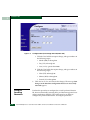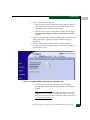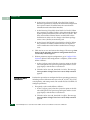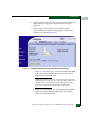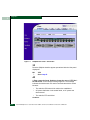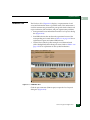
1
McDATA® Sphereon 3032 and 3232
Fabric Switches
Installation and Service Manual
P/N 620-000155-210
(REV A)
Record of Revisions and Updates
Revision
Date
Description
620-000155-000
10/2002
First release of the manual
620-000155-100
2/2003
Revision to support EOS 5.1 and
EFCM 7.0
620-000155-200
9/2003
Revision to support EOS 5.1/5.2 and
EFCM 7.1/7.2
620-000155-210
1/2005
Revision to support EOS 7.0 and
EFCM 8.5.
Copyright © 2003-2005 McDATA Corporation. All rights reserved.
Printed January 2005
Fourth Edition
No part of this publication may be reproduced or distributed in any form or by any means, or stored in a
database or retrieval system, without the prior written consent of McDATA Corporation.
The information contained in this document is subject to change without notice. McDATA Corporation
assumes no responsibility for any errors that may appear.
All computer software programs, including but not limited to microcode, described in this document are
furnished under a license, and may be used or copied only in accordance with the terms of such license.
McDATA either owns or has the right to license the computer software programs described in this document.
McDATA Corporation retains all rights, title and interest in the computer software programs.
McDATA Corporation makes no warranties, expressed or implied, by operation of law or otherwise, relating
to this document, the products or the computer software programs described herein. McDATA
CORPORATION DISCLAIMS ALL IMPLIED WARRANTIES OF MERCHANTIBILITY AND FITNESS FOR
A PARTICULAR PURPOSE. In no event shall McDATA Corporation be liable for (a) incidental, indirect,
special, or consequential damages or (b) any damages whatsoever resulting from the loss of use, data or
profits, arising out of this document, even if advised of the possibility of such damages.
ii
McDATA® Sphereon 3032 and 3232 Installation and Service Manual
(Templates v2.1)
Contents
Chapter 1
General Information
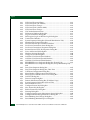
Switch Description............................................................................1-2
Switch Management..................................................................1-2
Error-Detection, Reporting, and Serviceability Features .....1-5
Zoning Feature ...........................................................................1-7
Multiswitch Fabrics ...................................................................1-8
Switch Specifications ......................................................................1-10
Management Server ................................................................1-12
Ethernet Hub (Optional).........................................................1-13
SANpilot Interface...................................................................1-13
Maintenance Approach..................................................................1-14
Remote Workstation Configurations ...........................................1-15
Minimum Remote Console Hardware Specifications ........1-18
Field-Replaceable Units .................................................................1-18
SFP Transceivers ......................................................................1-19
Cooling Fans.............................................................................1-20
Power Supplies ........................................................................1-20
Connectors and Indicators.............................................................1-21
Initial Machine Load Button ..................................................1-21
Ethernet LAN Connector........................................................1-21
Power and System Error LEDs ..............................................1-22
FRU Status LEDs......................................................................1-22
Maintenance Port.....................................................................1-22
Software Diagnostic Features........................................................1-23
SAN Management Application .............................................1-23
Element Manager Description .....................................................1-24
Using the Element Manager..........................................................1-27
Using Dialog Boxes ................................................................1-27
Keyboard Navigation..............................................................1-28
Hardware View ........................................................................1-28
McDATA® Sphereon 3032 and 3232 Fabric Switches Installation and Service Manual
1
Contents
Window Layout and Function...............................................1-28
Closing the Element Manager ...............................................1-44
SANpilot Diagnostics..............................................................1-44
SNMP Trap Message Support................................................1-45
E-Mail and Call-Home Support ............................................1-46
Tools and Test Equipment .............................................................1-46
Tools Supplied with the Switch .............................................1-46
Tools Supplied by Service Personnel ....................................1-48
Chapter 2
Installation Tasks
Factory Defaults.........................................................................2-1
Installation Options ..........................................................................2-4
Summary of Installation Tasks........................................................2-5
Task 1: Verify Installation Requirements .......................................2-7
Task 2: Unpack, Inspect, and Install the Ethernet Hub (Optional).
2-8
Unpack and Inspect the Ethernet Hub ...................................2-8
Desktop Installation ..................................................................2-8
Rack-Mount Installation .........................................................2-10
Task 3: Unpack, Inspect, and Install the Switch .........................2-12
Unpack and Inspect the Switch .............................................2-13
.Desktop Installation ...............................................................2-13
Rack-Mount Installation .........................................................2-14
Task 4: Configure Network Information .....................................2-14
Task 5: LAN-Connect the Switch..................................................2-21
Task 6: Unpack, Inspect, and Install the Management Server..2-22
Task 7: Configure Management Server Password and Network
Addresses.........................................................................................2-25
Configure Password................................................................2-26
Configure Private LAN Addresses .......................................2-27
Configure Public LAN Addresses (Optional) .....................2-28
Task 8: Configure Management Server Information .................2-30
Access the Management Server Desktop .............................2-30
Configure Management Server Names ................................2-32
Configure Gateway and DNS Server Addresses ................2-35
Task 9: Configure Windows 2000 Users ......................................2-38
Change Default Administrator Password ...........................2-39
Add a New User ......................................................................2-41
Change User Properties ..........................................................2-43
Task 10: Set Management Server Date and Time .......................2-44
Task 11: Configure the Call-Home Feature (Optional)..............2-46
Task 12: Assign User Names and Passwords .............................2-47
2
McDATA® Sphereon 3032 and 3232 Fabric Switches Installation and Service Manual
Contents
Task 13: Configure the Switch to the Management Application.....
2-51
Task 14: Record or Verify Management Server Restore
Information ..................................................................................... 2-53
Task 15: Verify Switch-to-Management Server Communication ....
2-55
Task 16: Configure PFE Key (Optional) ...................................... 2-56
Task 17: Configure Management Server (Optional).................. 2-59
Configure OSMS ..................................................................... 2-59
Installation ............................................................................... 2-59
Configure FMS ........................................................................ 2-60
SANtegrity™Binding Features ............................................. 2-62
Fabric Binding ......................................................................... 2-62
Switch Binding ........................................................................ 2-63
Flexport............................................................................................ 2-68
Open Trunking................................................................................ 2-69
Open Trunking Log ................................................................ 2-73
Task 18: Set Switch Date and Time .............................................. 2-74
Set Date and Time Manually ................................................. 2-74
Periodically Synchronize Date and Time ............................ 2-75
Task 19: Configure the Sphereon 3032/3232 Element Manager
Applications .................................................................................... 2-76
Configure Switch Identification............................................ 2-76
Task 20: Configure Switch Operating Parameters..................... 2-78
Switch Parameters................................................................... 2-79
Task 21: Configure Fabric Operating Parameters...................... 2-81
Fabric Parameters.................................................................... 2-82
Configure Ports (Open Systems Mode) ............................... 2-84
Configure Ports (FICON Mode)............................................ 2-86
Configure Port Addresses (FICON Mode).......................... 2-88
Configure SNMP Trap Message Recipients ........................ 2-91
Configure and Enable E-mail Notification.......................... 2-92
Configure and Enable Ethernet Events................................ 2-93
Configure and Enable Call-Home Event Notification....... 2-94
Configure Threshold Alerts................................................... 2-95
Procedures................................................................................ 2-96
Task 22: Configure Open Trunking............................................ 2-102
Task 23: Test Remote Notification (Optional)........................... 2-102
Task 24: Back Up Configuration Data ....................................... 2-103
Task 25: Configure the Switch from the SANpilot Interface
(Optional) ...................................................................................... 2-106
Configure Switch Ports ........................................................ 2-109
Configure Switch Identification.......................................... 2-110
McDATA® Sphereon 3032 and 3232 Fabric Switches Installation and Service Manual
3
Contents
Configure Date and Time ..................................................... 2-111
Configure Operating Parameters ........................................ 2-112
Configure Fabric Parameters ............................................... 2-114
Configure Network Information ......................................... 2-117
Configure SNMP ................................................................... 2-119
Enable or Disable the CLI.....................................................2-121
Enable or Disable Host Control...........................................2-122
Configure User Rights ..........................................................2-123
Configure Port Binding ........................................................2-124
Configure Switch Binding ....................................................2-125
Configure Fabric Binding .....................................................2-127
Enable or Disable Enterprise Fabric Mode ........................2-128
Configure OpenTrunking .....................................................2-129
Install PFE Keys (Optional)..................................................2-132
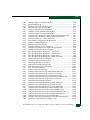
Task 26: Cable Fibre Channel Ports ............................................2-134
Task 27: Connect Switch to a Fabric Director (Optional) ........2-135
Task 28: Register with the McDATA File Center ......................2-137
Chapter 3
Diagnostics
Maintenance Analysis Procedures .................................................3-1
Factory Defaults.........................................................................3-1
Quick Start ..................................................................................3-2
MAP 0000: Start MAP ......................................................................3-6
MAP 0100: Power Distribution Analysis ....................................3-28
MAP 0200: POST, Reset, or IPL Failure Analysis.......................3-35
MAP 0300: Console Application Problem Determination........3-36
MAP 0400: Loss of Console Communication .............................3-46
MAP 0500: Fan and CTP Card Failure Analysis ........................3-67
MAP 0600: Port Failure and Link Incident Analysis .................3-72
MAP 0700: Fabric, ISL, and Segmented Port Problem
Determination .................................................................................3-92
MAP 0800: Server Hardware Problem Determination............3-108
Chapter 4
Repair Information
Factory Defaults.........................................................................4-2
Procedural Notes ..............................................................................4-2
Using Log Information.....................................................................4-3
EFC Audit Log ...........................................................................4-4
EFC Event Log ...........................................................................4-4
EFC Session Log.........................................................................4-6
EFC Product Status Log............................................................4-6
4
McDATA® Sphereon 3032 and 3232 Fabric Switches Installation and Service Manual
Contents
EFC Fabric Log .......................................................................... 4-7
EFC Product Manager Audit Log........................................... 4-7
Product Manager Event Log ................................................... 4-7
Product Manager Hardware Log............................................ 4-9
Product Manager Link Incident Log .................................... 4-10
Product Manager Threshold Alert Log................................ 4-12
SANpilot Logs ......................................................................... 4-14
Using Views .................................................................................... 4-15
Port List View .......................................................................... 4-16
FRU List View ................................................................................. 4-18
Node List View ........................................................................ 4-19
Performance View................................................................... 4-20
Zone Set View .......................................................................... 4-20
Performing Port Diagnostics ........................................................ 4-22
Port LEDs ................................................................................. 4-22
Hardware View ....................................................................... 4-23
Performance View................................................................... 4-27
Perform Loopback Tests......................................................... 4-29
Perform Channel Wrap Test .................................................. 4-33
Swapping Ports............................................................................... 4-34
Collecting Maintenance Data ....................................................... 4-36
SANpilot Interface .................................................................. 4-36
EFC Server................................................................................ 4-39
Clean Fiber-Optic Components.................................................... 4-40
Power-On Procedure ..................................................................... 4-41
Power-Off Procedure ..................................................................... 4-42
Reset or IPL the Switch.................................................................. 4-43
Reset the Switch ...................................................................... 4-43
IPL the Switch.......................................................................... 4-44
Set the Switch Online or Offline................................................... 4-45
Set Online State ....................................................................... 4-45
Set Offline State ....................................................................... 4-46
Block and Unblock Ports ............................................................... 4-46
Block a Port .............................................................................. 4-46
Unblock a Port ......................................................................... 4-47
Manage Firmware Versions .......................................................... 4-48
Determine a Switch Firmware Version ................................ 4-48
Add a Firmware Version........................................................ 4-49
Modify a Firmware Version Description ............................. 4-52
Delete a Firmware Version..................................................... 4-53
Download a Firmware Version to a Switch......................... 4-53
Manage Configuration Data ......................................................... 4-56
Back Up the Configuration .................................................... 4-57
McDATA® Sphereon 3032 and 3232 Fabric Switches Installation and Service Manual
5
Contents
Restore the Configuration ......................................................4-58
Reset Configuration Data .......................................................4-59
Install or Upgrade Software ..........................................................4-59
Chapter 5
FRU Removal and Replacement
Remove and Replace FRUs .............................................................5-1
FRUs ............................................................................................5-1
Procedural Notes .......................................................................5-2
RRP: SFP Transceiver .......................................................................5-2
Removal ......................................................................................5-2
Replacement ...............................................................................5-3
RRP: Power Supply ..........................................................................5-4
Removal ......................................................................................5-4
Replacement ...............................................................................5-5
RRP: Cooling Fan FRU.....................................................................5-6
Removal ......................................................................................5-6
Replacement ...............................................................................5-7
RRP: CTP Card - Switch Replacement...........................................5-8
Replacing a Failed Switch ........................................................5-8
Chapter 6
Illustrated Parts Breakdown
Front-Accessible FRUs .....................................................................6-1
Rear-Accessible FRUs.......................................................................6-2
Power Plugs and Receptacles..........................................................6-4
Appendix A
Messages
Sphereon 3032/3232 Element Manager Messages .....................A-1
A..................................................................................................A-1
C ..................................................................................................A-3
D................................................................................................A-12
E.................................................................................................A-14
F.................................................................................................A-15
I..................................................................................................A-17
L.................................................................................................A-22
M ...............................................................................................A-23
N................................................................................................A-23
O................................................................................................A-24
P.................................................................................................A-25
R ................................................................................................A-27
S.................................................................................................A-27
T.................................................................................................A-29
6
McDATA® Sphereon 3032 and 3232 Fabric Switches Installation and Service Manual
Contents
U ............................................................................................... A-33
Y................................................................................................ A-33
Appendix B
Event Code Tables
System Events (000 through 199) ..................................................B-3
Power Supply Events (200 through 299) ....................................B-20
Fan Module Events (300 through 399) .......................................B-25
CTP Card Events (400 through 499) ...........................................B-31
Port Module Events (500 through 599) ......................................B-45
MPC Module Events (600 through 699) .....................................B-67
CMM Module Events (800 through 899) ...................................B-73
Appendix C
Restore EFC Server
Requirements .................................................................................. C-1
Restore EFC Server Procedure ...................................................... C-2
Appendix D
Consolidating EFC Servers in a Multiswitch Fabric
Overview .......................................................................................... D-2
Required EFC Manager Version............................................. D-5
IP Address Assignment........................................................... D-5
Consolidating EFC Servers ............................................................ D-7
Common Steps for All Configurations ................................. D-7
Private LAN Connection....................................................... D-12
Private and Public LAN Connection................................... D-15
Reconfiguring a Client PC After an EFC Server Failure.......... D-17
McDATA® Sphereon 3032 and 3232 Fabric Switches Installation and Service Manual
7
Contents
8
McDATA® Sphereon 3032 and 3232 Fabric Switches Installation and Service Manual
(Templates v2.1)
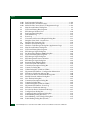
Figures
1-1
1-2
1-3
1-4
1-5
1-6
1-7
1-8
1-9
1-10
2-1
2-2
2-3
2-4
2-5
2-6
2-7
2-8
2-9
2-10
2-11
2-12
2-13
2-14
2-15
2-16
2-17
2-18
2-19
2-20
Out-of-Band Product Management ........................................................... 1-4
Management Server ................................................................................... 1-12
24-Port Ethernet Hub ................................................................................. 1-13
Typical Network Configuration (One Ethernet Connection) ............. 1-16
Typical Network Configuration (Two Ethernet Connections) ........... 1-17
Sphereon 3032/3232 Switch (Front View) ............................................. 1-19
Sphereon 3032/3232 Switch (Rear View) ............................................... 1-19
Multimode and Singlemode Wrap Plugs .............................................. 1-47
Fiber-Optic Protective Plug ....................................................................... 1-47
Null Modem Cable ..................................................................................... 1-48
Stacked Ethernet Hubs ................................................................................ 2-9
Patch Cable and MDI Selector Configuration ........................................ 2-10
Mounting Bracket Installation (Ethernet Hub) ...................................... 2-11
Rack Installation (Ethernet Hub) .............................................................. 2-11
Connection Description Dialog Box ........................................................ 2-17
Connect To Dialog Box .............................................................................. 2-17
COMn (COM1 or COM2) Dialog Box ..................................................... 2-18
Hyperterminal Window ............................................................................ 2-19
Disconnect Confirmation Message Box ................................................... 2-20
Save Session Device Confirmation Box ................................................... 2-20
1U Management Server Connections ...................................................... 2-23
LCD Panel During Boot Sequence ........................................................... 2-24
LCD Panel (Password Entry) .................................................................... 2-26
LCD Panel (New Password) ..................................................................... 2-26
LCD Panel (Save Change) ......................................................................... 2-26
LCD Panel (Password Entry) .................................................................... 2-27
LCD Panel (LAN 2 IP Address) ................................................................ 2-27
LCD Panel (Save Change) ......................................................................... 2-27
LCD Panel (LAN 2 Subnet Mask) ............................................................ 2-28
LCD Panel (Save Change) ......................................................................... 2-28
McDATA® Sphereon 3032 and 3232 Fabric Switches Installation and Service Manual
1
Figures
2-21
2-22
2-23
2-24
2-25
2-26
2-27
2-28
2-29
2-30
2-31
2-32
2-33
2-34
2-35
2-36
2-37
2-38
2-39
2-40
2-41
2-42
2-43
2-44
2-45
2-46
2-47
2-48
2-49
2-50
2-51
2-52
2-53
2-54
2-55
2-56
2-57
2-58
2-59
2-60
2-61
2-62
2
LCD Panel (Password Entry) .................................................................... 2-28
LCD Panel (LAN 1 IP Address) ................................................................ 2-29
LCD Panel (Save Change) .......................................................................... 2-29
LCD Panel (LAN 1 Subnet Mask) ............................................................. 2-29
LCD Panel (Save Change) .......................................................................... 2-29
VNC Authentication Screen ...................................................................... 2-30
Welcome to Windows Dialog Box ............................................................ 2-31
Log On to Windows Dialog Box ............................................................... 2-31
SANavigator Log In or EFCM 8 Log In Dialog Box ............................... 2-32
Control Panel Window ............................................................................... 2-33
System Properties Dialog Box (Network Identification Tab) ............... 2-34
Identification Changes Dialog Box ........................................................... 2-34
Network and Dial-up Connections Window .......................................... 2-35
Local Area Connection 2 Status Dialog Box ............................................ 2-36
Local Area Connection 2 Properties Dialog Box .................................... 2-36
Internet Protocol (TCP/IP) Properties Dialog Box ................................. 2-37
Users and Passwords Dialog Box ............................................................. 2-39
Windows Security Dialog Box .................................................................. 2-40
Change Password Dialog Box ................................................................... 2-40
Add New User Wizard (First Window) .................................................. 2-41
Add New User Wizard (Second Window) .............................................. 2-42
Add New User Wizard (Third Window) ................................................ 2-42
EFCSERVER\srvacc Properties Dialog Box (General Tab) .................. 2-43
EFCSERVER\srvacc Properties Dialog Box (Group Membership Tab) .....
2-44
Date/Time Properties Dialog Box ............................................................ 2-45
Date/Time Properties Dialog Box, Time Zone ....................................... 2-45
Call Home Configuration Dialog Box ...................................................... 2-47
Main Window (SANavigator 4.0 or EFCM 8.0) ...................................... 2-48
SANavigator or EFCM 8 Server Users Dialog Box ................................ 2-49
Add User Dialog Box .................................................................................. 2-49
Discover Setup Dialog Box ........................................................................ 2-51
Domain Information Dialog Box (IP Address Page) .............................. 2-52
System Properties Dialog Box (General Tab) .......................................... 2-54
Switch Hardware View .............................................................................. 2-56
Configure Feature Key Dialog Box ........................................................... 2-57
New Feature Key Dialog Box .................................................................... 2-57
Enable Feature Key Dialog Box ................................................................. 2-58
Warning Dialog Box ................................................................................... 2-58
Configure Open Systems Management Server Dialog Box .................. 2-60
Configure FICON Management Server Dialog Box ............................... 2-61
Switch Binding State Change Dialog Box ................................................ 2-64
Switch Binding Membership List Dialog Box ......................................... 2-66
McDATA® Sphereon 3032 and 3232 Fabric Switches Installation and Service Manual
Figures
2-63
2-64
2-65
2-66
2-67
2-68
2-69
2-70
2-71
2-72
2-73
2-74
2-75
2-76
2-77
2-78
2-79
2-80
2-81
2-82
2-83
2-84
2-85
2-86
2-87
2-88
2-89
2-90
2-91
2-92
2-93
2-94
2-95
2-96
2-97
2-98
2-99
2-100
2-101
2-102
2-103
2-104
2-105
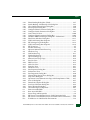
Configure Open Trunking Dialog Box .................................................... 2-70
Open Trunking Log .................................................................................... 2-73
Configure Date and Time Dialog Box ..................................................... 2-74
Date and Time Synced Dialog Box ........................................................... 2-75
Configure Identification Dialog Box ........................................................ 2-77
Configure Switch Parameters Dialog Box ............................................... 2-78
Configure Fabric Parameters Dialog Box ................................................ 2-82
Configure Ports Dialog Box (Open Systems Management Style) ....... 2-85
Configure Ports Dialog Box (FICON Management Style) .................... 2-87
Configure Addresses - Active Dialog Box .............................................. 2-89
Save Address Configuration As Dialog Box .......................................... 2-90
Configure SNMP Dialog Box .................................................................... 2-91
Configure E-Mail Dialog Box .................................................................... 2-92
Configure Ethernet Events Dialog Box ................................................... 2-94
Configure Call Home Event Notification Dialog Box ........................... 2-94
Configure Threshold Alerts Dialog Box .................................................. 2-96
New Threshold Alerts Dialog Box – First Screen .................................. 2-97
New Threshold Alerts Dialog Box - Second Screen .............................. 2-98
New Threshold Alerts Dialog Box - Third Screen ................................. 2-99
New Threshold Alerts Dialog Box - Summary Screen ........................ 2-100
Test Remote Notification Dialog Box .................................................... 2-102
Call-Home Information Dialog Box ....................................................... 2-103
Shut Down Windows Dialog Box .......................................................... 2-105
TightVNC Network Error Message ....................................................... 2-105
Enter Network Password Dialog Box .................................................... 2-108
View Panel (Switch Page) ........................................................................ 2-108
Configure Panel (Ports Page) .................................................................. 2-109
Configure Panel (Switch Page with Identification Tab) ..................... 2-111
Configure Panel (Switch Page with Date/Time Tab) ......................... 2-112
Configure Panel (Switch Page with Parameters Tab) ......................... 2-113
Configure Panel (Director Page with Fabric Parameters Tab) ........... 2-115
Configure Panel (Director Page with Network Tab) ........................... 2-118
Network Information Message Box ....................................................... 2-118
Configure Panel (Management Page with SNMP Tab) ...................... 2-120
Configure Panel (Management Page with CLI Tab) ........................... 2-121
Configure Panel (Management Page with OSMS Tab) ....................... 2-122
Configure Panel (Security Page with User Rights Tab) ...................... 2-123
Configure Panel (Security Page with Port Binding Tab) .................... 2-124
Configure Panel (Security Page with Switch Binding Tab) ................ 2-125
Configure Panel (Security Page with Fabric Binding Tab) ................. 2-127
Configure Panel (Security Page with EFM Tab) .................................. 2-129
Configure Panel (Performance Page with OpenTrunking Tab) ........ 2-130
Operations Panel (Feature Installation Tab) ......................................... 2-133
McDATA® Sphereon 3032 and 3232 Fabric Switches Installation and Service Manual
3
Figures
2-106
2-107
2-108
3-1
3-2
3-3
3-4
3-5
3-6
3-7
3-8
3-9
3-10
3-11
3-12
3-13
3-14
3-15
3-16
3-17
3-18
3-19
3-20
3-21
3-22
3-23
3-24
3-25
3-26
3-27
3-28
3-29
3-30
3-31
3-32
3-33
3-34
3-35
3-36
3-37
3-38
3-39
3-40
4
Port Properties Dialog Box ...................................................................... 2-136
McDATA File Center Home Page .......................................................... 2-137
McDATA File Center (New User Registration Page) .......................... 2-139
Shut Down Windows Dialog Box ............................................................... 3-8
LCD Panel During Boot Sequence .............................................................. 3-9
EFC Manager Product View ...................................................................... 3-10
Port Properties Dialog Box ........................................................................ 3-14
Link Incident Log ........................................................................................ 3-16
Event Log ..................................................................................................... 3-17
Username and Password Required Dialog Box ..................................... 3-21
SANpilot View Panel - Switch View ........................................................ 3-22
SANpilot Port Properties Tab .................................................................... 3-24
Windows Security Dialog Box .................................................................. 3-37
Windows Task Manager Dialog Box (Applications Page) .................... 3-37
Shut Down Windows Dialog Box ............................................................. 3-38
LCD Panel During Boot Sequence ............................................................ 3-39
EFC Manager Login Dialog Box ............................................................... 3-40
Dr. Watson for Windows 2000 Dialog Box .............................................. 3-43
LCD Panel During Boot Sequence ............................................................ 3-44
EFC Manager Login Dialog Box ............................................................... 3-45
EFC Management Services Window ........................................................ 3-47
EFC Manager Login Dialog Box ............................................................... 3-49
Interconnecting Multiple Hubs ................................................................. 3-52
LCD Panel (LAN 2 IP Address) ................................................................ 3-56
Connection Description Dialog Box ......................................................... 3-57
Connect To Dialog Box ............................................................................... 3-58
COMn Dialog Box (COM1 or COM2) ...................................................... 3-58
Hyperterminal Window - Configuration Information .......................... 3-59
Disconnect Verification Message Box ...................................................... 3-60
Save Session Device Verification Message Box ...................................... 3-60
Modify Network Address Dialog Box ..................................................... 3-60
New Product Dialog Box ........................................................................... 3-61
Connection Description Dialog Box ......................................................... 3-64
Connect-To Dialog Box .............................................................................. 3-65
COMn Dialog Box (COM1 or COM2) ...................................................... 3-65
Hyperterminal Window - Event Log ....................................................... 3-66
Disconnect Verification Message .............................................................. 3-67
Save Session Device Verification Message .............................................. 3-67
Configure Ports Dialog Box ....................................................................... 3-81
Configure Fabric Parameters Dialog Box ................................................ 3-82
Fabric Binding Dialog Box (First) ............................................................. 3-85
Switch Binding - State Change Dialog Box ............................................. 3-85
Fabric Binding Dialog Box (Second) ......................................................... 3-87
McDATA® Sphereon 3032 and 3232 Fabric Switches Installation and Service Manual
Figures
3-41
3-42
3-43
3-44
3-45
3-46
3-47
3-48
3-49
3-50
3-51
3-52
3-53
4-1
4-2
4-3
4-4
4-5
4-6
4-7
4-8
4-9
4-10
4-11
4-12
4-13
4-14
4-15
4-16
4-17
4-18
4-19
4-20
4-21
4-22
4-23
4-24
6-1
6-2
6-3
D-1
D-2
D-3
Fabric Binding Dialog Box (Third) ........................................................... 3-87
Switch Binding - Membership List Dialog Box ...................................... 3-88
Clear Link Incident Alert(s) Dialog Box .................................................. 3-90
Port Properties Dialog Box ........................................................................ 3-94
Configure Fabric Parameters Dialog Box ................................................ 3-98
Configure Switch Parameters Dialog Box ............................................... 3-99
Active Zone Set View ............................................................................... 3-100
Configure Fabric Parameters Dialog Box .............................................. 3-104
Windows 2000 Task Manager Dialog Box - Performance .................. 3-110
Shut Down Windows Dialog Box .......................................................... 3-111
LCD Panel During Boot Sequence ......................................................... 3-111
EFC Manager Login Dialog Box ............................................................. 3-112
LCD Panel During Boot Sequence ......................................................... 3-114
EFC Event Log .............................................................................................. 4-5
Product Status Log ...................................................................................... 4-6
Sphereon 3032 and 3232 Event Log .......................................................... 4-8
Hardware Log .............................................................................................. 4-9
Link Incident Log ...................................................................................... 4-11
Threshold Alert Log ................................................................................... 4-12
Open Trunking Log .................................................................................... 4-13
Monitor Panel (Logs Page) ........................................................................ 4-14
Port List View ............................................................................................. 4-16
FRU List View ............................................................................................. 4-18
Node List View .......................................................................................... 4-19
Zone Sets View ........................................................................................... 4-21
Hardware View ......................................................................................... 4-23
Port Properties Dialog Box ........................................................................ 4-24
Performance View ..................................................................................... 4-27
Port Diagnostics Dialog Box .................................................................... 4-30
Channel Wrap On for Port n Dialog Box ............................................... 4-34
Swap Ports Dialog Box ............................................................................. 4-35
Operations Panel (Maintenance Page with Dump Retrieval Tab) ...... 4-37
Save As Dialog Box .................................................................................... 4-37
Download Complete Dialog Box ............................................................. 4-38
Save Data Collection Dialog Box .............................................................. 4-39
Data Collection Dialog Box ....................................................................... 4-40
Clean Fiber-Optic Components ................................................................ 4-41
Front-Accessible FRUs ................................................................................ 6-2
Rear-Accessible FRUs ................................................................................. 6-3
Power Plugs and Receptacles .................................................................... 6-4
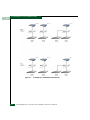
EFC Server Consolidation (Private LAN Connection Only) ................ D-3
EFC Server Consolidation (Private and Public LAN Connections) .... D-4
IP Addresses in a Multiswitch Environment ......................................... D-6
McDATA® Sphereon 3032 and 3232 Fabric Switches Installation and Service Manual
5
Figures
6
McDATA® Sphereon 3032 and 3232 Fabric Switches Installation and Service Manual
(Templates v2.1)
Tables
1-1
1-2
2-1
2-2
2-3
2-4
2-5
3-1
3-2
3-3
3-4
3-5
3-6
4-1
5-1
6-1
6-2
6-3
Status Symbols ............................................................................................ 1-27
Operating Bar and Switch Status ............................................................. 1-43
Factory-Set Defaults (Switch) ..................................................................... 2-1
Factory-Set Defaults (management server) .............................................. 2-2
................................................ Defaults for Reset Configuration (Switch) 2-2
Installation Task Summary ......................................................................... 2-5
Switch Operational States and Symbols .................................................. 2-55
Factory-Set Defaults ..................................................................................... 3-1
MAP Summary ............................................................................................. 3-2
Event Codes versus Maintenance Action ................................................. 3-3
Port Operational States and Actions (SANpilot) ................................... 3-76
Port Operational and LED States (EFC Server) ...................................... 3-77
Bytes 8 through 11 Failure Reasons and Actions ................................. 3-106
Factory-Set Defaults ..................................................................................... 4-2
ESD Requirements ........................................................................................ 5-1
Front-Accessible FRU Parts List ................................................................. 6-2
Rear-Accessible FRU Parts List .................................................................. 6-3
Power Cord and Receptacle List ................................................................ 6-5
McDATA® Sphereon 3032 and 3232 Fabric Switches Installation and Service Manual
1
Tables
2
McDATA® Sphereon 3032 and 3232 Fabric Switches Installation and Service Manual
Preface
This publication is part of a documentation suite that supports the
McDATA® Sphereon 3032™ and Shereon 3232™ Switch.
Who Should Use this
Manual
How to Use this
Manual
This publication is intended for trained service representatives
experienced with storage area network (SAN) and Fibre Channel
technology.
This publication is organized as follows:
Chapter 1, General Information. This chapter describes the
maintenance approach to switch problem analysis and repair. The
chapter provides a description of the switches and attached
Enterprise Fabric Connectivity (EFC) Server, specifications,
remote workstation configurations and minimum specifications,
field-replaceable units (FRUs), switches and indicators, software
diagnostic features, and tools and test equipment.
Chapter 2, Installation Tasks. This chapter provides instructions to
install, configure, and verify operation of one or more switches
and the associated EFC Server. The switch can be installed on a
desktop, or mounted in an FC-512 Fabricenter™ equipment
cabinet or in any standard equipment rack.
Chapter 3, Diagnostics. This chapter describes maintenance
analysis procedures (MAPs) that assist you in isolating a switch
problem to an individual FRU.
Chapter 4, Repair Information. This chapter describes
supplementary diagnostic and repair procedures for a failed
switch. The chapter includes procedures to display and use log
information, perform port diagnostics, save configuration data,
McDATA® Sphereon 3032 and 3232 Fabric Switches Installation and Service Manual
3
Preface
collect maintenance data, power-on, power-off, and IPL the
switch, set the switch online or offline, block ports, manage
firmware, clean fiber optics, and install or upgrade software.
Chapter 5, FRU Removal and Replacement. This chapter describes
procedures to remove and replace the switch FRUs, and the entire
switch when required.
Chapter 6, Illustrated Parts Breakdown. This chapter illustrates,
describes, and shows the location of all switch FRUs. In addition,
FRUs are cross-referenced to corresponding part numbers.
Appendix A, Messages. This appendix lists user and error
messages that appear in the EFC Manager and Sphereon Product
Manager applications at the EFC Server. A description of each
message and recommended action in response to the message are
also provided.
Appendix B, Event Code Tables. This appendix provides an
explanation of event codes that appear at the Product Manager
application. The event severity and a recommended action in
response to each event are also provided.
Appendix C, Restore EFC Server. This appendix provides the
instructions to restore all required switch applications to the EFC
Server in case of a hard drive failure.
Appendix D, Consolidating EFC Servers in a Multiswitch Fabric.
This appendix provides the instructions for consolidating
operation and network addressing of multiple EFC Servers.
The Glossary defines terms, abbreviations, and acronyms used in
the manual. An Index is also provided.
Related Publications
4
Other publications that provide additional information about the
switch include:
•
McDATA Products in a SAN Environment Planning Manual
(620-000124).
•
McDATA Sphereon 3032 and 3232 Fabric Switch Product Manager
User Manual (620-000152).
•
Enterprise Fabric Connectivity Manager User Manual (620-005001).
•
FC-512 Fabricenter Equipment Cabinet Installation and Service
Manual (620-000100).
•
McDATA SANpilot User Manual (620-000160).
McDATA® Sphereon 3032 and 3232 Fabric Switches Installation and Service Manual
Preface
Conventions
•
McDATA OPENconnectors SNMP Support Manual (620-000131).
•
McDATA OPENconnectors Command Line Interface User Manual
(620-000134).
The following notational conventions are used in the document:
A danger contains information essential to avoid a hazard that can cause
death.
A warning contains information essential to avoid a hazard that can cause
severe personal injury or substantial property damage.
A caution contains information essential to avoid damage to the
system or equipment. The caution may apply to hardware or
software.
Where to Get Help
For technical support, customers should contact the McDATA
solution center. The solution center provides a single point of contact
for customers seeking assistance, and is staffed 24 hours a day, seven
days a week, including holidays. Contact the solution center at the
phone number, fax number, or e-mail address listed below. Please
have the product serial number (printed on the service label attached
to the bottom of the switch) available.
The serial number is printed on the service label attached to the
bottom of the switches, and on a label attached to the rear panel of the
switches.
Phone: (800) 752-4572 or (720) 558-3910
Fax: (720) 558-3851
E-mail: [email protected]
For technical support for the SANavigator® application, contact the
SANavigator Solution Center at the phone number or e-mail address
listed below.
Phone: (877) 948-4448
E-mail: [email protected]
Forwarding
Publication
Comments
We sincerely appreciate comments about this publication. Please send
comments to McDATA’s solution center by telephone, fax, or e-mail.
The numbers and e-mail address are listed above. Identify the
manual and provide page numbers and specific detail. Thank you.
McDATA® Sphereon 3032 and 3232 Fabric Switches Installation and Service Manual
5
Preface
Ordering Printed
Manuals
Trademarks
To order a paper copy of this manual, submit a purchase order as
described in Ordering McDATA Documentation Instructions, which is
found on McDATA’s web site, http://www.mcdata.com. To obtain
documentation CD-ROMs, contact your sales representative.
The following terms, indicated by a registered trademark symbol (®)
or trademark symbol (™) on first use in this publication, are
trademarks of McDATA Corporation or SANavigator, Inc. in the
United States or other countries or both:
Registered Trademarks
Trademarks
McDATA®
Sphereon™
Fabricenter®
OPENconnectors™
OPENready®
SANpilot™
SANavigator®
SANtegrity™
All other trademarked terms, indicated by a registered trademark
symbol (®) or trademark symbol (™) on first use in this publication,
are trademarks of their respective owners in the United States or
other countries or both.
Laser Compliance
Statement
Laser transceivers in the switches are tested and certified in the
United States to conform to Title 21 of the Code of Federal
Regulations (CFR), Subchapter J, Parts 1040.10 and 1040.11 for Class 1
laser products. Elsewhere, the transceivers are tested and certified to
be compliant with International Electrotechnical Commission
IEC825-1 and European Norm EN60825-1 and EN60825-2 regulations
for Class 1 laser products.
Class 1 laser products are not considered hazardous. The transceivers
are designed such that there is never human access to laser radiation
above a Class 1 level during normal operation or prescribed
maintenance conditions.
Federal
Communications
Commission (FCC)
Statement
6
The switches generate, use, and can radiate radio frequency energy,
and if not installed and used in accordance with the instructions
provided, may cause interference to radio communications. The
switches have been tested and found to comply with the limits for
Class A computing devices pursuant to Subpart J of Part 15 of the
FCC Rules, which are designed to provide reasonable protection
against such interference in a commercial environment. Operation of
this equipment in a residential area is likely to cause interference in
which case the user, at his or her own expense, will take whatever
McDATA® Sphereon 3032 and 3232 Fabric Switches Installation and Service Manual
Preface
measures are required to correct the interference. Any modifications
or changes made to the switches without explicit approval from
McDATA, by means of a written endorsement or through published
literature, will invalidate the service contract and void the warranty
agreement with McDATA.
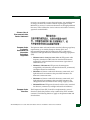
Chinese Class A
Telecommunication
Product Statement
European Union
Conformity
Declarations for
Information
Technology
Equipment
European Union
Directives
The Sphereon 3016 and 3216 Switches meet the following regulatory
requirements as set forth by European Norms (ENs) and
International Electrotechnical Commission (IEC) standards for
commercial and light industrial information technology equipment
(ITE).
•
EN55022 1994+A (1995), A2 (1997) Class A: ITE-generic radio
frequency interference (RFI) emission standard for domestic,
commercial, and light industrial environments (equivalent to
CISPR 22 Class A).
•
EN50082-1 (IEC61000-4x): ITE-generic electromagnetic
compatibility and immunity standard for domestic, commercial,
and light industrial environments.
•
EN61000-3-2: Generic standard for domestic, commercial, and
light industrial environments that proscribes limitations for
harmonic current emissions.
•
EN61000-3-3: Generic standard for domestic, commercial, and
light industrial environments that proscribes limitations for
voltage fluctuation and flicker in low-voltage supply systems.
•
EN60950/IEC 950: ITE-generic electrical and fire safety standard
for domestic, commercial, and light industrial environments.
The European Union (EU) Council has implemented a series of
directives that define product safety standards for all EU member
countries. The following directives apply to the Sphereon 3016 and
3216 Switches:
McDATA® Sphereon 3032 and 3232 Fabric Switches Installation and Service Manual
7
Preface
•
The switch conforms with all protection requirements of EU
directive 89/336/EEC (EMC Directive) in accordance with of the
laws of the member countries relating to electromagnetic
compatibility (EMC), emissions, and immunity.
•
The switch conforms with all protection requirements of EU
directive 73/23/EEC (Low Voltage Directive) in accordance with
of the laws of the member countries relating to electrical safety.
•
The switch conforms with all protection requirements of EU
directive 93/68/EEC (Machinery Directive) in accordance with of
the laws of the member countries relating to safe electrical and
mechanical operation of the equipment.
McDATA does not accept responsibility for any failure to satisfy the
protection requirements of any of these directives resulting from a
non-recommended or non-authorized modification to the switch.
Warnings
The following WARNING statements apply to certain information in
this publication, and describe safety practices that must be observed
while servicing the switch.
DANGER
To prevent electric shock, do not reach into nonvisible areas of a
switch connected to primary facility power.
DANGER
A McDATA-supplied power cord is provided for each switch power
supply. To prevent electric shock when connecting the switch to
primary facility power, use only the supplied power cords, and
ensure the facility power receptacle is the correct type, supplies the
required voltage, and is properly grounded.
Cautions
8
The following CAUTION statements apply to certain information in
this publication, and describe safety practices that must be observed
while servicing the switch.
McDATA® Sphereon 3032 and 3232 Fabric Switches Installation and Service Manual
Preface
CAUTION
Do not press the IML button unless directed by a procedural step or
the next level of support.
CAUTION
Prior to servicing a switch or EFC Server, determine the Ethernet
LAN configuration. Installation of switches and the EFC Server on
a public customer intranet can complicate problem determination
and fault isolation.
CAUTION
Three person lift - the director weighs approximately 115 lbs. Do
not attempt to lift or carry the director with fewer than three
people. Failure to observe this CAUTION may result in injury to
personnel or damage to the director.
CAUTION
The switch’s non-open fiber control (non-OFC) laser transceivers
are designed and certified for use only with fiber-optic cable and
connectors with characteristics specified by McDATA. Use of other
connectors or optical fiber can result in emission of laser power
levels capable of producing injury to the eye if viewed directly. Use
of non-specified connectors or optical fiber can violate the Class 1
laser classification.
General Precautions
When servicing the switch, follow these practices:
•
Always use correct tools.
•
Always use correct replacement parts.
•
Keep all paperwork up to date, complete, and accurate.
McDATA® Sphereon 3032 and 3232 Fabric Switches Installation and Service Manual
9
Preface
10
McDATA® Sphereon 3032 and 3232 Fabric Switches Installation and Service Manual
1
General Information
The McDATA® Sphereon™ 3032and Sphereon™ 3232 Fabric Switches
provide dynamically switched connections between Fibre Channel
servers and devices in a storage area network (SAN) environment.
SANs introduce the concept of server-to-device networking and
multiswitch fabrics, eliminate requirements for dedicated
connections, and enable the enterprise to become data-centric.
A SAN provides speed, high capacity, and flexibility for the
enterprise, and is primarily based upon Fibre Channel architecture.
The Sphereon 3032 and Sphereon 3232 switches implement Fibre
Channel technology that provides a bandwidth of either 1.0625
gigabits per second (Sphereon 3032) or 2.125 gigabits per second
(Sphereon 3232), redundant switched data paths, a scalable number
of active ports, and long transmission distances (up to 20 kilometers).
This chapter describes the switch and switch management tdhrough
the attached Enterprise Fabric Connectivity (EFC) Server. The chapter
specifically discusses:
•
Switch management, error-detection and reporting features,
serviceability features, zoning, multiswitch fabrics, and
specifications.
•
The management server and minimum hardware specifications.
•
Remote workstation configurations and hardware specifications.
•
Maintenance approach.
•
Field-replaceable units (FRUs).
•
Connectors and indicators.
•
Software diagnostic features.
•
Tools and test equipment.
General Information
1-1
General Information
1
Switch Description
The Sphereon 3032/3232 Switches provide Fibre Channel
connectivity through 32 ports. Switch ports operate at either 1.0625
(Sphereon 3032) or 2.125 (Sphereon 3232) gigabits per second (Gbps),
and can be configured as:
•
Fabric ports (F_Ports) to provide direct connectivity for up to 24
switched fabric devices.
•
Expansion ports (E_Ports) to provide interswitch link (ISL)
connectivity to fabric directors and switches.
The switch can be installed on a table or desk top, mounted in an
FC-512 Fabricenter™ equipment cabinet or in any standard
equipment rack.
Multiple switches and the management server communicate on a
local area network (LAN) through one or more 10/100 Base-T
Ethernet hubs. One or more 24-port Ethernet hubs are optional and
can be ordered with the switch. Up to three hubs are daisy-chained as
required to provide additional Ethernet connections as more switches
(or other McDATA managed products) are installed on a customer
network.
The switches provide dynamically switched connections for servers
and devices, supports mainframe and open-systems interconnection
(OSI) computing environments, and provides data transmission and
flow control between device node ports (N_Ports) as dictated by the
Fibre Channel Physical and Signaling Interface (FC-PH 4.3). Through
interswitch links (ISLs), the switch can connect additional switches to
form a Fibre Channel multiswitch fabric.
The switch provides connectivity for devices manufactured by
multiple original equipment manufacturers (OEMs). To determine if
an OEM product can communicate through connections provided by
the switch, or if communication restrictions apply, refer to the
supporting publications for the product or contact your McDATA
marketing representative
Switch
Management
1-2
Out-of-band (non-Fibre Channel) management access to McDATA
products is provided through an Ethernet LAN connection to a
switch front panel. The following out-of-band management access
methods are provided:
McDATA® Sphereon 3032 and 3232 Fabric Switches Installation and Service Manual
General Information
1
•
Optional management server with the SAN Management
Application) and Element Manager applications installed. The
management server is a rack-mount unit that provides a central
point of control for up to 48 switches or managed McDATA
products.
Operators at remote workstations can connect to the management
server through the local SANavigator or EFCM 8 application and
associated Element Manager applications to manage and monitor
switches controlled by the management server. A maximum of
nine concurrent users (including a local user) can log in to the
SANavigator or EFCM 8 application.
•
Management using simple network management protocol
(SNMP). An SNMP agent is implemented through the
SANavigator or EFCM 8 application that allows administrators
on SNMP management workstations to access product
management information using any standard network
management tool. Administrators can assign Internet Protocol
(IP) addresses and corresponding community names for up to six
SNMP workstations functioning as SNMP trap message
recipients.
•
Management through the Internet using the SANpilot interface
installed on the director or switch. This interface supports
configuration, statistics monitoring, and basic operation of the
product, but does not offer all the capabilities of the
corresponding Element Manager application. Administrators
launch the SANpilot interface from a remote PC by entering the
product’s IP address as the Internet uniform resource locator
(URL), then entering a user name and password at a login screen.
The PC browser then becomes a management console.
•
Management through a customer-supplied remote workstation
communicating with the management server through a corporate
intranet.
•
Management through the command line interface (CLI). The CLI
allows you to access many SANavigator or EFCM 8 and Element
Manager applications while entering commands during a telnet
session with the director. The primary purpose of the CLI is to
automate management of a large number of directors using
scripts. The CLI is not an interactive interface; no checking is
done for pre-existing conditions and no prompts display to guide
users through tasks. Refer to the McDATA Command Line Interface
User Manual (620-000124).
Switch Description
1-3
General Information
1
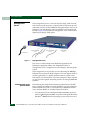
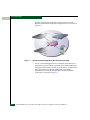
Figure 1-1 illustrates out-of-band product management. In the figure,
the managed product is a Sphereon fabric switch.
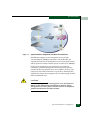
Figure 1-1
Out-of-Band Product Management
The following inband management access methods are provided as
options:
1-4
•
Management through the product’s open-system management
server (OSMS) that communicates with an application client. The
application resides on an open-systems interconnection (OSI)
device attached to a switch port, and communicates using Fibre
Channel common transport (FC-CT) protocol. Product operation,
port connectivity, zoning, and fabric control are managed through
a device-attached console.
•
Management through the product’s Fibre Connection (FICON)
management server (FMS) that communicates with the IBM
System Automation for OS/390 (SA OS/390) operating system.
The operating system resides on an IBM System/390 or zSeries
900 Parallel Enterprise Server attached to a director or switch
port, and communicates through a FICON channel. Control of
connectivity and statistical product monitoring are provided
through a host-attached console.
McDATA® Sphereon 3032 and 3232 Fabric Switches Installation and Service Manual
General Information
1
Error-Detection,
Reporting, and
Serviceability
Features
The switch provides the following error-detection, reporting, and
serviceability features:
•
Light-emitting diodes (LEDs) on switch FRUs and adjacent to
Fibre Channel ports that provide visual indicators of hardware
status or malfunctions.
•
System and threshold alerts, event logs, audit logs, link incident
logs, threshold alert logs, and hardware logs that display switch,
Ethernet link, and Fibre Channel link status at the management
server, customer-supplied server (running the EFCM Lite
application), or a remote workstation.
•
Diagnostic software that performs power-on self-tests (POSTs)
and port diagnostics (internal loopback, external loopback, and
Fibre Channel (FC) wrap tests). The FC wrap test applies only
when the switch is configured to operate in FICON management
mode.
•
Automatic notification of significant system events (to support
personnel or administrators) through e-mail messages or the
call-home feature.
•
An external modem for use by support personnel to dial-in to the
management server for event notification and to perform remote
diagnostics.
•
An RS-232 maintenance port at the rear of the switch (port access
is password protected) that enables installation or service
personnel to change the switch’s internet protocol (IP) address,
subnet mask, and gateway address; or to run diagnostics and
isolate system problems through a local or remote terminal.
•
Redundant FRUs; (small form factor pluggable (SFP)) optical
transceivers, power supplies, and cooling fans that are removed
or replaced without disrupting switch or Fibre Channel link
operation.
•
A modular design that enables quick removal and replacement of
FRUs without tools or equipment.
•
Concurrent port maintenance. SFPs and Fiber-optic cables are
removed and attached to ports without interrupting other ports
or director operation.
Switch Description
1-5
General Information
1
•
Beaconing to assist service personnel in locating a specific port or
switch. When port beaconing is enabled, the amber LED
associated with the port flashes. When unit beaconing is enabled,
the system error indicator on the front panel flashes. Beaconing
does not affect port or switch operation.
•
Data collection through the Element Manager application to help
isolate system problems. The data includes a memory dump file
and audit, hardware, and engineering logs.
•
Status monitoring of redundant FRUs and alternate Fibre
Channel data paths to ensure continued director availability in
case of failover. The SANavigator or EFCM 8 application queries
the status of each backup FRU daily. A backup FRU failure is
indicated by an illuminated amber LED.
•
Simple network management protocol (SNMP) management
using the Fibre Alliance MIB that runs on the management server.
Up to 12 authorized management workstations can be configured
through the SAN Management application to receive unsolicited
SNMP trap messages. The trap messages indicate operational
state changes and failure conditions.
•
SNMP management using the Fibre Channel Fabric Element MIB,
transmission control protocol/internet protocol (TCP/IP) MIB-II
definition (RFC 1213), or a product-specific MIB that runs on each
switch. Up to 12 authorized management workstations can be
configured through the Element Manager application to receive
unsolicited SNMP trap messages. The trap messages indicate
switch operational state changes and failure conditions.
•
SNMP management using the Fibre Alliance MIB that runs on the
management server. Up to 12 authorized management
workstations can be configured through the SAN Management
application to receive unsolicited SNMP trap messages. The trap
messages indicate operational state changes and failure
conditions.
NOTE: For more information about SNMP support provided by McDATA
products, refer to the McDATA OPENconnectors SNMP Support Manual
(620-000131).
1-6
McDATA® Sphereon 3032 and 3232 Fabric Switches Installation and Service Manual
General Information
1
Zoning Feature
The switch supports a name server zoning feature that partitions
attached devices into restricted-access groups called zones. Devices
in the same zone can recognize and communicate with each other
through switched port-to-port connections. Devices in separate zones
cannot communicate with each other.
Zoning is configured by authorizing or restricting access to name
server information associated with device N_Ports that attach to
switch fabric ports (F_Ports). A zone member is specified by the port
number to which a device is attached, or by the eight-byte (16-digit)
worldwide name (WWN) assigned to the host bus adapter (HBA) or
Fibre Channel interface installed in a device. A device can belong to
multiple zones.
CAUTION
If zoning is implemented by port number, a change to the switch
fiber-optic cable configuration disrupts zone operation and may
incorrectly include or exclude a device from a zone.
CAUTION
If zoning is implemented by WWN, removal and replacement of a
device HBA or Fibre Channel interface (thereby changing the
device WWN) disrupts zone operation and may incorrectly include
or exclude a device from a zone.
CAUTION
In Open Fabric mode, only zoning by WWN is supported. Zoning
by port numbers is not.
Zones are grouped into zone sets. A zone set is a group of zones that
is enabled (activated) or disabled across all switches in a multiswitch
fabric. Only one zone set can be enabled at one time.
Switch Description
1-7
General Information
1
Multiswitch Fabrics
A Fibre Channel topology that consists of one or more interconnected
switches or switch elements is called a fabric. Operational software
provides the ability to interconnect switches (through expansion port
(E_Port) connections) to form a multiswitch fabric. The data
transmission path through the fabric is typically determined by fabric
elements and is user-transparent. Subject to zoning restrictions,
devices attached to any interconnected switch can communicate with
each other through the fabric.
Because a multiswitch fabric is typically complex, maintenance
personnel should be aware that several factors can degrade fabric
performance or cause connectivity failures. These factors include:
•
Domain ID assignment - Each switch in a fabric is identified by a
unique domain ID that ranges from 1 through 31. A domain ID of
0 is invalid. If two operational fabrics join, they determine if any
domain ID conflicts exist between the fabrics. If one or more
conflicts exist, the E_Ports that form the interswitch link (ISL)
segment to prevent the fabrics from joining.
•
Zoning - In a multiswitch fabric, zoning is configured on a
fabric-wide basis, and any change to the zoning configuration is
applied to all switches in the fabric. To ensure zoning is consistent
across a fabric, the following rules are enforced when two fabrics
(zoned or unzoned) join:
— Fabric A unzoned and Fabric B unzoned - The fabrics join
successfully, and the resulting fabric remains unzoned.
— Fabric A zoned and Fabric B unzoned - The fabrics join
successfully, and fabric B automatically inherits the zoning
configuration from fabric A.
— Fabric A unzoned and Fabric B zoned - The fabrics join
successfully, and fabric A automatically inherits the zoning
configuration from fabric B.
— Fabric A zoned and Fabric B zoned - The fabrics join
successfully only if the zone configurations can be merged. If
the fabrics cannot join, the connecting ports segment and the
fabrics remain independent.
Zone configurations for two fabrics are compatible (the zones can
join) if the active zone set name is identical for each fabric, and if
zones with the same name have identical elements.
1-8
McDATA® Sphereon 3032 and 3232 Fabric Switches Installation and Service Manual
General Information
1
•
Port segmentation - When an ISL activates, the switches
exchange operating parameters to determine if they are
compatible and can join to form a single fabric. If incompatible,
the connecting E_Port at each switch segments to prevent the
creation of a single fabric. A segmented link transmits only Class
F traffic; the link does not transmit Class 2 or Class 3 traffic. The
following conditions cause ports to segment:
— Incompatible operating parameters - Either the resource
allocation time-out value (R_A_TOV) or error-detect time-out
value (E_D_TOV) is inconsistent between switches. To prevent
port segmentation, the same E_D_TOV and R_A_TOV must
be specified for each switch.
— Duplicate domain IDs - One or more domain ID conflicts are
detected.
— Incompatible zoning configurations - zoning configurations
for the switches are not compatible.
— Build fabric protocol error - A protocol error is detected
during the process of forming the fabric.
— No principal switch - No switch in the fabric is capable of
becoming the principal switch.
NOTE: At least one director or switch in a multiswitch fabric must be set to
either principal or default, making it capable of becoming principal switch. If
all directors and switches are set to never principal, all ISLs will segment
(Reason code 05).
— Unresponsive switch - Each switch in a fabric periodically
verifies operation of all attached switches. An ISL segments if
the attached switch does not respond to a verification request.
— ELP retransmission failure timeout - A switch that exhibits a
hardware failure or connectivity problem cannot transmit or
receive Class F frames. The director did not receive a response
to multiple exchange link protocol (ELP) frames, did not
receive a fabric login (FLOGI) frame, and cannot join an
operational fabric.
Switch Description
1-9
General Information
1
Switch Specifications
This section lists the physical characteristics, storage and shipping
environment, operating environment, and service clearances for the
Sphereon 3032 and Sphereon 3232Switches.
Physical
Characteristics
Dimensions:
Height: 6.5 centimeters (2.6inches)
Width: 44.5 centimeters (17.5 inches)
Depth: 64.1 centimeters (25.2 inches)
Weight: 16.8 kilograms (37 pounds)
Power Requirements:
Input voltage: 100 to 240 VAC
Input Frequency: 47 to 63 Hz
Input Current:
3032 - 1.0 amps at 208 VAC
3232 - 1.3 amp at 208 VAC
Plan for single phase or phase-to-phase connections and
5-ampere dedicated service
Airflow Clearance in Rack:
Sides: None
Top and Bottom: None
Front and Rear: 7.6 centimeters (3.0 inches)
Heat Dissipation:
3032:
682 BTU/Hr (200 watts)
3232:
836 BTU/Hr (245 watts)
Shock and Vibration Tolerance:
60 Gs for 10 milliseconds without nonrecoverable errors
1-10
McDATA® Sphereon 3032 and 3232 Fabric Switches Installation and Service Manual
General Information
1
Acoustical Noise:
70 dB “A” scale
Inclination:
10° maximum
Storage and Shipping
Environment
Protective packaging must be provided to protect the switch under
all shipping methods (domestic and international).
Shipping temperature:
-40° C to 60° C (-40° F to 140° F )
Storage temperature:
1° C to 60° C (34° F to 140° F)
Shipping relative humidity:
5% to 100%
Storage relative humidity:
5% to 80%
Maximum wet-bulb temperature:
29° C (84° F )
Altitude:
40,000 feet (12,192 meters)
Operating
Environment
Temperature:
4° C to 40° C (40° F to 104° F)
Relative humidity:
8% to 80%
Maximum wet-bulb temperature:
27° C (81° F)
Altitude:
3,048 meters (10,000 feet)
Switch Specifications
1-11
General Information
1
Management
Server
Figure 1-2
The management server is a one rack unit (1U) high, LAN-accessed,
rack- mount unit that provides a central point of control for up to 48
connected switches or other McDATA managed products. The server
desktop is accessed through a LAN-attached PC and standard web
browser. Figure 1-2 illustrates the management server with attached
liquid crystal display (LCD) panel.
Management Server
The server is rack mounted in the McDATA-supplied FC-512
Fabricenter equipment cabinet. The SANpilot interface or
management server is required to install, configure, and manage the
switch.
The management server provides two auto-detecting 10/100 Mbps
Ethernet LAN connectors (RJ-45 adapters). The first adapter (LAN 1)
attaches (optionally) to a public customer intranet to allow access
from remote user workstations. The second adapter (LAN 2) attaches
to a private LAN segment containing switches or managed McDATA
products.
Management Server
Specifications
The following list summarizes hardware specifications for the EFC
Server rack-mount platform. Current platforms may ship with more
enhanced hardware, such as a faster processor, additional randomaccess memory (RAM), or a higher-capacity hard drive.
•
1-12
1U rack-mount server running the Intel® Pentium® 4 processor
with an 1,800 megahertz (MHz) or greater clock speed, Microsoft
Windows® 2000 Professional operating system, and power cord.
McDATA® Sphereon 3032 and 3232 Fabric Switches Installation and Service Manual
General Information
1
Ethernet Hub
(Optional)
•
TightVNC™ Viewer Version 1.2.7 client-server software control
package that provides remote network access (through a standard
web browser) to the EFC Server desktop.
•
1,024 megabyte (MB) or greater RAM.
•
40 gigabyte (GB) or greater internal hard drive.
•
1.44 MB 3.5-inch slim-type disk drive and slim-type compact
disk-rewritable (CD-RW) drive.
•
56K internal modem.
•
Two 10/100 Mbps Ethernet adapters with RJ-45 connectors.
The management server and managed switches connect through a
10/100 Base-T Ethernet hub. Figure 1-3 illustrates the 24-port hub.
.
1
4 5
13
8
9
16 17
12
20 21
MID
24
MDIX
1
13
2
3
14
4
Port
5
Status
6
15
7
Green 16 17
8
9 10
- 100
18
Collisio
19
M, Yell
11
n
20
ow 12 100
21
10M
M
22
, Flas
h - Acti 23
24 10M
vity
Baselin
e 10/
100
Hub
Pow
er
3C
SuperS 16411
tack ®
3
Figure 1-3
3com
®
24-Port Ethernet Hub
Hubs can be interconnected to provide additional connections as
more switches (or other McDATA managed products) are installed
on a network. Multiple hubs are daisy-chained by attaching RJ-45
Ethernet patch cables and configuring each hub through a mediumdependent interface (MDI) switch.
SANpilot Interface
The SANpilot interface provides a GUI accessed through the Internet
(locally or remotely) to manage, monitor, and isolate problems for the
Switch. When the interface opens, the default display is the View
panel.
Task selection tabs appear at the top of the panel, a graphical
representation of the switch hardware (front and rear) appears at the
right side of the panel, and menu selections (View, Configure, Monitor,
Switch Specifications
1-13
General Information
1
Operations, and Help) appear at the left side of the panel. The task
selection tabs allow personnel to perform switch-specific tasks, and
are a function of the menu selected as follows:
•
View - At the View panel, the Switch (default), Port Properties, FRU
Properties, Unit Properties, Operating Parameters, and Fabric task
selection tabs appear.
•
Configure - At the Configure panel, the Ports (default), Switch,
Management, Zoning, Security, and Performance task selection tabs
appear.
•
Monitor - At the Monitor panel, the Port List (default), Port Stats,
Log, and Node List task selection tabs appear.
•
Operations - At the Operations panel, the Switch (default), Port,
Maintenance, and Feature Installation task selection tabs appear.
•
Help - The Help selection opens online user documentation that
supports the SANpilot interface.
Maintenance Approach
Whenever possible, the maintenance approach instructs service
personnel to perform fault isolation and repair procedures without
degrading or interrupting operation of the switch, attached devices,
or associated applications. Switch fault isolation begins when one or
more of the following occur:
•
System event information displays at the attached management
server, a remote workstation communicating with the
management server, or the SANpilot interface.
•
LEDs on the switch front panel or FRUs illuminate to indicate a
hardware malfunction.
•
An unsolicited SNMP trap message is received at a management
workstation, indicating an operational state change or failure.
•
Notification of a significant system event is received at a
designated support center through an e-mail message or the
call-home feature.
System events can be related to a:
•
1-14
Switch or management server failure (hardware or software).
McDATA® Sphereon 3032 and 3232 Fabric Switches Installation and Service Manual
General Information
1
•
Ethernet LAN communication failure between the switch and
management server
•
Link failure between a port and attached device.
•
ISL failure or segmentation of an E_port.
Fault isolation and service procedures vary depending on the system
event information provided. Fault isolation and related service
information is provided through maintenance analysis procedures
(MAPs) documented in Chapter 3. MAPs consist of step-by-step
procedures that prompt service personnel for information or describe
a specific action to be performed. MAPs provide information to
interpret system event information, isolate a switch failure to a single
FRU, remove and replace the failed FRU, and verify switch operation.
The fault isolation process normally begins with Map 000.
Ensure the correct switch is selected for service (if the management
server manages multiple switches or other McDATA products) by
enabling unit beaconing at the failed switch. The amber system error
(ERR) LED on the switch front panel blinks when beaconing is
enabled. Instructions to enable beaconing are incorporated into MAP
steps.
Remote Workstation Configurations
Using a standard web browser, the SAN Management application
and Element Manager applications can be downloaded and installed
on remote user workstations that are LAN-attached to the
management server.
Operators at these workstations can manage and monitor switches
controlled by the management server. A maximum of five concurrent
users (including a local user) can log in to the SAN Management
application.
Each remote workstation must have access to the LAN segment on
which the management server is installed. Switch administrative
functions are accessed through the LAN and management server. The
LAN interface can be:
•
Part of the dedicated 10/100 Mbps LAN segment that provides
access to managed switches. This switch-to-management server
LAN connection is part of the equipment installation and is
required. Connection of remote workstations can be through the
McDATA Ethernet hub or through the customer intranet. A
Remote Workstation Configurations
1-15
General Information
1
network configuration using the customer intranet and one
Ethernet connection through the management server is shown in
Figure 1-4.
Figure 1-4
Typical Network Configuration (One Ethernet Connection)
•
1-16
Part of a second management server interface that connects to a
customer intranet and allows operation of the Element Manager
application from remote user PCs or workstations. Connection to
this LAN segment is optional and depends on customer
requirements. A network configuration using both Ethernet
connections is shown in Figure 1-5.
McDATA® Sphereon 3032 and 3232 Fabric Switches Installation and Service Manual
General Information
1
Figure 1-5
Typical Network Configuration (Two Ethernet Connections)
Both Ethernet adapters in the management server provide
auto-detecting 10/100 Mbps connections. The dedicated LAN
segment that connects the management server to managed switches
and the optional customer intranet operate at either ten or 100 Mbps.
If only one management server connection is used and this
connection is provided through the customer intranet, functions
provided by the management server are available to all users. The
purpose for dual LAN connections is to provide a dedicated LAN
segment that isolates the management server and managed switches
from unauthorized users.
CAUTION
Prior to servicing a switch or management server, determine the
Ethernet LAN configuration. Installation of switches and the
management server on a public customer intranet can complicate
problem determination and fault isolation.
Remote Workstation Configurations
1-17
General Information
1
Minimum Remote
Console Hardware
Specifications
Client EFC Manager and Product Manager applications download
and install to remote workstations (from the EFC Server) using a
standard web browser. The applications operate on platforms that
meet the following minimum system requirements:
•
Desktop or notebook PC with color monitor, keyboard, and
mouse, using an Intel Pentium processor with a 400 MHz or
greater clock speed, and using the Microsoft Windows 95,
Windows 98, Windows 2000, Windows XP, Windows NT 4.0, or
Linux 2.2 operating system.
•
Unix workstation with color monitor, keyboard, and mouse,
using a:
— Hewlett-Packard® HA PA-RISC® processor with a 400 MHz or
greater clock speed, using the HP-UX® 11 or higher operating
system.
— Sun® Microsystems UltraSPARC™ II processor with a 400
MHz or greater clock speed, using the SunOS™ Version 5.5.1
or higher operating system, or Solaris™ Version 2.5.1 or higher
operating system.
— IBM PowerPC® microprocessor with a 400 MHz or greater
clock speed, or POWER3™ microprocessor with a 400 MHz or
greater clock speed, using the AIX Version 4.3.3 or higher
operating system.
•
At least 15 MB available on the internal hard drive.
•
128 MB or greater RAM.
•
Video card supporting 256 colors at 800 x 600 pixel resolution.
•
Ethernet network adapter.
•
Java-enabled Internet browser, such as Microsoft Internet
Explorer (Version 4.0 or later) or Netscape Navigator (Version 4.6
or later).
Field-Replaceable Units
The switch provides a modular design that enables quick removal
and replacement of FRUs (small form factor pluggable SFP)) optical
transceivers, power supplies, and fans). Figure 1-6 illustrates the
front of the switch. SFPs installed in the ports are the only FRUs
accessed from the front. The switch front panel also includes:
1-18
McDATA® Sphereon 3032 and 3232 Fabric Switches Installation and Service Manual
General Information
1
•
An initial machine load (IML) button.
•
An Ethernet LAN connector.
•
Green power (PWR) and amber system error (ERR) LEDs.
Initial Microcode
Load (IML)
Button
Power (PWR)
LED
TM
31
29
27
25
23
21
19
17
15
13
11
9
7
5
3
1
30
28
26
24
22
20
18
16
14
12
10
8
6
4
2
0
PWR
ERR
IML
Ethernet
Connector
Figure 1-6
SFF Fibre Optic
Connectors (32)
Error (ERR)
LED
Port
LEDs (64)
Sphereon 3032/3232 Switch (Front View)
Figure 1-7 illustrates the rear of the switch. The rear panel includes
two power supplies, six cooling fans, and an RS-232 maintenance
port.
Fan
Module
Figure 1-7
SFP Transceivers
AC IN 1
Power
Receptacle
Power
Switch
Fan
Modules
AC IN 0
Power
Receptacle
Power
Switch
Sphereon 3032/3232 Switch (Rear View)
A singlemode or multimode fiber-optic cable attaches to a port
through a pluggable small form factor (SFP) transceiver. The SFP
provides a duplex LC® interface, and can be detached from the
switch port for easy replacement. The following fiber-optic
transceiver types are available:
Field-Replaceable Units
1-19
General Information
1
NOTE: All of the following transceiver types can be used in either the 1 Gbps
or 2 Gbps switches, however a 1 Gbps transceiver used in a 2 Gbps switch
will limit that port to a 1 Gbps data rate.
•
Shortwave laser (1.0625 Gbps) - Shortwave laser transceivers
provide connections for transferring 1.0625 Gbps data over short
distances as follows:
— Up to 500 meters through 50-micron multimode fiber.
— Up to 300 meters through 62.5-micron multimode fiber.
•
Shortwave laser (2.125 Gbps) - Shortwave laser transceivers
provide connections for transferring 2.125 Gbps data over short
distances as follows:
— Up to 300 meters through 50-micron multimode fiber.
— Up to 150 meters through 62.5-micron multimode fiber.
Cooling Fans
•
Longwave laser (1.0625 Gbps) - Longwave laser transceivers
provide connections for transferring 1.0625 Gbps data up to 10
kilometers through 9-micron singlemode fiber.
•
Longwave laser (2.125 Gbps) - Longwave laser transceivers
provide connections for transferring 2.125 Gbps data up to 10
kilometers through 9-micron singlemode fiber.
•
Extended longwave laser (2.125 Gbps) - Two types of extended
longwave laser transceivers provide connections for transferring
2.125 Gbps data up to 20 kilometers or 35 kilometers through
9-micron singlemode fiber.
Four fans (each a separate FRU) provide cooling for the switch power
supplies and the control processor (CTP) card, as well as redundancy
for continued operation if a single fan fails.
Anyfan FRU can be replaced while the switch is operating.
Power Supplies
1-20
Redundant, load-sharing power supplies step down and rectify
facility input power to provide 3.3 volt direct current (VDC), 5 VDC,
and 12 VDC to the CTP card. The power supplies also provide input
filtering, overvoltage protection, and overcurrent protection. Either
power supply can be replaced while the switch is operational.
McDATA® Sphereon 3032 and 3232 Fabric Switches Installation and Service Manual
General Information
1
Each power supply has a separate CTP card connection to allow for
independent AC power sources. The power supplies are input-rated
at 100 to 230 volts alternating current (VAC).
Connectors and Indicators
Connectors and indicators include the:
Initial Machine Load
Button
•
Initial machine load (IML) button.
•
Ethernet LAN connector.
•
Green power (PWR) and amber system error (ERR) LEDs.
•
Green and amber status LEDs associated with FRUs.
•
RS-232 maintenance port.
When the IML button (Figure 1-6 on page 1-19) is pressed and held
for three seconds, the switch performs an IML that takes
approximately 30 seconds and resets the:
•
Microprocessor and functional logic for the CTP card and loads
firmware from FLASH memory.
•
Ethernet LAN interface, causing the connection to the
management server to drop momentarily until the connection
automatically recovers.
•
Ports, causing all Fibre Channel connections to drop momentarily
until the connections automatically recover.
An IML should only be performed if a CTP card failure is indicated.
Do not IML the switch unless directed to do so by a procedural step
in this manual,or the next level of support. As a precaution, the IML
button is flush mounted to protect against accidental activation.
Ethernet LAN
Connector
The front panel provides a 10/100 megabit per second (Mbps) RJ-45
twisted-pair connector (Figure 1-6 on page 1-19) that attaches to an
Ethernet LAN to provide communication with the management
server or an SNMP management workstation. Two green LEDs are
associated with the LAN connector. When illuminated, the left LED
indicates LAN operation at 10 Mbps, and the right LED indicates
LAN operation at 100 Mbps.
Connectors and Indicators
1-21
General Information
1
Power and System
Error LEDs
The PWR LED (Figure 1-6 on page 1-19) illuminates when the switch
is connected to facility AC power and powered on. If the LED
extinguishes, a facility power source, power cord, or power
distribution failure is indicated.
The ERR LED (Figure 1-6 on page 1-19) illuminates when the switch
detects an event requiring immediate operator attention, such as a
FRU failure. The LED remains illuminated as long as an event is
active. The LED extinguishes when the Clear System Error Light
function is selected from the Element Manager application. The LED
blinks if unit beaconing is enabled. An illuminated ERR LED
(indicating a failure) takes precedence over unit beaconing.
FRU Status LEDs
Maintenance Port
1-22
Amber and green LEDs associated with switch FRUs provide status
information as follows:
•
Port SFP - Amber and green LEDs to the left of the port
(Figure 1-6 on page 1-19) illuminate, extinguish, or blink to
indicate various port states (operational with active Fibre
Channel traffic, operational but not communicating, beaconing,
blocked, failed, inactive, or running diagnostics).
•
Fan - An amber LED at the lower left corner of each fan
(Figure 1-7 on page 1-19) illuminates if the fan fails or rotates too
slowly.
•
Power Supply - A green LED at the upper left corner of each
power supply (Figure 1-7 on page 1-19) illuminates if the power
supply is operational and receiving AC power.
The rear panel provides a 9-pin RS-232 maintenance port (Figure 1-7
on page 1-19) that provides a connection for a local terminal or dial-in
connection for a remote terminal. Although the port is typically used
by authorized maintenance personnel, operations personnel can use
the port to configure switch network addresses.
McDATA® Sphereon 3032 and 3232 Fabric Switches Installation and Service Manual
General Information
1
Software Diagnostic Features
The switch provides the following diagnostic software features that
aid in fault isolation and repair of problems:
SAN Management
Application
•
FRUs provide on-board diagnostic and monitoring circuits that
continuously report FRU status to the SAN Management and
element Manager applications. These applications provide
system alerts and logs that display failure and diagnostic
information at the management server or a remote workstation
communicating with the management server.
•
The EFC Management Services (EMS) application that runs as a
Windows 2000 service and provides an additional user interface
to display operational status.
•
The SANpilot interface that provides Internet access to isolate
problems for a single switch.
•
Unsolicited SNMP trap messages that indicate operational state
changes or failures can be transmitted to up to 12 authorized
management workstations.
•
E-mail messages or call-home reports provide automatic
notification of significant system events to designated support
personnel or administrators.
Access Element Managers for director and switch products through
SAN management application. Right-click the product icon on the
application Physical Map (topology) and select Element Manager from
the pop-up menu.
NOTE: In the following figure, the Model XXXX under the product icon will
be replaced with an actual switch or director model number in your SAN
management application Physical Map (topology).
Software Diagnostic Features
1-23
General Information
1
Besides access to director and switch Element Managers, you may
configure some features through both your SAN management
application and through the Element Manager. You must also enable
Element Manager feature permissions for Administrative, Operator,
and Maintenance user levels through your SAN management
application. When this refers to your Management Application for
specific tasks, you should see the application online help or User
Manual for detailed instructions.
Element Manager Description
The Element Manager for your switch is a Java-based graphical user
interface (GUI) that provides in-depth management, configuration,
and monitoring functions for individual switches and their
field-replaceable units (FRUs). Although each Element Manager is
accessed from your SAN Management application, it is a separate
application.
The Element Manager provides graphical views of switch hardware
components and displays of component status. By positioning the
cursor on icons, graphics, panels, and other visual elements in these
1-24
McDATA® Sphereon 3032 and 3232 Fabric Switches Installation and Service Manual
General Information
1
views and clicking the left or right mouse button, you can quickly
manage and monitor the switch on your network.
Access the switch Element Manager, by right-clicking a switch
product icon in the SAN management application Physical Map
(topology) and selecting the Element Manager from the menu that
displays.
The server software for the SAN management and Element Manager
application may be installed on a server platform (computer system)
shipped by your supplier or it may be installed on a server platform
provided by the customer.
You can install the SAN management and Element Manager client
applications on remote computer systems For instructions, refer to
the section in your SAN management application Software User
Manual that pertains to the operating system of your workstation.
Using the Element Manager, you can:
•
Back up and restore configuration data.
•
Change management style between FICON and open systems.
•
Clear the system error indicator.
•
Configure extended distance buffering for ports.
•
Configure Fibre Channel operating parameters for the switch,
such as BB_Credit, R_A_TOV, E_D_TOV, preferred domain ID,
switch priority, Domain RSCNs, preferred and insistent domain
ID, and rerouting delay.
•
Configure individual ports with a port name describing the node
attached to the port.
•
Configure keys for new features.
•
Configure interoperability mode for open switch fabrics.
•
Configure LIN alerts.
•
Configure Port Binding.
•
Configure Nickname to display instead of WWN for the switch
and attached devices.
•
Configure port address configurations. (FICON management
style only).
•
Configure SNMP trap recipients and community names.
Element Manager Description
1-25
General Information
1
1-26
•
Configure the FICON and Open Systems Management Server
features if optional FICON and Open Systems Management
Server is installed.
•
Configure Switch Binding if optional SANtegrity Binding feature
is installed.
•
Configure Open Trunking if optional OpenTrunking feature is
installed.
•
Configure the management style between open systems and
FICON management.
•
Configure the switch name, location, description, and contact
person.
•
Control individual Fibre Channel ports by blocking/unblocking
operation, enabling LIN alerts and port binding, setting data
speeds, and running internal and external loopback diagnostics.
•
Display field replaceable unit (FRU) properties such as the FRU
name, physical position in the switch (chassis slot number), active
failed state, part number, and serial number.
•
Display information for individual Fibre Channel ports, such as
the port name, port number, Fibre Channel address, operational
state, type of port, and login data.
•
Display information on nodes attached to ports.
•
Display port performance and statistics.
•
Display vital product data for the switch, such as the system
name, description, contact person, location, status, model
number, firmware and EC level, and manufacturer.
•
Enable beaconing for ports and the switch unit.
•
Maintain a port address library (FICON management style only).
•
Monitor the operational status of the switch and each of its
hardware field-replaceable units.
•
Perform an initial program load (IPL).
•
Perform maintenance tasks for the switch including maintaining
firmware levels, administering the Call Home Notification
feature, accessing the switch logs, and collecting data to support
failure analysis.
McDATA® Sphereon 3032 and 3232 Fabric Switches Installation and Service Manual
General Information
1
NOTE: The Call Home Notification feature may be optional, depending
on your purchased software package.
Table 1-1
•
Reset port operation.
•
Run port diagnostics.
•
Set the date and time on the switch.
•
Swap addresses between ports (FICON management style only).
•
Use standard keyboard navigation in dialog boxes. For example,
use the Tab, arrow, and backspace keys to move through dialog
box fields and the Enter key to perform default button functions.
Status Symbols
Alert Symbol
Meaning
Green circle
Status Bar: All managed products are fully operational and no failures are indicated.
Next to Icon: The switch is fully operational and no failures are indicated.
Yellow triangle
Status Bar: At least one managed product is operating in degraded mode.
Next to Icon: A redundant component failed or the switch is operating in degraded
mode. Service is required.
Red diamond (with
yellow background)
Status Bar: At least one managed product is not operational.
Next to Icon: A critical failure occurred and the switch is not operational. Immediate
service is required.
Grey square
Status Bar: The status of at least one managed product is unknown.
Next to Icon: The switch status is unknown because of a network connection failure
between the switch and management server.
Using the Element Manager
This provides a general overview of the Element Manager and its
functions.
Using Dialog Boxes
Buttons such as OK, Activate and Close or Cancel initiate functions in a
dialog box. Click a button to perform its labeled function. There is a
difference between the Close and Cancel buttons. The Close button
closes the dialog box and saves the data you entered. The Cancel
Using the Element Manager
1-27
General Information
1
button cancels the operation and closes the dialog box without saving
the information you entered.
Keyboard
Navigation
Keyboard navigation is an alternative to mouse navigation. The
Element Manager supports standard keyboard navigation.
Hardware View
NOTE: The SAN management application window is still available as a
separate window. You can drag the Element Manager window away from the
SAN management application window and view both windows on your PC
desktop or minimize one or both of them to icons if desired. You can have a
maximum of four Element Manager windows open concurrently.
Window Layout and
Function
The main Element Manager window is divided into four main areas.
The menu bar on the Element Manager window displays tabs for the
following menus:
•
Product
•
Configure
•
Logs
•
Maintenance
•
Help
Click one of the tabs to display a list of menu options. Click an option
to open a dialog box that allows you to perform configuration and
maintenance tasks and view logs. If a menu option contains a check
box, click in the box to add a check mark and enable a function. Click
a check box containing a check mark to remove the check mark and
disable the function.
Product Menu
Select one of the following options from the Product menu.
Management Style
This provides a secondary menu with radio buttons for Open
Systems and FICON management styles. These options change some
Element Manager dialog boxes and options to allow management of
the switch in open systems or FICON environments.
1-28
McDATA® Sphereon 3032 and 3232 Fabric Switches Installation and Service Manual
General Information
1
• Open Systems. Click this radio button for (non-FICON) Fibre
channel environments.
• FICON. Typically, select this radio button when attaching an
IBM S/390 Parallel Enterprise or zSeries server to the switch
and implementing inband director management through a
Fibre Connection (FICON) channel. If switch firmware level is
below 6.0 and the FICON Management Server feature is
enabled, the default management style will be FICON. The
management style cannot be changed to Open Systems with
the FICON Management Server feature enabled.
NOTE: If firmware versions below 6.0 are installed on the switch, you need
to take the switch offline before changing the management style.
Port
This provides a secondary port menu only when the Hardware
View, Port List View, or Performance View displays in the view
panel. To use this menu for a specific port, click a port in the
Hardware View, a port row in the Port List View, or a port bar graph
in the Performance View. The menu contains options which are
identical to those that display when you right-click the port, port
row, or port bar graph in those views.
FRU
Click a power supply module or cooling fan module in the
Hardware View only and select FRU from the Product menu to
display the FRU Properties menu option. This option displays the
FRU Properties dialog box for the FRU. The FRU Properties dialog
box can also be displayed when you double-click the FRU in the
Hardware View.
Clear System Error Light
Select this to turn off the amber system error LED, located below
the green power LED on the switch front bezel.
Enable Unit Beaconing
Click the check box to toggle unit beaconing on or off. When the
check box has a check mark, unit beaconing is on, and the amber
system error light on the switch front bezel blinks to help users
locate the actual unit in an equipment room. When you click the
check box to remove the check mark, unit beaconing is disabled
Using the Element Manager
1-29
General Information
1
and the amber LED goes out. You can only enable beaconing if
there are no system errors (the system error light is off) or if the
FRU has failed.
Properties
Click to display the Switch Properties dialog box. This dialog box
contains the switch name, description, location, and contact
person configured through the Configure Identification dialog box.
Also included is other product information as detailed in Switch
Properties. You can also display this dialog box by double-clicking
an area on the illustration in the Hardware View, away from a
hardware component.
Close
Select this option to close the Element Manager window.
Configure Menu
Click on the Configure menu on the menu bar to display the following
options.
Identification
Select this option to display the Configure Identification dialog box.
Enter the following information in this dialog box:
— Name - Assign a product name. Note that you can set this
name as the nickname for the switch WWN, using the Set
Name as Nickname check box. The nickname then displays
instead of the WWN in Element Manager views. The
maximum number of nicknames allowed is 2,048.
— Description - Assign a unique product description.
— Location - Describe the product location.
— Contact - Assign a contact either by name, phone number, or
e-mail address.
NOTE: This information displays in the identification table at the top of
the Hardware View and in your SAN management application Physical
Map (topology), if the Physical Map (topology) is configured to display
names.
1-30
McDATA® Sphereon 3032 and 3232 Fabric Switches Installation and Service Manual
General Information
1
Switch Operating Parameters
Select this option to display the Configure Switch Parameters dialog
box for setting Fibre Channel operating parameters. In this dialog
box, you can set the preferred domain identification (1 to 31) and
make it insistent. You can also enable rerouting delay, domain
register for state change notifications (RSCNs), and Zoning
RSCNs). The switch must be offline to configure preferred
domain ID.
Fabric Operating Parameters
Select this option to display the Configure Fabric Parameters dialog
box for setting fabric operating parameters. In this dialog box,
you can set buffer-to-buffer credit (BB_Credit) from 1 to 60
(default is 16) and the resource allocation time-out value
(R_A_TOV) and error detect time-out value (E_D_TOV) in
tenth-of-a-second increments. In addition, you can set the switch
priority level (Principal, Default, or Never Principal) and the
interoperability modes between McDATA Fabric 1.0, and Open
Fabric 1.0.
The switch must be offline to configure any fabric operating
parameter.
Switch Binding
This submenu provides two options: Change State and Edit
Membership List.
•
Selecting Change State displays the Switch Binding State Change
dialog box where you can activate Switch Binding according to a
specific connection policy (Restrict E_Ports, Restrict F_Ports, or
Restrict All Ports).
•
Edit Membership List allows you to create a list of switches and
devices that you want to allow exclusively to attach to switch
ports. Switch Binding is an optional feature that requires the
SANtegrity Binding feature key. The feature can be installed
through the Configure Feature Key dialog box.
Ports
Select this option to display the Configure Ports dialog box. This
dialog has different functions in FICON versus Open Systems
management style.
Using the Element Manager
1-31
General Information
1
In FICON management style, use the dialog box to enable
extended distance buffering for 10 to 100 km, link incident (LIN)
alerts, and port binding for each port.
In Open Systems management style, for each port you can
provide a name, block or unblock operation, configure extended
distance buffering for 10 to 100 km, enable LIN alerts for each
port, define a type (G, F, and E), and enable port binding.
NOTE: Ports are automatically configured as G_Ports if no device is
connected, F_Ports if a device is connected, and E_Ports if a switch is
connected.
In both styles, you can enable the rerouting delay feature.
Addresses
FICON management style only. Select from two suboptions for
active and stored addresses.
Active Addresses: Displays the Configure-Addresses - “Active”
dialog box. Use this dialog box to configure a name, blocked or
unblocked state, and prohibited and allowed connection
attributes for a port.
Stored Addresses: Displays the Address Configuration Library. Use
this dialog box to activate, modify, delete, and modify existing
address configurations created through the Active Addresses
dialog box.
SNMP Agent
Select this option to display the Configure SNMP dialog box. Use
this dialog box to configure network addresses and community
names for up to six SNMP trap recipients. Also authorize write
permissions to enable SNMP management stations to modify
writable MIB variables. In addition, you can enable authorization
traps to be sent to management stations when unauthorized
stations request access to switch SNMP data.
Management Server
Select this option to display either the Configure Open Systems
Management Server or Configure FICON Management Server dialog
box, depending on which feature (if any) is enabled for the
switch. Use this to configure a FICON or open systems inband
management program to function with the switch. To use these
1-32
McDATA® Sphereon 3032 and 3232 Fabric Switches Installation and Service Manual
General Information
1
procedures, you must have enabled either the FICON
Management Server or Open Systems Management Server
through the Configure Feature Key dialog box.
Features
Displays the Configure Feature Key dialog box. Use this dialog box
to enter a feature key to enable optional features that you have
purchased for the switch.
Date and Time
Select this option to display the Configure Date and Time dialog
box. Use this option to set the current date and time in the switch.
When the Periodic Date/Time Synchronization check box is checked,
the Date and Time fields are unavailable, and the Management
Server date and time periodically synchronizes the switch date
and time. If the Periodic Date/Time Synchronization check box is not
checked, you can set the date and time in the dialog box fields
manually.
Threshold Alert(s)
Select this option to configure threshold alerts for ports. A
threshold alert notifies users when the transmit (Tx) or receive
(Rx) throughput reaches specified values for specific switch ports
or port types (E_Ports or F_Ports). Using this option, you can
configure:
— A name for the alert.
— A threshold type for the alert (Rx, Tx, or both).
— Active or inactive state of the alert.
— Threshold criteria. This includes configuring the threshold as
the percent of port traffic capacity utilized (% utilization). You
must also configure the time interval during which the
throughput is measured and the maximum cumulative time
that the throughput percentage threshold can be exceeded
during this time interval before an alert is generated.
Open Trunking
Select this option to enable the optional OpenTrunking feature.
This feature monitors the average data rates of all traffic flows on
ISLs (from a receive port to a target domain) and periodically
adjusts routing tables to reroute data flows from congested links
to lightly loaded links and optimize bandwidth use. The feature
can be installed through the Configure Feature Key dialog box.
Using the Element Manager
1-33
General Information
1
Export Configuration Report
Select this option to display the Export Configuration Report dialog
box, which enables you to specify a file name in which to save an
ASCII text file containing all current user-definable configuration
options in a printable format. Note that this file cannot be read
back into the Element Manager in order to set configuration
parameters.
Enable Web Server
Select this option to place a check mark in the check box to enable
the SANpilot interface on the switch. Select the option again to
remove the check mark and disable the SANpilot interface. When
disabled, users at remote computers running the client software
cannot access the SANpilot interface.
Enable Telnet
Select this option to place a check mark in the check box to enable
telnet access to the switch. Select the option again to remove the
check mark and disable telnet access. When disabled, users at
remote workstations cannot access the switch through telnet to
use the Command Line Interface (CLI) or perform other tasks.
Logs Menu
Click the Logs menu to display the following options.
Audit Log
This log provides a record of all configuration changes made on
the switch. Each entry displays the date and time of the change, a
description of the change, the source of the change (such as the
Management Server or SNMP management station), and an
identifier for the source, such as the IP address of the
Management Server or SNMP management station.
Event Log
Select this option to display the switch event log. This log
provides a record of significant events that have occurred on the
switch, such as hardware failures, degraded operation, and port
problems. Each entry includes the date and time of the event, a
reason code for the event, the severity level, a brief description,
and up to 32 bytes of supplementary event data. For more
information, refer to Appendix B.
1-34
McDATA® Sphereon 3032 and 3232 Fabric Switches Installation and Service Manual
General Information
1
Hardware Log
This log displays information on FRUs inserted and removed
from the switch. Each log entry includes the name of the FRU
inserted or removed, the slot position relative to identical FRUs
installed, whether the FRU was inserted or removed, the FRU
part number and serial number, and the date and time the FRU
was inserted or removed.
Link Incident Log
The link incident (LIN) log displays the most recent incidents
with their date and time, port number, and description of the
incident. A link incident can be one of several conditions detected
on a fiber optic link.
Threshold Alert Log
This log provides notifications of threshold alerts. Besides the
date and time that the alert occurred, it also displays information
that was configured through the Configure Threshold Alert(s)
option under the Configure menu. This includes the alert name,
port for which the alert is configured, the type of alert (transmit
throughput, receive throughput, or both), threshold utilization of
traffic capacity, minutes the threshold was configured for, and the
configured time interval for the threshold.
Open Trunking Log
This log provides details on flow rerouting that occurs through
switch ports.
Maintenance Menu
Click the Maintenance menu to display the following options.
Port Diagnostics
This option displays the Port Diagnostics dialog box. Use this
dialog box to run internal and external loopback tests on ports.
Swap Ports
FICON management style only. Select this option to display the
Swap Ports dialog box. Use this dialog box to swap one port
address for another.
Data Collection
This option displays the Save Data Collection dialog box. Use this
dialog box to collect maintenance data into a file. This file is used
by support personnel to diagnose system problems.
Using the Element Manager
1-35
General Information
1
IPL
Select this option to initiate an initial program load on the switch.
A dialog box displays to allow you to confirm the IPL. Note that
an IPL does not affect any configuration settings done through
the Element Manager. This operation does not disrupt port
operation.
Set Online State
Select this option to display the Set Online State dialog box. Use
this dialog box to change the online state of the switch to offline
or online.
Firmware Library
Select this option to display the Firmware Library dialog box. This
dialog box displays all firmware versions currently installed on
the Management Server that can be downloaded to switches. Use
this dialog box to add a new firmware version to the
Management Server hard disk, modify the description displayed
for an existing version, delete a version from the PC, or download
(send) a version for operation on a switch.
Enable E-Mail Notification
The Simple Mail Transfer Protocol (SMTP) server and e-mail
recipient addresses are configured in your SAN management
application (not in the switch Element Manager). E-mail
notification is also initially enabled in your SAN management
application for all switches managed by your SAN management
application. Note, however, that the E-Mail Notification option on
the Element Manager Maintenance menu must be enabled
(checked) for e-mail notification to occur for the specific switch.
The default setting for the Enable E-Mail Notification function is
enabled (checked). To disable the function, select Enable E-Mail
Notification from the Maintenance menu to clear the check box.
Enable Call Home Notification
NOTE: The default setting for the Enable Call Home Notification feature is
disabled (unchecked).
Select Enable Call Home Notification from the Maintenance menu to
enable the call home notification feature for the switch.
1-36
McDATA® Sphereon 3032 and 3232 Fabric Switches Installation and Service Manual
General Information
1
The parameters of the call home notification feature are
configured through your SAN management application. For
more information, refer to your SAN management application
Software User Manual.
NOTE: The Call Home Notification feature may be optional, depending
on your purchased software package.
Backup & Restore Configuration
Select this option to save the product configuration stored on the
switch to the Management Server hard disk or to restore the
configuration data from the Management Server. Only a single
copy of the configuration is kept on the server.
This backup is primarily for single-CTP systems, where a backup
is needed to restore the configuration data to a replacement CTP
card. You cannot modify the location or the file name of the saved
configuration.
NOTE: You can only restore the configuration to a switch with the same
IP address.
CAUTION
The following operation resets all configuration including any
optional features that have been installed. You will need to re-enter
your feature key to enable all optional features after resetting the
configuration.
Reset Configuration
Select this option to reset all switch configuration data back to the
factory defaults. A confirmation dialog box displays with a
warning upon selecting the option.
Help Menu
Click the Help menu to display the following options.
Contents
Select this option to display the Help window. The Help window
contains Contents, Index, and Glossary buttons and hypertextlinked items to help you quickly navigate through information.
Use the forward (>) and back (<) buttons to scroll forward and
Using the Element Manager
1-37
General Information
1
backward through the displayed help frames. Exit the help
feature at any time by clicking the Close icon at the top of the Help
window.
About
Select this option to display the version number for the Element
Manager and copyright information.
Click one of the view tabs across the top of the Element Manager
window to display the following views in the View panel.
•
Hardware
•
Port List
•
Node List
•
Performance
•
FRU List
Views, selected from the view tabs, display under the tabs in the view
panel.
Hardware View
The Hardware View is a view that displays in the view panel when you
open the switch Element Manager. Other views may display,
depending on what view you displayed last before closing the
application. To return to this view from another view, click the
Hardware View tab.
In the Hardware View, colored indicators reflect the status of actual
LEDs on the switch FRUs. The status bar displays a symbol to
represent the most degraded status currently reported by any of the
switch FRUs. For example, for a port failure, indicated by a blinking
red and yellow diamond on a port, a yellow triangle displays on the
status bar to indicate a degraded condition. However, if a blinking
red and yellow diamond displays over both power supplies, the
status bar displays a red and yellow diamond, indicating a failure
that requires immediate attention.
Switch Menu
Double-click the switch graphic away from a FRU to display the
Switch Properties dialog box. Right-click a hardware graphic away
from a FRU to display the following options:
•
1-38
Switch Properties
McDATA® Sphereon 3032 and 3232 Fabric Switches Installation and Service Manual
General Information
1
•
Enable Unit Beaconing
•
Clear System Error Light
•
IPL Switch
•
Set Switch Date and Time
•
Set Switch Online State
Port Menu
Double-click a port to display the Port Properties dialog box.
Right-click a port to display the following options:
•
Node Properties
•
Port Technology
•
Block Port
•
Enable Beaconing
•
Channel Wrap (FICON management style only)
•
Swap Ports (FICON management style only)
•
Diagnostics
•
Clear Link Incident Alert(s)
•
Reset Port
•
Port Binding
•
Clear Threshold Alert(s)
Note that these same options are available when you click a port on
the Hardware View and select the port secondary menu from the
Product menu on the menu bar.
NOTE: For Node Properties, if a node is not logged in a message box displays
indicating that node information is not available.
Port List View
Select the Port List View tab. A table listing the port number, port
name, port address (FICON management style only), the
block/unblock configuration, operating state, port type, and alert
condition displays in the view panel.
The Port List View displays information about all ports installed in the
switch. All data is dynamic and updates automatically. Double-click
Using the Element Manager
1-39
General Information
1
any row in this view to display the Port Properties dialog box for the
port.
Right-click a port row to display the same menu options that display
when you right-click a port in the Hardware View or a port bar graph
in the Performance View. These include:
•
Port Properties
•
Node Properties
•
Port Technology
•
Block Port
•
Enable Beaconing
•
Diagnostics
•
Channel Wrap (FICON management style only)
•
Swap Ports (FICON management style only)
•
Clear Link Incident Alert(s)
•
Reset Port
•
Port Binding
•
Clear Threshold Alert(s)
Note that these options are also available when you click a port row
and select the Port secondary menu from the Product menu on the
menu bar.
Node List View
Select Node List from view tabs. This view displays a table with
information about all node attachments or N_Ports that have logged
into existing F_Ports on the switch. Only N_Ports display in the Node
List View after nodes have logged in to the fabric. The columns that
display in the table include: port number where the node is attached,
the port address, unit type, WWN of the attached node (device), and
BB_Credit used by the attached node.
Double-click a port row to highlight it and display the Node Properties
dialog box for that port.
Right-click a port row to display the following menu options:
1-40
•
Node Properties. Displays the Node Properties dialog box.
•
Port Properties. Displays the Port Properties dialog box.
McDATA® Sphereon 3032 and 3232 Fabric Switches Installation and Service Manual
General Information
1
•
Define Nickname. Displays the Define Nickname dialog box, where
you can define a nickname to display for the attached device
instead of the device's 8-byte WWN.
•
Display options. Allows you to display attached devices listed
under the Port WWN column in the Node List View by the device
nickname configured through the Define Nickname menu option
or the device's WWN.
Note that these options are also available when you click a port row,
then select the Port secondary menu from the Product tab on the menu
bar.
Performance View
Select the Performance view tab. This view provides a graphical
display of performance for all 32 ports. The top portion of the
Performance View displays bar graphs that show the level of
transmit/receive activity for each port. This information updates
every five seconds. Each bar graph also shows the percentage link
utilization for the port. A red arrow marks the highest utilization
level reached since the Performance View was opened. If the system
detects activity on a port, it represents minimal activity with at least
one bar.
When an end device (node) is logged into a port, moving the cursor
over the port bar graph in the Performance View highlights the graph
and displays a message with the World Wide Name of the connected
node. If the connected node has more than one port, this is the World
Wide Name of the specific port on the node. When a port is
functioning as an expansion port (E_Port), the message is “E_Port.”
When a port is not logged into an end-device (not functioning as an
F_Port) or to another switch (not functioning as an E_Port), the
message is the port current online state.
Right-click a bar graph to display a menu of port-related actions. The
options available on this menu are the same as those that are
available when you right-click a port in the Hardware View or
right-click a row in the Port List View. These include:
•
Port Properties
•
Node Properties
•
Port Technology
•
Block Port
•
Enable Beaconing
Using the Element Manager
1-41
General Information
1
•
Diagnostics
•
Channel Wrap (FICON management style only)
•
Swap Ports (FICON management style only)
•
Clear Link Incident Alert(s)
•
Reset Port
•
Port Binding
•
Clear Threshold Alert(s)
Note that these same options are also available when you click a port
graph, then select the Port secondary menu from the Product menu on
the menu bar.
The bottom portion of the Performance View displays cumulative
statistical information for the port selected in the bar graph. Values
are displayed for transmit and receive traffic, class 2 and 3 statistics,
operational statistics, and error categories. Click a category in the left
frame of the statistics area to display only statistics in that category or
click All to display values for all categories. Click Refresh to update
the data with current data from the port.
The Clear button clears all counters to zero. Selecting this button
displays a Clear Port Statistcs dialog box. Select the appropriate radio
button and click OK to clear all counters to zero on the selected port
only or counters on all ports on the switch.
NOTE: Clearing the counters clears the statistics for all users.
The status bar is located along the bottom of the Element Manager
window. This includes a symbol that displays at the left side of the
bar and messages that display in the panel to the right of the symbol.
The symbol indicates the current operating status of the switch and
the messages display to provide more description of menu options as
you move the cursor over the options under menu bar menus.
If a gray square displays in the status bar (no Ethernet connection), a
reason for the status displays in the Status table at the top of the
Hardware View.
1-42
McDATA® Sphereon 3032 and 3232 Fabric Switches Installation and Service Manual
General Information
1
Table 1-2
Operating Bar and Switch Status
Symbol
Status Bar
Switch Status Table Text
Meaning
Green Circle
Fully Operational
All components and installed ports are
operational; no failures.
Yellow
Triangle
Redundant Failure
A redundant component has failed, such
as a power supply, and the backup
component has taken over operation.
Minor Failure
A failure occurred which has decreased
the switch operational ability. Normal
switching operations are not affected.
• One or more ports failed, but at least
one port is still operational.
• A fan has failed or is not rotating
sufficiently.
Red
Diamond
with Yellow
Background
NOT OPERATIONAL
A critical failure prevents the switch from
performing fundamental switching
operations.
• All fans failed.
• All installed ports failed.
• Both power supplies failed.
Gray Square
Never Connected
Link Timeout
Protocol Mismatch
Duplicate Session
Unknown Network Address
Incorrect Product Type
Switch status is unknown. This occurs if
the Ethernet network connection between
the Management Server and the switch
cannot be established or if the CTP fails.
Messages display to the right of the status symbol as you move the
cursor over options under the menu bar menus. These messages
provide additional details about tasks that you can perform through
the menu option.
FRU List View
Select the FRU List view tab. A table with information about each of
the FRUs installed in the switch displays in the view panel. All data is
dynamic and updates automatically.
Using the Element Manager
1-43
General Information
1
Closing the Element
Manager
SANpilot
Diagnostics
To close the Element Manager, do one of the following:
•
Select Close from the Product menu on the menu bar.
•
Click the X button at the top right corner of the Element Manager
window.
•
Double-click the icon at the top left corner of the Element
Manager window, or right-click the icon and select Close from the
menu that displays.
If management server or customer-supplied server platform access is
not available, the SANpilot interface provides a GUI accessed
through the Internet (locally or remotely) to manage, monitor, and
isolate problems for a single switch. This interface is available with
switch firmware Version 1.2 (or later) installed, and does not replace
nor offer the full management capability of the EFC Manager and
Sphereon 3032/3232 Element Manager applications.
The SANpilot interface can be opened from a standard web browser
running Netscape Navigator® 4.6 or higher or Microsoft Internet
Explorer 4.0 or higher. At the browser, enter the IP address of the
switch as the Internet uniform resource locator (URL). When
prompted at a login screen, enter a user name and password. When
the interface opens, the default display is the View panel. Service
personnel can perform the monitoring, configuration, maintenance
and diagnostic functions as follows:
•
View panel - quickly inspect and determine the operational
status of the switch, and inspect switch properties and operating
parameters, FRU properties, and Fibre Channel port properties.
•
Configure panel - configure or change:
— Switch ports.
— Switch identification, date and time, operating parameters,
and network addresses.
— SNMP trap message recipients.
— User passwords.
•
Monitor panel - inspect and monitor:
— Fibre Channel ports and port performance statistics.
— The active zone set.
1-44
McDATA® Sphereon 3032 and 3232 Fabric Switches Installation and Service Manual
General Information
1
— Event log entries, and clear the IML LED at the front panel.
— Information about attached devices (nodes).
•
Operations panel - perform the following operations and
maintenance tasks:
— Enable port beaconing and perform port diagnostics (internal
and external loopback tests).
— Reset Fibre Channel ports.
— Set the switch online state.
— Upgrade switch firmware.
General tasks performed through the SANpilot interface are similar
in form and function to tasks performed through the EFC Manager
and Element Manager applications, and are therefore not
documented in this publication. For task information and
descriptions, open the online user documentation (Help selection)
that supports the interface.
This publication provides instructions for switch installation and
fault isolation using the SANpilot interface. Refer to Chapter 2,
Installation Tasks for installation and configuration tasks. Refer to
Chapter 3, Diagnostics for fault isolation tasks.
SNMP Trap Message
Support
Unsolicited SNMP trap messages that indicate switch operational
state changes or failure conditions can be customer-configured to be
transmitted to up to 12 management workstations. If installed on a
dedicated Ethernet LAN, the workstations communicate directly
with each switch. If installed on a customer intranet, the workstations
communicate with switches through the management server.
SNMP data and trap messages are defined in the Fibre Channel
FE-MIB definition, a subset of the TCP/IP MIB-II definition (RFC
1213), and a custom, switch-specific MIB. Customers can install these
MIBs (in standard ASN.1 format) on any SNMP management
workstation.
Although SNMP trap messages are typically transmitted to customer
personnel only, the messages may be provided to service personnel as
initial notification of a switch problem or as information included in
the fault isolation process. Generic SNMP traps include:
•
coldStart - reports that the SNMP agent is reinitializing due to a
switch reset.
Using the Element Manager
1-45
General Information
1
•
warmStart - reports that the SNMP agent is reinitializing due to a
switch IPL.
•
authorizationFailure - reports access by an unauthorized SNMP
manager. This trap is configurable, and is disabled by default.
Switch-specific SNMP traps specified in the custom MIB include
Fibre Channel port operational state changes and FRU operational
state changes.
If authorized through the Configure SNMP dialog box in the Element
Manager application, users at SNMP management workstations can
modify MIB variables. Switch modifications performed through
SNMP management work stations are recorded in the associated
Sphereon 3032/3232 Audit Log and are available through the Element
Manager application.
For additional information, refer to the McDATA OPENconnectors
SNMP Support Manual (620-000131).
E-Mail and
Call-Home Support
If e-mail notification and call-home support are configured for the
switch as part of the customer support process, service personnel
may be:
•
Notified of a switch problem by e-mail message, either directly or
through a system administrator at the customer site or call center.
•
Assigned a service call from call center personnel upon receipt
and confirmation of a switch call-home event.
NOTE: The call-home feature may not be supported on customer-supplied
server platforms.
Tools and Test Equipment
This section describes tools and test equipment that may be required
to install, test, service, and verify operation of the switch and
attached management server. These tools are supplied with the
switch or must be supplied by service personnel.
Tools Supplied with
the Switch
1-46
The following tools are supplied with the switch. Use of the tools
may be required to perform one or more installation, test, service, or
verification tasks.
McDATA® Sphereon 3032 and 3232 Fabric Switches Installation and Service Manual
General Information
1
•
Figure 1-8
Multimode and Singlemode Wrap Plugs
•
Figure 1-9
Fiber-optic wrap plug - An SFP multimode (shortwave laser) or
singlemode (longwave laser) wrap plug is required to perform
port loopback diagnostic tests. One wrap plug is shipped with the
switch, depending on the type of port transceivers installed. Both
plugs are shipped if shortwave laser and longwave laser
transceivers are installed. The plug is shown in Figure 1-8.
Fiber-optic protective plug - For safety and port transceiver
protection, fiber-optic protective plugs must be inserted in all port
SFPs without fiber-optic cables attached. The switch is shipped
with protective plugs installed in all ports. A protective plug is
shown in Figure 1-9.
Fiber-Optic Protective Plug
•
Null modem cable - An asynchronous RS-232 null modem cable
is required to configure switch network addresses and acquire
event log information through the maintenance port. The cable
has nine conductors and DB-9 male and female connectors. A null
modem cable is not a standard (straight-through) RS-232 cable.
Refer to Figure 1-10.
Tools and Test Equipment
1-47
General Information
1
Figure 1-10
Tools Supplied by
Service Personnel
Null Modem Cable
The following tools are expected to be supplied by service personnel
performing switch installation and maintenance actions. Use of the
tools may be required to perform one or more installation, test,
service, or verification tasks.
•
Scissors or pocket knife - A sharp cutting edge (scissors or knife
blade) may be required to cut the protective strapping when
unpacking the switch, management server, Ethernet hub, or
replacement FRUs.
•
Standard flat-tip and cross-tip (Phillips) screwdrivers Screwdrivers are required to remove, replace, adjust or tighten
various connector or chassis components.
•
Maintenance terminal (desktop or notebook PC) - the PC is
required to configure switch network addresses and acquire
event log information through the maintenance port. The PC
must have:
— The Microsoft Windows 98, Windows 2000, or Windows
Millennium Edition operating system installed.
— RS-232 serial communication software (such as ProComm
Plus™ or HyperTerminal) installed. HyperTerminal is
provided with Windows operating systems.
•
1-48
Fiber-optic cleaning kit - The kit contains tools and instructions
to clean fiber-optic cable, connectors, loopback plugs, and
protective plugs.
McDATA® Sphereon 3032 and 3232 Fabric Switches Installation and Service Manual
2
Installation Tasks
This chapter describes tasks to install, configure, and verify operation
of the Sphereon 3032 Switch or Sphereon 3232 Switch and rack-mount
Enterprise Fabric Connectivity (EFC) Server. The switch can be
installed on a table or desk top, mounted in an FC-512 Fabricenter™
equipment cabinet, or mounted in any standard equipment rack.
Factory Defaults
Table 2-1 lists the factory-set defaults for the Sphereon 3032 Switch or
Sphereon 3232 Switch.
Table 2-1
Factory-Set Defaults (Switch)
Item
Default
Customer password
password
Maintenance password
level-2
IP address
10.1.1.10
Subnet mask
255.0.0.0
Gateway address
0.0.0.0
Installation Tasks
2-1
Installation Tasks
2
Table 2-2
Factory-Set Defaults (management server)
Item
Default
Liquid crystal display (LCD) front panel
9999
Windows 2000 operating system user name (case sensitive)
Administrator
Windows 2000 operating system password (case sensitive)
password
SAN management application user name (case
Administrator
sensitive)
SAN management application password (case sensitive)
password
LAN 1 (public interface)
IP Address
192.168.0.1
Subnet mask
255.0.0.0
Gateway address
0.0.0.0
IP Address
10.1.1.1
Subnet mask
255.0.0.0
Gateway address
0.0.0.0
LAN 2 (private interface)
Table 2-3
Configuration
Description
Default
Identification
Switch Name
NULL string
Switch Description
“Fibre Channel Switch”
Switch Contact
“End User Contact (please configure)”
Switch Location
“End User Contact (please configure)”
Port Names
NULL strings
Port Blocked States
Unblocked
Extended Distance
(10-100km)
Disabled
LIN Alerts
Disabled
Port Address
Port number plus 4
Ports enabled
16
Ports
2-2
Defaults for Reset Configuration (Switch)
McDATA® Sphereon 3032 and 3232 Fabric Switches Installation and Service Manual
Installation Tasks
2
Configuration
Description
Default
Switch Addressing
IP Address
10.1.1.10
Subnet Mask
255.0.0.0
Gateway Address
0.0.0.0
MAC Address
PROM value
Preferred Domain
ID - Preferred
1
Preferred Domain
ID - Insistent
Disabled
Rerouting Delay
Disabled
Domain RSCNs
Disabled
Management Style
Open Systems
Buffer-to-Buffer
Credit
16
R_A_TOV
10 seconds (100 tenths)
E_D_TOV
2 seconds (20 tenths)
Switch Priority
Default
Interop Mode
McDATA Fabric 1.0
Switch Operating
Parameters
Fabric Operating
Parameters
SNMP
Management Server
SNMP Communities “public” — 5 NULL strings
SNMP Write
Authorizations
Read only per community
Trap Recipient IP
Addressees
0 for each
UDP Port
162
SNMP Authorization
Trap State
5
Active Equal Saved
State
Disabled
Remote Offline
Control State
Disabled
2-3
Installation Tasks
2
Configuration
Description
Default
Zoning
Number of Zone
Members
0
Number of Zones
0
Number of Zone
Sets
0
Zone Names
None
Zone Sets Names
None
Zone Members
None
Default Zone State
Enabled
Active Zone Set
State
Disabled
Active Zone Set
Name
NULL string
Installation Options
The switch is installed in one of three configurations. The options are:
2-4
•
Table or desk top - one or more switches, an optional
management server, and an optional Ethernet hub are delivered
and installed at the customer facility on a desk or table top.
Ethernet cabling distance, and local area network (LAN)
addressing issues must be considered.
•
Fabricenter equipment cabinet - one or more switches, a
rack-mount management server, and an Ethernet hub are
delivered (cabled and installed) in a McDATA-supplied
equipment cabinet. Ethernet cabling, distance, and LAN
addressing issues must be considered only if multiple cabinets are
daisy-chained.
•
Customer-supplied equipment rack - one or more switches, an
optional management server, and an optional Ethernet hub are
delivered to the customer facility for installation in a
customer-supplied equipment rack. Rack-mount hardware is
provided in the shipping container. Ethernet cabling, distance,
and LAN addressing issues must be considered.
McDATA® Sphereon 3032 and 3232 Fabric Switches Installation and Service Manual
Installation Tasks
2
Summary of Installation Tasks
Table 2-4 summarizes installation tasks for the switch, management
server, and Ethernet hub. The table numbers and describes each task,
states if the task is required or optional, and lists the page reference
for the task. If a task is optional, decision-related information is
included.
Table 2-4
Installation Task Summary
Task Number and Description
Required or Optional
Page
Task 1: Verify Installation Requirements.
Required
2-7
Task 2: Unpack, Inspect, and Install the Ethernet Hub
(Optional).
Optional - install only if ordered and Ethernet
segment does not exist to connect switches and the
management server.
2-8
Task 3: Unpack, Inspect, and Install the Switch.
Required
2-12
Task 4: Configure Network Information.
Optional - configure if connecting multiple switches
(not in a Fabricenter cabinet) or if connecting a switch
and management server to a public LAN.
2-14
Task 5: LAN-Connect the Switch.
Required
2-21
Task 6: Unpack, Inspect, and Install the Management
Server.
Required
2-22
Task 7: Configure Management Server Password and
Network Addresses.
Required
2-25
Task 8: Configure Management Server Information
Required
2-30
Task 9: Configure Windows 2000 Users
Required
2-38
Task 10: Set Management Server Date and Time.
Required
2-44
Task 11: Configure the Call-Home Feature (Optional).
Optional - configure if specified by the customer and a
telephone connection is provided.
2-46
Task 12: Assign User Names and Passwords.
Required
2-47
Task 13: Configure the Switch to the Management
Application.
Required
2-51
Task 14: Record or Verify Management Server Restore
Information.
Required
2-53
Summary of Installation Tasks
2-5
Installation Tasks
2
Table 2-4
2-6
Installation Task Summary (continued)
Task Number and Description
Required or Optional
Page
Task 15: Verify Switch-to-Management Server
Communication.
Optional
2-55
Task 16: Configure PFE Key (Optional).
Optional - configure if a feature key is ordered by the
customer.
2-56
Task 17: Configure Management Server (Optional).
Required if the management server is installed.
2-59
Task 18: Set Switch Date and Time.
Optional
2-74
Task 19: Configure the Sphereon 3032/3232 Element
Manager Applications.
Required
2-76
Task 20: Configure Switch Operating Parameters
Use to set parameters on the switch through the
Configure Switch Parameters dialog box.
2-78
Task 21: Configure Fabric Operating Parameters
Use to set parameters on the switch through the
Configure Fabric Parameters dialog box.
2-81
Task 22: Configure Open Trunking
Optional (only available if the Open Trunking feature
is installed).
2-102
Task 23: Test Remote Notification (Optional).
Optional - perform this task to change default settings
or customize switch operation.
2-102
Task 24: Back Up Configuration Data.
Required
2-103
Task 25: Configure the Switch from the SANpilot Interface
(Optional).
Optional
2-106
Task 26: Cable Fibre Channel Ports.
Required
2-134
Task 27: Connect Switch to a Fabric Director (Optional).
Optional - perform this task to connect the switch to a
fabric.
2-135
Task 28: Register with the McDATA File Center
Required
2-137
McDATA® Sphereon 3032 and 3232 Fabric Switches Installation and Service Manual
Installation Tasks
2
Task 1: Verify Installation Requirements
Verify the following requirements are met prior to switch and
management server installation. Ensure:
•
A site plan is prepared, configuration planning tasks are
complete, planning considerations are evaluated, and related
planning checklists are complete. Refer to the McDATA Products
in a SAN Environment Planning Manual (620-000124) for
information.
•
Fabric and device connectivity are evaluated, and the related
planning worksheet is complete. Refer to the McDATA Products in
a SAN Environment Planning Manual (620-000124) for information.
•
Support is available for one of the following switch management
methods:
— A browser-capable PC and Internet connectivity to support
switch management through the SANpilot interface, or
— A browser-capable PC and LAN segment connectivity to the
rack-mount management server to support switch
management through the SAN management application and
element manager applications.
•
Support equipment and personnel are available for the
installation.
•
The required number and type of fiber-optic jumper cables are
delivered and available. Ensure the cables are the correct length
with the required connectors.
•
A customer-supplied equipment rack and associated hardware
are available (optional).
•
Remote workstations or simple network management protocol
(SNMP) workstations are available (optional). Workstations are
customer-supplied and connected through a corporate or
dedicated LAN.
Task 1: Verify Installation Requirements
2-7
Installation Tasks
2
Task 2: Unpack, Inspect, and Install the Ethernet Hub (Optional)
The Sphereon 3032 Switch or Sphereon 3232 Switch is managed
through either:
•
An Internet connection to a browser-capable PC (SANpilot
interface). Connection of a LAN segment with multiple switches
to the Internet may require installation of the McDATA-supplied
24-port Ethernet hub.
•
A 10/100 megabit per second (Mbps) LAN connection to both the
rack-mount management server and a browser-capable PC.
Connectivity may require installation of the McDATA-supplied
24-port Ethernet hub. A combination of up to 48 McDATA
products can be configured and managed on one network,
therefore multiple, daisy-chained hubs may be required to
provide sufficient port connections.
The following paragraphs provide instructions to unpack and inspect
one or more Ethernet hubs, and install the hubs in a desktop or
rack-mount configuration.
Unpack and Inspect
the Ethernet Hub
Unpack and inspect the Ethernet hub(s) as follows:
1. Inspect shipping container(s) for damage caused during transit. If
a container is damaged, ensure a representative from the freight
carrier is present when the container is opened.
2. Unpack shipping container(s) and inspect each item for damage.
Ensure the packaged items correspond to the items listed on the
enclosed bill of materials.
3. If any items are damaged or missing, contact the McDATA
solution center as follows:
Phone: (800) 752-4572 or (720) 566-3910
Fax: (720) 566-3851
E-mail: [email protected]
Desktop Installation
To install and configure up to three Ethernet hubs on a desktop:
1. Remove the backing from the four adhesive rubber pads and
apply the pads to the underside of each hub. Ensure the pads
are aligned with the scribed circles at each corner.
2-8
McDATA® Sphereon 3032 and 3232 Fabric Switches Installation and Service Manual
Installation Tasks
2
2. Position the first hub on a table or desktop as directed by the
customer.
3. Stack the remaining hubs on top of the first hub as shown in
Figure 2-1. Ensure the adhesive rubber pads on the underside of a
hub align with the recesses on the top of the hub below.
1
4 5
8
9
12
13
MID
16 17
Baseline 10/100
MDIX
20 21
Hub
Port Status
1 2 3
Collision
4 5
6 7 8
9 10 11
13 14 15
12 100M
16 17 18
19 20 21
Green - 100M,
22 23 24
Yellow - 10M,
10M
Flash - Activity
Power
24
3C16411
SuperStack ®
3
3com
®
1
4 5
8
9
13
12
16 17
20 21
MID
MDIX
24
Port Stat
1 2
us
3 4
5 6
13 14
7 8
15 16
Collision
9 10
17 18
Green
11 12
19 20
- 100M
100M
, Yellow
21 22
- 10M,
23 24
Flash
- Activ
10M
ity
1
Baseline
13
8
Hub
3C16411
SuperSt
ack ® 3
9
16 17
10/100
Power
4 5
3com
®
12
20 21
MID
24
MDIX
1
13
2
3
14
4
Port
5
Status
6
15
7
Green 16 17
8
9 10
- 100
18
Collisi
19
M, Yel
on
11
20
low 12 100
21
10M
M
22
, Fla
sh Activity 23 24
10M
Basel
ine 10/
Pow
100
Hub
er
3C
Super 16411
Stack ®
3
Figure 2-1
3com
®
Stacked Ethernet Hubs
4. To interconnect three hubs:
NOTE: To connect two hubs, use step a and step c (top and middle
hub instructions only).
a. To connect the top and middle hubs in the stack, connect an
RJ-45 patch cable to port 24 of the top hub, then connect the
cable to port 12 of the middle hub.
b. To connect the bottom and middle hubs in the stack, connect a
second RJ-45 patch cable to port 24 of the middle hub, then
connect the cable to port 12 of the bottom hub.
c. Using a pencil or other pointed instrument, set the mediumdependent interface (MDI) switch on the top and middle hubs
to MDI (in). Set the MDI switch on the bottom hub to MDIX
(out). The configuration is shown in Figure 2-2 on page 2-10.
Task 2: Unpack, Inspect, and Install the Ethernet Hub (Optional)
2-9
Installation Tasks
2
1
4 5
8
9
12
13
16 17
MID
20 21
MDIX
24
1
1
1
4 5
8
13
9
12
16 17
20 21
MID
1
MDIX
24
4 5
13
1
8
9
16 17
12
20 21
MID
24
MDIX
1
Figure 2-2
Patch Cable and MDI Selector Configuration
5. Connect the U. S. power cord to the receptacle at the rear of each
hub and to an AC power strip (a power strip is provided with the
optional management server). Use an 18-inch electrical extension
cord (provided) if required.
6. Connect the AC power strip to a facility power outlet. Power for
each hub switches on when the strip is connected to facility AC
power.
7. Inspect the front panel of each hub. Ensure each green Power
light-emitting diode (LED) illuminates.
Rack-Mount
Installation
Perform the following steps to install and configure up to three
Ethernet hubs in a Fabricenter equipment cabinet or a customersupplied 19-inch equipment rack. A pointed instrument (pencil tip or
bent paper clip), #2 Phillips screwdriver, and 1/8-inch Allen wrench
are required.
1. Secure one mounting bracket to each side of the first hub as
shown in Figure 2-3 on page 2-11. Use the two brackets and four
pan-head Phillips screws (8/32 x 0.5-inch) provided.
2-10
McDATA® Sphereon 3032 and 3232 Fabric Switches Installation and Service Manual
Installation Tasks
2
Base
line
10/10
0 Hu
b
3C
Supe 1641
rStac 1
k®3
Figure 2-3
3co
m
®
Mounting Bracket Installation (Ethernet Hub)
2. Position the first hub in the equipment rack as directed by the
customer. Align screw holes in the mounting brackets with screw
holes in the rack-mount standards.
NOTE: The hub is 1.75 inches, or one rack unit (1U) high.
3. Secure both sides of the hub to the rack-mount standards as
shown in Figure 2-4. Use the 1/8-inch Allen wrench and four
Allen-head mounting screws (10/32 x 0.5-inch) provided.
Bas
elin
e 10/1
00 Hub
3C1
641
1
erS
tack ®
3
Sup
Figure 2-4
3co
m
®
Rack Installation (Ethernet Hub)
4. Repeat step 1 through step 3 for the second and third hubs.
Task 2: Unpack, Inspect, and Install the Ethernet Hub (Optional)
2-11
Installation Tasks
2
5. To interconnect three hubs:
NOTE: To connect two hubs, use step a and step c (top and middle
hub instructions only).
a. To connect the top and middle hubs in the stack, connect an
RJ-45 patch cable to port 24 of the top hub, then connect the
cable to port 12 of the middle hub.
b. To connect the bottom and middle hubs in the stack, connect a
second RJ-45 patch cable to port 24 of the middle hub, then
connect the cable to port 12 of the bottom hub.
c. Using a pencil or other pointed instrument, set the mediumdependent interface (MDI) switch on the top and middle hubs
to MDI (in). Set the MDI switch on the bottom hub to MDIX
(out). The configuration is shown in Figure 2-2 on page 2-10.
6. Connect an AC power cord to the receptacle at the rear of each
hub and to a rack power strip. Power for each hub switches on
when the hub (and equipment rack) are connected to facility AC
power.
NOTE: Ensure each hub is connected to a separate rack power strip.
7. Inspect the front panel of each hub. Ensure each green Power
LED illuminates.
Task 3: Unpack, Inspect, and Install the Switch
The following paragraphs provide instructions to unpack and inspect
the Sphereon 3032/3232 Switch, and install it in a desktop or
rack-mount configuration.
If the switch is delivered (with the Ethernet hub and management
server) as part of an FC-512 Fabricenter equipment cabinet, refer to
FC-512 Fabricenter Equipment Cabinet Installation and Service Manual
(620-000100) for unpacking and installation instructions, then go to
Task 4: Configure Network Information on page 2-14.
2-12
McDATA® Sphereon 3032 and 3232 Fabric Switches Installation and Service Manual
Installation Tasks
2
Unpack and Inspect
the Switch
Unpack and inspect the switch:
When you remove the switch from the carton, do not rest it on its
rear panel while examining it. To do so may break the FRU handles.
1. Inspect the shipping container(s) for damage caused during
transit. If a container is damaged, ensure a representative from
the freight carrier is present when the container is opened.
2. Unpack the shipping container(s) and inspect each item for
damage. Save all shipping and packing materials.Ensure that all
items on the enclosed shipping list are in each container.
3. If any items are damaged or missing, customers should contact
the McDATA solution center as follows:
Phone: (800) 752-4572 or (720) 566-3910
Fax: (720) 566-3851
E-mail: [email protected]
.Desktop Installation
To install and configure the switch on a desktop:
1. Remove the backing from the four adhesive rubber pads and
apply the pads to the underside of the switch. Ensure the pads are
aligned with the scribed circles at each corner.
2. Position the switch on a table or desktop as directed by the
customer. Ensure:
— Grounded AC electrical outlets are available.
— Adequate ventilation is present.
— Areas with excessive heat, dust, or moisture are avoided.
— All planning considerations are met. Refer to the McDATA
Products in a SAN Environment Planning Manual (620-000124).
3. Verify that all FRUs are installed as ordered.
4. Verify that the SFP optical transceivers are installed as required
for your installation.
5. Connect the U.S. or country-specific (optional) AC power cords to
the right (PS0) and left (PS1) receptacles at the rear of the chassis.
Task 3: Unpack, Inspect, and Install the Switch
2-13
Installation Tasks
2
A McDATA-supplied power cord is provided for each switch
power supply. To prevent electric shock when connecting the
switch to primary facility power, use only the supplied power
cord(s), and ensure the facility power receptacle is the correct
type, supplies the required voltage, and is properly grounded.
6. Connect the remaining ends of the AC power cords to separate
facility power sources that provide single-phase, 120 to 240 volts
alternating current (VAC) current. This provides power
redundancy.
7. Turn on the power. Two power switches are on the back of the
unit.The unit powers on and performs power-on self-tests
(POSTs). During POSTs:
a. The green power (PWR) LED on the front panel illuminates.
b. The amber system error (ERR) LED on the front panel blinks
momentarily while the switch is tested.
c. The green LEDs associated with the Ethernet port blink
momentarily while the port is tested.
d. The green and amber LEDs associated with the ports blink
momentarily while the ports are tested.
8. After successful POST completion, the green power (PWR) LED
remains illuminated and all other front panel LEDs extinguish.
9. If a POST error or other malfunction occurs, go to MAP 0000: Start
MAP on page 3-6 to isolate the problem.
Rack-Mount
Installation
To install the switch in a customer-supplied equipment rack, refer to
the McDATA Rack-Mount Kit Installation Instructions.
Task 4: Configure Network Information
The Sphereon 3032/3232 Switch is delivered with the following
default network addresses:
•
2-14
MAC address - the media access control (MAC) address is
programmed into FLASH memory on the CTP card at the time of
manufacture. The MAC address is unique for each switch, and
should not be changed. The address is in xx.xx.xx.xx.xx.xx format,
where xx is a hexadecimal pair.
McDATA® Sphereon 3032 and 3232 Fabric Switches Installation and Service Manual
Installation Tasks
2
•
IP address - the factory preset default internet protocol (IP)
address is 10.1.1.10. The default IP address is also 10.1.1.10.
If Reset Configuration is selected from the element manager
application, the switch resets to the default address of 10.1.1.10.
If multiple switches are installed on the same LAN, each switch
(and the management server) must have a unique IP address. One
switch can use the factory-set address, but the addresses of the
remaining switches must be changed.
NOTE: If multiple switches, other managed products, and the
management server are delivered in a Fabricenter equipment cabinet, all
devices are configured with unique IP addresses that do not require
change. The addresses require change only if multiple equipment
cabinets are LAN-connected.
•
McDATA Flexport Feature - If you have enabled additional port
function with the McDATA Flexport Feature since the switch
shipped from the factory, resetting configuration will return this
feature to the factory default of only 16 ports enabled. You must
re-enable the additional ports using the Configure Feature Key
dialog box (refer to Task 16: Configure PFE Key (Optional) on
page 2-56).
NOTE: Until this feature is enabled the additional ports will appear as
Not Installed in the Port Operational State dialog box of the Hardware View
and Port List View.
•
Subnet mask - the default subnet mask is 255.0.0.0. If the switch
is installed on a complex public LAN with one or more routers,
the address may require change.
•
Gateway address - the default gateway address is 0.0.0.0. If the
switch is installed on a dedicated LAN with no connection
through a router, the address does not require change. If the
switch is installed on a public LAN (corporate intranet), the
gateway address must be changed to the address of the corporate
intranet’s local router.
Verify the type of LAN installation with the customer’s network
administrator. If one switch (or one Fabricenter equipment cabinet) is
installed on a dedicated LAN, network addresses do not require
change.
Task 4: Configure Network Information
2-15
Installation Tasks
2
If multiple switches (or multiple Fabricenter equipment cabinets) are
installed or a public LAN segment is used, network addresses must
be changed to conform to the customer’s LAN addressing scheme.
The following tools are required:
•
A maintenance terminal (desktop or notebook PC) with:
— The Microsoft Windows 98, Windows 2000, or Windows
Millennium Edition operating system installed.
— RS-232 serial communication software (such as ProComm
Plus™ or HyperTerminal) installed. HyperTerminal is
provided with Windows operating systems.
•
An asynchronous RS-232 modem cable (provided by installation
or service personnel).
Perform the following steps to change a switch’s IP address, subnet
mask, or gateway address.
NOTE: If the subnet mask, gateway address, or any other configurable
ethernet settings are changed, an IPL is required. Refer to IPL the Switch on
page 4-44 for infordmation on how to IPL the switch.
1. Remove the protective metal cap from the 9-pin maintenance port
at the rear of the switch (a phillips-tip screwdriver is required).
Connect the 9-pin end of the RS-232 modem cable to the port.
Refer to Figure 1-7 on page 1-19 for the location of the
maintenance port.
2. Connect the other cable end to a 9-pin communication port
(COM1 or COM2) at the rear of the maintenance terminal PC.
3. Power on the maintenance terminal. After the PC powers on, the
Windows desktop displays. Refer to operating instructions
shipped with the PC.
4. Click the Windows Start button. The Windows 2000 Workstation
menu displays.
NOTE: These steps describe changing network addresses using
HyperTerminal serial communication software.
5. At the Windows 2000 Workstation menu, select Programs,
Accessories, Hyperterminal, and HyperTerminal. The Connection
Description dialog box displays.
2-16
McDATA® Sphereon 3032 and 3232 Fabric Switches Installation and Service Manual
Installation Tasks
2
Figure 2-5
Connection Description Dialog Box
6. Type Sphereon 3032 or Sphereon 3232 in the Name field and click
OK. The Connect To dialog box displays.
Figure 2-6
Connect To Dialog Box
7. Ensure the Connect using field displays COM1 or COM2
(depending on the serial communication port connection to the
switch), and click OK. The COMn dialog box displays (where n is
1 or 2).
Task 4: Configure Network Information
2-17
Installation Tasks
2
Figure 2-7
COMn (COM1 or COM2) Dialog Box
8. Configure the Port Settings parameters as follows:
— Bits per second - 57600.
— Data bits - 8.
— Parity - None.
— Stop bits - 1.
— Flow control - Hardware.
When the parameters are set, click OK. The HyperTerminal
window displays.
9. At the > prompt, type the user-level password (the default is
password) and press Enter. The password is case sensitive. The
HyperTerminal window displays with a C> prompt at the top of
the window.
2-18
McDATA® Sphereon 3032 and 3232 Fabric Switches Installation and Service Manual
Installation Tasks
2
Figure 2-8
Hyperterminal Window
10. At the C> prompt, type ipconfig and press Enter. The
HyperTerminal window displays with configuration information
listed as follows:
— MAC Address.
— IP Address (default is 10.1.1.10, factory preset is 10.1.1.10).
— Subnet Mask (default is 255.0.0.0).
— Gateway Address (default is 0.0.0.0).
Only the IP Address, Subnet Mask, and Gateway Address fields are
configurable.
11. Change the IP address, subnet mask, and gateway address as
directed by the customer’s network administrator. To change
theswitch network addresses, type the following at the C>
prompt and press Enter.
ipconfig xxx.xxx.xxx.xxx yyy.yyy.yyy.yyy zzz.zzz.zzz.zzz
The IP address is always xxx.xxx.xxx.xxx, the subnet mask is
always yyy.yyy.yyy.yyy, and the gateway address is always
zzz.zzz.zzz.zzz, where the octets xxx, yyy, and zzz are decimals
from zero through 255. If a network address is to remain
unchanged, type the current address in the respective field.
Task 4: Configure Network Information
2-19
Installation Tasks
2
When the new network addresses are configured at the switch,
the message Request completed OK displays at the bottom of the
HyperTerminal window.
12. Select Exit from the File menu to close the HyperTerminal
application. The following message box appears:
Figure 2-9
Disconnect Confirmation Message Box
13. Click Yes. The following message box appears:
Figure 2-10
Save Session Device Confirmation Box
14. Click No to exit and close the HyperTerminal application.
15. Power off the maintenance terminal:
a. Click the Windows Start button and select the Shut Down
option.
b. At the Shut Down Windows dialog box, select Shut down the
Computer and click Yes to power off the PC.
16. Disconnect the RS-232 modem cable from the switch and the
maintenance terminal. Replace the protective cap over the
maintenance port.
2-20
McDATA® Sphereon 3032 and 3232 Fabric Switches Installation and Service Manual
Installation Tasks
2
Task 5: LAN-Connect the Switch
Connect the switch to the customer-supplied Ethernet LAN segment
or the Ethernet hub installed in Task 2: Unpack, Inspect, and Install the
Ethernet Hub (Optional).
If the switch is delivered (with the Ethernet hub and management
server) as part of an FC-512 Fabricenter equipment cabinet, this task
and the following two tasks are not required. Go to Task 8: Configure
Management Server Information on page 2-30.
To connect the desktop or rack-mounted switch to the Ethernet LAN
segment:
1. Connect one end of the Ethernet patch cable (supplied with the
switch) to the RJ-45 connector (labeled 10/100) on the left front of
the chassis.
2. Connect the remaining end of the Ethernet cable to the LAN as
follows:
a. If the switch is installed on a customer-supplied LAN
segment, connect the cable to the LAN as directed by the
customer’s network administrator.
b. If the switch is installed on the Ethernet hub, connect the cable
to any available port (1x through 11x or 13x through 23x) on
the hub.
3. Perform one of the following steps:
— If an management server or customer-supplied server
platform is delivered and available, the Ethernet LAN
segment does not require connection to the internet. Go to Task
6: Unpack, Inspect, and Install the Management Server on
page 2-22.
— If an management server or customer-supplied server
platform is not available and the switch is managed through
the SANpilot interface, attach the Ethernet LAN segment to an
internet connection and go to Task 25: Configure the Switch from
the SANpilot Interface (Optional) on page 2-106
Task 5: LAN-Connect the Switch
2-21
Installation Tasks
2
Task 6: Unpack, Inspect, and Install the Management Server
The management server is a1U high, rack-mount unit with the SAN
management application and Sphereon 3032 Switch or Sphereon 3232
Switch element manager applications installed. The applications
provide a graphical user interface (GUI) for operating and managing
the switch and other McDATA products. The management server
also includes a TightVNC Viewer Version 1.2.7 client-server software
control package that provides remote network access (through a
standard web browser) to the server desktop. For information about
the TightVNC Viewer, refer to www.tightvnc.com.
NOTE: The management server and related applications provide a GUI to
monitor and manage McDATA products, and are a dedicated hardware and
software solution that should not be used for other tasks. McDATA tests the
SAN management application installed on the management server, but does
not compatibility test other third-party software. Modifications to the
management server hardware or installation of additional software
(including patches or service packs) may interfere with normal operation.
Unpack, inspect, and install the management server as follows:
1. Inspect the shipping container for damage caused during transit.
If a container is damaged, ensure a representative from the freight
carrier is present when the container is opened.
2. Unpack the shipping container and inspect each item for damage.
Ensure the packaged items correspond to the items listed on the
enclosed bill of materials.
3. If any items are damaged or missing, customers should call the
toll-free telephone number printed on the service label attached
to the bottom of the server.
4. Perform one of the following:
• For a desktop installation, position the management server on
a table or desktop as directed by the customer. Ensure a
grounded AC electrical outlet is available.
• For a cabinet installation, open the rack-mount kit and inspect
the contents. Refer to the enclosed bill of materials and verify
all parts are delivered.
2-22
McDATA® Sphereon 3032 and 3232 Fabric Switches Installation and Service Manual
Installation Tasks
2
Install the management server in the equipment cabinet. Refer
to the 1U Server Rack-Mount Kit Installation Instructions
(958-000310) for guidance.
5. Connect the management server to the customer-supplied
Ethernet
LAN segment or McDATA-supplied Ethernet hub (private LAN
interface). To connect the management server:
a. As shown in Figure 2-11 on page 2-23, connect one end of the
Ethernet patch cable (supplied with the management server)
to the right RJ-45 adapter (LAN 2) at the rear of the server.
Figure 2-11
1U Management Server Connections
b. Connect the remaining end of the Ethernet cable to the LAN as
follows:
• If the management server is installed on a
customer-supplied LAN segment, connect the cable to the
LAN as directed by the customer’s network administrator.
• If the management server is installed on the
McDATA-supplied Ethernet hub, connect the cable to any
available hub port.
6. If required, connect the management server to the customer’s
corporate intranet (public LAN interface). To connect the
management server:
a. As shown in Figure 2-11, connect one end of a customersupplied Ethernet patch cable to the left RJ-45 adapter (LAN 1)
at the rear of the server.
Task 6: Unpack, Inspect, and Install the Management Server
2-23
Installation Tasks
2
b. Connect the remaining end of the Ethernet cable to the
corporate intranet as directed by the customer’s network
administrator.
7. As shown in Figure 2-11, connect the 20-foot phone cord to the
left RJ-11 adapter (LINE) at the rear of the server and to a facility
telephone connection.
8. As shown in Figure 2-11, connect the AC power cord to the server
and to a facility power source or rack power strip that provides
single-phase, 90 to 264 VAC current.
9. When the power cord is connected, the management server
powers on and performs power-on self-tests (POSTs). During
POSTs:
a. The green liquid crystal display (LCD) panel illuminates.
b. The green hard disk drive (HDD) LED blinks momentarily,
and processor speed and random-access memory information
display momentarily at the LCD panel.
c. After a few seconds, the LCD panel displays the following
message pertaining to boot sequence selection (Figure 2-12):
Boot from LAN?
Press <Enter>
Figure 2-12
LCD Panel During Boot Sequence
d. Ignore the message. After ten seconds, the server performs the
boot sequence from the basic input/output system (BIOS).
During the boot sequence, the server performs additional
POSTs and displays the following information at the LCD
panel:
• Host name.
• System date and time.
• LAN 1 and LAN 2 IP addresses.
• Fan 1, fan 2, fan 3, and fan 4 rotational speed.
• Central processing unit (CPU) temperature.
• Hard disk capacity.
• Virtual and physical memory capacity.
2-24
McDATA® Sphereon 3032 and 3232 Fabric Switches Installation and Service Manual
Installation Tasks
2
10. After successful POST completion, the LCD panel displays a
Welcome!! message and all front panel LEDs extinguish.
11. If a POST error or other malfunction occurs, go to MAP 0000: Start
MAP on page 3-6 to isolate the problem.
12. Press the left edge (PUSH label) of the LCD panel to disengage
the panel and expose the CD-RW drive.
13. Insert a blank rewritable CD into the CD-RW drive and close the
LCD panel.
Task 7: Configure Management Server Password and Network
Addresses
Verify the type of LAN installation with the customer’s network
administrator. If the management server or Fabricenter equipment
cabinet is installed on a dedicated LAN, network information does
not require change. Change the default password for the server’s
LCD panel
(if required by the customer), then go to Task 8: Configure Management
Server Information on page 2-30.
If the management server or Fabricenter equipment cabinet is
installed on a public LAN segment, the default password for the
server’s LCD panel and the following transmission control protocol
internet protocol (TCP/IP) network information must be changed to
conform to the customer’s LAN addressing scheme:
•
IP address.
•
Subnet mask.
NOTE: At some customer installations, TCP/IP addresses for the
management server may be allocated automatically using dynamic host
configuration protocol (DHCP).
Task 7: Configure Management Server Password and Network Addresses
2-25
Installation Tasks
2
Configure Password
To configure a new LCD panel password:
1. At the management server’s LCD panel, press ENTER. The
Welcome!! or operational information message changes to the
following (Figure 2-13):
Input Password:
0****
Figure 2-13
LCD Panel (Password Entry)
2. Using the button to increment a digit, the button to
decrement a digit, the
button to move the cursor left,
and the
button to move the cursor right, input the default
password (9999), and press ENTER. The LAN 1 Setting??
message appears at the LCD panel.
3. Press the button several times until the Change Password?
option appears at the LCD panel, then press ENTER. The
following message appears (Figure 2-14):
New Password:
0****
Figure 2-14
LCD Panel (New Password)
4. Use the arrow keys as described in step 2 to input a new 4-digit
numeric password, then press ENTER. The following message
appears (Figure 2-15):
Save Change?
Yes, Save !!
Figure 2-15
LCD Panel (Save Change)
5. Press ENTER. A Wait a moment! message appears at the LCD
panel, the LCD panel returns to the LAN 1 Setting?? message,
and the password changes.
2-26
McDATA® Sphereon 3032 and 3232 Fabric Switches Installation and Service Manual
Installation Tasks
2
Configure Private
LAN Addresses
To configure TCP/IP network information for the private LAN
connection (LAN 2):
1. At the management server’s LCD panel, press ENTER. The
Welcome!! or operational information message changes to the
following (Figure 2-16):
Input Password:
0****
Figure 2-16
LCD Panel (Password Entry)
2. Using the button to increment a digit, the button to
decrement a digit, the
button to move the cursor left,
and the
button to move the cursor right, input the default or
changed password, and press ENTER. The LAN 1 Setting??
message appears at the LCD panel.
3. Press the button. The LAN 2 Setting?? message appears at the
LCD panel. Press ENTER and the following message appears
(Figure 2-17) with the default IP address of 10.1.1.1.
Input IP:
010.001.001.001
Figure 2-17
LCD Panel (LAN 2 IP Address)
4. Use the arrow keys as described in step 2 to input a new IP
address, then press ENTER. The following message appears
(Figure 2-18):
Save Change?
Yes, Save !!
Figure 2-18
LCD Panel (Save Change)
5. Press ENTER. The LAN 2 IP address changes and the following
message appears (Figure 2-19) with the default subnet mask of
255.0.0.0.
Task 7: Configure Management Server Password and Network Addresses
2-27
Installation Tasks
2
Input Netmask:
255.000.000.000
Figure 2-19
LCD Panel (LAN 2 Subnet Mask)
6. Use the arrow keys as described in step 2 to input a new subnet
mask, then press ENTER. The following message appears
(Figure 2-20):
Save Change?
Yes, Save !!
Figure 2-20
LCD Panel (Save Change)
7. Press ENTER. A Wait a moment! message appears at the LCD
panel, the LCD panel returns to the LAN 1 Setting?? message,
and the LAN 2 subnet mask changes.
8. Record the private LAN IP address and subnet mask for reference
if the management server hard drive fails and must be restored.
Configure Public
LAN Addresses
(Optional)
To optionally configure TCP/IP network information for the public
LAN connection (LAN 1):
1. At the management server’s LCD panel, press ENTER. The
Welcome!! or operational information message changes to the
following (Figure 2-21):
Input Password:
0****
Figure 2-21
LCD Panel (Password Entry)
2. Using the button to increment a digit, the button to
decrement a digit, the
button to move the cursor left,
and the
button to move the cursor right, input the default or
changed password, and press ENTER. The LAN 1 Setting??
message appears at the LCD panel.
3. Press ENTER and the following message appears (Figure 2-22)
with the default IP address of 192.168.0.1.
2-28
McDATA® Sphereon 3032 and 3232 Fabric Switches Installation and Service Manual
Installation Tasks
2
Input IP:
192.168.000.001
Figure 2-22
LCD Panel (LAN 1 IP Address)
4. Use the arrow keys as described in step 2 to input a new IP
address, then press ENTER. The following message appears
(Figure 2-23):
Save Change?
Yes, Save !!
Figure 2-23
LCD Panel (Save Change)
5. Press ENTER. The LAN 1 IP address changes and the following
message appears (Figure 2-24) with the default subnet mask of
255.0.0.0.
Input Netmask:
255.000.000.000
Figure 2-24
LCD Panel (LAN 1 Subnet Mask)
6. Use the arrow keys as described in step 2 to input a new subnet
mask, then press ENTER. The following message appears
(Figure 2-25):
Save Change?
Yes, Save !!
Figure 2-25
LCD Panel (Save Change)
7. Press ENTER. A Wait a moment! message appears at the LCD
panel, the LCD panel returns to the LAN 1 Setting?? message,
and the LAN 1 subnet mask changes.
8. Record the public LAN IP address and subnet mask for reference
if the management server hard drive fails and must be restored.
Task 7: Configure Management Server Password and Network Addresses
2-29
Installation Tasks
2
Task 8: Configure Management Server Information
Configure the computer name and workgroup name for the
management server. Configure these parameters from the server’s
Windows 2000 operating system, using a LAN-attached PC with
standard web browser.
If required, change the management server’s gateway addresses and
domain name system (DNS) server IP addresses to conform to the
customer’s LAN addressing scheme. The gateway addresses are the
addresses of the local router for the corporate intranet.
Access the
Management
Server Desktop
To login and access the management server desktop:
1. Ensure the management server and a browser-capable PC are
connected through an Ethernet LAN segment. At the PC, launch
the browser application (Netscape Navigator or Internet
Explorer).
2. At the PC browser, enter the LAN 2 IP address of the
management server, followed by :5800, as the Internet uniform
resource locator (URL). Enter the URL in the following format:
http://xxx.xxx.xxx.xxx:5800
Where xxx.xxx.xxx.xxx is the default IP address of 10.1.1.1 or the
IP address configured while performing Task 7: Configure
Management Server Password and Network Addresses on page 2-25.
The VNC Authentication screen displays (Figure 2-26).
Figure 2-26
2-30
VNC Authentication Screen
McDATA® Sphereon 3032 and 3232 Fabric Switches Installation and Service Manual
Installation Tasks
2
3. Type the default password and click OK. The Welcome to Windows
dialog box displays (Figure 2-27).
NOTE: The default TightVNC viewer password is password.
Figure 2-27
Welcome to Windows Dialog Box
4. Click the Send Ctrl-Alt-Del button at the top of the window to
log on to the management server desktop. The Log On to Windows
dialog box displays (Figure 2-28).
NOTE: Do not simultaneously press the Ctrl, Alt, and Delete keys. This
action logs the user on to the browser-capable PC, not the rack-mount
management server.
Figure 2-28
Log On to Windows Dialog Box
Task 8: Configure Management Server Information
2-31
Installation Tasks
2
5. Type the default Windows 2000 user name and password and
click OK. The management server’s Windows 2000 desktop opens
and the SANavigator Log In or EFCM 8 Log In dialog box displays
(Figure 2-29).
NOTE: The default Windows 2000 user name is Administrator and
the default password is password. The user name and password are
case-sensitive.
Figure 2-29
Configure
Management
Server Names
2-32
SANavigator Log In or EFCM 8 Log In Dialog Box
To configure the management server name and workgroup name:
1. At the Windows 2000 desktop, click Start at the left side of the
task bar (bottom of the desktop), then select Settings, then Control
Panel. The Control Panel window displays (Figure 2-30 on
page 2-33).
McDATA® Sphereon 3032 and 3232 Fabric Switches Installation and Service Manual
Installation Tasks
2
Figure 2-30
Control Panel Window
2. Double-click the System icon. The System Properties dialog box
displays with the General tab selected as the default.
3. Click the Network Identification tab. The System Properties dialog
box displays with the Network Identification tab selected
(Figure 2-31 on page 2-34).
Task 8: Configure Management Server Information
2-33
Installation Tasks
2
Figure 2-31
System Properties Dialog Box (Network Identification Tab)
4. Click Properties. The Identification Changes dialog box displays
(Figure 2-32).
Figure 2-32
2-34
Identification Changes Dialog Box
McDATA® Sphereon 3032 and 3232 Fabric Switches Installation and Service Manual
Installation Tasks
2
5. At the Computer Name field, change the name to MGMTSERVER,
at the Workgroup field, change the name to WORKGROUP, then
click OK. The dialog box closes.
6. Record the computer and workgroup names for reference if the
management server hard drive fails and must be restored.
7. At the System Properties dialog box, click OK to close the dialog
box and return to the Control Panel window.
8. Click close (X) at the upper right corner of the Control Panel
window to return to the Windows 2000 desktop.
Configure Gateway
and DNS Server
Addresses
To configure gateway addresses and DNS server IP addresses for
the private LAN connection (LAN 2) and optional public LAN
connection (LAN 1):
1. At the Windows 2000 desktop, click Start at the left side of the
task bar, then select Settings, then Control Panel. The Control Panel
window displays (Figure 2-30 on page 2-33).
2. Double-click the Network and Dial-up Connections icon. The
Network and Dial-up Connections window displays (Figure 2-33).
Figure 2-33
Network and Dial-up Connections Window
3. To configure addresses for the private LAN connection (LAN 2),
double-click the Local Area Connection 2 icon. The Local Area
Connection 2 Status dialog box displays (Figure 2-34 on page 2-36).
Task 8: Configure Management Server Information
2-35
Installation Tasks
2
Figure 2-34
Local Area Connection 2 Status Dialog Box
4. Click Properties. The Local Area Connection 2 Properties dialog box
displays (Figure 2-35).
Figure 2-35
2-36
Local Area Connection 2 Properties Dialog Box
McDATA® Sphereon 3032 and 3232 Fabric Switches Installation and Service Manual
Installation Tasks
2
5. Double-click the Internet Protocol (TCP/IP) entry. The Internet
Protocol (TCP/IP) Properties dialog box displays (Figure 2-36 on
page 2-37).
Figure 2-36
Internet Protocol (TCP/IP) Properties Dialog Box
6. The Use the following IP address radio button is enabled and the IP
address and Subnet mask fields display network information
configured while performing Task 7: Configure Management Server
Password and Network Addresses on page 2-25.
7. At the Default gateway field, enter the gateway address obtained
from the customer’s network administrator.
8. Select (enable) the Use the following DNS server addresses radio
button. At the Preferred DNS server field, enter the DNS server IP
address obtained from the customer’s network administrator,
then click OK to apply the changes and close the dialog box.
9. Click OK to close the Local Area Connection 2 Properties dialog box.
10. Record the changed gateway and DNS server addresses for
reference if the management server hard drive fails and must be
restored.
Task 8: Configure Management Server Information
2-37
Installation Tasks
2
11. To optionally configure addresses for the public LAN connection
(LAN 1), double-click the Local Area Connection 1 icon and repeat
step 3 through step 10 of this procedure.
12. Click close (X) at the upper right corner of the Network and Dial-up
Connections window to return to the Windows 2000 desktop.
13. Reboot the management server:
a. At the Windows 2000 desktop, click Start at the left side of the
task bar (bottom of the desktop), then select Shut down. The
Shut Down Windows dialog box appears.
b. At the Shut Down Windows dialog box, select the Restart option
and click OK to reboot the server.
c. Perform Access the Management Server Desktop on page 2-30.
Task 9: Configure Windows 2000 Users
Configure password access for all authorized Windows 2000 users of
the management server. It is also recommended to change the default
administrator password. To configure users:
1. At the Windows 2000 desktop, click Start at the left side of the
task bar, then select Settings, then Control Panel. The Control Panel
window displays (Figure 2-30 on page 2-33).
2. Double-click the Users and Passwords icon. The Users and
Passwords dialog box displays (Figure 2-37).
2-38
McDATA® Sphereon 3032 and 3232 Fabric Switches Installation and Service Manual
Installation Tasks
2
Figure 2-37
Users and Passwords Dialog Box
3. The Guest user name is a built-in account in the Windows 2000
operating system and cannot be deleted. The srvacc account is for
field service users and must not be modified or deleted.
Change Default
Administrator
Password
To change the administrator password from the default (password) to
a customer-specified password:
1. Click the Send Ctrl-Alt-Del button at the top of the window
surrounding the Users and Passwords dialog box. The Windows
Security dialog box displays (Figure 2-38).
NOTE: Do not simultaneously press the Ctrl, Alt, and Delete keys. This
action controls the browser-capable PC, not the rack-mount management
server.
Task 9: Configure Windows 2000 Users
2-39
Installation Tasks
2
Figure 2-38
Windows Security Dialog Box
2. Click Change Password. The Change Password dialog box displays
(Figure 2-39 on page 2-40).
Figure 2-39
Change Password Dialog Box
3. At the Old Password field, type the old password. At the New
Password and Confirm New Password fields, type the new
password.
2-40
McDATA® Sphereon 3032 and 3232 Fabric Switches Installation and Service Manual
Installation Tasks
2
NOTE: The New Password and Confirm New Password fields are
case-sensitive.
4. Click OK. The default administrator password changes and the
Change Password dialog box closes.
5. Click Cancel at the Windows Security dialog box to return to the
Users and Passwords dialog box.
Add a New User
To set up a new Windows 2000 user:
1. At the Users and Passwords dialog box, click Add. The first window
of the Add New User wizard displays (Figure 2-40 on page 2-41).
Figure 2-40
Add New User Wizard (First Window)
2. Type the appropriate new user information in the User name, Full
name, and Description fields, then click Next. The second window
of the Add New User wizard displays (Figure 2-41).
Task 9: Configure Windows 2000 Users
2-41
Installation Tasks
2
Figure 2-41
Add New User Wizard (Second Window)
3. Type the new user’s password in the Password and Confirm
password fields, then click Next. The third window of the Add New
User wizard displays (Figure 2-42).
Figure 2-42
Add New User Wizard (Third Window)
4. Based on the level of access to be granted, select the Standard user,
Restricted user, or Other radio button. If the Other radio button is
selected, choose the type of access from the adjacent list box.
2-42
McDATA® Sphereon 3032 and 3232 Fabric Switches Installation and Service Manual
Installation Tasks
2
5. Click Finish. The new user information is added and the wizard
closes. Record the user information for reference if the
management server hard drive fails and must be restored.
6. If no other users are to be added, click OK to close the Users and
Passwords dialog box.
7. Click close (X) at the upper right corner of the Control Panel
window to return to the Windows 2000 desktop.
Change User
Properties
To change an existing user’s properties:
1. At the Users and Passwords dialog box, highlight the user
(srvacc, for example) at the Users for this computer field and click
Properties. The EFCSERVER\srvacc Properties dialog box displays
with the General tab selected (Figure 2-43 on page 2-43).
Figure 2-43
EFCSERVER\srvacc Properties Dialog Box (General Tab)
2. Type the appropriate new user information in the User name, Full
name, and Description fields, then click the Group Membership tab.
The EFCSERVER\srvacc Properties dialog box displays with the
Group Membership tab selected (Figure 2-44).
Task 9: Configure Windows 2000 Users
2-43
Installation Tasks
2
Figure 2-44
EFCSERVER\srvacc Properties Dialog Box (Group Membership Tab)
3. Based on the level of access to be changed, select the Standard user,
Restricted user, or Other radio button. If the Other radio button is
selected, choose the type of access from the adjacent list box.
4. Click OK. The new user information is added and the
EFCSERVER\srvacc Properties dialog box closes. Record the user
information for reference if the management server hard drive
fails and must be restored.
5. If no other users are to be changed, click OK to close the Users and
Passwords dialog box.
6. Click close (X) at the upper right corner of the Control Panel
window to return to the Windows 2000 desktop.
Task 10: Set Management Server Date and Time
The SAN Management application’s audit and event logs are
stamped with the date and time from the management server. The
switch’s system clock is synchronized with date and time of the
management server by default. To set the server date and time:
1. At the Windows 2000 desktop, click Start, then select Settings,
then Control Panel. The Control Panel window displays.
2-44
McDATA® Sphereon 3032 and 3232 Fabric Switches Installation and Service Manual
Installation Tasks
2
2. At the Control Panel window, double-click the Date/Time icon. The
Date/Time Properties dialog box displays with the Date & Time
page open.
NOTE: The Time Zone field must be set before the Date & Time field.
Figure 2-45
Date/Time Properties Dialog Box
3. At the Date/Time Properties dialog box, click the Time Zone tab. The
dialog box displays with the Time Zone page open.
Figure 2-46
Date/Time Properties Dialog Box, Time Zone
4. To change the time zone:
Task 10: Set Management Server Date and Time
2-45
Installation Tasks
2
a. Select the appropriate time zone from the drop-down list at
the top of the dialog box.
b. If instructed by the customer’s system administrator, select the
Automatically adjust clock for daylight saving changes check box.
c. Click Apply. Record time zone and daylight savings
information for reference if the EFC server hard drive fails and
must be restored.
5. At the Date/Time Properties dialog box, click the Date & Time tab.
The dialog box displays with the Date & Time page open.
6. To change the date and time:
a. Select the month from the drop-down list under Date.
b. Click the up or down arrow adjacent to the year field and
select the year.
c. Click the day on the calendar to select the date.
d. Click in the time field and enter the time.
e. Click the up or down arrow adjacent to the time field and
select AM or PM.
f. Click Apply.
7. Click OK to close the Date/Time Properties dialog box.
8. Click close (X) at the upper right corner of the Control Panel
window to close the window and return to the Windows 2000
desktop.
Task 11: Configure the Call-Home Feature (Optional)
The management server has an optional call-home feature that
provides automatic dial-out through the internal modem to a service
support facility to report switch problems. The problem is logged into
the support facility’s tracking system for resolution. To configure the
call-home feature:
1. There are two jacks on the management server’s internal modem:
one for the call-home connection (LINE), and the other for a
telephone (PHONE). Ensure a telephone cable is routed and
connected to the LINE jack at the rear of the management server
(connected while performing Task 7: Configure Management Server
Password and Network Addresses on page 2-25).
2-46
McDATA® Sphereon 3032 and 3232 Fabric Switches Installation and Service Manual
Installation Tasks
2
2. At the Windows 2000 desktop, double-click the CallHome
Configuration icon. The Call Home Configuration dialog box
displays (Figure 2-47).
Figure 2-47
Call Home Configuration Dialog Box
3. At the Call Center Phone Number field, enter the telephone number
for the McDATA Solution Center (720-566-3912). Include
necessary information, such as the country code, area code, or
any prefix required to access a telephone line outside the facility.
4. At the Local Phone Number field, enter the telephone number for
access to the local server. Include necessary information such as
the country code or area code.
5. Click OK to save the configured telephone numbers and close the
dialog box.
Task 12: Assign User Names and Passwords
In addition to password access for the Windows 2000 operating
system, users must be configured for access to the SAN management
application. To assign SAN management application user names and
passwords:
1. At the Windows 2000 desktop, the SANavigator Log In or EFCM
Log In dialog box displays (Figure 2-29 on page 2-32). The dialog
box was opened when performing Task 8: Configure Management
Server Information on page 2-30.
2. Type the SAN management application default user ID and
password and select a server or IP address from the Network
Address drop-down list.
NOTE: The default SAN management application user ID is
Administrator and the default password is password. The user
name and password are case-sensitive.
Task 12: Assign User Names and Passwords
2-47
Installation Tasks
2
3. Click Login. The application opens and the SANavigator or EFCM
8 main window appears (Figure 2-48 on page 2-48).
Figure 2-48
Main Window (SANavigator 4.0 or EFCM 8.0)
4. Select Users from the SAN menu. The SANavigator Server Users or
EFCM 8 Server Users dialog box displays (Figure 2-49 on
page 2-49).
2-48
McDATA® Sphereon 3032 and 3232 Fabric Switches Installation and Service Manual
Installation Tasks
2
Figure 2-49
SANavigator or EFCM 8 Server Users Dialog Box
5. Click Add. The Add User dialog box displays (Figure 2-50).
Figure 2-50
Add User Dialog Box
Task 12: Assign User Names and Passwords
2-49
Installation Tasks
2
6. Enter information in fields as directed by the customer:
• Name - click in this field and type a new user name up to 16
alphanumeric characters in length. Control characters and
spaces are not valid. The user name is case-sensitive.
• Email Address - click in this field and type one or more new
user e-mail addresses. Separate multiple addresses with a
semicolon.
• User ID - click in this field and type a unique user ID for the
new user.
• Password - click in this field and type a password up to 16
alphanumeric characters in length. Control characters and
spaces are not valid. The password is case-sensitive.
• Retype Password - to confirm the password is entered
correctly, click in this field and enter the password exactly as
in the Password field. If an incorrect keystroke is entered, use
the Backspace key to delete individual letters or select the
entire entry and use the Delete key.
7. To enable e-mail notification for the new user, select (click) the
Enable check box. An unchecked box indicates e-mail notification
is not enabled.
8. To configure event types for which e-mail notification is sent,
select (click) the Filter link. The Define Filter dialog box displays.
For instructions on defining event filters, refer to the SANavigator
Software Release 4.0 User Manual (621-000013).
9. Click OK to accept the information and close the dialog box.
10. Repeat step 5 through step 9 as required to assign multiple user
names and passwords.
11. When finished, click OK at the SANavigator Server Users or EFCM
8 Server Users dialog box to return to the SANavigator or EFCM
main window.
2-50
McDATA® Sphereon 3032 and 3232 Fabric Switches Installation and Service Manual
Installation Tasks
2
Task 13: Configure the Switch to the Management Application
To manage a new switch, it must be identified to and discovered by
the SAN management application. To identify the new switch:
1. At the SAN management application (SANavigator or EFCM
main window), select the Setup option from the Discover menu.
The Discover Setup dialog box displays (Figure 2-51).
Figure 2-51
Discover Setup Dialog Box
2. Click Add. The Domain Information dialog box displays with the
IP Address page open by default (Figure 2-52 on page 2-52).
Task 13: Configure the Switch to the Management Application
2-51
Installation Tasks
2
Figure 2-52
Domain Information Dialog Box (IP Address Page)
3. Type a switch description (Sphereon 3216, for example) in
the Description field.
4. Type the switch IP address (determined by the customer’s
network administrator) in the IP Address field.
5. Type the switch subnet mask (determined by the customer’s
network administrator) in the Subnet Mask field.
6. At the Data Source for Domain area of the dialog box, select the Use
auto detection, Use the server, or Use a specific RDC radio button
(determined by the customer’s network administrator).
7. Click OK to save the entered information, close the dialog box,
and define the switch to the SAN management application.
8. Repeat step 2 through step 7 for each new switch.
9. Click OK to close the Discover Setup dialog box and return to the
SAN management application.
2-52
McDATA® Sphereon 3032 and 3232 Fabric Switches Installation and Service Manual
Installation Tasks
2
Task 14: Record or Verify Management Server Restore
Information
Configuration information must be recorded to restore the
management server in case of hard drive failure. Refer to Appendix
C, Restore EFC Server for instructions. To record or verify
management server configuration information:
1. Verify network configuration information is recorded. The
information was recorded while performing Task 7: Configure
Management Server Password and Network Addresses on page 2-25
and Task 8: Configure Management Server Information on page 2-30.
a. Verify the default LCD panel password (9999) or changed
password is recorded.
b. Verify default or changed network addresses are recorded for
the private LAN connection (LAN 2):
• IP address - default is 10.1.1.1.
• Subnet mask - default is 255.0.0.0.
• Gateway address - default is blank.
• DNS server IP address - default is blank.
c. Verify default or changed network addresses are recorded for
the public LAN connection (LAN 1):
• IP address - default is 192.168.0.1.
• Subnet mask - default is 255.0.0.0.
• Gateway address - default is blank.
• DNS server IP address - default is blank.
d. Verify the default computer name (EFCSERVER) or changed
computer name is recorded.
2. Verify user passwords and other information are recorded. The
information was recorded while performing Task 9: Configure
Windows 2000 Users on page 2-38.
3. Verify date and time information is recorded. The information
was recorded while performing Task 10: Set Management Server
Date and Time on page 2-44.
a. Verify the time zone is recorded.
Task 14: Record or Verify Management Server Restore Information
2-53
Installation Tasks
2
b. Verify if the management server is set to automatically adjust
the clock for daylight savings time changes.
4. Record the Product ID number as follows:
a. At the Windows 2000 desktop, click Start at the left side of the
task bar, then select Settings, then Control Panel. The Control
Panel window displays (Figure 2-30 on page 2-33).
b. Double-click the System icon. The System Properties dialog box
displays with the General page open (Figure 2-53 on
page 2-54). Record the Product ID number listed under the
Registered to heading.
Figure 2-53
System Properties Dialog Box (General Tab)
c. Click Cancel to close the System Properties dialog box.
d. Click close (X) at the upper right corner of the Control Panel
window to return to the Windows 2000 desktop.
2-54
McDATA® Sphereon 3032 and 3232 Fabric Switches Installation and Service Manual
Installation Tasks
2
Task 15: Verify Switch-to-Management Server Communication
Communication must be verified between the switch and server
(SAN management and Element Manager applications). To verify
switch-to-server communication:
1. At the SAN management application’s main window (physical
map or product list), inspect the shape and color of the status
symbol associated with the switch product icon. Table 2-5
explains operational states and associated symbols.
Table 2-5
Switch Operational States and Symbols
Operational State
Symbol
Operational - switch-to server communication is established, the switch
is operational, and no failures are indicated. Go to Task 18: Set Switch
Date and Time on page 2-74.
No status
symbol
Degraded - switch-to server communication is established, but the
switch is operating in degraded mode and requires service. This
condition is typical if a port or redundant FRU fails. Go to step 3.
Failed - switch-to server communication is established, but the switch
failed and requires immediate service. Go to step 3.
Status Unknown - the switch status is unknown because of a network
communication failure between the switch and management
server.
Go to step 3.
2. Right-click the switch icon. A pop-up menu appears.
3. Select the Element Manager option from the pop-up menu. When
the Element Manager application opens, the last view (tab)
accessed by a user opens by default. As an example, the Hardware
View is shown.
4. Inspect switch status at the Hardware View and perform one of the
following steps:
a. If the switch appears operational (no FRU alert symbols and a
green circle at the status bar), go to Task 16, Configure PFE
Key (Optional).
Task 15: Verify Switch-to-Management Server Communication
2-55
Installation Tasks
2
b. If switch operation appears degraded or a switch failure is
indicated (FRU alert symbols and a yellow triangle or red
diamond at the status bar), go to MAP 0000: Start MAP on
page 3-6 to isolate the problem.
Figure 2-54
Switch Hardware View
Task 16: Configure PFE Key (Optional)
Perform this task to display or install operating features that are
available as customer-specified options. Available features include
the:
•
Open systems management server (OSMS). This feature allows
open systems host control of the switch.
•
Fibre connection (FICON™) management server (FMS). This
feature allows FICON host control of the switch
Only one of the above features can be installed at a time.
2-56
McDATA® Sphereon 3032 and 3232 Fabric Switches Installation and Service Manual
Installation Tasks
2
•
Flexport Technology - A Flexport Technology switch is delivered
at a discount with only eight ports enabled. When additional port
capacity is required, the remaining ports are enabled (in
eight-port increments) through purchase of this feature.
•
SANtegrity binding - This feature enhances security in SANs
with a large and mixed group of fabrics and attached devices.
•
OpenTrunking - This feature provides dynamic load balancing of
Fibre Channel traffic across multiple ISLs.
Features are enabled through a PFE key that is encoded to work with
the serial number of a unique switch. A key is a case-sensitive
alphanumeric string with dashes every four characters.
To configure the PFE key:
1. Set the switch offline (Set the Switch Online or Offline on
page 4-45).
2. At the Hardware View for the selected switch, click the Configure
icon at the top of the view and select Features from the pop-up
menu. The Configure Feature Key dialog box displays.
Figure 2-55
Configure Feature Key Dialog Box
3. Click New. The New Feature Key dialog box displays.
Figure 2-56
New Feature Key Dialog Box
Task 16: Configure PFE Key (Optional)
2-57
Installation Tasks
2
4. Type the PFE key (case-sensitive xxxx-xxxx-xxxx-xx format) and
click OK. The Enable Feature Key dialog box displays.
Figure 2-57
Enable Feature Key Dialog Box
5. Click Activate. Because the switch performs an IPL when the PFE
key is enabled, a Warning dialog box displays.
Figure 2-58
Warning Dialog Box
6. Click Yes to enable the PFE key. When the key is enabled, the
switch performs an IPL.
2-58
McDATA® Sphereon 3032 and 3232 Fabric Switches Installation and Service Manual
Installation Tasks
2
NOTE: PFE keys are encoded to work with the serial number of the
installed switch only. Record the key to re-install the feature if required.
If the switch fails and must be replaced, obtain new PFE keys from the
McDATA Solution Center (800-752-4572 or [email protected]).
Please have the serial numbers of the failed and replacement switches,
and the old PFE key number or transaction code.
Task 17: Configure Management Server (Optional)
Perform this task to configure the open systems management server
or FICON management server. Only one management server can be
configured at a time.
Configure OSMS
Perform this procedure to configure the open systems management
server and enable OSI host control of the switch. Implementing host
control requires installation of a SAN management application on the
OSI server. Management applications include Veritas® SANPoint™
Control (version 1.0 or later), or Tivoli® NetView® (version 6.0 or
later).
The Open System Management Server (OSMS) is a keyed feature that
allows host control and inband management of the switch through a
management application that resides on an open-systems
interconnection (OSI) device. This device is attached to a switch port.
The device communicates with the switch through Fibre Channel
common transport (FC-CT) protocol.
Installation
To install and enable this option, select the Configure Feature Key
option under the element manager’s Configure menu. Use the steps
under Task 16: Configure PFE Key (Optional) on page 2-56.
Configuring the Open Systems Management Server
Perform this procedure to configure the open systems management
server and enable OSI host control of the switch. Implementing host
control requires installation of a SAN management application on the
OSI server. Management applications include Veritas® SANPoint™
Control (version 1.0 or later), or Tivoli® NetView® (version 6.0 or
later). To configure the open systems management server:
Task 17: Configure Management Server (Optional)
2-59
Installation Tasks
2
To configure the open systems management server (Open Systems
Management Style only):
1. At the Hardware View for the selected switch, click the Configure
icon at the navigation control panel and select Management Server
from the Configure menu. The Configure Open Systems Management
Server dialog box displays.
Figure 2-59
Configure Open Systems Management Server Dialog Box
2. Allow or prohibit host (OSI server) control by selecting (clicking)
the Host Control Prohibited check box. If a check mark displays,
host control is prohibited, and the host management program is
prohibited from changing configuration and connectivity
parameters on the switch. If no checkmark displays, the host
program is allowed to change configuration and connectivity
parameters on the switch
3. Click Activate to enable a change and allow or prohibit open
systems host control.
Configure FMS
Perform this procedure to configure the FICON management server
and enable FICON host control of the switch. Implementing host
control requires installation of System Automation for Operating
System/390 (SA OS/390), version 1.2 or later.
To configure the FICON management server (FICON Management
Style only):
1. At the Hardware View for the selected switch, click the Configure
icon at the navigation control panel and select Management Server
from the Configure menu. The Configure FICON Management Server
dialog box displays.
2-60
McDATA® Sphereon 3032 and 3232 Fabric Switches Installation and Service Manual
Installation Tasks
2
Figure 2-60
Configure FICON Management Server Dialog Box
2. Enable or disable the following options by selecting (clicking) the
associated check box:
— Switch Clock Alert Mode - this option enables or disables a
warning message that appears if the switch is set to
periodically synchronize date and time with the management
server (Task 18: Set Switch Date and Time on page 2-74).
Synchronizing date and time with the management server
may conflict with the date and time set from the attached host.
If a check mark displays, clock alert mode is enabled.
— Programmed offline state control - this option enables or
disables host (S/390 or zSeries 900) ability to set the switch
offline state. If a check mark displays, control is enabled.
— Host Control Prohibited - this option allows or prohibits host
(S/390 or zSeries 900) control of the switch. If a check mark
displays, host control is prohibited.
— Active = Saved - when this option is enabled, the active
configuration of logical port addresses is used when the IPL
configuration file is updated. If a check mark displays, the
Active = Saved option is enabled.
3. Select the appropriate country code page from the following Code
Page list box.
Code Page Name
Code Page
United States/Canada
00037
Germany/Austria
00273
Brazil
00275
Italy
00280
Task 17: Configure Management Server (Optional)
2-61
Installation Tasks
2
Code Page Name
Code Page
Japan
00281
Spain/Latin America
00284
United Kingdom
00285
France
00297
International #5
00500
4. Click Activate to enable changes and allow or prohibit FICON
host control.
SANtegrity™Binding
Features
SANtegrity Binding includes a set of features that enhance security in
SANs (Storage Area Networks) that contain a large and mixed group
of fabrics and attached devices. Through these features you can allow
or prohibit switch attachment to fabrics and device attachment to
switches. These features are enabled by purchasing a feature key,
then enabling the key through the Configure Feature Key dialog box.
For general instructions in enabling a feature key, refer to Task 16:
Configure PFE Key (Optional) on page 2-56.
SANtegrity Binding features include:
•
Fabric Binding
•
Switch Binding
Enterprise Fabric Mode - Although this is not a keyed feature, the
SANtegrity Fabric Binding and Switch Binding must be installed
before you can use Enterprise Fabric Mode function through the SAN
management application Fabrics menu.
Fabric Binding
2-62
This feature is managed through the Fabric Binding option, available
through the Fabrics menu in the SAN management application when
the Fabrics tab is selected. Using Fabric Binding, you can allow
specific switches to attach to specific fabrics in the SAN. This
provides security from accidental fabric merges and potential fabric
disruption when fabrics become segmented because they cannot
merge.
McDATA® Sphereon 3032 and 3232 Fabric Switches Installation and Service Manual
Installation Tasks
2
Enable/Disable and
Online State Functions
For More Information
Switch Binding
In order for Fabric Binding to function, specific operating parameters
and optional features must be enabled. Also, there are specific
requirements for disabling these parameters and features when the
switch is offline or online. Be aware of the following:
•
Because switches are bound to a fabric by world wide name
(WWN) and domain ID, the Insistent Domain ID option in the
Configure Switch Parameters dialog box is automatically enabled if
Fabric Binding is enabled. You cannot disable Insistent Domain
ID while Fabric Binding is active and the switch is online.
•
If Fabric Binding is enabled and the switch is online, you cannot
disable Insistent Domain ID.
•
If Fabric Binding is enabled and the switch is offline, you can
disable Insistent Domain ID, but this will disable Fabric Binding.
•
You cannot disable Fabric Binding or Switch Binding if Enterprise
Fabric Mode is enabled. However, if Enterprise Fabric Mode is
disabled, you can disable Fabric Binding, Switch Binding, or both.
To enable, disable, and configure this option, refer to the Fabric
Binding section of Chapter 8, “Optional Features,” in the McDATA
Enterprise Fabric Connectivity Manager User Manual (620-005001).
This feature is managed through the Switch Binding submenu options
available on the element manager Configure menu. Using Switch
Binding, you can specify devices and switches that can attach to
switch ports. This provides security in environments that include a
large number of devices by ensuring that only the intended set of
devices attach to a switch or director.
Configuring Switch Binding - Overview
To configure switch binding, you must first activate the feature using
the Switch Binding State Change dialog box while selecting the type of
port where you want to restrict connection (connection policy).
Possible selections are E_Ports, F_Ports, or all types.
If the switch is online, activating switch binding populates the
Membership List in the Switch Binding - Membership List dialog box
(element manager) with the following WWNs currently connected to
the switch, depending on the connection policy set in the State Change
dialog box:
•
WWNs of devices connected to F_Ports (F_Port connection
policy). The WWN is the WWN of the attached device's port.
Task 17: Configure Management Server (Optional)
2-63
Installation Tasks
2
•
WWNs of switches connected to E_Ports (E_Port connection
policy). The WWN is the WWN of the attached switch.
•
WWNs of devices connected to F_Ports and switches connected
to E_Ports (all-ports connection policy).
Notes
•
When the Switch Binding feature is first installed and has not
been enabled, the Switch Membership List is empty. When you
enable Switch Binding, the Membership List is populated with
WWNs of devices, switches, or both that are currently connected
to the switch.
•
If the switch is offline and you activate switch binding, the
Membership List is not automatically populated.
•
Edits to the Switch Binding Membership list will be maintained
when you enable or disable Switch Binding.
After enabling Switch Binding, you prohibit devices and/or switches
from connecting with switch ports by removing them from the
Membership List in the Switch Binding Membership List dialog box.
You allow connections by adding them to the Membership List. You
can also add detached nodes and switches as well.
Enable/Disable Switch Binding
1. Select the State Change option from the Configure menu's Switch
Binding submenu. The Switch Binding State Change dialog box
displays.
Figure 2-61
Switch Binding State Change Dialog Box
2. Perform one of the following steps:
2-64
McDATA® Sphereon 3032 and 3232 Fabric Switches Installation and Service Manual
Installation Tasks
2
• To disable Switch Binding (when a checkmark appears in the
Enable Switch Binding check box), click the Enable Switch
Binding check box to remove the checkmark, then click
Activate.
• To enable Switch Binding (when there is no checkmark in the
Enable Switch Binding check box), click the Enable Switch
Binding check box to add a checkmark. Go on to step 3 to set
the Connection Policy.
3. Click one of the Connection Policy radio buttons.
• Restrict E_Ports. Select this if you want to restrict connections
from specific switches to switch E_Ports. Switch WWNs can be
added to the Switch Membership List to allow connection and
removed from the Membership List to prohibit connection.
Devices are allowed to connect to any F_Port.
• Restrict F_Ports. Select this if you want to restrict connections
from specific devices to switch F_Ports. Device WWNs can be
added to the Switch Membership List to allow connection and
removed from the Membership List to prohibit connection.
Switches are allowed to connect to any E_Port.
• Restrict All. Select this if you want to restrict connections from
specific devices to switch F_Ports and switches to switch
E_Ports. Device and switch WWNs can be added to the Switch
Membership List to allow connection and removed from the
Membership List to prohibit connection.
4. Click Activate to enable the changes and close the dialog box.
5. Edit the Switch Membership List through the Switch Binding
Membership List dialog box to add or remove switches and devices
that are allowed to connect with the switch. Refer to Editing the
Switch Membership List for a procedure for editing the Switch
Membership List.
Editing the Switch Membership List
1. Select the Edit Membership List option from the Configure menu's
Switch Binding submenu in the element manager. The Switch
Binding Membership List dialog box displays. The WWNs of
devices and/or switches that can currently connect to switch
ports are listed in the Switch Membership List panel.
Task 17: Configure Management Server (Optional)
2-65
Installation Tasks
2
Figure 2-62
Switch Binding Membership List Dialog Box
NOTE: Refer to Configure Switch Binding for information on how the
Switch Membership List is populated with WWNs according to options
set in the Switch Binding State Change dialog box.
2. If nicknames are configured for WWNs through the SAN
management application and you want these to display instead of
WWNs in this dialog box, click the Display Options button at the
bottom of the dialog box. When the Display Options dialog box
displays, click Nickname, then OK.
3. To prohibit connection to a switch port from a WWN currently in
the Membership List, click the WWN or nickname in the
Membership List, then click the Remove button. The WWN or
nickname will move to the Node List panel. WWNs can only be
removed from the fabric if any of the following is true:
• The switch is offline.
• Switch Binding is disabled.
• The switch or device with the WWN is not connected to the
switch.
2-66
McDATA® Sphereon 3032 and 3232 Fabric Switches Installation and Service Manual
Installation Tasks
2
• Switch Binding is not enabled for the same port type as
enabled for the Connection Policy in the Switch Binding State
Change dialog box. For example, a WWN for a switch attached
to an E_Port can be removed if the Switch Binding Connection
Policy was enabled to Restrict F_Ports.
• The switch or device with the WWN is connected to a port that
is blocked.
• The switch or device with the WWN is not currently
connected to the switch (detached node).
4. WWNs can be added to the Switch Membership List (and thereby
allowed connection) when Switch Binding is either enabled or
disabled. To allow connection to a switch port from a WWN in the
Node List Panel, select the WWN or nickname in the Node List
panel, click the Add button. The WWN or nickname will move to
the Membership List panel.
5. To add a WWN for a device or switch not currently connected to
the switch, click the Detached Node button. When the Add Detached
Node dialog box appears, enter the appropriate WWN or
nickname (if configured through the SAN management
application) and click OK. The WWN or nickname appears in the
Switch Membership List.
6. Click Activate to enable the changes and close the dialog box.
Enable/Disable and Online State Functions
In order for Switch Binding to function, specific operating parameters
and optional features must be enabled. Also, there are specific
requirements for disabling these parameters and features when the
switch is offline or online. Be aware of the following:
•
Switch Binding can be enabled or disabled whether the switch is
offline or online.
•
Enabling Enterprise Fabric Mode automatically enables Switch
Binding.
•
You cannot disable Switch Binding if Enterprise Fabric Mode is
enabled.
•
If Enterprise Fabric Mode is enabled and the switch is online, you
cannot disable Switch Binding. However, if Enterprise Fabric
Mode is disabled, you can disable Fabric Binding, Switch
Binding, or both.
Task 17: Configure Management Server (Optional)
2-67
Installation Tasks
2
•
If Enterprise Fabric Mode is enabled and the switch is offline you
can disable Switch Binding, but Enterprise Fabric Mode will also
disable.
•
WWNs can be added to the Switch Membership List when Switch
Binding is enabled or disabled.
•
WWNs can only be removed from the Switch Membership List if
any of the following are true:
— The switch is offline.
— Switch Binding is disabled.
— The switch or device with the WWN is not connected to the
switch.
— Switch Binding is not enabled for the same port type as
enabled for the Connection Policy in the Switch Binding State
Change dialog box. For example, a WWN for a switch attached
to an E_Port can be removed if Switch Binding Connection
Policy was enabled to Restrict F_Ports.
— The switch or device with the WWN is connected to a port that
is blocked.
— The switch or device with the WWN is not currently
connected to the switch (detached node).
•
If the switch is online and Switch Binding is not enabled, all
nodes and switches attached to the switch are automatically
added to the Switch Membership List.
Zoning with Switch Binding Enabled
Note that SANtegrity Binding has no effect on existing zoning
configurations. However, note that if a device WWN is in a specific
zone, but the WWN is not in the Switch Membership List, the device
cannot log in to the switch port and cannot connect to other devices
in the zone with Switch Binding enabled.
Flexport
Sphereon 3232Switches can be purchased at a discount without all
Fibre Channel ports enabled. The optional Flexport feature is a
hardware port expansion kit that allows customers to upgrade switch
capacity on demand in eight-port increments. Flexport kits are
2-68
McDATA® Sphereon 3032 and 3232 Fabric Switches Installation and Service Manual
Installation Tasks
2
available to upgrade the Sphereon 3232 Switch from 16 to 24 ports, or
from 24 to 32 ports.
Each port expansion kit includes eight SFP optical transceivers and
upgrade instructions.
To enable the added port capacity through the element manager
application, a feature key must be purchased and installed through
the Configure Feature Key dialog box. There are no other
configuration options in the SAN management application or
element manager for this feature.
Open Trunking
Interswitch links (ISLs) connect ports between E_Ports on Fibre
Channel switches and link these switches into a multiswitch fabric.
Multiple ISLs may be connected between the switches in the fabric.
Data from an attached end device (server or storage) flows through
these ISLs to a target end-device connected to a switch somewhere in
the fabric. A data flow is data received from a specified receive port
that is destined for a port in a specified target domain (switch). The
list of ISLs that are candidates for being rerouted (to or from) is
derived from the fibre shortest path first (FSPF) algorithm.
The Open Trunking feature monitors the average data rates of all
traffic flows on ISLs (from a receive port to a target domain), and
periodically adjusts routing tables to reroute data flows from
congested links to lightly loaded links and optimize bandwidth use.
The objective of Open Trunking is to make the most efficient possible
use of redundant ISLs between neighboring switches, even if these
ISLs have different bandwidths.
Load-balancing among the ISLs does not require user configuration,
other than enabling Open Trunking. However, you can modify or
“tweak” default settings for congestion thresholds (per port) and low
BB credit threshold if desired.
In particular, you do not need to manually configure ISLs into “trunk
groups” of redundant links where data can be “off-loaded.”
Candidate links for rerouting flow are identified and maintained
automatically. This means that flow may be rerouted onto a link that
goes to a different adjacent switch, as long as that link is on the least
cost/shortest path to the destination domain ID.
Open Trunking
2-69
Installation Tasks
2
To install and enable this option, select the Configure Feature Key
option under the element manager’s Configure menu. Refer to Task 16:
Configure PFE Key (Optional) on page 2-56.
Enabling and Configuring Open Trunking
To enable Open Trunking for a specific switch and configure
threshold values and event notification options, use the following
steps.
1. Select Open Trunking from the Configure menu on the menu bar.
The Configure Open Trunking dialog box displays.
Figure 2-63
Configure Open Trunking Dialog Box
2. Enable Open Trunking by clicking the Enable Open Trunking check
box to display a check mark.
3. Set the Congestion Thresholds for ports as percentages of link
bandwidths, in the range of 1% through 99%. These thresholds
are used only when a port becomes an ISL. When the link’s traffic
load becomes greater than this percentage, the link is seen as
2-70
McDATA® Sphereon 3032 and 3232 Fabric Switches Installation and Service Manual
Installation Tasks
2
“congested” and traffic is rerouted (if possible) to an uncongested
link. Note that rerouting may not be possible if there are no
alternate links available or if alternate links are congested or
credit-starved.
NOTE: Using default settings for port congestion thresholds should
work well in most cases. This step is not required.
Set the Congestion Threshold using one of these methods:
• Click the check box under the Use Algorithmic Threshold
column to display a value under the Threshold % column. This
value is computed by the feature’s rerouting algorithm. If you
click this check box, you cannot enter a value into the Threshold
% column for the port.
If you click the check box to remove the checkmark, any value
that was set in the Threshold % column for the port will
redisplay.
• Click in the Threshold % column and enter a value in the range
of 1 through 99.
NOTE: If no threshold is entered for a port, a default value is used that is
based on port type (1 Gb/sec or 2 Gb/sec) and channel bandwidth.
4. Set Event Notification options. Note that, if enabled, these
notifications occur the first time the events occur. Notifications
are not resent while the problem persists.
• Unresolved Congestion. Click this check box to display a
checkmark and enable notification. If enabled, an “unresolved
congestion” entry is made to the Event Log and an SNMP trap
will be generated, if trap recipients are configured through the
Configure SNMP dialog box.
An unresolved congestion event occurs when the rerouting
algorithm cannot find a path for rerouting data flow and
relieving congestion on an ISL.
• Back Pressure. Click this check box to display a checkmark and
enable this option. If enabled, a back pressure entry will be
made to the Event Log and an SNMP trap will be generated if
trap recipients are configured through the Configure SNMP
dialog box.
Open Trunking
2-71
Installation Tasks
2
A back pressure event occurs when the percentage of time the
ISL has a low BB credit condition exceeds the low BB credit
threshold. A separate event also occurs when the backpressure
condition ends.
5. Set the Low BB Credit Threshold.
NOTE: Earlier versions of this dialog box may display Credit Starvation
Threshold instead of Low BB Credit Threshold. They are the same threshold
value.
NOTE: Using default settings for low BB credit threshold should work
well in most cases. This step is not required.
This is the percentage of time that the transmitting link cannot
transmit because BB_Credit is unavailable. In other words, it is
the percent of time that the link can be “starved” and is treated as
“back-pressured” by the rerouting algorithm. This value is also
used when determining routes for a transmit link. A
back-pressured ISL cannot be the recipient of traffic rerouted from
other ISLs, and traffic on a back-pressured ISL may be rerouted
even if the ISL is not congested.
• Click Default Threshold and a default value (1 to 99%) will
appear in the threshold field. If the default is enabled, you
cannot enter values into the field.
• Click in the threshold field and enter a value from 1 to 99.
6. Click Activate to enable these values on the switch and close the
dialog box.
Pop-Up Menu
Right click on columns in the Configuration Threshold table to display
menu options that globally change values in the column cells.
Use Algorithmic Threshold
Right click in the column to display these options:
2-72
•
Set all to Default - Adds checkmarks to all check boxes in this
column and sets all cells of Threshold % column to default values.
•
Clear All - Clears all check boxes in this column and restores
values in cells of Threshold % column with previous values.
McDATA® Sphereon 3032 and 3232 Fabric Switches Installation and Service Manual
Installation Tasks
2
Threshold %
Right click in the column to display these options:
Open Trunking Log
Figure 2-64
•
Set All To xx - Sets all cells in this column to the value (xx) that you
clicked.
•
Restore All - Sets all cells in the column to the previous values.
This log, available from the SAN management application Product
View Logs menu, (Figure 2-64) provides details on flow rerouting
that is occurring through switch ports.
Open Trunking Log
•
Date and Time - Date and Time that action occurred.
•
Receive Port - The decimal receive port number on the local switch
associated with the flow that was rerouted.
•
Target Domain - The decimal domain ID associated with the flow
that was rerouted.
•
Old Exit Port - The decimal exit port number on this switch that
the flow used to get to the target domain.
•
New Exit Port - The decimal exit port number on this switch that
the flow now uses to get to the target domain.
Open Trunking
2-73
Installation Tasks
2
Task 18: Set Switch Date and Time
Sphereon 3032/3232 element manager log entries are stamped with
the date and time received from the switch. To set the effective date
and time for the switch:
1. At the Hardware View for the selected switch, click the Configure
icon at the navigation control panel and select Date/Time from the
Configure menu. The Configure Date and Time dialog box displays.
The switch date and time can be set manually, or set to be
periodically updated by the SAN management application (the
switch and SAN management application synchronize at least
once daily).
Figure 2-65
Set Date and Time
Manually
Configure Date and Time Dialog Box
To set the switch date and time manually:
1. At the Configure Date and Time dialog box, click the Periodic
Date/Time Synchronization check box to deselect the option (no
check mark in the box). The greyed out Date and Time fields
activate.
2. Click the Date fields that require change, and type numbers in the
following ranges:
— Month (MM): 1 through 12.
— Day (DD): 1 through 31.
— Year (YY): greater than 1980.
3. Click the Time fields that require change, and type numbers in the
following ranges:
2-74
McDATA® Sphereon 3032 and 3232 Fabric Switches Installation and Service Manual
Installation Tasks
2
— Hour (HH): 0 through 23.
— Minute (MM): 0 through 59.
— Second (SS): 0 through 59.
4. Click Activate to set the switch date and time and close the
Configure Date and Time dialog box.
Periodically
Synchronize Date
and Time
To set the switch to periodically synchronize date and time with the
SAN management application:
1. Click the Periodic Date/Time Synchronization check box to select the
option (check mark in the box). The Date and Time fields are
greyed out and not selectable. Perform one of the following
options:
— Click Activate to enable synchronization and close the
Configure Date and Time dialog box. The switch date and time
synchronize with the SAN management application date and
time at the next update period (at least once daily).
— Click Sync Now to synchronize the switch and SAN
management application immediately. The Date and Time
Synced dialog box displays.
Figure 2-66
Date and Time Synced Dialog Box
2. Click OK to synchronize the date and time and close the Date and
Time Synced dialog box, then click Activate to enable
synchronization and close the Configure Date and Time dialog box.
Task 18: Set Switch Date and Time
2-75
Installation Tasks
2
Task 19: Configure the Sphereon 3032/3232 Element Manager
Applications
Selectively perform the following configuration tasks for the
Sphereon 3032/3232 element manager application according to the
customer’s installation requirements. For additional information,
refer to the McDATA Sphereon 3032 and 3232 Switch element manager
User Manual (620-000152).
Configure Switch
Identification
•
Identify the switch to the SAN management application.
Configure switch management style (open systems or FICON).
•
Configure switch management style (open systems or FICON).
•
Configure switch operating parameters.
•
Configure switch and fabric operating parameters.
•
Configure switch binding.
•
Configure switch ports.
•
Configure logical port addresses (FICON Management Style
only).
•
Configure SNMP trap message recipients.
•
Configure threshold alerts.
•
Configure OpenTrunking.
•
Configure and enable e-mail notification.
•
Configure and enable call-home event notification.
Perform this procedure to configure the switch name, description,
location, and contact person for the SAN management application.
The information appears in multiple dialog boxes throughout the
application. In addition, the Name, Location, and Contact variables
configured at the Configure Identification dialog box correspond
respectively to the SNMP variables sysName, sysLocation, and
sysContact. These variables are used by SNMP management
workstations when obtaining data from managed switches.
To configure the switch identification:
2-76
McDATA® Sphereon 3032 and 3232 Fabric Switches Installation and Service Manual
Installation Tasks
2
1. At the Hardware View for the selected switch, click the Configure
icon at the navigation control panel and select Identification from
the Configure menu. The Configure Identification dialog box
displays.
Figure 2-67
Configure Identification Dialog Box
a. Type a switch name of 24 alphanumeric characters or less in
the Name field. Each switch should be configured with a
unique name.
If the switch is installed on a public LAN, the name should
reflect the switch’s Ethernet network DNS host name. For
example, if the DNS host name is es3232.mcdata.com, the
name entered in this dialog box should be es3232.
b. Click Set Name as Nickname and add a check mark if you want
to use the name in the name field as the nickname for the
switch’s WWN. The nickname will display instead of the
WWN in element manager views.
c. Type a switch description of 255 alphanumeric characters or
less in the Description field.
d. Type the switch’s physical location (255 alphanumeric
characters or less) in the Location field.
e. Type the name of a contact person (255 alphanumeric
characters or less) in the Contact field.
2. Click Activate to configure the switch identification and close the
dialog box.
Task 19: Configure the Sphereon 3032/3232 Element Manager Applications
2-77
Installation Tasks
2
Task 20: Configure Switch Operating Parameters
Use the procedures in this section to set parameters on the switch for
fabric operation through the Configure Switch Parameters dialog box.
These operating parameters are stored in NV-RAM on the switch.
1. The switch must be offline to change Preferred Domain ID and
Management Style parameters. If it is not and you activate values
in this dialog box, a dialog box displays prompting you to set the
unit offline.
Setting the switch offline terminates all Fibre Channel
connections.
To set the unit offline:
a. Select Set Online State from the Maintenance menu on the menu
bar along the top of the element manager window.
b. When the Set Online State dialog box displays, click Set Offline.
c. When the warning box displays asking you to confirm the
offline state, click OK.
2. Select Switch Parameters from the Operating Parameters submenu
(Configure menu tab).
3. The Configure Switch Parameters dialog box displays.
Figure 2-68
2-78
Configure Switch Parameters Dialog Box
McDATA® Sphereon 3032 and 3232 Fabric Switches Installation and Service Manual
Installation Tasks
2
NOTE: Ordinarily, you do not need to change values in this dialog box from
their defaults. The only exception is the Preferred Domain ID. Change this
value if the switch will participate in a multiswitch fabric.
4. Use information under Switch Parameters to change settings as
required for parameters in this dialog box.
5. After you change settings, click the Activate button.
Switch Parameters
Domain ID
Configure the following parameters as required by your fabric.
The domain identification is a value between 1 and 31 that provides a
unique identification for the switch in a fabric. A fabric switch cannot
contain the same domain ID as another switch or their E_Ports will
segment when they try to join.
In the Configure Switch Parameters dialog box, a field is provided to
enter a preferred domain ID and a check box is provided to enable
this ID as an insistent domain ID.
Preferred
NOTE: To change this value, you must first set the switch offline. Select Set
Online State from the Maintenance menu to display the Set Online State dialog
box, then click the Set Offline button. Be sure to set the switch back online
after you change this value.
Use this field to set the a unique domain ID for the switch. The
default value is 1. Set a value between 1 and 31. When a switch comes
online with a preferred ID, it requests an ID from the fabric’s
principal switch (indicating its preferred value as part of the request).
If the requested domain ID is not allocated to the fabric, the domain
ID is assigned to the requesting switch. If the requested domain ID is
already allocated, an unused domain ID is assigned. Note that you
must set the switch offline before you can change to the preferred
domain ID.
The preferred domain ID must be unique for each director and switch
in a fabric. If two switches or directors have the same preferred
domain ID, the E_Ports segment, causing the fabric to segment.
For more information on domain ID, refer to the section on domain
ID assignment for multiswitch fabrics in the McDATA Products in a
SAN Environment - Planning Manual (626-000124) for details.
Task 20: Configure Switch Operating Parameters
2-79
Installation Tasks
2
Insistent
Click the check box to remove or add a check mark. The default state
is disabled (no check mark).
When a checkmark displays, the domain ID configured in the
Preferred Domain ID field will become the active domain identification
when the fabric initializes. See the following notes:
•
This option is required if Enterprise Fabric Mode (optional
SANtegrity feature) is enabled. Refer to Insistent Domain
Identification in the McDATA Sphereon 3032 and 3232 Fabric Switch
element manager User Manual for details.
•
If you enable Insistent Domain while the switch or director is
online, the Preferred Domain ID will change to the current active
domain ID if the IDs are different.
If a switch with a duplicate domain ID exists in the fabric, both
switches’ E_Ports will segment when they try to join.
Rerouting Delay
Placing a check mark in the check box to the left of the Rerouting Delay
option enables rerouting delay. This option is only applicable if the
configured switch is in a multiswitch fabric. The default state is
disabled.
Enabling the rerouting delay ensures that frames are delivered in
order through the fabric to their destination. If there is a change to the
fabric topology that creates a new path (for example, a new switch is
added to the fabric), frames may be routed over this new path if its
hop count is less than a previous path with a minimum hop count.
This may result in frames being delivered to a destination out of
order since frames sent over the new, shorter path may arrive ahead
of older frames still in route over the older path.
If rerouting delay is enabled, traffic ceases in the fabric for the time
specified in the E_D_TOV field of the Configure Fabric Parameters
dialog box. This delay allows frames sent on the old path to exit to
their destination before new frames begin traversing the new path.
Note that this option is required if Enterprise Fabric Mode (optional
SANtegrity feature) is enabled. Refer to Rerouting Delay on page 2-80
for details.
Domain RSCNs
2-80
Fabric format domain register for state change notifications (RSCNs)
are sent to ports on the switch following any change to the fabric's
McDATA® Sphereon 3032 and 3232 Fabric Switches Installation and Service Manual
Installation Tasks
2
active zone set. These changes include activating and deactivating the
zone set, or enabling and disabling the default zone.
Suppress RSCNs on
Zone Set Activations
When the Suppress RSCNs on Zone Set Activations checkbox
contains a checkmark, fabric format RSCNs are not sent for zone
changes to the attached devices on the switch. Click the check box to
remove or add a checkmark.
Task 21: Configure Fabric Operating Parameters
Use procedures in this section to set parameters on the switch for
fabric operation through the Configure Fabric Parameters dialog box.
These operating parameters are stored in NV-RAM on the switch.
1. The switch must be offline to change parameters in this dialog
box. If it is not and you activate values, a dialog box displays
prompting you to set the unit offline.
Setting the switch offline terminates all Fibre Channel
connections.
To set the unit offline:
a. Select Set Online State from the Maintenance menu on the menu
bar along the top of the element manager window.
b. When the Set Online State dialog box displays, click Set Offline.
c. When the warning box displays asking you to confirm the
offline state, click OK.
2. Select Fabric Parameters from the Operating Parameters submenu
(Configure menu tab).
3. The Configure Fabric Parameters dialog box displays.
Task 21: Configure Fabric Operating Parameters
2-81
Installation Tasks
2
Figure 2-69
Configure Fabric Parameters Dialog Box
NOTE: Ordinarily, you do not need to change values in this dialog box from
their defaults. The only exception is the Preferred Domain ID. Change this
value if the switch will participate in a multiswitch fabric.
4. Use information under Fabric Parameters to change settings as
required for parameters in this dialog box.
5. After you change settings, click the Activate button.
6. Back up the configuration data when you are finished
configuring the switch.
Fabric Parameters
2-82
Configure the following parameters as required by your fabric.
BB_Credit
Configure the switch to support buffer to buffer credit (BB_Credit)
from 1 through 60. This is the value used for all ports, except those
configured for extended distance buffering (10-100 km). The default
value is 16. For a description of the buffer-to-buffer credit, refer to
industry specification, Fibre Channel Physical and Signaling Interface.
R_A_TOV
Configure resource allocation time-out value (R_A_TOV) in
tenth-of-a-second increments. This variable works with the error
detect time-out value (E_D_TOV) variable to control the switch’s
behavior when an error condition occurs. Resources are allocated to a
McDATA® Sphereon 3032 and 3232 Fabric Switches Installation and Service Manual
Installation Tasks
2
circuit when errors are detected and are not released for reuse until
the time set by the R_A_TOV value expires. The default value is 100
tenths (10 seconds). Set a value between 10 tenths and 1200 tenths (1
through 120 seconds).
NOTE: Set the same value for R_A_TOV on all directors and switches in a
multiswitch fabric. If the value is not the same on all units, the fabric
segments. Also, the value for R_A_TOV must be greater than the value
configured for E_D_TOV.
E_D_TOV
Adjust the E_D_TOV in tenth-of-a-second increments. An error
condition occurs when an expected response is not received within
the time limit set by this value. The default value is 20 tenths (2
seconds). Set a value between 2 tenths through 600 tenths (.2 through
60 seconds).
NOTE: Set the same value for E_D_TOV on all switches and directors in a
multiswitch fabric. If the value is not the same, the fabric segments.
Switch Priority
Setting this value determines the principal switch for the multiswitch
fabric. Select Principal (highest priority), Default, or Never Principal
(lowest priority) from the Switch Priority drop-down list.
Setting these priority values determines the principal switch selected
for the multiswitch fabric. For example, if you have three switches in
the fabric and set one as Principal, one as Default, and one as Never
Principal, the unit set to Principal becomes the principal switch in the
fabric.
If all switches are set to Principal or Default, the switch with the
highest priority and the lowest WWN becomes the principal switch.
Following are some examples of principal switch selection when
switches have these settings:
•
If you have three switches and set all to Default, the switch with
the lowest WWN becomes the principal switch.
•
If you have three switches and set two to Principal and one to
Default, the switch with the Principal setting that has the lowest
WWN becomes the principal switch.
•
If you have three switches and set two to Default and one to Never
Principal, the switch with the Default setting and the lowest WWN
becomes the principal switch.
Task 21: Configure Fabric Operating Parameters
2-83
Installation Tasks
2
Note that at least one switch in a multiswitch fabric needs to be set as
Principal or Default. If all of the switches are set to Never Principal, all
of the interswitch links (ISLs) will segment. If all but one switch is set
to Never Principal and the switch that was principal goes offline, then
all of the other ISLs will segment.
NOTE: We recommend you leave the switch priority setting as Default. If you
are considering setting this value to something other than default, refer to the
section on principal switch selection for multiswitch fabrics in the McDATA
Products in a SAN Environment - Planning Manual (626-000124) for details.
In, for example, the audit log, you may notice that the Principal
setting maps to a number code of 1, Default maps to a number code of
254, and Never Principal maps to a number code of 255. The number
codes of 2 - 253 are not currently in use.
Interop Mode
Configure Ports
(Open Systems
Mode)
Select one of the following options:
•
McDATA Fabric 1.0. Select this mode if the fabric contains only
McDATA switches and switches that are operating in McDATA
Fabric 1.0 mode.
•
Open Fabric 1.0 (Default). Select this mode if the fabric contains
McDATA directors and switches, as well as other open-fabric
compliant switches. Select this mode for managing
heterogeneous fabrics.
If the switch is set to open systems mode, perform this procedure to
define Fibre Channel port names, configure ports as blocked or
unblocked, enable extended distance operation and link incident
(LIN) alerts, configure port binding, and define port types.
To configure switch ports (Open Systems Management Style only):
1. At the Hardware View for the selected switch, click the Configure
icon at the navigation control panel and select Ports from the
Configure menu. The Configure Ports dialog box (open systems
mode) displays.
a. Select a blank Name field and type a descriptive port name of
24 or fewer alphanumeric characters. Use a name that reflects
the device connected to the port.
2-84
McDATA® Sphereon 3032 and 3232 Fabric Switches Installation and Service Manual
Installation Tasks
2
b. Click the Blocked check box to block or unblock a port. A check
mark in the box indicates the port is blocked. Blocking the port
prevents the attached device from communicating with the
switch. A blocked port continuously transmits the offline
sequence (OLS).
Figure 2-70
Configure Ports Dialog Box (Open Systems Management Style)
c. Click the 10-100 km check box to enable extended distance
buffering for a port. A check mark in the box indicates
extended distance operation up to 100 kilometers (through
repeaters) is enabled.
d. Click the LIN Alerts check box to enable or disable LIN alerts
for a port. A check mark in the box indicates alerts are
enabled. When the feature is enabled and an incident occurs
on the link, an alert indicator (yellow triangle) displays at the
Hardware View, Port List View, and Port Card View, and a
message is sent to configured e-mail recipients. LIN alerts are
enabled by default.
e. Select a Type field and choose generic port (G_Port), fabric
port (F_Port), or expansion port (E_Port) from the list box.
•
WWN Binding
Task 21: Configure Fabric Operating Parameters
2-85
Installation Tasks
2
Click this check box to display a check mark and enable WWN
binding for the port. This allows only a specific device to attach to
the port. This device is specified by the WWN or nickname
entered into the Bound WWN column. With the check box cleared,
any device can attach to the port even if a WWN or nickname is
specified in the Bound WWN column.
•
Bound WWN
Enter a world-wide name (WWN) in the proper format
(xx.xx.xx.xx.xx.xx.xx.xx) or a nickname configured through the
element manager application. The device with this WWN or
nickname will have exclusive attachment to the port if WWN
Binding is enabled. If a valid WWN or nickname is not entered in
this field, but the WWN Binding check box is checked (enabled),
then no devices can connect to the port. If you enter a WWN or
nickname in this field and do not place a check in the WWN
Binding checkbox, the WWN or nickname will be stored, and all
devices can connect to the port.
2. Use the vertical scroll bar as necessary to display additional port
information rows (up to 64 ports).
3. Click Activate to save the configuration information and close the
dialog box.
Configure Ports
(FICON Mode)
If the switch is set to FICON mode, perform this procedure to enable
extended distance operation and LIN alerts for Fibre Channel ports.
Then continue to Configure Port Addresses (FICON Mode) on page 2-88
to define port names, configure ports as blocked or unblocked, and
define the control unit port (CUP).
To configure switch ports (FICON Management Style only):
1. At the Hardware View for the selected switch, click the Configure
icon at the navigation control panel and select Ports from the
Configure menu. The Configure Ports dialog box (FICON mode)
displays.
2-86
McDATA® Sphereon 3032 and 3232 Fabric Switches Installation and Service Manual
Installation Tasks
2
Figure 2-71
Configure Ports Dialog Box (FICON Management Style)
a. Click the 10-100 km check box to enable extended distance
buffering for a port. A check mark in the box indicates
extended distance operation up to 100 kilometers (through
repeaters) is enabled.
b. Click the LIN Alerts check box to enable or disable LIN alerts
for a port. A check mark in the box indicates alerts are
enabled. When the feature is enabled and an incident occurs
on the link, an alert indicator (yellow triangle) displays at the
Hardware View, Port List View, and Port Card View, and a
message is sent to configured e-mail recipients. LIN alerts are
enabled by default.
•
WWN Binding
Click this check box to display a check mark and enable WWN
binding for the port. This allows only a specific device to attach to
the port. This device is specified by the WWN or nickname
entered into the Bound WWN column. With the check box cleared,
any device can attach to the port even if a WWN or nickname is
specified in the Bound WWN column.
•
Bound WWN
Enter a world wide name (WWN) in the proper format
(xx.xx.xx.xx.xx.xx.xx.xx) or a nickname configured through the
element manager application. The device with this WWN or
Task 21: Configure Fabric Operating Parameters
2-87
Installation Tasks
2
nickname will have exclusive attachment to the port if WWN
Binding is enabled. If a valid WWN or nickname is not entered in
this field, but the WWN Binding check box is checked (enabled),
then no devices can connect to the port. If you enter a WWN or
nickname in this field and do not place a check in the WWN
Binding checkbox, the WWN or nickname will be stored, and all
devices can connect to the port.
2. Use the vertical scroll bar as necessary to display additional port
information rows (up to 64 ports).
3. Click Activate to save the configuration information and close the
dialog box.
Configure Port
Addresses (FICON
Mode)
If the switch is set to FICON mode, perform this procedure to access
the switch matrix and define Fibre Channel port names, configure
ports as blocked or unblocked, and define the CUP name. Perform
this procedure in conjunction with Configure Ports (FICON Mode) on
page 2-86.
1. To configure switch port addresses: At the Hardware View for the
selected switch, click the Configure icon at the navigation control
panel and select the Addresses and Active options from the
Configure menu. The Configure Addresses - Active dialog box
displays.
2-88
McDATA® Sphereon 3032 and 3232 Fabric Switches Installation and Service Manual
Installation Tasks
2
Figure 2-72
Configure Addresses - Active Dialog Box
a. Select a blank Name field and type a descriptive port name of
24 or fewer alphanumeric characters. Use a name that reflects
the device connected to the port.
b. Click the Blocked check box to block or unblock a port. A check
mark in the box indicates the port is blocked. Blocking the port
prevents the attached device from communicating with the
switch. A blocked port continuously transmits the offline
sequence (OLS).
2. The yellow shaded area of the dialog box (matrix) represents a
rectangular array of port addresses used to configure
connections. The default state is an empty cell representing an
allowed connection between two port addresses.
a. Click a blank matrix cell to prohibit the connection of the two
intersecting ports. A prohibited connection is indicated by a
red circle with a slash in the cell.
b. Click a prohibited matrix cell to clear the restriction and allow
the connection of the two intersecting ports.
c. Right-click a matrix cell to display a menu that provides the
following port configuration selections:
Task 21: Configure Fabric Operating Parameters
2-89
Installation Tasks
2
• Prohibit or allow connections for an entire row (row 0C is
prohibited in the Configure Addresses - Active dialog box
example).
• Prohibit or allow connections for all switch ports.
• Block or unblock all switch ports.
• Clear connectivity restrictions for all switch ports.
3. At the CUP Name field, type a control unit port description of 24
or fewer alphanumeric characters (optional). The CUP is an
internal switch port that communicates with channels to report
errors and link initialization.
4. Perform one of the following to activate the configuration
(without saving it), or save the configuration for later activation:
— Activate the Configuration - click Activate to activate the
configuration changes (without saving) and close the
Configure Addresses - Active dialog box.
— Save the Configuration - click Save As. The Save Address
Configuration As dialog box displays.
Figure 2-73
Save Address Configuration As Dialog Box
• At the Name field, type a configuration name of 8 or fewer
alphanumeric characters.
• At the Description field, type a configuration description of
24 or fewer alphanumeric characters.
• Click OK to save the configuration in the address
configuration library and close the Save Address
Configuration As dialog box.
• At the Configure Addresses - Active dialog box, click Activate
to activate the configuration and close the dialog box, or
click Close to close the dialog box.
2-90
McDATA® Sphereon 3032 and 3232 Fabric Switches Installation and Service Manual
Installation Tasks
2
Configure SNMP
Trap Message
Recipients
Perform this procedure to configure community names, write
authorizations, and network addresses and for up to 12 SNMP trap
message recipients. A trap recipient is a management workstation
that receives notification (through SNMP) if a switch event occurs.
To configure SNMP trap recipients:
1. At the Hardware View for the selected switch, click the Configure
icon at the navigation control panel and select SNMP from the
Configure menu. The Configure SNMP dialog box displays.
Figure 2-74
Configure SNMP Dialog Box
a. For each trap recipient to be configured, type a community
name of 64 alphanumeric characters or less in the associated
Community Name field. The community name is incorporated
in SNMP trap messages to ensure against unauthorized
viewing or use.
b. Click the check box in the Write Authorization column to enable
or disable write authorization for the trap recipient (default is
disabled). A check mark in the box indicates write
authorization is enabled. When the feature is enabled, a
management workstation user can change the management
server’s sysContact, sysName, and sysLocation SNMP variables.
c. Type the IP address or DNS host name of the trap recipient
(SNMP management workstation) in the associated Trap
Recipient field. Use 32 alphanumeric characters or less. It is
recommended the IP address be used.
Task 21: Configure Fabric Operating Parameters
2-91
Installation Tasks
2
d. The default user datagram protocol (UDP) port number for
trap recipients is 162.
e. Type a decimal port number in the associated UDP Port
Number field to override the default.
2. To enable or disable transmission of authorization trap messages
to unauthorized management workstations trying to access
SNMP information through the management server, select the
Enable Authorization Traps check box. A check mark in the box
enables transmission.
3. Click Activate to save the information and close the dialog box.
Configure and
Enable E-mail
Notification
Perform this procedure to configure and enable e-mail addresses and
simple mail transfer protocol (SMTP) server addresses to receive
e-mail notification of switch (and other managed product) events.
The addresses must be configured at the SAN management
application, then enabled through the Element Manager application.
Refer to Task 23: Test Remote Notification (Optional) on page 2-102 for
instructions on testing this notification feature. To configure and
enable e-mail and SMTP server addresses:
1. Close the Hardware View and return to the Products View by
clicking close (X) at the upper right corner of the window.
2. Select Configure E-Mail from the Maintenance menu. The Configure
E-Mail dialog box displays (Figure 2-75).
Figure 2-75
2-92
Configure E-Mail Dialog Box
McDATA® Sphereon 3032 and 3232 Fabric Switches Installation and Service Manual
Installation Tasks
2
a. Type the IP address or DNS host name of the email server in
the E-mail Server field. Use 64 alphanumeric characters or less.
It is recommended the IP address be used.
b. For the Reply field, type the e-mail address of the recipient
who should be informed of system events. Use 64
alphanumeric characters or less for each entry.
NOTE: The enable function must also be activated for each switch
through the Sphereon 4500 Element Manager application. E-mail
notification can be active for some switches and inactive for others.
3. At the Interval field, type the length of time the application should
wait between notifications. Choose seconds, minutes, or hours
from the associated drop-down list.
4. To specify users that are to receive e-mail notification, click User
List.
5. To enable e-mail notification for a user, click the check box in the
Email column.
6. To configure event types for which e-mail notification is sent,
click the Filter link adjacent to the check box. The Define Filter
dialog box displays.
7. Click OK to save the information and close the dialog box.
8. Double-click the Sphereon 4500 Switch icon. The Hardware View
for the selected switch displays.
9. At the Hardware View, select Enable E-Mail Notification from the
Maintenance menu. A check mark appears in the check box to
indicate e-mail notification for the switch is enabled, and the
menu closes.
Configure and
Enable Ethernet
Events
Perform this procedure to configure and enable Ethernet events. An
Ethernet event is recorded (after a user-specified time interval) when
the switch-to-management server communication link drops. To
configure and enable Ethernet events:
1. Close the Hardware View and return to the Products View by
clicking close (X) at the upper right corner of the window.
2. Select Configure Ethernet Events from the Maintenance menu. The
Configure Ethernet Events dialog box displays (Figure 2-76).
Task 21: Configure Fabric Operating Parameters
2-93
Installation Tasks
2
Figure 2-76
Configure Ethernet Events Dialog Box
3. Click the Enable Ethernet Events check box. A check mark appears
in the check box to indicate Ethernet events are enabled.
4. At the Ethernet Timeout field, type a value between 10 through 120
minutes.
5. Click OK to close the dialog box.
Configure and
Enable Call-Home
Event Notification
Telephone numbers and other information for the call-home feature
are configured through the Windows 2000 dial-up networking
application. Refer to Task 11: Configure the Call-Home Feature (Optional)
for configuration instructions. Refer to Task 23: Test Remote Notification
(Optional) on page 2-102 for instructions on testing this notification
feature.
NOTE: The call-home feature may not be available if the EFC Management
applications (EFCM Lite) is installed on a customer-supplied platform.
1. Close the Hardware View and return to the Products View by
clicking close (X) at the upper right corner of the window.
2. Select Configure Call Home Event Notification from the Maintenance
menu. The Configure Call Home Event Notification dialog box
displays (Figure 2-77).
Figure 2-77
2-94
Configure Call Home Event Notification Dialog Box
McDATA® Sphereon 3032 and 3232 Fabric Switches Installation and Service Manual
Installation Tasks
2
3. Click the Enable Call Home Event Notification check box. A check
mark appears in the check box to indicate call-home event
notification is enabled.
NOTE: The enable function must also be activated for each switch
through the Sphereon 4500 Element Manager application. Call-home
event notification can be active for some switches and inactive for others.
4. Click OK to close the dialog box.
5. Double-click the Sphereon 4500 Switch icon. The Hardware View
for the selected switch displays.
6. At the Hardware View, select Enable Call Home Notification from the
Maintenance menu. A check mark appears in the check box to
indicate call-home event notification for the switch is enabled,
and the menu closes.
Configure Threshold
Alerts
A threshold alert notifies users when the transmit (Tx) or receive (Rx)
throughput reaches specified values for specific switch ports or port
types, (E_Ports or F_Ports).
You are notified of a threshold alert in five ways:
•
An attention indicator (yellow triangle) that displays on the port
in the Hardware View.
•
An attention indicator (yellow triangle) that displays in the Alert
column of the Port List View.
•
An attention indicator (yellow triangle) that displays by the
Threshold Alerts field in the Port Properties dialog box.
•
Detailed threshold alert data is recorded in the Threshold Alert Log.
Use the Threshold Alerts option on the Configure menu to configure the
following:
•
Name for the alert.
•
Type of threshold for the alert (Rx, Tx, or either).
•
Active or inactive state of the alert.
•
Threshold criteria:
Task 21: Configure Fabric Operating Parameters
2-95
Installation Tasks
2
— Percent traffic capacity utilized. This is the percent of the
port’s throughput capacity achieved by the measured
throughput. This setting constitutes the threshold value. For
example the value of 50 means that the port’s threshold is
reached when throughput is 50% of capacity.
— Time interval during which throughput is measured and alert
notification can occur.
— The time that the percentage of throughput capacity (%
utilization) must exist during the set time interval before an
alert generates.
•
Ports for which you are configuring threshold alerts.
You can configure up to 16 alerts, and any number of alerts can be
active at one time.
Procedures
Use the following procedures to create a new threshold alert, or to
modify, activate, deactivate, or delete an alert.
Create New Alert
1. Select Threshold Alerts from the Configure menu.
The Configure Threshold Alerts dialog box displays.
Figure 2-78
Configure Threshold Alerts Dialog Box
If alerts are configured, they will display in table format showing
the name of the alert, type of alert (Rx, Tx, or Rx or Tx), and alert
state (inactive or active).
2. Click New.
The New Threshold Alert dialog box displays.
2-96
McDATA® Sphereon 3032 and 3232 Fabric Switches Installation and Service Manual
Installation Tasks
2
Figure 2-79
New Threshold Alerts Dialog Box – First Screen
3. Enter a name from one to 64 characters in length. All characters in
the ISO Latin-1 character set, excluding control characters, are
allowed.
4. Select one of the following from the drop-down list under the
Name field:
• Rx Throughput. An alert will occur if the threshold set for
receive throughput is reached.
• Tx Throughput. An alert will occur if the threshold set for
transmit throughput is reached.
• Rx or Tx Throughput. An alert will occur if the threshold set for
either receive or transmit throughput is reached.
5. Click Next.
A new screen appears with additional parameters. The name
configured for the alert appears at the top of the screen.
(Click Previous to return to the previous screen.)
Task 21: Configure Fabric Operating Parameters
2-97
Installation Tasks
2
Figure 2-80
New Threshold Alerts Dialog Box - Second Screen
6. Enter a percentage from 1 through 100 for % utilization. When
throughput reaches this percentage of port capacity, a threshold
alert will occur.
7. Enter the amount of cumulative minutes in which the %
utilization should exist during the notification interval before an
alert is generated. You can also select At any time if you want an
alert to occur whenever the set % utilization is reached. The valid
range is 1to the interval set in step 8 (following).
8. Enter the interval in minutes in which throughput is measured
and threshold notifications can occur. The valid range is 5
minutes to 70,560 minutes.
9. Click Next.
A new screen appears for selecting ports for the alerts.
2-98
McDATA® Sphereon 3032 and 3232 Fabric Switches Installation and Service Manual
Installation Tasks
2
Figure 2-81
New Threshold Alerts Dialog Box - Third Screen
10. Either select Port Type or Port List.
• If you select Port Type, selecting either E_Ports or F_Ports will
cause this alert to generate for all ports configured as E_Ports
or F_Ports respectively.
• If you select Port List, you can select individual ports by
clicking the check box by each port number or set all ports.
Selecting Set All Ports places a check mark by each port
number. Selecting Clear All Ports will clear the check marks by
each port number.
11. Click Next.
A final screen appears to provide a summary of your alert
configuration. To make any changes, backwards and forwards
through the configuration screens by selecting the Previous and
Next buttons.
Task 21: Configure Fabric Operating Parameters
2-99
Installation Tasks
2
Figure 2-82
New Threshold Alerts Dialog Box - Summary Screen
12. Select Finish.
The Configure Threshold Alerts dialog box appears listing the
name, type, and state of the alert that you just configured.
13. At this point, the alert is not active. To activate the alert, select the
alert information that displays in the Configure Threshold Alerts
table and select Activate.
Modify an Alert
Use the following steps to modify an existing threshold alert
configuration.
1. Select Threshold Alerts from the Configure menu.
The Configure Threshold Alerts dialog box displays.
2. Select the alert that you want to modify by clicking the alert
information in the table.
3. If the alert is active, select Deactivate, then select the alert
information in the table again.
4. Select Modify.
NOTE: If the alert is active, an error message displays prompting you to
deactivate the alert.
An initial Modify Threshold screen appears where you can change
the threshold type.
5. Select a threshold type from the drop-down list.
2-100
McDATA® Sphereon 3032 and 3232 Fabric Switches Installation and Service Manual
Installation Tasks
2
6. Select Next when you are done. A Modify Threshold screen appears
where you can change the % utilization, cumulative minutes for
the threshold to occur before notification, and the time interval
for measuring throughput and for alert notification.
7. Make appropriate changes, then continue through the Modify
Threshold screens, making changes as necessary, until the
summary screen appears displaying the alert configuration.
8. Perform either of the following steps:
• If you need to change any parameters, select Previous and Next
to display the desired Modify Threshold screen.
• Select Finish when you are done.
Activate or
Deactivate Alerts
Use the following steps to activate or deactivate existing threshold
alerts. In the active state, notifications are generated for the alert. In
the inactive state, notifications do not occur.
1. Select Threshold Alerts from the Configure menu.
The Configure Threshold Alerts dialog box displays. The port’s
current state, deactive or active, is listed under the State column.
2. To change the state, select the alert information in the table.
3. If the alert is active, select Deactivate to change to the deactive
state. If the alert is deactive, select Activate to change to the active
state.
Delete Alerts
Use the following steps to delete existing threshold alerts.
1. Select Threshold Alerts from the Configure menu.
The Configure Threshold Alerts dialog box displays.
2. Select the alert that you want to delete by selecting the alert
information in the table.
3. Select Delete.
A message displays asking you to confirm the deletion.
4. Select Yes.
The alert is removed from the dialog box.
Task 21: Configure Fabric Operating Parameters
2-101
Installation Tasks
2
Task 22: Configure Open Trunking
This option is only available if the optional Open Trunking
feature is installed. Selecting this option opens the Configure Open
Trunking dialog box. For details on enabling Open Trunking and
configuring such parameters as congestion thresholds for ports,
event notification options, and the low BB credit threshold, refer
to Chapter 6, Optional Features in element manager user manual.
Task 23: Test Remote Notification (Optional)
If the call-home and e-mail notification features are enabled, set up
the SAN management application to test these remote notification
features. Because the features are configured at the SAN management
application, call-home and e-mail notification are enabled for
multiple switches or McDATA managed products. To test remote
notification:
1. Close the Hardware View for the switch and return to the Product
View by clicking the Close icon at the navigation control panel.
2. At the Product View, click Maintenance at the navigation control
panel and select Test Remote Notification from the Maintenance
menu. The Test Remote Notification dialog box displays.
Figure 2-83
Test Remote Notification Dialog Box
3. Select the Call Home and E-Mail check boxes to perform applicable
tests. The call home test dials the telephone number configured
while performing Task 11: Configure the Call-Home Feature
(Optional). The e-mail test sends a test message to e-mail
recipients configured while performing Task 19: Configure the
Sphereon 3032/3232 Element Manager Applications.
2-102
McDATA® Sphereon 3032 and 3232 Fabric Switches Installation and Service Manual
Installation Tasks
2
4. Click Send Test. Call-home and e-mail test messages are
transmitted and an Information dialog box displays. Click OK to
close the dialog box.
5. Verify with recipients that call-home and e-mail notifications
were received.
Figure 2-84
Call-Home Information Dialog Box
Task 24: Back Up Configuration Data
Back up of critical SAN management configuration data (contained in
the EfcData directory) is provided by the management server. The
server is configured to automatically mirror the contents of the
directory to the CD-RW drive anytime directory contents change or
the server is rebooted. The directory contains all SAN management
configuration data, and is used to restore the management server
operating environment in case of hard drive failure. The EfcData
directory contains:
•
SAN management configuration data (switch definitions, user
names and passwords, switch date and time, port configurations,
operating parameters, SNMP recipients, and e-mail recipients).
•
Log files (SAN management application logs and Sphereon
3032/3232 element manager application logs).
•
Switch firmware versions stored in the firmware library.
•
Call-home configuration data.
•
Configuration data for the switch is stored in nonvolatile random
access memory (NV-RAM) on the switch’s CTP card, and is
backed up through the element manager application. The data is
recorded in the EfcData directory when a backup is performed.
The server does not back up Windows 2000 operating system data,
such as user names, passwords, date and time, and TCP/IP network
information. This information was recorded while performing
Task 24: Back Up Configuration Data
2-103
Installation Tasks
2
installation tasks, and verified while performing Task 14: Record or
Verify Management Server Restore Information on page 2-53.
To back up management server configuration data and create a base
EfcData restore CD:
1. Insert a blank rewritable CD into the CD-RW drive and format
the CD.
a. At the Windows 2000 desktop, locate the InCD icon at the
right side of the task bar.
b. Right click the icon and select Format (F). The first window of
the InCD wizard displays.
c. Click Next to proceed to the second window of the InCD
wizard. Use the default parametersdisplayed at each window,
and click Next and Finish as appropriate to complete the CD
formatting task.
d. When the rewritable CD is formatted, the red down arrow
associated with the InCD icon changes to a green up arrow.
2. Back up the switch configuration file to the management server.
3. If the Hardware View is open, close the view and return to the
Products View by clicking close (X) at the upper right corner of the
window.
4. Close the SAN management application by selecting Exit from
the Product menu.
5. Reboot the management server to cause EfcData directory
contents to be written to the blank CD:
a. At the Windows 2000 desktop, click Start at the left side of the
task bar (bottom of the desktop), then select Shut Down. The
Shut Down Windows dialog box displays (Figure 2-85).
2-104
McDATA® Sphereon 3032 and 3232 Fabric Switches Installation and Service Manual
Installation Tasks
2
Figure 2-85
Shut Down Windows Dialog Box
b. Select the Restart option from the list box and click OK. The
management server powers down and restarts. During the
reboot process the LAN connection between the management
server and browser-capable PC drops momentarily, and the
TightVNC viewer displays a network error as shown in
Figure 2-86 on page 2-105.
Figure 2-86
TightVNC Network Error Message
c. After the management server reboots, click Login again. The
VNC Authentication screen displays.
d. Type the default password and click OK. The Welcome to
Windows dialog box displays.
NOTE: The default TightVNC viewer password is password.
e. Click the Send Ctrl-Alt-Del button at the top of the window to
log on to the management server desktop. The Log On to
Windows dialog box displays.
Task 24: Back Up Configuration Data
2-105
Installation Tasks
2
NOTE: Do not simultaneously press the Ctrl, Alt, and Delete keys.
This action logs the user on to the browser-capable PC, not the
rack-mount management server.
f. Type the default Windows 2000 user name and password and
click OK. The management server’s Windows 2000 desktop
opens and the SAN management Login dialog box displays.
NOTE: The default Windows 2000 user name is Administrator and
the default password is password. The user name and password are
case-sensitive.
g. Type the SAN management default user name and password
and select an management server from the management server
drop-down list.
NOTE: The default SAN management user name is Administrator
and the default password is password. The user name and password
are case-sensitive.
h. Click Login. The SAN management application opens and the
Products View appears.
6. Remove the base EfcData restore CD from the CD-RW drive and
store the CD in a safe location. Insert a blank rewritable CD into
the CD-RW drive and format the CD. Refer to step 1 of this
procedure for formatting instructions.
7. Go to Task 26: Cable Fibre Channel Ports on page 2-134.
Task 25: Configure the Switch from the SANpilot Interface
(Optional)
If an management server is not available, use the SANpilot interface
to configure the Sphereon 3032/3232 Switch. Selectively perform the
following configuration tasks according to the customer’s installation
requirements:
2-106
•
Configure switch ports.
•
Configure the switch identification, date and time, operating
parameters, fabric parameters, and network addresses.
McDATA® Sphereon 3032 and 3232 Fabric Switches Installation and Service Manual
Installation Tasks
2
•
Configure SNMP trap message recipients, enable the command
line interface (CLI), and configure the open systems management
server (OSMS) feature.
•
Configure administrator and operator passwords.
•
Install switch product feature enablement (PFE) keys.
Perform procedures under this task to configure the switch from the
SANpilot interface. A PC platform with Internet access and standard
web browser running Netscape Navigator 4.6 or higher or Microsoft
Internet Explorer 4.0 or higher is required.
1. Connect the switch to the Internet or Ethernet LAN segment as
follows:
a. Connect one end of the Ethernet patch cable (supplied with
the switch) to the RJ-45 connector (labelled 10/100) on the left
front of the switch chassis.
b. Connect the remaining end of the Ethernet cable as follows:
• Connect the cable to an Internet port or Internet-connected
LAN segment as directed by the customer’s network
administrator, or
• If the McDATA-supplied Ethernet hub installed in Task 2:
Unpack, Inspect, and Install the Ethernet Hub (Optional) on
page 2-8 provides Internet connectivity, connect the cable
to any available hub port.
2. Open the SANpilot interface as follows:
a. Ensure the browser-capable PC and the Ethernet LAN
segment (with the Sphereon 4500 Switch attached) are
connected through the Internet. At the PC, launch the browser
application (Netscape Navigator or Internet Explorer).
b. At the browser, enter the Internet Protocol (IP) address of the
switch as the Internet uniform resource locator (URL). Use the
default IP address of 10.1.1.10. The Enter Network Password
dialog box displays (Figure 2-87).
Task 25: Configure the Switch from the SANpilot Interface (Optional)
2-107
Installation Tasks
2
Figure 2-87
Enter Network Password Dialog Box
c. Type the default user name and password.
NOTE: The default SANpilot interface user name is Administrator
and the default password is password. The user name and password
are case-sensitive.
d. Click OK. The SANpilot interface opens with the View panel
open and the Switch page displayed (Figure 2-88).
Figure 2-88
2-108
View Panel (Switch Page)
McDATA® Sphereon 3032 and 3232 Fabric Switches Installation and Service Manual
Installation Tasks
2
Configure Switch
Ports
Perform procedures in this section to configure names and operating
characteristics for Fibre Channel ports. To configure one or more
switch ports:
1. At the View panel, select the Configure option at the left side of the
panel. The Configure panel opens with the Ports page displayed
(Figure 2-89 on page 2-109).
Figure 2-89
Configure Panel (Ports Page)
a. For each port to be configured, type a port name of 24
alphanumeric characters or less in the associated Name field.
The port name should characterize the device to which the
port is attached.
b. Click a check box in the Blocked column to block or unblock a
port (default is unblocked). A check mark in the box indicates
a port is blocked. Blocking a port prevents the attached device
or fabric switch from communicating. A blocked port
continuously transmits the offline sequence (OLS).
c. Click the check box in the FAN column to enable or disable the
fabric address notification (FAN) feature (default is enabled).
A check mark in the box indicates FAN is enabled. When the
feature is enabled, the port transmits FAN frames after loop
Task 25: Configure the Switch from the SANpilot Interface (Optional)
2-109
Installation Tasks
2
initialization to verify that FC-AL devices are still logged in. It
is recommended this option be enabled for ports configured
for loop operation.
d. Select from the drop-down list in the Type column to configure
the port type. Available selections are:
• Generic mixed port (GX_Port). Use this selection to
configure a port as a generic loop port (GL_Port). This is
the default selection.
• Fabric mixed port (FX_Port). Use this selection to
configure a port as a fabric loop port (FL_Port).
• Generic port (G_Port).
• Fabric port (F_Port).
• Expansion port (E_Port).
e. Select from the drop-down list in the Speed column to
configure the port transmission rate. Available selections are:
• Auto-negotiate between 1.0625 and 2.125 gigabit per
second (Gbps) operation (Negotiate). This is the default
selection.
• 1.0625 Gbps operation (1 Gb/sec).
• 2.125 Gbps operation(2 Gb/sec).
2. Click Activate to save and activate the changes. The message Your
changes to the port configuration have been successfully
activated appears.
Configure Switch
Identification
Perform this procedure to configure the switch name, description,
location, and contact person. The Name, Location, and Contact
variables configured here correspond respectively to the SNMP
variables sysName, sysLocation, and sysContact. These variables are
used by SNMP management workstations when obtaining data from
managed switches. To configure the switch identification:
1. At the Configure panel, click the Switch tab. The Switch page
displays with the Identification tab selected (Figure 2-90 on
page 2-111).
a. Type a switch name of 24 alphanumeric characters or less in
the Name field. Each switch should be configured with a
unique name.
2-110
McDATA® Sphereon 3032 and 3232 Fabric Switches Installation and Service Manual
Installation Tasks
2
If the switch is installed on a public LAN, the name should
reflect the switch’s Ethernet network domain name system
(DNS) host name. For example, if the DNS host name is
sphereon4500.mcdata.com, the name entered in this dialog
box should be sphereon4500.
Figure 2-90
Configure Panel (Switch Page with Identification Tab)
b. Type a switch description of 255 alphanumeric characters or
less in the Description field.
c. Type the switch’s physical location (255 alphanumeric
characters or less) in the Location field.
d. Type the name of a contact person (255 alphanumeric
characters or less) in the Contact field.
2. Click Activate to save and activate the changes. The message Your
changes to the identification configuration have been
successfully activated appears.
Configure Date and
Time
Perform this procedure to configure the effective date and time for
the switch. To set the date and time:
1. At the Configure panel, click the Date/Time tab. The Switch page
displays with the Date/Time tab selected (Figure 2-91 on
page 2-112).
Task 25: Configure the Switch from the SANpilot Interface (Optional)
2-111
Installation Tasks
2
Figure 2-91
Configure Panel (Switch Page with Date/Time Tab)
a. Click the Date fields that require change, and type numbers in
the following ranges:
• Month (MM): 1 through 12.
• Day (DD): 1 through 31.
• Year (YYYY): greater than 1980.
b. Click the Time fields that require change, and type numbers in
the following ranges:
• Hour (HH): 0 through 23.
• Minute (MM): 0 through 59.
• Second (SS): 0 through 59.
2. Click Activate to save and activate the changes. The message Your
changes to the date/time configuration have been successfully
activated appears.
Configure
Operating
Parameters
2-112
Perform this procedure to configure the switch’s preferred domain
ID, insistent domain ID, rerouting delay, and domain registered state
change notifications (RSCNs). The switch must be set offline to
configure the preferred domain ID. To configure parameters:
McDATA® Sphereon 3032 and 3232 Fabric Switches Installation and Service Manual
Installation Tasks
2
1. Set the switch offline as follows:
a. At the Configure panel, select the Operations option at the left
side of the panel. The Operations panel opens and the Switch
page displays with the Beacon tab selected
b. Click the Online State tab, then click Set Offline. The message
Your operations changes have been successfully activated
appears.
2. At the Operations panel, select the Configure option at the left side
of the panel. The Configure panel opens with the Ports page
displayed.
3. At the Configure panel, click the Switch tab, then click the
Parameters tab. The Switch page displays with the Parameters tab
selected (Figure 2-92).
Figure 2-92
Configure Panel (Switch Page with Parameters Tab)
a. At the Preferred Domain ID field, type a value between 1
through 31. The domain ID uniquely identifies each switch in
a fabric.
NOTE: If the switch is attached to a fabric element, the switch and
element must have unique domain IDs. If the values are not unique,
the E_Port connection to the element segments and the switch cannot
communicate with the fabric.
Task 25: Configure the Switch from the SANpilot Interface (Optional)
2-113
Installation Tasks
2
b. At the Insistent Domain ID field, select Enabled or Disabled.
When this parameter is enabled, the domain ID configured in
the Preferred Domain ID field becomes the active domain
identification when the fabric initializes.
c. At the Rerouting Delay field, select Enabled or Disabled. When
this parameter is enabled, traffic is delayed through the fabric
by the specified error detect time out value (E_D_TOV). This
delay ensures Fibre Channel frames are delivered to their
destination in order, even if a change to the fabric topology
creates a new (shorter) transmission path.
d. At the Domain RSCNs field, select Enabled or Disabled. When
this parameter is enabled, attached devices can register to
receive notification when another attached device changes
state.
4. Click Activate to save and activate the changes. The message Your
changes to the operating parameters configuration have been
successfully activated appears.
5. If fabric parameters require configuration, go to Configure Fabric
Parameters below. If the configuration is complete, set the switch
online as follows:
a. At the Configure panel, select the Operations option at the left
side of the panel. The Operations panel opens and the Switch
page displays with the Beacon tab selected
b. Click the Online State tab, then click Set Online. The message
Your operations changes have been successfully activated
appears.
Configure Fabric
Parameters
Perform this procedure to configure the fabric operating parameters,
including resource allocation time out value (R_A_TOV), E_D_TOV,
switch priority, and interop mode. The switch must be set offline. To
configure parameters:
1. If required, set the switch offline as follows:
a. At the Configure panel, select the Operations option at the left
side of the panel. The Operations panel opens and the Switch
page displays with the Beacon tab selected
b. Click the Online State tab, then click Set Offline. The message
Your operations changes have been successfully activated
appears.
2-114
McDATA® Sphereon 3032 and 3232 Fabric Switches Installation and Service Manual
Installation Tasks
2
2. At the Operations panel, select the Configure option at the left side
of the panel. The Configure panel opens with the Ports page
displayed.
3. At the Configure panel, click the Switch tab, then click the
Fabric Parameters tab. The Switch page displays with the Fabric
Parameters tab selected (Figure 2-93).
Figure 2-93
Configure Panel (Director Page with Fabric Parameters Tab)
a. At the R_A_TOV field, type a value between 10 through 1200
tenths of a second (one through 120 seconds). Ten seconds
(100) is the recommended value.
NOTE: If the switch is attached to a fabric element, the switch and
element must be set to the same R_A_TOV value. If the values are not
identical, the E_Port connection to the element segments and the
switch cannot communicate with the fabric. In addition, the
R_A_TOV value must be greater than the E_D_TOV value.
b. At the E_D_TOV field, type a value between 2 through 600
tenths of a second (0.2 through 60 seconds). Two seconds
(20) is the recommended value.
Task 25: Configure the Switch from the SANpilot Interface (Optional)
2-115
Installation Tasks
2
NOTE: If the switch is attached to a fabric element, the switch and
element must be set to the same E_D_TOV value. If the values are not
identical, the E_Port connection to the element segments and the
switch cannot communicate with the fabric. In addition, the
E_D_TOV value must be less than the R_A_TOV value.
c. Select from the Switch Priority drop-down list to set the switch
priority. Available selections are Default, Principal, and Never
Principal. The default setting is Default.
This value designates the fabric’s principal switch. The
principal switch is assigned a priority of 1 and controls the
allocation and distribution of domain IDs for all fabric
elements (including itself).
Principal is the highest priority setting, Default is the next
highest, and Never Principal is the lowest priority setting. The
setting Never Principal means the switch is incapable of
becoming a principal switch. If all switches are set to Principal
or Default, the switch with the highest priority and the lowest
world wide name (WWN) becomes the principal switch.
At least one switch in a fabric must be set as Principal or
Default. If all switches are set to Never Principal, all interswitch
links (ISLs) segment.
d. Select from the Interop Mode drop-down list to set the switch
operating mode. This setting only affects the mode used to
manage the switch; it does not affect port operation. Available
selections are:
• McDATA Fabric 1.0 - Select this option if the switch is
fabric-attached only to other McDATA directors or
switches operating in McDATA fabric mode.
• Open Fabric 1.0 - Select this option (default) for managing
heterogeneous fabrics and if the switch is fabric-attached to
McDATA directors or switches and open-fabric compliant
switches produced by other original equipment
manufacturers (OEMs).
NOTE: When Open Fabric 1.0 is selected, the default zone is
disabled, and you have to activate the default zone or enable the
active zone set
2-116
McDATA® Sphereon 3032 and 3232 Fabric Switches Installation and Service Manual
Installation Tasks
2
4. Click Activate to save and activate the changes. The message Your
changes to the fabric parameters configuration have been
successfully activated appears.
5. Set the switch online as follows:
a. At the Configure panel, select the Operations option at the left
side of the panel. The Operations panel opens and the Switch
page displays with the Beacon tab selected
b. Click the Online State tab, then click Set Online. The message
Your operations changes have been successfully activated
appears.
Configure Network
Information
Verify the type of LAN installation with the customer’s network
administrator. If one switch is installed on a dedicated LAN, network
information (IP address, subnet mask, and gateway address) does not
require change. Go to Configure SNMP on page 2-119.
If multiple switches are installed or a public LAN segment is used,
network information must be changed to conform to the customer’s
LAN addressing scheme.
Perform the following steps to change a switch’s IP address, subnet
mask, or gateway address.
1. At the Operations panel, select the Configure option at the left side
of the panel. The Configure panel opens with the Ports page
displayed.
2. At the Configure panel, click the Switch tab, then click the Network
tab. The Switch page displays with the Network tab selected
(Figure 2-94).
Task 25: Configure the Switch from the SANpilot Interface (Optional)
2-117
Installation Tasks
2
Figure 2-94
Configure Panel (Director Page with Network Tab)
a. At the IP Address field, type the new value as specified by the
customer’s network administrator (default is 10.1.1.10).
b. At the Subnet Mask field, type the new value as specified by
the customer’s network administrator (default is 255.0.0.0).
c. At the Gateway Address field, type the new value as specified
by the customer’s network administrator (default is 0.0.0.0).
3. Click Activate to save and activate the changes. The following
message box displays (Figure 2-95).
Figure 2-95
2-118
Network Information Message Box
McDATA® Sphereon 3032 and 3232 Fabric Switches Installation and Service Manual
Installation Tasks
2
4. Update the address resolution protocol (ARP) table for the
browser PC.
a. Select the Exit option from the File menu to close the SANpilot
interface and browser applications. The Windows desktop
displays.
b. At the Windows desktop, click Start at the left side of the task
bar. The Windows Workstation menu displays.
c. At the Windows Workstation menu, sequentially select the
Programs and Command Prompt options. A disk operating
system (DOS) window displays.
d. Delete the switch’s old IP address from the ARP table. At the
command (C:\) prompt, type arp -d xxx.xxx.xxx.xxx, where
xxx.xxx.xxx.xxx is the old IP address for the switch.
e. Click close (X) at the upper right corner of the DOS window to
close the window and return to the Windows desktop.
5. At the switch front panel, press and hold the IML/RESET button
for ten seconds. The switch performs a power-on reset (POR).
6. At the PC, launch the browser application (Netscape Navigator or
Internet Explorer).
7. At the browser, enter the switch’s new IP address as the Internet
URL. The Enter Network Password dialog box displays.
8. Type the default user name and password.
NOTE: The default user name is Administrator and the default
password is password. The user name and password are case-sensitive.
9. Click OK. The SANpilot interface opens with the View panel open
and the Switch page displayed.
Configure SNMP
Perform this procedure to configure community names, write
authorizations, network addresses, and user datagram protocol
(UDP) port numbers for up to six SNMP trap message recipients. A
trap recipient is a management workstation that receives notification
(through SNMP) if a switch event occurs. To configure SNMP trap
recipients:
1. At the View panel, select the Configure option at the left side of the
panel. The Configure panel opens with the Ports page displayed.
Task 25: Configure the Switch from the SANpilot Interface (Optional)
2-119
Installation Tasks
2
2. At the Configure panel, click the Management tab. The Management
page displays with the SNMP tab selected (Figure 2-96 on
page 2-120).
a. Click the Enable SNMP Agent check box to enable or disable
the installed SNMP agent.
b. Select the appropriate Fibre Alliance management information
base (FA MIB) from the FA MIB Version drop-down list.
Available selections are:
• FA MIB Version 3.0.
• FA MIB Version 3.1.
c. Click the Enable Authentication Traps check box to enable or
disable transmission of SNMP trap messages to configured
recipients.
Figure 2-96
Configure Panel (Management Page with SNMP Tab)
d. For each trap recipient to be configured, type a community
name of 32 alphanumeric characters or less in the Community
Name field. The community name is incorporated in SNMP
trap messages to ensure against unauthorized viewing or use.
2-120
McDATA® Sphereon 3032 and 3232 Fabric Switches Installation and Service Manual
Installation Tasks
2
e. Click the check box in the Write Authorization column to
enable or disable write authorization for the trap recipient
(default is disabled). A check mark indicates write
authorization is enabled. When the feature is enabled, a
management workstation user can change sysContact,
sysName, and sysLocation SNMP variables.
f. Type the IP address or DNS host name of the trap recipient
(SNMP management workstation) in the Trap Recipient field. It
is recommended the IP address be used.
g. The default UDP port number for trap recipients is 162. Type a
decimal port number in the UDP Port Number field to override
the default value.
3. Click Activate to save and activate the changes. The message Your
changes to the SNMP configuration have been successfully
activated appears.
Enable or Disable
the CLI
Perform this procedure to toggle (enable or disable) the state of the
switch’s command line interface. To change the CLI state:
1. At the Configure panel, click the CLI tab. The Management page
displays with the CLI tab selected (Figure 2-97).
Figure 2-97
Configure Panel (Management Page with CLI Tab)
2. Perform one of the following steps as required:
Task 25: Configure the Switch from the SANpilot Interface (Optional)
2-121
Installation Tasks
2
• Click Enable to activate the CLI. The message Your changes
to the CLI enable state have been successfully activated
appears.
• Click Disable to deactivate the CLI. The message Your changes
to the CLI enable state have been successfully activated
appears.
Enable or Disable
Host Control
Perform this procedure to toggle (enable or disable) host control of
the switch through the OSMS. The OSMS feature must be installed to
access this control. Refer to Install PFE Keys (Optional) on page 2-132
for instructions. If the feature is not installed, the message OSMS
Feature Not Installed appears. To enable or disable host control:
1. At the Configure panel, click the OSMS tab. The Management page
displays with the OSMS tab selected (Figure 2-98).
Figure 2-98
Configure Panel (Management Page with OSMS Tab)
2. Perform one of the following steps as required:
• Click Enable to activate the OSMS. The message Your changes
to the host control enable state have been successfully
activated appears.
• Click Disable to deactivate the OSMS. The message Your
changes to the host control enable state have been
successfully activated appears.
2-122
McDATA® Sphereon 3032 and 3232 Fabric Switches Installation and Service Manual
Installation Tasks
2
Configure User
Rights
Perform this procedure to configure the administrator-level and
operator-level passwords used to access the SANpilot interface
through the Enter Network Password dialog box. To configure
passwords:
1. At the Configure panel, click the Security tab. The Security page
displays with the User Rights tab selected (Figure 2-99 on
page 2-123).
Figure 2-99
Configure Panel (Security Page with User Rights Tab)
2. For the Administrator set of data fields:
a. Type the administrator user name (as specified by the
customer’s network administrator) in the New User Name
field. Use 16 alphanumeric characters or less.
b. Type the administrator password (as specified by the
customer’s network administrator) in the New Password field.
Use 16 alphanumeric characters or less.
c. Type the administrator password again in the Confirm New
Password field.
3. For the Operator set of data fields:
a. Type the operator user name (as specified by the customer’s
network administrator) in the New User Name field. Use 16
alphanumeric characters or less.
Task 25: Configure the Switch from the SANpilot Interface (Optional)
2-123
Installation Tasks
2
b. Type the operator password (as specified by the customer’s
network administrator) in the New Password field. Use 16
alphanumeric characters or less.
c. Type the operator password again in the Confirm New
Password field.
4. Click Activate to save the information. The message Your changes
to the user rights configuration have been successfully
activated appears.
Configure Port
Binding
Perform this procedure to configure Fibre Channel port binding by
WWN. To configure port binding:
1. At the Configure panel, click the Port Binding tab. The Security
page displays with the Port Binding tab selected (Figure 2-100).
Figure 2-100 Configure Panel (Security Page with Port Binding Tab)
a. Click the check box in the Port Binding column to enable or
disable port binding for a specified port (default is disabled).
b. In the Bound WWN column, type the world wide name of the
device to which the port is to be bound. If port binding is
enabled, only the specified device can connect to the port. If
port binding is enabled and no device is specified in the Bound
WWN column, then no devices can connect to the port.
2-124
McDATA® Sphereon 3032 and 3232 Fabric Switches Installation and Service Manual
Installation Tasks
2
c. The Attached WWN column contains read-only fields that list
the world wide names of attached Fibre Channel devices.
Click the check box in the Use Attached column to indicate the
world wide name specified in the Attached WWN column is to
be used for port binding. After activation, the attached WWN
appears in the Bound WWN column.
2. Click Activate to save the information. The message Your changes
to the port binding configuration have been successfully
activated appears.
Configure Switch
Binding
Perform this procedure to configure switch binding by attached
devices (nodes). The SANtegrity™ feature must be installed to access
this control. Refer to Install PFE Keys (Optional) on page 2-132 for
instructions. If the feature is not installed, the message This Feature
Not Installed appears. To configure switch binding:
1. At the Configure panel, click the Switch Binding tab. The Security
page displays with the Switch Binding tab selected (Figure 2-101).
Figure 2-101 Configure Panel (Security Page with Switch Binding Tab)
Task 25: Configure the Switch from the SANpilot Interface (Optional)
2-125
Installation Tasks
2
2. Select the connection policy from the Switch Binding State
drop-down list. The switch binding state indicates the type of
binding restrictions imposed on the switch. Switch binding is
enabled by activating Enterprise Fabric Mode (refer to Enable or
Disable Enterprise Fabric Mode on page 2-128), or by enforcing a
connection policy at the Switch Binding State drop-down list.
Available selections are:
• Enable & Restrict E_Ports - Uses the switch binding
membership list to restrict devices that can attach to the switch
through E_Ports.
• Enable & Restrict F_Ports - Uses the switch binding
membership list to restrict devices that can attach to the switch
through F_Ports.
• Enable & Restrict All Ports - Uses the switch binding
membership list to restrict devices that can attach to the switch
through any port.
• Disable Switch Binding - Sets the switch binding state to
disabled and removes restrictions on devices that can attach to
the switch.
3. Click Submit. A confirmation dialog box appears. Click OK to
close the confirmation dialog box, activate the selected connection
policy, and change the switch binding state.
NOTE: The Disable Switch Binding selection cannot be activated while
Enterprise Fabric Mode is enabled and the switch is online.
4. The Attached Nodes drop-down list contains the world wide
names of attached Fibre Channel devices. To add a member (node
or device) to the switch binding membership list displayed at the
bottom of the page, perform one of the following:
• Select a WWN from the Attached Nodes drop-down list and
click the adjacent Add Member button.
• Type a new WWN in the Detached Node (WWN) field and click
the adjacent Add Member button.
5. To delete a device from the switch binding membership list, click
the Delete button adjacent to the device WWN. A confirmation
dialog box appears. Click OK to close the dialog box and delete
the device.
2-126
McDATA® Sphereon 3032 and 3232 Fabric Switches Installation and Service Manual
Installation Tasks
2
Configure Fabric
Binding
Perform this procedure to configure fabric binding by attached fabric
member (domain ID and WWN). The SANtegrity feature must be
installed to access this control. Refer to Install PFE Keys (Optional) on
page 2-132 for instructions. If the feature is not installed, the message
This Feature Not Installed appears. To configure fabric binding:
1. At the Configure panel, click the Fabric Binding tab. The Security
page displays with the Fabric Binding tab selected (Figure 2-102).
Figure 2-102 Configure Panel (Security Page with Fabric Binding Tab)
2. The saved status of the fabric binding configuration displays at
the top of the page. The status can be:
• Saved & Active - Information displayed on the page reflects
the active configuration saved for the fabric.
• Unsaved & Active - Information displayed may be different
than the active configuration saved for the fabric.
Task 25: Configure the Switch from the SANpilot Interface (Optional)
2-127
Installation Tasks
2
• Unsaved & Inactive - Information displayed may be different
than the active configuration saved for the fabric.
3. Click Save and Activate to save and activate the displayed fabric
binding configuration. A confirmation dialog box appears. Click
OK to close the confirmation dialog box, activate the fabric
binding configuration, and change the status to Saved & Active.
4. Click Deactivate to deactivate fabric binding while Enterprise
Fabric Mode is also deactivated. A confirmation dialog box
appears. Click OK to close the confirmation dialog box, deactivate
fabric binding, and change the status to Unsaved & Inactive.
NOTE: The Deactivate selection cannot be used while Enterprise Fabric
Mode is enabled.
5. Click Discard Unsaved Changes to discard unsaved changes to the
fabric binding configuration. A confirmation dialog box appears.
Click OK to close the confirmation dialog box; then refresh and
display the current fabric binding configuration.
6. To add a member (new fabric) to the fabric binding membership
list displayed at the bottom of the page, type a new domain ID
(range is 1 through 31) in the Domain ID field, type a new WWN
in the WWN field, and click the adjacent Add Member button.
7. To delete a fabric from the fabric binding membership list, click
the Delete button adjacent to the fabric domain ID and WWN. A
confirmation dialog box appears. Click OK to close the dialog box
and delete the fabric.
Enable or Disable
Enterprise Fabric
Mode
Perform this procedure to toggle (enable or disable) the use of
Enterprise Fabric Mode (EFM). The SANtegrity feature must be
installed to access this control. Refer to Install PFE Keys (Optional) on
page 2-132 for instructions. If the feature is not installed, the message
This Feature Not Installed appears. To enable or disable EFM:
1. At the Configure panel, click the EFM tab. The Security page
displays with the EFM tab selected (Figure 2-103 on page 2-129).
2-128
McDATA® Sphereon 3032 and 3232 Fabric Switches Installation and Service Manual
Installation Tasks
2
Figure 2-103 Configure Panel (Security Page with EFM Tab)
2. Perform one of the following steps as required:
• Click Enable to activate EFM. The message Your changes to
enterprise fabric mode have been successfully activated
appears.
• Click Disable to deactivate EFM. The message Your changes to
enterprise fabric mode have been successfully activated
appears.
Configure
OpenTrunking
Perform this procedure to configure OpenTrunking parameters. The
OpenTrunking feature must be installed to access this control. Refer
to Install PFE Keys (Optional) on page 2-132 for instructions. If the
feature is not installed, the message OpenTrunking Feature Not
Installed appears. To configure OpenTrunking parameters:
1. At the Configure panel, click the Performance tab. The Performance
page displays with the OpenTrunking tab selected (Figure 2-104 on
page 2-130).
Task 25: Configure the Switch from the SANpilot Interface (Optional)
2-129
Installation Tasks
2
Figure 2-104 Configure Panel (Performance Page with OpenTrunking Tab)
a. At the OpenTrunking State field, select Enabled or Disabled.
When this parameter is enabled, the optional OpenTrunking
feature is functional.
b. At the Unresolved Congestion Event Notification field, select
Enabled or Disabled. When this parameter is enabled,
unresolved congestion events are recorded in the event log,
and SNMP trap messages are generated and transmitted (if
SNMP is configured).
An unresolved congestion event occurs for a low-BB_Credit
ISL when the switch’s firmware rerouting algorithm cannot
route data flow to an alternate path (because doing so would
exceed the alternate path’s low BB_Credit threshold).
c. At the Backpressure Event Notification field, select Enabled or
Disabled. When this parameter is enabled, backpressure events
are recorded in the event log, and SNMP trap messages are
generated and transmitted (if SNMP is configured).
A backpressure event occurs when the percent time an ISL has
low BB_Credit exceeds the low BB_Credit threshold.
2-130
McDATA® Sphereon 3032 and 3232 Fabric Switches Installation and Service Manual
Installation Tasks
2
d. The low BB_Credit threshold is the percent time an ISL is
allowed to not transmit data because BB_Credit is unavailable.
When the threshold is exceeded, data is rerouted to another
ISL. In addition, traffic cannot be rerouted to another lowthreshold ISL. Use one of the following to set the low
BB_Credit threshold:
• Click the Default check box. A check mark appears in the
box and a calculated default value appears (1% to 99%) in
the Low BB_Credit Threshold field. If the default value is
enabled, a value cannot be entered in the Low BB_Credit
Threshold field.
• Ensure the Default check box is blank. At the Low BB_Credit
Threshold field, type a percentage value from 1% to 99%.
NOTE: The default low BB_Credit threshold is calculated by the
switch’s firmware and performs well in most cases.
2. For each switch port:
a. Click the check box in the Default Threshold % column. A check
mark appears in the box and a calculated default value
appears (1% to 99%) in the associated field in the Threshold %
column. If the default value is enabled, a value cannot be
entered in the Threshold % column.
b. Ensure the check box in the Default Threshold % column is
blank. At the associated field in the Threshold % column, type a
percentage value from 1% to 99%.
NOTE: The default low BB_Credit threshold is calculated by the
switch’s firmware and performs well in most cases.
3. Click Activate to save the information. The message Your changes
to the port binding configuration have been successfully
activated appears.
4. If additional optional features are to be installed, go to Install PFE
Keys (Optional) on page 2-132. If no PFE keys are to be installed,
go to Task 26: Cable Fibre Channel Ports on page 2-134.
Task 25: Configure the Switch from the SANpilot Interface (Optional)
2-131
Installation Tasks
2
Install PFE Keys
(Optional)
Perform this procedure to install one or more of the following
optional features:
•
OSMS - These feature allows open systems host control of the
switch.
•
Flexport Technology - A Flexport Technology switch is delivered
at a discount with only eight ports enabled. When additional port
capacity is required, the remaining ports are enabled (in eightport increments) through purchase of this feature.
•
SANtegrity™ binding - This feature enhances security in SANs
with a large and mixed group of fabrics and attached devices.
•
Preferred path - This feature allows a user to configure an ISL
data path between switches by configuring the source and exit
ports of the origination switch, and the domain ID of the
destination switch.
•
OpenTrunking - This feature provides dynamic load balancing of
Fibre Channel traffic across multiple ISLs.
•
Full volatility - This feature ensures that no Fibre Channel frames
are stored after the switch is powered off, and a memory dump
file (that possibly includes classified frames) is not included as
part of the data collection procedure.
•
CNT WAN support - This feature is included only in software
maintenance release 4.02.00, and is required to allow the switch
to communicate with Computer Network Technologies (CNT)
UltraEdge wide area network (WAN) Gateways.
After purchasing a feature, obtain the required PFE key by following
the enclosed instructions. A PFE key is an alphanumeric string
consisting of both uppercase and lowercase characters. The total
number of characters may vary. The key is case sensitive and must be
entered exactly, including dashes. The following is an example of a
PFE key format:
XxXx-XXxX-xxXX-xX.
After obtaining the PFE key, install the feature as follows:
1. Set the switch offline as follows:
a. At the Configure panel, select the Operations option at the left
side of the panel. The Operations panel opens and the Switch
page displays with the Beacon tab selected
2-132
McDATA® Sphereon 3032 and 3232 Fabric Switches Installation and Service Manual
Installation Tasks
2
b. Click the Online State tab, then click Set Offline. The message
Your operations changes have been successfully activated
appears.
2. At the Configure panel, select the Operations option at the left side
of the panel. The Operations panel opens with the Switch page
displayed.
3. Click the Feature Installation tab. The Operations panel opens with
the Feature Installation page displayed (Figure 2-105).
Figure 2-105 Operations Panel (Feature Installation Tab)
4. Type the PFE key and click Activate. The interface displays a
confirmation page with a warning, stating this action overrides
the current set of switch features.
5. Click Activate to activate the new PFE key. The switch performs
an IPL when the key is activated.
NOTE: When Activate is selected, all current features are replaced with
new features.
6. Set the switch online as follows:
a. At the Configure panel, select the Operations option at the left
side of the panel. The Operations panel opens and the Switch
page displays with the Beacon tab selected
Task 25: Configure the Switch from the SANpilot Interface (Optional)
2-133
Installation Tasks
2
b. Click the Online State tab, then click Set Online. The message
Your operations changes have been successfully activated
appears.
NOTE: PFE keys are encoded to work with the serial number of the
installed switch only. Record the key to re-install the feature if required.
If the switch fails and must be replaced, obtain new PFE keys from the
McDATA Solution Center (800-752-4572 or [email protected]).
Please have the serial numbers of the failed and replacement switches,
and the old PFE key number or transaction code.
7. Go to Task 26: Cable Fibre Channel Ports on page 2-134.
Task 26: Cable Fibre Channel Ports
Perform this task to connect devices to the switch. To cable Fibre
Channel ports:
1. Route singlemode or multimode fiber-optic cables (depending on
the type of SFP pluggable optic transceivers installed) from
customer-specified devices to ports at the front of the switch.
2. Connect device cables to small form factor pluggable (SFP)
transceivers. Start with port 0 and continue sequentially to the left
through port 31.
3. Perform one of the following:
a. If the switch is installed on a table or desk top, bundle and
secure the Fibre Channel cables as directed by the customer.
b. If the switch is installed in a customer-supplied equipment
rack, bundle Fibre Channel cables from the switch and other
equipment (groups of 16 maximum), and secure them as
directed by the customer.
c. If the switch is installed in a Fabricenter equipment cabinet,
bundle Fibre Channel cables from the switch and other
equipment (groups of 16 maximum), and secure them in the
cable management area at the front-left side of the cabinet.
4. Set the switch online (Set the Switch Online or Offline on page 4-45).
2-134
McDATA® Sphereon 3032 and 3232 Fabric Switches Installation and Service Manual
Installation Tasks
2
Task 27: Connect Switch to a Fabric Director (Optional)
To provide Fibre channel connectivity between public devices and
fabric-attached devices, connect the switch to an expansion port
(E_Port) of a McDATA Director. The switch port to director port
connection is called an interswitch link (ISL). In addition:
•
If interop mode is set to McDATA Fabric, the switch can be
fabric-attached only to another McDATA switch or director.
•
If interop mode is set to Open Fabric, the switch can be
fabric-attached to McDATA switches or directors, and to switches
or directors produced by other OEMs.
To fabric-attach the switch and create an ISL:
1. Ensure the switch is defined to the SAN management application
(defined while performing Task 13: Configure the Switch to the
Management Application on page 2-51)
2. Ensure the preferred domain ID for the switch is unique and does
not conflict with the ID of another switch participating in the
fabric. To change the domain ID, refer to Task 19: Configure the
Sphereon 3032/3232 Element Manager Applications on page 2-76.
3. Ensure the R_A_TOV and E_D_TOV values for the switch are
identical to the values for all switches participating in the fabric.
To change the values, refer to Task 19: Configure the Sphereon
3032/3232 Element Manager Applications on page 2-76.
4. Route a multimode or singlemode fiber-optic cable (depending
on the type of SFP transceiver installed) from a
customer-specified E_Port of the switch to the director.
5. Connect the switch-attached fiber-optic cable to the port SFP
transceiver.
6. If the switch is managed by an attached management server, go to
step 7. If the switch is managed by the SANpilot interface:
a. At the Configure panel, select View at the left side of the panel.
The View panel opens with the Unit page displayed.
b. At the View panel, click the Port Properties tab. The Port
Properties page displays with a port number selected
(highlighted red), and port information listed.
Task 27: Connect Switch to a Fabric Director (Optional)
2-135
Installation Tasks
2
c. Ensure the Operational State field displays Online and the
Reason field displays N/A or is blank. If an ISL segmentation or
other problem is indicated, go to MAP 0000: Start MAP on
page 3-6 to isolate the problem. If no problems are indicated,
installation tasks are complete.
7. At the management server’s Product View, click the switch icon.
The Hardware View for the selected switch displays.
8. Click the port connector (leftmost port) to open the Port Properties
dialog box.
Figure 2-106 Port Properties Dialog Box
NOTE: If the Open Trunking feature is installed and additional item will
appear in the Port Properties dialog box, called Congested Threshold %. This
field displays the active congested threshold percentage currently configured
in the Configure Open Trunking dialog box.
9. Ensure the Link Incident field displays None and the Reason field
is blank. If an ISL segmentation or other problem is indicated, go
to MAP 0000: Start MAP on page 3-6 to isolate the problem. If no
problems are indicated, installation tasks are complete.
2-136
McDATA® Sphereon 3032 and 3232 Fabric Switches Installation and Service Manual
Installation Tasks
2
Task 28: Register with the McDATA File Center
To complete the installation, register with the McDATA File Center
web site to receive e-mail updates and access the following:
•
Technical publications.
•
Firmware and software upgrades.
•
Technical newsletters.
•
Release notes.
To register with the McDATA File Center:
1. At a PC with Internet access, open the McDATA File Center home
page (Figure 2-107). The uniform resource locator (URL) is
http://central.mcdata.com.
Figure 2-107 McDATA File Center Home Page
2. Select (click) the New User Registration option at the top of the
home page. The File Center’s New User Registration page displays
(Figure 2-108 on page 2-139). Use the registration page to input
required and optional user information. The following
information is required:
• Password.
• Verify password.
• First name.
Task 28: Register with the McDATA File Center
2-137
Installation Tasks
2
• Last name.
• E-mail address.
• Company.
• Title.
3. Complete the information fields as required and click Register.
The registration is complete and File Center login information is
transmitted to the e-mail address specified on the New User
Registration page.
2-138
McDATA® Sphereon 3032 and 3232 Fabric Switches Installation and Service Manual
Installation Tasks
2
Figure 2-108 McDATA File Center (New User Registration Page)
4. At the browser PC, close the Internet session. If no switch
problems are indicated, installation tasks are complete.
Task 28: Register with the McDATA File Center
2-139
Installation Tasks
2
2-140
McDATA® Sphereon 3032 and 3232 Fabric Switches Installation and Service Manual
3
Diagnostics
This chapter describes diagnostic procedures used by service
representatives to isolate Sphereon 3032/3232 Switch problems or
failures to the field-replaceable unit (FRU) level. The chapter
specifically describes how to perform maintenance analysis
procedures (MAPs).
Maintenance Analysis Procedures
The MAPs provide fault isolation and related service procedures.
They are step-by-step procedures that prompt service personnel for
information and describe a maintenance action. The provide
information to interpret system events, isolate a switch failure to a
single FRU, remove and replace the failed FRU, and verify switch
operation.
Factory Defaults
Table 3-1 lists the defaults for the passwords, and IP, subnet, and
gateway addresses.
Table 3-1
Factory-Set Defaults
Item
Default
Customer password
password
Maintenance password
level-2
IP address
10.1.1.10
Diagnostics
3-1
Diagnostics
3
Table 3-1
Quick Start
Factory-Set Defaults (continued)
Item
Default
IP address (factory preset)
10.1.1.10
Subnet mask
255.0.0.0
Gateway address
0.0.0.0
Table 3-2 lists the MAPs in this chapter. Fault isolation normally
begins at MAP 0000: Start MAP on page 3-6.
However, Table 3-3 lists the event codes and the corresponding
MAPs. It is a quick start, if an event code is readily available.
Table 3-2
MAP Summary
MAP
3-2
Page
MAP 0000: Start MAP
3-6
MAP 0100: Power Distribution Analysis
3-28
MAP 0200: POST, Reset, or IPL Failure Analysis
3-35
MAP 0300: Console Application Problem Determination
3-36
MAP 0400: Loss of Console Communication
3-46
MAP 0500: Fan and CTP Card Failure Analysis
3-67
MAP 0600: Port Failure and Link Incident Analysis
3-72
MAP 0700: Fabric, ISL, and Segmented Port Problem Determination
3-92
MAP 0800: Server Hardware Problem Determination
3-108
McDATA® Sphereon 3032 and 3232 Fabric Switches Installation and Service Manual
Diagnostics
3
Table 3-3
Event
Code
Event Codes versus Maintenance Action
Explanation
Action
001
System power-down.
Power on switch.
011
Login server database invalid.
Go to MAP 0700.
021
Name server database invalid.
Go to MAP 0700.
031
SNMP request received from unauthorized community.
051
Management server database invalid.
Go to MAP 0700.
052
Management server internal error.
Go to MAP 0700.
061
Fabric controller database invalid.
Go to MAP 0700.
062
Maximum interswitch hop count exceeded.
Go to MAP 0700.
063
Remote switch has too many ISLs
070
E_Port is segmented.
Go to MAP 0700.
071
Switch is isolated.
Go to MAP 0700.
072
E_Port connected to an unsupported switch.
Go to MAP 0700.
073
Fabric Init Error
Perform data
collection and contact
service representative.
074
ISL frame delivery error threshold
Perform data
collection and contact
service representative.
080
Unauthorized world wide name
Go to MAP 0600
081
Port has been set to Invalid Attachment state
Go to MAP 0700.
120
Error detected while processing system management
command
121
Zone set activation failed. Zone set too large
Reduce zone size.
200
Power supply ac voltage failure.
Go to MAP 0100.
201
Power supply DC voltage failure.
Go to MAP 0100.
202
Power supply thermal failure.
Go to MAP 0100.
Add community name.
Reduce no. of ISLs
Perform data
collection and contact
service representative.
Maintenance Analysis Procedures
3-3
Diagnostics
3
Table 3-3
Event
Code
3-4
Event Codes versus Maintenance Action (continued)
Explanation
Action
203
Power supply ac voltage recovery.
No action required.
204
Power supply DC voltage recovery.
No action required.
206
Power supply removed.
Replace FRU.
207
Power supply installed.
No action required.
208
Power supply false shutdown.
Go to MAP 0100.
300
First cooling fan failed.
Go to MAP 0500.
301
Second cooling fan failed.
Go to MAP 0500.
301
Third cooling fan failed.
Go to MAP 0500.
303
Fourth cooling fan failed.
Go to MAP 0500.
310
First cooling fan recovered.
No action required.
311
Second cooling fan recovered.
No action required.
312
Third cooling fan recovered.
No action required.
313
Fourth cooling fan recovered.
No action required.
400
Power-up diagnostic failure.
Go to MAP 0200.
410
CTP card reset.
No action required.
411
Firmware fault occurred.
Go to MAP 0200.
421
Firmware download complete.
No action required.
423
CTP firmware download initiated.
No action required.
430
Excessive Ethernet transmit errors.
Go to MAP 0400.
431
Excessive Ethernet receive errors.
Go to MAP 0400.
432
Ethernet adapter reset.
Go to MAP 0400.
433
Non-recoverable Ethernet fault.
Go to MAP 0400.
440
Embedded port hardware failure.
Go to MAP 0600.
442
Port module anomaly detected.
No action required.
504
Port module failure - error threshold exceeded.
Go to MAP 0600.
McDATA® Sphereon 3032 and 3232 Fabric Switches Installation and Service Manual
Diagnostics
3
Table 3-3
Event
Code
Event Codes versus Maintenance Action (continued)
Explanation
Action
505
Port module revision not supported.
No action required.
506
Fibre Channel port failure.
Go to MAP 0600.
507
Loopback diagnostics port failure.
Go to MAP 0600.
508
Fibre Channel port anomaly detected.
Go to MAP 0600.
510
SFP hot-insertion initiated.
512
SFP nonfatal error.
513
SFP hot-removal completed.
No action required.
514
SFP failure.
Go to MAP 0600.
581
Implicit incident.
Go to MAP 0600.
582
Bit-error threshold exceeded.
Go to MAP 0600.
583
Loss of signal or loss of synchronization.
Go to MAP 0600.
584
Not operational primitive sequence (NOS) received.
Go to MAP 0600.
585
Primitive sequence timeout.
Go to MAP 0600.
586
Invalid primitive sequence received for link state.
Go to MAP 0600.
602
SBAR module anomaly detected.
No action required.
604
SBAR module failure.
Go to MAP 0600.
605
SBAR module revision not supported.
Go to MAP 0600.
800
High-temperature warning (port module thermal
sensor).
Go to MAP 0500.
801
Critically hot temperature warning (port module thermal
sensor).
Go to MAP 0500.
802
Port module shutdown due to thermal violations.
Go to MAP 0500.
805
High-temperature warning (SBAR module thermal
sensor).
Go to MAP 0500.
806
Critically hot temperature warning (SBAR module
thermal sensor).
Go to MAP 0500.
807
SBAR module shutdown due to thermal violations.
Go to MAP 0500.
No action required.
Go to MAP 0600.
Maintenance Analysis Procedures
3-5
Diagnostics
3
Table 3-3
Event
Code
Event Codes versus Maintenance Action (continued)
Explanation
Action
810
High-temperature warning (CTP thermal sensor).
Go to MAP 0500.
811
Critically hot temperature warning (CTP thermal
sensor).
Go to MAP 0500.
812
CTP shutdown due to thermal violations.
Go to MAP 0500.
850
System shutdown due to CTP thermal violations.
Go to MAP 0500.
MAP 0000: Start MAP
This MAP describes initial fault isolation for the Sphereon 3032/3232
Switch. Fault isolation begins at the Enterprise Fabric Connectivity
(EFC) Server, failed switch, or Internet-connected personal computer
(PC) running the SANpilot interface.
1
Prior to fault isolation, acquire the following information from the
customer:
•
A system configuration drawing or planning worksheet that
includes the EFC Server, customer-supplied server (accessing
the SANpilot interface or running the EFCM Lite application),
switches, other McDATA products, and device connections.
•
The location of the EFC Server or customer-supplied server and
all switches.
•
The internet protocol (IP) address, gateway address, and subnet
mask for the switch reporting the problem.
•
If performing fault isolation using the EFC Server:
— The Windows user name and password. These are required
when prompted during any MAP or repair procedure that
directs the EFC Server to be rebooted.
— The user name, maintenance password, and EFC Server
name. All are case sensitive and required when prompted at
the EFC Manager Login dialog box.
3-6
McDATA® Sphereon 3032 and 3232 Fabric Switches Installation and Service Manual
Diagnostics
3
•
If performing fault isolation using the SANpilot interface, the
administrator user name and password. Both are case sensitive
and required when prompted at the Username and Password
Required dialog box.
•
If performing fault isolation using a customer-supplied server
running the EFCM Lite application:
— The operating system user name and password. These are
required when prompted during any MAP or repair
procedure that directs the EFC Server to be rebooted.
— The user name, maintenance password, and EFC Server
name. All are case sensitive and required when prompted at
the EFC Manager Login dialog box.
Continue.
2
Are you at the EFC Server or customer-supplied server running the
EFCM Lite application?
YES
↓
NO
Go to step 24.
3
Did the EFC Server lock up or crash and:
•
Display an application warning or error message, or
•
Not display an application warning or error message, or
•
Display a Dr. Watson for Windows 2000 dialog box?
NO
↓
YES
An EFC Server application problem is indicated. Event codes
are not recorded. Go to MAP 0300: Console Application
Problem Determination on page 3-36.
4
Did the EFC Server crash and display a blue screen with the system
dump file in hexadecimal format (blue screen of death)?
NO
↓
YES
An EFC Server application problem is indicated. Event codes
are not recorded. Go to MAP 0300: Console Application
Problem Determination on page 3-36.
MAP 0000: Start MAP
3-7
Diagnostics
3
5
Is the EFC Manager application active?
NO
↓
YES
Go to step 7.
6
Reboot the EFC Server or customer-supplied server PC. If the
customer-supplied server does not use the Windows 2000 operating
system, refer to the supporting documentation to reboot the server.
a. At the Windows 2000 desktop, click Start at the left side of the
task bar (bottom of the desktop), then select Shut Down. The
Shut Down Windows dialog box displays (Figure 3-1).
Figure 3-1
Shut Down Windows Dialog Box
b. Select the Shut Down option from the list box and click OK. The
EFC Server powers down.
c. Wait approximately 30 seconds and press the power ( ) button
on the liquid crystal display (LCD) panel to power on the server
and perform power-on self-tests (POSTs). During POSTs:
1. The green LCD panel illuminates.
2. The green hard disk drive (HDD) LED blinks momentarily,
and processor speed and random-access memory
information display momentarily at the LCD panel.
3-8
McDATA® Sphereon 3032 and 3232 Fabric Switches Installation and Service Manual
Diagnostics
3
3. After a few seconds, the LCD panel displays the following
message pertaining to boot sequence selection (Figure 3-2):
Boot from LAN?
Press <Enter>
Figure 3-2
LCD Panel During Boot Sequence
4. Ignore the message. After ten seconds, the server performs
the boot sequence from the basic input/output system
(BIOS). During the boot sequence, the server performs
additional POSTs and displays the following operational
information at the LCD panel:
•
Host name.
•
System date and time.
•
LAN 1 and LAN 2 IP addresses.
•
Fan 1, fan 2, fan 3, and fan 4 rotational speed.
•
Central processing unit (CPU) temperature.
•
Hard disk capacity.
•
Virtual and physical memory capacity.
d. After successful POST completion, the LCD panel displays a
Welcome!! message, then continuously cycles through and
displays server operational information.
e. After rebooting the server at the LCD panel, log on to the EFC
Server’s Windows 2000 desktop through a LAN connection to a
browser-capable PC. Refer to Access the Management Server
Desktop on page 2-30 for instructions.The EFC Management
Services and EFC Manager applications start and the EFC
Manager Login dialog box displays.
f. At the EFC Manager Login dialog box, type a user name,
password, and EFC Server name (all are case sensitive), and
click Login. The application opens and the Products View
displays (Figure 3-3 on page 3-10).
MAP 0000: Start MAP
3-9
Diagnostics
3
.
Figure 3-3
EFC Manager Product View
Did the Product View display and does the EFC Manager application
appear operational?
YES
↓
NO
An EFC Server hardware problem is indicated. Event codes
are not recorded. Go to MAP 0800: Server Hardware
Problem Determination on page 3-108.
7
Inspect the alert panel at the lower left corner of the Product View.
The indicator shows the status of managed switches or the status of
the link between the EFC Server and managed switches as follows:
3-10
•
A green circle indicates all switches are operational.
•
A yellow triangle indicates at least one switch is operating in
degraded mode.
•
A red diamond with yellow background indicates at least one
switch is not operational.
•
A grey square indicates the status of at least one switch is
unknown
McDATA® Sphereon 3032 and 3232 Fabric Switches Installation and Service Manual
Diagnostics
3
The grey square indicates the EFC Server cannot communicate with
the switch because:
•
The switch-to-EFC Server Ethernet link failed.
•
Ac power distribution in the switch failed.
•
The control processor (CTP) card failed.
Does a grey square appear at the alert panel and as the background
to the icon representing the switch reporting the problem?
YES
↓
NO
Go to step 10.
8
At the switch reporting the problem, ensure the power switch is set to
the Power On (1) position. Inspect the switch for indications of being
powered on, such as:
•
At the front panel, an illuminated PWR or ERR indicator.
•
Green LEDs illuminated on the power supplies.
•
Audio emanations and airflow from fans.
Does the switch appear powered on?
YES
↓
NO
A power distribution problem is indicated. Go to step 23 to
obtain event codes. If no event codes are found, go to MAP
0100: Power Distribution Analysis on page 3-28.
9
Either a switch-to-EFC Server Ethernet link failure or CTP card failure
is indicated. Go to step 23 to obtain event codes. If no event codes
are found:
a. Fault isolate the least severe failure indicated (Ethernet link
problem). Go to MAP 0400: Loss of Console Communication on
page 3-46.
b. If MAP 400 does not isolate the problem, fault isolate the CTP
card problem. Go to MAP 0200: POST, Reset, or IPL Failure
Analysis on page 3-35.
MAP 0000: Start MAP
3-11
Diagnostics
3
10
Does a red diamond with yellow background (failure indicator) appear
at the alert panel and as the background to the icon representing the
switch reporting the problem?
YES
↓
NO
Go to step 14.
11
Double-click the icon representing the switch reporting the problem.
The Hardware View displays. At the Hardware View:
•
Observe whether the Sphereon 3032/3232 Status table is yellow
and switch status is NOT OPERATIONAL.
•
Inspect FRUs for a blinking red and yellow diamond (failed FRU
indicator) that overlays a FRU graphic.
Does a blinking red and yellow diamond overlay a Fibre Channel port
graphic?
NO
↓
YES
A port SFP failure is indicated. Go to step 23 to obtain event
codes. If no event codes are found, go to MAP 0600: Port
Failure and Link Incident Analysis on page 3-72.
12
Does a blinking red and yellow diamond overlay a fan graphic?
NO
↓
YES
A fan failure is indicated. Go to step 23 to obtain event
codes. If no event codes are found, go to MAP 0500: Fan and
CTP Card Failure Analysis on page 3-67.
13
A blinking red and yellow diamond overlays a power supply graphic.
A power supply failure is indicated. Go to step 23 to obtain event
codes. If no event codes are found, go to MAP 0100: Power
Distribution Analysis on page 3-28.
14
Does a yellow triangle (attention indicator) appear at the alert panel
and as the background to the icon representing the switch reporting
the problem?
3-12
McDATA® Sphereon 3032 and 3232 Fabric Switches Installation and Service Manual
Diagnostics
3
YES
↓
NO
Go to step 18.
15
Click the icon representing the switch reporting the problem. The
Hardware View displays. At the Hardware View:
•
Observe whether the Sphereon 3032/3232 Status table is yellow
and switch status is Minor Failure or Not Installed.
•
Inspect FRUs for a blinking red and yellow diamond (failed FRU
indicator) that overlays the FRU graphic.
Does a blinking red and yellow diamond overlay a Fibre Channel port
graphic?
NO
↓
YES
A port SFP failure is indicated. Go to step 23 to obtain event
codes. If no event codes are found, go to MAP 0600: Port
Failure and Link Incident Analysis on page 3-72.
16
Does a blinking red and yellow diamond overlay a fan graphic?
NO
↓
YES
A fan failure is indicated. Go to step 23 to obtain event
codes. If no event codes are found, go to MAP 0500: Fan and
CTP Card Failure Analysis on page 3-67.
17
A blinking red and yellow diamond overlays a power supply graphic.
A power supply failure is indicated. Go to step 23 to obtain event
codes. If no event codes are found, go to MAP 0100: Power
Distribution Analysis on page 3-28.
18
A green circle appears at the alert panel and as the background to the
icon representing the switch reporting the problem. Although the
switch is operational, a minor problem may exist.
Click the icon representing the switch reporting the problem. The
Hardware View displays. At the Hardware View, inspect ports for a
yellow triangle (attention indicator) that overlays a port graphic.
Does a yellow triangle overlay the port graphic?
MAP 0000: Start MAP
3-13
Diagnostics
3
YES
↓
NO
Go to step 22.
19
Inspect the port state and LED status for all ports with an attention
indicator.
a. At the Hardware View, click the port graphic with the attention
indicator. The Port Properties dialog box displays.
b. Inspect the Beaconing and Operational State fields.
Figure 3-4
Port Properties Dialog Box
NOTE: If the Open Trunking feature is installed and additional item will
appear in the Port Properties dialog box, called Congested Threshold %. This
field displays the active congested threshold percentage currently configured
in the Configure Open Trunking dialog box.
Does the Operational State field display a Beaconing message and
the Beaconing field display an On message?
YES
↓
3-14
NO
Go to step 21.
McDATA® Sphereon 3032 and 3232 Fabric Switches Installation and Service Manual
Diagnostics
3
20
Port beaconing is enabled.
a. Consult with the customer and next level of support to determine
the reason port beaconing is enabled.
b. Disable port beaconing:
1. At the Hardware View, right-click the port graphic. A pop-up
menu appears.
2. Click Enable Beaconing. The check mark disappears from
the box adjacent to the option, and port beaconing is
disabled.
Was port beaconing enabled because port failure or degradation was
suspected?
YES
↓
NO
The switch appears operational.
Go to step 2.
21
At the Port Properties dialog box, does the Operational State field
display a Segmented E_Port message?
NO
↓
YES
E_Port segmentation is indicated. Go to step 23 to obtain
event codes. If no event codes are found, go to MAP 0700:
Fabric, ISL, and Segmented Port Problem Determination on
page 3-92.
A message displays indicating a link incident or port problem. Go to
step 23 to obtain event codes. If no event codes are found, go to
MAP 0600: Port Failure and Link Incident Analysis on page 3-72.
22
A link incident may have occurred, but the LIN alerts option is not
enabled for the port and the attention indicator does not appear.
At the Hardware View, select Link Incident Log from the Logs menu
on the navigation control panel. The Link Incident Log displays.
MAP 0000: Start MAP
3-15
Diagnostics
3
.
Figure 3-5
Link Incident Log
If a link incident occurred, the affected port number is listed with one
of the following messages.
Link interface incident - implicit incident.
Link interface incident - bit-error threshold exceeded.
Link failure - loss of signal or loss of synchronization.
Link failure - not-operational primitive sequence (NOS)
received.
Link failure - primitive sequence timeout.
Link failure - invalid primitive sequence received for the
current link state.
Did one of the listed messages appear in the Link Incident Log?
YES
↓
NO
The switch appears operational.
A link incident problem is indicated. Go to step 23 to obtain event
codes. If no event codes are found, go to MAP 0600: Port Failure and
Link Incident Analysis on page 3-72.
3-16
McDATA® Sphereon 3032 and 3232 Fabric Switches Installation and Service Manual
Diagnostics
3
23
Obtain event codes from the Sphereon 3032/3232 Event Log.
If multiple event codes are found, note all codes and associated severity
levels. Record the date, time, and listed sequence, and determine if the
codes are related to the reported problem. Begin fault isolation with the
most recent event code with the highest severity level. Other codes may
accompany this event code, or may indicate a normal indication after a
problem is recovered.
a. At the Hardware View, select Event Log from the Logs icon on
the navigation control panel. The Event Log displays.
b. Record the event code, date, time, and severity (Informational,
Minor, Major, or Severe).
c. Record all event codes that may relate to the reported problem.
Figure 3-6
Event Log
Were one or more event codes found?
NO
↓
YES
Go to Table 3-3 on page 3-3.
Return to the MAP step that sent you here.
24
Are you at the switch reporting the problem?
YES
↓
NO
Go to step 36.
25
Is the PWR LED at the switch front panel illuminated?
NO
↓
YES
Go to step 30.
MAP 0000: Start MAP
3-17
Diagnostics
3
26
Is the power switch set to the Power On (1) position?
NO
↓
YES
Go to step 29.
27
Power on the switch. Inspect the switch for indications of being
powered on, such as:
•
At the front panel, an illuminated PWR or ERR indicator.
•
Green LEDs illuminated on the power supplies.
•
Audio emanations and airflow from fans.
Does the switch appear powered on?
YES
↓
NO
A power distribution problem is indicated. Go to step 23 to
obtain event codes. If no event codes are found, go to MAP
0100: Power Distribution Analysis on page 3-28.
28
Is the PWR LED at the switch front panel illuminated?
NO
↓
YES
Go to step 30.
A faulty PWR LED is indicated, but Fibre Channel port operation is
not disrupted.
a. If continued operation without benefit of the PWR LED is
acceptable to the customer, do not perform any repair action.
b. If continued operation without benefit of the PWR LED is not
acceptable to the customer, remove and replace the switch.
29
Inspect the switch for indications of being powered on, such as:
•
At the front panel, an illuminated PWR or ERR indicator.
•
Green LEDs illuminated on the power supplies.
•
Audio emanations and airflow from fans.
Does the switch appear powered on?
YES
3-18
NO
McDATA® Sphereon 3032 and 3232 Fabric Switches Installation and Service Manual
Diagnostics
3
↓
A power distribution problem is indicated. Go to step 23 to
obtain event codes. If no event codes are found, go to MAP
0100: Power Distribution Analysis on page 3-28.
A faulty PWR LED is indicated, but Fibre Channel port operation is
not disrupted.
a. If continued operation without benefit of the PWR LED is
acceptable to the customer, do not perform any repair action.
b. If continued operation without benefit of the PWR LED is not
acceptable to the customer, remove and replace the switch.
Exit MAP.
30
Is the ERR LED blinking?
YES
↓
NO
Go to step 32.
31
Unit beaconing is enabled for the switch.
a. Consult the customer and next level of support to determine the
reason unit beaconing is enabled.
b. Disable unit beaconing.
1. At the Hardware View, right-click the front bezel graphic
(away from a FRU). A pop-up menu appears.
2. Click Enable Unit Beaconing. The check mark disappears
from the box adjacent to the option, and unit beaconing is
disabled.
Was unit beaconing enabled because an switch failure or degradation
was suspected?
YES
↓
NO
The switch appears operational.
Go to step 25.
32
Is the ERR LED illuminated?
YES
↓
NO
The switch appears operational. Verify operation at the EFC
Server. Go to step 3.
MAP 0000: Start MAP
3-19
Diagnostics
3
33
Check FRUs (port SFPs, fans, power supplies) for failure symptoms.
Is the amber LED adjacent to a port SFP illuminated?
NO
↓
YES
A port SFP failure is indicated. Go to step 23 to obtain event
codes. If no event codes are found, go to MAP 0600: Port
Failure and Link Incident Analysis on page 3-72.
34
Is the amber LED at the lower left corner of a fan illuminated?
NO
↓
YES
A fan failure is indicated. Go to step 23 to obtain event
codes. If no event codes are found, go to MAP 0500: Fan and
CTP Card Failure Analysis on page 3-67.
35
Is the green LED on a power supply extinguished?
NO
↓
YES
A power supply failure is indicated. Go to step 23 to obtain
event codes. If no event codes are found, go to MAP 0100:
Power Distribution Analysis on page 3-28.
The switch appears operational.
36
Are you at a PC with a web browser (such as Netscape Navigator or
Microsoft Internet Explorer) and an Internet connection to the switch
reporting the problem.
YES
↓
NO
Go to step 53.
37
Is the web browser PC powered on and communicating with the
switch through the Internet connection?
NO
↓
3-20
YES
Go to step 39.
McDATA® Sphereon 3032 and 3232 Fabric Switches Installation and Service Manual
Diagnostics
3
38
Boot the web browser PC.
a. Power on the PC in accordance with the instructions delivered
with the PC. The Windows desktop appears.
b. Launch the PC browser application by double-clicking the
appropriate icon at the Windows desktop.
c. At the Netsite field (Netscape Navigator) or Address field
(Internet Explorer), type http://xxx.xxx.xxx.xxx, where
xxx.xxx.xxx.xxx is the IP address of the switch (obtained in
step 1). The Username and Password Required dialog box
appears.
Figure 3-7
Username and Password Required Dialog Box
d. Type the user name and password obtained in step 1, and click
OK. The SANpilot interface opens with the View panel (Switch
tab) displayed.
*Continue.
MAP 0000: Start MAP
3-21
Diagnostics
3
Figure 3-8
SANpilot View Panel - Switch View
39
Does the SANpilot interface appear operational with the View panel
displayed?
NO
↓
YES
Go to step 45.
40
A Page cannot be found, Unable to locate the server, HTTP 404 file not found, or other similar message appears. The message
indicates the web browser PC cannot communicate with the switch
because:
•
The switch-to-PC Internet link could not be established.
•
AC power distribution in the switch failed, or AC power was
disconnected.
•
The switch’s CTP card failed.
Continue.
3-22
McDATA® Sphereon 3032 and 3232 Fabric Switches Installation and Service Manual
Diagnostics
3
41
Ensure the switch reporting the problem is connected to facility AC
power. Inspect the switch for indications of being powered on, such
as:
•
At the front panel, an illuminated PWR LED or ERR LED.
•
Green LEDs illuminated on the power supplies.
•
Audio emanations and airflow from fans.
Does the switch appear powered on?
YES
↓
NO
A power distribution problem is indicated. Go to MAP 0100:
Power Distribution Analysis on page 3-28.
42
At the front of the switch, inspect the amber ERR LED.
Is the LED illuminated?
NOYES
↓
A FRU failure or link incident is indicated. Go to step 52 to
obtain event codes that identify the failure. Exit MAP.
43
Either a switch-to-PC Internet link problem (Internet too busy or IP
address typed incorrectly) or a CTP card failure is indicated.
a. Wait approximately five minutes, then attempt to login to the
switch again.
b. At the Netsite field (Netscape Navigator) or Address field
(Internet Explorer), type http://xxx.xxx.xxx.xxx, where
xxx.xxx.xxx.xxx is the IP address of the switch (obtained in
step 1). The Username and Password Required dialog box
appears.
c. Type the user name and password obtained in step 1, and click
OK. If the View panel does not display, wait another five minutes
and perform this step again.
MAP 0000: Start MAP
3-23
Diagnostics
3
Does the SANpilot interface appear operational with the View panel
displayed?
YES
↓
NO
A CTP card failure is indicated. Go to MAP 0200: POST,
Reset, or IPL Failure Analysis on page 3-35.
44
At the View panel, inspect the Status field.
Does the switch status indicate Operational?
NO
↓
YES
The switch appears operational. Exit MAP.
45
Inspect the port operational state.
a. At the View panel, click the Port Properties tab. The View panel
(Port Properties tab) displays.
b. Inspect the Beaconing and Operational State fields.*
Figure 3-9
3-24
SANpilot Port Properties Tab
McDATA® Sphereon 3032 and 3232 Fabric Switches Installation and Service Manual
Diagnostics
3
Does the Operational State field display a Beaconing message and
the Beaconing field display an On message?
YES
↓
NO
Go to step 47.
46
Port beaconing is enabled.
a. Consult the customer and next level of support to determine the
reason port beaconing is enabled.
b. Disable port beaconing:
1. At the View panel, select Operations at the left side of the
panel. The Operations panel opens with the Port Beaconing
page displayed.
2. Click the Beaconing State check box for the port. The check
mark disappears from the box and port beaconing is
disabled.
3. Return to the View panel (Port Properties tab).
Continue.
47
At the View panel, does the Operational State field display a
Segmented message?
NO
↓
YES
Port segmentation is indicated. Go to step 52 to obtain event
codes. If no event codes are found, go to MAP 0700: Fabric,
ISL, and Segmented Port Problem Determination on
page 3-92.
48
At the View panel, does the Operational State field display a message
indicating a link incident or port problem?
NO
↓
YES
A port problem is indicated. Go to step 52 to obtain event
codes. If no event codes are found, go to MAP 0600: Port
Failure and Link Incident Analysis on page 3-72.
49
Repeat step 45 through step 48 for each remaining port.
MAP 0000: Start MAP
3-25
Diagnostics
3
Is a link incident or port problem indicated for any of the ports?
NO
↓
YES
A link incident problem or port SFP failure is indicated. Go to
step 52 to obtain event codes. If no event codes are found,
go to MAP 0600: Port Failure and Link Incident Analysis on
page 3-72.
50
Inspect the power supply operational states.
a. At the View panel, click the Component Properties tab. The View
panel (Component Properties tab) displays.
b. Inspect the State fields for both power supplies.
Does the State field display a Failed message for either power
supply?
NO
YES
↓ A power supply failure is indicated. Go to step 52 to obtain event
codes. If no event codes are found, go to MAP 0100: Power
Distribution Analysis on page 3-28.
51
Inspect the State fields for Fan 0, and Fan 1 through Fan 3.
Does the State field display a Failed or Not Installed message for
any of the fans?
3-26
McDATA® Sphereon 3032 and 3232 Fabric Switches Installation and Service Manual
Diagnostics
3
YES
↓
NO
The switch appears operational.
A fan failure is indicated. Continue to the next step to obtain event
codes. If no event codes are found, go to MAP 0500: Fan and CTP
Card Failure Analysis on page 3-67.
52
Obtain event codes from the SANpilot event log.
If multiple event codes are found, note all codes and associated severity
levels. Record the date, time, and listed sequence, and determine if the
codes are related to the reported problem. Begin fault isolation with the
most recent event code with the highest severity level. Other codes may
accompany this event code, or may indicate a normal indication after a
problem is recovered.
a. At the View panel, select Monitor at the left side of the panel.
The Monitor panel opens with the Port List page displayed.
b. At the Monitor panel, click the Log tab. The Monitor panel (Log
tab) displays.
c. Record the event code, date, time, and severity (Informational,
Minor, Major, or Severe).
d. Record all event codes that may relate to the reported problem.
Were one or more event codes found?*
YES
↓
NO
Return to the MAP step that sent you here.
Go to Table 3-3 on page 3-3.
MAP 0000: Start MAP
3-27
Diagnostics
3
53
The link incident record provides the attached switch port number(s)
and one or more of the following event codes and messages. Record
all event codes that may relate to the reported problem.
581 - Link interface incident - implicit incident.
582 - Link interface incident - bit-error threshold exceeded.
583 - Link failure - loss of signal or loss of synchronization.
584 - Link failure - not-operational primitive sequence (NOS)
received.
585 - Link failure - primitive sequence timeout.
586 - Link failure - invalid primitive sequence received for the
current link state.
Were one or more event codes found?
YES
↓
NO
Perform switch fault isolation at the EFC Server.
Go to step 3.
Go to Table 3-3 on page 3-3.
MAP 0100: Power Distribution Analysis
This MAP describes fault isolation for the switch power distribution
system, including defective AC power cords or power supplies.
1
Was an event code 200, 201, 202, or 208 observed at the Sphereon
3032/3232 Event Log (EFC Server) or at the SANpilot event log?
YES
↓
NO
Go to step 3.
2
The following table lists event codes, brief explanations of the codes,
and the associated steps that describe fault isolation procedures.
3-28
McDATA® Sphereon 3032 and 3232 Fabric Switches Installation and Service Manual
Diagnostics
3
Event
Code
Explanation
Action
200
Power supply AC voltage failure.
Go to step 6.
201
Power supply DC voltage failure.
Go to step 10.
202
Power supply thermal failure.
Go to step 10.
208
Power supply false shutdown.
Go to step 6.
3
Is remote fault isolation being performed at the EFC Server?
YES
↓
NO
Remote fault isolation is being performed through the
SANpilot interface. Go to step 20.
4
Does inspection of a power supply indicate a failure (green LED
extinguished)?
NO
↓
YES
Go to step 6.
5
Does a blinking red and yellow diamond (failed FRU indicator) appear
to overlay a power supply graphic at the EFC Server Hardware View?
YES
↓
NO
Go to step 11.
6
A redundant power supply is disconnected from facility AC power, not
properly installed, or has failed.
Verify the indicated power supply is connected to facility power.
Ensure the AC power cord (PS0 or PS1) is connected to the rear of
the switch and a facility power receptacle. If not, connect the cord as
directed by the customer.
a. Ensure the associated facility circuit breaker is on. If not, ask the
customer set the circuit breaker on.
MAP 0100: Power Distribution Analysis
3-29
Diagnostics
3
b. Ensure the AC power cord is not damaged. If damaged, replace
the cord.
Was a corrective action performed?
YES
↓
NO
Go to step 8.
7
Verify power supply operation.
a. Inspect the power supply and ensure the green LED illuminates.
b. At the Hardware View, observe the graphic representing the
power supply and ensure a failure symbol (blinking red and
yellow diamond) does not appear.
Is a failure indicated?
YES
↓
NO
The switch appears operational.
8
Ensure the power supply is correctly installed and seated in the CTP
card. If required, partially remove and reseat the power supply.
Was a corrective action performed?
YES
↓
NO
Go to step 10.
9
Verify power supply operation.
a. Inspect the power supply and ensure the green LED illuminates.
b. At the Hardware View, observe the graphic representing the
power supply and ensure a failure symbol (blinking red and
yellow diamond) does not appear.
Is a failure indicated?
YES
↓
NO
The switch appears operational.
10
A redundant power supply failed and must be removed and replaced.
(RRP: Power Supply on page 5-4).
3-30
McDATA® Sphereon 3032 and 3232 Fabric Switches Installation and Service Manual
Diagnostics
3
•
This procedure is concurrent and can be performed while the
switch is powered on.
•
Perform the data collection procedure after FRU removal and
replacement.
Did power supply replacement solve the problem?
NO
↓
YES
The switch appears operational.
Contact the next level of support.
11
At the Product View, does a grey square appear at the alert panel and
as the background to the icon representing the switch reporting the
problem?
The grey square indicates the EFC Server cannot communicate with
the switch because:
•
The switch-to-EFC Server Ethernet link failed.
•
AC power distribution in the switch failed, or AC power was
disconnected.
•
The switch’s CTP card failed.
YES
↓
NO
The switch appears operational.
12
Ensure the power switch is set to the Power On (1) position. Inspect
the switch for indications of being powered on, such as:
•
At the front panel, an illuminated PWR or ERR indicator.
•
Green LEDs illuminated on the power supplies.
•
Audio emanations and airflow from fans.
Does the switch appear powered on?
NO
↓
YES
Analysis for an Ethernet link or CTP card failure is not
described in this MAP. Go to MAP 0000: Start MAP on
page 3-6. If this is the second time at this step, contact the
next level of support.
MAP 0100: Power Distribution Analysis
3-31
Diagnostics
3
13
Verify facility AC power connections.
a. Ensure both AC power cords (PS0 and PS1) are connected to
the rear of the switch and to facility power receptacles. If not,
connect the cords as directed by the customer.
b. Ensure associated facility circuit breakers are on. If not, ask the
customer set the circuit breakers on.
c. Ensure the AC power cords are not damaged. If damaged,
replace the cords.
Was a corrective action performed?
YES
↓
NO
Go to step 15.
14
Verify operation of both power supplies.
a. Inspect the power supplies and ensure the green LEDs
illuminate.
b. At the Hardware View, observe the graphics representing the
power supplies and ensure a failure symbol (blinking red and
yellow diamond) does not appear.
Is a failure indicated?
YES
↓
NO
The switch appears operational.
15
Ensure both power supplies are correctly installed and seated in the
CTP card. If required, partially remove and reseat the power supplies.
Was a corrective action performed?
YES
↓
NO
Go to step 17.
16
Verify operation of both power supplies.
a. Inspect the power supplies and ensure the green LEDs
illuminate.
3-32
McDATA® Sphereon 3032 and 3232 Fabric Switches Installation and Service Manual
Diagnostics
3
b. At the Hardware View, observe the graphics representing the
power supplies and ensure a failure symbol (blinking red and
yellow diamond) does not appear.
Is a failure indicated?
YES
↓
NO
The switch appears operational.
17
Inspect the switch for indications the power supplies are operational,
but the switch is not receiving DC power. Indications include:
•
Green LEDs illuminated on one or both power supplies.
•
PWR and ERR LEDS extinguished at the switch front panel.
•
All green and amber port LEDs extinguished.
Does the switch appear powered off while the power supplies appear
operational (one or both power supply LEDs illuminated)?
NO
↓
YES
Go to step 19.
18
Both power supplies failed and must be removed and replaced (RRP:
Power Supply on page 5-4). Perform the data collection procedure
after FRU removal and replacement.
Did replacement of both power supplies solve the problem?
NO
↓
YES
The switch appears operational.
Contact the next level of support.
19
One or both power supplies appear operational, but the CTP card is
not receiving DC power. An in-card circuit breaker may have tripped
due to a power surge or the CTP card failed.
Reset the switch (Reset the Switch on page 4-43).
MAP 0100: Power Distribution Analysis
3-33
Diagnostics
3
Did a switch reset solve the problem?
NO
↓
YES
The switch appears operational.
A CTP card failure is indicated. Because the CTP card is not a FRU,
replace the switch
20
Does the SANpilot interface appear operational?
NO
↓
YES
Go to step 22.
21
A Page cannot be found, Unable to locate the server, HTTP 404 file not found, or other similar message appears. The message
indicates the web browser PC cannot communicate with the switch
because:
•
The switch-to-PC Internet (Ethernet) link could not be
established.
•
AC power distribution in the switch failed, or AC power was
disconnected.
•
The switch CTP card failed.
Go to step 12.
22
Inspect the power supply operational states at the SANpilot interface.
a. At the View panel, click the Component Properties tab. The View
panel (Component Properties tab) displays.
b. Inspect the State fields for Power Supply 0 and Power Supply
1.
Does the State field display a Failed or Not Installed message for
either power supply?
NO
↓
YES
A redundant power supply failure is indicated. Go to step 6.
The switch appears operational.
3-34
McDATA® Sphereon 3032 and 3232 Fabric Switches Installation and Service Manual
Diagnostics
3
MAP 0200: POST, Reset, or IPL Failure Analysis
When the switch is powered on, it performs a series of power-on
self-tests (POSTs). When POSTs complete, the switch performs an
initial program load (IPL) that loads firmware and brings the unit
online. This MAP describes fault isolation for problems that may
occur during the POST/IPL process.
If an error is detected, the POST/IPL process continues in an attempt
to initialize the switch and bring it online. But an event code 400
displays when the switch completes the POST/IPL process.
1
Was an event code 400 or 411 observed at the Sphereon 3032/3232
Event Log (EFC Server) or at the SANpilot event log?
YES
NO
↓
Analysis for the failure is not described in this MAP. Go to
MAP 0000: Start MAP on page 3-6.
2
The following table lists event codes, brief explanations of the codes,
and the associated steps that describe fault isolation procedures.
Event
Code
Explanation
Action
400
Power-up diagnostic failure.
Go to step 3.
411
Firmware fault occurred.
Go to step 4.
3
POST/IPL diagnostics detected a CTP card failure as indicated by an
event code 400 with supplementary bytes of event data.
•
Byte 0 is a FRU code (02) that indicates a failed CTP card.
•
Byte 1 is the slot number (00) for the CTP card.
Because the CTP card is not a FRU, replace the switch.
4
POST/IPL diagnostics detected a firmware failure (as indicated by
event code 411) and performed an online dump. All Fibre Channel
MAP 0200: POST, Reset, or IPL Failure Analysis
3-35
Diagnostics
3
ports reset after the failure and attached devices momentarily logout,
login, and resume operation.
Perform the data collection procedure and return the CD to McDATA
for analysis.
MAP 0300: Console Application Problem Determination
This map describes isolation of EFC Server or customer-supplied
server application problems, including problems associated with the
Windows 2000 Professional operating system, SANavigator or EFCM
8, and Spereon 3032 or 3232 Element Manager applications.
1
Did the rack-mount EFC Server or customer-supplied server lock up
or crash without displaying a warning or error message?
YES
↓
NO
Go to step 4.
2
An application or operating system problem is indicated. Close the
EFC Manager application (at the browser-capable PC connected
through an Ethernet LAN segment to the EFC Server).
a. At the EFC Server’s Windows 2000 desktop, click the Send
Ctrl-Alt-Del button at the top of the window. The Windows
Security dialog box displays (Figure 3-10).
NOTE: Do not simultaneously press the Ctrl, Alt, and Delete keys. This
action controls the browser-capable PC, not the rack-mount EFC Server.
3-36
McDATA® Sphereon 3032 and 3232 Fabric Switches Installation and Service Manual
Diagnostics
3
Figure 3-10
Windows Security Dialog Box
b. Click Task Manager. The Windows Task Manager dialog box
displays with the Applications page open by default
(Figure 3-11).
Figure 3-11
Windows Task Manager Dialog Box (Applications Page)
MAP 0300: Console Application Problem Determination
3-37
Diagnostics
3
c. Select (highlight) the McDATA Enterprise Fabric Connectivity
Manager entry and click End Task. The EFC Manager
application closes.
Continue to the next step.
3
Attempt to clear the problem by rebooting the EFC Server or
customer-supplied server PC. If the customer-supplied server does
not use the Windows 2000 operating system, refer to the supporting
documentation to reboot the server.
a. At the Windows 2000 desktop, click Start at the left side of the
task bar (bottom of the desktop), then select Shut Down. The
Shut Down Windows dialog box displays (Figure 3-12 on
page 3-38).
Figure 3-12
Shut Down Windows Dialog Box
b. Select the Shut Down option from the list box and click OK. The
EFC Server powers down.
c. Wait approximately 30 seconds and press the power button on
the LCD panel to power on the server and perform POSTs.
During POSTs:
1. The green LCD panel illuminates.
2. The green HDD LED blinks momentarily, and processor
speed and random-access memory information display
momentarily at the LCD panel.
3. After a few seconds, the LCD panel displays the following
message pertaining to boot sequence selection
(Figure 3-13):
3-38
McDATA® Sphereon 3032 and 3232 Fabric Switches Installation and Service Manual
Diagnostics
3
Boot from LAN?
Press <Enter>
Figure 3-13
LCD Panel During Boot Sequence
4. Ignore the message. After ten seconds, the server performs
the boot sequence from the BIOS. During the boot sequence,
the server performs additional POSTs and displays the
following operational information at the LCD panel:
•
Host name.
•
System date and time.
•
LAN 1 and LAN 2 IP addresses.
•
Fan 1, fan 2, fan 3, and fan 4 rotational speed.
•
CPU temperature.
•
Hard disk capacity.
•
Virtual and physical memory capacity.
d. After successful POST completion, the LCD panel displays a
Welcome!! message, then continuously cycles through and
displays server operational information.
e. After rebooting the server at the LCD panel, log on to the EFC
Server’s Windows 2000 desktop through a LAN connection to a
browser-capable PC. Refer to Access the Management Server
Desktop on page 2-30 for instructions.The EFC Management
Services and EFC Manager applications start and the EFC
Manager Login dialog box displays (Figure 3-14).
f. At the EFC Manager Login dialog box, type a user name,
password, and EFC Server name (obtained in MAP 0000: Start
MAP on page 3-6, and all are case sensitive), and click Login.
The application opens and the Products View displays.
MAP 0300: Console Application Problem Determination
3-39
Diagnostics
3
Figure 3-14
EFC Manager Login Dialog Box
Did the Product View display and does the EFC Manager application
appear operational?
NO
↓
YES
The problem is transient and the EFC Server appears
operational.
Contact the next level of support.
4
Did the EFC Manager application display a dialog box with the
message Connection to EFC Server lost - click OK to exit
application or EFC Manager error n (where n is an error message
number 1 through 8 inclusive)?
NO
↓
3-40
YES
An EFC Manager application error occurred. Click OK to
close the dialog box and close the EFC Manager application.
Go to step 3.
McDATA® Sphereon 3032 and 3232 Fabric Switches Installation and Service Manual
Diagnostics
3
5
Did the EFC Manager application display a dialog box with the
message The software version on this EFC Server is not
compatible with the version on the remote EFC Server?
YES
↓
NO
Go to step 8.
6
The EFC Manager applications running on the EFC Server and client
workstation are not at compatible release levels. Recommend to the
customer that the downlevel version be upgraded.
Does the customer want the EFC Manager application upgraded?
YES
↓
NO
Power off the client workstation.
7
Upgrade the downlevel EFC Manager application (Install or Upgrade
Software on page 4-59).
Did the software upgrade solve the problem?
NO
↓
YES
The EFC Server appears operational
Contact the next level of support.
8
Did the Element Manager application display a dialog box with the
message Element Manager error 5001 or Element Manager error
5002?
NO
↓
YES
A Element Manager application error occurred. Click OK to
close the dialog box and close the EFC Manager and
Element Manager applications. Go to step 3.
9
Did the Element Manager application display a dialog box with the
message Send firmware failed?
YES
↓
NO
Go to step 11.
MAP 0300: Console Application Problem Determination
3-41
Diagnostics
3
10
An attempt to download a firmware version from the EFC Server hard
drive to the switch failed. Retry the operation (Manage Firmware
Versions on page 4-48).
Did the firmware version download to the switch?
NO
↓
YES
The EFC Server appears operational.
A CTP card failure is suspected. Go to MAP 0000: Start MAP on
page 3-6 to isolate the problem.
11
Did the Element Manager application display a dialog box with the
message The data collection process failed?
YES
↓
NO
Go to step 13.
12
The data collection process failed. Retry the process using a new CD
(Collecting Maintenance Data on page 4-36).
Did the data collection process complete?
NO
↓
YES
Exit MAP.
Contact the next level of support.
13
Did the EFC Server or customer-supplied server lock up or crash and
display a Dr. Watson for Windows 2000 dialog box (Figure 3-15)?
3-42
McDATA® Sphereon 3032 and 3232 Fabric Switches Installation and Service Manual
Diagnostics
3
Figure 3-15
Dr. Watson for Windows 2000 Dialog Box
YES
↓
NO
Go to step 14.
An EFC Manager application error occurred and transmitted a
handling exception event to the operating system.
a. Click Cancel to close the Dr. Watson for Windows 2000
dialog box and EFC Manager application.
b. Using the My Computer function at the Windows 2000 desktop,
copy the crash dump file (user.dmp) from the local disk (C:) to
the CD-RW drive (D:).
c. At the EFC Server, press the left edge (PUSH label) of the LCD
panel to disengage the panel and expose the CD-RW drive.
d. Remove the CD and return it to McDATA customer support
personnel for analysis.
Go to step 3.
MAP 0300: Console Application Problem Determination
3-43
Diagnostics
3
14
Did the EFC Server crash and display a blue screen with the system
dump file in hexadecimal format (blue screen of death)?
YES
↓
NO
The EFC Server appears operational.
15
Attempt to clear the problem by power cycling the EFC Server or
customer-supplied server PC. If the customer-supplied server does
not use the Windows 2000 operating system, refer to the supporting
documentation to reboot the server.
a. At the rack-mount EFC Server, press the power button on the
LCD panel to power off the server.
b. Wait approximately 30 seconds and press the power button to
power on the server and perform POSTs. During POSTs:
1. The green LCD panel illuminates.
2. The green HDD LED blinks momentarily, and processor
speed and random-access memory information display
momentarily at the LCD panel.
3. After a few seconds, the LCD panel displays the following
message pertaining to boot sequence selection
(Figure 3-16):
Boot from LAN?
Press <Enter>
Figure 3-16
LCD Panel During Boot Sequence
4. Ignore the message. After ten seconds, the server performs
the boot sequence from BIOS. During the boot sequence, the
server performs additional POSTs and displays the following
operational information at the LCD panel:
3-44
•
Host name.
•
System date and time.
•
LAN 1 and LAN 2 IP addresses.
•
Fan 1, fan 2, fan 3, and fan 4 rotational speed.
•
CPU temperature.
McDATA® Sphereon 3032 and 3232 Fabric Switches Installation and Service Manual
Diagnostics
3
•
Hard disk capacity.
•
Virtual and physical memory capacity.
c. After successful POST completion, the LCD panel displays a
Welcome!! message, then continuously cycles through and
displays server operational information.
d. After rebooting the server at the LCD panel, log on to the EFC
Server’s Windows 2000 desktop through a LAN connection to a
browser-capable PC. Refer to Access the Management Server
Desktop on page 2-30 for instructions.The EFC Management
Services and EFC Manager applications start and the EFC
Manager Login dialog box displays (Figure 3-17 on page 3-45).
e. At the EFC Manager Login dialog box, type a user name,
password, and EFC Server name (obtained in MAP 0000: Start
MAP on page 3-6, and all are case sensitive), and click Login.
The application opens and the Products View displays.
Figure 3-17
EFC Manager Login Dialog Box
MAP 0300: Console Application Problem Determination
3-45
Diagnostics
3
Did the Product View display and does the EFC Manager application
appear operational?
NO
↓
YES
The problem is transient and the EFC Server appears
operational.
Contact the next level of support.
MAP 0400: Loss of Console Communication
This MAP describes fault isolation of the Ethernet communication
link between a switch and the EFC Server, or between a switch and a
web browser PC running the SANpilot interface. Failure indicators
include:
•
At the Product View, a grey square at the alert panel and as the
background to the icon representing the switch reporting the
problem.
•
At the Hardware View, a grey square at the alert panel, a No Link
status and reason at the Sphereon 3032/3232 Status table, and no
FRUs visible for the switch.
•
At the web browser PC, A Page cannot be found, Unable to
locate the server, HTTP 404 - file not found, or other similar
message.
•
Event codes recorded only in nonvolatile random-access memory
(NV-RAM) on the switch’s CTP card.
•
Event codes recorded at the Sphereon 3032/3232 Event Log or
SANpilot event log.
When the logical connection between the switch and EFC Server is
initiated, it may take up to five minutes for the link to activate at the
Product View, and a green circle to appear at the alert panel and the
background to the icon representing the switch. This delay is normal.
Prior to servicing a switch or EFC Server, determine the Ethernet
LAN configuration. Installation of switches and the EFC Server on
a public customer intranet can complicate problem determination
and fault isolation.
3-46
McDATA® Sphereon 3032 and 3232 Fabric Switches Installation and Service Manual
Diagnostics
3
1
Was an event code 430, 431, 432, or 440 observed at the Sphereon
3032/3232 Event Log (EFC Server) or at the SANpilot event log?
YES
↓
NO
Go to step 6.
2
A transmission control protocol (TCP) reset command from the EFC
Server caused the Ethernet connection to terminate. The connection
recovers if the EFC Server is powered on and the EFC Management
Services (EMS) application is running.
Verify the EFC Server is powered on and the EMS application is
running. The application runs in the background as a Windows 2000
service and starts automatically when the EFC Server is powered on.
Click EFC Management Services at the Windows 2000 task bar. The
EFC Management Services window displays.
Figure 3-18
EFC Management Services Window
Is the EFC Server powered on and the EMS application running?
YES
↓
NO
Go to step 4.
MAP 0400: Loss of Console Communication
3-47
Diagnostics
3
3
Did the switch-to-EFC Server Ethernet connection recover?
NO
↓
YES
The switch-to-EFC Server connection is restored and
appears operational.
Contact the next level of support.
4
Reboot the EFC Server PC.
a. Click the Windows Start button. The Windows 2000 Workstation
menu displays.
b. At the Windows 2000 Workstation menu, select Shut Down. The
Shut Down Windows dialog box appears.
c. At the Shut Down Windows dialog box, select Shut down the
Computer and click Yes to power off the PC.
d. Wait approximately 30 seconds and power on the PC. After
POSTs complete, the Begin Logon dialog box displays.
e. Simultaneously press Ctrl, Alt, and Delete to display the Logon
Information dialog box. Type a user name and password
(obtained in MAP 0000: Start MAP on page 3-6) and click OK.
The EMS and EFC Manager applications start and the EFC
Manager Login dialog box displays.
f. At the EFC Manager Login dialog box, type a user name,
password, and EFC Server name (obtained in MAP 0000: Start
MAP on page 3-6), and click Login. The application opens and
the Product View displays.
3-48
McDATA® Sphereon 3032 and 3232 Fabric Switches Installation and Service Manual
Diagnostics
3
Figure 3-19
EFC Manager Login Dialog Box
5
Did the switch-to-EFC Server Ethernet connection recover?
NO
↓
YES
The switch-to-EFC Server connection is restored and
appears operational.
Contact the next level of support.
6
Is fault isolation being performed at the switch or EFC Server?
YES
↓
NO
Remote fault isolation is being performed through the
SANpilot interface. Go to step 26.
MAP 0400: Loss of Console Communication
3-49
Diagnostics
3
7
At the Product View, does a grey square appear at the alert panel and
as the background to the icon representing the switch reporting the
problem?
YES
↓
NO
The switch-to-EFC Server connection is restored and
appears operational.
The grey square indicates the EFC Server cannot communicate with
the switch because:
•
The switch-to-EFC Server Ethernet link failed.
•
AC power distribution in the switch failed, or AC power was
disconnected.
•
The switch CTP card failed.
Continue.
8
Inspect the switch reporting the problem for indications of being
powered on, such as:
•
At the front panel, an illuminated PWR or ERR indicator.
•
Green LEDs illuminated on the power supplies.
•
Audio emanations and airflow from fans.
Does the switch appear powered on?
YES
↓
NO
Analysis for an ac power distribution or CTP card failure is not
described in this MAP. Go to MAP 0000: Start MAP on
page 3-6. If this is the second time at this step, contact the
next level of support.
9
The switch-to-EFC Server Ethernet link failed. Click the icon with the
grey square representing the switch reporting the problem. The
Hardware View displays. At the Hardware View:
3-50
•
A grey square appears at the alert panel.
•
No FRUs are visible for the switch.
McDATA® Sphereon 3032 and 3232 Fabric Switches Installation and Service Manual
Diagnostics
3
•
The Sphereon 3032/3232 Status table is yellow, the Status field
displays No Link, and the Reason field displays an error
message.
The following table lists the error messages and associated steps that
describe fault isolation procedures.
Error Message
Action
Never connected.
Go to step 10.
Link timeout.
Go to step 10.
Protocol mismatch.
Go to step 16.
Duplicate session.
Go to step 19.
Unknown network address.
Go to step 22.
Incorrect product type.
Go to step 24.
10
Errors for the switch Ethernet adapter exceeded a threshold, the
switch-to-EFC Server link was not connected, or the switch-to-EFC
Server link timed out. A problem with the Ethernet cable, hub or hubs,
or other LAN-attached device is indicated.
Verify the switch is connected to the EFC Server through one or more
Ethernet hubs.
a. Ensure an RJ-45 Ethernet cable connects the switch front panel
to an Ethernet hub. If not, connect the cable as directed by the
customer.
b. Ensure an RJ-45 Ethernet cable connects the EFC Server
adapter card to an Ethernet hub. If not, connect the cable as
directed by the customer.
c. Ensure both Ethernet cables are not damaged. If damaged,
replace the cables.
Was a corrective action performed?
NO
↓
YES
Go to step 1.
MAP 0400: Loss of Console Communication
3-51
Diagnostics
3
11
Does the LAN configuration use multiple Ethernet hubs that are
daisy-chained?
YES
↓
NO
Go to step 13.
12
Verify the hubs are correctly interconnected (refer to next figure).
a. At the first (top) Ethernet hub, verify:
1. An RJ-45 Ethernet patch cable connects to port 24.
2. The medium-dependent interface (MDI) switch is set to MDI
(in). If not, set the switch using a pencil or other pointed
instrument.
b. At the second Ethernet hub, verify:
1
4 5
8
9
12
13
16 17
MID
20 21
MDIX
24
1
1
1
4 5
8
13
9
12
16 17
20 21
MID
1
MDIX
24
4 5
13
1
8
9
16 17
12
20 21
MID
24
MDIX
1
Figure 3-20
Interconnecting Multiple Hubs
1. The patch cable from the first hub connects to port 12.
3-52
McDATA® Sphereon 3032 and 3232 Fabric Switches Installation and Service Manual
Diagnostics
3
2. An RJ-45 Ethernet patch cable connects to port 24.
3. The MDI switch is set to MDI (in). If not, set the switch using a
pencil or other pointed instrument.
c. At the last (bottom) Ethernet hub, verify:
1. The patch cable from the second hub connects to port 12.
2. The MDI switch is set to MDIX (out). If not, set the switch
using a pencil or other pointed instrument.
If two hubs are installed the MDI switch is set to MDIX (out) on the
second hub. If three hubs are installed the MDI switch is set to MDIX
(out) on the third hub.
Was a corrective action performed?
NO
↓
YES
Go to step 1.
13
Verify operation of the Ethernet hub or hubs. Inspect each hub for
indications of being powered on, such as:
•
Green Power LED illuminated.
•
Green Status LEDs illuminated.
Is a hub failure indicated?
YES
↓
NO
Go to step 15.
14
Replace the Ethernet hub. Refer to the supporting documentation
shipped with the hub for instructions.
Did hub replacement solve the problem?
NO
↓
YES
The switch-to-EFC Server connection is restored and
appears operational.
A switch Ethernet port failure is indicated. Go to step 30.
15
A problem with another LAN-attached device is indicated.
MAP 0400: Loss of Console Communication
3-53
Diagnostics
3
•
If the problem is associated with another switch or EFC Server,
go to MAP 0000: Start MAP on page 3-6 to isolate the problem
for that device.
•
If the problem is associated with an unrelated device, notify the
customer and have the system administrator correct the
problem.
Did repair of an unrelated LAN-attached device solve the problem?
NO
↓
YES
The switch-to-EFC Server connection is restored and
appears operational.
A switch Ethernet port failure is indicated. Go to step 30.
16
The EFC Manager application (running on the EFC Server) and the
firmware running on the switch are not at compatible release levels.
Recommend to the customer that the downlevel version (software or
firmware) be upgraded.
Does the EFC Manager application require upgrade?
YES
↓
NO
Go to step 18.
17
At the EFC Server, upgrade the EFC Manager application (Install or
Upgrade Software on page 4-59).
Did the switch-to-EFC Server Ethernet connection recover?
NO
↓
YES
The switch-to-EFC Server connection is restored and
appears operational.
Contact the next level of support.
18
A switch firmware upgrade is required.
Download the firmware (Download a Firmware Version to a Switch on
page 4-53). After the download, perform the data collection
procedure and return the CD to McDATA for analysis.
3-54
McDATA® Sphereon 3032 and 3232 Fabric Switches Installation and Service Manual
Diagnostics
3
Did the switch-to-EFC Server Ethernet connection recover?
NO
↓
YES
The switch-to-EFC Server connection is restored and
appears operational.
Contact the next level of support.
19
An instance of the EFC Manager application is open at another EFC
Server and communicating with the switch. Notify the customer and
either:
•
Power off the EFC Server running the second instance of the
application, or
•
Configure the EFC Server running the second instance of the
application as a client workstation.
Does the customer want the second EFC Server configured as a
client?
YES
↓
NO
Power off the EFC Server reporting the Duplicate Session
communication problem.
20
Determine the internet protocol (IP) address of the EFC Server or
customer-supplied server running the first instance of the EFC
Manager application.
a. After the EFC Server powers on and successfully completes
POSTs, the LCD panel displays a Welcome!! message, then
continuously cycles through and displays the following
operational information:
— Host name.
— System date and time.
— LAN 1 and LAN 2 IP addresses.
— Fan 1, fan 2, fan 3, and fan 4 rotational speed.
— CPU temperature.
— Hard disk capacity.
— Virtual and physical memory capacity.
MAP 0400: Loss of Console Communication
3-55
Diagnostics
3
b. After a few seconds, the LCD panel displays the following
(Figure 3-21):
LAN 2:
010.001.001.001
Figure 3-21
LCD Panel (LAN 2 IP Address)
c. Depending on switch-to-server LAN connectivity, record the
appropriate IP address (LAN 1 or LAN 2).
Continue to the next step.
21
Configure the EFC Server reporting the Duplicate Session
communication problem as a client.
a. At the Product View, select Logout from the Logout/Exit menu on
the navigation control panel. The EFC Manager Login dialog box
displays.
b. At the EFC Manager Login dialog box, type a user name and
password (obtained in MAP 0000: Start MAP on page 3-6).
c. Type the IP address of the EFC Server running the first instance
of the EFC Manager application in the EFC Server field.
d. Click Login. The EFC Manager application opens as a client and
the Product View displays.
Did the EFC Server reconfigure as a client and did the Ethernet
connection recover?
NO
↓
YES
The switch-to-EFC Server connection is restored and the
second EFC Server appears operational as a client.
Contact the next level of support.
22
The IP address defining the switch to the EFC Manager application is
incorrect or unknown and must be verified. A maintenance terminal
(desktop or notebook PC) and asynchronous RS-232 modem cable
are required to verify the switch IP address. Both tools are provided
by installation or service personnel. To verify the switch IP address:
3-56
McDATA® Sphereon 3032 and 3232 Fabric Switches Installation and Service Manual
Diagnostics
3
a. Remove the protective cap from the 9-pin maintenance port at
the rear of the switch (a flat-tip screwdriver may be required).
Connect one end of the RS-232 modem cable to the port.
b. Connect the other cable end to a 9-pin communication port
(COM1 or COM2) at the rear of the maintenance terminal PC.
c. Power on the maintenance terminal. After the PC powers on, the
Windows desktop displays.
d. At the Windows desktop, click Click the Windows Start button.
The Windows Workstation menu displays.
The following steps describe inspecting the IP address using
HyperTerminal serial communication software.
e. At the Windows Workstation menu, sequentially selectPrograms,
Accessories, and HyperTerminalHyperTerminal. The Connection
Description dialog box displays.
Figure 3-22
Connection Description Dialog Box
f. Type Sphereon 3032 or Sphereon 3232 in the Name field and
click OK. The Connect To dialog box displays.
MAP 0400: Loss of Console Communication
3-57
Diagnostics
3
Figure 3-23
Connect To Dialog Box
g. Ensure the Connect using field displays COM1 or COM2
(depending on the serial communication port connection to the
switch) and click OK. The COMn dialog box displays (where n is
1 or 2).
Figure 3-24
COMn Dialog Box (COM1 or COM2)
h. Configure the Port Settings parameters as follows:
3-58
McDATA® Sphereon 3032 and 3232 Fabric Switches Installation and Service Manual
Diagnostics
3
— Bits per second - 57600.
— Data bits - 8.
— Parity - None.
— Stop bits - 1.
— Flow control - Hardware.
When the parameters are set, click OK. The HyperTerminal
window displays.
i. At the > prompt, type the user-level password (the default is
password) and press Enter. The password is case sensitive.
The HyperTerminal window displays with software and hardware
version information for the switch, and an C> prompt at the
bottom of the window.
j. At the C> prompt, type the ipconfig command and press Enter.
The HyperTerminal window displays with configuration
information listed (including the IP address).
Figure 3-25
Hyperterminal Window - Configuration Information
k. Record the switch IP address.
l. Select Exit from the File pull-down menu to close the
HyperTerminal application. The following message box appears:
MAP 0400: Loss of Console Communication
3-59
Diagnostics
3
Figure 3-26
Disconnect Verification Message Box
m. Click Yes. The following message box appears:
Figure 3-27
Save Session Device Verification Message Box
n. Click No to exit and close the HyperTerminal application.
o. Power off the maintenance terminal.
p. Disconnect the RS-232 modem cable from the switch and the
maintenance terminal. Replace the protective cap over the
maintenance port.
Continue.
23
Define the switch’s correct IP address to the EFC Server.
a. At the Product View, right-click the icon with the grey square
representing the switch reporting the problem. A pop-up menu
displays.
b. Select Modify. The Modify Network Address dialog box displays.
Figure 3-28
3-60
Modify Network Address Dialog Box
McDATA® Sphereon 3032 and 3232 Fabric Switches Installation and Service Manual
Diagnostics
3
c. Type the correct IP address and click OK.
Did the IP address below the switch icon change to the new entry and
did the Ethernet connection recover?
NO
↓
YES
The switch-to-EFC Server connection is restored and
appears operational.
Contact the next level of support.
24
An incorrect product type is defined to the EFC Server
a. At the Product View, right-click the icon with the grey square
representing the product reporting the problem. A pop-up menu
displays.
b. Select Delete. A Warning dialog box displays asking if the
product is to be deleted.
c. Click Yes to delete the product.
d. At the Product View, select New Product from the Configure
menu on the navigation control panel. The New Product dialog
box displays.
Figure 3-29
New Product Dialog Box
e. Type the configured IP address in the Network Address field.
f. Select Sphereon 3032 or Sphereon 3232 from the Product
Type list box and click OK.
Did the IP address below the switch icon change to the new entry and
did the Ethernet connection recover?
NO
YES
MAP 0400: Loss of Console Communication
3-61
Diagnostics
3
↓
The switch-to-EFC Server connection is restored and
appears operational.
25
The product at the configured IP address is not a McDATA managed
product. Notify the customer of the problem.
a. At the Product View, right-click the icon with the grey square
representing the product reporting the problem. A pop-up menu
displays.
b. Select Delete. A Warning dialog box displays asking if the
product is to be deleted.
c. Click Yes to delete the product.
Exit MAP.
26
Does the SANpilot application appear operational?
NO
↓
YES
The switch-to-SANpilot PC connection is restored and
appears operational.
27
A Page cannot be found, Unable to locate the server, HTTP 404 file not found, or other similar message appears. The message
indicates the web browser PC cannot communicate with the switch
because:
•
The switch-to-PC Internet (Ethernet) link could not be
established.
•
AC power distribution in the switch failed, or AC power was
disconnected.
•
The switch CTP card failed.
Continue.
28
Inspect the switch reporting the problem for indications of being
powered on, such as:
3-62
•
At the front panel, an illuminated PWR or ERR indicator.
•
Green LEDs illuminated on the power supplies.
•
Audio emanations and airflow from fans.
McDATA® Sphereon 3032 and 3232 Fabric Switches Installation and Service Manual
Diagnostics
3
Does the switch appear powered on?
YES
↓
NO
Analysis for an AC power distribution or CTP card failure is
not described in this MAP. Go to MAP 0000: Start MAP on
page 3-6. If this is the second time at this step, contact the
next level of support.
29
Either a switch-to-PC Internet link problem (Internet too busy or IP
address typed incorrectly) or a switch Ethernet port failure is
indicated.
a. Wait approximately five minutes, then attempt to login to the
switch again.
b. At the Netsite field (Netscape Navigator) or Address field
(Internet Explorer), type http://xxx.xxx.xxx.xxx, where
xxx.xxx.xxx.xxx is the IP address of the switch (obtained in
MAP 0000: Start MAP on page 3-6). The Username and
Password Required dialog box appears.
c. Type the user name and password (obtained in MAP 0000: Start
MAP on page 3-6) and click OK. If the View panel does not
display, wait another five minutes and perform this step again.
Does the SANpilot interface appear operational with the View panel
displayed?
NO
↓
YES
The switch-to-SANpilot PC connection is restored and
appears operational.
30
An unrecoverable Ethernet fault (reported as event code 433) is
indicated. The event code is not reported to the Sphereon 3032/3232
Event Log or the SANpilot event log, and must be verified through the
switch maintenance port. A maintenance terminal (desktop or
notebook PC) and asynchronous RS-232 modem cable are required
to verify the reporting of event code 433. Both tools are provided by
installation or service personnel. To verify the event code:
a. Remove the protective cap from the 9-pin maintenance port at
the rear of the switch (a flat-tip screwdriver may be required).
Connect one end of the RS-232 modem cable to the port.
MAP 0400: Loss of Console Communication
3-63
Diagnostics
3
b. Connect the other cable end to a 9-pin communication port
(COM1 or COM2) at the rear of the maintenance terminal PC.
c. Power on the maintenance terminal. After the PC powers on, the
Windows desktop displays.
d. Click the Windows Start button. The Windows Workstation menu
displays.
The following steps describe inspecting event code 433 using
HyperTerminal serial communication software.
e. At the Windows Workstation menu, sequentially select
Programs, Accessories, and HyperTerminal. The Connection
Description dialog box displays.
Figure 3-30
Connection Description Dialog Box
f. Type Sphereon 3032 or Sphereon 3232 in the Name field and
click OK. The Connect To dialog box displays.
3-64
McDATA® Sphereon 3032 and 3232 Fabric Switches Installation and Service Manual
Diagnostics
3
Figure 3-31
Connect-To Dialog Box
g. Ensure the Connect using field displays COM1 or COM2
(depending on the serial communication port connection to the
switch), and click OK. The COMn dialog box displays (where n is
1 or 2).
Figure 3-32
COMn Dialog Box (COM1 or COM2)
h. Configure the Port Settings parameters as follows:
MAP 0400: Loss of Console Communication
3-65
Diagnostics
3
— Bits per second - 57600.
— Data bits - 8.
— Parity - None.
— Stop bits - 1.
— Flow control - Hardware.
When the parameters are set, click OK. The HyperTerminal
window displays.
i. At the C> prompt, type the user-level password (the default is
password) and press Enter. The password is case sensitive.
The HyperTerminal window displays with software and hardware
version information for the switch, and a C> prompt at the bottom
of the window.
j. At the C> prompt, type the displaylog command and press
Enter. The HyperTerminal window displays with the event log
(from switch NV-RAM) listed.
Figure 3-33
Hyperterminal Window - Event Log
k. If listed in the REAS column, record the event code 433.
l. Select Exit from the File pull-down menu to close the
HyperTerminal application. The following message box appears:
3-66
McDATA® Sphereon 3032 and 3232 Fabric Switches Installation and Service Manual
Diagnostics
3
Figure 3-34
Disconnect Verification Message
m. Click Yes. The following message box appears:
Figure 3-35
Save Session Device Verification Message
n. Click No to exit and close the HyperTerminal application.
o. Power off the maintenance terminal.
p. Disconnect the RS-232 modem cable from the switch and the
maintenance terminal. Replace the protective cap over the
maintenance port.
Was event code 433 reported?
NO
↓
YES
An unrecoverable Ethernet fault (CTP card failure) occurred.
Because the CTP card is not a FRU, replace the switch.
Contact the next level of support.
MAP 0500: Fan and CTP Card Failure Analysis
This MAP describes fault isolation for the CTP card (which is not a
FRU) and fans. Failure indicators include:
•
The amber LED on a fan illuminates.
•
The amber emulated LED on a fan graphic at the Hardware View
illuminates.
MAP 0500: Fan and CTP Card Failure Analysis
3-67
Diagnostics
3
•
A blinking red and yellow diamond (failed FRU indicator)
appears at the Product View or Hardware View.
•
An event code recorded at the Sphereon 3032/3232 Event Log or
the SANpilot event log.
•
A Failed or Not Installed message associated with a fan at the
SANpilot interface.
1
Was an event code 300, 301, 302, 303, 304, 305; or 604,: or 800,
801, 802, 806, 807, 810, 811, 812, or 850 observed at the Sphereon
3032/3232 Event Log (EFC Server) or at the SANpilot event log?
YES
↓
NO
Go to step 3.
2
The following table lists event codes, brief explanations of the codes,
and associated steps that describe fault isolation procedures.
Event
Code
3-68
Explanation
Action
300
First cooling fan failed.
Go to step 8.
301
Second cooling fan failed.
Go to step 8.
302
Third cooling fan failed.
Go to step 8.
303
Fourth cooling fan failed.
Go to step 8.
304
Fifth cooling fan failed (does not apply to Sphereon
3032/3232).
Go to step 8.
305
Sixth cooling fan failed (does not apply to Sphereon
3032/3232).
Go to step 8.
604
SBAR assembly failure.
Go to step 14.
800
High-temperature warning (port module sensor)
Go to step 8.
801
Critically hot temperature warning (port module
thermal sensor)
Go to step 8.
802
Port module shutdown due to thermal violations.
Go to step 8.
805
High-temperature warning (SBAR module thermal
sensor).
Go to step 8.
McDATA® Sphereon 3032 and 3232 Fabric Switches Installation and Service Manual
Diagnostics
3
Event
Code
Explanation
Action
806
Critically hot temperature warning (SBAR assembly
thermal sensor).
Go to step 8.
807
SBAR assembly shutdown due to thermal violation.
Go to step 8.
810
High temperature warning (CTP card thermal sensor).
Go to step 8.
811
Critically hot temperature warning (CTP card thermal
sensor).
Go to step 8.
812
CTP card shutdown due to thermal violation.
Go to step 8.
850
System shutdown due to CTP card thermal violations.
Go to step 8.
3
Is fault isolation being performed at the switch or EFC Server?
YES
↓
NO
Fault isolation is being performed through the SANpilot
interface or EFC Server (or customer-supplied server). Go to
step 6.
4
Does a blinking red and yellow diamond (failed FRU indicator) appear
to overlay a cooling fan graphic at the Hardware View?
NO
↓
YES
Go to step 8.
5
Does inspection of a fan indicate a failure? Indicators include:
•
The amber LED at the upper left corner of a fan illuminates.
•
The fan is not rotating.
NO
↓
YES
Go to step 8.
The switch appears operational.
MAP 0500: Fan and CTP Card Failure Analysis
3-69
Diagnostics
3
6
Does the SANpilot interface appear operational?
YES
↓
NO
Analysis for an Ethernet link, AC power distribution, or CTP
card failure is not described in this MAP. Go to MAP 0000:
Start MAP on page 3-6. If this is the second time at this step,
contact the next level of support.
7
Inspect the fan operational states at the SANpilot interface.
a. At the View panel, click the Component Properties tab. The View
panel (Component Properties tab) displays.
b. Inspect the State fields for Fan 0 through Fan 3.
Does the State field display a Failed message for any fan?
YES
↓
NO
The switch appears operational.
8
A fan failed or is improperly installed.
a. Partially remove a fan from the switch chassis.
b. Reseat the fan in the chassis.
Does the fan appear to function?
NO
↓
YES
The switch appears operational.
9
A fan failed and must be removed and replaced (RRP: Cooling Fan
FRU on page 5-6).
Does the fan appear to function?
NO
↓
YES
The switch appears operational.
Contact the next level of support.
10
Have the customer inspect and verify that facility power is within
specifications. These specifications are:
3-70
McDATA® Sphereon 3032 and 3232 Fabric Switches Installation and Service Manual
Diagnostics
3
•
One single-phase connection for each power supply.
•
Input power between 120 and 230 Vac.
•
Input current between 2 and 4 amps.
•
Input frequency between 47 and 63 Hz.
Is facility power within specifications?
YES
↓
NO
Ask the customer to correct the facility power problem. When
facility power is corrected, verify switch temperature cools to
within the operational limit.
11
Inspect the fans. Do one or more fans appear to rotate at insufficient
angular velocity (failure pending)?
NO
↓
YES
Remove and replace the affected fan.(RRP: Cooling Fan
FRU on page 5-6). After fan replacement, verify switch
temperature cools to within the operational limit.
A power supply problem is indicated. Go to MAP 0100: Power
Distribution Analysis on page 3-28.
12
An SBAR module is not recognized by switch firmware because the
firmware version is not supported or the SBAR module failed. Advise
the customer of the problem and determine the correct firmware
version to download from the EFC Server.
Download the firmware (Download a Firmware Version to a Switch on
page 4-53). Perform the data collection procedure after the
download.
Continue.
13
Did the firmware download solve the problem?
NO
↓
YES
The switch appears operational.
14
The SBAR module on the CTP card failed. Contact the next level of
support.
MAP 0500: Fan and CTP Card Failure Analysis
3-71
Diagnostics
3
MAP 0600: Port Failure and Link Incident Analysis
This MAP describes fault isolation for small form factor pluggable
(SFP) transceivers and Fibre Channel link incidents. Failure
indicators include:
•
One or more amber LEDs on the Fibre Channel ports illuminate.
•
The amber emulated LED adjacent to a port graphic at the
Hardware View illuminates.
•
A blinking red and yellow diamond (failed FRU indicator) or
yellow triangle (attention indicator) appears at the alert panel of
the Product View or Hardware View.
•
An event code recorded at the Sphereon 3216/3232Event Log or
the SANpilot event log.
•
A port operational state message or a Failed message at the Port
Properties dialog box or SANpilot interface.
•
A link incident event code recorded at the console of an OSI
server attached to the switch reporting the problem.
•
A link incident message at the Link Incident Log or Port Properties.
1
Was an event code 080, 081, 506, 507, 508, 512, or 514, observed at
the Sphereon 3032/3232Event Log (EFC Server) or at the SANpilot
event log?
NO
↓
YES
Go to step 3.
2
Was an event code 581, 582, 583, 584, 585, or 586 observed at the
console of an OSI or FICON server attached to the switch reporting
the problem.?
YES
↓
NO
Go to step 4.
3
The following table lists event codes, brief explanations of the codes,
and associated steps that describe fault isolation procedures.
3-72
McDATA® Sphereon 3032 and 3232 Fabric Switches Installation and Service Manual
Diagnostics
3
Event
Code
Explanation
Action
080
Unauthorized world wide name
Go to step 21
081
Invalid attachment.
Go to step 22.
506
Fibre Channel port failure.
Go to step 11.
507
Loopback diagnostics port failure.
Go to step 12.
512
SFP nonfatal error.
Go to step 6.
514
SFP failure.
Go to step 6.
581
Implicit incident.
Go to step 34.
582
Bit-error threshold exceeded.
Go to step 34.
583
Loss of signal or loss of synchronization.
Go to step 34.
584
Not operational primitive sequence (NOS) received.
Go to step 34.
585
Primitive sequence timeout
Go to step 34.
586
Invalid primitive sequence received for link state.
Go to step 34.
4
Is fault isolation being performed at the switch?
YES
↓
NO
Fault isolation is being performed at the SANpilot interface,
EFC Server, or customer-supplied server. Go to step 7.
5
Each port has an amber LED and a blue (2 Gbps operation) or green
(1 Gbps operation) LED adjacent to the port. The amber LED
illuminates and the blue or green LED extinguishes if the port fails.
MAP 0600: Port Failure and Link Incident Analysis
3-73
Diagnostics
3
Is an amber port LED illuminated but not blinking (beaconing)?
YES
↓
NO
The switch appears operational, however a link incident
or other problem may have occurred. Perform fault isolation
at the EFC Server or customer-supplied server.
Go to step 13.
6
As indicated by a message or event code 506, 512, or 514, a Fibre
Channel port failed and the SFP optical transceiver must be removed
and replaced. Refer to RRP: SFP Transceiver on page 5-2.
•
This procedure is concurrent and can be performed while the
switch is powered on and operational.
•
Verify location of the failed port.
•
Replace the optical transceiver with a transceiver of the same
type (shortwave or longwave).
•
Perform an external loopback test for the port as part of FRU
removal and replacement. Refer to Performing Port Diagnostics
on page 4-22.
Did optical transceiver replacement solve the problem?
NO
↓
YES
The switch appears operational. Exit MAP.
Contact the next level of support. Exit MAP.
7
Is fault isolation being performed at the SANpilot interface?
YES
↓
NO
Fault isolation is being performed at the EFC Server
(or customer-supplied server). Go to step 13.
8
Does the SANpilot interface appear operational?
NO
↓
3-74
YES
Go to step 11.
McDATA® Sphereon 3032 and 3232 Fabric Switches Installation and Service Manual
Diagnostics
3
9
A Page cannot be found, Unable to locate the server, HTTP
404 - file not found, or other similar message appears. The message
indicates the PC cannot communicate with the switch because:
•
The switch-to-PC Internet link could not be established.
•
AC power distribution in the switch failed, or AC power was
disconnected.
•
The switch CTP card failed.
Continue to the next step.
10
Ensure the switch reporting the problem is connected to facility AC
power. Inspect the switch for indications of being powered on, such
as:
•
At the front bezel, an illuminated PWR LED (green)
or ERR LED (amber).
•
Illuminated LEDs adjacent to Fibre Channel ports.
•
Audio emanations and airflow from cooling fans.
Does the switch appear powered on?
YES
↓
NO
Analysis for an Ethernet link, AC power distribution, or CTP
failure is not described in this MAP. Go to MAP 0000: Start
MAP on page 3-6. If this is the second time at this step,
contact the next level of support. Exit MAP.
11
Inspect Fibre Channel port operational states at the SANpilot
interface.
a. At the View panel, click the Port Properties tab. The View panel
(Port Properties tab) displays with port 0 highlighted in red.
b. Click the port number (0 through (23) for which a failure is
suspected to display properties for that port.
c. Inspect the Operational State field. Scroll down the View panel
as necessary.
d. Table 3-4 on page 3-76 lists port operational states and MAP
0600 steps that describe fault isolation procedures.
MAP 0600: Port Failure and Link Incident Analysis
3-75
Diagnostics
3
Table 3-4
Port Operational States and Actions (SANpilot)
Operational State
Action
Offline
Go to step 19.
Not Operational
Go to step 19.
Port Failure
Go to step 6.
Testing
Internal or external loopback test in process. Exit MAP.
Invalid Attachment
Go to step 22.
Link Reset
Go to step 33.
Not Installed
Go to step 12.
12
Install an SFP optical transceiver in the port receptacle. Refer to
RRP: SFP Transceiver on page 5-2.
•
This procedure is concurrent and can be performed while the
switch is powered on and operational.
•
Verify location of the failed port.
•
Perform an external loopback test for the port as part of FRU
removal and replacement. Refer to Performing Port Diagnostics
on page 4-22.
Exit MAP.
13
At the EFC Server, does a blinking red and yellow diamond
(failed FRU indicator) appear adjacent to a Fibre Channel port
graphic at the Hardware View?
NO
↓
YES
A port failure is indicated. Go to step 6.
14
Did a Fibre Channel port fail a loopback test?
NO
↓
3-76
YES
Go to step 18.
McDATA® Sphereon 3032 and 3232 Fabric Switches Installation and Service Manual
Diagnostics
3
15
Does a yellow triangle (attention indicator) appear adjacent to a port
graphic at the Hardware View?
YES
↓
NO
Go to step 17.
16
Inspect the port state and LED status for all ports with an attention
indicator.
a. At the Hardware View, double-click the port graphic with the
attention indicator. The Port Properties dialog box displays.
b. Inspect the Operational State field at the Port Properties dialog
box, and the emulated green and amber LEDs adjacent to the
port at the Hardware View.
c. Table 3-5 lists LED and port operational state combinations and
associated MAP 0600 (or other) steps that describe fault
isolation procedures.
Table 3-5
Port Operational and LED States (EFC Server)
Operational State
Green LED
Amber LED
Action
Offline
Off
Off
Go to step 19.
Not Operational
Off
Off
Go to step 19.
Testing
Off
Blinking
Internal loopback test in
process. Exit MAP.
Testing
On
Blinking
External loopback test in
process. Exit MAP.
Beaconing
Off or On
Blinking
Go to step 20.
Invalid Attachment
On
Off
Go to step 22.
Link Reset
Off
Off
Go to step 33.
Link Incident
Off
Off
Go to step 34.
Segmented E_Port
On
Off
Go to MAP 0700.
MAP 0600: Port Failure and Link Incident Analysis
3-77
Diagnostics
3
17
A link incident may have occurred, but the LIN alerts option is not
enabled for the port and the attention indicator does not appear.
At the Hardware View, click Logs and select Link Incident Log. The
Link Incident Log displays. If a link incident occurred, the affected port
number is listed with one of the following messages.
Link interface incident - implicit incident.
Link interface incident - bit-error threshold exceeded.
Link failure - loss of signal or loss of synchronization.
Link failure - not-operational primitive sequence (NOS)
received.
Link failure - primitive sequence timeout.
Link failure - invalid primitive sequence received for the
current link state.
Did one of the listed messages appear in the Link Incident Log?
YES
↓
NO
The switch appears operational. Exit MAP.
Go to step 34.
18
As indicated by a message or event code 507, a Fibre Channel port
failed an internal or external loopback test.
a. Reset each port that failed the loopback test.
1. At the Hardware View, right-click the port. A pop-up menu
appears.
2. Select Reset Port. A This operation will cause a link reset
to be sent to the attached device message displays.
3. Click OK. The port resets.
b. Perform an external loopback test for all ports that were reset.
Refer to Performing Port Diagnostics on page 4-22.
Did resetting ports solve the problem?
NO
↓
3-78
YES
The switch appears operational. Exit MAP.
McDATA® Sphereon 3032 and 3232 Fabric Switches Installation and Service Manual
Diagnostics
3
19
A switch port is unblocked and receiving the offline sequence (OLS)
or not operational sequence (NOS) from an attached device.
Inform the customer that the attached device failed or is set offline,
and to take the appropriate corrective action. Exit MAP.
20
Beaconing is enabled for the port.
a. Consult the customer and next level of support to determine the
reason port beaconing is enabled.
b. Disable port beaconing.
1. At the Hardware View, right-click the port graphic. A pop-up
menu appears.
2. Click the Enable Beaconing option. The check mark
disappears from the box adjacent to the option, and port
beaconing is disabled.
Was port beaconing enabled because port failure or degradation was
suspected?
YES
↓
NO
The switch appears operational. Exit MAP.
Go to step 1.
21
As indicated by a message or event code 080, the eight-byte
(16-digit) worldwide name (WWN) entered to configure port binding is
not valid or a nickname was used that is not configured for the
attached device in the Element Manager application.
From the Hardware View, click Node List. Note the Port WWN
column. This is the WWN assigned to the port or Fibre Channel
interface installed on the attached device.
•
If a nickname is not assigned to the WWN, the WWN is prefixed
by the device manufacturer’s name.
•
If a nickname is assigned to the WWN, the nickname appears in
place of the WWN.
MAP 0600: Port Failure and Link Incident Analysis
3-79
Diagnostics
3
The bound WWN must be entered in the form of a raw WWN format
(XX:XX:XX:XX:XX:XX:XX:XX) or must be a valid nickname. Ensure
a valid WWN or nickname is entered.
Did configuring the WWN or nickname solve the problem?
NO
↓
YES
The switch appears operational. Exit MAP.
Contact the next level of support. Exit MAP.
22
As indicated by a message or event code 081, a port has an invalid
attachment. The information in the Port Properties dialog box
specifies the reason as listed in the following table.
3-80
Reason
Action
Unknown
Contact the next level of
support.
ISL connection not allowed on this port.
Go to step 23.
Incompatible switch at other end of ISL.
Go to step 24.
External loopback adapter connected to the
port.
Go to step 25.
N-Port connection not allowed on this port.
Go to step 23.
Non-McDATA switch at other end of the ISL.
Go to step 24.
Port binding violation - Unauthorized WWN.
Go to step 21.
Unresponsive node connected to port.
Go to step 27.
ESA security mismatch
Go to step 29
Fabric binding mismatch
Go to step 30
Authorization failure reject
Go to step 27
Unauthorized switch binding WWN
Go to step 31
Fabric mode mismatch
Go to step 24
CNT WAN extension mode mismatch
Go to step 32
McDATA® Sphereon 3032 and 3232 Fabric Switches Installation and Service Manual
Diagnostics
3
23
The port connection conflicts with the configured port type. Either an
expansion port (E_Port) is incorrectly cabled to a Fibre Channel
device or a fabric port (F_Port) is incorrectly cabled to a fabric
element (director or switch).
a. At the EFC Server’s Hardware View, click the Configure icon at
the navigation control panel and select Ports from the Configure
menu. The Configure Ports dialog box (open systems mode)
displays.
Figure 3-36
Configure Ports Dialog Box
b. Use the vertical scroll bar as necessary to display the
information row for the port indicating an invalid attachment.
c. Select (click) the Type field and configure the port from the list
box as follows:
•
Select fabric port (F_Port) if the port is cabled to a device
(node).
•
Select expansion port (E_Port) if the port is cabled to a fabric
element (director or switch) to form an ISL.
d. Click the Activate button to save the configuration information
and close the dialog box.
MAP 0600: Port Failure and Link Incident Analysis
3-81
Diagnostics
3
Did reconfiguring the port type solve the problem?
NO
↓
YES
The switch appears operational. Exit MAP.
Contact the next level of support. Exit MAP.
24
One of the following mode-mismatch conditions was detected and an
ISL connection is not allowed:
•
The switch is configured for operation in Open Fabric 1.0 mode
and is connected to a fabric element not configured to Open
Fabric 1.0 mode.
•
The switch is configured for operation in Open Fabric 1.0 mode
and is connected to a legacy McDATA switch at the incorrect
Exchange Link Parameter (ELP) revision level.
•
The switch is configured for operation in Open Fabric 1.0 mode
and is connected to a non-McDATA switch at the incorrect ELP
revision level.
•
The switch is configured for operation in McDATA Fabric 1.0
mode and is connected to a non-McDATA switch.
Configure the switch interop mode:
a. Select Fabric Parameters from the Operating Parameters sub
menu. The Configure Fabric Parameters dialog box displays.
Figure 3-37
Configure Fabric Parameters Dialog Box
b. Select McDATA Fabric 1.0 or Open Fabric 1.0 from the Interop
Mode list box.
3-82
McDATA® Sphereon 3032 and 3232 Fabric Switches Installation and Service Manual
Diagnostics
3
Select the McDATA Fabric 1.0 option if the switch is
fabric-attached only to other McDATA switches that are also
operating in McDATA Fabric 1.0 mode. Select the Open Fabric
1.0 option if the fabric contains OEM switches that are
open-fabric compliant.
c. Click the Activate button to save the selection and close the
dialog box.
Did configuring the management style solve the problem?
NO
↓
YES
The switch appears operational. Exit MAP.
Contact the next level of support. Exit MAP.
25
A loopback (wrap) plug is connected to the port and there is no
diagnostic test running. Is a loopback plug in the port receptacle?
YES
↓
NO
Contact the next level of support. Exit MAP.
26
Remove the wrap plug from the port receptacle. If directed by the
customer, connect a fiber-optic jumper cable attaching a device to the
switch.
•
If the port is operational and a device is not attached, both LEDs
adjacent to the port extinguish and the port state is No Light.
•
If the port is operational and a device is attached, the green
LED illuminates, the amber LED extinguishes, and the port state
is Online.
Did removing the wrap plug solve the problem?
NO
↓
YES
The switch appears operational. Exit MAP.
Contact the next level of support. Exit MAP.
27
A port connection timed out because of an unresponsive device
(node) or an ISL connection was not allowed because of a security
violation (authorization failure reject). Check the port status and clean
the fiber-optic connectors on the cable.
MAP 0600: Port Failure and Link Incident Analysis
3-83
Diagnostics
3
a. Notify the customer the port will be blocked. Ensure the
customer’s system administrator quiesces Fibre Channel frame
traffic through the port and sets the attached device offline.
b. Block the port. Refer to Block or Unblock a Port on page 4-45.
c. Disconnect both ends of the fiber-optic cable.
d. Clean the fiber-optic connectors. Refer to Clean Fiber-Optic
Components on page 4-48.
e. Reconnect the fiber-optic cable.
f. Unblock the port. Refer to Block or Unblock a Port on page 4-45.
g. Monitor port operation for approximately five minutes.
Is the invalid attachment problem solved?
YES
↓
NO
The Fibre Channel link and switch appear operational.
Exit MAP.
28
Inspect and service the host bus adapters (HBAs) as necessary.
Did service of the HBAs solve the problem?
NO
↓
YES
Exit MAP.
Contact the next level of support. Exit MAP.
29
A port connection is not allowed because of an Exchange Security
Attribute (ESA) feature mismatch. Fabric and switch binding
parameters must be compatible for both fabric elements.
a. At the Fabrics View for each switch, click Fabrics and select
Fabric Binding. The first Fabric Binding dialog box displays.
3-84
McDATA® Sphereon 3032 and 3232 Fabric Switches Installation and Service Manual
Diagnostics
3
Figure 3-38
Fabric Binding Dialog Box (First)
b. Ensure the Enable Fabric Binding checkbox is enabled
(checked) for both switches.
c. At the first Fabric Binding dialog box (both switches), click Next.
The second Fabric Binding dialog box displays.
d. At the second Fabric Binding dialog box (both switches), click
Next. The third Fabric Binding dialog box displays.
e. At the third Fabric Binding dialog box, click Activate for each
switch. The fabric binding feature is consistently enabled for both
switches.
f. At the Hardware View for each switch, click Configure and select
Switch Binding and Change State. The Switch Binding - State
Change dialog box displays.
Figure 3-39
Switch Binding - State Change Dialog Box
g. Ensure the Enable Switch Binding checkbox is enabled
(checked) for both switches.
MAP 0600: Port Failure and Link Incident Analysis
3-85
Diagnostics
3
h. Ensure the Connection Policy radio buttons are compatible for
both switches.
i. Click Activate for each switch. The switch binding feature is
consistently enabled for both switches.
Did configuring the fabric and switch binding parameters solve the
problem?
NO
↓
YES
The switch appears operational. Exit MAP.
Contact the next level of support. Exit MAP.
30
A port connection is not allowed because of a fabric binding
mismatch. Fabric membership lists must be compatible for both
fabric elements.
a. At the Fabrics View for each switch, click Fabrics and select
Fabric Binding. The first Fabric Binding dialog box displays.
b. Ensure the Enable Fabric Binding checkbox is enabled
(checked) for both switches.
c. At the first Fabric Binding dialog box, click Next. The second
Fabric Binding dialog box displays.
3-86
McDATA® Sphereon 3032 and 3232 Fabric Switches Installation and Service Manual
Diagnostics
3
Figure 3-40
Fabric Binding Dialog Box (Second)
d. Update the Fabric Membership List for both elements to ensure
interswitch compatibility, then click Next. The third Fabric Binding
dialog box displays.
Figure 3-41
Fabric Binding Dialog Box (Third)
MAP 0600: Port Failure and Link Incident Analysis
3-87
Diagnostics
3
e. At the third Fabric Binding dialog box, ensure the Fabric
Membership List is updated and correct for each switch, then
click Activate for each switch. The fabric binding feature is
consistently enabled for both switches.
Did updating the fabric membership lists solve the problem?
NO
↓
YES
The switch appears operational. Exit MAP.
Contact the next level of support. Exit MAP.
31
A port connection is not allowed because of a switch binding
mismatch. Switch membership lists must be compatible for both
fabric elements.
a. At the Hardware View for each switch, click Configure and select
Switch Binding and Edit Membership List. The Switch Binding Membership List dialog box displays.
Figure 3-42
3-88
Switch Binding - Membership List Dialog Box
McDATA® Sphereon 3032 and 3232 Fabric Switches Installation and Service Manual
Diagnostics
3
b. At the Switch Binding - Membership List dialog box ensure the
Switch Membership List is updated and correct for each switch,
then click Activate for each switch. The switch binding feature is
consistently enabled for both switches.
Did updating the switch membership lists solve the problem?
NO
↓
YES
The switch appears operational. Exit MAP.
Contact the next level of support. Exit MAP.
32
A port connection is not allowed because of a Computer Network
Technologies (CNT) wide area network (WAN) extension mode
mismatch. Based on switch-to-switch differences between the ELP
maximum frame sizes allowed, a connection was not allowed to a
switch set to CNT WAN extension mode.
Contact McDATA support personnel to obtain software maintenance
release 4.02.00. This release is required to correct the problem and
allow McDATA switches to communicate with CNT UltraEdge WAN
Gateways. Exit MAP.
33
The switch and attached device are performing a Fibre Channel link
reset. This is a transient state. Wait approximately 30 seconds and
inspect port state and LED behavior.
Did the link recover and resume operation?
NO
↓
YES
The Fibre Channel link and switch appear operational.
Exit MAP.
Go to step 1.
34
A link incident message appeared in the Link Incident Log or in the
Link Incident field of the Port Properties dialog box; or an event code
581, 582, 583, 584, 585, or 586 was observed at the console of an
OSI server attached to the switch reporting the problem.
Clear the link incident for the port.
a. At the Hardware View, right-click the port. A pop-up menu
appears.
MAP 0600: Port Failure and Link Incident Analysis
3-89
Diagnostics
3
b. Select Clear Link Incident Alert(s). The Clear Link Incident
Alert(s) dialog box displays.
Figure 3-43
Clear Link Incident Alert(s) Dialog Box
c. Select the This port (n) only radio button (where n is the port
number) and click OK. The link incident clears.
d. Monitor port operation for approximately five minutes.
Did the link incident recur?
YES
↓
NO
The problem is transient and the Fibre Channel link and
switch appear operational. Exit MAP.
35
Inspect the fiber-optic jumper cable attached to the port and ensure
the cable is not bent and connectors are not damaged. If the cable is
bent or connectors are damaged:
a. Notify the customer the port will be blocked. Ensure the
customer’s system administrator quiesces Fibre Channel frame
traffic through the port and sets the attached device offline.
b. Block the port. Refer to Block or Unblock a Port on page 4-45.
c. Remove and replace the fiber-optic jumper cable.
d. Unblock the port. Refer to Block or Unblock a Port on page 4-45.
Was a corrective action performed?
YES
↓
NO
Go to step 37.
36
Monitor port operation for approximately five minutes.
Did the link incident recur?
3-90
McDATA® Sphereon 3032 and 3232 Fabric Switches Installation and Service Manual
Diagnostics
3
YES
↓
NO
The Fibre Channel link and switch appear operational.
Exit MAP.
37
Clean fiber-optic connectors on the jumper cable.
a. Notify the customer the port will be blocked. Ensure the
customer’s system administrator quiesces Fibre Channel frame
traffic through the port and sets the attached device offline.
b. Block the port. Refer to Block or Unblock a Port on page 4-45.
c. Disconnect both ends of the fiber-optic cable.
d. Clean the fiber-optic connectors. Refer to Clean Fiber-Optic
Components on page 4-48.
e. Reconnect the fiber-optic cable.
f. Unblock the port. Refer to Block or Unblock a Port on page 4-45.
g. Monitor port operation for approximately five minutes.
Did the link incident recur?
YES
↓
NO
The Fibre Channel link and switch appear operational.
Exit MAP.
38
Disconnect the fiber-optic jumper cable from the switch port and
connect the cable to a spare port.
Is a link incident reported at the new port?
YES
↓
NO
Go to step 40.
39
The attached device is causing the recurrent link incident. Notify the
customer of the problem and have the system administrator:
a. Inspect and verify operation of the attached device.
b. Repair the attached device if a failure is indicated.
c. Monitor port operation for approximately five minutes.
MAP 0600: Port Failure and Link Incident Analysis
3-91
Diagnostics
3
Did the link incident recur?
YES
↓
NO
The attached device, Fibre Channel link, and switch appear
operational. Exit MAP.
Contact the next level of support. Exit MAP.
40
The switch port reporting the problem is causing the recurrent link
incident. The recurring link incident indicates port degradation and a
possible pending failure. Go to step 6.
MAP 0700: Fabric, ISL, and Segmented Port Problem
Determination
This MAP describes isolation of fabric logout, interswitch link (ISL),
and port segmentation problems. Failure indicators include:
•
An event code recorded at the Sphereon 3032/3232 Event Log or
the SANpilot event log.
•
A segmentation reason associated with the port at the SANpilot
interface.
•
A yellow triangle (attention indicator) appears at the Product View
or Hardware View.
•
A link incident message recorded in the Link Incident Log or Port
Properties dialog box.
1
Was an event code 011, 021, 051, 052, 061, 062, 063, 070, 071, 072,
081, 140, 142, or 150 observed at the Sphereon 3032/3232 Event
Log (EFC Server) or at the SANpilot event log?
YES
↓
NO
Go to step 3.
2
The following table lists event codes, brief explanations of the codes,
and associated steps that describe fault isolation procedures.
3-92
McDATA® Sphereon 3032 and 3232 Fabric Switches Installation and Service Manual
Diagnostics
3
Event
Code
Explanation
Action
011
Login server database invalid.
Go to step 7.
021
Name server database invalid.
Go to step 7.
051
Management server database invalid.
Go to step 7.
052
Management server internal error.
Go to step 7.
061
Fabric controller database invalid.
Go to step 7.
062
Maximum interswitch hop count exceeded.
Go to step 8.
063
Remote switch has too many ISLs.
070
E_Port is segmented.
Go to step 10.
071
Switch is isolated.
Go to step 10.
072
E_Port connected to an unsupported switch.
Go to step 11.
140
Congestion detected on an ISL.
142
Low BB_Credit detected on an ISL.
150
Zone merge failure.
3
Is fault isolation being performed at the EFC Server?
YES
↓
NO
Fault isolation is being performed through the SANpilot
interface. Go to step 18.
4
Does a yellow triangle (attention indicator) appear to overlay the port
graphic at the Hardware View?
YES
↓
NO
The problem is transient and the switch-to-fabric device
connection appears operational.
5
Inspect the port state and LED status for the port.
MAP 0700: Fabric, ISL, and Segmented Port Problem Determination
3-93
Diagnostics
3
a. At the Hardware View, click the port graphic. The Port Properties
dialog box displays.
b. Inspect the Operational State field.
Figure 3-44
Port Properties Dialog Box
NOTE: If the Open Trunking feature is installed and additional item will
appear in the Port Properties dialog box, called Congested Threshold %. This
field displays the active congested threshold percentage currently configured
in the Configure Open Trunking dialog box.
Does the Operational State field indicate Segmented E_Port?
YES
↓
NO
Analysis for a port failure or other link incident is not
described in this MAP. Go to MAP 0600: Port Failure and Link
Incident Analysis on page 3-72.
6
Inspect the Reason field fir the selected port at the Port Properties
dialog box.
Is the Reason Field blank or does it display an N/A message?
NO
↓
3-94
Yes
The switch ISL appears to be operational. Exit MAP.
McDATA® Sphereon 3032 and 3232 Fabric Switches Installation and Service Manual
Diagnostics
3
The following table lists port segmentation reasons and associated
steps that describe fault isolation procedures.
Segmentation Reason
Action
Incompatible operating parameters.
Go to step 12.
Duplicate domain IDs.
Go to step 13.
Incompatible zoning configurations.
Go to step 14.
Build fabric protocol error.
Go to step 15.
No principal switch.
Go to step 20.
No response from attached switch.
Go to step 17.
7
As indicated by an event code 052, a minor internal operating error
was detected by the management server subsystem. The error
caused management server databases to be re-initialized to an
empty state. As a result, a disruptive server logout and login occurred
for all attached devices. All attached devices resume operation after
management server login.
Perform the data collection procedure and return the CD to McDATA
for analysis.
8
As indicated by an event code 062, the fabric controller software
detected a path within the connected multiswitch fabric that traverses
more than three interswitch links (ISLs or hops). Fibre Channel
frames may persist in the fabric longer than timeout values allow.
Advise the customer of the problem and work with the system
administrator to reconfigure the fabric so the path between any two
fabric switches does not traverse more than three hops.
Did fabric reconfiguration solve the problem?
NO
↓
YES
The switch and connected multiswitch fabric appear
operational.
Contact the next level of support.
MAP 0700: Fabric, ISL, and Segmented Port Problem Determination
3-95
Diagnostics
3
9
As indicated by an event code 063, the Fabric Controller software
detected an:
•
Intrepid 6064 Director in a multiswitch fabric that has more than
48 ISLs attached.
•
Intrepid 6140 Director in a multiswitch fabric that has more than
70 ISLs attached.
•
Other fabric element (director or switch) in a multiswitch fabric
that has more than 32 ISLs attached.
Fibre Channel frames may be lost or routed in loops because of
potential fabric routing problems. Advise the customer of the problem
and work with the system administrator to reconfigure the fabric so
that no director or switch elements have more than the proscribed
number of ISLs.
Did fabric reconfiguration solve the problem?
NO
↓
YES
The switch and multiswitch fabric appear operational.
Exit MAP.
Contact the next level of support. Exit MAP.
10
A 070 event code indicates the E_Port detected an incompatibility
with an attached switch and prevented the switches from forming a
multiswitch fabric. A segmented E_port cannot transmit Class 2 or
Class 3 Fibre Channel traffic.
A 071 event code indicates the switch is isolated from all switches in a
multiswitch fabric, and is accompanied by a 070 event code for the
segmented E_Port. The 071 event code is resolved when all 070
events are corrected.
Obtain supplementary event data for the 070 event code.
a. At the Sphereon 3032/3232 Event Log or the SANpilot event log,
record the first four bytes (0 through 3) of event data.
b. Examine the first five bytes (0 through 4) of event data.
c. Byte 0 specifies the port number (00 through 31) of the
segmented E_port. Byte 4 specifies the segmentation reason as
listed in the following table.
3-96
McDATA® Sphereon 3032 and 3232 Fabric Switches Installation and Service Manual
Diagnostics
3
Byte 3
Segmentation Reason
Action
01
Incompatible operating parameters.
Go to step 12.
02
Duplicate domain IDs.
Go to step 13.
03
Incompatible zoning configurations.
Go to step 14.
04
Build fabric protocol error.
Go to step 15.
05
No principal switch.
Go to step 20.
06
No response from attached switch (Hello
Timeout).
Go to step 17.
11
As indicated by an event code 072, the switch E_Port is connected to
an unsupported switch.
Advise the customer of the problem and disconnect the interswitch
link to the unsupported switch.
12
The switch E_Port segmented because the error-detect time-out
value (E_D_TOV) or resource allocation time-out value (R_A_TOV) is
incompatible with the attached fabric element.
a. Contact McDATA customer support or engineering personnel to
determine the recommended E_D_TOV and R_A_TOV values
for the switches.
b. Notify the customer that both switches will be set offline. Ensure
the system administrator stops Fibre Channel frame traffic
through the switches and sets attached devices offline.
c. Set both switches offline (Set Offline State on page 4-46).
d. At the Hardware View for the selected switch, double-click the
Configure menu tab and select Fabric Parameters from the
Operating Parameters sub menu. The Configure Fabric
Parameters dialog box displays.
MAP 0700: Fabric, ISL, and Segmented Port Problem Determination
3-97
Diagnostics
3
Figure 3-45
Configure Fabric Parameters Dialog Box
e. Type the recommended E_D_TOV and R_A_TOV values, then
click Activate.
f. Repeat steps d and e at the Hardware View for the switch
attached to the segmented switch. Use the same E_D_TOV and
R_A_TOV values.
g. Set both switches online (Set Online State on page 4-45).
Did the operating parameter change solve the problem and did both
switches join through the ISL to form a fabric?
NO
↓
YES
The switches, associated ISL, and multiswitch fabric appear
operational.
Contact the next level of support.
13
The switch E_Port segmented because two fabric elements have
duplicate domain IDs.
a. Work with the system administrator to determine the desired
domain ID (1 through 31 inclusive) for both switches.
b. Notify the customer that both switches will be set offline. Ensure
the system administrator quiesces Fibre Channel frame traffic
through the switches and sets attached devices offline.
c. Set both switches offline (Set Offline State on page 4-46).
At the Hardware View for the selected switch, click the Configure
menu tab and select Switch Parameters from the Operating
3-98
McDATA® Sphereon 3032 and 3232 Fabric Switches Installation and Service Manual
Diagnostics
3
Parameters sub menu. The Configure Switch Parameters dialog box
displays.
Figure 3-46
Configure Switch Parameters Dialog Box
d. Type the customer-determined preferred domain ID value, then
click Activate.
e. Repeat steps d and e at the Hardware View for the switch
attached to the segmented E-Port (second switch). Use a
different preferred domain ID value.
f. Set both switches online (Set Online State on page 4-45).
Did the domain ID change solve the problem and did both switches
join through the ISL to form a fabric?
NO
YES
↓
The switches, associated ISL, and multiswitch fabric appear
operational.
Contact the next level of support.
14
The switch E_Port segmented because two switches have
incompatible zoning configurations. An identical zone name is
recognized in the active zone set for both switches, but the zones
contain different members.
a. Work with the system administrator to determine the desired
zone name change for the one of the affected switches.Zone
names must conform to the following rules:
•
The name must be 64 characters or fewer in length.
•
The first character must be a letter (a through z), upper or
lower case.
MAP 0700: Fabric, ISL, and Segmented Port Problem Determination
3-99
Diagnostics
3
•
Other characters are alphanumeric (a through z or 0 through
9), dollar sign ($), hyphen (-), caret (^), or underscore (_).
b. Close the Element Manager application for the switch (Hardware
View). The main EFC Manager window, or Product View (still
active) displays.
c. Select the Fabrics tab from the View menu. The Fabrics View
displays with the default Topology tab active.
d. Select the Zone Set tab at the bottom of the window. The Zone
Set tab becomes active and displays the active zone set.
Figure 3-47
Active Zone Set View
e. Inspect zone names in the active zone set to determine the
incompatible name.
f. Modify the incompatible zone name as directed by the customer:
1. At the navigation control panel, select Zone Sets from the
Configure menu. The Zone Sets dialog box displays.
2. Select (highlight) the active zone set name, then select
Modify from the Actions menu on the dialog box. The Modify
Zone Set dialog box displays.
3-100
McDATA® Sphereon 3032 and 3232 Fabric Switches Installation and Service Manual
Diagnostics
3
3. Select (highlight) the zone name to be modified (and later
deleted) at the Zone Library list, then select Copy Zone from
the Actions menu on the dialog box. The Copy Zone dialog
box displays.
4. Type the new zone name (specified by the customer) and
click OK. The new zone name appears in the Zone Library
list. The new zone contains the same members as the copied
zone.
5. Select (highlight) the new zone name and drag (holding the
left mouse button) the name to the Zones in Set list.
6. At the Zones in Set list, select (highlight) the zone name to be
deleted, then drag (holding the left mouse button) the name
off the Modify Zone Set dialog box.
7. At the Modify Zone Set dialog box, click Save Zone Set. The
zone set (with the new zone name) is saved and the dialog
box closes.
8. At the Zone Sets dialog box, select (highlight) the active zone
set name, then select Activate from the Actions menu on the
dialog box. The Activate Zone Set dialog box displays.
9. Click Start. The status message changes to Activate zone
set complete. Click Close to close the dialog box.
10.Click Close to close the Zone Sets dialog box and return to
the Zoning Set tab view with the modified active zone set.
Did the zone name change solve the problem and did both switches
join through the ISL to form a fabric?
NO
↓
YES
The switches, associated ISL, and multiswitch fabric appear
operational.
Contact the next level of support.
15
The switch E_Port segmented because a build fabric protocol error
was detected.
a. Disconnect the fiber-optic jumper cable from the segmented
E_Port.
b. Reconnect the cable to the same port.
MAP 0700: Fabric, ISL, and Segmented Port Problem Determination
3-101
Diagnostics
3
Did reconnecting the cable solve the problem and did both switches
join through the ISL to form a fabric?
NO
↓
YES
The switches, associated ISL, and multiswitch fabric appear
operational.
16
Initial program load (IPL) the switch (Reset or IPL the Switch on
page 4-43).
Did the IPL solve the problem and did both switches join through the
ISL to form a fabric?
NO
↓
YES
The switches, associated ISL, and multiswitch fabric appear
operational.
Contact the next level of support.
17
The switch E_Port segmented because a response to a verification
check indicates the attached switch is not operational.
a. Perform the data collection procedure for the switch and return
the CD to McDATA for analysis.
b. Go to MAP 0000: Start MAP on page 3-6 and perform fault
isolation for the failed switch.
18
Does the SANpilot interface appear operational?
YES
↓
NO
Analysis for an Ethernet link, AC power distribution, or CTP
card failure is not described in this MAP. Go to MAP 0000:
Start MAP on page 3-6. If this is the second time at this step,
contact the next level of support.
19
Inspect the Fibre Channel port segmentation reason at the SANpilot
interface.
a. At the View panel, click the Port Properties tab. The View panel
(Port Properties tab) displays.
b. Click the port number (0 through 31) of the segmented port.
3-102
McDATA® Sphereon 3032 and 3232 Fabric Switches Installation and Service Manual
Diagnostics
3
c. Inspect the Reason field for the port.
Is the Reason field blank or does it display an N/A message?
NO
↓
YES
The switch ISL appears operational.
The Reason field displays a reason message. The following table lists
segmentation reasons and associated steps that describe fault
isolation procedures.
Segmentation Reason
Action
Incompatible operating parameters.
Go to step 12.
Duplicate domain IDs.
Go to step 13.
Incompatible zoning configurations.
Go to step 14.
Build fabric protocol error.
Go to step 15.
No principal switch.
Go to step 20.
No response from attached switch.
Go to step 17.
20
A switch E_Port segmented because no switch in the fabric is capable
of becoming the principal switch.
a. Notify the customer that the switch will be set offline. Ensure the
system administrator quiesces Fibre Channel frame traffic
through the switch and sets attached devices offline.
b. Set the switch offline (Set Offline State on page 4-46)
c. At the Hardware View for the selected switch, click the Configure
menu tab and select Fabric Parameters from the Operating
Parameters sub menu. The Configure Fabric Parameters dialog
box displays.
MAP 0700: Fabric, ISL, and Segmented Port Problem Determination
3-103
Diagnostics
3
Figure 3-48
Configure Fabric Parameters Dialog Box
d. At the Switch Priority field, select Principal, Never Principal, or
Default (the default setting is Default). Then click Activate.
e. Set the switch online (Set Online State on page 4-45)
Did the switch priority change solve the problem and did both
switches join through the ISL to form a fabric?
NO
↓
YES
The switches, associated ISL, and multiswitch fabric appear
operational.
Contact the next level of support.
21
switch E_Port segmented (at an operational switch) because a
response (hello timeout) to a verification check indicates an attached
switch is not operational.
a. Perform the data collection procedure at the operational switch
and return the CD to McDATA for analysis. This information may
assist in fault isolating the failed switch.
b. Go to MAP 0000: Start MAP on page 3-6 and perform fault
isolation for the failed switch.
Exit MAP.
22
As indicated by an event code 072, a switch E_Port is connected to
an unsupported switch or fabric element.
3-104
McDATA® Sphereon 3032 and 3232 Fabric Switches Installation and Service Manual
Diagnostics
3
Advise the customer of the problem and disconnect the interswitch
link to the unsupported switch. Exit MAP.
23
A 140 event code occurs only if the optional OpenTrunking feature is
enabled. The event code indicates OpenTrunking firmware detected
an ISL with Fibre Channel traffic that exceeds the configured
congestion threshold.
No action is required for an isolated event. However, if this event
persists, perform one of the following:
•
Relieve the congestion by adding parallel ISLs between the
switches reporting the problem.
•
Increase the ISL link speed between the switches reporting the
problem (from 1 Gbps to 2 Gbps).
•
Reroute Fibre Channel traffic by moving device connections to a
less-congested region of the fabric.
Did the corrective action solve the problem and relieve the reported
ISL congestion?
NO
↓
YES
The ISL appears operational. Exit MAP.
Contact the next level of support. Exit MAP.
24
A 142 event code occurs only if the optional OpenTrunking feature is
enabled. The event code indicates OpenTrunking firmware detected
an ISL with no transmission BB_Credit for a period of time that
exceeded the configured low BB_Credit threshold. This results in
downstream fabric congestion.
No action is required for an isolated event or if the reporting ISL
approaches 100% throughput. However, if this event persists, perform
one of the following:
•
Relieve the congestion by adding parallel ISLs between the
switches reporting the problem.
•
Increase the ISL link speed between the switches reporting the
problem (from 1 Gbps to 2 Gbps).
•
Reroute Fibre Channel traffic by moving device connections to a
less-congested region of the fabric.
MAP 0700: Fabric, ISL, and Segmented Port Problem Determination
3-105
Diagnostics
3
Did the corrective action solve the problem and relieve the reported
low BB_Credit condition?
NO
YES
↓
The ISL appears operational. Exit MAP.
Contact the next level of support. Exit MAP.
25
A 150 event code indicates a zone merge process failed during ISL
initialization. Either an incompatible zone set was detected or a
problem occurred during delivery of a zone merge frame. This event
code always precedes a 070 event code, and represents the reply of
an adjacent fabric element in response to a zone merge frame.
Obtain supplementary event data for each 150 event code.
a. At the Hardware View, click Logs and select Event Log. The
Event Log displays.
b. Examine the first 12 bytes (0 through 11) of event data.
c. Bytes 0 through 3 specify the E_Port number (00 through 23)
reporting the problem. Bytes 8 through 11 specify the failure
reason as specified in Table 3-6 on page 3-106.
Table 3-6
Bytes 8 - 11
Bytes 8 through 11 Failure Reasons and Actions
Failure Reason
Action
01
Invalid data length.
Go to step 26.
08
Invalid zone set format.
Go to step 26.
09
Invalid data.
Go to step 27.
0A
Cannot merge.
Go to step 27.
F0
Retry limit reached.
Go to step 26.
F1
Invalid response length.
Go to step 26.
F2
Invalid response code.
Go to step 26.
26
A zone merge process failed during ISL initialization. The following list
explains the reason:
3-106
McDATA® Sphereon 3032 and 3232 Fabric Switches Installation and Service Manual
Diagnostics
3
•
Failure reason 01 - An invalid data length condition caused an
error in a zone merge frame.
•
Failure reason 08 - An invalid zone set format caused an error
in a zone merge frame.
•
Failure reason F0 - A retry limit reached condition caused an
error in a zone merge frame.
•
Failure reason F1 - An invalid response length condition caused
an error in a zone merge frame.
•
Failure reason F2 - An invalid response code caused an error in
a zone merge frame.
Disconnect the fiber-optic jumper cable from the E_Port reporting the
problem, then reconnect the cable to the same port.
Did disconnecting and reconnecting the cable solve the problem and
was the resulting zone merge process successful?
NO
↓
YES
The merged zone appears operational. Exit MAP.
Perform the data collection procedure and return the CD to McDATA
for analysis. Contact the next level of support. Exit MAP.
27
A zone merge process failed during ISL initialization. The following list
explains the reason:
•
Failure reason 09 - Invalid data caused a zone merge failure.
•
Failure reason 0A - A Cannot Merge condition caused a zone
merge failure.
Obtain supplementary error code data for the 150 event code.
a. At the Hardware View, click Logs and select Event Log. The
Event Log displays.
b. Examine bytes 12 through 15 of event data that specify the error
code. Record the error code.
Perform the data collection procedure and return the CD to McDATA
for analysis. Contact the next level of support, and report the 150
event code, the associated failure reason, and the associated error
code. Exit MAP.
MAP 0700: Fabric, ISL, and Segmented Port Problem Determination
3-107
Diagnostics
3
MAP 0800: Server Hardware Problem Determination
This MAP describes isolation of hardware-related problems with the
customer-supplied server communicating with the switch through
the SANpilot interface, EFC Server, or customer-supplied server
running the EFC Manager application.
The MAP provides high-level fault isolation instructions only. Refer
to the documentation provided with the server for detailed problem
determination and resolution.
To fault isolate software-related problems with the server, go to
MAP 0300: Console Application Problem Determination on page 3-36.
To fault isolate switch-to-server communication problems, go to
MAP 0400: Loss of Console Communication on page 3-46.
1
Are you performing fault isolation at a customer-supplied server
communicating with the switch through the SANpilot interface?
NO
↓
YES
The server and Internet browser application are not McDATAsupported and analysis for the failure is not described in this
MAP. Refer to the supporting documentation shipped with the
server for instructions on resolving the problem. Exit MAP.
2
Are you performing fault isolation at a customer-supplied, Unix-based
server running the client EFC Manager application?
NO
↓
3-108
YES
Unix-based servers are not McDATA-supported and analysis
for the failure is not described in this MAP. Refer to the
supporting documentation shipped with the server for
instructions on resolving the problem. Exit MAP.
McDATA® Sphereon 3032 and 3232 Fabric Switches Installation and Service Manual
Diagnostics
3
3
Are you performing fault isolation at one of the following servers?
•
The rack-mount EFC Server running the Windows 2000
Professional operating system.
•
A customer-supplied server running the client EFC Manager
application and a Windows-based operating system (Windows
95, Windows 98, Windows 2000, Windows XP, or Windows
NT 4.0).
•
A customer-supplied server running the EFCM Lite application
and a Windows-based operating system.
YES
↓
NO
Analysis for the server failure is not described in this MAP.
Contact the next level of support. Exit MAP.
4
At the server, close the EFC Manager or EFCM Lite application.
a. At the Products View or Fabrics View, select the Exit option from
the Product menu. The EFC Manager or EFCM Lite application
closes.
b. Close any other applications.
Continue to the next step.
5
Inspect the available random access memory (RAM). The server
must have a minimum of 128 megabytes (MB) of memory to run the
Windows-based operating system and EFC Manager application.
a. Right-click anywhere on the Windows task bar at the bottom of
the desktop. A pop-up menu appears.
b. Select Task Manager. The Windows Task Manager dialog box
displays with the Applications page open by default. Click the
Performance tab to open the Performance page.
MAP 0800: Server Hardware Problem Determination
3-109
Diagnostics
3
Figure 3-49
Windows 2000 Task Manager Dialog Box - Performance
c. At the Physical Memory (K) portion of the dialog box, inspect the
total amount of physical memory.
d. Close the dialog box by clicking Close (X) at the upper right
corner of the window.
Does the computer have sufficient memory?
YES
↓
NO
A memory upgrade is required. Inform the customer of the
problem and contact the next level of support. Exit MAP.
6
Reboot the server and perform system diagnostics.
a. At the Windows 2000 desktop, click Start at the left side of the
task bar (bottom of the desktop), then select Shut Down. The
Shut Down Windows dialog box displays (Figure 3-50 on
page 3-111).
3-110
McDATA® Sphereon 3032 and 3232 Fabric Switches Installation and Service Manual
Diagnostics
3
Figure 3-50
Shut Down Windows Dialog Box
b. Select the Shut Down option from the list box and click OK. The
EFC Server powers down.
c. Wait approximately 30 seconds and press the power button on
the LCD panel to power on the server and perform POSTs.
During POSTs:
1. The green LCD panel illuminates.
2. The green HDD LED blinks momentarily, and processor
speed and random-access memory information display
momentarily at the LCD panel.
3. After a few seconds, the LCD panel displays the following
message pertaining to boot sequence selection
(Figure 3-51):
Boot from LAN?
Press <Enter>
Figure 3-51
LCD Panel During Boot Sequence
4. Ignore the message. After ten seconds, the server performs
the boot sequence from BIOS. During the boot sequence, the
server performs additional POSTs and displays the following
operational information at the LCD panel:
•
Host name.
•
System date and time.
•
LAN 1 and LAN 2 IP addresses.
MAP 0800: Server Hardware Problem Determination
3-111
Diagnostics
3
•
Fan 1, fan 2, fan 3, and fan 4 rotational speed.
•
CPU temperature.
•
Hard disk capacity.
•
Virtual and physical memory capacity.
d. After successful POST completion, the LCD panel displays a
Welcome!! message, then continuously cycles through and
displays server operational information.
Did POSTs detect a problem?
NO
↓
YES
A computer hardware problem exists. Refer to the supporting
documentation shipped with the server for instructions on
resolving the problem. Exit MAP.
7
After rebooting the server at the LCD panel, log on to the EFC
Server’s Windows 2000 desktop through a LAN connection to a
browser-capable PC. Refer to Access the Management Server
Desktop on page 2-30 for instructions.The EFC Management
Services and EFC Manager applications start and the EFC Manager
Login dialog box displays (Figure 3-52).
Figure 3-52
3-112
EFC Manager Login Dialog Box
McDATA® Sphereon 3032 and 3232 Fabric Switches Installation and Service Manual
Diagnostics
3
Did the EFC Manager Login dialog box display?
YES
↓
NO
Go to step 9.
8
At the EFC Manager Login dialog box, type a user name, password,
and EFC Server name (obtained in MAP 0000: Start MAP on
page 3-6, and case sensitive), and click Login. The EFC Manager
application opens and the Products View displays.
Did the Products View display and does the EFC Manager application
appear operational?
NO
↓
YES
The server appears operational. Exit MAP.
9
Perform one of the following:
•
If the server has standalone diagnostic test programs resident
on the hard drive, perform the diagnostics. Refer to supporting
documentation shipped with the server for instructions.
•
If the server does not have standalone diagnostic test programs
resident on hard drive, go to step 10.
Did diagnostic test programs detect a problem?
NO
↓
YES
Refer to the supporting documentation shipped with the
server for instructions to resolve the problem. Exit MAP.
10
Reboot the server.
a. At the Windows 2000 desktop, click Start at the left side of the
task bar (bottom of the desktop), then select Shut Down. The
Shut Down Windows dialog box displays (Figure 3-50 on
page 3-111).
b. Select the Shut Down option from the list box and click OK. The
EFC Server powers down.
c. Wait approximately 30 seconds and press the power ( ) button
on the LCD panel to power on the server and perform POSTs.
During POSTs:
MAP 0800: Server Hardware Problem Determination
3-113
Diagnostics
3
1. The green LCD panel illuminates.
2. The green HDD LED blinks momentarily, and processor
speed and random-access memory information display
momentarily at the LCD panel.
3. After a few seconds, the LCD panel displays the following
message pertaining to boot sequence selection
(Figure 3-53):
Boot from LAN?
Press <Enter>
Figure 3-53
LCD Panel During Boot Sequence
4. Ignore the message. After ten seconds, the server performs
the boot sequence from BIOS. During the boot sequence, the
server performs additional POSTs and displays the following
operational information at the LCD panel:
•
Host name.
•
System date and time.
•
LAN 1 and LAN 2 IP addresses.
•
Fan 1, fan 2, fan 3, and fan 4 rotational speed.
•
CPU temperature.
•
Hard disk capacity.
•
Virtual and physical memory capacity.
d. After successful POST completion, the LCD panel displays a
Welcome!! message, then continuously cycles through and
displays server operational information.
e. After rebooting the server at the LCD panel, log on to the EFC
Server’s Windows 2000 desktop through a LAN connection to a
browser-capable PC. Refer to Access the Management Server
Desktop on page 2-30 for instructions.The EFC Management
Services and EFC Manager applications start and the EFC
Manager Login dialog box displays (Figure 3-52 on page 3-112).
f. At the EFC Manager Login dialog box, type a user name,
password, and EFC Server name (obtained in MAP 0000: Start
MAP on page 3-6, and case sensitive), and click Login. The EFC
Manager application opens and the Products View displays.
3-114
McDATA® Sphereon 3032 and 3232 Fabric Switches Installation and Service Manual
Diagnostics
3
Did the Products View display and does the EFC Manager application
appear operational?
NO
↓
YES
The server appears operational. Exit MAP.
11
Re-install the EFC Manager application. Refer to Install or Upgrade
Software on page 4-59 for instructions.
Did the EFC Manager application install and open successfully?
NO
↓
YES
The server appears operational. Exit MAP.
12
Advise the customer and next level of support that the server hard
drive should be restored to its original factory configuration. If the
customer and support personnel do not concur, go to step 13.
a. Format the server hard drive. Refer to supporting documentation
shipped with the server for instructions.
b. Install the Windows 2000 operating system and EFC Manager
application. Refer to Appendix C, Restore EFC Server for
instructions.
Did the server hard drive format, and did the operating system and
EFC Manager application install and open successfully?
NO
↓
YES
The server appears operational. Exit MAP.
13
Additional analysis for the failure is not described in this MAP. Contact
the next level of support. Exit MAP.
MAP 0800: Server Hardware Problem Determination
3-115
Diagnostics
3
3-116
McDATA® Sphereon 3032 and 3232 Fabric Switches Installation and Service Manual
4
Repair Information
This chapter describes the repair and repair-related procedures for
the Sphereon 3032/3232 Switch, and associated field-replaceable
units (FRUs). These procedures are described:
•
Obtain log information.
•
Display and use EFC Server views.
•
Obtain and interpret port diagnostic and performance data, and
perform port diagnostic loopback tests.
•
Swap ports (FICON Management Style only).
•
Collect maintenance data.
•
Clean fiber-optic components.
•
Power the switch on and off.
•
Perform an initial program load (IPL).
•
Set the switch online or offline.
•
Block or unblock Fibre Channel ports.
•
Manage firmware versions.
•
Manage configuration data.
•
Install or upgrade software.
Do not perform repairs until a failure is isolated to a FRU. If fault
isolation was not performed, refer to MAP 0000: Start MAP on
page 3-6.
Repair Information
4-1
Repair Information
4
Factory Defaults
Table 4-1 lists the defaults for the passwords, and IP, subnet, and
gateway addresses.
Table 4-1
Factory-Set Defaults
Item
Default
Customer password
password
Maintenance password
level-2
IP address
10.1.1.10
IP address (factory preset)
10.1.1.10
Subnet mask
255.0.0.0
Gateway address
0.0.0.0
Procedural Notes
NOTE: EFCM and Product Manager screens in this manual may not match
the screens on your server and workstation. The title bars have been removed
and the fields may contain data that does not match the data seen on your
system.
The following procedural notes are referenced in applicable repair
procedures. The notes do not necessarily apply to all procedures in
the chapter.
1. Before performing a repair procedure, read the procedure
carefully and thoroughly to familiarize yourself with the
information and reduce the possibility of problems or customer
down time.
2. When performing procedures described in this chapter, heed all
WARNING and CAUTION statements, and other statements
listed in the preface of this manual.
3. After completing steps of a detailed procedure that is referenced
from another procedure, return to the initial (referencing)
procedure and continue to the next step of that procedure.
4. After replacing a FRU, extinguish the System Error light-emitting
diode (LED) on the front of the switch.
4-2
McDATA® Sphereon 3032 and 3232 Fabric Switches Installation and Service Manual
Repair Information
4
Using Log Information
The Enterprise Fabric Connectivity (EFC) Manager and Sphereon
3032/3232 Product Manager applicationprovide access to ten logs
that provide information for administration, operation, and
maintenance personnel. Each log stores up to 1,000 entries. The most
recent entry appears at the top of a log. If a log is full, a new entry
overwrites the oldest entry.
Five logs are accessed through the EFC Manager:
•
EFC Audit Log.
•
EFC Event Log.
•
EFC Session Log.
•
EFC Product Status Log.
•
EFC Fabric Log
Six logs are accessed through the Product Manager application:
•
Sphereon Product ManagerAudit Log.
•
Sphereon Product ManagerEvent Log.
•
Hardware Log.
•
Link Incident Log.
•
Threshold Alert Log.
•
Open Trunking Log.
These logs are accessed through the SANpilot interface:
•
Event Log.
•
Open Trunking Re-Route Log.
•
Link Incident Log.
•
Security Log
•
Audit Log
•
Fabric Log
•
Embedded Port Frame Log.
Using Log Information
4-3
Repair Information
4
NOTE: For information on the SANPilot logs, review the SANpilot User
Manual.
EFC Audit Log
The EFC Audit Log displays a history of user actions performed
through the EFC Manager application. This information is useful for
system administrators and users. To open the EFC Audit Log, select
Audit Log from the Logs menu at the Products View.
For a description of the EFC Audit Log and an explanation of button
functions at the bottom of the log window, refer to the McDATA
Enterprise Fabric Connectivity Manager User Manual (620-005001).
EFC Event Log
The EFC Event Log displays events or error conditions recorded by
the EFC Management Services application. Entries reflect the status
of the application and managed switches.
Information associated with a call-home failure is intended for
maintenance personnel to fault isolate the problem (modem failure,
no dial tone, etc.), while information provided in all other entries is
generally intended for use by third-level support personnel to isolate
more significant problems.
To open the EFC Event Log, select Event Log from the Logs menu at the
Products View.
4-4
McDATA® Sphereon 3032 and 3232 Fabric Switches Installation and Service Manual
Repair Information
4
Figure 4-1
EFC Event Log
The event log contains the following columns:
•
Date/Time - the date and time the event was reported to the EFC
Server.
•
Event - an event number and brief description of the event.
Include both the event number and description when reporting
an event to third-level customer support.
•
Product - the product associated with the event. Some events are
associated with the EFC Management Services application, while
others are associated with a specific instance of the Product
Manager application. In the latter case, the product (Sphereon
3032 or Sphereon 3232) and configured name (or internet protocol
(IP) address) associated with the instance are displayed.
•
Qualifier - this column provides an event qualifier for use by
engineering personnel. Include this number when reporting an
event to third-level customer support.
•
Data - additional event data for fault isolating a problem. Use the
information when fault isolating a call-home problem, or include
the information when reporting an event to third-level customer
support.
Using Log Information
4-5
Repair Information
4
EFC Session Log
The Session Log displays a session (login and logout) history for the
EFC Server, including the date and time, user name, and network
address of each session. This information is useful for system
administrators and users. To open the Session Log, select Session Log
from the Logs menu at the Products View.
For a description of the Session Log and an explanation of button
functions at the bottom of the log window, refer to the McDATA
Enterprise Fabric Connectivity Manager User Manual (620-005001).
EFC Product Status
Log
The Product Status Log (Figure 4-2) records an entry when the status
of a switch changes. The log reflects the previous status and current
status of the switch, and indicates the instance of a Sphereon
3032/3232 Product Manager application that should be opened to
investigate a problem. The information is useful to maintenance
personnel for fault isolation and repair verification.
To open the Product Status Log, select Product Status Log from the Logs
menu at the Products View.
.
Figure 4-2
Product Status Log
The log contains the following columns:
4-6
•
Date/Time - the date and time the switch status change occurred.
•
Network Address - the IP address or configured name of the
switch. This address or name corresponds to the address or name
displayed under the switch icon at the Product View.
•
Previous Status - the status of the switch prior to the reported
status change (Operational, Degraded, Failed, or Unknown). An
Unknown status indicates the EFC Manager application cannot
communicate with the switch.
McDATA® Sphereon 3032 and 3232 Fabric Switches Installation and Service Manual
Repair Information
4
•
EFC Fabric Log
New Status - the status of the switch after to the reported status
change (Operational, Degraded, Failed, or Unknown).
The log reflects the time and nature of changes made to a managed
fabric (switch added or removed, ISL added or removed, fabric
renamed or persisted, or zone set activated).
To display the Fabric Log, choose Fabric Log from the Logs menu.
EFC Product
Manager Audit Log
•
The Date/Time column displays the date and time of the change in
the fabric.
•
The Fabric Status Changed column displays the type of change in
the fabric (for example, a switch was added or removed, an ISL
was added or removed, the fabric was renamed or persisted, or a
zone set became active).
•
The Description column displays a description of the change in the
fabric.
The Sphereon 3032/3232 Audit Log displays a history of all
configuration changes made to a switch from the Product Manager
application or a simple network management protocol (SNMP)
management workstation. This information is useful for system
administrators and users. To open the Audit Log from the Hardware
View, Port List View, or Performance View, select Audit Log from the Logs
menu on the navigation control panel.
For a description of the Audit Log and an explanation of button
functions at the bottom of the log window, refer to the McDATA
Sphereon 3032 and 3232 Switch Product Manager User Manual
(620-000152).
Product Manager
Event Log
The Sphereon 3032/3232 Event Log (Figure 4-3) displays a history of
events for the switch, such as system events, degraded operation,
FRU failures, FRU removals and replacements, port problems, Fibre
Channel link incidents, and EFC Server-to-switch communication
problems. All detected software and hardware failures are recorded
in the Event Log. The information is useful to maintenance personnel
for fault isolation and repair verification.
To open the Event Log, select Event Log from the Logs menu on the
navigation control panel
Using Log Information
4-7
Repair Information
4
.
Figure 4-3
Sphereon 3032 and 3232 Event Log
The log contains the following columns:
•
Date/Time - the date and time the switch event occurred.
•
Event - the three-digit event code associated with the event. Refer
to Appendix B, "Event Code Tables"for an explanation of event
codes.
•
Description - a brief description of the event.
•
Severity - the severity of the event (Informational, Minor, Major, or
Severe).
•
FRU-Position - an acronym representing the FRU or non-FRU
elements, followed by a number representing the FRU or chassis
position. The acronyms are:
— SFP - Small form factor pluggable (SFP) optical transceiver.
Chassis slots for SFPs inserted in a port are 0 through 31. SFPs
are FRUs.
— PWR - power supply. Chassis slots for redundant power
supplies are 0 and 1. Power supplies are FRUs.
— FAN - cooling fan. Chassis slots for redundant fans are 0
through 3. Fans are FRUs.
— CTP - control processor (CTP) card. The chassis slot is 0. The
CTP card is not a FRU.
— THM - thermal sensor. The chassis slot is 0. The thermal
sensor is not a FRU.
•
4-8
Event Data - up to 32 bytes of supplementary event data (if
available for the event) in hexadecimal format. Refer to Appendix
B, "Event Code Tables"for an explanation of the supplementary
event data.
McDATA® Sphereon 3032 and 3232 Fabric Switches Installation and Service Manual
Repair Information
4
Refresh the Event Log
Clear the Event Log
Product Manager
Hardware Log
To ensure recently-created events appear in the Event Log,
periodically refresh the log display. This is particularly important
when inspecting the log for informational event codes to verify a
repair procedure. To refresh the log, click Refresh at the bottom of the
log window.
To ensure the Event Log is up-to-date and not filled with archived
events, periodically clear the log display. To clear the log, click Clear
at the bottom of the log window.
The Hardware Log (Figure 4-4) displays a history of FRU removals and
replacements (insertions) for the switch. The information is useful to
maintenance personnel for fault isolation and repair verification
.
Figure 4-4
Hardware Log
To open the Hardware Log, select Hardware Log from the Logs menu on
the navigation control panel.
The log contains the following columns:
•
Date/Time - the date and time the FRU was inserted or removed.
•
FRU-Position - an acronym representing the FRU or non-FRU
elements, followed by a number representing the FRU or chassis
position. The acronyms are:
— SFP - Small form factor pluggable (SFP) optical transceiver.
Chassis slots for SFPs inserted in a port are 0 through 31. SFPs
are FRUs.
Using Log Information
4-9
Repair Information
4
— PWR - power supply. Chassis slots for redundant power
supplies are 0 and 1. Power supplies are FRUs.
— FAN - cooling fan. Chassis slots for redundant fans are 0
through 3. Fans are FRUs.
— CTP - control processor (CTP) card. The chassis slot is 0. The
CTP card is not a FRU.
— THM - thermal sensor. The chassis slot is 0. The thermal
sensor is not a FRU.
Product Manager
Link Incident Log
•
Position - a number representing the FRU chassis position.
Chassis slots for power supplies are 0 and 1. Chassis slots for fans
are 0 through 3 inclusive. Chassis slots for SFPs are 0 through 31.
•
Action - the action performed (Inserted or Removed).
•
Part Number - the part number of the inserted or removed FRU.
•
Serial Number - the serial number of the inserted or removed
FRU.
The Link Incident Log (Figure 4-5) displays a history of Fibre Channel
link incidents and associated port numbers for the switch. The
information is useful to maintenance personnel for isolating port
problems and repair verification.
To open the Link Incident Log, select Link Incident Log from the Logs
menu on the navigation control panel.
4-10
McDATA® Sphereon 3032 and 3232 Fabric Switches Installation and Service Manual
Repair Information
4
Figure 4-5
Link Incident Log
The log contains the following columns:
•
Date/Time - the date and time the link incident occurred.
•
Port - the port number that reported the link incident (0 through
31).
•
Link Incident - a brief description of the link incident. Problem
descriptions include:
— Implicit incident.
— Bit-error threshold exceeded.
— Link failure - loss-of-signal or loss-of-synchronization.
— Link failure - not-operational primitive sequence received.
— Link failure - primitive sequence timeout.
— Link failure - invalid primitive sequence received for current
link state.
Refer to MAP 0600: Port Failure and Link Incident Analysis on page 3-72
or MAP 0700: Fabric, ISL, and Segmented Port Problem Determination on
page 3-92 for corrective actions in response to these link incident
messages.
Using Log Information
4-11
Repair Information
4
Refresh the Link
Incident Log
To ensure recently-created link incidents appear in the Link Incident
Log, periodically refresh the log display. To refresh the log, click
Refresh at the bottom of the log window.
Clear the Link Incident
Log
To ensure the Link Incident Log is up-to-date and not filled with
archived incidents, periodically clear the log display. To clear the log,
click Clear at the bottom of the log window.
Product Manager
Threshold Alert Log
This log provides details of threshold alert notifications. Besides the
date and time that the alert occurred, the log also displays details
about the alert as configured through the Configure Threshold Alert(s)
option under the Configure menu.
Figure 4-6
Threshold Alert Log
•
Date/Time
Date and time stamp for when the alert occurred.
4-12
McDATA® Sphereon 3032 and 3232 Fabric Switches Installation and Service Manual
Repair Information
4
•
Name
Name for the alert as configured through the Configure Threshold
Alerts dialog box.
•
Port
Port number where the alert occurred.
•
Type
The type of alert: transmit (TX) or receive (RX).
•
Utilization %
Percent usage of traffic capacity. This is the percent of the port’s
throughput capacity achieved by the measured throughput. This
setting constitutes the threshold value and is configured through
the Configure Threshold Alerts dialog box. For example, a value of
25 means that threshold occurs when throughput reaches 25
percent of the port’s capacity.
•
Alert Time
The time that the utilization % must exist before an alert is
generated. This is set through the Configure Threshold Alerts dialog
box.
•
Interval
The time interval during which the throughput is measured and
an alert can generate. This is set through the Configure Threshold
Alerts dialog box.
Open Trunking Log
Figure 4-7
To open the Open Trunking Log, select the Open Trunking Log option
from the Logs menu at the Hardware View. The log displays
(Figure 4-7). The log can also be opened from the Port List View, Node
List View, Performance View, or FRU List View.
Open Trunking Log
Using Log Information
4-13
Repair Information
4
The log displays ISL congestion events that cause Fibre Channel
traffic to be routed through an alternate ISL. Entries reflect the traffic
re-route status at the managed switch. The log consists of the
following columns:
SANpilot Logs
•
Date/Time - Date and time the re-route action occurred.
•
Receive Port - The switch port number (decimal) used for
receiving Fibre Channel traffic after the re-route action.
•
Target Domain - The domain ID (decimal) of the target device to
which Fibre Channel traffic from the switch was rerouted.
•
Old Exit Port - The switch port number (decimal) used for
transmitting Fibre Channel traffic before the re-route action.
•
New Exit Port - The switch port number (decimal) used for
transmitting Fibre Channel traffic after the re-route action.
To open a SANpilot log, click the Logs tab at the Monitor panel. The
Monitor panel opens with the Logs page displayed (Figure 4-8).
Figure 4-8
Monitor Panel (Logs Page)
The Logs tab provides links to the following logs:
4-14
McDATA® Sphereon 3032 and 3232 Fabric Switches Installation and Service Manual
Repair Information
4
•
Event Log - A listing of messages generated by the product
regarding errors and events. The four levels of events indicate an
increasing level of severity, from Informational to Severe.
•
Open Trunking Re-Route Log - A log of open trunking re-route
actions made by the product.
•
Link Incident Log - A log of link incidents that have occurred.
Security Log - List of security incidents that have occurred.
•
Audit Log - List of events tracked for auditing purposes.
•
Fabric Log - List of events associated with the Fabric.
•
Embedded Port Frame Log - List of cumulative events.
•
All Logs - collects the information for each log into a single text
page.
NOTE: For details on the logs, review the SANpilot User Manual.
Each log contains a link that brings the user to a page of ASCII text
that reflects the log information present on the machine at that
moment. The log displayed is a snapshot of the current log
information. Log entries are displayed in the order in which they
occurred, with most recent entries listed first. Each log also contains a
Clear Log button that is used to clear all the entries in the log.
At the Logs page:
•
Select (double-click) a log title to open and view the contents of
the associated log, or
•
Select (double-click) the All Logs title to open and simultaneously
view the contents of all logs.
The Logs page provides a Clear Log button for each log. Click the
button to delete all entries for the associated log. The Logs page also
provides a Clear All Logs button. Click the button to delete all entries
in all logs.
Using Views
The EFC Manager and Product Manager provide access to a series of
views (windows) that provide information for administrators, users,
and maintenance personnel. These views are accessed through the
Hardware View, and include the:
Using Views
4-15
Repair Information
4
Port List View
•
Port List View.
•
FRU List View.
•
Node List View.
•
Performance View.
•
Topology View.
•
Zoning View.
The Port List View (Figure 4-9) lists and provides status information
for all switch ports. The information is useful to maintenance
personnel for isolating port problems.
To open the Port List View, select Port List from the View menu on the
navigation control panel.
Figure 4-9
Port List View
The port row provides status information in the following columns:
•
Port # - the port number (0 through 31).
•
Addr - the switch logical port address in hexadecimal format
(FICON management style only).
4-16
•
Name - the port name configured through the Configure Ports
dialog box.
•
Blocked Config - the status (Blocked or Unblocked) of the port.
•
State - the state of the port. Valid states are:
McDATA® Sphereon 3032 and 3232 Fabric Switches Installation and Service Manual
Repair Information
4
— Online, offline, or testing.
— Beaconing.
— Invalid Attachment.
— Link incident or link reset
— No light, not operational, or port failure.
— Segmented E_Port.
•
Type - The type of port. Valid port types are a generic port
(G_Port) that is not connected to a Fibre Channel device or
switch, therefore light is not transmitted; fabric port (F_Port) that
is connected to a device; or an expansion port (E_Port) that is
connected to another switch to form an interswitch link (ISL).
•
Alert - If link incident (LIN) alerts are configured for the port
through the Configure Ports dialog box, a yellow triangle appears
in the column when a link incident occurs. A yellow triangle also
appears if beaconing is enabled for the port. A red and yellow
diamond appears if the port fails.
Click anywhere in the port row to open the Port Properties dialog box.
Right-click anywhere in the port row to open a pop-up menu to:
•
Open the Port Properties dialog box.
•
Open the Node Properties dialog box.
•
Display the Port Technology dialog box.
•
Block or unblock the port.
•
Enable port beaconing.
•
Perform port diagnostics.
•
Enable or disable port channel wrapping. This menu option
appears only when the switch is configured for FICON
management style.
•
Swap one Fibre Channel port address with another. This menu
option appears only when the switch is configured for FICON
management style.
•
Clear link incident alerts.
•
Reset the port.
•
Configure Port Binding.
Using Views
4-17
Repair Information
4
FRU List View
The FRU List View (Figure 4-10 on page 4-18) displays a list of all
switch FRUs. The information is useful to maintenance personnel for
fault isolation and repair verification.
Figure 4-10
FRU List View
To open the FRU List View from the Hardware View, click View and
select FRU List. The FRU List View contains the following columns:
•
FRU - an acronym representing the FRU type. FRU acronyms
are:
— SFP - Small form factor pluggable (SFP) optical transceiver.
Chassis slots for SFPs inserted in a port are 0 through 31. The
SFPs are FRUs.
— PWR - power supply. Chassis slots for redundant power
supplies are 0 and 1. The power supplies are FRUs.
— FAN - cooling fan. Chassis slots for redundant fans are 0 (fan
FRU assembly) and 1 through 4 (cooling fans). The cooling
fans are FRUs.
— CTP - control processor (CTP) card. The chassis slot is 0. The
CTP card is not a FRU.
4-18
McDATA® Sphereon 3032 and 3232 Fabric Switches Installation and Service Manual
Repair Information
4
— THM - thermal sensor. The chassis slot is 0 (on the CTP
card). The thermal sensor is not a FRU.
Node List View
•
Position-a number representing the FRU chassis position. The
chassis (slot) position for a nonredundant FRU is 0. The chassis
positions for redundant FRUs are 0 and 1. The chassis positions
for UPM cards are 0 through 15 inclusive.
•
Status-the FRU status (Active or Backup).
•
Part Number-the FRU part number.
•
Serial Number-the FRU serial number.
The Node List View (Figure 4-11) displays information about all
devices attached to the switch through node ports (N_Ports). The
information is useful to maintenance personnel for fault isolation and
repair verification.
To open the Node List View, select Node List from the View menu on the
navigation control panel.
Figure 4-11
Node List View
The Node List View contains the following columns:
•
Port # - the port number (0 through 31). Only ports attached to a
device are displayed.
•
Addr - the switch logical port address (05 through 43 inclusive) in
hexadecimal format.
FRU List View
4-19
Repair Information
4
•
Node Type - the type of attached device. This information is
supplied by the device (if supported). Node types include:
— Unknown or other.
— Hub, switch, gateway, or converter.
— Host or host bus adapter (HBA).
— Proxy agent.
— Storage device or storage subsystem.
— Module.
— Software driver.
•
Port WWN- the eight-byte (16-digit) world-wide name (WWN)
assigned to the port or Fibre Channel interface installed on the
attached device.
— If a nickname is not assigned to the WWN, the WWN is
prefixed by the device manufacturer’s name.
— If a nickname is assigned to the WWN, the nickname appears
in place of the WWN.
•
BB_Credit - the buffer-to-buffer credit (BB_Credit) value assigned
to a port attached to a device. The value (normally 1 through 16
inclusive) determines the frame buffers available for the port.
Ports configured for extended distance operation are assigned a
BB_Credit value of 60.
Performance View
The Performance View displays statistical information about the
performance of the ports. The information is useful to maintenance
personnel for isolating port problems. For information about the
Performance View, refer to Performing Port Diagnostics on page 4-22.
Zone Set View
The Zone Set view (Figure 4-12) displays a list of the active zone set,
including all zones and zone members. The active zone set name
appears at the top of the list, followed by zone names, followed by
zone members for each name.The table at the top of the view
indicates if the default zone is enabled or disabled.
To open the Zone Set view, click the Zone Set tab at the bottom of the
Fabrics view on the EFC Manager main window
4-20
McDATA® Sphereon 3032 and 3232 Fabric Switches Installation and Service Manual
Repair Information
4
.
Figure 4-12
Zone Sets View
Zone members appear as:
•
The unique 16-digit WWN identifying the device attached to the
port. If a nickname is configured, the nickname appears instead.
For example:
10:00:0206:77:43:B0:1C
•
A unique domain ID (1 through 31 inclusive) and port number (0
through 31). For example:
Domain 1, Port 7
The information is also useful for fault isolating E_Port segmentation
problems caused by incompatible zone sets. When forming a
multiswitch fabric by connecting switches with active zone sets, zone
names within the active zone sets should not be duplicated. Names
can be duplicated only if the member WWNs of each zone are
identical. If two switches have a zone name conflict (duplicate zone
names exist), the zone sets cannot merge, the connecting E_Port at
each switch segments to prevent the creation of an ISL, and the
switches do not form a multiswitch fabric.
FRU List View
4-21
Repair Information
4
For a description of how to expand or collapse the active zone set list
and an explanation of button functions at the bottom of the Zoning
View, refer to the McDATA Enterprise Fabric Connectivity Manager User
Manual (620-005001).
Performing Port Diagnostics
Port diagnostics are performed at the switch and Sphereon 3032/3232
Product Manager application. These diagnostics include:
Port LEDs
•
Inspecting port light-emitting diodes (LEDs) at the switch.
•
Obtaining port degradation or failure information at the Product
Manager application’s Hardware View.
•
Obtaining statistical performance information for ports at the
Product Manager application’s Performance View.
•
Performing internal or external port loopback tests.
•
Performing channel wrap tests. The tests apply only to a switch
configured for FICON management style.
To obtain port operational information at the switch, inspect the port
LEDs. Amber and green LEDs adjacent to each port indicate
operational status as follows:
— The green LED illuminates (or blinks if there is active traffic)
and the amber LED extinguishes to indicate normal port
operation.
— The amber LED illuminates and the green LED extinguishes to
indicate a port failure.
— Both LEDs extinguish to indicate a port is operational but not
communicating (no SFP installed, no cable attached, loss of
light, port blocked, or link recovery in process).
— The amber LED flashes and the green LED illuminates (or
blinks if there is active traffic) to indicate a beaconing is set for
the port.
— The amber LED flashes and the green LED extinguishes to
indicate a port is running online diagnostics, or beaconing is
set and the port is not communicating (no SFP installed, no
cable attached, loss of light, port blocked, or link recovery in
process).
4-22
McDATA® Sphereon 3032 and 3232 Fabric Switches Installation and Service Manual
Repair Information
4
Hardware View
Figure 4-13
The Hardware View (Figure 4-13) displays a representation of and
associated information about a specified switch. This information is
useful to maintenance personnel for port-specific fault isolation and
repair verification, link incidents, and port segmentation problems.
•
Port operational state information from the Port Properties dialog
box (Figure 4-14).
•
Port LED behavior that emulates the operational status of the
corresponding real switch. Refer to Table 1-1 on page 1-27 for an
explanation of green and amber LED behavior.
•
Colored alert symbols (yellow triangle or red diamond with
yellow background) that indicate port status. Refer to Table 1-1 on
page 1-27 for an explanation of alert symbol indications.
Hardware View
Click the port connector (leftmost port) to open the Port Properties
dialog box (Figure 4-14)
Performing Port Diagnostics
4-23
Repair Information
4
.
Figure 4-14
Port Properties Dialog Box
NOTE: If the Open Trunking feature is installed an additional item will
appear in the Port Properties dialog box, called Congested Threshold %. This
field displays the active congested threshold percentage currently configured
in the Configure Open Trunking dialog box.
The dialog box provides the following information:
4-24
•
Port Number - the switch port number (0 through 31).
•
Port Name - the user-defined name or description for the port.
•
Type - the type of port (G_Port if nothing is attached to the port,
F_Port if a device is attached to the port, and E_Port if the port is
connected to another switch as part of an ISL).
•
Fibre Channel Address - the Fibre Channel address identifier for
the port.
•
Port WWN - the Fibre Channel WWN for the port.
•
Attached Port WWN - the Fibre Channel WWN for the device
attached to the port.
•
Block Configuration - a user-configured state for the port
(Blocked or Unblocked).
McDATA® Sphereon 3032 and 3232 Fabric Switches Installation and Service Manual
Repair Information
4
•
10-100 km Configuration - a user-specified state for the port (On
or Off), configured through the Configure Ports dialog box.
•
LIN Alerts Configuration - a user-specified state for the port (On
or Off), configured through the Configure Ports dialog box.
•
Beaconing - user-specified for the port (On or Off). When
beaconing is enabled, a yellow triangle appears adjacent to the
status field.
•
Link Incident - If no link incidents are recorded, None appears in
the status field. If a link incident is recorded, a summary appears
describing the incident, and a yellow triangle appears adjacent to
the status field. Valid summaries are:
— Implicit incident.
— Bit-error threshold exceeded.
— Link failure - loss of signal or loss of synchronization.
— Link failure - not-operational primitive sequence received.
— Link failure - primitive sequence timeout.
— Link failure - invalid primitive sequence received for the
current link state.
•
Operational State - the state of the port (Online, Offline, Beaconing,
Invalid Attachment, Link Incident, Link Reset, No Light, Not
Operational, Port Failure, Segmented E_Port, or Testing). A yellow
triangle appears adjacent to the status field if the port is in a
non-standard state that requires attention. A red and yellow
blinking diamond appears adjacent to the status field if the port
fails.
•
Reason - If the E_Port segments while attempting to form a
multiswitch fabric, a summary appears describing the reason for
segmentation. Valid summaries are:
— Incompatible operating parameters.
— Duplicate domain ID(s).
— Incompatible zoning configurations.
— Build fabric protocol error.
— No principal switch.
— No response from attached switch.
— Exchange link protocol (ELP) retransmission failure timeout.
Performing Port Diagnostics
4-25
Repair Information
4
This field also displays reasons for Invalid Attachment state:
•
01 Unknown. Invalid attachment reason cannot be determined.
•
02 ISL connection not allowed on this port. Port is configured as an
F_Port, but connected to switch or director.
•
03 ELP rejected by the attached switch. This director/switch
transmitted an exchange link protocol (ELP) frame that was
rejected by the switch at the other end of the ISL.
•
04 Incompatible switch at the other end of the ISL. Interop mode for
this switch is set to Open Fabric mode and the switch at the other
end of the ISL is a McDATA switch configured for McDATA
Fabric mode.
•
05 External loopback adapter connected to the port. A loopback plug.
is connected to the port and there is no diagnostic test running.
•
06 N_Port connection not allowed on this port. The port type
configuration does not match the actual port use. Port is
configured as an E_Port, but attaches to a node device.
•
07 Non-McDATA switch at other end of the ISL. The cable is
connected to a non-McDATA switch and interop mode is set to
McDATA fabric mode.
•
08 ISL connection not allowed on this port. The port type
configuration does not match the actual port use (the port is
configured as an F_Port, but attaches to a switch or director).
•
10 Port binding violation - unauthorized WWN. The WWN entered
to configure port binding is not valid or a nickname was used that
is not configured through the Product Manager for the attached
device.
•
11 Unresponsive node connected to port. Possible causes are:
— Hardware problem on switch or on a connected node where
ELP frames are not delivered, the response is not received, or a
fabric login in (FLOGI) cannot be received. There may be
problems in switch SBAR.
— Faulty or dirty cable connection.
— Faulty host bus adapters that do not send out FLOGI within
reasonable time frame.
4-26
McDATA® Sphereon 3032 and 3232 Fabric Switches Installation and Service Manual
Repair Information
4
•
Threshold Alert - If a threshold alert exists for the port, an alert
indicator (yellow triangle) will appear by the Threshold Alert field,
and the configured name for the last alert received will appear in
the field.
•
Congested Threshold %
This field only displays if the optional Open Trunking feature is
installed. It displays the active congested threshold percentage
currently configured in the Configure Open Trunking dialog box.
Performance View
The Performance View (Figure 4-15) displays statistical information
about the performance of the ports. The information is useful for
isolating port problems. To open the Performance View from the
Hardware View, select Performance from the View menu on the
navigation control panel
.
Figure 4-15
Performance View
When the Performance View opens, no port statistics or errors appear.
The message Click on gauge above to display statistics for that port
appears beneath the port bar graphs.
Performing Port Diagnostics
4-27
Repair Information
4
Each port bar graph in the upper portion of the view displays the
instantaneous transmit or receive activity level for the port, and is
updated every five seconds. The relative value displayed is the
greater of either the transmit or receive activity (whichever value is
greatest when sampled). Each port’s graph has multiple green-bar
level indicators that correspond to a percentage of the maximum
Fibre Channel throughput for the port (either transmit or receive). If
any activity is detected for a port, at least one green bar appears.
A red indicator on each port bar graph (high-water mark) remains at
the highest level the graph has reached since the Performance View
was opened. The indicator does not appear if the port is offline, and is
reset to the bottom of the graph if the port detects a loss of light.
When the mouse pointer is passed over a port bar graph, the graph
highlights with a blue border and an information pop-up displays
adjacent to the port as follows:
•
If a device is not attached to the port, the pop-up displays the
port’s current state.
•
If a device is attached to the port, the pop-up displays the WWN
of the attached device.
•
If the port is an E_Port, the pop-up displays E_Port.
•
If the port is segmented, the pop-up displays Segmented E_Port.
Click a port bar graph to display statistics values for the port (bottom
half of the Performance View). Right-click a port bar graph to display
statistics values for the port (bottom half of the Performance View) and
access a menu to:
4-28
•
Open the Port Properties, Node Properties, or Port Technology dialog
boxes.
•
Block or unblock the port.
•
Enable or disable port beaconing.
•
Perform port diagnostics.
•
Enable or disable port channel wrapping. This menu option
appears only when the switch is configured for FICON
management style.
•
Swap one Fibre Channel port address with another. This menu
option appears only when the switch is configured for FICON
management style.
McDATA® Sphereon 3032 and 3232 Fabric Switches Installation and Service Manual
Repair Information
4
•
Clear link incident alerts.
•
Reset the port.
•
Configure Port Binding.
When a port is selected, the bottom half of the Performance View
displays the following tables of cumulative port statistics and error
count values. These statistics correspond to values defined in the
Fabric Product management information base (MIB).
•
Traffic statistics.
•
Class 2 statistics.
•
Class 3 statistics.
•
Error statistics.
Click Refresh to update statistical information displayed on the
Performance View for the selected port. Click Clear to display a dialog
box that allows you to choose to reset the cumulative value counts to
zero on the Performance View for only the selected port or for all ports.
A confirmation dialog box displays before the values are cleared.
Perform Loopback
Tests
Internal Loopback
Test
This section describes procedures to perform an:
•
Internal loopback test - an internal loopback test checks internal
port, serializer, and deserializer circuitry and checks for the
presence of an SFP, but does not check fiber-optic components of
the installed SFP. The test can be performed with a switch or
device attached to a port.The test momentarily blocks the port
and is disruptive to the attached device.
•
External loopback test - an external loopback test checks all port
circuitry, including fiber-optic components of the installed SFP. To
perform the test, the attached switch or device must be quiescent
and disconnected from the port, and a multimode, singlemode, or
wrap plug must be inserted in the SFP receptacle.
To perform an internal loopback test for a single port:
1. Notify the customer that a disruptive internal loopback test is to
be performed on a port. Ensure the customer’s system
administrator quiesces Fibre Channel frame traffic through the
port and sets the attached devices offline.
Performing Port Diagnostics
4-29
Repair Information
4
NOTE: An SFP transceiver must be installed in the port during the test.
A switch can remain attached during the test.
2. At the EFC Server, open the EFC Manager application. The
Product View displays.
3. Select the icon representing the switch to be tested. The Hardware
View for the selected switch displays.
4. At the Hardware View, verify the location of the port to be tested.
When the mouse pointer is passed over the graphical port on the
front view of the switch, the port highlights with a blue border
and an pop-up displays Switch Port.
5. At the navigation control panel, select Port Diagnostics from the
Maintenance menu. The Port Diagnostics dialog box displays
(Figure 4-16).
6. Select a port for test. To select a port for test, type the port number
(0 through 31) in the Port Number field.
7. At the Diagnostics Test list box, select Internal Loopback
.
Figure 4-16
Port Diagnostics Dialog Box
8. Click Next. Beaconing initiates for the port selected for test. At the
Hardware View, a yellow triangle appears at the top of the port. At
the Port Diagnostics dialog box, the message Verify selected ports
are beaconing appears.
4-30
McDATA® Sphereon 3032 and 3232 Fabric Switches Installation and Service Manual
Repair Information
4
9. Verify beaconing is enabled, then click Next. The message Press
START Test to begin diagnostics appears, and the Next button
changes to a Start Test button.
10. Click Start Test. The test begins and:
— The Start Test button changes to a Stop Test button
— The message Port xx: Test running appears, where xx is the
port number.
— A red progress bar (indicating percent completion) travels
from left to right across the Completion Status field.
As a port is tested, the amber LED flashes (beacons) and the green
LED extinguishes (indicating the port is blocked).
NOTE: Click Stop Test at any time to abort the loopback test.
11. When the test completes, test results appear (for each port tested)
as Port xx: Passed! or Port xx: Failed! in the message area of the
dialog box. If a port fails the test, the amber LED for the port
remains illuminated.
12. When finished, click Cancel to close the Port Diagnostics dialog box
and return to the Hardware View. Beaconing is disabled for the
port.
13. Reset each tested port.
External Loopback
Test
To perform an external loopback test for a single port:
1. Notify the customer that a disruptive external loopback test will
be performed on a port and the fiber-optic cable or cables will be
disconnected. Ensure the customer’s system administrator
quiesces Fibre Channel frame traffic through the port and sets
attached devices offline.
NOTE: At the start of the loopback test, the port can be online, offline,
blocked, or unblocked.
2. At the EFC Server, open the EFC Manager application. The
Product View displays.
3. Select the icon representing the switch for which the loopback test
is to be performed. The Hardware View for the selected switch
displays.
Performing Port Diagnostics
4-31
Repair Information
4
4. At the Hardware View, verify the location of the port to be tested.
When the mouse pointer is passed over the graphical port on the
front view of the switch, the port highlights with a blue border
and an pop-up displays Switch Port.
5. Disconnect the fiber-optic jumper cable from the port.
If name server zoning is implemented for the switch by port
number, ensure the fiber-optic cables that are disconnected to
perform the loopback test are reconnected properly. A change
to the cable configuration disrupts zone operation and may
incorrectly include or exclude a device from a zone.
6. If the port to be tested is shortwave laser (determined in step 4),
insert a black multimode wrap plug into the port receptacle. If the
port to be tested is longwave laser (also determined in step 4),
insert a blue singlemode wrap plug into the port receptacle.
7. At the navigation control panel, select Port Diagnostics from the
Maintenance menu. The Port Diagnostics dialog box displays
(Figure 4-16).
8. Select a port for test. To select a port for test, type the port number
(0 through 31) in the Port Number field.
9. At the Diagnostics Test list box, select External Loopback.
10. Click Next. Beaconing initiates for the port selected for test. At the
Hardware View, a yellow triangle appears at the top of the port. At
the Port Diagnostics dialog box, the message Loopback plug(s)
must be installed on ports being diagnosed appears.
11. Verify loopback plug(s) are installed and click Next. The message
Verify selected ports are beaconing appears.
12. Verify beaconing is enabled, then click Next. The message Press
START TEST to begin diagnostics appears, and the Next button
changes to a Start Test button.
13. Click Start Test. The test begins and:
— The Start Test button changes to a Stop Test button
— The message Port xx: TEST RUNNING appears, where xx is
the port number.
— A red progress bar (indicating percent completion) travels
from left to right across the Completion Status field.
4-32
McDATA® Sphereon 3032 and 3232 Fabric Switches Installation and Service Manual
Repair Information
4
As a port is tested, the amber LED flashes (beacons) and the green
LED illuminates (indicating loopback traffic through the port).
NOTE: Click Stop Test at any time to abort the loopback test.
14. When the test completes, test results appear (for each port tested)
as Port xx: Passed! or Port xx: Failed! in the message area of the
dialog box. If a port fails the test, the amber LED for the port
remains illuminated.
15. When finished, click Cancel to close the Port Diagnostics dialog box
and return to the Hardware View. Beaconing is disabled for the
port.
16. Reset each tested port.
17. Remove loopback plug(s) from the tested ports.
18. Reconnect fiber-optic jumper cables from devices to tested ports.
Perform Channel
Wrap Test
A channel wrap test is a diagnostic procedure that checks S/390
host-to-switch connectivity by returning the output of the host as
input. The test is host-initiated, and transmits Fibre Channel frames
to a switch port. A port enabled for channel wrapping echoes the
frame back to the host.
To perform a channel wrap test for a single port (FICON
Management Style only):
1. Notify the customer that a disruptive channel wrap test will be
performed on a host-attached port.
2. At the EFC Server, open the EFC Manager application. The
Product View displays.
3. Select the icon representing the switch for which the channel
wrap test will be performed. The Hardware View for the selected
switch displays.
4. At the Hardware View, verify the location of the port to be tested.
Click the port to be tested. The Port View displays.
5. Right-click the port to be tested, then select Channel Wrap from the
pop-up menu. The Channel Wrap On for Port n (where n is the port
number) dialog box displays (Figure 4-17
Performing Port Diagnostics
4-33
Repair Information
4
.
Figure 4-17
Channel Wrap On for Port n Dialog Box
6. Click OK to enable channel wrapping for the port.
Swapping Ports
Use the port swap procedure to swap a device connection and logical
port address from a failed Fibre Channel port to an operational port.
Because both ports are blocked during the procedure, switch
communication with the attached device is momentarily disrupted.
To perform the port swap procedure for a pair of switch ports
(FICON management style only):
1. Notify the customer a port swap procedure will be performed
and a fiber-optic cable or cables will be disconnected. Ensure the
customer’s system administrator quiesces Fibre Channel frame
traffic through the ports and sets attached devices offline.
2. At the EFC Server, open the EFC Manager application. The
Product View displays.
3. Select the icon representing the switch for which the loopback test
will be performed. The Hardware View for the selected switch
displays.
4. At the navigation control panel, select Swap Ports from the
Maintenance menu. The Swap Ports dialog box displays
(Figure 4-18)
4-34
McDATA® Sphereon 3032 and 3232 Fabric Switches Installation and Service Manual
Repair Information
4
.
Figure 4-18
Swap Ports Dialog Box
5. At the First address and Second address fields, type the logical port
addresses (in hexadecimal format) of the pair of ports to be
swapped. The ports are automatically blocked during the
procedure. Select the Unblock after swap check boxes to unblock
the ports when the procedure completes.
6. Click Next. At the Swap Ports dialog box, the message Continuing
this procedure requires varying the selected ports offline. Ask
the system operator to vary the link(s) offline, then press Next.
appears.
7. Click Next. At the Swap Ports dialog box, the message Move the
port cable(s). Then press Next. appears.
8. Swap the fiber-optic jumper cables between the selected ports,
then click Next.
9. At the Swap Ports dialog box, the message Ports swapped
successfully. appears. Click Next to close the dialog box and
return to the Hardware View.
Swapping Ports
4-35
Repair Information
4
Collecting Maintenance Data
When the switch operational firmware detects a critical error, the
switch automatically copies the contents of dynamic random access
memory (DRAM) to a dump area in FLASH memory on the CTP
card, then transfers (through the Ethernet connection) the captured
dump file from FLASH memory to the EFC Server hard drive.
NOTE: An optional full-volatility feature is often required at military sites
that process classified data. If the feature is enabled through the switch’s
maintenance port, a memory dump file (that possibly includes classified
Fibre Channel frames) is not included as part of the data collection
procedure.
Perform the maintenance data collection procedure after a firmware
fault is corrected or a failed FRU is replaced to capture the data for
analysis by support personnel. Maintenance data includes the dump
file, hardware log, audit log, and an engineering log viewable only by
support personnel.
SANpilot Interface
To collect maintenance data (retrieve the dump file from the CTP
card) at the SANpilot interface:
1. When the SANpilot interface opens, the View panel and Switch
page appear as the default. At the View panel, select the Operations
option at the left side of the panel. The Operations panel opens
with the Switch page displayed.
2. Click the Maintenance and Dump Retrieval tabs. The Maintenance
page displays with the Dump Retrieval tab selected (Figure 4-19).
4-36
McDATA® Sphereon 3032 and 3232 Fabric Switches Installation and Service Manual
Repair Information
4
Figure 4-19
Operations Panel (Maintenance Page with Dump Retrieval Tab)
3. Right-click the CTP Dump link to open a list of menu options.
4. Select the Save Target As menu option. The Save As dialog box
displays (Figure 4-20 on page 4-37).
Figure 4-20
Save As Dialog Box
5. Insert a blank diskette in the floppy drive of the browser PC.
Collecting Maintenance Data
4-37
Repair Information
4
6. At the Save As dialog box, select the floppy drive (A:\) from the
Save in drop-down menu, type a descriptive name for the dump
file in the File name field, and click Save.
7. The Download complete dialog box displays (Figure 4-21) with a
progress bar that shows percent completion of the dump file
download process.
Figure 4-21
4-38
Download Complete Dialog Box
McDATA® Sphereon 3032 and 3232 Fabric Switches Installation and Service Manual
Repair Information
4
8. When the process completes, click Close to close the dialog box.
9. Remove the diskette with the newly-collected maintenance data
from the browser PC floppy drive. Return the diskette with the
failed FRU to McDATA for failure analysis.
EFC Server
To collect maintenance data (retrieve the dump file from the EFC
Server hard drive) from the Sphereon 4500 Product Manager
application:
1. At the EFC Server, open the EFC Manager application. The
Products View displays.
2. Select (double-click) the icon representing the switch for which
the data collection procedure is to be performed. The Hardware
View for the selected switch displays.
3. Select the Data Collection option from the Maintenance menu. The
Save Data Collection dialog box displays (Figure 4-22).
Figure 4-22
Save Data Collection Dialog Box
4. Remove the backup CD from the EFC Server’s compact diskrewritable (CD-RW) drive and insert a blank rewritable CD, and
format the CD.
a. At the Windows 2000 desktop, locate the InCD icon at the
right side of the task bar.
b. Right click the icon and select Format (F). The first window of
the InCD wizard displays.
Collecting Maintenance Data
4-39
Repair Information
4
c. Click Next to proceed to the second window of the InCD
wizard. Use the default parametersdisplayed at each window,
and click Next and Finish as appropriate to complete the CD
formatting task.
d. When the rewritable CD is formatted, the red down arrow
associated with the InCD icon changes to a green up arrow.
5. At the Save Data Collection dialog box, select the compact disc
drive (D:\) from the Look in drop-down menu, then type a
descriptive name for the collected maintenance data in the File
name field.
6. The Data Collection dialog box (Figure 4-23) displays with a
progress bar that shows percent completion of the data collection
process. When the process reaches 100%, the Cancel button
changes to a Close Button.
Figure 4-23
Data Collection Dialog Box
7. Click Close to close the dialog box.
8. Remove the CD with the newly-collected maintenance data from
the EFC Server’s CD-RW drive. Return the CD with the failed
FRU to McDATA for failure analysis.
9. To ensure the backup application operates normally, replace the
original backup CD in the EFC Server’s CD-RW drive.
Clean Fiber-Optic Components
Perform this procedure as directed in this publication and when
connecting or disconnecting fiber-optic cables from switch SFP
optical transceivers (if necessary). To clean fiber-optic components:
1. Obtain the appropriate tools (portable can of oil-free compressed
air and alcohol pads) from the fiber-optic cleaning kit.
4-40
McDATA® Sphereon 3032 and 3232 Fabric Switches Installation and Service Manual
Repair Information
4
2. Disconnect the fiber-optic cable from the SFP. Use compressed air
to blow any contaminants from the connector as shown in part A
of Figure 4-24.
— Keep the air nozzle approximately 50 millimeters (two inches)
from the end of the connector and hold the can upright.
— Blow compressed air on the surfaces and end of the connector
continuously for approximately five seconds
.
A
Figure 4-24
B
Clean Fiber-Optic Components
3. Gently wipe the end-face and other surfaces of the connector with
an alcohol pad as shown in part B of Figure 4-24. Ensure the pad
makes full contact with the surface to be cleaned. Wait
approximately five seconds for surfaces to dry.
4. Repeat step 2 and step 3 of this procedure (second cleaning).
5. Repeat step 2 and step 3 of this procedure again (third cleaning),
then reconnect the fiber-optic cable to the port.
Power-On Procedure
To power on the switch:
1. One alternating current (AC) power cord is required for each
power supply. Ensure power cord(s) are available to connect the
switch to facility power.
Power-On Procedure
4-41
Repair Information
4
A McDATA-supplied power cord is provided for each switch
power supply. To prevent electric shock when connecting the
switch to primary facility power, use only the supplied power
cord(s), and ensure the facility power receptacle is the correct
type, supplies the required voltage, and is properly grounded.
2. Turn on both power switches at the rear of the unit. The unit
powers on and performs power-on self-tests (POSTs).
NOTE: If two power cords are used for high availability, plug the cords
into separate facility power circuits.
3. During POSTs:
a. The green power (PWR) LED on the switch front panel
illuminates.
b. The amber system error (ERR) LED on the switch front panel
blinks momentarily while the switch is tested.
c. The green LEDs associated with the Ethernet port blink
momentarily while the port is tested.
d. The green and amber LEDs associated with the ports blink
momentarily while the ports are tested.
4. After successful POST completion, the green power (PWR) LED
remains illuminated and all other LEDs extinguish.
5. If a POST error or other malfunction occurs, go to MAP 0000: Start
MAP on page 3-6 to isolate the problem.
NOTE: When powering on the switch after removing and replacing a
faulty FRU, the amber system error LED may remain illuminated. Clear
the system error LED as part of the replacement procedure.
Power-Off Procedure
To power off the switch:
1. Notify the customer the switch is to be powered off. Ensure the
customer’s system administrator quiesces Fibre Channel frame
traffic through the switch and sets attached devices offline.
2. Set the switch offline (Set Offline State on page 4-46).
4-42
McDATA® Sphereon 3032 and 3232 Fabric Switches Installation and Service Manual
Repair Information
4
3. Turn off both power switches at the rear of the unit.
4. If servicing the switch, disconnect the power cord(s) from the
input power module at the rear of the switch. This step is not
required when performing a power cycle.
Reset or IPL the Switch
A switch reset using the IML button (at the switch front panel) or IPL
(at the Product Manager application) are functionally equivalent.
They:
•
Perform partial power-on diagnostics, reset functional logic for
the CTP card, and load firmware from FLASH memory to
random-access memory (RAM) without powering off the switch.
•
Reset the Ethernet local area network (LAN) interface, causing
the connection to the EFC Server to drop momentarily until the
connection automatically recovers.
•
Automatically enable changes to an active zone configuration.
•
Keep all configured fabric logins, name server registrations, and
operating parameters intact.
•
Automatically set the switch online. The blocked state of each
Fibre Channel port remains intact.
NOTE: A switch reset or IPL should be performed only if a CTP card failure
is indicated. Do not reset or IPL the switch unless directed to do so by a
procedural step or the next level of support.
Reset the Switch
Resetting the switch with the IML button causes the switch to
perform an initial machine load (IML) that takes approximately 30
seconds.
To reset the switch:
1. At the switch front panel, press and hold the IML button for
approximately three seconds.
2. During the reset, the switch-to-EFC Server Ethernet link drops
momentarily and the following occurs at the Product Manager
application:
Reset or IPL the Switch
4-43
Repair Information
4
— As the network connection drops, the Status table turns
yellow, the Status field displays No Link, and the State field
displays a reason message.
— The alert panel at the bottom of the navigation control panel
displays a grey square, indicating switch status is unknown.
— Illustrated FRUs (SFPs, fans, and power supplies) in the
Hardware View disappear, and appear again as the connection
is re-established.
IPL the Switch
To IPL the switch:
1. At the EFC Server, open the EFC Manager application. The
Product View displays.
2. Select the icon representing the switch to be IPLed. The Hardware
View for the selected switch displays.
3. At the navigation control panel, select IPL from the Maintenance
menu. The Information dialog box displays
.
4. Click Yes to IPL the switch. During the IPL, the switch-to-EFC
Server Ethernet link drops momentarily and the following occur
at the Product Manager application:
— As the network connection drops, the Status table turns
yellow, the Status field displays No Link, and the State field
displays a reason message.
— The alert panel at the bottom of the navigation control panel
displays a grey square, indicating switch status is unknown.
— Illustrated FRUs (SFPs, fans, and power supplies) in the
Hardware View disappear, and appear again as the connection
is re-established.
4-44
McDATA® Sphereon 3032 and 3232 Fabric Switches Installation and Service Manual
Repair Information
4
Set the Switch Online or Offline
This section describes procedures to set the switch online or offline.
These operating states are described as follows:
•
Online - when the switch is set online, an attached device can log
in to the switch if the port is not blocked. Attached devices can
communicate with each other if they are configured in the same
zone.
•
Offline - when the switch is set offline, all switch ports are set
offline. The switch transmits the offline sequence (OLS) to
attached devices, and the devices cannot log in to the switch.
NOTE: When the switch is set offline, the operation of attached Fibre
Channel devices is disrupted. Do not set the switch offline unless directed to
do so by a procedural step or the next level of support.
Set Online State
To set the switch online:
1. At the EFC Server, open the EFC Manager application. The
Product View displays.
2. Select the icon representing the switch to be set online. The
Hardware View for the selected switch displays.
3. At the navigation control panel, select Set Online State from the
Maintenance menu. If the switch is offline, the Set Online State
dialog box displays, indicating the state is OFFLINE
.
4. Click Set Online. A Warning dialog box displays, indicating the
switch is to be set online.
5. Click OK. As the switch comes online, inspect the Product
Manager application. The State field of the Status table displays
Online.
Set the Switch Online or Offline
4-45
Repair Information
4
Set Offline State
To set the switch offline:
1. Notify the customer the switch is to be set offline. Ensure the
customer’s system administrator quiesces Fibre Channel frame
traffic through the switch and sets attached devices offline.
2. At the EFC Server, open the EFC Manager application. The
Product View displays.
3. Select the icon representing the switch to be set offline. The
Hardware View for the selected switch displays.
4. At the navigation control panel, select Set Online State from the
Maintenance menu. If the switch is online, the Set Online State
dialog box displays, indicating the state is ONLINE
.
5. Click Set Offline. A Warning dialog box displays, indicating the
switch is to be set offline.
6. Click OK. As the switch goes offline, inspect the Product Manager
application. The State field of the Status table displays OFFLINE.
Block and Unblock Ports
This section describes procedures to block or unblock the switch
ports. When a port is blocked, the port is automatically set offline.
When a port is unblocked, the port is automatically set online.
NOTE: When a port is blocked, the operation of an attached Fibre Channel
device is disrupted. Do not block a port unless directed to do so by a
procedural step or the next level of support.
Block a Port
To block a port:
1. Notify the customer the port is to be blocked. Ensure the
customer’s system administrator quiesces Fibre Channel frame
traffic through the port.
4-46
McDATA® Sphereon 3032 and 3232 Fabric Switches Installation and Service Manual
Repair Information
4
2. At the EFC Server, open the EFC Manager application. The
Product View displays.
3. Select the icon representing the switch with the port to be
blocked. The Hardware View for the selected switch displays.
4. Move the pointer over the port and right-click the mouse to open
a list of menus.
5. Select Block Port. The Block Port n dialog box displays (n is the port
number)
.
6. Click OK. The following occur to indicate the port is blocked (and
offline):
— The emulated green LED associated with the port extinguishes
at the Hardware View.
— The green LED associated with the port extinguishes at the
switch.
— A check mark displays in the check box adjacent to the Block
Port menu.
Unblock a Port
To unblock a port:
1. At the EFC Server, open the EFC Manager application. The
Product View displays.
2. Select the icon representing the switch with the port to be
unblocked. The Hardware View for the selected switch displays.
3. Move the pointer over the port and right-click the mouse to open
a list of menu options.
4. Select Block Port. Note the check mark in the box adjacent to the
menu item, indicating the port is blocked. The Unblock Port n
dialog box displays (n is the port number).
Block and Unblock Ports
4-47
Repair Information
4
5. Click OK. The following occur to indicate the port is unblocked
(and online):
— The emulated green LED associated with the port illuminates
at the Hardware View.
— The green LED associated with the port illuminates at the
switch.
— The check box adjacent to the Block Port menu option becomes
blank.
Manage Firmware Versions
Firmware is the internal operating code stored on the switch’s CTP
card. Up to eight versions can be stored on the EFC Server hard drive
and made available for download to a switch. Service personnel can
perform the following firmware management tasks:
Determine a Switch
Firmware Version
•
Determine the firmware version active on a switch.
•
Add to and maintain a library of up to eight firmware versions on
the EFC Server hard drive.
•
Modify a firmware description stored on the EFC Server hard
drive.
•
Delete a firmware version from the EFC Server hard drive.
•
Download a firmware version to a selected switch.
To determine a switch firmware version:
1. At the EFC Server, open the EFC Manager application. The
Product View displays.
2. Select the icon representing the switch to be inspected for
firmware version. The Hardware View for the selected switch
displays.
4-48
McDATA® Sphereon 3032 and 3232 Fabric Switches Installation and Service Manual
Repair Information
4
3. At the navigation control panel, select Firmware Library from the
Maintenance menu. The Firmware Library dialog box displays.
4. The firmware version displays at the lower left corner of the
dialog box in XX.YY.ZZ format, where XX is the version level, YY
is the release level, and ZZ is the patch level.
5. Click Close to return to the Hardware View.
Add a Firmware
Version
The firmware version shipped with the switch is provided on the
System Version XX.YY.ZZ diskette. Subsequent firmware versions for
upgrading the switch are provided to customers through McDATA’s
internet home page.
NOTE: When adding a firmware version, follow all the instructions in the
release notes or engineering change (EC) instructions that accompany the
firmware version. This information supplements information in this general
procedure.
To add a switch firmware version to the library stored on the EFC
Server hard drive:
1. Obtain the new firmware version from McDATA’s home page:
a. At the EFC Server or other personal computer (PC) with
internet access, open the McDATA home page. The uniform
resource locator (URL) is http://www.mcdata.com.
b. Move the pointer over the Support button at the top of the
home page to open a pair of menu selections, then click the
Login menu selection. The Customer Support Login page
displays.
Manage Firmware Versions
4-49
Repair Information
4
c. Click the Login hyperlink. The McDATA Central Site page
displays.
d. Type a member name and password (both are case sensitive)
and click Sign In. The File Libraries page displays.
NOTE: If required, obtain the customer-specific member name and
password from the customer or next level of support.
e. Click the Microcode Downloads folder. A list of software
available for download displays at the right side of the
window.
f. Click the Firmware Version XX.YY.ZZ entry, where XX.YY.ZZ is
the desired version. The Windows 2000 Save As dialog box
appears.
g. Ensure the correct directory path is specified at the Save in
field and the correct file is specified in the File name field. Click
Save. The new firmware version is downloaded and saved to
the EFC Server or PC hard drive.
h. If the new firmware version was downloaded to a PC (not the
EFC Server), transfer the firmware version file to the EFC
Server by diskette or other electronic means.
2. At the EFC Server, open the EFC Manager application. The
Product View displays.
3. Select the icon representing the switch for which a firmware
version is to be added. The Hardware View for the selected switch
displays.
4. At the navigation control panel, select Firmware Library from the
Maintenance menu. The Firmware Library dialog box displays.
.
4-50
McDATA® Sphereon 3032 and 3232 Fabric Switches Installation and Service Manual
Repair Information
4
5. Click New. The New Firmware Version dialog box displays.
6. Select the desired firmware version file (downloaded in step 1)
from the EFC Server diskette drive or hard drive. Ensure the
correct directory path and filename appear in the File name field
and click Save. The New Firmware Description dialog box displays.
7. Enter a description (up to 24 characters) for the new firmware
version and click OK. The description should include the
installation date and text that uniquely identify the firmware
version.
8. A Transfer Complete message box appears indicating the new
firmware version is stored on the EFC Server hard drive. Click
Close to close the message box.
9. The new firmware version and associated description appear in
the Firmware Library dialog box. Click Close to close the dialog box
and return to the Product Manager application.
Manage Firmware Versions
4-51
Repair Information
4
10. To send the firmware version to a switch, refer to Download a
Firmware Version to a Switch on page 4-53.
Modify a Firmware
Version Description
To modify the description of a switch firmware version in the library
stored on the EFC Server hard drive:
1. At the EFC Server, open the EFC Manager application. The
Product View displays.
2. Select the icon representing the switch for which a firmware
version is to be modified. The Hardware View for the selected
switch displays.
3. At the navigation control panel, select Firmware Library from the
Maintenance menu. The Firmware Library dialog box displays.
4. Select the firmware version to be modified and click Modify. The
Modify Firmware Description dialog box displays.
5. Enter a modified description (up to 24 characters) for the
firmware version and click OK. The description should include
the installation date and text that uniquely identify the firmware
version.
4-52
McDATA® Sphereon 3032 and 3232 Fabric Switches Installation and Service Manual
Repair Information
4
6. The new description for the firmware version displays in the
Firmware Library dialog box. Click Close to close the dialog box
and return to the Product Manager application.
Delete a Firmware
Version
To delete an switch firmware version from the library stored on the
EFC Server hard drive:
1. At the EFC Server, open the EFC Manager application. The
Product View displays.
2. Select the icon representing the switch from which the firmware
version is to be deleted. The Hardware View for the selected switch
displays.
3. At the navigation control panel, select Firmware Library from the
Maintenance menu. The Firmware Library dialog box displays.
4. Select the firmware version to be deleted and click Delete. A
confirmation dialog box displays.
5. Click OK. The selected firmware version is deleted from the
Firmware Library dialog box.
6. Click Close to close the dialog box and return to the Product
Manager application.
Download a
Firmware Version to
a Switch
This procedure downloads a selected firmware version from the EFC
Server library to a Sphereon 3032/3232 Switch managed by the open
instance of the Product Manager application.
Manage Firmware Versions
4-53
Repair Information
4
NOTE: When downloading a firmware version, follow all procedural
information in the release notes or EC instructions that accompany the
firmware version. This information supplements information in this general
procedure.
To download a firmware version to a switch:
1. Notify the customer that a firmware version is to be downloaded
to the switch. The switch resets during the firmware download,
causing Fibre Channel links to momentarily drop and attached
devices to log out and log back in. Data frames lost during switch
reset must be retransmitted.
2. At the EFC Server, open the EFC Manager application. The
Product View displays.
3. Before downloading firmware version XX.YY.ZZ to a switch,
ensure version XX.YY.ZZ or higher of the EFC Manager
application is running on the EFC Server.
a. Select About from the Help menu. The About dialog box
displays the EFC Manager application version. Click OK to
close the dialog box.
b. If required, install the correct version of the EFC Manager
application (Install or Upgrade Software on page 4-59).
4. Select the icon representing the switch for which a firmware
version is to be downloaded. The Hardware View for the selected
switch displays.
5. As a precaution to preserve switch configuration information,
perform the data collection procedure (Collecting Maintenance
Data on page 4-36).
6. At the navigation control panel, select Firmware Library from the
Maintenance menu. The Firmware Library dialog box displays.
4-54
McDATA® Sphereon 3032 and 3232 Fabric Switches Installation and Service Manual
Repair Information
4
7. Select the firmware version to be downloaded and click Send. The
send function verifies existence of certain switch conditions
before the download begins. If an error occurs, a message
displays indicating the problem must be fixed before the
firmware download. Conditions that terminate the process
include:
— The firmware version is being installed to the switch by
another user.
— The switch-to-EFC Server link fails or times out.
If a problem occurs and a corresponding message displays, go to
MAP 0000: Start MAP on page 3-6 to isolate the problem. If no
error occurs, the Send Firmware confirmation box displays.
8. Click Yes. The Send Firmware dialog box displays.
As the download begins, a Sending Files message displays at the
top of the dialog box. This message remains for a few moments as
a progress bar travels across the dialog box to show percent
completion of the download. As the download progresses, a
Writing data to FLASH message displays. This message remains
as the progress bar continues to travel across the dialog box. The
bar progresses to 100% when the last file is transmitted to the CTP
Manage Firmware Versions
4-55
Repair Information
4
card. The switch then performs an IPL, during which the
switch-to-EFC Server link drops momentarily and the following
occur at the Product Manager application:
— As the network connection drops, the Status table turns
yellow, the Status field displays No Link, and the State field
displays a reason message.
— The alert panel at the bottom of the navigation control panel
displays a grey square, indicating switch status is unknown.
— Illustrated FRUs in the Hardware View disappear, and appear
again as the connection is re-established.
After the IPL, a Send firmware complete message displays as
shown below.
9. Click Close to close the dialog box.
10. Click Close to close the Firmware Library dialog box and return to
the Hardware View.
Manage Configuration Data
The Product Manager application provides maintenance options to
back up, restore, or reset the configuration file stored in nonvolatile
random-access memory (NV-RAM) on the switch CTP card.
Configuration data in the file include:
4-56
•
Identification data (switch name, description, and location).
•
Port configuration data (port names, blocked states, and port
validation, auto-LIP, and LIN alert configurations).
•
Operating parameters (loop mode, error-detect time-out value
(E_D_TOV), resource allocation time-out value (R_A_TOV), and
preferred domain ID).
McDATA® Sphereon 3032 and 3232 Fabric Switches Installation and Service Manual
Repair Information
4
•
Simple network management protocol (SNMP) configuration
information, including trap recipients, community names, and
write authorizations.
•
Zoning configuration information, including the active zone set
and default zone state.
NOTE: The switch must be set offline prior to restoring or resetting the
configuration file.
Back Up the
Configuration
NOTE: The figures in the following procedures are examples. The product
names shown in the figures may not be the same as the product names you
see on your screen. The product names on your screen are correct.
To back up the switch configuration file to the EFC Server:
1. At the EFC Server, open the EFC Manager application. The
Product View displays.
2. Select the icon representing the switch for which a configuration
file is to be backed up. The Hardware View for the selected switch
displays.
3. At the navigation control panel, select Backup & Restore
Configuration from the Maintenance menu. The Backup and Restore
Configuration dialog box displays.
4. Click Backup. When the backup process finishes, the Backup
Complete dialog box displays.
5. Click OK to close the dialog box and return to the Hardware View.
Manage Configuration Data
4-57
Repair Information
4
Restore the
Configuration
To restore the switch configuration file from the EFC Server:
1. Notify the customer that the switch is to be set offline. Ensure the
customer’s system administrator quiesces Fibre Channel frame
traffic through the switch and sets attached devices offline.
2. Set the switch offline (Set Offline State on page 4-46).
3. At the EFC Server, open the EFC Manager application. The
Product View displays.
4. Select the icon representing the switch for which a configuration
file is to be restored. The Hardware View for the selected switch
displays.
5. At the navigation control panel, select Backup & Restore
Configuration from the Maintenance menu. The Backup and Restore
Configuration dialog box displays.
6. Click Restore. A Warning message box displays
7. Click Yes. When the restore process finishes, the Restore Complete
dialog box displays.
8. Click OK to close the dialog box and return to the Hardware View.
4-58
McDATA® Sphereon 3032 and 3232 Fabric Switches Installation and Service Manual
Repair Information
4
Reset Configuration
Data
NOTE: This procedure resets the switch IP address to the default of 10.1.1.10
and may disrupt server-to-switch communication.
To reset the switch data to the factory default settings:
1. Notify the customer the switch is to be set offline. Ensure the
customer’s system administrator quiesces Fibre Channel frame
traffic through the switch and sets attached devices offline.
2. Set the switch offline (Set Offline State on page 4-46).
3. At the EFC Server, open the EFC Manager application. The
Product View displays.
4. Select the icon representing the switch for which a configuration
file is to be reset to factory default settings. The Hardware View for
the selected switch displays.
5. At the navigation control panel, select Reset Configuration from the
Maintenance menu. The Reset Configuration dialog box displays.
6. Click Reset. When the reset process finishes, the dialog box closes
and the application returns to the Hardware View.
Install or Upgrade Software
This section describes the procedure to install or upgrade the EFC
Manager application to the EFC Server. The EFC Manager application
includes the Sphereon 3032/3232Product Manager and EFC
Management Services applications.
The EFC Manager application shipped with the switch is provided on
the EFC Management Applications CD-ROM. Subsequent software
versions for upgrading the switch are provided to customers through
the EFC Management Applications CD-ROM or through McDATA’s
Internet home page.
Install or Upgrade Software
4-59
Repair Information
4
NOTE: When installing or upgrading a software version, follow all
procedural information in the release notes or EC instructions that
accompany the software version. This information supplements information
in this general procedure.
To install or upgrade the EFC Manager application and associated
applications to the EFC Server:
1. Log out of all EFC Manager sessions (local and remote) and exit
the EFC Manager application.
2. To obtain the new software version from the EFC Management
Applications CD-ROM, go to step 4.
3. To obtain the new software version from McDATA’s home page:
a. At the EFC Server or other personal computer (PC) with
internet access, open the McDATA home page. The URL is
http://www.mcdata.com.
b. Move the pointer over Services at the top of the home page to
open a list of menu selections, then click the Support Login
selection. The McDATA Central Site page displays.
c. Type a member name and password (both are case sensitive)
and click Sign In. The McDATA Central Site File Library page
displays.
If required, obtain the customer-specific member name and
password from the customer or next level of support.
d. Click the Microcode Downloads folder. A list of software
available for download displays at the right side of the
window.
NOTE: If required, obtain the customer-specific member name and
password from the customer or next level of support.
e. Click the appropriate EFCM Server Version XX.YY.ZZ entry,
where XX.YY.ZZ is the desired version. A File Download dialog
box appears.
f. Select Save this file to disk and click OK. The Save As dialog box
appears.
g. Ensure the correct directory path is specified in the Save In
field at the Save as dialog box, and the correct file is specified
in the File name field. Click Save.
4-60
McDATA® Sphereon 3032 and 3232 Fabric Switches Installation and Service Manual
Repair Information
4
h. When the process completes, click Close to close the dialog
box. The new software version executable file is downloaded
and saved to the EFC Server or PC hard drive.
i. If the executable file was downloaded to a PC (not the EFC
Server), transfer the firmware version file to the EFC Server by
diskette or other electronic means.
j. Go to step 5.
4. Insert the EFC Management Applications CD-ROM into the
CD-ROM drive of the service processor.
5. At the EFC Server, click the Windows Start button. The Windows
2000 Workstation menu displays.
6. At the Windows 2000 Workstation menu, select Run. The Run
dialog box appears.
7. At the Run dialog box, type D:\mcdataServerInstall in the
Open field.
8. Click OK. A series of message boxes appear as the InstallAnywhere
third-party application prepares to install the EFC Manager
software, followed by the McDATA EFC Management Applications
dialog box.
Install or Upgrade Software
4-61
Repair Information
4
9. Follow the online instructions for the InstallAnywhere program.
Click Next, Install, or Done as appropriate.
10. Power off and reboot the rack-mount EFC Server.
a. At the Windows 2000 desktop, click Start at the left side of the
task bar (bottom of the desktop), then select Shut Down. The
Shut Down Windows dialog box displays.
b. Select the Restart option from the list box and click OK. The
EFC Server powers down and restarts. During the reboot
process the LAN connection between the EFC Server and
browser-capable PC drops momentarily, and the TightVNC
viewer displays a network error.
c. After the EFC Server reboots, click Login again. The VNC
Authentication screen displays.
d. Type the default password and click OK. The Welcome to
Windows dialog box displays.
NOTE: The default TightVNC viewer password is password.
e. Click the Send Ctrl-Alt-Del button at the top of the window to
log on to the EFC Server desktop. The Log On to Windows
dialog box displays.
4-62
McDATA® Sphereon 3032 and 3232 Fabric Switches Installation and Service Manual
Repair Information
4
NOTE: Do not simultaneously press the Ctrl, Alt, and Delete keys.
This action logs the user on to the browser-capable PC, not the
rack-mount EFC Server.
f. Type the default Windows 2000 user name and password and
click OK. The EFC Server’s Windows 2000 desktop opens and
the EFC Manager Login dialog box displays.
NOTE: The default Windows 2000 user name is Administrator and
the default password is password. The user name and password are
case-sensitive.
g. Type the EFC Manager default user name and password and
select an EFC Server from the EFC Server drop-down list.
NOTE: The default EFC Manager user name is Administrator and
the default password is password. The user name and password are
case-sensitive.
h. Click Login. The EFC Manager application opens and the
Products View appears.
Install or Upgrade Software
4-63
Repair Information
4
4-64
McDATA® Sphereon 3032 and 3232 Fabric Switches Installation and Service Manual
5
FRU Removal and
Replacement
This chapter describes the removal and replacement procedures
(RRPs) for the Sphereon 3032/3232 field-replaceable units (FRUs). Do
not remove a FRU until a failure is isolated to that FRU. If fault
isolation was not performed, refer to MAP 0000: Start MAP on
page 3-6.
Remove and Replace FRUs
This section describes procedures to remove and replace (RRP)
concurrent Sphereon 3032/3232 FRUs. A flat-blade screwdriver is
required to remove and replace the fan FRUs. No tools are required to
remove and replace the other FRUs. All FRUs are removed and
replaced while the switch is powered on and operational (concurrent
FRUs). Refer to Chapter 6, Illustrated Parts Breakdown for FRU
locations and part numbers.
FRUs
Table 5-1
Table 5-1 lists the FRUs and electrostatic discharge (ESD) precaution
requirements (yes or no) for each FRU.
ESD Requirements
FRU Name
ESD Precaution Requirement
SFP LC transceiver
No
Power supply
No
Cooling fan
No
FRU Removal and Replacement
5-1
FRU Removal and Replacement
5
Procedural Notes
Note the following:
1. Read the removal and replacement procedures (RRPs) for that
FRU before removing the FRU.
2. Follow all WARNING and CAUTION statements and statements
in the preface of this manual.
3. After completing a FRU replacement, clear the event code
reporting the failure and the event code reporting the recovery
from the Sphereon 3032/3232 Event Log (at the Enterprise Fabric
Connectivity (EFC) Server). Extinguish the amber system error
(ERR) light-emitting diode (LED) at the switch front panel.
RRP: SFP Transceiver
Use the following procedures to remove and replace an SFP
transceiver from a port. No tools are required.
Removal
To remove an SFP:
1. Identify the defective port from the illuminated amber LED at the
switch or failure information at the EFC Server’s Hardware View.
2. Notify the customer the port will be blocked. Ensure the
customer’s system administrator quiesces Fibre Channel frame
traffic through the port and sets the attached device offline.
3. Block communication to the defective port (Block a Port on
page 4-46).
4. Disconnect the fiber-optic jumper cable from the SFP:
a. Pull the keyed subscriber connector (LC) free from the SFP.
b. Place a protective cap over the cable connector.
5. If the SFP was not manufactured by IBM Corporation, go to step
6. Remove an IBM-manufactured SFP from the chassis:
a. Flip the wire bale at the bottom of the SFP upward 90 degrees.
b. Use the wire bale as a handle to pull the SFP out of the chassis.
6. Remove a non-IBM SFP from the chassis:
a. Simultaneously squeeze the metal latches on the sides of the
SFP to disengage the SFP from the port receptacle.
5-2
McDATA® Sphereon 3032 and 3232 Fabric Switches Installation and Service Manual
FRU Removal and Replacement
5
b. Pull the SFP out of the chassis.
7. At the EFC Server’s Hardware View, select Event Log from the Logs
menu. The Event Log displays. Ensure the following event code
appears in the log:
— 510 - SFP hot-insertion initiated.
Replacement
To install an SFP in a switch port:
1. Remove the replacement SFP from its shipping container.
2. If the SFP was not manufactured by IBM Corporation, go to step
3. Insert an IBM-manufactured SFP into the port receptacle:
a. Ensure the IBM label is at the top, and the alignment groove is
at the bottom.
b. Verify the SFP is aligned in the receptacle, then slide it forward
until it seats firmly.
c. Flip the wire bale (handle) of the SFP downward 90 degrees.
3. Insert a non-IBM SFP into the G_Port receptacle:
a. Ensure the label that identifies the OEM of the SFP is at the
top, and the alignment groove is at the bottom.
b. Verify the SFP is aligned in the receptacle, then slide it forward
until it seats.
4. Perform an external loopback test for the port (External Loopback
Test on page 4-31). If the test fails, go to MAP 0000: Start MAP on
page 3-6 to isolate the problem.
5. Connect the fiber-optic jumper cable to the port SFP:
a. Remove the protective cap from the cable connector. Store the
cap for safekeeping.
b. Clean the cable and SFP connectors (Clean Fiber-Optic
Components on page 4-40).
c. Insert the keyed LC cable connector into the port SFP.
d. Verify that the amber LED adjacent to the port is extinguished.
6. At the EFC Server’s Hardware View, select Event Log from the Logs
menu. The Event Log displays. Ensure the following event code
appears in the log:
— 513 - SFP hot-removal completed.
RRP: SFP Transceiver
5-3
FRU Removal and Replacement
5
If an event code 513 does not appear in the log, go to MAP 0000:
Start MAP on page 3-6 to isolate the problem.
7. At the EFC Server’s Hardware View:
a. Ensure no alert symbols appear that indicate a failure (yellow
triangle or red diamond).
b. Click the port graphic representing the replacement SFP to
open the Port Properties dialog box. Verify that port
information (port number, port name, operational state, and
port technology) is correct.
If a problem is indicated, go to MAP 0000: Start MAP on page 3-6
to isolate the problem.
8. Restore communication to the port and set the port online as
directed by the customer (Unblock a Port on page 4-47).
9. Perform the data collection procedure (Collecting Maintenance
Data on page 4-36).
10. Clear the switch’s system error (ERR) LED:
— If at the EFC Server, open the Hardware View and:
a. Right-click the front panel bezel graphic (away from a FRU) to
open a pop-up menu.
b. Click Clear System Error Light.
— If at a web browser connected to the SANpilot interface:
a. Click the Switch tab at the Operations panel. The Operations
panel opens with the Switch page displayed.
b. Click the Sys Err Light tab. The Switch page displays with the
Sys Err Light tab selected. A System Error Light is ON
message displays on the page.
c. Click Clear Light.
RRP: Power Supply
Use the following procedures to remove or replace a power supply
from the rear of the switch. No tools are required.
Removal
5-4
To remove a power supply:
McDATA® Sphereon 3032 and 3232 Fabric Switches Installation and Service Manual
FRU Removal and Replacement
5
1. Identify the defective power supply from the extinguished green
LED at the switch or failure information at the EFC Server’s
Hardware View.
2. Turn off the power switch on the power supply.
3. Disconnect the AC power cord from the power supply.
4. Rotate the power lockout lever to the right to expose the black
plastic latch lever.
5. Pull the latch lever down to the horizontal position.
The power supply will disengage and back out about 1/4 inch
when the lever is horizontal.
d. Use the latch lever to pull the power supply out of the chassis.
Support the power supply as it exits the chassis.
To prevent electric shock, do not reach into nonvisible areas of a
Sphereon 3032/3232 while the switch is connected to primary
facility power.
Replacement
To replace a power supply:
1. Remove the replacement power supply from its shipping
container.
2. Inspect the rear of the power supply for bent or broken connector
pins. If any pins are damaged, obtain a new power supply.
3. Ensure that the power switch on the power supply is turned off,
the power lockout lever is rotated to the right, covering the AC
connector, and the black plastic latch lever is completely down in
the horizontal position.
4. Insert the power supply into the chassis until it stops.
5. Raise the black plastic latch lever to the vertical position.
The power supply cams into its seated position in the chassis.
6. Rotate the power lockout lever to the left to cover the plastic lever
and expose the AC connector.
7. Verifying that the power switch is off, connect the AC power cord
to the power supply and to a facility power source.
8. Turn on the power switch.
RRP: Power Supply
5-5
FRU Removal and Replacement
5
9. Inspect the power supply to ensure that the green LED is
illuminated. If the green LED is extinguished, go to MAP 0000:
Start MAP on page 3-6 to isolate the problem.
10. At the EFC Server’s Hardware View, select the Event Log option
from the Logs icon. The Event Log displays. Ensure the following
event codes appear in the log:
— 203 - Power supply AC voltage recovery.
— 204 - Power supply DC voltage recovery.
11. At the EFC Server’s Hardware View, observe the power supply
graphic and ensure no alert symbols appear that indicate a failure
(yellow triangle or red diamond). If a problem is indicated, go to
MAP 0000: Start MAP on page 3-6 to isolate the problem.
12. Perform the data collection procedure (Collecting Maintenance
Data on page 4-36).
13. Clear the switch system error (ERR) LED:
a. At the EFC Server’s Hardware View, right-click the front panel
bezel graphic (away from a FRU) to open a pop-up menu.
b. Click the Clear System Error Light menu selection.
RRP: Cooling Fan FRU
Use the following procedures to remove or replace a cooling fan FRU
from the rear of the switch. No tools are required.
Removal
To remove a cooling fan:
1. Identify the defective cooling fan from the illuminated amber
LED on the fan or failure information at the EFC Server’s
Hardware View.
2. With a screwdriver, loosen the fan retaining screw in the upper
right corner of the fan. The retaining screw is captive and will
remain in the fan assembly.
3. Grasp the fan handle and pull the fan FRU out of the chassis.
5-6
McDATA® Sphereon 3032 and 3232 Fabric Switches Installation and Service Manual
FRU Removal and Replacement
5
Replacement
To replace a cooling fan FRU:
1. Remove the replacement cooling fan FRU from its shipping
container.
2. Inspect the rear of the fan FRU for bent or broken connector pins.
If any pins are damaged, obtain a new fan FRU.
3. Position the fan FRU with its retaining screw at the upper right
corner (the fan cannot be inserted in any other position).
4. Push the fan FRU into the chassis to engage the connector pins.
Ensure that the fan FRU faceplate is flush with the chassis.
5. Engage the threads of the retaining screw and lightly tighten the
screw. Over-tightening the screw may damage the FRU or chassis.
6. Inspect the fan FRU to ensure that the amber LED is extinguished.
If the amber LED is illuminated, go to MAP 0000: Start MAP on
page 3-6 to isolate the problem.
7. At the EFC Server’s Hardware View, select Event Log from the Logs
menu. The Event Log displays. Ensure one of the following event
codes appears in the log:
— 310 to 315 - Nth cooling fan has recovered, where N is First to
Sixth (fan).
8. At the EFC Server’s Hardware View, observe the fan graphic and
ensure no alert symbols appear that indicate a failure (yellow
triangle or red diamond). If a problem is indicated, go to MAP
0000: Start MAP on page 3-6 to isolate the problem.
9. Perform the data collection procedure (Collecting Maintenance
Data on page 4-36).
10. Clear the switch system error (ERR) LED:
a. At the EFC Server’s Hardware View, right-click the front panel
bezel graphic (away from a FRU) to open a pop-up menu.
b. Click Clear System Error Light.
RRP: Cooling Fan FRU
5-7
FRU Removal and Replacement
5
RRP: CTP Card - Switch Replacement
Some event codes indicate a CTP card failure, as do some diagnostic
paths through MAPs. The CTP card is not a FRU, and cannot be
replaced. CTP card failure requires replacement of the entire switch.
If the failed switch provides a critical singular link in the fabric, and
that link is still operating, it may be necessary to schedule down-time
for this replacement.
Replacing a Failed
Switch
NOTE: This procedure assumes that the new switch will be installed in the
same location as the failed switch and will be configured the same as the
failed switch.
Replacing a failed switch in an existing fabric requires the following
tasks be done, in order:
1. Remove the failed switch:
— Ensure the failed switch is no longer carrying traffic.
Set the switch offline.
— Using EFCM, remove the switch from the fabric.
Delete the switch from the fabric, using the EFCM product
view.
— Physically disconnect and remove the switch from the
mounting location.
2. Set up the new switch to operate in the fabric:
— Physically mount the new switch in the mounting location.
— Verify that the new switch powers up successfully.
After successful power-on-self-tests, the green PWR LED
remains on and all other front panel LEDs extinguish.
— Set the switch to operate on the LAN:
1. Connect a maintenance terminal to the 9-pin
maintenance port.
2. Using Hyperterminal, connect to the switch.
3. Enter the default password (password).
4. At the C: prompt, type ipconfig and press Enter.
5-8
McDATA® Sphereon 3032 and 3232 Fabric Switches Installation and Service Manual
FRU Removal and Replacement
5
5. Set the IP address, subnet mask, and gateway address
the same as the failed switch and press Enter.
6. Close Hyperterminal and disconnect the maintenance
terminal.
— Connect the switch to the LAN.
— Configure the switch for the EFCM application:
1. Right click in a blank area of the EFCM product view and
select new.
2. Type the IP address of the switch in the new product
dialog box.
3. Select the correct product type from the product type
field and click OK. A new icon will display on the product
view.
— Configure the switch identification:
1. Click on the new icon to open the hardware view and
click the configure icon.
2. Select identification from the configure menu.
3. In the configure identification dialog box, type the name,
description, location, and contact the same as the failed
switch.
— Configure switch and fabric parameters:
1. Set the switch offline.
2. Select Switch Parameters from the Operating Parameters
submenu (Configure menu tab).
3. On the Configure Switch Parameters dialog box, set
Domain ID, Management Style, Rerouting Delay, and
RSCNs the same as the failed switch and click Activate.
4. Select Fabric Parameters from the Operating Parameters
submenu (Configure menu tab).
5. Set BB_Credit, R_A_TOV, E_D_TOV, Switch Priority,
and Interop Mode the same as the failed switch, and click
Activate.
— Verify the firmware version:
RRP: CTP Card - Switch Replacement
5-9
FRU Removal and Replacement
5
1. At the hardware view, select firmware library from the
maintenance icon and verify that the firmware version is
the same as that running on the existing fabric. The active
version is displayed at the bottom of the display. To
upgrade/download the active version, select the correct
version and select SEND. The firmware will load, perhaps
taking up to 10 minutes.
— Configure the ports the same as the failed switch (select ports
from the configure menu).
— Configure SNMP traps, CLI, EWS the same as the failed
switch.
— Set the date and time.
— Set zoning configuration:
1. At the EFCM product view, select fabric. Select the new
switch icon, then zone set tab.
2. Verify that the active zoneset is the same active zoneset
that is running on the fabric, and that the default zone is
disabled.
3. Add the switch to the fabric:
— Connect the fibre-optic cables to the switch ports.
— Set the switch online.
— Verify that the switch successfully joins the fabric.
5-10
McDATA® Sphereon 3032 and 3232 Fabric Switches Installation and Service Manual
6
Illustrated Parts
Breakdown
This chapter provides an illustrated parts breakdown for Sphereon
3032/3232 Switch field-replaceable units (FRUs). Exploded-view
assembly drawings are provided for:
•
Front-accessible FRUs.
•
Rear-accessible FRUs.
•
Power plugs and receptacles.
Exploded-view illustrations portray the switch disassembly
sequence. Illustrated FRUs are numerically keyed to associated
tabular parts lists. The parts lists also include McDATA part numbers,
descriptions, and quantities.
Front-Accessible FRUs
The front-accessible Sphereon 3032/3232 FRUs are illustrated and
described in Figure 6-1 and Table 6-1. The table includes reference
numbers to the figure, part numbers, descriptions, and quantities.
Illustrated Parts Breakdown
6-1
Illustrated Parts Breakdown
6
TM
31
10/100
29
27
25
23
21
19
17
15
13
11
9
7
5
15
14
13
12
11
10
9
8
7
6
5
4
3
3
28
26
24
22
20
18
16
14
12
10
8
6
4
1
RST
B
30
2
2
1
PWR
PWR
ERR
ERR
0
1
Figure 6-1
Table 6-1
Ref.
1
Front-Accessible FRU Parts List
Part Number
Description
Qty.
002-002470-002
Base assembly, Sphereon 3032/3232 Switch, without optics
803-000054-385
Transceiver, optical, shortwave laser, 1.0625 Gbps,
850 nm, LC (3016)
Transceiver, optical, shortwave laser, 2.125 Gbps,
850 nm, LC (3216)
0 to 32
Transceiver, optical, longwave laser, 1.0625 Gbps,
1300 nm, LC (3016)
Transceiver, optical, longwave laser, 2.125 Gbps,
1300 nm, LC (3216)
0 to 32
803-000064-386
1
Front-Accessible FRUs
803-000056-313
803-000065-313
Reference
Rear-Accessible FRUs
The FRUs and their part numbers differ between the two packaging
systems for the Sphereon 3032/3232 . Use care when selecting a part
number to order for replacement purposes to ensure that the part
number matches the Sphereon 3032/3232 for which it is intended.
The rear-accessible Sphereon 3032/3232 FRUs are illustrated and
described in Figure 6-2 and Table 6-2. The table includes reference
numbers to the figure, part numbers, descriptions, and quantities.
6-2
McDATA® Sphereon 3032 and 3232 Fabric Switches Installation and Service Manual
Illustrated Parts Breakdown
6
Figure 6-2
Table 6-2
Rear-Accessible FRUs
Rear-Accessible FRU Parts List
Ref.
Part Number
Description
Qty.
1
002-002470-200
2
002-002342-300
Power supply assembly (includes one cooling fan, P/N
002-002343-400)
2
3
002-002343-400
Fan, cooling
4
Base assembly, Sphereon 3232 Switch, without optics
Reference
Rear-Accessible FRUs
6-3
Illustrated Parts Breakdown
6
Power Plugs and Receptacles
Figure 6-3 illustrates optional power plugs and receptacles. Table 6-3
is the associated parts list. The table includes reference numbers to
the figure, feature numbers, and descriptions.
Figure 6-3
6-4
Power Plugs and Receptacles
McDATA® Sphereon 3032 and 3232 Fabric Switches Installation and Service Manual
Illustrated Parts Breakdown
6
Table 6-3
Power Cord and Receptacle List
Ref.
Part Number
Description
Feature
-1
806-000004-001
Power cord, AC, United Kingdom
BS 1363 right angle, 250 volts, 10 amps, 2.8 meters
Receptacle: BS 1363
1012
-2
806-000005-001
Power cord, AC, European Community
CEE 7/7 straight, 250 volts, 10 amps, 2.5 meters
Receptacle: CEE 7
1013
-3
806-000006-001
Power cord, AC, Australia
AS 3112 straight, 250 volts, 10 amps, 2.8 meters
Receptacle: AS 3112
1014
-4
806-000027-000
Power cord, AC, Italy, Chile, Libya, and Ethiopia
CEI 23-16/VII straight, 250 volts, 10 amps, 2.8 meters
Receptacle: CEI 23-16/VII
1021
-5
806-000029-000
Power cord, AC, Israel
SI-32 right angle, 250 volts, 15 amps, 2.8 meters
Receptacle: SI-32
1022
-6
806-000030-000
Power cord, AC, Thailand, Philippines, Taiwan, Bolivia, and Peru
NEMA 6-15P straight, 250 volts, 15 amps, 2.8 meters
Receptacle: NEMA 6-15R
1023
-7
806-000033-000
Power cord, AC, Denmark
Afsnit 107-2-D1 straight, 250 volts, 10 amps, 2.8 meters
Receptacle: Afsnit 107-2-D1
1024
-8
806-000034-000
Power cord, AC, South Africa, Burma, Pakistan, India, and Bangladesh
BS 546 Type, right angle, 250 volts, 15 amps, 2.8 meters
Receptacle: BS 546
1025
-9
806-000037-000
Power cord, AC, Switzerland and Liechtenstein
SEV 1011 straight, 250 volts, 10 amps, 2.8 meters
Receptacle: SEV 1011
1026
-10
806-000038-000
Power cord, AC, United States (Chicago)
NEMA 6-15P straight, non-locking, 250 volts, 10 amps, 1.8 meters
Receptacle: NEMA 6-15R
1027
-11
806-000040-000
Power cord, AC, United States (Chicago)
NEMA L6-15P straight, twist-lock, 250 volts, 10 amps, 1.8 meters
Receptacle: NEMA L6-15R
1028
Power Plugs and Receptacles
6-5
Illustrated Parts Breakdown
6
Table 6-3
6-6
Power Cord and Receptacle List (continued)
Ref.
Part Number
Description
-12
806-000042-000
Power cord, AC, North America
NEMA L6-15P straight, twist-lock, 250 volts, 10 amps, 2.8 meters
Receptacle: NEMA L6-15R
1016
-13
806-000042-000
Power cord, AC, North America
NEMA L6-15P straight, twist-lock, 250 volts, 10 amps, 2.8 meters
Receptacle: NEMA L6-15R
1029
-14
806-000043-000
Power cord, AC, Japan
NEMA 6-15P straight, 250 volts, 10 amps, 2.8 meters
Receptacle: NEMA 6-15R
None
McDATA® Sphereon 3032 and 3232 Fabric Switches Installation and Service Manual
Feature
A
Invisible Body Tag
Messages
This appendix lists information and error messages that appear in
pop-up message boxes at the Sphereon 3032/3232 Element Manager.
The text of each message is followed by a description and
recommended course of action.
Sphereon 3032/3232 Element Manager Messages
This section lists Sphereon 3032/3232 Element Manager information
and error messages in alphabetical order.
A
Message
Description
Action
Message
A preferred path already exists between this Source Port and this
Destination Domain ID. Please reconfigure the desired path.
For any source port, only one path may be defined to each destination
domain ID.
On the Add/Change Preferred Path Dialog box, change the Preferred
Path.
Activating this configuration will overwrite the current
configuration.
Messages
A-1
Messages
A
Description
Action
Message
Description
Action
Message
Description
Action
Message
Description
Action
Message
Description
Action
Message
A-2
Confirmation to activate a new address configuration.
Click Yes to confirm activating the new address configuration or No to
cancel the operation.
All configuration names must be unique.
All address configurations must be saved with unique names.
Save the configuration with a different name that is unique to all
saved configurations.
All port names must be unique.
A duplicate port name was entered. Every configured port name
must be unique.
Reconfigure the port with a unique name.
Another Element Manager is currently performing a firmware
install.
Only one firmware install to a specific switch can take place at a time.
Wait for the current firmware install to complete and try again.
Are you sure you want to delete firmware version?
Requesting confirmation to delete the firmware version. Firmware
library can hold only eight firmware versions.
Click Yes to confirm the firmware deletion or No to cancel the
operation.
Cannot change port type while Management Style if FICON,
without SANtegrity Feature. Please contact your sales
representative.
McDATA® Sphereon 3032 and 3232 Installation and Service Manual
Messages
A
Descripton
Action
Message
Description
Action
Message
Description
Action
Message
Description
Action
Firmware level is below 6.0 and user attempted to change a port type
in the Configure Ports dialog box while FICON management style is
enabled, but the optional SANtegrity Binding feature is not installed.
Informational message. If the firmware is below 6.0, install
SANtegrity Binding feature before changing port types inthe
Configure Ports dialog box while using FICON Managment style.
Cannot create partition <partition number> while FICON
Managment Server is enabled.
The user has moved slots into a partition while the FMS server is
enabled.
Disable FMS before moving slots into a partition.
Are you sure you want to delete this address configuration?
Confirmation to delete the selected address configuration.
Click Yes to confirm the deletion of the address configuration or No to
cancel the operation.
Are you sure you want to send firmware version?
Confirmation to send a firmware version to the switch.
Click Yes to confirm sending the firmware version to the switch, or no
to cancel the operation.
C
Message
Description
Cannot change Port Type while in FICON mode without
SANtegrity feature. Please contact your sales representative.
User attempted to change a port type in the Configure Ports dialog box
while in FICON mode, but the optional SANtegrity Binding feature is
not installed.
Sphereon 3032/3232 Element Manager Messages
A-3
Messages
A
Action
Message
Cannot disable Switch Binding while Enterprise Fabric Mode is
active and the switch is Online.
Description
User attempted to disable switch binding through the Switch Binding
Change State dialog box, but Enterprise Fabric Mode is enabled.
Action
You must either disable Enterprise Fabric Mode using the Enterprise
Fabric Mode dialog box in the EFC Manager application or set the
switch offline before you can disable Switch Binding.
Message
Cannot enable beaconing on a failed FRU.
Description
Occurs when selecting Enable Beaconing option for a failed FRU.
Action
Replace FRU and enable beaconing again or enable beaconing on
operating FRU.
Message
Description
Action
Message
Description
Action
A-4
Informational message. Install SANtegrity Binding before changing
port types in the Configure Ports dialog box while in FICON
management style.
Cannot enable beaconing while the system error light is on.
Beaconing cannot be enabled while the system error light is on.
Select Clear System Error Light from Product menu to clear error light,
then enable beaconing.
Cannot enable Open Trunking while Enterprise Fabric Mode is
active and the switch is offline.
Enterprise Fabric mode is active and the switch or director is online
and user is attempting to enable Open Trunking. This message only
displays if the optional Open Trunking feature is installed.
Perform either of the following steps:
McDATA® Sphereon 3032 and 3232 Installation and Service Manual
Messages
A
•
Disable Enterprise Fabric Mode option by selecting the appropriate
fabric in the Fabric Tree portion of the EFC Manager window
(Fabrics tab) and then selecting Enterprise Fabric Mode from the
Fabrics menu. When the Enterprise Fabric Mode dialog box
displays, click Start and follow prompts to disable the feature.
Set the switch or director offline through the Set Online State dialog
box. Display this dialog box by selecting Set Online State from the
Element Manager Maintenance menu.
Message
Cannot have E_Ports in FICON mode unless SANtegrity feature is
installed. Please contact your sales representative.
Description
User attempted to change management stylefrom Open Systems to
FICON style with E_Ports ports configured, but SANtegrity Binding
is not installed.
Action
Informational message. If you install SANtegrity Binding before
changing to FICON mode, then E_Ports will remain as E_Ports when
you change to FICON mode. If SANtegrity Binding is not installed,
setting a switch to FICON mode will change all E_ports to G_Ports.
Message
Description
Action
Message
Description
Action
Cannot have spaces in field.
Spaces are not allowed in this field.
Remove the spaces or retype the field without spaces.
Cannot install firmware to a switch with a failed CTP card.
Firmware cannot be installed on a switch with a defective CTP card.
Replace the failed CTP card and retry the firmware install to the
switch.
Message
Cannot perform this operation while the switch is offline.
Description
This operation cannot take place while the switch is offline.
Sphereon 3032/3232 Element Manager Messages
A-5
Messages
A
Action
Message
Description
Action
Message
Description
Action
Message
Cannot remove all slot assignments from Partition 0.
The user has attempted to remove all slots from Partition 0, which
would leave the partition disabled. The director firmware requires
that Partition 0 be enabled.
Do not attempt to remove slots from Partition 0.
Cannot retrieve current SNMP configuration.
The current SNMP configuration cannot be retrieved. The link is
down or busy.
Retry the operation later. If the condition persists, contact support
personnel.
Cannot retrieve diagnostics results.
Description
Diagnostics results cannot be retrieved. The link is down or busy.
Action
Retry the operation later. If the condition persists, contact support
personnel.
Message
Description
Action
Message
Description
Action
A-6
Configure the switch offline through the Set Online State dialog box
then retry the operation.
Cannot retrieve information for port.
Information for the port cannot be retrieved. The link is down or
busy.
Retry the operation later. If the condition persists, contact support
personnel.
Cannot retrieve port configuration.
Port configuration cannot be retrieved. The link is down or busy.
Retry the operation later. If the condition persists, contact support
personnel.
McDATA® Sphereon 3032 and 3232 Installation and Service Manual
Messages
A
Message
Description
Action
Message
Description
Action
Message
Description
Action
Message
Description
Action
Message
Description
Cannot retrieve port information.
Port information cannot be retrieved. The link is down or busy.
Retry the operation later. If the condition persists, contact support
personnel.
Cannot retrieve port statistics.
Port statistics cannot be retrieved. The link is down or busy.
Retry the operation later. If the condition persists, contact support
personnel.
Cannot retrieve switch date and time.
Switch date and time cannot be retrieved. The link is down or busy.
Retry the operation later. If the condition persists, contact support
personnel.
Cannot retrieve switch state.
Switch state cannot be retrieved. The link is down or busy.
Retry the operation later. If the condition persists, contact support
personnel.
Cannot run diagnostics on a port that is failed.
Port diagnostics cannot be performed on a port that has failed.
Action
Run diagnostics only on an operational port.
Message
Cannot run diagnostics on an active E-port.
Description
Port diagnostics cannot be performed on an active E-port.
Sphereon 3032/3232 Element Manager Messages
A-7
Messages
A
Action
Message
Description
Action
Message
Description
Action
Message
Description
Action
Message
Description
Action
Message
Description
Action
A-8
Run diagnostics on an E-port only when it is not active.
Cannot run diagnostics while a device is logged-in to the port.
A device is logged in to the port where a diagnostic test is attempted.
Log out the device and run the diagnostic test again.
Cannot run diagnostics. The port is not installed.
Port diagnostics cannot be performed when the port is not installed.
Run diagnostics only on a port that is installed.
Cannot save IPL configuration file while active=saved is enabled.
The user cannot save the IPL file while the active=save property is
set.
The FICON management server property, active=save, must be
disabled for EFCM to save the IPL file.
Cannot save port configuration.
Port configuration cannot be saved. The link is down or busy.
Retry the operation later. If the condition persists, contact support
personnel.
Cannot save SNMP configuration.
SNMP configuration cannot be saved. The link is down or busy.
Retry the operation later. If the condition persists, contact support
personnel.
McDATA® Sphereon 3032 and 3232 Installation and Service Manual
Messages
A
Message
Cannot set all ports to 1 Gb/sec due to port speed restriction on
some ports.
Description
Displays if you try to set ports to operate at 1 Gb/sec data speed
through the Configure Ports dialog box and some ports do not support
speed configuration.
Action
Replace ports that do not support speed configuration with those that
do support more than one speed configuration.
Message
Cannot set all ports to 2Gb/sec due to port speed restriction on
some ports.
Description
Displays if you try to set ports to operate at 2 Gb/sec data speed
through the Configure Ports dialog box and some ports do not support
speed configuration (Sphereon 3232 only).
Action
Replace ports that do not support speed configuration with those that
do support more than one speed configuration.
Message
Cannot set all ports to Negotiate due to port speed restriction on
some ports.
Description
Displays if you try to set all ports to Negotiate through the Configure
Ports dialog box and some ports do not support speed configuration
(Sphereon 3232 only).
Action
Replace ports that do not support speed configuration with those that
do support more than one speed configuration.
Message
Cannot set Fibre Channel parameters.
Description
Fibre Channel parameters cannot be set. The link is down or busy.
Action
Retry the operation later. If the condition persists, contact support
personnel.
Message
Cannot set switch date and time.
Sphereon 3032/3232 Element Manager Messages
A-9
Messages
A
Description
Action
Message
Description
Action
Message
Description
Action
Message
Description
Action
Message
Description
Action
Message
Description
A-10
Switch date and time cannot be set. The link is down or busy.
Retry the operation later. If the condition persists, contact support
personnel.
Cannot set switch state.
Switch state cannot be set. The link is down or busy.
Retry the operation later. If the condition persists, contact support
personnel.
Cannot set write authorization without defining a community
name.
A community name was not defined in the Configure SNMP dialog
box for the write authorization selected.
Provide a name in the name field where write authorization is
checked.
Cannot start data collection.
Data collection cannot be started. The link is down or busy.
Retry the operation later. If the condition persists, contact support
personnel.
Cannot start port diagnostics.
Port diagnostics cannot be started. The link is down or busy.
Retry the operation later. If the condition persists, contact support
personnel.
Cannot swap an uninstalled port.
A port swap cannot be performed when the port is not installed.
McDATA® Sphereon 3032 and 3232 Installation and Service Manual
Messages
A
Action
Message
Description
Action
Message
Description
Action
Message
Description
Action
Message
Description
Action
Message
Description
Action
Perform a swap only on a port that is installed.
Click OK to remove all contents from log.
Requesting confirmation that you want all contents removed from
the log.
Click OK to continue or Cancel to cancel the operation.
Continuing may overwrite host programming. Continue?
Configurations sent from the host may be overwritten by EFCM.
Continuing will activate the current configuration, which may have
been configured by an S/390 host.
Could not export log to file.
A file I/O error occurred. The log file could not be saved to the
specified destination.
Ensure filename and drive are correct.
Could not find firmware file.
Firmware file selected was not found in the FTP directory.
Ensure file name and directory are correct.
Could not find firmware file.
The selected file is not a firmware file.
Obtain a valid firmware file from your service representative.
Sphereon 3032/3232 Element Manager Messages
A-11
Messages
A
Message
Description
Action
Message
Description
Action
Message
Description
Action
Message
Description
Action
Could not remove dump files from server.
Dump files could not be removed from server. Link may be down or
switch may be busy.
Retry the operation later. If the condition persists, contact support
personnel.
Could not stop port diagnostics.
Port diagnostics could not be stopped. Link may be down or switch
may be busy.
Retry the operation later. If the condition persists, contact support
personnel.
Could not write firmware to flash.
Firmware could not be written to flash memory.
Try again. If problem persists, contact support personnel.
CUP name and port name are identical.
Within the address configuration, one or more of the port names are
the same as the CUP name.
Make sure all names are unique for the ports and CUP name.
D
Message
Date entered is invalid.
Description
Date entered incorrectly.
Action
A-12
Verify that the number of days in the month is valid.
McDATA® Sphereon 3032 and 3232 Installation and Service Manual
Messages
A
Message
Description
Action
Message
Device applications should be terminated before starting
diagnostics. Press NEXT to continue.
Device application is not terminated.
Terminate device application before running port diagnostics.
[device WWN] cannot be removed from the Switch Membership
List while participating in Switch Binding. The device must be
isolated from the switch, or Switch Binding deactivated before it
can be removed.
Description
User attempted to remove a device WWN from the Switch
Membership List (SANtegrity Binding feature) while Switch Binding
is enabled.
Action
Remove the device from the switch by blocking the port, setting the
switch offline, or disabling Switch Binding through the Switch Binding
Change State dialog box before removing devices form the Switch
Membership List.
Message
Disabling Insistent Domain ID will disable Fabric Binding. Do you
want to continue?
Description
Action
Message
Description
Action
Fabric Binding is enabled through the EFC Manager and user
attempted to disable Insistent Domain ID in the Configure Switch
Parameters dialog box.
Click Yes if you want to continue and disable Fabric Binding.
Disabling Insistent Domain ID will disable Fabric Binding. Do you
want to continue?
Fabric Binding is enabled through the EFC Manager and user
attempted to disable Insistent Domain ID in the Configure Switch
Parameters dialog box.
Click Yes if you want to continue and disable Fabric Binding.
Sphereon 3032/3232 Element Manager Messages
A-13
Messages
A
Message
Description
Action
Message
Description
Action
Do you want to continue with IPL?
Requesting confirmation to proceed with an IPL.
Click Yes to confirm the IPL or Cancel to cancel the operation.
Duplicate community names require identical write authorizations.
Duplicate community names exist that have conflicting or different
write authorizations.
Verify community names and whether a community name is
duplicated with different write authorizations.
E
Message
Description
Action
You attempted to execute a command that is not valid when more
than one management server is connected to the director.
Exit the additional management servers to that only one is connected
to the director.
Message
Enterprise Fabric Mode will be disabled if any of the following
parameters are disabled: Insistent Domain ID, Rerouting Delay,
Domain RSCNs. Do you want to continue?
Description
User attempted to disable these parameters in the Configure Switch
Parameters dialog box while the switch was online, but Enterprise
Fabric Mode (SANtegrity Binding feature) is enabled.
Action
A-14
Exclusive management server connection to the director required
for this command.
Click Yes if you want to continue, and disable Enterprise Fabric
Mode.
McDATA® Sphereon 3032 and 3232 Installation and Service Manual
Messages
A
Message
Description
Action
Message
Description
Action
Message
Description
Action
Message
Description
Action
Error retrieving port information.
An error occurred while retrieving port information. The link is down
or busy.
Retry the operation later. If the condition persists, contact support
personnel.
Error retrieving port statistics.
An error occurred while retrieving port statistics. The link is down or
busy.
Retry the operation later. If the condition persists, contact support
personnel.
Error stopping port diagnostics.
An error occurred while attempting to stop the port diagnostics from
running. The link is down or busy.
Retry the operation later. If the condition persists, contact support
personnel.
Error transferring files <message>.
An error occurred while attempting to download files.
Retry the operation. If the condition persists, contact support
personnel.
F
Message
Description
Action
Field cannot be blank.
A blank field is not allowed in this dialog.
Enter the required information in the blank field.
Sphereon 3032/3232 Element Manager Messages
A-15
Messages
A
Message
Feature not supported. The ’product name’ must be running version
05.00.00 or higher.
Description
The enterprise operating system (E/OS) version on the hardware
product (switch or director) is lower than 05.00.00. This message only
displays if the optional Open Trunking feature is installed.
Action
Message
Description
Action
Message
Field has exceeded maximum number of characters.
The maximum number of data entry characters allowed in the field
was exceeded.
Enter the information using the prescribed number of characters.
File transfer aborted.
Description
User has stopped the file transfer.
Action
N/A. An informational message.
Message
Description
Action
Message
Description
Action
Message
A-16
Install E/OS version 5.00.00 or higher on the hardware product.
File transfer is in progress.
Firmware or data collection is being transferred.
N/A. An informational message.
Firmware download timed out.
The switch did not respond in the time allowed. The status of the
firmware install operation is unknown.
Retry the operation. If the problem persists, contact support
personnel.
Firmware file I/O error.
McDATA® Sphereon 3032 and 3232 Installation and Service Manual
Messages
A
Description
Action
Message
Description
Action
Firmware file input/output error occurred.
Contact support personnel.
Firmware file not found.
Firmware file deleted from the EFC Server.
Add firmware to library.
I
Message
Incompatible configuration between management style and
management server.
Description
The user has selected the open systems management style, but has
the FICON Management Server feature installed, and is attempting to
activate the management style.
Action
User needs to install Open Systems Management Server or select the
FICON management style.
Message
Description
Action
Message
Description
Incorrect product type.
When configuring a new product through the New Product dialog
box, an incorrect product was selected for the network address.
Select the correct product type for the product with the network
address.
Installing this feature key, while online, will cause an IPL
operation on the switch and a momentary loss of LAN connection.
This operation is non-disruptive to the Fibre Channel traffic. Do
you wish to continue installing this feature key?
If the switch is online, installing the new feature key will cause an
internal program load (IPL). The LAN connection to the EFC server
will be lost momentarily, but Fibre Channel traffic will not be
affected.
Sphereon 3032/3232 Element Manager Messages
A-17
Messages
A
Action
Message
Description
Action
Message
Description
Action
Message
Description
Action
Message
Description
Action
Message
Description
Action
Message
A-18
Select Yes to install the feature key or No to not install.
Internal file transfer error received from switch.
Switch detected an internal file transfer error.
Contact support personnel.
Invalid character in field.
Invalid character in the input field.
Re-enter the field information.
Invalid configuration name.
Attempted to save an address configuration name with an invalid
name.
Use up to 24 alphanumeric characters, including spaces, hyphens and
underscores.
Invalid feature key.
The feature key was not recognized.
Re-enter the feature key noting the key is case sensitive and to
include the dashes.
Invalid firmware file.
Selected file is not a firmware file.
Select the correct firmware file.
Invalid network address.
McDATA® Sphereon 3032 and 3232 Installation and Service Manual
Messages
A
Description
Action
Message
Description
Action
Message
Description
Network address specified is not known by the domain name server.
Check the input address and specify the correct network address.
Invalid port address.
Invalid port address has been entered.
Verify port address through the Configure Addresses - “Active” dialog
box (FICON mode only) and re-enter.
Invalid port number.
Port number must be within the range of ports for the specific switch
model.
Action
Enter a port number within the correct range.
Message
Invalid port number. Valid ports are (0 - 31).
Description
Action
Message
Description
Action
Message
Description
Action
Port number must be within the range of ports for the specific switch
model. For this model, the valid port numbers are 0 - 31.
Enter a port number within the correct range.
Invalid port swap.
Port swap selection is not allowed.
Ensure that each port selected for swap has not been previously
swapped.
Invalid response received from switch.
The switch returned an invalid response.
Resend the firmware. If the condition persists, contact support
personnel.
Sphereon 3032/3232 Element Manager Messages
A-19
Messages
A
Message
Description
Action
Message
Description
Action
Message
Description
Action
Message
Description
Action
Invalid serial number for this feature key.
The serial number and the feature key did not match.
Ensure that the feature key being installed is specifically for this
switch serial number.
Invalid UDP port number.
UDP port number must be an integer from 1 through 65535.
Enter a port number from 1 through 65535.
Invalid value for BB_Credit.
BB_Credit must be an integer from 1 through 60.
Enter a number from 1 through 60.
Invalid value for Low BB Credit threshold (1-99) %.
Low BB Credit Threshold text field in Configure Open Trunking dialog
box must have entries in the range from 1 and 99. This message only
displays if the optional Open Trunking feature is installed. Note that
your message and the Configure Open Trunking dialog box may
display Credit Starvation Threshold instead of Low BB Credit Threshold.
Enter a value from 1 to 99 into the Low BB Credit Threshold of the
Configure Open Trunking dialog box.
Message
Invalid value for low BB credit threshold (1-99) %.
Description
Low BB Credit Threshold text field in Configure Open Trunking dialog
box must have entries in the range from 1 and 99. This message only
displays if the optional Open Trunking feature is installed.
Action
Enter a value from 1 to 99 into the Low BB Credit Field of the Configure
Open Trunking dialog box.
A-20
McDATA® Sphereon 3032 and 3232 Installation and Service Manual
Messages
A
Message
Description
Action
Message
Description
Action
Message
Description
Action
Message
Description
Invalid value for day (1 - 31).
Value for day must be an integer from 1 through 31.
Enter a value from 1 through 31.
Invalid value for E_D_TOV.
Value for E_D_TOV must be an integer from 2 through 600, measured
in tenths of a second.
Enter a value from 2 through 600.
Invalid value for hour (0 - 23).
Value for hour must be an integer from 0 through 23.
Enter a value from 0 through 23.
Invalid value for minute (0 - 59).
Value for minute must be an integer from 0 through 59.
Action
Enter a value from 0 through 59.
Message
Invalid value for month (1 - 12).
Description
Action
Message
Description
Action
Value for month must be an integer from 1 through 12.
Enter a value from 1 through 12.
Invalid value for R_A_TOV.
Value for R_A_TOV must be an integer from 10 through 1200.
Measured in tenths of a second.
Enter a value from 10 to 1200.
Sphereon 3032/3232 Element Manager Messages
A-21
Messages
A
Message
Description
Action
Message
Description
Action
Message
Description
Action
Message
Description
Action
Invalid value for second (0 - 59).
Value for second must be an integer from 0 through 59.
Enter a value from 0 through 59.
Invalid value for threshold (1-99)%.
Value entered for each port in the Configure Open Trunking dialog box
must be in the range from 1 to 99. This message only displays if the
optional Open Trunking feature is installed.
Enter a number from 1 to 99 into the Threshold % column of the
Configure Open Trunking dialog box.
Invalid value for year.
Value for year must be a four-digit year after 1980.
Enter a correct four-digit value for the year.
Invalid World Wide Name.
World wide name must have eight two-digit hexadecimal numbers
separated by colons (xx:xx:xx:xx:xx:xx:xx:xx).
Enter a worldwide name using eight two-digit hexadecimal numbers
separated by colons in the format given in the message.
L
Message
Description
Action
Message
A-22
Link dropped.
Connection between EFC Server and the switch has been lost.
Wait for the connection to re-establish. Link re-connects are
attempted every 30 seconds.
Log is currently in use.
McDATA® Sphereon 3032 and 3232 Installation and Service Manual
Messages
A
Description
Action
Log is in use by another Element Manager.
Retry the operation later.
Message
Loopback plug(s) must be installed on ports being diagnosed. Press
Next to continue.
Description
External loopback diagnostics require an optical loopback plug to be
installed.
Action
Ensure that an optical loopback plug is installed in port optical
transceiver before running external wrap diagnostic testing.
M
Message
Description
Maximum number of versions already installed.
The maximum number of firmware versions has been reached.
Action
Delete a firmware version before adding a new firmware version.
Message
McDATA SANtegrity Feature not installed. Please contact your
sales representative.
Description
Action
The user selected Switch Binding from the Configure menu, but the
optional SANtegrity Binding feature is not installed.
Install the SANtegrity Binding key through the Configure Feature
Key dialog box before using Switch Binding features.
N
Message
Description
Action
Message
No file was selected.
Action requires you to select a file
Select a file.
No firmware version file was selected.
Sphereon 3032/3232 Element Manager Messages
A-23
Messages
A
Description
A file was not selected in the Firmware Library dialog box before an
action, such as modify or send was performed.
Action
Click a firmware version in the dialog box to select it, then perform
the action again.
Message
Description
Action
Message
Description
Action
Message
Description
Action
No firmware versions to delete.
There are no firmware versions in the firmware library to delete.
N/A. An informational message.
Non-redundant switch must be offline to install firmware.
Since the switch has only a single CTP card, it must be offline to
initiate a firmware installation.
Take switch offline and try again.
Not all of the optical transceivers are installed for this range of
ports.
Some ports in the specified range do not have optical transceivers
installed.
Use a port range that is valid for the ports installed.
O
Message
Description
Action
A-24
Open Trunking is not installed for this product. Please contact your
sales representative.
The Open Trunking feature key has not been enabled. This message
only displays if the optional Open Trunking feature is installed.
Enter the feature key into the Configure Feature Key dialog box and
enable the key. If you require a feature key, see your account
representative.
McDATA® Sphereon 3032 and 3232 Installation and Service Manual
Messages
A
P
Message
Description
Action
Message
Description
Action
Message
Description
Action
Message
Description
Action
Message
Description
Performing this operation will change the current state to Offline.
This operation causes the switch to go offline.
N/A. An informational message.
Performing this operation will change the current state to Online.
This operation causes the switch to go online.
N/A. An informational message.
Performing this action will overwrite the date/time on the switch.
Warning that occurs when configuring the date and time through the
Configure Date and Time dialog box, that the new time or date will
overwrite the existing time or date set for the switch.
Verify that you want to overwrite the current date or time.
Periodic Date/Time synchronization must be cleared before enabling
switch clock alert.
Action cannot be performed because Periodic Date/Time Synchronization
option is active.
Click Periodic Date/Time Synchronization check box in Configure Date and
Time dialog box (Configure menu) to clear checkmark and disable periodic
date/time synchronization.
Port binding was removed from attached devices that are also
participating in Switch Binding.
Informational message. User has removed Port Binding from
attached devices, but one or more of these devices is still controlled
by Fabric Binding.
Sphereon 3032/3232 Element Manager Messages
A-25
Messages
A
Action
Message
Description
Action
Message
Description
Action
Message
Description
Action
Message
Description
Action
Message
Description
Action
A-26
Review the Switch Binding Membership List to determine if the
devices should be members.
Port cannot swap to itself.
Port addresses entered in the Swap Ports dialog box are the same.
Make sure that address in the first and second port address fields are
different.
Port diagnostics cannot be performed on an inactive port.
This displays when port diagnostics is run on a port in an inactive
state.
Run the diagnostics on an active port.
Port speeds cannot be configured at a higher rate than the
director/switch speed.
This displays when you configure a port to 2 GB/sec and the switch
speed is set to 1 Gb/sec.
Set the port speed to 1 Gb/sec in the Configure Ports dialog box.
Element Manager error <number>.
The switch Element Manager encountered an internal error and
cannot continue.
Report the problem to support personnel.
Element Manager instance is currently open.
A Element Manager window is currently open.
Informational message only.
McDATA® Sphereon 3032 and 3232 Installation and Service Manual
Messages
A
R
Message
Description
Action
Message
R_A_TOV must be greater than E_D_TOV.
R_A_TOV must be greater than E_D_TOV.
Change one of the values so that R_A_TOV is greater than E_D_TOV.
Resource is unavailable.
Description
The specified operation cannot be performed because the product is
unavailable.
Action
Verify that the EFC Server-to-product link is up. If the link is up, the
EFC Server may be busy. Try the operation again later.
Message
Preferred Paths can not be enabled until the Domain ID is set to
Insistent. Disable Preferred Paths, then configure Switch
Parameters.
Description
If the switch’s domain ID has not been set to Insistent, the user is not
allowed to activate the Preferred Path configuration with the Enable
Preferred Paths check box selected.
Action
Close the Configure Preferred Paths dialog box and select the Configure
menu, then Operating Parameters, then Switch Parameters. On the
Configure Switch Parameters dialog box, select the Insistent check box.
S
Message
Description
Action
Send firmware failed.
Send firmware operation has failed.
Retry the operation. If the condition persists, contact support
personnel.
Sphereon 3032/3232 Element Manager Messages
A-27
Messages
A
Message
Description
Action
Message
Description
Action
Message
An SNMP trap address must be defined if a community name is
defined.
Define an SNMP address.
Switch Binding was removed from attached devices that are also
participating in Port Binding. Please review the Port Binding
Configuration.
The device WWNs were removed from the director’s Switch
Membership List (SANtegrity Switch Binding feature), but you
should note that one or more of these devices still has security control
in port binding.
Verify that the security level for each device is as required by
reviewing the Bound WWN list in the Configure Ports dialog box.
Stop diagnostics failed. The test is already running.
Description
Diagnostics for the port was not running and the Stop was selected on
the Port Diagnostics dialog box. Diagnostics quit for the port for some
reason, but the Stop button remains enabled.
Action
Verify port operation. Retry diagnostics for port and select Stop from
the dialog box. If problem persists, contact your service
representative.
Message
Description
Action
A-28
SNMP trap address not defined.
Stop diagnostics failed. The test was not running.
The action to stop diagnostics failed because the test was not running.
Informational message.
McDATA® Sphereon 3032 and 3232 Installation and Service Manual
Messages
A
Message
Description
Switch clock alert mode must be cleared before enabling period
synchronization.
Clock alert mode is enabled through the Configure FICON
Management Server dialog box and user is attempting to enable
Periodic Date/Time Synchronization through the Configure Date and Time
dialog box.
Action
Disable clock alert mode through the Configure FICON Management
Server dialog box.
Message
System diagnostics cannot run. The Operational Status is invalid.
Description
Action
System diagnostics cannot run on switches with failed ports.
Replace failed ports.
T
Message
Description
Action
Message
Description
Action
Message
Description
Action
The add firmware process has been aborted.
User has ended the add firmware process.
N/A. An informational message.
The data collection process failed.
An error occurred in the data collection process.
Contact support personnel.
The data collection process has been aborted.
User has ended the data collection process.
N/A. An informational message.
Sphereon 3032/3232 Element Manager Messages
A-29
Messages
A
Message
Description
The default zone must be disabled to configure.
The message displays when the user attempts to change the management style to the open fabric management style and the default zone
is enabled.
Action
Message
The EFC Server is busy processing a request from another Element
Manager
Description
The EFC Server could not process the current request because it is
busy handling a request from another Element Manager.
Action
Retry the operation later. If the condition persists, contact support
personnel.
Message
Description
Action
Message
Description
Action
Message
Description
Action
A-30
Disable the default zone and repeat the operation.
The firmware file is corrupted.
A firmware file has corrupt data.
Contact support personnel.
The firmware version already exists.
Firmware version already exists in the database.
N/A. An informational message.
The following parameters cannot be disabled while Enterprise
Fabric Mode is active: Insistent Domain ID, Rerouting Delay,
Domain RSCNs.
User attempted to disable these parameters in the Configure Switch
Parameters dialog box with the switch online and Enterprise Fabric
Mode (SANtegrity binding feature) enabled.
Disable Enterprise Fabric Mode through the Enterprise Fabric Mode
dialog box in the EFC Manager, then disable the parameters.
McDATA® Sphereon 3032 and 3232 Installation and Service Manual
Messages
A
Message
Description
Action
Message
Description
Action
Message
Description
Action
Message
Description
Action
Message
Description
The IPL configuration cannot be deleted.
A user attempted attempted to delete the IPL address configuration.
This operation was not allowed.
Cancel the operation.
The link to the switch is not available.
The link from the EFC Server to the switch is not available.
Check Ethernet connection.
The maximum number of address configurations has been reached.
The maximum number of saved address configurations has been
reached.
Delete configurations no longer needed to allow new configuration to
be saved.
The optical transceiver is not installed.
No information available for a port that is not installed.
Ensure the optical transceiver is installed and fully seated.
This feature has not been installed. Please contact your sales
representative.
Indicator that the feature has not been installed on this director.
Action
Contact your sales representative to obtain the desired feature.
Message
This feature key does not include all of the features currently
installed and cannot be activated while the switch is online.
Sphereon 3032/3232 Element Manager Messages
A-31
Messages
A
Description
Action
Message
Description
Action
Message
Description
Action
Message
Description
Action
Message
Description
Action
A-32
The feature set currently installed for this system contains features
that are not being installed with the new feature key. To activate the
new feature key, you must set the switch offline. Activating the new
feature set, however, will remove current features not in the new
feature set.
Set the switch offline through the Set Online State dialog box, then
activate the new feature key using the Configure Feature Key dialog
box.
The switch did not accept the request.
The switch did not handle the action.
Try action again. If problem persists, contact your support
representative.
The switch did not respond in the time allowed.
A time out was reached waiting for the switch to respond to the
action.
Try action again.
The switch is busy saving maintenance information.
Switch is busy with a maintenance operation.
Retry the operation later. If the condition persists, contact support
personnel.
The switch must be offline to configure.
A configuration changed was attempted for a configuration requiring
offline changes.
Take the appropriate actions to set the switch offline before
attempting the configuration change.
McDATA® Sphereon 3032 and 3232 Installation and Service Manual
Messages
A
Message
This feature has not been installed. Please contact your sales
representative.
Description
Indicator that the feature has not been installed on this switch.
Action
Contact your sales representative to obtain the desired feature.
Message
Description
Action
Threshold alerts are not supported on firmware earlier than
01.03.00.
Threshold alerts are not supported in firmware releases before
1.03.00.
Informational message.
U
Message
Description
Action
Message
Description
Action
Unable to change to incompatible firmware release.
The user tried to download a firmware release that is not compatible
with the current product configuration.
Refer to the release notes or contact customer support.
Unable to save data collection file to destination.
Could not save data collection file to the specified drive (hard drive,
network).
Retry the operation. If the condition persists, contact support
personnel.
Y
Message
Description
Action
You do not have rights to perform this action.
User does not have the rights to perform this action.
An informational message.
Sphereon 3032/3232 Element Manager Messages
A-33
Messages
A
A-34
McDATA® Sphereon 3032 and 3232 Installation and Service Manual
B
Invisible Body Tag
Event Code Tables
This appendix lists all three-digit McDATA Sphereon 3032/3232
Switch event codes and provides detailed information about each
code. Event codes are listed in numerical order and in tabular format.
An event is an occurrence (state change, problem detection, or
problem correction) that requires user attention or that should be
reported to a system administrator or service representative. An
event usually indicates an Sphereon 3032/3232 operational state
transition, but may also indicate an impending state change
(threshold violation). An event may also provide information only,
and not indicate an operational state change. Event codes are
grouped as follows:
•
000 through 199 - system events.
•
200 through 299 - power supply events.
•
300 through 399 - fan module events.
•
400 through 499 - CTP card events.
•
500 through 599 - port module events.
•
600 through 699 - SBAR module events.
•
700 through 799 - Reserved for future use.
•
800 through 899 - Thermal
Events can be recorded in the Sphereon 3016/3216 Event Logs at the
Enterprise Fabric Connectivity (EFC) Server, or at a remote
workstation if e-mail and call-home features are enabled. An event
Event Code Tables
B-1
Event Code Tables
B
may also illuminate the system error (ERR) light-emitting diode
(LED) on the front panel.
In addition to numerical event codes, the tables in this appendix also
provide a:
•
Message - a brief text string that describes the event.
•
Severity - a severity level that indicates event criticality as
follows:
— 0 - informational.
— 2 - minor.
— 3 - major.
— 4 - severe (not operational).
B-2
•
Explanation - a complete explanation of what caused the event.
•
Action - the recommended course of action (if any) to resolve the
problem.
•
Event Data - supplementary event data (if any) that appears in
the event log in hexadecimal format.
•
Distribution - check marks in associated fields indicate where the
event code is reported (front panel, EFC Server, or host).
McDATA® Sphereon 3032 and 3232 Installation and Service Manual
Event Code Tables
B
System Events (000 through 199)
Event Code: 001
Message:
System power-down
Severity:
Informational
Explanation:
Power to the switch was shut down, either with the main power switch or through loss of the ac source. This event
is distributed the next time the switch powers on, but the date and time of the event reflect the time the shutdown
occurred.
Action:
No action required.
Event Data:
No supplementary data included with this event.
Distribution:
Switch
Nonvolatile
System
Event Log
EFC Server
System
Error
Indicator
✔
Event Log
E-Mail
Host
Call-Home
Sense Info
Link Incident
✔
Event Code: 011
Message:
Login Server database found to be invalid
Severity:
Minor
Explanation:
Following an IML, CTP hot-plug, CTP card failover, or LIC load, the Login Server database failed its validation. All
Fabric Services databases are initialized to an empty state resulting in an implicit Fabric logout of all attached
devices.
Action:
Perform the data collection procedure for the switch using the EFC Manager, and return the CD to McDATA for
analysis.
Event Data:
No supplementary data included with this event.
Distribution:
Switch
EFC Server
Host
Nonvolatile
System
Event Log
System
Error
Indicator
Event Log
E-Mail
Call-Home
✔
✔
✔
✔
✔
Sense Info
Link Incident
System Events (000 through 199)
B-3
Event Code Tables
B
Event Code: 021
Message:
Name Server database found to be invalid
Severity:
Minor
Explanation:
Following an IML, CTP hot-plug, CTP card failover, or LIC load, a Name Server database failed its validation. All
Fabric Services databases are initialized to an empty state resulting in an implicit Fabric logout of all attached
devices.
Action:
Perform the data collection procedure for this switch using the EFC Manager, and return the CD to McDATA for
analysis.
Event Data:
No supplementary data included with this event.
Distribution:
Switch
EFC Server
Host
Nonvolatile
System
Event Log
System
Error
Indicator
Event Log
E-Mail
Call-Home
✔
✔
✔
✔
✔
Sense Info
Link Incident
Event Code: 031
Message:
SNMP request received from unauthorized community
Severity:
Informational
Explanation:
An SNMP request containing an unauthorized community name was received and rejected with an error. Only
requests containing authorized SNMP community names as configured through the EFC Manager are allowed.
Action:
Add the community name to the SNMP configuration using the EFC Project Manager for this switch.
Event Data:
No supplementary data included with this event.
Distribution:
Switch
Nonvolatile
System
Event Log
✔
B-4
EFC Server
System
Error
Indicator
Event Log
E-Mail
Host
Call-Home
✔
McDATA® Sphereon 3032 and 3232 Installation and Service Manual
Sense Info
Link Incident
Event Code Tables
B
Event Code: 051
Message:
Management Server database found to be invalid
Severity:
Minor
Explanation:
Following an IML, CTP hot-plug, CTP failover, or LIC load, a Management Server database failed its validation.
All Management Services databases are initialized to an empty state resulting in an implicit logout of all attached
devices logged in with the Management Server.
Action:
Perform the data collection procedure for the switch using the EFC Manager, and return the CD to McDATA for
analysis.
Event Data:
No supplementary data included with this event.
Distribution:
Switch
EFC Server
Host
Nonvolatile
System
Event Log
System
Error
Indicator
Event Log
E-Mail
Call-Home
✔
✔
✔
✔
✔
Sense Info
Link Incident
System Events (000 through 199)
B-5
Event Code Tables
B
Event Code: 052
Message:
Management Server internal error, an indication of asynchronous status report activation, or an indication that a
mode register update has occurred.
Severity:
Informational
Explanation:
The Management Server subsystem detected an internal operating error within the switch, or an asynchronous
status is to be reported to a Host, or an idication that a mode register has occurred.
Action:
For a management server internal error, perform the data collection procedure for the switch using the EFC
Manager, and return the CD to McDATA for analysis. If the ervent is a synchronous status report or a mode
register update no action is required.
Event Data:
The data reported consists of an indication that the reporting tasks are of type eMST_SB2, the component_id is
eMSCID_SB2_CHPGM. In the event of an actual error the subcomponent_id is
eMS_ELR_SB2_DEVICE_PROTOCOL_ERROR or eMS_ELR_SB2_MSG_PROCESSING_ERROR. When
asynchronous status is to be reported the subcomponent_id is
eSB2_CP_RER_ASYNCH_STATUS_REPORTING. In the event of a Mode Register update the
subcomponent_id is eMS_ELR_MODE_REGISTER_UPDATE. Any other data elements are used by the
developers to evaluate errors.
Distribution:
Switch
Nonvolatile
System
Event Log
✔
B-6
EFC Server
System
Error
Indicator
Event Log
E-Mail
Host
Call-Home
✔
McDATA® Sphereon 3032 and 3232 Installation and Service Manual
Sense Info
✔
Link Incident
Event Code Tables
B
Event Code: 061
Message:
Fabric Controller database found to be invalid
Severity:
Minor
Explanation:
Following an IML, CTP hot-plug, CTP failover, or LIC load, a Fabric Controller database failed its validation. All
Fabric Services databases are initialized to an empty state resulting in a momentary loss of inter-switch
communications.
Action:
Perform the data collection procedure for the switch using the EFC Manager, and return the CD to McDATA for
analysis.
Event Data:
No supplementary data included with this event.
Distribution:
Switch
EFC Server
Host
Nonvolatile
System
Event Log
System
Error
Indicator
Event Log
E-Mail
Call-Home
✔
✔
✔
✔
✔
Sense Info
Link Incident
Event Code: 062
Message:
Maximum interswitch hop count exceeded
Severity:
Informational
Explanation:
The Fabric Controller software has detected that a path to another switch in the fabric traverses more than seven
interswitch links (‘hops’). This may result in frames persisting in the fabric longer than the Fibre Channel standard
timeout values allow.
Action:
If possible, reconfigure the fabric so that the path between any two switches traverses no more than seven
interswitch links.
Event Data:
Byte 0 = domain ID of the switch more than seven hops away.
Bytes 1 - 3 = reserved.
Distribution:
Switch
Nonvolatile
System
Event Log
✔
EFC Server
System
Error
Indicator
Event Log
E-Mail
Host
Call-Home
Sense Info
Link Incident
✔
System Events (000 through 199)
B-7
Event Code Tables
B
Event Code: 063
Message:
Remote switch has too many ISLs.
Severity:
Major
Explanation:
The switch indicated in the event data (Domain ID) has too many ISLs attached to it. That switch is unreachable
from this switch.
Action:
Reduce the number of ISLs on the indicated switch to a number that within the limits (128 ISLs per switch).
Event Data:
Byte 0 = domain ID of the switch with too many ISLs.
Bytes 1 - 3 = reserved.
Distribution:
B-8
Switch
EFC Server
Nonvolatile
System
Event Log
System
Error
Indicator
Event Log
E-Mail
✔
✔
✔
✔
Host
Call-Home
McDATA® Sphereon 3032 and 3232 Installation and Service Manual
Sense Info
Link Incident
Event Code Tables
B
Event Code: 070
Message:
E_Port has become segmented
Severity:
Informational
Explanation:
E_Port has recognized an incompatibility with the switch connected to the other end of the link, preventing the
two fabrics from joining. Segmented E_Ports will not carry Class 2 or Class 3 traffic (traffic from attached
devices), but will carry Class F traffic (traffic originating from the switch for management and control). See the
Event Data for the Segmentation Reason Code.
Action:
Action depends on the segmentation reason code in the Event Data.
Event Data:
Byte 0: The port number of the E_Port.
Byte 4: The Segmentation Reason Code.
01 = Incompatible operating parameters. Either the R_A_TOV or E_D_TOV values are inconsistent
between the two fabrics. Modify the operating parameters to make the R_A_TOV and
E_D_TOV values the same for both fabrics.
02 = Duplicate domain ID(s). One or more Domain ID conflicts have been detected. Modify the
operating parameters and set the Preferred Domain ID to a value that is unique in the fabric.
03 = Incompatible zoning configurations. The same zone name has been recognized in each fabric,
but the two zones contain different members. Modify the active zone set in one of the fabrics to
make certain all of the zone names are unique between the fabrics to be joined.
04 = Build fabric protocol error. A protocol error was detected during formation of a fabric.
Investigate the state of the neighboring E_Port. Optionally, disconnect then reconnect the link
connecting the two switches. An IML or IPL will not correct the problem. If the condition
persists, perform the data collection procedure for the switch using the EFC Manager, and
return the CD to McDATA for analysis.
05 = No principal switch. No switch in the fabric is capable of becoming the principal Switch. Modify
the operating parameters and set the switch priority to any value other than 255.
06 = Hello timeout. There is no response from attached switch. Periodically each switch performs a
simple test to verify that the attached switch is operational. The E_Port times out and segments
if the attached switch does not respond properly. Check the operational status of the switch
connected to the other end of the link. If the condition persists, perform the data collection
procedure for the switch using the EFC Manager, and return the CD to McDATA for analysis.
Distribution:
Switch
Nonvolatile
System
Event Log
✔
EFC Server
System
Error
Indicator
Event Log
E-Mail
Host
Call-Home
Sense Info
Link Incident
✔
System Events (000 through 199)
B-9
Event Code Tables
B
Event Code: 071
Message:
The switch has become isolated
Severity:
Informational
Explanation:
The switch has isolated itself from all other switches in a multi-switch fabric. This event will be accompanied by
one or more 070 event codes. See the Event Data for the Segmentation Reason code.
Action:
Action depends on the segmentation reason code in the Event Data.
Event Data:
Byte 0: The port number of the E_Port.
Byte 4: The Segmentation Reason Code.
01 = Incompatible operating parameters. Either the R_A_TOV or E_D_TOV values are inconsistent
between the two fabrics. Modify the operating parameters to make the R_A_TOV and
E_D_TOV values for the same fabrics.
02 = Duplicate Domain Ids). One or more Domain ID conflicts have been detected. Modify the
operating parameters and set the Preferred Domain ID to a unique value in the fabric.
03 = Incompatible zoning configurations. The same zone name has been recognized in each fabric,
but the two zones contain different members. Modify the active zone set in one of the fabrics to
make certain all of the zone names are unique between the fabrics to be joined.
04 = Build Fabric protocol error. A protocol error was detected during formation of a fabric.
Disconnect, then reconnect the link connecting the two switches, or perform an IML or IPL
operation. If the condition persists, perform the data collection procedure for the switch using
the EFC Manager, and return the CD to McDATA for analysis.
05 = No Principal Switch. No switch in the fabric is capable of becoming the Principal Switch. Modify
the operating parameters and set the Switch Priority to any value other than 255.
06 = Hello timeout. There was no response from attached switch. Periodically each switch performs
a simple test to verify that the attached switch is operational. The E_Port times out and
segments if the attached switch does not respond properly. Check the operational status of the
switch connected to the other end of the link. If the condition persists, perform the data
collection procedure for the switch using the EFC Manager, and return the CD to McDATA for
analysis.
Distribution:
Switch
Nonvolatile
System
Event Log
✔
B-10
EFC Server
System
Error
Indicator
Event Log
E-Mail
Host
Call-Home
✔
McDATA® Sphereon 3032 and 3232 Installation and Service Manual
Sense Info
Link Incident
Event Code Tables
B
Event Code: 072
Message:
E_Port connected to unsupported switch
Severity:
Informational
Explanation:
The device connected to the other end of the interswitch link is not compatible.
Action:
Disconnect the interswitch link.
Event Data:
No supplementary data included with this event.
Distribution:
Switch
Nonvolatile
System
Event Log
EFC Server
System
Error
Indicator
✔
Event Log
E-Mail
Host
Call-Home
Sense Info
Link Incident
✔
Event Code: 073
Message:
Fabric Init Error
Severity:
Informational
Explanation:
There was an error detected in the fabric initialization sequence. Most problems are caused by frame delivery
errors. The Event data is intended for engineering evaluation of the problem. It includes a reason code and if
applicable, a list of ports that problems were detected over.
Action:
Perform a data collection operation and contact a service representative.
Event Data:
Byte 0: The error Reason Code.
01 = Error no notification for principal switch. Not principal switch and never receives AAI (DIA) from
the principal switch
02 = Error domain ID not assigned. Not principal switch and got no response to RDI. Unable to
allocate a domain ID.
03 = Fabric initializion completed and discover neighbor switches not in local domain ID list. After the
fabric init sequence completes, directly connected switches are not included in the local domain
id list..
04-FF = Reserved.
Distribution:
Switch
Nonvolatile
System
Event Log
✔
EFC Server
System
Error
Indicator
Event Log
E-Mail
Host
Call-Home
Sense Info
Link Incident
✔
System Events (000 through 199)
B-11
Event Code Tables
B
Event Code: 074
Message:
ISL frame delivery error threshold.
Severity:
Informational
Explanation:
The number of fabric controller frame delivery erors exceeded a threshold over an E_Port and frabric init
problems (event 73) were detected. Most fabric init problems are due to control fram e delivery problems. This
event provides an indication of undelivered frames after they have caused problems with the fabric initialization
process.
Action:
Perform a data collection operation and contact a service representative.
Event Data:
Byte 0: E_Port port number.
Byte 1-3 : Reserved
Byte 4 - 7: Count of frame delivery timeout indications.
Byte 8 - 11: Count of frame delivery abort indications.
Distribution:
Switch
Nonvolatile
System
Event Log
EFC Server
System
Error
Indicator
✔
Event Log
E-Mail
Host
Call-Home
Sense Info
Link Incident
✔
Event Code: 080
Message:
Unauthorized world wide name
Severity:
Informational
Explanation:
The world wide name of the switch connected to the indicated port is not authorized for that port.
Action:
Either change the port binding definition, or connect the correct switch to this port.
Event Data:
Byte 0 = failing port number.
Bytes 1 - 3 = reserved.
Bytes 4 - 11 = World wide name of the unauthorized device.
Distribution:
Switch
Nonvolatile
System
Event Log
✔
B-12
EFC Server
System
Error
Indicator
Event Log
E-Mail
✔
✔
Host
Call-Home
McDATA® Sphereon 3032 and 3232 Installation and Service Manual
Sense Info
✔
Link Incident
Event Code Tables
B
Event Code: 081
Message:
Port has been set to Invalid Attachment state.
Severity:
Informational
Explanation:
The port has recognized an incompatibility with the device connected to the other end of the link, preventing the
two devices from joining. Ports that are isolated will not carry Class 2 or Class 3 traffic, and will reject Class F
traffic..
Action:
Action depend on the event data.
Event Data:
Byte 0 = Port number.
Bytes 1 - 3 = reserved.
Byte 4 = Reason Code
01 = Unknown reason.
02 = Non E_Port mode..
03 = Process ELP reject with Unable-to-Process reason code.
04 = Procxess ELP reject with invalid revision level.
05 = Loopback indication.
06 = Non F_Port mode.
07 = When in legacy mode detect connection over E_Port of a non-McDATA switch based on the
WWN.
08 = Not used.
09 = Not used.
0A = Unauthorized port binding WWN.
0B = G_Port ELP timeout.
0C = ESA security mismatch.
0D = Fabric binding mismatch.
0E = Authorization failure reject.
0F = Unauthorized switch binding.
10 = Authentication Failure. ISL Authentication check failed.
11 = Fabric Mode Mismatch.
12 = CNT WAN Extension Mode Mismatch.
Bytes 8-16 = WWN of device attached.
Distribution:
Switch
Nonvolatile
System
Event Log
✔
EFC Server
System
Error
Indicator
Event Log
E-Mail
Host
Call-Home
Sense Info
Link Incident
✔
System Events (000 through 199)
B-13
Event Code Tables
B
Event Code: 120
Message:
Error detected while processing system management command.
Severity:
Informational
Explanation:
This event occurrs when the switch receives a command from the management tool (EFCM) that does not meet
specified boundary conditions. This may occurr as a result of a network communication error. The switch rejects
the command, then disconnects from the management tool to force error recovery processing. The management
tool should immediately reconnect, and the operation can be retried.
Action:
No actoin required if this is an isolated event. If this event is persistent, perform a data collection operation for this
switch and return the data to McDATA for analysis.
Event Data:
None.
Distribution:
Switch
Nonvolatile
System
Event Log
EFC Server
System
Error
Indicator
✔
Event Log
E-Mail
Host
Call-Home
Sense Info
Link Incident
✔
Event Code: 121
Message:
Zone set activation failed. Zone set too large.
Severity:
Informational
Explanation:
This event occurrs when the switch receives a zone set activation command from the management tool (EFCM)
that exceed the size supported by the switch. The switch rejects the command, then disconnects from the
management tool to force error recovery processing. The management tool should immediately reconnect, and
the operation can be retried.
Action:
Reduce the size of the zone set so it conforms to the limits specified in the user manual and retry the activation.
Verify that the number of zones and zone members in the zone set are within the limits stated in the user manual,
or try reducing the length of zone names.
Event Data:
None.
Distribution:
Switch
Nonvolatile
System
Event Log
✔
B-14
EFC Server
System
Error
Indicator
Event Log
E-Mail
Host
Call-Home
✔
McDATA® Sphereon 3032 and 3232 Installation and Service Manual
Sense Info
Link Incident
Event Code Tables
B
Event Code: 140
Message:
Congestion has been detected on an ISL
Severity:
Informational
Explanation:
Open Trunking firmware has detected an ISL that has Fibre Channel traffic that exceeds the configured offload
threshold.
Action:
Review the fabric topology using McDATA’s switch topology guidelines - This condition may be corrected by
adding parallel ISLs, increasing the link speed of he ISL, or by moving devices to different locations in the fabric.
Event Data:
Byte 0: Number of the congested port.
Byte 1 - 3: Reserved
Distribution:
Switch
Nonvolatile
System
Event Log
EFC Server
System
Error
Indicator
✔
Event Log
E-Mail
Host
Call-Home
Sense Info
Link Incident
✔
Event Code: 141
Message:
End of congestion has been detected on an ISL
Severity:
Informational
Explanation:
Open Trunking firmware previously detected an ISL that had Fibre Channel traffic that exceeds the configured
offload threshold. This congestion has been relieved.
Action:
None.
Event Data:
Byte 0: Number of the port that is no longer congested.
Byte 1 - 3: Reserved
Distribution:
Switch
Nonvolatile
System
Event Log
✔
EFC Server
System
Error
Indicator
Event Log
E-Mail
Host
Call-Home
Sense Info
Link Incident
✔
System Events (000 through 199)
B-15
Event Code Tables
B
.
Event Code: 142
Message:
Low BB Credit has been detected on an ISL
Severity:
Informational
Explanation:
Open Trunking firmware has detected a transmit ISL that has no credits for data transmission for a portion of time
greater than the low transmit BB Credit threshold. This is an indication of congestion in the fabric downstream
from the exit port.
Action:
Review the fabric topology using McDATA’s switch topology guidelines - This condition may be corrected by
adding parallel ISLs, increasing the link speed of he ISL, or by moving devices to different locations in the fabric.
If this condition is brief and rare, or if the reporting ISL has nearly 100% throughput, this condition can be ignored.
Event Data:
Byte 0: Number of the port on which the low BB credit condition was detected.
Byte 1 - 3: Reserved
Distribution:
Switch
Nonvolatile
System
Event Log
EFC Server
System
Error
Indicator
✔
Event Log
E-Mail
Host
Call-Home
Sense Info
Link Incident
✔
Event Code: 143
Message:
End of a low BB Credit condition has been detected on an ISL
Severity:
Informational
Explanation:
Open Trunking firmware has detected that the low BB credit condition on an ISL has been relieved. Credits
allowing data transmission are now available for a greater portion of the time.
Action:
A rare, brief episode of low BB credit can sometimes be ignored, but if a low BB credit condition is common or
long-lasting without a very high loading on the reporting ISL, the condition should be handled as described in
Event Code 142.
Event Data:
Byte 0: Number of the port that no longer has a low BB credit condition.
Byte 1 - 3: Reserved
Distribution:
Switch
Nonvolatile
System
Event Log
✔
B-16
EFC Server
System
Error
Indicator
Event Log
E-Mail
Host
Call-Home
✔
McDATA® Sphereon 3032 and 3232 Installation and Service Manual
Sense Info
Link Incident
Event Code Tables
B
Event Code: 150
Message:
Zone Merge Failure
Severity:
Informational
Explanation:
There was a failure in the Zone Merge process during ISL initialization. Either a noncompatible Zone Set was
detected or there was a problem with delivery of the Zone Merge frame. This event is always preceded by an ISL
segmentation event (event code 70). This code’s purpose is to explain the cause of the failure and segmentation.
It represents the reply from the neighboring switch in response to a Zone Merge frame that was sent to it.
Action:
The action depends on the reason for failure.
Event Data:
See following table: Event Data for Event Code 150.
Distribution:
Switch
Nonvolatile
System
Event Log
✔
EFC Server
System
Error
Indicator
Event Log
E-Mail
Host
Call-Home
Sense Info
Link Incident
✔
System Events (000 through 199)
B-17
Event Code Tables
B
Event Data for Event Code 150
Byte 0-3: Number of the port with the Zone Merge failure.
Byte 4-7: Response Code:
01 = Fabric Busy.
02 = Failed. Expected response code for a zone
merge failure.
03 - EF = Reserved
F0 - FF = Vendor Unique.
Byte 8 - 11: Reason Code:
00 = No reason code
01 = Invalid Data Length. Logical error with the
zone merge frame.
02 = Unsupported Command
03 = Reserved
04 = Not Authorized
05 = Invalid Request
06 = Fabric Changing
07 = Update not Staged
08 = Invalid Zone Set Format. Logical error with
the zone merge frame. See Error Codes.
09 = Invalid Data. See Error Codes.
0A = Cannot Merge. See Error Codes.
0B-EF = Reserved
F0 = Retry Limit reached. Problem sending or
receiving responses to Merge Frame.
F1 = Invalid Response Length. Logical error with
the zone merge response frame.
F2 = Invalid Response Code. Logical error with
the zone merge response frame.
F3-FF = Vendor Unique
Byte 8 - 11: Error Code:
01 = Completion Fail
02 = Not Used
03 = Zone Merge Error - too many zones.
04 = Zone Merge Error - Incompatible zones.
B-18
05 = Zone Merge Error - Too long if Reason is 0A.
06 = Zone Set Definition too Long.
07 = Zone Set either too short or not authorized.
08 = Invalid Number of Zones.
09 = Zone Merge Error - Default zone states
incompatible, if Reason Code = 0A.
0A = Invalid Protocol
0B = Invalid Number of Zone Members.
0C = Invalid Flags.
0D = Invalid Zone Member Information Length.
0E = Invalid Zone Member Information Format.
0F = Invalid Zone Member Information Port.
10 = Invalid Zone Set Name Length.
11 = Invalid Zone Name Length.
12-36 = Not used.
37 = Invalid Zone Name.
38 = Not Used.
39 = Duplicate Zone.
3A = Not Used.
3B = Not Used.
3C = Invalid Number of Zone Members.
3D = Invalid Member Type.
3E = Invalid Zone Set Name.
3F-44 = Not Used.
45 = Duplicate Member in Zone.
46-49 = Not Used.
4A = Invlaid Number of Zones.
4B = Invalid Zone Set Size.
4C = Maximum Number of Unique Zone Members
Exceeded.
4C-FF = Not Used.
McDATA® Sphereon 3032 and 3232 Installation and Service Manual
Event Code Tables
B
Event Code: 151
Message:
Fabric configuration failure.
Severity:
Informational.
Explanation:
A fabric-wide configuration activation process failed. An event code 151 is recorded only by the managing switch
in the fabric. The event code is intended to help engineering support personnel fault isolate a fabric-wide
configuration failures.
Action:
Perform the data collection procedure and return the CD to McDATA support personnel.
Event Data:
Event data are mapped from the software implementation of the FC-SW2 protocol and are typically complicated.
Decoding the event data requires engineering support. Event data are as follows:
Bytes 0 - 3 = Managing switch domain ID in internal format (1-31).
Bytes 4 - 7 = Fabric configuration operation that failed.
Bytes 8 - 11 = Fabric configuration step that failed.
Bytes 12 - 15 = Managed switch domain ID in internal format (1-31).
Bytes 16 - 19 = Response command code received from the managed switch.
Bytes 20 - 23 = Response code received from the managed switch.
Bytes 24 - 27 = Reason code received from the managed switch.
Bytes 28 - 31 = Error code received from the managed switch.
Distribution:
Switch
EFC Server
SANpilot
Event Log
System
Error LED
Event Log
✔
✔
✔
E-Mail
Host
Call-Home
Sense Info
Link Incident
System Events (000 through 199)
B-19
Event Code Tables
B
Power Supply Events (200 through 299)
Event Code: 200
Message:
Power supply ac voltage failure
Severity:
Major
Explanation:
Either the ac input to the indicated power supply has been lost, or the ac voltage has failed in the power supply
module. This event can only occur when dual power supplies are installed. The second supply automatically
assumes the full load to continue providing uninterrupted system power.
Action:
Ensure that the power cord is securely connected to the receptacles at both ends, and verify the ac source is live.
If the ac voltage does not recover (recovery is indicated by event 203), replace the faulty power supply. Perform
the data collection procedure for this unit using the EFC Manager, save the data file to the EFC Manager Zip
drive, and return the CD and the faulty power supply to McDATA for analysis and repair.
Event Data:
No supplementary data included with this event.
Distribution:
B-20
Switch
EFC Server
Host
Nonvolatile
System
Event Log
System
Error
Indicator
Event Log
E-Mail
Call-Home
Sense Info
✔
✔
✔
✔
✔
✔
McDATA® Sphereon 3032 and 3232 Installation and Service Manual
Link Incident
Event Code Tables
B
Event Code: 201
Message:
Power supply DC voltage failure
Severity:
Major
Explanation:
The DC voltage has failed on the indicated power supply. This event can only occur when dual power supplies are
installed. The second supply automatically assumes the full load to continue providing uninterrupted system
power.
Action:
Replace the faulty power supply. Perform the data collection procedure for this unit using the EFC Manager, and
return the CD and the faulty power supply to McDATA for analysis and repair.
Event Data:
No supplementary data included with this event.
Distribution:
Switch
EFC Server
Host
Nonvolatile
System
Event Log
System
Error
Indicator
Event Log
E-Mail
Call-Home
Sense Info
✔
✔
✔
✔
✔
✔
Link Incident
Event Code: 202
Message:
Power supply thermal failure
Severity:
Major
Explanation:
The thermal sensor has been triggered on the indicated power supply. This event can only occur when dual
power supplies are installed. The second supply automatically assumes the full load to continue providing
uninterrupted system power.
Action:
Replace the faulty power supply. Perform the data collection procedure for this unit using the EFC Manager, and
return the CD and the faulty power supply to McDATA for analysis and repair.
Event Data:
No supplementary data included with this event.
Distribution:
Switch
EFC Server
Host
Nonvolatile
System
Event Log
System
Error
Indicator
Event Log
E-Mail
Call-Home
Sense Info
✔
✔
✔
✔
✔
✔
Link Incident
Power Supply Events (200 through 299)
B-21
Event Code Tables
B
Event Code: 203
Message:
Power supply ac voltage recovery
Severity:
Informational
Explanation:
The ac voltage on the indicated power supply has been restored. This event can only occur when dual power
supplies are installed. Both supplies automatically adjust to share the system load.
Action:
No action required.
Event Data:
No supplementary data included with this event.
Distribution:
Switch
Nonvolatile
System
Event Log
EFC Server
System
Error
Indicator
Event Log
✔
E-Mail
Host
Call-Home
Sense Info
Link Incident
✔
Event Code: 204
Message:
Power supply DC voltage recovery
Severity:
Informational
Explanation:
The DC voltage on the indicated power supply has been restored. This event can only occur when dual power
supplies are installed. Both supplies automatically adjust to share the system load.
Action:
No action required.
Event Data:
No supplementary data included with this event.
Distribution:
Switch
Nonvolatile
System
Event Log
✔
B-22
EFC Server
System
Error
Indicator
Event Log
E-Mail
Host
Call-Home
✔
McDATA® Sphereon 3032 and 3232 Installation and Service Manual
Sense Info
Link Incident
Event Code Tables
B
Event Code: 206
Message:
Power supply removed
Severity:
Informational
Explanation:
The indicated supply has been removed from the switch while system power was on. This event can only occur
when dual power supplies are installed. The other power supply automatically adjusts to assume the system full
load providing uninterrupted system power.
Action:
Re-install an operational power supply.
Event Data:
No supplementary data included with this event.
Distribution:
Switch
Nonvolatile
System
Event Log
EFC Server
System
Error
Indicator
✔
Event Log
E-Mail
Host
Call-Home
Sense Info
Link Incident
✔
Event Code: 207
Message:
Power supply installed
Severity:
Informational
Explanation:
A redundant power supply has been installed while system power was on and the switch was operational. Both
supplies automatically adjust to share the system load.
Action:
No action required.
Event Data:
No supplementary data included with this event.
Distribution:
Switch
Nonvolatile
System
Event Log
✔
EFC Server
System
Error
Indicator
Event Log
E-Mail
Host
Call-Home
Sense Info
Link Incident
✔
Power Supply Events (200 through 299)
B-23
Event Code Tables
B
Event Code: 208
Message:
Power supply false shutdown
Severity:
Major
Explanation:
The power supply indicated that it was about to shutdown as a result of a power loss, but never did. The
operational firmware prepared for the shutdown.
Action:
If subsequent power events occur, perform the data collection procedure for this unit using the EFC Manager,
and return the CD and the faulty power supply to McDATA for analysis and repair.
Event Data:
No supplementary data included with this event.
Distribution:
B-24
Switch
EFC Server
Host
Nonvolatile
System
Event Log
System
Error
Indicator
Event Log
E-Mail
Call-Home
Sense Info
✔
✔
✔
✔
✔
✔
McDATA® Sphereon 3032 and 3232 Installation and Service Manual
Link Incident
Event Code Tables
B
Fan Module Events (300 through 399)
Event Code: 300
Message:
First cooling fan propeller has failed
Severity:
Major
Explanation:
Indicates that a fan is no longer operational. The fan has stopped or was removed. The remainder of the fans in
the system are installed and operational. If present, the LED on the associated fan module is turned off. The fan
has either stopped or was removed.
Action:
Replace the fan module.
Event Data:
Byte 0 = Failed fan number (1-6)
Distribution:
Switch
EFC Server
Host
Nonvolatile
System
Event Log
System
Error
Indicator
Event Log
E-Mail
Call-Home
Sense Info
✔
✔
✔
✔
✔
✔
Link Incident
Event Code: 301
Message:
Second cooling fan propeller has failed
Severity:
Major
Explanation:
A second fan has failed. The fan has stopped or was removed. The remainder of the fans in the system are
installed and operational. The LED on the associated fan module is turned off. The fan has either stopped or was
removed.
Action:
Replace the fan module immediately.
Event Data:
Byte 0 = Failing fan number (1-6).
Distribution:
Switch
EFC Server
Host
Nonvolatile
System
Event Log
System
Error
Indicator
Event Log
E-Mail
Call-Home
Sense Info
✔
✔
✔
✔
✔
✔
Link Incident
Fan Module Events (300 through 399)
B-25
Event Code Tables
B
Event Code: 302
Message:
Third cooling fan propeller has failed
Severity:
Major
Explanation:
A third fan has failed. The fan has stopped or was removed. The remainder of the fans in the system are installed
and operational. If present, the LED on the associated fan module is turned off. The fan has either stopped or
was removed.
Action:
Replace the fan module immediately.
Event Data:
Byte 0 = Failed fan number (1-6).
Distribution:
Switch
EFC Server
Host
Nonvolatile
System
Event Log
System
Error
Indicator
Event Log
E-Mail
Call-Home
Sense Info
✔
✔
✔
✔
✔
✔
Link Incident
Event Code: 303
Message:
Fourth cooling fan propeller has failed
Severity:
Major
Explanation:
A fourth fan has failed. The fan has stopped or was removed. The remainder of the fans in the system are
installed and operational. If present, the LED on the associated fan module is turned off. The fan has either
stopped or was removed.
Action:
Replace the fan module immediately.
Event Data:
Byte 0 = Failed fan number (1-6).
Distribution:
B-26
Switch
EFC Server
Host
Nonvolatile
System
Event Log
System
Error
Indicator
Event Log
E-Mail
Call-Home
Sense Info
✔
✔
✔
✔
✔
✔
McDATA® Sphereon 3032 and 3232 Installation and Service Manual
Link Incident
Event Code Tables
B
Event Code: 304
Message:
Fifth cooling fan propeller has failed
Severity:
Major
Explanation:
A fifth fan has failed. The remainder of the fans in the system are installed and operational. If present, the LED on
the associated fan module is turned off. The fan has either stopped or was removed.
Action:
Replace the fan module immediately.
Event Data:
Byte 0 = Failed fan number (1-6).
Distribution:
Switch
EFC Server
Host
Nonvolatile
System
Event Log
System
Error
Indicator
Event Log
E-Mail
Call-Home
Sense Info
✔
✔
✔
✔
✔
✔
Link Incident
Event Code: 305
Message:
Sixth cooling fan propeller has failed
Severity:
Major
Explanation:
A sixth fan has failed. If present, the LED on the associated fan module is turned off. The fan has either stopped
or was removed.
Action:
Replace the fan module immediately.
Event Data:
Byte 0 = Failing fan number (1-6).
Distribution:
Switch
EFC Server
Host
Nonvolatile
System
Event Log
System
Error
Indicator
Event Log
E-Mail
Call-Home
Sense Info
✔
✔
✔
✔
✔
✔
Link Incident
Fan Module Events (300 through 399)
B-27
Event Code Tables
B
Event Code: 310
Message:
First cooling fan propeller has recovered
Severity:
Informational
Explanation:
A fan started spinning. It either spontaneously recovered or its FRU was replaced. One fan is now operational.
Action:
No action required.
Event Data:
Byte 0 = Recovered fan number (1-6).
Distribution:
Switch
Nonvolatile
System
Event Log
EFC Server
System
Error
Indicator
Event Log
✔
E-Mail
Host
Call-Home
Sense Info
Link Incident
✔
Event Code: 311
Message:
Second cooling fan propeller has recovered
Severity:
Informational
Explanation:
Another fan started spinning. It either spontaneously recovered or its FRU was replaced. Two fans are now
operational.
Action:
No action required.
Event Data:
Byte 0 = Recovered fan number (1-6).
Distribution:
Switch
Nonvolatile
System
Event Log
✔
B-28
EFC Server
System
Error
Indicator
Event Log
E-Mail
Host
Call-Home
✔
McDATA® Sphereon 3032 and 3232 Installation and Service Manual
Sense Info
Link Incident
Event Code Tables
B
Event Code: 312
Message:
Third cooling fan propeller has recovered
Severity:
Informational
Explanation:
Another fan started spinning. It either spontaneously recovered or its FRU was replaced. Three fans are now
operational.
Action:
No action required.
Event Data:
Byte 0 = Recovered fan number (1-6).
Distribution:
Switch
Nonvolatile
System
Event Log
EFC Server
System
Error
Indicator
Event Log
✔
E-Mail
Host
Call-Home
Sense Info
Link Incident
✔
Event Code: 313
Message:
Fourth cooling fan propeller has recovered
Severity:
Informational
Explanation:
Another fan started spinning. It either spontaneously recovered or its FRU was replaced. Four fans are now
operational.
Action:
No action required.
Event Data:
Byte 0 = Recovered fan number (1-6).
Distribution:
Switch
Nonvolatile
System
Event Log
✔
EFC Server
System
Error
Indicator
Event Log
E-Mail
Host
Call-Home
Sense Info
Link Incident
✔
Fan Module Events (300 through 399)
B-29
Event Code Tables
B
Event Code: 314
Message:
Fifth cooling fan propeller has recovered
Severity:
Informational
Explanation:
Another fan started spinning. It either spontaneously recovered or its FRU was replaced. Five fans are now
operational.
Action:
No action required.
Event Data:
Byte 0 = Recovered fan number (1-6).
Distribution:
Switch
Nonvolatile
System
Event Log
EFC Server
System
Error
Indicator
Event Log
✔
E-Mail
Host
Call-Home
Sense Info
Link Incident
✔
Event Code: 315
Message:
Sixth cooling fan propeller has recovered
Severity:
Informational
Explanation:
Another fan started spinning. It either spontaneously recovered or its FRU was replaced. Six fans are now
operational.
Action:
No action required.
Event Data:
Byte 0 = Recovered fan number (1-6).
Distribution:
Switch
Nonvolatile
System
Event Log
✔
B-30
EFC Server
System
Error
Indicator
Event Log
E-Mail
Host
Call-Home
✔
McDATA® Sphereon 3032 and 3232 Installation and Service Manual
Sense Info
Link Incident
Event Code Tables
B
CTP Card Events (400 through 499)
Event Code: 400
Message:
Power-up diagnostics failure
Severity:
Major
Explanation:
The CTP power-on self test diagnostics detected a faulty FRU as indicated in the event data.
Action:
Replace the faulty FRU with a functional FRU. Perform the data collection procedure for the switch using the EFC
Manager, and return the CD and the faulty FRU to McDATA for analysis and repair.
Event Data:
Byte 0: FRU code:
01 = LBA
02 = CTP
03 = SBAR
05 = Fan module
06 = Power supply
08-0F = Port module
Byte 1: Slot position
Byte 2: Device ID
Byte 3: Power-up error code (Internally defined) (stored in the faulty FRU EEPROM for analysis)
Bytes 4-7: Power-up data code (Internally defined) (stored in the faulty FRU EEPROM)
Distribution:
Switch
EFC Server
Host
Nonvolatile
System
Event Log
System
Error
Indicator
Event Log
E-Mail
Call-Home
Sense Info
✔
✔
✔
✔
✔
✔
Link Incident
CTP Card Events (400 through 499)
B-31
Event Code Tables
B
Event Code: 410
Message:
CTP card reset
Severity:
Informational
Explanation:
The CTP card was reset due to a system power-up, a CTP card hot-insert, an IML, or a software IPL. An IPL can
be caused by an EFC Manager user or automatically after a firmware fault (see Event Code 411). The event data
indicates the type of reset that occurred.
Action:
No action required
Event Data:
Byte 0: Reset type:
00 = Power-on / hot insert
02 = IML
04 = IPL
40 = Partition switch
Distribution:
Switch
Nonvolatile
System
Event Log
✔
B-32
EFC Server
System
Error
Indicator
Event Log
E-Mail
Host
Call-Home
✔
McDATA® Sphereon 3032 and 3232 Installation and Service Manual
Sense Info
Link Incident
Event Code Tables
B
Event Code: 411
Message:
Firmware fault occurred
Severity:
Major
Explanation:
The firmware executing on the indicated CTP card encountered an unexpected operating condition and dumped
its current operating state to FLASH memory for retrieval and analysis.
All Fibre Channel connections to the switch are reset after the fault and IPL. Attached devices must re-login to the
switch to resume operations.
The dump file is automatically transferred from the switch to the EFC Server over the Ethernet LAN connection,
where it is stored for later retrieval during the data collection operation.
Action:
Perform the data collection procedure for this switch using the EFC Manager, and return the CD to McDATA for
analysis.
Event Data:
Bytes 0-3: Fault identifier, least significant byte first (e.g., event data 33 22 11 00).
Bytes 4 - 7: Fault identifier specific data.
Bytes 8 - 11: Fault identifier specific data.
Distribution:
Switch
EFC Server
Host
Nonvolatile
System
Event Log
System
Error
Indicator
Event Log
E-Mail
Call-Home
Sense Info
✔
✔
✔
✔
✔
✔
Link Incident
CTP Card Events (400 through 499)
B-33
Event Code Tables
B
Event Code: 421
Message:
Firmware download complete
Severity:
Informational
Explanation:
A new version of the switch firmware was successfully downloaded from the EFC Server or from the SANpilot.
Action:
No action required
Event Data:
New firmware release level (ASCII) in the format: FF.MM.II BBBB
FF: Bytes 0-1 = Function release level
MM: Bytes 3-4 = Maintenance release level
II: Bytes 6-7 = Interim release level
BBBBB: Bytes 9-12 = Build ID
Example: 30 31 2E 30 32 2E 30 30 20 30 30 34 38 = Release 10.02.00 Build 0048
Notes:
Release format punctuation is incorporated in data and formatted in ASCII.
Only the first byte of word 3 is used.
Data is an array of bytes eliminating any LSB/MSB considerations.
Distribution:
Switch
Nonvolatile
System
Event Log
✔
B-34
EFC Server
System
Error
Indicator
Event Log
E-Mail
Host
Call-Home
✔
McDATA® Sphereon 3032 and 3232 Installation and Service Manual
Sense Info
Link Incident
Event Code Tables
B
Event Code: 423
Message:
CTP firmware download initiated
Severity:
Informational
Explanation:
The EFC Server or SANpilot has initiated the download of a new version of the switch firmware.
Action:
No action required
Event Data:
No supplementary data included with this event.
Distribution:
Switch
Nonvolatile
System
Event Log
✔
EFC Server
System
Error
Indicator
Event Log
E-Mail
Host
Call-Home
Sense Info
Link Incident
✔
CTP Card Events (400 through 499)
B-35
Event Code Tables
B
Event Code: 430
Message:
Excessive Ethernet transmit errors
Severity:
Informational
Explanation:
The transmit error counters for the Ethernet adapter on the active CTP card (sum of all counters) exceeded a
threshold. This does not indicate a CTP card failure but indicates a possible problem with either the Ethernet
cable or hub, or another device on the same Ethernet segment. All counters in the event data are represented in
hexadecimal with the least significant byte first (e.g., event data 56 34 12 00 represents the counter value
0x00123456).
Action:
Verify that the cable and Ethernet hub, and other devices connected to the same segment are working properly.
Event Data:
Bytes 0-3: Total ethernet transmit errors (Sum of all xmit errors).
Bytes 4-7: Loss of CRS count (Count of frames sent where Ethernet adapter does not see Carrier Sense at the
end of the preamble).
Bytes 8-11: SQE error count (Count of frames where the Ethernet adapter did not see collision within 64 bit times
at the end of the transmission).
Bytes 12-15: Out of window count (Count of frames where the Ethernet adapter detects a collision more than 512
bit times after the first bit of the preamble. The frame is not transmitted).
Bytes 16-19: Jabber count: (Count of frames where the transmission is more than 26 milliseconds. The frame is
not transmitted).
Bytes 20-23: 16-collision count: (Count of frames where the Ethernet adapter encounters 16 collisions while
attempting to transmit a frame. The frame is not transmitted).
Distribution:
Switch
Nonvolatile
System
Event Log
✔
B-36
EFC Server
System
Error
Indicator
Event Log
E-Mail
Host
Call-Home
✔
McDATA® Sphereon 3032 and 3232 Installation and Service Manual
Sense Info
Link Incident
Event Code Tables
B
Event Code: 431
Message:
Excessive Ethernet receive errors
Severity:
Informational
Explanation:
The receive error counters for the Ethernet adapter on the active CTP card (sum of all error counters) exceeded
a threshold. This does not indicate a CTP card failure but an indication of a possible problem with either the
Ethernet cable, or hub, or misbehavior of another device on the same Ethernet segment. All counters in the event
data described below are represented in hexadecimal with the least significant byte first (e.g., event data 56 34
12 00 represents the counter value 0x00123456).
Action:
Verify that the cable and Ethernet hub, and other devices connected to the same segment are working properly.
Event Data:
Bytes 0-3: Total Ethernet receive errors (Sum of all receive errors).
Bytes 4-7: Dribble bits count (Count of frames where the received frame had from one to seven bits after the
last received full byte. The CRC error counter is also updated. The frame is not processed).
Bytes 8-11: CRC error count (Count of frames where the received frame had a bad CRC. The frame is not
processed).
Bytes 12-15: Runt frame count (Count of frames received with less than 64 bytes. The frame is not processed.
Broadcast runt frames are counted but do not contribute to the threshold count).
Bytes 16-19: Extra Data count (Count of frames received with more than 1518 bytes. The frame is not processed.
Broadcast frames are counted but do not contribute to the threshold count).
Distribution:
Switch
Nonvolatile
System
Event Log
✔
EFC Server
System
Error
Indicator
Event Log
E-Mail
Host
Call-Home
Sense Info
Link Incident
✔
CTP Card Events (400 through 499)
B-37
Event Code Tables
B
Event Code: 432
Message:
Ethernet adapter reset
Severity:
Minor
Explanation:
The Ethernet adapter was reset on the active CTP in response to an internally detected error condition. This does
not indicate a CTP failure. The connection to the EFC Server is terminated, but should automatically recover
once the reset is complete.
Action:
Perform the data collection procedure for the switch using the EFC Manager, and return the CD to McDATA for
analysis.
Event Data:
Bytes 0-3: Reset Error reason code (Reason for resetting the adapter (least significant byte first)
1 = Frame transmission timed out.
Distribution:
Switch
Nonvolatile
System
Event Log
✔
B-38
EFC Server
System
Error
Indicator
Event Log
E-Mail
Host
Call-Home
✔
McDATA® Sphereon 3032 and 3232 Installation and Service Manual
Sense Info
Link Incident
Event Code Tables
B
Event Code: 433
Message:
Non-recoverable Ethernet fault
Severity:
Major
Explanation:
A non-recoverable error condition was detected on the Ethernet adapter, and the LAN interface has been
shutdown. The connection to the EFC Server is terminated, but all Fibre Channel switching functions remain
unaffected. Since communication with the EFC Server is lost, no failure indication can be reported.
Action:
Replace the switch. Perform the data collection procedure for the switch using the EFC Manager, and return the
CD and the faulty CTP card to McDATA for analysis and repair.
Event Data:
Bytes 0-3: LAN error type
01 = Hard failure - See LAN error subtype for reason.
04 = Registered fault - See LAN Fault ID for reason.
Bytes 4-7: LAN error subtype (Description of failure). Engineering use only.
Bytes 8-11: LAN fault identifier (Internally defined). Engineering use only.
Distribution:
Switch
EFC Server
Nonvolatile
System
Event Log
System
Error
Indicator
✔
✔
Event Log
E-Mail
Host
Call-Home
Sense Info
Link Incident
✔
CTP Card Events (400 through 499)
B-39
Event Code Tables
B
Event Code: 440
Message:
Embedded Port hardware has failed
Severity:
Major
Explanation:
The embedded port hardware detected an error.
Action:
Replace the switch. Perform a data collection operation for the switch using the EFC Manager, and return the
failed CTP card and the CD to McDATA for analysis and repair.
Event Data:
Byte 0 = Slot Position
Byte 1 = Reason Code
00 = TX clock loss
01 = Solicited response parity error detected
02 = Solicited response invalid error detected
03 = High availability error threshold exceeded
Bytes 4 - 7 = Elapsed millisecond tick count
Bytes 8 - 11 = High availability error callout (internally defined)
Distribution:
B-40
Switch
EFC Server
Host
Nonvolatile
System
Event Log
System
Error
Indicator
Event Log
E-Mail
Call-Home
Sense Info
✔
✔
✔
✔
✔
✔
McDATA® Sphereon 3032 and 3232 Installation and Service Manual
Link Incident
Event Code Tables
B
Event Code: 442
Message:
Embedded Port Anomaly Detected
Severity:
Informational
Explanation:
Indicates that the control processor has detected a deviation in the normal operation mode or operation status of
the embedded port.
Action:
No action required. There will be an additional event generated if the occurrence of this incident exceeds an error
threshold resulting in a module or port failure.
Event Data:
Word 0:
Byte 0 = Embedded port number
Byte 1 = Reason Code (See following chart)
Word 1:
Byte 0 - 3 = Elapsed millisecond tick count
Word 2:
Byte 0 -1 = High availability error callout #1
Byte 2 - 3 = High availability error callout #2
Word 3:
Byte 0 = Detecting port
Byte 1 = Connected port
Byte 3 = Reserved
Word 4:
Byte 0 -1 = High availability error callout #3
Byte 2 - 3 = High availability error callout #4
Distribution:
Switch
Nonvolatile
System
Event Log
EFC Server
System
Error
Indicator
Event Log
✔
E-Mail
Host
Call-Home
Sense Info
Link Incident
✔
Event #442 Anomaly Reason Codes
Reason Code
Description
Additional Data
0x00
Utility bus error to SBAR
HA Error Callouts (Words 2 & 4)
0x01
Utility bus error to Port Module
HA Error Callouts (Words 2 & 4)
0x02
Reserved
HA Error Callouts (Words 2 & 4)
CTP Card Events (400 through 499)
B-41
Event Code Tables
B
B-42
0x03
SBAR module detected utility bus parity error
HA Error Callouts (Words 2 & 4)
0x04
Port module detected utility bus parity error
HA Error Callouts (Words 2 & 4)
0x05
SBAR module detected clock frequency error
HA Error Callouts (Words 2 & 4)
0x06
Port module detected clock frequency error
HA Error Callouts (Words 2 & 4)
0x07
SBAR module detected CTP interface signal
error
HA Error Callouts (Words 2 & 4)
0x08
Port module detected CTP interface signal error
HA Error Callouts (Words 2 & 4)
0x09
SBAR Module detected external parity error
HA Error Callouts (Words 2 & 4)
0x0A
Port Module detected external parity error
HA Error Callouts (Words 2 & 4)
0x0B
SBAR Module detected lost of system clock
HA Error Callouts (Words 2 & 4)
0x0C
Port Module detected lost of system clock
HA Error Callouts (Words 2 & 4)
0x0D
SBAR detected invalid request from port
HA Error Callouts (Words 2 & 4)
0x0E
Internal SBAR time out
HA Error Callouts (Words 2 & 4)
0x0F
Internal SBAR parity error
HA Error Callouts (Words 2 & 4)
0x10
User port internal protocol error
HA Error Callouts (Words 2 & 4)
0x11
User port internal parity error
HA Error Callouts (Words 2 & 4)
0x12
User port internal buffer range error
HA Error Callouts (Words 2 & 4)
0x13
User port internal time out #1
HA Error Callouts (Words 2 & 4)
0x14
User port internal time out #2
HA Error Callouts (Words 2 & 4)
0x15
User port internal frame error – bad delimiter
HA Error Callouts (Words 2 & 4)
0x16
User port internal frame error – CRC
HA Error Callouts (Words 2 & 4)
0x17
User port internal frame error – invalid size
HA Error Callouts (Words 2 & 4)
0x18
User port internal frame error – long frame
HA Error Callouts (Words 2 & 4)
0x19
User port internal frame error – short frame
HA Error Callouts (Words 2 & 4)
0x1A
User port internal parity error
HA Error Callouts (Words 2 & 4)
0x1B
Buffer error
HA Error Callouts (Words 2 & 4)
0x1C
User port detected unexpected frame
transmission
HA Error Callouts (Words 2 & 4)
McDATA® Sphereon 3032 and 3232 Installation and Service Manual
Event Code Tables
B
0x1D
User port internal frame error – invalid trailer
HA Error Callouts (Words 2 & 4)
0x1E
User port detected frame internal integrity error
HA Error Callouts (Words 2 & 4)
0x1F
Internal connection time out
HA Error Callouts (Words 2 & 4)
0x20
User port detected elastic store error
HA Error Callouts (Words 2 & 4)
0x21
User port detected trailer parity error
HA Error Callouts (Words 2 & 4)
0x22
User port detected internal frame error – long
frame
HA Error Callouts (Words 2 & 4)
0x23
Port detected SBAR response error
HA Error Callouts (Words 2 & 4)
0x24
User port detected clock error
HA Error Callouts (Words 2 & 4)
0x25
Port module internal address bus error
HA Error Callouts (Words 2 & 4)
0x26
User module internal data bus error
HA Error Callouts (Words 2 & 4)
0x27
User Port detected invalid address
HA Error Callouts (Words 2 & 4)
0x28
Embedded port detected frame integrity error
HA Error Callouts (Words 2 & 4)
0x29
Embedded port detected frame error – non-parity
HA Error Callouts (Words 2 & 4)
0x2A
Embedded port detected frame error – parity
HA Error Callouts (Words 2 & 4)
0x2B
Embedded port detected invalid SBAR response
HA Error Callouts (Words 2 & 4)
0x2C
Embedded port detected receive frame parity
error
HA Error Callouts (Words 2 & 4)
0x2D
Embedded port detected connection time out
HA Error Callouts (Words 2 & 4)
0x2E
Embedded port detected receive fame overrun
error
HA Error Callouts (Words 2 & 4)
0x2F
Embedded port detected frame transmit error
HA Error Callouts (Words 2 & 4)
0x30
Embedded port detected request time out
HA Error Callouts (Words 2 & 4)
0x31
Embedded port internal parity error
HA Error Callouts (Words 2 & 4)
0x32
Reserved (Engineering use only)
HA Error Callouts (Words 2 & 4)
0x33
Health Check – port failed busy bit clear
HA Error Callouts (Words 2 & 4)
0x34
Health Check – port detected bit synchronization
error
HA Error Callouts (Words 2 & 4)
0x35
Diagnostic port test failure
HA Error Callouts (Words 2 & 4)
CTP Card Events (400 through 499)
B-43
Event Code Tables
B
0x36
Embedded Port detected internal frame error –
invalid trailer
HA Error Callouts (Words 2 & 4)
0x37
SBAR detected request out of range error
HA Error Callouts (Words 2 & 4)
0x38
User port internal timeout #3
HA Error Callouts (Words 2 & 4)
0x39
Embedded Port detected CRC Error
HA Error Callouts (Words 2 & 4)
0x3A
User port internal protocol error – Unsolicited
response
HA Error Callouts (Words 2 & 4)
0x3B
User port detected frame error – Undeliverable
frame
HA Error Callouts (Words 2 & 4)
0x3C
User port detected transmission rate discrepancy
HA Error Callouts (Words 2 & 4)
0x3D
User port detected transmission rate inconsistent
mode
HA Error Callouts (Words 2 & 4)
0x3E
User port internal protocol error – Credit out of
sync
HA Error Callouts (Words 2 & 4)
0x3F
Reserved
0x40
SBAR detected request out of range error
0x41
Reserved
0x42
User egress port detected frame transmission
error
HA Error Callouts (Words 2 & 4)
0x43
User ingress port dectected internal timeout
HA Error Callouts (Words 2 & 4)
0x44
Reserved
HA Error Callouts (Words 2 & 4)
0x45
User egress port detected frame internal integrity
error
HA Error Callouts (Words 2 & 4)
0x46
User egress port detected internal protocol error.
HA Error Callouts (Words 2 & 4)
0x47
User port detected internal frame length error
HA Error Callouts (Words 2 & 4)
0x48
User port detected internal buffer error
HA Error Callouts (Words 2 & 4)
0x49
User port detected internal queue protocol error.
HA Error Callouts (Words 2 & 4)
HA Error Callouts (Words 2 & 4)
0x4A-0xFF
B-44
McDATA® Sphereon 3032 and 3232 Installation and Service Manual
Event Code Tables
B
Port Module Events (500 through 599)
Event Code: 502
Message:
Port module anomaly has been detected
Severity:
Informational
Explanation:
Indicates that the control processor has detected a deviation in the normal operating mode or operating status of
the indicated four-port hardware module.
Action:
No action required. There will be an additional event code generated (504) if this occurrence exceeds an error
threshold, which results in a subsequent port module failure.
Event Data:
Byte 0 = Slot position
Byte 1 = Anomaly reason code (See following chart).
0x00 = Common logic error
0x01 = ASIC common error
Bytes 4-7 = Elapsed millisecond tick count
Bytes 8-9 = High availability error callout #1
Bytes 10-11 = High availability error callout #2
Byte 12 = Detecting port
Byte 13 = Connected port
Byte 14 = Participating SBAR
Bytes 16-17 = High availability error callout #3
Bytes 18-19 = High availability error callout #4
Distribution:
Switch
Nonvolatile
System
Event Log
✔
EFC Server
System
Error
Indicator
Event Log
E-Mail
Host
Call-Home
Sense Info
Link Incident
✔
Port Module Events (500 through 599)
B-45
Event Code Tables
B
Event #502 Anomaly Reason Codes
B-46
Reason Code
Description
Additional Data
0x00
Utility bus error to SBAR
HA Error Callouts (Words 2 & 4)
0x01
Utility bus error to Port Module
HA Error Callouts (Words 2 & 4)
0x02
Reserved
HA Error Callouts (Words 2 & 4)
0x03
SBAR module detected utility bus parity error
HA Error Callouts (Words 2 & 4)
0x04
Port module detected utility bus parity error
HA Error Callouts (Words 2 & 4)
0x05
SBAR module detected clock frequency error
HA Error Callouts (Words 2 & 4)
0x06
Port module detected clock frequency error
HA Error Callouts (Words 2 & 4)
0x07
SBAR module detected CTP interface signal
error
HA Error Callouts (Words 2 & 4)
0x08
Port module detected CTP interface signal error
HA Error Callouts (Words 2 & 4)
0x09
SBAR Module detected external parity error
HA Error Callouts (Words 2 & 4)
0x0A
Port Module detected external parity error
HA Error Callouts (Words 2 & 4)
0x0B
SBAR Module detected lost of system clock
HA Error Callouts (Words 2 & 4)
0x0C
Port Module detected lost of system clock
HA Error Callouts (Words 2 & 4)
0x0D
SBAR detected invalid request from port
HA Error Callouts (Words 2 & 4)
0x0E
Internal SBAR time out
HA Error Callouts (Words 2 & 4)
0x0F
Internal SBAR parity error
HA Error Callouts (Words 2 & 4)
0x10
User port internal protocol error
HA Error Callouts (Words 2 & 4)
0x11
User port internal parity error
HA Error Callouts (Words 2 & 4)
0x12
User port internal buffer range error
HA Error Callouts (Words 2 & 4)
0x13
User port internal time out #1
HA Error Callouts (Words 2 & 4)
0x14
User port internal time out #2
HA Error Callouts (Words 2 & 4)
0x15
User port internal frame error – bad delimiter
HA Error Callouts (Words 2 & 4)
0x16
User port internal frame error – CRC
HA Error Callouts (Words 2 & 4)
0x17
User port internal frame error – invalid size
HA Error Callouts (Words 2 & 4)
McDATA® Sphereon 3032 and 3232 Installation and Service Manual
Event Code Tables
B
0x18
User port internal frame error – long frame
HA Error Callouts (Words 2 & 4)
0x19
User port internal frame error – short frame
HA Error Callouts (Words 2 & 4)
0x1A
User port internal parity error
HA Error Callouts (Words 2 & 4)
0x1B
Buffer error
HA Error Callouts (Words 2 & 4)
0x1C
User port detected unexpected frame
transmission
HA Error Callouts (Words 2 & 4)
0x1D
User port internal frame error – invalid trailer
HA Error Callouts (Words 2 & 4)
0x1E
User port detected frame internal integrity error
HA Error Callouts (Words 2 & 4)
0x1F
Internal connection time out
HA Error Callouts (Words 2 & 4)
0x20
User port detected elastic store error
HA Error Callouts (Words 2 & 4)
0x21
User port detected trailer parity error
HA Error Callouts (Words 2 & 4)
0x22
User port detected internal frame error – long
frame
HA Error Callouts (Words 2 & 4)
0x23
Port detected SBAR response error
HA Error Callouts (Words 2 & 4)
0x24
User port detected clock error
HA Error Callouts (Words 2 & 4)
0x25
Port module internal address bus error
HA Error Callouts (Words 2 & 4)
0x26
User module internal data bus error
HA Error Callouts (Words 2 & 4)
0x27
User Port detected invalid address
HA Error Callouts (Words 2 & 4)
0x28
Embedded port detected frame integrity error
HA Error Callouts (Words 2 & 4)
0x29
Embedded port detected frame error – non-parity
HA Error Callouts (Words 2 & 4)
0x2A
Embedded port detected frame error – parity
HA Error Callouts (Words 2 & 4)
0x2B
Embedded port detected invalid SBAR response
HA Error Callouts (Words 2 & 4)
0x2C
Embedded port detected receive frame parity
error
HA Error Callouts (Words 2 & 4)
0x2D
Embedded port detected connection time out
HA Error Callouts (Words 2 & 4)
0x2E
Embedded port detected receive fame overrun
error
HA Error Callouts (Words 2 & 4)
0x2F
Embedded port detected frame transmit error
HA Error Callouts (Words 2 & 4)
0x30
Embedded port detected request time out
HA Error Callouts (Words 2 & 4)
Port Module Events (500 through 599)
B-47
Event Code Tables
B
B-48
0x31
Embedded port internal parity error
HA Error Callouts (Words 2 & 4)
0x32
Reserved (Engineering use only)
HA Error Callouts (Words 2 & 4)
0x33
Health Check – port failed busy bit clear
HA Error Callouts (Words 2 & 4)
0x34
Health Check – port detected bit synchronization
error
HA Error Callouts (Words 2 & 4)
0x35
Diagnostic port test failure
HA Error Callouts (Words 2 & 4)
0x36
Embedded Port detected internal frame error –
invalid trailer
HA Error Callouts (Words 2 & 4)
0x37
SBAR detected request out of range error
HA Error Callouts (Words 2 & 4)
0x38
User port internal timeout #3
HA Error Callouts (Words 2 & 4)
0x39
Embedded Port detected CRC Error
HA Error Callouts (Words 2 & 4)
0x3A
User port internal protocol error – Unsolicited
response
HA Error Callouts (Words 2 & 4)
0x3B
User port detected frame error – Undeliverable
frame
HA Error Callouts (Words 2 & 4)
0x3C
User port detected transmission rate discrepancy
HA Error Callouts (Words 2 & 4)
0x3D
User port detected transmission rate inconsistent
mode
HA Error Callouts (Words 2 & 4)
0x3E
User port internal protocol error – Credit out of
sync
HA Error Callouts (Words 2 & 4)
0x3F
Reserved
0x40
SBAR detected request out of range error
0x41
Reserved
0x42
User egress port detected frame transmission
error
HA Error Callouts (Words 2 & 4)
0x43
User ingress port dectected internal timeout
HA Error Callouts (Words 2 & 4)
0x44
Reserved
HA Error Callouts (Words 2 & 4)
0x45
User egress port detected frame internal integrity
error
HA Error Callouts (Words 2 & 4)
0x46
User egress port detected internal protocol error.
HA Error Callouts (Words 2 & 4)
0x47
User port detected internal frame length error
HA Error Callouts (Words 2 & 4)
HA Error Callouts (Words 2 & 4)
McDATA® Sphereon 3032 and 3232 Installation and Service Manual
Event Code Tables
B
0x48
User port detected internal buffer error
HA Error Callouts (Words 2 & 4)
0x49
User port detected internal queue protocol error.
HA Error Callouts (Words 2 & 4)
0x4A-0xFF
Event Code: 504
Message:
Port module failure
Severity:
Major
Explanation:
A failure associated with a four-port hardware module has been detected. The amber Service Required LED is
illuminated on each of the module’s four contiguous ports.
Action:
Perform data collection procedure for the switch using the EFC Manager, save the data file to the EFC Server Zip
drive. Return the CD to McDATA for analysis. Perform a system power-on reset. If the problem persists, replace
the switch.
Event Data:
Byte 0 = Slot position
Byte 1 = Reason code
00 = Operator requested with debug command
02 = Initialization failure
03 = Hot plug/power up diagnostics failure acknowledgment
04 = Board ready timeout
05 = Read of module ID failed
06 = Statistical error threshold reached
07 = Communication with hardware is irregular or non-existent
Bytes 4 - 7 = Elapsed millisecond tick count
Bytes 8 - 11 = Reason code specific data #1 (Internally defined)
Distribution:
Switch
EFC Server
Host
Nonvolatile
System
Event Log
System
Error
Indicator
Event Log
E-Mail
Call-Home
Sense Info
✔
✔
✔
✔
✔
✔
Link Incident
Port Module Events (500 through 599)
B-49
Event Code Tables
B
Event Code: 505
Message:
Port module revision not supported
Severity:
Minor
Explanation:
The specified port hardware module is not supported by the existing firmware. The associated ports will appear
uninstalled to system software.
Action:
Ensure that the switch model supports the operating firmware. If the firmware provides support for the indicated
model, perform a data collection operation for this switch using the EFC Manager, saving the data file to the EFC
Server Zip drive. If the problem persists following a system power-on reset, replace the switch and return both the
failing switch and the CD to McDATA for analysis and repair.
Event Data:
Byte 0 = Slot position
Byte 1 = Reason code:
00 = Unrecognized board ID.
01 = FPM in an intolerant (2-gig) switch.
02 = FPM in an unsupported switch.
Bytes 4-7 = Elapsed millisecond tick count.
Distribution:
Switch
Nonvolatile
System
Event Log
✔
B-50
EFC Server
System
Error
Indicator
Event Log
E-Mail
Host
Call-Home
✔
McDATA® Sphereon 3032 and 3232 Installation and Service Manual
Sense Info
Link Incident
Event Code Tables
B
Event Code: 506
Message:
Fibre Channel port failure
Severity:
Major
Explanation:
One of the four ports on a single port module has failed and has been taken out of service. Normally the amber
Service Required LED on the corresponding port is illuminated to indicate which port has failed. All other ports on
the module remain operational if their respective Service Required LEDs are off.
Action:
Perform a data collection procedure for this switch using the EFC Manager, save the data file to the EFC Server
Zip drive and return the CD to McDATA for analysis. Perform a system power-on reset. If the problem persists,
replace the switch. A failed port may also be recovered by performing a port reset using the EFC Manager or the
Web interface, however newly detected errors may result in the port failing again.
Port Module Events (500 through 599)
B-51
Event Code Tables
B
Event Data:
Byte 00 = Port number (00 - 3F)
Byte 01 = Reason code
00 = Operator requested with debug command
01 = Hot plug, power up or online diagnostics failure acknowledgment
02 = Initialization failure
03 = High availability error threshold reached
Bytes 04-07 = Elapsed millisecond tick count
Bytes 08-11 = Reason code specific (internally defined)
Byte 12 = Connector type
00 = Unknown
01-06 = Reserved
07 = LC connector
08 = MT-RJ connector
09 = MU connector
Bytes 13-14 = Transmitter technology
0200 = Longwave laser (LC)
0040 = Shortwave laser
0020 = Shortwave laser with OFC
0010 = Longwave laser (LL)
0008 = Long distance
Byte 15 = Distance capabilities
80 = Very long
40 = Short
20 = Intermediate
10 = Long
Byte 16 = Supported transmission media
08 = Multi-mode 62.5
04 = Multi-mode 50
01 = Single mode
Byte 17 = Speed capabilities
10 = 400 Mbytes per second
04 = 200 Mbytes per second
01 = 100 Mbytes per second
Distribution:
B-52
Switch
EFC Server
Host
Nonvolatile
System
Event Log
System
Error
Indicator
Event Log
E-Mail
Call-Home
Sense Info
✔
✔
✔
✔
✔
✔
McDATA® Sphereon 3032 and 3232 Installation and Service Manual
Link Incident
Event Code Tables
B
Event Code: 507
Message:
Loopback diagnostics port failure
Severity:
Informational
Explanation:
A loopback diagnostic test detected a port failure. Loopback diagnostics are initiated through the EFC Manager
or as a result of the hot insertion of a port module (on supported models).
Action:
No action required. There will be an additional event generated (506) if the diagnostic failure incident results in a
port failure.
Event Data:
Byte 0 = Port number (00-8F)
Byte 1 = Failure reason code
0x00 = Unable to generate test frame
0x01 = Unable to send test frame
0x02 = Timed out waiting for test frame
0x00 = Received frame contained invalid/corrupt data
0x04 = External wrap test requires active link
0x05 = Routing table test failed
0x06 = No bit sync achieved.
0x07 = VC rare event status register is set.
0x10 = Port’s maximum speed is less than the backplane speed.
0x11 = Unrecognized module/chip revision.
0x12 = SERDES read failed.
Bytes 4-7 = Elapsed millisecond tick count
Byte 8 = Test type:
0x01 = Internal wrap
0x02 = External wrap
0x03 = Hotplug
0x05 = Internal BIST
0x06 = External BIST
0x08 = Internal EMC loopback
0x09 = External EMC loopback
0x0A = Internal system loopback
0x0B = External system loopback
Bytes 12-13 = SB rare event register contents
Bytes 14-15 = BB rare event register contents
Bytes 16-17 = RD rare event register contents
Bytes 18-19 = FE rare event register contents
Bytes 20-21 = QM rare event register contents
Bytes 22 = WR rare event register contents
Bytes 23 = RD rare event register contents
Port Module Events (500 through 599)
B-53
Event Code Tables
B
Distribution:
Switch
Nonvolatile
System
Event Log
EFC Server
System
Error
Indicator
Event Log
✔
Host
E-Mail
Call-Home
Sense Info
Link Incident
✔
Event Code: 508
Message:
Fibre Channel port anomaly detected
Severity:
Informational
Explanation:
Indicates that the control processor has detected a deviation in the normal operating mode or operating status of
the indicated port.
Action:
No action required. There will be an additional event generated (506) if the diagnostic failure incident results in a
port failure.
Event Data:
Byte 0 = Port number (00-8F)
Byte 1 = Anomaly reason code (See following chart)
Bytes 4-7 = Elapsed millisecond tick count
Bytes 8-9 = High availability error callout #1 (Internally defined)
Bytes 10-11 = High availability error callout #2 (Internally defined)
Byte 12 = Detecting port
Byte 13 = Connected port
Byte 14 = Participating SBAR
Bytes 16-17 = High Availability error callout #3 (Internally defined)
Bytes 18-19 = High Availability error callout #4 (Internally defined)
Distribution:
Switch
Nonvolatile
System
Event Log
EFC Server
System
Error
Indicator
Event Log
✔
E-Mail
Host
Call-Home
Sense Info
✔
Event #508 Anomaly Reason Codes
B-54
Reason Code
Description
Additional Data
0x00
Utility bus error to SBAR
HA Error Callouts (Words 2 & 4)
0x01
Utility bus error to Port Module
HA Error Callouts (Words 2 & 4)
McDATA® Sphereon 3032 and 3232 Installation and Service Manual
Link Incident
Event Code Tables
B
0x02
Reserved
HA Error Callouts (Words 2 & 4)
0x03
SBAR module detected utility bus parity error
HA Error Callouts (Words 2 & 4)
0x04
Port module detected utility bus parity error
HA Error Callouts (Words 2 & 4)
0x05
SBAR module detected clock frequency error
HA Error Callouts (Words 2 & 4)
0x06
Port module detected clock frequency error
HA Error Callouts (Words 2 & 4)
0x07
SBAR module detected CTP interface signal
error
HA Error Callouts (Words 2 & 4)
0x08
Port module detected CTP interface signal error
HA Error Callouts (Words 2 & 4)
0x09
SBAR Module detected external parity error
HA Error Callouts (Words 2 & 4)
0x0A
Port Module detected external parity error
HA Error Callouts (Words 2 & 4)
0x0B
SBAR Module detected lost of system clock
HA Error Callouts (Words 2 & 4)
0x0C
Port Module detected lost of system clock
HA Error Callouts (Words 2 & 4)
0x0D
SBAR detected invalid request from port
HA Error Callouts (Words 2 & 4)
0x0E
Internal SBAR time out
HA Error Callouts (Words 2 & 4)
0x0F
Internal SBAR parity error
HA Error Callouts (Words 2 & 4)
0x10
User port internal protocol error
HA Error Callouts (Words 2 & 4)
0x11
User port internal parity error
HA Error Callouts (Words 2 & 4)
0x12
User port internal buffer range error
HA Error Callouts (Words 2 & 4)
0x13
User port internal time out #1
HA Error Callouts (Words 2 & 4)
0x14
User port internal time out #2
HA Error Callouts (Words 2 & 4)
0x15
User port internal frame error – bad delimiter
HA Error Callouts (Words 2 & 4)
0x16
User port internal frame error – CRC
HA Error Callouts (Words 2 & 4)
0x17
User port internal frame error – invalid size
HA Error Callouts (Words 2 & 4)
0x18
User port internal frame error – long frame
HA Error Callouts (Words 2 & 4)
0x19
User port internal frame error – short frame
HA Error Callouts (Words 2 & 4)
0x1A
User port internal parity error
HA Error Callouts (Words 2 & 4)
0x1B
Buffer error
HA Error Callouts (Words 2 & 4)
Port Module Events (500 through 599)
B-55
Event Code Tables
B
B-56
0x02
Reserved
HA Error Callouts (Words 2 & 4)
0x03
SBAR module detected utility bus parity error
HA Error Callouts (Words 2 & 4)
0x04
Port module detected utility bus parity error
HA Error Callouts (Words 2 & 4)
0x05
SBAR module detected clock frequency error
HA Error Callouts (Words 2 & 4)
0x06
Port module detected clock frequency error
HA Error Callouts (Words 2 & 4)
0x07
SBAR module detected CTP interface signal
error
HA Error Callouts (Words 2 & 4)
0x08
Port module detected CTP interface signal error
HA Error Callouts (Words 2 & 4)
0x09
SBAR Module detected external parity error
HA Error Callouts (Words 2 & 4)
0x0A
Port Module detected external parity error
HA Error Callouts (Words 2 & 4)
0x0B
SBAR Module detected lost of system clock
HA Error Callouts (Words 2 & 4)
0x0C
Port Module detected lost of system clock
HA Error Callouts (Words 2 & 4)
0x0D
SBAR detected invalid request from port
HA Error Callouts (Words 2 & 4)
0x0E
Internal SBAR time out
HA Error Callouts (Words 2 & 4)
0x0F
Internal SBAR parity error
HA Error Callouts (Words 2 & 4)
0x10
User port internal protocol error
HA Error Callouts (Words 2 & 4)
0x11
User port internal parity error
HA Error Callouts (Words 2 & 4)
0x12
User port internal buffer range error
HA Error Callouts (Words 2 & 4)
0x13
User port internal time out #1
HA Error Callouts (Words 2 & 4)
0x14
User port internal time out #2
HA Error Callouts (Words 2 & 4)
0x15
User port internal frame error – bad delimiter
HA Error Callouts (Words 2 & 4)
0x16
User port internal frame error – CRC
HA Error Callouts (Words 2 & 4)
0x17
User port internal frame error – invalid size
HA Error Callouts (Words 2 & 4)
0x18
User port internal frame error – long frame
HA Error Callouts (Words 2 & 4)
0x19
User port internal frame error – short frame
HA Error Callouts (Words 2 & 4)
0x1A
User port internal parity error
HA Error Callouts (Words 2 & 4)
0x1B
Buffer error
HA Error Callouts (Words 2 & 4)
McDATA® Sphereon 3032 and 3232 Installation and Service Manual
Event Code Tables
B
0x1C
User port detected unexpected frame
transmission
HA Error Callouts (Words 2 & 4)
0x1D
User port internal frame error – invalid trailer
HA Error Callouts (Words 2 & 4)
0x1E
User port detected frame internal integrity error
HA Error Callouts (Words 2 & 4)
0x1F
Internal connection time out
HA Error Callouts (Words 2 & 4)
0x20
User port detected elastic store error
HA Error Callouts (Words 2 & 4)
0x21
User port detected trailer parity error
HA Error Callouts (Words 2 & 4)
0x22
User port detected internal frame error – long
frame
HA Error Callouts (Words 2 & 4)
0x23
Port detected SBAR response error
HA Error Callouts (Words 2 & 4)
0x24
User port detected clock error
HA Error Callouts (Words 2 & 4)
0x25
Port module internal address bus error
HA Error Callouts (Words 2 & 4)
0x26
User module internal data bus error
HA Error Callouts (Words 2 & 4)
0x27
User Port detected invalid address
HA Error Callouts (Words 2 & 4)
0x28
Embedded port detected frame integrity error
HA Error Callouts (Words 2 & 4)
0x29
Embedded port detected frame error – non-parity
HA Error Callouts (Words 2 & 4)
0x2A
Embedded port detected frame error – parity
HA Error Callouts (Words 2 & 4)
0x2B
Embedded port detected invalid SBAR response
HA Error Callouts (Words 2 & 4)
0x2C
Embedded port detected receive frame parity
error
HA Error Callouts (Words 2 & 4)
0x2D
Embedded port detected connection time out
HA Error Callouts (Words 2 & 4)
0x2E
Embedded port detected receive fame overrun
error
HA Error Callouts (Words 2 & 4)
0x2F
Embedded port detected frame transmit error
HA Error Callouts (Words 2 & 4)
0x30
Embedded port detected request time out
HA Error Callouts (Words 2 & 4)
0x31
Embedded port internal parity error
HA Error Callouts (Words 2 & 4)
0x32
Reserved (Engineering use only)
HA Error Callouts (Words 2 & 4)
0x33
Health Check – port failed busy bit clear
HA Error Callouts (Words 2 & 4)
Port Module Events (500 through 599)
B-57
Event Code Tables
B
0x34
Health Check – port detected bit synchronization
error
HA Error Callouts (Words 2 & 4)
0x35
Diagnostic port test failure
HA Error Callouts (Words 2 & 4)
0x36
Embedded Port detected internal frame error –
invalid trailer
HA Error Callouts (Words 2 & 4)
0x37
SBAR detected request out of range error
HA Error Callouts (Words 2 & 4)
0x38
User port internal timeout #3
HA Error Callouts (Words 2 & 4)
0x39
Embedded Port detected CRC Error
HA Error Callouts (Words 2 & 4)
0x3A
User port internal protocol error – Unsolicited
response
HA Error Callouts (Words 2 & 4)
0x3B
User port detected frame error – Undeliverable
frame
HA Error Callouts (Words 2 & 4)
0x3C
User port detected transmission rate discrepancy
HA Error Callouts (Words 2 & 4)
0x3D
User port detected transmission rate inconsistent
mode
HA Error Callouts (Words 2 & 4)
0x3E
User port internal protocol error – Credit out of
sync
HA Error Callouts (Words 2 & 4)
0x3F
Reserved
0x40
SBAR detected request out of range error
0x41
Reserved
0x42
User egress port detected frame transmission
error
HA Error Callouts (Words 2 & 4)
0x43
User ingress port dectected internal timeout
HA Error Callouts (Words 2 & 4)
0x44
Reserved
HA Error Callouts (Words 2 & 4)
0x45
User egress port detected frame internal integrity
error
HA Error Callouts (Words 2 & 4)
0x46
User egress port detected internal protocol error.
HA Error Callouts (Words 2 & 4)
0x47
User port detected internal frame length error
HA Error Callouts (Words 2 & 4)
0x48
User port detected internal buffer error
HA Error Callouts (Words 2 & 4)
0x49
User port detected internal queue protocol error.
HA Error Callouts (Words 2 & 4)
HA Error Callouts (Words 2 & 4)
0x4A-0xFF
B-58
McDATA® Sphereon 3032 and 3232 Installation and Service Manual
Event Code Tables
B
Event Code: 510
Message:
SFP optics hot-insertion initiated
Severity:
Informational
Explanation:
The hot insertion of a Small Form Factor pluggable optics transceiver has been detected. If the amber LED stays
illuminated after the insertion of the new optic transceiver, see the Port Failure event (506).
Action:
No action required.
Event Data:
Byte 0 = Slot position (port number)
Bytes 4-7 = Elapsed millisecond tick count.
Distribution:
Switch
Nonvolatile
System
Event Log
EFC Server
System
Error
Indicator
✔
Event Log
E-Mail
Host
Call-Home
Sense Info
Link Incident
✔
Event Code: 512
Message:
SFP optics nonfatal error
Severity:
Minor
Explanation:
A Small Form Factor pluggable optics module nonfatal failure has been detected by the system software.
Action:
Replace the Small Form Factor optics module with a working module of the same type.
Event Data:
Byte 00 = Port number (00-8F)
Byte 01 = Reason code
00 = Read of VPD data from optic component failed
Bytes 04-07 = Elapsed millisecond tick count
Distribution:
Switch
Nonvolatile
System
Event Log
✔
EFC Server
System
Error
Indicator
Event Log
E-Mail
Host
Call-Home
Sense Info
Link Incident
✔
Port Module Events (500 through 599)
B-59
Event Code Tables
B
Event Code: 513
Message:
SFP optics hot-removal completed
Severity:
Informational
Explanation:
The hot removal of a Small Form Factor pluggable optics transceiver has been detected.
Action:
No action required.
Event Data:
Byte 0 = Port number (00-8F)
Bytes 4-7 = Elapsed millisecond tick count.
Distribution:
Switch
Nonvolatile
System
Event Log
EFC Server
System
Error
Indicator
✔
Event Log
E-Mail
Host
Call-Home
Sense Info
Link Incident
✔
Event Code: 514
Message:
SFP optics failure
Severity:
Major
Explanation:
A Small Form Factor pluggable optics module failure has been detected by the system software.The amber LED
associated with this port is illuminated.
Action:
Replace the Small Form Factor optics module with a working module of the same type. If the amber LED does
not extinguish when the new module is inserted, see the Port Failure event (506).
Event Data:
Byte 00 = Port number (00-8F)
Byte 01 = Reason code
00 = Optics component has asserted its fail signal
Bytes 04-07 = Elapsed millisecond tick count
Distribution:
B-60
Switch
EFC Server
Host
Nonvolatile
System
Event Log
System
Error
Indicator
Event Log
E-Mail
Call-Home
Sense Info
✔
✔
✔
✔
✔
✔
McDATA® Sphereon 3032 and 3232 Installation and Service Manual
Link Incident
Event Code Tables
B
Event Code: 581
Message:
Implicit incident
Severity:
Major
Explanation:
A condition caused by an event known to have occurred within the incident node has been recognized by the
incident node. The condition affects the attached link in such a way that it may cause a link incident to be
recognized by the attached node.
Action:
A Link-incident Record (LIR) is generated and sent to the host using the Link-Incident reporting procedure
defined in the T11/99-017v0 document. If, after fault isolation is performed by the host, it is determined that the
incident is because of a port failure, perform a data collection procedure for this switch using the EFC manager,
and return the CD to McDATA for analysis.
Event Data:
Byte 00 = Port number (00-8F)
Bytes 4-7 = Elapsed millisecond tick count.
Distribution:
Switch
Nonvolatile
System
Event Log
EFC Server
System
Error
Indicator
Event Log
E-Mail
Host
Call-Home
Sense Info
Link Incident
✔
Port Module Events (500 through 599)
B-61
Event Code Tables
B
Event Code: 582
Message:
Bit-error threshold exceeded
Severity:
Major
Explanation:
The number of code violation errors recognized by the incident node has exceeded a threshold (see FC-PH
clause 5.1).
Action:
A Link-incident Record (LIR) is generated and sent to the host using the Link-Incident reporting procedure
defined in the T11/99-017v0 document. If, after fault isolation is performed by the host, it is determined that the
incident is because of a port failure, perform a data collection procedure for this switch using the EFC manager,
and return the CD to McDATA for analysis.
Event Data:
Byte 0 = Port number (00-8F)
Bytes 4-7 = Elapsed millisecond tick count.
Distribution:
Switch
Nonvolatile
System
Event Log
EFC Server
System
Error
Indicator
Event Log
E-Mail
Host
Call-Home
Sense Info
Link Incident
✔
B-62
McDATA® Sphereon 3032 and 3232 Installation and Service Manual
Event Code Tables
B
Event Code: 583
Message:
Loss-of -signal or loss-of-synchronization
Severity:
Major
Explanation:
A loss-of-synchronization condition has been recognized by the incident node and it has persisted for more than
the R_T_TOV timeout period. A loss-of-signal condition has been recognized by the incident node (see FC-PH
clause 16.4.2).
Action:
A link-incident record (LIR) is generated and sent to the host using the Link-Incident reporting procedure defined
in the T11/99-017v0 document. If, after fault isolation is performed by the host, it is determined that the incident is
because of a port failure, perform a data collection procedure for this switch using the EFC manager, and return
the CD to McDATA for analysis.
Event Data:
Byte 0 = Port number (00-0F)
Bytes 4-7 = Elapsed millisecond tick count
Bytes 8-11 = Port state indicators
0x00 = Active
0x01 = OLIB
0x05 = LR1
0x06 = LR2
0x07 = LR3
0x09 = LF2
0x0A = LF1
0x0C = OL1A
0x0D = OL1C
0x0E = OL2
0x0F = OL3
Distribution:
Switch
Nonvolatile
System
Event Log
EFC Server
System
Error
Indicator
Event Log
E-Mail
Host
Call-Home
Sense Info
Link Incident
✔
Port Module Events (500 through 599)
B-63
Event Code Tables
B
Event Code: 584
Message:
Not Operational primitive sequence (NOS) received
Severity:
Major
Explanation:
The Not-Operational Primitive Sequence (NOS) has been recognized by the incident node (see FC-PH clause
16.5.3.2).
Action:
A Link-incident Record (LIR) is generated and sent to the host using the link-incident reporting procedure defined
in the T11/99-017v0 document. If, after fault isolation is performed by the host, it is determined that the incident is
because of a port failure, perform a data collection procedure for this switch using the EFC Manager, and return
CD to McDATA for analysis.
Event Data:
Byte 0 = Port number (00-8F)
Bytes 4-7 = Elapsed millisecond tick count
Bytes 8-11 = Port state indicators
0x00 = Active
0x01 = OLIB
0x05 = LR1
0x06 = LR2
0x07 = LR3
0x09 = LF2
0x0A = LF1
0x0C = OL1A
0x0D = OL1C
0x0E = OL2
0x0F = OL3.
Distribution:
Switch
Nonvolatile
System
Event Log
EFC Server
System
Error
Indicator
Event Log
E-Mail
Host
Call-Home
Sense Info
Link Incident
✔
B-64
McDATA® Sphereon 3032 and 3232 Installation and Service Manual
Event Code Tables
B
Event Code: 585
Message:
Primitive sequence timeout
Severity:
Major
Explanation:
The incident node has recognized either a Link-Reset-Protocol (LR) timeout (see FC-PH clauses 16.5.2.1 and
16.5.2.3) or a timeout when timing for the appropriate response while in NOS Receive state and after NOS is no
longer recognized (see FC-PH clause 16.5.3.2).
Action:
A link-incident record (LIR) is generated and sent to the host using the link-incident reporting procedure defined
in the T11/99-017v0 document. If, after fault isolation is performed by the host, it is determined that the incident is
because of a port failure, perform a data collection procedure for this switch using the EFC Manager, and return
the CD to McDATA for analysis.
Event Data:
Byte 0 = Port number (00-8F)
Bytes 4-7 = Elapsed millisecond tick count
Bytes 8-11 = Port state indicators
0x00 = Active
0x01 = OLIB
0x05 = LR1
0x06 = LR2
0x07 = LR3
0x09 = LF2
0x0A = LF1
0x0C = OL1A
0x0D = OL1C
0x0E = OL2
0x0F = OL3
Distribution:
Switch
Nonvolatile
System
Event Log
EFC Server
System
Error
Indicator
Event Log
E-Mail
Host
Call-Home
Sense Info
Link Incident
✔
Port Module Events (500 through 599)
B-65
Event Code Tables
B
Event Code: 586
Message:
Invalid primitive sequence received for current link state
Severity:
Major
Explanation:
The incident node has recognized either a Link-Reset (LR) or a Link-Reset_Response (LRR) Primitive Sequence
while in the Wait-for-OLS state (see FC-PH clauses 16.5.4.3).
Action:
A Link-incident Record (LIR) is generated and sent to the host using the Link-Incident reporting procedure
defined in the T11/99-017v0 document. If, after fault isolation is performed by the host, it is determined that the
incident is because of a port failure, perform a data collection procedure for this switch using the EFC Manager,
and return the CD to McDATA for analysis.
Event Data:
Byte 0 = Port number (00-3F)
Bytes 4-7 = Elapsed millisecond tick count
Bytes 8-11 = Port state indicators
0x00 = Active
0x01 = OLIB
0x05 = LR1
0x06 = LR2
0x07 = LR3
0x09 = LF2
0x0A = LF1
0x0C = OL1A
0x0D = OL1C
0x0E = OL2
0x0F = OL3
Distribution:
Switch
Nonvolatile
System
Event Log
EFC Server
System
Error
Indicator
Event Log
E-Mail
Host
Call-Home
Sense Info
Link Incident
✔
B-66
McDATA® Sphereon 3032 and 3232 Installation and Service Manual
Event Code Tables
B
MPC Module Events (600 through 699)
Event Code: 602
Message:
SBAR module anomaly detected
Severity:
Informational
Explanation:
Indicates that the control processor has detected a deviation in the normal operating mode or operating status of
the indicated SBAR module.
Action:
No action required. There will be an additional event generated (604) if this event results in an SBAR logic failure.
Event Data:
Byte 0 = Slot position
Byte 1 = Anomaly reason code (See following chart)
Bytes 4-7 = Elapsed millisecond tick count
Bytes 8-9 = High Availability error callout #1
Bytes 10-11 = High Availability error callout #2
Byte 12 = Detecting port
Byte 13 = Connected port
Byte 14 = Participating SBAR
Bytes 16-17 =.High Availability error callout #3
Bytes 18-19 =.High Availability error callout #4
Distribution:
Switch
Nonvolatile
System
Event Log
EFC Server
System
Error
Indicator
Event Log
✔
E-Mail
Host
Call-Home
Sense Info
Link Incident
✔
Event #602 Anomaly Reason Codes
Reason Code
Description
Additional Data
0x00
Utility bus error to SBAR
HA Error Callouts (Words 2 & 4)
0x01
Utility bus error to Port Module
HA Error Callouts (Words 2 & 4)
0x02
Reserved
HA Error Callouts (Words 2 & 4)
0x03
SBAR module detected utility bus parity error
HA Error Callouts (Words 2 & 4)
0x04
Port module detected utility bus parity error
HA Error Callouts (Words 2 & 4)
MPC Module Events (600 through 699)
B-67
Event Code Tables
B
B-68
0x05
SBAR module detected clock frequency error
HA Error Callouts (Words 2 & 4)
0x06
Port module detected clock frequency error
HA Error Callouts (Words 2 & 4)
0x07
SBAR module detected CTP interface signal
error
HA Error Callouts (Words 2 & 4)
0x08
Port module detected CTP interface signal error
HA Error Callouts (Words 2 & 4)
0x09
SBAR Module detected external parity error
HA Error Callouts (Words 2 & 4)
0x0A
Port Module detected external parity error
HA Error Callouts (Words 2 & 4)
0x0B
SBAR Module detected lost of system clock
HA Error Callouts (Words 2 & 4)
0x0C
Port Module detected lost of system clock
HA Error Callouts (Words 2 & 4)
0x0D
SBAR detected invalid request from port
HA Error Callouts (Words 2 & 4)
0x0E
Internal SBAR time out
HA Error Callouts (Words 2 & 4)
0x0F
Internal SBAR parity error
HA Error Callouts (Words 2 & 4)
0x10
User port internal protocol error
HA Error Callouts (Words 2 & 4)
0x11
User port internal parity error
HA Error Callouts (Words 2 & 4)
0x12
User port internal buffer range error
HA Error Callouts (Words 2 & 4)
0x13
User port internal time out #1
HA Error Callouts (Words 2 & 4)
0x14
User port internal time out #2
HA Error Callouts (Words 2 & 4)
0x15
User port internal frame error – bad delimiter
HA Error Callouts (Words 2 & 4)
0x16
User port internal frame error – CRC
HA Error Callouts (Words 2 & 4)
0x17
User port internal frame error – invalid size
HA Error Callouts (Words 2 & 4)
0x18
User port internal frame error – long frame
HA Error Callouts (Words 2 & 4)
0x19
User port internal frame error – short frame
HA Error Callouts (Words 2 & 4)
0x1A
User port internal parity error
HA Error Callouts (Words 2 & 4)
0x1B
Buffer error
HA Error Callouts (Words 2 & 4)
0x1C
User port detected unexpected frame
transmission
HA Error Callouts (Words 2 & 4)
0x1D
User port internal frame error – invalid trailer
HA Error Callouts (Words 2 & 4)
0x1E
User port detected frame internal integrity error
HA Error Callouts (Words 2 & 4)
McDATA® Sphereon 3032 and 3232 Installation and Service Manual
Event Code Tables
B
0x1F
Internal connection time out
HA Error Callouts (Words 2 & 4)
0x20
User port detected elastic store error
HA Error Callouts (Words 2 & 4)
0x21
User port detected trailer parity error
HA Error Callouts (Words 2 & 4)
0x22
User port detected internal frame error – long
frame
HA Error Callouts (Words 2 & 4)
0x23
Port detected SBAR response error
HA Error Callouts (Words 2 & 4)
0x24
User port detected clock error
HA Error Callouts (Words 2 & 4)
0x25
Port module internal address bus error
HA Error Callouts (Words 2 & 4)
0x26
User module internal data bus error
HA Error Callouts (Words 2 & 4)
0x27
User Port detected invalid address
HA Error Callouts (Words 2 & 4)
0x28
Embedded port detected frame integrity error
HA Error Callouts (Words 2 & 4)
0x29
Embedded port detected frame error – non-parity
HA Error Callouts (Words 2 & 4)
0x2A
Embedded port detected frame error – parity
HA Error Callouts (Words 2 & 4)
0x2B
Embedded port detected invalid SBAR response
HA Error Callouts (Words 2 & 4)
0x2C
Embedded port detected receive frame parity
error
HA Error Callouts (Words 2 & 4)
0x2D
Embedded port detected connection time out
HA Error Callouts (Words 2 & 4)
0x2E
Embedded port detected receive fame overrun
error
HA Error Callouts (Words 2 & 4)
0x2F
Embedded port detected frame transmit error
HA Error Callouts (Words 2 & 4)
0x30
Embedded port detected request time out
HA Error Callouts (Words 2 & 4)
0x31
Embedded port internal parity error
HA Error Callouts (Words 2 & 4)
0x32
Reserved (Engineering use only)
HA Error Callouts (Words 2 & 4)
0x33
Health Check – port failed busy bit clear
HA Error Callouts (Words 2 & 4)
0x34
Health Check – port detected bit synchronization
error
HA Error Callouts (Words 2 & 4)
0x35
Diagnostic port test failure
HA Error Callouts (Words 2 & 4)
0x36
Embedded Port detected internal frame error –
invalid trailer
HA Error Callouts (Words 2 & 4)
MPC Module Events (600 through 699)
B-69
Event Code Tables
B
0x37
SBAR detected request out of range error
HA Error Callouts (Words 2 & 4)
0x38
User port internal timeout #3
HA Error Callouts (Words 2 & 4)
0x39
Embedded Port detected CRC Error
HA Error Callouts (Words 2 & 4)
0x3A
User port internal protocol error – Unsolicited
response
HA Error Callouts (Words 2 & 4)
0x3B
User port detected frame error – Undeliverable
frame
HA Error Callouts (Words 2 & 4)
0x3C
User port detected transmission rate discrepancy
HA Error Callouts (Words 2 & 4)
0x3D
User port detected transmission rate inconsistent
mode
HA Error Callouts (Words 2 & 4)
0x3E
User port internal protocol error – Credit out of
sync
HA Error Callouts (Words 2 & 4)
0x3F
Reserved
0x40
SBAR detected request out of range error
0x41
Reserved
0x42
User egress port detected frame transmission
error
HA Error Callouts (Words 2 & 4)
0x43
User ingress port dectected internal timeout
HA Error Callouts (Words 2 & 4)
0x44
Reserved
HA Error Callouts (Words 2 & 4)
0x45
User egress port detected frame internal integrity
error
HA Error Callouts (Words 2 & 4)
0x46
User egress port detected internal protocol error.
HA Error Callouts (Words 2 & 4)
0x47
User port detected internal frame length error
HA Error Callouts (Words 2 & 4)
0x48
User port detected internal buffer error
HA Error Callouts (Words 2 & 4)
0x49
User port detected internal queue protocol error.
HA Error Callouts (Words 2 & 4)
HA Error Callouts (Words 2 & 4)
0x4A-0xFF
B-70
McDATA® Sphereon 3032 and 3232 Installation and Service Manual
Event Code Tables
B
Event Code: 604
Message:
SBAR module failure
Severity:
Major
Explanation:
A failure criteria associated with the serial crossbar hardware module has been met.
Action:
Perform the data collection procedure for the switch using the EFC Manager, and return the CD to McDATA for
analysis.
Event Data:
Byte 0 = Slot position
Byte 1 = Reason code
00 = Operator requested with debug command
02 = Initialization failure
03 = Hot plug/power up diagnostics failure acknowledgement
04 = Communications with hardware is irregular or non-existent
05 = Read of module ID failed
06 = High availability statistical error threshold reached
07 = Communication with hardware is irregular or non-existent
Bytes 4-7 = Elapsed millisecond tick counter
Bytes 8-11 = Reason code specific data
Distribution:
Switch
EFC Server
Host
Nonvolatile
System
Event Log
System
Error
Indicator
Event Log
E-Mail
Call-Home
Sense Info
✔
✔
✔
✔
✔
✔
Link Incident
MPC Module Events (600 through 699)
B-71
Event Code Tables
B
Event Code: 605
Message:
SBAR module revision not supported
Severity:
Minor
Explanation:
The specified SBAR module is not recognized by the existing firmware. The SBAR module will appear uninstalled
to system software.
Action:
Ensure that the switch model supports the operating firmware. If the firmware supports the model, perform the
data collection procedure for the switch using the EFC Manager. If the problem persists following a system
power-on reset, replace the switch and return the switch and the CD to McDATA for analysis and repair.
Event Data:
Byte 0 = Slot position
Bytes 4-7 = Elapsed millisecond tick counter
Bytes 8-9: = Detected Module identifier
Distribution:
Switch
Nonvolatile
System
Event Log
✔
B-72
EFC Server
System
Error
Indicator
Event Log
E-Mail
Host
Call-Home
✔
McDATA® Sphereon 3032 and 3232 Installation and Service Manual
Sense Info
Link Incident
Event Code Tables
B
CMM Module Events (800 through 899)
Event Code: 800
Message:
High-temperature warning (Port module thermal sensor).
Severity:
Major
Explanation:
The thermal sensor associated with the port module has detected that the "warm" temperature threshold level
has been surpassed.
Action:
Perform the data collection procedure for the switch using the EFC Manager, and return the CD to McDATA for
analysis. Perform a system power-on reset. If the problem persists, replace the switch.
Event Data:
No supplementary data included with this event.
Distribution:
Switch
EFC Server
Host
Nonvolatile
System
Event Log
System
Error
Indicator
Event Log
E-Mail
Call-Home
Sense Info
✔
✔
✔
✔
✔
✔
Link Incident
Event Code: 801
Message:
Critically hot temperature warning (Port module thermal sensor)
Severity:
Major
Explanation:
The thermal sensor associated with the port module has detected that the "hot" temperature threshold level has
been surpassed.
Action:
Perform the data collection procedure for this switch using the EFC Manager, and return the CD to McDATA for
analysis. Perform a system power-on reset. If the problem persists, replace the switch.
Event Data:
No supplementary data included with this event.
Distribution:
Switch
EFC Server
Host
Nonvolatile
System
Event Log
System
Error
Indicator
Event Log
E-Mail
Call-Home
Sense Info
✔
✔
✔
✔
✔
✔
Link Incident
CMM Module Events (800 through 899)
B-73
Event Code Tables
B
Event Code: 802
Message:
Port module shutdown due to thermal violations
Severity:
Major
Explanation:
The Port Module has been marked failed and power has been removed from the board due to excessive heat.
This event follows an indication that the port module "hot" threshold level has been surpassed (event 801).
Action:
Perform the data collection procedure for this switch using the EFC Manager, save the data file to the EFC Zip
drive, and return the CD to McDATA for analysis. Perform a system power-on reset. If the problem persists,
replace the switch.
Event Data:
No supplementary data included with this event.
Distribution:
Switch
EFC Server
Host
Nonvolatile
System
Event Log
System
Error
Indicator
Event Log
E-Mail
Call-Home
Sense Info
✔
✔
✔
✔
✔
✔
Link Incident
Event Code: 805
Message:
High-temperature warning (SBAR module thermal sensor).
Severity:
Major
Explanation:
The thermal sensor associated with the SBAR module has detected that the "warm" temperature threshold level
has been surpassed.
Action:
Perform the data collection procedure for this switch using the EFC Manager, save the data file to the EFC Zip
drive, and return the CD to McDATA for analysis. Perform a system power-on reset. If the problem persists,
replace the switch.
Event Data:
No supplementary data included with this event.
Distribution:
B-74
Switch
EFC Server
Host
Nonvolatile
System
Event Log
System
Error
Indicator
Event Log
E-Mail
Call-Home
Sense Info
✔
✔
✔
✔
✔
✔
McDATA® Sphereon 3032 and 3232 Installation and Service Manual
Link Incident
Event Code Tables
B
Event Code: 806
Message:
Critically hot temperature warning (SBAR module thermal sensor).
Severity:
Major
Explanation:
The thermal sensor associated with the SBAR module has detected that the "hot" temperature threshold level
has been surpassed.
Action:
Perform the data collection procedure for this switch using the EFC Manager, save the data file to the EFC Zip
drive, and return the CD to McDATA for analysis. Perform a system power-on reset. If the problem persists,
replace the switch.
Event Data:
No supplementary data included with this event.
Distribution:
Switch
EFC Server
Host
Nonvolatile
System
Event Log
System
Error
Indicator
Event Log
E-Mail
Call-Home
Sense Info
✔
✔
✔
✔
✔
✔
Link Incident
Event Code: 807
Message:
SBAR module shutdown due to thermal violation
Severity:
Major
Explanation:
The SBAR Module has been marked failed and power has been removed from the module due to excessive heat.
This event follows an indication that the SBAR module "hot" threshold level has been surpassed (event 806).
Action:
Perform the data collection procedure for this switch using the EFC Manager, save the data file to the EFC Zip
drive, and return the CD to McDATA for analysis. Perform a system power-on reset. If the problem persists,
replace the switch.
Event Data:
No supplementary data included with this event.
Distribution:
Switch
EFC Server
Host
Nonvolatile
System
Event Log
System
Error
Indicator
Event Log
E-Mail
Call-Home
Sense Info
✔
✔
✔
✔
✔
✔
Link Incident
CMM Module Events (800 through 899)
B-75
Event Code Tables
B
Event Code: 810
Message:
High temperature warning (CTP thermal sensor)
Severity:
Major
Explanation:
The CTP thermal sensor has detected that the "warm" temperature threshold level has been surpassed.
Action:
Perform the data collection procedure for this switch using the EFC Manager, save the data file to the EFC Zip
drive, and return the CD to McDATA for analysis. Perform a system power-on reset. If the problem persists,
replace the switch.
Event Data:
No supplementary data included with this event.
Distribution:
Switch
EFC Server
Host
Nonvolatile
System
Event Log
System
Error
Indicator
Event Log
E-Mail
Call-Home
Sense Info
✔
✔
✔
✔
✔
✔
Link Incident
Event Code: 811
Message:
Critically hot temperature warning (CTP thermal sensor)
Severity:
Major
Explanation:
The CTP thermal sensor has detected that the "hot" temperature threshold level has been surpassed.
Action:
Perform the data collection procedure for this switch using the EFC Manager, save the data file to the EFC Zip
drive, and return the CD to McDATA for analysis. Perform a system power-on reset. If the problem persists,
replace the switch.
Event Data:
No supplementary data included with this event.
Distribution:
B-76
Switch
EFC Server
Host
Nonvolatile
System
Event Log
System
Error
Indicator
Event Log
E-Mail
Call-Home
Sense Info
✔
✔
✔
✔
✔
✔
McDATA® Sphereon 3032 and 3232 Installation and Service Manual
Link Incident
Event Code Tables
B
Event Code: 812
Message:
CTP shutdown due to thermal violations
Severity:
Major
Explanation:
The CTP has been marked failed and power has been removed from the card because of excessive heat. This
event follows an indication that the CTP "hot" threshold level has been surpassed (event 811).
Action:
Perform the data collection procedure for this switch using the EFC Manager, save the data file to the EFC Zip
drive, and return the CD to McDATA for analysis. Perform a system power-on reset. If the problem persists,
replace the switch.
Event Data:
No supplementary data included with this event.
Distribution:
Switch
EFC Server
Host
Nonvolatile
System
Event Log
System
Error
Indicator
Event Log
E-Mail
Call-Home
Sense Info
✔
✔
✔
✔
✔
✔
Link Incident
Event Code: 850
Message:
System shutdown due to CTP thermal violations
Severity:
Severe
Explanation:
The switch has been shutdown because of excessive thermal violations on the last operational CTP.
Action:
Perform the data collection procedure for this switch using the EFC Manager, save the data file to the EFC Zip
drive, and return the CD to McDATA for analysis. Perform a system power-on reset. If the problem persists,
replace the switch.
Event Data:
No supplementary data included with this event.
Distribution:
Switch
EFC Server
Host
Nonvolatile
System
Event Log
System
Error
Indicator
Event Log
E-Mail
Call-Home
Sense Info
✔
✔
✔
✔
✔
✔
Link Incident
CMM Module Events (800 through 899)
B-77
Event Code Tables
B
B-78
McDATA® Sphereon 3032 and 3232 Installation and Service Manual
C
Invisible Body Tag
Restore EFC Server
The procedure in this appendix provides information to restore the
EFC Server after a failure of the personal computer (PC) hard drive.
The procedure includes restoration of the:
•
Windows 2000 operating system.
•
Enterprise Fabric Connectivity (EFC) Manager, Sphereon
3032/3232 Element Manager, and Fabric Manager applications.
•
EFC Manager data directory.
•
Windows 2000 configuration information.
Requirements
The following are required to perform this procedure:
•
EFC Server Restore CD-ROM - this CD-ROM is shipped with the
EFC Server and contains the:
— Disk operating system (DOS) files required to boot the PC
after a hard drive failure.
— Windows 2000 operating system.
— QuikSync backup and restore application from Iomega.
— Readme.txt file with restore instructions. Print and follow
these instructions to restore the EFC Server. The instructions
may change as PC models and software versions change.
Restore EFC Server
C-1
Restore EFC Server
C
•
EFC Management Applications CD-ROM - this CD-ROM is
shipped with the EFC Server and contains the EFC Manager,
Element Manager, and Fabric Manager applications.
•
EFC Manager data directory backup on CD - the EFC Manager
data directory is automatically backed up to a removable
rewritable CD when the EFC Server is rebooted or when the data
directory contents change. The data directory includes:
— All EFC Manager configuration data (product definitions, user
names, passwords, user rights, nicknames, session options,
SNMP trap recipients, e-mail recipients, and Ethernet event
notifications).
— All log files (EFC manager logs and individual Element
Manager logs).
— Zoning library (all zone sets and zone definitions).
— Firmware library.
— Call-home settings (phone numbers and dialing options).
— Configuration data for each managed switch (stored on the
EFC Server and in NV-RAM on each switch).
•
Windows 2000 configuration information - Windows 2000
network addresses, date and time information, user information,
and the product identification are recorded during installation of
the EFC Server (Task 14: Record or Verify Management Server Restore
Information on page 2-53).
Restore EFC Server Procedure
To restore the EFC Server:
1. Print the readme.txt instructions provided on the EFC Server
Restore CD-ROM.
a. Insert the EFC Server Restore CD-ROM in the CD-ROM drive
of an operational PC or laptop running the Windows 2000 4.0
operating system.
b. Click the Windows Start button. The Windows 2000 Workstation
menu displays.
c. Select Programs. The Programs menu appears.
d. Select Accessories. The Accessories menu appears.
C-2
McDATA® Sphereon 3032 and 3232 Installation and Service Manual
Restore EFC Server
C
e. Select Notepad. The Notepad window appears.
f. At the Notepad window, select Open from the File menu. The
Open dialog box appears.
g. Select the system CD-ROM drive from the Look in drop-down
menu at the top of the dialog box. By default, all .txt files on
the CD-ROM are listed.
h. Select (highlight) the readme.txt file and click Open. The file
appears in the Notepad window.
i. To print the file, click Print from the File menu.
j. To close the file, click Close (X) at the upper right corner of the
Notepad window.
2. Ensure the EFC Server PC is powered off.
The following steps delete all data from all hard drive
partitions.
3. Insert the EFC Server Restore CD-ROM in the CD-ROM drive and
power on the PC.
4. Insert the rewritable CD with the EFC Manager data directory
backup when prompted.
Restore EFC Server Procedure
C-3
Restore EFC Server
C
C-4
McDATA® Sphereon 3032 and 3232 Installation and Service Manual
D
Invisible Body Tag
Consolidating EFC
Servers in a
Multiswitch Fabric
This appendix provides instructions to consolidate multiple
Enterprise Fabric Connectivity (EFC) Servers by configuring one
notebook personal computer (PC) as the server and configuring the
remaining PCs as both clients backups. The appendix provides the
following sections:
•
Overview.
•
Consolidating EFC Servers.
•
Reconfiguring a client after an EFC Server failure.
Consolidating EFC Servers in a Multiswitch Fabric
D-1
Consolidating EFC Servers in a Multiswitch Fabric
D
Overview
For maximum control and efficiency, all switches in a multiswitch
fabric should be managed by a single EFC Server. When multiple EFC
Servers communicate with switches, the PC environment should be
consolidated to one notebook PC server. The remaining PCs should
be configured as client backups.
Although there can be multiple notebook PC configurations, the two
configurations described as follows are the most probable and are
addressed in this appendix.
D-2
•
Multiple EFC Server PCs (Figure D-1), each with one Ethernet
media adapter connected to the private switch local area network
(LAN). The second Ethernet media adapter is not connected.
•
Multiple EFC Server PCs (Figure D-2), each with one Ethernet
media adapter connected to the private switch LAN, and a
second Ethernet media adapter connected to the customer’s
corporate intranet.
McDATA® Sphereon 3032 and 3232 Installation and Service Manual
Consolidating EFC Servers in a Multiswitch Fabric
D
Figure D-1
EFC Server Consolidation (Private LAN Connection Only)
Overview
D-3
Consolidating EFC Servers in a Multiswitch Fabric
D
Figure D-2
D-4
EFC Server Consolidation (Private and Public LAN Connections)
McDATA® Sphereon 3032 and 3232 Installation and Service Manual
Consolidating EFC Servers in a Multiswitch Fabric
D
Required EFC
Manager Version
Before consolidating EFC Servers, ensure each notebook PC is
running Version 3.0 (or later) of the EFC Manager application, and
each switch is running firmware Version 3.0 (or later). If the EFC
Manager application requires upgrade, see Install or Upgrade Software
on page 4-59 for instructions. If switch firmware requires upgrade,
see Manage Firmware Versions on page 4-48 for instructions.
The EFC Manager application supports management of up to 48
switches (or up to 48 McDATA managed products) per EFC Server,
and supports a multiswitch fabric of eight switches.
IP Address
Assignment
All Sphereon 3032/3232 switches (or other McDATA managed
products) and all EFC Server PCs participating in a multiswitch
fabric must have unique IP addresses. Figure D-3 shows IP addresses
(without leading zeros) in a multiswitch environment.
IP addresses are structured to represent a location and product type.
The address format is 010.rrr.ppp.xxx, where:
•
rrr is the location number (001, 002, 003, or 004) which specifies
either the location of a single switch or the location of a switch in
an FC-512 Fabricenter equipment cabinet. The numbers have no
hierarchical significance and do not have to reflect physical order
along a LAN. However, you must assign a different number to
each switch.
NOTE: Procedures in this appendix assume the switch at location 1 (001)
is associated with the EFC Server PC, and switches connected to client
PCs are numbered in the physical order shown in Figure D-3.
•
ppp is the product type (001 for an EFC Server notebook PC, 005
for an ED-5000 Director, 006 for a Sphereon 3016/3216 Switch,
and 007 for a Sphereon 3032/3232 Switch).
•
xxx is the position of the PC or switch in a Fabricenter equipment
cabinet (001 for the PC, 001 for the lowest switch, and 002 for the
next switch).
NOTE: Use position number 001 for stand-alone switches.
Overview
D-5
Consolidating EFC Servers in a Multiswitch Fabric
D
Figure D-3
D-6
IP Addresses in a Multiswitch Environment
McDATA® Sphereon 3032 and 3232 Installation and Service Manual
Consolidating EFC Servers in a Multiswitch Fabric
D
Consolidating EFC Servers
This procedure provides instructions to consolidate multiple EFC
Servers into a single environment. The procedure is divided into
steps that are:
Common Steps for
All Configurations
•
Common for all configurations.
•
Unique to the private LAN configuration.
•
Unique to the private LAN and corporate intranet configuration.
Perform the following steps for the switch configurations shown in
Figure D-1 and Figure D-2:
1. Designate one notebook PC as the EFC Server (as directed by the
customer’s network administrator) and the remaining notebook
PCs as client backups.
2. Ensure each PC has a unique computer name. Repeat this step for
the EFC Server and all client PCs.
a. Click the Windows Start button. The Windows Workstation
menu displays.
b. Sequentially select Settings and Control Panel. The Control Panel
window displays.
c. Double-click the Network icon. The Network dialog box
displays with the Identification page open.
Consolidating EFC Servers
D-7
Consolidating EFC Servers in a Multiswitch Fabric
D
d. At the Computer Name field, type a unique entry for each
notebook PC. For example:
EFC Server: EFCSERVER
First client backup PC: EFCCLIENT1
Second client backup PC: EFCCLIENT2
Third client backup PC: EFCCLIENT3
If including numbers in the names of client backup PCs,
follow the same numbering sequence used during IP
addresses assignment.
e. Click OK. When prompted to restart the computer, click No.
The PC will be rebooted later.
3. Ensure each PC has a unique IP address configured for the top
Ethernet adapter card. Repeat this step for the EFC Server and all
client PCs.
a. Click the Windows Start button. The Windows Workstation
menu displays.
b. Sequentially select Settings and Control Panel. The Control Panel
window displays.
D-8
McDATA® Sphereon 3032 and 3232 Installation and Service Manual
Consolidating EFC Servers in a Multiswitch Fabric
D
c. Double-click the Network icon. The Network dialog box
displays with the Identification page open.
d. Click the Protocols tab. The Network dialog box displays with
the Protocols tab selected.
e. Select the TCP/IP Protocol entry from the list box and click
Properties. The Microsoft TCP/IP Properties dialog box displays
with the IP Address tab selected.
f. At the Adapter list box, select [2] Silicom FastEthernet
CardBus (bottom Ethernet card at the right side of the PC for
the private LAN) and click the Specify an IP address radio
button.
g. Type a unique IP address for each notebook PC. For example:
EFC Server: 10.1.1.1
First client backup PC: 10.2.1.1
Second client backup PC: 10.3.1.1
Third client backup PC: 10.4.1.1
h. Click OK. When prompted to restart the computer, click Yes to
reboot the PC.
4. Ensure each Sphereon 3032/3232 Switch has a unique IP address.
Consolidating EFC Servers
D-9
Consolidating EFC Servers in a Multiswitch Fabric
D
a. Change the IP address of a switch through the maintenance
port at the rear of the chassis.
b. If the IP address is changed at a switch, the IP address must
also be changed at the EFC Manager application (EFC Server)
(Task 13: Configure the Switch to the Management Application on
page 2-51).
5. Define all switches formerly managed by client backup PCs to the
EFC Server. Repeat this step for all switches defined to the EFC
Server.
a. At the EFC Server, right-click in a blank area of the Product
View and select New or select New product from the
Configuration menu. The New Product dialog box displays
b. Type the IP address of the switch.
c. Select Sphereon 3032 or Sphereon 3232 from the Product Type
field and click OK. A new switch icon displays at the Product
View.
6. Delete all consolidated switches from the Product View of all client
backup PCs:
a. At the Product View, right-click a switch icon to be deleted and
choose the Delete option.
b. Click Yes at the confirmation window.
7. To interconnect the hubs in a star topology.
a. To connect the top hub to the middle hub in the stack, connect
an RJ-45 patch cable from port 24 of the top hub to port 12 of
the middle hub.
D-10
McDATA® Sphereon 3032 and 3232 Installation and Service Manual
Consolidating EFC Servers in a Multiswitch Fabric
D
b. To connect the bottom hub to the middle hub in the stack,
connect a second RJ-45 patch cable from port 24 of the middle
hub to port 12 of the bottom hub.
c. Using a pencil or other pointed instrument, set the
medium-dependent interface (MDI) switch on the top and
middle hubs to MDI. Set the MDI switch on the bottom hub to
MDIX.
1
4 5
8
9
12
13
16 17
MID
20 21
MDIX
24
1
1
1
4 5
8
13
9
12
16 17
20 21
MID
1
MDIX
24
4 5
13
1
8
9
16 17
12
20 21
MID
24
MDIX
1
8. Wait approximately five minutes for the Ethernet link to establish,
then inspect the Product View at the EFC Server. Ensure all switch
icons appear with a green circle as the background, indicating the
switches are defined and communicating with the EFC Manager
application. If a problem is indicated, contact McDATA customer
support.
9. If the EFC Server is connected to a private LAN (no connection to
the customer’s corporate intranet), go to Private LAN Connection
on page D-12. If the EFC Server is connected to a private LAN
and the customer’s corporate intranet (two connections), go to
Private and Public LAN Connection on page D-15.
Consolidating EFC Servers
D-11
Consolidating EFC Servers in a Multiswitch Fabric
D
Private LAN
Connection
Disabling the Ethernet
Media Adapter
After completing the common steps to consolidate EFC Server
operation, disable the second Ethernet media adapter for the EFC
Server PC and client backup PCs. This ensures against IP address
conflicts because public LAN devices cannot be connected.
Disable the second Ethernet media adapter as follows. Repeat this
step for the EFC Server and all client backup PCs.
1. Click the Windows Start button. The Windows Workstation menu
displays.
2. Sequentially select Settings and Control Panel. The Control Panel
window displays.
3. Double-click the Network icon. The Network dialog box displays
with the Identification page open.
4. Click the Bindings tab. The Network dialog box displays with the
Bindings tab selected.
5. At the Show Bindings For list, select all protocols.
6. Double-click the TCP/IP Protocols selection to expand it.
7. Select [1] Silicom FastEthernet CardBus (top Ethernet card at the
right side of the PC for the public LAN) and click Enable. The red
circle with a slash disappears from the left of the selection.
D-12
McDATA® Sphereon 3032 and 3232 Installation and Service Manual
Consolidating EFC Servers in a Multiswitch Fabric
D
8. Click OK. When prompted to restart the computer, click Yes to
reboot the PC. After the operating system starts, the Begin Logon
dialog box displays.
9. Simultaneously press Ctrl, Alt, and Delete. The Logon Information
dialog box displays.
10. Type the Windows 2000 user name and password and click OK.
The Windows 2000 desktop opens and the EFC Manager Login
dialog box displays.
NOTE: The default user name is Administrator and the default
password is password. The user name and password are case-sensitive.
11. Login to the EFC Manager application as follows:
a. Type the user name and password.
NOTE: The default user name is Administrator and the default
password is password. The user name and password are
case-sensitive.
Consolidating EFC Servers
D-13
Consolidating EFC Servers in a Multiswitch Fabric
D
b. At the EFC Server field, select localhost from the list box when
logging into the EFC Server. Type 10.1.1.1 (IP address of the
EFC Server) when logging into a client backup PC.
c. Click Login. The Product View displays.
Enabling the Ethernet
Media Adapter
If requested by the customer, enable the second Ethernet media
adapter as follows. Repeat this step for the EFC Server and all client
backup PCs.
1. Click the Windows Start button. The Windows Workstation menu
displays.
2. Sequentially select the Settings option and Control Panel option.
The Control Panel window displays.
3. Double-click the Network icon. The Network dialog box displays
with the Identification page open.
4. Click the Bindings tab. The Network dialog box displays with the
Bindings tab selected.
5. At the Show Bindings For list, select all protocols.
6. Double-click the TCP/IP Protocols selection to expand it.
7. Select [1] FE574B-3Com 10/100 LAN PCCard-Fast Ethernet
(bottom Ethernet adapter card for the public LAN) and click
Enable. The red circle with a slash disappears from the left of the
selection.
8. Click OK. When prompted to restart the computer, click Yes to
reboot the PC. After the operating system starts, the Begin Logon
dialog box displays.
9. Simultaneously press Ctrl, Alt, and Delete. The Logon Information
dialog box displays.
10. Type the Windows 2000 user name and password and click OK.
The Windows 2000 desktop opens and the EFC Manager Login
dialog box displays.
NOTE: The default user name is Administrator and the default
password is password. The user name and password are case-sensitive.
11. Login to the EFC Manager application as follows:
a. Type the user name and password.
D-14
McDATA® Sphereon 3032 and 3232 Installation and Service Manual
Consolidating EFC Servers in a Multiswitch Fabric
D
NOTE: The default user name is Administrator and the default
password is password. The user name and password are
case-sensitive.
b. At the EFC Server field, select localhost from the list box when
logging into the EFC Server. Type 10.1.1.1 (IP address of the
EFC Server) when logging into a client backup PC.
c. Click Login. The Product View displays.
Private and Public
LAN Connection
After completing the common steps to consolidate EFC Server
operation, ensure each client backup PC can login to the EFC Server.
Perform this procedure at each client backup PC.
1. Reboot the client backup PC.
a. Click the Windows Start button. The Windows 2000 Workstation
menu displays.
b. At the Windows 2000 Workstation menu, select Shut Down. The
Shut Down Windows dialog box appears.
c. At the Shut Down Windows dialog box, select Restart the
Computer and click Yes. The Begin Logon dialog box displays
2. Simultaneously press Ctrl, Alt, and Delete. The Logon Information
dialog box displays.
3. Type the Windows 2000 user name and password and click OK.
The Windows 2000 desktop opens and the EFC Manager Login
dialog box displays.
NOTE: The default user name is Administrator and the default
password is password, both of which are case-sensitive.
Consolidating EFC Servers
D-15
Consolidating EFC Servers in a Multiswitch Fabric
D
4. Login to the EFC Manager application as follows:
a. Type the user name and password.
NOTE: The default user name is Administrator and the default
password is password. The user name and password are
case-sensitive.
b. At the EFC Server field, type 10.1.1.1 (IP address of the EFC
Server).
c. Click Login. The Product View displays.
D-16
McDATA® Sphereon 3032 and 3232 Installation and Service Manual
Consolidating EFC Servers in a Multiswitch Fabric
D
Reconfiguring a Client PC After an EFC Server Failure
If the EFC Server fails, backup configuration data from the Server PC
is installed to any client backup PC, and the client is reconfigured as
the new EFC Server PC.
To reconfigure a client backup PC:
1. Ensure the failed EFC Server PC is powered off.
2. Remove the disk from the Zip drive of the failed EFC Server PC.
Insert the disk into the Zip drive of the selected client PC.
3. Click the Windows Start button. The Windows Workstation menu
displays.
4. Sequentially select Programs and Windows 2000 Explorer. The
Exploring window displays.
5. At the root (C:\) directory, rename the EfcData folder to
EfcDataBackup, then copy the EfcData folder from the Zip drive to
the root directory as a replacement.
6. Close the Exploring window.
7. Reboot the client backup PC as follows:
a. Click the Windows Start button. The Windows 2000 Workstation
menu displays.
b. At the Windows 2000 Workstation menu, select Shut Down. The
Shut Down Windows dialog box appears.
c. At the Shut Down Windows dialog box, select Restart the
Computer and click Yes. The Begin Logon dialog box displays
8. Simultaneously press Ctrl, Alt, and Delete. The Logon Information
dialog box displays.
9. Type the Windows 2000 user name and password and click OK.
The Windows 2000 desktop opens and the EFC Manager Login
dialog box displays.
NOTE: The default user name is Administrator and the default
password is password. The user name and password are case-sensitive.
Reconfiguring a Client PC After an EFC Server Failure
D-17
Consolidating EFC Servers in a Multiswitch Fabric
D
10. Login to the EFC Manager application as follows:
a. Type the user name and password.
NOTE: The default user name is Administrator and the default
password is password. The user name and password are
case-sensitive.
b. At the EFC Server field, select localhost from the list box.
c. Click Login. The Product View displays.
NOTE: When services restart on the new EFC Server PC, expect to see a
number of event messages pertaining to corrupted log files. Mark these
events as viewed, and disregard them. The messages are caused by the
change in server names due to the reconfiguration.
D-18
McDATA® Sphereon 3032 and 3232 Installation and Service Manual
(Templates v3.0)
Glossary
The following cross-references are used in this glossary:
Contrast with. This refers to a term that has an opposite or
substantively different meaning.
See. This refers the reader to another keyword or phrase for the same
term.
See also. This refers the reader to definite additional information
contained in another entry.
NUMERICS
8B/10B
A data encoding scheme developed by IBM, translating byte-wide
data to an encoded 10-bit format.
10BaseT
An implementation of the Institute of Electrical and Electronics Engineers (IEEE) Ethernet standard on 24-gauge unshielded twisted-pair
wiring, a baseband medium at 10 Mbps.
100BaseT
An implementation of the Institute of Electrical and Electronics Engineers (IEEE) Ethernet standard on 24-gauge unshielded twisted-pair
wiring, a baseband medium at 100 Mbps.
Glossary
g-1
Glossary
A
AC
access
access control
access time
active configuration
active
field-replaceable unit
active FRU
The ability and means necessary to store data in, to retrieve data
from, to transfer data into, to communicate with, or to make use of
any resource of a storage device, a system, or area such as random
access memory (RAM) or a register.
A list of all devices that can access other devices across the network
and the permissions associated with that access. See also persistent
binding; zoning.
The amount of time, including seek time, latency, and controller time,
necessary for a storage device to retrieve information.
In S/390 mode, the director or switch configuration that is determined by the status of the connectivity attributes.
Active FRU. A FRU that is currently operating as the active, and not
the backup FRU. See also backup field-replaceable unit.
See active field-replaceable unit.
active port address
matrix
In S/390 mode, an active port address matrix is the port address
matrix that is currently active or operational on an attached director
or switch. See also connectivity capability.
active zone set
A single zone set that is active in a multiswitch fabric and is created
when a specific zone set is enabled. This zone set is compiled by
checking for undefined zones or aliases. See also zone; zone set.
address
address name
agent
g-2
See alternating current.
(1) To refer to a device or an item of data by its address (A, I). (2) The
location in a computer where data is stored. (3) In data communication, the unique code assigned to each device or workstation connected to a network. (4) The identifier of a location, source, or
destination (D).
Synonym for port name.
Software that processes queries on behalf of an application and
returns replies.
McDATA® Sphereon 3032 and 3232 Fabric Switches Installation and Service Manual
Glossary
alarm
alert panel
alias
(1) A notification of an abnormal condition within a system that provides an indication of the location or nature of the abnormality to
either a local or remote alarm indicator. (2) A simple network management protocol (SNMP) message notifying an operator of a network or device problem.
This panel, located below the navigation control panel, displays an
alert symbol that indicates the current state of the switch.
A nickname representing a world-wide name.
allowed connection
In S/390 mode, in a director or switch, the attribute that when set,
establishes dynamic connectivity capability. Contrast with blocked
connection. See connectivity attribute. See also dynamic connectivity;
unblocked connection.
allowed port
connection
In S/390 mode, this attribute establishes dynamic connectivity capability.
alternating current
AC. Electric current that reverses direction at regular sinusoidal intervals (D). Contrast with direct current.
American National
Standard Code for
Information
Interchange
ASCII. A standard character set consisting of 7-bit coded characters
(8-bit including parity check) used for information exchange between
systems and equipment (D).
American National
Standards Institute
ANSI. A national organization consisting of producers, consumers,
and general interest groups that establishes procedures by which
accredited organizations create and maintain industry standards in
the United States (A).
ANSI
API
See American National Standards Institute.
See application program interface.
application
(1) The use to which a data processing system is put, for example, a
payroll application, an airline reservation application, or a network
application. (2) A collection of software components used to perform
specific types of work on a computer (D).
application client
The source object of the small computer system interface (SCSI) commands and destination for the command responses.
Glossary
g-3
Glossary
application program
(1) A program that is specific to the solution of an application problem. Synonymous with application software. (2) A program written
for or by a user that applies to the user’s work, such as a program that
does inventory control or payroll. (3) A program used to connect and
communicate with stations in a network, enabling users to perform
application-oriented activities (I).
application program
interface
API. A set of programming functions and routines that provides
access between protocol layers, such as between an application and
network services.
application-specific
integrated circuit
ASIC. An asynchronous transfer mode (ATM) local area network/
wide area network (LAN/WAN) circuit using cell relay transport
technology. ASICs are designed for a specific application or purpose,
such as implementing the lower-layer Fibre Channel protocol (FC-0).
They are particularly suited to sending video and audio information,
as well as text. ASICs differ from general-purpose devices such as
memory chips or microprocessors.
archive
area
g-4
(1) To copy files to a long-term storage medium for backup. (2)
Removing data, usually old or inactive files, from a system and permanently storing the data on removable media to reclaim system
hard disk space.
The second byte of the node port (N_Port) identifier.
ASCII
See American National Standard Code for Information Interchange.
ASIC
See application-specific integrated circuit.
attribute
In S/390 mode, the connection status of the address on a configuration matrix: allowed, blocked, or prohibited.
Audit Log
Log summarizing actions (audit trail) made by the user. There are
two types of Audit Logs: the director or switch Audit Log, and the EFC
Audit Log.
(1) Director or switch Audit Log. Log displayed through the Product
Manager application that provides a history of all configuration
changes made to an individual director or switch from the respective
Product Manager application, a simple network management protocol (SNMP) management workstation, a Fibre Connection (FICON)
or open systems host, or the maintenance port. This information is
useful for administrators and users. Contrast with EFC Audit Log. See
McDATA® Sphereon 3032 and 3232 Fabric Switches Installation and Service Manual
Glossary
also Event Log; Hardware Log; Link Incident Log; Threshold Alert
Log.
(2) See EFC Audit Log.
availability
The accessibility of a computer system or network resource.
B
b
See bit.
B
See byte.
backbone
Cable on which two or more stations or networks may be attached,
typically used to link computer networks at one site with those at
another. Smaller branch networks are sometimes called ribs.
backplane
The backplane provides direct current (DC) power distribution and
connections for all logic cards.
backup
field-replaceable unit
backup FRU
bandwidth
baud
BB_Credit
beaconing
Backup FRU. When an active FRU fails, an identical backup FRU
takes over operation automatically (failover) to maintain director or
switch and Fibre Channel link operation. See also active field-replaceable unit.
See backup field-replaceable unit.
(1) The amount of data that can be sent over a given circuit. (2) A
measure of how fast a network can move information, usually measured in Hertz (Hz).
The unit of signaling speed, expressed as the maximum number of
times per second the signal can change the state of the transmission
line or other medium. The units of baud are seconds to the negative 1
power. Note: With Fibre Channel scheme, a signal event represents a
single transmission bit.
See buffer-to-buffer credit.
Use of light-emitting diodes (LEDs) on ports, port cards,
field-replaceable units (FRUs), and directors to aid in the fault-isolation process. When enabled, active beaconing will cause LEDs to flash
Glossary
g-5
Glossary
in order for the user to locate field-replaceable units (FRU’s),
switches, or directors in cabinets or computer rooms.
ber
bezel
A removable panel that covers empty drive bays and port cards.
bidirectional
In Fibre Channel protocol, the capability to simultaneously communicate at maximum speeds in both directions over a link.
bit
Abbreviated as b. (1) Binary digit, the smallest unit of data in computing, with a value of zero or one (D). (2) A bit is the basic data unit of
all digital computers. It is usually part of a data byte or data word;
however, a single bit can be used to control or read logic ON/OFF
functions. (3) A bit is a single digit in a binary number. Bits are the
basic unit of information capacity on a computer storage device.
Eight bits equals one byte.
bit density
Expressed as bits per inch (bpi), the number of bits that can be written
on one inch of track on a disk surface.
bit error rate
Abbreviated as ber. Ratio of received bits that contain errors to total
of all bits transmitted.
bits per inch
Abbreviated as bpi. Indicates the density of information on a hard
drive.
blocked connection
In S/390 mode, in a director or switch, the attribute that, when set,
removes the communication capability of a specific port. A blocked
address is disabled so that no other address can be connected to it. A
blocked attribute supersedes a dedicated or prohibited attribute on
the same address. Contrast with allowed connection; unblocked connection. See connectivity attribute. See also dynamic connection;
dynamic connectivity.
blocked port
In a director or switch, the attribute that when set, removes the communication capability of a specific port. A blocked port continuously
transmits the offline sequence.
boot
bpi
B_Port
g-6
See bit error rate.
(1) To start or restart a computer. (2) Loading the operating system.
See bits per inch.
See bridge port.
McDATA® Sphereon 3032 and 3232 Fabric Switches Installation and Service Manual
Glossary
bps
Bits per second.
Bps
Bytes per second.
bridge
(1) An attaching device that connects two local area network (LAN)
segments to allow the transfer of information from one LAN segment
to the other. A bridge can connect the LAN segments directly by network adapters and software in a single device, or can connect network adapters in two devices through software and use of a
telecommunication link between the two adapters. (2) A functional
unit that connects two LANs that use the same logical link control
protocol, but may use different media access control protocols (T).
Contrast with router. (3) A device that connects and passes packets
between two network segments that use the same communications
protocol.
bridge port
B_Port. (1) In Fibre Channel protocol, a fabric inter-element port used
to connect bridge devices with E_Ports on a switch. B_Ports provide a
subset of E_Port functionality. (2) A McDATA term for a physical
interface between the fabric (switch) and a bridge device. The interface is identical to an expansion port (E_Port), but it does not participate in full expansion port protocols. As such, it does not assign
domain IDs or participate in routing protocol. See also expansion port;
fabric port; generic port; node port; segmented expansion port.
British thermal unit
broadband
broadcast
broadcast frame
Btu
Btu. The quantity of heat required to raise the temperature of one
pound of water by one degree Fahrenheit (D).
Large bandwidth communications channel capable of multiple, parallel high-speed transmissions.
In Fibre Channel protocol, to send a transmission to all node ports
(N_Ports) on a fabric. See also broadcast frame.
In Fibre Channel protocol, a frame whose destination address specifies all node ports (N_Ports) in the fabric. See also broadcast.
See British thermal unit.
buffer
Storage area for data in transit. Buffers compensate for differences in
processing speeds between devices. See buffer-to-buffer credit.
buffer-to-buffer credit
BB_Credit. (1) The maximum number of receive buffers allocated to a
transmitting node port (N_Port) or fabric port (F_Port). Credit repre-
Glossary
g-7
Glossary
sents the maximum number of outstanding frames that can be transmitted by that N_Port or F_Port without causing a buffer overrun
condition at the receiver. (2) The maximum number of frames a port
can transmit without receiving a receive ready signal from the receiving device. BB_Credit can be adjustable to provide different levels of
compensation.
bypassed port
If a port is bypassed, all serial channel signals route past the port. A
device attached to the port cannot communicate with other devices in
the loop.
byte
Abbreviated as B. A byte generally equals eight bits, although a byte
can equal from four to ten bits. A byte can also be called an octet See
also octet.
C
call-home
cascade
g-8
Product feature which enables the EFC Server to automatically contact a support center and report system problems. The support center
server accepts calls from the EFC Server, logs reported events, and
can notify one or more support center representatives.
Linking two or more Fibre Channel switches to form a larger switch
or fabric. The switched link through fiber cables attached between
one or more expansion ports (E_Ports). See also expansion port.
CBY
Channel operations running in byte mode. This occurs when a channel is attached to a converter and specifies the I/O operation mode
for the channel path under the I/O configuration program (IOCP)
channel path identifier (CHPID) statement ‘Type’ parameter. Contrast
with CVC.
cell
In S/390 mode, in a port address matrix, a cell is the intersection
point between a horizontal port address and a vertical port address.
A selected cell is indicated by the cell cursor.
chained
Two directors or switches that are physically attached.
channel
(1) A system element that controls one channel path, and whose
mode of operation depends on the type of hardware attached. Each
channel controls an I/O interface between the channel control element and the attached control units (D). (2) Point-to-point link that
McDATA® Sphereon 3032 and 3232 Fabric Switches Installation and Service Manual
Glossary
transports data from one point to the other. (3) A connection or socket
on the motherboard to controller card. A motherboard may have only
one or two channels (primary and secondary). If a motherboard has
only one channel, it may be necessary to add a controller card to create a secondary channel.
channel-attached
(1) Pertaining to direct attachment of devices by data I/O channels to
a computer. (2) Pertaining to devices attached to a control unit by
cables, not telecommunication lines (D). Synonymous with local.
channel wrap test
A diagnostic procedure that checks S/390 host-to-director or
host-to-switch connectivity by returning the output of the host as
input. The test is host-initiated and transmits Fibre Channel frames to
a director or switch port. A director or switch port enabled for channel wrapping echoes the frame back to the host.
Class 2 Fibre Channel
service
Provides a connectionless (not dedicated) service with notification of
delivery or nondelivery between two node ports (N_Ports).
Class 3 Fibre Channel
service
Provides a connectionless (not dedicated) service without notification
of delivery or nondelivery between two node ports (N_Ports). Synonymous with datagram.
Class F Fibre Channel
service
Used by switches to communicate across interswitch links (ISLs) to
configure, control, and coordinate a multiswitch fabric.
Class of Fibre Channel
service
Defines the level of connection dedication, acknowledgment, and
other characteristics of a connection.
command
(1) A character string from an external source to a system that represents a request for system action. (2) A request from a terminal to perform an operation or execute a program. (3) A value sent through an
I/O interface from a channel to a control unit that specifies the operation to be performed (D).
communications tray
The communications tray is a sliding tray located in the middle of the
Fabricenter cabinet. The communications tray holds the laptop personal computer (PC), zip drive, and zip drive power supply.
community name
(SNMP)
A name that represents an simple network management protocol
(SNMP) community that the agent software recognizes as a valid
source for SNMP requests. A product recognizes a management station as a valid recipient for trap information when the station’s community names are configured.
Glossary
g-9
Glossary
community profile
Information that specifies which management objects are available to
what management domain or simple network management protocol
(SNMP) community name.
community (SNMP)
A relationship between an simple network management protocol
(SNMP) agent and a set of SNMP managers that defines authentication, access control, and proxy characteristics.
component
(1) Hardware or software that is part of a functional unit. (2) A functional part of an operating system; for example, the scheduler or
supervisor (D).
concurrent firmware
upgrade
concurrent
maintenance
configuration data
connectionless
connectivity
connectivity attribute
g-10
Firmware is upgraded without disrupting switch operation.
Ability to perform maintenance tasks, such as removal or replacement of field-replaceable units (FRUs), while a hardware product is
operating.
The collection of data that results from configuring product and system operating parameters. For example, configuring operating
parameters, simple network management protocol (SNMP) agent,
zoning configurations, and port configurations through the Product
Manager application, results in a collection of configuration data.
Configuration data includes: identification data, port configuration
data, operating parameters, simple network management protocol
(SNMP) configuration, and zoning configuration. A configuration
backup file is required to restore configuration data if the control processor (CTP) card in a nonredundant ED-5000 Director is removed
and replaced.
Nondedicated link. Typically used to describe a link between nodes
which allows the switch to forward Class 2 or Class 3 frames as
resources (ports) allow. Contrast this with the dedicated bandwidth
that is required in a Class 1 Fibre Channel Service (FC-1)
point-to-point link.
The ability of devices to link together.
In S/390 mode, the characteristic that determines port address status
for the director or switch. See allowed connection; blocked connection; connectivity capability; connectivity control; dynamic connection; dynamic connectivity; unblocked connection.
McDATA® Sphereon 3032 and 3232 Fabric Switches Installation and Service Manual
Glossary
connectivity
capability
connectivity control
connector
console
control processor
card
(1) The capability that allows attachment of a device to a system without requiring physical reconfiguration of either the device or the
interconnections. (2) The director or switch capability that allows logical manipulation of link connections to provide physical device
attachment (D). See also active port address matrix; connectivity
attribute; connectivity control.
In S/390 mode, in a director or switch, the method used to change
port address connectivity attributes and determine the communication capability of the link attached to the port (D). See also active port
address matrix; connectivity attribute; connectivity capability.
Synonym for optical fiber connector.
See personal computer; server.
CTP card. Circuit card that contains the director or switch microprocessor. The CTP card also initializes hardware components of the system after power-on. The card may contain an RJ-45 twisted pair
connector.
credit
See buffer-to-buffer credit.
CTP card
See control processor card.
customer support
CVC
Synonym for technical support.
Channel operations running in block mode. This occurs when a channel is attached to a converter. This specifies the I/O operation mode
for the channel path under the I/O configuration program (IOCP)
channel path identifier (CHPID) statement Type parameter. Contrast
with CBY.
D
database
data directory
A collection of data with a given structure for accepting, storing, and
providing on-demand data for multiple users. (T)
Critical information for all managed products (including directors
and switches). Information stored here includes:
• All configuration data
Glossary
g-11
Glossary
datagram
dB
dBm
DC
All log files
•
Call-home settings
•
Firmware library
•
Zoning library
Synonym for Class 3 Fibre Channel service.
See decibel.
Decibels referenced to one milliwatt. Zero dBm equals one milliwatt,
with a logarithmic relationship as the value increases (D).
See direct current.
decibel
Abbreviated as dB. A standard unit used to express gain or loss of
optical power, expressed as the ratio of input power to output power
on a logarithmic basis (D).
default
Pertaining to an attribute, value, or option that is assumed by a system when none is explicitly specified (D, I).
default zone
A zone that contains all attached devices that are not members of a
separate active zone.
destination
A point or location, such as a processor, director or switch, or server,
to which data is transmitted (D).
device
(1) Mechanical, electrical, or electronic hardware with a specific purpose (D). See also managed product.
(2) See node.
diagnostics
(1) The process of investigating the cause or nature of a problem in a
product or system. (2) Procedures or tests used by computer users
and service personnel to diagnose hardware or software problems
(D).
dialog box
A pop-up window in the user interface with informational messages
or fields to be modified or completed with desired options.
direct current
g-12
•
DC. Electric current that continuously flows in one direction (D). Contrast with alternating current.
McDATA® Sphereon 3032 and 3232 Fabric Switches Installation and Service Manual
Glossary
director
An intelligent, highly-available, Fibre Channel switch providing
any-to-any port connectivity between nodes (end devices) on a
switched fabric. The director sends data transmissions (data frames)
between nodes in accordance with the address information present in
the frame headers of those transmissions.
diskette
A thin magnetic disk enclosed in a plastic jacket, which is removable
from a computer and is used to store and transport data (D).
diskette drive
The hardware mechanism by which a computer reads data from and
writes data to removable diskettes (D).
DNS name
Domain name system or domain name service. Host or node name
for a device or managed product that is translated to an Internet protocol (IP) address through a domain name server.
domain
A Fibre Channel term describing the most significant byte in the node
port (N_Port) identifier for the Fibre Channel device. It is not used in
the Fibre Channel small computer system interface (FC-SCSI) hardware path ID. It is required to be the same for all SCSI targets logically
connected to a Fibre Channel adapter.
domain ID
Domain identifier. A number that uniquely identifies a switch in a
multiswitch fabric. A distinct domain ID is automatically allocated to
each switch in the fabric by the principal switch. The preferred
domain ID is the domain ID value that a switch requests from the
principal switch. If the value has not been allocated to another switch
in the fabric, it will be granted by the principal switch and will
become the requesting switch’s active domain ID. The active domain
ID is the domain ID that has been assigned by the principal switch
and that a switch is currently using.
domain name server
DRAM
drop-down menu
duplex
In TCP/IP, a server program that supplies name-to-address translation by mapping domain name to internet addresses. (D)
See dynamic random access memory.
A menu that appears when a heading in a navigation bar is clicked on
with the mouse. The objects that appear in the drop-down menus are
organize by their headings in the navigation bar.
In data communication, pertaining to transmission in which data is
sent and received at the same time (D). Contrast with half duplex.
Glossary
g-13
Glossary
duplex connector
An optical fiber component that terminates jumper cable fibers in one
housing and provides physical keying for attachment to a duplex
receptacle (D).
duplex receptacle
A fixed or stationary optical fiber component that provides a keyed
attachment method for a duplex connector (D).
dynamic connection
A connection between two ports, established or removed by the
directors and that, when active, appears as one continuous link. See
connectivity attribute. See also allowed connection; blocked connection; connectivity capability; dynamic connectivity; unblocked connection.
dynamic connectivity
The capability that allows connections to be established and removed
at any time.
dynamic random
access memory
DRAM. Random access memory that resides in a cell comprised of a
capacitor and transistor. DRAM data deteriorates (that is, is dynamic)
unless the capacitor is periodically recharged by the controlling
microprocessor. DRAM is slow, but relatively inexpensive (D). Contrast with static random access memory.
E
EAF
See enhanced availability feature.
EDI
See electronic data interchange.
E_D_TOV
See error-detect time-out value.
EE-PROM
See electronically erasable programmable read-only memory.
EFC
EFC Audit Log
g-14
Enterprise Fabric Connectivity. The Fibre Channel protocol infrastructure made up of switches and directors in an enterprise. EFC is
used to describe products such as EFC Management, EFC Manager
application, or EFC Server.
Enterprise Fabric Connectivity Audit Log. Log displayed though the
EFC Manager application that provides a history of user actions performed at the EFC Server through the EFC Manager application. This
information is useful for system administrators and users. See also
Audit Log; EFC Event Log; EFC Product Status Log; EFC Session Log.
McDATA® Sphereon 3032 and 3232 Fabric Switches Installation and Service Manual
Glossary
EFC Event Log
Enterprise Fabric Connectivity Event Log. Log displayed though the
EFC Manager application that provides a record of events or error
conditions recorded by the EFC Management Services application.
Entries reflect the status of the application and managed directors
and switches. Information associated with a call-home failure is
intended for use by maintenance personnel to fault isolate the problem (modem failure, no dial tone, etc.), while information provided in
all other entries is generally intended for use by third-level support
personnel to fault isolate more significant problems. See also EFC
Audit Log; EFC Product Status Log; EFC Session Log; Event Log.
EFCM
Enterprise Fabric Connectivity Management. The management
scheme for McDATA products. This includes the EFC Server, EFC
Manager application, EFC Management Services application, and all
Product Manager applications and their associated services.
EFC Management
Services application
EMS Application; Enterprise Fabric Connectivity Management Services Application. Software application that provides back-end product-independent services to the EFC Manager application. EFC
Management Services application runs only on the EFC Server and
cannot be downloaded to remote workstations.
EFC Manager
application
Enterprise Fabric Connectivity Manager application. (1) Software
application that is the system management framework providing the
user interface for managing McDATA Fibre Channel connectivity
products. (2) The software application that implements the management user interface for all managed hardware products. The EFC
Manager application can run both locally on the EFC Server and
remotely on a user workstation.
EFCM Lite
Enterprise Fabric Connectivity Manager Lite version. EFCM Lite bundles the Product Manager application for a specific switch or director,
the Enterprise Fabric Connectivity (EFC) Manager application, and
the Fabric Manager application for installation on a customer-supplied server platform. Functionally, EFCM Lite and the standard
EFCM applications installed on an EFC server are identical, except
that EFCM Lite does not support the Call-Home and the automated
Zip drive back up feature. In addition, EFCM Lite requires installation of the remote client application to a remote user workstation
from the EFCM Lite CD.
EFC Product Status
Log
Enterprise Fabric Connectivity Product Status Log. Log displayed
though the EFC Manager application that records an entry when the
status of a director or switch changes. The log reflects the previous
Glossary
g-15
Glossary
status and current status of a managed product, and indicates the
instance of a Product Manager application that should be opened to
investigate a problem. The information is useful to maintenance personnel for fault isolation and repair verification. See also EFC Audit
Log; EFC Event Log; EFC Session Log.
EFC Server
Enterprise Fabric Connectivity Server. A laptop shipped with the
product for the purpose of running the EFC Manager application,
EFC Product Manager application, EFC Product Services application,
and EFC Management Services applications. See also SANavigator
Server.
EFC Session Log
Enterprise Fabric Connectivity Session Log. Log displayed though the
EFC Manager application that records a session (login and logout)
history for the EFC Server, including the date and time, user name,
and network address of each session. This information is useful for
system administrators and users. See also EFC Audit Log; EFC Event
Log; EFC Product Status Log.
EIA
electromagnetic
interference
electronically
erasable
programmable
read-only memory
EMI. Undesirable electromagnetic emissions generated by solar activity, lightning, and electronic devices. The emissions interfere with or
degrade the performance of another electronic device (D).
A memory chip that can be loaded with data and later erased and
loaded with update information.
electronic data
interchange
EDI. The electronic transfer of preformatted business documents,
such as purchase orders and bills of lading, between trading partners.
Electronic Industries
Association
EIA. The governing body that publishes recommended standards for
physical devices and associated interfaces. For example, RS-232 is the
EIA standard that defines computer serial port connectivity (D). See
also Telecommunications Industry Association.
electronic mail
E-mail. Any communications service that permits the electronic
transmission and storage of messages and attached or enclosed files.
electrostatic
discharge
g-16
See Electronic Industries Association.
ESD. The undesirable discharge of static electricity that can damage
or degrade electronic circuitry (D).
McDATA® Sphereon 3032 and 3232 Fabric Switches Installation and Service Manual
Glossary
e-mail
See electronic mail.
embedded web
server interface
The interface provides a graphical user interface (GUI) similar to the
Product Manager application, and supports director or switch configuration, statistics monitoring, and basic operations. With director or
switch firmware installed, administrators or operators with a
browser-capable personal computer (PC) and an Internet connection
can monitor and manage the director or switch through an embedded
web server interface.
embedded web
server interface
timeout
If the embedded web server interface is running but no user activity
occurs, (such as viewing different pages, refreshing, or reconfiguring
information), the application times out after 30 minutes. The user
must log in again. A login dialog box displays if the user attempts to
access any pages after the timeout has occurred.
embedded web
server interface
window
The window for the embedded web server interface. The window is
divided into two separate panels: the navigation panel on the left,
and the main panel on the right.
EMI
EMS application
See electromagnetic interference.
See EFC Management Services application.
enhanced availability
feature
EAF. A backup field-replaceable unit (backup FRU) that is ordered
and installed to provide redundancy and reduce disruption in case of
failure.
enterprise
The entire storage system. The series of computers employed largely
in high-volume and multi-user environments such as servers or networking applications; may include single-user workstations required
in demanding design, engineering and audio/visual applications.
Enterprise Fabric
Connectivity
See EFC.
Enterprise Fabric
Connectivity Audit
Log
See EFC Audit Log.
Enterprise Fabric
Connectivity Event
Log
See EFC Event Log.
Glossary
g-17
Glossary
Enterprise Fabric
Connectivity
Management
Enterprise Fabric
Connectivity
Management
Services application
Enterprise Fabric
Connectivity
Manager application
Enterprise Fabric
Connectivity
Manager Lite
Enterprise Fabric
Connectivity Product
Status Log
Enterprise Fabric
Connectivity Server
Enterprise Fabric
Connectivity Session
Log
E_Port
error-detect time-out
value
error log
error message
ESD
Ethernet
g-18
See EFCM.
See EFC Management Services application.
See EFC Manager application.
See EFCM Lite.
See EFC Product Status Log.
See EFC Server.
See EFC Session Log.
See expansion port.
E_D_TOV. The time the switch waits for an expected response before
declaring an error condition.
See Event Log.
Indication that an error has been detected (D).
See electrostatic discharge.
A widely implemented local area network (LAN) protocol that uses a
bus or star topology and serves as the basis for the Institute of Electrical and Electronics Engineers (IEEE) 802.3 standard, which specifies
the physical and software layers.
McDATA® Sphereon 3032 and 3232 Fabric Switches Installation and Service Manual
Glossary
Ethernet hub
A device used to connect the EFC Server and the directors it manages.
event code
A three-digit number that specifies the exact event that occurred. This
code provides information on system failures, such as hardware failures, failure locations, or general information on normal system
events.
Event Log
Record of significant events that have occurred on the director or switch
(director or switch Event Log) or through the EFC Management Services
application (EFC Event Log). There are two Event Logs: director or
switch Event Log, and EFC Event Log.
(1) Director or switch Event Log. Log displayed through the Product
Manager application that provides a history of events for an individual director or switch, such as system events, degraded operation,
FRU failures, FRU removals and replacements, port problems, Fibre
Channel link incidents, and EFC Server-to-product communication
problems. All detected software and hardware failures are recorded
in the Event Log. The information is useful to maintenance personnel
for fault isolation and repair verification. Contrast with EFC Event
Log. See also Audit Log; Hardware Log; Link Incident Log; Threshold
Alert Log.
(2) See EFC Event Log.
exchange
expansion port
A term that refers to one of the Fibre Channel protocol “building
blocks,” composed of one or more nonconcurrent sequences.
E_Port. Physical interface on a Fibre Channel switch within a fabric,
that attaches to an E_Port on another Fibre Channel switch through
an interswitch link (ISL) to form a multiswitch fabric. See also bridge
port; fabric port; generic port; node port; segmented expansion port.
F
fabric
fabric element
Entity that interconnects node ports (N_Ports) and is capable of routing (switching) Fibre Channel frames, using the destination ID information in the Fibre Channel frame header accompanying the frames.
A switch is the smallest entity that can function as a complete
switched fabric topology.
Any active director, switch, or node in a switched fabric.
Glossary
g-19
Glossary
fabric login
fabric login command
fabric mode
fabric port
FLOGI. The command that establishes the initial operating parameters and topology for a fabric. The command is accepted by a fabric
port (F_Port).
See interoperability mode.
F_Port. Physical interface within the fabric that connects to a node
port (N_Port) through a point-to-point full duplex connection. See
also bridge port; expansion port; generic port; node port; segmented
expansion port.
fabric services
The services that implement the various Fibre Channel protocol services that are described in the standards. These services include the
fabric controller (login server), name server, and management server.
fabric switches
A device which allows the communication between multiple devices
using Fibre Channel protocols. A fabric switch enables the sharing
bandwidth and end-nodes using basic multiplexing techniques.
failover
FC
g-20
The process by which node ports (N_Ports) establish their operating
parameters. During fabric login, the presence or absence of a fabric is
determined, and paths to other N_Ports are mapped. Specific operating characteristics for each port, such as buffer-to-buffer credit
(BB_Credit) and data frame size, are also established.
Automatic and nondisruptive transition of functions from an active
field-replaceable unit (FRU) that has failed to a backup FRU.
See Fibre Channel.
FC-0
The Fibre Channel layer that describes the physical link between two
ports, including the transmission media, transmitter and receiver circuitry, and interfaces (D). This consists of a pair of either optical fiber
or electrical cables (link media) along with transceiver circuitry which
work together to convert a stream of bits at one end of the link to a
stream of bits at the other end.
FC-1
Middle layer of the Fibre Channel physical and signaling interface
(FC-PH) standard, defining the 8B/10B encoding/decoding and
transmission protocol.
FC-2
The Fibre Channel layer that specifies the signaling protocol, rules,
and mechanisms required to transfer data blocks. The FC-2 layer is
very complex and provides different classes of service, packetization,
McDATA® Sphereon 3032 and 3232 Fabric Switches Installation and Service Manual
Glossary
sequencing, error detection, segmentation, and reassembly of transmitted data (D).
FC-3
The Fibre Channel layer that provides a set of services common
across multiple node ports (N_Ports) of a Fibre Channel node. The
services are not commonly used and are essentially reserved for Fibre
Channel architecture expansion (D).
FC-4
The Fibre Channel layer that provides mapping of Fibre Channel
capabilities to upper level protocols (ULP), including Internet protocol (IP) and small computer system interface (SCSI) (D).
FCA
See Fibre Channel Association.
FC adapter
FCC
Fibre Channel adapter. See host bus adapter.
Federal Communications Commission.
FCC-IOC
See Fibre Channel I/O controller.
FCFE
See Fibre Channel fabric element.
FCFE-MIB
See Fibre Channel fabric element management information base.
FCIA
See Fibre Channel Industry Association.
FC IP
See Fibre Channel IP address.
FCMGMT
FC-PH
See Fibre Channel management framework integration.
See Fibre Channel physical and signaling interface.
feature key
A unique key to enable additional product features. This key is
entered into the Configure Feature Key dialog box in the Product Manager
application to activate optional hardware and software features. Upon purchasing a new feature, McDATA will provide the feature key to the
customer.
fiber
The fiber-optic cable made from thin strands of glass through which
data in the form of light pulses is transmitted. It is used for
high-speed transmissions over medium (200 m) to long (10 km) distances.
fiber-optic cable
Synonym for optical cable.
Glossary
g-21
Glossary
fiber optics
The branch of optical technology concerned with the transmission of
radiant power through fibers of transparent materials such as glass,
fused silica, or plastic (E). Telecommunication applications of fiber
optics use optical fibers. A single fiber or a nonspatially aligned fiber
bundle is used for each information channel. Such fibers are often
called optical fibers to differentiate them from fibers that are used in
noncommunication applications (D).
fibre
A generic Fibre Channel term used to cover all transmission media
types specified in the Fibre Channel Physical Layer (FC-PH) standard
such as optical fiber, copper twisted pair, and copper coaxial cable.
Fibre Channel
FC. Integrated set of standards recognized by American National
Standards Institute (ANSI) which defines specific protocols for flexible information transfer. Logically, a point-to-point serial data channel, structured for high performance.
Fibre Channel
adapter
FC adapter. See host bus adapter.
Fibre Channel address
Fibre Channel
Association
FCA. The FCA is a non-profit corporation consisting of over 150
members throughout the world. Its mission is to nurture and help
develop the broadest market for Fibre Channel products through
market development, education, standards monitoring, and fostering
interoperability among members’ products.
Fibre Channel fabric
element
FCFE. Any device linked to a fabric.
Fibre Channel fabric
element
management
information base
FCFE-MIB. A table of variables available to network management
stations and resident on a switch or director. Through the simple network management protocol (SNMP) these pointers can be manipulates to monitor, control, and configure the switch or director.
Fibre Channel Industry
Association
g-22
A 3-byte node port (N_Port) identifier which is unique within the
address domain of a fabric. Each port may choose its own identifier,
or the identifier may be assigned automatically during fabric login.
FCIA. A corporation consisting of over 100 computer industry-related companies. Its goal is to provide marketing support,
exhibits, and tradeshows for its member companies. The FCIA complements activities of the various standards committees.
McDATA® Sphereon 3032 and 3232 Fabric Switches Installation and Service Manual
Glossary
Fibre Channel I/O
controller
Fibre Channel IP
address
FCC-IOC. In a director, the integrated controller on the control processor (CTP) card dedicated to the task of managing the embedded
Fibre Channel port. In a director or switch, the FCC-IOC controls the
embedded Fibre Channel port and configures the ports’ application-specific integrated circuits (ASICs).
FC IP. The default FC IP on a new switch is a temporary number
divided by the switch’s world-wide name (WWN). The system
administrator needs to enter a valid IP address.
Fibre Channel
management
framework integration
FCMGMT. A standard defined by the Fibre Alliance to provide easy
management for Fibre Channel-based devices such as switches, hubs,
and host-bus adapters.
Fibre Channel
physical and signaling
interface
FC-PH. The American National Standards Institute (ANSI) document
that specifies the FC-0 (physical signaling), FC-1 (data encoding), and
FC-2 (frame construct) layers of the Fibre Channel protocol (D).
Fibre Channel
standard
American National Standards Institute (ANSI) standard that provides
a common, efficient data transport system that supports multiple protocols. The architecture integrates both channel and network technologies, and provides active, intelligent interconnection among devices.
All data transmission is isolated from the control protocol, allowing
use of point-to-point, arbitrated loop, or switched fabric topologies to
meet the needs of an application.
Fibre Connection
FICON. An IBM set of products and services introduced in 1999 that
is based on the Fibre Channel Standard. FICON technology uses
fiber-optic cables as the data transmission medium, and significantly
improves I/O performance (including one Gbps bi-directional data
transfer). FICON is designed to coexist with ESCON™ channels, and
FICON-to-ESCON control unit connections are supported.
fibre port module
FPM. A 1 gigabit-per-second module that contains four generic ports
(G_Ports).
FICON
FICON Management
Server
See Fibre Connection.
An optional feature that can be enabled on the director or switch or
switch through the Product Manager application. When enabled, host
control and management of the director or switch or switch is provided through an S/390 Parallel Enterprise or 2/Series Server
attached to a director or switch or switch port.
Glossary
g-23
Glossary
field-replaceable unit
FRU. Assembly removed and replaced in its entirety when any one of
its components fails (D). See active field-replaceable unit.
file server
A computer that stores data centrally for network users and manages
access to that data.
file transfer protocol
firewall
firewall zoning
firmware
FLASH memory
FLOGI
FPM
A networking device that blocks unauthorized access to all or parts of
a network.
Hardware enforced access between F_Ports enforced at the source
port. The hardware verifies the destination port against the zone
defined for the source port.
Embedded program code that resides and runs on, for example,
directors, switches, and hubs.
Reusable nonvolatile memory that is organized as segments for writing, and as bytes or words for reading. FLASH memory is faster than
read-only memory, but slower than random access memory (D).
See fabric login command.
See fibre port module.
F_Port
See fabric port.
frame
A variable-length packet of data that is transmitted in frame relay
technology.
FRU
See field-replaceable unit.
FTP
See file transfer protocol.
full-duplex
g-24
FTP. A transmission control protocol/Internet protocol (TCP/IP)
-based client/server protocol used to transfer files to and from a
remote host. Does not perform any conversion or translation.
The capability to transmit in two directions simultaneously.
McDATA® Sphereon 3032 and 3232 Fabric Switches Installation and Service Manual
Glossary
G
gateway address
(1) In transmission control protocol/Internet protocol (TCP/IP), a
device that connects two systems that use the same or different protocols. (2) In TCP/IP, the address of a router to which a device sends
frames destined for addresses not on the same physical network (for
example, not on the same Ethernet) as the sender. The hexadecimal
format for the gateway address is XXX.XXX.XXX.XXX.
Gb
See gigabit.
GB
See gigabyte.
Gbps
generic port
GHz
gigabit
Acronym for gigabits per second.
G_Port. Physical interface on a director or switch that can function
either as a fabric port (F_Port) or an expansion port (E_Port), depending on the port type to which it connects. See also bridge port; expansion port; fabric port; node port; segmented expansion port.
See gigahertz.
Gb. A unit of measure for data storage, equal to approximately
134,217,728 bytes. Approximately one eighth of a gigabyte.
gigabyte
GB. A unit of measure for data storage, equal to 1,073,741,824 bytes.
Generally approximated as one billion bytes (D).
gigahertz
GHz. One billion cycles per second (Hertz) (D).
G_Port
graphical user
interface
ground
GSM card
GUI
See generic port.
GUI. A visually oriented interface where the user interacts with representations of real-world objects displayed on the computer screen.
Interactions with such objects produce actions that are intuitive to the
user (D).
That portion of a conducting circuit connected to the earth (D).
A generic port (G_Port) module card containing shortwave laser
ports for multimode fiber-optic cables.
See graphical user interface.
Glossary
g-25
Glossary
H
half duplex
hardware
Hardware Log
HBA
Hertz
heterogeneous fabric
Physical equipment (director, switch, or personal computer) as
opposed to computer programs or software.
Director or switch Hardware Log. Log displayed through the Product
Manager application that provides a history of FRU removals and
replacements (insertions) for an individual director or switch. The
information is useful to maintenance personnel for fault isolation and
repair verification. See also Audit Log; Event Log; Link Incident Log;
Threshold Alert Log.
See host bus adapter.
Hz. A unit of frequency equal to one cycle per second.
A fabric containing open-fabric-compliant products from various
vendors. Contrast with homogeneous fabric.
hexadecimal
A numbering system with base of sixteen; valid numbers use the digits 0 through 9 and characters A through F, where A represents 10 and
F represents 15 (D).
high availability
A performance feature characterized by hardware component redundancy and concurrent maintenance. High-availability systems maximize system uptime while providing superior reliability, availability,
and serviceability.
homogeneous fabric
A fabric consisting of only one vendor’s products. Contrast with heterogeneous fabric.
hop
hop count
host bus adapter
g-26
The capacity to transmit in two directions, but not simultaneously.
(1) Data transfer from one node to another node. (2) Describes the
number of switches that handle a data frame from its origination
point through it’s destination point.
The number of hops a unit of information traverses in a fabric.
HBA. Logic card that provides a link between the server and storage
subsystem, and that integrates the operating systems and I/O protocols to ensure interoperability.
McDATA® Sphereon 3032 and 3232 Fabric Switches Installation and Service Manual
Glossary
host processor
(1) A processor that controls all or part of a user application network
(T). (2) In a network, the processing unit in which resides the access
method for the network (D).
hot pluggable
See concurrent maintenance.
hot spare
See field-replaceable unit.
hot swap
See concurrent maintenance.
hot-swapping
See concurrent maintenance.
HTTP
See hypertext transport protocol.
hub
(1) In Fibre Channel protocol, a device that connects nodes into a logical loop by using a physical star topology. (2) In Ethernet, a device
used to connect the EFC Server and the directors it manages.
hyperlink
hypertext transport
protocol
Hz
A predefined link for jumping from one location to another, within
the same computer or network site or even to a location at a completely different physical location. Commonly used on the world
wide web for navigation, reference, and depth where published text
will not suffice.
HTTP. A simple protocol that allows world wide web pages to be
transferred quickly between web browsers and servers.
See Hertz.
I
ID
identifier
See identifier.
ID. (1) One or more characters used to identify or name a data element and possibly to indicate certain properties of that data element
(D, T). (2) A sequence of bits or characters that identifies a program,
device, or system to another program, device, or system. See also port
name.
IEEE
See Institute of Electrical and Electronics Engineers.
IML
See initial machine load.
Glossary
g-27
Glossary
inband management
Management of the director or switch through Fibre Channel. An
interface connection to a port card. Contrast with out-of-band management.
initial machine load
IML. Hardware reset for all installed control processor (CTP) cards on
the director or switch. This reset does not affect other hardware. It is
initiated by pushing the IML button on a director’s or switch’s operating panel.
initial program load
IPL. The process of initializing the device and causing the operating
system to start. An IPL may be initiaded through a menu option or a
hardware button.
initial program load
configuration
IPL configuration. In S/390 mode, information stored in a director or
switch’s nonvolatile memory that contains default configurations.
The director or switch loads the file for operation when powered on.
Institute of Electrical
and Electronics
Engineers
IEEE. An organization of engineers and technical professionals that
promotes the development and application of electronic technology
and allied sciences.
integrated product
Hardware product that is mounted in the Fabricenter cabinet. For
example, any director or switch shipped with in the Fabricenter cabinet is an integrated product.
interface
g-28
(1) A shared boundary between two functional units, defined by
functional, signal, or other characteristics. The concept includes the
specification of the connection of two devices having different functions (T). (2) Hardware, software, or both, that link systems, programs, or devices (D).
Internet protocol
IP. Network layer for the transmission control protocol/Internet protocol (TCP/IP) protocol used on Ethernet networks. IP provides
packet routing, fragmentation, and reassembly through the data link
layer (D).
Internet protocol
address
IP address. Unique string of numbers (in the format xxx.xxx.xxx.xxx)
that identifies a device on a network.
interoperability
Ability to communicate, execute programs, or transfer data between
various functional units over a network.
McDATA® Sphereon 3032 and 3232 Fabric Switches Installation and Service Manual
Glossary
interoperability mode
interop mode
Interop mode. An operating mode set through management software
that allows products to operate in homogeneous or heterogeneous
fabrics.
See interoperability mode.
interrupt
A signal sent by a subsystem to the central processing unit (CPU) that
signifies a process has either completed or could not be completed.
interswitch link
ISL. Physical expansion port (E_Port) connection between two directors in a fabric.
interswitch link hop
IOPS
IP
IP address
IPL
IPL configuration
ISL
ISL hop
isolated E_Port
isolated expansion
port
ITE
ISL hop. See hop.
Input/output operations per second.
See Internet protocol.
See Internet protocol address.
See initial program load.
See initial program load configuration.
See interswitch link.
Interswitch link hop. See hop.
Isolated expansion port. See segmented expansion port.
Isolated E_Port. See segmented expansion port.
Information technology equipment.
J
Java
An object-oriented programming language derived from C++ that
produces code that is platform independent. Developed by Sun
Microsystems designed for distribution and distributable applications development. Java applications require a program called the
Glossary
g-29
Glossary
Java Virtual Machine (JVM) to execute. JVMs have been developed
for many of the mainstream platforms and operating systems.
.
jumper cable
Optical cable that provides physical attachment between two devices
or between a device and a distribution panel. Contrast with trunk
cable. See also optical cable.
K
Kb
See kilobit.
KB
See kilobyte.
kilobit
kilobyte
Kb. A unit of measure for data storage, equaling 1,024 bits, or two to
the tenth power. Kilobits are generally approximated as being one
thousand bits.
KB. A unit of measure for data storage, equaling 1,024 bytes, or two
to the tenth power. Kilobytes are generally approximated as being
one thousand bytes.
L
g-30
laser
Laser is an acronym for light amplification by stimulated emission of
radiation. A device that produces a very powerful narrow beam of
coherent light of a single wavelength by simulating the emissions of
photons from atoms, molecules, or ions.
latency
Amount of time elapsed between receipt of a data transmission at a
switch’s incoming fabric port (F_Port) from the originating node port
(N_Port) to retransmission of that data at the switch’s outgoing
F_Port to the destination N_Port. The amount of time it takes for data
transmission to pass through a switching device.
LCD
Liquid crystal display.
LED
See light-emitting diode.
McDATA® Sphereon 3032 and 3232 Fabric Switches Installation and Service Manual
Glossary
light-emitting diode
LED. A semiconductor chip that emits visible or infrared light when
electricity passes through it. LEDs are used on switch or director
field-replaceable units (FRUs) and the front bezel to provide visual
indications of hardware status or malfunctions.
LIN
See link incident.
link
Physical connection between two devices on a switched fabric. A link
consists of two conductors, one used for sending and the other for
receiving, thereby providing a duplex communication path.
link incident
LIN. Interruption to link due to loss of light or other causes. See also
link incident alerts.
link incident alerts
A user notification, such as a graphic symbol in the Product Manager
application Hardware View that indicates that a link incident has
occurred. See also link incident.
Link Incident Log
Director or switch Link Incident Log. Log displayed through the Product Manager application that provides a history of Fibre Channel link
incidents (with associated port numbers) for an individual director or
switch. The information is useful to maintenance personnel for isolating port problems (particularly expansion port (E_Port) segmentation
problems) and repair verification. See also Audit Log; Event Log;
Hardware Log; Threshold Alert Log.
LMA
load balancing
loader/monitor area
local
See loader/monitor area.
Ability to evenly distribute traffic over multiple interswitch links
within a fabric. Load balancing on McDATA directors and switches
takes place automatically.
LMA. Code that resides in the loader/monitor area of the control processor (CTP) card. Among other functions, LMA code provides I/O
functions available through the maintenance port, operator panel,
server interface, terminal window command functions, power up
diagnostics, field-replaceable unit (FRU) power-on hours update, and
data read/write control, and LMA code/licensed internal code (LIC)
download functions (D).
Synonym for channel-attached.
Glossary
g-31
Glossary
logical partition
logical port address
logical switch number
logical unit number
login server
LPAR. A processor hardware subset defined to support the operation
of a system control program, and can be used without affecting any of
the applications in another partition (D).
In a director or switch, the address used to specify port connectivity
parameters and to assign link addresses for the attached channels
and control units.
LSN. A two-digit number used by the I/O configuration program
(IOCP) to identify a director or switch (D).
LUN. In Fibre Channel addressing, a logical unit number is a number
assigned to a storage device which, in combination with the storage
device’s node port’s world-wide name, represents a unique identifier
for a logical device on a storage area network. Peripherals use LUNs
to represent addresses. A small computer system interface (SCSI)
device’s address can have up to eight LUNs.
Entity within the Fibre Channel fabric that receives and responds to
login requests.
longwave
Lasers or light-emitting diodes (LEDs) that emit light with wavelengths around 1300 nm. When using single mode (9 nm) fiber, longwave lasers can be used to achieve lengths greater than 2 Km.
loopback plug
In a fiber optic environment, a type of duplex connector used to wrap
the optical output signal of a device directly to the optical input. Contrast with protective plug. Synonymous with wrap plug.
loopback test
Test that checks attachment or control unit circuitry, without checking
the mechanism itself, by returning the output of the mechanism as
input.
LPAR
See logical partition.
LSN
See logical switch number.
LUN
See logical unit number.
M
MAC address
g-32
See media access control address.
McDATA® Sphereon 3032 and 3232 Fabric Switches Installation and Service Manual
Glossary
main panel
(1) The rightmost frame of the windows in EFC Management applications. (2) The rightmost frame of the embedded web server interface
window. See also navigation panel.
maintenance analysis
procedure
MAP. A written or online set of procedures that guide maintenance
personnel through step-by-step instructions for hardware fault isolation, repair, and verification (D).
maintenance port
Connector on the director or switch where a PC running an American
National Standard Code for Information Interchange (ASCII) terminal emulator can be attached or dial-up connection made for specialized maintenance support.
managed product
Hardware product that can be managed with the EFC Product Manager application. McDATA directors and switches are managed products. See also device.
management
information base
management session
MAP
matrix
MIB. Related set of software objects (variables) containing information about a managed device and accessed via simple network management protocol (SNMP) from a network management station.
A session that exists when a user logs on to the EFC Manager application. EFC can support multiple concurrent management sessions. The
user must specify the network address of the EFC Manager application’s server at logon time.
See maintenance analysis procedure.
See active port address matrix.
Mb
Megabit.
MB
See megabyte.
Mbps
Megabits per second.
MBps
Megabytes per second.
media access control
address
megabyte
MAC address. Hardware address of a node (device) connected to a
network.
MB. A unit of measure for data storage, equal to 1,048,576 bytes. Generally approximated as one million bytes.
Glossary
g-33
Glossary
memory
menu
menu bar
MIB
mirroring
modem
ms
multimedia
multimode optical
fiber
multiplexer
multiswitch fabric
A device or storage system capable of storing and retrieving data.
A list of items displayed on a monitor from which a user can make a
selection.
The menu bar is located across the top of a monitor window.
Pull-down menus are displayed by clicking on the menu bar option
with the mouse, or by pressing Alt with the underlined letter of the
name for the menu bar option (D).
See management information base.
The writing of data to pairs of drives in an array, creating two exact
copies of the drive contents. This procedure provides a backup of
data in case of a failure.
Modem is an abbreviation for modulator/demodulator. A communication device that converts digital computer data to signals and signals to computer data. These signals can be received or transmitted
by the modem via a phone line or other method of telecommunication.
Millisecond.
A simultaneous presentation of data in more than one form, such as
by means of both visual and audio.
A graded-index or step-index optical fiber that allows more than one
mode (light path) to propagate. Contrast with singlemode optical
fiber.
A device that allows two or more signals to be transmitted simultaneously on a single channel.
Fibre Channel fabric created by linking more than one director or fabric switching device within a fabric.
N
name server
g-34
(1) In TCP/IP, see domain name server. (2) In Fibre Channel protocol,
a server that allows node ports (N_Ports) to register information
McDATA® Sphereon 3032 and 3232 Fabric Switches Installation and Service Manual
Glossary
about themselves. This information allows N_Ports to discover and
learn about each other by sending queries to the name server.
name server zoning
NAS
navigation control
panel
Node port (N_Port) access management that allows N_Ports to communicate if and only if they belong to a common name server zone.
See network-attached storage.
The leftmost, vertical frame of the windows in EFC management
applications. The panel contains menu options which, among other
functions, allow you to change your views in the main panel.
navigation panel
The left side of the embedded web server interface window. Click on
words in this panel to display menu options. See also main panel.
network
An arrangement of hardware, software, nodes, and connecting
branches that comprises a data communication system. The International Organization for Standardization (ISO) seven-layer specification partitions a computer network into independent modules from
the lowest (physical) layer to the highest (application) layer (D).
network address
Name or address that identifies a device on a transmission control
protocol/Internet protocol (TCP/IP) network. The network address
can be either an IP address in dotted-decimal notation (composed of
four three-digit octets in the format xxx.xxx.xxx.xxx) or a domain
name (as administered on a customer network).
network-attached
storage
NAS. Storage connected directly to the network, through a processor
and its own operating system. Lacks the processor power to run centralized, shared applications.
network interface
card
NIC. An expansion board inserted into a computer so the computer
can be connected to a network. Most NICs are designed for specific
types of networks, protocols, and medias, although some can serve
multiple networks.
network management
The broad subject of managing computer networks. There exists a
wide variety of software and hardware products that help network
system administrators manage a network. Network management
covers a wide area, including security, performance, and reliability.
never principal
The setting that prevents the product from becoming the principal
switch for a fabric.
Glossary
g-35
Glossary
NIC
nickname
node
See network interface card.
Alternate name assigned to a world-wide name for a node, director
or switch in the fabric.
In Fibre Channel protocol, an end device (server or storage device)
that is or can be connected to a switched fabric. See also device.
node port
N_Port. Physical interface within an end device that can connect to an
fabric port (F_Port) on a switched fabric or directly to another N_Port
(in point-to-point communications). See also bridge port; expansion
port; fabric port; generic port; segmented expansion port.
node port identifier
N_Port ID. In Fibre Channel protocol, a unique address identifier by
which an N_Port is uniquely known. It consists of a domain (most
significant byte), an area, and a port, each 1 byte long. The N_Port ID
is used in the source identifier (S_ID) and destination identifier
(D_ID) fields of a Fibre Channel frame.
nondisruptive
maintenance
nonvolatile random
access memory
N_Port
See concurrent maintenance.
NV-RAM. RAM that retains its content when the device power is
turned off.
See node port.
N_Port ID
See node port identifier.
NV-RAM
See nonvolatile random access memory.
O
octet
An 8-bit quantity, often called a byte or word. An octet can equal a
byte as long as the byte equals eight bits. See also byte.
OEM
See original equipment manufacturer.
offline
g-36
Referring to data stored on a medium, such as tape or even paper,
that is not available immediately to the user.
McDATA® Sphereon 3032 and 3232 Fabric Switches Installation and Service Manual
Glossary
offline diagnostics
offline sequence
offline state
ohm
OLS
online
Diagnostics that only operate in stand alone mode. User operations
cannot take place with offline diagnostics running.
OLS. (1) Sequence sent by the transmitting port to indicate that it is
attempting to initialize a link and has detected a problem in doing so.
(2) Sequence sent by the transmitting port to indicate that it is offline.
When the switch or director is in the offline state, all the installed
ports are offline. The ports transmit an offline sequence (OLS) and
they cannot accept a login got connection from an attached device.
Contrast with online state.
A unit of electrical resistance equal to that of a conductor in which a
current of one ampere is produced by a potential of one volt across
the conductor terminals (D).
See offline sequence.
Referring to data stored on the system so it is available immediately
to the user.
online diagnostics
Diagnostics that can be run by the customer engineer while the operational software is running. These diagnostics do not impact user
operations.
online state
When the switch or director is in the online state, all of the unblocked
ports are allowed to log in to the fabric and begin communicating.
Devices can connect to the switch or director if the port is not blocked
and can communicate with another attached device if both devices
are in the same zone, or if the default zone is enabled. Contrast with
offline state.
Open Systems
Architecture
OSI. A model that represents a network as a hierarchical structure of
functional layers. Each layer provides a set of functions that can be
accessed and used by the layer above. Layers are independent, in that
implementation of a layer can be changed without affecting other layers (D).
open systems
management server
OSMS. An optional feature that can be enabled on the director or
switch through the Product Manager application. When enabled, host
control and management of the director or switch are provided
through an Open System Interconnection (OSI) device attached to a
director or switch port.
Glossary
g-37
Glossary
open systems mode
operating mode
In directors or switches, in managed products, a selection between
s/390 and open systems mode. See also open systems mode; S/390
mode.
operating system
OS. Software that controls execution of applications and provides services such as resource allocation, scheduling, I/O control, and data
management. Most operating systems are predominantly software,
but partial hardware implementations are possible (D, T).
Operating System/390
OS/390™. An integrated, open-enterprise server operating system
developed by IBM that incorporates a leading-edge and open communications server, distributed data and file services, parallel Sysplex™ support, object-oriented programming, distributed computing
environment, and open application interfaces (D).
optical cable
Single fiber, multiple fibers, or a fiber bundle in a structure built to
meet optical, mechanical, and environmental specifications (D, E). See
also jumper cable; trunk cable. Synonymous with fiber-optic cable.
optical drive backup
A data backup system that uses rewriteable optical cartridges (ROCs)
as the storage medium.
optical fiber
connector
Synonymous with connector.
ordered set
In Fibre Channel protocol, four 10-bit characters (a combination of
data and special characters) providing low-level link functions, such
as frame demarcation and signaling between two ends of a link. It
provides for initialization of the link after power-on and for some
basic recovery functions.
original equipment
manufacturer
OEM. A company that has a special relationship with computer producers. OEMs buy components and customize them for a particular
application. They sell the customized computer under their own
name. OEMs may not actually be the original manufacturers. They
are usually the customizers and marketers.
OS
OS/390™
g-38
The mode that is used for McDATA or open fabrics. See also operating mode; S/390 mode.
See operating system.
See Operating System/390.
McDATA® Sphereon 3032 and 3232 Fabric Switches Installation and Service Manual
Glossary
OSI
OSMS
out-of-band
management
See Open Systems Architecture.
See open systems management server.
Transmission of management information, using frequencies or channels other than those routinely used for information transfer.
P
packet
In Fibre Channel protocol, Logical unit of information (usually in the
form of a data frame) transmitted on a network. It contains a header
(with all relevant addressing and timing information), the actual data,
and a trailer (which contains the error checking function, usually in
the form of a cyclic redundancy check), and frequently user data.
panel
A logical component of the interface window. Typically, a heading
and/or frame marks the panel as an individual entity of the window.
Size and shape of the panel and its data depend upon the purpose of
the panel and may or may not be modified.
PC
persistent binding
See personal computer.
A form of server-level access control that uses configuration information to bind a server to a specific Fibre Channel storage volume (or
logical device), using a unit number. See also access control.
personal computer
PC. A portable computer that consists of a system unit, display, keyboard, mouse, one or more diskette drives, and internal fixed-disk
storage (D).
point-to-point
A Fibre Channel protocol topology that provides a single, direct connection between two communication ports. The director or switch
supports only point-to-point topology.
port
Receptacle on a device to which a cable leading to another device can
be attached. Ports provide Fibre Channel connections (D).
port address name
A user-defined symbolic name of 24 characters or less that identifies a
particular port address.
port authorization
Feature of the password definition function that allows an administrator to extend operator-level passwords to specific port addresses
Glossary
g-39
Glossary
for each director or switch definition managed by a personal computer (PC). Port authorization affects only operator-level actions for
active and saved matrices (D).
port name
POST
power-on self-test
See power-on self-test.
POST. Series of diagnostic tests that are run automatically by a device
when the power is turned on
preferred domain ID
Configured value that a switch will request from the Principal
Switch. If the preferred value is already in use, the Principal Switch
will assign a different value.
preventive service
planning bucket
PSP bucket. Collected problems after early ship of an IBM product.
principal switch
g-40
Name that the user assigns to a particular port through the Product
Manager application. See also identifier. Synonymous with address
name.
In a multiswitch fabric, the switch that allocates domain IDs to itself
and to all other switches in the fabric. There is always one principal
switch in a fabric. If a switch is not connected to any other switches, it
acts as its own principal switch.
printed wiring
assembly
PWA. A thin board on which integrated circuits and other electronic
components are placed and connected to each other via thin copper
traces.
private device
A loop device that cannot transmit a fabric login command (FLOGI)
command to a switch or director, nor communicate with fabric-attached devices. Contrast with public device.
processor complex
A system configuration that consists of all the machines required for
operation, for example, a processor unit, a processor controller, a system display, a service support display, and a power and coolant distribution unit.
Product Manager
application
Application that implements the management user interface for a
director or switch. There are two Product Manager applications:
director or switch Product Manager, and EFC Product Manager. (1) In
the EFC Management Services application, the software component
that provides a graphical user interface for managing and monitoring
EFC products. When a product instance is opened from the EFC Man-
McDATA® Sphereon 3032 and 3232 Fabric Switches Installation and Service Manual
Glossary
ager application Product View or Fabric Manager Topology View, the
corresponding EFC Product Manager application is invoked.
product name
User-configurable identifier assigned to a managed product. Typically, this name is stored on the product itself. A director or switch
product name can also be accessed by a simple network management
protocol (SNMP) manager as the system name.
Product View
The top-level display in the EFC software user interface that displays
icons of managed products.
prohibited port
connection
proprietary
protective plug
In a director or switch, in S/390 operating mode, an attribute that
removes dynamic connectivity capability.
Privately owned and controlled. In the computer industry, proprietary is the opposite of open. A proprietary design or technique is one
that is owned by a company. It also implies that the company has not
divulged specifications that would allow other companies to duplicate the product. Increasingly, proprietary architectures are seen as a
disadvantage. Consumers prefer open and standardized architectures, which allow them to mix and match products from different
manufacturers.
In a fiber-optic environment, a type of duplex connector (or cover)
that provides physical protection (D). Contrast with loopback plug.
protocol
(1) Set of semantic and syntactic rules that determines the behavior of
functional units in achieving communication. (2) In systems network
architechture, the meanings of and sequencing rules for requests and
responses for managing the network, transferring data, and synchronizing network component states. (3) A specification for the format
and relative timing of data exchanged between communicating
devices (D, I).
.
public device
A loop device that can transmit a fabric login command (FLOGI) to a
switch, receive acknowledgement from the switch’s login server, register with the switch’s name server, and communicate with fabric-attached devices. Public devices communicate with
fabric-attached devices through the switch’s bridge port (B_Port) connection to a director or switch. Contrast with private device.
pull-down menu
See drop-down menu.
Glossary
g-41
Glossary
PWA
See printed wiring assembly.
R
radio frequency
interference
RAM
random access
memory
R_A_TOV
See random access memory.
RAM. A group of computer memory locations that is numerically
identified to allow high-speed access by the controlling microprocessor. A memory location is randomly accessed by referring to its
numerical identifier (D). Contrast with read-only memory. See also
dynamic random access memory; nonvolatile random access memory; static random access memory.
See resource allocation time-out value.
read-only memory
ROM. An information storage chip with permanent memory. Stored
information cannot be changed or deleted except under special circumstances (D). Contrast with random access memory.
redundancy
Performance characteristic of a system or product whose integral
components are backed up by identical components to which operations will automatically failover in the event of a component failure.
Redundancy is a vital characteristic of virtually all high-availability
(24 hours/7 days per week) computer systems and networks.
remote notification
A process by which a system is able to inform remote users and
workstations of certain classes of events that occur on the system.
E-mail notification and the configuration of simple network management protocol (SNMP) trap recipients are two examples of remote
notification programs that can be implemented on director-class
switches.
remote user
workstation
g-42
RFI. Electromagnetic radiation which is emitted by electrical circuits
carrying rapidly changing signals, as a by-product of the normal
operation, and which causes unwanted signals (interference or noise)
to be induced in other circuits.
Workstation, such as a personal computer (PC), using EFC Manager
application and Product Manager application software that can
access the EFC Server over a local area network (LAN) connection.
McDATA® Sphereon 3032 and 3232 Fabric Switches Installation and Service Manual
Glossary
repeater
A device that generates and often amplifies signals to extend transmission distance.
rerouting delay
An option that ensures that frames are delivered in order through the
fabric to their destination.
resource allocation
time-out value
R_A_TOV. R_A_TOV is a value used to time-out operations that
depend on the maximum possible time that a frame could be delayed
in a fabric and still be delivered.
RFI
ROM
See radio frequency interference.
See read-only memory. Contrast with random access memory.
router
An attaching device that connects two local area network (LAN) segments, which use similar or different architectures, at the reference
model network layer (D). Contrast with bridge.
RS-232
The Electronic Industry Association (EIA)-recommended specification for asynchronous serial interfaces between computers and communications equipment. It specifies both the number of pins and type
of connection, but does not specify the electrical signals (D).
S
S/390 mode
SA/MVS™
SAN
SANavigator
SANavigator Server
SA OS/390™
The mode that is most useful when attaching to IBM S/390 Enterprise
Servers. See also open systems mode; operating mode.
See System Automation for Operating System/390.
See storage area network; system area network.
SANavigator management software provides easy, centralized management of a SAN and quick access to all device configuration applications.
The computer that is hosting the SANavigator application. Multiple
client systems can log in to the Server to utilize the application. See
also EFC Server.
See System Automation for Operating System/390.
Glossary
g-43
Glossary
scalable
SCSI
segment
segmented E_Port
See small computer system interface.
A fabric segments when one or more switches cannot join the fabric
because of various reasons. The switch or switches remain as separate
fabrics.
See segmented expansion port.
segmented expansion
port
Segmented E_Port. E_Port that has ceased to function as an E_Port
within a multiswitch fabric due to an incompatibility between the
fabrics that it joins. See also bridge port; fabric port; generic port; node
port.
serial port
A full-duplex channel that sends and receives data at the same time.
It consists of three wires: two that move data one bit at a time in
opposite directions, and a third wire that is a common signal ground
wire.
server
A computer that provides shared resources, such as files and printers,
to the network. Used primarily to store data, providing access to
shared resources. Usually contains a network operating system.
SFP transceivers
g-44
Refers to how well a system can adapt to increased demands. For
example, a scalable network system could start with just a few nodes
but easily expands to thousands of nodes. Scalability is important
because it allows the user to invest in a system with confidence that a
business will not outgrow it. Refers to anything whose size can be
changed.
See small form factor pluggable transceivers.
shortwave
Lasers or light-emitting diodes (LEDs) that emit light with wavelengths around 780 nm or 850 nm. When using multimode fiber (50
nm) shortwave lasers can be used with Fibre Channel links less than
500 m. To achieve longer lengths, single-mode fiber is required. The
preferred fiber core size is 50 micron as this fiber has large bandwidth
so that the distance is limited by the fiber attenuation. A 62.5 micron
core size is also supported for compatibility with existing FDDI
installations. Fiber of this type has smaller bandwidth and, in this
case, the distance is limited by the fiber bandwidth.
simple mail transfer
protocol
SMTP. A transmission control protocol/Internet protocol (TCP/IP)
protocol that allows the user to create, send, and receive text messages. SMTP protocols specify how messages are passed across a link
McDATA® Sphereon 3032 and 3232 Fabric Switches Installation and Service Manual
Glossary
from one system to another. They do not specify how the mail application accepts, presents, or stores the mail.
simple network
management
protocol
SNMP. A transmission control protocol/Internet protocol
(TCP/IP)-derived protocol governing network management and
monitoring of network devices.
simple network
management
protocol community
SNMP community. Also known as SNMP community string. SNMP
community is a cluster of managed products (in SNMP terminology,
hosts) to which the server or managed product running the SNMP
agent belongs.
simple network
management
protocol community
name
SNMP community name. The name assigned to a given SNMP community. Queries from an SNMP management station to a device running an SNMP agent will only elicit a response if those queries are
addressed with the correct SNMP community name.
simple network
management
protocol
management station
SNMP management station. An SNMP workstation personal computer (PC) used to oversee the SNMP network.
simple network
management
protocol version 1
SNMP v1. The original standard for SNMP is now referred to as
SNMP v1. The Sphereon 3216 and Sphereon 3232 use SNMP v1.
simple network
management
protocol version 2
SNMP v2. The second version of the SNMP standard. This version
expands the functionality of SNMP and broadens its ability to include
OSI-based, as well as TCP/IP-based, networks as specified in RFC
1441 through 1452.
singlemode optical
fiber
small computer
system interface
An optical fiber that allows one wavelength-dependent mode (light
path) to propagate. Contrast with multimode optical fiber.
SCSI. An interface standard that enables computers to communicate
with peripherals connected to them. Commonly used in enterprise
computing and in Apple Macintosh systems. Usually pronounced as
“scuzzy.” The equivalent interface in most personal computers is
enhanced integrated drive electronics (EIDE).
A narrow SCSI adapter supports up to eight devices, including itself.
SCSI address 7 has the highest priority followed by 6, 5, 4, 3, 2, 1, 0,
with 0 being the lowest priority.
Glossary
g-45
Glossary
small form factor
pluggable
transceivers
SMTP
SNMP
See simple mail transfer protocol.
See simple network management protocol.
SNMP community
See simple network management protocol community.
SNMP community
name
See simple network management protocol community name.
SNMP management
station
See simple network management protocol management station.
SNMP v1
See simple network management protocol version 1.
SNMP v2
See simple network management protocol version 2.
SRAM
SSP
state
See static random access memory.
See system services processor.
The state of the switch or director. Possible values include online,
offline, testing, and faulty. See offline state; online state.
static random access
memory
SRAM. SRAM is microprocessor-cache random access memory. It is
built internal to the microprocessor or on external chips. SRAM is
fast, but relatively expensive (D). Contrast with dynamic random
access memory.
storage area network
SAN. A high-performance data communications environment that
interconnects computing and storage resources so that the resources
can be effectively shared and consolidated.
stored addresses
subnet
g-46
SFP transceivers. Laser-based optical transceivers for a wide range of
networking applications requiring high data rates. The transceivers,
which are designed for increased densities, performance, and
reduced power, are well-suited for Fibre Channel applications.
In S/390 mode, a method for configuring addresses.
A portion of a network that shares a common address component. On
transmission control protocol/Internet protocol (TCP/IP) networks,
subnets are defined as all devices whose IP addresses have the same
prefix. Dividing a network into subnets is useful for both security and
performance reasons. IP networks are divided using a subnet mask.
McDATA® Sphereon 3032 and 3232 Fabric Switches Installation and Service Manual
Glossary
subnet mask
switch
switchover
switch priority
System Automation for
Operating System/390
system name
system services
processor
A mask used by a computer to determine whether another computer
with which it needs to communicate is located on a local or remote
network. The network mask depends upon the class of networks to
which the computer is connecting. The mask indicates which digits to
look at in a longer network address and allows the router to avoid
handling the entire address. Subnet masking allows routers to move
the packets more quickly. Typically, a subnet may represent all the
machines at one geographic location, in one building, or on the same
local area network.
A device that connects, filters and forwards packets between local
area network (LAN) segments or storage area network (SAN) nodes
or devices.
Changing a backup field-replaceable unit (FRU) to the active state,
and the active FRU to the backup state.
Value configured into each switch in a fabric that determines its relative likelihood of becoming the fabric’s principal switch. Lower values indicate higher likelihood of becoming the principal switch. A
value of 1 indicates the highest priority; 225 is the lowest priority. A
value of 225 indicates that the switch is not capable of acting as the
principal switch. The value 0 is illegal.
SA OS/390™. IBM licensed software that provides System/390 Parallel Sysplex™ management, automation capabilities, and integrated
systems and network management. SA OS/390 manages host, remote
processor, and I/O operations. SA OS/390 integrates the functions of
Automated Operations Control for Multiple Virtual Storage (MVS™),
ESCON™ Manager, and Target System Control Facility (D).
See product name.
SSP. In a director or switch, the central controlling processor. Controls
the RS-232 maintenance port and the Ethernet port of a Fibre Channel
director or switch.
T
TB
TCP
See terabyte.
See transmission control protocol.
Glossary
g-47
Glossary
TCP/IP
technical support
Single point of contact for a customer when assistance is needed in
managing or troubleshooting a product. Technical support provides
assistance twenty-four hours a day, seven days a week, including holidays. The technical support number is (800) 752-4572 or (720)
566-3910. Synonymous with customer support.
Telecommunications
Industry Association
TIA. A member organization of the Electronic Industries Association
(EIA), TIA is the trade group representing the communications and
information technology industries. See also Electronic Industries
Association.
telnet
The Internet standard protocol for remote terminal connection over a
network connection.
terabyte
TB. One thousand (1,000) gigabytes; one terabyte of text on paper
would consume 42,500 trees. At 12 characters per inch, 1 TB of data in
a straight line would encircle the earth 56 times and stretch some 1.4
million miles equalling nearly three round trips from the earth to the
moon.
Threshold Alert Log
Director or switch Threshold Alert Log. Log displayed through the
Product Manager application that provides details of threshold alert
notifications for an individual director or switch. The log displays the
date and time an alert occurred, and displays details about the alert
as configured for the product. The information is useful to maintenance personnel for fault isolation and repair verification. See also
Audit Log; Event Log; Hardware Log; Link Incident Log.
TIA
topology
transceiver modules
g-48
See transmission control protocol/Internet protocol.
See Telecommunications Industry Association.
Logical and/or physical arrangement of stations on a network.
Transceiver modules come in longwave, extra longwave, or shortwave laser versions, providing a single fiber connection.
transfer rate
The speed with which data can be transmitted from one device to
another. Data rates are often measures in megabits (Mbps) or megabytes (MBps) per second, or gigabits (Gbps) or gigabytes per second
(GBps).
transmission control
protocol
TCP. The transport layer for the transmission control protocol/Internet protocol (TCP/IP) protocol widely used on Ethernet networks
McDATA® Sphereon 3032 and 3232 Fabric Switches Installation and Service Manual
Glossary
and any network that conforms to U.S. Department of Defense standards for network protocol. TCP provides reliable communication
and control through full-duplex connections (D).
transmission control
protocol/Internet
protocol
TCP/IP. A layered set of protocols (network and transport) that
allows sharing of applications among devices on a high-speed local
area network (LAN) communication environment (D). See also transmission control protocol; Internet protocol.
trap
Unsolicited notification of an event originating from a simple network management protocol (SNMP) managed device and directed to
an SNMP network management station.
trap host
trap recipient
trunk cable
Simple network management protocol (SNMP) management workstation that is configured to receive traps.
In simple network management protocol (SNMP), a network management station that receives messages through SNMP for specific
events that occur on the arbitrated loop device.
Cable consisting of multiple fiber pairs that do not directly attach to
an active device. This cable usually exists between distribution panels
and can be located within, or external to, a building (D). Contrast with
jumper cable. See also optical cable.
U
UDP
UL
ULP
unblocked
connection
unblocked port
See user datagram protocol.
See Underwriters Laboratories.
See upper level protocol.
In a director or switch, the absence of the blocked attribute for a specific port. Contrast with blocked connection. See connectivity attribute.
See also allowed connection; dynamic connection; dynamic connectivity.
Devices communicating with an unblocked port can login to the
director or switch and communicate with devices attached to any
other unblocked port (assuming that this is supported by the current
zoning configuration).
Glossary
g-49
Glossary
Underwriters
Laboratories
UL. A laboratory organization accredited by the Occupational Safety
and Health Administration and authorized to certify products for use
in the home and workplace (D).
unicast
Communication between a single sender and a single receiver over a
network.
uninterruptable power
supply
UPS. A buffer between public utility power or another power source,
and a system that requires precise, uninterrupted power (D).
UNIX
A popular multi-user, multitasking operating system originally
designed to be a small, flexible system used exclusively by programmers. UNIX was one of the first operating systems to be written in a
high-level programming language, namely C. This meant that it
could be installed on virtually any computer for which a C compiler
existed. Due to its portability, flexibility, and power, UNIX has
become the leading operating system for workstations. Historically, it
has been less popular in the personal computer market, but the emergence of a new version called Linux is revitalizing UNIX across all
platforms.
upper level protocol
ULP. Protocols that map to and run on top of the Fibre Channel FC-4
layer. ULPs include Internet protocol (IP) and small computer system
interface (SCSI).
UPS
user datagram
protocol
See uninterruptable power supply.
UDP. A connectionless protocol that runs on top of Internet protocol
(IP) networks. User datagram protocol/Internet protocol (UDP/IP)
offers very few error recovery services, instead providing a direct
way to send and receive datagrams over an IP network. UDP/IP is
primarily used for broadcasting messages over an entire network.
Contrast with transmission control protocol/Internet protocol.
V
VAC
See volts alternating current.
VDC
See volts direct current.
virtual machine
g-50
VM®. (1) A virtual data processing system that appears to be at the
exclusive disposal of a single user, but whose functions are accom-
McDATA® Sphereon 3032 and 3232 Fabric Switches Installation and Service Manual
Glossary
plished by sharing the resources of a real data processing system. (2)
A functional simulation of a computer system and its associated
devices, multiples of which can be controlled concurrently by one
operating system (D, T).
virtual storage
VS. (1) Storage space that may be regarded as addressable main storage by the user of a computer system in which virtual addresses are
mapped to real addresses. The size of virtual storage is limited by the
addressing scheme of the computer system and by the amount of
auxiliary storage available, not by the number of main storage locations. (2) Addressable space that is apparent to the user as processor
storage space, from which the instructions and the data are mapped
to the processor storage locations (A, D, I).
volt
A measure of the difference in electrical potential between two points
in a conductor, equal to one ohm resistance carrying a constant current of one ampere, with a power dissipation of one watt (D). See
volts alternating current; volts direct current.
volts alternating
current
VAC. A term for classifying the system in which volts exist. VAC
means that the volts exist in a circuit where the electricity can travel
in either direction. Contrast with volts direct current. See volt.
volts direct current
VDC. A term for classifying the system in which volts exist. VDC
means that the electricity has a specific path it must follow. Contrast
with volts alternating current. See volt.
W
warning message
A message that indicates a possible error has been detected. See also
error message.
watt
A unit of power in the International System equal to one joule (Newton-meter) per second (D).
window
The main window for the EFC Manager application or Product Manager applications. Each application has a unique window that is
divided into separate panels for the title, navigation control, alerts,
and the main or Product View. The user performs all management and
Glossary
g-51
Glossary
monitoring functions for these Fibre Channel products through the
application window.
workstation
world-wide names
wrap plug
wrap test
write authorization
WWN
A terminal or microcomputer usually connected to a network or
mainframe at which a user can perform applications.
WWN. Eight-byte string that uniquely identifies a Fibre Channel
entity (that is, a port, a node, a switch, a fabric), even on global networks.
Synonym for loopback plug.
A test that checks attachment or control unit circuitry, without checking the mechanism itself, by returning the output of the mechanism
as input. A wrap test can transmit a specific character pattern
through a system and compare the pattern received with the pattern
transmitted (D).
Permission for an simple network management protocol (SNMP)
management station with the proper community name to modify
writable management information base (MIB) variables.
See world-wide names.
Z
g-52
zip drive
A high capacity floppy disk and disk drive developed by the Iomega
Corporation. Zip disks are slightly larger than conventional floppy
disks. The storage capacity for zip disks is between 100 and 250 MB of
data. The zip drive and disk is used for backing up the EFC Server,
and is located on the communications tray behind the EFC Server.
zone
Set of devices that can access one another. All connected devices may
be configured into one or more zones. Devices in the same zone can
see each other. Those devices that occupy different zones cannot. See
also active zone set; zone set; zoning.
zone member
Specification of a device to be included in a zone. A zone member can
be identified by the port number of the director or switch to which it
is attached or by its port world-wide name (WWN). In multiswitch
fabrics, identification of end-devices or nodes by WWN is preferable.
McDATA® Sphereon 3032 and 3232 Fabric Switches Installation and Service Manual
Glossary
zone set
A collection of zones that may be activated as a unit. See also active
zone set; zone.
zoning
Grouping of several devices by function or by location. All devices
connected to a connectivity product, such as the director or switch,
may be configured into one or more zones. See also access control;
zone.
Glossary
g-53
Glossary
g-54
McDATA® Sphereon 3032 and 3232 Fabric Switches Installation and Service Manual
(Templates v2.1)
Index
A
active addresses 1-32
active zone set state, default value 2-4
additional port function 2-15
addresses
director, default values 2-3
FICON management style 1-32
alerts
introduction 1-5
threshold 1-33
audit log 1-34
audit logs 4-7
B
backup and restore configuration option 1-37
backup FRU status checking 1-6
bandwidth of ports 1-1
bb_credit 2-82
default value 2-3
beaconing
description of 1-6
introduction 1-6
binding
fabric
configure 2-127
description 2-127
port
configure 2-124
description 2-124
switch
configure 2-125
description 2-125
disable 2-125
enable 2-125
binding, port 2-85, 2-87
blocking a port 4-46
buffer-to-buffer credit
default value 2-3
Build fabric protocol error 1-9
C
call home feature
introduction 1-5
call-home
notification, enabling 1-36
call-home notification
reporting 1-46
call-home support
configure at EFC Server 2-46, 2-94
enable at EFC Server 2-94
channel wrap test, procedure 4-33
circle, green
meaning of 1-43
clear system error light
product menu 1-29
close
product menu 1-30
closing the element manager 1-44
CNT WAN support
description 2-132
PFE key 2-132
command line interface
disable at SANpilot interface 2-121
enable at SANpilot interface 2-121
command line interface management 1-3
configuration data
McDATA® Sphereon 3032 and 3232 Fabric Switches Installation and Service Manual
i-1
Index
backing up 2-103, 4-57
managing 4-56
resetting 4-59
restoring 4-58
configurations
backing up and restoring 1-37
resetting 1-37
configure 2-13
call-home feature 2-46
call-home support 2-94
EFC Server IP address 2-25
EFC Server password 2-25
EFC Server subnet mask 2-25
Ethernet events 2-93
fabric binding 2-127
fabric parameters 2-114
management server DNS domain name 2-30
management server name 2-30
OpenTrunking 2-129
OSMS 2-122
passwords 2-123
PFE key 2-132
port binding 2-124
ports 2-109
SNMP 2-119
switch binding 2-125
switch date and time 2-111
switch identification 2-110
switch network information 2-117
switch operating parameters 2-112
switch to SAN management application 2-51
user names 2-123
Windows 2000 users 2-38
configure date and time dialog box 1-33
configure fabric parameters dialog box 2-6, 2-81
configure feature key dialog box 1-33
configure identification dialog box 1-30
configure menu 1-30
date and time 1-33
date/time 1-33
enable telnet 1-34
enable web server 1-34
export configuration report 1-34
fabric parameters 1-31
features 1-33
identification 1-30
open trunking 1-33
i-2
ports 1-31
SNMP agent 1-32
switch binding 1-31, 2-65
switch parameters 1-31
threshold alert(s) 1-33
configure open trunking
pop-up menu 2-72
configure open trunking dialog box 1-33, 2-70
configure open trunking dialog box menu 2-72
configure ports dialog box 1-31
configure SNMP dialog box 1-32
configure switch parameters dialog box 2-6, 2-78,
5-9
configuring
date and time 1-33
fabric operating parameters 2-6, 2-81
configuring date and time, menu option 1-33
configuring features, menu option 1-33
configuring open trunking, menu option 1-33
congested threshold %
port properties dialog box 4-27
connectors and indicators 1-21
CTP card
CMM module, event codes B-73
event codes B-31
MPC module, event codes B-67
port module, event codes B-45
D
data collection 1-6
data collection option 1-35
data collection procedure
EFC Server 4-39
SANpilot interface 4-36
date
set switch date at SANpilot interface 2-111
default
DNS server IP address 2-53
EFC Manager password 2-47, 2-106, 4-63
EFC Manager user name 2-47, 2-106, 4-63
EFC Server gateway address 2-53
EFC Server IP address 2-53
EFC Server subnet mask 2-53
SANpilot interface password 2-108
SANpilot interface user name 2-108
TightVNC password 2-31, 2-105, 4-62
McDATA® Sphereon 3032 and 3232 Fabric Switches Installation and Service Manual
Index
Windows 2000 password 2-32, 2-106, 4-63
Windows 2000 user name 2-32, 2-106, 4-63
defaults
call-home notification 1-36
enable e-mail notification 1-36
switch priority setting 2-84
defaults, factory-set 2-1
desktop installation
hub 2-8
switch 2-4, 2-13
diagnostic software
introduction 1-5
diagnostics
EFC Manager 1-23
port 4-22
software 1-23
dialog boxes 2-72
configure date and time 1-33
configure fabric parameters 2-6, 2-81
configure feature key 1-33
configure identification 1-30
configure open trunking 1-33, 2-70
configure ports 1-31
configure SNMP 1-32
configure switch parameters 2-6, 2-78, 5-9
export configuration report 1-34
fabric operating parameters 1-31
firmware library 1-36
keyboard navigation 1-28
port diagnostics 1-35
port properties 1-39
save data collection 1-35
set online state 1-36
swap ports 1-35
switch binding membership list 2-65
switch binding state change 2-64
switch operating parameters 1-31
switch properties 1-38
using 1-27
diamond, red
meaning of 1-43
director
fibre channel addresses 2-79
NV-RAM 2-78, 2-81
rerouting delay 2-80
director addressing, default values 2-3
director priority, default value 2-3
director, connecting switch to 2-135
domain ID 1-8
insistent 2-80
preferred 2-79
zone member 4-21
domain RSCNs 2-80
Duplicate domain IDs 1-9
E
E_D_TOV 2-115
e_d_tov 2-83
default value 2-3
fabric segmentation 2-83
less than r_a_tov 2-83
multiswitch fabrics 2-83
rerouting delay 2-80
E_Port
configuring 2-109
description 1-2
E_Port segmentation 1-9
E_port segmentation
preferred domain ID 2-79
EFC
audit log 4-4
event log 4-4
EFC Manager
consolidating EFC Servers, version required
D-5
diagnostic features 1-23
EFC Manager application
default password 2-47, 2-106, 4-63
default user name 2-47, 2-106, 4-63
EFC Server
consolidating D-7
EFC Manager, version required D-5
IP address assignment D-5
private and public LAN connection
D-15
private LAN connection D-12
consolidating in multiswitch fabric D-1
description 1-12
hardware fault isolation 3-108
illustration 1-12
reconfiguring a client D-1, D-17
recording and verifying restoration
information 2-53
McDATA® Sphereon 3032 and 3232 Fabric Switches Installation and Service Manual
i-3
Index
restoring
procedure for C-2
requirements for C-1
setting date and time 2-44
unpacking, inspecting, and installing 2-22
verifying communication to switch 2-55
EFC server
Fibre Alliance MIB 1-6
remote workstation 1-3
electrostatic discharge (ESD)
repair procedures, caution 4-2
element manager 1-38
closing 1-44
configure 1-30
FRU list view 1-43
functionality 1-25
help menu 1-37
logs menu 1-34
maintenance menu 1-35
node list view 1-40
node list view menu 1-40
performance view 1-41
performance view menu 1-41
port list view 1-39
port menu 1-39
product 1-28
switch view 1-38
view panel 1-38
view tabs 1-38
window layout and function 1-28
ELP retransmission failure timeout 1-9
email messages
introduction 1-5
e-mail notification
configuring, Product Manager 2-92
enabling 1-36
reporting 1-46
embedded web server
configuring
switch 2-106
enable
call-home support 2-94
CLI 2-121
EFM 2-128
Ethernet events 2-93
fabric binding 2-127
host control 2-122
i-4
port binding 2-124
switch binding 2-125
enable call-home notification option 1-36
enable e-mail notification option 1-36
enable telnet on switch 1-34
enable unit beaconing
product menu 1-29
enable web server on switch 1-34
enabled ports, factory default 2-15
enterprise fabric mode
enable at SANpilot interface 2-128
equipment cabinet installation 2-4
ERR LED 1-19
ESD
repair procedures, caution 4-2
Ethernet
LAN, connector 1-21
Ethernet events
configure at EFC Server 2-93
enable at EFC Server 2-93
Ethernet hub 1-13
illustration 1-13
ethernet hub
desktop installation 2-8
rack-mount installation 2-10
event codes
CMM module (800 through 899) B-73
CTP card B-31
description B-1
fans (300 through 399) B-25
MPC module (600 through 699) B-67
port module (500 through 599) B-45
power supplies (200 through 299) B-20
system B-3
event log 1-34, 4-7, 4-9, 4-10, 4-12
export configuration report dialog box 1-34
extended distance, default value 2-2
external loopback tests 4-31
external modem 1-5
F
F_Port
configuring 2-109
description 1-2
fabric binding 2-62
configure 2-127
McDATA® Sphereon 3032 and 3232 Fabric Switches Installation and Service Manual
Index
description 2-127
online state functions 2-63
fabric logs 4-7
Fabric Manager
zone set view 4-20
fabric operating parameters dialog box 1-31
fabric parameters
bb_credit 2-82
configure at SANpilot interface 2-114
e_d_tov 2-83
interop mode 2-84
r_a_tov 2-82
switch priority 2-83
fabric segmentation
e_d_tov 2-83
preferred domain ID 2-79
Fabricenter equipment cabinet
Ethernet hub installation 2-10
factory defaults 2-1
fans 1-20
event codes B-25
illustrations 6-2
LEDs 1-22
part numbers 6-2
removal 5-6
replacement 5-7
fault isolation
MAP 0800 - Server hardware problem
determination 3-108
reasons for 1-14
feature
SANtegrity 2-62
features
flexport 2-68
SANtegrity binding 2-62
fiber-optic
cleaning kit 1-48
components, cleaning 4-40
fiber-optic components, cleaning 4-40
Fiber-optic protective plug 1-47
Fiber-optic wrap plug 1-47
Fibre Alliance MIB 1-6
fibre channel addresses 2-79
Fibre Connection management server, see FMS
Fibre Connection, see FICON
FICON
product management 1-4
FICON management server 1-29
FICON management style 1-28, 1-29
FICON management server 1-29
swap ports 1-35
FICON mode
swap ports 1-35
field replaceable units
See FRUs
file center
registration 2-137
firmware
adding a version 4-49
deleting a version 4-53
determining version 4-48
downloading 4-53
managing versions 4-48
managing versions of 4-48
modifying description 4-52
firmware library dialog box 1-36
firmware versions 1-36
FL_Port
configuring 2-109
flexport feature 2-68
flexport feature, McDATA
re-enabling 2-15
Flexport PFE key 2-57
Flexport Technology PFE key 2-132
FMS
product management 1-4
frames
routing of 2-80
FRU
description 1-29
product menu 1-29
FRU list view 1-43
FRUs 1-18
fans 1-20, 6-2
front-accessible 6-1
illustrations 6-1
part numbers 6-1
power supplies 1-20, 6-2
rear-accessible 6-2
RRPs 5-1
SFP transceivers 6-1
status LEDs 1-22
FRUs, backup
checking status of 1-6
McDATA® Sphereon 3032 and 3232 Fabric Switches Installation and Service Manual
i-5
Index
full-volatility feature 4-36
PFE key 2-132
G
gateway address
change switch address 2-117
configuring 2-15
default 2-1, 3-1, 4-2
EFC Server default 2-53
gateway address, default value 2-3
H
hardware log 1-35, 4-9
Hardware View 4-23
hardware view 1-38
alert symbol function 1-38
displayed 1-38
status conditions 1-38
using 1-38
help
about option 1-38
contents option 1-37
help menu 1-37
hop counts 2-80
I
icon
view 1-38
identification
configure at SANpilot interface 2-110
default values 2-2
illustrated parts breakdown 6-1
IML button 1-19
IML button, description of operation 1-21
IML procedure 4-43
inband management access methods 1-4
inband switch management
FICON management style 1-29
open systems management style 1-29
Incompatible operating parameters 1-9
Incompatible zoning configurations 1-9
indicators on the switch 1-21
initial microcode load
See IML
initial program load
i-6
See IPL
initial program load (IPL) 1-36
insistent domain ID 2-79, 2-80, 2-114
installation options 2-4
installation tasks
assigning user names and passwords 2-47
backing up configuration data 2-103
backing-up configuration data 2-103
cabling fibre channel ports 2-134
configuring
network addresses 2-14
network information 2-14
switch from the embedded web server
2-106
the Product Manager Application 2-76
the switch from the embedded web server 2-106
connecting switch to fabric director 2-135
LAN-connecting the switch 2-21
recording and verifying EFC Server
restoration information 2-53
recording EFC Server restoration information
2-53
setting EFC Server date and time 2-44
setting switch date and time 2-74
summary 2-5
Task 11 - Configure the call-home feature
2-46
Task 13 - Configure the switch to the
Management application 2-51
Task 25 - Register with the McDATA file
center 2-137
Task 7 - Configure EFC Server password and
network addresses 2-25
Task 8 - Configure Management Server
information 2-30
Task 9 - Configure Windows 2000 users 2-38
testing remote notification 2-102
unpacking, inspecting, and installing
the EFC Server 2-22
the switch 2-12
verify installation requirements 2-7
verifying switch-to-EFC Server
communication 2-55
internal loopback tests 4-29
interop mode 2-84, 2-116
interswitch link
McDATA® Sphereon 3032 and 3232 Fabric Switches Installation and Service Manual
Index
description 1-2
IP address
change switch address 2-117
configuring 2-14
consolidating EFC Servers D-5
default 2-1, 3-1, 4-2
default value 2-3
DNS server default 2-53
EFC Server default 2-53
IP addresses 2-15
IPL 1-36
IPL procedure 4-43
ISL
load balancing 2-69
session 4-6
threshold alert 1-35
using information 4-3
logs menu 1-34
audit 1-34
event 1-34
hardware 1-35
link incident 1-35
open trunking 1-35
threshold alert 1-35
loopback tests
port, external 4-31
port, internal 4-29
M
K
keyboard navigation in dialog boxes 1-28
L
LAN
connecting the switch 2-21
connector 1-21
LEDs
ERR 1-19
fan 1-22
FRU status 1-22
port 4-22
port SFPs 1-22
power supply 1-22
PWR 1-19
LIN alerts, default values 2-2
link incident log 1-35, 4-10, 4-12
load balancing ISLs 2-69
local area network
See LAN
logs
audit 1-34, 4-7
EFC Audit 4-4
EFC Event 4-4
event 1-34, 4-7, 4-9, 4-10, 4-12
fabric 4-7
hardware 1-35, 4-9
introduction 1-5
link incident 1-35, 4-10, 4-12
open trunking 1-35, 2-73
product status 4-6
MAC address, default 2-3
MAC addresses 2-14
maintenance
approach 1-14
event codes B-1
maintenance analysis procedures
MAP 0800 - Server hardware problem
determination 3-108
See MAPs
maintenance menu 1-35
backup and restore configuration 1-37
data collection 1-35
enable call-home notification 1-36
enable e-mail notification 1-36
firmware library 1-36
IPL 1-36
port diagnostics 1-35
reset configuration 1-37
set online state 1-36
swap ports 1-35
maintenance port 1-5, 1-22
management
command line interface 1-3
EFC Server 1-12
out of band 1-4
out-of-band 1-2
remote workstation 1-3
SNMP 1-6
SNMP agent 1-3
web server 1-3
management server
McDATA® Sphereon 3032 and 3232 Fabric Switches Installation and Service Manual
i-7
Index
access desktop through TightVNC 2-30
open systems
installing 2-59
management server option 1-32
management server, default values 2-3
management style 1-28
FICON 1-28
operating 1-28
product menu 1-28
management using SANpilot 1-3
MAP 0000-Start Map 3-6
MAP 0100-Power Distribution Analysis 3-28
MAP 0200-POST, Reset, or IPL Failure Analysis
3-35
MAP 0300-Console Application Problem
Determination 3-36
MAP 0400-Loss of Console Communication 3-46
MAP 0500-Fan and CTP Card Failure Analysis
3-67
MAP 0500-Fan Failure Analysis 3-67
MAP 0600-Port Failure and Link Incident
Analysis 3-72
MAP 0700-Fabric, ISL, and Segmented Port
Problem Determination 3-92
MAPs 3-1
collecting data 4-36
MAP 0000-Start Map 3-6
MAP 0100-Power Distribution Analysis 3-28
MAP 0200-POST, Reset or IPL Failure
Analysis 3-35
MAP 0300-Console Application Problem
Determination 3-36
MAP 0400-Loss of Console Communication
3-46
MAP 0500-Fan and CTP Card Failure
Analysis 3-67
MAP 0500-Fan Failure Analysis 3-67
MAP 0600-Port Failure and Link Incident
Analysis 3-72
MAP 0700-Fabric, ISL, and Segmented Port
Problem Determination 3-92
quick start 3-2
McDATA fabric 1.0 2-84
menus
configure 1-30
help 1-37
logs 1-34
i-8
maintenance 1-35
node list view 1-40
performance view 1-41
port 1-39
port list view 1-40
product 1-28
switch 1-38
messages
Product Manager A-1
mode
interop 2-84
McDATA fabric 1.0 2-84
open fabric 1.0 2-84
modem cable 1-47
multiswitch fabric 1-8
consolidating EFC Servers D-1
description of 1-8
domain ID 1-8
e_d_tov 2-83
E_Port segmentation 1-9
port segmentation 1-9
principal switch 2-83
rerouting delay 2-80
zoning 1-8
N
network addresses, configuring 2-14
network configurations, typical 1-16
network information
configure EFC Server 2-25
configure switch at SANpilot interface 2-117
network information, configuring 2-14
No principal switch 1-9
Node List View 4-19
node list view 1-40
node list view menu 1-40
nodes, types, list of 4-20
Null modem cable 1-47
null modem cable 1-47
NV-RAM 2-78, 2-81
O
offline, setting switch 4-45
online, setting switch 4-45
open fabric 1.0 2-84
open systems management server 1-29
McDATA® Sphereon 3032 and 3232 Fabric Switches Installation and Service Manual
Index
installing 2-59
open systems management style 1-29
open systems management server 1-29
open trunking feature 2-69
dialog box 2-70
dialog box menu 2-72
enabling and configuring 2-70
log 2-73
open trunking log 1-35
open-system management server, see OSMS
open-systems management server
configure at SANpilot interface 2-122
PFE key 2-132
OpenTrunking
configure at SANpilot interface 2-129
OpenTrunking PFE key 2-57, 2-132
operating environment 1-11
operating parameters
configure at SANpilot interface 2-112
default values 2-3
operating status for the switch 1-43
OSMS
product management 1-4
out-of-band management
description 1-2
out-of-band management, illustration of 1-4
P
part numbers 6-1
parts 6-1
password
assigning 2-47
configure at SANpilot interface 2-123
default 2-1, 3-1, 4-2
default EFC Manager 2-47, 2-106, 4-63
default SANpilot interface 2-108
default TightVNC 2-31, 2-105, 4-62
default Windows 2000 2-32, 2-106, 4-63
Performance View 4-20
performance view menu 1-41
performance view option 1-41
PFE keys
CNT WAN support 2-132
configure at SANpilot interface 2-132
Flexport feature 2-57
Flexport Technology feature 2-132
full-volatility feature 2-132
open-systems management server 2-132
OpenTrunking 2-57, 2-132
preferred path feature 2-132
SANtegrity binding 2-57, 2-132
port
blocking 4-46
cabling 2-134
description 1-29
diagnostics 4-22
LEDs 4-22
loopback tests, external 4-31
loopback tests, internal 4-29
module, event codes B-45
segmentation 1-9
swapping 4-34
unblocking 4-47
port addresses
default value 2-2
port bandwidth 1-1
port binding 2-85, 2-87
configure 2-124
description 2-124
port blocked states, default value 2-2
port diagnostics dialog box 1-35
Port List View 4-16
port list view menu 1-40
port menu 1-39
port properties dialog box 1-39
ports
binding 2-85, 2-87
configurable types 1-2
configure at SANpilot interface 2-109
configuring 1-31
default configuration 1-32
default values 2-2
diagnostics 1-35
displaying statistics 1-42
FICON management style 1-32
open systems management style 1-32
product menu 1-29
swapping 1-35
UDP, default value 2-3
ports list view 1-39
power off procedure 4-42
power plugs
illustrations 6-4
McDATA® Sphereon 3032 and 3232 Fabric Switches Installation and Service Manual
i-9
Index
power receptacles, illustrations 6-4
power supplies 1-20
event codes B-20
illustrations 6-2
LEDs 1-22
part numbers 6-2
removal 5-4
replacement 5-5
power-on procedure 4-41
preferred domain ID 2-79, 2-113
default value 2-3
multiswitch fabric 2-79, 2-82
preferred path feature
PFE key 2-132
preventive maintenance, cleaning fiber-optic
components 4-40
principal switch, determining 2-83
product management
FICON 1-4
FMS 1-4
inband access 1-4
OSMS 1-4
Product Manager
configuring 2-76
configuring e-mail notification 2-92
configuring SNMP trap message recipients
2-91
configuring switch identification 2-76
Hardware View 4-23
messages A-1
Node List View 4-19
Performance View 4-20, 4-27
Port List View 4-16
using views 4-15
product menu 1-28
clear system error light 1-29
close 1-30
enable unit beaconing 1-29
FRU 1-29
management style 1-28
port 1-29
ports 1-29
properties 1-30
product status log 4-6
properties
product menu 1-30
PWR LED 1-19
i-10
Q
quick start, MAPs 3-2
R
R_A_TOV 2-115
r_a_tov 2-82
default value 2-3
greater than e_d_tov 2-83
rack installation 2-4
rack-mount installation
hub 2-10
remote notification, testing 2-102
remote offline control states, default value 2-3
remote user workstations 1-25
remote workstation
configurations 1-15
minimum specifications 1-18
remove and replace procedures
See RRPs
repair, event codes B-1
replacing a switch 5-8
rerouting delay 2-80, 2-114
reset configuration option 1-37
RRPs 5-1
fans 5-6
FRUs 5-1
power supplies 5-4
SFF transceivers 5-2
SFP transceivers 5-2
S
S/390 mode
channel wrap tests 4-22
procedure 4-33
enabling or disabling port channel wrapping
4-17
port channel wrapping, enabling and
disabling 4-28
swapping fibre channel port address 4-28
swapping port addresses 4-17
swapping ports 4-34
safety
ESD
repair procedures 4-2
general precautions 1-9
McDATA® Sphereon 3032 and 3232 Fabric Switches Installation and Service Manual
Index
SAN management application
main window 2-48
SANpilot interface
server hardware fault isolation 3-108
SANpilot interface, management by 1-3
SANtegrity Binding feature 2-62
SANtegrity Binding features
switch binding 2-63
SANtegrity binding feture 2-62
SANtegrity binding PFE key 2-57, 2-132
SANtegrity feature
fabric binding 2-62
save data collection dialog box 1-35
segmented E_Port
description 2-113
serviceability features 1-5
session log 4-6
set online state dialog box 1-36
SFP transceivers
illustrations 6-1
LEDs 1-22
part numbers 6-1
removal 5-2
replacement 5-3
simple network management protocol
See SNMP
small form factor transceivers
See SFF transceivers
SNMP
configure at SANpilot interface 2-119
configuring trap message recipients 2-91
configuring trap recipients, Product Manager
2-91
default values 2-3
introduction 1-3, 1-6
trap message support 1-45
SNMP agent option 1-32
SNMP authorization trap states, default value 2-3
SNMP communities, default value 2-3
SNMP management, introduction to 1-6
SNMP trap messages
maximum recipients 1-6
SNMP write authorizations, default value 2-3
SNTP server address 1-36
software
diagnostic features 1-23
installing 4-59
upgrading 4-59
specifications, remote workstations 1-18
square, gray, meaning of 1-43
statistics, ports 1-42
status bar 1-43
status symbols 1-43
status bar symbols 1-43
status symbols 1-43
stored addresses 1-32
subnet mask
change switch value 2-117
configuring 2-15
default 2-1, 3-1, 4-2
EFC Server default 2-53
subnet mask, default value 2-3
swap ports dialog box 1-35
swapping ports 4-34
switch
audit logs 4-7
connecting to fabric director 2-135
connectors and indicators 1-21
description 1-2
desktop installation 2-4, 2-13
error-detection, reporting, and serviceability
features 1-5
event codes B-1
event log 4-7, 4-9, 4-10, 4-12
fabric logs 4-7
fans 1-20
FRUs 1-18
FRUs, front accessible 6-1
FRUs, rear accessible 6-2
hardware log 4-9
illustrated parts breakdown 6-1
IML 4-43
IML procedure 4-43
IPL procedure 4-43
LAN connecting 2-21
LEDs 1-22
link incident log 4-10, 4-12
maintenance port 1-22
MAPs 3-1
multiswitch fabric 1-8
network addresses 2-14
network information 2-14
operating status 1-43
power off procedure 4-42
McDATA® Sphereon 3032 and 3232 Fabric Switches Installation and Service Manual
i-11
Index
power on procedure for 4-41
power supplies 1-20
setting date and time 2-74
setting offline 4-45
setting online 4-45
tools supplied 1-46
unpacking, inspecting, and installing 2-12
verifying communication to EFC Server 2-55
zoning feature 1-7
switch binding 2-63
configure 2-125
description 2-125
enable and disable 2-64
membership list 2-65
online state functions 2-67
state change dialog box 2-64
zoning function 2-68
switch binding membership list dialog box 2-65
switch fault isolation
reasons for 1-14
switch installation options 2-4
switch menu 1-38
switch operating parameters dialog box 1-31
switch parameters
domain RSCNs 2-80
insistent domain ID 2-80
NV-RAM storage 2-78, 2-81
preferred domain ID 2-79
rerouting delay 2-80
switch priority 2-83, 2-116
related number codes 2-84
switch priority setting 2-84
switch properties dialog box 1-38
switch replacement procedure 5-8
switches, principal, determining 2-83
symbols, status bar, table of 1-43
system events 1-14
T
tabs
view 1-38
technical support
file center registration 2-137
threshold alert log 1-35
threshold alerts 1-33
TightVNC
i-12
access management server desktop 2-30
default password 2-31, 2-105, 4-62
time
set switch time at SANpilot interface 2-111
tools and test equipment 1-46
tools, supplied by service personnel 1-48
tools, supplied with switch 1-46
transmission distance 1-1
trap messages
maximum recipients 1-6
trap recipient IP addresses, default value 2-3
triangle, yellow
meaning of 1-43
trunking feature 2-69
dialog box 2-70
dialog box menu 2-72
enabling and configuring 2-70
log 2-73
U
UDP port, default value 2-3
unblocking a port 4-47
unresponsive switch 1-9
user name
assigning 2-47
configure at SANpilot interface 2-123
default EFC Manager 2-47, 2-106, 4-63
default SANpilot interface 2-108
default Windows 2000 2-32, 2-106, 4-63
user name, assigning 2-47
V
versions, firmware 1-36
view panel 1-38
view tabs 1-38
views
Hardware 4-23
Node List 4-19
Performance 4-20, 4-27
Port List 4-16
Zone set 4-20
W
warnings
resetting configurations 1-37
McDATA® Sphereon 3032 and 3232 Fabric Switches Installation and Service Manual
Index
web server
introduction 1-3
web server, enabling 1-34
Windows 2000
configure users 2-38
default password 2-32, 2-106, 4-63
default user name 2-32, 2-106, 4-63
WWN
principal switch 2-83
WWN binding 2-85, 2-87
WWN, zone member 4-21
Z
zone members, default value 2-4
zone set
description of 1-7
zone set state, default value 2-4
Zone set View 4-20
zone sets, default value 2-4
zone states, default value 2-4
zones, number of, default value 2-4
zoning 1-7
zoning, cautions about 1-7
zoning, default values 2-4
McDATA® Sphereon 3032 and 3232 Fabric Switches Installation and Service Manual
i-13
Index
i-14
McDATA® Sphereon 3032 and 3232 Fabric Switches Installation and Service Manual