1
Controls Data
Wall Control
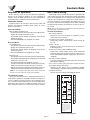
Two types of remote wall controls are available:
1. Standard Wall Control: analog control with slide fan speed
switch and dehumidistat adjustment.
2. Xtra Wall Control: digital control with push buttons for fan
mode selection, dehumidistat control and maintenance
indicator.
The remote wall controls work with the integrated electronic
controls within the unit to control ventilation sequences. Both
wall controls listed above have different features and require
4-wire connection to the unit as indicated in the Terminal
Connections section. Without a wall control, remote fan control
(as explained in Terminal Connections) must be completed to
operate the fans.
CAUTION: Do not use a wall control and remote fan switch (Remote
Fan Control terminals) at the same time. Damage to the unit may occur.
NOTE: All control accessories (ex. Night setback timer, CO2 controller or
smoke detector) intended to provide a contact closure for occupancy
control across terminals 3 and 4 cannot be used in conjunction with the
Xtra wall control. If a wall control is required in addition to any of these
options, only the Standard wall control may be used. Without these
options, a factory installed jumper across terminals 3 and 4 must be
installed.
Occupied Timer/Sensor
Occupancy control is achieved by connection to the Occupied
Timer/Sensor terminals. These terminals require a dry contact
which could be provided by various controls such as a timer,
light sensor, occupancy sensor, building management system or
other. The unit will not operate unless these contacts are
closed!!
NOTE: All control accessories (ex. Night setback timer, CO2 controller or
smoke detector) intended to provide a contact closure for occupancy
control across terminals 3 and 4 cannot be used in conjunction with the
Xtra wall control. If a wall control is required in addition to any of these
options, only the Standard wall control may be used. Without these
options, a factory installed jumper across terminals 3 and 4 must be
installed.
Unocc. Recirc Contacts (Unoccupied Recirculation
Contacts, Recirculation Defrost Units Only)
On HRV units equipped with recirculation defrost controls,
unoccupied recirculation ventilation modes can be achieved by
connection to the Unoccupied Recirculation terminals. Providing
24 VAC to these terminals will cause the unit to go into a 'recirculation mode' in which the supply fan runs on high speed and
the exhaust fan remains off.
NOTE: Although these contacts are intended for use during unoccupied
periods, they are still active during an occupied condition. Therefore, the
24 VAC signal should be applied such that it is disabled during occupied
periods, preventing the unit from going into a recirculation ventilation
condition unnecessarily.
CO2 Ventilation Control (Optional Accessory)
HRV units can be controlled by using CO2 levels to determine
the ventilation speed of the unit. To obtain this type of control,
the CO2 controller is connected to the Remote Fan Control terminals - LOW, COMMON and HIGH. As the CO2 levels exceed
acceptable limits, the dry contact across the HIGH and COM
terminals will close, engaging high speed fan ventilation.
Smoke Detector (Optional Accessory)
HRV units can be controlled by using a duct-mounted smoke
detector which will monitor the air when passing through the duct
system into the unit. When sufficient smoke is detected, an alarm
condition is activated. By connecting the Occupied Timer/Sensor
contacts to the normally closed (NC) alarm auxiliary contacts on
the duct sensor, an alarm condition will open the auxiliary contact
and stop operation of the unit.
NOTE: The smoke detector should be located in a normally occupied
area of premises. It is recommended for compliance to NFPA-90A and
IMC Code 606.
IMC Code: In order to meet International Mechanical Code (IMC)
Section 606, the smoke detector sensor should be connected to the
Occupied Timer/Sensor contacts.
Remote Fan Control (Low, Common, High)
Remote fan control can be achieved by connecting dry contact controls to the terminal interface at terminals labeled: LOW,
COMMON and HIGH. Placing a jumper across the LOW and
COM terminals will put the unit in low speed ventilation or placing a jumper across the HIGH and COM terminals will put the
unit into high speed (if equipped with two speed motors). DO
NOT jumper all three terminals together. These controls could
also be the following: SPDT switch, dehumidistat, CO2 sensor,
light sensor, heat sensor, timer, building management system,
etc. The factory supplied jumper must be in place across the
Occupied Timer/Sensor terminals.
CAUTION: Do not use a wall control and remote fan switch (Remote
Fan Control terminals) at the same time. Damage to the unit may occur.
Dirty Filter Sensor
Units can be equipped with a dirty filter sensor which monitors
the pressure across the filters and closes the contacts when the
filters become restricted with dirt. The terminals labeled "Dirty
Filter Indicator" may be used for interconnection of the sensors
and indicator light (option).
Page 22