1
iLive
Fixed Format MixRack
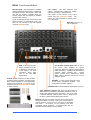
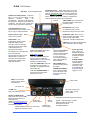
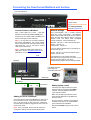
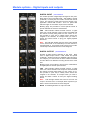
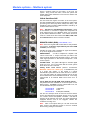
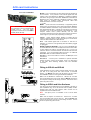
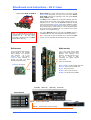
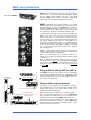
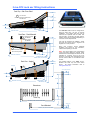
Mic/Line inputs High performance, recallable
analogue preamps for balanced or unbalanced
microphone and line level signals. Gain, Pad
and 48V are digitally controlled within the
preamp. Digital Trim and Polarity is available
within the DSP channel.
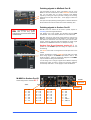
Inputs are identified by Slot (card position) and
Socket (number), for example A1 or C8. Any
input can be patched to any DSP channel
using the PREAMP screen.
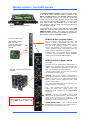
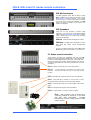
MIDI IN and OUT sockets.
MIDI is tunnelled via ACE™
or Network to the MIDI port
at the Surface. For more
information about MIDI
refer to the iLive MIDI
Specification.
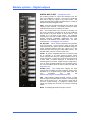
Line outputs
Line level, balanced XLR
outputs. Nominal level +4dBu with +22dBu
maximum providing +18dB headroom.
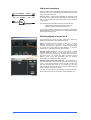
iLive signals can be patched to any output
socket using the OUTPUTS screen.
The
outputs are relay protected to prevent power
on or off thumps.
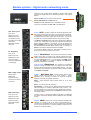
Rack Ears Fit into a 19”
rack or flightcase.
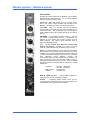
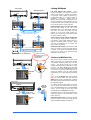
Port B audio network option slot Fit one of
the option cards available for system
expansion, digital mic splitting and distributed
audio networking. Capable of bi-directional 64
channels, 48kHz sampling rate.
Current
options include ACE™, EtherSound, MADI,
MMO. Refer to the A&H web site for more on
available options.
PL-Anet RS485 connection for Allen & Heath
PL Series remote controllers. Several may be
daisy chained together or routed individually
via the PL-9 PL-Anet hub. PL controls can be
assigned using the SURFACE SETUP screen
or Editor software.
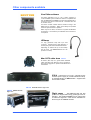
PHONES ¼” stereo socket and level control
for the built-in headphone amplifier. The
output follows the PAFL selection.
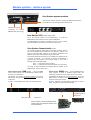
SYSTEM LOCK indicates MixRack digital audio sync lock.
ACE™ MixRack to Surface link Also used when linking a
Slave MixRack to a Master in Dual-Rack expansion mode. A
single CAT5 cable links audio and control. You do not need
a separate Network cable because control is bridged over
the ACE™ cable between MixRack and Surface.
PL-9 hub
iLive Reference Guide – Hardware
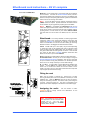
Network Built-in 3 port switch. Connect one or more laptops
running iLive Editor, a wireless router, other iLive systems or
external network, or link control to a Surface not equipped
with ACE™.
All devices on the network must have
compatible TCP/IP addresses. A recessed switch lets you
reset the network settings to factory default.
Part 1 - 10
AP6526-1 iss.5