1
Module options – Digital inputs and outputs
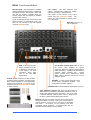
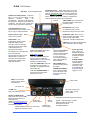
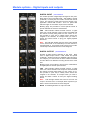
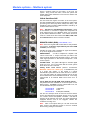
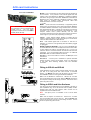
DIGITAL INPUT part M-DIGIN-A
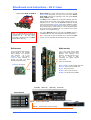
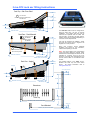
This module provides 8 digital inputs arranged as four pairs.
Each offers a choice of digital format - AES, SPDIF or optical
(TOSLINK). For each pair, one format is chosen and used at
a time. The selection is made using the iLive Surface or PC
application channel SEL function. One of 3 yellow LED
indicators lights to show which input format is selected.
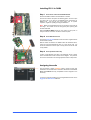
Blanking plugs are provided for unused optical sockets to
prevent interference and dust contamination.
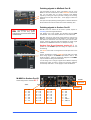
CHK Yellow indicator follows the PAFL function. It lights
when one or both channels of the input are associated with
the channel currently being PAFL’d at the surface or PC.
This provides a quick way to identify which sockets are
mapped to the channels, for example when you want to
quickly find which sockets to plug your digital playback
device into.
Note: CHK will light whether the input is the main channel
source, insert return or mix external input for the channel or
mix being PAFL’d. For example, three may be lit if you PAFL
a stereo input channel which has an insert assigned.
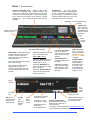
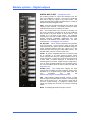
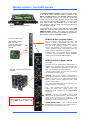
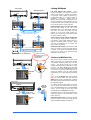
DIGITAL OUTPUT part M-DIGOUT-A
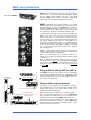
Provides 8 digital outputs arranged as four pairs. Each
offers 3 digital output formats – AES, SPDIF and optical
(TOSLINK). All three formats are available at the same time.
For example, you could record the same material via SPDIF
and also AES to two different recording devices at the same
time.
Blanking plugs are provided to prevent dust contamination
and light spill from unused optical sockets.
CHK Yellow indicator follows the PAFL function. It lights
when one or both channels of the output are associated with
the channel currently being PAFL’d at the surface or PC.
This provides a quick way to identify which sockets are
mapped to the channels, for example when you want to
quickly find which sockets to feed your digital recording
device.
Note: CHK will light whether the socket is the main mix
output or an insert send. For example, three may be lit if you
PAFL a stereo mix which has an insert assigned.
MUTE A red LED lights when an output is muted.
iLive Reference Guide – Hardware
Part 1 - 20
AP6526-1 iss.5