1
<P=002>
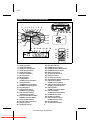
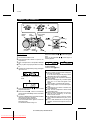
COMPACT DISC OPERATION
2
4
3
REPEAT
BAND
STOP
TUNING
PLAY / PAUSE
TUNING
/
PRESET
TUNING
/
PRESET
BAND
TUNING
ON/STAND-BY
(Function)
REVIEW
PRESET
CUE
PRESET
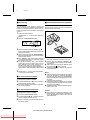
■ CD playback
1
2
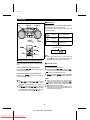
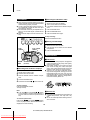
To interrupt playback:
Press the PLAY/PAUSE (0 6) button during playback.
Press the PLAY/PAUSE (0 6) button again to
resume playback.
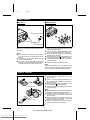
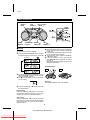
Set the function switch to CD.
Press the CD EJECT button to open the CD
compartment.
3
Place a compact disc on the spindle, label side
up.
● 8 cm (3") discs may be played without an adaptor.
4
To stop playback:
Press the STOP (■) button.
Close the CD compartment by firmly pushing the
right corner of it.
Total number of
tracks
Precautions:
● When "no dISC" or track number is displayed,
the power is connected.
If you will not be using the CD player, set the
ON/STAND-BY switch to STAND-BY.
● Do not open the CD compartment whilst the
disc is rotating.
● If the disc is damaged, dirty, or loaded upside
down, "Er" or "no dISC" will appear in the
display.
Clean, replace, or reload the disc properly.
● Keep foreign objects out of the CD compartment.
● Subjecting the unit to shock or vibration may
cause mistracking.
● Keep the CD compartment closed except
when loading discs.
● Playing certain compact discs at a high volume may cause mistracking. In this case,
listen at a lower volume.
● The temperature range for playing compact
discs is recommended to be 5˚C (41˚F) - 35˚C
(95˚F).
● If TV or radio interference occurs during CD
operation, move the unit away from the TV or
radio.
Total playing time
5
Press the PLAY/PAUSE (0
playback from track 1.
6
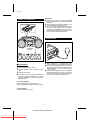
Press the VOLUME W button to increase the
volume and the VOLUME X button to decrease
the volume.
7
Press the X-BASS button to emphasise the bass
region of the frequency spectrum.
The "X-BASS" indicator will light up.
Press the X-BASS button again to cancel the
extra bass mode.
The "X-BASS" indicator will go out.
6
) button to start
5
QT-CD250H(SUK) TINSE0043SJZZ
Downloaded From Disc-Player.com Sharp Manuals