1
<P=005>
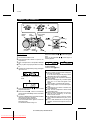
RADIO OPERATION
REPEAT
BAND
STOP
TUNING
PLAY / PAUSE
TUNING
TUNER
MEMORY
/
PRESET
CLEAR
TUNING
/
PRESET
BAND
TUNING
TUNER
MEMORY
ON/STAND-BY
(Function)
REVIEW
PRESET
CUE
PRESET
Notes:
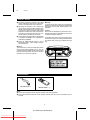
● When radio interference occurs during auto scan
tuning, auto scan tuning may stop automatically
at that point.
● If a weak station signal is found during auto scan
tuning, the station will be skipped.
● To stop the auto tuning, press the TUNING (
or ) button again.
● If the FM reception is poor, press the REPEAT/BAND ( ) button so that the "ST" indicator goes out.
Although the reception changes to monaural, the
sound becomes clearer.
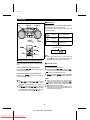
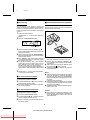
■ Tuning
1
2
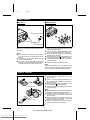
Set the function switch to TUNER.
R
Press the REPEAT/BAND ( ) button to select
the desired frequency band. (FM ST, FM or AM)
W
FM STEREO
FM MONO
X
R
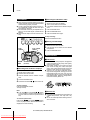
Aerial adjustment:
AM
FM
AM
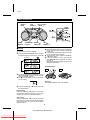
● To receive an FM stereo transmission, press the
REPEAT/BAND ( ) button so that the "ST" indicator on the display lights up.
● The " " indicator lights up when an FM broadcast is in stereo.
j
R
After use:
Set the ON/STAND-BY switch to STAND-BY.
3
X or W) button to tune into
Press the TUNING (
the desired station.
Manual tuning:
Press the TUNING ( or ) button as many times
as required to adjust the frequency shown on the
display to the frequency of the desired station.
X W
Auto tuning:
When the TUNING ( or ) button is pressed for
more than 0.5 seconds, scanning will start automatically and the tuner will stop at the first receivable
broadcast station.
X W
8
QT-CD250H(SUK) TINSE0043SJZZ
Downloaded From Disc-Player.com Sharp Manuals