1
4-12
Maintaining the printer
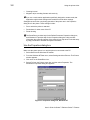
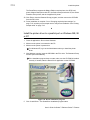
Edge of the printhead
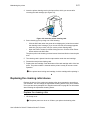
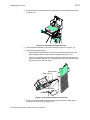
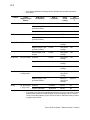
Figure 4-12: Clean the printing surface of the printhead
E
If the cleaning pen does not remove all contamination from the printhead,
contact your service provider for additional assistance.
6
Close the swing arm by grasping the handle, lowering it into position, and
pressing it down until the push latch clicks into place.
7
Close the printer cover.
8
Connect the power cable to the power source and power on the printer.
Print a card to verify the quality of printing. You can print a Windows test page or a
sample card. If card quality is still inadequate, see “Problems with card appearance”
on page 5-8.
♦
Replacing the printhead cartridge
The printer uses an operator-replaceable printhead cartridge. For more information
about printhead cartridges, see “Supplies and cards” on page B-1.
Remove the printhead cartridge
! Do not touch the printing edge of the printhead cartridge. If you do, clean it using
the cleaning pen, as described in “Cleaning the printhead” on page 4-11.
! Do not bump the printing edge of the printhead cartridge with any sharp objects.
Sharp objects can permanently damage the printhead.
1
Power off the printer.
2
Open the top cover.
3
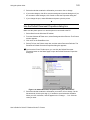
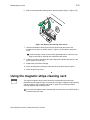
Push down on the swing arm. The push latch will release the swing arm. Grasp
the handle and lift the swing arm up until it is fully open.
User’s Guide for Select™ Platinum Series™ Printers