1
5-13
Troubleshooting
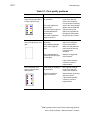
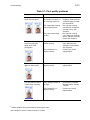
Table 5-1: Print quality problems
What you see
Possible causes
Solutions
The printed card shows
small unprinted spots.
The card is scratched, the
card surface is uneven, or
the card edge has burrs.
If the problem occurs
frequently, obtain and use
a different supply of cards.
See Appendix B.
The replaceable cleaning
sleeve might be dirty.
Run a printer cleaning
card and then change the
cleaning sleeve. See
Chapter 4
The printer rollers might
be dirty.
Run a printer cleaning
card, change the cleaning
sleeve, and then clean the
rollers. See Chapter 4.
The print ribbon is not
loaded correctly.
Load the print ribbon
again. Make sure the
cartridge is firmly seated.
See Chapter 2.
The printhead is not
aligned correctly.
Contact your service
representative.
The card shows irregular
lighter or darker spots.
The printhead is not
aligned correctly.
Contact your service
representative.
The card shows wrinkles
in dark areas of printing.
The printhead intensity is
too high.
Decrease the printhead
intensity setting. See the
e-Guide.#
The printhead is not
aligned correctly.
Contact your service
representative.
The printed card shows
wavy lines along the
length of the card
(woodgrain).
#
Obtain guidance from service before performing this task.
User’s Guide for Select™ Platinum Series™ Printers