1
Setting up
Install your SIM card
Your SIM (Subscriber Identity Module) card is your identity on the mobile
phone network. It can also store your phonebook contact details. Without a
working SIM card, your phone can only make emergency calls (subject to
network availability).
Note: When handling your SIM card, limit your movements to reduce static
electricity and avoid touching the gold contacts.
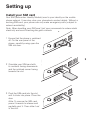
1 Ensure that the phone is switched
off. On the rear panel of the
phone, carefully swing open the
SIM slot door.
2 Orientate your SIM card with
its contacts facing downwards
and the notched corner facing
towards the slot.
3 Push the SIM card into the slot
until it clicks into place. Close the
door.
Note: To remove the SIM card,
press it inwards to release and
partially eject it. Then slide it out
of the slot.