1
Optimux-XLT1
Multiple T1 and Ethernet Multiplexer
Installation and Operation Manual
Notice
This manual contains information that is proprietary to RAD Data Communications. No part of this
publication may be reproduced in any form whatsoever without prior written approval by RAD Data
Communications.
No representation or warranties for fitness for any purpose other than what is specifically mentioned in
this manual is made either by RAD Data Communications or its agents.
For further information contact RAD Data Communications at the address below or contact your local
distributor.
International Headquarters
RAD Data Communications Ltd.
U.S. Headquarters
RAD Data Communications Inc.
24 Raoul Wallenberg St.
Tel Aviv 69719 Israel
Tel: 972-3-6458181
Fax: 972-3-6498250
E-mail: [email protected]
900 Corporate Drive
Mahwah, NJ 07430 USA
Tel: (201) 529-1100
Toll free: 1-800-444-7234
Fax: (201) 529-5777
E-mail: [email protected]
© 2001 RAD Data Communications
Order from: Cutter Networks
Ph:727-398-5252/Fax:727-397-9610
Publication No. 327-200-10/01
www.bestdatasource.com
Order from: Cutter Networks
Ph:727-398-5252/Fax:727-397-9610
www.bestdatasource.com
Warranty
This RAD product is warranted against defects in material and workmanship for a period of one year
from date of shipment. During the warranty period, RAD will, at its option, either repair or replace
products which prove to be defective. For warranty service or repair, this product must be returned to
a service facility designated by RAD. Buyer shall prepay shipping charges to RAD and RAD shall pay
shipping charges to return the product to Buyer. However, Buyer shall pay all shipping charges, duties
and taxes for products returned to RAD from another country.
Limitation of Warranty
The foregoing warranty shall not apply to defects resulting from improper or inadequate maintenance
by Buyer, Buyer-supplied firmware or interfacing, unauthorized modification or misuse, operation
outside of the environmental specifications for the product, or improper site preparation or
maintenance.
Exclusive Remedies
The remedies provided herein are the Buyer’s sole and exclusive remedies. RAD shall not be liable for
any direct, indirect special, incidental, or consequential damages, whether based on contract, tort, or
any legal theory.
Safety Warnings
The exclamation point within a triangle is intended to warn the operator or
service personnel of operation and maintenance factors relating to the
product and its operating environment which could pose a safety hazard.
Always observe standard safety precautions during installation, operation and maintenance of this
product. Only a qualified and authorized service personnel should carry out adjustment, maintenance
or repairs to this instrument. No adjustment, maintenance or repairs should be performed by either
the operator or the user.
Laser Warnings
This product may be equipped with a laser diode. In such a case, this laser
warning symbol label will be attached near the optical transmitter. Please
observe the following precautions:
•
Do not attempt to adjust the laser drive current.
•
Do not use broken or unterminated fiber-optic cables/connectors or stare at the laser beam.
•
The use of optical equipment with this product will increase eye hazard.
•
Use of controls, adjustments or performing procedures other than those specified herein, may
result in hazardous radiation exposure.
Order from: Cutter Networks
Ph:727-398-5252/Fax:727-397-9610
www.bestdatasource.com
Telecommunication Safety
The safety status of each of the ports on the Optimux-XLT1 is declared according to EN 41003 and is
detailed in the table below:
Ports
Safety Status
LAN, ALARM
SELV
Circuit operating with Safety Extra-Low Voltage
T1
TNV-1
Circuit whose normal operating voltage is within
the limits of SELV, on which overvoltages from
Telecommunications Networks are possible.
Note
The T1 ports are not intended for connection to exposed plant.
Regulatory Information
FCC-15 User Information
This equipment has been tested and found to comply with the limits of the Class A digital device,
pursuant to Part 15 of the FCC rules. These limits are designed to provide reasonable protection
against harmful interference when the equipment is operated in a commercial environment. This
equipment generates, uses and can radiate radio frequency energy and, if not installed and used in
accordance with the instruction manual, may cause harmful interference to the radio communications.
Operation of this equipment in a residential area is likely to cause harmful interference in which case
the user will be required to correct the interference at his own expense.
Warning per EN 55022
This is a Class A product. In a domestic environment, this product may cause radio interference, in
which case the user may be required to take adequate measures.
Order from: Cutter Networks
Ph:727-398-5252/Fax:727-397-9610
www.bestdatasource.com
Contents
Chapter 1. Introduction
1.1 OVERVIEW ......................................................................................................................1-1
Versions...................................................................................................................1-1
Applications.............................................................................................................1-2
Features...................................................................................................................1-2
1.2 PHYSICAL DESCRIPTION ....................................................................................................1-3
Front Panel ..............................................................................................................1-3
Rear Panel ...............................................................................................................1-3
1.3 FUNCTIONAL DESCRIPTION ...............................................................................................1-4
Fiber Optic Link Interface ........................................................................................1-4
Link Redundancy.....................................................................................................1-5
Tributary Interface Characteristics ............................................................................1-5
Management Requirements .....................................................................................1-6
Timing .....................................................................................................................1-7
Power Requirements................................................................................................1-9
1.4 TECHNICAL SPECIFICATIONS ............................................................................................1-10
Chapter 2. Installation and Setup
2.1
2.2
2.3
2.4
INTRODUCTION ..............................................................................................................2-1
SITE REQUIREMENTS & PREREQUISITES ................................................................................2-1
PACKAGE CONTENTS ........................................................................................................2-2
INSTALLATION AND SETUP.................................................................................................2-2
Identifying Optimux-XLT1 Modules..........................................................................2-2
Setting Internal Jumpers and Switches ......................................................................2-4
2.5 INTERFACES AND CONNECTIONS ........................................................................................2-9
Channel Connections.............................................................................................2-11
Fiber Optic Link Connections.................................................................................2-12
Alarm Connection..................................................................................................2-12
Management Connections .....................................................................................2-13
Power Connection .................................................................................................2-13
Chapter 3. Operation
3.1 OPTIMUX-XLT1 CONTROLS ..............................................................................................3-1
Front Panel Controls ................................................................................................3-1
Rear Panel Controls .................................................................................................3-3
3.2 OPERATING INSTRUCTIONS ...............................................................................................3-5
Turn ON..................................................................................................................3-5
Normal Indications ..................................................................................................3-5
Redundancy Functions.............................................................................................3-6
Turn OFF.................................................................................................................3-6
Chapter 4. Supervisory Port Software Configuration
4.1
4.2
4.3
4.4
INTRODUCTION ..............................................................................................................4-1
ACCESSING AND EXITING THE SUPERVISORY TERMINAL...........................................................4-1
CHANGING PARAMETER SETTINGS ......................................................................................4-3
THE OPTIMUX-XLT1 DEVICE INFORMATION ........................................................................4-4
Optimux-XLT1 Installation and Operation Manual
Order from: Cutter Networks
Ph:727-398-5252/Fax:727-397-9610
i
www.bestdatasource.com
Table of Contents
4.5
4.6
4.7
4.8
4.9
Viewing the Optimux-XLT1 Versions ........................................................................4-4
Viewing the Optimux-XLT1 Component Status.........................................................4-5
Setting Link-Redundancy .........................................................................................4-6
Changing the Clock Source ......................................................................................4-7
THE OPTIMUX-XLT1 INTERFACE ........................................................................................4-8
Viewing Status of Transmission Interfaces .................................................................4-8
Viewing Configuration of Monitor Interface ..............................................................4-9
Changing the Configuration of the Interface ...........................................................4-10
Changing the Configuration of the Serial Port .........................................................4-20
Resetting to the Default Configuration....................................................................4-20
Viewing Hardware Setting......................................................................................4-21
Viewing Interface Status .........................................................................................4-21
THE OPTIMUX-XLT1 SOFTWARE DOWNLOAD ...................................................................4-22
THE OPTIMUX-XLT1 SNMP PARAMETERS .........................................................................4-23
Viewing IP Addresses .............................................................................................4-23
Viewing Community Names...................................................................................4-24
Viewing Permanent Managers ................................................................................4-25
THE OPTIMUX-XLT1 RESET .............................................................................................4-26
SETTING THE TELNET PASSWORD......................................................................................4-26
Chapter 5. Troubleshooting & Diagnostics
5.1 LOOP CONNECTIONS .......................................................................................................5-1
5.2 TROUBLESHOOTING INSTRUCTIONS ...................................................................................5-3
Appendix A. Interface Specification
ii
Order from: Cutter Networks
Optimux-XLT1 Installation and Operation Manual
Ph:727-398-5252/Fax:727-397-9610
www.bestdatasource.com
Table of Contents
List of Figures
1-1.
1-2.
1-3.
1-4.
1-5.
1-6.
1-7.
Optimux-XLT1 Point-to-point Link Application.......................................................... 1-2
Optimux-XLT1 3D View............................................................................................ 1-3
Internal and Loopback Timing with V35/RS530 Module ............................................ 1-7
Internal and Loopback Timing with X21 Module ....................................................... 1-8
External with V35/RS530 Module .............................................................................. 1-8
External with X21 Module ......................................................................................... 1-8
Timing Description for Tail End Application with V35/RS530 Module........................ 1-9
2-1.
2-2.
2-3.
2-4.
2-5.
2-6.
2-7.
Location of Modules in the Optimux-XLT1 Case........................................................ 2-3
Setting the Optimux-XLT1 Switches and Jumpers ...................................................... 2-5
Setting the High Speed Module Jumpers.................................................................... 2-6
Front Panel Connections of Ethernet Port and T1 Balanced Channels ........................ 2-9
Front Panel Connections of Ethernet Port and High Speed Channels ......................... 2-9
Front Panel Connections of Fast Ethernet Port and T1 Balanced Channels ................. 2-9
Rear Panel Connections Optimux-XLT1 with Dual Link and Dual Power Supply...... 2-10
3-1.
3-2.
3-3.
3-4.
Optimux-XLT1 Front Panel........................................................................................ 3-1
High Speed Module Panels ....................................................................................... 3-1
Fast Ethernet Module Panel ....................................................................................... 3-1
Optimux-XLT1 Rear Panel......................................................................................... 3-3
4-1. Software Configuration Menu Map............................................................................ 4-3
5-1. Optimux-XLT1 Loops ................................................................................................ 5-1
Optimux-XLT1 Installation and Operation Manual
Order from: Cutter Networks
Ph:727-398-5252/Fax:727-397-9610
iii
www.bestdatasource.com
Table of Contents
List of Tables
1-1. Fiber optic Interface Options ..................................................................................... 1-4
1-2. Channel Module Options .......................................................................................... 1-5
1-3. Interface Installation Combinations............................................................................ 1-9
2-1.
2-2.
2-3.
2-4.
2-5.
2-6.
2-7.
List of Optimux-XLT1 Modules .................................................................................. 2-4
Internal Settings......................................................................................................... 2-7
Connectors.............................................................................................................. 2-10
Management, Alarm and Link Connectors ............................................................... 2-11
Cable to Interface Connections................................................................................ 2-11
Fiber Optic Link Connections .................................................................................. 2-12
Management Port Options ...................................................................................... 2-13
3-1. Optimux-XLT1 Front Panel Controls and Indicators ................................................... 3-2
3-2. Optimux-XLT1 Rear Panel Controls ........................................................................... 3-4
3-3. LED Indications ......................................................................................................... 3-5
4-1.
4-2.
4-3.
4-4.
4-5.
Power Supply States .................................................................................................. 4-5
Interface Ports ........................................................................................................... 4-9
T1 and Fiber Optic Interface States.......................................................................... 4-10
Ethernet Setting ....................................................................................................... 4-10
Fields in the Change Interface Configuration Screen ................................................ 4-19
5-1. Diagnostic Loops ....................................................................................................... 5-2
5-2. Troubleshooting Chart ............................................................................................... 5-3
iv
Order from: Cutter Networks
Optimux-XLT1 Installation and Operation Manual
Ph:727-398-5252/Fax:727-397-9610
www.bestdatasource.com
Chapter 1
Introduction
1.1 Overview
The Optimux-XLT1 is a multiplexer that combines Ethernet, Fast Ethernet, High
Speed (HS) and T1 channels into a data stream transmitted over fiber optic cables.
A pair of Optimux-XLT1 units offers simple low-cost connectivity for Ethernet, Fast
Ethernet, High Speed (HS) and T1 channels at distances up to 60 Km (37.28 miles).
Versions
Order from: Cutter Networks
Link Interface Options
Optimux-XLT1 is available with a variety of fiber optic link options in addition to
the built-in Ethernet port (see Table 1-1 for details). The unit can also be ordered
with a second redundant link (same as the first link).
Power Supply Options
Optimux-XLT1 is available with one or two of the following power supplies:
•
100–230 VAC power supply
•
-48 VDC power supply
•
24 VDC power supply.
In addition, the unit can be ordered with a second redundant power supply (same
as the first power supply).
Channel Module Options
Optimux-XLT1 supports various channel module options as detailed in Table 1-2.
Overview
Ph:727-398-5252/Fax:727-397-9610
1-1
www.bestdatasource.com
Optimux-XLT1 Installation and Operation Manual
Chapter 1 Introduction
Applications
The Optimux-XLT1 unit permits improved utilization of fiber optic links, due to its
capability to multiplex channels connected to different transmission environments,
Ethernet LAN and T1 channels. A frequently used application is depicted in Figure 1-1.
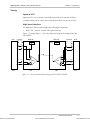
Point-to-point Application
In Figure 1-1, a company campus line or a line leased from the local operator is
used to link two Optimux-XLT1 units situated at a distance ranging from several
hundreds of meters to several tens of kilometers. A backup link is optionally used
to ensure uninterrupted data flow between the two sites. The Optimux-XLT1 at
each site is connected to Ethernet LANs and T1 access equipment like PBXs and
T1 multiplexers. The distance limitations on the LAN deployment area are
efficiently removed while maintaining the full and half-duplex transmission modes.
MP-2100
MP-2100
Main Link
Backup Link
PBX Extension
Optimux-XLT1
LAN A
Optimux-XLT1
PBX Extension
Ethernet Switch
LAN B
LAN A
LAN B
LAN C
Server
Figure 1-1. Optimux-XLT1 Point-to-point Link Application
Features
Optimux-XLT1 is a compact 44 mm (1U) high unit intended for 19-inch rack
installations using an adapter kit. A combination of up to four 10BaseT Ethernet
channels or one 10BaseT Ethernet channel and Fast Ethernet, HS data and T1
channels can be combined into a single fiber optic link. Optimux-XLT1 is suitable
for various modes of fiber optic transmission.
Optimux-XLT1 features link redundancy (an optional backup link), which enables
coupling of any combination of fiber modules to the link. In addition,
Optimux-XLT1 can accommodate up to two (one redundant power supply in case
of power failure or disconnection) built-in AC to DC and DC to DC power supplies
for a wide range of power sources.
Optimux-XLT1 offers the options of working in loopback timing.
Setup, monitoring and diagnostics can be configured using an ASCII terminal,
Telnet or an SNMP management station. System diagnostics are monitored and
managed using status and alarm panel indications, alarm dry contacts and external
management tools.
1-2
Order from: Cutter Networks
Overview
Ph:727-398-5252/Fax:727-397-9610
www.bestdatasource.com
Optimux-XLT1 Installation and Operation Manual
Chapter 1 Introduction
1.2 Physical Description
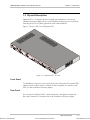
Optimux-XLT1 is a compact 44 mm (1U) high unit intended for 19-inch rack
installations using an adapter kit. For rack installation instructions refer to the Rack
Mounting Kit for 19-inch Racks guide that comes with the RM kit.
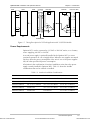
Figure 1-2 shows a 3D view of Optimux-XLT1.
Figure 1-2. Optimux-XLT1 3D View
Front Panel
T1 and Ethernet connectors are located on the unit's front panel. Front panel LEDs
indicate system and link status. For details on the front panel, its connectors and
LEDs, see the Installation and Setup chapter.
Rear Panel
Order from: Cutter Networks
The rear panel of Optimux-XLT1 contains the power, management, alarm and
fiber optic connectors. For details refer to the Installation and Setup chapter.
Physical Description
Ph:727-398-5252/Fax:727-397-9610
1-3
www.bestdatasource.com
Optimux-XLT1 Installation and Operation Manual
Chapter 1 Introduction
1.3 Functional Description
Fiber Optic Link Interface
The Optimux-XLT1 can be ordered with a fiber optic link interface. The optical
interface is used to extend the transmission range to 60 km (37.28 miles), enhance
the transmission security and achieve immunity against electrical interference.
The fiber optic interface complies with the ITU-T Rec. G.956, while applying a
proprietary signaling format to the NRZ 34 Mbps data stream. In the upstream
direction, the data stream modulates the beam emitted by the optical device,
which is either a LED or a Laser diode. In the downstream direction, the data
stream is recovered from the current changes in a diode sensitive to the received
optical beam.
Various optical interfaces meet a range of customer and infrastructure needs.
Table 1-1 shows the Optimux-XLT1 options in terms of transceiver, fiber optic and
maximum transmission range. The maximum transmission range is a function of
the optical budget (transmitter power minus receiver sensitivity), the fiber optic
attenuation per kilometer and the necessary margin due to CO connections, aging,
etc. A typical 3 dB margin has been assumed to calculate the maximum range in
Table 1-1. Front panel LEDs indicate loss-of-signal frame and AIS on the link.
It is possible to add a redundant fiber optic link to an existing unit or to replace the
link module by the 850 nm multimode AMC-101 module or any of the single
mode AMC-101 modules.
Table 1-1. Fiber optic Interface Options
Wavelength Fiber Type (µ
µm)
(nm)
Transmitter
Type
Power
(dBm)
Receiver
Typical Max. Range
Sensitivity (dBm) (km / miles)
850
62.5/125 multimode LED
-18
-28
2.5/1.55
1300
62.5/125 multimode LED
-18
-31
5.5/3.4
1300
9/125 single mode
LED
-15
-31
32/20
1300
9/125 single mode
Laser
-12
-31
38/23.6
1300
9/125 single mode
Laser (long haul) -2
-34
70/43.4
1550
9/125 single mode
Laser
-31
68/42.2
1550
9/125 single mode
Laser (long haul) -1
-34
110/68.35
1300/1550
9/125 single mode
Laser (WDM)
-30
40/24.8
1-4
Order from: Cutter Networks
-12
-12
Functional Description
Ph:727-398-5252/Fax:727-397-9610
www.bestdatasource.com
Optimux-XLT1 Installation and Operation Manual
Chapter 1 Introduction
Link Redundancy
An additional link interface can be ordered for backup. The two link interfaces are
both identical. The link interfaces are implemented by interchangeable link
modules plugged into two dedicated slots at the rear of the Optimux-XLT1 unit
designated LINK A (MAIN) and LINK B (BACKUP). Front panel LEDs provide AIS
and signal loss (SYNC LOSS) indications on the link.
When two link modules are installed, the redundancy mechanism of the
Optimux-XLT1 is used to:
•
Automatically switch to the back-up link interface in case of signal or sync loss
on the main link. If the redundancy mode is set to AUTOMATIC, under signal
loss, the main link (equipment and/or line) resumes transmission after it has
recovered. Under sync loss, the backup link continues transmission until it
receives a sync loss/signal loss.
•
Force transmission via the MAIN link using a software management tool for
maintenance purposes if the redundancy mode is OFF.
When the redundancy mode is MANUAL and the main link is disconnected or
fails, the backup link is forced into the active state. The main link will not resume
transmission as long as the redundancy mode is MANUAL.
Tributary Interface Characteristics
The modular design of the Optimux-XLT1 supports one fixed 10BaseT Ethernet
port and up to three additional plug-in channel modules. The additional channel
module types are specified in Table 1-2.
Table 1-2. Channel Module Options
Channel Module
Port Type
Bandwidth
No. of
Ports
Port Connector
OP-XL-M/ETH
10BaseT Ethernet
6.639 MHz
1
RJ-45
OP-XL-M/FETH
10/100BaseT Fast Ethernet
6.639 MHz
1
RJ-45
OP-XL-M/2T1/BAL
T1 Balanced (twisted pairs) 1.544 Mbps
2
RJ-45
OP-XL-M/4T1/BAL
T1 Balanced (twisted pairs) 1.544 Mbps
4
RJ-45
OP-XL-M/4HS/1.5M/V35
V.35
1.544 Mbps
4
SCSI 26-pin
OP-XL-M/4HS/1.5M/RS530 RS-530
1.544 Mbps
4
SCSI 26-pin
OP-XL-M/4HS/1.5M/X21
1.544 Mbps
4
SCSI 26-pin
Order from: Cutter Networks
X.21
Functional Description
Ph:727-398-5252/Fax:727-397-9610
1-5
www.bestdatasource.com
Optimux-XLT1 Installation and Operation Manual
Chapter 1 Introduction
A selection of Ethernet, Fast Ethernet, T1 and high-speed channel modules permits
a variety of multiplexing schemes for LAN and CO sites. The Ethernet or Fast
Ethernet ports are connected directly to the local network or to an Ethernet LAN.
The port activity and the link integrity are monitored either by front panel LEDs or
by an external terminal. The transmission of the Ethernet or Fast Ethernet channel
is implemented by a built-in bridging function operating at the 6.639 Mbps,
"almost wire-speed", rate and supports up to 10,000 (Ethernet) or 16,0000 (Fast
Ethernet) addresses.
The T1 interface complies with the ITU-T Rec. G.703. Line coding is B8ZS. A pair
of LEDs monitor loss-of-signal and AIS on each T1 receive line.
For the high-speed modules (V.35, RS-530 and X.21), the desired physical port
connector is achieved by the use of an appropriate adapter cable, which is
supplied with the product.
Management Requirements
Optimux-XLT1 operates locally using on-board switches and jumpers to configure
the operation modes and front panel LEDs to monitor system failure and tests
(loop connections). Alarms are monitored using the dry contacts of the
Optimux-XLT1 alarm relays on a dedicated D-type connector.
An ITU-T V.24/EIA RS-232 port enables monitoring and tests using an ASCII
supervision terminal.
The management interface also includes an SNMP agent that enables SNMP
management of the Optimux-XLT1, using the Ethernet protocol. The SNMP
management capability enables fully graphical, user-friendly management using
the RADview network management stations offered by RAD, as well as
management by other SNMP-based management systems.
Remote management is also possible using the Telnet communication protocol,
which uses TCP/IP communication, without the SNMP service. Telnet support
enables a remote IP host to control the operation of Optimux-XLT1 using functions
identical to those provided by a supervision terminal. The Telnet management
function can be protected by the manager password feature.
Note
1-6
Order from: Cutter Networks
When using Telnet for management, the Software Downloading option is not
operational.
Functional Description
Ph:727-398-5252/Fax:727-397-9610
www.bestdatasource.com
Optimux-XLT1 Installation and Operation Manual
Chapter 1 Introduction
Timing
Optimux-XLT1
Optimux-XLT1 can work with an internally generated clock (internal oscillator).
Loopback timing can be used in those systems that require a one-source clock.
High Speed Interface
The high-speed (HS) modules support the following timing modes:
•
4HSx1.5M – Internal, external and loopback timing
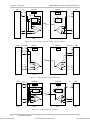
Figure 1-3 through Figure 1-7 show the different timing modes supported by the
HS modules.
DTE
V35/RS530
EXTC
TXD
TXD
TXC
TXC
RXC
RXD
EXT
Order from: Cutter Networks
EXTC
RXC
RXD
DCE OP
DCE OP
OSC
Not
Used
V35/RS530
OSC
TXC
TXC
TXD
TXD
RXC
MUX
MUX
RXD
EXTC
TXD
TXD
TXC
TXC
RXC
RXC
RXD
RXD
RXC
RXD
INT
EXTC
DTE
EXT
LBT
Figure 1-3. Internal and Loopback Timing with V35/RS530 Module
Functional Description
Ph:727-398-5252/Fax:727-397-9610
1-7
www.bestdatasource.com
Optimux-XLT1 Installation and Operation Manual
Chapter 1 Introduction
DTE
DCE OP
X21
EXTC
EXTC
TXD
TXD
OSC
DCE OP
Not
Used
OSC
FIFO on
transmit side
DATA OUT
TXD
ST
ST
RXD
RXD
DATA IN
TXC
TXC
TXD
TXD
MUX
RXC
MUX
RXD
EXT
TXD
FIFO
DATA OUT
ST
RXD
EXTC
CLOCK OUT CLOCK IN
FIFO
DATA IN
RXD
EXTC
Not
Used
CLOCK IN CLOCK OUT
ST
DTE
X21
RXC
RXD
EXT
LBT
INT
Figure 1-4. Internal and Loopback Timing with X21 Module
DTE
DCE OP
V35/RS530
EXTC EXTC
TXD
TXD
TXC
TXC
RXC
Not
Used
DCE OP
Not
Used
OSC
OSC
TXC
TXC
TXD
TXD
MUX
RXC
MUX
RXC
RXD
RXD
V35/RS530
EXT
INT
EXTC
TXD
TXD
TXC
TXC
RXC
RXC
RXD
RXD
DTE
RXC
RXD
RXD
EXTC
LBT
EXT
Figure 1-5. External with V35/RS530 Module
DTE
DCE OP
X21
EXTC EXTC
TXD
TXD
Not
Used
OSC
DCE OP
Not
Used
FIFO on
receive side
CLOCK IN CLOCK OUT
FIFO
DATA IN
DATA OUT
DTE
X21
OSC
Not
Used
EXTC
EXTC
TXD
TXD
ST
ST
RXD
RXD
CLOCK OUT CLOCK IN
FIFO
DATA OUT
DATA IN
TXC
TXC
TXD
ST
ST
RXC
RXD
RXD
INT
MUX
MUX
TXD
RXC
RXD
RXD
EXT
LBT
EXT
Figure 1-6. External with X21 Module
1-8
Order from: Cutter Networks
Functional Description
Ph:727-398-5252/Fax:727-397-9610
www.bestdatasource.com
Optimux-XLT1 Installation and Operation Manual
DTE
EXTC EXTC
DCE
DCE
Chapter 1 Introduction
DCE OP
V35/RS530
EXTC
EXTC
OSC
TXD
TXD
TXC
TXC
TXD
TXD
TXC
TXC
DCE OP
Not
Used
OSC
TXC
RXC
RXD
RXD
EXT
RXC
RXC
RXC
RXD
RXD
EXTC
TXD
TXD
TXC
TXC
RXC
RXC
RXD
RXD
TXD
MUX
MUX
RXD
EXT
LBT
EXTC
DTE
TXC
TXD
RXC
V35/RS530
RXC
RXD
EXT
INT
EXT
Cross Cable
Figure 1-7. Timing Description for Tail End Application with V35/RS530 Module
Power Requirements
Optimux-XLT1 can be connected to 115 VAC or 220 VAC mains, or to a battery
source supplying -48 VDC or 24 VDC.
A second power supply is optionally installed in the Optimux-XLT1 to assure
continuous operation in case of supply failure. When the two supplies are turned
ON, they share the power consumption of the unit. If one of the power supplies
fails, the other provides full power consumption.
A limitation in the combination of interface installation exists due to the power
supply currently installed in Optimux-XLE1. Table 1-3 shows the feasible
combinations that can be ordered or installed.
Table 1-3. Interface Installation Combinations
Port A
Port B
Port C
Port D
Ethernet (10BaseT)
4HS/V35
4T1 or 2T1 or 10BaseT
4T1 or 2T1 or 10BaseT
Ethernet (10BaseT)
4HS/RS530 or 4HS/X21
4HS/RS530 or 4HS/X21
4HS/RS530 or 4HS/X21
Ethernet (10BaseT)
4T1 or 2T1 or 10BaseT
4T1 or 2T1 or 10BaseT
4T1 or 2T1 or 10BaseT
Ethernet (10BaseT)
Fast Ethernet
4T1 or 2T1 or 10BaseT
4T1 or 2T1 or 10BaseT
Ethernet (10BaseT)
Fast Ethernet
Fast Ethernet
4T1 or 2T1 or 10BaseT
Order from: Cutter Networks
Functional Description
Ph:727-398-5252/Fax:727-397-9610
1-9
www.bestdatasource.com
Optimux-XLT1 Installation and Operation Manual
Chapter 1 Introduction
1.4 Technical Specifications
Link Interfaces
Channel Interfaces
Fiber Optic Link
Applicable Standard
ITU-T Rec. G.955
Line Code
CDP
Performance
Refer to Table 1-1
Connectors
ST, SC, FC/PC
Redundancy
Additional link is optional
Ethernet Ports
Physical Interface
10BaseT, 10/100BaseT
Channel Slots
(Ports)
• Fixed: A (one 10BaseT)
Data Rate
• 10 Mbps for 10BaseT interface
• Interchangeable with FETH/HS/T1: B, C
and D (three)
• 10/100 Mbps for 10/100BaseT interface
Transmission Mode
Full/half-duplex or auto negotiation
enable/disable selectable on Ethernet
channel module
Bridge Parameters
• Data transfer rate: 6.639 Mbps maximum
• No. of Supported Addresses:
10,000 for 10BaseT
16,000 for 10/100BaseT
• Connector: RJ-45
T1 Interface
1-10
Order from: Cutter Networks
Electrical Interface
According to ITU-T Rec. G.703
Jitter
According to ITU-T Rec. G.824
Data Rate
1.544 Mbps
Line Code
B8ZS or AMI
Range
According to ITU-T G.703
Slots (Ports)
B, C and D interchangeable with three
FETH/HS Ethernet ports
Technical Specifications
Ph:727-398-5252/Fax:727-397-9610
www.bestdatasource.com
Optimux-XLT1 Installation and Operation Manual
Port Type
High Speed Interfaces
Power
Chapter 1 Introduction
Balanced (100Ω)
No. of channels
per slot
2 or 4
Maximum no.
of channels per
unit
12
Connector
RJ-45
Physical Interface
V.35, RS-530 or X.21
Data Rate
1.544 Mbps
Slots/Ports
B, C and D (interchangeable)
Timing
Internal, external and loopback
Number of
Channels
4
Connector
SCSI 26-pin (with adapter cable)
Control Signals
RTS, CTS, DTR, DSR and DCD
Number of Supplies
One or two (power sharing)
AC Power
90 VAC to 260 VAC, 47 Hz to 63 Hz
DC Power
• -48 VDC: -36 VDC to -72 VDC
• 24 VDC: 24 VDC ±10%
Unit Indications and
Alarms
Order from: Cutter Networks
Source Power
Consumption
40 Watt maximum (from one or two
supplies)
Unit Indications
See Table 3-1
Dry Contacts
• Maximum Ratings: 1A, 60 VDC, 30 VAC
• Major alarm: Power is OFF, in redundant
power supply: One power supply is
faulty, E3 signal loss of frame, T1 loss of
signal
• Minor alarm: AIS on T1 input line, AIS on
link input
• Connector: 9-pin D-type female
Technical Specifications
Ph:727-398-5252/Fax:727-397-9610
1-11
www.bestdatasource.com
Optimux-XLT1 Installation and Operation Manual
Chapter 1 Introduction
Control Ports
Physical
Characteristics
Environmental
Characteristics
1-12
Order from: Cutter Networks
CONTROL/MNG
ITU-T V.24/EIA RS-232 ASCII terminal port
Rate
9600 bps to 115200 bps
Connector
25-pin D-type female
MNG-ETH
10BaseT
Connector
RJ-45
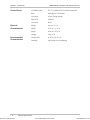
Height
4.4 cm / 1.7 in
Width
43.2 cm / 17.0 in
Depth
26.8 cm / 10.5 in
Weight
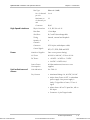
2 kg / 5 lb
Temperature
0–45°C (32–113°F)
Humidity
Up to 90% non-condensing
Technical Specifications
Ph:727-398-5252/Fax:727-397-9610
www.bestdatasource.com
Order from: Cutter Networks
Chapter 2
Installation and Setup
2.1 Introduction
Optimux-XLT1 is delivered completely assembled. It is designed for installation as a
desktop unit or for mounting in a 19-inch rack. For rack installation instructions,
refer to the Rack Mounting Kit for 19-inch Racks guide that comes with the RM kit.
After installing the unit, refer to the Operation chapter for system operating
instructions. In case a problem arises, refer to the Troubleshooting & Diagnostics
chapter for test and diagnostics instructions.
Warning
No settings of switches and jumpers, replacement of cards and cables or other
repairs may be performed by either the operator or the user. Such activities
may be performed only by a skilled technician who is aware of the hazards
involved.
Always observe standard safety precautions during installation, operation, and
maintenance of this product.
2.2 Site Requirements & Prerequisites
AC-powered Optimux-XLT1 units should be installed within 1.5m (5 ft) of an easily
accessible grounded AC outlet capable of furnishing a supply voltage in the range
of 90 to 260 VAC.
DC-powered Optimux-XLT1 units require -36 VDC to -72 VDC or 21.4 VDC to
26.4 VDC power source according to order. Verify that the input voltage at the
end of the power cable is within the above limits
Allow at least 90 cm (36 in) of frontal clearance for operator access. Allow at least
10 cm (4 in) rear clearance for interface cable connections.
When planning the routing of fiber optic cables, avoid sharp bends. The bending
radius should exceed 30 mm (1.2 in).
The ambient operating temperature of Optimux-XLT1 should be 0°C to 45°C
(32°F to 113°F) at a relative humidity of up to 90%, non-condensing.
Site Requirements & Prerequisites
Ph:727-398-5252/Fax:727-397-9610
2-1
www.bestdatasource.com
Optimux-XLT1 Installation and Operation Manual
Chapter 2 Installation and Setup
2.3 Package Contents
A preliminary inspection of the equipment contained in the shipping box should
be made before unpacking. Evidence of damage should be noted and reported
immediately. The Optimux-XLT1 package includes the following items:
•
Optimux-XLT1 unit
•
Optimux-XLT1 Installation and Operation Manual
•
Power cable – 110 or 220 depending on your order
•
Interface adapter cable – High speed modules depending on your order
•
If –48 VDC version is ordered, 48V plug is supplied
•
If 24 VDC version is ordered, 24V plug is supplied.
2.4 Installation and Setup
This section details the functions and positions of the internal switches and
jumpers used to configure the Optimux-XLT1 unit for your particular application.
A common configuration procedure is provided. Then, the configuration options
and the default settings for each module are detailed.
Identifying Optimux-XLT1 Modules
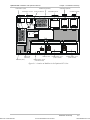
Figure 2-1 and shows the modular construction of the Optimux-XLT1 unit. Use this
figure to identify the modules supplied.
➤
To remove the unit from its case:
1. Unscrew three captive screws on each side of the unit and eight captive screws
on the top.
2. Remove the Optimux-XLT1 top cover.
3. Check that the optional modules ordered are installed in the unit case. Refer
to Table 2-1 and verify the designation of the modules/cards in capital letters.
2-2
Order from: Cutter Networks
Installation and Setup
Ph:727-398-5252/Fax:727-397-9610
www.bestdatasource.com
Optimux-XLT1 Installation and Operation Manual
Order from: Cutter Networks
Chapter 2 Installation and Setup
LINK MODULE B (BACKUP)
POWER SUPPLY B (BACKUP)
POWER SUPPLY A (MAIN)
POWER SUPPLY A FILTER
MANAGEMENT MODULE
PROTECTIVE GROUND
LINK MODULE A (MAIN)
SW1
ON
JP1
SW1
ON
SW2 SW1
SW2 SW1
JP1
J1
J2
J3
J4
J5
J6
J7
J8
J9
J10
J11
ETH-TOP CARD
(FIXED PORT)
MAIN BOARD (GREY)
AGENT-ETH CARD
CHANNEL MODULE - SLOT C
(4T1BAL IS SHOWN)
CHANNEL MODULE - SLOT D
(4T1BAL IS SHOWN)
CHANNEL MODULE - SLOT B
(ETH/10BT IS SHOWN)
Figure 2-1. Location of Modules in the Optimux-XLT1 Case
Installation and Setup
Ph:727-398-5252/Fax:727-397-9610
2-3
www.bestdatasource.com
Optimux-XLT1 Installation and Operation Manual
Chapter 2 Installation and Setup
Table 2-1. List of Optimux-XLT1 Modules
Module
Designation
Fixed/
Location
Optional
Used to provide
Main Board/
OPTI-T1/LAN
Fixed
Optimux-XLT1 unit control functions.
Along the width of
the unit
Fixed Ethernet port (section A on the front panel).
Operation modes of the fixed Ethernet port (see ETH-TOP card).
Ethernet agent functionality (see AGENT-ETH card).
ETH
Fixed/
Optional
Front fixed A
Front slots B, C, D
Ethernet port connection
FETH
Optional
Front slots B, C, D
Fast Ethernet port connection
4 T1 balanced–
4T1 BAL
Optional
Front slots B, C, D
ITU-T G.703 interface for four T1 balanced ports
fiber optic Link–FO Fixed/
Optional
Rear slots LINK A/B Fiber optic interface to the link. A is the main link and B is the
optional backup link.
H.S.
Optional
Front slots B, C, D
V35/RS530/X21 Interface ports
Power supply–
PWR-A
Fixed
On the rear side
Optimux-XLT1 supply voltages
Power supply–
PWR-B
Optional
On the rear side
Power supply redundancy - power consumption sharing or full
consumption in case of power supply A failure.
Setting Internal Jumpers and Switches
Initializing the Unit
Before setting the switches and jumpers, the unit must be initialized.
➤
To initialize the unit after power up:
•
Press the reset switch.
The switch can be reached from the front (see Figure 3-1) with a screwdriver
(to prevent unauthorized personnel from resetting the unit).
The Optimux-XLT1 internal jumpers and switches are located on its board. The
internal jumpers and switches of the modules are located on the board of each
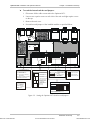
module. Figure 2-2 shows the settings of the Optimux-XLT1 and its modules’
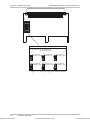
switches and jumpers. Figure 2-3 shows the settings of the high-speed module
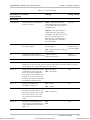
jumpers. The internal settings are listed in Table 2-2.
2-4
Order from: Cutter Networks
Installation and Setup
Ph:727-398-5252/Fax:727-397-9610
www.bestdatasource.com
Optimux-XLT1 Installation and Operation Manual
To reach the internal switches and jumpers:
1. Disconnect all the cables connected to the Optimux-XLT1.
2. Unscrew two captive screws on each side of the unit and eight captive screws
on the top.
3. Remove the unit cover.
4. Set switches and jumpers of the installed modules as specified below.
SW1
ON
JP1
SW2 SW1
SW1
ON
SW2 SW1
JP1
J1
J2
J3
J4
J5
J6
J7
J8
J9
J10
J11
J11 ON OPTI-E1/LAN BOARD AND
ON ETH MODULE
ON - UNIT HAS 2 CONNECTED
POWER SUPPLIES
SW1 ON T1 MODULES: 4T1/BAL
ON - FULL-DUPLEX ETHERNET
ON
OFF - UNIT HAS ONLY 1 CONNECTED
POWER SUPPLY
FACTORY SET ACCORDING TO NUMBER
OF ORDERED POWER SUPPLIES
OFF - HALF-DUPLEX ETHERNET
(FACTORY PRESET)
1
1 2
3
AMI
OFF - T1 CHANNEL ALARMS
ARE DISABLED
FACTORY SETTING: ON
4
B8ZS
LINE CODE SET TO B8ZS
LINE CODE SET TO AMI
FACTORY SETTING: B8ZS
OFF - COMPRESSION IS DISABLED
2
PORT A - MNG-ETH
FROM FRONT
SEPERATE - MNG-ETH
FROM BACK
FACTORY SETTING:
separate
ON - T1 CHANNEL ALARMS ARE
ENABLED
ON
ON - COMPRESSION IS ACTIVATED
(FACTORY PRESET)
ON
ON - ONLY FRAMES DESTINED
FOR ANOTHER LAN ARE
TRANSMITTED OVER WAN
ON
J1 TO J10 ON OPTI-E1/LAN
BOARD
JP1 ON T1 MODULES: 4T1/BAL
SW1 ON ETH-TOP CARD
OFF - ALL FRAMES ARE
TRANSMITTED OVER WAN
(FACTORY PRESET)
3
ON
SW2 ON T1 MODULES: 4T1/BAL
FACTORY PRESET
(DO NOT CHANGE)
4
ON
1 2
3
4
FACTORY PRESET
(SW2-1)
SW2-1 SW2-2
ON
ON
OFF
OFF
OFF
ON
ON
OFF
ON
ON
SW2-3 SW2-4 RANGE
0-133 ft
OFF
ON
133-266 ft
266-399 ft
ON
399-533 ft
ON
533-655 ft
ON
NOT
CONNECTED
Order from: Cutter Networks
➤
Chapter 2 Installation and Setup
DECLARES THE SHAPE AND AMPLITUDE
OF THE T1 TRANSMIT PULSE
Figure 2-2. Setting the Optimux-XLT1 Switches and Jumpers
Installation and Setup
Ph:727-398-5252/Fax:727-397-9610
2-5
www.bestdatasource.com
Optimux-XLT1 Installation and Operation Manual
JP4
JP2
EXT INT LBT EXT INT LBT
JP5
JP1
Chapter 2 Installation and Setup
JP1, JP2, JP4 and JP5 ON HS BOARD
FACTORY SETTING: INT FOR CHANNELS 1 AND 2
JP5
EXT INT LBT EXT INT LBT
JP1
JP5
JP2
JP1
INT TIMING FOR
CHANNELS 3 AND 4
JP5
EXT INT LBT EXT INT LBT
JP5
JP4
EXT TIMING FOR
CHANNELS 3 AND 4
JP4
JP2
JP1
JP2
LBT TIMING FOR
CHANNELS 3 AND 4
EXT TIMING FOR
CHANNELS 1 AND 2
EXT INT LBT EXT INT LBT
JP5
JP4
EXT INT LBT EXT INT LBT
JP1
JP4
JP4
INT TIMING FOR
CHANNELS 1 AND 2
JP5
LBT TIMING FOR
CHANNELS 1 AND 2
JP2
JP1
JP2
EXT INT LBT EXT INT LBT
JP2
EXT INT LBT EXT INT LBT
JP1
INT FOR CHANNELS 3 AND 4
JP4
Figure 2-3. Setting the High Speed Module Jumpers
2-6
Order from: Cutter Networks
Installation and Setup
Ph:727-398-5252/Fax:727-397-9610
www.bestdatasource.com
Optimux-XLT1 Installation and Operation Manual
Chapter 2 Installation and Setup
Table 2-2. Internal Settings
Identification of Function
Internal Setting
Settings
Factory Setting
Main Board
J1 through J10
MNG-ETH port is available from
front or rear panel
Port A – The MNG-ETH port is
Separate
only available from the front panel
in half-duplex only and operates as
an Ethernet port.
Separate – The MNG-ETH port is
available from the rear panel in
half-duplex. The MNG-ETH port on
the front panel operates as an
Ethernet port, is combined into a
fiber optic link and is available in
half or full duplex.
J11
Setting unit to work with one or
two power supplies
ON – When the unit uses two
power supplies.
OFF – When the unit uses only one
power supply.
JP5
To facilitate clock from the T1
Jumper connected
module to the station clock module
Jumper disconnected
To match
numbered order
of power supplies
Jumper
disconnected
ETH–TOP card
SW1
The ETH-TOP card mounted on the main board supports the fixed Ethernet port of the
Optimux-XLT1 unit. A similar switch mounted on the Ethernet module installed in slots B, C
and D supports the optional Ethernet ports (up to three).
Section 1
Determines the transmission mode ON – Full duplex
of the Ethernet ports in slots B, C
OFF – Half duplex
and D, and in the fixed Ethernet
port, either full or half duplex (if J1
through J10 are set to Port A, the
working mode of the fixed Ethernet
port must be half-duplex only).
OFF
Section 2
Enables and disables data
throughput compression
ON – Enable
ON
Determines whether all frames are
transmitted over the WAN or only
those that are destined for another
LAN. If this section is set to OFF,
the software selects the filtering
mode.
ON – Filtered
Not used in the Optimux-XLT1
current version and should be set
to the default position specified in
Figure 2-2.
ON
Section 3
Section 4
Order from: Cutter Networks
OFF – Disable
OFF
OFF – Not filtered
OFF
OFF
Installation and Setup
Ph:727-398-5252/Fax:727-397-9610
2-7
www.bestdatasource.com
Optimux-XLT1 Installation and Operation Manual
Chapter 2 Installation and Setup
Table 2-2. Internal Settings (Cont.)
Identification of Function
Internal Setting
Settings
Factory Setting
ON – Alarms enabled
ON
T1 Channel Modules
SW1
Sections 1–4
On the T1 modules are used to
enable T1 interface alarms to the
Optimux-XLT1 system control
OFF – Alarms disabled
Sections 3–4 are not used in the
2T1/BAL channel modules
SW2
Sections 1–3
On the T1 modules are used to set
the line length equalizer that
determines the shape and
amplitude of the transmit pulse.
ON, ON, OFF – 0–133 ft
ON, ON, OFF
OFF, OFF, ON – 133–266 ft
ON, OFF, ON – 266–399 ft
Sections 4 are not used and always OFF, ON, ON – 399–533 ft
set to OFF.
ON, ON, ON – 533–655 ft
JP1
Determines the line code
implemented by the T1 interface
B8ZS – Line code set to B8ZS
B8ZS
AMI – Line code set to AMI
High Speed Module
JP1, JP2
Select timing mode for channels 1
and 2
LBT – Loopback timing
INT
INT – Internal timing
EXT – External timing
JP4, JP5
Select timing mode for channels 3
and 4
LBT – Loopback timing
INT
INT – Internal timing
EXT – External timing
2-8
Order from: Cutter Networks
Installation and Setup
Ph:727-398-5252/Fax:727-397-9610
www.bestdatasource.com
Optimux-XLT1 Installation and Operation Manual
Chapter 2 Installation and Setup
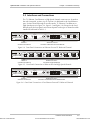
2.5 Interfaces and Connections
The T1, Ethernet, Fast Ethernet or High Speed channel connectors are located on
the unit front panel, sections A to D. Section A is dedicated to the fixed Ethernet
port. Sections (slots) B through D are allocated to T1, Ethernet, Fast Ethernet or
High Speed ports (see Figure 2-4, Figure 2-5 and Figure 2-6). Except for the fixed
Ethernet port, the front panel connections depend on the type of channel module
installed as indicated in Table 2-3.
PWR
A
ETHERNET
SYSTEM
A
FLT
B
TST
LNK
SYNC A B
LOSS
RST AIS
B
C
ETHERNET
OK
OK
ACT
ACT
OP-M
Optimux-XLT1
ETH/10BT
Section A Connection of Fixed Port
D
SYNC
LOSS
AIS
SYNC
LOSS
AIS
OP-M
4T1/BAL
SYNC
LOSS
AIS
OP-M
2T1/BAL
Sections B, C and D Connection of Ethernet Port and E1 Balanced
Figure 2-4. Front Panel Connections of Ethernet Port and T1 Balanced Channels
PWR
A
ETHERNET
SYSTEM
A
FLT
B
TST
LNK
SYNC A B
LOSS
RST AIS
B
OK
ACT
D
3
1
3
1
2
4
2
4
2
DCE
V.35
OP-M
Optimux-XLT1
C
1
4HSx2M
Section A Connection of Fixed Port
OP-M
DCE
V.35
4HSx2M
3
4
DCE
V.35
OP-M
4HSx2M
Sections B, C and D Connection of High Speed Ports
Figure 2-5. Front Panel Connections of Ethernet Port and High Speed Channels
PWR
A
ETHERNET
SYSTEM
A
FLT
B
TST
Order from: Cutter Networks
LNK
SYNC A B
LOSS
RST AIS
Optimux-XLT1
B
C
ETHERNET
100M
OK
ACT
OP-M
Section A Connection of Fixed Port
ACT
LINK
ETH-10/100BT
SYNC
LOSS
AIS
OP-M
D
SYNC
LOSS
AIS
4T1/BAL
SYNC
LOSS
AIS
OP-M
2T1/BAL
Sections B, C and D Connection of Fast Ethernet and E1 Balanced Ports
Figure 2-6. Front Panel Connections of Fast Ethernet Port and T1 Balanced Channels
Interfaces and Connections
Ph:727-398-5252/Fax:727-397-9610
2-9
www.bestdatasource.com
Optimux-XLT1 Installation and Operation Manual
Chapter 2 Installation and Setup
ELECTRICAL SHOCK HAZARD: Access to the inside of the equipment is
permitted only to qualified and authorized service personnel.
Before disconnecting the unit from its cables, verify that the remote unit is
turned OFF. Disconnect the unit from the power line and from all the cables
before removing the cover.
Warning
Dangerous high voltages are present inside the Optimux-XLT1 when it is
connected to power. Moreover, under external fault conditions, dangerous
high voltages may appear on the lines connected to the Optimux-XLT1.
Capacitors inside the instruments may still be charged even after the unit has
been disconnected from the supply source.
Any setting, or repair of the open unit under voltage should be avoided as
much as possible and, when inevitable, would be carried out only by a skilled
technician who is aware of the hazard involved.
Caution The Optimux-XLT1 contains components sensitive to electrostatic discharge (ESD).
To prevent ESD damage, avoid touching the internal components. Before moving
jumpers, touch the Optimux-XLT1 frame.
Table 2-3. Connectors
Section
Channel Module Connector
Used to connect
A
None
RJ-45
The fixed Ethernet port to a LAN
B, C, D
ETH/10BaseT
RJ-45
Up to three additional Ethernet ports to LANs
B, C, D
FETH/10/100BaseT RJ-45
Up to three additional Ethernet ports to LANs
B, C, D
4T1/BAL
RJ-45x4
Four T1 balanced channels
B, C, D
2T1/BAL
RJ-45x2
Two T1 balanced channels
B, C, D
4 HS
SCSI 26-pin
Four DTE channels
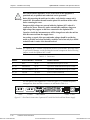
The rear panel of the Optimux-XLT1 unit (see Figure 2-7), contains the power,
management, alarm and link connectors as indicated in Table 2-4.
LINK A (MAIN)
POWER B
LINK B (BACKUP)
CONTROL/MNG
OK
RX
TX
OK
RX
CAUTION:
FOR C ON TIN U ED
PR OTE C TION A GAIN S T R IS K OF
FI RE , RE PLA CE O N LY W I TH SA ME
TY PE A ND R ATI NG
O F FU SE.
POWER A
--
O
O
TX
0
OK
ALARMS
MAIN LINK
VDC-IN
--
BACKUP LINK
-48
MNG-ETH
ALARMS MANAGEMENT
DC POWER
AC POWER
Figure 2-7. Rear Panel Connections Optimux-XLT1 with Dual Link and Dual Power Supply
2-10
Order from: Cutter Networks
Interfaces and Connections
Ph:727-398-5252/Fax:727-397-9610
www.bestdatasource.com
Optimux-XLT1 Installation and Operation Manual
Chapter 2 Installation and Setup
Table 2-4. Management, Alarm and Link Connectors
Connector
Type
Used to connect
POWER B
Standard 3-pin plug
Redundant power source (DC or AC plug), when the
redundant power supply option is selected
POWER A
Standard 3-prong plug
Main power source (DC or AC plug)
CONTROL/MNG
25-pin D-type female
RS-232 ASCII terminal
MNG-ETH
RJ-45
MNG-ETH entrance
ALARMS
9-pin D-type female
Optimux-XLT1 dry contacts of two alarm relays
(major and minor) to a remote monitoring site
LINK A, TX/RX
ST, SC or FC/PC
Main fiber-optic link
LINK B, TX/RX
ST, SC or FC/PC
Redundant (backup) fiber-optic link
For the pin assignment of the connectors, refer to the Interface Specification
appendix.
Channel Connections
The Optimux-XLT1 has four groups of interface ports designated A to D on the
front panel of the unit.
Channel A is a fixed 10BaseT Ethernet port with an RJ-45 connector. The other
groups of interface ports should be prepared according to the ordered channel
modules (see the Channel Module Options table). Any combination of 10BaseT
Ethernet, T1 balanced, Fast Ethernet and High Speed modules can be installed in
Optimux-XLT1 slots B to D (see Figure 2-1). A vacant slot should be closed up
using a blank panel.
For T1 lines, the maximum allowable line length between the T1 ports and the
user's equipment is 655 ft (200m) according to ANSI T1.102. The cable type and
length should be selected accordingly. The length of a standard UTP cable to a
10BaseT Ethernet or 10/100BaseT station is 100 meters (330 ft).
The Interface Specification appendix provides the pin allocation for all the
connectors.
Connect the channel cables to connectors corresponding to the interface in use
(see Figure 2-4, Figure 2-5 and Figure 2-6) as indicated in Table 2-5.
Table 2-5. Cable to Interface Connections
Interface
Connector Type
Note
G.703 balanced
RJ-45
Channel numbers 1 to 4 for the 4T1/BAL modules, 1
and 2 for the 2T1/BAL module
Ethernet, Fast Ethernet
RJ-45
Physical connection
HS
SCSI 26-pin
To achieve the desired connector type, use the
supplied adapter cable
Order from: Cutter Networks
Interfaces and Connections
Ph:727-398-5252/Fax:727-397-9610
2-11
www.bestdatasource.com
Optimux-XLT1 Installation and Operation Manual
Chapter 2 Installation and Setup
Fiber Optic Link Connections
Laser
Warning
Eye damage may be caused by a broken or non-terminated fiber-optic or
connector if the laser beam is viewed directly or with improper optical
instruments.
One or two (main and backup) link interfaces are provided according to order.
The fiber optic interfaces can be of optical type only.
In normal operation a module must be installed in the main link.
For the properties and specifications of the optical link interfaces, refer to the Fiber
Optic Interface Options table.
When working with WDM modules, the two types SF1 and SF2 must work one
opposite the other. SF1 does not work opposite SF1 and SF2 does not work
opposite SF2.
Note
While link redundancy is OFF, it is recommended not to install the backup link so
as not to receive a major alarm indication (while the backup link is in sync loss).
Connect each fiber optic link interface (main and backup), in accordance with the
type of interface installed for that link as indicated in Table 2-6.
Table 2-6. Fiber Optic Link Connections
Interface
Connector Type
Note
Optical
ST, SC or FC/PC
Avoid sharp bends of the optical cables. The minimum bending
radius should be 30 mm (1.2 in).
Cleanliness of the optical connectors: use an approved solvent, and
dry thoroughly using optical tissue.
Connection of the receive cable to the optical connector designated
RX and the transmit cable to the optical connector designated TX.
Alarm Connection
The alarm cable is terminated with a 9-pin D-type male connector on the unit
side. The maximum rating of the alarm relay contacts for planning the monitoring
means and cabling is 1 Amp, 60 VDC and 30 VAC.
The dry contacts of the Optimux-XLT1 alarm relays (major and minor) are
connected to a remote monitoring site via the rear panel ALARM connector (see
Figure 2-7).
2-12
Order from: Cutter Networks
Interfaces and Connections
Ph:727-398-5252/Fax:727-397-9610
www.bestdatasource.com
Optimux-XLT1 Installation and Operation Manual
Chapter 2 Installation and Setup
Management Connections
The Optimux-XLT1 can be managed via:
•
V.24/RS-232 terminal. The connection cable to the V.24/RS-232 interface on
the unit’s rear panel should be terminated with a 25-pin D-type male connector.
The nominal length of the cable for a data rate of 19.2 kbps is 16m (50 ft).
•
Ethernet port. The connection cable to the MNG-ETH interface on the unit’s
front and rear panels should be terminated with an RJ-45 connector.
Connect the management cable to the required management port. The options
available are indicated in Table 2-7.
Table 2-7. Management Port Options
Interface
Connector Type
Note maximum cable length
RS-232
25-pin D-type
16m (50 ft) for a 19.2 kbps data rate
Ethernet, Port A
RJ-45
100m for a UTP cable, type 3
MNG-ETH
RJ-45
100m for a UTP cable, type 3
Power Connection
Order from: Cutter Networks
The Optimux-XLT1 chassis ground is connected to the protective ground (middle)
pin of the power connectors, both for the AC and DC versions of the unit.
Intentional disconnection of the protective ground is prohibited since such an
action may expose personnel to electrical shock hazards.
Warning
Before switching on or connecting any cable, the protective ground terminal
(see Figure 2-1) must be connected to the protective ground connector of the
power cord. The power plug shall only be inserted in a socket outlet provided
with a protective ground contact. The protective action must not be negated by
use of an extension cord (power cable) without a protective conductor
(grounding).
For AC or DC power connections, refer to Site Requirements & Prerequisites on
page 2-1.
Interfaces and Connections
Ph:727-398-5252/Fax:727-397-9610
2-13
www.bestdatasource.com
Chapter 2 Installation and Setup
2-14
Order from: Cutter Networks
Optimux-XLT1 Installation and Operation Manual
Interfaces and Connections
Ph:727-398-5252/Fax:727-397-9610
www.bestdatasource.com
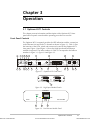
Chapter 3
Operation
3.1 Optimux-XLT1 Controls
This chapter presents information and description of the Optimux-XLT1 front
panel and rear panel controls and the operating procedure for turn ON.
Front Panel Controls
Order from: Cutter Networks
The Optimux-XLT1 front panel provides the LED indications and the connections
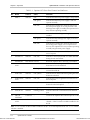
to the Ethernet LAN and to the T1 channels as shown in Figure 3-1. Table 3-1lists
the functions of the LEDs, switch and connectors located on the Optimux-XLT1
front panel. Figure 3-2and Figure 3-3 show the High Speed and Fast Ethernet
modules front panel. The index numbers in Table 3-1correspond to the balloon
numbers in Figure 3-1, Figure 3-2and Figure 3-3.
1
4
5
6
10
8
10
B
A
PWR
A
B
SYSTEM
LNK
SYNC A B
FLT
LOSS
TST RST AIS
ETHERNET
OK
OK
ACT
OP-M
2
3
7
9
11
12
11
13
D
C
ETHERNET
ACT
Optimux-XLT1
13
13
ETH/10BT
12
SYNC
LOSS
AIS
SYNC
LOSS
AIS
SYNC
LOSS
AIS
OP-M
4T1/BAL
14
OP-M
14
15
2T1/BAL
15
14
15
Figure 3-1. Optimux-XLT1 Front Panel
1
3
2
4
DCE
V.35
OP-M
4HSx1.5M
16
Figure 3-2. High Speed Module Panels
ETHERNET
100M
ACT
LINK
OP-M
ETH-10/100BT
17
11
18
Figure 3-3. Fast Ethernet Module Panel
Optimux-XLT1 Controls
Ph:727-398-5252/Fax:727-397-9610
3-1
www.bestdatasource.com
Optimux-XLT1 Installation and Operation Manual
Chapter 3 Operation
Table 3-1. Optimux-XLT1 Front Panel Controls and Indicators
No.
Name
Control
State
Function
1
PWR A
Indicator
OFF
Indicates that the main power supply is not powered
ON (green)
Indicates that the main power supply is ON and
operates normally
ON (red)
Indicates that a malfunction has been detected in
the main power supply or it is not powered. If the
backup power supply is installed, the Optimux-XLT1
may continue operating normally.
OFF
Indicates that the backup power supply is not
installed
ON (green)
Indicates that the backup power supply is ON and
operates normally
ON (red)
Indicates that a malfunction has been detected in
the backup power supply or it is not powered. In
this case, the Optimux XLT1 may continue operating
normally using the main power supply.
2
PWR B
Indicator
3
SYSTEM TST
Indicator
ON (yellow)
Indicates that the system is on TEST, turn ON self
test or loop test.
4
SYSTEM FLT
Indicator
ON (red)
Indicates a control system fault or a failure detected
during the turn ON self test.
5
SYSTEM RST
Push-button Pressed
Resets the Optimux-XLT1 unit using a screwdriver
6
LINK A SYNC
LOSS
Indicator
ON (red)
Indicates that a loss-of-signal or loss-of-frame has
been detected on the main link.
Flashing (red)
Indicates that the link is not active (the signal is
received from link B)
7
LINK A AIS
Indicator
ON (yellow)
Indicates that an alarm indication signaling has been
detected on the link
8
LINK B SYNC
LOSS
Indicator
ON (red)
Indicates that a loss-of-signal has been detected on
the backup link
9
LINK B AIS
Indicator
ON (yellow)
Indicates that an alarm indication signaling has been
detected on the backup link
10
A/B/C/D OK
Indicator
ON (green)
Indicates link integrity on the Ethernet port
11
A/B/C/D ACT
Indicator
Flashing (yellow)
Indicates LAN traffic on the Ethernet/Fast Ethernet
port
12
A/B/C/D
ETHERNET
Connector
–
Connects the Optimux-XLT1 Ethernet port to a LAN
13
B/C/D SYNC
LOSS i
Indicator
ON (red)
Indicates that a loss-of-signal has been detected on
channel i of the T1 interface module installed in slot
B/C/D.
Note: i is 1 to 4 for the 4T1/BAL module installed in slot B, C or D of the Optimux-XLT1 unit. i is 1 or 2 when
2T1/BAL is installed.
3-2
Order from: Cutter Networks
Optimux-XLT1 Controls
Ph:727-398-5252/Fax:727-397-9610
www.bestdatasource.com
Optimux-XLT1 Installation and Operation Manual
Chapter 3 Operation
Table 3-1. Optimux-XLT1 Front Panel Controls and Indicators (Cont.)
No.
Name
Control
State
Function
14
B/C/D AIS i
Indicator
ON (yellow)
Indicates that an alarm indication signaling has been
detected on T1 port i
15
B/C/D i
Connector
–
Connects T1 port i of the T1 module installed in slot
B/C/D to the T1 network
16
B/C/D i
Connector
–
Connects HS DTE to the module installed in slot B,
C or D
17
B/C/D 100M
Indicator
ON (green)
Indicates speed of 100 Mbps on the Fast Ethernet
port
18
B/C/D LINK
Indicator
ON (green)
Indicates link integrity on the Fast Ethernet port
Rear Panel Controls
Order from: Cutter Networks
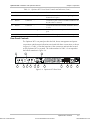
The Optimux-XLT1 rear panel provides the link, alarm, management and power
connections and the status indications associated with these connections as shown
in Figure 3-4. Table 3-2 lists the functions of the connectors and switches located
on the Optimux-XLT1 rear panel. The index numbers in Table 3-2 correspond to
the balloon numbers in Figure 3-4.
4
10
LINK A (MAIN)
POWER B
LINK B (BACKUP)
CONTROL/MNG
OK
RX
OK
TX
RX
OK
3
5
CAUTION:
FOR C ON TIN U ED
PR OTE C TION A GAI NS T RI SK OF
FI RE , RE PLA CE ON LY W I TH S AME
TY PE A N D RAT IN G
O F FU SE .
6
7
8
POWER A
--
O
O
TX
ALARMS
2
VDC-IN
--
0
1.6A T 250V
100-230VAC
1
-48
MNG-ETH
9
11
12
13
14
Figure 3-4. Optimux-XLT1 Rear Panel
Optimux-XLT1 Controls
Ph:727-398-5252/Fax:727-397-9610
3-3
www.bestdatasource.com
Optimux-XLT1 Installation and Operation Manual
Chapter 3 Operation
Table 3-2. Optimux-XLT1 Rear Panel Controls
No.
Name
Control
State
Function
1
LINK A OK
Indicator
ON (green)
Indicates that the received signal from link A is
detected
2
LINK A (MAIN) Connector
RX
–
Connects the input cable of the main link to the
main link module
3
LINK A (MAIN) Connector
TX
–
Connects the output cable of the main link to the
main link module
4
LINK B OK
Indicator
ON (green)
Indicates that the received signal from link B is
detected
5
LINK B
(BACKUP) RX
Connector
–
Connects the input cable of the backup link to the
backup link module Station Clock Module: Input
2.048 MHz signal
6
LINK B
(BACKUP) TX
Connector
–
Connects the output cable of the backup link to the
backup link module Station Clock Module: Output
2.048 MHz signal
7
ALARMS
Connector
–
Connects the dry contacts of the major and minor
alarm relays to a remote monitoring site
8
MNG-ETH OK Indicator
ON (green)
Indicates link integrity on the Ethernet port
9
MNG-ETH
Connector
–
Connects the Ethernet port to the Management port
10
CONTROL /
MNG
Connector
–
Connects the V.24/RS-232 management port to an
ASCII terminal
11
POWER B
Switch
0
Turns OFF the backup power supply. The OptimuxXLT1 is powered by the main power supply only.
1
Turns ON the Optimux-XLT1 backup power supply;
when set to this position, the switch lights in red.
12
POWER B
Connector
–
Connects the Optimux-XLT1 to the AC mains or to
the backup DC power source
13
POWER A
Connector
–
Connects the Optimux-XLT1 to the AC mains or to
the main DC power source
14
POWER A
Switch
0
Turns OFF the main power supply. The OptimuxXLT1 is powered by the backup power supply only.
1
Turns ON the Optimux-XLT1 main power supply ;
when set to this position, the switch lights in red.
3-4
Order from: Cutter Networks
Optimux-XLT1 Controls
Ph:727-398-5252/Fax:727-397-9610
www.bestdatasource.com
Optimux-XLT1 Installation and Operation Manual
Chapter 3 Operation
3.2 Operating Instructions
Turn ON
➤
To turn ON a unit with a single power supply module:
Set POWER A switch to ON.
The PWR A indicator on the front panel must light in green.
➤
To turn ON a unit with two power supply modules:
1. Set at least one of the two rear POWER switches to ON.
2. To achieve power supply redundancy, turn ON both POWER switches.
3. The PWR A and PWR B indicator(s) on the front panel must light in green
indicating that the power consumption of the unit is shared between the two
supplies.
Note
For the first operation and before synchronization of two units, declare the link
redundancy in the same configuration for both units. In addition, declare the timing
for both units in a valid configuration (i.e. not both units on Loop Back Timing – LBT).
Normal Indications
Order from: Cutter Networks
During normal operation, the LED indications shown in Table 3-3 should appear:
Table 3-3. LED Indications
LED
State
Indicates
PWR
ON, green
Power supplies of the OPTIMUX-XLT1 unit active
FLT
OFF
Self test passes
TST
OFF
No diagnostic test is performed
OK
ON, green
Link integrity of the Ethernet ports
ACT
Flashing, yellow
Ethernet port traffic
SYNC LOSS OFF
No loss of receive signal on T1 ports
AIS
No AIS received on T1 ports
OFF
Operating Instructions
Ph:727-398-5252/Fax:727-397-9610
3-5
www.bestdatasource.com
Optimux-XLT1 Installation and Operation Manual
Chapter 3 Operation
Redundancy Functions
The redundant power supply and the redundant link module ensure the
Optimux-XLT1 operation even when one of these critical modules fails.
Link Redundancy
When the redundant link is installed (backup module and link A) and the linkredundancy is set to AUTOMATIC from the terminal or SNMP, the Optimux-XLT1
starts using the main link. It will automatically switch to the backup link when the
main link fails (signal loss/sync loss). The LINK A/B SYNC LOSS LED on the front
panel indicates the deactivated link. If the failure is due to signal loss, the
Optimux-XLT1 will switch back to the main link, when the signal is recovered in
the main link. If the failure is due to sync loss, the backup link becomes the active
link until signal loss/sync loss occurs on the backup link.
When the redundant link is installed and the management link-redundancy is
MANUAL, the Optimux-XLT1 starts using the main link. It will automatically switch
to the backup link when the main link fails (signal loss/sync loss). The LINK A/B
SYNC LOSS LED on the front panel indicates the deactivated link. The backup link
remains active even when the main link recovers. Switching back to the main link
is performed by setting the link-redundancy to AUTOMATIC from the terminal or
by turning the system OFF and then ON.
When the management link-redundancy is OFF, the redundancy function is not
available.
Power Supply Redundancy
In the redundant power supply mode, both supplies share the Optimux-XLT1
power consumption. If one of the power supply modules fails, the entire power
consumption of the unit is automatically drawn from a single power supply. In this
case, the respective PWR LED on the front panel indicates the active power
supply.
Note
All changes made to the terminal or SNMP in link redundancy mode at the local site
automatically affect the remote site.
Turn OFF
Set the Optimux-XLT1 rear power switch (switches) to OFF.
3-6
Order from: Cutter Networks
Operating Instructions
Ph:727-398-5252/Fax:727-397-9610
www.bestdatasource.com
Order from: Cutter Networks
Chapter 4
Supervisory Port Software
Configuration
4.1 Introduction
The Optimux-XLT1 parameters can be configured from a supervisory terminal
connected to the unit's CONTROL/MNG connector. Remote management is also
possible using the Telnet communication protocol through the unit’s MNG-ETH
connector.
Note
All the example screens shown in this chapter are for different hardware/software
situations that are available.
4.2 Accessing and Exiting the Supervisory Terminal
➤
To access the supervisory terminal for configuration:
1. Connect an ASCII ANSI terminal, or a PC capable of emulating an ASCII ANSI
terminal, to the 25-pin CONTROL/MNG connector on the rear panel of the
Optimux-XLT1 (for the cable wiring diagram, refer to the Control Cable Wiring
figure).
2. Set the terminal communication parameters to: 19,200 baud, 8 bits/character,
one stop bit and no parity bit.
Optimux-XLT1 automatically detects and adapts itself to terminal baud rates of
9600, 19200, 38400, 57600 and 115200 bps only.
3. Turn the unit on and immediately press <Enter> four or more times. If the
correct baud rate was detected, dots will start to appear correctly on the
terminal screen.
4. Press the dot <.> key once to set the parity and to complete the detection.
This baud setting will be saved in non-volatile RAM.
If the auto-detection fails, the baud rate of the Optimux-XLT1 management
port is the last baud rate that was written in the non-volatile RAM.
5. If a PC is used, run a terminal emulation program.
6. Reset the Optimux-XLT1 or turn it ON.
The Optimux-XLT1 Main Menu appears.
Accessing and Exiting the Supervisory Terminal
Ph:727-398-5252/Fax:727-397-9610
4-1
www.bestdatasource.com
Chapter 4 Supervisory Port Software Configuration
Optimux-XLT1 Installation and Operation Manual
MAIN MENU
RAD Data Communications Ltd.
OPTIMUX - XLT1
*****************************************
SW version 4.0
HW Revision H
1.
Local device
2.
Remote device
Enter your choice:
7. Type 1 for the Local Device menu or 2 for the Remote Device menu.
The Optimux-XLT1 Local Device or Remote Device screen appears.
Note
All the following screens for the Local Device and the Remote Device are the same,
except Download, SNMP and parts of the interface configuration screens, which are
not available for the Remote Device.
The top left corner of each screen indicates the screen that applies to a Local
Device or a Remote Device.
When working with the remote device, all changes take affect within 120 seconds.
LOCAL DEVICE
LOCAL OPTIMUX MENU
------------------
0.
Exit
1.
Device Information
2.
Interface
3.
Software Download (not available in Telnet)
4.
SNMP Parameters
5.
Reset
6.
Change password
Enter your choice:
➤
To exit the supervisory terminal:
Type 0 or press ESC in any menu screen and in any subsequent screen that may
appear.
4-2
Order from: Cutter Networks
Accessing and Exiting the Supervisory Terminal
Ph:727-398-5252/Fax:727-397-9610
www.bestdatasource.com
Optimux-XLT1 Installation and Operation Manual
Order from: Cutter Networks
Chapter 4 Supervisory Port Software Configuration
4.3 Changing Parameter Settings
The configurable parameters can be changed using a series of menus and
submenus (see Figure 4-1).
MAIN MENU
0. EXIT
1. DEVICE INFORMATION
3. CHANGE LINK REDUNDANCY SETUP
4. CHANGE CLOCK SOURCE
2. INTERFACE
3. CHANGE INTERFACE CONFIGURATION
4. SERIAL PORT CONFIGURATION
5. SET CONFIGURATION TO DEFAULT
3. SOFTWARE DOWNLOAD
6. HARDWARE SETTING
4. SNMP PARAMETERS
3. PERMANENT MANAGERS
5. RESET
6. CHANGE PASSWORD
Figure 4-1. Software Configuration Menu Map
➤
To set a parameter in a menu:
1. Type the number of the parameter to be changed.
2. Enter the new parameter value according to the prompt message appearing on
the screen.
3. If you wish to leave the current value, press ESC.
4. To exit to the previous screen, type 0 in any screen.
Each configuration screen contains the following parameter information: name,
current value and when the option is selected, the applicable value(s).
Changing Parameter Settings
Ph:727-398-5252/Fax:727-397-9610
4-3
www.bestdatasource.com
Optimux-XLT1 Installation and Operation Manual
Chapter 4 Supervisory Port Software Configuration
4.4 The Optimux-XLT1 Device Information
➤
To access the device information:
Type 1 in the Optimux-XLT1 Local Device screen.
The Device Information Menu screen appears.
LOCAL DEVICE
DEVICE INFORMATION MENU
-----------------------
0.
Exit
1.
General Information
2.
Status
3.
Change Link Redundancy Status
4.
Change Clock Source
Enter your choice:
Viewing the Optimux-XLT1 Versions
➤
To view the hardware and software revisions:
Type 1 in the Device Information Menu.
The General Information screen appears.
LOCAL DEVICE
GENERAL INFORMATION
-------------------
Hardware revision
H
Software version
SW Version 4.0
Management channel
Through module A
0. Exit
Enter your choice:
The Management channel shows one of the following states:
4-4
Order from: Cutter Networks
Through module A
indicates MNG-ETH port is set to Port A.
Separate port (back panel)
indicates MNG-ETH port is set to Separate.
The Optimux-XLT1 Device Information
Ph:727-398-5252/Fax:727-397-9610
www.bestdatasource.com
Optimux-XLT1 Installation and Operation Manual
Chapter 4 Supervisory Port Software Configuration
Viewing the Optimux-XLT1 Component Status
➤
To view the status of the functional blocks:
Type 2 in the Device Information Menu screen.
The Status Information screen appears.
LOCAL DEVICE
Order from: Cutter Networks
STATUS INFORMATION
------------------
Power supply 1
FAULT
Power supply 2
OK
Active Link
MAIN
Link Redundancy
MANUAL
Clock Source
INTERNAL
0. Exit
Enter your choice:
The applicable states for power supplies are indicated in Table 4-1.
Table 4-1. Power Supply States
State
Indicates
Not present
Power supply is not mounted. This indication applies only
to power supply # 2 (backup)
OK
Power supply is ON and functions properly
FAULT
Power supply failure was detected
The Optimux-XLT1 Device Information
Ph:727-398-5252/Fax:727-397-9610
4-5
www.bestdatasource.com
Optimux-XLT1 Installation and Operation Manual
Chapter 4 Supervisory Port Software Configuration
Setting Link-Redundancy
➤
To change the link-redundancy setting:
1. Type 3 in the Device Information Menu screen.
The Change Link Redundancy screen appears.
LOCAL DEVICE
CHANGE LINK REDUNDANCY
----------------------
0.
Exit.
1.
Redundancy status
AVAILABLE
2.
Redundancy setup
MANUAL
Enter your choice:
2. Type 2 to enter the redundancy setup.
3. Type 1 for AUTOMATIC, 2 for MANUAL, 3 for OFF, or press ESC to cancel
your choice.
4. To exit to the screen, type 0.
Notes
4-6
Order from: Cutter Networks
1. Redundancy status is not available for changes, but you can change
Redundancy status even if the status is "NOT AVAILABLE". (And in that case your
change will take place once the status "AVAILABLE").
2. When in normal operation, the link redundancy setting must be changed only
after the system has been operating and synchronized for 120 sec on the same
link.
3. Changes to the link redundancy mode take affect up to 120 seconds after being
made.
4. Before synchronizing two Optimux-XLT1 units, the link redundancy mode of
both units must be the same.
The Optimux-XLT1 Device Information
Ph:727-398-5252/Fax:727-397-9610
www.bestdatasource.com
Optimux-XLT1 Installation and Operation Manual
Chapter 4 Supervisory Port Software Configuration
Changing the Clock Source
➤
To change the clock source:
Type 4 in the Device Information Menu screen.
The Clock screen appears.
LOCAL DEVICE
Order from: Cutter Networks
CLOCK
-----
0.
Exit
1.
Change clock source: INTERNAL
2.
Reset to default configuration
Enter your choice:
➤
To view and change the clock source:
1. Type 1 to enter the change clock source option.
2. Type 1 for LoopBackTiming (RCV clk), 2 for Internal (INT clk), or 0 to cancel
your choice.
➤
To reset to the default clock configuration (INT):
1. Type 2 to perform the reset to default configuration option.
2. Confirm the action.
3. Type 0 to exit the Clock screen.
Note
Option 1 (view and change the clock source) is not available in Hardware Version A.
Loop back timing is not available at the Remote Device and at the Local Device at
the same time.
The Optimux-XLT1 Device Information
Ph:727-398-5252/Fax:727-397-9610
4-7
www.bestdatasource.com
Chapter 4 Supervisory Port Software Configuration
Optimux-XLT1 Installation and Operation Manual
4.5 The Optimux-XLT1 Interface
➤
To view the interface information:
Type 2 in the Optimux-XLT1 Local Device screen.
The Interface Menu screen appears.
LOCAL DEVICE
INTERFACE MENU
-------------0.
1.
2.
3.
4.
5.
6.
Exit
Line Status
Monitor Interface Configuration
Change Interface Configuration
Serial Port Configuration
Set Configuration to Default
Hardware Setting
7.
Interface Status
Enter your choice:
Viewing Status of Transmission Interfaces
➤
To view the status of the T1, Ethernet, HS, FETH and Fiber Optic interfaces:
Type 1 in the Interface Menu screen.
The Line Status screen appears.
LOCAL DEVICE
LINE STATUS
--------------------------------------------------------------------------------------| Port
| Module A
| Module B | Module C | Module D | FO link
|
| number | ETHERNET
| NO_MODULE | NO_MODULE | NO_MODULE | F/O-F/O
|
----------------------------------------------------------------------------|
1
| Signal loss | No port
| No port
| No port
|Signal loss |
----------------------------------------------------------------------------|
2
| No port
| No port
| No port
| No port
|Signal loss |
----------------------------------------------------------------------------|
3
| No port
| No port
| No port
| No port
|
----------------------------------------------------------------------------|
4
| No port
| No port
| No port
| No port
|
----------------------------------------------------------------------------0.Exit
Enter your choice:
4-8
Order from: Cutter Networks
The Optimux-XLT1 Interface
Ph:727-398-5252/Fax:727-397-9610
www.bestdatasource.com
Optimux-XLT1 Installation and Operation Manual
Chapter 4 Supervisory Port Software Configuration
The interface ports are characterized by the states indicated in Table 4-2.
Table 4-2. Interface Ports
State
Indicates
No port
The interface module associated with the specific port is not installed or the port number is
irrelevant for a certain type of interface module. For example, only a single port is
associated with an Ethernet interface module.
O.K.
The signal is detected at the input of an T1 or fiber optic port or, for an Ethernet port, link
integrity pulse is detected on the receive pair.
Signal Loss
No signal is detected at the input of an T1 or fiber optic port or, for an Ethernet port, link
integrity pulse is not detected on the receive pair.
AIS
An Alarm Indication Signal was detected at the input of an T1 port or on the fiber optic link.
NA
Not relevant
The first row in the screen table specifies the type of module installed in the
Optimux-XLT1 slot. For example, 4T1_UTP in slot B specifies a 4-port balanced T1
module.
For the HS interface, the state is always characterized as NA.
Viewing Configuration of Monitor Interface
➤
To view the configuration of the monitor interface:
Type 2 in the Interface Menu screen.
The Monitor Interface Configuration screen appears.
LOCAL DEVICE
MONITOR INTERFACE CONFIGURATION
----------------------------------------------------------------------------------------------------------| Port
| Module A | Module B | Module C | Module D | FO link
|
| number | ETHERNET | NO_MODULE | NO_MODULE | NO_MODULE | F/O-F/O
|
----------------------------------------------------------------------------|
1
| Filter en | No port
| No port
| No port
| No loop
|
----------------------------------------------------------------------------|
2
| No port
| No port
| No port
| No port
| No loop
|
----------------------------------------------------------------------------|
3
| No port
| No port
| No port
| No port
|
----------------------------------------------------------------------------|
4
| No port
| No port
| No port
| No port
|
----------------------------------------------------------------------------0.Exit
Enter your choice:
Order from: Cutter Networks
The Optimux-XLT1 Interface
Ph:727-398-5252/Fax:727-397-9610
4-9
www.bestdatasource.com
Chapter 4 Supervisory Port Software Configuration
Optimux-XLT1 Installation and Operation Manual
The tributaries and fiber optic settings can be set from the terminal (see Changing
the Configuration of the Interface on page 4-10). The applicable tributaries and
fiber optic interface states are indicated in Table 4-3.
Table 4-3. T1 and Fiber Optic Interface States
State
Indicates
No loop
No loop is set
Local loop
A local loop is set. An T1 local loop applies to all ports of an T1 module (see
Troubleshooting Instructions on page 5-3 for details)
Remote loop
A remote loop is set. A T1 remote loop applies to a single port of a T1 module (see
Troubleshooting Instructions on page 5-3 for details). Remote loop on fiber optic link is
not available.
The Ethernet port is set from a DIP switch. The applicable settings are:
Table 4-4. Ethernet Setting
Setting
Indicates
Half duplex
Ethernet port operates in half duplex
Full duplex
Ethernet port operates in full duplex
Changing the Configuration of the Interface
➤
To change the configuration of the monitor interface:
4. Type 3 in the Interface Menu screen.
The Change Interface Configuration screen appears.
LOCAL DEVICE
CHANGE INTERFACE CONFIGURATION
-----------------------------NOTE:
To change the configuration of the interface, select it
in the next format:
- decimal number from 1 to 5 for modules,
(1 for module A, 2 for module B,..., 5 for E3 link)
- decimal number from 1 to 4 for ports
- for E3 link port=1 selects main link, port=2 selects backup link.
0.
Exit
1.
Module
module A
2.
Port
port 1
3.
Test Configuration
Filter enabled
Enter your choice:
4-10
Order from: Cutter Networks
The Optimux-XLT1 Interface
Ph:727-398-5252/Fax:727-397-9610
www.bestdatasource.com
Optimux-XLT1 Installation and Operation Manual
Chapter 4 Supervisory Port Software Configuration
5. Type 1 to change a module.
6. Type 1 for module A, 2 for module B, 3 for module C, 4 for module D, or 5
for an E3 link.
7. Type 2 to change ports
8. Type 1 for port 1, 2 for port 2, 3 for port 3, or 4 for port 4.
For the E3 link, port 1 selects the main link; port 2 selects the backup link.
For an Ethernet module:
9. Type 3
10. Set the test configuration to filter enabled or disabled. This change takes
effect only if switch SW1-3 on the ETH-TOP card or the ETH module is set to
OFF. If the switch is set to ON, the status of the interface remains filter
enabled regardless of changes made by the supervisory software.
For a Fast Ethernet module:
11. Type 1 to change a module.
12. Set the module slot to correspond to the slot of the Fast Ethernet module by
typing 1 for module slot A, 2 for module slot B, 3 for module slot C, 4 for
module slot D or 5 for E3 link.
The Change Interface Configuration screen changes and appears as
follows:
LOCAL DEVICE
CHANGE INTERFACE CONFIGURATION
-----------------------------NOTE:
To change the configuration of the interface, select it
in the next format:
-
decimal number from 1 to 5 for modules,
(1 for module A, 2 for module B,..., 5 for E3 link)
0.
Exit
1.
Module
module B
2.
Back Pressure
Disable
3.
Half/Full duplex
N/A
4.
Auto-negotiation
Enable
5.
Multicast blocking
Disable
6.
Broadcast blocking
Disable
7.
Speed
N/A
8.
Reset
Enter your choice:
Order from: Cutter Networks
The Optimux-XLT1 Interface
Ph:727-398-5252/Fax:727-397-9610
4-11
www.bestdatasource.com
Chapter 4 Supervisory Port Software Configuration
Optimux-XLT1 Installation and Operation Manual
13. Type 2 to set the back pressure.
The Change Interface Configuration screen changes and appears as follows:
LOCAL DEVICE
CHANGE INTERFACE CONFIGURATION
------------------------------
NOTE:
To change the configuration of the interface, select it
in the next format:
-
decimal number from 1 to 5 for modules,
(1 for module A, 2 for module B,..., 5 for E3 link)
0.
Exit
1.
Module
module B
2.
Back Pressure
Disable
3.
Half/Full duplex
N/A
4.
Auto-negotiation
Enable
5.
Multicast blocking
Disable
6.
Broadcast blocking
Disable
7.
Speed
N/A
8.
Reset
Choose 1–for ‘Back pressure Enable’ 2–for ‘Back pressure Disable’,
ESC to cancel
14. Type 1 to enable back pressure or 2 to disable back pressure.
4-12
Order from: Cutter Networks
The Optimux-XLT1 Interface
Ph:727-398-5252/Fax:727-397-9610
www.bestdatasource.com
Optimux-XLT1 Installation and Operation Manual
Chapter 4 Supervisory Port Software Configuration
15. Type 3 to set the port operation mode.
The Change Interface Configuration screen changes and appears as follows:
LOCAL DEVICE
CHANGE INTERFACE CONFIGURATION
------------------------------
NOTE:
To change the configuration of the interface, select it
in the next format:
-
decimal number from 1 to 5 for modules,
(1 for module A, 2 for module B,..., 5 for E3 link)
0.
Exit
1.
Module
module B
2.
Back Pressure
Disable
3.
Half/Full duplex
N/A
4.
Auto-negotiation
Enable
5.
Multicast blocking
Disable
6.
Broadcast blocking
Disable
7.
Speed
N/A
8.
Reset
Choose 1–for ‘Full duplex’ 2–for ‘Half duplex’, ESC to cancel
Order from: Cutter Networks
16. Type 1 to set operation to full duplex or 2 to set operation to half duplex.
The Optimux-XLT1 Interface
Ph:727-398-5252/Fax:727-397-9610
4-13
www.bestdatasource.com
Chapter 4 Supervisory Port Software Configuration
Optimux-XLT1 Installation and Operation Manual
17. Type 4 to set the auto-negotiation function.
The Change Interface Configuration screen changes and appears as follows:
LOCAL DEVICE
CHANGE INTERFACE CONFIGURATION
------------------------------
NOTE:
To change the configuration of the interface, select it
in the next format:
-
decimal number from 1 to 5 for modules,
(1 for module A, 2 for module B,..., 5 for E3 link)
0.
Exit
1.
Module
module B
2.
Back Pressure
Disable
3.
Half/Full duplex
N/A
4.
Auto-negotiation
Enable
5.
Multicast blocking
Disable
6.
Broadcast blocking
Disable
7.
Speed
N/A
8.
Reset
Choose 1–for ‘Auto-negotiation Disable’ 2–for ‘Auto-negotiation Enable’,
ESC to cancel
18. Type 1 to disable auto-negotiation or 2 to enable auto-negotiation.
4-14
Order from: Cutter Networks
The Optimux-XLT1 Interface
Ph:727-398-5252/Fax:727-397-9610
www.bestdatasource.com
Optimux-XLT1 Installation and Operation Manual
Chapter 4 Supervisory Port Software Configuration
19. Type 5 to set multicast blocking.
The Change Interface Configuration screen changes and appears as follows:
LOCAL DEVICE
CHANGE INTERFACE CONFIGURATION
------------------------------
NOTE:
To change the configuration of the interface, select it
in the next format:
-
decimal number from 1 to 5 for modules,
(1 for module A, 2 for module B,..., 5 for E3 link)
0.
Exit
1.
Module
module B
2.
Back Pressure
Disable
3.
Half/Full duplex
N/A
4.
Auto-negotiation
Enable
5.
Multicast blocking
Disable
6.
Broadcast blocking
Disable
7.
Speed
N/A
8.
Reset
Choose 1–for ‘Multicast blocking Enable’ 2–for ‘Multicast blocking Disable’,
ESC to cancel
Order from: Cutter Networks
20. Type 1 to enable multicast blocking or 2 to disable multicast blocking.
The Optimux-XLT1 Interface
Ph:727-398-5252/Fax:727-397-9610
4-15
www.bestdatasource.com
Chapter 4 Supervisory Port Software Configuration
Optimux-XLT1 Installation and Operation Manual
21. Type 6 to set broadcast blocking.
The Change Interface Configuration screen changes and appears as follows:
LOCAL DEVICE
CHANGE INTERFACE CONFIGURATION
------------------------------
NOTE:
To change the configuration of the interface, select it
in the next format:
-
decimal number from 1 to 5 for modules,
(1 for module A, 2 for module B,..., 5 for E3 link)
0.
Exit
1.
Module
module B
2.
Back Pressure
Disable
3.
Half/Full duplex
N/A
4.
Auto-negotiation
Enable
5.
Multicast blocking
Disable
6.
Broadcast blocking
Disable
7.
Speed
N/A
8.
Reset
Choose 1–for ‘Broadcast blocking Enable’ 2–for ‘Broadcast blocking Disable’,
ESC to cancel
22. Type 1 to enable broadcast blocking or 2 to disable broadcast blocking.
4-16
Order from: Cutter Networks
The Optimux-XLT1 Interface
Ph:727-398-5252/Fax:727-397-9610
www.bestdatasource.com
Optimux-XLT1 Installation and Operation Manual
Chapter 4 Supervisory Port Software Configuration
23. Type 7 to set the speed.
The Change Interface Configuration screen changes and appears as follows:
LOCAL DEVICE
CHANGE INTERFACE CONFIGURATION
------------------------------
NOTE:
To change the configuration of the interface, select it
in the next format:
-
decimal number from 1 to 5 for modules,
(1 for module A, 2 for module B,..., 5 for E3 link)
0.
Exit
1.
Module
module B
2.
Back Pressure
Disable
3.
Half/Full duplex
N/A
4.
Auto-negotiation
Enable
5.
Multicast blocking
Disable
6.
Broadcast blocking
Disable
7.
Speed
N/A
8.
Reset
Choose 1–for 10Mbps, 2–for 100Mbps, ESC– for cancel
Order from: Cutter Networks
24. Type 1 to set the module speed to 10 Mbps or 2 to set the module speed to
100 Mbps.
The Optimux-XLT1 Interface
Ph:727-398-5252/Fax:727-397-9610
4-17
www.bestdatasource.com
Chapter 4 Supervisory Port Software Configuration
Optimux-XLT1 Installation and Operation Manual
25. Type 8 to reset to default settings.
The Change Interface Configuration screen changes and appears as follows:
LOCAL DEVICE
CHANGE INTERFACE CONFIGURATION
------------------------------
NOTE:
To change the configuration of the interface, select it
in the next format:
-
decimal number from 1 to 5 for modules,
(1 for module A, 2 for module B,..., 5 for E3 link)
0.
Exit
1.
Module
module B
2.
Back Pressure
Disable
3.
Half/Full duplex
N/A
4.
Auto-negotiation
Enable
5.
Multicast blocking
Disable
6.
Broadcast blocking
Disable
7.
Speed
N/A
8.
Reset
Type ‘reset’ to confirm reset to default setting, ESC– cancel
26. Type reset to reset the module back to its default settings.
4-18
Order from: Cutter Networks
The Optimux-XLT1 Interface
Ph:727-398-5252/Fax:727-397-9610
www.bestdatasource.com
Optimux-XLT1 Installation and Operation Manual
Chapter 4 Supervisory Port Software Configuration
The fields needed in order to configure an interface are indicated in Table 4-5.
Table 4-5. Fields in the Change Interface Configuration Screen
Field
Specifies
Modules
Values
Module
Interface module and fiber
optic link
All
1 to 5
Port
Interface channel
4T1/BAL
1 to 4
2T1/BAL FO LINK
1 and 2
ETH/10BT
1
HS
1 to 4
4T1/BAL, 2T1/BAL,
Normal, Local loop,
Remote loop
FO LINK
Normal, Local loop
ETH/10BT
Filter enable, Filter disable
HS
Normal, Local loop,
Remote loop (in 2M
modules only)
DCD Configuration Current port configuration
HS
Permanent ON, Control*
CTS Configuration
HS
Permanent ON, Control**
Test Configuration
*
Current port configuration
Current port configuration
ON when the active link is OK (no sync loss, frame loss or AIS)
** ON when RTS is ON
Order from: Cutter Networks
The Ethernet filtering configuration of the fixed Ethernet can be changed from this
screen. The factory setting is filter enable. The change will take affect only if
switch SW1-3 on the ETH-TOP card is set to OFF.
Notes
1. Under the remote device at the fiber-optic module no loop is available. Under
the local device at the fiber-optic module the remote loop is not available.
2. Turning the unit OFF and ON or removing and reassembling a changeable ETH
module changes back the filtering configuration to 'filter enable'.
The Optimux-XLT1 Interface
Ph:727-398-5252/Fax:727-397-9610
4-19
www.bestdatasource.com
Chapter 4 Supervisory Port Software Configuration
Optimux-XLT1 Installation and Operation Manual
Changing the Configuration of the Serial Port
➤
To change the configuration of the serial port:
1. Type 4 in the Interface Menu screen.
The Serial Port Configuration screen appears.
LOCAL DEVICE
SERIAL PORT CONFIGURATION
------------------------0.
1.
2.
Exit.
Baud rate.
parity.
38400 baud
NO
Enter your choice:
2. Type 1 to set the baud rate
3. Type 4 for 9600, 6 for 19200, 7 for 38400, 8 for 57600, or 9 for 115200 bps.
4. Type 2 to set the parity
5. Type 0 for no parity, 1 for even, or 2 for odd.
6. Confirm the action.
7. Type 0 to exit the Serial Port Configuration screen.
Resetting to the Default Configuration
➤
To reset all T1 and fiber optic interfaces to "Normal" operation:
1. Type 5 in the Interface Menu screen.
The Set Configuration to Default screen appears.
LOCAL DEVICE
SET CONFIGURATION TO DEFAULT
---------------------------NOTE:
After performing this operation all interfaces
will be set to NORMAL configuration.
0.
1.
Exit
Reset to default configuration
Enter your choice: 1
Type 'reset' to confirm reset to default setting, ESC to cancel:
reset
All interfaces have been set to default!
2. Type 1 to perform the reset to default configuration option.
3. Type reset to confirm or press ESC to cancel your choice.
4. Type 0 to exit the Set Configuration to Default screen.
4-20
Order from: Cutter Networks
The Optimux-XLT1 Interface
Ph:727-398-5252/Fax:727-397-9610
www.bestdatasource.com
Optimux-XLT1 Installation and Operation Manual
Chapter 4 Supervisory Port Software Configuration
Viewing Hardware Setting
➤
To view the hardware setting:
Type 6 in the Interface Menu screen.
The Hardware Setting screen appears.
LOCAL DEVICE
HARDWARE SETTING
-------------------------------------------------------------------------------------------|
Module
|
Type
|
Coding/Duplex
|
Channel Alarm
|
|
|
|
| CH1 | CH2 | CH3 | CH4 |
|---------------------------------------------------------------------------|
|
A
| ETHERNET |
Half duplex
|
NA |
NA |
NA |
NA |
|---------------------------------------------------------------------------|
|
B
| NO_MODULE |
|
|
|
|
|
|---------------------------------------------------------------------------|
|
C
| NO_MODULE |
|
|
|
|
|
|---------------------------------------------------------------------------|
|
D
| NO_MODULE |
|
|
|
|
|
|---------------------------------------------------------------------------|
0.Exit
Enter your choice:
Viewing Interface Status
➤
To view the interface status:
Type 7 in the Interface Menu screen.
The Interface Status screen appears.
LOCAL DEVICE
NOTE:
0.
1.
2.
3.
4.
5.
6.
INTERFACE STATUS
---------------To change the configuration of the interface, select it
in the next format:
decimal number from 1 to 4 for modules,
(1 for module A, 2 for module B, ...
decimal number from 1 to 4 for ports
Exit
Module
Port
Link Integrity
Speed
Hardware Revision
Timing
Order from: Cutter Networks
module A
port 1
N/A
N/A
N/A
N/A
The Optimux-XLT1 Interface
Ph:727-398-5252/Fax:727-397-9610
4-21
www.bestdatasource.com
Chapter 4 Supervisory Port Software Configuration
Optimux-XLT1 Installation and Operation Manual
4.6 The Optimux-XLT1 Software Download
➤
To download software:
1. Type 3 in the Optimux-XLT1 Local Device screen.
The Software Downloading screen appears.
LOCAL DEVICE
SOFTWARE DOWNLOADING
--------------------
0.
Exit
1.
Download new software
Enter your choice:
2. Type 1 to download new software.
3. Type flash (in lower case only) when asked for the password.
4. Press Enter.
The Optimux-XLT1 resets itself and erases the flash memory.
5. Start the communication software.
Depending on the terminal used, the popup screen differs.
6. Select the XMODEM protocol.
7. Enter the name and path of the software distribution file to be downloaded.
8. Press Enter.
The new software version is loaded to the flash memory.
9. Reset the unit by either turning it OFF and then ON or by pressing the RST
push button on the unit's front panel.
Notes
1. Software download is not available for the remote device.
2. The downloading speed is determined by the baud rate set during the serial
port configuration stage. To change the baud rate, refer to the 'Changing the
Configuration of the Serial Port' section in this chapter.
3. When using Telnet for management, the Software Downloading option is not
operational.
4-22
Order from: Cutter Networks
The Optimux-XLT1 Software Download
Ph:727-398-5252/Fax:727-397-9610
www.bestdatasource.com
Optimux-XLT1 Installation and Operation Manual
Chapter 4 Supervisory Port Software Configuration
4.7 The Optimux-XLT1 SNMP Parameters
➤
To modify the SNMP parameters:
Type 4 in the Optimux-XLT1 Local Device screen.
The SNMP Parameters screen appears
LOCAL DEVICE
SNMP PARAMETERS
--------------0.
Exit
1.
IP addresses
2.
Community names
3.
Permanent managers
Enter your choice:
The SNMP Parameters Menu is not available for the Remote Device.
Viewing IP Addresses
➤
To view the IP addresses:
1. Type 1 in the SNMP Parameters screen.
The IP Addresses screen appears.
LOCAL DEVICE
IP ADDRESSES
------------
NOTES:
1. IP address should be typed in the following format: X.X.X.X
where: X- decimal number from 0 to 255.
2. Non-contiguous subnet masks are not allowed.
3. Change will take effect after RESET only.
0.
Exit.
1.
Inband IP address:
192.115.244.135
2.
Subnet mask:
255.255.255.192
3.
Default Gateway:
192.115.244.129
Order from: Cutter Networks
Enter your choice:
The Optimux-XLT1 SNMP Parameters
Ph:727-398-5252/Fax:727-397-9610
4-23
www.bestdatasource.com
Chapter 4 Supervisory Port Software Configuration
Optimux-XLT1 Installation and Operation Manual
2. Type 1 to input an inband IP address.
3. Type 2 to insert a subnet mask.
4. Type 3 to set a default gateway.
5. Type 0 to exit the IP Addresses screen.
Note
For changes to take effect, the unit must be reset.
Viewing Community Names
➤
To view the community names:
1. Type 2 in the SNMP Parameters screen.
The Community Names screen appears.
LOCAL DEVICE
COMMUNITY NAMES
---------------
NOTE:
Change will take effect after RESET only.
0.
Exit.
1.
View & change Trap community name:
2.
View & change Read-only community names: public
3.
View & change Read-write community names: 1
public
Enter your choice:
2. Type 1 to view and modify a Trap community name.
3. Type 2 to view and modify a Read-only community name.
4. Type 3 to view and modify a Read-write community name.
5. Type 0 to exit the Community Names screen.
4-24
Order from: Cutter Networks
The Optimux-XLT1 SNMP Parameters
Ph:727-398-5252/Fax:727-397-9610
www.bestdatasource.com
Optimux-XLT1 Installation and Operation Manual
Chapter 4 Supervisory Port Software Configuration
Viewing Permanent Managers
➤
To specify the permanent managers:
1. Type 3 in the SNMP Parameters screen.
The Permanent Managers screen appears.
LOCAL DEVICE
Order from: Cutter Networks
PERMANENT MANAGERS
------------------
Manager Number
IP
1.
255.0.0.0
2.
192.115.72.35
3.
255.255.0.0
4.
255.255.255.0
5.
192.115.0.0
0.
Exit
1.
Choose manager number
2.
Enter permanent manager IP
Enter your choice:
Permanent manager IP address should be typed in an X.X.X.X format where X is a
decimal number from 0 to 255.
2. Type 1 to select a manager number.
3. Type 2 to enter or change a permanent manager IP address.
4. Confirm the action.
5. Type 0 to exit the Permanent Managers screen.
Note
When choosing a manager number row it will appear as highlighted on the screen.
The Optimux-XLT1 SNMP Parameters
Ph:727-398-5252/Fax:727-397-9610
4-25
www.bestdatasource.com
Chapter 4 Supervisory Port Software Configuration
Optimux-XLT1 Installation and Operation Manual
4.8 The Optimux-XLT1 Reset
➤
To restart the system:
Type 5 in the Optimux-XLT1 Local Device screen.
The Restart Menu screen appears.
LOCAL DEVICE
RESTART MENU
-----------0.
1.
Exit
Restart system
Enter your choice:
The Restart Menu is not available for the Remote Device.
4.9 Setting the Telnet Password
➤
To set the Telnet password
1. Type 6 in the Optimux-XLT1 Local Device screen.
The Password Management screen appears.
PASSWORD MANAGEMENT
0.
1.
Exit
Set new monitor password
Enter your choice :
2. Type 1 to set the password.
3. Type the manager password, “optimux1” (not case sensitive).
4. Type the new password.
5. Verify the new password by retyping the password.
The password has now been set and saved. Connection to Telnet can be
established by using this password.
Note
4-26
Order from: Cutter Networks
The manager password is always valid in terminal connection but, it cannot be used
to connect to Telnet.
Setting the Telnet Password
Ph:727-398-5252/Fax:727-397-9610
www.bestdatasource.com
Chapter 5
Troubleshooting &
Diagnostics
This chapter includes a description of the Optimux-XLT1 loop connections and
troubleshooting procedures.
5.1 Loop Connections
Optimux-XLT1 supports loop connections necessary for isolating a failure to a
particular component of the transmission system. The loop connections are set
using a management tool connected to one of the management ports at the rear of
the unit.
The available Optimux-XLT1 loop connections are shown in Figure 5-1 and the
diagnostic loops in Table 5-1.
T1 Local Loop
AIS
Fiber Optic Local Loop
AIS
OPTIMUX-XLT1-NEAR END
ETH
ETH
I/F-A
ETH
ETH
I/F-B
4xE1
4xT1
I/F-C
2xE1
2xT1
I/F-D
LINK
TX/RX
(MAIN)
T13
MUX/
DEMUX
LINK
TX/RX
(BACKUP)
Optical Link
Unit A
Terminal
AIS
Order from: Cutter Networks
ETH
I/F-A
LINK
TX/RX
(MAIN)
T13
MUX/
DEMUX
T1 Remote Loop
LINK
TX/RX
(BACKUP)
ETH
(FIXED)
ETH
I/F-B
ETH
4xT1
I/F-C
4xT1
2xT1
I/F-D
2xT1
OPTIMUX-XLT1-FAR END
Unit B
Figure 5-1. Optimux-XLT1 Loops
Loop Connections
Ph:727-398-5252/Fax:727-397-9610
5-1
www.bestdatasource.com
Optimux-XLT1 Installation and Operation Manual
Chapter 5 Troubleshooting & Diagnostics
Table 5-1. Diagnostic Loops
Loop
Function
T1 local
An incoming T1 signal is looped back to the T1 line. AIS is injected towards
the T13 MUX. T1 local loop is set for all the ports belonging to a particular T1
channel module. For HS modules, the loop can be set separately for each port
belonging to a particular HS channel module.
Fiber optic local
The outgoing fiber optic signal is looped back towards the T1 and Ethernet
ports. AIS is injected in the outgoing fiber optic signal towards the link and
propagated to the T1 signals in the remote Optimux-XLT1.
T1 remote
The received T1 signal is looped back towards the link. AIS is injected in the
T1 signal towards the T1 line. The T1 remote loop is set separately for each
port belonging to a particular T1 channel module.
Note
➤
Before setting the fiber optic local loop, set the clock source to INT and set the link
redundancy to OFF.
To perform a T1 loop on Unit B:
T1 loops can be made the same way on Unit B, with the terminal connected to
Unit A, while choosing the remote option from the Main Menu of the Terminal
Main Menu.
5-2
Order from: Cutter Networks
Loop Connections
Ph:727-398-5252/Fax:727-397-9610
www.bestdatasource.com
Optimux-XLT1 Installation and Operation Manual
Chapter 5 Troubleshooting & Diagnostics
5.2 Troubleshooting Instructions
In case a problem arises, check the displayed indications and using this section and
the Optimux-XLT1 Front Panel Controls table attempt to interpret and solve.
Identify the trouble symptoms and perform the actions listed under "Corrective
Measures" in the order given in Table 5-2, until the problem is solved.
Table 5-2. Troubleshooting Chart
Trouble Symptoms
Probable Cause
Corrective Measures
Optimux-XLT1 is "dead".
No power
1. Check that both ends of the power cable are
properly connected.
2. If the Optimux-XLT1 is powered from DC, check
the polarity of the power connections.
Blown fuse
1. Disconnect the power cable from both ends
2. Replace the fuse with another fuse of the same
rating.
One of the PWR LEDs is
red.
The LINK SYNC LOSS
LED is ON
Defective Optimux-XLT1
Replace Optimux-XLT1
Power connection
Check the connection of the power cable.
Blown fuse.
Replace the fuse with another fuse of the same rating.
Defective power supply
If the PWR LED is still RED, have the Optimux-XLT1
repaired as soon as possible.
Defective Optimux-XLT1
1. Set the clock source to INT.
2. Loop the link connection with a short fiber.
3. If the LED is still ON replace the link.
4. If the LED is still ON have the Optimux-XLT1
repaired.
External problem
The LINK AIS LED is ON External problem
Order from: Cutter Networks
Defective Optimux-XLT1
Check the link connections. Use loopback connections
to isolate the faulty unit (see Loop Connections on
page 5-1).
The remote equipment connected to the fiber optic link
of the Optimux-XLT1 sends an AIS sequence. Check
the remote equipment.
1. Set the clock source to INT.
2. Loop the link connection with a short fiber/coax.
3. If the LED is still ON have the Optimux-XLT1
repaired.
Troubleshooting Instructions
Ph:727-398-5252/Fax:727-397-9610
5-3
www.bestdatasource.com
Optimux-XLT1 Installation and Operation Manual
Chapter 5 Troubleshooting & Diagnostics
Table 5-2. Troubleshooting Chart (Cont.)
Trouble Symptoms
Probable Cause
All the units connected to External problem
a local Optimux-XLT1 do
not receive the remote
equipment.
Corrective Measures
1. Activate the fiber optic local loop on the
Optimux-XLT1.
2. Check that all the SYNC LOSS and AIS indicators
turn OFF, and that the equipment connected to the
local channels receive their own transmissions.
3. If the indicators turn OFF, the problem is external.
Troubleshoot the remote unit, and the fiber optic
transmission path.
Only one of the units
connected to a local
Optimux-XLT1 does not
receive from the remote
equipment.
Defective Optimux-XLT1
Replace Optimux-XLT1
Connection problem
Check the equipment connected to the local channel
External problem
1. Activate the port local loop on the Optimux-XLT1.
2. Check that any previously lit alarm indicators related
to the channel turn OFF.
3. If the indicators turn OFF, the problem is external.
Check the remote equipment.
SYSTEM FLT indicator is
ON
5-4
Order from: Cutter Networks
Defective Optimux-XLT1
Replace Optimux-XLT1
Defective Optimux-XLT1.
Replace Optimux-XLT1
Troubleshooting Instructions
Ph:727-398-5252/Fax:727-397-9610
www.bestdatasource.com
Order from: Cutter Networks
Appendix A
Interface Specification
A.1 T1 Connectors
T1 module connectors are of type RJ-45. An RJ-45 connector is mounted on the
4T1/BAL for each T1 channel. The pin assignment of the T1 RJ-45 connector is
indicated in Table A-1.
Table A-1. T1 RJ-45 Connector Pin Assignment
Pin
Designation
Function
Direction
1
RD(T)
Receive Data (Tip)
Input
2
RD(R)
Receive Data (Ring)
Input
3
FG
Frame Ground
–
4
TD(R)
Transmit Data (Ring)
Output
5
TD(T)
Transmit Data (Tip)
Output
6
FG
Frame Ground
–
Not connected
–
7, 8
T1 Connectors
Ph:727-398-5252/Fax:727-397-9610
A-1
www.bestdatasource.com
Optimux-XLT1 Installation and Operation Manual
Appendix A Interface Specification
A.2 Ethernet and Fast Ethernet Connectors
One Ethernet RJ-45 connector is mounted on each of the modules indicated in
Table A-2.
Table A-2. RJ-45 Connector Location
Module
Use
Main Board
Fixed Ethernet port at the front
ETH/10BaseT
Modular Ethernet port in front slot B, C or D
FETH/10/100BaseT
Modular Fast Ethernet port in front slot B, C or D
Management
MNG-ETH at the back panel
The pin assignment of the Ethernet RJ-45 connector is depicted in Table A-3.
Table A-3. Ethernet RJ-45 Connector Pin Assignment
A-2
Order from: Cutter Networks
Pin
Designation
Function
Direction
1
RX+
Receive - positive lead
Input
2
RX-
Receive - negative lead
Input
3
TX+
Transmit - positive lead
Output
6
TX-
Transmit - negative lead
Output
4, 5, 7, 8
–
Not connected
–
Ethernet and Fast Ethernet Connectors
Ph:727-398-5252/Fax:727-397-9610
www.bestdatasource.com
Optimux-XLT1 Installation and Operation Manual
Order from: Cutter Networks
Appendix A Interface Specification
A.3 HS DTE Connector
The HS DTE module connectors are of 26-pin SCSI type. Up to four connectors
can be mounted on each module. The desired physical connector (V.35, RS-530
or X.21), is achieved using an adapter cable which is supplied with the product.
The pin assignment of the HS DTE connector is depicted in Table A-4.
Table A-4. HS DTE Connector Pin Assignment
Pin
Designation
Function
Direction
1
GND
26
–
Unused
–
2
TD-
Transmit data
Input
14
TD+
Transmit data
Input
3
RD-
Receive data
Output
16
RD+
Receive data
Output
4
RTS-
Request to send
Input
19
RTS+
Request to send
Input
5
CTS-
Clear to send
Output
13
CTS+
Clear to send
Output
6
DSR-
Data set read
Output
22
DSR+
Data set read
Output
8
DCD-
Data carrier detect
Output
10
DCD+
Data carrier detect
Output
17
RXC-
Receive clock
Output
9
RXC+
Receive clock
Output
24
EXTC-
External clock
Input
11
EXTC+
External clock
Input
15
TXC-
Transmit clock
Output
12
TXC+
Transmit clock
Output
20
DTR-
Data terminal ready
Input
23
DTR+
Data terminal ready
Input
18
–
Unused
–
21
–
Unused
–
25
–
Unused
–
7
GND
–
–
HS DTE Connector
Ph:727-398-5252/Fax:727-397-9610
A-3
www.bestdatasource.com
Optimux-XLT1 Installation and Operation Manual
Appendix A Interface Specification
A.4 Alarm Connector
The Optimux-XLT1 ALARM connector is a 9-pin female connector, which includes
three contacts for each of the alarm relays. Figure A-1 shows the pin functions. The
relay positions are shown in the non-energized (alarm active) state.
ALARM CONNECTOR
MINOR ALARM RELAY
1
2
6
MAJOR ALARM RELAY
4
5
9
MINOR-NO
MINOR-NC
MINOR-COM
MAJOR-NO
MAJOR-NC
MAJOR-COM
Figure A-1. Alarm Connector Wiring
A-4
Order from: Cutter Networks
Alarm Connector
Ph:727-398-5252/Fax:727-397-9610
www.bestdatasource.com
Optimux-XLT1 Installation and Operation Manual
Appendix A Interface Specification
A.5 Control Connector
Connector Pin Assignment
The optional RS-232 control port has a standard ITU-T V.24 DTE interface. The
physical interface is a 25-pin female connector, designated CONTROL/MNG. The
pin assignment of the CONTROL/MNG connector is indicated in Table A-5.
Table A-5. ITU-T V.24 CONTROL/MNG Connector Pin Assignment
Pin
Designation
Function
V.24 Circuit
Direction
1
CHAS
Frame Ground
112
–
2
TD
Transmit Data
103
Output
3
RD
Receive Data
104
Input
4
RTS
Request-to-send
105
Output
5
CTS
Clear-to-send (not connected)
106
Input
6, 9–19,
21–25
–
Not connected
–
–
7
SG
Signal Ground
102
–
8
CD
Carrier Detect (not connected)
109
Input
20
DTR
Data Terminal Ready
108.1
Output
Cable Connection
Order from: Cutter Networks
If you do not wish to connect the Optimux-XLT1 to an ASCII terminal through a
modem, use a standard null-modem cable (EYN-251), or prepare a cable
according to the diagram shown in Figure A-2.
DB-25
DB-25
2
2
3
3
4
4
5
5
7
7
Figure A-2. Control Cable Wiring
Control Connector
Ph:727-398-5252/Fax:727-397-9610
A-5
www.bestdatasource.com
Optimux-XLT1 Installation and Operation Manual
Appendix A Interface Specification
A.6 Power Connectors
The power connector used for AC powering is a standard square 3-prong female
connector.
The power connector used for DC powering is a terminal block connector (see
Figure A-3).
VDC-IN
0
-48
Figure A-3. DC Connections
A-6
Order from: Cutter Networks
Power Connectors
Ph:727-398-5252/Fax:727-397-9610
www.bestdatasource.com
24 Raoul Wallenberg St., Tel Aviv 69719, Israel
Tel: +972-3-6458181, Fax: +972-3-6483331, +972-3-6498250
E-mail: [email protected], Web site: http://www.rad.com
Customer Response Form
RAD Data Communications would like your help in improving its product documentation.
Please complete and return this form by mail or by fax or send us an e-mail with your
comments.
Thank you for your assistance!
Manual Name: ______________________________________________________________
Publication Number: __________________________________________________________
Please grade the manual according to the following factors:
Installation instructions
Operating instructions
Manual organization
Illustrations
The manual as a whole
Excellent
Good
Fair
Poor
Very Poor
❒
❒
❒
❒
❒
❒
❒
❒
❒
❒
❒
❒
❒
❒
❒
❒
❒
❒
❒
❒
❒
❒
❒
❒
❒
What did you like about the manual?
___________________________________________________________________________
___________________________________________________________________________
___________________________________________________________________________
___________________________________________________________________________
___________________________________________________________________________
Order from: Cutter Networks
1
Ph:727-398-5252/Fax:727-397-9610
www.bestdatasource.com
Error Report
Type of Error(s)
❒
Incompatibility with product
or Problem(s):
❒
Difficulty in understanding text
❒
Regulatory information (Safety, Compliance, Warnings, etc.)
❒
Difficulty in finding needed information
❒
Missing information
❒
Illogical flow of information
❒
Style (spelling, grammar, references, etc.)
❒
Appearance
❒
Other _________
Please list the exact page numbers with the error(s), detail the errors you found (information missing,
unclear or inadequately explained, etc.) and attach the page to your fax, if necessary.
_________________________________________________________________________________________
_________________________________________________________________________________________
_________________________________________________________________________________________
_________________________________________________________________________________________
Please add any comments or suggestions you may have.
_________________________________________________________________________________________
_________________________________________________________________________________________
_________________________________________________________________________________________
You are:
❒
Distributor
❒
End user
❒
VAR
❒
Other ________________________
Who is your distributor?
_______________________________
Your name and company: ___________________________________________________________
Job title: __________________________________________________________________________
Address: __________________________________________________________________________
Direct telephone number and extension: _______________________________________________
Fax number: ______________________________________________________________________
E-mail: _____________________________________________________________________
Order from: Cutter Networks
2
Ph:727-398-5252/Fax:727-397-9610
www.bestdatasource.com