1
Using Databases with ID
Works Projects
5
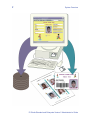
If you want to save information entered in the
Production Form for future use or if you want to
use existing information to print cards or reports, you will do it by
connecting fields in your Production Form to columns in a database.
Enterprise
Edition Only!
ID Works Enterprise also offers the option of using a Directory
Service for data storage. See chapter 6, Using a Directory Service
with ID Works Projects, for complete information.
This chapter assumes you have an understanding of database
concepts in general as well as your database system in particular.
You do not need to be the database administrator to use this chapter,
but you may need to consult with that person as you make decisions.
If you do not currently have a database, see “Creating a Database
from ID Works Designer” on page 102.
Supported Databases
ID Works software uses OLE DB to connect with your database. Your
operating system gives you the following OLE DB providers:
•
•
•
Microsoft Jet 4.0 OLE DB Provider (for Access databases)
Microsoft OLE DB Provider for ODBC Drivers
Microsoft OLE DB Provider for SQL Server
Other providers may be installed with client software for your
database. You can also purchase additional providers from thirdparty vendors. ID Works software requires ODBC providers at version
3.0 and above. The ODBC provider must support ODBC core
interface conformance and extended SQL grammar conformance.
ODBC level one interface conformance is necessary when using a
schema qualifier on a table or view.
ID Works Standard and Enterprise Version 5 Administrator’s Guide