1
105
Using Databases with ID Works Projects
+ plus
# number sign (hash)
When Create Database from Production Form creates a database
table, it names the database the same as the ID Works project except
that it removes the characters listed above. For example, if your ID
Works project is named My Project, Create Database from
Production Form would create a database table named MyProject
(without the space).
When creating database field names, Create Database from
Production Form and Add Production Form Fields to Database
start with the Production Form field name, remove any characters
that are not allowed, and add “IDW” to the start of the name. Adding
this prefix prevents the inadvertent creation of a database field name
that is a reserved word. If removing characters from Production Form
field names results in duplicate database field names, the software
tells you to change a Production Form field name. For example,
Production Form fields named “First Name” and “FirstName” would
both result in the database field name “IDWFirstName” and you
would receive an error message.
Database field names are limited to 64 characters. If the field name is
longer than 64 characters after the characters mentioned above are
removed, only the first 64 characters are used.
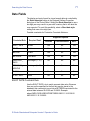
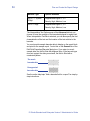
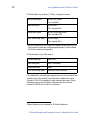
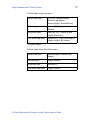
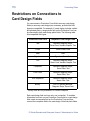
The Access field types created are:
Production Form Field Type
Database Field Type
Text or List
Text
Date
Date/Time
Photo, Signature, or Binary*
BLOB: OLE Object
File: Text
Print Count
Number(LongInteger)
Auto Sequence
Number(LongInteger)
* Binary fields are only available in ID Works Enterprise.
Database text fields created for ID Works text or list fields are set to
255 characters, which is the maximum length for ID Works text fields.
ID Works Standard and Enterprise Version 5 Administrator’s Guide