1
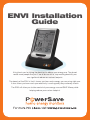
How the ENVI works
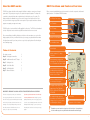
ENVI Functions and Features Overview
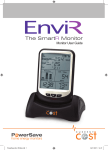
The ENVI uses clamps that detect a tiny magnetic field that is created as current moves through
power cables. The greater your energy use, the greater the magnetic signature. The clamps are
connected to a transmitter that sends a signal wirelessly to the display every 12 seconds. The
display calculates the data and shows you how much energy you are using in real time. It also
stores your historical energy usage. Data can be exported to your computer and various software
programs can graph your usage various ways.
Before commencing installation please take a moment to review the components, buttons and
display functions. Your Standard* ENVI Kit includes:
The ENVI monitor is not a substitute for utility supplied electric meters. The ENVI is an informational
tool only. Utility electric meters monitor usage full time and are therefore more accurate.
One Display Power Supply
One Transmitter
Two CT Clamps
One Display
We recommend that you install the display in your kitchen or other area where you can check the
display regularly. Over time you will learn more about your energy use pattern and will know when
it is higher than normal. As you leave your home or go to bed, a quick glance will confirm that you
are not wasting energy.
Optional - One USB Data cable
One Installation Guide
Antenna Signal
Table of Contents
Kit contents overview
3
Step A Pair display to transmitter 4
Step B Install transmitter and CT clamps 3
Step C Setting the clock 4
Step D Set the Base Rate 4
Step E Set Multiple tariffs 5
Step F Advanced features 5
Indicates number of CT clamps
connected
Shows how much energy you are
using right now. Test it by turning a light on or off and watch the number change
Shows how much money you are spending per day and per month based on the energy being used and the cost rate in effect
Shows cost change based on a recent change in energy use
IMPORTANT: READ AND FOLLOW ALL INSTRUCTIONS BEFORE INSTALLING YOUR ENVI.
2
This device is designed to provide years of maintenance
If you have any doubt about how to install it safely
free energy usage information. Since the device monitors
consult a qualified electrician. Similarly, if you notice
whole home energy usage measured through the incoming
anything unusual about your electricity supply, such as
main electricity feed cables, the installer must have some
loose wires, exposed cabling, burn marks or holes in the
knowledge of electricity including working on or around
insulating materials, damage to your meter, then stop
wires and power panels. The ENVI monitor does not
immediately and consult an electrician or your energy
require you to carry out any electrical wiring.
supplier.
This graph shows relative energy usage between Day (7AM and 3 PM), Eve (3PM and 11PM) and Night (11PM-7AM)
Accumulated energy usage over the past day, week and month. Mode changes every 10 seconds or can be scrolled using the OK button
!
Current Time
Temperature or Device Number
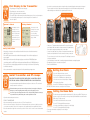
Transmitters can send a wireless signal up to 100 feet indoors. You must deduct
10 feet from this range for every wall between the transmitter and the display.
3