1
STEP
A
Pair Display to the Transmitter
• Plug display power supply into back of display.
• Plug display into convenient wall outlet.
• Remove plastic battery tab from transmitter.
• The red LED light on the transmitter should be flashing slowly. If not, check the batteries.
• Check the display and compare it to the two images below to determine if
the unit is paired.
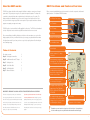
System is Paired
If the display looks like
the image to the left
displaying 0.00 and the
Electric symbols than a
wireless connection is
made and the system is
paired. You can move to
STEP B.
B
If the display looks like
the image on the left then
it needs to be paired.
Proceed to pairing
instructions below before
going to STEP B.
Install Transmitter and CT clamps
IMPORTANT: THIS DEVICE MUST BE INSTALLED BY A QUALIFIED/LICENCED
ELECTRICIAN, UNLESS OTHERWISE PERMITTED BY LOCAL REGULATIONS.
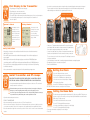
• Locate the main breaker panel that disconnects all power to the house. This enclosure is
usually located close to the meter.
!
If the main breaker panel enclosure or wiring or breakers show any sign of disrepair or
damage or you notice anything unusual about your electricity supply, such as
loose wires, exposed cabling, burn marks or holes in the insulating materials or damage
to your meter then stop immediately and consult a qualified electrician.
• Open the main breaker panel enclosure.
• TURN OFF MAIN BREAKER
• Unscrew and carefully remove the protective cover. This will reveal all wires.
• Check to make sure that there is enough room to fit the transmitter in the enclosure so that the protective
cover can be remounted. If there is not enough room seek installation help from a qualified electrician.
• Place the transmitter as high in the enclosure as possible. A Velcro sticker is used to secure the transmitter
in place.
4
Examples of main cables
Pairing Needed
Pairing Instructions:
• Using the tip of a pen, press the small button found in the front-center of the black transmitter
and hold it for 9 seconds.
• The red LED light on the transmitter should be flashing rapidly. If it doesn’t flash rapidly repeat
last step again.
• While the light on the transmitter is flashing rapidly, press and hold the DOWN (Right) button
on the display until the red LED light on the display starts flashing. Release DOWN (Right) button.
• The screen will show a tuning signal pyramid shown on the image on the left and is synchronizing
itself with the transmitter.
• Once synchronization is complete the display will look like paired display image above.
STEP
• Locate the two main incoming cables coming from the meter and feeding the main breakers in the panel.
They are usually the 2 thickest cables and are normally black or red. A third cable usually thinner and
marked with green or white labels is the ground and will not be used.
• Clamp one CT clamp around each main cable. Do not pull or bend the
power cables. Make sure that the clamps can move freely and that they
do not pinch or apply any undue pressure on the cables.
• Connect the clamp leads to the bottom of the transmitter and make sure
that the center input labeled #1 on the transmitter is always connected.
The second sensor to the left of the center input. The third input is reserved
for 3-phase installations.
• Check the display to ensure that it is reading the signal and that watts are being displayed.
• Re-attach the protective cover and close the panel.
• Turn On the Main Breaker.
STEP
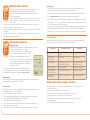
Setting the Clock
• Press the OK button for three seconds.
• The screen will clear and clock hours will flash.
• Use the UP or DOWN buttons to adjust the hour.
• Once the correct hour is selected press OK button.
• The minutes will now flash.
Use the UP or DOWN buttons to adjust the minutes.
Once the correct minute has been selected press the OK button.
C
STEP
Setting the Base Rate
The unit has been programmed with a default rate of $0.1396 cents per KWh. To find out your
local rate, contact your local utility or review your last utility bill and divide the total bill amount
/ KWhs used. To adjust your rate:
• Push the UP button and hold for three seconds.
• Press OK. The display will flash normal price.
• Press up or down buttons to adjust price on first 2 digits
• Press OK. The display will flash last 2 digits
• Press up or down buttons to adjust price on last 2 digits
• Press OK
D
5