1
4-14
Compuprint PageMaster 450 User Guide
PCL Menu
PCL Menu
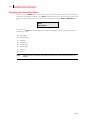
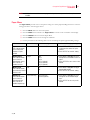
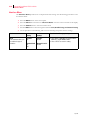
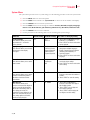
The PCL Menu provides access to the PCL settings. Use the following procedure to enter the PCL menu:
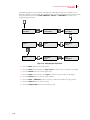
1. Press the MENU button on the control panel.
2. Press the NEXT button until the text “PCL Menu” is shown on the second line of the display.
3. Press the SELECT button to enter the PCL menu.
4. Press the NEXT button to move through the submenus: Print PS Errors, Manual Feed TO.
5. Press the SELECT button to enter a submenu.
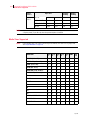
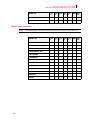
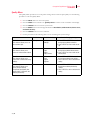
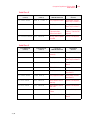
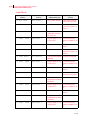
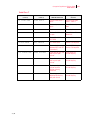
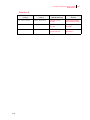
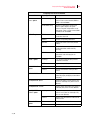
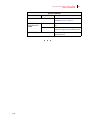
6. Use the procedures in the following table to access and change the PCL settings:
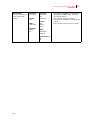
Submenus
Default Setting
Available Settings
Procedure for Changing Setting
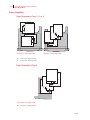
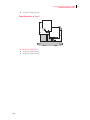
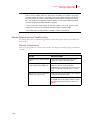
Orientation
This submenu allows
you to choose the
orientation of the
page.
Portrait
Portrait
Landscape
1. Press NEXT or PREVIOUS to
toggle between PORTRAIT and
LANDSCAPE.
2. Press SELECT to choose and
save an orientation.
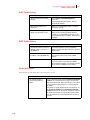
Font Source
This submenu allows
you to choose a font
source.
Internal
Internal
1. Press NEXT or PREVIOUS to
scroll through the available font
sources.
2. Press SELECT to choose and
set a source.
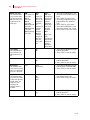
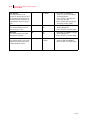
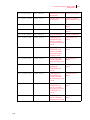
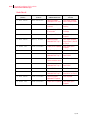
Font Number
This submenu allows
you to set the font
number.
0
Numbers 0-?
1. Press NEXT or PREVIOUS to
increase or decrease the font
number.
2. Press SELECT to save this
setting.
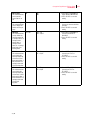
Pitch
This submenu allows
you to change the
pitch of text.
10.00
0.08 - 100.00
1. Press NEXT or PREVIOUS to
increase or decrease the pitch.
2. Press SELECT to save this
setting.
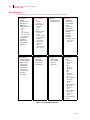
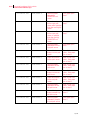
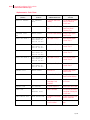
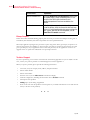
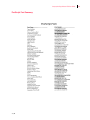
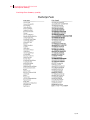
Symbol Set
This submenu allows
you to choose a
symbol set.
10U:PC-8 CP437
10U:PC-8 CP437
11U:PC-8 D/N
12U:PC-850
17U:PC-852
9T:PC-Turkish
19U:WIN Latin1
9E:WIN Latin2
5T:WIN Latin5
7J:Desk Top
10J:PS Text
13J:Ventura Intl
14J:Ventura US
6J:Microsoft Pub
8M:Math-8
PS:Math
6M:Ventura Math
15U:Pi Font
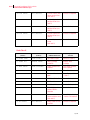
1U: Legal
1E: ISO4 UK
0U:ISO6 ASCII
0S:ISO11 Swedish
0I:ISO15 Italian
2S:ISO17 Spanish
1G:ISO21 German
0D:ISO60 Norweg.
1F:ISO69 French
9U:WIN3.0 Latin1
8U:Roman 8
0N:ISO 8859-1
2N:ISO 8859-2
5N:ISO 8859-5
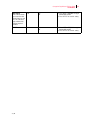
1. Press NEXT or PREVIOUS to
scroll through the available
symbol sets.
2. Press SELECT to choose and
set a symbol set.
Sep 01