1
6.
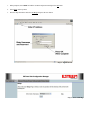
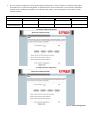
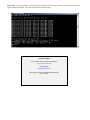
Enter in the Gateway address in the default route IP address block and any DNS information for the server. If this is not
know or on a network without a Gateway, leave these items at factory default.
Step 6 – Enter Gateway Address
7.
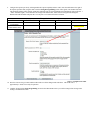
All 195Es modems in the network must be have the exact same Service Set Identification (SSID). The default SSID is
ESTeem and we will use this for demonstration. Enter the SSID as listed above and turn off the wireless security features by
selecting the NO radial. Press the Next button to continue.
Step 7 – Enter SSID
Note: It is recommended that security be used in all wireless applications. This procedure will forgo the security configuration
for brevity. Please see the example applications and the security appendix for further information.