1
Data-Link Modem
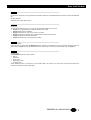
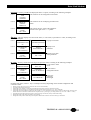
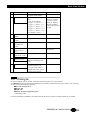
↵ ENTER : This key validates the displayed choice or option, according to the following examples:
Case 1
PRESS ENTER Enter branches to the configuration sub-menus.
FOR
CONFIG
CHANGE
Case 2
CHANGE ?
VISUAL
DISPLAY
Enter branches to the AT display parameter submenus.
Case 3
COMMAND
ECHO
ON > OFF
Enter selects the new value of the parameter
located on the right of the « > » symbol.
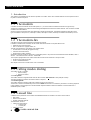
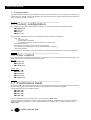
↓ DOWN : This key displays next item of the menu, i.e. next menu, or parameter or value, according to the
following examples:
Displays next menu.
Case 1
↓
SELECT
STORE
CONFIGURATIO
CONFIGURATION
N?
?
Case 2
COMMAND
ECHO
ON CHANGE?
Case 3
COMMAND
ECHO
ON > ON
↓
QUIET
OFF CHANGE ?
↓ COMMAND ECHO
ON > OFF
Displays next
parameter.
Displays next value
of the parameter.
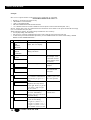
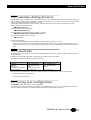
← LEFT : This key comes back one step to the previous menu, according to the following examples:
Case 1
Comes back to main
←
CHANGE ?
MDU903/4
menu.
MODEM OPTION
REV 5.01
Case 2
COMMAND
ECHO
ON CHANGE ?
Case 3
COMMAND
ECHO
ON > OFF
←
CHANGE ?
VISUAL DISPLAY
← COMMAND ECHO
ON CHANGE ?
Comes back to
configuration menu.
Leaves the
parameter
unchanged.
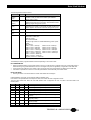
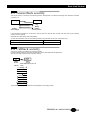
From the main menu, LEFT ← key is a multiple action key depending on the modem configuration and
connection status:
•=
•=
•=
•=
•=
•=
•=
•=
During training, left key aborts the connection and restores command mode,
In on line mode, left key disconnects,
In idle mode, if the modem is configured in leased line mode, left key initiates a leased line training,
In idle mode when incoming rings are detected, left key initiates answer mode (acts as an ‘ATA’ command),
In idle mode when the modem is configured in dial up mode (i.e. not in leased line mode), left key initiates a calling mode connection. The
modem dials the first automatic number found in the phone book, or just hangs up in calling mode if any (acts as an ‘ATDS’ or ‘ATD’),
In leased line mode with dial backup option set, during training on lease line, left key initiates dial backup,
During dial backup with alarm beep, left key stops beeping,
During dial backup without alarm beep, left keep aborts the dial line connection and starts training on leased line.
TECHNICAL: 0118 931 2233
13