1
Data-Link Modem
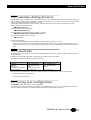
3.4 Automatic dialing directory
The MDU903/4 has a non volatile memory that allows the user to store frequently used numbers. Each phone number can
have a name and control sequence associated. So instead of remembering every number, the user can type in the recipient
name, thus greatly easing the task of making a connection.
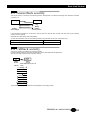
The following example shows how to store a number, name and control sequence at location 3 of the directory memory.
Dialing a direct line, send the command:
ATDT36062424 <CR>
Dialing via a PABX, send the command:
ATDP0W36062424 <CR>
Storing a number in the directory (number 3), send the command:
AT&Z3:NAME:CONTROL:P0W36062424:::A <CR>
Show directory contents, send the command:
AT&N <CR>
Dialing from the directory:
•= The ATDSn command dials the stored telephone number specified by n where n is 0 to 99.
•= By CCITT 108/1 operation. The modem autodials a stored number when an off-to-on transition of the DTR occurs. The
modem disconnects when an on to off transition of the DTR occurs. AT&D1 command select the dialing mode of the DTR
signal.
3.5 Leased line
As mentioned before, a leased line is a permanent analogue telephone connection between 2 sites. Therefore there is no
dialing necessary.
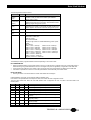
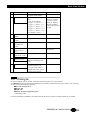
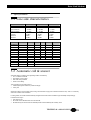
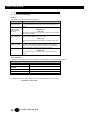
Depending on the selected configuration, the following commands are sent to the modem.
(See reference manual for a description of these commands).
Configuration
2-wire line
4-wire line
Dial back up
1234 back up dial number
Recovery lookback
Originating modem
AT&L1%O1&W <CR>
AT&L2%O1&W <CR>
AT%U1
AT&Z:::1234:::A <CR>
AT%L1&W <CR>
Answering modem
AT&L1%O0&W <CR>
AT&L2%O0&W <CR>
AT%U1
AT%L1&W <CR>
after this leased line configuration is saved by the AT&W command, the modem will start training on leased line if :
•=
it is reset by ATZ or by a power restart,
•=
the front panl button is pressed.
3.6 Saving user configurations
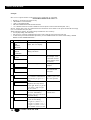
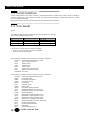
The MDU903/4 modem can store up to 5 user configurations.
The AT&Wn command saves the current configuration in non-volatile memory (n = 0 to 4). This configuration is saved even
when the modem is turned off. The modem will load the last saved user configuration at power-up.
TECHNICAL: 0118 931 2233
17