1
Electronics
Workbench
TM
Multisim 9 Simulation and Capture
TM
User Guide
TitleShort-Hidden (cross reference text)
February 2006
371590B-01
Support
Worldwide Technical Support and Product Information
ni.com
National Instruments Corporate Headquarters
11500 North Mopac Expressway
Austin, Texas 78759-3504
USA Tel: 512 683 0100
Worldwide Offices
Australia 1800 300 800, Austria 43 0 662 45 79 90 0, Belgium 32 0 2 757 00 20, Brazil 55 11 3262 3599,
Canada 800 433 3488, China 86 21 6555 7838, Czech Republic 420 224 235 774, Denmark 45 45 76 26 00,
Finland 385 0 9 725 725 11, France 33 0 1 48 14 24 24, Germany 49 0 89 741 31 30, India 91 80 41190000,
Israel 972 0 3 6393737, Italy 39 02 413091, Japan 81 3 5472 2970, Korea 82 02 3451 3400,
Lebanon 961 0 1 33 28 28, Malaysia 1800 887710, Mexico 01 800 010 0793, Netherlands 31 0 348 433 466,
New Zealand 0800 553 322, Norway 47 0 66 90 76 60, Poland 48 22 3390150, Portugal 351 210 311 210,
Russia 7 095 783 68 51, Singapore 1800 226 5886, Slovenia 386 3 425 4200, South Africa 27 0 11 805 8197,
Spain 34 91 640 0085, Sweden 46 0 8 587 895 00, Switzerland 41 56 200 51 51, Taiwan 886 02 2377 2222,
Thailand 662 278 6777, United Kingdom 44 0 1635 523545
For further support information, refer to the Technical Support Resources and Professional Services page. To comment
on National Instruments documentation, refer to the National Instruments Web site at ni.com/info and enter the
info code feedback.
© 2004–2006 National Instruments Corporation. All rights reserved.
Important Information
Warranty
The media on which you receive National Instruments software are warranted not to fail to execute programming instructions, due to defects
in materials and workmanship, for a period of 90 days from date of shipment, as evidenced by receipts or other documentation. National
Instruments will, at its option, repair or replace software media that do not execute programming instructions if National Instruments receives
notice of such defects during the warranty period. National Instruments does not warrant that the operation of the software shall be
uninterrupted or error free.
A Return Material Authorization (RMA) number must be obtained from the factory and clearly marked on the outside of the package before
any equipment will be accepted for warranty work. National Instruments will pay the shipping costs of returning to the owner parts which are
covered by warranty.
National Instruments believes that the information in this document is accurate. The document has been carefully reviewed for technical
accuracy. In the event that technical or typographical errors exist, National Instruments reserves the right to make changes to subsequent
editions of this document without prior notice to holders of this edition. The reader should consult National Instruments if errors are suspected.
In no event shall National Instruments be liable for any damages arising out of or related to this document or the information contained in it.
EXCEPT AS SPECIFIED HEREIN, NATIONAL INSTRUMENTS MAKES NO WARRANTIES , EXPRESS OR IMPLIED, AND SPECIFICALLY DISCLAIMS ANY WARRANTY OF
MERCHANTABILITY OR FITNESS FOR A PARTICULAR PURPOSE . C USTOMER’S RIGHT TO RECOVER DAMAGES CAUSED BY FAULT OR NEGLIGENCE ON THE PART OF
NATIONAL INSTRUMENTS SHALL BE LIMITED TO THE AMOUNT THERETOFORE PAID BY THE CUSTOMER. NATIONAL INSTRUMENTS WILL NOT BE LIABLE FOR
DAMAGES RESULTING FROM LOSS OF DATA, PROFITS, USE OF PRODUCTS, OR INCIDENTAL OR CONSEQUENTIAL DAMAGES, EVEN IF ADVISED OF THE POSSIBILITY
THEREOF. This limitation of the liability of National Instruments will apply regardless of the form of action, whether in contract or tort, including
negligence. Any action against National Instruments must be brought within one year after the cause of action accrues. National Instruments
shall not be liable for any delay in performance due to causes beyond its reasonable control. The warranty provided herein does not cover
damages, defects, malfunctions, or service failures caused by owner’s failure to follow the National Instruments installation, operation, or
maintenance instructions; owner’s modification of the product; owner’s abuse, misuse, or negligent acts; and power failure or surges, fire,
flood, accident, actions of third parties, or other events outside reasonable control.
Copyright
Under the copyright laws, this publication may not be reproduced or transmitted in any form, electronic or mechanical, including photocopying,
recording, storing in an information retrieval system, or translating, in whole or in part, without the prior written consent of National
Instruments Corporation.
National Instruments respects the intellectual property of others, and we ask our users to do the same. NI software is protected by copyright and other
intellectual property laws. Where NI software may be used to reproduce software or other materials belonging to others, you may use NI software only
to reproduce materials that you may reproduce in accordance with the terms of any applicable license or other legal restriction.
BSIM3 and BSIM4 are developed by the Device Research Group of the Department of Electrical Engineering and Computer Science,
University of California, Berkeley and copyrighted by the University of California.
Trademarks
National Instruments, NI, ni.com, and LabVIEW are trademarks of National Instruments Corporation. Refer to the Terms of Use section
on ni.com/legal for more information about National Instruments trademarks.
Other product and company names mentioned herein are trademarks or trade names of their respective companies.
Members of the National Instruments Alliance Partner Program are business entities independent from National Instruments and have no
agency, partnership, or joint-venture relationship with National Instruments.
Patents
For patents covering National Instruments products, refer to the appropriate location: Help»Patents in your software, the patents.txt file
on your CD, or ni.com/patents.
Some portions of this product are protected under United States Patent No. 6,560,572.
WARNING REGARDING USE OF NATIONAL INSTRUMENTS PRODUCTS
(1) NATIONAL INSTRUMENTS PRODUCTS ARE NOT DESIGNED WITH COMPONENTS AND TESTING FOR A LEVEL OF
RELIABILITY SUITABLE FOR USE IN OR IN CONNECTION WITH SURGICAL IMPLANTS OR AS CRITICAL COMPONENTS IN
ANY LIFE SUPPORT SYSTEMS WHOSE FAILURE TO PERFORM CAN REASONABLY BE EXPECTED TO CAUSE SIGNIFICANT
INJURY TO A HUMAN.
(2) IN ANY APPLICATION, INCLUDING THE ABOVE, RELIABILITY OF OPERATION OF THE SOFTWARE PRODUCTS CAN BE
IMPAIRED BY ADVERSE FACTORS, INCLUDING BUT NOT LIMITED TO FLUCTUATIONS IN ELECTRICAL POWER SUPPLY,
COMPUTER HARDWARE MALFUNCTIONS, COMPUTER OPERATING SYSTEM SOFTWARE FITNESS, FITNESS OF COMPILERS
AND DEVELOPMENT SOFTWARE USED TO DEVELOP AN APPLICATION, INSTALLATION ERRORS, SOFTWARE AND
HARDWARE COMPATIBILITY PROBLEMS, MALFUNCTIONS OR FAILURES OF ELECTRONIC MONITORING OR CONTROL
DEVICES, TRANSIENT FAILURES OF ELECTRONIC SYSTEMS (HARDWARE AND/OR SOFTWARE), UNANTICIPATED USES OR
MISUSES, OR ERRORS ON THE PART OF THE USER OR APPLICATIONS DESIGNER (ADVERSE FACTORS SUCH AS THESE ARE
HEREAFTER COLLECTIVELY TERMED “SYSTEM FAILURES”). ANY APPLICATION WHERE A SYSTEM FAILURE WOULD
CREATE A RISK OF HARM TO PROPERTY OR PERSONS (INCLUDING THE RISK OF BODILY INJURY AND DEATH) SHOULD
NOT BE RELIANT SOLELY UPON ONE FORM OF ELECTRONIC SYSTEM DUE TO THE RISK OF SYSTEM FAILURE. TO AVOID
DAMAGE, INJURY, OR DEATH, THE USER OR APPLICATION DESIGNER MUST TAKE REASONABLY PRUDENT STEPS TO
PROTECT AGAINST SYSTEM FAILURES, INCLUDING BUT NOT LIMITED TO BACK-UP OR SHUT DOWN MECHANISMS.
BECAUSE EACH END-USER SYSTEM IS CUSTOMIZED AND DIFFERS FROM NATIONAL INSTRUMENTS' TESTING
PLATFORMS AND BECAUSE A USER OR APPLICATION DESIGNER MAY USE NATIONAL INSTRUMENTS PRODUCTS IN
COMBINATION WITH OTHER PRODUCTS IN A MANNER NOT EVALUATED OR CONTEMPLATED BY NATIONAL
INSTRUMENTS, THE USER OR APPLICATION DESIGNER IS ULTIMATELY RESPONSIBLE FOR VERIFYING AND VALIDATING
THE SUITABILITY OF NATIONAL INSTRUMENTS PRODUCTS WHENEVER NATIONAL INSTRUMENTS PRODUCTS ARE
INCORPORATED IN A SYSTEM OR APPLICATION, INCLUDING, WITHOUT LIMITATION, THE APPROPRIATE DESIGN,
PROCESS AND SAFETY LEVEL OF SUCH SYSTEM OR APPLICATION.
Preface
Congratulations on choosing Multisim 9 from Electronics Workbench. We are confident that
it will deliver years of increased productivity and superior designs.
Electronics Workbench is the world’s leading supplier of circuit design tools. Our products
are used by more customers than those of any other EDA vendor, so we are sure you will be
pleased with the value delivered by Multisim 9, and by any other Electronics Workbench
products you may select.
Documentation Conventions
When Multisim guides refer to a toolbar button, an image of the button appears in the left
column.
When you see the icon in the left column, the functionality described is only available in
certain versions of Multisim, or to users who have purchased optional modules. Please refer to
the release notes for details.
Multisim guides use the convention Menu/Item to indicate menu commands. For example,
“File/Open” means choose the Open command from the File menu.
Multisim guides use the convention of an arrow () to indicate the start of procedural
information.
Multisim guides use the construction CTRL-KEY and ALT-KEY to indicate when you need to
hold down the “Ctrl” or “Alt” key on your keyboard and press another key.
The Multisim 9 Documentation Set
Multisim 9 documentation consists of this User Guide, the Component Reference Guide and
online help. All Multisim 9 users receive PDF versions of the User Guide and the
Component Reference Guide.
User Guide
The User Guide describes Multisim and its many functions in detail. It is organized based on
the stages of circuit design, and explains all aspects of Multisim, in detail. It also offers an
introductory tutorial that takes you through the stages of circuit design, simulation, analysis
and reporting.
Online Help
Multisim offers a full helpfile system to support your use of the product.
Choose Help/Multisim Help to display the helpfile that explains the Multisim program in
detail, or choose Help/Component Reference to display the helpfile that contains details on the
components families provided with Multisim. Both are standard Windows helpfiles, offering
a table of contents and index.
In addition, you can display context-sensitive help by pressing F1 from any command or
window, or by clicking the Help button on any dialog box that offers it.
Adobe PDF Files
The User Guide and Component Reference Guide are provided on the documentation CD as
Adobe PDF files. To open PDF files, you will need Adobe’s free Acrobat Reader program,
available for download at www.adobe.com.
License Agreement
Please read the license agreement found at www.electronicsworkbench.com carefully before
installing and using the software contained in this package. By installing and using the
software, you are agreeing to be bound by the terms of this license. If you do not agree to the
terms of this license, simply return the unused software within ten days to the place where you
obtained it and your money will be refunded.
Table of Contents
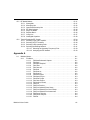
1. Installing Multisim
1.1
Installation Requirements . . . . . . . . . . . . . . . . . . . . . . . . . . . . . . . . . . . . . . . . . . . . . . 1-2
1.2
Installation Overview . . . . . . . . . . . . . . . . . . . . . . . . . . . . . . . . . . . . . . . . . . . . . . . . . 1-3
1.3
Installing Multisim 9 . . . . . . . . . . . . . . . . . . . . . . . . . . . . . . . . . . . . . . . . . . . . . . . . . . 1-3
1.3.1
Before Installing Multisim 9 . . . . . . . . . . . . . . . . . . . . . . . . . . . . . . . . . . . . . 1-3
1.3.2
Single User Edition . . . . . . . . . . . . . . . . . . . . . . . . . . . . . . . . . . . . . . . . . . . 1-4
1.3.2.1 Installing the Single User Edition . . . . . . . . . . . . . . . . . . . . . . . . . 1-4
1.3.2.2 Requesting a Release Code for the Single User Version . . . . . . 1-4
1.3.3
Multi-Station Standalone Edition . . . . . . . . . . . . . . . . . . . . . . . . . . . . . . . . . 1-5
1.3.4
Network Version . . . . . . . . . . . . . . . . . . . . . . . . . . . . . . . . . . . . . . . . . . . . . . 1-5
1.3.4.1 Installing the Network Edition . . . . . . . . . . . . . . . . . . . . . . . . . . . 1-6
1.3.4.2 Entering the Release Code for the Network Edition . . . . . . . . . . 1-7
1.3.4.3 Workstation Setup . . . . . . . . . . . . . . . . . . . . . . . . . . . . . . . . . . . . 1-7
1.3.4.4 Setting User Permissions . . . . . . . . . . . . . . . . . . . . . . . . . . . . . . . 1-7
1.3.5
Changing Server Name and/or Port Number After Client Installation. . . . . 1-10
1.4
Network License Server . . . . . . . . . . . . . . . . . . . . . . . . . . . . . . . . . . . . . . . . . . . . . . 1-10
1.4.1
Administering the Network License Server . . . . . . . . . . . . . . . . . . . . . . . . 1-10
1.4.2
Administering Fixed Seat Licenses. . . . . . . . . . . . . . . . . . . . . . . . . . . . . . . 1-11
1.4.3
Reviewing License Server Events . . . . . . . . . . . . . . . . . . . . . . . . . . . . . . . 1-12
1.4.4
Troubleshooting . . . . . . . . . . . . . . . . . . . . . . . . . . . . . . . . . . . . . . . . . . . . . 1-12
1.5
Support and Upgrade . . . . . . . . . . . . . . . . . . . . . . . . . . . . . . . . . . . . . . . . . . . . . . . 1-14
1.5.1
Checking for Updates . . . . . . . . . . . . . . . . . . . . . . . . . . . . . . . . . . . . . . . . 1-14
1.5.2
Installing Updates . . . . . . . . . . . . . . . . . . . . . . . . . . . . . . . . . . . . . . . . . . . . 1-14
1.5.3
Viewing Messages . . . . . . . . . . . . . . . . . . . . . . . . . . . . . . . . . . . . . . . . . . . 1-15
1.5.4
Changing Settings . . . . . . . . . . . . . . . . . . . . . . . . . . . . . . . . . . . . . . . . . . . 1-15
1.6
Uninstalling Multisim 9 . . . . . . . . . . . . . . . . . . . . . . . . . . . . . . . . . . . . . . . . . . . . . . . 1-16
1.6.1
Uninstalling the Single User Version . . . . . . . . . . . . . . . . . . . . . . . . . . . . . 1-16
1.7
Uninstalling SUU . . . . . . . . . . . . . . . . . . . . . . . . . . . . . . . . . . . . . . . . . . . . . . . . . . . 1-16
1.8
Uninstalling a Site Version . . . . . . . . . . . . . . . . . . . . . . . . . . . . . . . . . . . . . . . . . . . . 1-17
1.8.1
Uninstalling Standalone Multi-Station Installation . . . . . . . . . . . . . . . . . . . 1-17
1.8.2
Uninstalling Network Installation . . . . . . . . . . . . . . . . . . . . . . . . . . . . . . . . 1-17
1.8.3
Uninstalling Combination Standalone Multi-Station
and Network Installations . . . . . . . . . . . . . . . . . . . . . . . . . . . . . . . . . . . . . . 1-17
1.9
Uninstalling NLS . . . . . . . . . . . . . . . . . . . . . . . . . . . . . . . . . . . . . . . . . . . . . . . . . . . 1-18
Multisim 9 User Guide
i
2. Multisim Tutorial
2.1
The Electronics Workbench Suite . . . . . . . . . . . . . . . . . . . . . . . . . . . . . . . . . . . . . . . .2-1
2.2
Multisim 9 Tutorial . . . . . . . . . . . . . . . . . . . . . . . . . . . . . . . . . . . . . . . . . . . . . . . . . . . .2-2
2.2.1
Schematic Capture . . . . . . . . . . . . . . . . . . . . . . . . . . . . . . . . . . . . . . . . . . . .2-3
2.2.2
Simulation . . . . . . . . . . . . . . . . . . . . . . . . . . . . . . . . . . . . . . . . . . . . . . . . . . .2-9
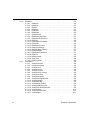
3. User Interface
ii
3.1
Introduction to the Multisim Interface . . . . . . . . . . . . . . . . . . . . . . . . . . . . . . . . . . . . .3-3
3.2
Toolbars . . . . . . . . . . . . . . . . . . . . . . . . . . . . . . . . . . . . . . . . . . . . . . . . . . . . . . . . . . .3-4
3.2.1
Standard Toolbar . . . . . . . . . . . . . . . . . . . . . . . . . . . . . . . . . . . . . . . . . . . . .3-5
3.2.2
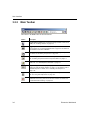
Main Toolbar . . . . . . . . . . . . . . . . . . . . . . . . . . . . . . . . . . . . . . . . . . . . . . . . .3-6
3.2.3
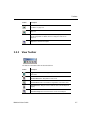
View Toolbar . . . . . . . . . . . . . . . . . . . . . . . . . . . . . . . . . . . . . . . . . . . . . . . . .3-7
3.2.4
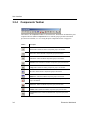
Components Toolbar . . . . . . . . . . . . . . . . . . . . . . . . . . . . . . . . . . . . . . . . . .3-8
3.2.5
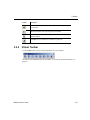
Virtual Toolbar . . . . . . . . . . . . . . . . . . . . . . . . . . . . . . . . . . . . . . . . . . . . . . . .3-9
3.2.6
Graphic Annotation Toolbar . . . . . . . . . . . . . . . . . . . . . . . . . . . . . . . . . . . .3-10
3.2.7
Instruments Toolbar . . . . . . . . . . . . . . . . . . . . . . . . . . . . . . . . . . . . . . . . . .3-11
3.3
Using the Pop-up Menus . . . . . . . . . . . . . . . . . . . . . . . . . . . . . . . . . . . . . . . . . . . . .3-12
3.3.1
Pop-up From Circuit Window, with no Component Selected . . . . . . . . . . .3-13
3.3.2
Pop-up From a Selected Component or Instrument . . . . . . . . . . . . . . . . . .3-15
3.3.3
Pop-up From a Selected Wire . . . . . . . . . . . . . . . . . . . . . . . . . . . . . . . . . . .3-17
3.3.4
Pop-up From a Selected Text Block or Graphic . . . . . . . . . . . . . . . . . . . . .3-17
3.3.5
Pop-up From a Title Block . . . . . . . . . . . . . . . . . . . . . . . . . . . . . . . . . . . . .3-18
3.3.6
Pop-up from a Comment or Measurement Probe . . . . . . . . . . . . . . . . . . . .3-19
3.4
Setting Schematic Capture Preferences . . . . . . . . . . . . . . . . . . . . . . . . . . . . . . . . . .3-20
3.4.1
Using the Preferences Dialog Box . . . . . . . . . . . . . . . . . . . . . . . . . . . . . . .3-20
3.4.1.1 Preferences - Paths Tab . . . . . . . . . . . . . . . . . . . . . . . . . . . . . .3-21
3.4.1.2 Preferences - Save Tab . . . . . . . . . . . . . . . . . . . . . . . . . . . . . . .3-22
3.4.1.3 Preferences - Parts Tab . . . . . . . . . . . . . . . . . . . . . . . . . . . . . . .3-23
3.4.1.4 Preferences - General Tab . . . . . . . . . . . . . . . . . . . . . . . . . . . . .3-24
3.4.2
Using the Sheet Properties Dialog Box . . . . . . . . . . . . . . . . . . . . . . . . . . . .3-25
3.4.2.1 Sheet Properties - Circuit Tab . . . . . . . . . . . . . . . . . . . . . . . . . .3-26
3.4.2.2 Sheet Properties - Workspace Tab . . . . . . . . . . . . . . . . . . . . . .3-28
3.4.2.3 Sheet Properties - Wiring Tab . . . . . . . . . . . . . . . . . . . . . . . . . .3-29
3.4.2.4 Sheet Properties - Font Tab . . . . . . . . . . . . . . . . . . . . . . . . . . . .3-30
3.4.2.5 Sheet Properties - PCB Tab . . . . . . . . . . . . . . . . . . . . . . . . . . . .3-32
3.4.2.6 Sheet Properties - Visibility Tab . . . . . . . . . . . . . . . . . . . . . . . . .3-33
Electronics Workbench
3.5
Design Toolbox . . . . . . . . . . . . . . . . . . . . . . . . . . . . . . . . . . . . . . . . . . . . . . . . . . . . 3-34
3.5.1
Visibility Tab . . . . . . . . . . . . . . . . . . . . . . . . . . . . . . . . . . . . . . . . . . . . . . . . 3-34
3.5.2
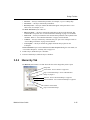
Hierarchy Tab . . . . . . . . . . . . . . . . . . . . . . . . . . . . . . . . . . . . . . . . . . . . . . 3-35
3.6
Customizing the Interface . . . . . . . . . . . . . . . . . . . . . . . . . . . . . . . . . . . . . . . . . . . . 3-37
3.6.1
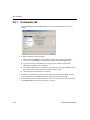
Commands tab . . . . . . . . . . . . . . . . . . . . . . . . . . . . . . . . . . . . . . . . . . . . . . 3-38
3.6.2
Toolbars tab . . . . . . . . . . . . . . . . . . . . . . . . . . . . . . . . . . . . . . . . . . . . . . . . 3-39
3.6.3
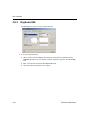
Keyboard tab. . . . . . . . . . . . . . . . . . . . . . . . . . . . . . . . . . . . . . . . . . . . . . . . 3-40
3.6.4
Menu tab . . . . . . . . . . . . . . . . . . . . . . . . . . . . . . . . . . . . . . . . . . . . . . . . . . 3-41
3.6.5
Options tab . . . . . . . . . . . . . . . . . . . . . . . . . . . . . . . . . . . . . . . . . . . . . . . . . 3-42
3.6.6
Customization Pop-up Menus . . . . . . . . . . . . . . . . . . . . . . . . . . . . . . . . . . 3-42
3.6.7
Other Customization Options . . . . . . . . . . . . . . . . . . . . . . . . . . . . . . . . . . . 3-43
4. Schematic Capture - Basics
4.1
Introduction to Schematic Capture . . . . . . . . . . . . . . . . . . . . . . . . . . . . . . . . . . . . . . 4-3
4.2
Working with Multiple Circuit Windows . . . . . . . . . . . . . . . . . . . . . . . . . . . . . . . . . . . 4-3
4.3
Selecting Components from the Database . . . . . . . . . . . . . . . . . . . . . . . . . . . . . . . . 4-3
4.4
Placing Components . . . . . . . . . . . . . . . . . . . . . . . . . . . . . . . . . . . . . . . . . . . . . . . . . 4-4
4.4.1
Using the place component browser . . . . . . . . . . . . . . . . . . . . . . . . . . . . . . 4-4
4.4.1.1 Multisection Components . . . . . . . . . . . . . . . . . . . . . . . . . . . . . . 4-7
4.4.1.2 Rotating/flipping a part during placement . . . . . . . . . . . . . . . . . . 4-9
4.4.1.3 Other buttons . . . . . . . . . . . . . . . . . . . . . . . . . . . . . . . . . . . . . . . . 4-9
4.4.2
Placing Virtual Components . . . . . . . . . . . . . . . . . . . . . . . . . . . . . . . . . . . . . 4-9
4.4.2.1 Virtual component toolbars. . . . . . . . . . . . . . . . . . . . . . . . . . . . . 4-10
4.4.3
Using the In Use List . . . . . . . . . . . . . . . . . . . . . . . . . . . . . . . . . . . . . . . . . 4-13
4.4.4
Selecting Placed Components . . . . . . . . . . . . . . . . . . . . . . . . . . . . . . . . . . 4-13
4.4.5
Moving a Placed Component . . . . . . . . . . . . . . . . . . . . . . . . . . . . . . . . . . . 4-15
4.4.6
Copying a Placed Component . . . . . . . . . . . . . . . . . . . . . . . . . . . . . . . . . . 4-16
4.4.7
Replacing a Placed Component . . . . . . . . . . . . . . . . . . . . . . . . . . . . . . . . 4-17
4.4.8
Controlling Component Color . . . . . . . . . . . . . . . . . . . . . . . . . . . . . . . . . . . 4-18
4.5
Wiring Components . . . . . . . . . . . . . . . . . . . . . . . . . . . . . . . . . . . . . . . . . . . . . . . . . 4-18
4.5.1
Wiring Components Automatically . . . . . . . . . . . . . . . . . . . . . . . . . . . . . . . 4-19
4.5.1.1 Autowire of Touching Pins . . . . . . . . . . . . . . . . . . . . . . . . . . . . . 4-20
4.5.2
Wiring Components Manually . . . . . . . . . . . . . . . . . . . . . . . . . . . . . . . . . . 4-22
4.5.3
Combining Automatic and Manual Wiring . . . . . . . . . . . . . . . . . . . . . . . . . 4-23
4.5.4
Marking Pins for No Connection . . . . . . . . . . . . . . . . . . . . . . . . . . . . . . . . 4-23
4.5.5
Placing Wires Directly Onto Workspace . . . . . . . . . . . . . . . . . . . . . . . . . . 4-26
4.5.6
Setting Wiring Preferences . . . . . . . . . . . . . . . . . . . . . . . . . . . . . . . . . . . . 4-26
4.5.7
Modifying the Wire Path . . . . . . . . . . . . . . . . . . . . . . . . . . . . . . . . . . . . . . . 4-27
Multisim 9 User Guide
iii
4.5.8
4.5.9
4.5.10
Controlling Wire Color . . . . . . . . . . . . . . . . . . . . . . . . . . . . . . . . . . . . . . . . .4-27
Moving a Wire . . . . . . . . . . . . . . . . . . . . . . . . . . . . . . . . . . . . . . . . . . . . . . .4-28
Virtual Wiring . . . . . . . . . . . . . . . . . . . . . . . . . . . . . . . . . . . . . . . . . . . . . . . .4-28
4.6
Manually Adding a Junction (Connector) . . . . . . . . . . . . . . . . . . . . . . . . . . . . . . . . .4-29
4.7
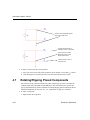
Rotating/Flipping Placed Components . . . . . . . . . . . . . . . . . . . . . . . . . . . . . . . . . . .4-30
4.8
Finding Components in Your Circuit . . . . . . . . . . . . . . . . . . . . . . . . . . . . . . . . . . . . .4-32
4.9
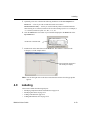
Labeling . . . . . . . . . . . . . . . . . . . . . . . . . . . . . . . . . . . . . . . . . . . . . . . . . . . . . . . . . .4-33
4.9.1
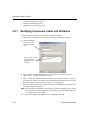
Modifying Component Labels and Attributes . . . . . . . . . . . . . . . . . . . . . . .4-34
4.9.2
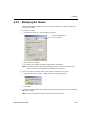
Modifying Net Names . . . . . . . . . . . . . . . . . . . . . . . . . . . . . . . . . . . . . . . . .4-35
4.9.3
Adding a Title Block . . . . . . . . . . . . . . . . . . . . . . . . . . . . . . . . . . . . . . . . . .4-36
4.9.3.1 Entering the Title Block Contents . . . . . . . . . . . . . . . . . . . . . . . .4-37
4.9.4
Adding Miscellaneous Text . . . . . . . . . . . . . . . . . . . . . . . . . . . . . . . . . . . . .4-39
4.9.5
Adding a Comment . . . . . . . . . . . . . . . . . . . . . . . . . . . . . . . . . . . . . . . . . . .4-40
4.9.6
Graphic Annotation . . . . . . . . . . . . . . . . . . . . . . . . . . . . . . . . . . . . . . . . . . .4-43
4.9.7
Capturing Screen Area . . . . . . . . . . . . . . . . . . . . . . . . . . . . . . . . . . . . . . . .4-45
4.10 Circuit Description Box . . . . . . . . . . . . . . . . . . . . . . . . . . . . . . . . . . . . . . . . . . . . . . .4-47
4.10.1 Formatting the Circuit Description Box . . . . . . . . . . . . . . . . . . . . . . . . . . . .4-47
4.10.1.1 Formatting Circuit Description Box Text . . . . . . . . . . . . . . . . . . .4-48
4.10.1.2 Paragraph Dialog Box . . . . . . . . . . . . . . . . . . . . . . . . . . . . . . . .4-48
4.10.1.3 Tabs Dialog Box . . . . . . . . . . . . . . . . . . . . . . . . . . . . . . . . . . . . .4-49
4.10.1.4 Date and Time Dialog Box . . . . . . . . . . . . . . . . . . . . . . . . . . . . .4-49
4.10.1.5 Options Dialog Box . . . . . . . . . . . . . . . . . . . . . . . . . . . . . . . . . . .4-50
4.10.1.6 Insert Object Dialog Box . . . . . . . . . . . . . . . . . . . . . . . . . . . . . . .4-50
4.10.2 Scrolling with Events During Simulation . . . . . . . . . . . . . . . . . . . . . . . . . . .4-51
4.10.2.1 Scrolling Text During Simulation . . . . . . . . . . . . . . . . . . . . . . . . .4-51
4.10.2.2 Playing a Video Clip . . . . . . . . . . . . . . . . . . . . . . . . . . . . . . . . . .4-53
4.10.2.3 Description Label Dialog Box . . . . . . . . . . . . . . . . . . . . . . . . . . .4-55
4.10.2.4 Edit Labels Dialog Box . . . . . . . . . . . . . . . . . . . . . . . . . . . . . . . .4-56
4.10.2.5 Other Actions . . . . . . . . . . . . . . . . . . . . . . . . . . . . . . . . . . . . . . .4-57
4.10.3 Description Edit Bar . . . . . . . . . . . . . . . . . . . . . . . . . . . . . . . . . . . . . . . . . .4-57
4.11 Linking a Form to a Circuit. . . . . . . . . . . . . . . . . . . . . . . . . . . . . . . . . . . . . . . . . . . . .4-59
4.11.1 Creating Forms . . . . . . . . . . . . . . . . . . . . . . . . . . . . . . . . . . . . . . . . . . . . . .4-59
4.11.2 Setting Form Submission Options . . . . . . . . . . . . . . . . . . . . . . . . . . . . . . .4-60
4.11.3 Completing Forms . . . . . . . . . . . . . . . . . . . . . . . . . . . . . . . . . . . . . . . . . . . .4-61
4.12 Printing the Circuit . . . . . . . . . . . . . . . . . . . . . . . . . . . . . . . . . . . . . . . . . . . . . . . . . .4-62
iv
Electronics Workbench
5. Schematic Capture - Advanced Functions
5.1
Placed Component Properties . . . . . . . . . . . . . . . . . . . . . . . . . . . . . . . . . . . . . . . . . . 5-2
5.1.1
Displaying Identifying Information about a Placed Component . . . . . . . . . . 5-2
5.1.2
Viewing a Placed Component’s Value/Model . . . . . . . . . . . . . . . . . . . . . . . 5-3
5.1.2.1 Real Components . . . . . . . . . . . . . . . . . . . . . . . . . . . . . . . . . . . . 5-3
5.1.2.2 Edit Model Dialog Box . . . . . . . . . . . . . . . . . . . . . . . . . . . . . . . . . 5-5
5.1.2.3 Edit Footprint Dialog Box . . . . . . . . . . . . . . . . . . . . . . . . . . . . . . . 5-6
5.1.2.4 Virtual Components . . . . . . . . . . . . . . . . . . . . . . . . . . . . . . . . . . . 5-7
5.1.3
Controlling How a Placed Component is Used in Analyses . . . . . . . . . . . . . 5-7
5.2
The Spreadsheet View . . . . . . . . . . . . . . . . . . . . . . . . . . . . . . . . . . . . . . . . . . . . . . . 5-9
5.2.1
Spreadsheet View Results Tab . . . . . . . . . . . . . . . . . . . . . . . . . . . . . . . . . . 5-9
5.2.2
Spreadsheet View Nets Tab . . . . . . . . . . . . . . . . . . . . . . . . . . . . . . . . . . . 5-10
5.2.3
Spreadsheet View Components Tab . . . . . . . . . . . . . . . . . . . . . . . . . . . . . 5-11
5.2.4
Spreadsheet View PCB Layers Tab . . . . . . . . . . . . . . . . . . . . . . . . . . . . . 5-14
5.2.5
Spreadsheet View Buttons . . . . . . . . . . . . . . . . . . . . . . . . . . . . . . . . . . . . . 5-14
5.3
Title Block Editor . . . . . . . . . . . . . . . . . . . . . . . . . . . . . . . . . . . . . . . . . . . . . . . . . . . 5-15
5.3.1
Enter Text Dialog Box . . . . . . . . . . . . . . . . . . . . . . . . . . . . . . . . . . . . . . . . 5-17
5.3.2
Placing Fields . . . . . . . . . . . . . . . . . . . . . . . . . . . . . . . . . . . . . . . . . . . . . . . 5-18
5.3.2.1 Field Codes . . . . . . . . . . . . . . . . . . . . . . . . . . . . . . . . . . . . . . . . 5-20
5.3.3
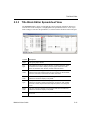
Title Block Editor Spreadsheet View . . . . . . . . . . . . . . . . . . . . . . . . . . . . . 5-21
5.3.4
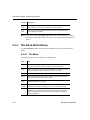
Title Block Editor Menus . . . . . . . . . . . . . . . . . . . . . . . . . . . . . . . . . . . . . . 5-22
5.3.4.1 File Menu . . . . . . . . . . . . . . . . . . . . . . . . . . . . . . . . . . . . . . . . . . 5-22
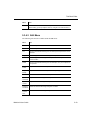
5.3.4.2 Edit Menu . . . . . . . . . . . . . . . . . . . . . . . . . . . . . . . . . . . . . . . . . 5-23
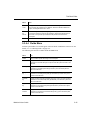
5.3.4.3 View Menu . . . . . . . . . . . . . . . . . . . . . . . . . . . . . . . . . . . . . . . . . 5-24
5.3.4.4 Fields Menu . . . . . . . . . . . . . . . . . . . . . . . . . . . . . . . . . . . . . . . . 5-25
5.3.4.5 Graphics Menu . . . . . . . . . . . . . . . . . . . . . . . . . . . . . . . . . . . . . 5-27
5.3.4.6 Tools Menu . . . . . . . . . . . . . . . . . . . . . . . . . . . . . . . . . . . . . . . . 5-28
5.3.4.7 Help Menu . . . . . . . . . . . . . . . . . . . . . . . . . . . . . . . . . . . . . . . . . 5-28
5.3.4.8 Pop-up Menus . . . . . . . . . . . . . . . . . . . . . . . . . . . . . . . . . . . . . . 5-28
5.3.5
Toolbars . . . . . . . . . . . . . . . . . . . . . . . . . . . . . . . . . . . . . . . . . . . . . . . . . . . 5-29
5.3.5.1 Standard Toolbar . . . . . . . . . . . . . . . . . . . . . . . . . . . . . . . . . . . . 5-29
5.3.5.2 Zoom Toolbar . . . . . . . . . . . . . . . . . . . . . . . . . . . . . . . . . . . . . . 5-30
5.3.5.3 Draw Tools Toolbar . . . . . . . . . . . . . . . . . . . . . . . . . . . . . . . . . . 5-31
5.3.5.4 Drawing Toolbar . . . . . . . . . . . . . . . . . . . . . . . . . . . . . . . . . . . . 5-32
5.4
Electrical Rules Checking . . . . . . . . . . . . . . . . . . . . . . . . . . . . . . . . . . . . . . . . . . . . 5-34
5.4.1
ERC Options Tab . . . . . . . . . . . . . . . . . . . . . . . . . . . . . . . . . . . . . . . . . . . . 5-37
5.4.1.1 Clearing ERC Markers . . . . . . . . . . . . . . . . . . . . . . . . . . . . . . . . 5-38
5.4.2
ERC Rules Tab . . . . . . . . . . . . . . . . . . . . . . . . . . . . . . . . . . . . . . . . . . . . . 5-39
5.4.3
Component’s Pins Tab . . . . . . . . . . . . . . . . . . . . . . . . . . . . . . . . . . . . . . . . 5-41
Multisim 9 User Guide
v
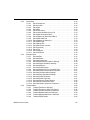
6. Working with Larger Designs
vi
6.1
Flat Multi-sheet Design . . . . . . . . . . . . . . . . . . . . . . . . . . . . . . . . . . . . . . . . . . . . . . . .6-2
6.1.1
Delete Multi-page Dialog Box . . . . . . . . . . . . . . . . . . . . . . . . . . . . . . . . . . . .6-3
6.2
Hierarchical Design . . . . . . . . . . . . . . . . . . . . . . . . . . . . . . . . . . . . . . . . . . . . . . . . . . .6-3
6.2.1
Nested Circuits . . . . . . . . . . . . . . . . . . . . . . . . . . . . . . . . . . . . . . . . . . . . . . .6-4
6.2.2
Component Numbering in Nested Circuits . . . . . . . . . . . . . . . . . . . . . . . . . .6-5
6.2.3
Net Numbering in Nested Circuits . . . . . . . . . . . . . . . . . . . . . . . . . . . . . . . . .6-6
6.2.4
Global Nets . . . . . . . . . . . . . . . . . . . . . . . . . . . . . . . . . . . . . . . . . . . . . . . . . .6-6
6.2.5
Adding a Hierarchical Block . . . . . . . . . . . . . . . . . . . . . . . . . . . . . . . . . . . . .6-7
6.2.5.1 Placing a HB from an Existing File . . . . . . . . . . . . . . . . . . . . . . . .6-8
6.2.5.2 Replacing Components with an HB. . . . . . . . . . . . . . . . . . . . . . . .6-9
6.2.6
Adding a Subcircuit . . . . . . . . . . . . . . . . . . . . . . . . . . . . . . . . . . . . . . . . . . . .6-9
6.2.6.1 Replacing Components with a SC . . . . . . . . . . . . . . . . . . . . . . .6-11
6.2.7
Viewing Parent Sheet . . . . . . . . . . . . . . . . . . . . . . . . . . . . . . . . . . . . . . . . .6-11
6.3
Renaming Component Instances . . . . . . . . . . . . . . . . . . . . . . . . . . . . . . . . . . . . . . .6-11
6.3.1
Reference Designator Prefix Setup Dialog . . . . . . . . . . . . . . . . . . . . . . . . .6-13
6.4
Buses . . . . . . . . . . . . . . . . . . . . . . . . . . . . . . . . . . . . . . . . . . . . . . . . . . . . . . . . . . . .6-16
6.4.1
Placing a Bus . . . . . . . . . . . . . . . . . . . . . . . . . . . . . . . . . . . . . . . . . . . . . . .6-18
6.4.1.1 Placing a bus across Multi-pages . . . . . . . . . . . . . . . . . . . . . . . .6-19
6.4.1.2 Connecting Buses to HB/SCs . . . . . . . . . . . . . . . . . . . . . . . . . .6-19
6.4.2
Bus Properties . . . . . . . . . . . . . . . . . . . . . . . . . . . . . . . . . . . . . . . . . . . . . .6-21
6.4.2.1 Adding buslines to a Bus . . . . . . . . . . . . . . . . . . . . . . . . . . . . . .6-21
6.4.2.2 Deleting Buslines from a Bus . . . . . . . . . . . . . . . . . . . . . . . . . . .6-23
6.4.2.3 Renaming Buslines in a Bus . . . . . . . . . . . . . . . . . . . . . . . . . . .6-23
6.4.3
Merging Buses . . . . . . . . . . . . . . . . . . . . . . . . . . . . . . . . . . . . . . . . . . . . . .6-24
6.4.4
Wiring to a Bus. . . . . . . . . . . . . . . . . . . . . . . . . . . . . . . . . . . . . . . . . . . . . . .6-25
6.4.5
Bus Vector Connect . . . . . . . . . . . . . . . . . . . . . . . . . . . . . . . . . . . . . . . . . .6-27
6.5
Variants . . . . . . . . . . . . . . . . . . . . . . . . . . . . . . . . . . . . . . . . . . . . . . . . . . . . . . . . . . .6-34
6.5.1
Setting Up Variants . . . . . . . . . . . . . . . . . . . . . . . . . . . . . . . . . . . . . . . . . . .6-34
6.5.2
Placing Parts in Variants . . . . . . . . . . . . . . . . . . . . . . . . . . . . . . . . . . . . . . .6-37
6.5.2.1 Assigning Variant Status to Components . . . . . . . . . . . . . . . . . .6-38
6.5.2.2 Assigning Variant Status to Nested Circuits . . . . . . . . . . . . . . . .6-43
6.5.2.3 Setting the Active Variant for Simulation . . . . . . . . . . . . . . . . . .6-44
6.6
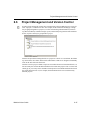
Project Management and Version Control . . . . . . . . . . . . . . . . . . . . . . . . . . . . . . . .6-47
6.6.1
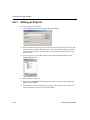
Setting up Projects . . . . . . . . . . . . . . . . . . . . . . . . . . . . . . . . . . . . . . . . . . .6-48
6.6.2
Working with Projects . . . . . . . . . . . . . . . . . . . . . . . . . . . . . . . . . . . . . . . . .6-49
6.6.3
Working with Files Contained in Projects . . . . . . . . . . . . . . . . . . . . . . . . . .6-50
6.6.4
Version Control . . . . . . . . . . . . . . . . . . . . . . . . . . . . . . . . . . . . . . . . . . . . . .6-51
Electronics Workbench
7. Components
7.1
Structure of the Component Database . . . . . . . . . . . . . . . . . . . . . . . . . . . . . . . . . . . 7-2
7.1.1
Database Levels . . . . . . . . . . . . . . . . . . . . . . . . . . . . . . . . . . . . . . . . . . . . . 7-2
7.1.2
Classification of Components in the Database . . . . . . . . . . . . . . . . . . . . . . 7-3
7.2
Locating Components in the Database . . . . . . . . . . . . . . . . . . . . . . . . . . . . . . . . . . . 7-3
7.2.1
Browsing for Components . . . . . . . . . . . . . . . . . . . . . . . . . . . . . . . . . . . . . . 7-4
7.2.2
Searching for Components . . . . . . . . . . . . . . . . . . . . . . . . . . . . . . . . . . . . . 7-4
7.3
Types of Information Stored for Components . . . . . . . . . . . . . . . . . . . . . . . . . . . . . . 7-6
7.3.1
Pre-Defined Fields . . . . . . . . . . . . . . . . . . . . . . . . . . . . . . . . . . . . . . . . . . . . 7-6
7.3.1.1 General Information . . . . . . . . . . . . . . . . . . . . . . . . . . . . . . . . . . . 7-7
7.3.2
User Fields . . . . . . . . . . . . . . . . . . . . . . . . . . . . . . . . . . . . . . . . . . . . . . . . . . 7-7
7.4
Component Nominal Values and Tolerances . . . . . . . . . . . . . . . . . . . . . . . . . . . . . . 7-7
7.5
Managing the Database . . . . . . . . . . . . . . . . . . . . . . . . . . . . . . . . . . . . . . . . . . . . . . . 7-8
7.5.1
Filtering Displayed Components . . . . . . . . . . . . . . . . . . . . . . . . . . . . . . . . 7-10
7.5.2
Managing Families . . . . . . . . . . . . . . . . . . . . . . . . . . . . . . . . . . . . . . . . . . . 7-11
7.5.3
Modifying User Field Titles . . . . . . . . . . . . . . . . . . . . . . . . . . . . . . . . . . . . . 7-12
7.5.4
Deleting Components . . . . . . . . . . . . . . . . . . . . . . . . . . . . . . . . . . . . . . . . 7-13
7.5.5
Copying Components . . . . . . . . . . . . . . . . . . . . . . . . . . . . . . . . . . . . . . . . 7-14
7.5.6
Saving Placed Components . . . . . . . . . . . . . . . . . . . . . . . . . . . . . . . . . . . . 7-16
7.5.7
Moving Components Between Databases . . . . . . . . . . . . . . . . . . . . . . . . . 7-16
7.5.8
Displaying Database Information . . . . . . . . . . . . . . . . . . . . . . . . . . . . . . . . 7-17
7.5.9
Editing Components . . . . . . . . . . . . . . . . . . . . . . . . . . . . . . . . . . . . . . . . . . 7-17
7.6
Converting 2001 or V7 Databases . . . . . . . . . . . . . . . . . . . . . . . . . . . . . . . . . . . . . . 7-18
7.7
Updating Components from Databases . . . . . . . . . . . . . . . . . . . . . . . . . . . . . . . . . . 7-19
7.8
Merging Databases . . . . . . . . . . . . . . . . . . . . . . . . . . . . . . . . . . . . . . . . . . . . . . . . . 7-20
8. Component Editing
8.1
Introduction to Component Editing . . . . . . . . . . . . . . . . . . . . . . . . . . . . . . . . . . . . . . 8-2
8.2
Adding Components with the Component Wizard . . . . . . . . . . . . . . . . . . . . . . . . . . . 8-4
8.2.1
Using an Existing Symbol File . . . . . . . . . . . . . . . . . . . . . . . . . . . . . . . . . . 8-11
8.3
Editing Components . . . . . . . . . . . . . . . . . . . . . . . . . . . . . . . . . . . . . . . . . . . . . . . . 8-12
8.4
Editing a Component’s General Properties . . . . . . . . . . . . . . . . . . . . . . . . . . . . . . . 8-14
Multisim 9 User Guide
vii
8.5
Editing a Component’s Symbol . . . . . . . . . . . . . . . . . . . . . . . . . . . . . . . . . . . . . . . . .8-15
8.5.1
Copying a Component’s Symbol . . . . . . . . . . . . . . . . . . . . . . . . . . . . . . . . .8-16
8.5.1.1 Using “Copy To...” . . . . . . . . . . . . . . . . . . . . . . . . . . . . . . . . . . .8-16
8.5.2
Creating and Editing a Component’s Symbol with the Symbol Editor . . . .8-17
8.5.2.1 Symbol Editor Spreadsheet View . . . . . . . . . . . . . . . . . . . . . . . .8-19
8.5.2.2 Working with the Symbol Editor . . . . . . . . . . . . . . . . . . . . . . . . .8-22
8.5.2.3 Enter Text Dialog Box . . . . . . . . . . . . . . . . . . . . . . . . . . . . . . . .8-26
8.5.2.4 In-Place Edit Mode . . . . . . . . . . . . . . . . . . . . . . . . . . . . . . . . . . .8-26
8.5.2.5 Symbol Editor Menus . . . . . . . . . . . . . . . . . . . . . . . . . . . . . . . . .8-27
8.5.2.6 Toolbars . . . . . . . . . . . . . . . . . . . . . . . . . . . . . . . . . . . . . . . . . . .8-33
8.6
Editing a Component’s Model . . . . . . . . . . . . . . . . . . . . . . . . . . . . . . . . . . . . . . . . . .8-38
8.6.1
Adding a Model to a Component . . . . . . . . . . . . . . . . . . . . . . . . . . . . . . . .8-40
8.6.1.1 Component List Dialog Box . . . . . . . . . . . . . . . . . . . . . . . . . . . .8-42
8.6.2
Creating a SPICE Model for a Component . . . . . . . . . . . . . . . . . . . . . . . . .8-42
8.6.2.1 Creating a Model Using a Model Maker . . . . . . . . . . . . . . . . . . .8-42
8.6.2.2 Creating a Primitive Model . . . . . . . . . . . . . . . . . . . . . . . . . . . . .8-43
8.6.2.3 Creating a Subcircuit Model . . . . . . . . . . . . . . . . . . . . . . . . . . . .8-45
8.6.3
Loading an Existing Model . . . . . . . . . . . . . . . . . . . . . . . . . . . . . . . . . . . . .8-48
8.6.4
Modify a Model’s Data . . . . . . . . . . . . . . . . . . . . . . . . . . . . . . . . . . . . . . . .8-48
8.6.5
Copying the Model of One Component to Another . . . . . . . . . . . . . . . . . . .8-49
8.7
Editing a Component Pin Model . . . . . . . . . . . . . . . . . . . . . . . . . . . . . . . . . . . . . . . .8-50
8.8
Editing a Component’s Footprint . . . . . . . . . . . . . . . . . . . . . . . . . . . . . . . . . . . . . . .8-51
8.8.1
Select a Footprint dialog box . . . . . . . . . . . . . . . . . . . . . . . . . . . . . . . . . . .8-52
8.8.1.1 Filter dialog box . . . . . . . . . . . . . . . . . . . . . . . . . . . . . . . . . . . . .8-53
8.8.2
Add a Footprint dialog box . . . . . . . . . . . . . . . . . . . . . . . . . . . . . . . . . . . . .8-57
8.8.3
Advanced Pin Mapping Dialog . . . . . . . . . . . . . . . . . . . . . . . . . . . . . . . . . .8-58
8.9
Editing a Component’s Electronic Parameters . . . . . . . . . . . . . . . . . . . . . . . . . . . . .8-62
8.10 Editing User Fields . . . . . . . . . . . . . . . . . . . . . . . . . . . . . . . . . . . . . . . . . . . . . . . . . .8-63
8.11 Creating a Component Model Using the Model Makers . . . . . . . . . . . . . . . . . . . . . .8-64
8.11.1 AC Motor . . . . . . . . . . . . . . . . . . . . . . . . . . . . . . . . . . . . . . . . . . . . . . . . . . .8-65
8.11.2 BJT Model Maker . . . . . . . . . . . . . . . . . . . . . . . . . . . . . . . . . . . . . . . . . . . .8-65
8.11.3 Converters . . . . . . . . . . . . . . . . . . . . . . . . . . . . . . . . . . . . . . . . . . . . . . . . .8-77
8.11.3.1 Boost Converter . . . . . . . . . . . . . . . . . . . . . . . . . . . . . . . . . . . . .8-78
8.11.3.2 Buck Boost Converter . . . . . . . . . . . . . . . . . . . . . . . . . . . . . . . .8-79
8.11.3.3 Buck Converter . . . . . . . . . . . . . . . . . . . . . . . . . . . . . . . . . . . . . .8-79
8.11.3.4 Cuk Converter . . . . . . . . . . . . . . . . . . . . . . . . . . . . . . . . . . . . . . .8-80
8.11.4 Diode Model Maker . . . . . . . . . . . . . . . . . . . . . . . . . . . . . . . . . . . . . . . . . . .8-80
viii
Electronics Workbench
8.11.5
8.11.6
8.11.7
8.11.8
8.11.9
Transformers . . . . . . . . . . . . . . . . . . . . . . . . . . . . . . . . . . . . . . . . . . . . . . . 8-84
8.11.5.1 Ideal Transformer (Multiple Winding) . . . . . . . . . . . . . . . . . . . . 8-84
8.11.5.2 Linear Transformer (Multiple Winding) . . . . . . . . . . . . . . . . . . . 8-85
8.11.5.3 Linear Transformer with Neutral Terminal . . . . . . . . . . . . . . . . . 8-86
8.11.5.4 Two Winding Linear Transformer . . . . . . . . . . . . . . . . . . . . . . . 8-87
8.11.5.5 Non-linear Transformer (Multiple Winding) . . . . . . . . . . . . . . . . 8-88
MOSFET (Field Effect Transistor) Model Maker . . . . . . . . . . . . . . . . . . . . 8-90
Operational Amplifier Model Maker . . . . . . . . . . . . . . . . . . . . . . . . . . . . . . 8-97
Silicon Controlled Rectifier Model Maker . . . . . . . . . . . . . . . . . . . . . . . . . 8-102
Zener Model Maker . . . . . . . . . . . . . . . . . . . . . . . . . . . . . . . . . . . . . . . . . 8-106
8.12 Creating a Model Using Code Modeling . . . . . . . . . . . . . . . . . . . . . . . . . . . . . . . . 8-111
8.12.1 What is Code Modeling? . . . . . . . . . . . . . . . . . . . . . . . . . . . . . . . . . . . . . 8-111
8.12.2 Creating a Code Model . . . . . . . . . . . . . . . . . . . . . . . . . . . . . . . . . . . . . . . 8-112
8.12.3 The Interface File (Ifspec.ifs) . . . . . . . . . . . . . . . . . . . . . . . . . . . . . . . . . . 8-115
8.12.3.1 Name Table . . . . . . . . . . . . . . . . . . . . . . . . . . . . . . . . . . . . . . . 8-115
8.12.3.2 Port Table . . . . . . . . . . . . . . . . . . . . . . . . . . . . . . . . . . . . . . . . 8-117
8.12.3.3 Parameter Table. . . . . . . . . . . . . . . . . . . . . . . . . . . . . . . . . . . . 8-118
8.12.3.4 Example Interface File . . . . . . . . . . . . . . . . . . . . . . . . . . . . . . . 8-120
8.12.4 The Implementation File (Cfunc.mod) . . . . . . . . . . . . . . . . . . . . . . . . . . . 8-121
8.12.4.1 Implementation File C Macros . . . . . . . . . . . . . . . . . . . . . . . . . 8-122
8.12.4.2 Example Implementation File . . . . . . . . . . . . . . . . . . . . . . . . . 8-130
9. Simulation
9.1
Introduction to Simulation . . . . . . . . . . . . . . . . . . . . . . . . . . . . . . . . . . . . . . . . . . . . . 9-2
9.2
Using Multisim Simulation . . . . . . . . . . . . . . . . . . . . . . . . . . . . . . . . . . . . . . . . . . . . . 9-3
9.2.1
Start/Stop/Pause Simulation . . . . . . . . . . . . . . . . . . . . . . . . . . . . . . . . . . . . 9-4
9.2.1.1 Simulation Running Indicator . . . . . . . . . . . . . . . . . . . . . . . . . . . . 9-4
9.2.1.2 Simulation Speed . . . . . . . . . . . . . . . . . . . . . . . . . . . . . . . . . . . . 9-4
9.2.2
Circuit Consistency Check . . . . . . . . . . . . . . . . . . . . . . . . . . . . . . . . . . . . . . 9-5
9.2.3
Simulation from Netlist Without Schematic . . . . . . . . . . . . . . . . . . . . . . . . . 9-6
9.3
Multisim SPICE Simulation: Technical Detail . . . . . . . . . . . . . . . . . . . . . . . . . . . . . . 9-6
9.3.1
Circuit Simulation Mechanism . . . . . . . . . . . . . . . . . . . . . . . . . . . . . . . . . . . 9-6
9.3.2
Four Stages of Circuit Simulation . . . . . . . . . . . . . . . . . . . . . . . . . . . . . . . . 9-7
9.3.3
Equation Formulation . . . . . . . . . . . . . . . . . . . . . . . . . . . . . . . . . . . . . . . . . . 9-9
9.3.4
Equation Solution . . . . . . . . . . . . . . . . . . . . . . . . . . . . . . . . . . . . . . . . . . . . 9-10
9.3.5
User Setting: Maximum Integration Order . . . . . . . . . . . . . . . . . . . . . . . . . 9-10
Multisim 9 User Guide
ix
9.3.6
9.3.7
Convergence Assistance Algorithms . . . . . . . . . . . . . . . . . . . . . . . . . . . . .9-11
9.3.6.1 Gmin Stepping . . . . . . . . . . . . . . . . . . . . . . . . . . . . . . . . . . . . . .9-11
9.3.6.2 Source Stepping . . . . . . . . . . . . . . . . . . . . . . . . . . . . . . . . . . . . .9-11
Digital Simulation . . . . . . . . . . . . . . . . . . . . . . . . . . . . . . . . . . . . . . . . . . . .9-11
9.4
RF Simulation . . . . . . . . . . . . . . . . . . . . . . . . . . . . . . . . . . . . . . . . . . . . . . . . . . . . . .9-12
9.5
MultiVHDL . . . . . . . . . . . . . . . . . . . . . . . . . . . . . . . . . . . . . . . . . . . . . . . . . . . . . . . . .9-13
9.6
Circuit Wizards . . . . . . . . . . . . . . . . . . . . . . . . . . . . . . . . . . . . . . . . . . . . . . . . . . . . .9-13
9.6.1
555 Timer Wizard . . . . . . . . . . . . . . . . . . . . . . . . . . . . . . . . . . . . . . . . . . . .9-14
9.6.2
Filter Wizard . . . . . . . . . . . . . . . . . . . . . . . . . . . . . . . . . . . . . . . . . . . . . . . .9-18
9.6.3
Common Emitter BJT Amplifier Wizard . . . . . . . . . . . . . . . . . . . . . . . . . . .9-19
9.6.4
MOSFET Amplifier Wizard . . . . . . . . . . . . . . . . . . . . . . . . . . . . . . . . . . . . .9-21
9.6.5
Opamp Wizard . . . . . . . . . . . . . . . . . . . . . . . . . . . . . . . . . . . . . . . . . . . . . .9-22
9.7
Simulation Error Log/Audit Trail . . . . . . . . . . . . . . . . . . . . . . . . . . . . . . . . . . . . . . . .9-25
9.8
Simulation Adviser . . . . . . . . . . . . . . . . . . . . . . . . . . . . . . . . . . . . . . . . . . . . . . . . . .9-26
9.9
Saving/Loading Simulation Profiles . . . . . . . . . . . . . . . . . . . . . . . . . . . . . . . . . . . . .9-27
9.9.1
Saving a Simulation Profile . . . . . . . . . . . . . . . . . . . . . . . . . . . . . . . . . . . . .9-27
9.9.2
Loading a Simulation Profile . . . . . . . . . . . . . . . . . . . . . . . . . . . . . . . . . . . .9-28
9.10 Using Simulation for Better Designs . . . . . . . . . . . . . . . . . . . . . . . . . . . . . . . . . . . . .9-28
10. Instruments
10.1 Introduction to the Multisim Instruments . . . . . . . . . . . . . . . . . . . . . . . . . . . . . . . . . .10-3
10.1.1 Saving Simulation Data with Instruments . . . . . . . . . . . . . . . . . . . . . . . . . .10-4
10.1.2 Adding an Instrument to a Circuit . . . . . . . . . . . . . . . . . . . . . . . . . . . . . . . .10-5
10.1.3 Using the Instrument . . . . . . . . . . . . . . . . . . . . . . . . . . . . . . . . . . . . . . . . . .10-5
10.1.4 Working with Multiple Instruments . . . . . . . . . . . . . . . . . . . . . . . . . . . . . . .10-6
10.1.5 Saving Instrument Data . . . . . . . . . . . . . . . . . . . . . . . . . . . . . . . . . . . . . . .10-7
10.2 Printing Instruments . . . . . . . . . . . . . . . . . . . . . . . . . . . . . . . . . . . . . . . . . . . . . . . . .10-7
10.2.1 Print Instruments Dialog . . . . . . . . . . . . . . . . . . . . . . . . . . . . . . . . . . . . . . .10-7
10.3 Interactive Simulation Settings . . . . . . . . . . . . . . . . . . . . . . . . . . . . . . . . . . . . . . . . .10-8
10.3.1 Troubleshooting Simulation Errors . . . . . . . . . . . . . . . . . . . . . . . . . . . . . . .10-9
10.4 Multimeter . . . . . . . . . . . . . . . . . . . . . . . . . . . . . . . . . . . . . . . . . . . . . . . . . . . . . . . .10-10
10.4.1 Using the Multimeter . . . . . . . . . . . . . . . . . . . . . . . . . . . . . . . . . . . . . . . . .10-11
10.4.1.1 Multimeter Settings . . . . . . . . . . . . . . . . . . . . . . . . . . . . . . . . . .10-11
x
Electronics Workbench
10.5 Function Generator . . . . . . . . . . . . . . . . . . . . . . . . . . . . . . . . . . . . . . . . . . . . . . . . 10-14
10.5.1 Using the Function Generator . . . . . . . . . . . . . . . . . . . . . . . . . . . . . . . . . 10-16
10.5.1.1 Function Generator Settings . . . . . . . . . . . . . . . . . . . . . . . . . . 10-16
10.6 Wattmeter . . . . . . . . . . . . . . . . . . . . . . . . . . . . . . . . . . . . . . . . . . . . . . . . . . . . . . . 10-17
10.6.1 Using the Wattmeter . . . . . . . . . . . . . . . . . . . . . . . . . . . . . . . . . . . . . . . . 10-18
10.6.1.1 Connecting the Wattmeter . . . . . . . . . . . . . . . . . . . . . . . . . . . . 10-18
10.7 Oscilloscope . . . . . . . . . . . . . . . . . . . . . . . . . . . . . . . . . . . . . . . . . . . . . . . . . . . . . 10-18
10.7.1 Using the Oscilloscope . . . . . . . . . . . . . . . . . . . . . . . . . . . . . . . . . . . . . . 10-20
10.7.1.1 Oscilloscope Settings . . . . . . . . . . . . . . . . . . . . . . . . . . . . . . . 10-20
10.7.1.2 Viewing Oscilloscope Results . . . . . . . . . . . . . . . . . . . . . . . . . 10-23
10.8 Bode Plotter . . . . . . . . . . . . . . . . . . . . . . . . . . . . . . . . . . . . . . . . . . . . . . . . . . . . . . 10-23
10.8.1 Using the Bode Plotter . . . . . . . . . . . . . . . . . . . . . . . . . . . . . . . . . . . . . . . 10-25
10.8.1.1 Bode Plotter Settings . . . . . . . . . . . . . . . . . . . . . . . . . . . . . . . . 10-25
10.8.1.2 Viewing Bode Plotter Results . . . . . . . . . . . . . . . . . . . . . . . . . 10-27
10.9 Word Generator . . . . . . . . . . . . . . . . . . . . . . . . . . . . . . . . . . . . . . . . . . . . . . . . . . . 10-28
10.9.1 Using the Word Generator . . . . . . . . . . . . . . . . . . . . . . . . . . . . . . . . . . . . 10-29
10.9.1.1 Word Generator Settings . . . . . . . . . . . . . . . . . . . . . . . . . . . . . 10-29
10.10 Logic Analyzer . . . . . . . . . . . . . . . . . . . . . . . . . . . . . . . . . . . . . . . . . . . . . . . . . . . . 10-31
10.10.1 Using the Logic Analyzer . . . . . . . . . . . . . . . . . . . . . . . . . . . . . . . . . . . . . 10-33
10.10.1.1 Logic Analyzer Settings . . . . . . . . . . . . . . . . . . . . . . . . . . . . . . 10-33
10.11 Logic Converter . . . . . . . . . . . . . . . . . . . . . . . . . . . . . . . . . . . . . . . . . . . . . . . . . . . 10-35
10.11.1 Using the Logic Converter . . . . . . . . . . . . . . . . . . . . . . . . . . . . . . . . . . . . 10-36
10.11.1.1 Logic Converter Settings . . . . . . . . . . . . . . . . . . . . . . . . . . . . . 10-36
10.12 Distortion Analyzer . . . . . . . . . . . . . . . . . . . . . . . . . . . . . . . . . . . . . . . . . . . . . . . . . 10-38
10.12.1 Using the Distortion Analyzer . . . . . . . . . . . . . . . . . . . . . . . . . . . . . . . . . . 10-39
10.12.1.1 Distortion Analyzer Settings . . . . . . . . . . . . . . . . . . . . . . . . . . 10-39
10.13 Spectrum Analyzer . . . . . . . . . . . . . . . . . . . . . . . . . . . . . . . . . . . . . . . . . . . . . . . . 10-40
10.14 Network Analyzer . . . . . . . . . . . . . . . . . . . . . . . . . . . . . . . . . . . . . . . . . . . . . . . . . . 10-40
10.15 Measurement Probe . . . . . . . . . . . . . . . . . . . . . . . . . . . . . . . . . . . . . . . . . . . . . . . 10-40
10.15.1 Using the Measurement Probe . . . . . . . . . . . . . . . . . . . . . . . . . . . . . . . . 10-42
10.15.1.1 Measurement Probe Settings . . . . . . . . . . . . . . . . . . . . . . . . . . 10-42
10.15.1.2 Viewing Measurement Probe Results . . . . . . . . . . . . . . . . . . . 10-44
10.15.1.3 Connecting the Measurement Probe . . . . . . . . . . . . . . . . . . . . 10-44
Multisim 9 User Guide
xi
10.16 Four-channel Oscilloscope . . . . . . . . . . . . . . . . . . . . . . . . . . . . . . . . . . . . . . . . . . .10-47
10.16.1 Using the Four-channel Oscilloscope . . . . . . . . . . . . . . . . . . . . . . . . . . . .10-48
10.16.1.1 Four-channel Oscilloscope Settings . . . . . . . . . . . . . . . . . . . . .10-48
10.16.1.2 Viewing Four-channel Oscilloscope Results . . . . . . . . . . . . . .10-52
10.16.1.3 Connecting the Four-channel Oscilloscope . . . . . . . . . . . . . . .10-55
10.17 Frequency Counter . . . . . . . . . . . . . . . . . . . . . . . . . . . . . . . . . . . . . . . . . . . . . . . . .10-57
10.17.1 Using the Frequency Counter . . . . . . . . . . . . . . . . . . . . . . . . . . . . . . . . . .10-57
10.18 IV Analyzer . . . . . . . . . . . . . . . . . . . . . . . . . . . . . . . . . . . . . . . . . . . . . . . . . . . . . . .10-60
10.18.1 Using the IV Analyzer . . . . . . . . . . . . . . . . . . . . . . . . . . . . . . . . . . . . . . . .10-61
10.18.1.1 Simulate Parameters Dialog Box . . . . . . . . . . . . . . . . . . . . . . .10-63
10.18.2 Reviewing IV Analyzer Data . . . . . . . . . . . . . . . . . . . . . . . . . . . . . . . . . . .10-67
10.19 Agilent Simulated Instruments . . . . . . . . . . . . . . . . . . . . . . . . . . . . . . . . . . . . . . . .10-70
10.19.1 Agilent Simulated Function Generator . . . . . . . . . . . . . . . . . . . . . . . . . . .10-71
10.19.1.1 Supported Features . . . . . . . . . . . . . . . . . . . . . . . . . . . . . . . . .10-71
10.19.1.2 Features Not Supported . . . . . . . . . . . . . . . . . . . . . . . . . . . . . .10-72
10.19.1.3 Using the Agilent Function Generator . . . . . . . . . . . . . . . . . . .10-73
10.19.2 Agilent Simulated Multimeter . . . . . . . . . . . . . . . . . . . . . . . . . . . . . . . . . .10-74
10.19.2.1 Supported Features . . . . . . . . . . . . . . . . . . . . . . . . . . . . . . . . .10-74
10.19.2.2 Features Not Supported . . . . . . . . . . . . . . . . . . . . . . . . . . . . . .10-75
10.19.2.3 Using the Agilent Multimeter . . . . . . . . . . . . . . . . . . . . . . . . . .10-76
10.19.3 Agilent Simulated Oscilloscope . . . . . . . . . . . . . . . . . . . . . . . . . . . . . . . . .10-77
10.19.3.1 Supported Features . . . . . . . . . . . . . . . . . . . . . . . . . . . . . . . . .10-77
10.19.3.2 Features Not Supported . . . . . . . . . . . . . . . . . . . . . . . . . . . . . .10-80
10.19.3.3 Using the Agilent Oscilloscope . . . . . . . . . . . . . . . . . . . . . . . . .10-81
10.20 Tektronix Simulated Oscilloscope . . . . . . . . . . . . . . . . . . . . . . . . . . . . . . . . . . . . . .10-82
10.20.1 Supported Features . . . . . . . . . . . . . . . . . . . . . . . . . . . . . . . . . . . . . . . . .10-82
10.20.2 Features Not Supported . . . . . . . . . . . . . . . . . . . . . . . . . . . . . . . . . . . . . .10-84
10.20.3 Using the Tektronix Oscilloscope . . . . . . . . . . . . . . . . . . . . . . . . . . . . . . .10-84
10.21 Voltmeter . . . . . . . . . . . . . . . . . . . . . . . . . . . . . . . . . . . . . . . . . . . . . . . . . . . . . . . .10-85
10.21.1 Using the Voltmeter . . . . . . . . . . . . . . . . . . . . . . . . . . . . . . . . . . . . . . . . . .10-85
10.21.1.1 Resistance (1.0 W - 999.99 TW) . . . . . . . . . . . . . . . . . . . . . . .10-85
10.21.1.2 Mode (DC or AC) . . . . . . . . . . . . . . . . . . . . . . . . . . . . . . . . . . .10-86
10.21.1.3 Connecting a Voltmeter . . . . . . . . . . . . . . . . . . . . . . . . . . . . . .10-86
10.22 Ammeter . . . . . . . . . . . . . . . . . . . . . . . . . . . . . . . . . . . . . . . . . . . . . . . . . . . . . . . . .10-86
10.22.1 Using the Ammeter . . . . . . . . . . . . . . . . . . . . . . . . . . . . . . . . . . . . . . . . . .10-86
10.22.1.1 Resistance (1.0 pW - 999.99 W) . . . . . . . . . . . . . . . . . . . . . . .10-86
10.22.1.2 Mode (DC or AC) . . . . . . . . . . . . . . . . . . . . . . . . . . . . . . . . . . .10-87
10.22.1.3 Connecting an Ammeter . . . . . . . . . . . . . . . . . . . . . . . . . . . . . .10-87
xii
Electronics Workbench
10.23 LabVIEW Instruments . . . . . . . . . . . . . . . . . . . . . . . . . . . . . . . . . . . . . . . . . . . . . . 10-87
10.23.1 System Requirements . . . . . . . . . . . . . . . . . . . . . . . . . . . . . . . . . . . . . . . 10-88
10.23.2 Sample LabVIEW Instruments . . . . . . . . . . . . . . . . . . . . . . . . . . . . . . . . . 10-88
10.23.2.1 Microphone . . . . . . . . . . . . . . . . . . . . . . . . . . . . . . . . . . . . . . . 10-89
10.23.2.2 Speaker . . . . . . . . . . . . . . . . . . . . . . . . . . . . . . . . . . . . . . . . . 10-89
10.23.2.3 Signal Generator . . . . . . . . . . . . . . . . . . . . . . . . . . . . . . . . . . 10-90
10.23.2.4 Signal Analyzer . . . . . . . . . . . . . . . . . . . . . . . . . . . . . . . . . . . 10-90
10.23.3 Creating a LabVIEW Instrument . . . . . . . . . . . . . . . . . . . . . . . . . . . . . . . . 10-90
10.23.4 Building a LabVIEW Instrument . . . . . . . . . . . . . . . . . . . . . . . . . . . . . . . . 10-92
10.23.5 Installing a LabVIEW Instrument . . . . . . . . . . . . . . . . . . . . . . . . . . . . . . . 10-93
10.23.6 Guidelines for Successfully Creating a LabVIEW Instrument . . . . . . . . . 10-93
11. Analyses
11.1 Introduction to Multisim Analyses . . . . . . . . . . . . . . . . . . . . . . . . . . . . . . . . . . . . . . 11-4
11.2 Viewing the Analysis Results: Grapher . . . . . . . . . . . . . . . . . . . . . . . . . . . . . . . . . . 11-4
11.2.1 Working with Pages on the Grapher . . . . . . . . . . . . . . . . . . . . . . . . . . . . . 11-7
11.2.2 Working with Graphs . . . . . . . . . . . . . . . . . . . . . . . . . . . . . . . . . . . . . . . . . 11-8
11.2.2.1 Grids and Legends . . . . . . . . . . . . . . . . . . . . . . . . . . . . . . . . . . 11-9
11.2.2.2 Cursors . . . . . . . . . . . . . . . . . . . . . . . . . . . . . . . . . . . . . . . . . . 11-10
11.2.2.3 Cursor Pop-up Menu . . . . . . . . . . . . . . . . . . . . . . . . . . . . . . . . 11-11
11.2.2.4 Zoom and Restore . . . . . . . . . . . . . . . . . . . . . . . . . . . . . . . . . . 11-13
11.2.2.5 Title . . . . . . . . . . . . . . . . . . . . . . . . . . . . . . . . . . . . . . . . . . . . . 11-14
11.2.2.6 Axes . . . . . . . . . . . . . . . . . . . . . . . . . . . . . . . . . . . . . . . . . . . . 11-15
11.2.2.7 Traces . . . . . . . . . . . . . . . . . . . . . . . . . . . . . . . . . . . . . . . . . . . 11-16
11.2.2.8 Merging Traces . . . . . . . . . . . . . . . . . . . . . . . . . . . . . . . . . . . . 11-18
11.2.2.9 Select Pages dialog box . . . . . . . . . . . . . . . . . . . . . . . . . . . . . 11-18
11.2.2.10 Graph Pop-up Menu . . . . . . . . . . . . . . . . . . . . . . . . . . . . . . . . 11-19
11.2.3 Viewing Charts . . . . . . . . . . . . . . . . . . . . . . . . . . . . . . . . . . . . . . . . . . . . . 11-19
11.2.4 Cut, Copy and Paste . . . . . . . . . . . . . . . . . . . . . . . . . . . . . . . . . . . . . . . . 11-20
11.2.5 Opening and Saving Files. . . . . . . . . . . . . . . . . . . . . . . . . . . . . . . . . . . . . 11-21
11.2.6 Print and Print Preview . . . . . . . . . . . . . . . . . . . . . . . . . . . . . . . . . . . . . . 11-22
11.3 Working with Analyses . . . . . . . . . . . . . . . . . . . . . . . . . . . . . . . . . . . . . . . . . . . . . . 11-23
11.3.1 General Instructions . . . . . . . . . . . . . . . . . . . . . . . . . . . . . . . . . . . . . . . . . 11-23
11.3.2 The Analysis Parameters Tab . . . . . . . . . . . . . . . . . . . . . . . . . . . . . . . . . 11-24
11.3.3 The Output Tab . . . . . . . . . . . . . . . . . . . . . . . . . . . . . . . . . . . . . . . . . . . . 11-24
11.3.3.1 Choosing How Output Variables are to be Handled . . . . . . . . 11-25
11.3.3.2 Filtering the Variable Lists . . . . . . . . . . . . . . . . . . . . . . . . . . . . 11-25
11.3.3.3 Adding Parameters to the Variable List . . . . . . . . . . . . . . . . . . 11-26
11.3.4 Adding Analysis Expressions . . . . . . . . . . . . . . . . . . . . . . . . . . . . . . . . . . 11-27
Multisim 9 User Guide
xiii
11.3.5
11.3.6
11.3.7
The Analysis Options Tab . . . . . . . . . . . . . . . . . . . . . . . . . . . . . . . . . . . . .11-29
The Summary Tab . . . . . . . . . . . . . . . . . . . . . . . . . . . . . . . . . . . . . . . . . .11-30
Incomplete Analyses . . . . . . . . . . . . . . . . . . . . . . . . . . . . . . . . . . . . . . . . .11-30
11.4 DC Operating Point Analysis . . . . . . . . . . . . . . . . . . . . . . . . . . . . . . . . . . . . . . . . .11-31
11.4.1 About the DC Operating Point Analysis . . . . . . . . . . . . . . . . . . . . . . . . . .11-31
11.4.2 Setting up and Running DC Operating Point Analysis . . . . . . . . . . . . . . .11-31
11.4.2.1 Setting DC Operating Point Analysis Parameters . . . . . . . . . .11-32
11.4.3 Sample Circuit . . . . . . . . . . . . . . . . . . . . . . . . . . . . . . . . . . . . . . . . . . . . . .11-32
11.4.4 Troubleshooting DC Operating Point Analysis Failures . . . . . . . . . . . . . .11-33
11.4.4.1 Circuit failure example . . . . . . . . . . . . . . . . . . . . . . . . . . . . . . .11-33
11.4.4.2 Trouble-shooting Techniques . . . . . . . . . . . . . . . . . . . . . . . . . .11-34
11.5 AC Analysis . . . . . . . . . . . . . . . . . . . . . . . . . . . . . . . . . . . . . . . . . . . . . . . . . . . . . .11-35
11.5.1 About the AC Analysis . . . . . . . . . . . . . . . . . . . . . . . . . . . . . . . . . . . . . . .11-35
11.5.2 Setting AC Analysis Frequency Parameters . . . . . . . . . . . . . . . . . . . . . . .11-36
11.6 Transient Analysis . . . . . . . . . . . . . . . . . . . . . . . . . . . . . . . . . . . . . . . . . . . . . . . . .11-38
11.6.1 About the Transient Analysis . . . . . . . . . . . . . . . . . . . . . . . . . . . . . . . . . .11-38
11.6.2 Setting Transient Analysis Parameters . . . . . . . . . . . . . . . . . . . . . . . . . . .11-38
11.6.3 Troubleshooting Transient Analysis Failures . . . . . . . . . . . . . . . . . . . . . .11-40
11.7 Fourier Analysis . . . . . . . . . . . . . . . . . . . . . . . . . . . . . . . . . . . . . . . . . . . . . . . . . . .11-41
11.7.1 About the Fourier Analysis . . . . . . . . . . . . . . . . . . . . . . . . . . . . . . . . . . . .11-41
11.7.2 Setting Fourier Analysis Parameters . . . . . . . . . . . . . . . . . . . . . . . . . . . .11-42
11.8 Noise Analysis . . . . . . . . . . . . . . . . . . . . . . . . . . . . . . . . . . . . . . . . . . . . . . . . . . . .11-44
11.8.1 About the Noise Analysis . . . . . . . . . . . . . . . . . . . . . . . . . . . . . . . . . . . . .11-44
11.8.2 Setting Noise Analysis Parameters . . . . . . . . . . . . . . . . . . . . . . . . . . . . . .11-46
11.8.3 Noise Analysis Example . . . . . . . . . . . . . . . . . . . . . . . . . . . . . . . . . . . . . .11-49
11.9 Distortion Analysis . . . . . . . . . . . . . . . . . . . . . . . . . . . . . . . . . . . . . . . . . . . . . . . . .11-51
11.9.1 Multisim Approach . . . . . . . . . . . . . . . . . . . . . . . . . . . . . . . . . . . . . . . . . .11-52
11.9.2 Preparing the Circuit for Distortion Analysis . . . . . . . . . . . . . . . . . . . . . . . 11-52
11.9.3 Understanding the Distortion Analysis Options . . . . . . . . . . . . . . . . . . . . .11-53
11.9.4 Distortion Analysis for Harmonic Distortion . . . . . . . . . . . . . . . . . . . . . . . . 11-54
11.9.5 Distortion Analysis for Intermodulation Distortion . . . . . . . . . . . . . . . . . . . 11-56
11.10 DC Sweep Analysis . . . . . . . . . . . . . . . . . . . . . . . . . . . . . . . . . . . . . . . . . . . . . . . .11-59
11.10.1 Setting DC Sweep Analysis Parameters . . . . . . . . . . . . . . . . . . . . . . . . . .11-59
11.10.2 DC Sweep Analysis Examples . . . . . . . . . . . . . . . . . . . . . . . . . . . . . . . . .11-60
xiv
Electronics Workbench
11.11 DC and AC Sensitivity Analyses . . . . . . . . . . . . . . . . . . . . . . . . . . . . . . . . . . . . . . 11-65
11.11.1 Sensitivity Analysis Parameters . . . . . . . . . . . . . . . . . . . . . . . . . . . . . . . . 11-65
11.11.2 Setting Up and Running Sensitivity Analysis . . . . . . . . . . . . . . . . . . . . . . 11-66
11.11.2.1 Example 1 . . . . . . . . . . . . . . . . . . . . . . . . . . . . . . . . . . . . . . . . 11-66
11.11.2.2 Example 2 . . . . . . . . . . . . . . . . . . . . . . . . . . . . . . . . . . . . . . . . 11-70
11.12 Parameter Sweep Analysis . . . . . . . . . . . . . . . . . . . . . . . . . . . . . . . . . . . . . . . . . . 11-71
11.12.1 About the Parameter Sweep Analysis . . . . . . . . . . . . . . . . . . . . . . . . . . . 11-71
11.12.2 Setting Parameter Sweep Analysis Parameters . . . . . . . . . . . . . . . . . . . 11-72
11.12.3 Parameter Sweep Analysis – Example . . . . . . . . . . . . . . . . . . . . . . . . . . 11-74
11.13 Temperature Sweep Analysis . . . . . . . . . . . . . . . . . . . . . . . . . . . . . . . . . . . . . . . . 11-80
11.13.1 About the Temperature Sweep Analysis . . . . . . . . . . . . . . . . . . . . . . . . . 11-80
11.13.2 Setting Temperature Sweep Analysis Parameters . . . . . . . . . . . . . . . . . 11-81
11.14 Transfer Function Analysis . . . . . . . . . . . . . . . . . . . . . . . . . . . . . . . . . . . . . . . . . . 11-83
11.14.1 About the Transfer Function Analysis . . . . . . . . . . . . . . . . . . . . . . . . . . . 11-83
11.14.2 Setting Transfer Function Analysis Parameters . . . . . . . . . . . . . . . . . . . . 11-84
11.14.3 Examples of Transfer Function Analysis . . . . . . . . . . . . . . . . . . . . . . . . . 11-85
11.14.3.1 Linear Example . . . . . . . . . . . . . . . . . . . . . . . . . . . . . . . . . . . . 11-85
11.14.3.2 Non-linear Example . . . . . . . . . . . . . . . . . . . . . . . . . . . . . . . . . 11-87
11.15 Worst Case Analysis . . . . . . . . . . . . . . . . . . . . . . . . . . . . . . . . . . . . . . . . . . . . . . . 11-89
11.15.1 About the Worst Case Analysis . . . . . . . . . . . . . . . . . . . . . . . . . . . . . . . . 11-89
11.15.1.1 Setting Tolerance Parameters . . . . . . . . . . . . . . . . . . . . . . . . . 11-90
11.15.2 Setting Worst Case Analysis Parameters . . . . . . . . . . . . . . . . . . . . . . . . 11-92
11.15.3 Worst Case Analysis Example . . . . . . . . . . . . . . . . . . . . . . . . . . . . . . . . . 11-93
11.16 Pole Zero Analysis . . . . . . . . . . . . . . . . . . . . . . . . . . . . . . . . . . . . . . . . . . . . . . . . . 11-96
11.16.1 About the Pole Zero Analysis . . . . . . . . . . . . . . . . . . . . . . . . . . . . . . . . . . 11-96
11.16.1.1 Multisim Approach . . . . . . . . . . . . . . . . . . . . . . . . . . . . . . . . . . 11-99
11.16.2 Setting Pole Zero Analysis Parameters . . . . . . . . . . . . . . . . . . . . . . . . . . 11-99
11.16.3 Running Pole Zero Analysis . . . . . . . . . . . . . . . . . . . . . . . . . . . . . . . . . . 11-101
11.17 Monte Carlo Analysis . . . . . . . . . . . . . . . . . . . . . . . . . . . . . . . . . . . . . . . . . . . . . . 11-103
11.17.1 About the Monte Carlo Analysis . . . . . . . . . . . . . . . . . . . . . . . . . . . . . . . 11-103
11.17.1.1 Uniform Distribution . . . . . . . . . . . . . . . . . . . . . . . . . . . . . . . . 11-103
11.17.1.2 Gaussian Distribution . . . . . . . . . . . . . . . . . . . . . . . . . . . . . . 11-104
11.17.2 Setting Up and Running Monte Carlo Analysis . . . . . . . . . . . . . . . . . . . 11-106
11.17.2.1 Entering a Component Tolerance . . . . . . . . . . . . . . . . . . . . . 11-106
11.17.2.2 Specifying Monte Carlo Analysis Parameters . . . . . . . . . . . . 11-107
11.17.3 Monte Carlo Analysis Example . . . . . . . . . . . . . . . . . . . . . . . . . . . . . . . 11-108
11.17.3.1 Setting up the Sample Monte Carlo Analysis . . . . . . . . . . . . 11-109
11.17.3.2 Simulation Results . . . . . . . . . . . . . . . . . . . . . . . . . . . . . . . . . 11-111
Multisim 9 User Guide
xv
11.18 Trace Width Analysis . . . . . . . . . . . . . . . . . . . . . . . . . . . . . . . . . . . . . . . . . . . . . .11-115
11.18.1 Multisim Approach . . . . . . . . . . . . . . . . . . . . . . . . . . . . . . . . . . . . . . . . .11-116
11.18.2 Sample Trace Width Analysis . . . . . . . . . . . . . . . . . . . . . . . . . . . . . . . . .11-118
11.19 RF Analyses . . . . . . . . . . . . . . . . . . . . . . . . . . . . . . . . . . . . . . . . . . . . . . . . . . . . .11-121
11.20 Nested Sweep Analyses . . . . . . . . . . . . . . . . . . . . . . . . . . . . . . . . . . . . . . . . . . . .11-121
11.21 Batched Analyses . . . . . . . . . . . . . . . . . . . . . . . . . . . . . . . . . . . . . . . . . . . . . . . . .11-123
11.22 User Defined Analyses . . . . . . . . . . . . . . . . . . . . . . . . . . . . . . . . . . . . . . . . . . . . .11-124
11.22.1 About the User Defined Analysis . . . . . . . . . . . . . . . . . . . . . . . . . . . . . .11-124
11.22.2 Creating and Simulating a SPICE Netlist . . . . . . . . . . . . . . . . . . . . . . . .11-125
11.22.3 Importing the SPICE netlist into Multisim . . . . . . . . . . . . . . . . . . . . . . . .11-126
11.22.4 Plotting Two Nodes Using the Tran Statement . . . . . . . . . . . . . . . . . . . .11-127
11.22.5 How to Run an AC Analysis . . . . . . . . . . . . . . . . . . . . . . . . . . . . . . . . . .11-128
11.23 Analysis Options dialog box. . . . . . . . . . . . . . . . . . . . . . . . . . . . . . . . . . . . . . . . . .11-129
11.23.1 Global tab . . . . . . . . . . . . . . . . . . . . . . . . . . . . . . . . . . . . . . . . . . . . . . . .11-130
11.23.2 DC tab . . . . . . . . . . . . . . . . . . . . . . . . . . . . . . . . . . . . . . . . . . . . . . . . . . .11-132
11.23.3 Transient tab . . . . . . . . . . . . . . . . . . . . . . . . . . . . . . . . . . . . . . . . . . . . . .11-133
11.23.4 Device tab . . . . . . . . . . . . . . . . . . . . . . . . . . . . . . . . . . . . . . . . . . . . . . . .11-134
11.23.5 Advanced tab . . . . . . . . . . . . . . . . . . . . . . . . . . . . . . . . . . . . . . . . . . . . .11-135
12. Postprocessor
12.1 Introduction to the Postprocessor . . . . . . . . . . . . . . . . . . . . . . . . . . . . . . . . . . . . . . .12-2
12.2 Using the Postprocessor . . . . . . . . . . . . . . . . . . . . . . . . . . . . . . . . . . . . . . . . . . . . . .12-2
12.2.1 Basic Steps . . . . . . . . . . . . . . . . . . . . . . . . . . . . . . . . . . . . . . . . . . . . . . . . .12-2
12.2.1.1 Using the Default Analysis . . . . . . . . . . . . . . . . . . . . . . . . . . . . .12-7
12.2.1.2 Creating Multiple Traces . . . . . . . . . . . . . . . . . . . . . . . . . . . . . .12-8
12.2.2 Working with Pages, Traces, Graphs and Charts . . . . . . . . . . . . . . . . . . .12-8
12.3 Postprocessor Variables . . . . . . . . . . . . . . . . . . . . . . . . . . . . . . . . . . . . . . . . . . . . . .12-9
12.4 Available Postprocessor Functions . . . . . . . . . . . . . . . . . . . . . . . . . . . . . . . . . . . . .12-10
xvi
Electronics Workbench
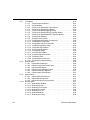
13. Reports
13.1 Bill of Materials . . . . . . . . . . . . . . . . . . . . . . . . . . . . . . . . . . . . . . . . . . . . . . . . . . . . 13-2
13.1.1 Using the BOM Report . . . . . . . . . . . . . . . . . . . . . . . . . . . . . . . . . . . . . . . . 13-3
13.2 Component Detail Report . . . . . . . . . . . . . . . . . . . . . . . . . . . . . . . . . . . . . . . . . . . . 13-5
13.2.1 Using the Component Detail Report . . . . . . . . . . . . . . . . . . . . . . . . . . . . . 13-5
13.3 Netlist Report . . . . . . . . . . . . . . . . . . . . . . . . . . . . . . . . . . . . . . . . . . . . . . . . . . . . . . 13-6
13.3.1 Using the Netlist Report . . . . . . . . . . . . . . . . . . . . . . . . . . . . . . . . . . . . . . . 13-7
13.4 Schematic Statistics Report . . . . . . . . . . . . . . . . . . . . . . . . . . . . . . . . . . . . . . . . . . . 13-8
13.4.1 Using the Schematic Statistics Report . . . . . . . . . . . . . . . . . . . . . . . . . . . . 13-8
13.5 Spare Gates Report . . . . . . . . . . . . . . . . . . . . . . . . . . . . . . . . . . . . . . . . . . . . . . . . . 13-9
13.5.1 Using the Spare Gates Report . . . . . . . . . . . . . . . . . . . . . . . . . . . . . . . . . 13-10
13.6 Model Data Report . . . . . . . . . . . . . . . . . . . . . . . . . . . . . . . . . . . . . . . . . . . . . . . . . 13-11
13.6.1 Using the Model Data Report . . . . . . . . . . . . . . . . . . . . . . . . . . . . . . . . . . 13-11
13.7 Cross Reference Report . . . . . . . . . . . . . . . . . . . . . . . . . . . . . . . . . . . . . . . . . . . . 13-12
13.7.1 Using the Cross Reference Report . . . . . . . . . . . . . . . . . . . . . . . . . . . . . 13-12
13.8 Variants Filter Dialog Box . . . . . . . . . . . . . . . . . . . . . . . . . . . . . . . . . . . . . . . . . . . 13-13
14. Transfer/Communication
14.1 Introduction to Transfer/Communication . . . . . . . . . . . . . . . . . . . . . . . . . . . . . . . . . 14-2
14.2 Exporting to PCB layout . . . . . . . . . . . . . . . . . . . . . . . . . . . . . . . . . . . . . . . . . . . . . . 14-2
14.2.1 Transferring from Multisim to Ultiboard for PCB Layout . . . . . . . . . . . . . . 14-3
14.2.2 Transferring to Other PCB Layout Packages . . . . . . . . . . . . . . . . . . . . . . . 14-4
14.2.3 Multisection Components . . . . . . . . . . . . . . . . . . . . . . . . . . . . . . . . . . . . . . 14-4
14.3 Forward Annotation . . . . . . . . . . . . . . . . . . . . . . . . . . . . . . . . . . . . . . . . . . . . . . . . . 14-4
14.4 Back Annotation . . . . . . . . . . . . . . . . . . . . . . . . . . . . . . . . . . . . . . . . . . . . . . . . . . . . 14-5
14.5 Exporting Simulation Results . . . . . . . . . . . . . . . . . . . . . . . . . . . . . . . . . . . . . . . . . . 14-5
14.5.1 Exporting to MathCAD . . . . . . . . . . . . . . . . . . . . . . . . . . . . . . . . . . . . . . . . 14-5
14.5.2 Exporting to Excel . . . . . . . . . . . . . . . . . . . . . . . . . . . . . . . . . . . . . . . . . . . 14-6
14.5.3 Exporting to LabView . . . . . . . . . . . . . . . . . . . . . . . . . . . . . . . . . . . . . . . . . 14-7
14.6 Exporting a Netlist . . . . . . . . . . . . . . . . . . . . . . . . . . . . . . . . . . . . . . . . . . . . . . . . . . 14-7
14.7 Importing Files with Other Formats . . . . . . . . . . . . . . . . . . . . . . . . . . . . . . . . . . . . . 14-8
14.7.1 Importing a SPICE or PSPICE Netlist . . . . . . . . . . . . . . . . . . . . . . . . . . . . 14-9
14.8 Internet Design Sharing . . . . . . . . . . . . . . . . . . . . . . . . . . . . . . . . . . . . . . . . . . . . . 14-10
Multisim 9 User Guide
xvii
15. RF
15.1 Introduction to the Multisim RF Module . . . . . . . . . . . . . . . . . . . . . . . . . . . . . . . . . .15-2
15.2 Components . . . . . . . . . . . . . . . . . . . . . . . . . . . . . . . . . . . . . . . . . . . . . . . . . . . . . . .15-2
15.2.1 About RF Components . . . . . . . . . . . . . . . . . . . . . . . . . . . . . . . . . . . . . . . .15-2
15.2.2 Multisim’s RF Components . . . . . . . . . . . . . . . . . . . . . . . . . . . . . . . . . . . . .15-3
15.2.3 Theoretical Explanation of the RF Models . . . . . . . . . . . . . . . . . . . . . . . . .15-4
15.2.3.1 Striplines/Microstrips/Waveguides . . . . . . . . . . . . . . . . . . . . . . .15-4
15.2.3.2 RF Resistors . . . . . . . . . . . . . . . . . . . . . . . . . . . . . . . . . . . . . . . .15-6
15.2.3.3 RF Capacitors . . . . . . . . . . . . . . . . . . . . . . . . . . . . . . . . . . . . . .15-6
15.2.3.4 RF Inductors . . . . . . . . . . . . . . . . . . . . . . . . . . . . . . . . . . . . . . . .15-7
15.2.3.5 Active Devices . . . . . . . . . . . . . . . . . . . . . . . . . . . . . . . . . . . . . .15-7
15.3 RF Instruments . . . . . . . . . . . . . . . . . . . . . . . . . . . . . . . . . . . . . . . . . . . . . . . . . . . . .15-9
15.3.1 Spectrum Analyzer . . . . . . . . . . . . . . . . . . . . . . . . . . . . . . . . . . . . . . . . . . .15-9
15.3.1.1 About the Spectrum Analyzer . . . . . . . . . . . . . . . . . . . . . . . . . . .15-9
15.3.1.2 Using Multisim’s Spectrum Analyzer . . . . . . . . . . . . . . . . . . . . .15-9
15.3.1.3 Frequency Range . . . . . . . . . . . . . . . . . . . . . . . . . . . . . . . . . . .15-10
15.3.1.4 Frequency Spans . . . . . . . . . . . . . . . . . . . . . . . . . . . . . . . . . . .15-10
15.3.1.5 Frequency Analysis . . . . . . . . . . . . . . . . . . . . . . . . . . . . . . . . .15-11
15.3.1.6 Amplitude Range . . . . . . . . . . . . . . . . . . . . . . . . . . . . . . . . . . .15-12
15.3.1.7 Reference Level . . . . . . . . . . . . . . . . . . . . . . . . . . . . . . . . . . . .15-12
15.3.1.8 Frequency Resolution . . . . . . . . . . . . . . . . . . . . . . . . . . . . . . .15-13
15.3.1.9 Examples . . . . . . . . . . . . . . . . . . . . . . . . . . . . . . . . . . . . . . . . .15-13
15.3.2 Network Analyzer . . . . . . . . . . . . . . . . . . . . . . . . . . . . . . . . . . . . . . . . . . .15-15
15.3.2.1 About the Network Analyzer . . . . . . . . . . . . . . . . . . . . . . . . . . .15-15
15.3.2.2 Using the Network Analyzer . . . . . . . . . . . . . . . . . . . . . . . . . . .15-16
15.3.2.3 Marker Controls . . . . . . . . . . . . . . . . . . . . . . . . . . . . . . . . . . . .15-17
15.3.2.4 Trace Controls . . . . . . . . . . . . . . . . . . . . . . . . . . . . . . . . . . . . .15-17
15.3.2.5 Format Controls . . . . . . . . . . . . . . . . . . . . . . . . . . . . . . . . . . . .15-17
15.3.2.6 Data Controls . . . . . . . . . . . . . . . . . . . . . . . . . . . . . . . . . . . . . .15-18
15.3.2.7 Mode Controls . . . . . . . . . . . . . . . . . . . . . . . . . . . . . . . . . . . . .15-18
15.4 RF Analyses . . . . . . . . . . . . . . . . . . . . . . . . . . . . . . . . . . . . . . . . . . . . . . . . . . . . . .15-18
15.4.1 RF Characterizer Analysis . . . . . . . . . . . . . . . . . . . . . . . . . . . . . . . . . . . .15-18
15.4.2 Matching Network Analysis . . . . . . . . . . . . . . . . . . . . . . . . . . . . . . . . . . . .15-20
15.4.3 Noise Figure Analysis . . . . . . . . . . . . . . . . . . . . . . . . . . . . . . . . . . . . . . . .15-25
15.4.3.1 Multisim Approach . . . . . . . . . . . . . . . . . . . . . . . . . . . . . . . . . .15-27
15.4.3.2 Noise Figure Analysis Tabs . . . . . . . . . . . . . . . . . . . . . . . . . . .15-28
15.4.3.3 Sample Noise Figure Analysis . . . . . . . . . . . . . . . . . . . . . . . . .15-29
xviii
Electronics Workbench
15.5 RF Model Makers . . . . . . . . . . . . . . . . . . . . . . . . . . . . . . . . . . . . . . . . . . . . . . . . . 15-31
15.5.1 Waveguide . . . . . . . . . . . . . . . . . . . . . . . . . . . . . . . . . . . . . . . . . . . . . . . . 15-31
15.5.2 Microstrip Line . . . . . . . . . . . . . . . . . . . . . . . . . . . . . . . . . . . . . . . . . . . . . 15-32
15.5.3 Open End Microstrip Line . . . . . . . . . . . . . . . . . . . . . . . . . . . . . . . . . . . . 15-33
15.5.4 RF Spiral Inductor . . . . . . . . . . . . . . . . . . . . . . . . . . . . . . . . . . . . . . . . . . 15-34
15.5.5 Strip Line Model . . . . . . . . . . . . . . . . . . . . . . . . . . . . . . . . . . . . . . . . . . . . 15-35
15.5.6 Stripline Bend . . . . . . . . . . . . . . . . . . . . . . . . . . . . . . . . . . . . . . . . . . . . . . 15-36
15.5.7 Lossy Line . . . . . . . . . . . . . . . . . . . . . . . . . . . . . . . . . . . . . . . . . . . . . . . . 15-37
15.5.8 Interdigital Capacitor . . . . . . . . . . . . . . . . . . . . . . . . . . . . . . . . . . . . . . . . 15-38
15.6 Tutorial: Designing RF Circuits . . . . . . . . . . . . . . . . . . . . . . . . . . . . . . . . . . . . . . . 15-39
15.6.1 Selecting Type of RF Amplifier . . . . . . . . . . . . . . . . . . . . . . . . . . . . . . . . 15-40
15.6.2 Selecting an RF Transistor . . . . . . . . . . . . . . . . . . . . . . . . . . . . . . . . . . . 15-40
15.6.3 Selecting a DC-operating Point . . . . . . . . . . . . . . . . . . . . . . . . . . . . . . . . 15-41
15.6.4 Selecting the Biasing Network . . . . . . . . . . . . . . . . . . . . . . . . . . . . . . . . . 15-41
15.6.4.1 Selecting an Operating Frequency Point . . . . . . . . . . . . . . . . . 15-43
15.6.4.2 Analyzing the RF Network . . . . . . . . . . . . . . . . . . . . . . . . . . . . 15-43
Appendix A
A.1
Multisim Menus . . . . . . . . . . . . . . . . . . . . . . . . . . . . . . . . . . . . . . . . . . . . . . . . . . . . . . A-1
A.1.1
File Menu . . . . . . . . . . . . . . . . . . . . . . . . . . . . . . . . . . . . . . . . . . . . . . . . . . . A-1
A.1.1.1 File/New/Schematic Capture . . . . . . . . . . . . . . . . . . . . . . . . . . . . A-1
A.1.1.2 File/Open . . . . . . . . . . . . . . . . . . . . . . . . . . . . . . . . . . . . . . . . . . . A-2
A.1.1.3 File/Open Samples . . . . . . . . . . . . . . . . . . . . . . . . . . . . . . . . . . . A-2
A.1.1.4 File/Close . . . . . . . . . . . . . . . . . . . . . . . . . . . . . . . . . . . . . . . . . . A-2
A.1.1.5 File/Close All . . . . . . . . . . . . . . . . . . . . . . . . . . . . . . . . . . . . . . . . A-2
A.1.1.6 File/Save . . . . . . . . . . . . . . . . . . . . . . . . . . . . . . . . . . . . . . . . . . . A-2
A.1.1.7 File/Save As . . . . . . . . . . . . . . . . . . . . . . . . . . . . . . . . . . . . . . . . A-2
A.1.1.8 File/Save All . . . . . . . . . . . . . . . . . . . . . . . . . . . . . . . . . . . . . . . . A-2
A.1.1.9 File/New Project . . . . . . . . . . . . . . . . . . . . . . . . . . . . . . . . . . . . . A-3
A.1.1.10 File/Open Project . . . . . . . . . . . . . . . . . . . . . . . . . . . . . . . . . . . . . A-3
A.1.1.11 File/Save Project . . . . . . . . . . . . . . . . . . . . . . . . . . . . . . . . . . . . . A-3
A.1.1.12 File/Close Project . . . . . . . . . . . . . . . . . . . . . . . . . . . . . . . . . . . . A-3
A.1.1.13 File/Version Control . . . . . . . . . . . . . . . . . . . . . . . . . . . . . . . . . . . A-3
A.1.1.14 File/Print . . . . . . . . . . . . . . . . . . . . . . . . . . . . . . . . . . . . . . . . . . . A-3
A.1.1.15 File/Print Preview . . . . . . . . . . . . . . . . . . . . . . . . . . . . . . . . . . . . . A-3
A.1.1.16 File/Print Options/Printer Setup . . . . . . . . . . . . . . . . . . . . . . . . . . A-3
A.1.1.17 File/Print Options/Print Circuit Setup . . . . . . . . . . . . . . . . . . . . . . A-3
A.1.1.18 File/Print Options/Print Instruments . . . . . . . . . . . . . . . . . . . . . . . A-4
A.1.1.19 File/Recent Circuits . . . . . . . . . . . . . . . . . . . . . . . . . . . . . . . . . . . A-4
A.1.1.20 File/Recent Projects . . . . . . . . . . . . . . . . . . . . . . . . . . . . . . . . . . A-4
A.1.1.21 File/Exit . . . . . . . . . . . . . . . . . . . . . . . . . . . . . . . . . . . . . . . . . . . . A-4
Multisim 9 User Guide
xix
A.1.2
A.1.3
xx
Edit Menu . . . . . . . . . . . . . . . . . . . . . . . . . . . . . . . . . . . . . . . . . . . . . . . . . . A-4
A.1.2.1 Edit/Undo . . . . . . . . . . . . . . . . . . . . . . . . . . . . . . . . . . . . . . . . . . A-4
A.1.2.2 Edit/Redo. . . . . . . . . . . . . . . . . . . . . . . . . . . . . . . . . . . . . . . . . . . A-4
A.1.2.3 Edit/Cut . . . . . . . . . . . . . . . . . . . . . . . . . . . . . . . . . . . . . . . . . . . . A-4
A.1.2.4 Edit/Copy . . . . . . . . . . . . . . . . . . . . . . . . . . . . . . . . . . . . . . . . . . A-5
A.1.2.5 Edit/Paste . . . . . . . . . . . . . . . . . . . . . . . . . . . . . . . . . . . . . . . . . . A-5
A.1.2.6 Edit/Delete . . . . . . . . . . . . . . . . . . . . . . . . . . . . . . . . . . . . . . . . . A-5
A.1.2.7 Edit/Select All . . . . . . . . . . . . . . . . . . . . . . . . . . . . . . . . . . . . . . . A-5
A.1.2.8 Edit/Delete Multi-Page . . . . . . . . . . . . . . . . . . . . . . . . . . . . . . . . A-5
A.1.2.9 Edit/Paste as Subcircuit . . . . . . . . . . . . . . . . . . . . . . . . . . . . . . . A-5
A.1.2.10 Edit/Find . . . . . . . . . . . . . . . . . . . . . . . . . . . . . . . . . . . . . . . . . . . A-6
A.1.2.11 Edit/Graphic Annotation . . . . . . . . . . . . . . . . . . . . . . . . . . . . . . . A-6
A.1.2.12 Edit/Order . . . . . . . . . . . . . . . . . . . . . . . . . . . . . . . . . . . . . . . . . . A-6
A.1.2.13 Edit/Assign to Layer . . . . . . . . . . . . . . . . . . . . . . . . . . . . . . . . . . A-6
A.1.2.14 Edit/Layer Settings . . . . . . . . . . . . . . . . . . . . . . . . . . . . . . . . . . . A-6
A.1.2.15 Edit/Title Block Position . . . . . . . . . . . . . . . . . . . . . . . . . . . . . . . A-7
A.1.2.16 Edit/Orientation . . . . . . . . . . . . . . . . . . . . . . . . . . . . . . . . . . . . . . A-7
A.1.2.17 Edit/Symbol/Title Block . . . . . . . . . . . . . . . . . . . . . . . . . . . . . . . . A-7
A.1.2.18 Edit/Font . . . . . . . . . . . . . . . . . . . . . . . . . . . . . . . . . . . . . . . . . . . A-8
A.1.2.19 Edit/Comment . . . . . . . . . . . . . . . . . . . . . . . . . . . . . . . . . . . . . . . A-8
A.1.2.20 Edit/Forms . . . . . . . . . . . . . . . . . . . . . . . . . . . . . . . . . . . . . . . . . A-8
A.1.2.21 Edit/Properties . . . . . . . . . . . . . . . . . . . . . . . . . . . . . . . . . . . . . . A-8
View Menu . . . . . . . . . . . . . . . . . . . . . . . . . . . . . . . . . . . . . . . . . . . . . . . . . A-8
A.1.3.1 View/Full Screen . . . . . . . . . . . . . . . . . . . . . . . . . . . . . . . . . . . . A-8
A.1.3.2 View/Parent Sheet . . . . . . . . . . . . . . . . . . . . . . . . . . . . . . . . . . . A-8
A.1.3.3 View/Zoom In . . . . . . . . . . . . . . . . . . . . . . . . . . . . . . . . . . . . . . A-8
A.1.3.4 View/Zoom Out . . . . . . . . . . . . . . . . . . . . . . . . . . . . . . . . . . . . . A-8
A.1.3.5 View/Zoom Area . . . . . . . . . . . . . . . . . . . . . . . . . . . . . . . . . . . . A-9
A.1.3.6 View/Zoom Fit to Page . . . . . . . . . . . . . . . . . . . . . . . . . . . . . . . A-9
A.1.3.7 View/ Show Grid . . . . . . . . . . . . . . . . . . . . . . . . . . . . . . . . . . . . . A-9
A.1.3.8 View/Show Border . . . . . . . . . . . . . . . . . . . . . . . . . . . . . . . . . . . A-9
A.1.3.9 View/Show Page Bounds . . . . . . . . . . . . . . . . . . . . . . . . . . . . . . A-9
A.1.3.10 View/Ruler Bars . . . . . . . . . . . . . . . . . . . . . . . . . . . . . . . . . . . . . A-9
A.1.3.11 View/Status Bar . . . . . . . . . . . . . . . . . . . . . . . . . . . . . . . . . . . . . A-9
A.1.3.12 View/Design Toolbox. . . . . . . . . . . . . . . . . . . . . . . . . . . . . . . . . . A-9
A.1.3.13 View/Spreadsheet View . . . . . . . . . . . . . . . . . . . . . . . . . . . . . . . A-9
A.1.3.14 View/Circuit Description Box . . . . . . . . . . . . . . . . . . . . . . . . . . . A-9
A.1.3.15 View/Toolbars . . . . . . . . . . . . . . . . . . . . . . . . . . . . . . . . . . . . . . A-10
A.1.3.16 View/Comment/Probe . . . . . . . . . . . . . . . . . . . . . . . . . . . . . . . A-11
A.1.3.17 View/Grapher . . . . . . . . . . . . . . . . . . . . . . . . . . . . . . . . . . . . . . A-11
Electronics Workbench
A.1.4
A.1.5
A.1.6
Place Menu . . . . . . . . . . . . . . . . . . . . . . . . . . . . . . . . . . . . . . . . . . . . . . . . A-12
A.1.4.1 Place/Component . . . . . . . . . . . . . . . . . . . . . . . . . . . . . . . . . . . A-12
A.1.4.2 Place/Junction . . . . . . . . . . . . . . . . . . . . . . . . . . . . . . . . . . . . . . A-12
A.1.4.3 Place/Wire . . . . . . . . . . . . . . . . . . . . . . . . . . . . . . . . . . . . . . . . . A-12
A.1.4.4 Place/Bus . . . . . . . . . . . . . . . . . . . . . . . . . . . . . . . . . . . . . . . . . A-12
A.1.4.5 Place/Connectors . . . . . . . . . . . . . . . . . . . . . . . . . . . . . . . . . . . A-12
A.1.4.6 Place/Hierarchical Block from File . . . . . . . . . . . . . . . . . . . . . . . A-13
A.1.4.7 Place/New Hierarchical Block . . . . . . . . . . . . . . . . . . . . . . . . . . A-13
A.1.4.8 Place/Replace by Hierarchical Block . . . . . . . . . . . . . . . . . . . . . A-13
A.1.4.9 Place/New Subcircuit . . . . . . . . . . . . . . . . . . . . . . . . . . . . . . . . . A-13
A.1.4.10 Place/Replace by Subcircuit. . . . . . . . . . . . . . . . . . . . . . . . . . . . A-13
A.1.4.11 Place/Multi-Page . . . . . . . . . . . . . . . . . . . . . . . . . . . . . . . . . . . . A-13
A.1.4.12 Place/Merge Bus . . . . . . . . . . . . . . . . . . . . . . . . . . . . . . . . . . . . A-13
A.1.4.13 Place/Bus Vector Connect . . . . . . . . . . . . . . . . . . . . . . . . . . . . . A-13
A.1.4.14 Place/Comment . . . . . . . . . . . . . . . . . . . . . . . . . . . . . . . . . . . . . A-14
A.1.4.15 Place/Text . . . . . . . . . . . . . . . . . . . . . . . . . . . . . . . . . . . . . . . . . A-14
A.1.4.16 Place/Graphics . . . . . . . . . . . . . . . . . . . . . . . . . . . . . . . . . . . . . A-14
A.1.4.17 Place/Title Block . . . . . . . . . . . . . . . . . . . . . . . . . . . . . . . . . . . . A-15
Simulate Menu . . . . . . . . . . . . . . . . . . . . . . . . . . . . . . . . . . . . . . . . . . . . . . A-15
A.1.5.1 Simulate/Run . . . . . . . . . . . . . . . . . . . . . . . . . . . . . . . . . . . . . . . A-15
A.1.5.2 Simulate/Pause . . . . . . . . . . . . . . . . . . . . . . . . . . . . . . . . . . . . . A-15
A.1.5.3 Simulate/Instruments . . . . . . . . . . . . . . . . . . . . . . . . . . . . . . . . . A-15
A.1.5.4 Simulate/Interactive Simulation Settings . . . . . . . . . . . . . . . . . . A-18
A.1.5.5 Simulate/Digital Simulation Settings . . . . . . . . . . . . . . . . . . . . . A-18
A.1.5.6 Simulate/Analyses . . . . . . . . . . . . . . . . . . . . . . . . . . . . . . . . . . . A-18
A.1.5.7 Simulate/Postprocessor . . . . . . . . . . . . . . . . . . . . . . . . . . . . . . . A-21
A.1.5.8 Simulate/Simulation Error Log/Audit Trail . . . . . . . . . . . . . . . . . A-21
A.1.5.9 Simulate/XSpice Command Line Interface . . . . . . . . . . . . . . . . A-21
A.1.5.10 Simulate/Load Simulation Settings . . . . . . . . . . . . . . . . . . . . . . A-21
A.1.5.11 Simulate/Save Simulation Settings . . . . . . . . . . . . . . . . . . . . . . A-21
A.1.5.12 Simulate/VHDL Simulation . . . . . . . . . . . . . . . . . . . . . . . . . . . . A-21
A.1.5.13 Simulate/Probe Properties . . . . . . . . . . . . . . . . . . . . . . . . . . . . . A-21
A.1.5.14 Simulate/Reverse Probe Direction . . . . . . . . . . . . . . . . . . . . . . A-22
A.1.5.15 Simulate/Clear Instrument Data . . . . . . . . . . . . . . . . . . . . . . . . A-22
A.1.5.16 Simulate/Global Component Tolerances . . . . . . . . . . . . . . . . . . A-22
Transfer Menu . . . . . . . . . . . . . . . . . . . . . . . . . . . . . . . . . . . . . . . . . . . . . . A-22
A.1.6.1 Transfer/Transfer to Ultiboard . . . . . . . . . . . . . . . . . . . . . . . . . . A-22
A.1.6.2 Transfer/Transfer to Other PCB Layout . . . . . . . . . . . . . . . . . . . A-22
A.1.6.3 Transfer/Forward Annotate to Ultiboard . . . . . . . . . . . . . . . . . . A-22
A.1.6.4 Transfer/Backannotate from Ultiboard . . . . . . . . . . . . . . . . . . . . A-22
A.1.6.5 Transfer/Highlight Selection in Ultiboard . . . . . . . . . . . . . . . . . . A-23
A.1.6.6 Transfer/Export Netlist . . . . . . . . . . . . . . . . . . . . . . . . . . . . . . . . A-23
Multisim 9 User Guide
xxi
A.1.7
Tools Menu . . . . . . . . . . . . . . . . . . . . . . . . . . . . . . . . . . . . . . . . . . . . . . . .
A.1.7.1 Tools/Component Wizard . . . . . . . . . . . . . . . . . . . . . . . . . . . . .
A.1.7.2 Tools/Database . . . . . . . . . . . . . . . . . . . . . . . . . . . . . . . . . . . .
A.1.7.3 Tools/Circuit Wizards/555 Timer Wizard . . . . . . . . . . . . . . . . .
A.1.7.4 Tools/Circuit Wizards/Filter Wizard . . . . . . . . . . . . . . . . . . . . .
A.1.7.5 Tools/Circuit Wizards/Opamp Wizard . . . . . . . . . . . . . . . . . . .
A.1.7.6 Tools/Circuit Wizards/CE BJT Amplifier Wizard . . . . . . . . . . . .
A.1.7.7 Tools/Circuit Wizards/MOSFET Amplifier Wizard . . . . . . . . . .
A.1.7.8 Tools/Variant Manager . . . . . . . . . . . . . . . . . . . . . . . . . . . . . . .
A.1.7.9 Tools/Set Active Variant . . . . . . . . . . . . . . . . . . . . . . . . . . . . . .
A.1.7.10 Tools/Rename/Renumber Components . . . . . . . . . . . . . . . . . .
A.1.7.11 Tools/Replace Component . . . . . . . . . . . . . . . . . . . . . . . . . . . .
A.1.7.12 Tools/Update Circuit Components . . . . . . . . . . . . . . . . . . . . . .
A.1.7.13 Tools/Electrical Rules Check . . . . . . . . . . . . . . . . . . . . . . . . . .
A.1.7.14 Tools/Clear ERC Markers . . . . . . . . . . . . . . . . . . . . . . . . . . . .
A.1.7.15 Tools/Toggle NC Marker . . . . . . . . . . . . . . . . . . . . . . . . . . . . .
A.1.7.16 Tools/Symbol Editor . . . . . . . . . . . . . . . . . . . . . . . . . . . . . . . . .
A.1.7.17 Tools/Title Block Editor . . . . . . . . . . . . . . . . . . . . . . . . . . . . . . .
A.1.7.18 Tools/Description Box Editor . . . . . . . . . . . . . . . . . . . . . . . . . . .
A.1.7.19 Tools/Edit Labels . . . . . . . . . . . . . . . . . . . . . . . . . . . . . . . . . . .
A.1.7.20 Tools/Capture Screen Area . . . . . . . . . . . . . . . . . . . . . . . . . . .
A.1.7.21 Tools/Internet Design Sharing . . . . . . . . . . . . . . . . . . . . . . . . .
A.1.8
Reports Menu . . . . . . . . . . . . . . . . . . . . . . . . . . . . . . . . . . . . . . . . . . . . . .
A.1.8.1 Reports/Bill of Materials . . . . . . . . . . . . . . . . . . . . . . . . . . . . . .
A.1.8.2 Reports/Component Detail Report . . . . . . . . . . . . . . . . . . . . . .
A.1.8.3 Reports/Netlist Report . . . . . . . . . . . . . . . . . . . . . . . . . . . . . . .
A.1.8.4 Reports/Cross Reference Report . . . . . . . . . . . . . . . . . . . . . . .
A.1.8.5 Reports/Schematic Statistics . . . . . . . . . . . . . . . . . . . . . . . . . .
A.1.8.6 Reports/Spare Gates Report . . . . . . . . . . . . . . . . . . . . . . . . . .
A.1.9
Options Menu . . . . . . . . . . . . . . . . . . . . . . . . . . . . . . . . . . . . . . . . . . . . . .
A.1.9.1 Options/Global Preferences . . . . . . . . . . . . . . . . . . . . . . . . . . .
A.1.9.2 Options/Sheet Properties . . . . . . . . . . . . . . . . . . . . . . . . . . . . .
A.1.9.3 Options/Customize User Interface . . . . . . . . . . . . . . . . . . . . . .
A.1.10 Window Menu . . . . . . . . . . . . . . . . . . . . . . . . . . . . . . . . . . . . . . . . . . . . . .
A.1.10.1 Window/New Window . . . . . . . . . . . . . . . . . . . . . . . . . . . . . . . .
A.1.10.2 Window/Cascade . . . . . . . . . . . . . . . . . . . . . . . . . . . . . . . . . . .
A.1.10.3 Window/Tile Horizontal . . . . . . . . . . . . . . . . . . . . . . . . . . . . . . .
A.1.10.4 Window/Tile Vertical . . . . . . . . . . . . . . . . . . . . . . . . . . . . . . . . .
A.1.10.5 Window/Close All . . . . . . . . . . . . . . . . . . . . . . . . . . . . . . . . . . .
A.1.10.6 Window/Windows . . . . . . . . . . . . . . . . . . . . . . . . . . . . . . . . . . .
A.1.10.7 Window (open files) . . . . . . . . . . . . . . . . . . . . . . . . . . . . . . . . .
xxii
A-23
A-23
A-23
A-24
A-24
A-24
A-24
A-24
A-24
A-24
A-24
A-25
A-25
A-25
A-25
A-25
A-25
A-25
A-25
A-26
A-26
A-26
A-26
A-26
A-26
A-26
A-26
A-27
A-27
A-27
A-27
A-27
A-27
A-27
A-27
A-27
A-28
A-28
A-28
A-28
A-28
Electronics Workbench
A.1.11 Help Menu . . . . . . . . . . . . . . . . . . . . . . . . . . . . . . . . . . . . . . . . . . . . . . . . . A-28
A.1.11.1 Help/Multisim Help . . . . . . . . . . . . . . . . . . . . . . . . . . . . . . . . . . . A-28
A.1.11.2 Help/Component Reference . . . . . . . . . . . . . . . . . . . . . . . . . . . A-28
A.1.11.3 Help/Release Notes . . . . . . . . . . . . . . . . . . . . . . . . . . . . . . . . . . A-29
A.1.11.4 Help/Check for Updates . . . . . . . . . . . . . . . . . . . . . . . . . . . . . . A-29
A.1.11.5 Help/File Information . . . . . . . . . . . . . . . . . . . . . . . . . . . . . . . . . A-29
A.1.11.6 Help/About Multisim . . . . . . . . . . . . . . . . . . . . . . . . . . . . . . . . . . A-29
Multisim 9 User Guide
xxiii
Chapter
1
Installing Multisim
This chapter contains Multisim installation instructions. It also includes documentation on the
Support and Upgrade Utility (SUU) and the Network License Server (NLS).
Some of the features described in this chapter may not be available in your edition of
Multisim 9. Such features have an icon in the column next to their description. Refer to the
release notes for a list of the features in your edition.
The following are described in this chapter.
Subject
Page No.
Installation Requirements
1-2
Installation Overview
1-3
Installing Multisim 9
Before Installing Multisim 9
Single User Edition
Multi-Station Standalone Edition
Network Version
Changing Server Name and/or Port Number After
Client Installation
1-3
1-3
1-4
1-5
1-5
1-10
Network License Server
Administering the Network License Server
Administering Fixed Seat Licenses
Reviewing License Server Events
Troubleshooting
1-10
1-10
1-11
1-12
1-12
Support and Upgrade
Checking for Updates
Installing Updates
Viewing Messages
Changing Settings
1-14
1-14
1-14
1-15
1-15
Uninstalling Multisim 9
Uninstalling the Single User Version
1-16
1-16
Multisim 9 User Guide
1-1
Installing Multisim
1.1
Subject
Page No.
Uninstalling SUU
1-16
Uninstalling a Site Version
Uninstalling Standalone Multi-Station Installation
Uninstalling Network Installation
Uninstalling Combination Standalone Multi-Station
and Network Installations
1-17
1-17
1-17
1-17
Uninstalling NLS
1-18
Installation Requirements
To successfully install Multisim 9, you may need up to 150 MB of hard disk space, depending
on which edition you have purchased. Your system also requires the following:
1-2
Minimum System Requirements
Recommended System Requirements
Windows 2000/XP
Windows XP Professional
Pentium III Processor
Pentium 4 Processor
128 MB RAM
256 MB RAM
CD-ROM
CD-ROM
800 x 600 screen resolution
1024 x 768
Electronics Workbench
Installation Overview
1.2
Installation Overview
Multisim 9 has three types of installation: Single User Edition, Network Edition, and
Multi-Station Standalone Edition.
Single User Edition – The Single User Edition is only licensed on the computer on which
you install it. If for any reason you wish to move the software to a different computer, you
must first uninstall it from the initial computer, and then re-install it onto the new computer. In
this case, you must contact Electronics Workbench to receive a new Release Code.
For details on the installation process see “1.3.2.1 Installing the Single User Edition” on
page 1-4”.
Network Edition – Either fixed or floating licenses are available from Electronics
Workbench for the Network Edition.
A floating license allows any computer to run Multisim 9 on a first-come, first-served basis.
Maximum concurrent uses are limited to the number of seats you have purchased. A fixed
license allows only a set number of specific computers to run the software. You may select
and change the specific computers allowed access using the NLS Utility, up to the number of
fixed licenses you have purchased (see “1.4.2 Administering Fixed Seat Licenses” on
page 1-11).
See also, “1.3.4 Network Version” on page 1-5.
Multi-Station Standalone Edition – If you are installing Multisim 9 on various computers in
a non-networked environment, then you are installing a Multi-Station Standalone Edition.
This type of installation is identical to that of the Single User Edition, except that you may
install a single copy of Multisim 9 per computer on as many computers as specified by the
License Agreement. For details on the installation process see “1.3.2.1 Installing the Single
User Edition” on page 1-4.
1.3
Installing Multisim 9
1.3.1
Before Installing Multisim 9
If you are upgrading to Multisim 9 from a previous version and wish to import your corporate
or user database, you will first need to make a back-up copy of the database.
To back-up your database:
1. Browse to the directory location where you have your previous version of Multisim (for
example, C:\Program Files\Electronics Workbench\EWB8.
Multisim 9 User Guide
1-3
Installing Multisim
2. Copy the entire \database folder to a location that you will remember later (for example,
C:\Temp).
3. Your database is now safely backed-up.
Note You will require Administrator privileges to install Electronics Workbench software
and to enter release codes.
1.3.2
Single User Edition
You have been provided with a serial number that you will be required to enter at the time of
installation. The Single User Edition is only licensed on the computer on which you install it.
If for any reason you wish to move the software to a different computer, you must first
uninstall it from the initial computer, and then re-install it onto the new computer. In this case,
you must contact Electronics Workbench to receive a new Release Code.
1.3.2.1 Installing the Single User Edition
The Multisim 9 CD you received will autostart when inserted in the CD-ROM drive. Follow
the instructions below and on the screen during the installation process.
To install Multisim 9:
1. Copy down the serial number you have received with your Multisim 9 package.
2. Exit all Windows applications prior to continuing with the installation.
3. Insert the Multisim 9 CD into your CD-ROM drive. When the splash screen appears,
click on Multisim 9 to begin the installation.
4. Follow the on-screen prompts to complete the installation.
1.3.2.2 Requesting a Release Code for the Single User
Version
Multisim 9 requires you to enter a Release Code within five days of the date of installation.
After the five day grace period has expired, Multisim 9 will not run until a Release Code is
entered.
To obtain your Release Code, you must provide us with the Serial Number and Signature, as
shown on the splash screen that displays when you launch Multisim. Contact Electronics
Workbench via our website (preferred method) at www.electronicsworkbench.com and select
the Product Registration link, or call Customer Service at 1.800.263.5552. Customers outside
North America should contact their local distributor.
1-4
Electronics Workbench
Installing Multisim 9
Electronics Workbench recommends that you obtain your Release Code as soon as possible
after you have installed Multisim 9.
To enter the Release Code:
1. Click on the Enter Release Code button at the start-up splash screen.
2. If you have received your Release Code via email there are a few ways to easily enter it
without the need to type each number or character one at a time. Select one of the
following methods:
• Highlight the Release Code. Drag and drop it on one of the text boxes.
• Highlight the Release Code, right-click on it and select Copy. Click on the Paste
Release Code button.
• Highlight the Release Code, right-click on it and select Copy. Right-click on one of
the text boxes and click on Paste from the pop-up menu.
3. If you have received your Release Code over the phone, you must type it in the Release
Code fields 5 characters at a time.
4. Click Accept to continue.
1.3.3
Multi-Station Standalone Edition
If you purchased the Multi-Station Standalone edition, you have been provided with one serial
number that you will use for each computer. You must then go to each computer on which
Multisim is installed, and separately request a Release Code for each, which enables the
software on that computer. Because of this inconvenience, and because of the fact that the
software is tied to particular computers, the Network Edition is the preferred alternative in
networked settings.
The Multi-Station Standalone Edition and Single User Edition installations are identical
except that you will re-use the same serial number multiple times.
1.3.4
Network Version
For network versions, the client software (Multisim 9) may be installed:
1. On a central file server that serves the software to other networked computers (called
"workstations").
2. Locally on each workstation computer. This option gives the best performance, as the
software need not be accessed across a network. However, it takes up the most disk space
on the workstation computers and requires updates to be installed separately on each
workstation. This option can be combined with option 1, where some workstations may
Multisim 9 User Guide
1-5
Installing Multisim
have the client software installed locally, and other workstations may have the software
served from a shared file system.
3. On several file servers, each one of which serves the software to a subset of the networked
computers, and, optionally, also on selected workstation computers. This option is
intermediate between options 1 and 2.
If options 1 or 3 are selected, the network must be set up to allow access from the
workstations to the shared file systems on which the client software is installed. For all of the
options above (1, 2 or 3), you must also install the Electronics Workbench Network License
Server (NLS) on any one computer on the network. This computer does not need to share a
file system with the client software. However, it requires TCP/IP access from the workstation
computers. This computer will run a Windows service that keeps track of and limits the
number of licenses currently in use. From that computer, administrators may run the NLS
utility that shows information on licenses available, the users currently utilizing the licenses,
and enables users to be remotely logged off.
As with the single user edition, you have been provided with a serial number that you will
require during each installation of Multisim 9 and for the lone installation of NLS. The serial
number identifies the product as being a Network Edition. Using NLS, you may access the
hardware signature of the NLS server computer. You must send the NLS server's hardware
signature and your serial number to Electronics Workbench. You will receive a Release Code
that you will need to enter into NLS to enable the network edition to function. The Release
Code encodes the number of seats and any term limits on your license.
A Multisim workstation will access either a fixed or a floating license depending upon the
serial number entered at the time of install of the Multisim 9 client software that the
workstation uses. In either the fixed or the floating case, the Multisim 9 client software may
be installed either directly on the workstation computer, or onto a shared file server. Different
serial numbers are provided to you for each of these cases.
Note NLS is only licensed on the computer on which you install it. If for any reason you
wish to move the NLS service to a different computer, you must first uninstall it from
the initial computer, and then re-install it onto the new computer. In this case, you must
contact Electronics Workbench to receive a new Release Code.
1.3.4.1 Installing the Network Edition
The Multisim 9 CD you received will autostart when inserted in the CD-ROM drive. Follow
the instructions below and on the screen during the installation process.
To install Multisim 9:
1. Copy the serial number you have received with your Multisim 9 package.
2. Exit all Windows applications prior to continuing with the installation.
1-6
Electronics Workbench
Installing Multisim 9
3. Insert the Multisim 9 CD into your CD-ROM drive. When the splashscreen appears, click
on Multisim 9 to begin the installation.
4. Follow the on-screen prompts to complete the installation.
1.3.4.2 Entering the Release Code for the Network
Edition
After installing NLS, you will be required to enter a Release Code to enable the workstations
to run Multisim 9. (NLS is installed at the same time as the Multisim 9 Network Edition).
To perform this step, you will need to use the NLS Utility that you have previously installed
on your license server. See “1.4 Network License Server” on page 1-10 for further
information.
Note To obtain the Release Code, contact Electronics Workbench via our website (preferred
method) at www.electronicsworkbench.com and select the Product Registration link,
or call Customer Service at 1.800.263.5552. Customers outside North America should
contact their local distributor.
1.3.4.3 Workstation Setup
If for your Network Installation you choose to serve Multisim 9 from a file server to the
workstation computers, you will need to perform an extra setup step on each workstation
computer as follows.
1. Log on to each workstation with administrator privileges.
2. Using Windows Explorer, navigate to the <install-root>\EWB9\Setup folder on the
computer drive where Multisim 9 was installed on the network.
3. Double-click on setup.exe to install the shortcuts to the software on the computer. The
setup routine will configure the workstation.
Access to Multisim 9 directories should be restricted by placing certain user permissions on
various directories. Follow the instructions below to place the appropriate permissions.
1.3.4.4 Setting User Permissions
If you are installing the Multisim 9 Network Edition, you will need to set certain restrictions
on the folder where Multisim is installed in order to prevent non-administrative users from
modifying, writing or deleting program files that otherwise would make the software
unusable.
Note that there are many different ways to set permissions in a networked environment. The
following settings are one way of configuring a Windows XP Professional-based computer
that is not part of a network domain (i.e., using workgroup sharing). It is recommended that
Multisim 9 User Guide
1-7
Installing Multisim
you have advanced knowledge of NTFS and share permissions. Contact your administrator
for help.
Multisim 9 Permissions on a Windows XP Professional-based Computer
1. Browse to <install-root>\EWB9, where the Multisim 9 Network Edition is installed on
the server.
2. Right-click on the \EWB9 folder and click on “Sharing and Security” from the pop-up
menu.
3. Click on the “Sharing” tab on the EWB9 Properties dialog and select “Share this folder”.
4. Click on the “Permissions” button. The “Permissions for EWB9” dialog will pop-up.
5. Under “Groups or user names”, select the security group that requires access to
Multisim 9. (If everybody on the network is allowed access, select “Everyone”).
6. Set the following permissions:
Permission
Allow
Full Control
X
Change
X
Read
X
Deny
All other options shown on the dialog should be unchecked unless specified on the above
table. Click OK to accept the permissions.
7. Click on the Security tab and select the appropriate group under “Group or user names”.
8. Click on the “Advanced” button. The “Advanced Security Settings for EWB9” dialog
will pop-up.
9. On the Permissions tab, click on the “Edit” button. The “Permissions Entry for EWB9”
dialog will pop-up.
1-8
Electronics Workbench
Installing Multisim 9
10.Set the following permissions:
Permission
Allow
Read & Execute
X
List Folder
Contents
X
Read
X
Deny
All other options shown on the dialog should be unchecked unless specified on the above
table.
Under the “Advanced” tab, make sure that the option “Inherit from parent the
permission entries that apply to child objects. Include these with entries explicitly
defined here” is unchecked.
Place a check mark on “Replace permission entries on all child objects with entries
shown here that apply to child objects”. Click OK to accept the permissions.
11. Click OK on the “EWB9 Properties” dialog. You have now set up the EWB9 folder
directory and all sub-directories and files with “Read & Execute” permissions.
Certain files and sub folders need to also be given “Write” permissions for Multisim 9 to
function properly on a networked environment.
Please follow the instructions below:
1. Browse to <install-root>\EWB9\database folder.
2. Right-click on the \EWB9\database folder and click on “Sharing and Security” from the
pop-up menu.
3. Click on the Security tab and select the appropriate group under “Group or user names”.
4. Under “Permissions” add a check mark for “Modify” and “Write” under the “Allow”
column. Click OK to accept the permissions on that folder.
5. Repeat Step 2-4 for the “Multisim users” and “Ultiboard users” folder.
Multisim 9 User Guide
1-9
Installing Multisim
1.3.5
Changing Server Name and/or Port Number After
Client Installation
If after having installed Multisim 9 on workstations and/or file servers it becomes necessary
to change the server name or port number, it is possible to do this without re-installing the
client software. On each Multisim 9 installation, navigate to the Settings sub-directory (by
default located in 'C:\Program Files\Electronics Workbench\EWB9\Settings') and use a
text editor (such as Notepad) to edit the file Multisim.ini. Change the entries next to Port and
Server.
1.4
Network License Server
The Network License Server (NLS) is used to administer network installations. If you have
installed a network version of any Electronics Workbench software, the Network License
Server will automatically run in the background whenever the computer on which it is
installed is operating.
1.4.1
Administering the Network License Server
To administer the Network License Server:
1. Click Start > All Programs > Electronics Workbench > Network License Server >
Network License Server.
Or
Double-click on the short-cut icon that was placed on your desktop during installation.
2. Click New to add a product. The Add Product dialog box appears.
3. Enter a valid serial number and click OK.
Tip If you have the serial number recorded electronically (for instance, in an email), you can
drag-and-drop it into the field in the Add Product dialog box.
4. Right-click on the Release Code line and select Edit Release Code from the pop-up.
5. You can either copy the release code and click Paste Release Code, drag-and-drop the
release code into any of the Release Code fields, or type it in manually.
Note For instructions on obtaining the release code, see “1.3.4.2 Entering the Release Code
for the Network Edition” on page 1-7.
6. Click Save to return to the main dialog box. The release code has been added to the
Release Code line.
1-10
Electronics Workbench
Network License Server
7. When network seats are being used, the dialog will appear similar to the following:
Right-click to edit
release codes, edit
serial numbers or
remove the
product
Right-click to edit
serial number
Right-click to edit
release code
Right-click to
log-off all users
Right-click on
individual users to
log them off
Click to restart the Network License Server software.
1.4.2
Click to add a new product.
Administering Fixed Seat Licenses
This section gives additional information needed for the administration of Fixed Seat
Licenses.
To add (authorize) a seat signature:
1. Go to the computer that contains the client software that you wish to add (for example,
Multisim) and launch the software. As this software is not yet authorized, a message
displays indicating that the computer’s signature was not recognized by the server. Copy
down the signature indicated in the message.
2. From NLS, right-click on Authorized Seat Signatures and select Authorize a new computer
from the pop-up that displays.
3. When prompted, enter the signature that you copied down from the client computer and
click OK.
Multisim 9 User Guide
1-11
Installing Multisim
Authorized and Available Seats
Number of seats logged in
Number of Authorized Seats
Maximum Seats Available
1.4.3
Reviewing License Server Events
The Network License Server records all client connections or attempted connections in the
system event log. To access the event log, go to the Windows Control Panel, select
Administrative Tools, and then select Event Viewer.
In the left-hand pane of the Event Viewer, choose Application Log. All events with the source
EWBNLSS are from the Network License Server. Double-click on any event to see more
detail.
1.4.4
Troubleshooting
The following contains solutions to situations that may be encountered with the
Network License Server.
1-12
•
Network License Server gives “Permission Denied” message.
For security reasons, the Network License Server may only be run from an account with
administrator privileges. Attempting to control the license server from a “user” or “power
user” account will cause a permission denied error.
•
Client application gives “Connection to the license server failed” message.
Make sure that the server address and port number on the client Network License Server
dialog have been set correctly. If you have entered a machine name as the server address,
try using the numeric IP address instead. In some networks, this IP address may change
dynamically. Please contact your network administrator for assistance if this occurs
frequently.
Electronics Workbench
Network License Server
If either the server machine or client machine has a firewall installed (including the
Windows XP service pack 2 internal firewall), make sure that either:
a) the required port is allowed to be open (in TCP protocol) or
b) the server program (EWBNLSS) or client application is granted an exception.
Please see your firewall’s documentation for more information.
•
Client application gives “This product is not registered on the license server”
message.
Make sure that you have used the same product serial number on both the client and the
server.
Make sure that the registration code has been accepted by the license server. No client
application will be licensed until the product has been successfully registered.
•
Client application gives “No more instances of the program can be run on the
network” message.
This message is returned when all available license seats have been used up. When a user
shuts down the client application normally, their seat should be released immediately;
however, when a client application terminates unexpectedly (the computer is turned off
while running or there is a fatal error), the license server may take up to five minutes to
relinquish this license for reuse. If you believe that there should be seats available and
clients are being denied licenses, waiting for five minutes to log on is usually sufficient to
allow these seats to be freed.
The administrator may also wish to check the Network License Server control screen and
try to identify unused but unreleased licenses by their computer name or IP address
subdomain. If the administrator logs off these users, their licenses will be immediately
available for new clients. The administrator may also check for users running multiple
clients on a single machine.
In extreme cases, the administrator may click the Restart button on the Network License
Server. This will immediately release all licenses and then reissue them silently to active
authorized users only. For most client users, this will be an invisible process. This option
should however be used with caution: if the number of clients requesting licenses is
indeed over the seat limit, the license server cannot guarantee that exactly the same set of
clients will be granted licenses as had them before the reset operation. Therefore, some
authorized clients may be given the “no more instances of the program can be run on the
network” message in the middle of their active session and be prohibited from continuing
their work (however, they will be given the opportunity to save their work).
Multisim 9 User Guide
1-13
Installing Multisim
1.5
Support and Upgrade
The Support and Upgrade program lets you call Electronics Workbench with your technical
questions. The program also entitles you to no-charge upgrades to the software as new
versions are released.
Between major upgrade releases, Electronics Workbench puts out a series of patches that may
add incremental functionality, add new parts to the database, or quickly address any issues
found in the field.
If you allow it to (a choice you initially make upon install and can later change), Multisim or
Ultiboard will quickly and silently check the Electronics Workbench website for the
availability of new patches and upgrades when you start the application. If any are available,
it will open the Support and Upgrade Utility (SUU) program that will allow you to download
and install all the necessary patches to get you to the most current version of your product.
1.5.1
Checking for Updates
Unless you selected I will check for updates and messages manually during the installation of
your software (e.g., Multisim, Ultiboard), SUU checks for updates when you launch that
software. You can also check for updates at any time by following the procedure below.
To check for updates:
1. Select Help/Check for Updates. SUU launches and checks for updates.
2. If updates are available, it is indicated in the Support and Upgrade Utility window. You can
click on the Release Notes link for a description of the upgrade.
Note A message advising that your software is up-to-date appears if there are no updates
available.
3. Proceed to “1.5.2 Installing Updates” on page 1-14.
1.5.2
Installing Updates
Use the procedure below to install updates. To determine if updates are available, see “1.5.1
Checking for Updates” on page 1-14.
Most users will install all available upgrades. You can also upgrade to a specific version. This
option should only be used to ensure parallel versions of software are being run within an
organization or institution.
1-14
Electronics Workbench
Support and Upgrade
Installing all Updates
To install all available updates:
1. From the Support and Upgrade Utility, click on Upgrade to Latest Version.
Patch information appears as the download progresses. When all downloads have been
made the install process begins.
2. Follow the onscreen prompts (if available) to complete the upgrade.
Note Some patches may be configured to install without user input.
Upgrading to a Specific Version
To upgrade to a specific version:
1. From the Support and Upgrade Utility, click on Advanced Options.
2. Click on a button in the Upgrade to Specific Version column.
3. Click Yes when prompted to confirm the upgrade.
Patch information appears as the download progresses.When all downloads have been
made the install process begins.
4. Follow the onscreen prompts to complete the upgrade.
1.5.3
Viewing Messages
To view messages:
1. Select Help/Check for Updates. SUU launches and checks for updates.
(For instructions on what to do if there are available updates, see “1.5.2 Installing
Updates” on page 1-14).
2. Click on more info... in the Messages area, beside the message of interest. The full message
appears.
3. You can also click on Message History to display a history of received messages.
1.5.4
Changing Settings
The initial settings for SUU are done during Multisim’s installation procedure. If you would
like to change these settings, follow the procedure outlined below.
To change the Support and Upgrade Utility’s settings:
1. Select Help/Check for Updates. SUU launches and checks for updates.
Multisim 9 User Guide
1-15
Installing Multisim
(For instructions on what to do if there are available updates, see “1.5.1 Checking for
Updates” on page 1-14).
2. Click on the Settings button.
Note The Language field applies to messages only. The sofware’s language is not affected
by this setting.
3. Select the desired options and click OK.
1.6
Uninstalling Multisim 9
1.6.1
Uninstalling the Single User Version
1. Ensure that you have recorded the serial number before uninstalling the software.
2. Click the Windows Start button.
3. Click Control Panel.
4. Click Add or Remove Programs. The Add or Remove Programs dialog appears.
5. From the list, select Multisim 9 and select Remove. Multisim 9 will be removed from your
computer.
1.7
Uninstalling SUU
To uninstall SUU:
1. Click the Windows Start button.
2. Click Control Panel.
3. Click Add or Remove Programs. The Add or Remove Programs dialog appears.
4. From the list, select EWB Support and Upgrade Utility and select Remove. SUU will be
removed from the standalone workstation.
1-16
Electronics Workbench
Uninstalling a Site Version
1.8
Uninstalling a Site Version
1.8.1
Uninstalling Standalone Multi-Station Installation
At each standalone workstation, perform the following procedure:
1. Ensure you have recorded the serial number.
2. Click the Windows Start button.
3. Click Control Panel.
4. Click Add or Remove Programs. The Add or Remove Programs dialog appears.
5. From the list, select Multisim 9 and select Remove. Multisim 9 will be removed from the
standalone workstation.
1.8.2
Uninstalling Network Installation
Only the workstation that was used to install Multisim 9 to the network directory (host
computer) can be used to remove it. Performing the steps below on other workstations (client
computer) will only remove the Multisim 9 folder.
To uninstall Multisim 9 from the network directory or the Multisim 9 folder:
1. Ensure that you have recorded the serial number prior to uninstalling Multisim 9.
2. Click the Windows Start button.
3. Click Control Panel.
4. Click Add or Remove Programs. The Add or Remove Programs dialog appears.
5. From the list, select Multisim 9 and select Remove. If the workstation is the host computer,
Multisim 9 is removed from the network directory. If the workstation is only a client
computer, the Multisim 9 folder is removed.
1.8.3
Uninstalling Combination Standalone
Multi-Station and Network Installations
Follow the instructions in “1.8.1 Uninstalling Standalone Multi-Station Installation” on
page 1-17 and “1.8.2 Uninstalling Network Installation” on page 1-17, as necessary.
Multisim 9 User Guide
1-17
Installing Multisim
1.9
Uninstalling NLS
To uninstall NLS:
1. Click the Windows Start button.
2. Click Control Panel.
3. Click Add or Remove Programs. The Add or Remove Programs dialog appears.
4. From the list, select EWB Network License Server and select Remove. SUU will be
removed from the standalone workstation.
1-18
Electronics Workbench
Chapter
2
Multisim Tutorial
This chapter contains a tutorial that introduces you to Multisim.
Some of the features described in this chapter may not be available in your edition of
Multisim 9. Such features have an icon in the column next to their description. Refer to the
release notes for a list of the features in your edition.
The following are described in this chapter.
2.1
Subject
Page No.
The Electronics Workbench Suite
2-1
Multisim 9 Tutorial
Schematic Capture
Simulation
2-2
2-3
2-9
The Electronics Workbench Suite
Electronics Workbench provides a suite of EDA (Electronics Design Automation) tools that
assist you in carrying out the major steps in the circuit design flow. The suite consists of the
following major components:
Multicap is a schematic capture program suitable for pure schematic entry, driving simulation,
and feeding to downstage steps, such as PCB layout. Multisim includes all of Multicap and
adds mixed analog/digital simulation capability. MultiVHDL adds HDL model creation and
Multisim 9 User Guide
2-1
Multisim Tutorial
co-simulation to Multisim. Depending on your tier of Multisim, optional add-ons may be
available, such as for RF simulation and extended parts libraries.
Ultiboard, fed from Multicap or Multisim, is used to design printed circuit boards, perform
certain basic mechanical CAD operations, and prepare them for manufacturing. Ultiroute is
an add-on to Ultiboard that provides automated parts placement and layout beyond what is
available in Ultiboard stand-alone.
All of the products in the Electronics Workbench suite are available in multiple tiers
depending upon budget and needs.
2.2
Multisim 9 Tutorial
This tutorial leads you through the circuit design flow, from schematic capture, through
simulation and analysis. After following the steps outlined on the following pages, you will
have designed a circuit that samples a small analog signal, amplifies it and then counts the
occurrences of the signal on a simple digital counter.
Helpful tips are indicated by the presence of an icon in the left column, as in:
You can access the online help at any time by pressing F1 on your keyboard, or by clicking on
the Help button in a dialog box.
When you get to the wiring section of this tutorial, you can carry on with the circuit you
created in the component placement section, or open the file "Tut1.ms8" (which has all
components properly placed) from the Tutorial folder (found inside the Samples folder) and
proceed. When you arrive at the simulation section, you can carry on with the circuit you
wired, or open the file "Tut2.ms8" (which has all components properly wired).
2-2
Electronics Workbench
Multisim 9 Tutorial
2.2.1
Schematic Capture
In this section, you will place and wire the components in the circuit shown below.
Opening and Saving the File
When you first launch Multisim, a blank file is opened on the workspace called "Circuit1".
To save the file with a new name:
1. Select File/Save As to display a standard Windows Save dialog.
2. Navigate to the location where you wish the file to reside, and enter "sample_and_count"
as the filename, and click on the Save button.
To guard against accidental loss of data, set up a timed auto-backup of the file in the Save tab
of the Preferences dialog box.
To open an existing file:
1. Select File/Open, navigate to the location where the file resides, highlight the file, and
click on the Open button.
Multisim 9 User Guide
2-3
Multisim Tutorial
You can import legacy OrCAD® or PSpice® files by selecting the desired type that appears in
the "Files of Type" drop-down list of the Windows Open dialog.
To view files from earlier versions of Multisim, select the desired version in the Files of Type
drop-down in the Open dialog.
Placing the Components
1. Open sample_and_count.ms9 as described above.
2. Select Place/Component to display the Select a Component browser, navigate to the
7-segment LED display as shown below and click OK. The component appears as a
"ghost" on the cursor.
Once you have selected the desired Group and Family, start typing the component's name.
As you type, the string appears in the Searching field at the bottom of the browser. In the
above example, type SEVEN_SEG_DECIMAL_COM_A_BLUE. Matches are displayed
as you type.
3. Move the cursor to the top-right of the workspace and left-click to place the component.
Note that the Reference Designator for this component is "U1".
2-4
Electronics Workbench
Multisim 9 Tutorial
4. Place the remaining components in the Digital Counter area as shown below.
While placing the 200-ohm resistor, rotate it to a vertical orientation by pressing CTRL-R on
your keyboard.
Reference Designators (e.g., U1, U2) are assigned in the order the components are placed. If
you place components in a different order than in the original circuit, the numbering will
differ. This will not effect the operation of the circuit in any way.
5. Place the parts in the Counter Control section. After placement, right-click on each of the
SPDT switches and select Flip Horizontal.
The SPDT switches are in the
Basic Group; Switch Family
When a part is on the workspace and you want to place the same part again, highlight it and
select Edit/Copy, then Edit/Paste.
Multisim 9 User Guide
2-5
Multisim Tutorial
6. Place the parts in the Analog Amplifier section as shown below, rotating as needed.
After you place the AC voltage signal source, double-click on it. Change the Voltage (Pk)
to 0.2 V and click OK to close the dialog.
7. Place the parts in the Bypass Capacitors section as shown below.
8. Place the header and associated parts as shown below.
J3 is in the Basic Group;
Connectors Family
Once you have wired a circuit, you can drop two-pinned passive components like resistors
directly onto a wire. The connection is automatically made by Multisim.
Wiring the Circuit
Multisim is modeless; there are no wiring or part placement modes to toggle between. All
components have pins that you use to wire them to other components or instruments. As soon
as your cursor is over a pin, Multisim knows you want to wire and the pointer changes to a
crosshair.
2-6
Electronics Workbench
Multisim 9 Tutorial
You can wire the circuit that you placed on the workspace or you can use “Tut1.ms9” from the
Tutorial folder (found inside the Samples folder).
To wire the circuit:
1. Click on a pin on a component to start the connection (your pointer turns into a crosshair)
and move the mouse. A wire appears, attached to your cursor.
2. Click on a pin on the second component to finish the connection. Multisim automatically
places the wire, which conveniently snaps to an appropriate configuration, as shown
below. This feature saves a great deal of time when wiring large circuits.
3. You can also control the flow of the wire by clicking on points as you move the mouse.
Each click "fixes" the wire to that point.
4. Finish wiring the Digital Counter section as shown below.
Multisim 9 User Guide
2-7
Multisim Tutorial
5. Wire the Counter Control section as shown below. Select Place/Junction to place a junction
beside J1. Repeat for J2 and wire the junctions to each switch as shown.
Virtual Wiring - To avoid clutter, this circuit uses virtual connections between the Counter
Control and Digital Counter sections. A virtual connection is achieved when two
unconnected wires are given the same net name. (A net represents a group of pins wired
together at the same electrical point).
If the net names are not showing, select Options/Sheet Properties and click on the Circuit tab in
the Sheet Properties dialog box that appears. Select Show All in the Net Names area.
6. Change the net name of the wire to the right of J1, by double-clicking on the wire and
entering "ENABLE" in the Net Name field of the Net dialog that appears.
7. Change the net name of the wire to the right of J2 to "LOAD".
8. Place and wire junctions to U2 as shown below. Then rename the nets to "ENABLE" and
"LOAD". When prompted that nets already exist with these names, click Yes to continue.
2-8
Electronics Workbench
Multisim 9 Tutorial
9. Finish wiring the circuit as shown below.
2.2.2
Simulation
Simulating your circuits with Multisim catches errors early in the design flow, saving time
and money.
Virtual Instrumentation
In this section, you will simulate the circuit with the virtual oscilloscope.
You can also use "Tut2.ms9" from the Tutorial folder (found inside the Samples folder).
1. J1, J2 and R2 are interactive components.
Set up the interactive keys for J1 and J2 by double-clicking on each. In the Key for Switch
field, enter "E" for J1 and "L" for J2.
Press "E" to enable the counter.
2. Select Simulate/Instruments/Oscilloscope to place the oscilloscope on the workspace. Wire
the instrument as shown in step 4.
To easily differentiate between traces on the oscilloscope, right-click on the wire connected to
the scope's "B" input and select Segment Color from the pop-up. Select a color that differs
from the wire connected to the "A" input, for example blue. (Simulation cannot be running
when changing wire color).
3. Double-click on the scope's icon to show the instrument face. Select Simulate/Run. The
output of the opamp appears on the scope.
Multisim 9 User Guide
2-9
Multisim Tutorial
4. Adjust the Timebase to 2mS/Div and Channel A's Scale to 500mV/Div. You will see the
following displayed on the scope.
As the circuit simulates, the 7-segment display counts up and the LED flashes at the end of
each count cycle.
5. Press "E" on your keyboard while the simulation is running to enable or disable the
counter. Enable is Active Low.
Press "L" to load zeros into the counter. Load is Active Low.
Press "Shift-A" to observe the effect of changing the potentiometer's setting. Repeat,
pressing "A".
Remember to click on the schematic or the interactive components' keys will not work.
Analysis
For this circuit, you will use AC Analysis to verify the frequency response of the amplifier.
To perform an AC Analysis at the output of the opamp:
1. Double-click on the wire that is attached to pin 6 of the opamp, and change the net name to
"ANALOG_OUT" in the Net dialog box.
2-10
Electronics Workbench
Multisim 9 Tutorial
2. Select Simulate/Analyses/AC Analysis and click on the Output tab.
3. Highlight $analog_out in the left column and click Add. $analog_out moves to the right
column.
4. Click Simulate. The results of the analysis appear in the Grapher.
The Grapher
The Grapher is a multi-purpose display tool that lets you view, adjust, save and export graphs
and charts. It is used to display the results of all Multisim analyses in graphs and charts and a
graph of traces for some instruments (for example the results of the oscilloscope).
Multisim 9 User Guide
2-11
Multisim Tutorial
To view results of a simulation on the Grapher:
1. Run the simulation as described earlier.
2. Select View/Grapher.
The Postprocessor
The Postprocessor lets you manipulate the output from analyses performed on a circuit and
plot the results on a graph or chart. Types of mathematical operations that can be performed
on analysis results include arithmetic, trigonometric, exponential, logarithmic, complex,
vector and logic. Detailed Postprocessor information can be found in Chapter 12,
“Postprocessor”.
Reports
Multisim allows you to generate a number of reports: Bill of Materials (BOM), Component
Detail Report, Netlist Report, Schematic Statistics, Spare Gates and the Cross Reference
Report. This section uses the BOM as an example for the tutorial circuit.
A bill of materials lists the components used in your design and therefore provides a summary
of the components needed to manufacture the circuit board. Information provided in the
Bill of Materials includes:
•
•
•
•
2-12
quantity of each component needed
description, including the type of part (example: resistor) and value (examples: 5.1 kohm)
Reference Designator of each component
package or footprint of each component
Electronics Workbench
Multisim 9 Tutorial
To create a BOM for your circuit:
1. Click the Reports menu and choose Bill of Materials from the menu that appears.
2. The report appears, looking similar to this:
To print the Bill of Materials, click the Print button. A standard Windows print screen appears,
allowing you to choose the printer, number of copies, and so on.
To save the Bill of Materials to a file, click the Save button. A standard Windows file save
dialog box appears, allowing you to specify the path and file name.
Because the Bill of Materials is primarily intended to assist in procurement and manufacturing,
it includes only “real” parts. That is, it excludes parts that are not real or able to be purchased,
such as sources or virtual components.
To see a list of components in your circuit that are not “real” components, click the Virtual
button. A separate window appears, showing these components only.
Detailed information on this and other reports can be found in Chapter 13, “Reports”.
Multisim 9 User Guide
2-13
Chapter
3
User Interface
This chapter explains the basic operation of the Multisim 9 user interface.
Some of the features described in this chapter may not be available in your edition of
Multisim 9. Such features have an icon in the column next to their description. Refer to the
release notes for a list of the features in your edition.
The following are described in this chapter.
Subject
Page No.
Introduction to the Multisim Interface
3-3
Toolbars
Standard Toolbar
Main Toolbar
View Toolbar
Components Toolbar
Virtual Toolbar
Graphic Annotation Toolbar
Instruments Toolbar
3-4
3-5
3-6
3-7
3-8
3-9
3-10
3-11
Using the Pop-up Menus
Pop-up From Circuit Window, with no Component Selected
Pop-up From a Selected Component or Instrument
Pop-up From a Selected Wire
Pop-up From a Selected Text Block or Graphic
Pop-up From a Title Block
Pop-up from a Comment or Measurement Probe
3-12
3-13
3-15
3-17
3-17
3-18
3-19
Multisim 9 User Guide
3-1
User Interface
3-2
Subject
Page No.
Setting Schematic Capture Preferences
Using the Preferences Dialog Box
Using the Sheet Properties Dialog Box
3-20
3-20
3-25
Design Toolbox
Visibility Tab
Hierarchy Tab
3-34
3-34
3-35
Customizing the Interface
Commands tab
Toolbars tab
Keyboard tab
Menu tab
Options tab
Customization Pop-up Menus
Other Customization Options
3-37
3-38
3-39
3-40
3-41
3-42
3-42
3-43
Electronics Workbench
Introduction to the Multisim Interface
3.1
Introduction to the Multisim Interface
Multisim’s user interface consists of the following basic elements:
Standard toolbar Design Toolbox
Component
toolbar
Status bar
View toolbar
Graphic Annotation
toolbar
“In Use” list
Menu Bar
Active circuit tab
Spreadsheet view
Main toolbar
Circuit
window
Scroll left/right
Instruments toolbar
Menus are where you find commands for all functions. For details, see “A.1 Multisim Menus”
on page A-1.
The Standard toolbar contains buttons for commonly-performed functions, as described in
“3.2.1 Standard Toolbar” on page 3-5.
The Instruments toolbar contains buttons for each instrument, as described in “10.1
Introduction to the Multisim Instruments” on page 10-3.
Multisim 9 User Guide
3-3
User Interface
The Component toolbar contains buttons that let you select components from the Multisim
databases for placement in your schematic. See “3.2.4 Components Toolbar” on page 3-8.
The Circuit Window (or workspace) is where you build your circuit designs.
The Status Bar displays useful information about the current operation and a description of the
item the cursor is currently pointing to.
The Design Toolbox lets you navigate through the different types of files in a project
(schematics, PCBs, reports), view a schematic’s hierarchy and show or hide different layers.
For details, see “3.5 Design Toolbox” on page 3-34.
The Spreadsheet View allows fast advanced viewing and editing of parameters including
component details such as footprints, RefDes, attributes and design constraints. Users can
change parameters for some or all components in one step and perform a number of other
functions. For details, see “5.2 The Spreadsheet View” on page 5-9.
3.2
Toolbars
The toolbars listed below are available in Multisim:
• Standard Toolbar
• Main Toolbar
• View Toolbar
• Components Toolbar
• Virtual Toolbar
• Graphic Annotation Toolbar
• Instruments Toolbar
Note If the above toolbars are not visible, select View/Toolbars/<toolbar name>.
Note For a description of the menus and commands found in Multisim, refer to “A.1
Multisim Menus” on page A-1.
3-4
Electronics Workbench
Toolbars
3.2.1
Standard Toolbar
The Standard toolbar contains buttons for commonly performed functions.
The buttons in the Standard toolbar are described below:
Button
Description
New button. Creates a new circuit file.
Open button. Opens an existing circuit file.
Save button. Saves the active circuit.
Print Circuit button. Prints the active circuit.
Print Preview button. Previews the circuit as it will be printed.
Cut button. Removes the selected elements and places them on the
Windows clipboard.
Copy button. Copies the selected elements and places them on the Windows
clipboard.
Paste button. Inserts the contents of the Windows clipboard at the cursor
location.
Multisim 9 User Guide
3-5
User Interface
3.2.2
Main Toolbar
The buttons in the Main toolbar are described below:
Button
Description
Toggle Design Toolbox button. Switches the Design Toolbox on and off. For
details, see “3.5 Design Toolbox” on page 3-34.
Toggle Spreadsheet View button. Switches the Spreadsheet View on and
off. For details, see “5.2 The Spreadsheet View” on page 5-9. This feature is
not available in all versions of Multisim.
Database Manager button. Launches the Database Manager dialog box.
For details, see “8.3 Editing Components” on page 8-12.
Create Component button. Launches the Component Wizard. For details,
see “8.2 Adding Components with the Component Wizard” on page 8-4.
Run/stop Simulation button. Starts/stops simulation of the active circuit. For
details, see “9.2.1 Start/Stop/Pause Simulation” on page 9-4.
Grapher/Analyses button. Displays the grapher. For details, see “11.2
Viewing the Analysis Results: Grapher” on page 11-4. Also displays a list of
available analyses. For details, see “11.3 Working with Analyses” on
page 11-23.
Postprocessor button. Displays the Postprocessor dialog box. For details,
see “12.2 Using the Postprocessor” on page 12-2.
Electrical Rules Checking button. Checks that the electrical rules
established for the wiring of the circuit have been followed. For details, see
“5.4 Electrical Rules Checking” on page 5-34.
3-6
Electronics Workbench
Toolbars
Button
Description
Back Annotate from Ultiboard button. For details, see “14.4 Back
Annotation” on page 14-5.
Forward Annotate button. For details, see “14.3 Forward Annotation” on
page 14-4.
In Use List (not shown here). Click on the arrow to display a list of the active
circuit’s components. For details, see “4.4.3 Using the In Use List” on
page 4-13.
Help button. Launches the help file.
3.2.3
View Toolbar
The buttons in the View toolbar are described below:
Button
Description
Toggle Full Screen button. Displays only the workspace, with no toobars or
menu items.
Increase Zoom button. Magnifies the active circuit.
Decrease Zoom button. Decreases the magnification of the active circuit.
Zoom Area button. Drag the cursor to select an area on the workspace to
magnify.
Zoom Fit to Page button. Shows the entire circuit in the workspace.
Multisim 9 User Guide
3-7
User Interface
3.2.4
Components Toolbar
The buttons in the Component toolbar are described below. Each button will launch the place
component browser (Select a Component browser) with the group specified on the button
pre-selected. For details, see “4.4.1 Using the place component browser” on page 4-4.
Button
Description
Source button. Selects the Source components group in the browser.
Basic button. Selects the Basic components group in the browser.
Diode button. Selects the Diode components group in the browser.
Transistor button. Selects the Transistor components group in the browser.
Analog button. Selects the Analog components group in the browser.
TTL button. Selects the TTL components group in the browser.
CMOS button. Selects the CMOS component group in the browser.
Miscellaneous Digital button. Selects the Miscellaneous Digital component
group in the browser.
Mixed button. Selects the Mixed component group in the browser.
Indicator button. Selects the Indicator component group in the browser.
Miscellaneous button. Selects the Miscellaneous component group in the
browser.
3-8
Electronics Workbench
Toolbars
Button
Description
Electromechanical button. Selects the Electromechanical component group
in the browser.
RF button. Selects the RF component group in the browser.
Place Hierarchical Block button. Opens a file to be embedded as a
hierarchical block.
Place Bus button. For details, see “6.4 Buses” on page 6-16.
3.2.5
Virtual Toolbar
Use the Virtual toolbar to place virtual components on your workspace.
The buttons in the Virtual toolbar are described in “4.4.2 Placing Virtual Components” on
page 4-9.
Multisim 9 User Guide
3-9
User Interface
3.2.6
Graphic Annotation Toolbar
The buttons in the Graphic Annotation toolbar are described below. For details on their use,
see “4.9.6 Graphic Annotation” on page 4-43.
Button
Description
Place Text button. Places a text frame on your workspace into which you can
enter miscellaneous text. For details, see “4.9.4 Adding Miscellaneous Text”
on page 4-39.
Line button. Click on this button to draw a line.
Multiline button. Click on this button to draw a multiline.
Rectangle button. Click on this button to draw a rectangle.
Ellipse button. Click on this button to draw an ellipse.
Arc button. Click on this button to draw an arc.
Polygon button. Click on this button to draw a polygon.
Picture button. Click on this button to place a picture on the workspace.
Place Comment button. Click on this button to place a comment on the
workspace. For details, see “4.9.5 Adding a Comment” on page 4-40.
3-10
Electronics Workbench
Toolbars
3.2.7
Instruments Toolbar
The buttons in the Instruments toolbar are described below. In each case, the button places a
specific instrument on the workspace.
Some versions of Multisim do not include all of the instruments noted below.
Button
Description
Multimeter button. Places a multimeter on the workspace. For details, see
“10.4 Multimeter” on page 10-10.
Function Generator button. Places a function generator on the workspace.
For details, see “10.5 Function Generator” on page 10-14.
Wattmeter button. Places a wattmeter on the workspace. For details, see
“10.6 Wattmeter” on page 10-17.
Oscilloscope button. Places an oscilloscope on the workspace. For details,
see “10.7 Oscilloscope” on page 10-18.
Four Channel Oscilloscope button. Places a four-channel oscilloscope on
the workspace. For details, see “10.16 Four-channel Oscilloscope” on
page 10-47.
Bode Plotter button. Places a bode plotter on the workspace. For details,
see “10.8 Bode Plotter” on page 10-23.
Frequency Counter button. Places a frequency counter on the workspace.
For details, see “10.17 Frequency Counter” on page 10-57.
Word Generator button. Places a word generator on the workspace. For
details, see “10.9 Word Generator” on page 10-28.
Logic Analyzer button. Places a logic analyzer on the workspace. For
details, see “10.10 Logic Analyzer” on page 10-31.
Logic Converter button. Places a logic converter on the workspace. For
details, see “10.11 Logic Converter” on page 10-35.
IV-Analysis button. Places an IV Analyser on the workspace. For details, see
“10.18 IV Analyzer” on page 10-60.
Multisim 9 User Guide
3-11
User Interface
Button
Description
Distortion Analyzer button. Places a distortion analyzer on the workspace.
For details, see “10.12 Distortion Analyzer” on page 10-38.
Spectrum Analyzer button. Places a spectrum analyzer on the workspace.
For details, see “10.13 Spectrum Analyzer” on page 10-40.
Network Analyzer button. Places a network analyzer on the workspace. For
details, see “10.14 Network Analyzer” on page 10-40.
Agilent Function Generator button. Places an Agilent function generator on
the workspace. For details, see “10.19.1 Agilent Simulated Function
Generator” on page 10-71.
Agilent Multimeter button. Places an Agilent multimeter on the workspace.
For details, see “10.19.2 Agilent Simulated Multimeter” on page 10-74.
Agilent Oscilloscope button. Places an Agilent oscilloscope on the
workspace. For details, see “10.19.3 Agilent Simulated Oscilloscope” on
page 10-77.
Tektronix Oscilloscope button. Places a Tektronix oscilloscope on the
workspace. For details, see “10.20 Tektronix Simulated Oscilloscope” on
page 10-82.
LabVIEW Instrument button. Places a LabVIEW instrument on the
workspace. For details, see“10.23 LabVIEW Instruments” on page 10-87.
Measurement Probe button. Attaches a probe to the mouse pointer that
measures voltage, current and frequency on any wire on your schematic.
Can be placed before, or during simulation. For details, see “10.15
Measurement Probe” on page 10-40.
3.3
Using the Pop-up Menus
In addition to the standard menus at the top of the screen (File, Edit, etc.), there are also a
number of context-sensitive pop-up menus available.
3-12
Electronics Workbench
Using the Pop-up Menus
3.3.1
Pop-up From Circuit Window, with no Component
Selected
If you right-click on the circuit window with no component selected, a pop-up menu of
appropriate commands appears. These commands are:
Command
Description
Place Component
Lets you browse the databases (“Master”, “Corporate” and “User”) for
components to be placed. For details, see “4.4.1 Using the place
component browser” on page 4-4.
Place Schematic Component
Lets you browse the databases (“Master”, “Corporate” and “User”) for
components to be placed. For details, see “4.4.1 Using the place
component browser” on page 4-4.
Place Schematic - Junction
Places a connector. For details, see “4.6 Manually Adding a Junction
(Connector)” on page 4-29.
Place Schematic - Wire
Use to place a wire on the workspace. For details, see “4.5.5 Placing
Wires Directly Onto Workspace” on page 4-26.
Place Schematic - Bus
Places a bus with segments created as you click. For details, see “6.4
Buses” on page 6-16.
Place Schematic HB/SC Connector
Adds connectors to a circuit for use in a hierarchical block or a
subcircuit.
Place Schematic Off-Page Connector
Places an off-page connector on your workspace. For details, see “6.1
Flat Multi-sheet Design” on page 6-2.
Place Schematic Bus HB/SC Connector
Adds bus connectors to a circuit for use in a hierarchical block or a
subcircuit.
Place Schematic Bus Off-Page Connector
Places an off-page connector for use with buses only on your
workspace.
Place Schematic Hierarchical Block from File
Opens a file to be embedded as a hierarchical block. For details, see
“6.2.5.1 Placing a HB from an Existing File” on page 6-8.
Place Schematic New Hierarchical Block
Displays the Hierarchical Block Properties dialog box. For details, see
“6.2.5 Adding a Hierarchical Block” on page 6-7.
Place Schematic - Replace
by Hierarchical Block
Replaces the selection by a hierarchical block.
Place Schematic New Subcircuit
Places a new subcircuit on the workspace. For details, see “6.2.6
Adding a Subcircuit” on page 6-9.
Multisim 9 User Guide
3-13
User Interface
3-14
Command
Description
Place Schematic Replace by Subcircuit
Replaces the selection by a subcircuit.
Place Schematic Multi-Page
Opens a new flat page. For details, see “6.1 Flat Multi-sheet Design”
on page 6-2.
Place Schematic Merge Bus
Merges selected buses.
Place Schematic Bus Vector Connect
Use to place numerous connections from a multi-pinned device, such
as an IC, to a bus. For details, see “6.4.5 Bus Vector Connect” on
page 6-27.
Place Graphic - Text
Lets you place text on the circuit. For details, see “4.9.4 Adding
Miscellaneous Text” on page 4-39.
Place Graphic - Line
Places a straight line on your workspace. For details, see “4.9.6
Graphic Annotation” on page 4-43.
Place Graphic - Multiline
Places a multiline on your workspace. For details, see “4.9.6 Graphic
Annotation” on page 4-43.
Place Graphic - Rectangle
Places a rectangle on your workspace. For details, see “4.9.6 Graphic
Annotation” on page 4-43.
Place Graphic - Ellipse
Places an ellipse on your workspace. For details, see “4.9.6 Graphic
Annotation” on page 4-43.
Place Graphic - Arc
Places an arc on your workspace. For details, see “4.9.6 Graphic
Annotation” on page 4-43.
Place Graphic - Polygon
Places a polygon on your workspace. For details, see “4.9.6 Graphic
Annotation” on page 4-43.
Place Graphic - Picture
Places a picture on your workspace. For details, see “4.9.6 Graphic
Annotation” on page 4-43.
Place Comment
Use to “pin” a comment to the workspace, or directly to a component.
For details, see “4.9.5 Adding a Comment” on page 4-40.
Cut
Removes the selected item from the circuit and places it on the
clipboard.
Copy
Copies the selected item from the circuit to the clipboard.
Paste
Pastes the current contents of the clipboard onto your circuit.
Delete
Deletes the selection from the workspace.
Select All
Selects all elements on the workspace.
Electronics Workbench
Using the Pop-up Menus
3.3.2
Command
Description
Paste as Subcircuit
Pastes the contents of the clipboard onto the workspace as a
subcircuit.
Replace by HB
Replaces the elements that you have selected with a hierarchical
block. See “6.2.5.2 Replacing Components with an HB” on page 6-9.
Replace by SC
Replaces the elements that you have selected with a subcircuit. See
“6.2 Hierarchical Design” on page 6-3.
Font
Displays a dialog box where you set font information for the circuit. For
details, see “3.4.2.4 Sheet Properties - Font Tab” on page 3-30.
Properties
Displays the Sheet Properties dialog box. Be sure that you have no
elements on the workspace selected, or the properties for that element
will appear instead. For details, see “3.4.2 Using the Sheet Properties
Dialog Box” on page 3-25.
Pop-up From a Selected Component or
Instrument
If you right-click on a selected element (component or instrument), a pop-up menu of
appropriate commands appears. These commands are:
Command
Description
Cut
Removes the selected components, circuits or
text, and places them on the clipboard.
Copy
Copies the selected components, circuits or
text, and places them on the clipboard. For
details, see “4.4.6 Copying a Placed
Component” on page 4-16.
Paste
Places the contents of the clipboard to the
workspace. The cursor shows a “ghosted”
image of the item to be pasted. Click to indicate
where the item is to be pasted.
Delete
Deletes the selection from the workspace.
Flip Horizontal
Flips the selection horizontally. For details, see
“4.7 Rotating/Flipping Placed Components” on
page 4-30.
Multisim 9 User Guide
3-15
User Interface
3-16
Flip Vertical
Flips the selection vertically. For details, see
“4.7 Rotating/Flipping Placed Components” on
page 4-30.
90 Clockwise
Rotates the selection 90 degrees clockwise.
For details, see “4.7 Rotating/Flipping Placed
Components” on page 4-30.
90 CounterCW
Rotates the selection 90 degrees
counterclockwise. For details, see “4.7
Rotating/Flipping Placed Components” on
page 4-30.
Bus Vector Connect
Displays the Bus Vector Connect dialog box.
For details, see “6.4.5 Bus Vector Connect” on
page 6-27.
Replace by HB
Replaces the elements that you have selected
with a hierarchical block. See “6.2.5.2
Replacing Components with an HB” on
page 6-9.
Replace by SC
Replaces the elements that you have selected
with a subcircuit. See “6.2 Hierarchical Design”
on page 6-3.
Replace Components
Invokes the Select a Component browser from
which you can select a new component. See
also, “4.4.7 Replacing a Placed Component” on
page 4-17.
Edit Symbol
You can edit either the appearance of the
symbol on the workspace (In-place Edit Mode).
For details, see “8.5.2 Creating and Editing a
Component’s Symbol with the Symbol Editor”
on page 8-17.
Color
Displays a color palette where you can change
the color of the selected element’s lines.
Font
Changes the font of various elements on the
workspace from their default values. For
details, see “3.4.2.4 Sheet Properties - Font
Tab” on page 3-30.
Properties
If a component is selected, displays that
component’s properties dialog box. If an
instrument is selected, opens the instrument
face.
Electronics Workbench
Using the Pop-up Menus
3.3.3
Pop-up From a Selected Wire
If you right-click on a selected wire on the circuit window, a pop-up menu of appropriate
commands appears. These commands are:
3.3.4
Command
Description
Delete
Deletes the selected wire from the workspace.
Wire Color
Changes the color of the selected wire from its default value.
Segment Color
Changes the color of the selected wire segment from its
default value.
Font
Changes the font of various elements on the workspace from
their default values. For details, see “3.4.2.4 Sheet
Properties - Font Tab” on page 3-30.
Properties
Displays the Net dialog box. “4.9.2 Modifying Net Names” on
page 4-35.
Pop-up From a Selected Text Block or Graphic
If you right-click on a selected text block or graphic element in the circuit window, a pop-up
menu of appropriate commands appears. These commands are:
Command
Description
Delete
Deletes the selected item.
Flip Horizontal
Flips the selection horizontally. For details, see “4.7 Rotating/
Flipping Placed Components” on page 4-30.
Flip Vertical
Flips the selection vertically. For details, see “4.7 Rotating/
Flipping Placed Components” on page 4-30.
90 Clockwise
Rotates the selection 90 degrees clockwise. For details, see
“4.7 Rotating/Flipping Placed Components” on page 4-30.
90 CounterCW
Rotates the selection 90 degrees counterclockwise. For
details, see “4.7 Rotating/Flipping Placed Components” on
page 4-30.
Pen Color
Changes the color of the selected item from its default value.
Multisim 9 User Guide
3-17
User Interface
3.3.5
Command
Description
Pen Style
Changes the style of the pen for a selected graphic. Is
disabled if text is selected.
Fill Color
Changes the color of the fill for selected rectangles, ellipses
and polygons. Is disabled if any other graphic element, or
text is selected.
Fill Type
Changes the appearance of the fill for selected rectangles,
ellipses and polygons. Is disabled if any other graphic
element, or text is selected.
Arrow
Places an arrow on selected lines and multilines. Is disabled
if any other graphic element, or text is selected.
Order
Use to Bring to Front or Send to Back selected element.
Assign to Layer
Places selected element on the selected layer. Deselect to
remove an element from the assigned layer. See “3.4.2.6
Sheet Properties - Visibility Tab” on page 3-33.
Font
Lets you select a font, font style and size for selected text.
Properties
Is inactive for text blocks or graphics.
Pop-up From a Title Block
If you right-click on a selected title block in the circuit window, a pop-up menu of appropriate
commands appears. These commands are:
3-18
Command
Description
Delete
Deletes the selected title block.
Edit Title Block
Launches the Title Block Editor. For details, see “5.3 Title
Block Editor” on page 5-15. (To edit the selected title block,
select Edit Symbol/Title Block).
Color
Displays a palette where you can change the selection’s
color.
Move to - Bottom Left
Places the selected title block at the bottom left corner of the
document.
Move to - Bottom Right
Places the selected title block at the bottom right corner of
the document.
Electronics Workbench
Using the Pop-up Menus
3.3.6
Command
Description
Move to - Top Left
Places the selected title block at the top left corner of the
document.
Move to - Top Right
Places the selected title block at the top right corner of the
document.
Properties
Lets you change the information that you see in the title
block. For details, see “4.9.3.1 Entering the Title Block
Contents” on page 4-37.
Pop-up from a Comment or Measurement Probe
If you right-click on a selected wire on a selected Comment or Measurement Probe, a pop-up
menu of appropriate commands appears. These commands are:
Command
Description
Cut
Removes the selected item and places it on the clipboard.
Copy
Copies the selected item and places it on the clipboard.
Paste
Places the contents of the clipboard to the workspace. The
cursor shows a “ghosted” image of the item to be pasted.
Click to indicate where the item is to be pasted.
Delete
Deletes the selected item from the workspace.
Show Comment/Probe
Displays the contents of the comment or placed probe.
Edit Comment
Is active for a selected comment only. Use to enter text into
the comment.
Reverse Probe Direction
Is active for a selected probe only. Reverse’s the probe’s
polarity.
Font
Changes the font of various elements on the workspace from
their default values. For details, see “3.4.2.4 Sheet
Properties - Font Tab” on page 3-30.
Properties
Depending on the element selected, displays either the
Comment Properties, or the Probe Properties dialog box.
See “4.9.5 Adding a Comment” on page 4-40 or “10.15.1.1
Measurement Probe Settings” on page 10-42.
Multisim 9 User Guide
3-19
User Interface
3.4
Setting Schematic Capture Preferences
You can customize virtually any aspect of Multisim preferences, including the colors used in
your circuit, page size, zoom level, auto-backup interval, symbol set (ANSI or DIN) and
printer setup. Your customization settings are saved individually with each circuit file you use
so you could, for example, have one color scheme for one circuit and another for a different
circuit. You can also override the settings for individual instances (for example, change one
particular component from red to orange) or for the entire circuit.
Customization is done through the:
•
Preferences dialog box — used to set up global preferences. These preferences can vary
•
Sheet Properties dialog box — used to set up the preferences for the active sheet. These
from computer to computer. See “3.4.1 Using the Preferences Dialog Box” on page 3-20.
preferences are saved with the circuit files so that if the circuit is opened on another
computer, it will use the same settings. See “3.4.2 Using the Sheet Properties Dialog Box”
on page 3-25
3.4.1
Using the Preferences Dialog Box
This section explains general procedures for setting preferences. The following sections
describe details of setting specific options.
Note For sheet preferences, see “3.4.2 Using the Sheet Properties Dialog Box” on
page 3-25.
To set your user preferences:
1. Choose Options/Global Preferences. The Preferences dialog box appears, offering you the
following tabs:
• Paths — where you can change the filepaths for the databases and other items.
• Save — where you set up Auto-backup timing and whether you want to save
simulation data with instruments.
• Parts — where you set up component placement mode and the symbol standard (ANSI
or DIN). You also set up phase shift direction and digital simulation settings.
• General — where you set up selection rectangle behavior, mouse wheel behavior, bus
wiring and auto-wiring behavior.
2. Select the desired tab.
3. Set the desired customization options. The specific options and settings available in the
tabs are described in the following sections of this chapter.
4. Click OK to save your changes.
3-20
Electronics Workbench
Setting Schematic Capture Preferences
3.4.1.1 Preferences - Paths Tab
The Multisim installation puts specific files in specific locations. If necessary you can point
Multisim to a new location to find, for example, database files. You can also use this dialog
box to create and specify user settings files that contain individuals' preferences for all
options.
To set up file locations:
1. Choose Options/Global Preferences. The Preferences dialog box appears.
2. Select the Paths tab and navigate to the appropriate locations for the different elements:
If desired, click to
navigate to a new
location for the files.
Note The most important setting is the Circuit default path, as this is where all new files are
saved, unless you manually navigate to a new location when saving.
Note User button images path is where you store any user-created button graphics.
3. To use a different configuration file, navigate to the appropriate user settings file.
4. To create a new user configuration file, click New user config file from template. You are
prompted to select the configuration file to use as a template, then to enter a name for the
new configuration file.
Multisim 9 User Guide
3-21
User Interface
3.4.1.2 Preferences - Save Tab
The options in this tab let you set up auto-backup timing and whether you want to save
simulation data with instruments.
Enable to save a security copy
when you do a Save.
Enables auto-backup.
Specify the interval at which
auto-backup will be performed
Enable to save simulation
data with instruments.
Enter maximum size of
instrument simulation data.
3-22
Electronics Workbench
Setting Schematic Capture Preferences
3.4.1.3 Preferences - Parts Tab
The options in this tab determine where you set up component placement mode, the symbol
standard (ANSI or DIN), phase shift direction and digital simulation settings.
1. In the Place component mode box, select one of:
• Place single component — Allows you to place one selected component at a time.
• Continuous placement for multi-section part only — Allows you to place multiple
sections of a multi-section component. For example, 7400N has four NAND gates, so
using this option means each time you place a 7400N you place a different one of its
NAND gates. Refer to “4.4.1 Using the place component browser” on page 4-4 for an
example of multi-section part placement.
• Continuous placement — Allows you to place several components of the same type by
continuing to click on the workspace after each component is placed. End continuous
placement by pressing ESC.
Optionally, enable the Return to Component Browser After Placement checkbox to display
the Select a Component dialog box after you place a component on the workspace. This is
useful when you have many parts to place. (Click ESC when finished part placement).
Multisim 9 User Guide
3-23
User Interface
2. In the Symbol Standard box:
• Select the symbol set to be used for components. The graphic changes to represent the
selected symbol set. To override this setting for individual components, see “8.5.2
Creating and Editing a Component’s Symbol with the Symbol Editor” on page 8-17.
3. In the Positive Phase Shift Direction box:
• select the desired direction for positive phase shift. (This setting only affects the Phase
parameter in AC sources).
4. In the Digital Simulation Settings box:
• Set the realism of the output when simulating digital components. For details, see
“9.3.7 Digital Simulation” on page 9-11.
3.4.1.4 Preferences - General Tab
In this tab, you set up selection rectangle behavior, mouse wheel behavior, bus wiring and
auto-wiring behavior.
For details, see “ Showing/
Hiding ‘Move’ Lines” on
page 4-16.
Enable if you wish to delete
wires that are connected to
components being deleted;
to delete wires that are
connected to components
being deleted, leave this box
unchecked.
1. In the Selection Rectangle box, select either Intersecting or Fully Enclosed. See “ Setting
Dragging Selection Options” on page 4-14 for details.
3-24
Electronics Workbench
Setting Schematic Capture Preferences
2. In the Mouse Wheel Behavior box select one of:
• Zoom workspace — mouse wheel will let you zoom in and out on workspace.
• Scroll workspace — mouse wheel will let you scroll up and down the page.
3. In the Autowire box select the desired options to control the degree of automation used in
wiring. For details, see “4.5.6 Setting Wiring Preferences” on page 4-26.
3.4.2
Using the Sheet Properties Dialog Box
The Sheet Properties dialog box is used to set up the preferences for each sheet. These
preferences are saved with the circuit file so that if the circuit is opened on another computer,
it will use the same settings.
Note For personal (user) preferences, see “3.4.1 Using the Preferences Dialog Box” on
page 3-20.
To set sheet preferences:
1. Select Options /Sheet Properties.
Or
Right-click on a blank area of the workspace and choose Properties from the pop-up menu
that appears. Do not select any elements (for example, components, wires) on the
workspace, or the properties dialog box for the selected element will display instead.
The Sheet Properties dialog box appears, offering you the following tabs:
• Circuit — where you set the color scheme and the display properties of workspace text
• Workspace — where you set the sheet size and properties
• Wiring — where you set the wire and bus options
• Font — where you select the font, font size and style for text elements on the circuit
• PCB — where you set up options for your printed circuit board
• Visibility — where you enable and disable custom annotation layers.
2. Select the desired tab.
3. Set the desired customization options. The specific options and settings available in the
tabs are described in the following sections of this chapter.
4. The Save as Default checkbox is normally enabled. If you do not wish to have the settings
saved as the default, disable this checkbox. Default settings are those used when you
create new circuits (File/New).
5. Click OK to save your changes. (If you wish to apply the changes without closing the
dialog, click Apply).
Multisim 9 User Guide
3-25
User Interface
3.4.2.1 Sheet Properties - Circuit Tab
The options on this tab control the way your circuit and its components appear on the
workspace, and the level of detail which appears. Multisim comes with several color schemes
that affect the circuit window background color, wire color, and component color. You can
also develop your own color scheme to meet your individual needs.
Shows the results of enabling
the options on the right.
Select a built-in color
scheme.
Use to set up a custom color
scheme (buttons are active
only if “Custom” is selected
as scheme).
Shows the currently
selected color scheme.
1. In the Component box, enable those items you want shown on the workspace. You can
override your choices for a particular component, as described in “5.1.1 Displaying
Identifying Information about a Placed Component” on page 5-2.
• Pin names checkbox — when fully checked, shows all pin names; when not checked,
shows no pin names; when grey checked, shows pin names for those components
whose default behavior is to show them.
• Pin numbers checkbox — when fully checked, shows all pin numbers; when not
checked, shows no pin numbers; when grey checked, shows pin numbers for those
components whose default behavior is to show them.
Note Pin names and numbers are made visible as details above; checking and un-checking
in the Visibility tab of the Design Toolbox has no effect.
3-26
Electronics Workbench
Setting Schematic Capture Preferences
2. In the Net Names box, select how net names will be shown:
• Show All — check to display all net names on the workspace.
• Use Net-specific Setting — check to show net names as set in the Net dialog box. For
details, see “4.9.2 Modifying Net Names” on page 4-35.
• Hide All — check to hide all net names on the workspace.
3. In the Color box:
• To use one of the built-in color schemes :
- Choose the scheme from the drop-down list.
- A representation of the scheme’s settings appears in the preview box below the list.
• To create a custom color scheme:
- Choose Custom from the drop-down list.
- Click on the color bar next to any item. A Color selector dialog box appears.
- Click on the color you want to use for that item and click OK.
- You are returned to the Sheet Properties dialog box.
- The results of your choice appear in the preview box.
- Repeat until all your color settings are made.
Multisim 9 User Guide
3-27
User Interface
3.4.2.2 Sheet Properties - Workspace Tab
The options on this tab determine the appearance and behavior of the circuit window.
Shows the results of enabling the
options on the right.
Enable those items you want shown.
Modify a sheet size.
Multisim comes with the standard sheet sizes that you can use for capturing your circuit. You
can modify any of the settings of these sizes to make your own custom sheet.
3-28
Electronics Workbench
Setting Schematic Capture Preferences
3.4.2.3 Sheet Properties - Wiring Tab
The options on this tab control the wire width, bus width and bus wiring mode options.
Change the wire
width for current or
subsequent wiring.
Change the bus
width for current or
subsequent buses.
Set bus wiring mode.
For details, see “6.4
Buses” on page 6-16.
Multisim 9 User Guide
3-29
User Interface
3.4.2.4 Sheet Properties - Font Tab
Use this tab to set the font parameters for all elements in the workspace containing text.
Specify the font, style
and size of labels and
names on your circuit.
Changes the font
for all instances of
the elements
selected in
“Change All”.
Displays a sample
using the selected font
settings.
Specify the text
element to change to
the selected font.
To change font for
a specific selection,
right-click on the
desired, part, etc,
select Font from
the pop-up that
appears and click
on Selection.
Caution Changing to larger fonts may cause labels to collide or
exceed boundaries.
3-30
Electronics Workbench
Setting Schematic Capture Preferences
To change the font for any text element of the circuit:
1. Select the font, font style and font size for the desired elements.
2. Select the elements you want to change from the following options in the Change All
section of the tab:
Font Option
Description
Component RefDes
The component’s unique identification (Reference Designator). For example,
R22.
Component Values
and Labels
The value being used by the component and identified in the Values tab of
the component’s properties dialog box. For details on viewing and modifying
this value see “5.1.2 Viewing a Placed Component’s Value/Model” on
page 5-3.
The Component label assigned by Multisim and identified in the Label tab of
the component’s properties dialog box. For details on changing this label see
“4.9.1 Modifying Component Labels and Attributes” on page 4-34.
Component Attributes
Descriptive information you add to specific components using the
component’s properties dialog box. For details see “4.9.1 Modifying
Component Labels and Attributes” on page 4-34.
Pin Numbers
The number automatically assigned to a pin when it is placed on your circuit.
Pin Names
The logical name for a pin, for example, GND (for ground).
Net Names
The name automatically assigned to a net when it is placed on your circuit.
For details on changing this name see “4.9.2 Modifying Net Names” on
page 4-35.
Schematic Text
Notes that you add to your circuit using the Place/Text command. For details
see “4.9.4 Adding Miscellaneous Text” on page 4-39.
Comments and
Probes
Text found in comments that you add to the circuit from the Place/Comment
command. Also for text found in probes that placed from the Instrument
toolbar. For details, see “4.9.5 Adding a Comment” on page 4-40 and “10.15
Measurement Probe” on page 10-40.
Busline Name
The name that you assign to buslines. For details, see “6.4 Buses” on
page 6-16.
Multisim 9 User Guide
3-31
User Interface
3.4.2.5 Sheet Properties - PCB Tab
This tab is used to set options used when exporting data for PCB layout.
Select this option to
make digital and
analog ground the
same when exporting
to PCB layout
packages.
Select units to use during
export to PCB layout.
As you increase the
number of copper layers,
the number of copper
layers (inner) increases.
This setting is used by
Ultiboard to determine the
default board setup.
3-32
Electronics Workbench
Setting Schematic Capture Preferences
3.4.2.6 Sheet Properties - Visibility Tab
This tab lets you add the custom annotation layers that are available in Multisim.
Click to add custom annotation
layers to the schematic. You can
show/hide these layers from the
Visibility tab in the Design
Toolbox. For details, see “3.5.1
Visibility Tab” on page 3-34
For details on annotation layers, refer to “3.5.1 Visibility Tab” on page 3-34.
Multisim 9 User Guide
3-33
User Interface
3.5
Design Toolbox
The Design Toolbox is used to manage various elements in the schematic.
Note For a description of the Project View tab, see “6.6 Project Management and Version
Control” on page 6-47.
3.5.1
Visibility Tab
The Visibility tab lets you choose which layers to display on the current sheet on the
workspace.
Custom annotation layer added
via the Visibility tab in the Sheet
Properties dialog box.
The Schematic Capture layers consist of:
•
•
•
•
3-34
RefDes — this layer contains the Reference Designators for all elements on the workspace,
for example, R1, U2A.
Label and Value — this layer contains the label entered in the component’s properties
dialog box in the Label field in the Label tab. It also contains the component’s value, for
example, 1 kohm. See “5.1 Placed Component Properties” on page 5-2 for details.
Attribute and Variant — this layer contains the attribute information entered in the
component’s properties dialog box in the Attributes fields in the Label tab. It also includes
the Variant Status. For details, see “6.5 Variants” on page 6-34.
Net Name — this layer contains the netnames.
Electronics Workbench
Design Toolbox
•
•
•
Pin Name — this layer contains the pin names, for example, “1Q” in a J-K flip-flop.
Pin Number — this layer contains the pin numbers.
Bus Entry Label — this layer contains the labels that appear at the point where a wire
enters a bus, for example, “Ln 1”.
The Fixed Annotations layers consist of:
ERC Error Mark — this layer contains the marks that are placed on the schematic that
indicate ERC error points. See “5.4 Electrical Rules Checking” on page 5-34 for details.
• Static Probe — this layer contains the static measurement probes that can be placed on the
schematic. Refer to “10.15 Measurement Probe” on page 10-40 for details.
• Comment — this layer contains any comments that you “pin” to the workspace. Refer to
“4.9.5 Adding a Comment” on page 4-40 for details.
• Text/Graphics — this layer contains any graphic elements that you place on the
workspace.
Custom Annotations layers can be added from the Sheet Properties dialog box. For details, see
“3.4.2.6 Sheet Properties - Visibility Tab” on page 3-33.
•
To hide a layer, disable the layer’s checkbox.
To show a hidden layer, enable the layer’s checkbox.
3.5.2
Hierarchy Tab
The Hierarchy tab contains a tree that shows the files in the design that you have open.
Design Root
Active Variant - see “6.5 Variants” on page 6-34
Page 1 of multi-sheet design - see “6.1 Flat Multi-sheet
Design” on page 6-2
Subcircuit - see “6.2 Hierarchical Design” on page 6-3
Hierarchical Block - see “6.2 Hierarchical Design” on page 6-3
Included in Active Variant
Page 2 of multi-sheet design
Multisim 9 User Guide
3-35
User Interface
Pop-up Menus
To view context-sensitive menus in the Hierarchy tab:
1. Right-click on an item. Depending on the item, different context-sensitive menus appear.
2. From the Design Root you can select:
• Close — to close the entire design.
• Save — to save the design.
3. From an active or in-active variant that branches from the Design Root, you can select:
• Set Variant Active — to set the active variant. A blue box displays beside the active
variant. For details, see “6.5.2.3 Setting the Active Variant for Simulation” on
page 6-44.
• Variant Manager — to display the Variant Manager dialog box. For details, see “6.5.1
Setting Up Variants” on page 6-34.
4. From a page of a multi-sheet design (in this example, PowerSupply#1), you can select:
• Open Window — to open the page on the workspace.
• Close Window — to close the page.
• Rename Page — to change the multi-page’s name.
5. From a subcircuit, you can select:
• Open Window — to open the subcircuit on the workspace.
• Close Window — to close the subcircuit.
• Rename Subcircuit — to change the subcircuit’s name.
6. From a Hierarchical Block, you can select:
• Open Window — to open the Hierarchical Block on the workspace.
• Close Window — to close the Hierarchical Block.
• Map Variants — to display the Hierarchical Block’s properties dialog box, where you
can assign its variant status. For details, see “6.5.2.1 Assigning Variant Status to
Components” on page 6-38.
7. From a variant that branches from a Hierarchical Block, you can select:
• Variant Manager — to display the Variant Manager dialog box. For details, see “6.5.1
Setting Up Variants” on page 6-34.
• Exclude from Active Variant — to exclude this variant from the active variant. If
desired, you can exclude all variants in a Hierarchical Block from the Active Variant.
• Include in Active Variant — to include this variant in the active variant. A blue triangle
appears beside the included variant. You can only include one variant at a time in the
Active Variant.
3-36
Electronics Workbench
Customizing the Interface
3.6
Customizing the Interface
The Multisim user interface is highly customizable. Separate customizations may be applied
whenever each different type of sheet becomes active. For example, the toolbars and docking
windows may be re-configured as you move from a circuit sheet to a description sheet.
Toolbars may be docked in various positions and orientations. The contents of the toolbars
may be customized. New toolbars may be created. The menu system is fully customizable,
including all pop-up menus for the various object types.
As well, the keyboard shortcut system is customizable. This allows for any keys or key
combinations to be assigned to any command that may be placed in a menu or on a toolbar.
To customize the interface:
1. Select Options/Customize User Interface.
2. Make changes in the Customize dialog’s tabs as detailed in the following sections:
•
•
•
•
•
•
•
“3.6.1 Commands tab” on page 3-38
“3.6.2 Toolbars tab” on page 3-39
“3.6.3 Keyboard tab” on page 3-40
“3.6.4 Menu tab” on page 3-41
“3.6.5 Options tab” on page 3-42
“3.6.6 Customization Pop-up Menus” on page 3-42
“3.6.7 Other Customization Options” on page 3-43.
Multisim 9 User Guide
3-37
User Interface
3.6.1
Commands tab
The Commands tab in the Customize dialog box is used to add commands to menus and
toolbars.
To add a command to a menu or toolbar:
1. Drag it from the Commands list to the desired menu or toolbar. When a command is
selected in the Command list, its description is displayed in the Description field.
2. If you do not see the command that you require, click on another selection in the
Categories list to display more commands.
3. If you wish to add a button to a toolbar that is not showing, click on the Toolbars tab and
click in the checkbox beside the desired toolbar to make it visible.
4. Click Close when customizations are complete.
To remove a command from a menu or toolbar, right-click on it and select Delete from the
pop-up that appears. The Customize dialog box must be open when you do this.
To change the position of a command that is in a menu or toolbar, drag it to its new location.
The Customize dialog box must be open when you do this.
3-38
Electronics Workbench
Customizing the Interface
3.6.2
Toolbars tab
The Toolbars tab in the Customize dialog box is used to show or hide toolbars, and to add new
custom toolbars.
To use the features in this tab:
1. To display a toolbar, switch on the checkbox beside the desired toolbar in the Toolbars list.
2. Switch off a checkbox to hide a toolbar.
Note You cannot switch off the Menu bar.
3. The buttons in this tab function as follows:
• Reset All—displays the Reset Toolbars dialog box, where you select whether to reset
the currently selected toolbars, or all toolbars. You are prompted to select the
configuration file you wish to use, for example, “default.ewcfg”.
• New—displays the Toolbar Name dialog box, where you enter the name for a new
toolbar. When you click OK, a new toolbar with the name that you entered is created.
Follow the steps in “3.6.1 Commands tab” on page 3-38 to add buttons to the toolbar.
• Rename—use to rename a toolbar that you have created yourself. You cannot rename
toolbars that are included in Multisim by default. for example, Components, Menu Bar.
• Delete—use to delete the selected toolbar. You cannot delete toolbars that are included
in Multisim by default. for example, Components, Menu Bar.
• Show text labels—select this checkbox to show the text labels (for example, “Save”) in
the toolbar, along with the command’s icon.
4. Click Close when customizations are complete.
Multisim 9 User Guide
3-39
User Interface
3.6.3
Keyboard tab
The Keyboard tab is used to set up keyboard shortcuts.
To set up keyboard shortcuts:
1. Choose a menu from the Category drop-down list and the desired command from the
Commands drop-down list. If a shortcut is already assigned, it appears in the Current Keys
field.
2. Enter a new shortcut in the Press New Shortcut Key field.
3. Click Close when customizations are complete.
3-40
Electronics Workbench
Customizing the Interface
3.6.4
Menu tab
The Menu tab is used to modify the various context-sensitive menus that appear when you
right-click from various locations in Multisim.
To display the desired menu:
1. Select the desired menu set from the Select Context Menu drop-down list.
2. Right-click on the menu that appears and edit as desired.
3. Select the desired menu effects using the Menu animations drop-down list and the
Menu shadows checkbox.
Multisim 9 User Guide
3-41
User Interface
3.6.5
Options tab
The Options tab in the Customize dialog box is used to set up toolbar and menu options.
To set up menu and toolbar options, switch the checkboxes on or off as desired.
3.6.6
Customization Pop-up Menus
To customize the appearance of toolbar buttons and menu items, a pop-up menu is available
when the Customize dialog box is open.
To display the above pop-up:
1. Be sure you have the Customize dialog box open.
2. Right-click on either a menu item or toolbar and select the desired option.
3-42
Electronics Workbench
Customizing the Interface
3. When you select Button Appearance, the Button Appearance dialog box appears, where
you can change the appearance of the selected toolbutton.
3.6.7
Other Customization Options
The Multisim user interface is highly customizable. Separate customizations may be applied
whenever a different type of sheet becomes active. For example, the toolbars and docking
windows may be re-configured as you move from a circuit sheet to a description edit sheet.
Toolbars may be docked in various positions and orientations. The contents of the toolbars
may be customized. New toolbars may be created. The menu system is fully customizable,
including all pop-up menu for the various object types. You can also customize the interface
by showing or hiding, dragging to a new location and, optionally, resizing any of toolbars.
These changes apply to all circuits you are working with. Moved or resized items will return
to that location and size when Multisim is next opened.
Multisim 9 User Guide
3-43
Chapter
4
Schematic Capture - Basics
This chapter describes the basic functions involved in creating a circuit in the circuit window.
It explains the fundamental steps in circuit creation, but is not intended to describe all the
potential aspects of circuit design. For example, you should look to other chapters for details
on the component database and instructions on editing components.
Some of the features described in this chapter may not be available in your edition of
Multisim 9. Such features have an icon in the column next to their description. Refer to the
release notes for a list of the features in your edition.
The following are described in this chapter.
Subject
Page No.
Introduction to Schematic Capture
4-3
Working with Multiple Circuit Windows
4-3
Selecting Components from the Database
4-3
Placing Components
Using the place component browser
Placing Virtual Components
Using the In Use List
Selecting Placed Components
Moving a Placed Component
Copying a Placed Component
Replacing a Placed Component
Controlling Component Color
4-4
4-4
4-9
4-13
4-13
4-15
4-16
4-17
4-18
Multisim 9 User Guide
4-1
Schematic Capture - Basics
4-2
Subject
Page No.
Wiring Components
Wiring Components Automatically
Wiring Components Manually
Combining Automatic and Manual Wiring
Marking Pins for No Connection
Placing Wires Directly Onto Workspace
Setting Wiring Preferences
Modifying the Wire Path
Controlling Wire Color
Moving a Wire
Virtual Wiring
4-18
4-19
4-22
4-23
4-23
4-26
4-26
4-27
4-27
4-28
4-28
Manually Adding a Junction (Connector)
4-29
Rotating/Flipping Placed Components
4-30
Finding Components in Your Circuit
4-32
Labeling
Modifying Component Labels and Attributes
Modifying Net Names
Adding a Title Block
Adding Miscellaneous Text
Adding a Comment
Graphic Annotation
Capturing Screen Area
4-33
4-34
4-35
4-36
4-39
4-40
4-43
4-45
Circuit Description Box
Formatting the Circuit Description Box
Scrolling with Events During Simulation
Description Edit Bar
4-47
4-47
4-51
4-57
Linking a Form to a Circuit
Creating Forms
Setting Form Submission Options
Completing Forms
4-59
4-59
4-60
4-61
Printing the Circuit
4-62
Electronics Workbench
Introduction to Schematic Capture
4.1
Introduction to Schematic Capture
Schematic capture is the first stage in developing your circuit. In this stage you choose the
components you want to use, place them on the circuit window in the desired position and
orientation, wire them together, and otherwise prepare your design. Multisim lets you modify
component properties, orient your circuit on a grid, add text and a title block, add subcircuits
and buses, and control the color of the circuit window background, components and wires.
Note For details on setting up your workspace, refer to “3.4 Setting Schematic Capture
Preferences” on page 3-20.
4.2
Working with Multiple Circuit Windows
You can open as many circuits as you want at the same time. Each circuit appears in its own
circuit window. The active circuit window is, as in other Windows applications, the window
with the highlighted title bar. You can use the Window menu to move from circuit window to
circuit window or just click on the tab at the bottom of the workspace for the circuit you want
to see.
Each window is distinct, and can have its own preferences settings, set of components and so
on. You can copy, but not move, a component or instrument from one circuit window to
another.
4.3
Selecting Components from the Database
The first step in schematic capture is placing the appropriate components on your circuit
window.
You can use the following methods to locate a component in the database:
use the Component toolbar to browse through all the component groups, as explained in
“4.4.1 Using the place component browser” on page 4-4
• search a specific component group/family of the database, as explained in “7.2.2
Searching for Components” on page 7-4.
Note There are multiple “levels” of the component database as discussed in “7.1.1 Database
Levels” on page 7-2.
•
The first of these choices is normally used. Each button on the Component toolbar
corresponds to a group of components with similar functionality. Clicking one of these
buttons opens the place component browser (i.e., the Select a Component dialog box) with the
contents of that button’s group displayed.
Multisim 9 User Guide
4-3
Schematic Capture - Basics
Multisim provides the unique concept of virtual components. Virtual components have a
symbol and a model, but no footprint and hence are not “real” in the sense that they cannot be
purchased. They are included for simulation flexibility. Virtual component families are color
coded green in the Select a Component dialog box.
4.4
Placing Components
The component browser is used to select parts from the three databases and place them on a
circuit. It is designed to make it fast and easy to find the part you are looking for amongst the
more than 17,000 available.
Parts are organized by database, group, and family (for example, Master Database, Digital
Group, TTL Family). Filters are provided as appropriate to narrow lists based on value range
and tolerance where applicable. Type-ahead allows you to type a few characters to jump to the
component you are looking for. Search capabilities allow you to find parts using generalized
wildcard searches throughout all the databases.
4.4.1
Using the place component browser
By default, the Components toolbar is enabled. If it has been turned off, select
View/Toolbars/Components or right-click in the menu area and select Place Component from
the pop-up that appears.
Note This section describes the placement of “real” components. Use the Virtual toolbar to
place “virtual” components, as explained in “4.4.2 Placing Virtual Components” on
page 4-9.
4-4
Electronics Workbench
Placing Components
To choose and place a component.
1. Click on the desired group in the Component toolbar, for example, Basic. The Select a
Component dialog box appears with the selected component group displayed.
Alternatively, you can display the Select a Component dialog box by choosing
Place/Component and selecting the desired group from the Group drop-down list.
Note The Select a Component browser is also referred to as the place component browser.
Note The default database that displays in the browser is the Master Database. If you wish to
select a component from either the Corporate Database or User Database, you must
select that database from the Database drop-down list before selecting a component.
Once changed, the database will remain as selected for subsequent part placements.
2. Click on the desired component family in the Family list.
3. Click on the desired component in the Component list.
Tip To make your scroll through the Component list faster, simply type the first few
characters of the component’s name. As you type, matches are displayed in the top of the
Component list. If you make a mistake, you can use the BACKSPACE key to remove one
character at a time, or the DELETE key to remove all of the characters that you typed.
Multisim 9 User Guide
4-5
Schematic Capture - Basics
Note Virtual components are identified by a green icon in the Family column. You can also
place virtual components by using the Virtual Toolbar. For details, see “4.4.2 Placing
Virtual Components” on page 4-9.
Indicates the database from which to
take the component.
Indicates the
Group in
which the
component
is found.
Indicates
the
component
family with
which you
are working.
Lists the
components
available in
the selected
component
family.
Shows the symbol that will be used
to represent the component
selected in the Component list.
Available
information about
the component
selected in the
Component List
displays here
Lists the
manufacturers and
the model levels
available for the
component selected
in the Component
list.
Lists the footprint
manufacturer and type
available for the
component selected in
the Component list.
4. To confirm that this is the component you want to place, click OK. (To cancel placing the
component, click Close). The browser closes and the cursor on the circuit window changes
to a ghost image of the component you wish to place. This indicates that the component is
ready to be placed.
Note If you are placing a component whose package includes multiple sections (for
example, four separate gates, as in the above example), a dialog box displays, where
you specify which of the sections you want to place. For a more detailed description of
the dialog’s functionality, refer to “4.4.1.1 Multisection Components” on page 4-7.
5. Move your cursor to the location where you want the component placed. The workspace
automatically scrolls if you move your cursor to the edges of the workspace.
Note See also, “4.4.1.2 Rotating/flipping a part during placement” on page 4-9.
4-6
Electronics Workbench
Placing Components
6. Click on the circuit window where you want the component placed. The component’s
symbol and labels appear (unless you have specified that they are not to be displayed, as
explained in “5.1.1 Displaying Identifying Information about a Placed Component” on
page 5-2), as well as a unique RefDes made up of a letter and number. The letter
represents the type of component and the number is a sequential number that indicates the
order in which the components were originally placed. For example, the first digital
component has the RefDes “U1”, the next is “U2”, the first inductor has the RefDes “L1”,
and so on.
Note If the component you place is a virtual component, it is a different color from real
components. This color is set in the Sheet Properties dialog box, as explained in
“3.4.2.1 Sheet Properties - Circuit Tab” on page 3-26.
Tip Some components, like resistors and capacitors will have Filter fields at the top of the
Component list, to make part selection faster.
Filters
4.4.1.1 Multisection Components
Certain non-virtual parts do not have a one-to-one correspondence with a footprint. Rather,
several circuit components may correspond to a single physical package. An example is a
quad 2-input NAND gate such as the Texas Instruments 7400N. For this example, up to four
components on a schematic diagram may correspond to a single part for the purposes of PCB
layout.
Multisim 9 User Guide
4-7
Schematic Capture - Basics
To place a multi-section part, you select the physical part from the component browser.
Immediately prior to placing the component, a section chooser pops up that lists parts that
have free sections, or allows you to start a new part. You must select one of these sections for
placement. Once placed, optimizing facilities are provided to enable multi-section parts to be
efficiently packed into chips, and a spare gate report is available to show sections not used on
multi-section parts in the circuit.
Refer to the following example for details.
To place a multi-section part:
1. Select Place/Component and navigate to the desired Group, Family and Component.
2. Click OK. If this is the first multi-section component of this type (e.g., 7400N) being
placed on the circuit, a dialog box appears as follows:
Click to place section A
of the component.
If there are other multi-section components placed the Select Part dialog box will be
similar to the following:
Darker text indicates available
sections for placement. Click on an
available section to place it.
Greyed-out text indicates this section
has already been placed.
Note It is a good idea to place all the sections of a multi-section device (U1 in this example)
before going to a new multi-section device of the same type.
Note Only instances of the same component type are shown as available to place. In the
above example, U1 and “New” are both quad 2-input 7400N ICs. If there are other
quad 2-input NAND devices in the circuit, for example 74LS01N, they will not be
displayed.
3. Click on any available section. The dialog box closes and a ghost image of the device is
attached to your cursor.
4. Click to place the device in the desired location.
4-8
Electronics Workbench
Placing Components
5. If you selected either Continuous placement for multi-section part only or Continuous
placement in the Parts tab of the Preferences dialog box, the dialog box re-appears.
Continue placing parts from this dialog. When finished, press ESC to exit.
6. If you selected Place Single Component in the Parts tab of the Preferences dialog box, the
dialog box does not re-appear after placing a component.
Note Settings for placing components with multiple devices are found in the Parts tab of the
Preferences dialog box. For details, see “3.4.1.3 Preferences - Parts Tab” on page 3-23.
4.4.1.2 Rotating/flipping a part during placement
To rotate or flip a part during placement:
1. Select a part as detailed in “4.4.1 Using the place component browser” on page 4-4.
2. As you are dragging the “ghost” image of the part that you are placing, press one of the
following key combinations:
CTRL-R — rotates the component 90 degrees clockwise.
CTRL-SHIFT-R — rotates the component 90 degrees counter-clockwise.
ALT-X — flips the component horizontally.
ALT-Y — flips the component vertically.
4.4.1.3 Other buttons
To display the Search Component dialog box, click the Search button. For details, see “7.2.2
Searching for Components” on page 7-4.
To display the Component Detail Report dialog box, click the Detail Report button. For details,
see “13.2 Component Detail Report” on page 13-5.
To display the Model Data Report dialog box, click the Model button. For details, see “13.6
Model Data Report” on page 13-11.
4.4.2
Placing Virtual Components
Use the Virtual toolbar to place virtual components on your workspace.
Note This toolbar is not displayed by default. To display it, select View/Toolbars/Virtual.
Multisim 9 User Guide
4-9
Schematic Capture - Basics
To place a virtual component:
1. Click on the desired button in the Virtual toolbar.
Button
Description
Show Power Source Components button. Displays the Power Source
Components toolbar, which contains buttons that let you place different
virtual Power Source components.
Show Signal Source Components button. Displays the Signal Source
Components toolbar, which contains buttons that let you place different
virtual Signal Source components.
Show Basic Components button. Displays the Basic Components toolbar,
which contains buttons that let you place different virtual Basic components.
Show Diode Components button. Displays the Diodes Components
toolbar, which contains buttons that let you place different virtual diodes.
Show Transistor Components button. Displays the Transistor
Components toolbar, which contains buttons that let you place different
virtual transistors.
Show Analog Components Bar button. Displays the Analog Components
toolbar, which contains buttons that let you place different virtual Analog
components.
Show Miscellaneous Components Bar button. Displays the
Miscellaneous Components toolbar, which contains buttons that let you
place miscellaneous virtual components.
Show Measurement Components Bar button. Displays the Measurement
Components toolbar, which contains buttons that let you place different
virtual Measurement components.
Note For details on the various toolbars that appear when buttons on the Virtual toolbar are
pressed, see “4.4.2.1 Virtual component toolbars” on page 4-10.
2. From the toolbar that displays, click on the desired virtual component. The cursor changes
to a “ghost” image of the component you wish to place.
3. Click on the workspace in the desired location to place the virtual component.
4.4.2.1 Virtual component toolbars
This section describes the virtual components that can be placed from the various virtual
component toolbars that are accessed by pressing the corresponding button on the Virtual
toolbar. For details see, “4.4.2 Placing Virtual Components” on page 4-9.
4-10
Electronics Workbench
Placing Components
Power Source Components toolbar
The buttons (from left to right) in the Power Source Components toolbar place the following
virtual components: AC Power Source; DC Power Source; Digital Ground; Ground; 3 Phase
Voltage Source Delta; 3 Phase Voltage Source Wye; VCC Supply; VDD Supply; VEE Supply;
VSS Supply.
Signal Source Components
The buttons (from left to right) in the Signal Source Components toolbar place the following
virtual components: AC Current Source; AC Voltage Source; AM Source; Clock Current
Source; Clock Voltage Source; DC Current Source; Exponential Current Source; Exponential
Voltage Source; FM Current Source; FM Voltage Source; PWL Linear Current; PWL Linear
Voltage; Pulse Current Source; Pulse Voltage Source; White Noise Source.
Basic Components toolbar
The buttons (from left to right) in the Basic toolbar place the following virtual components:
capacitor; coreless coil; inductor; magnetic core coil; non-linear transformer; potentiometer;
normally open relay; normally closed relay; combination relay; resistor; audio transformer;
miscellaneous transformer; power transformer; transformer; variable capacitor; variable
inductor; pullup resistor; voltage controlled resistor.
Multisim 9 User Guide
4-11
Schematic Capture - Basics
Diodes toolbar
The buttons (from left to right) in the Diodes toolbar place the following virtual components:
diode; zener diode.
Transistor Components toolbar
The buttons (from left to right) in the Transistor Components toolbar place the following
virtual components: BJT NPN 4T; BJT NPN; BJT PNP 4T; BJT PNP; GaASFET N;
GaASFET P; JFET N; JFET P; several enhancement and depletion mode NMOSFETs and
PMOSFETs.
Analog Components toolbar
The buttons (from left to right) in the Analog Components toolbar place the following virtual
components: Comparator; 3 Terminal Opamp; 5 Terminal Opamp.
Miscellaneous Components toolbar
The buttons (from left to right) in the Miscellaneous Components toolbar place the following
virtual components: 555 Timer; Analog Switch; Crystal; DCD Hex; Current Rated Fuse;
Lamp; Monostable; Motor; Optocoupler; Phase Locked Loop; 7 Segment Display Common
Anode; 7 Segment Display Common Cathode.
4-12
Electronics Workbench
Placing Components
Measurement Components toolbar
The buttons (from left to right) in the Measurement Components toolbar place the following
virtual components: Ammeter (4 configurations); Digital Probe (5 colors); Voltmeter
(4 configurations).
4.4.3
Using the In Use List
Each time you place a component, it is added to the In Use List for easy re-use. To place
another instance of any currently placed component, simply select it from the list. The copied
component appears at the top of your circuit window—you can move it to any location you
like.
4.4.4
Selecting Placed Components
You can select a component that has been placed on the workspace by either clicking on it or
dragging the mouse to make a selection.
To select a component by clicking the mouse, left-click on its center.
Tip If you wish to select a component’s label or other text, but not the entire component,
do not click on the center of the component — click directly on the text.
Multisim 9 User Guide
4-13
Schematic Capture - Basics
To select a component by dragging the mouse:
1. Click and hold the left mouse button and drag the cursor to form a selection rectangle on
the workspace that contains the component to be selected.
You can set whether you
must enclose all or part of
component in the selection
rectangle. See “ Setting
Dragging Selection
Options” on page 4-14.
2. Release the mouse.
Dashed line indicates
selected component.
Tip You can select individual elements in a component like the RefDes, label and so on. To
move the selection to another element of the component, use the TAB key.
Setting Dragging Selection Options
You can use the Selection Rectangle box in the General tab of the Preferences dialog box to set
how part selection by mouse dragging functions.
Part is selected when a portion of it is
contained in the dragged rectangle.
The entire part, including all text, labels,
etc. must be in the dragged rectangle
for part to be selected.
Tip To toggle between the Intersecting and Fully Enclosed modes, press and hold the Z key
before dragging the mouse.
4-14
Electronics Workbench
Placing Components
4.4.5
Moving a Placed Component
You can move a placed component to another location by doing one of the following:
•
•
dragging the component
selecting the component and pressing the arrow keys on your keyboard to move it up,
down, or to either side in increments of one grid space.
Note Moving automatically adjusts the wiring to an appropriate configuration, unless you
have disabled the Autowire on move option described in “4.5.6 Setting Wiring
Preferences” on page 4-26.
To move a component by dragging:
1. Click and hold the left mouse button on the desired component. The component is selected
with a dashed line.
Note A component’s symbol and labels can be moved independently or together — if you
plan to move the component, be sure the whole component is selected, not just its
label. Refer to “4.4.4 Selecting Placed Components” on page 4-13 for details.
Labels
Symbol
2. Drag the component to the desired location.
As you drag the mouse, a ghost image of the
selected part appears attached to the cursor,
along with a dashed line that connects the
ghost image to the selected component’s
original location. To toggle this feature, see “
Showing/Hiding ‘Move’ Lines” on page 4-16.
3. Release the mouse button when the ghost image is in the desired location.
Multisim 9 User Guide
4-15
Schematic Capture - Basics
To move a component’s label:
1. Click and hold the left mouse button on the desired label. The label is selected as
illustrated below.
Selected label
2. Drag the component to the desired location.
As you drag the mouse, a ghost image of the selected label appears
attached to the cursor, along with a dashed line that connects the ghost
image to the selected label’s original location.
A solid line connects the ghost image to the component to which it
belongs. This is very useful in circuits which have a large number of
components. To toggle this feature, see “ Showing/Hiding ‘Move’ Lines”
on page 4-16.
3. Release the mouse button when the ghost image is in the desired location.
Selected label in new location
Showing/Hiding ‘Move’ Lines
You can use these checkboxes in the General tab of the Preferences dialog box to show a line
between text or parts that are being moved and their original location.
Select desired options.
4.4.6
Copying a Placed Component
To copy a placed component:
1. Select the desired component and choose Edit/Copy.
Or
Right-click on the desired component, and, from the pop-up menu that appears, choose
Copy.
4-16
Electronics Workbench
Placing Components
2. Select Edit/Paste.
Or
Right-click on the workspace select Paste from the pop-up menu that appears.
3. The cursor shows a “ghosted” version of the copied component. Click at the location
where you want the copied component placed.
Note You can also copy a component using the Windows control keys for cut (CTRL-X),
copy (CTRL-C) and paste (CTRL-V).
4.4.7
Replacing a Placed Component
You can easily replace a placed component by using the Replace button on the component’s
properties dialog box. The most common use for this feature is when you wish to start a
circuit with virtual components, and then replace them with the nearest real components.
To replace a placed component:
1. Double-click on the component you want to replace. The component’s properties dialog
box appears.
2. Click Replace. The Select a Component browser appears.
3. Select a new component and click OK. The new component appears on the circuit window
in the place of the previous one. For more details about the component browser, see “4.4.1
Using the place component browser” on page 4-4.
Multisim 9 User Guide
4-17
Schematic Capture - Basics
Note If you wish to replace multiple selected parts with the same quantity of one specific
part, select Tools/Replace Component. See also, “A.1.7.11 Tools/Replace Component”
on page A-25.
4.4.8
Controlling Component Color
The default color used for a component and the background color of the circuit window are
controlled in the Sheet Properties dialog box, as described in “3.4.2.1 Sheet Properties Circuit Tab” on page 3-26.
To change the color of a placed component, right-click on the component and choose Color
from the pop-up menu that appears. You are presented with a color palette. Choose a color and
click OK to apply it to the selected item.
4.5
Wiring Components
A basic wire can be created by clicking on any one of a part's symbol pins. This creates a wire
that can then be routed to either another symbol pin, or to another wire. If routed to a wire,
when placed a junction is automatically created to differentiate the case of two wires crossing
and two wires connected.
Wires can also be started by double-clicking anywhere on the circuit. This creates a junction
at that location and starts wiring from that point. If a symbol's pins are dropped onto either a
wire or another pin, a connection is automatically made.
Each time a wire is placed it either creates a new net, or joins an existing one. A net is a
collection of wires all of which define a common electrical potential. The term net is typically
used to describe this concept when discussing PCB layout. This concept is equivalent to the
concept of a node when discussing SPICE-based circuit simulation.
Nets are typically assigned the next available small integer value. If two nets are merged by
wiring them together, there are rules used to decide which of the two names the new net will
bear, however in general the smaller-numbered net wins. You may also manually assign a
name to a net.
Within a single-page of a circuit, a net may be manually renamed to be the same name as
another on the same page. In this case, the two nets are merged together. This is called virtual
wiring and may be used to reduce the complexity of circuits. Except for special reserved nets,
virtual wiring may not be used across pages or across levels in the hierarchy. For details, see
“4.5.10 Virtual Wiring” on page 4-28.
Certain pre-defined named nets are considered global across an entire design. That is to say,
anytime a net at any level in the hierarchy or on any page is re-named to one of these reserved
4-18
Electronics Workbench
Wiring Components
nets, it joins this net. These reserved nets are 0, GND, VCC, VDD, VEE, and VSS. Net 0
corresponds to analog ground, and is the reference for all voltages during simulation. GND is
a digital ground (as it is common for the purposes of PCB layout to wish to isolate these two
ground nets).
These reserved nets are most often used in conjunction with hidden symbol pins. These are
pins that are not shown on a schematic, as they and their accompanying wires would clutter
the schematic to too great an extent, but are nonetheless connected for the purposes of
simulation and layout. For example, a TTL digital AND gate would implicitly be connected to
GND and VCC via hidden pins.
4.5.1
Wiring Components Automatically
To wire two components together automatically:
1. Click on a pin from the first component to start the connection (your pointer turns into a
crosshair ) and move the mouse. A wire appears, attached to your cursor.
2. Click on a pin on the second component to finish the connection. Multisim automatically
places the wire, which snaps to an appropriate configuration (unless you have disabled the
“autowire on connection” option, as described in “4.5.6 Setting Wiring Preferences” on
page 4-26). The wire is numbered as a net. After a wire is connected between two pins the
cursor returns to its normal mode and is ready for your next command.
System-generated net number
Tip If the connection was not successful, you may be trying to place the wire too close to
other surrounding components. Try to make the connection at a slightly different
location, or use manual wiring, as described in the following section.
Multisim 9 User Guide
4-19
Schematic Capture - Basics
Note When wiring a component with multiple sections, an “X” indicates that a common pin
has been connected in another section of the component. In the example below, U5A
and U5B are sections of a Dual, Current Controlled Operational Transconductance
Amplifier. These two sections share a common pin on the IC (pin 11, VB+).
Pin 11 is connected
to Q1 from
component U5A
(section A of U5).
Pin 11 of U5B
(section B of U5) is
marked with an “X”.
This indicates that
pin 11 is connected
in another section of
U5.
To delete a wire, click on it and press DELETE on your keyboard or right-click on it and choose
Delete from the pop-up menu that appears.
4.5.1.1 Autowire of Touching Pins
You have the option to make an automatic connection if a component pin is touching a wire,
another pin or a junction.
To enable/disable this option, select or deselect the Autowire when pins are touching checkbox
in the General tab of the Preferences dialog box.
4-20
Electronics Workbench
Wiring Components
Refer to the steps in the following example to automatically connect a component to a wire:
Step 1
Step 2
Add a component to
the workspace.
Existing components.
Step 3
Step 4
Move the component into
contact with the wire and a
junction is automatically
placed when the mouse is
released.
Drag the component
to a new location....
Step 5
....and note that the
component stays
attached to the wire.
Multisim 9 User Guide
4-21
Schematic Capture - Basics
Similarly, follow the steps in the example below to connect two components:
Step 1
Step 2
Existing components.
Step 3
Move one component into contact
with the other and a junction is
automatically placed when the
mouse is released.
Step 4
Drag the component
to a new location....
....and note that the two
components stay wired.
Tip Use the technique illustrated in the example above to automatically connect a
component to a junction.
4.5.2
Wiring Components Manually
To wire two components together, manually:
1. Click on a pin from the first component to start the connection (your pointer turns into a
crosshair ) and move the mouse. A wire appears, attached to your cursor.
2. Control the flow of the wire by clicking on points as you move the mouse. Each click
“fixes” the wire to that point. For example:
The mouse button was
clicked at these
locations.
4-22
Electronics Workbench
Wiring Components
By default, Multisim “skips over” (avoids) components to which it is not connected. For
example:
The wire “skips” this
component.
To pass through intermediary components instead, position the wire at the desired location
beside the intermediary component and press SHIFT on your keyboard while dragging the
wire. For example:
The wire passes through
this component.
3. Click on the desired pin of the second component to finish the connection. The wire snaps
to an appropriate configuration and the connection is numbered.
Note To stop the wiring process at any time, press ESC on your keyboard.
To delete a wire, click on it and press DELETE on your keyboard or right-click on it and choose
Delete from the pop-up menu that appears.
4.5.3
Combining Automatic and Manual Wiring
You can combine the two methods of wiring when placing a single wire. When in autowiring
mode, Multisim assumes you always want to perform automatic wiring until you click
somewhere, which “locks” the wire to that point (this is manual wiring). Multisim then
continues with automatic wiring, until you click once more—either at a destination pin or
wire to complete the connection, or at another interim point on the wire you are placing. This
method allows you to use automatic wiring for most connections, and use manual wiring only
for difficult, critical or sensitive paths.
4.5.4
Marking Pins for No Connection
You can place NC (no connection) markers on selected component pins to prevent
inadvertantly wiring to these pins.
Multisim 9 User Guide
4-23
Schematic Capture - Basics
If you attempt to connect a wire to a pin with an NC marker, the connection is prevented and a
message appears advising that you cannot connect to a pin marked as “no connection”.
To place an NC marker on a component’s pin:
1. Select Tools/Toggle NC Marker. The cursor changes to a crosshair as shown below.
Cursor
2. Click the crosshair on the desired pin to place the NC marker.
NC Marker
To exit the place NC marker mode:
1. Select Tools/Toggle NC Marker.
Or
Press ESC on your keyboard.
The crosshair on the cursor is replaced with a pointer.
4-24
Electronics Workbench
Wiring Components
To place an NC marker on a component’s pin via the component’s properties dialog:
1. Double-click on the component and click on the Pins tab.
2. Click in the field in the NC column for the desired pin, select Yes from the drop-down list
that appears and click OK to close the dialog box.
An NC marker is added to the selected pin on the schematic.
NC Marker
Multisim 9 User Guide
4-25
Schematic Capture - Basics
4.5.5
Placing Wires Directly Onto Workspace
For more flexibility during wiring, you can also start and end a wire in “mid-air”, that is,
without attaching it to a component or starting from a previously placed junction.
To place a wire using the menu:
1. Select Place/Wire.
Or
Right-click on the workspace and select Place Schematic/Wire from the pop-up menu that
appears.
2. Click to place a junction on the workspace and then move the mouse to route the wire as
desired.
3. Click as desired to lock the wire to a specific point on the workspace.
4. Double-click to place a junction in “mid-air” and end the wire placement.
Or
Click to attach the wire to an existing wire or component pin.
Note You can also double-click to auto-insert a junction on the workspace and start wiring
as described above.
4.5.6
Setting Wiring Preferences
You can set your preferences for how Multisim controls the automatic wiring.
To set your wiring preferences:
1. Choose Options/Global Preferences and select the General tab.
2. In the Autowire box, enable any or all of the following options:
• Autowire when pins are touching — makes an automatic connection if a component pin
is touching a wire, another pin or a junction.
• Autowire on connection — chooses the most efficient path to wire the selected
components together. Disabling this option gives you more control over the wire path,
as Multisim follows the exact path of your cursor.
• Autowire on move — when you move a wired component, Multisim reshapes the wire
to the most efficient path. Disabling this option means that the wires will move exactly
in the shape and direction that you move a wired component.
• Delete associated wires when deleting — wires attached to a component will be deleted
when that component is deleted.
3. Click OK.
4-26
Electronics Workbench
Wiring Components
4.5.7
Modifying the Wire Path
To alter the shape of the wire once it is placed:
1. Click on the wire. A number of drag points appear on the wire:
Drag points
2. Click any of these and drag to modify the shape.
Or, more commonly,
Move your cursor anywhere on the wire. When your cursor changes to a double arrow,
click and drag, in the direction of the arrows, to modify the shape.
You can add or remove drag points to give you even more control over the wire shape.
To add or remove drag points, press CTRL on your keyboard and click on the wire at the
location where you want the drag point added or removed.
4.5.8
Controlling Wire Color
The default color used for wires is controlled by the Preferences dialog box, as described in
“3.4.2.1 Sheet Properties - Circuit Tab” on page 3-26.
To change the color of a placed wire, or a wire segment, from its default values, right-click on
the wire and choose Wire Color or Segment Color from the pop-up menu that appears. You are
presented with a color palette. Choose a color and click OK to apply it to the selected item.
Note For more on color schemes, see “3.4.2.1 Sheet Properties - Circuit Tab” on page 3-26.
Multisim 9 User Guide
4-27
Schematic Capture - Basics
4.5.9
Moving a Wire
To disconnect a wire and move it to another location in your schematic:
1. Place your cursor at the point where you wish to disconnect the wire. The cursor changes
to an “x” with two parallel lines, as shown below.
2. Click once. The cursor changes to a crosshair.
3. Move the cursor to where you wish to reconnect the wire and click once. The wire is now
connected to the new location.
4.5.10 Virtual Wiring
To make a virtual connection between components, modify the components’ net names to be
the same as described below:
1. Double-click on the wire. The Net dialog box appears:
Net name that appears on
the schematic.
For more information on the Net dialog
box, see “4.9.2 Modifying Net Names”
on page 4-35.
2. Change the Net Name to match that of the net to which you wish to make the virtual
connection. For instance, if you want to connect the selected net to net 21, enter 21 in the
Net Name field.
3. To confirm your settings, click OK. To cancel them, click Cancel.
4-28
Electronics Workbench
Manually Adding a Junction (Connector)
Note You should exercise caution when changing net names, as they are critical to your
circuit’s connectivity as understood by simulation or PCB layout.
4. Multisim prompts you to confirm that you want this duplication. Click Yes. Multisim
creates a virtual connection between the pins with the same net number.
4.6
Manually Adding a Junction (Connector)
Multisim automatically inserts junctions when you connect one wire to another wire to
differentiate them from wires that are crossing but not connected. You can also manually
place junctions on the workspace as desired.
To manually add a junction:
1. Choose Place/Junction, or right-click on the workspace and select Place Schematic/Junction
from the pop-up. Your cursor changes to indicate that a junction is ready to be placed.
2. Click on the location where you want the junction placed. A junction appears at the
selected location.
Note You can place junctions on wires, on the workspace without them being attached to
any other circuit element, and directly on the end of component pins. If you place a
junction over two intersecting wires, they will be electrically connected.
Multisim 9 User Guide
4-29
Schematic Capture - Basics
Junction was automatically placed
when Ground was wired.
Junction placed directly on
workspace with no connections.
Junction placed over two
intersecting wires to form
electrical connection.
Junction placed on end of
component pin.
To make a connection from a placed junction:
1. Move your cursor close to the junction, until the cursor changes to a crosshair ( ) symbol.
2. Click and drag a wire from the junction to the desired location and click to place.
4.7
Rotating/Flipping Placed Components
You can rotate or flip a placed component by either using the pop-up menu or selecting the
component and using commands from the Edit menu. The instructions below describe the
pop-up menu method only, but the commands for rotating/flipping placed components that are
found in the Edit menu are the same. See “A.1.2 Edit Menu” on page A-4 for details.
To rotate a component:
1. Right-click on the component.
4-30
Electronics Workbench
Rotating/Flipping Placed Components
2. From the pop-up menu that appears, choose 90 Clockwise to rotate the component 90
degrees clockwise.
or
Choose 90 CounterCW to rotate the component 90 degrees counter clockwise.
For example:
Unrotated:
Rotated 90 degrees
clockwise:
Rotated 90 degrees
counter-clockwise:
Note Text associated with the component, such as labels, values and model information, will
be repositioned and rotated as a result of your action. Pin numbers will rotate along
with the associated pin. Any wires attached to the component are rerouted
automatically to maintain their connections using rubberbanding. If you do not want
this to happen, it can be controlled in the Wiring tab of the Preferences dialog box.
To flip a component:
1. Right-click on the component.
2. From the pop-up menu that appears, choose Flip Horizontal to flip the component
horizontally.
Or
Choose Flip Vertical to flip the component vertically.
Note Text associated with the component, such as labels, model information and values,
may be repositioned, but is not flipped. Any wires attached to the component are
rerouted automatically.
For example:
Unflipped:
Multisim 9 User Guide
Flipped horizontally
Flipped vertically
4-31
Schematic Capture - Basics
4.8
Finding Components in Your Circuit
To quickly find a component in the workspace:
1. Choose Edit/Find. The Find Component dialog box appears.
2. Enter a string in the Find What field.
Wildcards are allowed, for example:
•
•
•
•
•
“V1” finds only the exact string “V1”
“*1” finds any string ending with “1”
“V*” finds any string starting with “V”
“*V*” finds any string containing “V”
a “?” anywhere in the string will match exactly one character. For example, “R?” will
match “R1”, but not “R12”.
3. In the Search for box, select one of the following buttons:
All — searches all elements for entered string
Parts — searches all parts for entered string
Nets — searches all nets for entered string
Off-Page Connectors — searches all off-page connectors for entered string
HB/SC Connectors — searches all HB/SC connectors for entered string.
4. In the Search Options box, select one of the following from the Search From drop-down:
Current Sheet — search will be conducted on the contents of the current sheet only
Current Design — search will be conducted on the contents of the current design only
All Open Sheets — search will be conducted on the contents of all open sheets
All Open Designs — search will be conducted on the contents of all open designs.
4-32
Electronics Workbench
Labeling
5. Optionally, select one or both of the following checkboxes in the Search Options box:
Match Case — select if you wish to make the search case sensitive
Match Whole Word Only — click if you wish to find only whole words that match the
entered string. If not selected, search will be for entered string anywhere. For example, if
“1” is entered, search will yield “V1”, R1”, “C1”, etc.
6. Click the Find button. The results of your search are displayed in the Results tab of the
Spreadsheet View.
Double-click on desired result.
7. Double-click on the desired item in the Results tab. The element is selected on the
workspace, as in the example below.
Click on selected component to
clear shading from display.
Note You can also right-click on the desired result and select Go to from the pop-up that
appears.
4.9
Labeling
This section contains the following subjects:
•
•
•
•
Modifying Component Labels and Attributes on page 4-34
Modifying Net Names on page 4-35
Adding a Title Block on page 4-36
Adding Miscellaneous Text on page 4-39
Multisim 9 User Guide
4-33
Schematic Capture - Basics
•
•
•
4.9.1
Circuit Description Box on page 4-47
Graphic Annotation on page 4-43
Capturing Screen Area on page 4-45
Modifying Component Labels and Attributes
To assign a label and/or Reference Designator to a placed component:
1. Double-click on the component. The component’s properties dialog box appears.
2. Click the Label tab:
Enter or modify the
RefDes and/or label
here.
Enter any name or value
you wish and have it
displayed with the
component.
3. Enter or modify the label and/or RefDes text (which must be composed of letters or
numbers only — no special characters or spaces).
4. Enter or modify the component attributes (which can be any name or value you choose to
give them). For example, you could give the component the manufacturer name or a name
that is meaningful to you such as “new resistor” or “revised May 15”.
5. Select the component attributes to display by clicking in the Show column. Attributes will
be displayed with the component.
Note If you assign the same RefDes to more than one component, Multisim warns you that
this is not possible. Because all RefDes’s must be unique, you must change the RefDes
or Cancel before you can proceed.
6. To cancel your changes, click Cancel. To save your changes, click OK.
4-34
Electronics Workbench
Labeling
4.9.2
Modifying Net Names
Multisim automatically assigns a net name to each node in the circuit. You can modify and
move these net names.
To modify a net name:
1. Double-click on the wire. The Net dialog box appears:
Net name that appears on
the circuit window.
2. Enter the desired settings.
3. To confirm your settings, click OK. To cancel them, click Cancel.
Note You should exercise caution when changing net names, as they are critical to your
circuit’s connectivity as understood by simulation or PCB layout.
To lock a net name in position so that it will not move when the wire is moved:
1. Double-click on the net name. A dialog similar to the following appears.
2. Click OK.
To unlock a net name that has been locked in position, double-click on the net name and click
OK when prompted.
Note You can also right-click on the net name and select lock/unlock.
Multisim 9 User Guide
4-35
Schematic Capture - Basics
4.9.3
Adding a Title Block
A powerful title block editor allows you to create customized title blocks. If desired, a title
block can be included on every page of your design.
Various fields in the title block are automatically filled in depending upon the context and
various document properties. When designing the title block, you choose one of the
pre-defined fields or create your own. You choose appropriate fonts depending upon your
language of preference.
Title blocks can include elements such as text, lines, arcs, bezier curves, rectangles, ovals,
arcs, bitmaps, and so on.
To add a title block to your circuit:
1. Select the title block template and place the title block in the desired location.
2. Enter the information about your circuit that is to be displayed.
3. Optionally, use the title block editor to change the appearance of the selected title block or
create a new title block template.
Details follow.
To add a title block of an existing format to your circuit:
1. Choose Place/Title Block. A standard “Open” dialog box appears. If necessary, navigate to
the Titleblocks folder.
2. Select the desired title block template and click Open. The selected title block appears
attached to your cursor. Drag and drop it in the desired location, typically the lower-right
corner of the page.
Sample title block
4-36
Electronics Workbench
Labeling
3. You can also move the placed title block by right-clicking on it and selecting one of:
• Move to/Bottom Left — places the title block in the bottom-left corner of the
workspace
• Move to/Bottom Right — place the title block in the bottom-right corner of the
workspace
• Move to/Top Left — places the title block in the top-left corner of the workspace
• Move to/Top Right — places the title block in the top-right corner of the workspace.
To add a title block with a new format, refer to “5.3 Title Block Editor” on page 5-15 and then
place the new title block on the circuit following the procedure above.
4.9.3.1 Entering the Title Block Contents
To edit the contents of the title block:
1. Right-click on the title block and select Properties from the pop-up that appears.
Or
Double-click on the title block.
The Title Block dialog box appears.
2. The information that displays is in the following table. Make edits as desired and click
OK.
Note If a field in the Title Block dialog box contains information, and that information does
not appear in your title block, it is because the field that contains that information was
not placed in the title block. If this occurs, right-click on the title block, select
Title Block Editor, and place the required field in the title block. For details, see “5.3.2
Placing Fields” on page 5-18.
Multisim 9 User Guide
4-37
Schematic Capture - Basics
Field
Title
Description
Title of the circuit. Defaults to the circuit’s filename. Corresponds to the
#TITLE field that is placed using the Title Block Editor.
Description
A description for your project. Defaults to Project 1. Corresponds to the
#DSCRPT field that is placed using the Title Block Editor.
4-38
Designed
by
Designer’s name. Corresponds to the #DESIGNED field that is placed
using the Title Block Editor.
Document
No.
Document number. Defaults to 0001. Corresponds to the #DOC_N field that
is placed using the Title Block Editor.
Revision
Revision number of the circuit. Corresponds to the #REV field that is placed
using the Title Block Editor.
Checked by
Name of person checking the circuit. Corresponds to the #CHECKED field
that is placed using the Title Block Editor.
Date
Defaults to the date that the circuit was created. Corresponds to the #DATE
field that is placed using the Title Block Editor.
Size
Size of the sheet, for example, “A”. Corresponds to the #FMT field that is
placed using the Title Block Editor.
Approved
by
Name of person approving the circuit. Corresponds to the #APPROVED
field that is placed using the Title Block Editor.
Sheet
The number of the current sheet and the total number of sheets. For
example, Sheet 2 of 3. Corresponds to the #SN and #TSN fields that are
placed using the Title Block Editor.
Custom
Field 1
Information entered here will be placed in Custom Field 1. Corresponds to
the #CUSTOM_1 field that is placed using the Title Block Editor.
Custom
Field 2
Information entered here will be placed in Custom Field 2. Corresponds to
the #CUSTOM_2 field that is placed using the Title Block Editor.
Custom
Field 3
Information entered here will be placed in Custom Field 3. Corresponds to
the #CUSTOM_3 field that is placed using the Title Block Editor.
Custom
Field 4
Information entered here will be placed in Custom Field 4. Corresponds to
the #CUSTOM_4 field that is placed using the Title Block Editor.
Custom
Field 5
Information entered here will be placed in Custom Field 5. Corresponds to
the #CUSTOM_5 field that is placed using the Title Block Editor.
Electronics Workbench
Labeling
Caution The width of a field as displayed in the Title Block Editor is
not the same as the actual text that is placed in that field in
the title block. The text in the title block will be as wide as
the amount of text. It is also dependant on the font size. So if
two fields are placed closed to each other they may overlap.
You can also place the following special symbols in the Title Block dialog box. When you
return to the workspace, the symbol will be replaced by text as listed.
4.9.4
Symbol
Description
&p
page number
&P
total page number
&d
date
&t
time
&s
page name
&j
project name
&&
ampersand
Adding Miscellaneous Text
Multisim allows you to add text to a circuit, for example to label a particular part of a circuit.
To add text:
1. Choose Place/Text or right-click on the workspace and select Place Graphic/Text from the
pop-up.
2. Click on the location where you want the text placed. A text box with a blinking cursor
appears.
3. Type the text. The text box automatically grows to the correct size when you finish typing
and click elsewhere in the workspace.
Text appears where
you clicked in step 2.
Multisim 9 User Guide
4-39
Schematic Capture - Basics
4. Click elsewhere on the circuit window to stop adding text.
To delete text, right-click on the text box and choose Delete from the pop-up menu that
appears, or select the text and press DELETE on your keyboard.
To change the color of text, right-click on the text box, choose Pen Color from the pop-up
menu that appears, and choose the desired color. For details, see “3.3.4 Pop-up From a
Selected Text Block or Graphic” on page 3-17.
To change the font options for the text, right-click on the text box, choose Font from the
pop-up menu that appears, and choose the desired font options.
4.9.5
Adding a Comment
Adding a comment permits "redlining", which can be used to show engineering change
orders, to facilitate collaborative work among team members, or to allow background
information to be attached to a design.
You can “pin” a comment to the workspace, or directly to a component. When a component
with an attached comment is moved, the comment also moves.
To pin a comment to a component or the workspace:
1. Select Place/Comment.
2. Move the cursor to the desired location and click to place the comment.
Comment “pinned” to component.
If component is moved, the comment
moves with it.
Comment placed on
workspace.
4-40
Electronics Workbench
Labeling
To enter text in the placed comment:
1. Double-click on the placed comment. The Comment Properties dialog box appears.
Layer on which the
comment will
appear. Change if
desired.
Type text here.
2. Type the desired text in the field at the bottom of the dialog. If you wish to show the note’s
contents, enable the Show Window checkbox.
3. Optionally, set the Background and Text colors in the Color box.
4. In the Size box, enter the Width and Height, or enable Auto-Resize to have the info box
automatically resize to show all content.
Note “Tooltip” refers to the text that appears attached to the cursor if you hover it above a
tool button.
Multisim 9 User Guide
4-41
Schematic Capture - Basics
5. Optionally, click on the Font tab to change the comment’s font.
6. Click OK. If you selected the Show Window checkbox in the Display tab, the comment
displays. Otherwise, the Comment icon displays.
Comment with Show checkbox enabled.
Comment with Show checkbox disabled.
Note To enter text without using the Comment Properties dialog box, right-click on the
placed comment, select Edit Comment from the pop-up that appears and type the
desired text.
4-42
Electronics Workbench
Labeling
To display a hidden comment, right-click on the desired Comment icon, and select
Show Comment/Probe from the pop-up that appears.
To see the contents of a hidden comment, hover the cursor over the comment. When you
move the cursor, the comment disappears.
To change the size of a displayed comment:
1. Highlight its textbox.
2. Drag the handles that appears.
Drag handles to size box.
Note The size can also be changed from the Display tab of the Comment Properties dialog
box.
4.9.6
Graphic Annotation
Use Graphic Annotation to add the following graphic elements to your workspace:
•
•
•
•
•
•
•
•
Line
Multiline
Rectangle
Ellipse
Arc
Polygon
Picture
Comment.
Multisim 9 User Guide
4-43
Schematic Capture - Basics
To add a graphic element:
1. If the Graphic Annotation toolbar is not already showing, select View/Toolbars/Graphic
Annotation.
Or
Right-click in the menu area and select Graphic Annotation from the pop-up that appears.
2. Click on the button in the Graphic Annotation toolbar for the desired graphic element and
follow the directions for that element from the table below.
Button
Description
Click on this button to place text on the workspace. Then click on the
workspace in the location where you wish to place the text and type in the
desired text. When finished, click anywhere on the workspace. The text box
automatically sizes to display your text.
Click on this button to draw a line. The cursor changes to a crosshair. Place
the crosshair where you wish to start the line and click and hold the mouse
button. Drag the crosshair to where you wish to end the line and release the
mouse button. (To add an arrowhead, right-click on the placed line and select
Arrow from the pop-up).
Click on this button to draw a multiline, which consists of multiple connected
line segments. The cursor changes to a crosshair. Place the crosshair where
you wish to start the multiline and click the mouse button once. Move the
crosshair to where you wish to end the current segment of the multiline and
click the button once. Repeat until all segments of the multiline have been
drawn. When you have drawn the last segment of the multiline, double-click
the mouse button. (To add an arrowhead, right-click on the placed line and
select Arrow from the pop-up).
Click on this button to draw a rectangle. The cursor changes to a crosshair.
Place the crosshair where you wish to start the rectangle and click and hold
the mouse button. Drag the crosshair to where you wish to end the rectangle
and release the mouse button.
Click on this button to draw an ellipse. The cursor changes to a crosshair.
Place the crosshair where you wish to place the center of the ellipse and click
and hold the mouse button. Drag the crosshair to where you wish to end the
ellipse and release the mouse button.
Click on this button to draw an arc. The cursor changes to a crosshair. Place
the crosshair where you wish to place the center of the arc and click and hold
the mouse button. Drag the crosshair to where you wish to end the arc and
release the mouse button. The arc will appear as an ellipse while it is being
drawn, but when released, the right side only of the ellipse will be shown,
thereby giving the arc.
4-44
Electronics Workbench
Labeling
Button
Description
Click on this button to draw a polygon. The cursor changes to a crosshair.
Place the crosshair where you wish to start the polygon and click the mouse
button once. Move the crosshair to where you wish to end the the current
segment of the polygon and click the button once. Repeat until all segments
of the polygon have been drawn. When you have drawn the last segment of
the polygon, double-click the mouse button.
Click on this button to place a picture on the workspace. A dialog opens from
where you can select the desired bitmap image. You can place either a .bmp
or .dib file.
Click on this button to place a comment on the workspace. For details, see
“4.9.5 Adding a Comment” on page 4-40.
To change the size of placed graphic components, select the component and click and drag the
drag points that appear.
Drag points
Note Placed graphics can also be manipulated using the pop-up menu. For details, see “3.3.4
Pop-up From a Selected Text Block or Graphic” on page 3-17.
4.9.7
Capturing Screen Area
You can capture an area of the screen and then manipulate the image as you would any other
screen capture contained in the system clipboard. For example, you can paste it into the
Circuit Description Box. (For details, see “4.10 Circuit Description Box” on page 4-47).
Multisim 9 User Guide
4-45
Schematic Capture - Basics
To copy a section of your screen to the clipboard:
1. Select Tools/Capture Screen Area. A selection frame appears on your workspace.
Area within the selection frame
will be copied to clipboard when
copy is clicked.
2. To move the frame to a different location:
• Move your cursor to the border of the frame. A crosshair is added to the cursor.
Do not select sizing handles to move
the selection frame.
A crosshair is added to the cursor,
indicating that the selection frame
can be moved to a different location.
• Drag the selection frame to the desired location.
3. To re-size the selection frame:
• Move the cursor to one of the sizing handles.
Cursor switches to
line with arrows.
Sizing handles
• Drag the cursor to re-size the selection frame.
4-46
Electronics Workbench
Circuit Description Box
4. Click on the copy button at the top left corner of the selection frame. The image inside the
selection frame is copied to the system clipboard.
5. Click on the x at the top right corner of the selection frame to close it.
4.10
Circuit Description Box
In addition to adding text to a particular portion of a circuit, you can add general descriptions
to your circuit using the Circuit Description Box. You can also place bitmaps, sound and video
in the Circuit Description Box.
The contents of the Circuit Description Box are viewed in the top pane of the Circuit
Description Box window (select View/Circuit Description Box). To edit the contents of the
Circuit Description Box, select Tools/Description Box Editor.
Note The bottom pane of the Circuit Description Box contains any questions that you have
entered using Multisim’s Forms functionality. For details, see “4.11 Linking a Form to
a Circuit” on page 4-59.
To add or edit a description:
1. Choose Tools/Description Box Editor. The Edit Description window appears:
2. Enter text by typing directly into the window, or choose Insert/Object to place a bitmap,
etc.
Note Changes made in the Edit Description window are not reflected in the
Circuit Description Box (selected by View/Circuit Description Box) until you exit the
Edit Description window.
3. Use the Description Edit Bar to edit the contents of the Circuit Description Box as needed.
For details, see “4.10.3 Description Edit Bar” on page 4-57.
4. When you are finished entering text, select File/Close. The Edit Description window closes
and you are returned to the main Multisim workspace.
To print your description, from the Edit Description window, click the Print button.
4.10.1 Formatting the Circuit Description Box
You can format the contents of the Circuit Description Box as listed below:
•
Paragraph Dialog Box — use to enter paragraph formatting information. Refer to page
•
•
Tabs Dialog Box — use to enter tab settings. Refer to page 4-49 for details.
Date and Time Dialog Box — use to place a formatted date and/or time. Refer to page 4-49
4-48 for details.
for details.
•
Options Dialog Box — use to set measurement units and text wrapping settings. Refer to
Multisim 9 User Guide
4-47
Schematic Capture - Basics
page 4-50 for details.
•
Insert Object Dialog Box — use to select the type of object for insertion. Refer to page 4-50
for details.
4.10.1.1 Formatting Circuit Description Box Text
You can format currently-selected text in the Circuit Description Box by using the following
commands from the Description Edit Bar:
• Font button — click to select the desired font name, size, etc.
• Bold button — click to make the selection bold.
• Italic button — click to italicize the selection.
• Underline button — click to underline the selection.
Note The above commands are also available by selecting Format/Font.
•
•
•
•
•
Color button — click to display a palette where you pick a color for the text. This palette
will also display if you select Format/Font Color.
Left Justification button — click to align the selected paragraph(s) along the left margin.
You can also select Format/Align Left to perform this command.
Center Justification button — click to center-align the selected paragraph(s). You can also
select Format/Align Center to perform this command.
Right Justification button — click to align the selected paragraph(s) along the right margin.
You can also select Format/Align Right to perform this command.
Insert Bullet button — click to insert a bullet at the beginning of the selected paragraph(s).
You can also select Format/Insert a Bullet to perform this command.
Note See also, “4.10.3 Description Edit Bar” on page 4-57.
4.10.1.2 Paragraph Dialog Box
Use the Paragraph dialog box to enter paragraph formatting information for the
Circuit Description Box.
To enter paragraph formatting information for the Circuit Description Box:
1. Open the Edit Description window as described in “4.10 Circuit Description Box” on
page 4-47.
2. Select Format/Paragraph to display the Paragraph dialog box.
3. In the Indentation box, enter the measurements in the following fields as desired:
• Left — the distance the left side of the paragraph is indented from the left margin.
• Right — the distance the right side of the paragraph is indented from the right margin.
• First Line — the distance the first line of the paragraph is indented from the left
4-48
Electronics Workbench
Circuit Description Box
margin.
4. In the Alignment drop-down list, select whether the paragraph is left-, right-, or
center-aligned.
5. Click OK to close the dialog box.
4.10.1.3 Tabs Dialog Box
Use the Tabs dialog box to enter tab settings for the Circuit Description Box.
To enter tab settings for the Circuit Description Box:
1. Open the Edit Description window as described in “4.10 Circuit Description Box” on
page 4-47.
2. Select Format/Tab to display the Tabs dialog box.
3. Enter the desired position for the tab (for example 1.25”) in the Tab Stop Position field and
click Set.
Note You can also click in the top ruler bar to place a tab.
To remove a tab setting:
1. Highlight the desired setting and click Clear.
Tab to be cleared
Click to remove
selected tab.
2. To clear all tabs, click Clear All.
4.10.1.4 Date and Time Dialog Box
Use the Date and Time dialog box to enter a formatted date and/or time in the Circuit
Description Box.
To place a date and/or time in the Circuit Description Box:
1. Open the Edit Description window as described in “4.10 Circuit Description Box” on
page 4-47.
2. Click at the location where you wish to place the date and/or time.
Multisim 9 User Guide
4-49
Schematic Capture - Basics
3. Select Insert/Date and Time to display the Date and Time dialog box.
4. Select the desired date/time format from the Available Formats list and click OK to place
the selection.
4.10.1.5 Options Dialog Box
Use the Options dialog box to select the measurement units and text wrapping settings used in
the Circuit Description Box.
To set the measurement units and text wrapping settings:
1. Open the Edit Description window as described in “4.10 Circuit Description Box” on
page 4-47.
2. Select Options/Rich Edit Options to display the Options dialog box and click the Options
tab.
3. In the Measurement Units box, select one of Inches; Centimeters; Points; Picas.
4. Optionally, enable Automatic Word Selection to select one word at a time when you drag
the cursor. If you wish to select one character at a time, clear this checkbox.
5. Click the Rich Text tab and select one of:
• No Wrap — typed text will be on one line until you press the ENTER key.
• Wrap to Window — typed text will go to the next line when it reaches the edge of the
window.
• Wrap to Ruler — typed text will go to the next line when it reaches the page margin.
6. Click OK to close the dialog box.
4.10.1.6 Insert Object Dialog Box
Use the Insert Object dialog box to select an object, such as a bitmap or chart, to insert in the
Circuit Description Box.
4-50
Electronics Workbench
Circuit Description Box
To insert an object:
1. Open the Edit Description window as described in “4.10 Circuit Description Box” on
page 4-47.
2. Select Insert/Object to display the Insert Object dialog box.
3. To create a new object, enable the Create New button (this is the default setting).
4. Select the desired object from the Object Type list.
5. Optionally, enable Display As Icon to view an icon representing the file.
6. Click OK.
To create an object from an existing file:
1. Enable the Create from File button.
2. Enter the desired filepath and name in the File field, or click Browse and navigate to the
desired file from the Browse dialog box that appears.
3. Optionally, enable Link to link the object to the original file. Any updates to the original
file are reflected in the object.
4.10.2 Scrolling with Events During Simulation
Along with descriptive text and graphics, the Circuit Description Box lets you synchronize
scrolling and display of text, graphics or video with events in the simulation. You do this by
placing Measurement Probes in your design and setting the Probe Properties with the events
that you would like to have synchronized with the scrolling or display of text, graphics or
video.
4.10.2.1 Scrolling Text During Simulation
To make text scroll automatically during a simulation:
1. Enter text in the Circuit Description Box as desired.
Multisim 9 User Guide
4-51
Schematic Capture - Basics
2. Select Simulate/Instruments/Measurement Probe and click to place a probe at the desired
point, as in the following example. The simulation must not be running at this point. This
is the point where the desired event occurs. For example, when the voltage is equal to 5 V.
Placed Probe - Note that
no data are displayed as
the circuit is not simulating
Note For more details on the probe, see “10.15 Measurement Probe” on page 10-40.
3. Double-click on the placed probe to display the Probe Properties dialog box, and click on
the Description Box tab.
4. Click New. The blinking text cursor moves to the Condition(s) field.
5. Click on the button to the right of the Condition(s) field and build the equation from the
pop-up that appears. In this case we are entering the condition “V=5”, meaning the
condition required to scroll the text will be achieved when the voltage at the probe equals
5 volts.
6. From the Action drop-down list, select Start Scrolling.
7. In the Parameter field, type the scroll speed, for example, “100” (this equals a scroll rate
of 100 pixels per 10 seconds).
4-52
Electronics Workbench
Circuit Description Box
8. Click Apply. You should end up with something similar to the following.
9. Click OK to close the dialog box.
When you run the simulation, the text will scroll when the voltage at the probe equals 5 V.
Note To disable a trigger, highlight it in the Description Box Triggers area and deselect the
Enabled checkbox.
10.Click Simulate in the Main toolbar. The text in the Circuit Description Box will scroll when
the conditions set in the Description Box tab of the Probe Properties dialog box are met.
Note Remember to leave the Circuit Description Box open when you click Simulate.
4.10.2.2 Playing a Video Clip
To play a video clip during simulation:
1. Open the Edit Description window by selecting Tools/Description Box Editor.
2. Click at the point where you wish to place the video clip.
3. Select Insert/Object and select Create from File.
4. If you wish to have changes to the original file reflected in Multisim, enable Link.
5. Click Browse and navigate to the desired video clip.
6. Click OK to place the clip.
Multisim 9 User Guide
4-53
Schematic Capture - Basics
7. Click once on the clip to select it and select Insert/Label. Enter the name of the label in the
Label Name field of the Description Label dialog that appears and click OK. The clip’s
filename (in this case, “Filmclip.mpg”) appears enclosed in rails as shown below.
8. Select Simulate/Instruments/Measurement Probe and click to place a probe at the desired
point, as in the following example. The simulation must not be running at this point
Note This point is where the desired condition will occur. For example, the voltage becomes
equal to 5 V.
Placed Probe - Note that
no data are displayed as
the circuit is not simulating
9. Double-click on the placed probe to display the Probe Properties dialog box, and click on
the Description Box tab.
10.Click New. The blinking text cursor moves to the Condition(s) field.
11. Click on the button to the right of the Condition(s) field and build the equation from the
pop-up that apppears. In this case we are entering the condition “V=5”, meaning the
condition required to run the clip will be achieved when the voltage at the probe is 5 volts.
12.From the Action drop-down list, select Play Media Clip.
13.In the Parameter field, type the name of the label that you placed around the video clip in
the Circuit Description Box, (as described in “4.10.2 Scrolling with Events During
Simulation” on page 4-51). In this case, we used Label 2.
4-54
Electronics Workbench
Circuit Description Box
14.Click Accept. You should end up with something similar to the following.
15.Click OK to close the dialog box.
When you run the simulation, the video clip will play when the voltage at the probe equals
5 V.
16.Click Simulate in the Main toolbar. The video clip will run when the parameters set in the
Description Box tab of the Probe Properties dialog box are met.
Note Remember to leave the Circuit Description Box open when you click Simulate.
Note You can also run audio clips during simulation using the above procedure.
4.10.2.3 Description Label Dialog Box
You can insert labels in the Circuit Description Box that mark points where a certain action is
to occur during simulation. For example, you might want to jump to a specific point in the text
when the voltage at a specific node in the circuit drops below a pre-set value. Or, you may
wish to run a film clip when another parameter has been met. The specific point in the text,
and the film clip, are both marked with labels.
These actions are set up in the Description Box tab of the Probe Properties dialog box.
Use the Description Label dialog box to create a label to insert in the Circuit Description Box.
To insert a label:
1. Open the Edit Description window as described in “4.10 Circuit Description Box” on
page 4-47.
Multisim 9 User Guide
4-55
Schematic Capture - Basics
2. Select a block of text or an object that you wish to label. (This will be the content of the
label).
3. Select Format/Insert Label to display the Insert Label dialog box.
4. Enter a name for the label in the Label Name field.
5. If you wish the content of the label to display in the Circuit Description Box, enable the
Show Content in Description Bar checkbox.
Note The content of the label is the text or object that you selected in Step 2.
6. Click OK to accept your selections and close the dialog box. The label appears as shown
below.
Contents of label
Upper and lower
rails indicate label
4.10.2.4 Edit Labels Dialog Box
To edit existing labels in the Circuit Description Box:
1. Open the Edit Description window as described in “4.10 Circuit Description Box” on
page 4-47.
2. Select Edit/Labels to display the Edit Labels dialog box.
4-56
Electronics Workbench
Circuit Description Box
To show/hide the contents of labels in the Circuit Description Box, enable/disable checkboxes
as desired.
To delete a label, highlight the desired label and click Remove.
To rename a label, highlight the desired label and click Rename.
4.10.2.5 Other Actions
You can set up the following actions in the Description Box tab:
•
•
•
Jump to Label — when the conditions entered in the Condition(s) field are met (for
example, V=5), the text in the Circuit Description Box will jump to the label that you enter
in the Parameter field.
Pause Simulation — when the conditions entered in the Condition(s) field are met (for
example, V=5), the simulation will pause for the amount of time (in seconds) that you
enter in the Parameter field.
Stop Scrolling — when the conditions entered in the Condition(s) field are met (for
example, V=5), scrolling of the text in the Circuit Description Box will stop.
4.10.3 Description Edit Bar
Button
Description
Insert Date and Time button. Displays the Date and Time dialog box, where
you select the format for the date and time. For details see “4.10.1.4 Date
and Time Dialog Box” on page 4-49.
View and Select Options button. Displays the Options dialog box, where
you select measurement units and text wrapping settings. For details see
“4.10.1.5 Options Dialog Box” on page 4-50.
Insert Embedded Object button. Displays the Insert Object dialog box,
where you select the type of object to insert. For details see “4.10.1.6 Insert
Object Dialog Box” on page 4-50.
Multisim 9 User Guide
4-57
Schematic Capture - Basics
Button
Description
Create New Label button. Displays the Description Label dialog box, where
you enter the name of the new label to be inserted. For details see “4.10.2.3
Description Label Dialog Box” on page 4-55.
Edit Labels button. Displays the Edit Labels dialog box. For details, see
“4.10.2.4 Edit Labels Dialog Box” on page 4-56.
Bold button. Makes the selection bold.
Italic button. Makes the selection italic.
Underline button. Underlines the selection.
Left Justification button. Aligns the selected paragraph(s) along the left
margin.
Center Justification button. Center-aligns the selected paragraph(s).
Right Justification button. Aligns the selected paragraph(s) along the right
margin.
Font button. Changes the font, size and color of the selected text.
Color button. Displays a color palette where you pick a color for the
currently-selected text.
Paragraph Format button. Displays the Paragraph dialog box, where you
enter paragraph formatting information. For details see “4.10.1.2 Paragraph
Dialog Box” on page 4-48.
Insert Bullet button. Inserts a bullet at the beginning of the selected
paragraph(s).
Insert Tabs button. Displays the Tabs dialog box, where you enter tab
formatting information. For details see “4.10.1.3 Tabs Dialog Box” on
page 4-49.
4-58
Electronics Workbench
Linking a Form to a Circuit
4.11
Linking a Form to a Circuit
You can use Multisim’s form functionality to send circuits for approval, design reviews, or
anywhere feedback on a design is needed. Once the form has been completed, the circuit file,
including the completed form, can be returned to the originator via email.
Education edition users will find this particularly useful for assignments and tests that are
given to students to be completed remotely. Once the questions have been answered, the
circuit file, including the completed form, can be emailed to the instructor at the click of a
button.
A form can include any of the following types of questions:
•
•
Multiple Choice — the correct response is selected from two or more possible responses.
True/False — a statement is made on the form and either True or False is selected as the
response.
• Data Entry — a field for limited data entry is provided.
• Free Form — a field for more extensive data entry is provided.
The following sections discuss how to create a form, how to set form submission options and
how the recipient should complete and submit the form.
4.11.1 Creating Forms
When reviewing these instructions, please note that the dialog box where you enter the
questions is called Edit Questions in the Education Edition of Multisim. To access this dialog,
select Edit/Questions.
To create a form:
1. Select Edit/Forms. The Edit Form dialog box displays.
• Title — text entered here will appear as a title when the form is viewed.
• Instruction — enter instructions as desired in this field. Text entered here will appear
above the first question when the form is viewed.
• User Profile — Each line entered here appears as a separate line with a user-editable
field when the questions are viewed from the form. You can add, edit, or delete items
in this area as desired.
2. Click on the Add a Question button and select the desired question type from the pop-up
that appears. The Edit Form dialog box changes to reflect your selection.
3. Enter the question based on the following:
• Multiple Choice — enter a question in the Question field and enter possible responses in
the Candidate Answers fields.
• True/False — enter a question requiring a true or false answer in the Question field.
Multisim 9 User Guide
4-59
Schematic Capture - Basics
• Data Entry — enter a question or instruction in the Question field.
• Free Form — enter a question or instruction in the Free Form field.
4. As you proceed, the question types appear in the Questions tree of the Edit Form dialog
box.
Click on a specific question in the tree to view its contents in the dialog box.
Click on the Remove Selected Question button to remove it completely.
Use the up and down arrows to change the position of the selected question in the tree. The
sequence of the questions in the tree will be reflected when you view the completed form
in lower pane of the Circuit Description Box.
5. Once you have entered the desired questions, click OK to close the Edit Form dialog box.
6. Select View/Circuit Description Box. The questions are displayed in the bottom pane of the
Circuit Description Box.
7. Save the Multisim circuit file, which now includes the form. The completed circuit file
can be electronically sent (for example, via email) to the desired recipients.
4.11.2 Setting Form Submission Options
Form submission options are usually set by the person that creates the form, before it is sent
for completion.
When reviewing these instructions, please note that the dialog box where you enter the
questions is called Edit Questions in the Education Edition of Multisim. To access this dialog,
select Edit/Questions.
4-60
Electronics Workbench
Linking a Form to a Circuit
To set options for submitting completed questions:
1. Select Edit/Forms. The Edit Form dialog box displays.
2. Click Options in the Categories area and complete the following:
Email the circuit file to — enable checkbox and enter the desired email address.
Subject — enter text to be placed in the email’s subject line.
Body — enter text to be placed in the body of the email message.
Display the message — enable checkbox and enter text that you wish to appear in the
message that appears on the Multisim workspace when you click Submit.
3. Click OK to close the Edit Form dialog box.
•
•
•
•
Note See also “4.11.1 Creating Forms” on page 4-59 and “4.11.3 Completing Forms” on
page 4-61.
4.11.3 Completing Forms
Complete and submit the form from a Multisim circuit that you received as explained below.
Questions are answered directly from the Circuit Description Box.
To answer questions:
1. Select View/Circuit Description Box.
2. Enter the default information in the fields found at the top of the form in the lower pane of
the Circuit Description Box (eg., Name, Date). These fields may vary from circuit to
circuit.
3. Complete the questions by selecting the desired response for multiple choice and
true/false questions, or typing in answers to data entry and free form questions.
4. Submit the completed questions:
• To submit the completed questions on paper, click Print. A standard Print dialog
appears. Enter the desired settings and click Print.
• To submit the completed questions by email, click Submit. The circuit file, including
the completed questions will be attached to an email that is addressed as set up in the
On Submit options (see “4.11.2 Setting Form Submission Options” on page 4-60 for
details). Send this email in the usual manner.
Multisim 9 User Guide
4-61
Schematic Capture - Basics
4.12
Printing the Circuit
Multisim allows you to control specific aspects of your printing, including:
•
•
•
•
•
whether to output in color or black and white
which pages of a design to print
whether to include the background in the printed output
page margins for printing
scaling of the circuit’s image to fit the printed output.
To set the printing environment for circuits:
1. Select File/Print Options/Print Circuit Setup.
Set page margins
for printed output.
Select to print
the circuit in
the portrait
(vertical) or
landscape
(horizontal)
orientation.
Select an option
to scale the
circuit down or up
in printed output.
2. Set the Output Options as desired:
4-62
Print Options
Description
In Black/White
Prints the circuit in black and white (for non-color
printers). When disabled, colored components print in
shades of grey.
Instruments
Prints the circuit and faces of the instruments used in the
circuit on separate sheets.
Background
Includes the background in printed output. Use for color
printers or white on black output. This option is disabled if
In Black/White is selected.
Electronics Workbench
Printing the Circuit
Current Circuit
Prints the window that is currently active on the
workspace.
Current and Subcircuits
Prints the currently active window and any subcircuits or
hierarchical blocks that it contains.
Entire Design
Prints all circuits, subcircuits, hierarchical blocks and
multi-pages from the design which includes the currently
active window. For more information on hiearchical blocks
and subcircuits, see “6.2 Hierarchical Design” on
page 6-3.
3. Click OK to set the printing environment for the current circuit, or click Set As Default to
set the the printing environment for all circuits.
To preview your file before printing, choose File/Print Preview. The circuit appears in a
preview window where you can zoom in, move from page to page, and send the circuit to the
printer.
The Print Preview window offers the following toolbar:
Moves from page to
page in a multi-page
image.
Sends the previewed
image to the printer.
Zooms in or out on
the image.
Toggles between
showing one page or
two pages at a time.
Closes the Print
Preview window.
To print the circuit file using the specified environment, choose File/Print. We recommend
that you set your print options first.
Multisim 9 User Guide
4-63
Chapter
5
Schematic Capture - Advanced Functions
This chapter describes the advanced functions involved in creating a circuit in Multisim.
Some of the features described in this chapter may not be available in your edition of
Multisim 9. Such features have an icon in the column next to their description. Refer to the
release notes for a list of the features in your edition.
The following are described in this chapter.
Subject
Page No.
Placed Component Properties
Displaying Identifying Information about a Placed Component
Viewing a Placed Component’s Value/Model
Controlling How a Placed Component is Used in Analyses
5-2
5-2
5-3
5-7
The Spreadsheet View
Spreadsheet View Results Tab
Spreadsheet View Nets Tab
Spreadsheet View Components Tab
Spreadsheet View PCB Layers Tab
Spreadsheet View Buttons
5-9
5-9
5-10
5-11
5-14
5-14
Title Block Editor
Enter Text Dialog Box
Placing Fields
Title Block Editor Spreadsheet View
Title Block Editor Menus
Toolbars
5-15
5-17
5-18
5-21
5-22
5-29
Electrical Rules Checking
ERC Options Tab
ERC Rules Tab
Component’s Pins Tab
5-34
5-37
5-39
5-41
Multisim 9 User Guide
5-1
Schematic Capture - Advanced Functions
5.1
Placed Component Properties
Each component placed on the circuit window has a set of properties that control certain
aspects of it beyond those stored in the Multisim database. These properties affect only the
placed component, not other instances of that component in other circuits or other locations in
this circuit. Depending on the type of component, these properties determine some or all of
the following:
•
•
•
•
5.1.1
the identifying information and labels about the placed component to be displayed on the
circuit window (for details, see “4.9.1 Modifying Component Labels and Attributes” on
page 4-34)
the model of the placed component
for some components, how the placed component will be used in analyses
the component’s value or model and footprint.
Displaying Identifying Information about a Placed
Component
As described in “3.4.2.1 Sheet Properties - Circuit Tab” on page 3-26, your settings in the
Circuit tab of the Sheet Properties dialog box determine which identifying information is
displayed on your circuit.
You can also override these settings for an individual placed component, as described here.
To set the identifying information to be displayed for a placed component:
1. Double-click on the component. A properties dialog box for the selected component
appears.
5-2
Electronics Workbench
Placed Component Properties
2. Click the Display tab.
When this option is
enabled, the types
of identifying
information
displayed for this
individual
component are
controlled by the
circuit’s settings.
When the above
global setting option
is not enabled, these
options are available
and determine which
identifying
information is
displayed for this
individual component.
3. Disable Use Schematic Global Setting.
4. Enable the identifying information you want displayed for this component, and disable the
identifying information you do not want displayed for this component.
5. To cancel your settings, click Cancel. To save your settings, click OK.
5.1.2
Viewing a Placed Component’s Value/Model
The Value tab of the “properties” dialog box for a component shows the value/model being
used for the placed component. Depending on whether the component is a “real” component
or a virtual component, you see one of two types of tabs when you double-click on a placed
component.
5.1.2.1 Real Components
In one sense of the word, all components found in Multisim are virtual. They are virtual
representations of components like resistors, capacitors and transistors. Wired together and
Multisim 9 User Guide
5-3
Schematic Capture - Advanced Functions
simulated in Multisim, they will give you an idea of how such a circuit will function when
prototyped.
“Real” component with
footprint RES0.5
Same “virtual” component
- set to different values
However, when a “real” component is referred to in this guide, it corresponds to a real,
purchasable component with values that include footprints and package type for use in PCB
layout programs, like Ultiboard.
“Virtual” components, however, give you a means to experiment with a specific component’s
parameters early in the design process. Once you have determined the desired parameters, you
can replace the “virtual” component with a “real” component. Real components must be
replaced in order to provide alternate values (e.g., to substitute a 1kOhm resistor for a
3MOhm resistor).
For real components, the tab looks like this:
Identifies the value
information of the
component being
used.
Note For virtual components, see “5.1.2.4 Virtual Components” on page 5-7.
5-4
Electronics Workbench
Placed Component Properties
To edit the component in the database:
1. Click on Edit Component in DB.
2. Refer to “8.1 Introduction to Component Editing” on page 8-2.
5.1.2.2 Edit Model Dialog Box
You can edit the model of a selected component using the Edit Model dialog box.
To edit the selected component’s model:
1. Double-click the component to display its properties dialog box.
2. Click Edit Model in the Value tab. The Edit Model dialog box appears.
Edit model in
this area
3. Edit the model in the area shown above.
4. Make a selection based on the following:
• Change Part Model—changes the model information for the selected component only.
The button becomes active when a change is made to the model information.
• Change All Models—changes all models for the same part on the active workspace
only, (i.e., not in the database). The button becomes active when a change is made to
the model information.
• Restore—restores the model to its original state. The button becomes active when a
change is made to the model information.
• Cancel—closes the window without making the changes.
5. To cancel your settings, click Cancel. To save your settings, click OK.
Reminder! Changes made here only apply to that particular component, not to all similar
components on the schematic, or to the one in the database from which it was copied.
Multisim 9 User Guide
5-5
Schematic Capture - Advanced Functions
5.1.2.3 Edit Footprint Dialog Box
You can edit the footprint of a selected component using the Edit Footprint dialog box.
To edit the selected component’s footprint:
1. Click on Edit Footprint in the component’s Value tab. The Edit Footprint dialog box
appears.
2. Click Select From Database to display the Select a Footprint dialog box.
Select the desired footprint. Refer to “8.8.1 Select a Footprint dialog box” on page 8-52
for details on using the Select a Footprint dialog box.
Or
Click Change to display the Change Footprint dialog box.
Enter the desired Footprint Manufacturer and Footprint Type and click OK to return to the
Edit Footprint dialog box.
3. To cancel your settings, click Cancel. To save your settings, click OK.
Note Click Map Pins to display the Advanced Pin Mapping dialog. See “8.8.3 Advanced Pin
Mapping Dialog” on page 8-58 for details.
5-6
Electronics Workbench
Placed Component Properties
5.1.2.4 Virtual Components
For virtual components, whose value can be set manually, the tab looks similar to this:
Options let you
change the default
settings of the virtual
component.
You can modify any of these fields. To cancel your changes, click Cancel. To save your
changes, click OK.
Virtual components are not real; that is, you could not go to a supplier and purchase them.
They have a symbol and a model, but no footprint. They are provided for your convenience to
allow you to simulate “what-if” scenarios. Multisim treats them slightly differently from real
components. By default, virtual components are shown in a different color from that of real
components on your schematic. This is to remind you that, since they are not real, these
components will not be exported to PCB layout software.
Virtual parts include all sources, virtual resistor/capacitor/inductor parts, and numerous
others. Virtual parts also include other “ideal” devices intended to provide theoretical
equivalents of, for example, the perfect opamp.
5.1.3
Controlling How a Placed Component is Used in
Analyses
For some components, you can determine how they are to be used in any analyses you might
perform on the circuit. These components offer additional information in the Value tab.
Multisim 9 User Guide
5-7
Schematic Capture - Advanced Functions
To control how the component is used in analyses:
1. Double-click on the component. The “properties” dialog box for the component appears.
2. Click the Value tab:
3. Modify the settings as desired.
4. To cancel your changes, click Cancel. To save your changes, click OK.
5-8
Electronics Workbench
The Spreadsheet View
5.2
The Spreadsheet View
The Spreadsheet View allows fast advanced viewing and editing of parameters including
component details such as footprints, Reference Designators, attributes and design
constraints. The Spreadsheet View provides a global perspective on object properties.
5.2.1
Spreadsheet View Results Tab
If you select Result Pane in the ERC Options tab of the Electrical Rules Check dialog box, the
Results tab will display the results of Electrical Rules Checks (ERCs). For details, refer to “5.4
Electrical Rules Checking” on page 5-34 and “ Result Pane” on page 5-35.
The results on an Edit/Find command will also appear in the Results tab. See “4.8 Finding
Components in Your Circuit” on page 4-32 for details.
Pop-up from the Results tab
To use the pop-up menu on the results of an ERC or Find:
1. Right-click on the desired result to display the pop-up menu.
2. Select one of:
• Copy — copies entire contents of Results tab onto clipboard.
• Clear — clears content of Results tab.
• Go to — selects the item on the workspace.
Multisim 9 User Guide
5-9
Schematic Capture - Advanced Functions
5.2.2
5-10
Spreadsheet View Nets Tab
Column
Description
Net
The net’s name.
Sheet
The filename of sheet on which the net is found.
Color
Net’s color. “Default” is based on the color scheme selected in the Circuit tab
of the Sheet Properties dialog box. Click to display a Color palette and
select the desired color.
Trace Width
Width of the traces after export to PCB layout. Unit of measure is set in
Ultiboard.
Trace Width
Min
Trace’s minimum allowable width. Unit of measure is set in Ultiboard. Select
desired row and then click in the field to edit.
Trace Width
Max
Trace’s maximum allowable width. Unit of measure is set in Ultiboard. Select
desired row and then click in the field to edit.
Trace Length
Min
Trace’s minimum allowable length. Unit of measure is set in Ultiboard. Select
desired row and then click in the field to edit.
Trace Length
Max
Trace’s maximum allowable length. Unit of measure is set in Ultiboard. Select
desired row and then click in the field to edit.
Trace to
Trace
Minimum allowable space between traces in the net and traces in any other
net on the PCB (printed circuit board). Unit of measure is set in Ultiboard.
Click and type to make changes.
Trace to Pad
Minimum allowable space between traces in the net and pads on any other
net on the PCB. Unit of measure is set in Ultiboard. Click and type to make
changes.
Trace to Via
Minimum allowable space between traces in the net and vias on any other
net on the PCB. Unit of measure is set in Ultiboard. Click and type to make
changes.
Trace to
Copper Area
Minimum allowable space between traces in the net and copper areas on the
PCB. Unit of measure is set in Ultiboard. Click and type to make changes.
Routing
Layer
The copper layer where the net will be placed. Click to display a drop-down
list with the available selections. This drop-down is populated based on the
selections made in the PCB tab of the Sheet Properties dialog box in the
Number of Copper Layers field. For details on this tab, see “3.4.2.5 Sheet
Properties - PCB Tab” on page 3-32.
Electronics Workbench
The Spreadsheet View
5.2.3
Column
Description
Net Group
Click in this field to enter a group for a net. This group can be used in
Ultiboard 7 to keep nets together during the PCB layout process.
Lock PCB
Settings
If enabled, prevents changes to parameters that effect layout of net on the
PCB. Click to toggle between Yes and No.
IC Initial
Condition
The net’s initial condition for Transient Analysis in Multisim. For details, see
“11.6 Transient Analysis” on page 11-38.
NODESET
The net’s initial condition for DC Operating Point Analysis in Multisim. For
details, see “11.4 DC Operating Point Analysis” on page 11-31.
Type
Type of net. Can be Power, Ground or Signal.
Net Specific
Setting
If “Use Net-specific Setting” in the Sheet Properties dialog box is enabled,
(see, “3.4.2.1 Sheet Properties - Circuit Tab” on page 3-26), the setting for
the selected net is entered here. Choices are Show Net Name or Hide Net
Name.
Spreadsheet View Components Tab
Column
Description
RefDes
The component’s unique identifier.
Sheet
The sheet on which the component appears.
Section
The section of a multi-section component such as a quad NAND gate.
Section
Name
The name of the section of a multi-section component.
Family
The component’s database family.
Value
The component’s value, for example, 5 V for a battery; or the component’s
model, for example, 2N2222A. Double-click to edit the component’s model.
Manufacturer
The component’s manufacturer; either “Generic” or a specific company.
Footprint
The physical footprint of the component. Click on the field to change the
footprint. For details, see “8.8 Editing a Component’s Footprint” on
page 8-51.
Multisim 9 User Guide
5-11
Schematic Capture - Advanced Functions
5-12
Column
Description
Description
The component’s description.
Label
The component’s user-defined label. Click on the field and type in desired
text. Can also be entered in the Label tab in the component’s properties
dialog box. For details, see “4.9.1 Modifying Component Labels and
Attributes” on page 4-34.
Coordinate
X/Y
The position of the component on the workspace. This field is read-only and
changes as the component is moved on the workspace.
Rotation
Click to display a drop-down list of the selections available to rotate the
component. “Unrotated” is the component’s original position. Other selections
are: Rotated 90 (90 degrees clockwise from original position), Rotated 180
(180 degrees clockwise from original position), Rotated -90 (90 degrees
counter-clockwise from original position). You can also rotate a component
by right-clicking on it in the workspace. For details, see “3.3 Using the Pop-up
Menus” on page 3-12.
Flip
Click to display a drop-down list of the selections available to flip the
component. “Unflipped” is the component’s original position. Other selections
are: Flipped X (horizontal flip from original position), Flipped Y (vertical flip
from original position), Flipped XY (a horizontal and a vertical flip from
original position). You can also flip a component by right-clicking on it in the
workspace. For details, see “3.3 Using the Pop-up Menus” on page 3-12.
Color
Component’s color. “Default” is based on the color scheme selected in the
Circuit tab of the Sheet Properties dialog box. Click to display a Color
palette and select the desired color.
Spacing
Minimum distance between the component and another component when
using the shove option in Ultiboard. Unit of measure is set in the PCB tab of
the Sheet Properties dialog box. Click to enter new data.
Group
Click in this field to enter a group for a component. This group can be used in
Ultiboard to keep components together during the PCB layout process.
Pin
Swapping
If enabled, allows pins for like-components to be swapped during the PCB
layout process. Click to toggle between Yes and No. This feature is not
available in all versions of Multisim.
Gate
Swapping
If enabled, allows gates with same functionality, such as two NAND gates to
be swapped during PCB layout process. Click to toggle between Yes and No.
This feature is not available in all versions of Multisim.
Lock PCB
Settings
If enabled, prevents changes to parameters that effect layout of components
on the PCB. Click to toggle between Yes and No.
Electronics Workbench
The Spreadsheet View
Column
Description
VCC
Supply voltage. If not blank, indicates that the part has the corresponding
input. You may choose to assign a netname from those power and ground
nets that are placed on the schematic.
VDD
Supply voltage. If not blank, indicates that the part has the corresponding
input. You may choose to assign a netname from those power and ground
nets that are placed on the schematic.
VEE
Supply voltage. If not blank, indicates that the part has the corresponding
input. You may choose to assign a netname from those power and ground
nets that are placed on the schematic.
VPP
Supply voltage. If not blank, indicates that the part has the corresponding
input. You may choose to assign a netname from those power and ground
nets that are placed on the schematic.
GND
Ground. If not blank, indicates that the part has the corresponding input. You
may choose to assign a netname from those power and ground nets that are
placed on the schematic.
VSS
Usually ground, but for some components can be a negative supply voltage.
If not blank, indicates that the part has the corresponding input. You may
choose to assign a netname from those power and ground nets that are
placed on the schematic.
Variant
Displays a checkbox for each available variant. Enable the checkbox for
each variant of the circuit that you wish the component to be included in.
For details on variants, see “6.5 Variants” on page 6-34.
Multisim 9 User Guide
5-13
Schematic Capture - Advanced Functions
5.2.4
5.2.5
Spreadsheet View PCB Layers Tab
Column
Description
Layer
The contents of this column are set from the PCB tab of the Sheet
Properties dialog box. For details, see “3.4.2.5 Sheet Properties - PCB Tab”
on page 3-32.
Routable
When enabled, the layer can be routed during the PCB layout process.
Click to toggle between Yes and No.
Type
Defines the type of layer. Double-click to display a drop-down list and choose
from Signal, Power or Ground.
Spreadsheet View Buttons
The following buttons are available in the Spreadsheet View.
Button
Description
Find and Select button. Finds and highlights the selected component or net
on the workspace. This feature is not available in all versions of Multisim.
Export to Textfile button. Displays a standard Windows Save dialog where
you save the selection as a textfile. This feature is not available in all versions
of Multisim.
Export to CSV File button. Displays a standard Windows Save dialog where
you save the selection as a file with comma-separated values. This feature is
not available in all versions of Multisim.
Export to Excel button. Click to open a Microsoft® Excel spreadsheet with
the selected data displayed. (You must have Excel installed to use this
function). This feature is not available in all versions of Multisim.
Sort Ascending button. Sorts the selected column in ascending order.
Sort Descending button. Sorts the selected column in descending order.
Print button. Prints the data in the selected tab. This feature is not available
in all versions of Multisim.
5-14
Electronics Workbench
Title Block Editor
Button
Description
Copy button. Copies the selection to the clipboard.
All button. Displays all of the netlists or components (depending on the
selected tab) from all sheets, multi-pages, subcircuits and hierarchical blocks
in the current design.
Replace Selected Components button. Before using, select the desired
component(s) in the circuit window to be replaced. Invokes the Select a
Component browser from which you can select a new component. Click OK
to replace the old component(s) with the selected new one.
5.3
Title Block Editor
The Title Block Editor is a specialized graphics editor that allows you to create or modify a
title block. For example, you can insert and position title block data, change font properties
and place or move graphic objects.
The Title Block Editor looks like this:
Menu bar
Toolbars
Workspace
Sample title
block
Draw grid
Fields
Boundary
box
Spreadsheet
view
Status
bar
Multisim 9 User Guide
5-15
Schematic Capture - Advanced Functions
The Title Block Editor consists of:
•
•
•
•
•
the menu bar, which contains the menus with their associated commands.
the toolbars, which give quick access to the most commonly-used tools.
the workspace, which is where you build or modify your title blocks. The Draw Grid aids
in the placement of graphic elements inside the Boundary Box.
the Spreadsheet View, which is where you find and edit various title block parameters.
the status line, which gives information on the currently selected object or action.
To edit a title block that is already in your circuit:
1. Right click on the desired title block and select Edit Title Block from the pop-up. The Title
Block Editor appears with the selected title block loaded.
Note “In-Place Edit Mode” displays at the bottom of the dialog box when the Title Block
Editor is launched using the method described above. Changes will apply to the
selected title block only.
2. Edit the title block as described in:
•
•
•
•
•
“5.3.1 Enter Text Dialog Box” on page 5-17
“5.3.2 Placing Fields” on page 5-18.
“5.3.3 Title Block Editor Spreadsheet View” on page 5-21
“5.3.4 Title Block Editor Menus” on page 5-22
“5.3.5 Toolbars” on page 5-29
3. Select File/Exit. The following dialog box appears:
4. Click Yes. The Title Block Editor closes and you are returned to the main Multisim
workspace. The changes are reflected in the title block.
To edit a title block that is stored in the Title Block folder, or create a new title block:
1. Select Tools/Title Block Editor. The Title Block Editor appears with a new un-named title
block.
2. If you wish to create a new title block, you may start working from here.
Or
If you wish to edit an existing title block, select File/Open, navigate to the Titleblocks
folder, select the desired title block and click Open.
3. Edit the title block using the menus and toolbars as described in the following sections.
5-16
Electronics Workbench
Title Block Editor
4. Select File/Exit and click Yes when prompted to save your changes. If this is a new title
block, a standard Save As dialog box appears. Enter the desired filepath and filename, and
click Save.
If it is an existing title block the changes are saved and the Title Block Editor closes.
The next sections describe the Title Block Editor functionality in more detail.
5.3.1
Enter Text Dialog Box
The Enter Text dialog box is used to enter and format text and place it on the title block.
To enter text on a title block:
1. Select Graphics/Text.
2. Type the desired text in the Enter Text field.
3. Change the formatting of the text as desired:
•
•
•
•
•
Font field — select desired font from the list or type in.
Font Style field — select desired style from the list.
Size field — select desired size from the list or type in.
Text Orientation box — select either horizontal or vertical orientation.
Automatic drop-down list — optionally, select a new color from the pop-up that
appears when you click on the down-arrow.
4. Click OK, move the cursor to the desired location and click the mouse to place the text.
Multisim 9 User Guide
5-17
Schematic Capture - Advanced Functions
5.3.2
Placing Fields
Fields are placeholders for text that appears in the title block on your circuit schematic.
Note The actual text that appears in these fields is entered in the Title Block dialog box,
which is accessed from Multisim’s main screen.
For a field’s text to appear in the title block in Multisim, you must first place the field for that
text in the title block using the Title Block Editor.
To place a field on the title block:
1. Select the desired field type from the Field menu (for example, Revision).
Or
Click on the Text Field button in the Draw Tools toolbar and select the desired field type
from the pop-up that displays (for example, Revision).
The Enter Title Block Attribute dialog box displays the code for the selected field in the
Title Block Attribute field. (Since we selected Revision in this example, #REV appears).
Note For a list of all field codes, see “5.3.2.1 Field Codes” on page 5-20.
2. Change the formatting of the text as desired:
•
•
•
•
•
Font field — select desired font from the list or type in.
Font Style field — select desired style from the list.
Size field — select desired size from the list or type in.
Text Orientation box — select either horizontal or vertical orientation.
Automatic drop-down — optionally, select a new color from the pop-up that appears
when you click on the down-arrow.
5-18
Electronics Workbench
Title Block Editor
3. Click OK, move the cursor to the desired location and click the mouse to place the field.
Code for placed
Revision field.
All placed fields
appear in green
highlighting.
Placed text is not
highlighted.
4. After completing any other edits to the title block, select File/Exit and save the changes
when prompted. You are returned to the main Multisim screen, where the field code
(#REV) has been replaced by text. This text is set in the Revision field of the Title Block
dialog box, which is found in the main Multisim application. For details, see “4.9.3.1
Entering the Title Block Contents” on page 4-37.
Field code has been
replaced by text.
Caution The width of a field as displayed in the Title Block Editor is
not the same as the actual text that is placed in that field
using the Title Block dialog box (see “4.9.3.1 Entering the
Title Block Contents” on page 4-37). Space used is also
dependant on the font size. If after placing the actual text in
the title block using the Title Block dialog box, you find that
text overlaps, you must either adjust the text, or return to the
Title Block Editor and adjust the positioning of the fields.
Note If text in the Title Block dialog box does not appear in your title block, it is because the
field corresponding to that text was not placed in the title block using the Title Block
Editor.
Multisim 9 User Guide
5-19
Schematic Capture - Advanced Functions
5.3.2.1 Field Codes
The available field codes are described below:
5-20
Field
Code
Title
#TITLE
Description
#DSCRPT
Designed By
#DESIGNED
Checked By
#CHECKED
Approved By
#APPROVED
Document
Number
#DOC_N
Date
#DATE
Current Sheet
Number
#SN
Total Sheet
Numbers
#TSN
Revision
#REV
Format
#FMT
Custom Field 1
#CUSTOM_1
Custom Field 2
#CUSTOM_2
Custom Field 3
#CUSTOM_3
Custom Field 4
#CUSTOM_4
Custom Field 5
#CUSTOM_5
Electronics Workbench
Title Block Editor
5.3.3
Title Block Editor Spreadsheet View
The Spreadsheet View is where you find and edit various title block parameters. When you
select an item on the workspace, it is highlighted in the spreadsheet, and vice versa. If you
make a change to an item in the spreadsheet, it is reflected on the title block in the workspace.
Column
Description
Name
The type of graphic element.
Pen
Type
The appearance of lines for graphics elements, excluding placed text. Select
the desired row and click to display a list of pen types. Choices are: Solid;
Dash; Dot; Dash-Dot; Dash-Dot-Dot; Invisible; Solid Inside Frame.
Pen
Width
The width of the lines in graphic elements, excluding placed text. Select the
desired row and click to display a list of pen types. Choices are: Not Scaleable;
One Pixel; Two Pixels; Three Pixels; Four Pixels; Five Pixels.
Pen
Color
The color of lines for graphic elements, including placed text. Select the
desired row and click to display a color palette.
Brush
Type
The style of the fill in elements such as polygons, that have a fill. Select the
desired row and click to display a list of fill types. Choices are: Solid; Invisible;
Horizontal; Vertical; Diagonal Downward; Diagonal Upward; Cross; Diagonal
Cross.
Brush
Color
The color of the fill in elements such as polygons, that have a fill. Select the
desired row and click to display a color palette.
Font
The font name, active for placed text elements only. Double click to display a
list of fonts.
Multisim 9 User Guide
5-21
Schematic Capture - Advanced Functions
Column
Description
Font
Style
The font style, active for placed text elements only. Select the desired row and
click to display a list. Choices are: Regular; Italic; Bold; Bold Italic.
Font
Size
The font size, active for placed text elements only. Select the desired row and
click to display a list of sizes.
Note If objects are grouped using Edit/Group, their distinct names and properties will no
longer appear in the Name column. The name for any grouped object will appear as
“Group”.
5.3.4
Title Block Editor Menus
The Title Block Editor menus contain all the commands necessary to create and edit title
blocks.
5.3.4.1 File Menu
The following selections are available under the File menu:
5-22
Menu
Use
New
Opens a new untitled document in the Title Block Editor. If you already have
one open, it will close first, after prompting you to save any changes.
Open
Opens an existing document in the Title Block Editor. If you already have one
open, it will close first, after prompting you to save any changes.
Save
Saves changes to the active document.
Save As
Opens the standard Windows “Save As” dialog box where you can save the
active document under a new or existing name.
Print
Setup
Opens the standard Windows “Print Setup” dialog box where you can enter the
desired parameters for your printer.
Print
Preview
Opens the Print Preview dialog box, which shows the title block in the active
document with the best fit to the page. There are no other sizes available.
Print
Opens the standard Windows “Print” dialog box where you can enter the
desired printing properties and print the title block. The title block is printed
with the best fit to the page. There are no other magnifications available for
printing the title block.
Electronics Workbench
Title Block Editor
Menu
Use
Exit
Closes the Title Block Editor and returns you to the main Multisim screen.
Before exiting, you are prompted to save any changes to the active document.
5.3.4.2 Edit Menu
The following selections are available under the Edit menu:
Menu
Use
Undo
Undoes the previous action.
Redo
Undoes the previous “undo” action.
Cut
Removes the selected element(s) from the workspace and places them on the
clipboard.
Copy
Places a copy of the selected element(s) on the clipboard.
Paste
Places a copy of the element(s) on the clipboard on the workspace at the
cursor’s location.
Delete
Removes the selected element(s) from the workspace. They are not placed on
the clipboard.
Copy As
Picture
Copies the title block on the workspace as a metafile.
Copy As
Bitmap
Copies the title block on the workspace as a bitmap image.
Select All
Selects all of the elements on the workspace.
Flip
Horizontal
Flips the selected element(s) horizontally.
Flip
Vertical
Flips the selected element(s) vertically.
Rotate 90
Clockwise
Rotates the selected element(s) 90 degrees clockwise.
Rotate 90
Counter
CW
Rotates the selected element(s) 90 degrees counter-clockwise.
Multisim 9 User Guide
5-23
Schematic Capture - Advanced Functions
Menu
Use
Snap To
Grid
Snaps the selected element(s) to the Draw Grid that is found within the title
block’s boundary box.
Group
Places selected elements in one group.
UnGroup
Returns an element that was made using the Group command, back to its
individual elements.
Bring To
Front
Brings selected element(s) to the foreground on the workspace. Other
element(s) appear behind them.
Send To
Back
Sends selected element(s) to the background on the workspace. Other
elements appear in front of them.
Resize
Boundary
Box
Places a cursor at the lower-right side of the boundary box. Drag it to the
desired location to resize the boundary box. You cannot make the boundary
box smaller than the elements that it contains.
5.3.4.3 View Menu
The following selections are available under the View menu:
5-24
Menu
Use
Toolbars
Toggles the following toolbars on and off: Standard Toolbar; Zoom Toolbar;
Draw Tools; Drawing Toolbar.
Spreadsheet
Toggles the spreadsheet view on and off. For details, see “5.3.3 Title Block
Editor Spreadsheet View” on page 5-21.
Status
Bar
Toggles the Status bar at the bottom of the screen on and off.
Show
Draw
Grid
Toggles the Draw Grid, which displays inside the Boundary Box, on and off.
Draw
Grid Size
Sets the size of the Draw Grid, which displays inside the Boundary Box. The
choices are: No Grid (select if you wish to draw an element that does not snap
to the grid); Smallest Grid; Small Grid; Regular Grid; Large Grid.
Zoom In
Magnifies the elements(s) in the workspace.
Zoom
Out
Reduces the viewing size of the elements(s) in the workspace.
Electronics Workbench
Title Block Editor
Menu
Use
Zoom
100%
Displays the items in the workspace at their normal viewing size. This is the
size that they will be displayed at in Multisim. When the Title Block Editor first
opens, the magnification is set to 100%.
Center
By
Mouse
When viewing the workspace at high magnifications, you can use this
command to center the image on the workspace. Select Center By Mouse and
then click on the spot that you would like to be placed at the center of the
workspace.
Redraw
Redraws all elements in the workspace.
5.3.4.4 Fields Menu
Fields are placeholders for text that appear in the title block on Multisim’s main screen. For
details, see “5.3.2 Placing Fields” on page 5-18.
The following selections are available under the Fields menu.
Menu
Use
Select
Lets you select specific element(s) on the workspace.
Title
Displays the Enter Title Block Attribute dialog box, where you enter formatting
information for the Title field (#TITLE) and click OK to place the field on the
title block.
Description
Displays the Enter Title Block Attribute dialog box, where you enter formatting
information for the Description field (#DSCRPT) and click OK to place the
field on the title block.
Designed
By
Displays the Enter Title Block Attribute dialog box, where you enter formatting
information for the Designed By field (#DESIGNED) and click OK to place
the field on the title block.
Checked
By
Displays the Enter Title Block Attribute dialog box, where you enter formatting
information for the Checked By field (#CHECKED) and click OK to place the
field on the title block.
Approved
By
Displays the Enter Title Block Attribute dialog box, where you enter formatting
information for the Approved By field (#APPROVED) and click OK to place
the field on the title block.
Document
Number
Displays the Enter Title Block Attribute dialog box, where you enter formatting
information for the Document Number field (#DOC_N) and click OK to place
the field on the title block.
Multisim 9 User Guide
5-25
Schematic Capture - Advanced Functions
5-26
Menu
Use
Date
Displays the Enter Title Block Attribute dialog box, where you enter formatting
information for the Date field (#DATE) and click OK to place the field on the
title block.
Current
Sheet
Number
Displays the Enter Title Block Attribute dialog box, where you enter formatting
information for the Current Sheet Number field (#SN) and click OK to place
the field on the title block.
Total Sheet
Numbers
Displays the Enter Title Block Attribute dialog box, where you enter formatting
information for the Total Sheet Numbers field (#TSN) and click OK to place
the field on the title block.
Revision
Displays the Enter Title Block Attribute dialog box, where you enter formatting
information for the Revision field (#REV) and click OK to place the field on the
title block.
Format
Displays the Enter Title Block Attribute dialog box, where you enter formatting
information for the Format field (#FMT) and click OK to place the field on the
title block.
Custom
Field 1
Displays the Enter Title Block Attribute dialog box, where you enter formatting
information for Custom Field 1 (#CUSTOM_1) and click OK to place the field
on the title block.
Custom
Field 2
Displays the Enter Title Block Attribute dialog box, where you enter formatting
information for Custom Field 2 (#CUSTOM_2) and click OK to place the field
on the title block.
Custom
Field 3
Displays the Enter Title Block Attribute dialog box, where you enter formatting
information for Custom Field 3 (#CUSTOM_3) and click OK to place the field
on the title block.
Custom
Field 4
Displays the Enter Title Block Attribute dialog box, where you enter formatting
information for Custom Field 4 (#CUSTOM_4) and click OK to place the field
on the title block.
Custom
Field 5
Displays the Enter Title Block Attribute dialog box, where you enter formatting
information for Custom Field 5 (#CUSTOM_5) and click OK to place the field
on the title block.
Electronics Workbench
Title Block Editor
5.3.4.5 Graphics Menu
The following selections are available under the Graphics menu:
Menu
Use
Text
Displays the Enter Text dialog box where you enter and format text to be
placed on the workspace. For details, see “5.3.1 Enter Text Dialog Box” on
page 5-17.
Line
Draws a line on the workspace.
Multiline
Draws a multiline on the workspace.
Half
Ellipse
Arc
Places half of an ellipse on the workspace. Click once at the desired starting
point and click again where you wish the diameter of the ellipse to end. As you
move the cursor, a dotted outline of the ellipse appears. Click again to place
the outer point of the arc at the desired location.
Segment
Arc
Places an arc on the workspace. Click once to place the center point of the
arc, click again to place the outer diameter point. As you move the cursor, a
dotted outline of the arc appears. Now move the cursor and click to place the
arc’s end point.
Bezier
Places a bezier curve on the workspace. Click to place the start of the curve,
then move the cursor on the workspace. As you move the cursor, a dotted
outline of the bezier curve appears. Click to place the end point of the bezier,
then move and click the cursor twice more to form the final shape of the bezier.
Rectangle
Places a rectangle on the workspace.
Circle
Places a circle on the workspace. Click to place the center of the circle, then
move the cursor on the workspace. As you move the cursor, a dotted outline of
the circle appears. When the circle is the desired shape and size, click to place
it on the workspace.
Ellipse
Places an ellipse on the workspace. Click to place the center of the ellipse,
then move the cursor on the workspace. As you move the cursor, a dotted
outline of the ellipse appears. When the ellipse is the desired shape and size,
click to place it on the workspace.
Polygon
Places a polygon on the workspace.
Bitmap
Places a bitmap image on the workspace. Click to display a standard Windows
“Open” dialog box, where you can select the desired bitmap.
Multisim 9 User Guide
5-27
Schematic Capture - Advanced Functions
5.3.4.6 Tools Menu
The following selection is available under the Tools menu:
Menu
Use
Customize
Displays the Customize dialog box. For details, see “3.6 Customizing the
Interface” on page 3-37.
5.3.4.7 Help Menu
The following selections are available under the Help menu:
Menu
Use
Help
Topics
Displays the helpfile.
About
Title
Block
Editor
Displays a splash dialog with information about the Title Block Editor.
5.3.4.8 Pop-up Menus
Depending on where you right-click in the Title Block Editor, different context-sensitive
pop-up menus appear.
Right-clicking on the menu/toobar area displays a pop-up which allows you to toggle the
following toolbars on and off: Standard Toolbar; Zoom Toolbar; Draw Tools; Drawing
Toolbar. It also allows you to display the Customize dialog box.
Right-clicking in the workspace displays a pop-up that contains: Cut; Copy; Paste; Show
Draw Grid; Draw Grid Size; Snap To Grid; Flip Horizontal; Flip Vertical; Rotate 90
Clockwise; Rotate 90 Counter CW. For details on these, see “5.3.4.2 Edit Menu” on
page 5-23. If you do not right-click on a specific item in the workspace, then items in the
pop-up will be greyed-out.
5-28
Electronics Workbench
Title Block Editor
5.3.5
Toolbars
The toolbars give access to the most commonly-used tools in the Title Block Editor.
5.3.5.1 Standard Toolbar
The buttons in the Standard toolbar are described below:
Button
Description
New button. Opens a new untitled document in the Title Block Editor. If you
already have one open, it will close first, after prompting you to save any
changes.
Open button. Opens an existing document in the Title Block Editor. If you
already have one open, it will close first, after prompting you to save any
changes.
Save button. Saves changes to the active document.
Cut button. Removes the selected element(s) from the workspace and places
them on the clipboard.
Copy button. Places a copy of the selected element(s) on the clipboard.
Copy As Picture button. Copies the title block on the workspace as a metafile.
Copy As Bitmap button. Copies the title block on the workspace as a bitmap
image.
Paste button. Places a copy of the element(s) on the clipboard on the
workspace at the cursor’s location.
Multisim 9 User Guide
5-29
Schematic Capture - Advanced Functions
Button
Description
Undo button. Undoes the previous action.
Redo button. Redoes the previous “undo” action.
Print Preview button. Opens the Print Preview dialog box, which shows the title
block in the active document with the best fit to the page. There are no other
sizes available.
Print button. Opens the standard Windows “Print” dialog box, where you can
enter the desired printing properties and print the title block. The title block is
printed with the best fit to the page. There are no other magnifications
available for printing the title block.
About Title Block Editor button. Displays an “About” box with information about
the Title Block Editor.
5.3.5.2 Zoom Toolbar
The buttons in the Zoom toolbar are described below:
Button
Description
Zoom In button. Magnifies the elements on the workspace.
Zoom 100% button. Displays the items in the workspace at their normal
viewing size. This is the size that they will be displayed at in Multisim. When
the Title Block Editor first opens, the magnification is set to 100%.
Zoom Out button. Reduces the viewing size of the element(s) on the
workspace.
5-30
Electronics Workbench
Title Block Editor
5.3.5.3 Draw Tools Toolbar
The buttons in the Draw Tools toolbar are described below:
Button
Description
Select button. Use to select element(s) on the workspace by clicking and
dragging the mouse.
Rectangle button. Places a rectangle on the workspace.
Line button. Places a line on the workspace.
Circle button. Places a circle on the workspace. Click to place the center of the
circle, then move the cursor on the workspace. As you move the cursor, a
dotted outline of the circle appears. When the circle is the desired shape and
size, click to place it on the workspace.
Ellipse button. Places an ellipse on the workspace. Click to place the center of
the ellipse, then move the cursor on the workspace. As you move the cursor, a
dotted outline of the ellipse appears. When the ellipse is the desired shape and
size, click to place it on the workspace.
Multiline button. Places a multiline on the workspace.
Polygon button. Places a polygon on the workspace.
Half Ellipse Arc button. Places a half ellipse arc on the workspace.
Segment Arc button. Places an arc on the workspace. Click once to place the
center point of the arc, click again to place the out diameter point. As you
move the cursor, a dotted outline of the arc appears. Now move the cursor and
click to place the arc’s end point.
Bezier button. Places a bezier curve on the workspace.
Multisim 9 User Guide
5-31
Schematic Capture - Advanced Functions
Button
Description
Text button. Displays the Enter Text dialog box, where you enter and format
text to be placed on the workspace. For details, see “5.3.1 Enter Text Dialog
Box” on page 5-17.
Bitmap button. Places a bitmap image on the workspace. Click to display a
standard Windows “Open” dialog box, where you can select the desired
bitmap.
Text Field button. Select to enter formatting information for a specific field.
Displays a drop-down list with these choices: Title; Description; Designed By;
Checked By; Approved By; Document Number; Date; Current Sheet Number;
Total Sheet Numbers; Revision; Format; Custom Field 1; Custom Field 2;
Custom Field 3; Custom Field 4; Custom Field 5. When a choice is made, the
Enter Title Block Attribute dialog box displays. For details, see “5.3.2 Placing
Fields” on page 5-18.
5.3.5.4 Drawing Toolbar
The buttons on the Drawing toolbar are described below:
Button
Description
Align Left button. Moves selected objects horizontally so that their left sides
line up with the left side of the left-most object. At least two objects must be
selected to enable this button.
Align Right button. Moves selected objects horizontally so that their right sides
line up with the right side of the right-most object. At least two objects must be
selected to enable this button.
Align Top button. Moves selected objects vertically so that their top sides line
up with the top side of the top-most object. At least two objects must be
selected to enable this button.
Align Bottom button. Moves the selected objects vertically so that their bottom
sides line up with the bottom side of the bottom-most object. At least two
objects must be selected to enable this button.
5-32
Electronics Workbench
Title Block Editor
Button
Description
Snap To Grid button. Snaps the selected element(s) to the Draw Grid that is
found within the title block’s boundary box.
Distribute Horizontal button. Evenly spaces the selected objects horizontally.
At least three objects must be selected to enable this button.
Distribute Vertical button. Evenly spaces the selected objects vertically. At
least three objects must be selected to enable this button.
Bring To Front button. Brings selected element(s) to the foreground on the
workspace. Other element(s) appear behind them.
Send To Back button. Sends selected element(s) to the background on the
workspace. Other elements appear in front of them.
Rotate 90 Counter CW button. Rotates the selected element(s) 90 degrees
counter-clockwise.
Rotate 90 Clockwise button. Rotates the selected element(s) 90 degrees
clockwise.
Flip Horizontal button. Flips the selected element(s) horizontally on the
workspace.
Flip Vertical button. Flips the selected element(s) vertically on the workspace.
Ungroup button. Returns an element that was made using the Group
command back to its individual elements.
Group button. Places selected elements in one group.
Resize Boundary Box button. Places a cursor at the lower-right side of the
boundary box. Drag it to the desired location to resize the boundary box. You
cannot make the boundary box smaller than the elements that it contains or
smaller than is required for the pins that are attached to it.
Multisim 9 User Guide
5-33
Schematic Capture - Advanced Functions
5.4
Electrical Rules Checking
Electrical Rules Checking creates and displays a report detailing connection errors (such as an
output pin connected to a power pin) and unconnected pins.
Once you have wired your circuit, you can check the connections for correctness based on the
rules set up in the Electrical Rules Check dialog box.
Depending on your circuit, you may wish to have warnings issued if some types of
connections are present, error messages for other connection types, and no warnings or errors
for other connections. You control the type of connections that are reported when Electrical
Rules Checking is done by setting up the rules in the grid found in the ERC Rules tab of the
Electrical Rules Check dialog box.
ERC may be run over an entire design, or only across certain areas of a design. When an ERC
is run, any anomalies are reported into a results pane at the bottom of the screen and the circuit
is annotated with circular error markers. Clicking on an error will center and zoom on the
error location.
To run the electrical rules check:
1. Select Tools/Electrical Rules Check to display the Electrical Rules Check dialog box.
2. Set up the reporting options as described in “5.4.1 ERC Options Tab” on page 5-37 and
“5.4.2 ERC Rules Tab” on page 5-39.
3. Set up the rules as described in “5.4.2 ERC Rules Tab” on page 5-39.
4. Click OK. The results display in the format selected in the Output box in the ERC Options
tab.
In the following examples, a power pin has been connected to an output pin, which was
defined as an error in the ERC Rules tab. All others pins have been left unconnected.
Note You can select whether or not to include specific pins in a component in the ERC.
Refer to “5.4.3 Component’s Pins Tab” on page 5-41 for details.
5-34
Electronics Workbench
Electrical Rules Checking
Result Pane
If you select Result Pane to display your output, errors and warnings are detailed in the Results
tab of the Spreadsheet View as shown below.
Double-click on individual errors
or warnings in the Results tab to
zoom in on the workspace with
the error or warning centered.
Double-click on the same error or warning
to zoom to the other pin associated with the
error or warning. (Does not apply to
unconnected pins).
ERC Marker — Red circle
indicates an error or warning.
File
If you select File in the Output box, the results of the ERC are saved in the filepath and name
that you enter in the File field.
Multisim 9 User Guide
5-35
Schematic Capture - Advanced Functions
List View
If you select List View, a report displays as shown below:
Total number of
pins that were
checked.
Total warnings
issued.
Total error
messages
issued.
Details of errors
and warnings
appear in this
area.
Use the buttons detailed below as required.
Save to a text file
Send to a printer
Print preview
To MS Excel App.
• Save to a Text File — click to save the data in the dialog box to a text file. A standard
Windows save dialog box appears. Choose the desired filepath and click Save.
• Send to a Printer — click to display a standard Windows print dialog box. Choose the
desired print options and click OK.
• Print Preview — click to display a Print Preview dialog box.
• To MS Excel App — click to open a Microsoft® Excel spreadsheet with the data from
the dialog box displayed. (You must have Excel installed to use this function).
5-36
Electronics Workbench
Electrical Rules Checking
5.4.1
ERC Options Tab
This section describes how to set up Electrical Rule Check (ERC) options. To run an ERC, see
“5.4 Electrical Rules Checking” on page 5-34.
To set up the ERC options:
1. Select Tools/Electrical Rules Check to display the Electrical Rules Check dialog box and
click on the ERC Options tab.
2. In the Scope box, select one of:
• Current Page — to run the ERC on the page displayed and selected on your workspace.
• Whole Design — to run the ERC on all subcircuits, hierarchical blocks and multi-pages
associated with the current design.
3. In the Flow Through box, select as many of the following as desired:
• Offpage Connectors — checks connections between pins connected through offpage
connectors. Does not check any other pins on the associated multi-page unless
Check Touched Pages is also selected.
• Hierarchical Block Pins — checks connections between pins connected through HB/SC
(hierarchical block or subcircuit) connectors. Does not check any other pins on the
associated hierarchical block or subcircuit unless Check Touched Pages is also selected.
• Bus Offpage Connectors — checks connections between pins connected to buses
through bus offpage connectors. Does not check any other pins on the associated
multi-page unless Check Touched Pages is also selected.
• Bus Hierarchical Block Pins — checks connections between pins connected to buses
through Bus HB/SC (hierarchical block or subcircuit) connectors. Does not check any
other pins on the associated hierarchical block of subcircuit unless Check Touched
Pages is also selected.
Multisim 9 User Guide
5-37
Schematic Capture - Advanced Functions
• Check Touched Pages — is active when one or more of the above are selected. When
selected, ERC will check all connections on the associated multi-page, hierarchical
block or subcircuit.
4. In the Report Also box, select the following as desired:
• Unconnected Pins — checks for pins that are not connected to anything.
• Excluded Pins — checks pins that have been excluded from ERC in the Pins tab of the
component’s properties dialog box. See “5.4.3 Component’s Pins Tab” on page 5-41.
5. In the ERC Marker box, select the following as desired:
• Clear ERC Markers — clears existing ERC markers (red circles indicating errors and
warnings) from the workspace when you run the ERC. To clear ERC markers without
running an ERC, see “5.4.1.1 Clearing ERC Markers” on page 5-38.
• Create ERC Markers — places red circles indicating errors and warnings on the
workspace.
6. In the Output box, select one of:
• Result Pane — displays ERC results in the Results tab of the Spreadsheet View. If you
select Clear Pane, any previous ERC results will be cleared from the Results tab when a
new ERC is run. Refer to “ Result Pane” on page 5-35 for an example.
• File — the results are saved in the filepath and name that you enter in the File field.
Refer to “ File” on page 5-35 for an example.
• List View — the results display in a report format as shown in “ List View” on
page 5-36.
5.4.1.1 Clearing ERC Markers
To clear ERC markers without running a new Electrical Rules Check:
1. Select Tools/Clear ERC Markers to display the ERC Marker Deletion Scope dialog box.
2. Select one of:
• Current Page — to clear the ERC markers from the currently selected page.
• Whole Design — to clear the ERC markers from all pages associated with the design.
3. Click OK to delete the selected markers.
5-38
Electronics Workbench
Electrical Rules Checking
5.4.2
ERC Rules Tab
This section describes how to set up the electrical rules used when running an Electrical Rules
Check. To run an ERC, see “5.4 Electrical Rules Checking” on page 5-34.
To set up the electrical rules:
1. Select Tools/Electrical Rules Check to display the Electrical Rules Check dialog box.
2. Click on the ERC Rules tab.
Multisim 9 User Guide
5-39
Schematic Capture - Advanced Functions
3. Set the desired warning or error levels by clicking on the button that appears at the
intersection of the desired pin types in the grid found in the Definition box. Click until the
desired color, based on the Legend appears. For clarity, some examples are shown below.
ERC symbol.
See chart below.
Example 1 - This
button indicates
“OK” for
connection of Pas
(passive) to In
(input) pin.
Example 2 - This button indicates an error
for connection of Oc (open collector) to Oe
(open emitter) pin.
Warning and error levels.
See “ Level” on page 5-41
for explanation.
Note The table below details the pin types available on the various components in Multisim.
5-40
Pin Type
Pin Type from Multisim Component Editor
ERC Symbol
INPUT
Input, 74LS Input, 74S Input, 74 STD Input, CMOS Input,
Schmitt Trigger, ECL Input.
In
OUTPUT
Output, Active Driver, 74LS Active Driver, 74S Active Driver,
74STD Active Driver, CMOS Active Driver.
Out
OPEN_COLLECTOR
Open Collector, 74S Open Collector, 74STD Open Collector,
CMOS Open Collector, 74LS Open Collector.
Oc
OPEN_EMITTER
ECL Output.
Oe
BI_DIRECTIONAL
Bi-directional, 74LS Bi-directional, 74S Bi-directional, 74STD
Bi-directional, CMOS Bi-directional.
Bi
3-STATE
3-state, 74LS 3-state, 74S 3-state, 74STD 3-state,
Bi-directional-3st, CMOS 3-State.
Tri
Electronics Workbench
Electrical Rules Checking
Pin Type
Pin Type from Multisim Component Editor
ERC Symbol
PASSIVE
Passive
Pas
POWER
Power, Vcc, Vdd, Vee, Vpp
Pwr
GND
Gnd, Vss
Pwr
NC
NC (no connection)
NC
The following explains the warning and error levels available.
5.4.3
Level
Description
Ok
Green button. No message is displayed after an Electrical Rules Check.
Warning
Yellow button. A warning message is displayed after an Electrical Rules
Check.
Error
Red button. An error message is displayed after an Electrical Rules Check.
Warning*
Blue button. A warning message is displayed after an Electrical Rules Check,
only if no other pin type is present.
Error*
Purple button. An error message is displayed after an Electrical Rules Check,
only if no other pin type is present.
Component’s Pins Tab
Before running an Electrical Rules Check (see “5.4 Electrical Rules Checking” on page 5-34),
you can set which pins to exclude or include for specific components.
Multisim 9 User Guide
5-41
Schematic Capture - Advanced Functions
To set up which pins in a component to include or exclude from an ERC:
1. Double-click on the desired component to display its properties dialog box and click on
the Pins tab.
2. In the ERC Status column, select either Include or Exclude for each of the component’s
pins.
3. Click OK to close the dialog box.
5-42
Electronics Workbench
Chapter
6
Working with Larger Designs
Some of the features described in this chapter may not be available in your edition of
Multisim 9. Such features have an icon in the column next to their description. Refer to the
release notes for a list of the features in your edition.
The following are described in this chapter.
Subject
Page No.
Flat Multi-sheet Design
Delete Multi-page Dialog Box
6-2
6-3
Hierarchical Design
Nested Circuits
Component Numbering in Nested Circuits
Net Numbering in Nested Circuits
Global Nets
Adding a Hierarchical Block
Adding a Subcircuit
Viewing Parent Sheet
6-3
6-4
6-5
6-6
6-6
6-7
6-9
6-11
Renaming Component Instances
Reference Designator Prefix Setup Dialog
6-11
6-13
Buses
Placing a Bus
Bus Properties
Merging Buses
Wiring to a Bus
Bus Vector Connect
6-16
6-18
6-21
6-24
6-25
6-27
Variants
Setting Up Variants
Placing Parts in Variants
6-34
6-34
6-37
Multisim 9 User Guide
6-1
Working with Larger Designs
6.1
Subject
Page No.
Project Management and Version Control
Setting up Projects
Working with Projects
Working with Files Contained in Projects
Version Control
6-47
6-48
6-49
6-50
6-51
Flat Multi-sheet Design
In many instances circuit designs are too large to fit all components on a single sheet or for
logical reasons it’s easier to think of a circuit design if it is divided. In this case, you can use
Multisim’s Flat Multi-sheet Design feature. This allows you to place off-page connectors
between different sections of your circuit.
To add another sheet to a circuit:
1. Select Place/Multi-Page. The Page Name dialog box displays.
2. Enter the desired name and click OK. A blank circuit appears with the name that you
entered above.
3. Place components and wire the circuit as desired.
4. Select Place/Connectors/Off Page Connector. A “ghost” image of an off-page connector
displays attached to your mouse pointer.
5. Drag the “ghost” image to the desired location and click to place the connector. Repeat for
any other required off-page connectors.
6. Wire the off-page connectors into the circuit.
7. Save the file and return to the main circuit window.
8. Select Place/Connectors/Off Page Connector. A “ghost” image of an off-page connector
displays attached to your mouse pointer.
9. Drag the “ghost” image to the desired location and click to place the connector. Repeat for
any other required off-page connectors.
10.Wire the off-page connectors into the main circuit.
Caution To achieve a connection between a point in the main circuit
and a point in another page, the name of the off-page
connector in the main circuit must be the same as in the other
page. For example, “OffPage1” in the main circuit, will be
connected to “OffPage1” in the other (flat) page.
Note See also “6.4.1.2 Connecting Buses to HB/SCs” on page 6-19.
6-2
Electronics Workbench
Hierarchical Design
6.1.1
Delete Multi-page Dialog Box
To delete a page from a multi-page circuit file.
1. Select Edit/Delete Multi-Page.
2. Highlight the page that you wish to delete and click OK.
6.2
Hierarchical Design
Hierarchical blocks and subcircuits are used to organize functionally related parts of a design
into manageable pieces. Multisim’s hierarchical functionality allows you to build a hierarchy
of inter-connected circuits, increasing the reusability of your circuit designs and ensuring
consistency across a group of designers. For example, you might build a library of commonly
used circuits, stored in a central location. Those circuits could in turn be contained in other,
more complex circuits, which could be used to create yet another level of circuit design. Since
the interconnected circuits are linked together, and updated automatically, you can ensure that
refinements made to one circuit are carried out in all related circuits as well. This lets you, for
example, divide a complex project into smaller, interconnected circuits for completion by
individual team members.
Hierarchical blocks and subcircuits are similar except that subcircuits are saved with the
original circuit and hierarchical blocks are individual circuit files that are referenced from a
main file. The connection method is the same for both using the HB/SC Connector.
Sub-circuits are easier to manage, as they cannot accidentally become separated from the
circuit that references them. Hierarchical blocks are useful when re-using nested circuits
across multiple designs, or for dividing the work when multiple designers are working on the
same design.
When using hierarchical blocks, the “block” remains a separate schematic file which can be
edited. The connection between a block and the circuit in which it is placed is an active link
— if you place the contents of circuit A as a block of circuit B, you can open circuit A
separately, make any changes necessary, and those changes are reflected in circuit B the next
time you open it and in any other circuits that use circuit A.
Multisim 9 User Guide
6-3
Working with Larger Designs
6.2.1
Nested Circuits
When a circuit file is opened or created in Multisim, by definition it is the top-level circuit of
the current design. All circuits may reference other, embedded (subcircuit) or linked-to
(hierarchical block) nested circuits, which act as building blocks to control circuit complexity.
In addition, any circuit (nested or otherwise), may comprise multiple pages for ease of
understanding and printing. The Hierarchy tab in the Design Toolbox displays a graphical view
of the open designs.
If the same nested circuit is used more than once in a design, it will appear more than once in
the hierarchy view, and will have more than one tab in the main workspace. Each appearance
is an instance of use of that nested circuit. Use instances are identified by a path formed by the
names of the references used to reach them. In the simple example above, there are two ways
to reach "sub": one via the reference X1 in Circuit1 and one via the reference X2.
With one notable exception (RefDes assignment), edits made to one instance of use are
reflected in all others (because it is actually the same circuit that is being modified). Different
views are maintained of each use instance in order that simulation may distinguish them.
Thus, if a probe (see “10.15 Measurement Probe” on page 10-40) was dragged over the net
IO1 in the X1 instance of sub, it would show a different voltage than if it were dragged over
the same net in the X2 instance.
6-4
Electronics Workbench
Hierarchical Design
6.2.2
Component Numbering in Nested Circuits
Every part in a design has a unique reference designator (RefDes), such as R5, U2, and so on.
A RefDes is assigned by default when a component is placed by taking a single letter typical
of the type of part being placed (R for resistors, C for capacitors, and so on) followed by the
next highest available number. You may edit these to be anything you like, so long as they are
unique across a design. In the case of multi-section parts, the RefDes will also include the
section identifier.
The assignment of RefDes to part is stored with the top-level circuit, and not with any of the
nested circuits. This is because the same nested circuit may appear more than once in a
design. Were the RefDes to be associated with a nested circuit, duplicate RefDes would
appear in this situation. To combat this, it is the top-level circuit that associates a RefDes with
each part's instance of use. Thus, a hierarchical block opened via top-level circuit 1 will have
all the same components as are in the same hierarchical block opened via top-level circuit 2,
however they will have different RefDes.
In the above example, we see Circuit1 referencing the same sub-circuit, sub, twice. The
components, their placement, the wiring, and the net names in the sub-circuit are identical in
the two instances (because they are, after all, the same sub-circuit: sub). However, the RefDes
of their components are different, as the association of RefDes to component instance is
stored with and managed by the containing design, Circuit1.
Multisim 9 User Guide
6-5
Working with Larger Designs
6.2.3
Net Numbering in Nested Circuits
Net names are unique across all the pages of a multi-page circuit. However, net names may be
repeated in nested circuits. This does not cause any ambiguity, however, as the "real" names
of nets in nested circuits are formed by pre-pending a dot-separated path of references to
reach the circuit instance. In the diagram below, 'X1.IO1' is the full name of net number IO1
in the sub-circuit referenced by the RefDes 'X1' from the top-level circuit.
6.2.4
Global Nets
Certain pre-defined named nets are considered global across an entire design. That is to say,
anytime a net at any level in the hierarchy or on any page is re-named to one of these reserved
nets, it joins this net. These reserved nets are 0, GND, VCC, VDD, VEE, and VSS. Net 0
corresponds to analog ground, and is the reference for all voltages during simulation. GND is
a digital ground (as it is common for the purposes of PCB layout to wish to isolate these two
ground nets).
Components like VCC, VDD, etc. that use the "T" symbol; or the GND component that uses
the triangle symbol; can be renamed as desired. When a wire is attached to such a component,
the netname is automatically changed to the name of the component. For example, in the
diagram below, VCC was placed and then renamed to "power" by double-clicking on the
6-6
Electronics Workbench
Hierarchical Design
component and changing the RefDes to "power". The netname automatically changed to
"power" to match the new component RefDes.
All instances of VCC are
shown here.
Nets created this way become accessible across pages in a multi-page circuit, without the use
of Off-Page Connectors. If the symbol is placed into a nested circuit (SC or HB), the attached
net is renamed to be a top-level net, and joins any other nets at the top-level with the same
name. For example, having a net named "power" in a sub-circuit referenced by X1 from the
top-level circuit would normally re-write the name of the net to "X1.power". This makes this
net unique to any other net named "power" at the top-level or in any other nested circuit in the
design (even other use instances of the same sub-circuit). However, placing a "T" component
re-named to be "power" and then attaching a wire to it would result in the net being simply
called "power". This creates a virtual wiring situation between all such nets named "power".
Hence, this is a mechanism by which nets may be declared to be of the top-most net
namespace, even when buried deeply into nested circuits.
6.2.5
Adding a Hierarchical Block
To place a new hierarchical block:
1. Select Place/New Hierarchical Block.
2. Enter a filename.
Or
Multisim 9 User Guide
6-7
Working with Larger Designs
3. Click on Browse, navigate to the folder where you would like to save the hierarchical
block and click Save. You are returned to the Hierarchical Block Properties dialog box.
4. Enter the number of pins desired and click OK. A “ghost” image of the new hierarchical
block appears. Click where you want the hierarchical block to appear.
5. Double-click on the new hierarchical block and select Edit HB/SC from the
Hierarchical Block/Subcircuit dialog box that displays. A circuit window that contains only
the entered pins displays.
6. Place and wire components as desired in the new hierarchical block.
7. Wire the hierarchical block into the circuit as in the example below.
8. Save the circuit.
Note If you move or re-name a hierarchical block relative to the main circuit, Multisim will
not be able to find it. A dialog box displays asking you to provide the new location for
the hierarchical block.
6.2.5.1 Placing a HB from an Existing File
To place a hierarchical block from an existing file:
1. Select Place/Hierarchical Block from File, navigate to the desired file and click Open. The
circuit is placed on the workspace.
2. You may need to add HB/SC connectors to the HB if they are not already present.
To do this, double-click on the placed HB’s symbol and select Edit HB/SC.
Select Place/Connectors/HB/SC Connector, and place and wire the connector as desired.
When you return to the main circuit, the symbol for the HB will include pins for the
number of connectors that you added.
6-8
Electronics Workbench
Hierarchical Design
Note If you have already placed instances of the hierarchical block, the following dialog
displays:
Select which hierarchical
block you wish to use to
assign grouping
information in the new
hierarchical block and click
OK.
6.2.5.2 Replacing Components with an HB
To replace a section of a schematic with a hierarchical block (HB):
1. In the workspace, select the desired components and nets.
2. Select Place/Replace by Hierarchical Block. The Hierarchical Block Properties dialog box
appears. Enter the desired filename and click OK.
3. The selection is replaced by a HB symbol that is correctly wired into the circuit.
6.2.6
Adding a Subcircuit
To place a new subcircuit:
1. Select Place/New Subcircuit. The Subcircuit Name dialog box appears.
2. Enter the name you wish to use for the subcircuit, for example, “PowerSupply” and click
OK. Your cursor changes to a “ghost” image of the subcircuit indicating that the subcircuit
is ready to be placed.
3. Click on the location in the circuit where you want the subcircuit placed (you can move it
later, if necessary).
Multisim 9 User Guide
6-9
Working with Larger Designs
The subcircuit appears in the desired location on the circuit window as an icon with the
subcircuit name inside it.
4. Double-click on the new subcircuit and select Edit HB/SC from the
Hierarchical Block/Subcircuit dialog box that displays. An empty circuit window appears.
5. Place and wire components as desired in the new hierarchical block.
6. Select Place/Connectors/HB/SC Connector, and place and wire the connector as desired.
Repeat for any other required HB/SC Connectors.
When you return to the main circuit, the symbol for the subcircuit will include pins for the
number of connectors that you added.
7. Wire the subcircuit into the circuit as in the example below.
To place another instance of the same subcircuit:
1. Select the desired subcircuit in the workspace and select Edit/Copy.
2. Select Edit/Paste to place a copy of the subcircuit on the workspace.
Note The copy should be pasted in the same file as the original subcircuit.
6-10
Electronics Workbench
Renaming Component Instances
6.2.6.1 Replacing Components with a SC
To replace a section of a schematic with a SC:
1. In the workspace, select the desired components and nets.
2. Select Place/Replace by Subcircuit. The Subcircuit Name dialog box appears.
3. Enter the name you wish to use for the subcircuit and click OK. The selection is replaced
by a SC symbol that is correctly wired into the circuit.
6.2.7
Viewing Parent Sheet
When you are viewing a subcircuit or hierarchical block you can quickly move to its parent
sheet by using the procedure that follows. This is particularly useful when you have many
circuits open at once.
To view an active subcircuit or hierarchical block’s parent, select View/Parent Sheet.
Note This command will move you to the next circuit upwards in the hierarchy. If you have
multiple nested circuits and are viewing , for example, a subcircuit within a subcircuit,
you will not move to the top of the hierarchy.
6.3
Renaming Component Instances
The Rename Component Reference Designators dialog box is used to rename/renumber
components to, for example, eliminate gaps in numbering. This should be done just before the
circuit is exported to PCB layout.
The columns in the dialog box contain the following information:
•
RefDes Path — the path for the component. If the component is located on the main sheet
(that is, not in a subcircuit, hierarchical block, or multi-page, the path will only contain the
Multisim 9 User Guide
6-11
Working with Larger Designs
•
•
•
component’s reference designator (RefDes), as in the example “V1”. If the component is
not on the main sheet, the sheet on which it is located also shows, as in the example
“X3.R1”. This indicates that R1 is found on the subcircuit referenced by X3.
RefDes — The reference designator of the component as it appears on the workspace.
Section — The section of a multi-section component.
Locked — “Yes” indicates that the component will not be changed by either a Renumber
or an Optimize command.
To renumber the components in a circuit:
1. Select Tools/Rename/Renumber Components.
Resistors in
subcircuit X1
Resistors in
subcircuit X2
2. Click Renumber.
RefDes’s in X2 have change to follow
sequence (R1 through R5)
3. Click OK to close the dialog box and accept the changes.
To optimize the circuit so that multi-section components are used as efficiently as possible:
1. Select Tools/Rename/Renumber Components.
2. Click Optimize Gates.
6-12
Electronics Workbench
Renaming Component Instances
6.3.1
Reference Designator Prefix Setup Dialog
This section uses the example of two instances of the same subcircuit. Please note that the
Reference Designator Prefix Setup dialog box can be used to assign a unique numbering system
for each subcircuit, hierarchical block or multi-page. This is very helpful when trying to
identify components in a design.
Note: X1 and X2 are
instances of the same
subcircuit.
X1
Multisim 9 User Guide
X2
6-13
Working with Larger Designs
To set up renaming parameters:
1. Click Setup from the Rename Component Reference Designators dialog box. The following
dialog box appears:
2. Select the item for which you wish to set up numbering parameters and enable
Use RefDes Prefix.
3. If desired, enter a prefix for the components in the selection in the Prefix field, for example
“Beta”.
6-14
Electronics Workbench
Renaming Component Instances
4. Enter the starting number for each RefDes in the selection in the Offset field, for example
“100”.
5. Click OK to return to the Rename Component Reference Designators dialog box.
6. Click Renumber. The RefDes’s are renumbered to reflect the changes to the setup that you
made in the Reference Designator Prefix Setup dialog box.
Prefix of “Beta” has been
added to each component
in the instance of the
subcircuit.
Component numbering
sequence for components
in the instance of the
subcircuit begins at “100”.
Multisim 9 User Guide
6-15
Working with Larger Designs
7. Click OK to accept the changes.
Prefix of “Beta” has been
added to each component
in the instance of the
subcircuit.
Component numbering
sequence for components
in the instance of the
subcircuit begins at “100”.
6.4
Buses
In order to simplify wiring, buses may be used to carry multiple nets. Buses may be used
within a page, across pages, and down into nested circuits (subcircuits and hierarchical
blocks).
Buses operate in two modes. In net mode, a bus is simply a collection of nets. Each time a
wire is connected to a bus via a bus entry, you are given the choice of connecting that new
wire to an existing net already in the bus, or of adding that net to the bus.
In busline mode, you may pre-define the number and names of buslines that are contained in
that bus. When connecting a wire to the bus via a bus entry, you are prompted to specify
which of the existing buslines the new wire should attach to. All wires attached to the same
busline are merged into the same net.
Note The bus wiring mode is set in the Wiring tab of the Sheet Properties dialog box. See
“3.4.2.3 Sheet Properties - Wiring Tab” on page 3-29.
6-16
Electronics Workbench
Buses
Net Mode
Busline Mode
Net mode is a more traditional way of using buses in schematic capture programs. Busline
mode allows for a more modern, declaration-before-use, approach to designing buses that
minimizes entry errors. Although you can switch between the two modes, you are encouraged
to use either one style or the other for any given circuit (switching from busline mode to net
mode loses information).
Buses exist in multiple bus segments. All bus segments with the same name are parts of the
same bus. They need not all be connected physically. To connect a bus to other pages of the
same circuit, a bus offpage connector is used. These work analogously to regular offpage
connectors in that they allow a bus to be continued onto a second or third page.
Bus Offpage Connectors
A nested circuit can use a Bus HB/SC Connector to specify that one of the pins of the
hierarchical block or subcircuit should be a bus pin. When using the nested circuit, attaching a
bus to such a bus pin brings up a dialog box asking you to map the buslines (or nets) of the bus
on the parent circuit to those in the nested circuit. This mapping is necessary as each instance
Multisim 9 User Guide
6-17
Working with Larger Designs
of a nested circuit may in general be connected to a different bus. If the bus in the parent
circuit is empty, no dialog will be presented and the bus will be wired in the natural manner.
Bus HB/SC Connector
To facilitate usage of buses, a powerful bus vector connect facility is provided that allows for
multiple pins of a chip to be connected to a bus in a single operation. This dialog allows you
to select pins from multi-pin components to connect to the buslines.
6.4.1
Placing a Bus
To place a bus in your circuit:
1. Select Place/Bus.
2. Click on the first point for the bus.
3. Click on the next point for the bus.
4. Continue to click on points until the bus is complete. Buses can be placed horizontally,
vertically, and at 45 degrees.
5. Double-click to mark the ending point of the bus.
6-18
Electronics Workbench
Buses
6.4.1.1 Placing a bus across Multi-pages
To place the same bus across multi-pages:
1. Select Place/Connectors/Bus-Offpage Connector to place a Bus-Offpage Connector on the
workspace.
2. Wire the connector to the desired bus.
3. Place a bus on the multi-page, and wire another Bus-Offpage Connector to the bus.
4. Double-click on the bus and change its name to match the busname of the bus on the main
page.
6.4.1.2 Connecting Buses to HB/SCs
To connect a bus to a bus on a hierarchical block (HB) or a subcircuit (SC):
1. Place a bus on the workspace as described in “6.4.1 Placing a Bus” on page 6-18.
2. Attach wires to the bus as described in “6.4.4 Wiring to a Bus” on page 6-25.
3. Place a hierarchical block or subcircuit on your workspace.
4. Place a bus in the HB/SC and attach wires to it as desired.
Hierarchical Block in main circuit
Contents of Hierarchical Block
Note This example uses a hierarchical block.
Multisim 9 User Guide
6-19
Working with Larger Designs
5. Select Place/Connectors/Bus HB/SC Connector and place the connector in the HB/SC on
the end of the bus. The symbol for the HB/SC in the main circuit will change to reflect the
addition of the Bus HB/SC Connector. (See below).
6. In the main circuit, attach the bus to the BusIO pin on the HB/SC by hovering the cursor
over one end of the bus and clicking when the cursor changes to a crosshair. Move the
cursor to the BusIO pin on the HB/SC symbol and click to place. The Bus HB/SC Mapping
Properties dialog box appears.
7. In the Bus Pin box, select the buslines from the Bus IO pin you wish to map and click on
the activated down-arrow button.
6-20
Electronics Workbench
Buses
8. In the Bus box on the right, select the buslines on the main page to which you wish to map
the buslines that you selected above and click the down-arrow.
9. Click OK. The connection from the bus in the main circuit is made to the Bus IO pin as
mapped above.
Note If you add more nets to the bus, you must double-click on the Bus IO pin in the
sub-circuit or hierarchical block symbol and map the new nets via the Bus HB/SC
Mapping Properties dialog box.
6.4.2
Bus Properties
You can add, delete and rename buslines from the Bus Properties dialog box.
6.4.2.1 Adding buslines to a Bus
When you are in the Busline mode (see “6.4 Buses” on page 6-16) you can pre-enter buslines
for use when wiring to a bus.
Multisim 9 User Guide
6-21
Working with Larger Designs
To add buslines to a bus:
1. Double-click on a placed bus to display the Bus Properties dialog box.
2. Click Add to display the Add Buslines dialog box.
3. If you wish to add a single busline to the selected bus, enable Add a Busline and type a
name into the Name field.
If you wish to add a number of buslines, enable Add Bus Vector and enter information in
the fields as described:
• Prefix — the prefix for the entered buslines, for example “Out”.
• Start Value — the number from which the buslines will start numbering, for example,
“0”.
• Increment by — the size of the the step between each number, for example, “1”.
• Number — the total number of buslines to add, for example, “4”.
6-22
Electronics Workbench
Buses
4. Click OK. The Add Buslines dialog box disappears, and the Bus Properties dialog box
appears with the added buslines appearing in the Buslines (Net) field.
Indicates that the
busline is unconnected.
6.4.2.2 Deleting Buslines from a Bus
To delete buslines from a bus:
1. Double-click on a placed bus to display the Bus Properties dialog box.
2. Select the desired bus(es) in the Buslines (Net) field and click Delete.
6.4.2.3 Renaming Buslines in a Bus
To rename buslines in a bus:
1. Double-click on a placed bus to display the Bus Properties dialog box.
2. Select the desired bus(es) in the Buslines (Net) field and click Rename. The Rename Busline
dialog box appears.
3. Enter the desired name in the New Name field and click OK.
Multisim 9 User Guide
6-23
Working with Larger Designs
6.4.3
Merging Buses
To merge two buses together so that they have the same busname:
1. Highlight the two buses and select Place/Merge Bus to display the Bus Merge dialog box.
Net to which the busline
is connected
Busline
Tip If you want to rename busline(s) before merging the buses, select the desired busline(s)
and click Rename. Buslines with the same name in each of the merged buses will be
electrically connected after the merge.
2. In the Merged Bus area, select the bus to use for the merged bus from the Name drop-down.
3. Click Merge. Note that the two buses on the workspace now share the selected name, as in
the following example.
6-24
Electronics Workbench
Buses
Note You can also access the Bus Merge dialog box by double-clicking on a bus, and
clicking the Merge button in the Bus Properties dialog box. In this case, you must select
the second bus from its Name drop-down list before clicking Merge. As well, you can
merge buses by wiring them together or renaming one bus with the name of another
existing bus.
6.4.4
Wiring to a Bus
In Busline bus wiring mode
1. Wire the bus into your circuit by drawing a wire to any location on the bus. The Bus Entry
Connection dialog box appears:
Use the default busline name,
or type a new name.
Or
Select one of the available
buslines.
2. Select the desired busline and click OK.
The 45 degree connection can be made
to point in either direction by adjusting
the mouse position when connecting the
wire to the bus.
Multisim 9 User Guide
6-25
Working with Larger Designs
Note After wiring, you can re-name the net, by double-clicking on it and editing the name in
the Net dialog box that appears.
Note You can select a bus entry to move it with the Arrow keys, or rotate it with SHIFT-R.
Note You can double-click on a bus entry to edit its properties via the Bus Entry Connection
dialog box.
In Net Bus Wiring Mode
1. Wire the bus into your circuit by drawing a wire to any location on the bus. The Bus Entry
Connection dialog box appears:
Use the default net.
Or
Select one of the existing nets.
2. Select the desired net and click OK.
Note After wiring, you can re-name the net as usual, by double-clicking on it and editing the
name in the Net dialog box that appears.
Note You can select a bus entry to move it with the Arrow keys, or rotate it with SHIFT-R.
Note You can double-click on a bus entry to edit its properties via the Bus Entry Connection
dialog box.
6-26
Electronics Workbench
Buses
Bus Resizing
To resize a bus:
1. Click on the bus and drag one of the handles that appear on the bus.
To add to the bus:
1. Place the cursor over the bus, and when it turns to a crosshair, click the mouse.
2. Move the cursor to the desired location and double-click to complete the bus.
6.4.5
Bus Vector Connect
Along with the method described in “6.4.4 Wiring to a Bus” on page 6-25, you can also use
the Bus Vector Connect command. This is the preferred method for placing numerous
connections from a multi-pinned device, such as an IC, to a bus.
The following example details the connection of an IC to a bus. However, the
Bus Vector Connect functionality can be used to connect any multi-pin device to a bus.
In Busline bus wiring mode
To connect a device to a bus in Busline bus wiring mode:
1. Place the component that you wish to connect to the bus on the workspace.
2. Place a bus on the workspace as described in “6.4.1 Placing a Bus” on page 6-18.
For best results, position the bus so that
it is at right-angles to the pins to be
connected. Also, the bus should be long
enough to comfortably accomodate the
number of connections.
Multisim 9 User Guide
6-27
Working with Larger Designs
3. Click once on the component to select it and select Place/Bus Vector Connect to display the
Bus Vector Connect dialog box.
4. In the Component box, select the side of the component from which terminals should be
connected from the Pins drop-down list. The list below the Pins field is populated based on
your selection.
5. Highlight the pins that you wish to attach to the bus, as in the example below.
6-28
Electronics Workbench
Buses
6. Click on the activated down-arrow button to move the selected pins to the bottom left
field.
Note If you move an incorrect item, highlight it and click on the up-arrow button to return it
to the Pins list.
7. In the Bus box, select the bus you wish to connect to from the Name drop-down list.
Multisim 9 User Guide
6-29
Working with Larger Designs
8. In the Buslines field, select the buslines you wish to use and click on the enabled
down-arrow button to move the selection to the lower-right field.
(If the Buslines field is empty, you can click on the Auto-assign button to automatically
create and assign busline names that correspond to the pin names).
9. Click OK. The connections to the bus are made as in the following example.
6-30
Electronics Workbench
Buses
In Net bus wiring mode
To connect a device to a bus in Net bus wiring mode:
1. Place the component that you wish to connect to the bus on the workspace.
2. Place a bus on the workspace as described in “6.4.1 Placing a Bus” on page 6-18.
For best results, position the bus so that
it is at right-angles to the pins to be
connected. Also, the bus should be long
enough to comfortably accomodate the
number of connections.
3. Click once on the component to select it and select Place/Bus Vector Connect to display the
Bus Vector Connect dialog box.
4. In the Component box, select the side of the component from which terminals should be
connected from the Pins drop-down list. The list below the Pins field is populated based on
your selection.
Multisim 9 User Guide
6-31
Working with Larger Designs
5. Highlight the pins that you wish to attach to the bus, as in the example below.
6. Click on the activated down-arrow button to move the selected pins to the bottom left
field.
Note If you move an incorrect item, highlight it and click on the up-arrow button to return it
to the Pins list.
6-32
Electronics Workbench
Buses
7. In the Bus box, select the bus you wish to connect to from the Name drop-down list.
8. In the Nets in Bus field select:
• existing nets — for example, “1” and/or “2” in the above, and click the down-arrow
button to move them to the bottom-right field.
• <new> — to map new nets to the selected component pins. Each time you click the
down-arrow button when <new> is highlighted, an instance of <new> appears in the
bottom-right field.
Note You can also click Auto-assign to automatically assign new nets to the mapped pins.
Multisim 9 User Guide
6-33
Working with Larger Designs
9. Click OK. The connections to the bus are made as in the following example.
Existing Nets
Connections made using Bus Vector Connect
6.5
Variants
A variant is a specific version of a circuit. As PCBs are manufactured for distribution on a
global scale, some designs may require modifications depending on their target markets. For
example, power supply requirements for the European market differ from those of North
America. The variations in the power supply requirements may call for the use of different
components in a design. The designer would want to produce a single PCB which would meet
requirements for both the North American and the European versions. The board itself must
contain the traces as well as land patterns/footprints for both variations of the design. The
PCB would then be populated with components according to the target market of the device.
6.5.1
Setting Up Variants
Variants are defined in the Variant Manager dialog box.
In the following example variants are entered for North American (NA) and European (EU)
versions (that is, variants) of a design.
To define circuit variants:
1. Open a circuit in Multisim. In this example, the circuit name is “VariantTest”.
2. Select Tools/Variant Manager. The Variant Manager dialog box appears.
6-34
Electronics Workbench
Variants
3. Highlight the circuit in the hierarchy that is displayed in the left pane. “Default1” is the
default name for the initial variant.
Default variant
4. Highlight “Default1” in the right pane. The Rename Variant button becomes active.
Note The Remove Variant button remains disabled, as there must be at least one variable
assigned to each circuit. This button becomes active when there are two or more
variants assigned to a circuit.
5. Click Rename Variant. The Rename Variant dialog box appears.
6. Enter a new name for the variant (in this example, “NA”, for North America) and
click OK. The name of the variant changes to the entered name in the right pane of the
Variant Manager dialog box.
The name of the European variant must now be entered.
7. Click on Add Variant in the Variant Manager dialog box. The Add Variant Name dialog
box appears.
Multisim 9 User Guide
6-35
Working with Larger Designs
8. Enter the name for the new variant (in this example, “EU” for Europe) and click OK. The
Variant Manager dialog box now appears as follows.
European variant
North American variant
9. Click Close to return to the workspace.
To delete variants from your circuit:
1. Select Tools/Variant Manager to display the Variant Manager dialog box.
2. Select the desired circuit in the left pane, and the variant you wish to delete in the right
pane.
3. Click Remove Variant. The highlighted variant is removed.
4. Click Close to return to the workspace.
To rename variants in your circuit:
1. Select Tools/Variant Manager to display the Variant Manager dialog box.
2. Select the desired circuit in the left pane, and the variant you wish to rename in the right
pane.
3. Click Rename Variant. The Rename Variant dialog box appears.
4. Enter the new variant name and click OK to return to the Variant Manager dialog box.
5. Click Close to return to the workspace.
6-36
Electronics Workbench
Variants
To remove components that are not in any of the variants:
1. Click on Remove Components in the Variant Manager dialog box. The Components for
Delete dialog box appears.
If you do not wish to remove
any of these components,
click to remove the
corresponding checkmark
2. Click OK to remove the components from the workspace.
6.5.2
Placing Parts in Variants
This section continues the example of the variants for the North American (NA) and
European (EU) markets used in “6.5.1 Setting Up Variants” on page 6-34.
To place a part in a circuit containing variants:
1. Place the parts in the usual manner, as documented in “4.4.1 Using the place component
browser” on page 4-4.
After wiring the parts in this example, the circuit appears as follows. Note that at this
point, each component is included in both the NA and EU variants of the circuit.
Indicates that this
component appears in
the NA and EU variants
Note To display the variant status for the components, e.g., “In Variant (NA, EU)”, you must
enable the Variant Data checkbox in the Circuit tab of the Sheet Properties dialog box.
Multisim 9 User Guide
6-37
Working with Larger Designs
2. Add a 220 V, 50 Hz power supply to the circuit. (This is for the EU variant).
3. Add a 220V lamp to the circuit (also for the EU variant).
4. Assign variant status (in this case NA or EU) to each component as described below.
6.5.2.1 Assigning Variant Status to Components
This section continues the example of the variants for the North American (NA) and
European (EU) markets used in “6.5.1 Setting Up Variants” on page 6-34. After you have set
up these variants, you must set which component belongs to which variant.
6-38
Electronics Workbench
Variants
To assign components to variants:
1. Open the desired circuit as in the following example:
2. Double-click on a component (for example V2) to display the component’s properties
dialog box, and click on the Variant tab.
Indicates that the selected
component is included in both the
EU and NA variants of the circuit.
This is a 220V 50Hz power supply, so we want to include it in the EU (European) variant,
but exclude it from the NA (North American) variant.
Multisim 9 User Guide
6-39
Working with Larger Designs
3. Highlight the line that contains “NA” in the Variant Name column and then select
Excluded from the Status column.
4. Click OK to close the component’s properties dialog box.
Component is dimmed, indicating that it is not present in the
active variant. To set which variant is active on your workspace,
see “6.5.2.3 Setting the Active Variant for Simulation” on
page 6-44.
Label indicates
component is only
in the EU variant.
5. Continuing with this example, double-click on V1 and select the Variant tab.
This is a 120V 60Hz power supply, so we want to include it in the NA (North American)
variant, but exclude it from the EU (European) variant.
6. Highlight the line that contains “EU” in the Variant Name column and then select Excluded
from the Status column.
6-40
Electronics Workbench
Variants
7. Click OK to close the component’s properties dialog box.
Component is not dimmed, indicating that it is present in the
active variant. To set which variant is active on your workspace,
see “6.5.2.3 Setting the Active Variant for Simulation” on
page 6-44.
Label indicates
component is only
in the NA variant.
8. Set the variant status for the lamps X1 and X2, using the Variant tab as described in the
preceding steps. X1 is rated at 120 V, so it is for the North American variant, and X2 is
rated at 220V, so it is for the European variant.
When you are done, the circuit will appear as shown below:
Multisim 9 User Guide
6-41
Working with Larger Designs
To exclude a component from future variants of a circuit:
1. Double-click on the desired component to display its properties dialog box, and click on
the Variant tab.
Indicates whether this component
will be in any future variants of
this circuit that you create.
Default value is “Included”.
2. Selected Excluded from the For New Variants drop-down list. This component will not be
included in variants of this circuit that you may create in the future.
Note If you create a new variant after setting the status to Excluded, and then place an
identical component from the database, it will still be included, as that is the default
setting for new components.
Tip If you copy a component with variants from one circuit and paste it into a circuit with
other variants, the pasted component will include the variants from the copied circuit. In
this case, you may end up with a circuit that has variants (say USA and North America)
that you may wish to combine. You can do this using the Rename button in the
Variant Manager dialog box. Just rename one of them to match the other... for example
rename USA to North America and the two variants will be merged into one variant
called North America.
6-42
Electronics Workbench
Variants
6.5.2.2 Assigning Variant Status to Nested Circuits
The active variant for a for a nested circuit (HB or SC) is whichever variant is mapped to its
parent circuit’s active variant.
To assign variant status to a subcircuit or hierarchical block:
1. Right-click on the desired variant, and select Include in Active Variant from the pop-up.
Active Variant
Included in Active Variant
Multisim 9 User Guide
6-43
Working with Larger Designs
Note You can also assign the variant status in the Variant tab of the HB/SC’s properties
dialog box as shown below.
6.5.2.3 Setting the Active Variant for Simulation
This section continues the example of the variants for the North American (NA) and
European (EU) markets used in “6.5.1 Setting Up Variants” on page 6-34.
Only one variant of a design can be simulated at a time. Consequently, you must select the
variant for simulation from the available circuit variants as described below.
Note For details on simulation, refer to Chapter 9, “Simulation”.
Setting the Active Variant from the Design Toolbox
To set the active variant from the Design Toolbox:
1. Click on the Hierarchy tab in the Design Toolbox.
Hierarchy tree for “VariantTest”
6-44
Electronics Workbench
Variants
2. Click on the “+” beside the Variants folder to open the folder.
Blue box indicates that “NA” is the
active variant
White box indicates that “EU” is
the inactive variant
When NA is set as the active variant, the circuit appears as shown below.
Only the active components will be included when the above circuit is simulated. The
dimmed components are inactive, and will not be simulated.
3. Right-click on the EU variant and select Set Variant Active from the pop-up that appears.
Select...
...EU becomes
active variant
Multisim 9 User Guide
6-45
Working with Larger Designs
When EU is the active variant, the circuit appears as shown below:
Only the active components will be included when the above circuit is simulated. The
dimmed components are inactive, and will not be simulated.
Setting the Active Variant from the Menu
To set the active variant from the menu:
1. Select Tools/Set Active Variant. The Active Variant dialog box displays.
2. Highlight the variant you wish to make active and click OK.
6-46
Electronics Workbench
Project Management and Version Control
6.6
Project Management and Version Control
In order to help manage the various files associated with a design, Multisim Projects may be
used. A project is a collection of files. For example, all the circuit files making up a design
may be grouped together in a project, as well as external design documentation (written in
say, Microsoft Word), simulation output, reports, and PCB layouts generated with Ultiboard.
In fact, any file at all may be grouped into a project.
Facilities are provided to manage the files in a project as a whole: to version them, back them
up, restore them, move them, and lock files within them so that no two designers accidentally
work on the same file at the same time.
Note that even if a project contains a top-level circuit that references a hierarchical block, it is
not necessarily the case that the hierarchical block is in that same project. This is a choice left
entirely up to you. It may not be desirable to backup and version that hierarchical block with
the circuit that references it if, for example, the hierarchical block is accessed from many
different projects.
Multisim 9 User Guide
6-47
Working with Larger Designs
6.6.1
Setting up Projects
To create a project for circuit files:
1. Choose File/New Project. The New Project dialog box appears:
2. Specify the name for your project, the folder where the project files are to be stored, and
the folder where backups of the project file are to be placed. If the folders do not already
exist, they will be created. Click the button next to the location fields to browse for the
desired location.
3. To save your project, click OK. To cancel, click Cancel. The Project View tab of the
Design Toolbox appears.
To add circuit files to the project:
1. Right-click on the Schematic folder in the project browser. From the pop-up menu that
appears, choose Add file.
2. A standard file selector window appears. Navigate to the location of the circuit file you
want included in the project, select it and click Open.
6-48
Electronics Workbench
Project Management and Version Control
3. The file is added to the project and its name appears in the project browser.
Note A circuit file can be part of more than one project.
• Schematic folder — for circuits drawn as schematics in Multisim or Multicap. May be
mutiple schematics as part of one project.
• PCB folder — for circuits laid out in Ultiboard are logically the PCBs matching the
schematic of the project.
• Documents folder — for documents you wish to collect for the project. For example,
MS Word description of project, Excel spreadsheet of costs, etc.
• Reports folder — for reports generated by Multisim, for example, Bill of Materials,
Netlist Report, etc.
To add PCB, document or report files to a project, right-click on the folder for the desired type
of file, for example, PCB and select Add file. In the file browser that appears, navigate to the
desired file and click Open.
To remove a file from a project, right-click on the file and choose Remove.
To save a project, choose File/Save Project.
To close the project, choose File/Close Project. Closed projects can be accessed quickly by
choosing File/Recent Projects and choosing from the displayed list.
6.6.2
Working with Projects
To open a file within a project:
1. Right-click on the circuit file name in the Project View tab of the Design Toolbox.
2. From the pop-up menu that appears, choose either Open or Open as Read-Only. If the file is
already open by another user, the Open command will not be available. If you open the file
as read-only, you will not be able to save your changes to that file.
Or
Multisim 9 User Guide
6-49
Working with Larger Designs
1. Double-click on a circuit file in the project browser. If the file is not in use by another user,
it will open. If it is in use, you are prompted to open it as read-only.
Note Files in use by another user are displayed with a different color in the project browser
than files which are not in use.
To open a project:
1. Choose File/Open Project. A standard Windows file browser appears.
2. If necessary, navigate to the correct folder and open the project file (with a .mp9
extension).
Or
1. Choose File/Recent Projects and select the project from the list that appears.
2. Once the project is open, the project browser shows a list of all the files within that
project.
6.6.3
Working with Files Contained in Projects
You can lock, unlock, see summary information about any file in a project and set the file as
the root using the pop-up menu.
To lock the file, preventing anyone else from opening it, right-click on the file name in the
project browser and choose Lock File from the pop-up menu that appears.
To unlock a file, freeing it for use by someone else, right-click on the file name in the project
browser and choose Unlock File from the pop-up menu that appears.
6-50
Electronics Workbench
Project Management and Version Control
To see information on a file in a project, right-click on the file name in the project browser and
choose Properties from the pop-up menu that appears.
A message box similar to the following appears:
6.6.4
Version Control
At any given time, you can back up the contents of a project folder. You can then restore the
folder as of that day and time.
To back up a project folder:
1. Choose File/Version Control. The Version Control dialog box appears:
2. Select Back up current version.
3. The system generates a name for the backup, based on the system date. If you wish, you
can change this by typing a new name in the field.
4. Click OK. The project file is backed up.
Multisim 9 User Guide
6-51
Working with Larger Designs
To restore a backed up project folder:
Note Restoring a backed up project folder replaces the current folder. If you want to keep
the current folder as well as the backed up version, save the folder to a new location or
with a new name before proceeding.
1. Close all circuits associated with the project.
2. Choose File/Version Control. The Version Control dialog box appears.
3. Select Restore project. A dialog box listing the available backed up project folders appears.
4. Select the file you want and click OK.
5. You are prompted to confirm that you want to over-write the existing project folder
contents with the backed up version.
6-52
Electronics Workbench
Chapter
7
Components
This chapter introduces you to the underlying structure and organization of the Multisim 9
component database. It also explains how to access the database for parts and how to search
the database for information.
Some of the features described in this chapter may not be available in your edition of
Multisim 9. Such features have an icon in the column next to their description. Refer to the
release notes for a list of the features in your edition.
The following are described in this chapter.
Subject
Page No.
Structure of the Component Database
Database Levels
Classification of Components in the Database
7-2
7-2
7-3
Locating Components in the Database
Browsing for Components
Searching for Components
7-3
7-4
7-4
Types of Information Stored for Components
Pre-Defined Fields
User Fields
7-6
7-6
7-7
Component Nominal Values and Tolerances
7-7
Managing the Database
Filtering Displayed Components
Managing Families
Modifying User Field Titles
Deleting Components
Copying Components
Saving Placed Components
Moving Components Between Databases
Displaying Database Information
Editing Components
7-8
7-10
7-11
7-12
7-13
7-14
7-16
7-16
7-17
7-17
Multisim 9 User Guide
7-1
Components
7.1
Subject
Page No.
Converting 2001 or V7 Databases
7-18
Updating Components from Databases
7-19
Merging Databases
7-20
Structure of the Component Database
The Multisim component database is designed to hold the information necessary to describe
any component. It contains all the details needed for schematic capture (symbols), simulation
(models) and PCB layout (footprints), as well as other electrical information.
There are three levels of database provided by Multisim. The Master Database is read only,
and contains components supplied by Electronics Workbench. The User Database is private to
an individual user. It is used for components built by an individual that are not intended to be
shared. The Corporate Database is used to store custom components that are intended to be
shared across an organization. Various database management tools are supplied in order to
move components between databases, merge databases, and edit them.
All the databases are divided into groups and then into families within those groups.
When a designer chooses a component from the database and drops it onto the circuit, it is a
copy of the component that is placed onto the circuit. Any edits made to the component in the
circuit do not affect the original database copy, or any similar components previously placed
on the circuit. Likewise, any edits made the component in the database after a copy has been
dropped do not affect the previously placed components, but will affect all subsequently
placed ones.
When a circuit is saved, the component information is saved with it. On load, the user has the
option to keep the loaded parts as is, to make copies to place into their user or corporate
database, or to update similarly-named components with the latest values from the database.
7.1.1
Database Levels
Components are stored in three different database levels:
•
•
•
7-2
the Master Database stores the components as originally shipped with Multisim; these
remain the same and cannot be edited to ensure integrity of information.
the Corporate Database stores components selected and, possibly, modified or created by
an individual user or company/institution; these remain available to any other selected
users.
the User Database stores components modified, imported or created by you; these are
Electronics Workbench
Locating Components in the Database
available only to you.
The User Database and the Corporate Database are empty when you first use Multisim. You
can use the User Database to store frequently used components or components you create
using Component editing (which is described in the following chapter).
The Corporate Database is primarily intended for companies/institutions (or individuals) who
work on projects where components with specific attributes are shared within a group or
project.
If you modify a component, thereby creating your own version, you must store it in either the
User Database or Corporate Database. You cannot modify the Master Database .
You can build a circuit that contains components from any or all of the available databases.
7.1.2
Classification of Components in the Database
Multisim divides components into logical groups. Each group contains families of related
components. The groups are listed below:
•
•
•
•
•
•
•
•
•
•
•
•
•
•
7.2
Sources
Basic
Diodes
Transistors
Analog
TTL
CMOS
Misc Digital
Mixed
Indicators
Misc
Electromechanical
RF (for users with RF module)
Electro-mechanical
Locating Components in the Database
You can locate components in a specific component family within a specific database by
either browsing through the available data, which is the more common method, or by
searching for a component that meets specific criteria. These functions are described in this
section.
Multisim 9 User Guide
7-3
Components
7.2.1
Browsing for Components
When you are placing a component, the browser dialog box that appears lets you browse for
components anywhere in the Multisim database. For details, see “4.4.1 Using the place
component browser” on page 4-4.
7.2.2
Searching for Components
Multisim comes with a powerful search engine to help you quickly locate components if you
know some information about the type of component you need. Multisim searches its
database for components that meet your criteria and presents them to you, enabling you to
choose the component that most suits the needs of your application from the list of candidates.
To perform a standard search of the database:
1. Select Place/Component to display the Select a Component browser.
2. Click Search. The Search Component dialog box appears:
3. Optionally, click More>> to display additional search options.
4. In the desired fields, enter your search criteria (you must enter at least one item). Enter
alphanumeric characters, that is, text and/or numbers. Case is not considered, and you can
use the “*” wildcard to search on partial strings.
7-4
Electronics Workbench
Locating Components in the Database
For example, in the Footprint Type field:
•
•
•
•
“CASE646-06” finds only the exact string “CASE646-06”
“*06” finds any string ending with “06”
“CASE*” finds any string starting with “CASE”
a “?” anywhere in the string will match exactly one character. For example, “CAS?”
will match “CASE”, but not “CASE646-06”.
5. Click Search. When the search is complete, the Search Component Result dialog box
appears.
Tip The more specific your search criteria, the smaller the number of matching components.
To select a component from the search results:
When the search is complete, the Search Component Result dialog box appears, displaying
information about the first component that matched your criteria. The Component list contains
a list of all the components that matched your criteria. For example, using the search example
above, the results look like this:
Number of
components that
matched the
search criteria.
List of components
that matched the
search criteria.
Details of the
component
selected from
the list.
From the Component list, select the component you are interested in. To view information
about any component found by the search, simply choose it from the list and the display fields
change accordingly.
6. To place the selected component, click OK. You return to the Select a Component dialog
box, where you can place the component by clicking OK.
Multisim 9 User Guide
7-5
Components
You can refine your search if your initial attempt yielded a large number of items.
To refine your search:
1. Click Refine Search. The following dialog box appears.
Note The original search parameters remain in the Refine Search Component dialog until a
component is placed.
2. Enter desired parameters and click Search.
7.3
Types of Information Stored for
Components
The Multisim databases store information about components in pre-defined fields (that is,
fields that are pre-filled in Multisim) and user fields (that is, fields you can use to capture
information that you want to record about a component).
Multisim also offers a detailed report of information about components, their models, and
their packages. See “13.2 Component Detail Report” on page 13-5 for details.
7.3.1
Pre-Defined Fields
For each component, the following is stored in the Master Database:
•
•
7-6
general information
common parameters.
Electronics Workbench
Component Nominal Values and Tolerances
7.3.1.1 General Information
The following fields appear on the Select a Component browser:
7.3.2
Field
Description
Example
Database
Name of Multisim database in which
the component is stored.
User
Group
Name of the group to which the
component belongs.
TTL
Family
Name of family to which the
component belongs.
74S
Component
Name of the individual component.
74S00D
Symbol
Symbol used (either ANSI or DIN) to
represent the component during
schematic capture.
Function
Describes the component.
QUAD 2-INPUT NAND
Model Manuf.\ID
Name of the company that
manufactures the component and the
component’s ID.
Texas Instruments\74S00
Footprint Manuf.\
Type
Footprint for the component (real
components only) and the package
type. Used in Ultiboard or other
vendors’ PCB layout products.
DO14
User Fields
In addition to the fields of data that are pre-defined and filled with information by Electronics
Workbench before Multisim is shipped, you can also create your own fields of data to be
stored about components. For details on setting up and entering data into user fields, see “8.10
Editing User Fields” on page 8-63.
7.4
Component Nominal Values and Tolerances
Multisim uses nominal values for each component in simulation.
Multisim 9 User Guide
7-7
Components
When you want to observe circuit behavior that is more typical of real world results, you can
choose to use tolerances instead. The components in this case randomly introduce variances to
simulate the performance of actual physical components. Tolerance settings affect simulation
results. For example, a 1 kohm resistor with a 10% variance could vary plus or minus 100
ohms.
To set the tolerances to be used for components:
1. Choose Simulate/Global Component Tolerances. If you have undeclared tolerances, you see
a dialog box that allows you to set a percentage to be applied to undeclared tolerances in
the circuit for each type of eligible component in the circuit. For example:
Note Only those components that exist in the active circuit can have values assigned to them
in this dialog box. If a component is not in the active circuit, its corresponding field is
disabled (greyed-out).
2. Enter the desired variances.
3. To cancel your changes, click Cancel. To save them, click OK. The simulation will now
use random values as specified.
7.5
Managing the Database
The Database Manager dialog box lets you:
•
•
•
7-8
add and remove component families from the User Database or Corporate Database. You
cannot add or remove families in the Master Database.
set up or modify user field titles for any database.
add or change component toolbar button symbols for component families in the
User Database or Corporate Database.
Electronics Workbench
Managing the Database
To invoke the Database Manager dialog box:
1. Click the Database Manager button on the Main toolbar.
Or
Choose Tools/Database/Database Manager.
The Database Manager dialog box appears.
Multisim 9 User Guide
7-9
Components
7.5.1
Filtering Displayed Components
To filter the components that are displayed in the Components tab of the Database Manager
dialog box:
1. Select the desired database from the Database Name drop-down list.
2. Click Filter to display the Filters dialog box.
3. Make selections as described below.
Select desired family.
Use the CTRL and
SHIFT keys with the
left mouse button to
select multiple items
in the list, or select
ALL to display all
component families.
Select the User fields
to display.
Type component
name. You can
also use wildcards.
Click to display all
User fields.
Click to clear all
checkboxes.
4. Click OK. The Filters dialog box closes and your selections are reflected in the
Components tab of the Database Manager dialog box.
7-10
Electronics Workbench
Managing the Database
7.5.2
Managing Families
To add a component family to the User Database or Corporate Database database:
1. Select the Family tab in the Database Manager dialog box.
2. In the Database Family Tree area, choose either the Corporate or User Database.
3. Click Add Family. The New Family Name dialog box displays.
4. Enter the required information and click OK. You are returned to the Database Manager
dialog box.
5. A default icon of the group is automatically assigned to the new family. To change it,
follow the procedure below.
6. Your new family appears in the associated component group. For example, a new Sample
family will appear in the Analog group of the database you selected.
To load a component toolbar button:
1. With the desired component family selected, click Load. You are prompted to navigate to
the desired toolbar button file.
2. Select the desired toolbar button file and click Open.
3. The new toolbar button will be displayed in the Database Manager dialog box in the
Family area and in the Family Tree area under the group where the family was added.
To edit the default family name button:
1. With the desired component family selected, click Edit.
2. Your paint program is launched and the bitmap file of the button is opened.
3. Edit the bitmap file to your requirements and then save and close the paint program.
4. The revised button will appear as the family name button.
5. You can edit both the ANSI and DIN buttons by selecting the ANSI or DIN selector in the
Family area of the Database Manager.
Multisim 9 User Guide
7-11
Components
To delete a component family from the User Database or Corporate Database.
1. In the Family list, choose the Component Family from which you want to delete a
component family.
2. Click Delete Family. You are prompted to confirm your deletion.
3. The Component Family is automatically removed.
To delete empty families from the User Database or Corporate Database:
1. Click Delete Empty Families. You are prompted to confirm your command to delete all
empty family folders.
2. To proceed click Yes. All empty family folders will be deleted from the Family list for the
selected database.
7.5.3
Modifying User Field Titles
To modify User field titles:
1. Click the User Field Titles tab.
There are 20 User Fields that
can be entered to provide User
Specific information about the
component
Click to display the Database
Information dialog box.
2. Enter the desired information in the Title fields.
3. Click Save.
Note Modifying user field titles changes the titles for all databases, not only the selected
database. User field titles can be changed again at any time.
7-12
Electronics Workbench
Managing the Database
7.5.4
Deleting Components
To delete an existing component from a database:
1. Click the Database Manager button on the Main toolbar.
Or
Select Tools/Database/Database Manager.
2. Select the Components tab.
3. From the Database Name drop-down list, choose the database containing the component
you want to remove (Corporate Database or User Database only).
Note You cannot delete a component from the Master Database.
Multisim 9 User Guide
7-13
Components
4. Select the components that you wish to delete.
Use the SHIFT and
CTRL keys with the left
mouse button to
select multiple items
in the list.
5. Click Delete. You are prompted to confirm the action.
6. Click Yes. The components are removed from the database.
7.5.5
Copying Components
To copy an existing component:
1. Click the Database Manager button on the Main toolbar.
Or
Choose Tools/Database/Database Manager.
2. Select the Components tab in the Database Manager dialog box.
3. From the Database Name drop-down list, choose the database containing the components
you want to copy.
7-14
Electronics Workbench
Managing the Database
4. Select the components that you wish to copy.
Use the SHIFT and
CTRL keys with the left
mouse button to
select multiple items
in the list.
5. Click Copy. The Select Destination Family Name dialog box appears.
6. In the Family Tree, navigate to the database, group and family that you want to copy the
component(s) to and click OK. You are returned to the Components tab in the
Database Manager dialog box.
Note You can only copy components to the Corporate Database or the User Database.
7. When you are finished copying components, click Close.
Multisim 9 User Guide
7-15
Components
7.5.6
Saving Placed Components
If you have made changes to a placed component (for example, changed the footprint) you
can save the placed component to either the User Database or the Corporate Database.
To save a placed component to the database:
1. Select the component on the workspace and select Tools/Database/Save Component to DB.
The Select Destination Family Name dialog box appears.
2. Navigate to the desired location in either the User Database or the Corporate Database.
3. If necessary, click Add Family to create a Family in the desired location and click OK. The
following dialog box displays.
4. Click OK to close the dialog.
7.5.7
Moving Components Between Databases
To move components from the Corporate Database to the User Database, or vice versa:
1. Choose Tools/Database/Database Manager.
2. Select the Components tab in the Database Manager dialog box.
7-16
Electronics Workbench
Managing the Database
3. Select the components that you wish to move.
Use the SHIFT and
CTRL keys with the left
mouse button to
select multiple items
in the list.
4. Click Move. The Select Destination Family Name dialog box appears.
5. Navigate to where you wish to placed the moved component(s) and click OK.
7.5.8
Displaying Database Information
To review database information:
1. Click the About button in the Database Manager dialog box. The Database Information
dialog box displays.
2. To view version and other information, scroll down as desired.
7.5.9
Editing Components
The editing of components is discussed in detail in Chapter 8, “Component Editing”.
Multisim 9 User Guide
7-17
Components
7.6
Converting 2001 or V7 Databases
If you are a user of Multisim 2001, Multisim 7 or Multicap 7, your User Database and
Corporate Database must be converted to Multisim 9 format if you wish to use those
components in Multisim 9.
Note If you are upgrading from Multisim 8, there is no need to convert these databases, as
the formatting of the V8 and V9 databases is the same. However, it is recommended
that you merge your existing V8 User Database and Corporate Database into Multisim
9 so that you have access to the components from these V8 databases. For details, see
“7.8 Merging Databases” on page 7-20.
Note The option to convert the Master Database is not available, as a new Master Database is
loaded when you install Multisim 9.
To update your V6 (Multisim 2001) or V7 databases to Multisim 9:
1. Select Tools/Database/Convert Database. The Convert Database dialog box appears.
2. In the Type drop-down list select one of:
• Convert DB V7 ==> V9 — converts V7 components to V9 format. (Default setting).
• Convert DB V6 ==> V9 — converts V6 (Multisim 2001) components to V9 format.
The title bar of the dialog box changes to reflect your selection.
3. Click on Select Source Database Names. The Select a Component Database Name dialog box
displays.
4. Select the type of database that you wish to convert from the Files of type drop-down list:
• User — user database.
• Corporate — corporate database.
5. Highlight the desired database file (the one you wish to convert) and click Open. You are
returned to the Convert Database dialog box.
6. Click Start. The following dialog box displays.
7-18
Electronics Workbench
Updating Components from Databases
7. Select the desired option and click OK. The database is converted.
• Auto-Rename... — Import and automatically rename the duplicate components.
• Overwrite... — Replace the Multisim 9 components with V6 or V7 components.
• Ignore... — Do not import V6 or V7 components with duplicate names.
8. Click Close to close the Convert Database dialog box.
7.7
Updating Components from Databases
If you open a circuit that was created in an older version of Multisim, you can update its
components to match the current database.
To update components:
1. Select Tools/Update Circuit Components. The following dialog displays.
Click to display
component difference.
If there are any differences, they will be indicated by a Diff button in the appropriate
column and a red arrow.
2. If the Diff button appears in the Model column, you can click on it to show the difference
in models between the component on the workspace and the model in the current database.
3. If the Diff button appears in the Footprint column, you can click on it show the difference
between the component on the workspace and the footprint in the current database.
Multisim 9 User Guide
7-19
Components
4. Select the components to update as indicated in the example below.
Select so that all different
models will be updated.
De-select to prevent specific
models from being updated.
5. Click Update to update the selected components.
7.8
Merging Databases
To merge the contents of another database into your User or Corporate Database:
1. Select Tools/Database/Merge Database. The Database Merge dialog box appears.
2. Click Select a Component Database Name and navigate to the database that you wish to
merge into your database and click Open. You are returned to the Database Merge dialog
box.
3. Select the desired Target Database
4. Click Start. The selected database is merged into your User Database.
5. Click Close.
7-20
Electronics Workbench
Chapter
8
Component Editing
This chapter explains how to create, edit, copy, or delete a component, and how to manage the
Multisim 9 component database. It also explains how to load into the Multisim 9 database any
models that you may have developed, obtained or purchased, and how to create simulation
models using Multisim’s Model Makers or code modeling.
Some of the features described in this chapter may not be available in your edition of
Multisim 9. Such features have an icon in the column next to their description. Refer to the
release notes for a list of the features in your edition.
Editing a Component Pin Model
The following are described in this chapter.
Subject
Page No.
Introduction to Component Editing
8-2
Adding Components with the Component Wizard
Using an Existing Symbol File
8-4
8-11
Editing Components
8-12
Editing a Component’s General Properties
8-14
Editing a Component’s Symbol
Copying a Component’s Symbol
Creating and Editing a Component’s Symbol with the Symbol Editor
8-15
8-16
8-17
Editing a Component’s Model
Adding a Model to a Component
Creating a SPICE Model for a Component
Loading an Existing Model
Modify a Model’s Data
Copying the Model of One Component to Another
8-38
8-40
8-42
8-48
8-48
8-49
Editing a Component Pin Model
8-50
Multisim 9 User Guide
8-1
Component Editing
8.1
Subject
Page No.
Editing a Component’s Footprint
Select a Footprint dialog box
Add a Footprint dialog box
Advanced Pin Mapping Dialog
8-51
8-52
8-57
8-58
Editing a Component’s Electronic Parameters
8-62
Editing User Fields
8-63
Creating a Component Model Using the Model Makers
AC Motor
BJT Model Maker
Converters
Diode Model Maker
Transformers
MOSFET (Field Effect Transistor) Model Maker
Operational Amplifier Model Maker
Silicon Controlled Rectifier Model Maker
Zener Model Maker
8-64
8-65
8-65
8-77
8-80
8-84
8-90
8-97
8-102
8-106
Creating a Model Using Code Modeling
What is Code Modeling?
Creating a Code Model
The Interface File (Ifspec.ifs)
The Implementation File (Cfunc.mod)
8-111
8-111
8-112
8-115
8-121
Introduction to Component Editing
You can edit components in Multisim using the following methods:
Component Wizard — used to create and edit new components. For details see “8.2
Adding Components with the Component Wizard” on page 8-4
• Component Properties dialog box — used to edit existing components and is accessed
from the Database Manager dialog box. For details, see “8.3 Editing Components” on
page 8-12.
You can modify any component stored in the Multisim component database. (See Chapter 7,
“Components” for more information on this database.) For example, an existing component
might now be available in a new package (originally pin-through hole, now surface mount).
You can easily copy the component information and change only the package details to create
this new component. You can also create your own component and place it into the database
or load a component from another source.
•
You cannot edit the Master Database. However, you can copy components to the corporate or
user database and then modify them as desired.
8-2
Electronics Workbench
Introduction to Component Editing
Tip Where possible, we recommend that you modify an existing, similar component, rather
than create one.
Each component in the component database is identified by the following types of
information, each of which are in a specific tab in the Component Properties dialog box. These
are described in subsequent sections of this chapter.
•
•
•
general information (such as name, manufacturer, date and author)
symbol (pictorial representation of the component for schematic capture)
model (information used to represent the actual operation/behavior of the component
during simulation) — necessary only for a component that will be simulated.
• pin model (information used to represent the behavior of the pin during simulation)
• footprint (the package that Multisim uses when exporting a schematic containing this
component to a PCB Layout package such as Ultiboard)
• electronic parameters of the component
• user fields (if used to further define the components)
In addition, components can be organized by using the Database Manager which lets you:
• add and remove component families from the User or Corporate databases
• modify user field titles for any database
• add and change family icons.
Note If you modify any information about a component in the Master Database, you must
store the modified information in the User Database or Corporate Database database.
Caution If you modify information about any component in the
Corporate Database or User Database, you are prompted for a
new name for the component. If you do not give a new name,
Multisim saves the changes to the original location, so the
original User Database or Corporate Database component
information is overwritten.
Tip You can also edit components that you have already placed on the workspace. This can
be done using the component’s properties dialog box (double-click on the component to
display) and changing parameters in the various tabs. Changes made to placed
components in this manner will not be reflected in the database. If you place the same
component from the database, it will contain the parameters that it had before it was
edited. Edits to individual components can also be made via the Spreadsheet View.
Multisim 9 User Guide
8-3
Component Editing
8.2
Adding Components with the Component
Wizard
Multisim includes a Component Wizard to step you through the process of creating a
component.
To create a component:
1. Click the Create Component button in the Main toolbar.
Or
Choose Tools/Component Wizard.
The Component Wizard appears.
•
•
•
•
Enter the component name, author and type.
Enter a brief description in the Function box that will identify the component.
Select the component simulation and layout footprint requirements for the component.
To use the component for simulation and PCB layout, select I will use this component
for both simulation and layout (model and footprint).
• To use the component only for simulation, select Simulation only (model).
• To use the component only for PCB layout, select Layout only (footprint).
Note The number of steps you will have to complete will depend upon which component
requirements you select in Step 1. If you will use the component for both simulation
and layout, the wizard includes eight steps. If you will use the component for
simulation only, the wizard includes seven steps, for layout only it includes six steps.
8-4
Electronics Workbench
Adding Components with the Component Wizard
2. Click Next. Step 2 of the wizard appears.
You will enter footprint
information in this step.
3. Click Select a Footprint. The Select a Footprint dialog box appears, where you select a
footprint from one of the databases.
• Select the desired Database Name, scroll down the list at the bottom of the dialog box
and click the desired Footprint, for example, TO-39.
For more details on this dialog box, see “8.8.1 Select a Footprint dialog box” on
page 8-52.
Multisim 9 User Guide
8-5
Component Editing
Note If you do not wish to assign a footprint at this time, select the database where the
component will be stored and click on the Add button. The Add a Footprint dialog box
appears. Type in a name in the Footprint field, for example, placeholder. Enter
“Generic” in the manufacturer field and click OK. For details, see “8.8.2 Add a
Footprint dialog box” on page 8-57.
4. Click Select. You are returned to the Component Wizard. The Footprint Manufacturer and
Footprint Type fields have been populated based on the selected footprint.
Note You can also enter values directly into the Footprint Manufacturer and Footprint Type
fields instead of using the Select a Footprint dialog box. If you enter a value in either of
these fields that do not exist in the Master or User Database, you will be prompted to
confirm that you wish to add the information to a new footprint. If you select Yes, you
will be presented with the Add a Footprint dialog box. For details, see “8.8.2 Add a
Footprint dialog box” on page 8-57.
5. Specify the number of pins for the component (three, in this example). You have a choice
of selecting a single or multi-section component and the number of pins for each.
8-6
Electronics Workbench
Adding Components with the Component Wizard
6. Click Next. Step 3 of the wizard appears.
• The symbol you assign to this component appears when it is placed on the workspace.
• To modify the symbol information, click Edit and the Symbol Editor will be launched
— see “8.5.2 Creating and Editing a Component’s Symbol with the Symbol Editor” on
page 8-17 for more details.
• Selecting ANSI or DIN, allows you to use the symbol for the symbol set you prefer.
• By clicking Copy To, you can choose to have the same symbol used for both. You can
also use this button to copy the symbol of a multi-section component to another
section in that component. For details, see “8.5.1.1 Using “Copy To...”” on page 8-16.
• Click the Copy From DB button to browse the component database libraries if you wish
to use an existing component symbol. For details, see “8.5.1 Copying a Component’s
Symbol” on page 8-16.
Multisim 9 User Guide
8-7
Component Editing
7. Click Next. The following dialog box appears.
Click to add hidden pins: Power;
Ground; Common.
Click in field and select whether
to include or exclude pin from
Electrical Rules Checking.
Click in field and select pin
model type from drop-down list
that appears.
Click in field and select desired
Section for pin.
8. To accept the symbol information displayed, click Next. Step 5 of the wizard appears.
Displays Advanced Pin Mapping
dialog box
The symbol and footprint pin mapping is needed for exporting to a layout package. A
symbol pin is the name of the pin in the symbol, for example, Vcc. The footprint pin is the
number or name of that pin on the footprint in PCB layout.
The symbol and footprint pins must accurately map in order to transfer correctly to PCB
layout — see “ Pins” on page 8-22 for a more detailed explanation of symbol and footprint
pins.
• For each symbol pin, enter a corresponding footprint pin. The mapping information
you enter here will be displayed in the Footprint tab of the Component Properties
8-8
Electronics Workbench
Adding Components with the Component Wizard
dialog box.
• For advanced pin mapping options, click Map Pins. The Advanced Pin Mapping dialog
box displays. For details, see “8.8.3 Advanced Pin Mapping Dialog” on page 8-58.
9. Click Next. If the component does not require simulation, skip to step 12. Otherwise, the
following dialog box appears.
• The Select from DB button displays the Select Model Data dialog box, where you copy
model data from an existing component. For details, see “8.6.5 Copying the Model of
One Component to Another” on page 8-49.
• The Copy to button displays the Select Target dialog box. In this case you are copying
model information from a selected section of a multi-section component to the target
sections that you select in the Select Target dialog box. For details, see “8.5.1.1 Using
“Copy To...”” on page 8-16. This would typically be used after using the Select from
DB button to copy model data from another component. This model data will have
only been copied to the selected section of the component. By using Copy to, you can
copy the information into the remaining sections of the component.
• The Model Maker button displays the Select Model Maker dialog box. For more
information, see“8.6.3 Loading an Existing Model” on page 8-48.
• The Load from File button displays a standard file browser where you navigate to, and
select, the desired model file.
Multisim 9 User Guide
8-9
Component Editing
10.If necessary, click Next to display this dialog box.
• For each symbol pin enter a corresponding number to connect to its respective nodes
in the model. The mapping information you enter here will be displayed in the Model
tab of the Component Properties dialog box.
11. Click Next. The dialog box that appears lets you indicate where you would like the new
component that you just created to be saved. If there is no family in the group that you
want to save the component, you can add a new family by clicking on the Add Family
button. For details, see “7.5.2 Managing Families” on page 7-11.
12.Navigate to the family where you want to save the component and click Finish. The
component is saved in the selected family.
8-10
Electronics Workbench
Adding Components with the Component Wizard
8.2.1
Using an Existing Symbol File
This section demonstrates how to use a symbol that you create in the Symbol Editor when
creating a new component using the Component Wizard.
Note In this example, we will use Bjt_new.sym for the symbol’s filename.
Multisim saves all symbols as Sym_temp.sym in the folder pointed to by your
environmental variable Temp. Therefore, you must first locate this folder.
To determine the environment variable:
1. Start your computer.
2. Follow the steps below for your operating system:
Windows XP
- Click Start, right-click on My Computer and select Properties.
- Under the Advanced tab, click the Environment Variables button.
- In the User Variables For <user> section, note the path for TEMP (e.g., C:\Documents
And Settings\User\Local Settings\Temp)
Windows 2000
- Right-click on My Computer and select Properties.
- Under the Advanced tab, click the Environment Variables button.
- In the User Variables For <user> section, note the path for TEMP (e.g., C:\Documents
And Settings\User\Local Settings\Temp)
Windows NT4
- Click Start, right-click on My Computer and select Properties.
- Under the Environment tab, in the User Variables For <user> section, note the path for
TEMP (e.g., C:\Documents And Settings\User\Local Settings\Temp)
To create a symbol file:
1. Start Multisim 9.
2. Select Tools/Symbol Editor.
3. In the symbol editor, create the desired symbol. For details, see “8.5.2 Creating and
Editing a Component’s Symbol with the Symbol Editor” on page 8-17.
4. Select File/Save As and save the symbol into an easily accessible location (for example
C:\Temp>Bjt_new.sym).
To create a new component with the symbol saved in the above step:
1. Select Tools/Component Wizard.
2. Complete step 1 of the component wizard and click Next.
Multisim 9 User Guide
8-11
Component Editing
3. In step 2 of the component wizard, enter the desired footprint and number of pins.
4. In step 3 of the component wizard, click the Edit button. The Symbol Editor appears.
5. Select File/Open and open the symbol file saved earlier (C:\Temp>Bjt_new.sym).
6. Select File/Save As and save the symbol as sym_temp.sym in the folder determined for
TEMP (e.g., C:\Documents And Settings\User\Local Settings\Temp).
(You are overwriting the existing sym_temp.sym).
7. Select File/Exit. Notice that the symbol now appears in the component wizard preview
window.
8. Continue with the remaining steps in the component wizard. For details, see “8.2 Adding
Components with the Component Wizard” on page 8-4.
8.3
Editing Components
To edit an existing component:
1. Click the Database Manager button on the Main toolbar.
Or
Choose Tools/Database/Database Manager.
The Database Manager dialog box appears:
8-12
Electronics Workbench
Editing Components
2. Select the Component tab if it is not selected.
3. In the Component List, select the component you want to edit.
4. Click Edit. The Component Properties dialog box appears, consisting of multiple tabs:
5. To edit component information in the various tabs, see:
• “8.4 Editing a Component’s General Properties” on page 8-14
• “8.5 Editing a Component’s Symbol” on page 8-15
• “8.6 Editing a Component’s Model” on page 8-38
• “8.7 Editing a Component Pin Model” on page 8-50
• “8.8 Editing a Component’s Footprint” on page 8-51
• “8.9 Editing a Component’s Electronic Parameters” on page 8-62
• “8.10 Editing User Fields” on page 8-63.
6. Click OK from any of the tabs to save the edited component.
Multisim 9 User Guide
8-13
Component Editing
You are prompted to specify the location where you want the edited component saved.
Choose the database in which
you want the edited
component stored.
Choose the family group in
which you want the edited
component stored and then
click the family name. The OK
button becomes active.
Click here to add a new family
(prompted for group and
name).
Note Remember, you cannot change information in, or add to, the Master Database, so you
must make your changes in either the Corporate Database or User Database.
8.4
Editing a Component’s General Properties
The General tab of the Component Properties dialog box allows you to modify the
component’s name and change the functional description. The date and author are drawn from
system information and cannot be changed.
8-14
Electronics Workbench
Editing a Component’s Symbol
8.5
Editing a Component’s Symbol
The Symbol tab of the Component Properties dialog box allows you to:
•
•
•
edit a component’s symbol
give a component the same symbol as another component
create a symbol for a component.
The symbol set
(ANSI or DIN) of the
displayed symbol.
Section of the
component.
Read-only for
existing pins. If the
number of pins is
changed, can be
edited for new pins.
The symbol assigned
to this component, if
any. This is what will
appear when this
component is placed
on the circuit window.
Shared/hidden pins
that are common to
all gates in the IC.
Multisim 9 User Guide
Use to edit a
component’s
symbol.
Use to copy a
symbol from
another
component.
Use to copy a
symbol to
another
section
Click to display
sections of
component.
8-15
Component Editing
8.5.1
Copying a Component’s Symbol
To copy a symbol from another component:
1. From the Symbol tab of the Component Properties dialog box, click Copy from DB. The
Select a Symbol dialog box appears.
2. Navigate through the Database, Group, Family and Component lists to identify the
component whose symbol you want to copy and click OK. (Click Close to cancel.) You
return to the Component Properties dialog box, where the symbol associated with the
selected component appears.
3. If you want to change the symbol set to be associated with this component, select ANSI or
DIN from the Symbol Set box. The appropriate symbol appears in the upper part of the
dialog box.
4. To confirm the association of this symbol with your component, click OK.
8.5.1.1 Using “Copy To...”
To copy the symbol of a multi-section component to another section in that component:
1. Click Copy to in the Symbol tab of the Component Properties dialog box.
Or
Click Copy to in the Create Component Wizard - Step 3 of 7 dialog box.
8-16
Electronics Workbench
Editing a Component’s Symbol
The Select Target dialog box displays.
2. Select the sections to where you would like to copy the symbol and click OK.
Note The Select Target dialog box is also accessed from the Select Simulation Model dialog
box of the Create Component Wizard. In this case you are copying model information
from a selected section of a multi-section component to the target sections that you
select in the Select Target dialog box.
8.5.2
Creating and Editing a Component’s Symbol with
the Symbol Editor
The Symbol Editor is a specialized graphics editor that allows you to create or modify a
component’s symbol. The Symbol Editor functions in the “normal” mode when editing
component symbols in the database, or creating a new symbol. To edit the symbol for a single
component in your active circuit, use the “In-Place Edit Mode”. See “8.5.2.4 In-Place Edit
Mode” on page 8-26 for details.
To edit a component symbol:
1. Double-click on the desired component and click Edit Component in DB to display the
Component Properties dialog box.
2. In the Symbol tab of the Component Properties dialog box, in the Symbol Set box, be sure
you have selected the desired symbol set (ANSI or DIN).
3. Click Edit. The Symbol Editor appears, displaying the selected symbol for you to edit.
Multisim 9 User Guide
8-17
Component Editing
The Symbol Editor looks like this:
Menu bar
Toolbars
Workspace
Draw grid
Pin grid
Boundary
box
Spreadsheet
View
Status
Bar
The Symbol Editor dialog box consists of:
the menu bar, which contains the menus with their associated commands.
the toolbars, which give quick access to the most commonly-used tools.
the workspace, which is where you build or modify your symbols. The Pin Grid aids in the
placement of pins. Its size cannot be adjusted. The Draw Grid aids in the placement of
graphic elements inside the Boundary Box.
• the Spreadsheet View, which is where you find and edit various graphical primitives and
pin parameters.
• the Status Bar, which gives information on the commands and actions associated with the
position of the cursor.
The next sections describe the menus, toolbars and Symbol Editor functionality in more detail.
•
•
•
8-18
Electronics Workbench
Editing a Component’s Symbol
8.5.2.1 Symbol Editor Spreadsheet View
The Spreadsheet View is where you find and edit various symbol parameters. When you select
an item on the workspace, it is highlighted in the spreadsheet, and vice versa. If you make a
change to an item in the spreadsheet, it is reflected on the symbol in the workspace.
Pins Tab
Column
Description
Name
The pin’s name. You can perform full or partial negation on pin names by
typing the ^ symbol on either side of any character that you wish to display a
negation bar on the symbol.
Shape
Select a row and click in this field to display a list of pin types. Choices are:
Line Pin; Dot Pin; Clock Pin; Dot-Clock Pin; Input Wedge Pin; Output Wedge
Pin; Zero-Length Pin. Select the desired pin type. The symbol changes to
reflect your selection. For details on pin types, see “ Pins” on page 8-22.
Length
Select a row and click in this field to display a list of pin lengths. Choices are:
Short (1 grid); Regular (2 grids); Long (3 grids); Extra Long (4 grids). If
Zero-Length Pin is selected in the Shape field, the list of pin lengths is not
available in the Length field.
Symbol
Pins
Select a row and click in this field and select either Hidden or Visible to hide or
show the pin name on the symbol.
Name
Orientation
Select a row and click in this field to set the orientation of the pin’s name on the
symbol. Choices are: Auto; Vertical; Horizontal.
Name Font
The font used for the pin’s name.
Name Font
Style
The style of font used for the pin’s name (for example, Bold).
Multisim 9 User Guide
8-19
Component Editing
Column
Description
Name Font
Size
The size of the font used for the pin’s name.
Footprint
Pins
Select a row and click in this field and select either Hidden or Visible to hide or
show the footprint pin on the symbol.
Number
Orientation
Select a row and click in this field to set the orientation of the pin number on
the symbol. Choices are: Auto; Vertical; Horizontal.
Number
Font
The font used for the pin’s number.
Number
Font Style
The style of font used for the pin’s number.
Number
Font Size
The size of the font used for the pin’s number.
See also “ Pins” on page 8-22.
8-20
Electronics Workbench
Editing a Component’s Symbol
Draw Layer Tab
Column
Description
Name
The type of graphic element.
Pen
Type
The appearance of lines for graphics elements, excluding placed text. Select a
row and click in this field to display a list of pen types. Choices are: Solid;
Dash; Dot; Dash-Dot; Dash-Dot-Dot; Invisible; Solid Inside Frame.
Pen
Width
The width of the lines in graphic elements, excluding placed text. Select a row
and click in this field to display a list of pen types. Choices are: Not Scalable;
One Pixel; Two Pixels; Three Pixels; Four Pixels; Five Pixels.
Pen
Color
The color of lines for graphic elements, including placed text. Select a row and
click in this field to display a color palette.
Brush
Type
The style of the fill in elements such as polygons, that have a fill. Select a row
and click in this field to display a list of fill types. Choices are: Solid; Invisible;
Horizontal; Vertical; Diagonal Downward; Diagonal Upward; Cross; Diagonal
Cross.
Brush
Color
The color of the fill in elements such as polygons, that have a fill. Select a row
and click in this field to display a color palette.
Font
The font name, active for placed text elements only. Select a row and click in
this field to display a list of fonts.
Font
Style
The font style, active for placed text elements only. Select a row and click in
this field to display a list. Choices are: Regular; Italic; Bold; Bold Italic.
Font
Size
The font size, active for placed text elements only. Select a row and click in this
field to display a list of sizes.
Note If objects are grouped using Edit/Group, their distinct names and properties will no
longer appear. The name for any grouped object will appear as “Group”.
Multisim 9 User Guide
8-21
Component Editing
8.5.2.2 Working with the Symbol Editor
To use the Symbol Editor to create working symbols you need to be familiar with the elements
required to make up a symbol in Multisim. The key elements needed for a symbol are:
• shape
• pins
These are described in more detail in the following sections.
Shape
A symbol requires a shape to allow users to recognize its general function.
You use the drawing capabilities of Multisim’s Symbol Editor to construct a shape that makes
logical sense for the component you are creating or modifying. The simplest way to do this is
to edit the shape of an existing component. Once this is done, you must add pins.
Pins
There are three main parts to a pin. These are the:
•
Name — This is the name of the pin and is usually the same as that given in the data sheet.
For example, most digital parts have pins named “VCC” and “GND”. These names are
used to identify the actual name of the pin in the symbol and must be unique. It is
recommended that you use concise names as they display best on the workspace and on
printed output.
There are two methods to handle components that have more than one pin with the same
name:
1. Have one pin on the symbol that represents the duplicated pin (for example, “GND”)
and match the footprint pins later to the one on the symbol pin.
2. Add multiple pins that have the same basic name but append a digit to represent each
occurence. For example, you could represent multiple ground connections as GND1,
GND2, GND3, etc.
•
Footprint Pin — This is the pin number on the footprint for the device. This numbering
will match the numbering used in PCB layout. Within the Symbol Editor you only choose
whether to display the footprint pins by default, or not, and their orientation on the
workspace.
• Shape — The shape of the pin denotes the type of pin. Multisim provides seven pin shapes
that you can use: Line Pin; Dot Pin; Clock Pin; Dot-Clock Pin; Input Wedge Pin; Output
Wedge Pin; Zero-Length Pin. For details, see “ Place Pin Toolbar” on page 8-36. The
shapes are used for identification purposes and do not have any impact on the operation of
the component.
Note The symbol and footprint pins must accurately map in order to transfer correctly to
PCB layout.
8-22
Electronics Workbench
Editing a Component’s Symbol
This is a 555 timer’s
symbol shown in
the Symbol Editor
Footprint Pin
Symbol Pin
This is the 555 timer’s
symbol shown in
Multisim’s workspace
Footprint Pin
The relationship of the
Footprint Pin to the Symbol
Pin is mapped in the
Footprint tab of the
Component Properties
dialog box. For details, see
“8.8 Editing a Component’s
Footprint” on page 8-51
Symbol Pin
To add a pin to a symbol:
1. Click on the desired pin type in the Place Pin Toolbar.
2. Click on the workspace where you want the pin to appear.
Note Pins cannot be placed on top of each other or on corners of the boundary box. If you
attempt to do so, the cursor switches to a circle with a line through it, indicating that
the action is prohibited.
You can edit a pin’s properties in the Pins tab of the Spreadsheet View. For details, see “ Pins
Tab” on page 8-19.
Multisim 9 User Guide
8-23
Component Editing
Default Pin Options Dialog Box
For details on the Pin Array Options dialog box, go to “ Pin Array Options Dialog Box” on
page 8-25.
To set up the default options for pins:
1. Choose Pins/Default Pin Options.
2. Set the options in the Pin Name box:
• Prefix field—appears before the pin name. A preview of the prefix appears in the
Name Preview field.
• Suffix field—appears after the pin name. A preview of the suffix appears in the
Name Preview field.
• Index checkbox—enables the Start from and Increment by fields.
• Start from field—the starting number for the pins.
• Increment by field—the size of the steps between pin numbers.
3. Set the options in the Pin Properties box.
• Shape drop-down list—the shape of the pin.
• Length drop-down list—the length of the pin.
• Name Orientation drop-down list—the orientation of the pin name. If you do not wish
to show the pin name, turn off the Name Visible checkbox.
• Number Orientation drop-down list—the orientation of the pin number. If you do not
wish to show the pin number, turn off the Number Visible checkbox.
4. Optionally, enable the Continuous Pin Placement checkbox. This allows you to place pins
one after the other, based on the parameters entered in the above steps, until the ESC button
on your keyboard is pressed.
8-24
Electronics Workbench
Editing a Component’s Symbol
Pin Array Options Dialog Box
To place a pin array on a symbol:
1. Choose Pins/Place Pin Array.
2. Set the options in the Pin Name box:
• Prefix field—appears before the pin names. A preview of the prefix appears in the
Name Preview field.
• Index checkbox—enables the Start from and Increment by fields.
• Start from field—the starting number for the pins in the array.
• Increment by field—the size of the steps between pin numbers in the array.
• Suffix field—appears after the pin names. A preview of the suffix appears in the
Name Preview field.
3. Enter the quantity of the pins desired in the Number of Pins in Array field.
4. Enter the spacing of the pins (in grids) in the Distance between Pins in Array field.
5. Set the options in the Pins Order box:
• Clockwise button—pins are placed in ascending order clockwise.
• Counterclockwise button—pins are placed in ascending order counter-clockwise.
6. Set the options in the Pin Properties box.
• Shape drop-down list—the shape of the pin.
• Length drop-down list—the length of the pin.
• Name Orientation drop-down list—the orientation of the pin name. If you do not wish
to show the pin name, turn off the Name Visible checkbox.
• Number Orientation drop-down list—the orientation of the pin number. If you do not
wish to show the pin number, turn off the Number Visible checkbox.
7. Click OK and place the array in the desired location. You are not permitted to place the
array if there is insufficient space.
Multisim 9 User Guide
8-25
Component Editing
8.5.2.3 Enter Text Dialog Box
This dialog box is accessed from either the Symbol Editor, or Title Block Editor. For details on
the Title Block Editor, see “5.3 Title Block Editor” on page 5-15.
To enter text on a symbol or title block:
1. Select Graphics/Text.
2. Type the desired text in the Enter Text field.
3. Change the formatting of the text as desired:
•
•
•
•
•
Font field—select desired font from the list or type in.
Font Style field—select desired style from the list.
Size field—select desired size from the list or type in.
Text Orientation box—select either horizontal or vertical orientation.
Automatic drop-down—optionally, select a new color from the pop-up that appears
when you click on the down-arrow.
4. Click OK and place the text in the desired location.
Caution If the boundary does not contain sufficient space to place the
text, it will be lost when you click the mouse.
8.5.2.4 In-Place Edit Mode
To edit the symbol for a component placed on the workspace, right-click on the component
and select Edit Symbol from the pop-up that appears. The Symbol Editor launches in the
In-Place Edit Mode.
You can edit the symbol via the menus, toolbars and spreadsheet.
8-26
Electronics Workbench
Editing a Component’s Symbol
In the In-Place Edit Mode, you can change the graphical elements of a symbol (e.g., the shape
and placed text). You cannot add or remove pins as this would affect the footprint and model
mapping.
Note The In-Place Edit Mode only changes the symbol for the selected component. It does
not change the symbol for other components of the same value within the active
circuit, or in the database.
8.5.2.5 Symbol Editor Menus
The Symbol Editor menus contain all the commands necessary to create and edit component
symbols.
File Menu
The following selections are available under the File menu:
Menu
Use
New
Opens a new untitled document in the Symbol Editor. If you already have one
open, it will close first, after prompting you to save any changes.
Open
Opens an existing document in the Symbol Editor. If you already have one
open, it will close first, after prompting you to save any changes.
Save
Saves changes to the active document.
Save As
Opens the standard Windows “Save As” dialog box where you can save the
active document under a new or existing name.
Print
Setup
Opens the standard Windows “Print Setup” dialog box where you can enter the
desired parameters for your printer.
Print
Preview
Opens the Print Preview dialog box, which shows the symbol in the active
document with the best fit to the page. There are no other sizes available.
Print
Opens the standard Windows “Print” dialog box where you can enter the
desired printing properties and print the symbol. The symbol is printed with the
best fit to the page. There are no other sizes available for printing the symbol.
Exit
Closes the Symbol Editor and returns you to the main Multisim screen. Before
exiting, you are prompted to save changes, if any, to the active document.
Multisim 9 User Guide
8-27
Component Editing
Edit Menu
The following selections are available under the Edit menu:
8-28
Menu
Use
Undo
Undoes the previous action.
Redo
Redoes the previous “undo” action.
Cut
Removes the selected element(s) from the workspace and places them on the
clipboard.
Copy
Places a copy of the selected element(s) on the clipboard. Note that pin
names cannot be copied separately.
Paste
Places a copy of the element(s) on the clipboard on the workspace at the
cursor’s location. If the clipboard contains pins and graphical elements, only
the graphical elements will be pasted.
Delete
Removes the selected element(s) from the workspace. They are not placed on
the clipboard.
Copy As
Picture
Copies the symbol on the workspace to the clipboard as a metafile. For use
with Winword.
Copy As
Bitmap
Copies the symbol on the workspace to the clipboard as a bitmap image. For
use in PaintBrush.
Select All
Selects all of the elements on the workspace.
Flip
Horizontal
Flips the selected element(s) horizontally. Does not apply to pins.
Flip
Vertical
Flips the selected element(s) vertically. Does not apply to pins.
Rotate 90
Clockwise
Rotates the selected element(s) 90 degrees clockwise. Does not apply to pins.
Rotate 90
Counter
CW
Rotates the selected element(s) 90 degrees counter-clockwise. Does not
apply to pins.
Snap To
Grid
Snaps the selected element(s) to the Draw Grid that is found within the
symbol’s boundary box. Does not apply to pins.
Group
Places selected elements in one group. Does not apply to pins.
UnGroup
Returns an element that was made using the Group command, back to its
individual elements. Does not apply to pins.
Electronics Workbench
Editing a Component’s Symbol
Menu
Use
Bring To
Front
Brings selected element(s) to the foreground on the workspace. Other
element(s) appear behind them. Does not apply to pins.
Send To
Back
Sends selected element(s) to the background on the workspace. Other
elements appear in front of them. Does not apply to pins.
Resize
Boundary
Box
Places a cursor at the lower-right side of the boundary box. Drag it to the
desired location to resize the boundary box. You cannot make the boundary
box smaller than the elements that it contains or smaller than is required for
the pins that are attached to it.
View Menu
The following selections are available under the View menu:
Menu
Use
Toolbars
Toggles the following toolbars on and off: Standard Toolbar; Zoom Toolbar;
Draw Tools; Pin Place Toolbar; Drawing Toolbar.
Spreadsheet
Toggles the spreadsheet view on and off. For details, see “8.5.2.1 Symbol
Editor Spreadsheet View” on page 8-19.
Status
Bar
Toggles the Status bar at the bottom of the screen on and off.
Show
Pin Grid
Toggles the Pin Grid, which displays outside of the Boundary Box on the
workspace, on and off. For consistency throughout Multisim, the Pin Grid’s
size cannot be changed.
Show
Draw
Grid
Toggles the Draw Grid, which displays inside the Boundary Box, on and off.
Draw
Grid Size
Sets the size of the Draw Grid, which displays inside the Boundary Box. The
choices are: No Grid; Smallest Grid; Small Grid; Regular Grid; Large Grid.
Zoom In
Magnifies the element(s) in the workspace.
Zoom
Out
Reduces the viewing size of the element(s) in the workspace.
Zoom
100%
Displays the items in the workspace at their normal viewing size. This is the
size that they will be displayed at in Multisim. When the Symbol Editor first
opens, the magnification is set to 200%.
Multisim 9 User Guide
8-29
Component Editing
Menu
Use
Center
By
Mouse
When viewing the workspace at high magnifications, you can use this
command to center the image on the workspace. Select Center By Mouse and
then click on the spot that you would like to be placed at the center of the
workspace.
Redraw
Redraws all elements in the workspace.
Pins Menu
The following selections are available under the Pins menu. For details on pin types, see “
Pins” on page 8-22.
8-30
Menu
Use
Select
Use to select element(s) on the workspace by clicking and dragging the
mouse.
Line Pin
Places a line pin on the workspace.
Dot Pin
Places a dot pin on the workspace.
Clock
Pin
Places a clock pin on the workspace.
DotClock
Pin
Places a dot-clock pin on the workspace.
Input
Wedge
Pin
Places an input wedge pin on the workspace.
Output
Wedge
Pin
Places an output wedge pin on the workspace.
ZeroLength
Pin
Places a zero-length pin on the workspace.
Place
Pin Array
Displays the Pin Array Options dialog box where you enter parameters to
place a pin array on the workspace. For details, see “ Pin Array Options Dialog
Box” on page 8-25.
Default
Pin
Options
Displays the Default Pin Options dialog box where you enter the default
settings for the various pin types. For details, see “ Default Pin Options Dialog
Box” on page 8-24.
Electronics Workbench
Editing a Component’s Symbol
Graphics Menu
The following selections are available under the Graphics menu:
Menu
Use
Text
Displays the Enter Text dialog box where you enter and format text to be
placed on the workspace. For details, see “8.5.2.3 Enter Text Dialog Box” on
page 8-26.
Line
Draws a line on the workspace.
Multiline
Draws a multiline on the workspace.
Half
Ellipse
Arc
Places half of an ellipse on the workspace. Click once at the desired starting
point and click again where you wish the diameter of the ellipse to end. As you
move the cursor, a dotted outline of the ellipse appears. Click again to place
the outer point of the arc at the desired location.
Segment
Arc
Places an arc on the workspace. Click once to place the center point of the
arc, click again to place the outer diameter point. As you move the cursor, a
dotted outline of the arc appears. Now move the cursor and click to place the
arc’s end point.
Bezier
Places a bezier curve on the workspace. Click to place the start of the curve,
then move the cursor on the workspace. As you move the cursor, a dotted
outline of the bezier curve appears. Click to place the end point of the bezier,
then move and click the cursor twice more to form the final shape of the bezier.
Rectangle
Places a rectangle on the workspace.
Circle
Places a circle on the workspace. Click to place the center of the circle, then
move the cursor on the workspace. As you move the cursor, a dotted outline of
the circle appears. When the circle is the desired size, click to place it on the
workspace.
Ellipse
Places an ellipse on the workspace. Click to place the center of the ellipse,
then move the cursor on the workspace. As you move the cursor, a dotted
outline of the ellipse appears. When the ellipse is the desired shape and size,
click to place it on the workspace.
Polygon
Places a polygon on the workspace. Click to place the polygon’s corners and
right-click to finish.
Bitmap
Places a bitmap image on the workspace. Click to display a standard Windows
“Open” dialog box, where you can select the desired bitmap.
Note Graphical primitives such as lines and rectangles can only be placed inside the
boundary box. If you attempt to place them outside of the boundary box, the cursor
will change to a circle with a line through it, indicating that the action is prohibited.
Multisim 9 User Guide
8-31
Component Editing
Layout Menu
To align two or more graphic elements, use one of the following selections from under the
Layout/Align menu:
Menu
Use
Left
Left aligns the selected elements.
Horiz.
Center
Horizontally centers the selected elements.
Right
Right aligns the selected elements.
Top
Aligns the selected elements along their top edges.
Vert.
Center
Vertically centers the selected items.
Bottom
Aligns the selected elements along their bottom edges.
Tool Menu
The following selection is available under the Tool menu:
Menu
Use
Check
Symbol
Confirms that the symbol has no errors, such as duplicate pin names.
Customize
Displays the Customize dialog box. For details, see “3.6 Customizing the
Interface” on page 3-37.
Help Menu
The following selections are available under the Help menu:
8-32
Menu
Use
Help
Topics
Displays the helpfile.
About
Symbol
Editor
Displays a splash window with information about the Symbol Editor.
Electronics Workbench
Editing a Component’s Symbol
Pop-up Menus
Depending on where you right-click in the Symbol Editor, different pop-up menus appear.
Right-clicking from a menu displays a pop-up which allows you to toggle the following
toolbars on and off: Standard Toolbar; Zoom Toolbar; Draw Tools; Pin Place Toolbar;
Drawing Toolbar.
Right-clicking in the workspace displays a pop-up that contains: Cut; Copy; Paste; Show
Draw Grid; Draw Grid Size; Snap To Grid; Flip Horizontal; Flip Vertical; Rotate 90
Clockwise; Rotate 90 Counter CW. For details on these, see “ Edit Menu” on page 8-28.
8.5.2.6 Toolbars
The toolbars give access to the most commonly-used tools.
Standard Toolbar
The buttons in the Standard toolbar are described below:
Button
Description
Open button. Opens a new untitled document in the Symbol Editor. If you
already have one open, it will close first, after prompting you to save any
changes.
Open button. Opens an existing document in the Symbol Editor. If you already
have one open, it will close first, after prompting you to save any changes.
Save button. Saves changes to the active document.
Cut button. Removes the selected element(s) from the workspace and places
them on the clipboard.
Copy button. Places a copy of the selected element(s) on the clipboard.
Paste button. Places a copy of the element(s) on the clipboard on the
workspace at the cursor’s location.
Multisim 9 User Guide
8-33
Component Editing
Button
Description
Copy As Picture button. Copies the symbol on the workspace as a metafile.
Copy As Bitmap button. Copies the symbol on the workspace as a bitmap
image.
Undo button. Undoes the previous action.
Redo button. Redoes the previous “undo” action.
Print Preview button. Opens the Print Preview screen, which shows the
symbol in the active document with the best fit to the page. There are no other
magnifications available.
Print button. Opens the standard Windows “Print” dialog box, where you can
enter the desired printing properties and print the symbol. The symbol is
printed with the best fit to the page. There are no other magnifications
available for printing the symbol.
About Symbol Editor button. Displays a splash screen with information about
the Symbol Editor.
Zoom Toolbar
The buttons in the Zoom toolbar are
described below.
Button
Description
Zoom In button. Magnifies the elements on the workspace.
Zoom 100% button. Displays the items in the workspace at their normal
viewing size. This is the size that they will be displayed at in Multisim. When
the Symbol Editor first opens, the magnification is set to 200%.
Zoom Out button. Reduces the viewing size of the element(s) on the
workspace.
8-34
Electronics Workbench
Editing a Component’s Symbol
Draw Tools Toolbar
The buttons in the Draw Tools toolbar are described below:
Button
Description
Select button. Use to select element(s) on the workspace by clicking and
dragging the mouse.
Rectangle button. Places a rectangle on the workspace.
Line button. Places a line on the workspace.
Circle button. Places a circle on the workspace. Click to place the center of the
circle, then move the cursor on the workspace. As you move the cursor, a
dotted outline of the circle appears. When the circle is the desired shape and
size, click to place it on the workspace.
Ellipse button. Places an ellipse on the workspace. Click to place the center of
the ellipse, then move the cursor on the workspace. As you move the cursor, a
dotted outline of the ellipse appears. When the ellipse is the desired shape and
size, click to place it on the workspace.
Multiline button. Places a multiline on the workspace.
Polygon button. Places a polygon on the workspace.
Half Ellipse Arc button. Places a half ellipse arc on the workspace.
Segment Arc button. Places an arc on the workspace. Click once to place the
center point of the arc, click again to place the out diameter point. As you
move the cursor, a dotted outline of the arc appears. Now move the cursor and
click to place the arc’s end point.
Multisim 9 User Guide
8-35
Component Editing
Button
Description
Places a bezier curve on the workspace. Click to place the start of the curve,
then move the cursor on the workspace. As you move the cursor, a dotted
outline of the bezier curve appears. Click to place the end point of the bezier,
then move and click the cursor twice more to form the final shape of the bezier.
Text button. Displays the Enter Text dialog box, where you enter and format
text to be placed on the workspace. For details, see “8.5.2.3 Enter Text Dialog
Box” on page 8-26.
Bitmap button. Places a bitmap image on the workspace. Click to display a
standard Windows “Open” dialog box, where you can select the desired
bitmap.
Check Symbol button. Confirms that the symbol has no errors, such as
duplicate pin names.
Place Pin Toolbar
The buttons on the Place Pin Toolbar are described below.
Button
Description
Line Pin button. Places a line pin on the workspace.
Dot Pin button. Places a dot pin on the workspace.
Clock Pin button. Places a clock pin on the workspace.
Dot-Clock Pin button. Places a dot-clock pin on the workspace.
Input Wedge Pin button. Places an input wedge pin on the workspace.
8-36
Electronics Workbench
Editing a Component’s Symbol
Button
Description
Output Wedge Pin button. Places an output wedge pin on the workspace.
Zero-Length Pin button. Places a zero-length pin on the workspace.
Note For details on pin types, see “ Pins” on page 8-22.
Drawing Toolbar
The buttons on the Drawing toolbar are described below:
Button
Description
Align Left button. Moves selected objects horizontally so that their left sides
line up with the left side of the left-most object. At least two objects must be
selected to enable this button. Does not work for pins.
Align Right button. Moves selected objects horizontally so that their right sides
line up with the right side of the right-most object. At least two objects must be
selected to enable this button. Does not work for pins.
Align Top button. Moves selected objects vertically so that their top sides line
up with the top side of the top-most object. At least two objects must be
selected to enable this button. Does not work for pins.
Align Bottom button. Moves the selected objects vertically so that their bottom
sides line up with the bottom side of the bottom-most object. At least two
objects must be selected to enable this button. Does not work for pins.
Snap To Grid button. Snaps the selected element(s) to the Draw Grid that is
found within the symbol’s boundary box. Does not work for pins.
Distribute Horizontal button. Evenly spaces the selected objects horizontally.
At least three objects must be selected to enable this button. Does not work for
pins.
Distribute Vertical button. Evenly spaces the selected objects vertically. At
least three objects must be selected to enable this button. Does not work for
pins.
Multisim 9 User Guide
8-37
Component Editing
Button
Description
Bring To Front button. Brings selected element(s) to the foreground on the
workspace. Other element(s) appear behind them. Does not work for pins.
Send To Back button. Sends selected element(s) to the background on the
workspace. Other elements appear in front of them. Does not work for pins.
Rotate 90 Counter CW button. Rotates the selected element(s) 90 degrees
counter-clockwise. Does not work for pins.
Rotate 90 Clockwise button. Rotates the selected element(s) 90 degrees
clockwise. Does not work for pins.
Flip Horizontal button. Flips the selected element(s) horizontally on the
workspace. Does not work for pins.
Flip Vertical button. Flips the selected element(s) vertically on the workspace.
Does not work for pins.
Ungroup button. Returns an element that was made using the Group
command back to its individual elements. Does not work for pins.
Group button. Places selected elements in one group. Does not work for pins.
Resize Boundary Box button. Places a cursor at the lower-right side of the
boundary box. Drag it to the desired location to resize the boundary box. You
cannot make the boundary box smaller than the elements that it contains or
smaller than is required for the pins that are attached to it.
8.6
Editing a Component’s Model
A component that has an effect on the circuit must have a model if you wish to simulate that
component.
The Model tab of the Component Properties dialog box offers you a number of options to
choose from when assigning a model to your component. You can:
•
•
•
•
8-38
create a model
load an existing model for a component
modify the model information of a component
copy a model of one component to another
Electronics Workbench
Editing a Component’s Model
Note If you select a component from the Master Database, you will not be able to modify its
model information.
Displays the list of Models
associated with the component
Allows the user to select a
model from the existing Multisim
database
Allows the user to add or edit a
new or existing model in the
Multisim database
Allows the user to delete a
model or number of models from
the model list in the Model name
section
Allows the user to copy model
information to other sections of a
multisection component
Displays the spice model data of
the selected component
Displays template of pins
connected to their respective
nodes in the model
The Symbol Pins column
displays the names of the
pins associated with the
symbol.
The Model Nodes column
displays the order in which the
Symbol Pins are represented in
the model data.
You can directly modify the existing model data by using the Add/Edit button, or you can
enter information from scratch using this method. The Model Data and the Pin Mapping Table
fields contain the information that make up the model itself (and are thus the most important
part for simulation purposes). The Model Data field contains the model’s code (for example in
SPICE) and the Pin Mapping Table lists the symbol pins and their corresponding mapping
order (Model Nodes).
Note If you modify a model, the model changes for all other components within the same
database, whose model is based on that template. If you want to modify a model for a
specific component, save the modified model with a name similar to that of the
component. Alternatively, you can copy a model whose model template matches what
you want.
.You can import or load an existing model. These options are described in more detail in
“8.6.3 Loading an Existing Model” on page 8-48.
Multisim 9 User Guide
8-39
Component Editing
Depending on your edition of Multisim, you can create your own model using the
Model Makers. Procedures for using the Model Makers are given in “8.11 Creating a
Component Model Using the Model Makers” on page 8-64.
Note If you choose to edit a model’s data or template directly, be very careful when entering
information. Making a typing error or removing a character by mistake could cause the
model to function improperly. Unless you are experienced at creating/editing models,
it is recommended that you copy a model that has the same Template information you
require.
8.6.1
Adding a Model to a Component
Multisim allows you to create models and place them in either the Corporate Database or
User Database. These models can then be used when creating components or editing a
component’s model.
To create a model and save it to the User Database or Corporate Database:
First add a new model ID to the Database.
8-40
Electronics Workbench
Editing a Component’s Model
1. Click the Add/Edit button on the Model tab of the Component Properties dialog box. The
Select a Model dialog box appears.
Adds a new model name to the
database selected
Deletes any of the models
listed in the Model ID list
Displays a list of components
with the selected model
through the Component List
dialog box
Displays the Filter dialog box,
where you select the
Manufacturer & Model ID to
display
Copies the selected model to
either the Corporate or User
database
Use to select a model from a
file. This model could be
SPICE, Verilog, VHDL, or Code
Model.
Accesses Multisim’s Model Maker in order to create a
SPICE model for the selected model.
2. Select the database in the Database Name field where you want the new model to be stored.
3. Click the Add button. The Set Parameters dialog box appears. Enter the name that you
would like to call the new model and click OK.
4. The name of the model appears in the Model ID List of the database you selected.
5. Highlight the model you just created in the Model ID List. Notice there is no model data
provided.
Next, enter information into the model; you can create a model by writing a SPICE model or
using the available Model Makers, load a model from a file, or copy existing model data
information right into the Model Data field.
The models for a component can come from a variety of sources. Please note that some of
these options may not be available in your edition of Multisim.
Multisim 9 User Guide
8-41
Component Editing
8.6.1.1 Component List Dialog Box
To display a list of components with a selected model:
1. Select a model in the Model ID list in the Select a Model dialog box.
2. Click Link Info in the Select a Model dialog box. The Component List dialog box displays.
3. Click OK to close the dialog.
8.6.2
Creating a SPICE Model for a Component
Multisim is based on industry standard SPICE 3F5. It supports models created using standard
SPICE syntax. You can create a model using the Model Makers, by assigning values to the
parameters of a primitive model, or by creating a subcircuit model.
8.6.2.1 Creating a Model Using a Model Maker
To use a model created by the Model Makers:
1. Select the Model ID in the Select a Model dialog box.
8-42
Electronics Workbench
Editing a Component’s Model
2. Click the Start Model Maker button. The Select Model Maker dialog box appears.
3. Select the Model Maker you wish to use to make a model.
4. Click Accept to continue to start the process of making a model. Click Cancel to return to
the Model tab of the Component Properties dialog box.
5. For analog model makers, refer to subsequent sections of this chapter for procedures on
using specific Model Makers. For RF model makers, see “15.5 RF Model Makers” on
page 15-31.
6. When you have entered in all the required information in the Model Maker dialog boxes,
click OK. The data for the model you have just created will appear in the Model Data field.
8.6.2.2 Creating a Primitive Model
Certain devices have primitive SPICE models. These devices are listed in the table below. A
primitive model is a model that is defined by a collection of parameters. They are used as
basic building blocks in circuits and in subcircuits.
R
Semiconductor resistor model
C
Semiconductor capacitor model
SW
Voltage controlled switch
CSW
Current controlled switch
URC
Uniform distributed RC model
LTRA
Lossy transmission line model
D
Diode model
Multisim 9 User Guide
8-43
Component Editing
NPN
NPN BJT model
PNP
PNP BJT model
NJF
N-channel JFET model
PJF
P-channel JFET model
NMOS
N-channel MOSFET model
PMOS
P-channel MOSFET model
NMF
N-channel MESFET model
PMF
P-channel MESFET model
An example of a primitive model for a 2n2222a NPN BJT Transistor follows. The first line of
a primitive model begins with the statement, .MODEL, followed by the model name and then
the primitive type. In the example below the model name is “2N2222A” and the primitive
type is “NPN”. The rest of the lines of the model define the parameters of the NPN BJT. Note
that they begin with a “+”. Details regarding the parameters are found in the Multisim
Component Reference Guide. You do not need to define all of the parameters; any that are
omitted are assigned default values.
.MODEL 2N2222A NPN
+IS=2.04566e-13 BF=296.463 NF=1.09697 VAF=10
+IKF=0.0772534 ISE=1.45081e-13 NE=1.39296 BR=0.481975
+NR=1.16782 VAR=100 IKR=0.100004 ISC=1.00231e-13
+NC=1.98587 RB=3.99688 IRB=0.2 RBM=3.99688
+RE=0.0857267 RC=0.428633 XTB=0.1 XTI=1
+EG=1.05 CJE=1.09913e-11 VJE=0.99 MJE=0.23
+TF=2.96787e-10 XTF=9.22776 VTF=25.2257 ITF=0.0793144
+CJC=3.1941e-11 VJC=0.4 MJC=0.85 XCJC=0.901093
+FC=0.1 CJS=0 VJS=0.75 MJS=0.5
+TR=3.83883e-07 PTF=0 KF=0 AF=1
For further information regarding primitive models, please consult the Multisim Component
Reference Guide or the SPICE 3F5 user manual (http://bwrc.eecs.berkeley.edu/Classes/
IcBook/SPICE/).
8-44
Electronics Workbench
Editing a Component’s Model
8.6.2.3 Creating a Subcircuit Model
Many electronics devices are not represented by primitives, but are still well suited as SPICE
models. Subcircuit Models are used to capture the characteristics of these models. A
subcircuit model is built from a collection of devices that contain primitive models, voltage
and/or current sources, and/or other subcircuit models.
You can either create a subcircuit model from scratch by typing it into the model data window
or you can first draw the circuit in Multisim and export the SPICE netlist and then modify it
for use as a subcircuit model.
All subcircuit models must begin with a line that begins with .SUBCKT followed by the
subcircuit model name and the external nodes of the subcircuit that will be connected to other
components. The subcircuit must end with the statement .ENDS.
.SUBCKT <SubcircuitName> <N1> <N2> <N3> <N4>
…
.ENDS SubcircuitName
A subcircuit model is defined by naming and connecting the internal devices that make up the
subcircuit. For example, to define that a 100kΩ resistor with the reference designator R1 is
connected between nodes 4 and 5 you would write:
R1 4 5 100k
An example of a subcircuit model follows:
.SUBCKT SampleSubcircuit 4 2
R1
C1
R2
D1
1
2
1
0
2
0
0
2
1.000e+003
1.0E-6
3.0k
D1N3909
.MODEL D1N3909 D (
+
IS = 6.233e-10
+
RS = 0.003866
+
CJO = 1.132e-10
+
VJ = 0.75
+
TT = 3.699e-07
+
M = 0.2711
Multisim 9 User Guide
8-45
Component Editing
+
BV = 100
+
N = 1.505
+
EG = 1.11
+
XTI = 3
+
KF = 0
+
AF = 1
+
FC = 0.5
+
IBV = 0.0001
+
TNOM = 27
+ )
.ENDS
This is the subcircuit for the following circuit drawn in Multisim:
Note that nodes 1 and 2 are the two nodes that will be connected outside of the subcircuit
model. They are defined as external nodes by including them in the first line of the subcircuit
model.
The resistors, capacitor, and diode are all primitives. The only parameters defined for the
resistors and capacitor are their values, but the diode has additional parameters defined using
the .model statement.
For more information about creating models from Subcircuits consult the SPICE User
Manual.
Extensions to SPICE 3F5
Multisim is based on industry standard SPICE 3F5; it also supports certain extensions to the
language in order to make it more powerful.
You can use conditional statements and tables in the Voltage Controlled Voltage Source,
Voltage Controlled Current Source, Current Controlled Voltage Source, and Current
8-46
Electronics Workbench
Editing a Component’s Model
Controlled Current Source. These sources begin with E, G, H, F respectively when used in a
subcircuit.
To represent conditional statements you would use the following syntax:
<source type><name> <positive node> <negative node> VALUE = { <expression> }
Instead of a fixed expression, the value across the nodes can be the result of a conditional
expression. The conditional expression should be represented with the following syntax:
IF ( <condition>, <value if true>, <value if false>)
For example a Voltage Controlled Current source would be defined as:
G_example 1 0 Value = { IF ( V(UVLO)>3, 12.5uA, 0 ) }
You can also have multiple conditions:
IF ( <condition1>, <value if 1 true>, IF ( <condition2>, <value if 2 true>,
<value if 2 false>))
A Voltage Controlled Current source with multiple conditions would be defined as follows:
G_example 1 0 Value = { IF ( V(UVLO)>3, 12.5uA, IF (V(UVLO)>0.5, 5uA, 0) ) }
Tables are supported in the following format:
E<name> <positive node> <negative node> TABLE { <expression> } =
+(<input value1>,<output value1> ) (<input value2>,<output value2> ) …
+( <input valuen>,<output valuen> )
For example:
E_example 11 12 TABLE {V(1) * 0.5 } = (1, 11) (2, 40) (3, 33) (4, 44) (5, 55)
+ (6, 66) (7, 77.3) (8, 88.1)(9, 99.2)
You may also represent non-linear dependant sources as follows:
B<name> <positive node> <negative node> <V or I>= <condition> ? <value if true>
: <value if false>
Where V is used for a non-linear dependant voltage source and I is used for a non-linear
dependant current source.
For Example:
B1 56 0 V=V(20)<1 ? 2 : 0
Multisim 9 User Guide
8-47
Component Editing
You can also have multiple conditional statements. For example:
B1 56 0 V=V(20)<1 ? 2 : V(12)>(4.15+V(6)) ? 0 : 4
8.6.3
Loading an Existing Model
To load or import an existing VHDL, Verilog HDL, Code Model, or SPICE model for your
component:
1. Click Load Model From File in the Select a Model dialog box. A standard file browser
appears, allowing you to choose the file type, name and location of the files to be loaded.
Before loading a netlist, make sure you know what folder it is in. Most Bspice, Xspice and
Pspice netlists end in extensions .cir or .net.
2. Select the file to load and click OK. The model data appears in the Model tab fields of the
Component Properties dialog box.
Note PSpice is not an industry standard, but is proprietary to the Orcad SPICE simulation
tool. Since some component vendors make models for their components available in
PSpice format, Multisim has been designed to support PSpice models as extensively as
possible. However, you will not be able to share models or circuits with other SPICE
users or tools.
8.6.4
Modify a Model’s Data
Models can only be modified if they are in the Corporate or User database. Multisim does not
allow information stored in the Master Database to be edited.
To modify a model in the Corporate or User database:
1. Make sure that the model is located in the Corporate or User database.
2. Select the model you wish to edit by clicking on it in the Model ID List in the Select a
Model dialog box.
3. The model data can be modified by making changes directly in the Model Data area of the
Select a Model dialog box.
4. Select the Save button to save any changes that were made to the model.
Note If the model that has been modified is being used by a component in the database
where it is located (Corporate or User) a message window will appear indicating that
the model has been linked to a component in the component database. Multisim will
not allow you to save the modifications to this named model. You will have to change
the name of the model.
8-48
Electronics Workbench
Editing a Component’s Model
8.6.5
Copying the Model of One Component to Another
To copy the model information from an existing component:
1. Click Add From Comp in the Model tab of the Component Properties dialog box. The
Select Model Data dialog box appears.
Select the
database you
want to choose
a model from.
Select the
Group and
Family of the
component you
want to choose
the model from
Select the component
you want to choose the
model from.
The component’s
symbol appears here.
The model’s
manufacturer and
footprint type appear
here.
2. Select from among the available databases in the Database drop-down list.
3. Using the Component list, choose the component whose model template most closely
matches what you want.
4. To view the model of the component you selected, click the Model button.
5. Click OK to return to the Component Properties dialog box.
6. The model name is added to the list of models associated to the component.
Multisim 9 User Guide
8-49
Component Editing
8.7
Editing a Component Pin Model
The Pin Parameters tab of the Component Properties dialog box allows you to the type of pin
for each of the symbol pins in a component.
Section of a multi-section
component. This column is
read-only.
Type of pin.
Include/exclude pin from
Electrical Rules Check.
Note The Symbol Pin is the name of the pin. For example, most digital parts have pins
named “Vcc” and “GND”.
To enter pin parameters:
1. Select the type of component in the Component Type drop-down list.
2. Select the technology in the Component Technology drop-down list.
3. For each symbol pin, click in the corresponding field in the Type column and select the pin
type from the drop-down list that appears.
Tip You can assign the same pin type to multiple symbol pins at once. Use the CTRL and
SHIFT keys to select the desired pins and then select the desired type from one of the
selected Type fields. The type for all of the selected symbol pins will change to reflect
your selection.
4. Select whether or not you wish to include each symbol pin in the Electrical Rules Check by
clicking in the corresponding field in the ERC Status column and selecting either
INCLUDE or EXCLUDE. (The default is INCLUDE).
8-50
Electronics Workbench
Editing a Component’s Footprint
8.8
Editing a Component’s Footprint
The Footprint tab of the Component Properties dialog box allows you to specify/modify
package information for a component and map footprint and symbol pins of a component.
Allows the user to add a footprint
package to the component from
a list of footprints in the selected
database.
Allows the user to delete any of
the footprint packages assigned
to the component in the Footprint
Manufacturer\Type section.
Displays the Change Footprint
dialog box (see “5.1.2.3 Edit
Footprint Dialog Box” on
page 5-6).
Displays the Advanced Pin
Mapping dialog box.
Shows the user the manufacturer
and footprint name associated
with the component.
Shows the symbol pin names of the component and the
footprint pin they are associated with in the package.
Note A footprint in the Master Database cannot be modified. To modify a footprint a copy
must be added to the Corporate Database or User Database.
Multisim 9 User Guide
8-51
Component Editing
8.8.1
Select a Footprint dialog box
To modify or enter package information:
1. Click the Add From Database button in the Footprint tab of the Component Properties
dialog box. The Select a Footprint dialog box appears.
Indicates what database
footprints are in.
Lets you filter the contents of the Data List. See
“8.8.1.1 Filter dialog box” on page 8-53.
Shows list of footprints.
Lets you add a footprint
to the User Database
or Corporate Database
database. See “8.8.2
Add a Footprint dialog
box” on page 8-57
Lets you delete a
footprint from the
Corporate or User
Database.
Shows a snapshot of
what the footprint looks
like.
Lets you copy a footprint
from one database to
another.
2. Select the Database Name where the footprint is that you want to edit.
3. If the footprint is in the Master Database, select the footprint in the Data List and click the
Copy To button. The Set Parameters dialog box arrears prompting you to place it in the
Corporate Database or User Database.
8-52
Electronics Workbench
Editing a Component’s Footprint
4. Click OK. The footprint is copied to the database you indicated and you are returned to the
Select a Footprint dialog box.
5. Click the field of the footprint you want to modify.
6. Enter the appropriate information.
Note Once a footprint is modified, you will be prompted to save the footprint with the
modifications. If you choose not to save, the modifications will be removed.
7. Click the Save button. The modifications are saved.
To map symbol and footprint pins:
1. Navigate to the Footprint tab of the Component Properties dialog box.
2. Select the footprint you wish to make modifications to in the Footprint Manufacturer\Type
box.
3. In the Symbol Pin to Footprint Pin Mapping Table, for each Symbol Pin:
• Select its corresponding footprint pin from the drop-down list in the Footprint Pins
column, using information from the component’s datasheet.
Note For a discussion of the differences between symbol pins and footprint pins, see “ Pins”
on page 8-22.
• Select its swap group from the drop-down list in the Swap Group column. Pins in the
same swap group can be interchanged during the PCB layout process.
8.8.1.1 Filter dialog box
You can filter what is displayed in the Data List of the Select a Footprint dialog box by using
the Filter dialog box. For example, you may wish to view a specific footprint from a specific
device manufacturer only.
To filter contents of the Data List:
1. Click Filter in the Select a Footprint dialog box to display the Filter dialog box.
Multisim 9 User Guide
8-53
Component Editing
2. Click Add. The dialog box changes as shown below.
3. Enter desired parameters as shown below:
• Column — corresponds to the columns in the Select a Footprint dialog box. Click in the
field and select the desired value from the drop-down list that appears (“Footprint”, for
example).
• Operator — select one of: =; NOT =; Contains; Starts with.
• Value — a value you would expect to see in the selected Column ( “16”, for example).
The dialog box will resemble the following:
8-54
Electronics Workbench
Editing a Component’s Footprint
4. Click OK. The Filter dialog box closes and the Select a Footprint dialog box displays with
the Data List populated according to the parameters you entered in the Filter dialog box.
Remains visible until
Clear Filter is clicked in
the Filter dialog box.
5. Optionally, click Filter to display the Filter dialog box and enter more parameters.
6. Click Add and enter parameters as shown above. For example:
Multisim 9 User Guide
8-55
Component Editing
7. Click OK to return to the Select a Footprint dialog box. The contents of the dialog now
reflect the two filters that you entered in the Filter List.
Tip Add as many filters as necessary to reduce the items in the Data List to an easily
scrollable quantity.
To display all available footprints in the Select a Footprint dialog box, click Clear Filter and
OK from the Filter dialog box.
To clear an individual filter from the Filter dialog box, select the filter and click Delete.
8-56
Electronics Workbench
Editing a Component’s Footprint
8.8.2
Add a Footprint dialog box
To add a footprint to the User Database or Corporate Database:
1. Select either Corporate Database or User Database in the Database Name field of the Select
a Footprint dialog box. For details, see “8.8.1 Select a Footprint dialog box” on page 8-52.
2. Click on Add in the Select a Footprint dialog box. The Add a Footprint dialog box displays.
Enter desired data in these fields.
Select either SMT (surface mount)
or TH (through-hole).
Contents of list increases as
Number of Pins (above) is
increased.
3. Enter the required footprint data as shown above.
4. For BGAs (Ball Grid Arrays):
• Check the Enable alpha-numeric BGA functionality checkbox.
• Alpha (Depth) — enter the number of rows of footprint pins in the BGA.
• Numeric (Width) — enter the number of columns of footprint pins in the BGA.
Multisim 9 User Guide
8-57
Component Editing
As you change the values in the above two fields, the Footprint Pins values are updated as
in the example shown below.
Note BGA pins in Ultiboard (Electronic Workbench’s PCB layout software), are named in a
matrix array starting with A1, A2…Ax; the next row would be B1, B2...Bx, etc. When
creating this symbol in Multisim, the footprint pins are initially named 1, 2, 3 etc… .
The functionality described in this step allows the footprint pins to be renamed to
match the alpha-numeric pin naming method used in Ultiboard. This feature is
especially useful for BGAs with large numbers of pins that would otherwise have to be
manually renamed.
5. Click OK.
8.8.3
Advanced Pin Mapping Dialog
The Advanced Pin Mapping dialog box is used to map symbol pins to footprint pins and is
especially useful for more complex components.
To display the Advanced Pin Mapping dialog box:
1. Click on the Map Pins button in either the Footprint tab of the Component Properties dialog
box, step 5 of the Component Wizard, or the Edit Footprint dialog box.
8-58
Electronics Workbench
Editing a Component’s Footprint
This example shows the pin mapping for an LM3301N, Quad High Gain Norton Op-amp.
Shows all
pins
Tabs A, B, C
& D show
pins from
individual
sections.
Footprint
Pins
The COM tab
shows pins
common to
all sections.
To reverse the display so that the symbol pins appear in the right pane, click Switch.
Symbol Pins
To remove all pin mapping, click Clean Map.
Multisim 9 User Guide
8-59
Component Editing
Mapping Pins
The following example uses the Advanced Pin Mapping dialog box with the footprint pins
displayed in the right pane. If you wish to display the symbol pins in the right pane, click
Switch. The same mapping techniques will apply.
To map footprint to symbol pins:
1. Display the Advanced Pin Mapping dialog as described earlier in this section.
Grey indicates that
this pin is selected.
Black
indicates pin
is mapped.
Blue indicates
unmapped
pin.
Red indicates
mapping error
(duplication).
Tip Hover the cursor over a pin in the right pane to display a tooltip that shows the pin’s
mapping.
2. Select a symbol pin in the left column and click on a blue (unmapped) footprint pin in the
right pane. The footprint pin’s color turns black to indicate that it is mapped.
3. You can also click-and-drag a symbol pin to footprint pin in the right pane to create a
mapping (or vice versa).
8-60
Electronics Workbench
Editing a Component’s Footprint
To use the Copy Up and Copy Down buttons:
1. Use the SHIFT and/or CTRL keys to select a number of pins:
2. Click Copy Up to copy the selected pin assignments upwards, as shown below.
Or
Click Copy Down to copy the selected pin assignments downward.
Multisim 9 User Guide
8-61
Component Editing
8.9
Editing a Component’s Electronic
Parameters
The dialog box consists of two sets of fields. The device parameters vary depending on the
type of component.
Common parameters
are the same for all
components.
Device parameters
vary depending on
component.
The common parameter fields are common to all components. These are:
8-62
Field
Description
Thermal Resistance Junction
Enter or modify the thermal characteristics within the
component (from the junction to the case), in watts or
degrees centigrade.
Thermal Resistance Case
Enter or modify the thermal characteristics of the whole
package (component) in watts or degrees centigrade.
Power Dissipation
Enter or modify the power dissipation of the component,
in watts.
Derating Knee Point
Enter or modify the temperature at which the power of
the component/package begins to be de-rated, in order
to operate the device in its safe operating range. Use
degrees centigrade.
Electronics Workbench
Editing User Fields
8.10
Field
Description
Min. Operating Temperature
Enter or modify the lowest ambient temperature at which
the component can operate reliably. Use degrees
centigrade.
Max. Operating Temperature
Enter or modify the highest ambient temperature at
which the component can operate reliably. Use degrees
centigrade.
ESD Rating
Enter or modify the electro-static discharge for the
component.
Editing User Fields
User fields can be used for any purpose you wish. For example, you might use these fields to
record the cost of a component (the price you pay to the supplier or vendor), lead time for
ordering, preferred supplier, stock number, and so on. The information is particularly useful in
reports and in searching the database for the most appropriate component.
User fields consist of two elements: the field title and the field value. Field titles are shared
across databases (that is, all components in all the databases have the same user field titles),
and field values are unique to an individual component. Typically, a manager or project leader
in your company would populate this level of the database.
Note User fields must be given titles before they can be used to record values.
To set up or modify user field titles:
1. Click the Database Manager button from the Standard toolbar.
Or
Choose Tools/Database/ Database Manager.
Multisim 9 User Guide
8-63
Component Editing
2. Click the User Field Titles tab.
3. Click the appropriate title until a frame appears around it.
4. Enter or change the name for the Title. This name will appear in the Component Properties
dialog box for all components in all databases.
8.11
Creating a Component Model Using the
Model Makers
Multisim offers advanced Model Makers which automatically generate simulation models for
you when you give them databook values as input. Using Model Makers will save you time
and effort but do require experience for you to become proficient with them.
For each Model Maker, preset values are provided for a specific model. However, these are not
default values, and you can select numerical values based on the component you are interested
in, using data from a databook.
When working with databooks, note that different databooks provide parameters for a
component model in different styles. While some pieces of information are given numerically
in tables or lists for a specific operating point, others are given in the form of a chart or graph.
Both types of information are required by Multisim’s Model Makers. In the case of tables or
lists, you will need to enter the operating point and the value that you want. In the case of
charts or graphs, the way you select the points from the appropriate curves will have an
impact on the accuracy of the parameters of the final model. This guide gives suggestions on
methods for selecting points in the procedures for the Model Makers. Also, note that the pieces
8-64
Electronics Workbench
Creating a Component Model Using the Model Makers
of information provided by databooks are usually the same from one manufacturer to another,
even though the names or labels and descriptions of parameters are different.
Note See also, “8.6 Editing a Component’s Model” on page 8-38.
8.11.1 AC Motor
1. From the Model tab of the Component Properties dialog box, click Add/Edit. The Select a
Model dialog box appears.
2. Click Start Model Maker. The Select Model Maker dialog box appears.
3. From the Model Maker List, select AC Motor and click Accept. (Click Cancel to return to
the Model tab.) The 3 Phase AC Motor dialog box appears.
4. Enter desired values in the 3 Phase AC Motor dialog box.
5. When all values are entered, click OK to complete the model, or click Cancel to cancel.
8.11.2 BJT Model Maker
1. From the Model tab of the Component Properties dialog box, click Add/Edit. The Select a
Model dialog box appears.
2. Click Start Model Maker. The Select Model Maker dialog box appears.
3. From the Model Maker List, select BJT and click Accept. (Click Cancel to return to the
Model tab.) The BJT Model dialog box appears.
4. Enter values in the BJT Model dialog box as described in the following sections.
5. When all values are entered, click OK to complete the model, or click Cancel to cancel.
Multisim 9 User Guide
8-65
Component Editing
Note The BJT Model dialog box shows preset values for the MPS2222 model.
Entering General and Table Data
1. In the BJT Model dialog box, click the General tab:
2. Locate data information for the BJT model from a databook.
To enter General data:
1. Enter the appropriate BJT type (NPN or PNP) in the Type of BJT field. This is usually
found on the first page of the data book.
2. In the Type of Semiconductor field, enter the type of semiconductor. This is usually found
written next to the component type.
3. If desired, change the default value set by Multisim for Nominal Temperature.
4. If desired, change the default value for Base Temperature for Input. This is typically found
in the top left corner of the “Electrical Characteristics” table in the databook.
8-66
Electronics Workbench
Creating a Component Model Using the Model Makers
To enter Maximum Ratings data:
1. In the databook for the BJT, locate the “Maximum Ratings” table — for example:
Enter this
information in the
Emitter-Base
Maximum Voltage
field.
2. Find the value for Emitter-Base Voltage and enter the value in the Emitter-Base Maximum
Voltage (VEBO) field.
To enter Output Admittance data:
1. In the databook, locate the “Small Signal Characteristics” table, and find the values for
Output Admittance — for example:
Use this information
to enter data in the
Output Admittance
fields.
If data are not available, enable Check if data not available.
Multisim 9 User Guide
8-67
Component Editing
2. Based on the table data, enter:
• Output Admittance (hoe)
• Collector Current (Ic1)
• Collector-Emitter Voltage (Vce)
Note Databooks provide maximum and minimum values for the Output Admittance
parameter. Select a typical value of output admittance.
To enter Switching Characteristics data:
1. In the databook, find the “Switching Characteristics” table — for example:
Use this
information to
enter data in
the Switching
Characteristics
fields.
2. Based on the table data, enter:
•
•
•
•
Storage Time (ts)
Collector Current (lc2)
Base Current (Ib1)
Base Current (Ib2)
Entering Capacitances Data
1. Click the Capacitances tab:
8-68
Electronics Workbench
Creating a Component Model Using the Model Makers
2. In the databook, locate the “Ceb and Ccb vs. Reverse Voltages (RV)” graph — for
example:
Point corresponding to the
lowest reverse voltage.
Select two intermediate
points for Intermediate
Values.
Point corresponding to the
highest reverse voltage
Use this curve to
enter Emitter-Base
Capacitance (Input
Capacitance) data.
See below.
Point corresponding
to the lowest reverse
voltage.
Select two
intermediate points
for Intermediate
Values.
Use this curve to enter
Collector-Base
Capacitance (Output
Capacitance) data. See
Point corresponding
to the highest
reverse voltage.
below.
To enter Emitter-Base Capacitance (Input Capacitance) data:
1. On the Ceb curve, locate the point corresponding to the lowest voltage, or the beginning
point, of the Ceb curve. Use the coordinates of this point to enter values for:
• Capacitance (Ceb1)
• Low-Value of Reverse Voltage
2. On the same curve, locate the point corresponding to the maximum voltage, or the end
point. Use the coordinates of this point to enter values for:
• Capacitance (Ceb4)
• Hi-Value of Reverse Voltage
3. To enter Intermediate Values, select two intermediate points close to the left side in the low
voltage region. Ensure that they are not too close, to avoid excessive error in the model.
Use the coordinates of the first and second points to enter values for:
• Capacitance (Ceb2) at Reverse Voltage
• Capacitance (Ceb3) at Reverse Voltage
Multisim 9 User Guide
8-69
Component Editing
To enter Collector-Base Capacitance Chart (Output Capacitance) data:
1. Using the Ccb curve from the same “Ceb and Ccb vs. Reverse Voltages (RV)” graph,
repeat steps 1 through 3 above to enter values for:
•
•
•
•
•
•
Capacitance (Ccb1)
Low-Value of Reverse Voltage
Capacitance (Ccb2) at Reverse Voltage
Capacitance (Ccb3) at Reverse Voltage
Capacitance (Ccb4)
Hi-Value of Reverse Voltage
Entering DC Current Gain Chart data
1. Click the DC Current Gain Chart (hFE vs. Ic) tab:
2. In the databook for the BJT, locate the hFE vs. Ic graph.
8-70
Electronics Workbench
Creating a Component Model Using the Model Makers
To enter DC Current Gain (hFE) at base Temperature data:
1. Among the hFE vs. Ic curves at the base temperature for the BJT, select the one whose
Vce is most likely the operating point for the transistor. For example:
Select a
point to
represent
the
intermediate
DC Current
Gain in the
low Ic
region.
The fourth curve from top
is the hFE vs. Ic curve at
base temperature (Vce =
1V)
Point corresponding to
maximum DC Current
Gain
Point
corresponding to
minimal DC
Current
Gain
Ic value for point
corresponding to
0.5 of maximum
gain in the low Ic
region (see “
Entering “On”
Voltages and
Current-Gain
Bandwidth Data”
on page 8-73).
Point corresponding to 0.5
of the maximum DC Current
Gain in the low Ic region
Ic value for point
corresponding to maximum
gain (see “ Entering “On”
Voltages and Current-Gain
Bandwidth Data” on
page 8-73).
Point
corresponding to 0.5
of the
maximum
DC Current
Gain in the
high Ic
region
Note You must select a curve with the same voltage as the Ic-Vbe curve you will use to enter
data on the last tab of this dialog box. See “ Entering “On” Voltages and Current-Gain
Bandwidth Data” on page 8-73.
2. Find the point on the curve corresponding to the minimal collector current, or the
beginning point of the curve. Use the coordinates of this value to enter:
• DC Current Gain (hFE1)
• Minimal Collector Current
3. Select a point from the low Ic region of the same curve. Use the coordinates of this point
to enter:
• DC Current Gain (hFE2)
• Intermediate Collector Current (low values range)
4. Find the highest point on the curve, and enter its DC Current Gain value in the Max Value
of DC Current Gain (hFE_Max) field.
Multisim 9 User Guide
8-71
Component Editing
Note You must note the Ic value of this point to plot points on the Ic-Vbe curve you will use
to enter data on the last tab of this dialog box. See “ Entering “On” Voltages and
Current-Gain Bandwidth Data” on page 8-73.
5. Find the two points corresponding to 0.5 of the maximum DC current gain value, one in
the low Ic region and one in the high Ic region. Use these points to enter:
• Collector Current (IL) at 0.5 Max DC Current Gain (low values range)
• Collector Current (Ikf) at 0.5 Max DC Current Gain (high values range)
Note You must note the Ic value of the point in the low Ic region to plot points on the Ic-Vbe
curve you will use to enter data on the last tab of this dialog box. See “ Entering “On”
Voltages and Current-Gain Bandwidth Data” on page 8-73.
To enter DC Current Gain (hFE) at another Temperature data:
1. Using the hFE vs. Ic graph, find a curve at a different temperature from the base
temperature. (This can be any other temperature.) For example:
Point corresponding to 0.5
of the maximum DC Current
Gain in the low Ic region
Point
corresponding to
minimal DC
Current
Gain
The second from top
curve is hFE vs. Ic at
125° (Vce = 1V)
Point
corresponding to
maximum DC
Current Gain
Select a
point to
represent
the
intermediate
DC Current
Gain in the
low Ic
region.
2. Enter the temperature of the selected curve in the Another temperature on the Chart (t2)
field.
3. Find the point on the curve corresponding to the minimal collector current, or the
beginning point of the curve. Use the coordinates of this value to enter:
• DC Current Gain (hFE1_t2)
• Minimal Collector Current
8-72
Electronics Workbench
Creating a Component Model Using the Model Makers
4. Select a point from the low Ic region of the same curve. Use the coordinates of this point
to enter:
• DC Current Gain (hFE2_t2)
• Intermediate Collector Current (low values range)
5. Find the highest point on the curve, and enter its DC Current Gain value in the Max Value
of DC Current Gain (hFE_Maxt2) field.
6. Find a point corresponding to 0.5 of the maximum DC current gain value in the low Ic
region and enter its value in the Collector Current (IL_t2) at 0.5 Max DC Current Gain (low
values range) field.
Entering “On” Voltages and Current-Gain Bandwidth Data
1. Click the “On” Voltages, Current-Gain Bandw. tab:
2. In the databook, locate the Ic vs. Vbe graph.
Multisim 9 User Guide
8-73
Component Editing
To enter DC Current Gain (hFE) at Base Temperature data:
1. On the graph, locate the curve with the same Vce as the one used in the hFE data. Enter its
Vce value in the Collector-Emitter Voltage for Vbe vs. Ic (same as hFE curve) field. For
example:
The second from top
curve is the Vbe vs. Ic
with same Vce as
Ic-hFE curve. (See “
Entering DC Current
Gain Chart data” on
page 8-70.)
Point corresponding to
maximum DC Current
gain. (See “ Entering
DC Current Gain Chart
data” on page 8-70.)
Point corresponding to
minimal Vbe
Point corresponding to
0.5 of the maximum
DC Current gain. (See
“ Entering DC Current
Gain Chart data” on
page 8-70.
2. Find the point on this curve corresponding to the minimal Ic value, or the beginning point
of the curve. Use the coordinates of this point to enter:
• “On” Base-Emitter Voltage (Vbe1)
• Low-Value of Collector Current
3. Using the Ic vs. hFE graph from the previous section, locate the Ic-hFE curve at the base
temperature that was used to enter data on the third tab of this dialog box. At the point of
the maximum DC Current Gain (hFE), note the coordinate for the collector current (Ic).
4. On the Ic-Vbe graph, find the point corresponding to this coordinate for Ic on the curve
used in steps 1 to 3. Enter the voltage for this point in the “On” Base-Emitter Voltage
(Vbe_hFEMax) at Max Gain field.
5. Using the Ic vs. hFE graph from the previous section, locate the Ic-hFE curve at the base
temperature that was used to enter data on the third tab of this dialog box. At the point
corresponding to 0.5 of the maximum DC Current Gain (hFE), note the coordinate for the
collector current (Ic).
6. On the Ic-Vbe graph, find the point corresponding to this coordinate for Ic on the curve
used in steps 1 to 4. Enter the voltage for this point in the “On” Base-Emitter Voltage
(Vbe_iL) at 0.5 Max Gain Collector Current (low values range) field.
8-74
Electronics Workbench
Creating a Component Model Using the Model Makers
To enter Vbe(sat)-Ic data:
1. Using the Ic vs. Vbe graph, locate the curve whose Vbe(Sat)@Ic/Ib=10. For example:
The top curve is Vbe-Ic
when Vbe is saturated
and Ic/Ib=10.
Point corresponding to
highest value of
collector current
Select a point in the
high values range of
the collector current.
2. Find the highest point on the curve. Use the coordinates of this point to enter:
• Saturation Base-Emitter Voltage (Vbe2_sat)
• Hi-Value of Collector Current
3. Select a point on the curve in the high values range of the collector current. Use the
coordinates of this point to enter:
• Saturation Base-Emitter Voltage (Vbe1_sat)
• Collector Current in the high values range
To enter Vce(sat)-Ic data:
1. Using the Ic vs. Vbe graph, locate the curve whose Vbe(Sat)@Ic/Ib=10. For example:
The bottom curve
is Vbe-Ic when Vce
is saturated and Ic/
Ib=10.
Point corresponding to
highest value of
collector current
Select a point in the
high values range of
the collector current.
2. Find the highest point on the curve. Use the coordinates of this point to enter:
• Saturation Collector-Emitter Voltage (Vce2_sat)
• Highest Value of Collector Current
Multisim 9 User Guide
8-75
Component Editing
3. Select a point on the curve in the high values range of the collector current. Use the
coordinates of this point to enter:
• Saturation Collector-Emitter Voltage (Vce1_sat)
• Collector Current in the high values range
To enter Current-Gain Bandwidth Product Chart (fT) data:
1. In the databook, locate the “Current-Gain Bandwidth Product versus Frequency” graph —
for example:
Point corresponding to the
maximum fT value
2. Locate the maximum fT value, or the highest point, of the curve. Enter this value in the
Maximum Value of Current-Gain Bandwidth Product field.
To enter Temperature Coefficients Chart data:
1. In the databook, locate the “Temperature Coefficients” chart — for example:
Point representing the
lowest value of
base-emitter voltage
temperature
coefficient
8-76
Electronics Workbench
Creating a Component Model Using the Model Makers
2. On the base-emitter temperature coefficient curve, find the minimum value, or the lowest
point, and enter this value in the Lowest Value of Base-Emitter Voltage Temperature
Coefficient field.
8.11.3 Converters
Buck Converter
A buck converter is a step-down converter that can be represented by the following equivalent
circuit:
For details on this Model Maker, see “8.11.3.3 Buck Converter” on page 8-79.
Boost Converter
A boost converter is a step-up converter that can be represented by the following equivalent
circuit:
For details on this Model Maker, see “8.11.3.1 Boost Converter” on page 8-78.
Multisim 9 User Guide
8-77
Component Editing
Buck-Boost Converter
A buck-boost converter is a step-down—step-up converter that can be represented by the
following equivalent circuit:
For details on this Model Maker, see “8.11.3.2 Buck Boost Converter” on page 8-79.
Cuk Converter
The cuk converter can be represented by the following equivalent circuit:
For details on this Model Maker, see “8.11.3.4 Cuk Converter” on page 8-80.
8.11.3.1 Boost Converter
1. From the Model tab of the Component Properties dialog box, click Add/Edit. The Select a
Model dialog box appears.
2. Click Start Model Maker. The Select Model Maker dialog box appears.
3. From the Model Maker List, select Boost Converter and click Accept. (Click Cancel to
return to the Model tab.) The Boost Converter Model dialog box appears.
8-78
Electronics Workbench
Creating a Component Model Using the Model Makers
4. Enter desired values in the Boost Converter Model dialog box.
5. When all values are entered, click OK to complete the model, or click Cancel to cancel.
8.11.3.2 Buck Boost Converter
1. From the Model tab of the Component Properties dialog box, click Add/Edit. The Select a
Model dialog box appears.
2. Click Start Model Maker. The Select Model Maker dialog box appears.
3. From the Model Maker List, select Buck Boost Converter and click Accept. (Click Cancel to
return to the Model tab.) The Buck Boost Converter Model dialog box appears.
4. Enter desired values in the Buck Boost Converter Model dialog box.
5. When all values are entered, click OK to complete the model, or click Cancel to cancel.
8.11.3.3 Buck Converter
1. From the Model tab of the Component Properties dialog box, click Add/Edit. The Select a
Model dialog box appears.
2. Click Start Model Maker. The Select Model Maker dialog box appears.
3. From the Model Maker List, select Buck Converter and click Accept. (Click Cancel to
return to the Model tab.) The Buck Converter Model dialog box appears.
4. Enter desired values in the Buck Converter Model dialog box.
Multisim 9 User Guide
8-79
Component Editing
5. When all values are entered, click OK to complete the model, or click Cancel to cancel.
8.11.3.4 Cuk Converter
1. From the Model tab of the Component Properties dialog box, click Add/Edit. The Select a
Model dialog box appears.
2. Click Start Model Maker. The Select Model Maker dialog box appears.
3. From the Model Maker List, select Cuk Converter and click Accept. (Click Cancel to return
to the Model tab.) The Cuk Converter Model dialog box appears.
4. Enter desired values in the Cuk Converter Model dialog box.
5. When all values are entered, click OK to complete the model, or click Cancel to cancel.
8.11.4 Diode Model Maker
1. From the Model tab of the Component Properties dialog box, click Add/Edit. The Select a
Model dialog box appears.
2. Click Start Model Maker. The Select Model Maker dialog box appears.
3. From the Model Maker List, select Diode and click Accept. (Click Cancel to return to the
Model tab.) The Diode Model dialog box appears.
4. Enter values in the Diode Model dialog box as described in the following sections.
5. When all values are entered, click OK to complete the model, or click Cancel to cancel.
Note The Diode Model dialog box shows preset values for the IN4001 model.
8-80
Electronics Workbench
Creating a Component Model Using the Model Makers
Entering General Data
1. Click the General tab:
2. Look up data information for the diode in a databook.
To enter Reverse Characteristics data:
1. In the databook, find the “Maximum Ratings and Electrical Characteristics” table.
2. Based on information in this table, enter the following values:
• Maximum repetitive peak reverse voltage (VRRM)
• Maximum DC reverse current at VRRM (IR)
• Typical reverse recovery time (trr).
To enter Reverse Breakdown data:
1. In the databook, find the “Reverse Voltage vs. Reverse Current” chart.
If no data are available, enable Check if data not available.
2. On the chart, locate the graph that indicates the ambient temperature of 25° C.
3. Select a point on the graph that represents the mid-point of the horizontal direction, as
indicated in the chart.
4. Use the coordinates of this point to enter values for:
• Reverse Breakdown Voltage (BV)
• Reverse Breakdown Current (IBV)
Multisim 9 User Guide
8-81
Component Editing
To enter Instantaneous Forward Characteristics data:
1. In the databook, locate the “Typical Instantaneous Forward Characteristics” graph — for
example:
Point on the curve
corresponding to
the intermediate
forward voltage
Point
corresponding to
the highest
forward voltage
Point corresponding to
the lowest forward
voltage
2. Find the point of lowest forward voltage, at beginning point of the curve. Use the
coordinates of this point to enter values for:
• Lowest forward current (IF1)
• Lowest forward voltage (VF1)
3. Find the point of highest forward voltage, or the end point on the curve. Use the
coordinates of this point to enter values for:
• Highest forward current (IFM)
• Highest forward voltage (VFM).
4. Using your eye or a ruler, find the second or intermediate point on the curve which you
think best identifies the transition point in the curve.
Note Guidelines for selecting the intermediate point vary from one databook to another. If
the graph is provided in logarithmic format, which is usually the case, a good way to
find this point is to place a ruler along the beginning of the curve in the lower voltage
area, which will look like a straight line. Where the curve begins to diverge from your
ruler, use this point as your intermediate point. If the graph is provided in linear
format, plot the data in logarithmic fashion and follow the ruler procedure.
5. Use the coordinates of this point to enter the values for:
• Forward current (IF2)
• Intermediate forward voltage (VF2).
8-82
Electronics Workbench
Creating a Component Model Using the Model Makers
Entering Capacitance data
1. Click the Junction Capacitance Chart tab:
To enter Junction Capacitances data:
1. In the databook, find the “Typical Junction Capacitance” chart — for example:
Point corresponding to the lowest
reveverse voltage
Select a second point on the curve in the
lower voltage area for the second to
lowest reverse voltage.
Select a third point on the curve in the
lower voltage area for the third to lowest/
second to highest reverse voltage
Point corresponding to the highest
reverse voltage
2. Find the junction capacitance at zero reverse voltage and enter it in the Junction
capacitance at zero reverse voltage (CJO) field.
If this information is not given in the databook, enable Check if data not available.
Multisim 9 User Guide
8-83
Component Editing
3. Find the point of lowest reverse voltage, or the beginning point of the curve. Use the
coordinates of this point to enter the values for:
• Junction capacitance (CJ1)
• Lowest Reverse Voltage (Vr1).
4. Find the point of highest reverse voltage, or the end point on the curve) and enter the
coordinate values in the Junction capacitance (CJ4) and Highest Reverse Voltage (Vr4)
fields.
5. Select two additional intermediate points on the graph, greater than the lowest reverse
voltage but in the lower range of the reverse voltage.
6. Use the coordinate values of the second point to enter:
• Junction capacitance (CJ2)
• Second to Lowest Reverse Voltage (Vr2).
7. Use the coordinate values of the third point to enter:
• Junction Capacitance (CJ3)
• Second to Highest Reverse Voltage (Vr3)
8.11.5 Transformers
The following transformer models are available in Multisim:
•
•
•
•
•
“8.11.5.1 Ideal Transformer (Multiple Winding)” on page 8-84
“8.11.5.2 Linear Transformer (Multiple Winding)” on page 8-85
“8.11.5.3 Linear Transformer with Neutral Terminal” on page 8-86
“8.11.5.4 Two Winding Linear Transformer” on page 8-87
“8.11.5.5 Non-linear Transformer (Multiple Winding)” on page 8-88
8.11.5.1 Ideal Transformer (Multiple Winding)
1. From the Model tab of the Component Properties dialog box, click Add/Edit. The Select a
Model dialog box appears.
2. Click Start Model Maker. The Select Model Maker dialog box appears.
8-84
Electronics Workbench
Creating a Component Model Using the Model Makers
3. From the Model Maker List, select Ideal Transformer (Multiple Winding) and click Accept.
(Click Cancel to return to the Model tab.) The Ideal Transformer Model dialog box appears.
Click Option 1 or Option 2 to
quickly select which input voltage
to use.
You can also edit the input
voltage directly here.
You can increase the number of
secondary outputs here.
The number of Output Voltage
fields will increase to match the
number selected.
4. Enter desired values in the Ideal Transformer Model dialog box.
5. When all values are entered, click OK to complete the model, or click Cancel to cancel.
8.11.5.2 Linear Transformer (Multiple Winding)
1. From the Model tab of the Component Properties dialog box, click Add/Edit. The Select a
Model dialog box appears.
2. Click Start Model Maker. The Select Model Maker dialog box appears.
Multisim 9 User Guide
8-85
Component Editing
3. From the Model Maker List, select Linear Transformer (Multiple Winding) and click
Accept. (Click Cancel to return to the Model tab.) The Linear Transformer Model dialog
box appears.
Click Option 1 or
Option 2 to quickly
select which
Primary properties
to use.
You can also edit
the Primary
properties directly.
You can increase the
number of secondary
outputs here.
The number of these
fields will increase to
match the number
selected.
4. Enter desired values in the Linear Transformer Model dialog box.
5. When all values are entered, click OK to complete the model, or click Cancel to cancel.
8.11.5.3 Linear Transformer with Neutral Terminal
1. From the Model tab of the Component Properties dialog box, click Add/Edit. The Select a
Model dialog box appears.
2. Click Start Model Maker. The Select Model Maker dialog box appears.
8-86
Electronics Workbench
Creating a Component Model Using the Model Makers
3. From the Model Maker List, select Linear Transformer with Neutral Terminal and click
Accept. (Click Cancel to return to the Model tab.) The following dialog box appears.
4. Enter the desired values in the dialog box.
5. When all values are entered, click OK to complete the model, or click Cancel to cancel.
8.11.5.4 Two Winding Linear Transformer
1. From the Model tab of the Component Properties dialog box, click Add/Edit. The Select a
Model dialog box appears.
2. Click Start Model Maker. The Select Model Maker dialog box appears.
3. From the Model Maker List, select Two Winding Linear Transformer and click Accept.
(Click Cancel to return to the Model tab.) The Two Winding Linear Transformer Model
dialog box appears.
4. Enter desired values in the Two Winding Linear Transformer Model dialog box.
5. When all values are entered, click OK to complete the model, or click Cancel to cancel.
Multisim 9 User Guide
8-87
Component Editing
8.11.5.5 Non-linear Transformer (Multiple Winding)
1. From the Model tab of the Component Properties dialog box, click Add/Edit. The Select a
Model dialog box appears.
2. Click Start Model Maker. The Select Model Maker dialog box appears.
3. From the Model Maker List, select Non-Linear Transformer (Multiple Winding) and click
Accept. (Click Cancel to return to the Model tab.) The Non-Linear Transformer Model
dialog box appears.
4. Enter desired values in the Non-Linear Transformer Model dialog box as described in the
following sections.
5. When all values are entered, click OK to complete the model, or click Cancel to cancel.
Entering General Data
Click Option 1 or
Option 2 to quickly
select which
Primary properties
to use.
You can also edit
the Primary
properties directly.
You can increase the
number of secondary
outputs here.
The number of these
fields will increase to
match the number
selected.
1. Click on the General tab.
2. In the Primary box, enter the parameters for Option 1 and Option 2 as desired.
8-88
Electronics Workbench
Creating a Component Model Using the Model Makers
3. If desired, increase the number of outputs in the Secondary Output Number drop-down list.
The fields in each of the Output Voltage, Leakage Impedance and Winding Resistance fields
increase to match the selection.
4. Enter the desired parameters for each of the secondary outputs (in this example 1st, 2nd
and 3rd) in the Output Voltage, Leakage Impedance and Winding Resistance fields.
Entering Advanced Data
1. Click on the Advanced tab.
2. Enter the Primary Turns, Core Length and Core Area parameters as required.
3. Use one of the pre-set sample B-H curves (Sample 1, Sample 2 or Sample 3), or enter your
own B-H Curve parameters.
4. Click OK.
Multisim 9 User Guide
8-89
Component Editing
8.11.6 MOSFET (Field Effect Transistor) Model Maker
1. From the Model tab of the Component Properties dialog box, click Add/Edit. The Select a
Model dialog box appears.
2. Click Start Model Maker. The Select Model Maker dialog box appears.
3. From the Model Maker list, select MOSFET and, to continue, click Accept. (Click Cancel
to return to the Model tab.) The MOSFET Model dialog box appears.
4. Enter values in the MOSFET Model dialog box as described in the following sections.
5. When all values are entered, click OK to complete the model, or click Cancel to cancel.
Note The MOSFET Model dialog box shows preset values for the BS250 model.
Entering General and Output Characteristics Data
1. Click the General tab:
2. Look up data information for the MOSFET in a databook.
To enter General data:
1. Enter the Channel Type of MOSFET. This is the title of the datasheet and is found at the top
of the datasheet.
2. Find the “Ratings” table for the MOSFET.
3. From the data given in the table, enter the Max Drain Current.
8-90
Electronics Workbench
Creating a Component Model Using the Model Makers
To enter Output Characteristics in Ohmic Region data:
1. From the MOSFET data information, find the Id vs. Vds graph — for example:
Highest VGS value
The first curve
corresponds to the
highest VGS value.
The sharply-rising section
of the curves is the Ohmic
region of the curves
2. Locate the curve with the highest Vgs. Enter this Vgs value in the Vgs for the curve
(Vgs_ohmic).
3. Locate a point in the ohmic region of the same curve.
4. Enter the Id value of this point in the Drain Current (Ids_Ohmic) field.
5. Enter the Vds value of this point in the Vds when drain current is Ids_Ohmic (Vds_Ohmic)
field.
To enter other output characteristics:
1. Using the same graph as above, locate the saturation region of the curves. The saturation
region is the steady state situation of the curves where points along the curve fit on a
Multisim 9 User Guide
8-91
Component Editing
straight line. (The curve corresponding to the highest VGS does not have a saturation
region.) For example:
The second from left curve
corresponds to the highest
VGS, and has a saturation
region
The region where the curves
exhibit a steady state, or
where points can be plotted
along a straight line, is the
saturation region.
The fourth from left curve
corresponds to the
intermediate curve with a
saturation region.
The bottom curve corresponds
to the lowest VGS value.
2. To enter data for the Ids_Vds curve 1 (for lowest Vgs) fields, find the curve with the lowest
Vgs value.
3. Enter the Vgs value of this curve in the Vgs for this curve (Vgs_f0) field.
4. Using your eye or a ruler, locate the beginning and end points of the saturation region, or
the area where the points fit along a straight line, for this curve.
5. Use the coordinates of the beginning point to enter:
• Drain Current (Ids_f00)
• Vds_f00 (lower Vds).
6. Use the coordinates of the end point to enter:
• Drain Current (Ids_f01)
• Vds_f01 (higher Vds).
7. To enter data for the Ids_Vds curve 3 (for highest Vgs) fields, find the curve with the highest
Vgs value, but which still has a saturation region. (This excludes the topmost curve of the
Id-Vds graph.)
8. Repeat steps 3 through 7 to enter values for:
• Vgs for this curve (Vgs_f2)
• Drain Current
• Vds_f20 (lower Vds)
8-92
Electronics Workbench
Creating a Component Model Using the Model Makers
• Drain Current (Ids_f21)
• Vds_f21 (higher Vds).
9. To enter data for the Ids_Vds curve 2 (for intermediate Vgs) fields, find the curve in the
middle point between the curves corresponding to the lowest Vgs and the highest VGS
with a saturation region.
10.Repeat steps 3 through 7 to enter values for:
• Vgs for this curve (Vgs_f1)
• Drain Current (Ids_f10)
• Vds_f01 (lower Vds)
• Drain Current (Ids_f11)
• Vds_f11 (higher Vds).
Entering Transfer Characteristics data
1. Click the Transfer Characteristics - Option A, B tab:
To select Transfer Characteristics options:
1. In the databook, locate the Id vs. Vgs graph. Depending on the available data, under
Vds for Id-Vgs curve and Multi Id-Vgs curve, enable the appropriate options.
Note If the graph contains more than one Vsb curve, it implies that source and bulk
(substrate) are not connected together.
If the latter option is not enabled, you will be prompted to enter data in the Option A or
Option B fields on the same dialog box.
If the latter option is enabled (as it is in our example), the dialog box will prompt you to
Go to Option C (Next Page).
Multisim 9 User Guide
8-93
Component Editing
2. To go to Option C, click the Transfer Characteristics - Option C tab:
To enter Transfer Characteristics (Drain Current vs. Gate-to-Source Voltage) data for all three
options (Option A, B, or C):
1. Look at the data in the Ids vs. Vgs graph — for example:
The highest point on
the curves
corresponds to the
maximum Id value.
The leftmost curve
corresponds to the
lowest Vsb value.
The second from left
curve corresponds to
the intermediate Vsb
value.
Multiple Vsb curves
imply that source-bulk
(substrate) are not
connected together.
The rightmost curve
corresponds to the
highest Vsb value.
Point corresponding to
10% of maximum Id
value
2. If you are using Option A, proceed to step 4.
8-94
Electronics Workbench
Creating a Component Model Using the Model Makers
If you are using Option B, proceed to step 3.
If you are using Option C, to enter data in the Ids-Vgs Curve for lowest Vsb fields, locate
the curve with the lowest Vsb.
3. If you are using Option B, enter the Vds value in the Vds for Ids-Vgs curve field.
If you are using Option C, enter the Vsb value in the Vsb for this curve (Vsb_C1) field.
4. Find the maximum Id, or the highest point of the curve. Use the coordinates for this point
to enter:
for Option A:
• Drain Current (Ids_A1)
• Vgs_A1 (lower Vgs)
for Option B:
• Drain Current Ids_B1
• Vgs_B1 (lower Vgs)
for Option C:
• Drain Current (Ids_C11)
• Vgs-C11 (lower Vgs)
5. Find the point on the curve which corresponds to 10% of the maximum Id on the same
curve. Use the coordinates of this point to enter:
for Option A:
• Drain Current (Ids_A2)
• Vgs_A2 (higher Vgs)
for Option B:
• Drain Current (Ids_B2)
• Vgs_B2 (higher Vgs)
for Option C:
• Drain Current (Ids_C12)
• Vgs_C12 (higher Vgs)
6. To complete the Option C dialog box, to enter data in the Ids-Vgs Curve for highest Vsb,
find the curve with the highest Vsb value, and repeat steps 3 through 5 above to enter data
for:
•
•
•
•
•
Vbs for this curve (Vsb_C3)
Drain Current (Ids_C31)
Vgs_C21 (lower Vgs)
Drain Current (Ids_C32)
Vgs_C22 (highest Vgs)
7. To enter data in the Ids-Vgs Curve for Intermediate Vsb fields, select the curve
corresponding to a Vsb value in between the highest and lowest Vsb. Repeat steps 3
through 5 above to enter data for:
Multisim 9 User Guide
8-95
Component Editing
•
•
•
•
•
Vsb for this curve (Vsb_C2)
Drain Current (Ids_C21)
Vgs_C21 (lower Vgs)
Drain Current (Ids_C22)
Vgs_C22 (highest Vgs)
Entering Capacitances Data
1. Click the Junction Capacitance Chart tab:
To enter Conditions:
1. Determine whether the bulk and source of the model are connected, and select the
appropriate answer beside Bulk and Source connected.
The substrate condition can be determined by two means. The first is to check the
schematic of the device where the internal connections of the MOS transistor are shown.
Note The second is to check the Id-Vgs graph. If the graph contains more than one Vsb
curve, it suggests that source-bulk (substrate) are not connected together.
2. In the databook, locate the “Capacitances vs. Drain-to-Source Voltage” chart. If it is
available, you may enter data in the Capacitances vs. Drain-to-Source Voltage fields. If it is
not available, enable Coss-Vds and Crss-Vds curve NOT available, and use the datasheet to
enter capacitances.
8-96
Electronics Workbench
Creating a Component Model Using the Model Makers
To enter Capacitance values from datasheet:
1. In the databook, find the “Characteristics” table.
2. From the table, enter data for:
•
•
•
•
Feedback capacitance
Input capacitance
Output capacitance
Drain-Substrate Voltage
8.11.7 Operational Amplifier Model Maker
1. From the Model tab of the Component Properties dialog box, click Add/Edit. The Select a
Model dialog box appears.
2. Click Start Model Maker. The Select Model Maker dialog box appears.
3. From the Model Maker list, select Operational Amplifier and, to continue, click Accept.
(Click Cancel to return to the Model tab.) The Operational Amplifier Model dialog box
appears.
4. Enter values on the Operational Amplifier Model dialog box as described in the following
sections.
5. When all values are entered, click OK to complete the model, or click Cancel to cancel.
Note The Operational Amplifier Model dialog box shows preset values for the µΑ741 model.
Multisim 9 User Guide
8-97
Component Editing
Entering General and Input Data
1. Click the General, Input tab:
2. Look up data information for the operational amplifier in a databook.
To enter General data:
1. In the Transistor Type field, select the type of transistor used in the input stage. This can be
determined by looking at the schematic of the internal structure of the opamp.
Note This information is optional, as the opamp model can be based on any type of input
transistor. If the type of the input transistor is not important, select “Don’t Care”.
To enter input data:
1. In the databook, find the two tables labeled “Electrical Characteristics at specified free-air
temperature”.
2. Use the data from these tables to enter:
•
•
•
•
•
•
•
•
Input Capacitance (Ci)
Input Offset Current (I1o)
Input Bias Current ((I1b)
Input Offset Voltage (V1o)
Common-mode Input Resistance (Rcm)
Differential-mode Input Resistance (R1)
Common-mode Rejection Ratio (CMRR)
Voltage Gain Avd
Note The Common-Mode input resistance is usually very high. If its value is not available,
choose 2 Gohm as the default.
8-98
Electronics Workbench
Creating a Component Model Using the Model Makers
Note While the typical value for the Common-Mode Rejection Ratio (CMRR) is provided
in the “Electrical Characteristics” table, its variations with frequency are also provided
in a chart called “Common-Mode Rejection Rate Vs. Frequency”. If you use this chart,
use the CMRR value for the lowest frequency possible.
Note While the typical value for Large Signal Differential Voltage Amplification (Avd) is
provided in the “Electrical Characteristics” table, you can also find it in a chart called
“Open-Loop Large Signal Differential Voltage”. If you use this chart, use the Avd
value at the lowest frequency.
Note Databooks provide Avd gain in either dB or V/mV. If the value is provided in V/mV,
you can still enter the data in dB. However, you should convert the numerical values:
value in dB = 20 * log[1000 * (value in V/mv)]
Entering Poles and Zero Data
1. Click the Gain frequency curve poles and Zero tab:
Multisim 9 User Guide
8-99
Component Editing
To enter Gain-frequency curve poles and Zero data:
1. In the databook, locate the “Avd-Open-Loop Single Differential Voltage Amplification vs.
Frequency” chart — for example:
The first pole
The second pole
2. Find the first pole on the curve, or the point on the curve where the first horizontal line
transitions into a slope. Enter the frequency value for this point in the Pole 1 frequency (fr1)
field.
3. Find the second pole on the curve, or the point where the slope transitions into a sharper
slope. Enter the frequency value for this point in the Pole 2 frequency (fr2) field.
To enter High frequency pole and zero data, find higher frequency poles using the curve
mentioned above, web sites or books. If these pieces of information are not available, enable
Not Available.
8-100
Electronics Workbench
Creating a Component Model Using the Model Makers
Entering Output Data
1. Click the Output tab:
2. In the databook, locate the “Operating Characteristics” table.
3. Use the data from this table to enter:
• Slew Rate (SR+) (non-inverting mode)
• Slew Rate (SR-) (inverting mode)
Note Databooks may provide only one value for both inverted and non-inverted slew rates.
4. Refer to the “Electrical Characteristics” tables mentioned in the previous section. Use the
data from these tables to enter:
• Output Resistance (Ro)
• Maximum Source Current (Isr)
• Maximum Sink Current (Isn)
Multisim 9 User Guide
8-101
Component Editing
Note Databooks normally provide the short circuit output current. This is the maximum
value of the output current which the output node can provide if it is connected to the
negative power supply, or can accept if it is shorted to the positive power supply. You
should enter its value regardless of its sign.
8.11.8 Silicon Controlled Rectifier Model Maker
1. From the Model tab of the Component Properties dialog box, click Add/Edit. The Select a
Model dialog box appears.
2. Click Start Model Maker. The Select Model Maker dialog box appears.
3. From the Model Maker list, select SCR and, to continue, click Accept. (Click Cancel to
return to the Model tab.) The SCR Model dialog box appears.
4. Enter values on the SCR Model dialog box as described in the following sections.
5. When all values are entered, click OK to complete the model, or click Cancel to cancel.
Note The SCR Model dialog box shows preset values for the 2N6504 SCR.
Entering Electrical and Maximum Forward Voltage Data
1. Click the Electrical Characteristics, Max Forward Voltage tab:
2. Look up data information for the SCR in a databook.
8-102
Electronics Workbench
Creating a Component Model Using the Model Makers
To enter Electrical Characteristics data:
1. Locate the “Electrical Characteristics” table — for example:
Use this information
to enter data in the
Electrical
Characteristics fields
under the Electrical
Data, Max Forward
Voltage
tab.
Use this information
to enter data in the
Electrical
Characteristics fields
of under the Time
Data, Max Ratings
tab.
See “ Entering Time
Data and Maximum
Ratings Data” on
page 8-105.
2. Based on the data provided in this table, enter:
•
•
•
•
•
Holding Current
Gate Trigger Current
Gate Trigger Voltage
Peak Forward Blocking Current
Critical Rate of Rise of Off-State Voltage
3. In the databook, locate the “Maximum Ratings” table.
4. Based on the data in the table, enter the value of the Peak Forward Blocking Voltage field.
5. Multiply this value by 1.05 and enter the value in the 1.05 Peak Reverse Blocking Voltage
field.
Multisim 9 User Guide
8-103
Component Editing
To enter Maximum Forward Voltage Chart data:
1. In the databook, locate the “Instantaneous Forward Current vs. Instantaneous Voltage”
graph, and find the If-Vf curve at 25°. For example:
Point corresponding to the
maximum instantaneous forward
current
Point corresponding to the
intermediate instantaneous
forward current
Point corresponding to the
minimum instantaneous forward
current
2. On the curve, find the point at the minimum If, or the beginning point of the curve. Use the
coordinates of this point to enter:
• Instantaneous Forward Current.
• Minimum value of instantaneous voltage.
3. Find the point at the maximum If, or the end point of the curve. use the coordinates of this
point to enter:
• Instantaneous Forward Current
• Maximum value of instantaneous voltage.
4. Locate an intermediate point on the curve corresponding to the transition point. Since the
graph is provided in logarithmic format, you can do this by using a ruler to draw a line
starting at the beginning point and following the straight line of the curve in the lower
8-104
Electronics Workbench
Creating a Component Model Using the Model Makers
voltage area. Where the curve begins to diverge from your ruler, use this point as your
intermediate point. Use the coordinates of this point to enter:
• Instantaneous Forward Current
• Intermediate value of instantaneous voltage
Entering Time Data and Maximum Ratings Data
1. Click the Time Data, Max Ratings tab:
To enter Electrical Characteristics data, refer to the “Electrical Characteristics” table
mentioned in the previous section, and enter data in the Turn-On Time and Turn-Off Time
fields.
To enter Maximum Ratings Chart data:
1. Refer to the “Maximum Ratings” table mentioned in the previous section.
2. Find the Forward Current and enter this value in the Forward Current field.
3. For the Reverse Current field, find the reverse current (IRC) when the device is in off-state
and enter this value, or, if this value is not provided, enter 0.
4. For the Reverse Voltage field, find the reverse voltage (VRC) when the device is in
off-state or, if this value is not provided, enter 0.
5. For the Identifier field, enter 1 if Reverse Current and Reverse Voltage values are
available, or 0 if they are unavailable.
Multisim 9 User Guide
8-105
Component Editing
6. For the first Parameter related to “off-state” field, enter 0 if the Reverse Current and
Reverse Voltage values are available, or, if they are not provided, enter the Forward
Current value.
7. For the second Parameter related to “off-state” field, enter 0 if the Reverse Current and
Reverse Voltage values are available, or, if they are not provided, enter the Peak Reverse
Blocking Voltage value.
8.11.9 Zener Model Maker
1. From the Model tab of the Component Properties dialog box, click Add/Edit. The Select a
Model dialog box appears.
2. Click Start Model Maker. The Select Model Maker dialog box appears.
3. From the Model Maker list, select Zener and, to continue, click Accept. (Click Cancel to
return to the Model tab.) The Zener Model dialog box appears.
4. Enter values on the Zener Model dialog box as described in the following sections.
5. When all values are entered, click OK to complete the model, or click Cancel to cancel.
Note The Zener Model dialog box shows preset values for the IN4728A model.
Entering Electrical Characteristics Data
1. Click the Electrical Characteristics tab:
2. Look up data information for the Zener diode in a databook.
8-106
Electronics Workbench
Creating a Component Model Using the Model Makers
3. From the databook, locate the “Electrical Characteristics” table — for example:
Use the
information from
this table to enter
data in the
Reverse
Characteristics
fields.
To enter Reverse Characteristics data, use the information from the table for the following
fields:
•
•
•
•
•
•
•
Nominal Zener Voltage (Vzt)
Zener Test Current (Izt)
Nominal Zener Impedance at Zzt and Izt (Zzt)
Leakage Current (Ir)
Reverse Test Voltage (Vr)
Zener Impedance near Breakdown Knee (Zzk)
Zener Current near Breakdown Knee (Izk)
Note In the example, the databook only provides the maximum Zener impedance. To find a
typical value for Zzk, use 0.75 times the maximum value of Zzk. To find the typical
value of Zzt, you can use the Zz-Iz graph. Find or estimate a curve at the nominal
zener voltage given in the table, and choose the point which corresponds to the test
current given in the table. Use the Zz coordinate of this point to enter as the typical
value.
Multisim 9 User Guide
8-107
Component Editing
To enter Forward Characteristics data:
1. In the databook, locate the If-Vf graph, and find the maximum curve at 25° — for
example:
The sixth from left curve is
the maximum curve at 25°.
Point corresponding to
maximum forward voltage
Point corresponding to
intermediate forward
voltage
Point corresponding to
minimum forward voltage
2. Find the point on the curve with the lowest forward voltage, or the beginning point. Use
the coordinates of this point to enter:
• Forward Current (If1)
• Lowest Forward Voltage (Vf1)
3. Find the knee point on the curve, or the point where the slope changes drastically. Use the
coordinates of this point to enter:
• Forward Current (If2)
• Intermediate Forward Voltage (Vf2)
4. Find the point of maximum forward voltage, or the highest point on the curve. Use the
coordinates of this point to enter:
• Highest Forward Current (Ifm)
• Highest Forward Voltage (Vfm)
8-108
Electronics Workbench
Creating a Component Model Using the Model Makers
Entering Temperature Coefficient and Capacitance Data
1. Click the Temperature Coefficient, Capacitance tab:
To enter Temperature Coefficient data:
1. From the databook, find the Temperature Coefficient versus Zener Voltage graph — for
example:
Point corresponding to the
temperature coefficient at the
Nominal Zener voltage.
Locate the Vzt and find the
corresponding point on the
curve to determine the
temperature coefficient.
2. Locate the curve corresponding to the model’s test current as given in the “Electrical
Characteristics” table. (If it is not on the graph, estimate its placement.)
3. Find the point corresponding to the model’s Vz, as provided in the “Electrical
Characteristics” table. Enter the Temperature Coefficient for this point in the Temperature
Coefficient at Zener Nominal Voltage (THETA_vz) field.
Multisim 9 User Guide
8-109
Component Editing
To enter Capacitance vs. Bias Voltage data:
1. In the databook, locate the “Capacitance versus Nominal Vz” graph — for example:
The capacitances at three bias
voltages.
Locate the Vzt and plot the
points on the three curves to
determine capacitance
values.
2. On each of the three curves in the graph, locate the point corresponding to the Vzt
provided in the “Electrical Characteristics” table.
3. For the curve at zero bias voltage, use this point to enter the capacitance value in the
Capacitance at 0 Bias Voltage (CJ1) field.
4. For the intermediate curve, enter its bias voltage in the Intermediate Bias Voltage field and
enter the capacitance value for the point you have marked in the Capacitance (CJ2) field.
5. For the curve with the highest voltage, enter its bias voltage in the Highest Voltage field.
(In our example, this value is 50% of the nominal Zener voltage (Vzt) of the model, as
provided in the “Electrical Characteristics” table.) Enter the capacitance value for the
point you have marked in the Capacitance (CJM) field.
8-110
Electronics Workbench
Creating a Model Using Code Modeling
8.12
Creating a Model Using Code Modeling
This section explains how to model a component using a high-level, industry-standard
programming language: C. The component can then be added to the Multisim database. To
use code modeling you must have a C compiler such as Microsoft Visual C++, Version 4.1 or
greater, and be familiar with programming and compiling C code. This section is not designed
for Multisim users without programming exposure.
Multisim has built-in models for most types of devices, but it is impossible to provide models
for every possible device. The behavior of some devices may be extremely difficult to model
as groups of SPICE components, but may be easier to describe in terms of high-level,
behavioral equations. As a result, the behavior of these devices can be modeled using code
modeling.
Note See also, “8.6 Editing a Component’s Model” on page 8-38.
8.12.1 What is Code Modeling?
Code modeling is the behavioral modeling of devices whose governing equations are known.
Note This section serves as a basic guide to code modeling and includes helpful examples.
However, code modeling is a complex process, so be aware that you need time and
practice to gain proficiency.
A code model consists of a set of interface definitions and a C function implementation
describing the device’s behavior. The naming and location of these files is important. The
model is created by combining two files (Ifspec.ifs and Cfunc.mod). The resulting
file, which is given the same name as the folder containing its source files, is placed in the
codemodl folder.
Cfunc.mod
Ifspec.ifs
modelname.dll
Multisim 9 User Guide
8-111
Component Editing
8.12.2 Creating a Code Model
For a specific example of compiling and using a code model, see “ GAINTEST Example” on
page 8-113. For best results, do all of the following steps from a DOS command window.
To create a code model:
1. Set up your environment variables for Microsoft Visual C++ by running VcVars32.bat
(installed, by default, in the c:/Program Files/Microsoft Visual Studio/
Vc98/Bin folder).
2. Find a directory in the same directory as your Multisim executable called codemodl.
Within this directory should be a single subdirectory called USER. You should create new
subdirectories inside of USER, one for each of your code models. The name of the
subdirectory will end up being the name of the code model executable.
3. Create a new interface file inside your model’s subdirectory called Ifspec.ifs to set
up your model’s basic definitions and interface (i/o ports and parameters).
4. Create a new implementation file inside your model’s subdirectory called Cfunc.mod.
This file contains the actual code model.
5. It is critical that the Cfunc.mod file include a list of all models in the file in the
following format:
SPICEdev * FAR DynDEVices[] = {
&<function_name>_info
};
Where <function_name> is the “C_Function_Name” defined in your Ifspec.ifs
file. This is a special Multisim requirement, so this line may need to be added to code
models used from other sources. It is recommended that you use a function name
beginning with “cm_”.
6. To compile the files into a form that can be used by Multisim, go to the
codemodl\USER folder and execute the following command:
MAKE_DLL <subdirectory>
Where <subdirectory> is the directory where you have put your code model files.
7. If the compilation is successful, you will find a new .dll file inside the subdirectory,
which is the executable code model. You must copy or move this .dll file into the main
codemodl directory in order for Multisim to find it.
8. Important: If Multisim is running, you must exit and restart it in order to access new code
models. Multisim only loads user code models on startup.
8-112
Electronics Workbench
Creating a Model Using Code Modeling
9. In order to use your code model in Multisim, choose a model in the normal way in the
component wizard, and select “Load from File”. Set the file type in the dialog to “Code
Model DLL(*.dll)”, and browse to the codemodl directory if necessary. Select the .dll
file you just created.
10.If you have not altered the codemodl directory structure, the model name and spice
model name will be automatically populated from the ifspec.ifs file. The format
should look as follows:
.MODEL <DLL> <name>(<params>)
Where <DLL> is the .dll name of your model (without the .dll extension), <name> is
the “Spice_Model_Name” from your Ifspec.ifs, and <params> is an optional
list of the type “<param_name> = <default value>” separated by spaces (not
commas), and serves to override any default parameter values defined in Ifspec.ifs.
Delete the string “_INSERT_PARAMS” and type in your desired parameters, or leave the
parentheses empty if you wish to use all defaults.
GAINTEST Example
The GAINTEST example is included in the Multisim install. (Note: This example assumes
familiarity with the Component Wizard.)
1. Set up your environment variables for Microsoft Visual C++ by running VcVars32.bat
(installed, by default, in the c:/Program Files/Microsoft Visual Studio/
Vc98/Bin folder).
2. In your Multisim executable directory, go to the subdirectory called
codemodl\USER\GAINTEST. Notice that it contains only two files: Ifspec.ifs
and Cfunc.mod.
3. If you wish, you may examine the Ifspec.ifs file for the GAINTEST model. This defines
many of the important characteristics of the GAINTEST model:
•
•
•
•
•
The C_Function_Name (cm_gaintest)
The Spice_Model_Name (gaintest)
One input port (analog: voltage, differential voltage, current, or differential current).
One output port (same options as the input).
Three model parameters (in_offset, gain, and out_offset). Note that each
parameter is given a plaintext description, a data type, and a default value. All three of
them have Null_Allowed defined as “yes”, so they are all optional parameters. If
any of these parameters are omitted when calling the model, the default value will be
used.
4. If you wish, you may examine the Cfunc.mod file for the GAINTEST model. This file
contains the actual code model – a simple C language function with the same name
defined as C_Function_Name in the Ifspec.ifs file. Note use of XSpice keywords
Multisim 9 User Guide
8-113
Component Editing
such as INPUT, OUTPUT, PARAM, PARTIAL, and AC_GAIN. Note also the use of the
model parameters defined in the Ifspec.ifs file.
5. Note that the GAINTEST Cfunc.mod file includes the following:
SPICEdev * FAR DynDEVices[] = {
&cm_gaintest_info
};
as required by Multisim.
6. To compile the GAINTEST model, go to the codemodl\USER folder and execute the
following command:
MAKE_DLL GAINTEST
After successful completion, note that two new files have been created in the GAINTEST
directory: Gaintest.c and Gaintest.dll:
• The Gaintest.c file contains all the information from the Ifspec.ifs and
Cfunc.mod files, expanded into a format understood by the Microsoft Visual C
compiler and the Multisim implementation of XSpice. If you examine this file, you’ll
notice that all of the XSpice keywords have been replaced with fairly complex
structure and array references.
• The Gaintest.dll file contains the compiled code model, ready for execution.
7. Move this Gaintest.dll file into the main codemodl directory so that Multisim may
find it.
8. If Multisim is running, you must exit and restart it so that it may load the new GAINTEST
model. Multisim only recognizes new code models on startup.
9. In Multisim, run the component wizard as follows:
•
•
•
•
•
•
•
•
•
8-114
Create an analog component, simulation only.
Give the part two pins, one input and one output.
On the “Select Simulation Model” step, click on the “Load from File” button.
In the file-selection dialog that appears, change the filter to “Code Model
DLL(*.dll)” and browse to the codemodl directory if necessary.
Select the Gaintest.dll file and click “Open”.
The model name should change to “GAINTEST” and the model data to “.MODEL
GAINTEST gaintest(_INSERT_PARAMS)”
In the “Model Data” section, change _INSERT_PARAMS to gain=2.0 (this creates a
part that multiplies the input voltage by two).
In the pin mapping section, change the “SPICE Model Type” to “XSpice model(a)”
Finally, put this model in some logical place in your User Database.
Electronics Workbench
Creating a Model Using Code Modeling
10.Create a new circuit and place your new part in series. You may verify that any voltage
applied to the part (DC or AC) will be doubled on output. If you wish, you may edit the
part’s model on the circuit to adjust the gain parameter, or add in values for the in_offset or
out_offset parameters as well.
8.12.3 The Interface File (Ifspec.ifs)
The interface file sets out, in tables, the names used by the model, the electrical connections to
the devices (ports), and the user-defined variables (parameters) that provide finer control over
the behavior of the model. These tables are explained in this section, with examples given for
each. An example of an interface file is shown in “8.12.3.4 Example Interface File” on
page 8-120. The interface file, along with the implementation file, needs to be compiled into a
DLL to complete the code model.
8.12.3.1 Name Table
The model name, description text, and C implementation function name are defined in the
name table. The model name must be the same as the subdirectory containing the code model
files. It is recommended that the model name be eight characters.
The name table has the following syntax:
NAME_TABLE:
C_Function_Name:function_name
Spice_ModelName:model_name
Description:
“text”
Multisim 9 User Guide
8-115
Component Editing
where:
function_name
is a valid C identifier which is the name of the main entry point (function) for the
code model. It may or may not be the same as the SPICE model name. To
reduce the chance of name conflicts, we recommend you use the prefix “UCM_”
for user code model, or use a prefix based on your own initials. The following
prefixes are used by the XSPICE simulator core and should not be used for user
code models:
A2VERI
A2VHDL
A_555
ADC_BRDG
ASRC
ASWITCH
BJT
BSIM
CAP
CCCS
CCVS
CKT
CLIMIT
CM
CMETER
CORE
CP
CSW
D_2_R
D_AND
D_BUFFER
D_CHIP
D_CPU
D_CPUPIC
D_DFF
D_DLATCH
D_DT
D_FDIV
D_INV
D_JKFF
D_NAND
D_NOR
D_OPEN_C
D_OPEN_E
D_OR
D_OSC
D_PULLDN
D_PULLUP
D_RAM
D_ROM
D_SERIALPORT
D_SOURCE
D_SRFF
D_SRLATC
D_STATE
D_TFF
D_TRISTA
D_VERI
D_VERILOG
D_VHDL
D_WGEN
D_XNOR
D_XOR
DAC_BRDG
DAC_HIZ
DEV
DIO
DIVIDE
ENH
EVT
EW_CAP
EW_IND
EW_NLA2D
EW_NOISE
EW_RES
EW_SCR
EW_SWTCH
EW_VLT
FTE
GAIN
HLP
HYST
ICM
IDN
ILIMIT
IND
INDUCTOR
INP
INT
IPC
ISRC
JFET
LCOUPLE
LIMIT
LMETER
MES
MFB
MIF
MOS1
MOS2
MOS3
MULT
N1
NCO
NOISE
ONESHOT
POLY
POT
PPT
PWL
R_2_V
RDELAY
RES
RGAIN
S_XFER
SCR
SINE
SLEW
SMP
SQUARE
SRC_LVM
SRC_LVM_CUR
SRC_TDM
SRC_TDM_CUR
SUMMER
SW
TRA
TRIANGLE
URC
VCCS
VCVS
VERIZA
VHDL2A
VHDL2HIZ
VSRC
XCAP
ZENER
model_name
is a valid SPICE identifier which will be used on SPICE deck .model records to
refer to this code model. It may or may not be the same as the C function name.
text
is a string describing the purpose and function of the code model.
For example:
NAME_TABLE:
8-116
Electronics Workbench
Creating a Model Using Code Modeling
Spice_Model_Name: capacitor
C_Function_Name: cm_capacitor
Description:
“Capacitor with voltage initial condition”
8.12.3.2 Port Table
The device ports are defined in the port tables. The port table has the following syntax:
PORT_TABLE:
Port_Name:
name
Description: text
Default_Type:
default
Allowed_Type:
[type type type]
Vector:
vector
Vector_Bounds:
size
Direction:
dataflow
Null_Allowed:
null
where:
name
is a valid SPICE identifier giving the name of the port.
text
is a string describing the purpose and function of the port.
default
specifies the type used for the port when no type is explicitly specified. Must be one of the
items listed in “type”.
type
lists the allowed types to which the port can be connected, with names separated by
commas or spaces (for example, [d, g, h].
Type Name
Valid Directions
Description
d
in, out
digital
g
in, out
conductance (voltage input, current output)
gd
in, out
differential conductance (voltage input, current output)
h
in, out
resistance (current input, voltage output)
hd
in, out
differential resistance (current input, voltage output)
i
in, out
current
id
in, out
differential current
v
in, out
voltage
vd
in, out
differential voltage
Multisim 9 User Guide
8-117
Component Editing
vnam
in
current through named voltage source
vector
specifies whether or not port is a vector and can be considered a bus. Choose from:
• yes - this port is a vector
• no - this port is not a vector
size
for port that are vectors only, specifies upper and lower bounds on vector size. Lower bound
specifies minimum number of elements, upper bound specifies maximum number of
elements. For unconstrained range, or ports that are not a vector, use a hyphen (“-”).
dataflo
w
specifies the dataflow direction through the port. Choose from:
• in
• out
• inout
null
specifies whether or not it is an error to leave the port unconnected. Choose from:
• yes - this port may be left unconnected
• no - this port must be connected
For example:
PORT_TABLE:
Port_Name:
Description:
Direction:
Default_Type:
Allowed_Types:
Vector:
Vector_Bounds:
Null_Allowed:
cap
“capacitor terminals”
inout
hd
[hd]
no
no
8.12.3.3 Parameter Table
The device parameters are defined in the parameter tables. The parameter table has the
following syntax:
PARAMETER_TABLE:
Parameter_Name:
Description:
Data_Type:
Vector:
Vector_Bounds:
Default_Value:
Limits:
Null_Allowed:
8-118
name
text
type
vector
size
default
range
null
Electronics Workbench
Creating a Model Using Code Modeling
where:
name
is a valid SPICE identifier which will be used on SPICE deck .model cards to refer to this
parameter.
text
is a string describing the purpose and function of the parameter.
type
is the parameter data type. Corresponds to the underlying C data type (e.g. “double”), not
the conceptual type of the parameter (e.g. “voltage”). Choose from:
• boolean (if C data type is “Boolean_t” with valid values MIF_TRUE and MIF_FALSE)
• complex (if C data type is “Complex_t” with double members real and imag)
• int (if C data type is “int”)
• real (if C data type is “double”)
• string (if C data type is “char*”)
• pointer (if C data type is “void*”)
vector:
specifies whether parameter is vector or scalar. Choose from:
• yes - parameter is vector
• no - parameter is scalar
size:
for parameters that are vectors only, specifies upper and lower bounds on vector size. Lower
bound specifies minimum number of elements, upper bound specifies maximum number of
elements. For unconstrained range, or parameters that are not a vector, use a hyphen (“-”).
Alternatively, specifies the name of the port whose vector size is to be used for this
parameter.
default
if Null_Allowed is “yes”, a default value to be used if the SPICE deck .model line does not
supply a value for the parameter. Value must correspond to Data_Type (numeric, boolean,
complex or string literal).
range
is a limited range of values (for “int” and “real” type parameters only).
null
specify whether or not parameter is allowed to be null. Choose from:
• yes - the corresponding SPICE deck .model card may omit a value for this parameter,
and the default value will be used or, if no default value, an undefined value will be
passed to the code model
• no - this parameter must have a value. XSPICE will flag an error if the corresponding
SPICE deck .model card omits a value for this parameter.
For example:
PARAMETER_TABLE:
Parameter_Name:
Description:
Data_Type:
Default_Value:
Limits:
Vector:
Vector_Bounds:
Null_Allowed:
Multisim 9 User Guide
c
“capacitance”
real
no
no
ic
“voltage initial condition”
real
0.0
no
no
8-119
Component Editing
8.12.3.4 Example Interface File
Here is an example interface file:
/* ====================================================
FILE
ifspec.ifs
MEMBER OF process XSPICE
Copyright 1991
Georgia Tech Research Corporation
Atlanta, Georgia 30332
All Rights Reserved
PROJECT A-8503
AUTHORS
9/12/91
Bill Kuhn
MODIFICATIONS
<date> <person name> <nature of modifications>
SUMMARY
This file contains the definition of a capacitor code model with
voltage type initial conditions.
INTERFACES
None.
REFERENCED FILES
None.
NON-STANDARD FEATURES
None.
==================================================== */
NAME_TABLE:
Spice_Model_Name:
C_Function_Name:
Description:
capacitor
cm_capacitor
“Capacitor with voltage initial condition”
PORT_TABLE:
Port_Name:
Description:
Direction:
8-120
cap
“capacitor terminals”
inout
Electronics Workbench
Creating a Model Using Code Modeling
Default_Type:
Allowed_Types:
Vector:
Vector_Bounds:
Null_Allowed:
hd
[hd]
no
no
PARAMETER_TABLE:
Parameter_Name:
Description:
Data_Type:
Default_Value:
Limits:
Vector:
Vector_Bounds:
Null_Allowed:
c
“capacitance”
real
no
no
ic
“voltage initial condition”
real
0.0
no
no
8.12.4 The Implementation File (Cfunc.mod)
At each simulation iteration for a circuit using the code model, Multisim’s XSpice simulation
engine calls the implementation file. An example of an implementation file is shown in
“8.12.4.2 Example Implementation File” on page 8-130. The implementation file, along with
the interface file, needs to be coupled into a DLL to complete the code model.
The code model function then generates the code-modeled device’s output. This output is
based on the following:
• The input that XSpice presents to the code model function.
• The state of the model, which is stored and returned by XSpice.
The implementation file includes one or more of the macros, shown in “8.12.4.1
Implementation File C Macros” on page 8-122, that provide the API (Application
Programming Interface) between XSpice and the code model.
This section lists the macros from which you can select. The example file shown in “8.12.4.2
Example Implementation File” on page 8-130 gives an example of how to implement a
macro. The implementation file, along with the interface file, needs to be compiled into a
DLL to complete the code model.
Multisim 9 User Guide
8-121
Component Editing
8.12.4.1 Implementation File C Macros
AC_GAIN(outputname, inputname)
Type
Complex_t
Args
y[i], x[i]
Applies to
Analog code models only (event-driven or digital code models should do
nothing during AC analysis).
Description
Assigns a value to this macro to specify the gain from outputname to
inputname at the current frequency. The code model function is called
once for each frequency point simulated.
ANALYSIS
Type
enum
Args
none
Applies to
All code models, since their behavior typically changes depending on the
type of analysis being performed, and this macro can be used to specify
appropriate output macros.
Description
Returns the type of analysis being performed:
MIF_AC for AC
MIF_DC for DC operating point
MID_TRAN for transient
ARGS
8-122
Type
Mif_Private_t
Args
none
Applies to
All code models.
Description
The code model function’s parameter list. Must be present and should not
be modified.
Electronics Workbench
Creating a Model Using Code Modeling
CALL_TYPE
Type
enum
Args
none
Applies to
Only code models that are mixed-mode (analog and event-driven or
digital).
Description
If the analog portion of the simulator requested the code model call, set to
MIF_ANALOG. If the digital portion of the simulator requested the code
model call, set to MIF_EVENT. Needed if a code model’s computation
effort can be reduced based on the type of call made.
INIT
Type
Boolean_t
Args
none
Applies to
All code models.
Description
If this is the first call to the code model function during the current analysis
or batch of analyses, set to MIF_TRUE. Otherwise, set to MIF_FALSE.
Needed to let the code model perform startup activities (for example,
allocated memory) at the start of simulation only.
INPUT(inputname)
Type
double or void *
Args
name [i]
Applies to
Analog/mixed-mode code models.
Description
Only analog inputs are allowed (for event-driven, use INPUT_STATE and
INPUT_STRENGTH). Returns the value on the node or branch connected
to inputname. Type/units of input value is specified when input type is
specified in the Ifspec.Ifs file.
Multisim 9 User Guide
8-123
Component Editing
INPUT_STATE(inputname)
Type
enum
Args
name [i]
Applies to
Digital/mixed-mode code models.
Description
Only event-driven/digital inputs are allowed (for analog, use INPUT).
Returns the digital value (ZERO, ONE or UNKNOWN) at node at
inputname. When a single output is connected to that node, this will equal
the value of the last output event. When multiple outputs are connected,
conflict resolution is performed.
INPUT_STRENGTH(inputname)
Type
enum
Args
name [i]
Applies to
Digital/mixed-mode code models.
Description
Only event-driven/digital inputs are allowed (for analog, use INPUT).
Returns the digital strength (STRONG, RESISTIVE, HI_IMPEDANCE or
UNDETERMINED) of node at inputname. When a single output is
connected to that node, this will equal the strength of the last output event.
When multiple outputs are connected, conflict resolution is performed.
INPUT_TYPE(inputname)
8-124
Type
char *
Args
name [i]
Applies to
All code models.
Description
Any inputs allowed. Returns the type string (i.e.: “v” for voltage, “i” for
digital, “hd” for differential conductance, etc.) which describes the current
usage of inputname. Needed to distinguish between “simulation time”
usage of an input or output with more than one allowed type. For example,
used for an input which has allowed types [v, i] and behaves differently
when the input is voltage vs. current.
Electronics Workbench
Creating a Model Using Code Modeling
LOAD(inputname)
Type
double
Args
name [i]
Applies to
Digital/mixed-mode code models.
Description
Only event-driven/digital inputs are allowed. Assign a value to LOAD to set
the input load due to inputname on the connected node. The load is given
as a capacitance (normalized to 1ohm resistance) which is summed with
all the other loads on the event-driven node to yield the total delay of the
node.
MESSAGE(outputname)
Type
char *
Args
name [i]
Applies to
Digital/mixed-mode code models.
Description
Only event-driven/digital outputs are allowed. A message string to be
placed on an event-driven node can be assigned to MESSAGE. Allows a
code model to issue a message associated with a node.
OUTPUT(outputname)
Type
double or void *
Args
name [i]
Applies to
Analog/mixed-mode code models.
Description
Only analog outputs are allowed (for event-driven, use OUTPUT_STATE
and OUTPUT_STRENGTH and OUTPUT_DELAY). Assigns a value to
the node or branch connected to outputname. Type/units of output value
specified when output type is specified in the Ifspec.Ifs file.
Multisim 9 User Guide
8-125
Component Editing
OUTPUT_CHANGED(outputname)
Type
Boolean_t
Args
name [i]
Applies to
Digital/mixed-mode code models.
Description
Only event-driven/digital inputs are allowed. Set to MIF_TRUE by default.
Assign MIF_FALSE to indicate no change on that output. Allows the code
model to specify that the event-driven output did not change and thereby
speed up simulation.
OUTPUT_DELAY(outputname)
Type
none
Args
double
Applies to
Digital/mixed-mode code models.
Description
Only event-driven/digital inputs are allowed (for analog, use OUTPUT).
Sets the delay after which the transition event specified by
OUTPUT_STATE occurs.
OUTPUT_STATE(outputname)
8-126
Type
none
Args
Digital_State_t
Applies to
Digital/mixed-mode code models.
Description
Only event-driven/digital outputs are allowed (for analog, use OUTPUT).
Assigns the digital value (ZERO, ONE or UNKNOWN) to node at
outputname by creating an event which is a transition to that value. When
a single output is connected to that node, this will equal the value of the
last output event. When multiple outputs are connected, conflict
resolution is performed.
Electronics Workbench
Creating a Model Using Code Modeling
OUTPUT_STRENGTH(outputname)
Type
none
Args
Digital_State_t
Applies to
Digital/mixed-mode code models.
Description
Only event-driven/digital outputs are allowed (for analog, use OUTPUT).
Assigns the digital strength (STRONG, RESISTIVE, HI_IMPEDANCE or
UNDETERMINED) at node at outputname. When a single output is
connected to that node, this will equal the strength of the last output event.
When multiple outputs are connected, conflict resolution is performed.
OUTPUT_TYPE(inputname)
Type
char *
Args
name [i]
Applies to
Digital/mixed-mode code models.
Description
Any output allowed. Returns the type string (i.e.: “v” for voltage, “i” for
digital, “hd” for differential conductance, etc.) which describes the current
usage of outputname. Needed to distinguish between “simulation time”
usage of an input or output with more than one allowed type. For example,
used for an input which has allowed types [v, i] and behaves differently
when the input is voltage vs. current.
PARAM(paramname)
Type
CD
Args
name [i]
Applies to
Any code model.
Description
Applies to all parameters. Returns the value paramname. Needed to
access model parameters specified in the netlist.
Multisim 9 User Guide
8-127
Component Editing
PARAM_NULL(paramname)
Type
Boolean_t
Args
name [i]
Applies to
Only parameters allowed to be unspecified (Null allowed in the param
table of the Ifspec.Ifs file is yes).
Description
Returns MIF_TRUE if paramname was not specified in the netlist and
MIF_FALSE if it was specified. Allows the code model to tell if a parameter
value equals its default because the default value was actually specified.
PARAM_SIZE(paramname)
Type
int
Args
name
Applies to
Vector type parameters only.
Description
Returns the number of elements in a vector type parameter. Needed to
iterate over the vector parameter if the number of vector elements is not
fixed.
PARTIAL
8-128
Type
double
Args
y[i], x[i]
Applies to
Analog/mixed-mode code models.
Description
Partial derivative of output y with respect to input x.
Electronics Workbench
Creating a Model Using Code Modeling
PORT_NULL
Type
Boolean_t
Args
name[i]
Applies to
Any code model.
Description
Has this port been specified as unconnected?
PORT_SIZE
Type
int
Args
name
Applies to
Any code model.
Description
Size of port vector.
RAD_FREQ
Type
double
Args
<none>
Applies to
Analog/mixed-mode code models.
Description
Current analysis frequency in radians per second.
T (<n>)
Type
double
Args
<none>
Applies to
All code models.
Description
History of the previous nth analysis time (TIME = T[0]). Maximum of 8.
Multisim 9 User Guide
8-129
Component Editing
TEMPERATURE
Type
double
Args
<none>
Applies to
All code models.
Description
Current analysis temperature.
TIME
Type
double
Args
<none>
Applies to
All code models.
Description
Current analysis time (same as T[0]).
8.12.4.2 Example Implementation File
Here is an example implementation file:
/* ====================================================
FILE
cfunc.mod
MEMBER OF process XSPICE
Copyright 1991
Georgia Tech Research Corporation
Atlanta, Georgia 30332
All Rights Reserved
PROJECT A-8503
AUTHORS
9/12/91
Bill Kuhn
MODIFICATIONS
<date> <person name> <nature of modifications>
SUMMARY
This file contains the definition of a capacitor code model
8-130
Electronics Workbench
Creating a Model Using Code Modeling
with voltage type initial conditions.
INTERFACES
cm_capacitor()
REFERENCED FILES
None.
NON-STANDARD FEATURES
None.
==================================================== */
#define VC
0
void cm_capacitor (ARGS)
{
Complex_t
ac_gain;
double
partial;
double
ramp_factor;
double
*vc;
/* Get the ramp factor from the .option ramptime */
ramp_factor = cm_analog_ramp_factor(MIF_INSTANCE);
/* Initialize/access instance specific storage for capacitor volt
age */
if(INIT) {
cm_analog_alloc(MIF_INSTANCE,VC, sizeof(double));
vc = cm_analog_get_ptr(MIF_INSTANCE,VC, 0);
*vc = PARAM(ic) * cm_analog_ramp_factor(MIF_INSTANCE);
}
else {
vc = cm_analog_get_ptr(MIF_INSTANCE,VC, 0);
}
/* Compute the output */
if(ANALYSIS == DC) {
OUTPUT(cap) = PARAM(ic) * ramp_factor;
PARTIAL(cap, cap) = 0.0;
}
else if(ANALYSIS == AC) {
ac_gain.real = 0.0;
ac_gain.imag = -1.0 / RAD_FREQ / PARAM(c);
Multisim 9 User Guide
8-131
Component Editing
AC_GAIN(cap, cap) = ac_gain;
}
else if(ANALYSIS == TRANSIENT) {
if(ramp_factor < 1.0) {
*vc = PARAM(ic) * ramp_factor;
OUTPUT(cap) = *vc;
PARTIAL(cap, cap) = 0.0;
}
else {
cm_analog_integrate(MIF_INSTANCE,INPUT(cap) / PARAM(c),
vc, &partial);
partial /= PARAM(c);
OUTPUT(cap) = *vc;
PARTIAL(cap, cap) = partial;
}
}
}
8-132
Electronics Workbench
Chapter
9
Simulation
This chapter explains the various types of simulation available in Multisim 9, the application
for which each type is appropriate, how the types of simulation are used separately and
together, and finally some of the underlying logic of Multisim 9 simulation.
Some of the features described in this chapter may not be available in your edition of
Multisim 9. Such features have an icon in the column next to their description. Refer to the
release notes for a list of the features in your edition.
The following are described in this chapter:
Subject
Page No.
Introduction to Simulation
9-2
Using Multisim Simulation
Start/Stop/Pause Simulation
Circuit Consistency Check
Simulation from Netlist Without Schematic
9-3
9-4
9-5
9-6
Multisim SPICE Simulation: Technical Detail
Circuit Simulation Mechanism
Four Stages of Circuit Simulation
Equation Formulation
Equation Solution
User Setting: Maximum Integration Order
Convergence Assistance Algorithms
Digital Simulation
9-6
9-6
9-7
9-9
9-10
9-10
9-11
9-11
RF Simulation
9-12
MultiVHDL
9-13
Multisim 9 User Guide
9-1
Simulation
9.1
Subject
Page No.
Circuit Wizards
555 Timer Wizard
Filter Wizard
Common Emitter BJT Amplifier Wizard
MOSFET Amplifier Wizard
Opamp Wizard
9-13
9-14
9-18
9-19
9-21
9-22
Simulation Error Log/Audit Trail
9-25
Simulation Adviser
9-26
Saving/Loading Simulation Profiles
Saving a Simulation Profile
Loading a Simulation Profile
9-27
9-27
9-28
Using Simulation for Better Designs
9-28
Introduction to Simulation
Simulation is a mathematical way of emulating the behavior of a circuit. With simulation, you
can determine much of a circuit’s performance without physically constructing the circuit or
using actual test instruments. Although Multisim makes simulation intuitively easy-to-use,
the technology underlying the speed and accuracy of the simulation, as well as its ease-of-use,
is complex.
Multisim incorporates SPICE3F5 and XSPICE at the core of its simulation engine, with
customized enhancements designed by Electronics Workbench specifically for optimizing
simulation performance with digital and mixed-mode simulation. Both SPICE3F5 and
XSPICE are industry-accepted, public-domain standards. SPICE3F5 is the most recent
edition of the SPICE (Simulation Program with Integrated Circuit Emphasis) core designed
by the University of California at Berkeley. XSPICE is a set of unique enhancements made to
SPICE, under contract to the US Air Force, which included event-driven mixed mode
simulation, and an end-user extensible modelling subsystem. Electronics Workbench has
further enhanced these cores with certain non-SPICE-standard PSPICE compatibility features
to allow for using a wider range of off-the-shelf SPICE models.
Multisim’s RF Design module simulates RF circuits using an optimized SPICE engine. There
is no need to tell Multisim that your circuit is an RF circuit. RF simulation uses the SPICE
simulation engine, but has been optimized to accurately simulate circuits designed to operate
at higher frequencies. This optimization uses parts specifically designed and modeled to
simulate accurately at these higher frequencies.
9-2
Electronics Workbench
Using Multisim Simulation
Purchased separately, MultiVHDL provides the capability to simulate components modeled in
VHDL and adds to Multisim the ability to co-simulate VHDL-modeled parts alongside
general mixed analog/digital parts. Use of the co-simulator is entirely transparent. If a
schematic contains complex digital chips modeled with VHDL, the co-simulator is
automatically and transparently invoked.
9.2
Using Multisim Simulation
To view the results of your simulation, you will need to use either a virtual instrument or run
an analysis to display the simulation output. This output will include the combined results of
all Multisim simulation engines.
When you use interactive simulation in Multisim (by clicking on the Run Simulation button),
you see the simulation results instantly by viewing virtual instruments such as the
oscilloscope. You can also view the effect of simulation on components like LED’s and
7-segment digital displays.
During simulation, you can change the values of “interactive” components (those whose
behavior can be controlled through the keyboard) and view the effect immediately. Interactive
components include such devices as the potentiometer, variable capacitor, variable inductor,
and multiple switcher. For example, changing a 100 kohm resistor to the next smaller resistor
may alter the results more than desired, but with Multisim, you could use a variable resistor,
reducing its value gradually, all the time seeing the simulation result change, until you reach
the desired result.
As well as interactive simulation, you can run numerous analyses on your circuits. Results of
analyses are displayed in the Grapher and can also be saved for later manipulation in the
Postprocessor. For details, see “11.2 Viewing the Analysis Results: Grapher” on page 11-4 and
“12.1 Introduction to the Postprocessor” on page 12-2.
Note All simulations require a reference net with respect to which all voltages are given. In
SPICE, this is always net 0. Therefore, somewhere in the circuit a net named "0" must
be defined. One may either name a net 0, or this will happen automatically if a ground
component is wired into a circuit. This is illustrated below.
Multisim 9 User Guide
9-3
Simulation
9.2.1
Start/Stop/Pause Simulation
To simulate a circuit, click the Run/stop simulation button. Multisim begins to simulate the
circuit’s behavior. You can also select Simulate/Run.
Note When simulating a design that contains hierarchical blocks, subcircuits and/or
multi-pages, the entire design is simulated, not just the current sheet. To simulate a
hierarchical block in isolation, you must open that block as a new design by selecting
File/Open. Subcircuits cannot be simulated by themselves.
During simulation, messages about the simulation results and any problems with the
simulation are written to the simulation error log/audit trail. If you want to keep an eye on the
progress of the simulation, you can display the error log/audit trail during simulation. To
display it, choose Simulate/Simulation Error Log/Audit Trail.
To pause the simulation while it is running, select Simulate/Pause. To resume the simulation
from the same point as when you paused, select Simulate/Pause again.
To stop a simulation, click the Run/stop simulation button or select Simulate/Run. If you restart
the simulation after stopping it, it will restart from the beginning (unlike Pause, which allows
you to restart from the point where you paused).
Note Before running your simulation, you have the option to perform an electrical rules
check. For details, see “5.4 Electrical Rules Checking” on page 5-34.
9.2.1.1 Simulation Running Indicator
To indicate that a simulation is running, the Simulation Running Indicator appears in the status
bar as in the example below. This indicator flashes until you stop the simulation. This is
especially useful when viewing an instrument that has reached a steady state, such as the
IV Analyzer.
9.2.1.2 Simulation Speed
There are many parameters that affect simulation speed and convergence. These are
accessible from the Interactive Simulation Settings dialog box (see “10.3 Interactive
9-4
Electronics Workbench
Using Multisim Simulation
Simulation Settings” on page 10-8). Some of the most important settings are shown on the
first tab.
The most important simulation setting governing speed of simulation is the setting of TMax.
TMax is the maximum time step that the simulator is allowed to take. In order to produce
results, the simulator may take smaller time steps at its discretion, however it will never take a
larger step than that specified by TMax. The smaller TMax is, the more accurate the
simulation results will be. However it will take longer to reach any given simulation results.
In general, most simulations will run slower than real-time. However, if a lot of time
resolution is not required, or if the circuit is primarily digital (in which case time steps will
always be inserted where digital events occur and hence TMax may be set large) then TMax
may be set to a higher value. If this results in the simulation running faster than real-time, it is
artificially slowed down to real-time and your CPU is freed up for other tasks.
If "automatically determine" is chosen, then TMax will be set in accordance with the highest
frequency AC power source in the schematic, or to the smallest resolution instrument.
9.2.2
Circuit Consistency Check
When you simulate your circuit or perform an analysis, a circuit consistency check is
performed to determine if the circuit obeys the simulation rules — for example, if a ground is
present. Errors are written to the error log. This function speeds your simulation process, since
it alerts you to items that may cause simulation errors and allows you to correct them before
simulating.
Multisim 9 User Guide
9-5
Simulation
9.2.3
Simulation from Netlist Without Schematic
You can also run simulations from a command line.
To open the command line interface, choose Simulate/Xspice Command Line Interface. The
XSpice Command Line dialog box appears.
You can enter netlists and commands directly in this dialog box. The most important
commands are: SOURCE, PLOT, OP, SAVE, WRITE, TAN, SET and ANAC.
9.3
Multisim SPICE Simulation: Technical Detail
This section explains the basic technical methodology of circuit simulation in a SPICE-based
simulator, including an outline of the stages of circuit simulation and an explanation of the
methods of formulation and solution used in the circuit simulation. It is not necessary to fully
understand this information to make use of Multisim’s simulation, but you may find it
interesting.
To fully understand the information in this section, you should be acquainted with the theory
of electronic circuit simulation and the mathematics involved.
9.3.1
Circuit Simulation Mechanism
After you create a circuit schematic and begin simulation, the solution of the circuit and
generation of the data you see on instruments such as the oscilloscope is the role of the
simulator. More specifically, the simulator is the part of Multisim that calculates a numerical
solution to a mathematical representation of the circuit you created.
For this calculation to occur, each component in a circuit is represented by a mathematical
model. Mathematical models link the schematic in the circuit window with the mathematical
representation for simulation. The accuracy of the component models is one of the key items
that determines the degree to which simulation results match real-world circuit performance.
The mathematical representation of a circuit is a set of simultaneous, nonlinear differential
equations. The main task of the simulator is to solve these equations numerically. A
SPICE-based simulator transforms the nonlinear differential equations into a set of nonlinear
algebraic equations. These equations are further linearized using the modified
Newton-Raphson method. The resulting set of linear algebraic equations is efficiently solved
using the sparse matrix processing LU factorization method.
9-6
Electronics Workbench
Multisim SPICE Simulation: Technical Detail
9.3.2
Four Stages of Circuit Simulation
The simulator in Multisim has four main stages: input, setup, analysis and output (described
below).
Stage
Description
Input stage
Simulator reads information about your circuit (after you have built a schematic,
assigned values and chosen an analysis). This is the process of netlist generation.
Setup stage
Simulator constructs and checks a set of data structures that contain a complete
description of your circuit.
Analysis stage
The circuit analysis specified in the input stage is performed. This stage occupies
most of the CPU execution time and is actually the core of circuit simulation. The
analysis stage formulates and solves circuit equations for the specified analyses
and provides all the data for direct output or postprocessing.
Output stage
You view the simulation results. You can view results on instruments such as the
oscilloscope, on graphs that appear when you run an analysis, or in the log
file/audit trail.
SPICE-based simulation works by first converting a schematic into a SPICE netlist. Multisim
performs this awkward and time-consuming task automatically whenever required. SPICE
models are stored in Multisim's extensive parts database. These models are SPICE netlist
Multisim 9 User Guide
9-7
Simulation
templates stored in the database. During netlist generation, these templates are expanded for
use in the generated SPICE netlist.
The text above is a small part of the netlist that Multisim generates for the Amplitude
Modulator circuit shown above. This netlist is the actual input to SPICE required to perform
the simulation.
Prior to schematic entry programs such as Multisim, designers were required to tediously
create such SPICE netlists for themselves each time they wished to analyze a circuit. A
modern schematic capture tool, in addition to providing a front-end for PCB layout or other
downstream activities such as IC or FPGA design, does this time-consuming and error-prone
task automatically
From the netlist, SPICE generates matrices that it solves numerically to come up with
voltages (AC and DC) at every node in the circuit. Current branches also appear in the
matrices when required in order to solve the equations. In particular, current branches appear
9-8
Electronics Workbench
Multisim SPICE Simulation: Technical Detail
whenever voltage sources are used (SPICE trick: if you need to measure a current in SPICE,
insert a 0V voltage source. It will not affect the circuit but will force SPICE to compute the
current running through the 0V source).
For a transient analysis (which is also the basis for interactive simulation), the matrices are
solved at every time step in the simulation. Because non-linear analog parts are present in the
simulation, at each time step successive approximations are used to compute the final node
voltage results. It is possible under certain circumstances that these results do not converge.
When this happens, SPICE backs up to 1/8th the time step used previously and tries again.
9.3.3
Equation Formulation
In a circuit, each common point created by wires and connectors is called a node. The
simulator calculates the voltage at each node. Each branch joining two nodes will have a
separate current flowing through it.
To calculate a circuit solution, a circuit is represented internally as a system of equations, in
the form:
A∗ X = B
where:
A
=
modified nodal admittance matrix with dimension n x n
X
=
vector of unknowns with dimension n
B
=
vector of constants, also with dimension n
n
=
number of unknowns.
The system of equations is formulated using a general circuit analysis method called the
Modified Nodal Approach (MNA).
The unknowns (n) include each node voltage (excluding ground), as well as the voltage
source currents. B contains the voltage and current source constants, and the entries in the
admittance matrix (A) are determined by Ohm’s law and Kirchhoff’s current and voltage
laws.
The modified nodal admittance matrix is deemed sparse because it contains more zeros than
non-zeros. Making use of a linked list, the solution of circuit equations can be performed by
employing non-zero terms only. This method is called Sparse Matrix Technique. Generally, a
sparse matrix approach requires less memory consumption and achieves faster simulation.
Multisim 9 User Guide
9-9
Simulation
9.3.4
Equation Solution
Multisim solves circuit equations for linear and nonlinear circuits using a unified algorithm.
The solution of a linear DC circuit is treated as a special case of general nonlinear DC circuits.
LU factorization is used to solve the system of sparse modified nodal matrix equations
described previously (a set of simultaneous linear equations). This involves decomposing the
matrix A into two triangular matrices (a lower triangular matrix, L, and an upper triangular
matrix, U) and solving the two matrix equations using a forward substitution and a backward
substitution.
Several efficient algorithms are used to avoid numerical difficulties due to the modified nodal
formulation, to improve numerical calculation accuracy and to maximize the solution
efficiency. These include:
•
A partial pivot algorithm that reduces the round-off error incurred by the LU factorization
method.
• A preordering algorithm that improves the matrix condition.
• A reordering algorithm that minimizes nonzero terms for the equation solution.
A nonlinear circuit is solved by transforming it into a linearized equivalent circuit at each
iteration and iteratively solving the linear circuit using the above-described method.
Nonlinear circuits are transformed into linear ones by linearizing all nonlinear components in
the circuit using the modified Newton-Raphson method.
A general nonlinear dynamic circuit is solved by transforming the circuit into a discretized
equivalent nonlinear circuit at each time point and solving it using the method for a nonlinear
DC circuit described above. A dynamic circuit is transformed into a DC circuit by discretizing
all dynamic components in the circuit using an appropriate numerical integration rule.
9.3.5
User Setting: Maximum Integration Order
You can change the maximum order for integration method using the MAXORD analysis
option (see “11.23 Analysis Options dialog box” on page 11-129). Using a higher order (3
through 6) Gear method theoretically leads to more accurate results, but slows down the
simulation. Be aware that the maximum order for integration method is the maximum order
that could be used, but that the simulator selects the most appropriate order based on the
circuit.
Due to the nature of the nonlinear components, each time point may involve solving the
admittance matrix several times before converging to a solution. The point solution is reached
when the difference between consecutive voltage values is less than the tolerance calculated
internally in terms of the absolute and relative tolerances specified in the analysis options.
9-10
Electronics Workbench
Multisim SPICE Simulation: Technical Detail
9.3.6
Convergence Assistance Algorithms
Multisim uses two modified Newton-Raphson continuation algorithms, Gmin stepping and
Source stepping, to help find the solution during a DC Operating Point analysis of general
nonlinear circuits.
9.3.6.1 Gmin Stepping
Gmin stepping is a multi-step iterative algorithm. This algorithm simply adds a conductance,
Gmin, to the diagonal elements of the modified nodal admittance matrix so that a solution will
converge more quickly. The basic concept is to keep the matrix well-conditioned.
Initially, a large Gmin value is applied and an approximate solution is found quickly. The
initial value is set by the Gmin value times 10GminSteps Gmin. The Gmin value is taken from the
GMIN (Gmin Minimum Conductance) analysis option and the number of steps from
GMINSTEPS (both options are described in more detail in “11.23 Analysis Options dialog
box” on page 11-129). The conductance is then reduced by a factor of ten and the circuit is
solved again by setting the previous solution as the initial guess of the next iteration. When
Gmin is reduced to zero, a final solution of the circuit is performed and the correct answer is
obtained. This actually divides one single-step solution of the simple nonlinear iteration into a
multi-step solution, which uses the same algorithm but has many smaller steps.
9.3.6.2 Source Stepping
Source stepping is a convergence assistance algorithm. This algorithm solves a nonlinear
circuit problem by setting a fraction of the source vector as a parameter variable to aid the
convergence of the DC solution. Similar to the Gmin stepping method, Source stepping
converts a single nonlinear circuit problem into a multi-step nonlinear circuit problem.
Starting from a zero source vector, the source vector is slowly ramped up to its full DC value.
At each source step, a simple nonlinear iteration solution is performed. The ramp rate is
controlled by the SRCSTEPS (“Steps in source stepping algorithm”) analysis option (see
“11.23 Analysis Options dialog box” on page 11-129).
9.3.7
Digital Simulation
Digital parts are modeled differently than analog parts. Digital parts are connected to the
analog parts of the circuit using special XSPICE code models for A-to-D and D-to-A bridges.
These models transform voltages into digital events and vice-versa. Thus a net in a schematic
may be either analog or digital, but not both at once. When digital parts are connected to one
another, the digital events propagate from one to the other with the appropriate simulated time
delays. Time steps are automatically inserted into the simulation whenever digital events
Multisim 9 User Guide
9-11
Simulation
make their presence felt on the analog parts of the circuit. This event-driven simulation
approach to digital simulation allows these types of simulation to run much more quickly than
analog simulations (hint: set the simulation parameter Tmax, the maximum analog time step,
quite high for digital simulations in order to speed things up dramatically).
When simulating circuits with digital components, you have the option of simulating for
speed or for accuracy. The “Ideal” option simulates your circuit quickly by not taking into
account variances in digital power and internal tolerances. The time to simulate digital
components is faster but the signal is not as accurate.
The “Real” option simulates your circuit accurately, but slower than the “Ideal” option, by
accounting for all variances. When using “Real” simulation settings, you are required to add
digital power and digital ground to your circuit.
To select a digital simulation option:
1. Choose Simulate/Digital Simulation Settings.
2. Select one of:
• Ideal — In this mode, if two digital pins are connected to one another, no additional
circuitry is supplied. If a digital pin is attached to an analog node, a simplified pin
driver circuit and A-to-D or D-to-A bridge is added into the netlist to smooth the edges
of the abrupt digital transitions.
• Real — In this mode, all digital pins are attached to D-to-A or A-to-D converters, and
more complex pin drivers better representing actual digital pin drivers are inserted into
the netlist.
Note “Real” mode provides for more accurate voltage results, but “Ideal” mode runs faster.
This switch only affects circuits that contain digital parts.
3. Click OK.
9.4
RF Simulation
RF simulation is included with Multisim Power Professional and is available as part of the
Professional Edition in an optional RF Design module. This section contains a brief
introduction to the simulation portion of the RF Design module.
9-12
Electronics Workbench
MultiVHDL
You simulate an RF circuit the same way you simulate a board/system-level circuit in
Multisim, as described in “9.2 Using Multisim Simulation” on page 9-3. This is because
Multisim’s RF Design module simulates RF circuits using an optimized SPICE engine (as
opposed to VHDL, etc.). There is no need to tell Multisim that your circuit is an RF circuit.
RF simulation uses the SPICE simulation engine, but has been optimized to accurately
simulate circuits designed to operate at higher frequencies, or at faster clock speeds (which
generate RF characteristics). This optimization uses parts specifically designed and modeled
to simulate accurately at these higher frequencies.
For detailed information on RF simulation and the RF Design module, see Chapter 15, “RF”.
9.5
MultiVHDL
VHDL (Very High Speed Integrated Circuit (VHSIC) Hardware Description Language) is
designed to describe the behavior of complex digital devices. For this reason it is referred to
as a “behavioral level” language; it can use behavioral level models (instead of transistor/gate
level, like SPICE) to describe the behavior of these devices. Using VHDL avoids the
unwieldy task of describing such devices at the gate level, greatly simplifying the design
process.
MultiVHDL, Electronics Workbench’s VHDL simulator can be used in two ways:
•
As part of the board/system design process, when components are modeled in VHDL
instead of SPICE. Multisim automatically invokes the VHDL simulator as needed (this is
called co-simulation). In this method, you do not need extensive VHDL knowledge, but
can simply take advantage of the broader database of simulatable models for complex
digital chips.
• As a VHDL source code editor/simulator, for writing and debugging VHDL source code.
For details, refer to the user documentation that comes with your MultiVHDL product.
9.6
Circuit Wizards
Multisim’s circuit wizards let you generate circuits that contain a schematic diagram,
simulation models and a netlist. You simply enter the design parameters in a wizard’s dialog
box and click a button to build the circuit. Once you have built the circuit, it can be simulated
in the usual manner. The wizards that are available are:
•
•
•
•
•
“9.6.1 555 Timer Wizard” on page 9-14
“9.6.2 Filter Wizard” on page 9-18
“9.6.3 Common Emitter BJT Amplifier Wizard” on page 9-19
“9.6.4 MOSFET Amplifier Wizard” on page 9-21
“9.6.5 Opamp Wizard” on page 9-22
Multisim 9 User Guide
9-13
Simulation
9.6.1
555 Timer Wizard
Use the 555 Timer Wizard to build astable and monostable oscillator circuits that use the 555
timer.
• Astable Operation—produces a free-running oscillator that does not need any input
signal.
• Monostable Operation—produces a single output pulse in response to an input trigger
pulse. When an input signal is applied, each input pulse will produce one output pulse.
To build an astable oscillator:
1. Select Tools/Circuit Wizards/555 Timer Wizard. The 555 Timer Wizard dialog box appears.
2. Select Astable Operation from the Type drop-down list.
Default settings
are initially
displayed. Refer
to the schematic
on the right of this
dialog box for the
location of these
components in the
circuit.
Circuit
schematic.
Click this button at
any time to return
to the default
settings.
3. Enter values based on the following:
Vs—Enter desired source voltage.
Frequency—Enter the frequency at which you wish the circuit to oscillate, to a maximum
of 1 MHz.
Duty—Enter the duty cycle for the circuit. For example, 60% indicates that the circuit will
be “on” for 60% of each cycle. Value must be greater than or equal to 50% and less than
100%.
C—This is the value of capacitor C and is initially set to 10 nF.
Cf—This is the value of capacitor Cf and is normally fixed to be 10 nF.
Rl—Enter desired load resistance.
9-14
Electronics Workbench
Circuit Wizards
4. As values are entered, R1 and R2 are calculated automatically and changed based on the
following:
R2 = (1-d)/(0.693*f*C)
If d = 0.5, R1 = R2/80, otherwise, R1 = (2*d-1)*R2/(1-d)
where d is the duty cycle, f is the oscillation frequency and C is the value of capacitor C.
5. If (R1+R2)>3.3 Mohm or R1<1 kohm or R2<1 kohm, a warning message displays on the
555 Timer Wizard dialog box:
Warning Message
If this happens, change the value of capacitor C and other parameters until the error
message no longer displays.
6. Check the values of R1 and R2. If they are unavailable or unsatisfactory, change the value
of capacitor C.
7. Repeat the above two steps until R1 and R2 are satisfactory and there is no error message
on the 555 Timer Wizard dialog box.
Multisim 9 User Guide
9-15
Simulation
8. Click on the Build Circuit button. The circuit, with the calculated values is placed on your
workspace.
RefDes’s of placed
components follow
circuit’s numbering
scheme.
To build a monostable (one-shot) oscillator:
1. Select Tools/Circuit Wizards/555 Timer Wizard. The 555 Timer Wizard dialog box appears.
2. Select Monostable Operation from the Type drop-down list.
Default settings
are initially
displayed. Refer
to the schematic
on the right of this
dialog box for the
location of these
components in the
circuit.
Circuit
schematic.
Click this button at
any time to return
to the default
settings.
3. Enter values based on the following:
Vs—Enter desired source voltage.
Vini—Set equal to Vs.
9-16
Electronics Workbench
Circuit Wizards
Vpulse—Enter desired voltage of input pulse. This should be less than Vs/3.
Frequency—Enter the frequency of the input voltage.
Output Pulse Width—Enter desired output pulse width.
Pulse Width—Enter desired input pulse width. Must be less than Output Pulse Width/5. If
it is not, the value in the Output Pulse Width field is changed by the system.
C—This is the value of capacitor C and is initially set to 1 uF.
Cf—This is the value of capacitor Cf and is normally fixed to be 1 nF.
Rl—Enter desired load resistance.
4. As values are entered, R is calculated automatically and changed based on the following:
R = OW/(1.1*C)
where OW is the output pulse width and C is the value of capacitor C.
5. Check the value of R. If it is unavailable or unsatisfactory, change the value of capacitor C
or other parameters until a satisfactory value is reached.
6. Click on the Build Circuit button.
7. The circuit, with the calculated values is placed on your workspace.
RefDes’s of placed
components follow
circuit’s numbering
scheme.
Multisim 9 User Guide
9-17
Simulation
9.6.2
Filter Wizard
The Multisim Filter Wizard lets you design numerous types of filters by entering the
specifications into its fields. The designed circuit can then be verified by SPICE simulation
directly.
To design a filter using the Filter Wizard:
1. Select Tools/Circuit Wizards/Filter Wizard.
Parameters of
filter selected
in the Type
drop-down list
Available
parameters
change to match
filter selected in
Type drop-down
list and the options
selected in the
Type, Topology,
Source Impedance
and Pass Band
Ripple boxes
2. Select the desired filter type from the Type drop-down list. Choices are low pass, high
pass, band pass or band reject. The parameters that are available in the box below the Type
drop-down and the diagram on the right of the dialog box change based on the selected
filter type and the selections made in the following steps.
3. Select either Butterworth or Chebyshev in the Type box. If you select Chebyshev, the Pass
Band Ripple box displays. If you select Butterworth, it does not.
4. Select either Passive or Active in the Topology box. If you select Passive, the Source
Impedance box displays. If you select Active, it is does not.
5. Select the desired source impedance in the Source Impedance box (for passive filters only).
6. Select the desired ripple in the Pass Band Ripple box (for Chebyshev type filters only).
7. Enter desired filter parameters in the box below the Type drop-down list.
Note The available parameters change depending on the selections made in the above steps.
9-18
Electronics Workbench
Circuit Wizards
8. Click Verify. If there are any problems with your design, a message displays below the
diagram in the Filter Wizard dialog box. Adjust your parameters and click Verify again.
When your design is error-free, the following message displays and the Build Circuit
button becomes active:
Indicates that you are
ready to build the circuit
9. Click Build Circuit. The Filter Wizard dialog box closes and a “ghost” image of the circuit
is placed on your cursor.
10.Move the cursor to the desired location and click the mouse to place the circuit.
9.6.3
Common Emitter BJT Amplifier Wizard
The Multisim Common Emitter BJT Amplifier Wizard lets you design common emitter
amplifier circuits by entering the desired specifications into its fields. The designed circuit can
then be verified by SPICE simulation directly.
Multisim 9 User Guide
9-19
Simulation
To design a common emitter amplifier using the Common Emitter BJT Amplifier Wizard:
1. Select Tools/Circuit Wizards/CE BJT Amplifier Wizard. The following dialog box displays.
2. Enter the desired parameters in the BJT Selection, Amplifier Specification, Quiescent Point
Specification, and Load Resistance and Power Supply boxes.
3. Click Verify. If there are any problems with your design, a message displays. Adjust your
parameters and click Verify again.
4. Click Build Circuit. The BJT Common Emitter Amplifier Wizard dialog box closes and a
“ghost” image of the circuit is placed on your cursor.
9-20
Electronics Workbench
Circuit Wizards
5. Move the cursor to the desired location and click the mouse to place the circuit.
9.6.4
MOSFET Amplifier Wizard
The Multisim MOSFET Amplifier Wizard lets you design MOSFET amplifier circuits by
entering the desired specifications into its fields. The designed circuit can then be verified by
SPICE simulation directly.
To design a MOSFET amplifier using the MOSFET Amplifier Wizard:
1. Select Tools/Circuit Wizards/MOSFET Amplifier Wizard. The MOSFET Amplifier Circuit
Wizard dialog box appears.
2. Enter the desired parameters in the MOSFET Selection, Amplifier Specification, Quiescent
Point Specification, and Load Resistance and Power Supply boxes.
3. Click Verify. If a warning message displays, you may wish to adjust your parameters and
click Verify again.
4. Click Build Circuit. The MOSFET Amplifier Circuit Wizard dialog box closes and a
“ghost” image of the circuit is placed on your cursor.
5. Move the cursor to the desired location and click the mouse to place the circuit.
Multisim 9 User Guide
9-21
Simulation
9.6.5
Opamp Wizard
The Multisim Opamp Wizard lets you design the following opamp circuits by entering the
desired specifications into its fields:
• Inverting Amplifier
• Non-inverting Amplifier
• Difference Amplifier
• Inverted Summing Amplifier
• Non-inverted Summing Amplifier
• Scaling Adder.
The designed circuit can then be verified by SPICE simulation directly.
Tip When working in the Opamp Wizard, you can return to the default settings at any time
by clicking the Default Settings button.
To build an inverting amplifier:
1. Select Tools/Circuit Wizards/Opamp Wizard to display the Opamp Wizard dialog box.
2. Select “Inverting Amplifier” from the Type drop-down list. The contents of the dialog box
change to reflect the selection.
3. If you do not wish to include a source in the circuit, de-select the Add Source checkbox.
4. In the Input Signal Parameters box, set the desired Input Voltage and Input Frequency.
5. In the Amplifier Parameters box, set the desired Voltage Gain, Input Impedance,
Positive Rail Voltage and Negative Rail Voltage.
6. Click Verify. If a warning message displays, you may wish to adjust your parameters and
click Verify again.
7. Click Build Circuit. The Opamp Wizard dialog box closes and a “ghost” image of the
circuit is placed on your cursor.
8. Move the cursor to the desired location and click the mouse to place the circuit.
To build a non-inverting amplifier:
1. Select Tools/Circuit Wizards/Opamp Wizard to display the Opamp Wizard dialog box.
2. Select “Non-Inverting Amplifier” from the Type drop-down list. The contents of the
dialog box change to reflect the selection.
3. If you do not wish to include a source in the circuit, de-select the Add Source checkbox.
4. In the Input Signal Parameters box, set the desired Input Voltage and Input Frequency.
5. In the Amplifier Parameters box, set the desired Voltage Gain, Terminal Input Impedance,
Feedback Resistor Value, Positive Rail Voltage and Negative Rail Voltage.
9-22
Electronics Workbench
Circuit Wizards
6. Click Verify. If a warning message displays, you may wish to adjust your parameters and
click Verify again.
7. Click Build Circuit. The Opamp Wizard dialog box closes and a “ghost” image of the
circuit is placed on your cursor.
8. Move the cursor to the desired location and click the mouse to place the circuit.
To build a difference amplifier:
1. Select Tools/Circuit Wizards/Opamp Wizard to display the Opamp Wizard dialog box.
2. Select “Difference Amplifier” from the Type drop-down list. The contents of the dialog
box change to reflect the selection.
3. If you do not wish to include a source in the circuit, de-select the Add Source checkbox.
4. In the Input Signal Parameters box, set the desired Inverting Input Voltage, Inverting Input
Frequency, Non-Inverting Input Voltage and Non-Inverting Input Frequency.
5. In the Amplifier Parameters box, set the desired Inverting Voltage Gain, Non-Inverting
Voltage Gain, Inverting Input Resistor Value, Non-Inverting Input Resistor Value,
Positive Rail Voltage and Negative Rail Voltage.
6. Click Verify. If a warning message displays, you may wish to adjust your parameters and
click Verify again.
7. Click Build Circuit. The Opamp Wizard dialog box closes and a “ghost” image of the
circuit is placed on your cursor.
8. Move the cursor to the desired location and click the mouse to place the circuit.
To build an inverting summing amplifier:
1. Select Tools/Circuit Wizards/Opamp Wizard to display the Opamp Wizard dialog box.
2. Select “Summing Amplifier Inv” from the Type drop-down list. The contents of the dialog
box change to reflect the selection.
3. If you do not wish to include a source in the circuit, de-select the Add Source checkbox.
4. Change the Number of Inputs as desired. Available inputs in the Input Signal Parameters
box change accordingly.
5. In the Input Signal Parameters box, set the Input Voltage and Input Frequency values for
each active input (e.g., Input 1, Input 2, etc.).
6. In the Amplifier Parameters box, set the desired Voltage Gain, Feedback Resistor Value,
Positive Rail Voltage and Negative Rail Voltage.
7. Click Verify. If a warning message displays, you may wish to adjust your parameters and
click Verify again.
8. Click Build Circuit. The Opamp Wizard dialog box closes and a “ghost” image of the
circuit is placed on your cursor.
Multisim 9 User Guide
9-23
Simulation
9. Move the cursor to the desired location and click the mouse to place the circuit.
To build a non-inverting summing amplifier:
1. Select Tools/Circuit Wizards/Opamp Wizard to display the Opamp Wizard dialog box.
2. Select “Summing Amplifier Non-Inv” from the Type drop-down list. The contents of the
dialog box change to reflect the selection.
3. If you do not wish to include a source in the circuit, de-select the Add Source checkbox.
4. Change the Number of Inputs as desired. Available inputs in the Input Signal Parameters
box change accordingly.
5. In the Input Signal Parameters box, set the Input Voltage and Input Frequency values for
each active input (e.g., Input 1, Input 2, etc.).
6. In the Amplifier Parameters box, set the desired Voltage Gain, Feedback Resistor Value,
Positive Rail Voltage and Negative Rail Voltage.
7. Click Verify. If a warning message displays, you may wish to adjust your parameters and
click Verify again.
8. Click Build Circuit. The Opamp Wizard dialog box closes and a “ghost” image of the
circuit is placed on your cursor.
9. Move the cursor to the desired location and click the mouse to place the circuit.
To build a scaling adder:
1. Select Tools/Circuit Wizards/Opamp Wizard to display the Opamp Wizard dialog box.
2. Select “Scaling Adder” from the Type drop-down list. The contents of the dialog box
change to reflect the selection.
3. If you do not wish to include a source in the circuit, de-select the Add Source checkbox.
4. Change the Number of Inputs as desired. Available inputs in the Input Signal Parameters
and Amplifier Parameters boxes change accordingly.
5. In the Input Signal Parameters box, set the Input Voltage and Input Frequency values for
each active input (e.g., Input 1, Input 2, etc.).
6. In the Amplifier Parameters box, set the desired Feedback Resistor Value, Positive Rail
Voltage, Negative Rail Voltage and the Input Resistor Value for each active input (Input 1,
Input 2, etc).
7. Click Verify. If a warning message displays, you may wish to adjust your parameters and
click Verify again.
8. Click Build Circuit. The Opamp Wizard dialog box closes and a “ghost” image of the
circuit is placed on your cursor.
9. Move the cursor to the desired location and click the mouse to place the circuit.
9-24
Electronics Workbench
Simulation Error Log/Audit Trail
9.7
Simulation Error Log/Audit Trail
When you select Simulate to begin simulating the circuit using the chosen analysis or
analyses, you may see one or both of the following views of the results:
•
•
the error log/audit trail, which displays the results in text format (explained here)
the Grapher, which displays the results in graphical format (explained in “11.2 Viewing
the Analysis Results: Grapher” on page 11-4).
If you turn on the analysis option ACCT, the error log/audit trail also includes errors or
warning messages generated during simulation, and a chart of simulation statistics. For more
on analysis options, see “11.23 Analysis Options dialog box” on page 11-129.
To display the error log/audit trail, from the Simulate menu choose Simulation Error Log/Audit
Trail.
The error log/audit trail display is useful for diagnosing the analysis and its results. The
following is a sample display:
Each analysis you perform, either individually or in batch, during this Multisim session, is
stored in the audit trail. The file is cleared when you exit Multisim.
You can expand or contract the contents of the display to show or hide details. You can also
choose to display all the errors (Full), only the simple errors (Simple), or none of the errors
(None) by choosing one of the options on the right of the dialog box. Regardless of the option
you choose, the full set of errors is saved. You can also save the results of the audit trail in a
separate file (click Save and choose a file name and location) or clear them (click New).
You can also display the Simulation Adviser by clicking Adviser. For details, see “Simulation
Adviser” below.
Multisim 9 User Guide
9-25
Simulation
9.8
Simulation Adviser
The Simulation Adviser provides trouble-shooting information for errors that you may
encounter during simulation.
To show the Simulation Adviser:
1. Highlight the desired error in the Simulation Error Log/Audit Trail dialog box as in the
following example.
2. Click Adviser. The Simulation Adviser displays with information for the highlighted error.
9-26
Electronics Workbench
Saving/Loading Simulation Profiles
9.9
Saving/Loading Simulation Profiles
You can save simulation profiles that contain specific settings for the analyses you have used.
These profiles can be used in other circuits instead of re-entering the settings for the various
analyses.
Note For information on analyses, see “11.1 Introduction to Multisim Analyses” on
page 11-4.
9.9.1
Saving a Simulation Profile
To save the simulation settings from the current circuit:
1. Select Simulate/Save Simulation Settings.
2. Navigate to the desired location, enter the Filename for the profile, and click Save. The
following dialog box displays.
Filename entered for the profile.
3. Optionally, enter a Description of the profile.
4. Enable Interactive Simulation Settings if you wish to save custom settings that you entered
in the Interactive Simulation Settings dialog box. For details, see “10.3 Interactive
Simulation Settings” on page 10-8.
5. In the Analyses area, select the analyses that you wish to include in this profile.
6. Click OK to finish.
Multisim 9 User Guide
9-27
Simulation
9.9.2
Loading a Simulation Profile
To load an existing simulation profile:
1. Select Simulate/Load Simulation Settings, navigate to the desired profile and click Open.
The following dialog displays.
2. Enable Interactive Simulation Settings if you wish to load the custom interactive simulation
settings that you saved with the profile.
3. Select the Analyses whose saved profiles you would like to load and click OK.
9.10
Using Simulation for Better Designs
Simulating a design can result in fewer iterations and less chance of errors in the prototype
stage of product development. When a design is simulated at the front end of the design
process, the number of design cycles can be significantly reduced.
The following tips will lead to successful simulation and more accurate board designs:
1. Simulate using ideal models and add complexity incrementally — Often, a design is based on
standard configurations in which each part of a circuit is described and then refined over a
number of iterative cycles. At this stage, it is best to begin simulation using ideal models,
or at least simplified models of the components. The simulation will generally converge
more quickly because the model does not have all the parametric data associated with its
real-world component. (Convergence is the mathematical ability of the simulation engine
to solve the equations it uses to represent the circuit). Early in the design cycle, ideal
9-28
Electronics Workbench
Using Simulation for Better Designs
models will offer faster simulation speeds and provide sufficient accuracy to determine if
the design is headed in the right direction.
“Virtual” components let you select any theoretical value and replace it later with a part
from a database of actual components. Interactive parts permit parameters of a component
to be varied during simulation, and let you observe the effects on the circuit’s performance
in real time. Initially, it is usually appropriate to ignore the parasitic side effects that add
complexity to the models and lengthen the simulation time. Once the general desired
circuit operation has been obtained, component models can be replaced with those that
more precisely represent the actual component.
2. Simulate critical areas of the design — A structured modular approach permits isolation of
each element in the design and ensures each circuit block is behaving as expected before
being integrated into the whole. For all but the most straightforward designs, the best
method for achieving this is a hierarchical approach. This leads to the creation of reusable
modules that can be used in other designs at a later time.
Most of those who perform design entry with schematic capture software do so as part of
their standard design flow. Employing this “block design” method simplifies the use of
simulation software, since each sub-block can be simulated using the expected stimulus at
the interface points.
The stimulus can be generated internally by the simulator using a wide variety of sources,
including standard waveforms, various modulators, controlled sources and complex
polynomial functions.
Examples of dividing a circuit into blocks for simulation include: an amplifier stage in
which the signal-to-noise ratio must be thoroughly understood; the impedance matching
of different stages in a network; a test bench that accurately represents real-world
conditions.
3. Analyze the results, starting with less complex methods first — Simulation software is
ultimately used to examine the signals at various points in a circuit. There are several
methods of increasing sophistication that can be used to analyze these signals. Consider
these three alternatives in ascending levels of complexity: virtual instrumentation;
simulation analyses; post-processing.
4. Consider HDL models for complex digital ICs — Digital devices can be modeled in several
ways. For smaller ICs, the best method for modeling is using SPICE and the digital
extensions built into the simulator.
For example, think of the 7400 series TTL chips or 4000 series CMOS devices. Most of
these devices typically use smaller-scale integration and fewer gates, and are adequately
modeled using SPICE. However, larger ICs with many thousands of gates are best
modeled with VHDL.
Writing a SPICE model for complex devices is not practical in most cases. Such complex
digital chips can even include programmable devices. FPGAs and CPLDs can be
Multisim 9 User Guide
9-29
Simulation
programmed in VHDL and then integrated into the overall design using their HDL code as
the simulation modeling language.
Co-simulation, as this method is known, integrates the simulation results from the HDL
simulators and the SPICE simulation engine and generates a combined set of results that
can then be analyzed. With co-simulation, all devices on a board can be simulated as one
complete circuit. The need to create elaborate test benches is reduced because the input
stimuli to the device under test can be the result of the SPICE or HDL simulation.
5. Models — To enable easy simulation with your schematic software, remember the
distinction between symbols and models. Models are to simulation as symbols are to
schematics. Multisim includes extensive libraries of models for all of its parts. In addition,
to accommodate new devices entering the market, you can add new models to existing
libraries. This can be done using Multisim’s Model Makers that permit databook
parameters to be entered directly. The databook parameters are then converted into SPICE
parameters for use by the simulator.
You can also obtain part models from the Internet. Most manufacturers that offer SPICE or
HDL provide component models on their websites.
9-30
Electronics Workbench
Chapter
10
Instruments
This chapter explains how to use the numerous virtual instruments provided as part of
Multisim 9. It explains both the general procedures for attaching and configuring the
instruments, and the specific steps for using each instrument. This chapter also explains how
to create your own custom instruments using the National Instruments LabVIEW graphical
development environment.
Some of the features described in this chapter may not be available in your edition of
Multisim 9. Such features have an icon in the column next to their description. Refer to the
release notes for a list of the features in your edition.
The following instruments are described in this chapter.
Subject
Page No.
Introduction to the Multisim Instruments
Saving Simulation Data with Instruments
Adding an Instrument to a Circuit
Using the Instrument
Working with Multiple Instruments
Saving Instrument Data
10-3
10-4
10-5
10-5
10-6
10-7
Printing Instruments
Print Instruments Dialog
10-7
10-7
Interactive Simulation Settings
Troubleshooting Simulation Errors
10-8
10-9
Multimeter
Using the Multimeter
10-10
10-11
Function Generator
Using the Function Generator
10-14
10-16
Wattmeter
Using the Wattmeter
10-17
10-18
Multisim 9 User Guide
10-1
Instruments
10-2
Subject
Page No.
Oscilloscope
Using the Oscilloscope
10-18
10-20
Bode Plotter
Using the Bode Plotter
10-23
10-25
Word Generator
Using the Word Generator
10-28
10-29
Logic Analyzer
Using the Logic Analyzer
10-31
10-33
Logic Converter
Using the Logic Converter
10-35
10-36
Distortion Analyzer
Using the Distortion Analyzer
10-38
10-39
Spectrum Analyzer
10-40
Network Analyzer
10-40
Measurement Probe
Using the Measurement Probe
10-40
10-42
Four-channel Oscilloscope
Using the Four-channel Oscilloscope
10-47
10-48
Frequency Counter
Using the Frequency Counter
10-57
10-57
IV Analyzer
Using the IV Analyzer
Reviewing IV Analyzer Data
10-60
10-61
10-67
Agilent Simulated Instruments
Agilent Simulated Function Generator
Agilent Simulated Multimeter
Agilent Simulated Oscilloscope
10-70
10-71
10-74
10-77
Tektronix Simulated Oscilloscope
Supported Features
Features Not Supported
Using the Tektronix Oscilloscope
10-82
10-82
10-84
10-84
Voltmeter
Using the Voltmeter
10-85
10-85
Ammeter
Using the Ammeter
10-86
10-86
Electronics Workbench
Introduction to the Multisim Instruments
10.1
Subject
Page No.
LabVIEW Instruments
System Requirements
Sample LabVIEW Instruments
Creating a LabVIEW Instrument
Building a LabVIEW Instrument
Installing a LabVIEW Instrument
Guidelines for Successfully Creating a LabVIEW
Instrument
10-87
10-88
10-88
10-90
10-92
10-93
10-93
Introduction to the Multisim Instruments
Multisim provides a number of virtual instruments. You use these instruments to measure the
behavior of your circuits. These instruments are set, used and read just like their real-world
equivalents. They look just like the instruments you’ve seen and used in a lab. Using virtual
instruments is the easiest way to examine your circuit’s behavior and show the results of a
simulation. In addition to the standard instruments that come with Multisim, you can create
your own custom instruments using LabVIEW, a graphical development environment for
creating flexible and scalable test, measurement, and control applications.
Virtual instruments have two views: the instrument icon you attach to your circuit, and the
instrument face, where you set the instrument’s controls. You can show or hide the face by
double-clicking on the instrument's icon. The instrument faces will always be drawn on top of
the main workspace so that they will not be hidden. You may place the instrument faces
wherever you wish on your desktop. The faces are automatically hidden when you activate a
different view. Upon returning to a view, the instruments are restored to their original
visibility and placement. When you save your circuit, the instrument face locations and hide/
show status are stored with the circuit. As well, any data contained in the instruments is saved,
Multisim 9 User Guide
10-3
Instruments
up to some maximum size (see “10.1.1 Saving Simulation Data with Instruments” on
page 10-4).
Instrument Face
Instrument identifier
Instrument icon
Terminal input/output indicators
The instrument’s icon indicates how the instrument is connected into the circuit. Once the
instrument is connected to the circuit, a black dot appears inside the terminal input/output
indicators on the instrument face.
10.1.1 Saving Simulation Data with Instruments
If Save simulation data with instruments in the Save tab of the Preferences dialog box is
checked, the data displayed on the instruments faces will be saved in the circuit file (in
addition to instrument settings and visibility state that are always saved). Because instruments
such as the oscilloscopes may contain a lot of data, file sizes may become very large (despite
the compression algorithms that are used during save). For this reason, you may set a
maximum size threshold. If upon saving the maximum threshold is exceeded you will be
asked whether you wish to save the instrument data anyways, save a subset of the instrument
data, or save no instrument data.
Note Whether Multisim saves the data for a LabVIEW instrument depends on the individual
instrument.
10-4
Electronics Workbench
Introduction to the Multisim Instruments
10.1.2 Adding an Instrument to a Circuit
To add an instrument to a circuit:
1. By default the instruments toolbar is displayed on the workspace. If the instrument toolbar
is not displayed, click View/Toolbars/Instruments. The Instruments toolbar appears, with
one button for each instrument.
You may also right-click in any of the blank toolbar areas and select Instruments from the
pop-up that appears.
(LabVIEW instruments appear in a sub-menu at the end of the Instruments toolbar).
2. From the Instruments toolbar, click the button of the instrument you want to use.
To add a LabVIEW instrument, click the LabVIEW Instruments button and select the
instrument you want to place from the sub-menu that appears.
Note See also, “3.2.7 Instruments Toolbar” on page 3-11.
3. Move the cursor to the location on the circuit window where you want to place the
instrument and click. The instrument is placed with the connections landing on the grid.
The instrument icon and the instrument identifier appear. The instrument identifier
identifies the type of instrument and its instance. For example, the first multimeter you
place on a circuit is called “XMM1”, the second is “XMM2”, and so on. This numbering
is unique within each circuit. That is, if you create a second circuit, the first multimeter
placed in it is “XMM1”, and so on.
Note Not all Multisim editions support all instruments or multiple instances of an
instrument.
4. To wire the instrument into the circuit, click on a terminal on the instrument’s icon and
drag a wire to the desired location in the circuit (a pin, wire, or junction). All the rules for
component wiring, described in Chapter 4, “Schematic Capture - Basics”, apply to
instruments as well.
Note The voltmeter and the ammeter are found in the Indicators component group. They are
not accessed by the method described above. For details on these instruments,
including connection, see “10.21 Voltmeter” on page 10-85 and “10.22 Ammeter” on
page 10-86.
10.1.3 Using the Instrument
To use the instrument:
1. To view and modify an instrument’s controls, double-click its icon. The instrument face
appears. Make any necessary changes to the control settings, just as you would on their
Multisim 9 User Guide
10-5
Instruments
real-world equivalents. The control settings are different for each instrument, so if you are
unfamiliar with them or need instruction, refer to the section on that particular instrument
in this chapter.
It is critical that the control settings be appropriate for your circuit. If the settings are
incorrect, this may cause the simulation results to appear incorrect or difficult to read.
Note Not all areas of the open instrument are modifiable. A hand appears when your cursor
is on a control that can be modified.
2. To “activate” the circuit, click the Run/stop simulation button on the Main toolbar.
Multisim begins to simulate the circuit’s behavior and the signals, as measured at the
points to which you have connected the instrument, are displayed.
The simulation results depend on the circuit’s construction. During simulation, messages
about the simulation results and any problems with the simulation are written to the
simulation error log/audit trail. If you want to keep an eye on the progress of the
simulation, you can display the error log/audit trail during simulation. To display it, from
the Simulate menu choose Simulation Error Log/Audit Trail. For more detailed information
about simulation, see Chapter 9, “Simulation”.
While the circuit is activated, you can adjust instrument settings. You cannot change the
circuit by changing values (except for variable components), or perform any schematic
capture functions such as rotate or component replacement as these would invalidate the
netlist.
To pause the simulation, select Simulate/Pause.
You can also run, stop, pause, or resume using commands from the Simulate menu.
To stop the simulation, click the Run/stop simulation button on the Main toolbar. The
simulation ends, with the final results shown on the instrument face and in the audit trail.
10.1.4 Working with Multiple Instruments
A single circuit can have multiple instruments attached to it, including (for some editions)
multiple instances of the same instrument. In addition, each circuit window can have its own
set of instruments. Setting up many different instruments or multiple instances of one
instrument is done in exactly the same way as setting up one instrument.
Instruments that sample for a period of time cause a transient analysis to be run. If you use
multiples of such instruments, only one transient analysis is run. The settings of this analysis
are derived from considering all the concurrent instruments and choosing settings that will
satisfy each. For example, if you have two oscilloscopes with two different time-bases
(resolutions), Multisim uses the time-base of the oscilloscope with the smallest time-base
10-6
Electronics Workbench
Printing Instruments
(highest resolution). As a result, both instruments will sample at a higher resolution than they
would individually.
The results from each instrument are recorded separately in the error log/audit trail.
10.1.5 Saving Instrument Data
You can set up your circuit so that data displayed on instruments are saved when the circuit is
saved. For details, see “3.4.1.2 Preferences - Save Tab” on page 3-22.
Note Whether Multisim saves the data for a LabVIEW instrument depends on the individual
instrument.
10.2
Printing Instruments
Multisim lets you print out the faces of selected instruments in your circuit. Any simulation
data for the circuit appears on the printout.
Instruments in
circuit display in this
column
Select as desired for
inclusion in the
printed report
Note Multisim does not print the faces of LabVIEW instruments.
10.2.1 Print Instruments Dialog
To produce a print-out of the instrument faces:
1. Have the desired circuit open in your workspace.
2. Select File/PrintOptions/Print Instruments. The Print Instruments dialog box appears.
3. Click on the checkbox beside any instrument to select/deselect it, then click Print to print
the selected instruments.
4. A standard print dialog appears. Choose the desired print options and click OK.
Multisim 9 User Guide
10-7
Instruments
10.3
Interactive Simulation Settings
Multisim lets you set default settings for instruments that are based on a transient analysis
(such as the oscilloscope, spectrum analyzer and logic analyzer).
To set the default instrument settings:
1. Choose Simulate/Interactive Simulation Settings. A streamlined Interactive Simulation
Settings dialog box appears displaying the most commonly used functions.
2. Click More. The full dialog box appears:
Set initial conditions: Zero,
User-Defined, Calculate DC
Operating Point, or
Automatically Determine Initial
Conditions.
Start time of transient analysis
must be greater than or equal
to 0 and less than End time.
End time of transient analysis
must be greater than Start
time.
Enable to enter the
maximum time step the
simulation can handle.
Enable to manually set time
steps.
Enable to generate time steps
automatically.
Enable to set a time interval for
simulation output and
graphing.
3. Enter settings as desired and click OK. These settings will be in effect the next time you
run a simulation.
You can control many aspects of the simulation, such as resetting error tolerances, selecting
simulation techniques, and viewing the results. The options you choose will determine the
efficiency of the simulation. See “11.23 Analysis Options dialog box” on page 11-129 for
details on the analysis options and their default values. You set these options through the
Analysis Options tab.
10-8
Electronics Workbench
Interactive Simulation Settings
10.3.1 Troubleshooting Simulation Errors
The default values in the Default Instrument Settings dialog box are set so the majority of
circuits will simulate correctly. However in some cases, it will be necessary to adjust these
values.
When running simulation, Multisim may encounter time-step difficulties depending on the
circuit configuration. This may cause inaccurate simulation or simulation errors.
To adjust the Default Instrument Settings values follow the steps below:
1. Start Multisim and load the circuit file exhibiting the problem.
2. Select Simulate/Interactive Simulation Settings.
3. Select the Defaults for Transient Analysis Instruments tab, and set the following:
• Select Set to zero from the Initial conditions pull-down menu.
• Select Maximum time step (TMAX) and change the value to 1e-3 sec.
4. Click Accept and run simulation.
If the problem persists, follow the additional steps below:
1. Select Simulate/Interactive Simulation Settings.
2. Select the Analysis Options tab, enable Use Custom Settings and click Customize to display
the Analysis Options dialog box.
3. In the Global tab, set the following:
• Enable the reltol parameter and set the value to 0.01 (or for better accuracy try 0.0001).
• Enable the rshunt parameter and set the value to 1e+8 (do this only if you are
experiencing simulation error messages).
4. Click OK twice and run simulation.
If the problem continues to persists, follow the additional steps below:
1. Select Simulate/Interactive Simulation Settings.
2. Select the Analysis Options tab, enable Use Custom Settings and click Customize to display
the Analysis Options dialog box.
3. In the Transient tab, set the following:
• Enable the METHOD parameter and set it to gear from the pull-down menu.
4. Click OK twice and run simulation.
Multisim 9 User Guide
10-9
Instruments
10.4
Multimeter
Use the multimeter to measure AC or DC voltage or current, and resistance or decibel loss
between two nodes in a circuit. The multimeter is auto-ranging, so a measurement range does
not need to be specified. Its internal resistance and current are preset to near-ideal values,
which can be changed (see “ Internal Settings - Multimeter Settings Dialog Box” on
page 10-13).
To use the instrument, click on the Multimeter button in the Instruments toolbar and click to
place its icon on the workspace. The icon is used to wire the Multimeter to the circuit.
Double-click on the icon to open the instrument face, which is used to enter settings and view
measurements.
Positive terminal
Measurement options
Signal mode
Negative terminal
Measurement results
Click to display
internal settings.
Note You should read “10.1.2 Adding an Instrument to a Circuit” on page 10-5 and “10.1.3
Using the Instrument” on page 10-5 before using this instrument.
10-10
Electronics Workbench
Multimeter
10.4.1 Using the Multimeter
10.4.1.1 Multimeter Settings
This section provides details on how to set up your multimeter.
Measurement Options
Ammeter
Decibels
Voltmeter
Ohmmeter
To select the type of measurement to be taken:
1. Click on one of the following buttons:
• Ammeter—measures current flowing through the circuit in a branch between two
nodes. Insert the multimeter in series with the load to measure current flow, just like a
real ammeter (as shown in diagram below).
To measure current at another node in the circuit, connect another multimeter in series
at that load and activate the circuit again. When used as an ammeter, the multimeter’s
internal resistance is very low (1 nOhm). To change the resistance, click Set.
See “ Internal Settings - Multimeter Settings Dialog Box” on page 10-13 for details.
• Voltmeter—measures voltage between two nodes. Select V and attach the voltmeter’s
probes in parallel with the load (as shown in diagram below).
When used as a voltmeter, the multimeter has a high internal resistance of 1 Gohm,
Multisim 9 User Guide
10-11
Instruments
which can be changed by clicking Set. See “ Internal Settings - Multimeter Settings
Dialog Box” on page 10-13 for details.
• Ohmmeter—This option measures resistance between two nodes. The nodes and
everything that lies between them are referred to as the “component network”. To
measure the resistance, select this option and attach the multimeter’s probes in parallel
with the component network (as shown in the diagram below).
To get an accurate measurement, make sure that:
• there is no source in the component network
• the component or component network is grounded
• there is nothing else in parallel with the component or component network.
The ohmmeter generates a 10 nA current, which can be changed by clicking Set.
See “ Internal Settings - Multimeter Settings Dialog Box” on page 10-13 for details. If
you change the ohmmeter connections, re-activate the circuit to get a reading.
• Decibels—measures decibel voltage loss between two nodes in a circuit. To measure
the decibels, select this option and attach the multimeter’s probes in parallel with the
load (as shown in diagram below).
The Decibel standard for calculating dB is preset to 774.69 mV, but can be changed by
clicking Set. See “ Internal Settings - Multimeter Settings Dialog Box” on page 10-13
for details. Decibel loss is calculated as follows:
dB = 20 * log10 V out
V in
10-12
Electronics Workbench
Multimeter
Signal Mode (AC or DC)
The Sine-wave button measures the root-mean-square (RMS) voltage or current of an AC
signal. Any DC component of the signal will be eliminated, so only the AC component of the
signal is measured.
The DC button measures the current or voltage value of a DC signal.
Note To measure the RMS voltage of a circuit with both AC and DC components, connect
an AC voltmeter as well as a “DC” voltmeter across the appropriate nodes and
measure the AC and DC voltage.
The following formula can be used to calculate RMS voltage when both AC and DC
components are in the circuit. Be advised that this is not a universal formula and should be
used in conjunction with Multisim only.
RMS voltage = (Vdc 2 + Vac 2 )
Internal Settings - Multimeter Settings Dialog Box
Ideal meters have no effect on the circuit being measured. An ideal voltmeter would have
infinite resistance, so no current could flow through it while it is attached to a circuit. An ideal
ammeter would present no resistance to a circuit. Real meters do not achieve this ideal, so
their readings will very closely match theoretical, calculated values for a circuit, but never
with absolute precision.
The multimeter in Multisim uses very small and very large numbers that approximate zero
and infinity to calculate near-ideal values for the circuit. For special cases, however, the
meter’s behavior can be changed by changing these values used to model its effect on the
circuit. (The values must be higher than 0.)
For example, if testing the voltage of a circuit with very high resistance, increase the
voltmeter’s resistance. If measuring the current of a circuit with very low resistance, decrease
the ammeter’s resistance even further.
Note Very low ammeter resistance in a high-resistance circuit may result in a mathematical
roundoff error.
Multisim 9 User Guide
10-13
Instruments
To display the default internal settings:
1. Click Set. The Multimeter Settings dialog box appears.
2. Change the desired options.
3. To save your changes, click OK. To cancel them, click Cancel.
10.5
Function Generator
The function generator is a voltage source that supplies sine, triangular or square waves. It
provides a convenient and realistic way to supply stimulus signals to a circuit. The waveform
can be changed and its frequency, amplitude, duty cycle and DC offset can be controlled. The
function generator’s frequency range is great enough to produce conventional AC as well as
audio- and radio-frequency signals.
The function generator has three terminals through which waveforms can be applied to a
circuit. The common terminal provides a reference level for the signal.
To use the instrument, simply click on the Function Generator button in the Instruments
toolbar and click to place its icon on the workspace. The icon is used to wire the Function
Generator to the circuit. Double-click on the icon to open the instrument face, which is used to
10-14
Electronics Workbench
Function Generator
enter settings and view measurements. For details see “10.5.1 Using the Function Generator”
on page 10-16.
Negative
terminal
Positive
terminal
Common or neutral
terminal
Choose one of the
possible waveforms.
Effect of signal option
choices depend on
waveform chosen.
To reference a signal from ground, connect the common terminal to the ground component.
The positive terminal (+) provides a waveform in the positive direction from the neutral
common terminal. The negative terminal (-) provides a waveform in the negative direction.
Note If you are not familiar with connecting and adjusting the settings of the instruments,
see “10.1.2 Adding an Instrument to a Circuit” on page 10-5 and “10.1.3 Using the
Instrument” on page 10-5 before using this instrument.
Multisim 9 User Guide
10-15
Instruments
10.5.1 Using the Function Generator
10.5.1.1 Function Generator Settings
Waveform Selection
You can select three different types of waveforms as the output.
To select the waveform, click the Sine-, Triangular- or Square-wave button.
To set the rise/fall time parameters for square waves:
1. Click the Square-wave button. The Set Rise/Fall Time button becomes active.
2. Click the Set Rise/Fall Time button to display the Set Rise/Fall Time dialog box.
3. Enter the desired rise/fall time and click Accept.
Signal Options
Frequency (1Hz — 999 MHz) — This setting determines the number of cycles per second the
function generator generates.
Duty Cycle (1% — 99%) — This setting determines the ratio of on-period to off-period. It
affects the shape of triangular and square waves as shown below. A sine wave is not affected
by the duty cycle setting.
Amplitude (1mV — 999 kV) — This setting controls the signal’s voltage, measured from its
DC level to its peak. If the leads are connected to the common and either the positive or the
negative terminal, the wave’s peak-to-peak measurement is twice its amplitude. If the output
comes from the positive and negative terminals, the wave’s peak-to-peak measurement is four
times its amplitude.
Offset (-999 kV and 999 kV) — This option controls the DC level about which the alternating
signal varies. An offset of 0 positions the waveform along the oscilloscope’s x-axis (provided
its Y POS setting is O). A positive value shifts the DC level upward, while a negative value
shifts it downward. Offset uses the units set for Amplitude.
10-16
Electronics Workbench
Wattmeter
10.6
Wattmeter
The wattmeter measures power. It is used to measure the magnitude of the active power, that
is, the product of the voltage difference and the current flowing through the current terminals
in a circuit. The results are shown in Watts. The wattmeter also displays the power factor,
calculated by measuring the difference between the voltages and the current, and multiplying
them together. The power factor is the cosine of the phase angle before the voltage and
current.
To use the instrument, click on the Wattmeter button in the Instruments toolbar and click to
place its icon on the workspace. The icon is used to wire the Wattmeter to the circuit.
Double-click on the icon to open the instrument face, which is used to enter settings and view
measurements.
Connect in series with load.
Connect in parallel with load.
Average power
Power factor (between 0 and 1)
Multisim 9 User Guide
10-17
Instruments
10.6.1 Using the Wattmeter
10.6.1.1 Connecting the Wattmeter
An example of a connected wattmeter is shown below. For details on connecting instruments,
including the Wattmeter, see “10.1.2 Adding an Instrument to a Circuit” on page 10-5.
Note If you are not familiar with connecting and adjusting the settings of the instruments,
see “10.1.2 Adding an Instrument to a Circuit” on page 10-5 and “10.1.3 Using the
Instrument” on page 10-5 before using this instrument.
10.7
Oscilloscope
To use the instrument, click on the Oscilloscope button in the Instrument toolbar and click to
place its icon on the workspace. The icon is used to wire the Oscilloscope to the circuit.
Double-click on the icon to open the instrument face, which is used to enter settings and view
measurements. For details see “10.7.1 Using the Oscilloscope” on page 10-20.
Trigger terminals
B channel terminals
A channel terminals
10-18
Electronics Workbench
Oscilloscope
The dual-channel oscilloscope displays the magnitude and frequency variations of electronic
signals. It can provide a graph of the strength of one or two signals over time, or allow
comparison of one waveform to another.
Graphical display
Reverses background color
(toggles between white and black).
Grounds the oscilloscope.
Save results as a scope (.scp),
text-based measurement(.lvm) or
binary (.tdm) file.
External Trigger
Readouts at vertical
cursor 1.
Readouts at vertical
cursor 2.
Difference between
readouts at vertical
cursors.
Note Along with the oscilloscope’s Save button, you can also save simulation results in the
Grapher window. For details, see “11.2.5 Opening and Saving Files” on page 11-21.
Note If you are not familiar with connecting and adjusting the settings of the instruments,
see “10.1.2 Adding an Instrument to a Circuit” on page 10-5 and “10.1.3 Using the
Instrument” on page 10-5 before using this instrument.
Multisim 9 User Guide
10-19
Instruments
10.7.1 Using the Oscilloscope
10.7.1.1 Oscilloscope Settings
Time Base
Value, in seconds, of the divisions on the x-axis
Signal’s starting point on the x-axis
Adds trace A and trace B.
Determines the axes of the oscilloscope display
(Y/T is voltage magnitude against time)
The time base setting controls the scale of the oscilloscope’s horizontal or x-axis when
comparing magnitude against time (Y/T).
To get a readable display, adjust the time base in inverse proportion to the frequency setting
on the function generator or AC source—the higher the frequency, the lower (or more
magnified) the time base.
For example, if you want to see one cycle of a 1 kHz signal, the time base should be around
1 millisecond.
X Position
This setting controls the signal’s starting point on the x-axis. When X Position is 0, the signal
starts at the left edge of the display. A positive value (for example, 2.00) shifts the starting
point to the right. A negative value (for example, -3.00) shifts the starting point to the left.
Axes (Y/T, A/B, and B/A)
The axes of the oscilloscope display can be switched from showing waveform magnitude
against time (Y/T) to showing one input channel against the other (A/B or B/A). The latter
settings display frequency and phase shifts, known as Lissajous patterns, or they can display a
hysteresis loop. When comparing channel A’s input against channel B’s (A/B), the scale of the
x-axis is determined by the volts-per-division setting for channel B (and vice versa).
Grounding
It is not necessary to ground the oscilloscope, as long as the circuit to which it is attached is
grounded.
10-20
Electronics Workbench
Oscilloscope
Channel A and Channel B Settings
Scale
Volts per division on the y-axis
When used alone, inverts the trace 180 degrees,
from
to
When used in conjunction with timebase Add
button, subtracts Trace B from Trace A.
Point of origin
on the y-axis
Input terminal indicators.
This setting determines the scale of the y-axis. It also controls the x-axis scale when A/B or
B/A is selected.
To get a readable display, adjust the scale in relation to the channel’s expected voltage. For
example, an input AC signal of 3 volts fills the oscilloscope’s display vertically when the
y-axis is set to 1 V/Div. If the Scale setting is increased, the waveform will become smaller. If
the Scale setting is decreased, the waveform’s top will be cut off.
Y Position
This setting controls the point of origin for the y-axis. When Y position is set to 0.00, the point
of origin is the intersection with the x-axis. Increasing Y position to 1.00, for example, moves
0 (the point of origin) up to the first division above the x-axis. Decreasing Y position to -1.00
moves 0 down to the first division below the x-axis.
Changing the Y position setting for channels A and B may help distinguish their waveforms
for comparison.
Input Coupling (AC, 0, and DC)
With AC coupling, only the AC component of a signal is displayed. AC coupling has the
effect of placing a capacitor in series with the oscilloscope’s probe. As on a real oscilloscope
using AC coupling, the first cycle displayed is inaccurate. Once the signal’s DC component
has been calculated and eliminated during the first cycle, the waveforms will be accurate.
With DC coupling, the sum of the AC and DC components of the signal is displayed.
Selecting 0 displays a reference flat line at the point of origin set by Y position.
Note Do not place a coupling capacitor in series with an oscilloscope probe. The
oscilloscope will not provide a path for current, and the analysis will consider the
capacitor improperly connected. Instead, choose AC coupling.
Multisim 9 User Guide
10-21
Instruments
Trigger
Descending edge
Ascending edge
Triggering level
External trigger terminal
Triggering signal
These settings determine the conditions under which a waveform is first displayed on the
oscilloscope.
Trigger Edge
To start displaying the waveform on its positive slope or rising signal, click the “ascending
edge” button.
To start with the negative slope or falling signal, select the “descending edge” button.
Trigger Level
The trigger level is the point on the oscilloscope’s y-axis that must be crossed by the
waveform before it is displayed.
Tip A flat waveform will not cross the trigger level. To see a flat signal, make sure the
triggering signal is set to Auto.
Trigger Signal
Triggering can be internal, with reference to the input signal for channel A or B, or external,
with reference to a signal through the external trigger terminal. If a flat signal is expected, or
if signals are to be displayed as soon as possible, select Auto.
The Sing button is used to make the oscilloscope trigger a single pass when the trigger level is
met. Once the trace gets to the end of the scope face, the trace will not change until you click
Sing again.
The Nor button is used to make the oscilloscope refresh every time the trigger level is met.
The None button is used if you do not wish to set triggering.
10-22
Electronics Workbench
Bode Plotter
10.7.1.2 Viewing Oscilloscope Results
Using Cursors and Readouts
To display the exact values of the wave, drag the vertical cursor until the desired value
appears. You can also move a cursor to a precise location by right-clicking on it and using the
pop-up menu that appears. For details, see “11.2.2.3 Cursor Pop-up Menu” on page 11-11.
The boxes below the display show the time and the voltage at the probe connections, where
the vertical cursor intersects the sine wave, and the difference between the two positions.
Once a circuit has been activated and its behavior simulated, you may move the oscilloscope’s
probes to other nodes without re-activating the circuit. Moving the probes automatically
redraws the waveforms for the new nodes. If you fine-tune the oscilloscope’s settings either
during or after simulation, the display redraws automatically.
Note If the oscilloscope settings or analysis options are changed to provide more detail, the
waveforms may appear choppy or uneven. If so, activate the circuit again to get more
detail. You can also increase the precision of a waveform by increasing the simulation
time step using the default instrument settings, as explained in “10.3 Interactive
Simulation Settings” on page 10-8.
10.8
Bode Plotter
To use the instrument, click on the Bode Plotter button in the Instruments toolbar and click to
place its icon on the workspace. The icon is used to wire the Bode Plotter to the circuit.
Double-click on the icon to open the instrument face, which is used to enter settings and view
measurements. For details see “10.8.1 Using the Bode Plotter” on page 10-25.
Output terminals
Input terminals
Multisim 9 User Guide
10-23
Instruments
The Bode Plotter produces a graph of a circuit’s frequency response and is most useful for
analyzing filter circuits. The Bode Plotter is used to measure a signal’s voltage gain or phase
shift. When the Bode Plotter is attached to a circuit, a spectrum analysis is performed.
Magnitude or phase
Vertical and horizontal
axes settings
Select sampling rate
(resolution points)
Directional arrows
move vertical cursor
+V
−V(COM)
+V
−V(COM)
Saves results as a bode plotter (.bod) or binary
measurement (.tdm) file.
Note Along with the Bode Plotter’s Save button, you can also save simulation results in the
Grapher window. For details, see “11.2.5 Opening and Saving Files” on page 11-21.
The Bode Plotter generates a range of frequencies over a specified spectrum. The frequency
of any AC source in the circuit does not affect the Bode Plotter. However, an AC source must
be included somewhere in the circuit.
The initial and final values of the vertical and horizontal scales are preset to their maximum
value. These values can be changed to see the plot on a different scale. If the scale is expanded
or the base changed after simulation is complete, you may need to activate the circuit again to
get more detail in the plot. Unlike most test instruments, if the Bode Plotter’s probes are
moved to different nodes, it is necessary to re-activate the circuit to ensure accurate results.
Note If you are not familiar with connecting and adjusting the settings of the instruments,
see “10.1.2 Adding an Instrument to a Circuit” on page 10-5 and “10.1.3 Using the
Instrument” on page 10-5 before using this instrument.
10-24
Electronics Workbench
Bode Plotter
10.8.1 Using the Bode Plotter
10.8.1.1 Bode Plotter Settings
Resolution Points - Settings Dialog dialog box
To set the resolution of your bode plot:
1. Click on Set to display the Settings Dialog.
2. Enter the desired number of Resolution Points and click Accept.
Magnitude or Phase
Magnitude measures the ratio of magnitudes (voltage gain, in decibels) between two nodes,
V+ and V-. Phase measures the phase shift (in degrees) between two nodes. Both are plotted
against frequency (in hertz).
If V+ and V- are single points in a circuit:
1. Attach the positive IN terminal and the positive OUT terminal to connectors at V+ and V-.
2. Attach the negative IN and OUT terminals to a ground component.
If V+ (or V-) is the magnitude or phase across a component, attach both IN terminals (or both
OUT terminals) on either side of the component.
Vertical and Horizontal Axes Settings
Final value
Base settings
Log = logarithmic
Lin = linear
Initial value
Multisim 9 User Guide
10-25
Instruments
Base Settings
A logarithmic base is used when the values being compared have a large range, as is generally
the case when analyzing frequency response. For example, if measuring a signal’s voltage
gain, the decibel value is calculated as follows:
dB = 20*log10Vout
Vin
The base scale can be changed from logarithmic (Log) to linear (Lin) without the circuit being
activated again. (Only when using a logarithmic scale is the resulting graph referred to as a
Bode plot.)
Horizontal Axis Scale
The horizontal or x-axis always shows frequency. Its scale is determined by the initial (I) and
final (F) settings for the horizontal axis. Since a frequency response analysis requires a large
frequency range, a logarithmic scale is often used.
Note When setting the horizontal axis scale, the initial (I) frequency must be less than the
final (F) frequency.
Vertical Axis Scale
The units and scale for the vertical axis depend on what is being measured and the base being
used, as shown in the table below.
When Measuring...
Using the Base...
Minimum Initial Value
is...
Maximum Final
Value is...
Magnitude (gain)
Logarithmic
-200 dB
200 dB
Magnitude (gain)
Linear
0
10e+09
Phase
Linear
-720°
720°
When measuring voltage gain, the vertical axis shows the ratio of the circuit’s output voltage
to its input voltage. For a logarithmic base, the units are decibels. When measuring phase, the
vertical axis always shows the phase angle in degrees. Regardless of the units, you can set
initial (I) and final (F) values for the axis using the Bode plotter’s controls.
Note When setting the vertical axis scale, the initial (I) frequency must be less than the final
(F) frequency.
10-26
Electronics Workbench
Bode Plotter
10.8.1.2 Viewing Bode Plotter Results
Readouts
Move the Bode Plotter’s vertical cursor to get a readout of the frequency and magnitude or
phase at any point on the plot. The vertical cursor is stored at the left edge of the Bode Plotter
display.
To move the vertical cursor:
•
click the arrows near the bottom of the Bode Plotter
Or
•
drag the vertical cursor from the left edge of the Bode Plotter display to the point on the
plot you want to measure.
Note You can also move the cursor by right-clicking on the cursor and using the pop-up
menu that appears. For details, see “11.2.2.3 Cursor Pop-up Menu” on page 11-11.
This feature is useful when locating the -3 dB point on a bode plot.
The magnitude (or phase) and frequency at the intersection of the vertical cursor and the trace
are shown in the boxes beside the arrows.
Click the directional arrows to
move the vertical cursor
Frequency at the vertical cursor
Multisim 9 User Guide
Phase at the vertical cursor
10-27
Instruments
10.9
Word Generator
To use the instrument, click on the Word Generator button in the Instrument toolbar and click
to place its icon on the workspace. The icon is used to wire the Word Generator to the circuit.
Double-click on the icon to open the instrument face, which is used to enter settings and view
measurements.
Least significant 16 bits
in the 32 bit word
Most significant 16 bits in the 32 bit word
External trigger terminal
Data-ready terminal
Use the word generator to send digital words or patterns of bits into circuits to provide
stimulus to digital circuits:
Buffer - Saves
word patterns
or generates
preset
patterns.
Output terminals, correspond to
those on the word generator icon
Note If you are not familiar with connecting and adjusting the settings of the instruments,
see “10.1.2 Adding an Instrument to a Circuit” on page 10-5 and “10.1.3 Using the
Instrument” on page 10-5 before using this instrument.
10-28
Electronics Workbench
Word Generator
10.9.1 Using the Word Generator
10.9.1.1 Word Generator Settings
Entering Words
The right side of the word generator instrument face displays rows of numbers, ranging from
00000000 to FFFFFFFF in hexadecimal (0 to 4,294,967,295 in decimal). The type of number
that displays can be Hex, Dec, Binary or ASCII, depending on the button selected in the
Display box. Each horizontal row represents one word. When the word generator is activated,
a row of bits is sent in parallel to the corresponding terminals at the bottom of the instrument.
To change a bit value in the word generator, select the number you want to modify and type
the new value in its field using the appropriate number format.
As the words are transmitted by the word generator, the value of each bit appears in the circles
representing the output terminals at the bottom of the instrument.
Controls
Sends a continuous stream of words
Sends all the words from the initial to the final address in a stream
Sends one word at a time
Uses or creates saved pattern
To inject the 32-bit words into a circuit, click Step, Burst or Cycle.
To transmit one word at a time into the circuit, click Step.
To send all words in sequence, click Burst. Clicking Cycle sends a continuous stream of words
that can be stopped by clicking the Run/stop simulation button on the Main toolbar.
Use a breakpoint when you want to pause the stream of words at a specified word.
To insert a breakpoint, select the word in the buffer scroll list where you want the input to
stop, right-click and select Set Breakpoint from the pop-up that appears. A “stop sign” marks a
breakpoint in the scroll list.
To remove a breakpoint, right-click on an existing breakpoint in the buffer scroll list and
select Delete Breakpoint from the pop-up that appears.
More than one breakpoint can be used. Breakpoints affect both Cycle and Burst.
Multisim 9 User Guide
10-29
Instruments
Settings Dialog Box
Click Set to display a set of options that allow you to save word patterns entered in the word
generator to a file and load previously saved word patterns. This function can also be used to
generate useful patterns or to clear the display.
Opens previously saved pattern
Saves current pattern as a file
Changes all words to hex 0000
Creates pattern of subsequent words
increasing or decreasing by 1
Creates pattern such that the
resulting binary words have a single
1 shifted to the left or right
Enter the initial value for up or down Number of lines (words) in
counter or right or left shift.
the buffer.
Triggering
Use internal triggering
Use external
trigger terminal
Trigger on ascending edge of signal
Trigger on descending edge of signal
To use the word generator clock to trigger input from the word generator’s input field to the
circuit, click Internal. To use input through the external terminal instead, with each input
cycle causing one word to be transmitted, click External.
Use the “ascending/descending edge” buttons to control whether the input signal triggers the
word generator on its ascending or descending edge.
Frequency and Data Ready
10-30
Electronics Workbench
Logic Analyzer
Set the clock frequency of the word generator in Hz, kHz or MHz. Each word is placed on the
output terminals for the duration of one clock cycle.
Lets the circuit know that data from the word generator is ready.
10.10 Logic Analyzer
To use the instrument, simply click on the Logic Analyzer button in the Instrument toolbar and
click to place its icon on the workspace. The icon is used to wire the Logic Analyzer to the
circuit. Double-click on the icon to open the instrument face, which is used to enter settings
and view measurements.
Terminals for
input signals
External clock
Trigger qualifier
Clock qualifier
Multisim 9 User Guide
10-31
Instruments
The logic analyzer displays the levels of up to 16 digital signals in a circuit. It is used for fast
data acquisition of logic states and advanced timing analysis to help design large systems and
carry out troubleshooting.
The 16 circles on the left side of the icon correspond to the terminals and horizontal rows
across the instrument face. When the terminal is connected with a node, its circle is displayed
with a black dot and the node’s name and color are displayed. Otherwise the terminal circle is
displayed without a black dot.
When a circuit is activated, the logic analyzer records the input values on its terminals. When
the triggering signal is seen, the logic analyzer displays the pre- and post-trigger data. Data is
displayed as square waves over time. The top row displays values for channel 0 (generally the
first bit in a digital word), the next row displays values for channel 1, and so on. The binary
value of each bit in the current word is displayed in the terminals on the left side of the
instrument face. The time axis is displayed as the top axis of the signal display dialog box.
The dialog box also displays the internal clock signal, external clock signal, external clock
qualify signal and trigger qualify signal.
To specify the number of samples stored before and after triggering, click Set in the Clock box
or use the default instrument settings, as explained in “10.3 Interactive Simulation Settings”
on page 10-8.
The logic analyzer stores data until it reaches the pre-trigger number of samples. Then, it
begins discarding samples as new samples appear until it sees the trigger signal. After the
trigger signal, samples are stored up to the value of the post-trigger samples.
10-32
Electronics Workbench
Logic Analyzer
The time position automatically displays the time position values of the two crosshair cursors,
T1 and T2, when sampling stopped. It also automatically moves the first crosshair cursor T1
to the position of time zero, when sampling is stopped.
To change the threshold voltage, use the default instrument settings, as explained in “10.3
Interactive Simulation Settings” on page 10-8.
Note If you are not familiar with connecting and adjusting the settings of the instruments,
see “10.1.2 Adding an Instrument to a Circuit” on page 10-5 and “10.1.3 Using the
Instrument” on page 10-5 before using this instrument.
10.10.1Using the Logic Analyzer
10.10.1.1Logic Analyzer Settings
Stop & Reset
Selecting Simulate/Pause while the circuit is simulating, pauses both the circuit and the Logic
Analyzer. By using the scroll bar at the bottom of the instrument face, you can view the results
of the Logic Analyzer at any period from the first instance the trigger condition was met as
long as the Logic Analyzer was not reset. If you did reset the Logic Analyzer, you would be
able to view the results from the time the instrument was reset and the trigger condition is met.
To restart the instrument, click Reset. This action will clear all information in the instrument
and start storing new information from the instance the trigger condition is met after you
clicked Reset.
To discard stored data when the logic analyzer is not triggered, click Stop. If the logic analyzer
is already triggered and displaying data, clicking Stop will stop the instrument and allow the
simulation to continue. After you have stopped the instrument, you must reset the Logic
Analyzer to begin storing data again.
To clear the logic analyzer’s display, click Stop, then Reset. Clearing the display does not
disrupt the simulation. The instrument will start storing data from the instance the trigger
condition is met after you clicked Reset.
Clock Setup
The clock informs the logic analyzer when to read an input sample. The clock can be internal
or external.
Multisim 9 User Guide
10-33
Instruments
To adjust the clock settings:
1. Click Set in the Clock area of the logic analyzer. The Clock Setup dialog box appears.
Connect to external
signal mode.
Clock frequency depends
on simulation speed.
Set clock rate.
Set amount of
data to show
before and after
sample.
2. Select external or internal clock mode.
3. Set the internal clock rate. The clock qualifier is an input signal that filters the clock
signal. If it is set to “x”, then the qualifier is disabled and the clock signal determines when
samples are read. If it is set to “1” or “0”, the samples are read only when the clock signal
matches the selected qualifier signal.
4. Set how much data to show before (Pre-trigger samples) and after (Post-trigger samples) the
sample.
5. Click Accept.
Trigger Settings
The logic analyzer can be made to trigger upon reading a specified word or combination of
words or when meeting the increase edge or decrease edge of the clock signal.
Choose a trigger filter.
Enter up to three
triggering 16 bit
words.
Choose among 21
combinations of A, B
and C.
10-34
Electronics Workbench
Logic Converter
To specify up to three trigger words or word combinations:
1. Click Set in the Trigger box of the logic analyzer.
2. Select Positive, Negative or Both positive and negative clock edge.
3. Click in the box labeled Pattern A, Pattern B, or Pattern C and enter a binary word. An “x”
means either 1 or 0.
4. From the Trigger combinations drop-down list, select the desired combination. (See below
for a list of combinations.)
5. From the Trigger qualifier drop-down list, select the desired trigger qualifier. The trigger
qualifier is an input signal that filters the triggering signal. If it is set to “x”, then the
qualifier is disabled and the trigger signal determines when the logic analyzer is triggered.
If it is set to “1” or “0”, the logic analyzer is triggered only when the triggering signal
matches the selected trigger qualifier.
6. Click Accept.
The possible trigger combinations are:
A
B
C
A or B
A or C
B or C
A OR B OR C
A AND B
A AND C
B AND C
A AND B AND C
NOT B
A NOT C
B NOT C
A THEN B
A THEN C
B THEN C
(A OR B) THEN C
A THEN (B OR C)
A THEN B THEN C
A THEN (B WITHOUT C)
10.11 Logic Converter
To use the instrument, click on the Logic Converter button in the Instrument toolbar and click
to place its icon on the workspace. The icon is used to wire the Logic Converter to the circuit.
Double-click on the icon to open the instrument face, which is used to enter settings and view
measurements.
The logic converter is able to perform several transformations of a circuit representation or
digital signal. This is a useful tool for digital circuit analysis, but has no real-world
Multisim 9 User Guide
10-35
Instruments
counterpart. It can be attached to a circuit to derive the truth table or Boolean expression the
circuit embodies, or to produce a circuit from a truth table or Boolean expression.
Inputs
Truth table
for specified
inputs
Boolean
expression
Click to change from 0 to 1 or X (toggle). See details
in “ Entering and Converting a Boolean Expression”
on page 10-37.
Conversion options
Click the circles or the labels below them to display the inputs for that terminal.
Note If you are not familiar with connecting and adjusting the settings of the instruments,
see “10.1.2 Adding an Instrument to a Circuit” on page 10-5 and “10.1.3 Using the
Instrument” on page 10-5 before using this instrument.
10.11.1Using the Logic Converter
10.11.1.1Logic Converter Settings
Deriving a Truth Table from a Circuit
To derive a truth table from a circuit schematic:
1. Attach the input terminals of the logic converter to up to eight nodes in the circuit.
2. Connect the single output of the circuit to the output terminal in the Logic Converter icon.
10-36
Electronics Workbench
Logic Converter
3. Click the Circuit to Truth Table
circuit appears in the logic converter’s display.
button. The truth table for the
Entering and Converting a Truth Table
To construct a truth table:
1. Click the number of input channels you want, from A to H, across the top of the logic
converter. The display area below the terminals fills up with the necessary combinations
of ones and zeros to fulfill the input conditions. The values in the output column on the
right are initially set to “?”.
2. Edit the output column to specify the desired output for each input condition.
To change an output value, click on it to switch among the three possible settings: “0”, “1”
and “X” (an “X” indicates that either 1 or 0 is acceptable).
To convert a truth table to a Boolean expression, click the Truth Table to Boolean Expression
button. The Boolean expression is displayed at the bottom of the logic
converter.
To convert a truth table to a simplified Boolean expression, or to simplify an existing Boolean
expression, click the Simplify
button.
The simplification is performed by the Quine-McCluskey method, rather than the more
familiar Karnaugh mapping technique. Karnaugh mapping works for only small numbers of
variables and requires human intuition, while Quine-McCluskey has proved to be exhaustive
for any number of variables but is too cumbersome for manual solutions.
Note Simplifying a Boolean expression requires substantial memory. If sufficient memory is
not available, Multisim may not be able to complete this operation.
Entering and Converting a Boolean Expression
A Boolean expression can be entered in the box at the bottom of the logic converter using
either sum-of-products or product-of-sums notation.
To convert a Boolean expression to a truth table, click the Boolean Expression to Truth Table
button.
To convert a Boolean expression to a circuit, click the Boolean Expression to Circuit
button.
The logic gates that fulfill the Boolean expression appear on the circuit window. The
components are selected so you can move them to a different location on the circuit window
or put them in a subcircuit. Deselect the components by clicking on an empty spot on the
circuit.
Multisim 9 User Guide
10-37
Instruments
To see a circuit that fulfills the conditions of the Boolean expression using only NAND gates,
button.
click the Boolean Expression to NAND
Note The width of the wire in the resulting circuit is determined by the Wire Width setting in
the Wiring tab of the Preferences dialog box.
10.12 Distortion Analyzer
To use the instrument, click on the Distortion Analyzer button in the Instrument toolbar and
click to place its icon on the workspace. The icon is used to wire the Distortion Analyzer to
the circuit. Double-click on the icon to open the instrument face, which is used to enter
settings and view measurements.
A typical distortion analyzer provides distortion measurements for signals in the range of
20 Hz to 100 kHz, including audio signals.
This label changes
depending on which type
of measurement is
selected.
Units used to present results.
10-38
Electronics Workbench
Distortion Analyzer
The types of measurements performed are either Total Harmonic Distortion (THD) or Signal
Plus Noise and Distortion (SINAD). To set the way results are to be displayed for either type
of measurement, click Set.
For THD only - sets the
definition used to calculate
THD (IEEE defines this
slightly differently from ANSI/
IEC).
Note If you are not familiar with connecting and adjusting the settings of the instruments,
see “10.1.2 Adding an Instrument to a Circuit” on page 10-5 and “10.1.3 Using the
Instrument” on page 10-5 before using this instrument.
10.12.1Using the Distortion Analyzer
10.12.1.1Distortion Analyzer Settings
Harmonic Distortion
Harmonic distortion produces signals at harmonics of the test frequency. For example, for a
1 kHz signal, the harmonics may be at 2 kHz, 3 kHz, 4 kHz, etc.
A very sharp tunable notch is required to measure harmonic distortion. This is tuned to the test
frequency such as 1 kHz, which will remove the 1 kHz signal, leaving only the harmonics or
the distortion. The distortion harmonics are measured and the resulting value is compared to
the amplitude of the test signal.
SINAD
This type of measurement measures the ratio of (signal plus noise and distortion)/(noise and
distortion).
Multisim 9 User Guide
10-39
Instruments
10.13 Spectrum Analyzer
The spectrum analyzer is used to measure amplitude versus frequency. It performs a similar
function in the frequency domain as an oscilloscope performs in the time domain. It operates
by sweeping through a range of frequencies. The amplitude of the signal at the input of the
receiver is plotted against the frequency of the signal. This instrument is capable of measuring
a signal's power at various frequencies, and helps determine the existence of the frequency
components’ signal.
The spectrum analyzer is part of the RF Design Module. For more details, see “15.3 RF
Instruments” on page 15-9.
Note If you are not familiar with connecting and adjusting the settings of the instruments,
see “10.1.2 Adding an Instrument to a Circuit” on page 10-5 and “10.1.3 Using the
Instrument” on page 10-5 before using this instrument.
10.14 Network Analyzer
The network analyzer is used to measure the scattering parameters (or S-parameters) of a
circuit, commonly used to characterize a circuit intended to operate at higher frequencies.
These S-parameters are used to derive matching cells using other Multisim analyses. The
network analyzer also calculates H, Y, Z parameters.
The circuit is idealized as a two-port network. To properly use the network analyzer, the
circuit must be left open at its input and output ports. During simulation the network analyzer
completes the circuit being analyzed by inserting its subcircuits. You need to remove these
subcircuits from the circuit before performing other analysis and simulation.
The network analyzer is part of the RF Design Module. For more details, see “15.3 RF
Instruments” on page 15-9.
Note If you are not familiar with connecting and adjusting the settings of the instruments,
see “10.1.2 Adding an Instrument to a Circuit” on page 10-5 and “10.1.3 Using the
Instrument” on page 10-5 before using this instrument.
10.15 Measurement Probe
Using the Measurement Probe is a fast and easy way to check voltage and frequency readings
on different nodes and pins.
The Measurement Probe can be used as a:
•
10-40
Dynamic Probe — the circuit is simulated and the probe is dragged to point to any wire to
Electronics Workbench
Measurement Probe
obtain an “on-the-fly” reading.
Instantaneous Voltage
Peak-to-peak Voltage
RMS Voltage
DC Voltage
Frequency
•
Placed Probe — multiple probes can be connected to points in the circuit before or during
simulation. These probes remain stationary, and will contain the data from the simulation
until another simulation is run, or the data is cleared. In addition to the various voltage
readings and the frequency reading found in dynamic probes, placed probes can also
include various current readings as shown below.
Instantaneous Current
Peak-to-peak Current
RMS Current
DC Current
Note Dynamic probes cannot display current; probes placed after simulation has run also
cannot measure current. This is because the SPICE netlist must be modified in order to
measure current, and this is only done when the simulation is restarted.
Multisim 9 User Guide
10-41
Instruments
10.15.1Using the Measurement Probe
10.15.1.1Measurement Probe Settings
The set-up for the Measurement Probe is done in the Probe Properties dialog box.
To set up the probe properties:
1. Select Simulate/Probe Properties and click on the Display tab.
2. Optionally, set the Background and Text colors in the Color box.
Note “Tooltip” refers to the text that appears attached to the cursor if you hover it above a
tool button.
3. In the Size box, enter the Width and Height, or enable Auto-Resize to have the information
box automatically resize to show all content.
10-42
Electronics Workbench
Measurement Probe
4. Optionally, click on the Font tab to change the font used in the probe’s information box.
5. Click on the Parameters tab.
Multisim 9 User Guide
10-43
Instruments
6. To hide a parameter (for example, V(p-p)), click beside the desired parameter in the Show
column to toggle to No.
7. Use the Minimum and Maximum columns to set a parameter’s range.
8. Optionally, change the number of significant digits for a displayed parameter in the
Precision column.
Note These settings are the defaults for any newly placed probes, as well as for the dynamic
probe.
10.15.1.2Viewing Measurement Probe Results
The readings for the probe are viewed directly on the screen as shown in “10.15 Measurement
Probe” on page 10-40.
10.15.1.3Connecting the Measurement Probe
Dynamic Probe
To use the Measurement Probe dynamically (i.e., not placed at one point) and take a reading:
1. Select Simulate/Run or click on the Run/Stop Simulation button to activate the circuit.
2. Click on the Measurement Probe button found in the Instruments toolbar. The probe is now
attached to the mouse cursor.
3. Hover the probe on the point where you wish to take the measurement. The readings
appear on the Measurement Probe.
10-44
Electronics Workbench
Measurement Probe
4. When the circuit is simulating, and the probe is not placed on a wire or terminal, it appears
as follows:
5. To de-activate the probe, click on the Measurement Probe button or press ESC.
Note For accuracy of measurement, your circuit must have a ground attached, even if it uses
a floating power supply.
Placed Probe
To connect a placed Measurement Probe and take a reading:
1. Click on the Measurement Probe button found in the Instruments toolbar.
2. Click to place the probe at the desired point on the circuit.
3. Select Simulate/Run or click on the Run/Stop Simulation button to activate the circuit.
4. The information box is populated with data.
Multisim 9 User Guide
10-45
Instruments
To hide the contents of the probe:
1. Right-click on the probe and click on Show Comment/Probe. The placed probe now
appears as an arrow, as shown below.
Placed probe
To show the contents of probe, right-click on it and click on Show Comment/Probe.
To change the properties of a placed probe:
1. Double-click on the probe to display the Probe Properties dialog box.
Layer on which the placed
probe appears. Select a
different layer if desired. For
details on layers, see “3.4.2.6
Sheet Properties - Visibility
Tab” on page 3-33.
De-select to hide the contents
of the placed probe.
2. Optionally, change the probe’s font and parameters as detailed in “10.15.1.1 Measurement
Probe Settings” on page 10-42.
10-46
Electronics Workbench
Four-channel Oscilloscope
10.16 Four-channel Oscilloscope
The four-channel oscilloscope allows for the simultaneous monitoring of up to four different
inputs.
Ground
External Trigger
Input Channels
To use the instrument, click on the Four Channel Oscilloscope button in the Instrument toolbar
and click to place its icon on the workspace. The icon is used to wire the Four Channel
Oscilloscope to the circuit. Double-click on the icon to open the instrument face, which is
used to enter settings and view measurements.
Note If you are not familiar with connecting and adjusting the settings of the instruments,
see “10.1.2 Adding an Instrument to a Circuit” on page 10-5 and “10.1.3 Using the
Instrument” on page 10-5 before using this instrument.
Multisim 9 User Guide
10-47
Instruments
10.16.1Using the Four-channel Oscilloscope
10.16.1.1Four-channel Oscilloscope Settings
Either before, after or during a simulation, you can change the settings that are found at the
bottom of the scope. In some cases, you may need to re-run the simulation to achieve accurate
results.
To change the settings:
1. Adjust the settings in the Timebase box as follows:
• Scale field—click in this field to change the scale of the scope’s horizontal (x-axis)
when comparing magnitude against time (Y/T) or adding signals, for example, A+B
(see Axes buttons below).
• X position field—click in this field to change the signal’s starting point on the x-axis.
When set to 0, the signal starts at the left edge of the display. A positive value (for
example, 2.00) shifts the starting point to the right, in this case two divisions. A
negative value (for example, -3.00) shifts the starting point to the left, in this case three
divisions.
• Axes buttons—
Axes Buttons
Y/T—click to display waveform magnitude (y-axis) against time (x-axis).
A/B—click to show input channel A against input channel B. (A is on the y-axis and B
is on the x-axis). These settings display frequency and phase shifts, known as
Lissajous patterns, or they can display a hysteresis loop. When this button is selected,
the Scale and X position fields are disabled (greyed out).
You can change the channels that are represented on the y-axis and x-axis by
right-clicking on the A/B button to display a pop-up menu. Remember that the first
letter is the channel that is represented on the y-axis and the second letter is the
channel that is represented on the x-axis. Once you have selected an item from the
menu, the A/B button’s label will change to reflect your selection. For example, if you
10-48
Electronics Workbench
Four-channel Oscilloscope
select D/A, the button will read D/A.
D/A is selected
Scale & X position fields
are disabled.
Button’s label changes to D/A
A+B—click to add trace A to trace B.
You can change the channels that are added together by right-clicking on the A+B
button and making a selection from the pop-up menu that appears.
2. Adjust the settings in the Channel_A box as follows:
• Channel dial—click and drag on the dial to select the input channel that is being set in
the Scale and Y position fields and input coupling buttons. Note that the name of the
box changes as you move the dial.
Turn dial to select Channel
• Scale field—click here to change the number of volts per division. This setting
determines the scale of the y-axis. It also controls the x-axis scale when the A/B button
is selected in the Timebase box.
Note When running a simulation, the Scale selected in the channel that is displayed is the
scale that is used on the graph. For example, if you have selected Channel B with the
channel dial, and its Scale is set to 5 V/Div, all channels in the graph will be shown at
5 V/Div, even if channels A, C & D are set to 2 V/Div.
Multisim 9 User Guide
10-49
Instruments
• Y position field—click in this field to change the signal’s starting point on the y-axis.
When set to 0, the signal starts at the intersection with the x-axis. A positive value (for
example, 2.00) shifts the starting point above the x-axis, in this case two divisions. A
negative value (for example, -3.00) shifts the starting point below the x-axis, in this
case three divisions. Using a different Y position setting for each trace (channel) helps
distinguish individual waveforms.
• Input coupling buttons:
Input Coupling Buttons
AC button—click to display only the AC component of a signal. This has the effect of
placing a capacitor in series with the oscilloscope’s probe. As on a real oscilloscope
using AC coupling, the first cycle displayed is inaccurate. Once the signal’s DC
component has been calculated and eliminated in the first cycle, the waveforms are
accurate.
0 button—click to display a flat reference line at the point of origin set in Y position.
DC button—click to display the sum of the AC and DC components of the signal.
- button—click to invert the selected channel’s trace 180 degrees.
Note Do not place a coupling capacitor in series with an oscilloscope probe. The
oscilloscope will not provide a path for current and the analysis will consider the
capacitor improperly connected. Instead, choose AC.
3. Adjust the settings in the Trigger box as follows:
Ascending Edge
Descending Edge
Trigger Buttons
• Edge buttons—click the Ascending Edge button to start displaying the signal on its
positive slope or rising signal. Click the Descending Edge button to start with the
negative slope or falling signal.
• Level fields—enter the trigger level in the left field and the unit of measure in the right
field. The trigger level is the point on the y-axis that must be crossed by the waveform
before it is displayed. A flat waveform will not cross the trigger level. To see a flat
signal, make sure the triggering signal is set to Auto.
• Trigger buttons:
Sing (single) button—click to make the scope trigger one pass when the trigger level is
met. Once the trace gets to the end of the scope face, it will not change until you click
Sing again.
10-50
Electronics Workbench
Four-channel Oscilloscope
Nor (normal) button—click to make the scope refresh every time the trigger level is
met.
Auto (automatic) button—click to display a flat signal, or if you wish to display signals
as soon as possible. If Auto is selected, the A and Ext buttons are disabled (greyed out).
A button—this is active if Sing or Nor are selected. If selected, triggering is internal
with reference to channel A. If you wish to change the internal reference channel,
right-click on A to display a pop-up menu and select the desired channel. The label on
the button changes to reflect your selection.
Channel selected in pop-up
is reflected on button
None button — to have no trigger setting
Ext (external) button—click if you wish to trigger the scope from an external source.
4. Optionally, click on Save to save the results in one of the following file formats:
• Scope data (*.scp) — Multisim oscilloscope format file.
• LabVIEW measurement files (*.lvm) — files created in National Instruments
LabVIEW.
• DIAdem files (*.tdm) — files created in National Instruments DIAdem. Note that
when you save data as a DIAdem file, two files are created; a header file (.tdm) and a
binary file (.tdx).
Note Along with the Save button found in the oscilloscope, you can also save simulation
results from the Grapher window. For details, see “11.2.5 Opening and Saving Files”
on page 11-21.
Multisim 9 User Guide
10-51
Instruments
10.16.1.2Viewing Four-channel Oscilloscope Results
This section uses the following circuit to demonstrate the use of the four-channel
oscilloscope. This circuit is a sawtooth waveform generator with the scope attached to four
different points.
Four-channel
Oscilloscope
Taking Readings
To take readings with the four-channel oscilloscope:
1. Select Simulate/Run or click on the Run/Stop Simulation button to activate the circuit.
2. Double-click on the four-channel oscilloscope’s icon to open the instrument face.
Note You may open the instrument at any time before, during or after the simulation is run.
3. After a few seconds, either stop or pause the simulation. Optionally, click Reverse to show
the display with a white background. The four traces on the oscilloscope’s display
represent the four input channels A through D. The traces have the same colors that were
10-52
Electronics Workbench
Four-channel Oscilloscope
selected for their wires in “10.16.1.3 Connecting the Four-channel Oscilloscope” on
page 10-55.
Note It is not necessary to stop or pause the simulation to view data or change the scope’s
settings.
Viewing Data
Either before, after or during a simulation, you can change the data viewing settings.
To view data on the four-channel oscilloscope screen:
1. Place the mouse cursor over the left graph cursor (labeled “1”) and drag the graph cursor
to a point on the curves. Note that the data in the T1 section of the scope change to reflect
the points where the cursor crosses the curves. You may also drag the right graph cursor
Multisim 9 User Guide
10-53
Instruments
(labeled “2”) to a desired point on the curves. When you do this the data in the T2 row of
the scope change.
Right cursor
(Labeled “2”)
Left cursor
(Labeled “1”)
Channel A
Channel B
Channel C
Channel D
Data for
left cursor
(T1)
Data for
right cursor
(T2)
2. You may also use the left and right arrows to move the graph cursor.
Click to move
left cursor (T1):
To right
To left
Click to move
right cursor (T2):
To left
To right
10-54
Electronics Workbench
Four-channel Oscilloscope
3. You can also move either graph cursor to a specific x or y value on the selected curve by
right-clicking on it to display a pop-up menu.
Note For details, see “11.2.2.3 Cursor Pop-up Menu” on page 11-11.
10.16.1.3Connecting the Four-channel Oscilloscope
To connect the four-channel oscilloscope:
1. Click on the 4 Channel Oscilloscope tool button and place the instrument in the desired
location in your circuit.
2. Wire the oscilloscope to the desired points in your circuit, following the Pin Map below.
Ground
External Trigger
Input Channels
3. Select different colors for the wires leading to the four input channels to the oscilloscope.
The traces of the four channels that appear on the oscilloscope will be represented by the
colors chosen in this step.
• Right-click on the wire leading to input channel A and select Segment Color from the
Multisim 9 User Guide
10-55
Instruments
pop-up that appears.
The Color dialog box appears.
• Click on the desired color for the wire and click OK.
• Repeat for channels B - D.
You now have a circuit with the four-channel oscilloscope connected in a fashion similar
to the following.
10-56
Electronics Workbench
Frequency Counter
10.17 Frequency Counter
The frequency counter is used to measure signal frequency.
To use the instrument, click on the Frequency Counter button in the Instrument toolbar and
click to place its icon on the workspace. The icon is used to wire the Frequency Counter to the
circuit. Double-click on the icon to open the instrument face, which is used to enter settings
and view measurements.
Note If you are not familiar with connecting and adjusting the settings of the instruments,
see “10.1.2 Adding an Instrument to a Circuit” on page 10-5 and “10.1.3 Using the
Instrument” on page 10-5 before using this instrument.
10.17.1Using the Frequency Counter
To measure a circuit using the frequency counter:
1. Click on the Frequency Counter tool button and place the icon in the desired location in
your circuit. Wire the frequency counter to the point in the circuit that you wish to
measure.
Note This example uses a simple AC source to provide a signal to the Frequency Counter.
Multisim 9 User Guide
10-57
Instruments
2. Double-click on the icon to open the instrument face. Note that the Freq (frequency)
button is currently selected.
3. Set the instrument to read as desired, using the following controls:
• Measurement box:
Freq (frequency) button—click to measure the frequency.
Pulse button—click to measure the duration of a positive and negative pulse.
Period button—click to measure the duration of a single cycle.
Rise/Fall button—click to measure the rise and fall times of a single cycle.
• Coupling box:
AC button—click to display only the AC component of a signal.
DC button—click to display the sum of the AC and DC components of the signal.
• Sensitivity (RMS) box—enter the sensitivity in the left field and the unit of measure in
the right field.
• Trigger Level box—enter the trigger level in the left field and the unit of measure in the
right field. The trigger level is the point that must be reached by the waveform before a
reading is displayed.
Note The above settings may be changed before, during or after a simulation.
10-58
Electronics Workbench
Frequency Counter
4. Select Simulate/Run. Since the Freq button is selected, the frequency at the point where the
frequency counter is connected displays.
Frequency
5. Other readings may be observed as follows:
• Pulse
Duration of
positive pulse
Duration of
negative pulse
Selected button
• Period
Duration of
a single cycle
Selected button
Multisim 9 User Guide
10-59
Instruments
• Rise/Fall
Rise time of
a single cycle
Fall time of
a single cycle
Selected button
10.18 IV Analyzer
The IV Analyzer is used to measure the current-voltage curves of the following devices:
• Diode
• PNP BJT
• NPN BJT
• PMOS
• NMOS.
Note The IV Analyzer measures single components that are not connected in a circuit. You
may measure devices that are already in circuits by disconnecting them first.
10-60
Electronics Workbench
IV Analyzer
10.18.1Using the IV Analyzer
To use the IV Analyzer to measure a device’s characteristics:
1. Click on the IV Analysis tool button, place its icon on the workspace and double-click on
the icon to open the instrument.
2. Select the type of device that you are analyzing from the Components drop-down list, for
example PMOS.
Icon
Note A PMOS FET is analyzed in this example.
3. Place the desired device on the workspace and wire it to the IV Analyzer following the
symbol map that is shown on the instrument face.
Symbol Map
Changes depending on the
device selected in the
Components drop-down list.
Note If checking a device that is already in a circuit, disconnect it from the circuit and attach
it to the IV Analyzer as shown above.
Multisim 9 User Guide
10-61
Instruments
4. Click Sim_Param to display the Simulate Parameters dialog box.
Note The contents of this dialog box change depending on the device selected in the
Components drop-down list. For details on how this dialog box appears for other
devices, see “10.18.1.1 Simulate Parameters Dialog Box” on page 10-63.
Optionally, change the default settings for Vds (drain-source voltage) that appear in the
following fields in the Source Name: V_ds box:
• Start—enter the desired start Vds for the sweep in the left section and the unit of
measure in the right section
• Stop—enter the desired stop Vds for the sweep in the left section and the unit of
measure in the right section
• Increment—enter the desired size of the steps of Vds for the sweep in the left section
and the unit of measure in the right section. The points formed by these steps will be
the points at which measurements will be calculated to form the curve(s) on the graph.
Optionally, change the default settings for Vgs (gate-source voltage) that appear in the
following fields in the Source Name: V_gs box:
• Start—enter the desired start Vgs for the sweep in the left section and the unit of
measure in the right section
• Stop—enter the desired stop Vgs for the sweep in the left section and the unit of
measure in the right section
• Num steps—enter the desired number of steps of Vgs for the sweep. There will be one
curve for each value of Vgs.
Normalize Data checkbox—displays the Vdsvalues in the curves (x-axis) with positive
values.
Click OK to save the settings and return to the main IV Analyzer dialog box.
5. Optionally, change the default scale buttons in the Current Range(A) and Voltage Range(V)
boxes from Lin (linear) to Log (logarithmic). In this example, both settings were left at
Lin.
Note There is no need to change the F (final) and I (initial) current and voltage settings.
After the simulation is run, these fields are populated so that the curves fully display.
10-62
Electronics Workbench
IV Analyzer
See “10.18.2 Reviewing IV Analyzer Data” on page 10-67 for details on changing
these fields to view specific areas of the curve.
6. Select Simulate/Run. The IV curves for the device are displayed. If desired, click on
Reverse to change the display to a white background.
Note See also “10.18.2 Reviewing IV Analyzer Data” on page 10-67.
7. Optionally, select View/Grapher to view the results of the simulation on the grapher.
10.18.1.1Simulate Parameters Dialog Box
The Simulate Parameters dialog box, which is described in step 4 above, changes depending
on the device selected in the Components drop-down list. This section describes the data that
appear in the dialog box when other component types are selected.
Diode Parameters
When you have selected Diode in the Components drop-down list of the IV Analyzer dialog
box and clicked Sim_Param., the Simulate Parameters dialog box that appears is populated
with the following data.
.
This box is disabled for
diode measurements
Multisim 9 User Guide
10-63
Instruments
Optionally, change the default settings that appear in the following fields in the
SourceName: V_pn box:
• Start—enter the desired start Vpn for the sweep in the left section and the unit of
measure in the right section
• Stop—enter the desired stop Vpn for the sweep in the left section and the unit of
measure in the right section
• Increment—enter the desired size of the steps of Vpn for the sweep in the left section
and the unit of measure in the right section. The points formed by these steps will be
the points at which measurements will be calculated to form the curve on the graph.
PNP BJT Parameters
When you have selected BJT PNP in the Components drop-down list of the IV Analyzer dialog
box and clicked Sim_Param., the Simulate Parameters dialog box that appears is populated
with the following data.
Optionally, change the default parameters for Vce (collector-emitter voltage) that appear in
the following fields in the Source Name: V_ce box:
• Start—enter the desired start Vce for the sweep in the left section and the unit of
measure in the right section
• Stop—enter the desired stop Vce for the sweep in the left section and the unit of
measure in the right section
• Increment—enter the desired size of the steps of Vce for the sweep in the left section
and the unit of measure in the right section. The points formed by these steps will be
the points at which measurements will be calculated to form the curve(s) on the graph.
Optionally, change the default parameters for Ib (base current) that appear in the following
fields in the Source Name: I_b box:
• Start—enter the desired start Ib for the sweep in the left section and the unit of measure
in the right section
• Stop—enter the desired stop Ib for the sweep in the left section and the unit of measure
in the right section
• Num steps—enter the desired number of steps of Ib. There will be one curve for each
10-64
Electronics Workbench
IV Analyzer
value of Ib.
• Normalize Data checkbox—displays the Vce values on the curves (x-axis) with positive
values.
NPN BJT Parameters
When you have selected BJT NPN in the Components drop-down list of the IV Analyzer
dialog box and clicked Sim_Param., the Simulate Parameters dialog box that appears is
populated with the following data.
Optionally, change the default settings parameters for Vce (collector-emitter voltage) that
appear in the following fields in the Source Name: V_ce box:
• Start—enter the desired start Vce for the sweep in the left section and the unit of
measure in the right section
• Stop—enter the desired stop Vce for the sweep in the left section and the unit of
measure in the right section
• Increment—enter the desired size of the steps of Vce for the sweep in the left section
and the unit of measure in the right section. The points formed by these steps will be
the points at which measurements will be calculated to form the curve(s) on the graph.
Optionally, change the default parameters for Ib (base current) that appear in the following
fields in the Source Name: I_b box:
• Start—enter the desired start Ib for the sweep in the left section and the unit of measure
in the right section
• Stop—enter the desired stop Ib for the sweep in the left section and the unit of measure
in the right section
• Num steps—enter the desired number of steps for Ib. There will be one curve for each
value of Ib.
PMOS FET Parameters
See step 4 on page 10-62 for details on the Simulate Parameter dialog box when used with a
PMOS FET.
Multisim 9 User Guide
10-65
Instruments
NMOS FET Parameters
When you have selected NMOS in the Components drop-down list of the IV Analyzer dialog
box and clicked Sim_Param., the Simulate Parameters dialog box that appears is populated
with the following data.
Optionally, change the default parameters for Vds (drain-source voltage) that appear in the
following fields in the Source Name: V_ds box:
• Start—enter the desired start Vds for the sweep in the left section and the unit of
measure in the right section
• Stop—enter the desired stop Vds for the sweep in the left section and the unit of
measure in the right section
• Increment—enter the desired size of the steps of Vds for the sweep in the left section
and the unit of measure in the right section. The points formed by these steps will be
the points at which measurements will be calculated to form the curve(s) on the graph.
Optionally, change the default parameters for Vgs (gate-source voltage) that appear in the
following fields in the Source Name: V_gs box:
• Start—enter the desired start Vgs for the sweep in the left section and the unit of
measure in the right section
• Stop—enter the desired stop Vgs for the sweep in the left section and the unit of
measure in the right section
• Num steps—enter the desired number of steps of Vgs for the sweep. The points formed
by these steps will be the points at which measurements will be calculated to form the
curve(s) on the graph.
10-66
Electronics Workbench
IV Analyzer
10.18.2Reviewing IV Analyzer Data
After you run an IV analysis, you will have a graph similar to the following. Note that the
cursor is not on any of the curves and the three fields at the bottom of the graph are empty.
Cursor
No data
Note This section uses data from the analysis of an NPN BJT.
To view data in the IV Analyzer dialog box:
1. Place the mouse cursor over the graph cursor and drag the graph cursor to a point on the
curves. The three fields at the bottom of the graph now contain data which corresponds to
a base current (Ib) of 1 mA. Ib(1m) is represented by the curve at the bottom of the graph.
Mouse
Cursor
Graph
Cursor
Curve selected
is Ib = 1 mA
Multisim 9 User Guide
Voltage at
cursor (x-axis)
Current at
cursor (y-axis)
10-67
Instruments
2. To select another curve, for example, Ib = 2 mA, click on that curve with your mouse
cursor. The fields at the bottom of the graph now contain the data from the point where the
graph cursor crosses the selected curve.
Curve selected
is Ib = 2 mA
Voltage at
cursor (x-axis)
Current at
cursor (y-axis)
3. You may also use the left and right arrows to move the graph cursor, as indicated below.
Click to move cursor
to the left
10-68
Click to move cursor
to the right
Electronics Workbench
IV Analyzer
4. You can also move the graph cursor to a specific x or y value on the selected curve by
right-clicking on it to display a pop-up menu.
Note For details, see “11.2.2.3 Cursor Pop-up Menu” on page 11-11.
5. To view specific areas of the graph, change the data in the Current Range(A) and
Voltage Range(V) boxes.
• Current Range(A) (y-axis)
I field—enter initial current to be displayed on graph in left field and unit of measure
in right field
F field—enter final current to be displayed on graph in left field and unit of measure in
right field
• Voltage Range(V) (x-axis)
I field—enter initial voltage to be displayed on graph in left field and unit of measure
in right field
F field—enter final voltage to be displayed on graph in left field and unit of measure in
right field
Multisim 9 User Guide
10-69
Instruments
6. In the following example, the graph is set to display Ib = 2 mA, from 75 mA to 175 mA on
the y-axis; and from 100 mV to 1.25 V on the x-axis.
10.19 Agilent Simulated Instruments
The following virtual simulated Agilent instruments are included in Multisim 9:
• Function Generator 33120A
• Multimeter 34401A
• Oscilloscope 54622D
Note If you are not familiar with connecting and adjusting the settings of the instruments,
see “10.1.2 Adding an Instrument to a Circuit” on page 10-5 and “10.1.3 Using the
Instrument” on page 10-5 before using this instrument.
10-70
Electronics Workbench
Agilent Simulated Instruments
10.19.1Agilent Simulated Function Generator
The Agilent Technologies 33120A is a high-performance 15 MHz synthesized function
generator with built-in arbitrary waveform capability. A link to the PDF version of this
instrument’s user guide can be found at www.electronicsworkbench.com.
10.19.1.1Supported Features
Most of the features that are documented in the Agilent 33120A User’s Guide are available in
its virtual simulated version. These include:
Standard Waveforms:
Sine, Square, Triangle, Ramp, Noise, DC volts
System Arbitrary Waveforms:
Sinc, Negative Ramp, Exponential Rise,
Exponential Fall, Cardiac
User Defined Arbitrary Waveforms:
Any type of waveform with 8 - 256 points
Modulations:
NON, AM, FM, Burst, FSK, Sweep
Memory Sections:
Four memory sections named #0 - #3. #0 is the
system default
Trigger Modes:
Auto/Single for Burst and Sweep modulation only
Display Digital:
4-8
Display Voltage:
Three modes: Vpp, Vrams and dBm
Edit Digital Value:
Change the displayed value with cursor buttons or
number keys, or use the knob, or use the ENTER
NUMBER key to key in the number directly
Multisim 9 User Guide
10-71
Instruments
Menu Operation:
The menu structure is:
A: MODulation MENU
1: AM SHAPE, 2:FM SHAPE, 3:BURST CNT,
4:BURST RATE, 5:BURST PHAS, 6:FSK
FREQ, 7:FSK RATE
B:SWP MENU
1:START F, 2:STOP F, 3:SWP TIME, 4:SWP
MODE,
C:EDIT MENU
1:NEW ARB, 2:POINTS, 3:LINE EDIT,
4:POINT EDIT, 5:INVERT, 6:SAVE AS,
7:DELETE
D:SYStem MENU
1:COMMA
10.19.1.2Features Not Supported
The following features are not supported in the simulated version of the function generator
included in Multisim:
Remote mode
Terminals on rear panel
Self-test
Hardware error detect
Calibration
10-72
Electronics Workbench
Agilent Simulated Instruments
10.19.1.3Using the Agilent Function Generator
To connect the Agilent 33120A Function Generator to a circuit:
1. Click on the Agilent Function Generator tool button, place its icon on the workspace and
double-click on the icon to open the instrument. Click on the Power button to switch on
the instrument.
2. Wire the icon to the circuit following the pin key below.
SYNC
OUTPUT
3. Refer to the PDF user guide for complete instructions on the use of this device.
Note A link to the PDF version of this instrument’s user guide can be found at
www.electronicsworkbench.com.
Multisim 9 User Guide
10-73
Instruments
10.19.2Agilent Simulated Multimeter
The simulated Agilent Technologies 34401A Multimeter is a 6 1/2-digit, high-performance
digital multimeter. A link to the PDF version of this instrument’s user guide can be found at
www.electronicsworkbench.com.
10.19.2.1Supported Features
Most of the features that are documented in the Agilent 34401A User’s Guide are available in
its virtual version. These include:
Measure Modes:
Voltage DC/AC
Current DC/AC
Resistor in two wires
Frequency of input signal’s voltage wave
Period of input signal’s voltage wave
Continuity test
Diode test
Ratio test
Functions:
Null (relative measurement)
Min-Max (store minimum and maximum readings)
dB (display on voltage value)
dBm (display on voltage value)
Limit Test (test readings with a lower threshold value and a high
threshold value)
Trigger Modes:
10-74
Auto/Manual
Electronics Workbench
Agilent Simulated Instruments
Display Modes:
Auto/Manual
Display Digital:
4 1/2 - 6 1/2
Reading Hold:
Yes
Reading Memory:
Yes
Edit Digital Value:
Change the displayed value with cursor buttons or number keys
Menu Operation:
The menu structure is:
A: MEASurement MENU
1: CONTINUITY, 2:RATIO FUNC
B:MATH MENU
1:MIN-MAX, 2:NULL VALUE, 3: dB REL, 4:dBm REF R,
5:LIMIT TEST, 6:HIGH LIMIT, 7:LOW LIMIT
C:TRIGger MENU
1:READ HOLD, 2:TRIG DELAY
D:SYStem MENU
1:RDGS STORE, 2:SAVED RDGS, 3:BEEP, 4:COMMA
All other features and operations are based on the Agilent 34401A User’s Guide.
10.19.2.2Features Not Supported
The following features are not supported in the simulated version of the Multimeter included
in Multisim.
Remote mode
Commands mode
Terminals on rear panel
Self-test
Hardware error detect
Calibration
Multisim 9 User Guide
10-75
Instruments
10.19.2.3Using the Agilent Multimeter
To connect the simulated Agilent 34401A Multimeter to a circuit:
1. Click on the Agilent Multimeter tool button, place its icon on the workspace and
double-click on the icon to open the instrument. Click on the Power button to switch on
the instrument.
2. Wire the icon to the circuit following the pin key below.
HI (1000 V Max)
HI (200 V Max)
LO (1000 V Max)
LO (200 V Max)
I
3. Refer to the PDF user guide for complete instructions on the use of this device.
Note A link to the PDF version of this instrument’s user guide can be found at
www.electronicsworkbench.com.
10-76
Electronics Workbench
Agilent Simulated Instruments
10.19.3Agilent Simulated Oscilloscope
The simulated Agilent Technologies 54622D Oscilloscope is a 2-channel +16 logic channels,
100-MHz bandwidth oscilloscope. A link to the PDF version of this instrument’s user guide
can be found at www.electronicsworkbench.com.
10.19.3.1Supported Features
Most of the features that are documented in the Agilent 54622D User’s Guide are available on
its simulated version. These include:
Running Mode:
Auto, Single, Stop
Trigger Mode:
Auto, normal, auto-level
Trigger Type:
Edge trigger, pulse trigger, pattern trigger
Trigger Source:
Analog signals, digital signals, external trigger
signal
Display Mode:
Main, delay, roll, XY
Signal Channels:
2 analog channels, 1 math channel, 16 digital
channels, 1 probe signal for testing purposes
Cursors:
4 cursors
Multisim 9 User Guide
10-77
Instruments
Math Channel:
FFT, multiply, subtract, differentiate, integrate
Measurements:
Cursor information, sampling information,
frequency, period, peak-peak, maximum, minimum,
rise time, fall time, duty cycle, RMS, width, average,
X at max
Display Controls:
Vector/point on traces, trace width, background
color, board color, grid color, cursor color
Auto-scale/Undo:
Yes
Print Traces:
Yes
File:
Save data into a DAT format file; can be converted
and displayed on the system graph window
Soft-button Menu Operation:
The menu structure is:
Main Display MENU
1:Main, 2: Delayed, 3:Roll, 4:XY, 5:Vernier,
6:Time Ref
Cursor MENU
1:Source, 2:X Y, 3:X1, 4:X2, 5:X1 X2, 6:Cursor
Quick Measure MENU
1:Source, 2:Clear Measure, 3:Frequency,
4:Period, 5:Peak_Peak, 6:Maximum,
7:Minimum, 8:Rise Time, 9:Fall Time, 10:Duty
Cycle, 11:RMS, 12:+Width, 13:-Width,
14:Average, 15:X at Maximum
Acquire MENU
1:Normal, 2:Average, 3:Args
Display MENU
1:Clear, 2:Grid, 3:Background, 4:Boarder,
5:Vector
Auto-Scale MENU
1:Undo Auto-scale
10-78
Electronics Workbench
Agilent Simulated Instruments
Save MENU
1:Save
Quick Print MENU
1:Print
Utility MENU
1:Sampling Information, 2:Default Settings
Edge MENU
1:Source, 2:Shape
Pulse MENU
1:Source, 2:Shape, 3:Operation, 4:Less Value,
5:Great Value
Pattern MENU
1:Source, 2:L, 3:H, 4:X, 5:Up Edge, 6:Down
Edge
Mode Coupling MENU
1:Mode, 2:Hold-off Value
Analog Channel MENU
1:Coupling, 2:Vernier, 3:Invert
Math Channel MENU
1:Setting, 2:FFT, 3:Multiply, 4:Subtract,
5:Differentiate, 6:Integrate
Math FFT MENU
1:Source, 2:Span, 3:Center, 4:Scale, 5:Offset
Math 1*2/1-2 MENU
1:Scale, 2:Offset
Math Diff/Inte MENU
1:Source, 2:Scale, 3:Offset
Multisim 9 User Guide
10-79
Instruments
Digital Channel MENU
1:Select Channel/Enable/Disable, 2:Shape,
3:Threshold, 4:User Value
10.19.3.2Features Not Supported
The following features are not supported in the simulated version of the oscilloscope included
in Multisim.
Remote mode
Terminals on rear panel
Self-test
Hardware error detect
Calibration
Language selection
Infinite Persistence Operation mode
Label button for editing on digital
channel’s label
Delay and phase measurement
Overshoot and preshoot
measurement
Clock setting
Cursor has normal mode only
Peak detection and real time data
acquirement
Noise reject and high frequency
reject modes in data coupling
Duration trigger, IC trigger,
Sequence trigger
Bandwidth limit feature
10-80
Electronics Workbench
Agilent Simulated Instruments
10.19.3.3Using the Agilent Oscilloscope
To connect the simulated Agilent 54622D Oscilloscope to a circuit:
1. Click on the Agilent Oscilloscope tool button, place its icon on the workspace and
double-click on the icon to open the instrument. Click on the Power button to switch on
the instrument
2. Wire the icon to the circuit following the pin key below.
Trig
Digital Ground
Probe Comp (internal 1.2 kHz signal)
Analog Input Channels 1 & 2
1 2 0
15
Digital Input Channels 0 - 15
3. Refer to the PDF copy of the instrument’s user guide for complete instructions on the use
of this device.
Tip For optimum simulation speed, set the time scale on the scope near to the value you
would like to display during simulation.
Note A link to the PDF version of this instrument’s user guide can be found at
www.electronicsworkbench.com.
Multisim 9 User Guide
10-81
Instruments
10.20 Tektronix Simulated Oscilloscope
The simulated Tektronix TDS 2024 is a 4-channel, 200-MHz oscilloscope. A link to the PDF
version of this instrument’s user guide can be found at www.electronicsworkbench.com.
10.20.1Supported Features
Most of the features that are documented in the Tektronix TDS 2024’s User Guide are
available in its simulated version. These include:
10-82
Running Mode:
Auto; Single; Stop.
Trigger Mode:
Auto; Normal.
Trigger Type:
Edge Trigger; Pulse Trigger.
Trigger Source:
Analog signals; Extent trigger signal.
Display Mode:
Main; Window; XY, FFT, Trig View.
Signal Channels:
4 analog channels; 1 math channel; one probe signal in 1kHz for
testing purposes.
Cursors:
4 cursors.
Math channel:
FFT; +; -.
Measurements:
Cursor information; Frequency; Period; Peak-Peak; Maximum;
Minimum; Rise time; Fall time; RMS; Mean.
Display controls:
Vector/Point on traces; Contrast color control.
Electronics Workbench
Tektronix Simulated Oscilloscope
Auto-setup:
Yes.
Print traces:
Yes.
Control Buttons Operation:
Run/Stop BUTTON:
Start or Stop sampling in multiple-triggers.
Single Seq. BUTTON: Start sampling in one-trigger.
Trig View BUTTON:
See current trigger signal wave and trigger level.
Force Trig BUTTON:
Immediately to start a trigger.
Set to 50% BUTTON:
Move trigger level to the mean value of the trigger signal.
Set to Zero BUTTON:
Set time offset position to zero.
Help BUTTON:
Goes to instrument help topic.
Print BUTTON:
Print the graph to printer.
Soft Menu BUTTONs: To support the menu controls.
Soft Button Menu Operation:
The soft button menu is a subset of the Tektronix Oscilloscope TDS 2024’s:
Save/Recall MENU:
1: Setup; 2: Save; 3: Recall.
Measure MENU:
Five measure areas, each one includes second a level menu to set a
source channel and measure type under: Frequency, Period,
Peak_peak, Maximum, Minimum, Rise time, Fall time; RMS,
Mean.
Acquire MENU:
1: Sample, 2: Average, 3: Average value.
Auto Set MENU:
Shows one of three menu lists based on the signal curve type:
A) (SIN Curve) 1: Multiple; 2: Single; 3: FFT; 4: Undo, (Pulse
curve) 1: Multiple; 2: Single; 3: Slope Up; 4: Slope Down; 5:
Undo, (Unknow curve) 1: Mean Value; 2: Peak-Peak Value.
Utility MENU:
1: System status, it includes second level menu: 1: Horizontal
status; 2: Vertical CH1-CH2 status; 3: Vertical CH3-CH4 status;
4: Trigger status; 5: Misc. status.
Cursor MENU:
1: Type; 2: Source.
Display MENU:
1: Type, 2: Format, 3: Contrast Increase, 4: Contrast Decrease.
Default Setup MENU:
1: Undo Default Setup.
Trig MENU:
It will show one of three menu lists: A) (Edge Trigger) 1: Type; 2:
Source; 3: Slope; 4: Mode; 5: Coupling; B) (Pulse Trigger page 1)
Multisim 9 User Guide
10-83
Instruments
1: Type; 2: Source; 3: When; 4: Pulse Width; 5: More Page; C)
(Pulse Trigger page 2) 1: Type; 2: Polarity; 3: Mode; 4: Coupling;
5) More Page.
Channel MENU:
1: Coupling, 2: Volts/Div, 3: Invert.
Math channel MENU:
It will show one of three sub menu lists: A) (+) 1: Operation; 2:
CH1+CH2; 3: CH3+CH4; B) (-) 1: Operation; 2: CH1-CH2; 2:
CH2-CH1; 3: CH3-CH4; 4: CH4-CH3; C) (FFT) 1: Operation; 2:
Source; 3: Window.
Horizontal MENU:
1: Main; 2:Window Zone; 3: Window; 4: Trig Knob selection.
10.20.2Features Not Supported
The following features are not supported in the simulated version of the oscilloscope:
•
•
•
•
•
•
•
•
•
•
•
•
•
Remote mode (without external device and RS 232 interface)
Terminals on rear panel
Probe check
Scan mode display
Language selection, Error Log and Do Self Calibration on menu item UTILITY
Saving Wave form, Ref A – Ref D on menu item SAVE/RECALL
Video Trigger on menu item TRIG MENU
Trigger coupling of Noise Reject, HF Reject and LF Reject on menu item TRIG MENU
Cursor source of Ref A --- Ref D on menu item CURSOR
Persistence display mode on menu item DISPLAY
Peak detect acquire on menu item ACQUIRE
FFT Zoom on menu item MATH
BW limit and Probe selection on menu item CHANNEL.
10.20.3Using the Tektronix Oscilloscope
To connect the simulated Tektronix TDS 2024 Oscilloscope to a circuit:
1. Click on the Tektronix Oscilloscope tool button, place its icon on the workspace and
double-click on the icon to open the instrument. Click on the Power button to switch on
the instrument
10-84
Electronics Workbench
Voltmeter
2. Wire the icon to the circuit following the pin key below.
Probe Comp
(internal 1 kHz signal)
Trigger
Ground
Analog Input Channels 1 — 4
3. Refer to the PDF copy of the instrument’s user guide for complete instructions on the use
of this device.
Note A link to the PDF version of this instrument’s user guide can be found at
www.electronicsworkbench.com.
10.21 Voltmeter
The voltmeter offers advantages over the multimeter for measuring voltage in a circuit. It
takes up less space in a circuit and you can rotate its terminals to suit your layout.
10.21.1Using the Voltmeter
10.21.1.1Resistance (1.0 Ω - 999.99 TΩ)
The voltmeter is preset to a very high resistance (1 MΩ(+)) which generally has no effect on
a circuit. If you are testing a circuit that itself has very high resistance, you may want to
increase the voltmeter’s resistance to get a more accurate reading. (However, using a
voltmeter with very high resistance in a low-resistance circuit may result in a mathematical
round-off error.)
Multisim 9 User Guide
10-85
Instruments
To change the resistance of the voltmeter, double-click on it and change the value in the
Resistance field that is found in the Value tab of the property dialog that displays.
10.21.1.2Mode (DC or AC)
The voltmeter can measure DC or AC voltage. In DC mode, any AC component of the signal
is eliminated so that only the DC component of the signal is measured. In AC mode, any DC
component is eliminated so that only the AC component is measured. When set to AC, the
voltmeter displays the root-mean-square (RMS) value of the signal.
To change the voltmeter’s mode, double-click on it and select either DC or AC in the Mode
field that is found in the Value tab of the property dialog that displays.
10.21.1.3Connecting a Voltmeter
Connect the voltmeter in parallel with the load, attaching the probes to connectors on either
side of the load you want to measure. When a circuit is activated and its behavior is simulated,
the voltmeter displays the voltage across the test points. (The voltmeter may also display
interim voltages before the final steady-state voltage is reached.)
Note The voltmeter is found in the Indicator component group. It is not found on the
Component toolbar.
Note If a voltmeter is moved after the circuit has been simulated, activate the circuit again to
get a reading.
10.22 Ammeter
The ammeter offers advantages over the multimeter for measuring current in a circuit. It takes
up less space in a circuit and you can rotate its terminals to suit your layout.
10.22.1Using the Ammeter
10.22.1.1Resistance (1.0 pΩ - 999.99 Ω)
The ammeter’s resistance is preset to 1 mΩ, which presents little resistance to a circuit. If you
are testing a circuit that has low resistance, you can lower the ammeter’s resistance even
10-86
Electronics Workbench
LabVIEW Instruments
further to get a more precise measurement. (However, using an ammeter with very low
resistance in a high-resistance circuit may result in a mathematical round-off error.)
To change the resistance of the ammeter, double-click on it and change the value in the
Resistance field that is found in the Value tab of the property dialog that displays.
10.22.1.2Mode (DC or AC)
The ammeter is preset to DC mode, which measures only the DC component of a signal. If
you want to measure the current from an AC source, change the mode to AC. When set to AC,
the ammeter displays the root-mean-square (RMS) value of the alternating signal.
To change the ammeter’s mode, double-click on it and select either DC or AC in the Mode
field that is found in the Value tab of the property dialog that displays.
10.22.1.3Connecting an Ammeter
Like a real ammeter, the simulated ammeter must be connected in series at nodes you want to
measure. The negative terminal is on the side with the heavy border. If an ammeter is moved
after the circuit has been simulated, activate the circuit again to get a reading.
Note The voltmeter is found in the Indicator component group. It is not found on the
Component toolbar.
10.23 LabVIEW Instruments
You can create your own custom instruments using the LabVIEW graphical development
environment. Instruments that you create using LabVIEW can take advantage of the full
functionality of the LabVIEW development system, including data acquisition, instrument
control, mathematical analysis, and so on. For example, you can create the following kinds of
instruments:
•
An instrument that acquires data from the real world using a National Instruments data
acquisition device or modular instrument. Multisim will then use that data as a signal
source for circuit simulation.
• An instrument that displays simulation data simultaneously with multiple measurements
(running average and power spectrum, for example) made from that simulation data.
LabVIEW instruments can be either input instruments or output instruments. Input
instruments receive simulation data for display or processing. Output instruments generate
data to use as a signal source in simulation. A LabVIEW instrument cannot be both an input
and output instrument.
Additionally, input and output instruments behave differently. Input instruments continuously
receive simulation data from Multisim while simulation is active.
Multisim 9 User Guide
10-87
Instruments
In contrast, at the beginning of circuit simulation, output instruments will first generate a
finite amount of data and return that data to Multisim. Multisim will then use that data for
circuit simulation. Output instruments do not continuously generate data while simulation is
running. To cause an output instrument to generate new data, you must stop and restart
simulation.
Output instruments allow the user or creator of the instrument to determine whether the
instrument repeats the output data. If you configure the instrument and not repeat the output
data and simulate a circuit which uses the instrument, once the simulation time has exceeded
the length of the generated data, Multisim will continue to simulate but the output signal from
the instrument will fall to 0 volts. Alternatively, if you configure the instrument and repeat the
output data, the instrument will repeatedly output the initially generated data until you stop
simulation.
Input instruments allow the user or creator of the instrument to set a sampling rate. This
sampling rate is the rate at which the instrument receives data from Multisim. This sampling
rate is analogous to the sampling rate you would set for a physical data acquisition device or
modular instrument that acquires data from the real world. You should observe the Nyquist
sampling theorem when choosing a sampling rate for your instrument. Note that the higher the
value of the sampling rate, the slower simulation will run.
10.23.1System Requirements
To create and modify LabVIEW instruments, you must have the LabVIEW 8.0 (or later)
Development System.
To use LabVIEW instruments, you must have the LabVIEW Run-Time Engine installed on
your computer. The version of this Run-Time Engine must correspond to the version of the
LabVIEW Development System used to create the instrument. The Multisim installer
includes the LabVIEW Run-Time Engine 8.0 as part of the Electronics Workbench Shared
Components installation.
10.23.2Sample LabVIEW Instruments
Multisim includes the following sample LabVIEW instruments:
•
•
•
•
10-88
Microphone — Records audio from the computer sound device and outputs the sound data
as a signal source.
Speaker — Plays input signal using the computer sound device.
Signal Generator — Generates and outputs a sine, triangle, square, or sawtooth wave.
Signal Analyzer — Displays time-domain data, auto power spectrum, or running average
of input signal.
Electronics Workbench
LabVIEW Instruments
The source code for the example instruments is available in the directory where you installed
Multisim at ...\samples\LabVIEW Instruments.
10.23.2.1 Microphone
The Microphone instrument allows you to record sound data from devices attached to the
input of your computer’s sound device (e.g., microphone, CD player). It then outputs that data
as a signal in Multisim. You configure the settings and record the sound before beginning
simulation. Multisim will then use the audio signal as a signal source during simulation.
To use the Microphone:
1. Place it in a schematic and open its face.
2. Select the desired audio Device (usually the default device is correct), the Recording
Duration, and the desired Sample Rate. The higher the value you choose for the Sample
Rate, the higher the quality of the output signal, but the slower simulation using that data
will run.
3. Click Record Sound to record the signal that is connected to the input connection of your
computer’s sound device.
4. Before starting simulation, you can also choose to Repeat Recorded Sound. If you do not
enable this option and simulate the circuit, once the simulation time has exceeded the
length of the recorded signal, Multisim will continue to simulate but the output signal
from the Microphone instrument will fall to 0 volts. If you enable this option, the
Microphone instrument will repeatedly output the recorded data until you stop simulation.
5. Begin simulation of the circuit. The Microphone instrument will output the recorded sound
as a voltage signal.
10.23.2.2 Speaker
The Speaker instrument allows you to output a voltage signal as sound using your computer’s
sound device. You configure the settings before beginning simulation and play the sound after
stopping simulation.
To use the Speaker:
1. Place the instrument in a schematic and open its face.
2. Select the desired audio Device (usually the default device is correct), the Playback
Duration, and the Sample Rate at which the instrument should receive data from the
simulation.
If you are using the Speaker instrument in conjunction with the Microphone instrument, set
the Sample Rate of the two instruments to be the same. Otherwise, set the sample rate of
the Speaker to be at least twice the frequency of the input signal. Note that the higher the
value of the sample rate, the slower simulation will run.
Multisim 9 User Guide
10-89
Instruments
3. Begin simulation of the circuit. As simulation runs, the Speaker instrument collects the
input data until the simulation time reaches the limit you configured in the Playback
Duration field.
4. Stop simulation and click Play Sound to play as sound the data that the Speaker stored
during the simulation.
10.23.2.3 Signal Generator
The Signal Generator instrument is an example of how to implement a simple LabVIEW
instrument that generates or acquires data and then outputs it as a signal source for simulation.
To use the Signal Generator:
1. Place the instrument in a schematic and open its face.
2. Set the desired Signal Information parameters and Sampling Info. If desired, enable Repeat
Data.
3. Begin simulation. The instrument generates the output data and then outputs that data as a
signal source for the simulation.
10.23.2.4 Signal Analyzer
The Signal Analyzer instrument is an example of how to implement a simple LabVIEW
instrument that receives, analyzes, and displays simulation data.
To use the Signal Analyzer:
1. Place the instrument in a schematic and open its face.
2. Set the desired Analysis Type and Sampling Rate (rate at which the instrument receives data
from the simulation). The sampling rate of the Signal Analyzer should be at least twice the
frequency of the input signal.
3. Begin simulation.
10.23.3Creating a LabVIEW Instrument
Note This section assumes existing familiarity with LabVIEW and concepts such as VIs,
VI Libraries, Projects, and Build Specifications. Refer to the LabVIEW documentation
for more information on these topics.
The primary component of a LabVIEW instrument for Multisim is a VI template (.vit file)
that serves as the face of the instrument and handles communication with Multisim.
Multisim includes templates for creating both input and output instruments. These starter
templates include a LabVIEW Project with the necessary settings for building the final
10-90
Electronics Workbench
LabVIEW Instruments
instrument and a VI template that contains the front panel and block diagram objects
necessary for the VI to communicate with Multisim.
These starter templates are available in the directory where you installed Multisim at:
•
...\samples\LabVIEW Instruments\Templates\Input – Use these files
when creating a new instrument that receives simulation data from Multisim.
• ...\samples\LabVIEW Instruments\Templates\Output – Use these files
when creating a new instrument that generates data to use as a signal source in Multisim.
The starter Projects, StarterInputInstrument.lvproj and
StarterOutputInstrument.lvproj, each contain a Source Distribution Build
Specification. The output of each Build Specification will go to ...\samples\LabVIEW
Instruments\Templates\Input\Build and ...samples\LabVIEW
Instruments\Templates\Output\Build. This output is what you must install into
Multisim to use the instrument. Refer to “10.23.4 Building a LabVIEW Instrument” on
page 10-92 and “10.23.5 Installing a LabVIEW Instrument” on page 10-93 for more
information on building and installing a LabVIEW instrument.
To create your own Multisim instrument:
1. Copy the contents of the ...\samples\LabVIEW
Instruments\Templates\Input (or ...\samples\LabVIEW
Instruments\Templates\Output) directory to an empty directory on your
computer.
2. Open the copy of StarterInputInstrument.lvproj (or
StarterOutputInstrument.lvproj) in LabVIEW.
3. In the Project tree, right click on the My Computer>>Instrument
Template>>StarterInputInstrument.vit (or StarterOutputInstrument.vit) item and select
Open.
4. In the window for the VI template, select File>>Save As. In the save dialog that appears,
select the Rename option and click Continue. In the next dialog, choose a new name (and
location, if you desire) for the VI template and click OK.
5. Close the newly renamed VI template.
6. In the Project tree, right click on the My
Computer>>subVIs>>StarterInstrument_multisimInformation.vi (or
StarterOutputInstrument_multisimInformation.vi) item and select Open.
7. In the window for the VI, select File>>Save As. In the save dialog that appears, select the
Rename option and click Continue. In the next dialog, choose a new name (and location, if
you desire) for the VI and click OK. The new name for the VI should be <Name chosen in
step 4, minus the .vit extension>_multisimInformation.vi. For example, if you renamed
the VI template in step 4 My Instrument.vit, the name for this VI should be
My Instrument_multisimInformation.vi.
Multisim 9 User Guide
10-91
Instruments
8. Close the newly renamed VI.
9. Right click on the My Computer>>Build Specification>>Source Distribution item in the
Project tree and select Properties from the context menu to edit the Build Specification.
10.In the Custom Destinations section of the Destination Settings page of the Build
Specification Properties dialog, modify the final VI library in the Destination Path for the
Destination Directory to something unique (for example, My Custom
Instrument.llb).
11. In the same location, modify the final directory in the Destination Directory for the
Support Directory to something unique (for example, My Custom Instrument).
12.Click OK on the Build Specification Properties dialog and save the Project file.
13.Open the template VI.
14.Edit the icon of the template VI. Multisim will use this icon in the center of the symbol for
the instrument.
15.Follow the guidelines and instruments listed in the comment fields on the block diagram
of the template VI to create your custom instrument. The example LabVIEW instruments
provide excellent guides for how to modify the starter instruments to add custom
functionality.
16.Save the VI template.
10.23.4Building a LabVIEW Instrument
To ready a LabVIEW instrument for installation into Multisim, build the Source Distribution
Build Specification in the LabVIEW Project for your instrument.
To build the Build Specification for your instrument, right click on the My Computer>>Build
Specification>>Source Distribution item in the Project tree for the instrument and select
Build from the context menu.
The output of this build process is as follows:
•
•
10-92
VI library file (.llb) containing the main VI template, any VIs used in the hierarchy of
the main VI template, and all VIs that are members of Libraries referenced in the main VI
template hierarchy, regardless of whether they are actually used in the hierarchy of the
instrument.
A directory with the same name as the VI library (minus the .llb extension) that
contains any non-VI portions of the template hierarchy and referenced Projects. These
files can be DLLs, LabVIEW menu files, and so on.
Electronics Workbench
LabVIEW Instruments
10.23.5Installing a LabVIEW Instrument
To install a LabVIEW instrument into Multisim, copy the output of the build process (a
uniquely named VI library and directory) into the ...\lvinstruments directory where
you installed Multisim. The next time you launch Multisim, the instrument will appear under
the LabVIEW Instruments button in the Instruments toolbar.
10.23.6Guidelines for Successfully Creating a LabVIEW
Instrument
When creating a LabVIEW instrument for Multisim, you must follow certain guidelines:
•
•
•
•
•
•
•
•
•
Always create new instruments from either the template instrument files or one of the
example instruments. These files include the front panel objects, block diagram objects,
and settings necessary for the instrument to behave correctly.
Do not delete or modify the existing diagram objects in the starter template VI. You may
add additional controls/indicators and handle additional events in the main event loop, but
do not modify or delete any of the existing event-handling code.
You may add diagram code to the starter template VI where specified in the comments on
the block diagram.
Every LabVIEW instrument installed in Multisim must have a unique name. Specifically,
the VI library that contains the main VI template, the support files directory, and the main
VI template itself must all have unique names.
All subVIs used in a LabVIEW instrument must have unique names unless you intend to
use the same subVI across multiple instruments.
All Libraries used in a LabVIEW instrument must have unique names unless you intend to
use the same Libraries across multiple instruments.
All LabVIEW instruments that contain VIs that are part of a Library must be built using
the same version of that Library. If you build an instrument using a Library and then make
changes to that Library before building another instrument to install on the same
computer, you must also rebuild and reinstall the original instrument.
The Source Distribution Build Specification in the LabVIEW Project for the instrument
must be configured to always include all contained items. To make this configuration,
navigate to the Source File Settings page of the Source Distribution Build Specification
Properties dialog, select Dependencies in the Project Files tree, and enable the
Set inclusion type for all contained items>>Always include option. This option is already
enabled correctly in the starter instrument LabVIEW Projects.
Consider whether subVIs you create for your instruments should be marked as Reentrant.
If subVIs use instance-specific constructs such as uninitialized shift registers, the First
Call? function, and so on, you will need to mark the VI for Reentrant execution under
Multisim 9 User Guide
10-93
Instruments
File>>VI Properties>>Execution. This setting is necessary to allow multiple instances of
the same LabVIEW instrument to behave correctly.
10-94
Electronics Workbench
Chapter
11
Analyses
This chapter explains how to use the various analyses included in Multisim 9. It explains how
to work with analyses in general, the specific settings and options for each individual analysis,
and how to view and manipulate analyses results.
Some of the features described in this chapter may not be available in your edition of
Multisim 9. Such features have an icon in the column next to their description. Refer to the
release notes for a list of the features in your edition.
The following analyses are described in this chapter.
Subject
Page No.
Introduction to Multisim Analyses
11-4
Viewing the Analysis Results: Grapher
Working with Pages on the Grapher
Working with Graphs
Viewing Charts
Cut, Copy and Paste
Opening and Saving Files
Print and Print Preview
11-4
11-7
11-8
11-19
11-20
11-21
11-22
Working with Analyses
General Instructions
The Analysis Parameters Tab
The Output Tab
Adding Analysis Expressions
The Analysis Options Tab
The Summary Tab
Incomplete Analyses
11-23
11-23
11-24
11-24
11-27
11-29
11-30
11-30
DC Operating Point Analysis
About the DC Operating Point Analysis
Setting up and Running DC Operating Point Analysis
Sample Circuit
Troubleshooting DC Operating Point Analysis Failures
11-31
11-31
11-31
11-32
11-33
Multisim 9 User Guide
11-1
Analyses
11-2
Subject
Page No.
AC Analysis
About the AC Analysis
Setting AC Analysis Frequency Parameters
11-35
11-35
11-36
Transient Analysis
About the Transient Analysis
Setting Transient Analysis Parameters
Troubleshooting Transient Analysis Failures
11-38
11-38
11-38
11-40
Fourier Analysis
About the Fourier Analysis
Setting Fourier Analysis Parameters
11-41
11-41
11-42
Noise Analysis
About the Noise Analysis
Setting Noise Analysis Parameters
Noise Analysis Example
11-44
11-44
11-46
11-49
Distortion Analysis
Multisim Approach
Preparing the Circuit for Distortion Analysis
Understanding the Distortion Analysis Options
Distortion Analysis for Harmonic Distortion
Distortion Analysis for Intermodulation Distortion
11-51
11-52
11-52
11-53
11-54
11-56
DC Sweep Analysis
Setting DC Sweep Analysis Parameters
DC Sweep Analysis Examples
11-59
11-59
11-60
DC and AC Sensitivity Analyses
Sensitivity Analysis Parameters
Setting Up and Running Sensitivity Analysis
11-65
11-65
11-66
Parameter Sweep Analysis
About the Parameter Sweep Analysis
Setting Parameter Sweep Analysis Parameters
Parameter Sweep Analysis – Example
11-71
11-71
11-72
11-74
Temperature Sweep Analysis
About the Temperature Sweep Analysis
Setting Temperature Sweep Analysis Parameters
11-80
11-80
11-81
Transfer Function Analysis
About the Transfer Function Analysis
Setting Transfer Function Analysis Parameters
Examples of Transfer Function Analysis
11-83
11-83
11-84
11-85
Electronics Workbench
Subject
Page No.
Worst Case Analysis
About the Worst Case Analysis
Setting Worst Case Analysis Parameters
Worst Case Analysis Example
11-89
11-89
11-92
11-93
Pole Zero Analysis
About the Pole Zero Analysis
Setting Pole Zero Analysis Parameters
Running Pole Zero Analysis
11-96
11-96
11-99
11-101
Monte Carlo Analysis
About the Monte Carlo Analysis
Setting Up and Running Monte Carlo Analysis
Monte Carlo Analysis Example
11-103
11-103
11-106
11-108
Trace Width Analysis
Multisim Approach
Sample Trace Width Analysis
11-115
11-116
11-118
RF Analyses
11-121
Nested Sweep Analyses
11-121
Batched Analyses
11-123
User Defined Analyses
About the User Defined Analysis
Creating and Simulating a SPICE Netlist
Importing the SPICE netlist into Multisim
Plotting Two Nodes Using the Tran Statement
How to Run an AC Analysis
11-124
11-124
11-125
11-126
11-127
11-128
Analysis Options dialog box
Global tab
DC tab
Transient tab
Device tab
Advanced tab
11-129
11-130
11-132
11-133
11-134
11-135
Multisim 9 User Guide
11-3
Analyses
11.1
Introduction to Multisim Analyses
Multisim offers you many analyses, all of which utilize simulation to generate the data for the
analysis you want to perform. These analyses can range from quite basic to extremely
sophisticated, and can often require one analysis to be performed (automatically) as part of
another.
For each analysis, you will need to decide upon some settings that will tell Multisim what you
want the analysis to do. In addition to the analyses provided by Multisim, you can also create
user-defined analyses based on SPICE commands you enter.
When you activate an analysis, the results are displayed on a plot in Multisim’s Grapher (see
“11.2 Viewing the Analysis Results: Grapher” on page 11-4 for more information) (unless you
specify otherwise) and saved for use in the Postprocessor (not available in all editions of
Multisim; see Chapter 12, “Postprocessor” for more information). Some results are also
written to an audit trail, which you can view. See “9.7 Simulation Error Log/Audit Trail” on
page 9-25 for more information.
To indicate that an analysis is running, the Simulation Running Indicator appears in the status
bar as in the example below. This indicator flashes until the analysis is complete.
Note Some analyses are performed so quickly, that you will not notice the Simulation
Running Indicator flashing.
11.2
Viewing the Analysis Results: Grapher
To have the Grapher appear, select View/Grapher.
The Grapher is a multi-purpose display tool that lets you view, adjust, save, and export graphs
and charts. It is used to display:
•
•
the results of all Multisim analyses in graphs and charts
a graph of traces for some instruments (for example the results of the postprocessor,
oscilloscope and Bode Plot).
The display shows both graphs and charts. In a graph, data are displayed as one or more traces
along vertical and horizontal axes. In a chart, text data are displayed in rows and columns. The
window is made up of several tabbed pages, depending on how many analyses, etc. have been
run.
Each page has two possible active areas which will be indicated by a red arrow: the entire
page indicated with the arrow in the left margin near the page name of the chart/graph
indicated with the arrow in the left margin near the active chart/graph. Some functions, such
11-4
Electronics Workbench
Viewing the Analysis Results: Grapher
as cut/copy/paste, affect only the active area, so be sure you have selected the desired area
before performing a function.
Name of page. Click
to display that page.
A red arrow will
appear here.
Chart or graph area
of page. Note the
red arrow showing
that this is the active
area.
Selected trace is
indicated by
triangles on the trace
and also in the
Status Bar.
If no trace is selected, this changes
to show the selected page instead.
Some analyses, such as the AC Analysis, create both a phase and magnitude graph on the same
page when the analysis is run. In this case, the x-axes (frequency) of the plots will line up as
Multisim 9 User Guide
11-5
Analyses
shown below. This is the default setting only; you can change the setting for individual graphs
as shown in “11.2.2.6 Axes” on page 11-15.
The window offers a number of buttons on a toolbar:
Shows preview of pages as
they will be printed. See
“11.2.6 Print and Print
Preview” on page 11-22.
Undoes most
recent action.
Opens a new page tab.
Opens an Open dialog
where you select a
previously saved graph file
to open.
11-6
Prints some or all of the
current pages. See “11.2.6
Print and Print Preview” on
page 11-22.
Cuts, copies and pastes pages or
graphs/charts. See “11.2.4 Cut,
Copy and Paste” on page 11-20.
Electronics Workbench
Viewing the Analysis Results: Grapher
Displays/hides
graph legend.
See “11.2.2.1
Grids and
Legends” on
page 11-9.
Zoom settings.
See “11.2.2.4
Zoom and
Restore” on
page 11-13.
Applies/removes
grid for the selected
graph. See “11.2.2.1
Grids and Legends”
on page 11-9.
See “11.2.1 Working with
Pages on the Grapher” on
page 11-7.
Displays/hides
cursors and data.
See “11.2.2.2
Cursors” on
page 11-10 for
details.
Pastes
chart
properties.
See “11.2.2 Working
with Graphs” on
page 11-8.
Displays/hides
negative image
of graph or
chart.
Copies chart
properties.
Overlay
traces.
Lets you export
analysis results
to MathCAD. See
“14.5.1 Exporting
to MathCAD” on
page 14-5.
Lets you export
analysis results to
Excel. See “14.5.2
Exporting to
Excel” on
page 14-6.
Lets you export
analysis results
to LabView. Not
in all versions.
11.2.1 Working with Pages on the Grapher
Every analysis you perform on a circuit displays its results on a separate page of the Grapher.
Every trace may also appear on a separate page, if that is how you have set up your analysis.
To view a page on the Grapher, click its tab.
To scroll through pages (when there are too many tabs to fit in the available space), click the
forward or reverse arrow buttons that appear at the right edge of the tabs.
To change page properties:
1. Select a page by clicking its tab.
Multisim 9 User Guide
11-7
Analyses
2. Click the Page Properties button. The Page Properties dialog box appears.
To change:
Do this:
Name of the tab
modify Tab Name field
Title of chart or graph
modify Title field
Title’s font
click Font button and choose from fonts displayed
Background color of page
select from Background Color drop-down list box
Which diagrams appear on the page
click Show/Hide Diagrams on Page and select
from the list that appears.
3. To apply the change and close the dialog box, click OK. To apply the change and leave the
dialog box open for additional selections, click Apply.
11.2.2 Working with Graphs
To help you examine graphical data, you can use a grid, a legend and vertical cursors. You can
also zoom in on any part of a graph. You can apply these tools separately or together. In
addition, you can change several graph display characteristics from the tabs of the Graph
Properties dialog box.
Note To display the Graph Properties dialog box or to use the buttons described in this
section, you must have a graph selected. Click on a graph to select it. A red arrow
11-8
Electronics Workbench
Viewing the Analysis Results: Grapher
appears to the left of the graph to indicate it is selected. Your selection is also indicated
in the Status Bar at the bottom of the Grapher.
11.2.2.1 Grids and Legends
To apply a grid to a graph:
1. Select a graph by clicking anywhere on it.
2. Click the Show/Hide Grid button. To remove the grid, click the button again.
Or
Select a graph by clicking anywhere on it.
1. Click the Properties button. The Graph Properties dialog box appears:
2. Click the General tab.
3. Enable the Grid On option. If desired, change the grid pen size and color.
To apply a legend to a graph:
1. Select a graph by clicking anywhere on it.
2. Click the Show/Hide Legend button. To remove the legend, click the button again.
Or
1. Select a graph by clicking anywhere on it.
2. Click the Properties button. The Graph Properties dialog box appears.
3. Select the General tab.
4. Enable the Legend On option. If desired, change the labels of the traces using the Traces
tab. See “11.2.2.7 Traces” on page 11-16 for details.
Multisim 9 User Guide
11-9
Analyses
11.2.2.2 Cursors
When you activate the cursors feature, two vertical cursors appear on the selected graph. At
the same time, a window pops up, displaying a list of data for one or all traces.
Cursors
Cursor Data
The cursor data include:
x1,y1
(x,y) co-ordinates for the left cursor
x2,y2
(x,y) co-ordinates for the right cursor
dx
x-axis delta between the two cursors
dy
y-axis delta between the two cursors
1/dx
reciprocal of the x-axis delta
1/dy
reciprocal of the y-axis delta
min x, min y
x and y minima within the graph ranges
max x, max y
x and y maxima within the graph ranges
To activate the cursors:
1. Select a graph by clicking anywhere on it.
2. Click the Show/Hide Cursors button. To hide the cursors, click the button again.
Or
1. Select a graph by clicking anywhere on it.
11-10
Electronics Workbench
Viewing the Analysis Results: Grapher
2. Click the Properties button. The Graph Properties dialog box appears.
3. Select the General tab.
4. Enable the Cursors On option.
5. Select Single Trace to view cursor data for one trace or All Traces to view cursor data for all
traces. If you select Single Trace and there is more than one trace in your graph, use the
Trace field to select the one you want.
To move a cursor, click and drag it horizontally.
11.2.2.3 Cursor Pop-up Menu
To move a cursor to a precise location:
1. Right-click on the cursor you wish to move. The following pop-up displays.
2. Choose Select Trace ID. The following dialog box appears.
3. Select the trace which you wish to use as the reference for the other options in the pop-up
menu from the Trace drop-down list. When you select any of the other options in the popup, the cursor will move to the specific location on the trace that you select in this step.
4. Right-click on the cursor you wish to move and choose one of the following options:
• Set X_Value — click to display the following dialog box. Enter the desired location on
Multisim 9 User Guide
11-11
Analyses
the x-axis and click OK. The cursor moves to that location.
• Set Y_Value => — click to display the following dialog box. Enter the desired location
on the y-axis to where you would like the cursor to move and click OK. The cursor
moves to the right, to the first place when that value occurs.
• Set Y_Value <= — click to display the following dialog box. Enter the desired location
on the y-axis to where you would like the cursor to move and click OK. The cursor
moves to the left, to the first place when that value occurs.
• Go to next Y_MAX => — click to move the cursor to the first occurence of the
maximum Y value that is to the right of its current location.
• Go to next Y_MAX <= — click to move the cursor to the first occurence of the
maximum Y value that is to the left of its current location.
• Go to next Y_MIN => — click to move the cursor to the first occurence of the minimum
Y value that is to the right of its current location.
• Go to next Y_MIN <= — click to move the cursor to the first occurence of the minimum
Y value that is to the left of its current location.
11-12
Electronics Workbench
Viewing the Analysis Results: Grapher
11.2.2.4 Zoom and Restore
To zoom in on any part of a graph:
1. Select a graph by clicking anywhere on it.
2. Click and drag the pointer until the dotted enlargement box covers the region of the graph
that you want to zoom in on. .
Enlargement box
for zooming
3. Release the mouse button. The axes are scaled and the graph redrawn based on the
enlargement box.
Or
1. Select a graph by clicking anywhere on it.
2. Click the Properties button. The Graph Properties dialog box appears.
Multisim 9 User Guide
11-13
Analyses
3. Click an axis tab to zoom along that axis. For example, choose the Bottom Axis tab to
zoom along the horizontal dimension. (Check the Traces tab to see which axis is used for
the range you want to zoom.)
4. Type a new minimum and maximum.
To restore a graph to its original scale, click the Zoom Restore button.
11.2.2.5 Title
To apply a title to a graph:
1. Select a graph by clicking anywhere on it.
2. Click the Properties button. The Graph Properties dialog box appears.
3. Choose the General tab.
4. Type a new title in the Title field. To change the title’s font, click the Font button.
11-14
Electronics Workbench
Viewing the Analysis Results: Grapher
11.2.2.6 Axes
You can change several characteristics of a graph’s axes from the four axes tabs in the Graph
Properties dialog box. The options are identical in each of the tabs.
To change the characteristics of an axis:
1. Select a graph by clicking anywhere on it.
2. Click the Properties button. The Graph Properties dialog box appears.
3. Click the axis tab for the axis you want to change.
Multisim 9 User Guide
11-15
Analyses
4. Change any of the axis’ characteristics, using the following fields:
Field
Use
Label
Label for the axis. To change the axis font, click Font.
Pen Size
Controls the thickness and color of the axis and the font of the axis’
values. To change color or font, click Color or Font.
Minimum/
Maximum
Controls the minimum and maximum values displayed. Values change
when you zoom.
Number
Sets the number of tick marks on axis.
Frequency
Sets the occurrence of values on tick marks. For example, “2” means that
a value appears every two tick marks.
Precision
Sets the number of significant digits for axis values.
Scale
Sets a multiplication factor for axis values. Changes the scale of the axis.
Enabled
Determines whether or not the axis appears.
11.2.2.7 Traces
To select a trace, left-click on it. Trace select marks appear on the selected trace (small
triangles along the trace.
To change other trace properties:
1. Right-click on the trace to display the following pop-up.
2. Select the desired item from the pop-up.
11-16
Electronics Workbench
Viewing the Analysis Results: Grapher
You can change several characteristics of each trace in a graph from the Traces tab in the
Graph Properties dialog box.
To change the characteristics of a trace:
1. Select a graph by clicking anywhere on it.
2. Click the Properties button. The Graph Properties dialog box appears.
3. Click the Traces tab.
4. Select a trace.
5. Change any of the trace’s characteristics, using the following fields:
Field
Use
Trace
Specifies the trace whose properties are being affected.
Label
Specifies a label for the trace. Appears in legend.
Pen Size
Controls the thickness of the trace.
Color
Controls the color of the trace. The Sample box shows a preview.
Bottom Axis/Top Axis
Controls the X range of the trace.
Left Axis/Right Axis
Controls the Y range of the trace.
X Offset/Y Offset
Value to offset the trace from its original coordinates.
Auto-Separate Button
Offsets multiple traces in a graph for easier viewing.
Multisim 9 User Guide
11-17
Analyses
11.2.2.8 Merging Traces
To traces together onto a new graph:
1. Click on the Overlay Traces button. The Select a Graph dialog box appears.
2. Select the files you wish to merge together and click OK. A new graph appears with the
merged traces.
11.2.2.9 Select Pages dialog box
The Select Pages dialog box is used to select pages to print, preview or remove from the
Grapher.
To preview pages before printing:
1. Select File/Print Preview from the Grapher. The Select Pages dialog box appears.
2. Check the pages you wish to preview and click OK.
Note The Select Pages dialog does not appear if there is only one page open in the Grapher.
To print pages:
1. Select File/Print from the Grapher. The Select Pages dialog box appears.
2. Check the pages you wish to print and click OK.
Note The Select Pages dialog does not appear if there is only one page open in the Grapher.
11-18
Electronics Workbench
Viewing the Analysis Results: Grapher
To remove pages from the Grapher:
1. Select Edit/Clear Pages. The Select Pages dialog box appears.
2. Check the pages you wish to delete and click OK.
Note The Select Pages dialog does not appear if there is only one page open in the Grapher.
11.2.2.10Graph Pop-up Menu
To view the graph’s pop-up menu:
1. Right-click on the background of a graph.
Note For the pop-up accessed from a trace, see “11.2.2.7 Traces” on page 11-16.
2. Select the desired option from the pop-up.
11.2.3 Viewing Charts
To help you examine and organize a chart, you can sort rows, adjust column widths, change
precision and add a title.
To sort a row of data, click the column name button of the column you want to sort by. Sorting
order is from low to high for numbers; otherwise, it is alphabetical.
To adjust the width of a column, click and drag the left edge of the column name button.
To change the chart’s column precision (number of significant digits) or title:
1. Select a chart by clicking anywhere on it.
Multisim 9 User Guide
11-19
Analyses
2. Click the Properties button. The Chart Properties dialog box appears.
3. To change the chart title, type a new title. To change the font, click the Font button.
4. To change a column’s precision, select a column number and a precision (number of
significant digits). Precision only affects columns that contain numerical values.
5. Click OK.
11.2.4 Cut, Copy and Paste
The Grapher lets you cut, copy and paste pages, graphs and charts.
Note You must use the cut, copy and paste buttons from the Grapher window. You cannot
use the Multisim menus, buttons or keyboard shortcuts for these functions.
To cut, copy and paste pages:
1. Select a page by clicking on its tab.
2. Click the Cut or Copy button.
3. Click the Paste button. The cut or copied page appears.
Note When a page is selected (the red arrow points to the tab), cut, copy and paste affect
page properties only. They do not affect the graphs or charts on the page.
To cut, copy and paste graphs and charts:
1. Select a graph or chart.
2. Click the Cut or Copy button.
3. Click the Paste button to paste the graph or chart onto the same page.
11-20
Electronics Workbench
Viewing the Analysis Results: Grapher
or, to paste onto a new page:
4. Click the New button.
5. Choose New Page.
6. Type a tab name and click OK.
7. Click the Paste button.
Note When a graph or chart is selected (the red arrow points to the graph or chart), cut, copy
and paste affect the selected graph or chart only. They do not affect overall page
properties.
To open a new page, click the New button and choose New Page.
To delete all pages, click the New button and choose Delete All Pages.
11.2.5 Opening and Saving Files
To open an existing file in the Grapher:
1. Click the Open button. A file browser appears.
2. Select the desired file type from the drop-down list. Available file types are:
• Graph files (*.gra) — Multisim Grapher files.
• Data files (*.dat) — files created and saved from the Agilent Simulated
Oscilloscope.
• Scope data (*.scp) — files created and saved from the Multisim oscilloscope.
• Bode data (*.bod) — files created and saved from the Multisim bode plotter.
3. Select the file you want to open.
4. Click Open.
To save a file in the Grapher:
1. Click the Save button. A file browser appears.
2. Select the desired file type from the drop-down list. Available file types are:
• Graph files (*.gra) — Multisim Grapher files.
• Text files (*.txt) — standard text files.
• Text-based measurement files (*.lvm) — files such as those created in
National Instruments LabVIEW.
• Binary measurement files (*.tdm) — files used to exchange data between
National Instruments software, such as LabVIEW and DIAdem. Note that when you
save data as a DIAdem file, two files are created; a header file (.tdm) and a binary file
(.tdx).
Multisim 9 User Guide
11-21
Analyses
3. Select a file you want to overwrite or type a new filename. Graph files have the file
extension .gra. The file extension is automatically added.
4. Click Save.
11.2.6 Print and Print Preview
To view the printed pages before you print:
1. Click the Print Preview button. The Select Pages dialog box appears.
2. Select the page that you wish to view and click OK.
3. Click the Print button to open the print dialog box and print the pages.
or
Click Close to close print preview.
To print pages:
1. Click the Print button on the toolbar or from the print preview. The Select Pages dialog box
appears.
2. Select the page that you wish to print and click OK. The Print dialog box for your printer
appears.
3. Enter the desired parameters and click OK.
Note Colored lines are distinguished with different line styles for black and white printers.
11-22
Electronics Workbench
Working with Analyses
11.3
Working with Analyses
To use an analysis you should follow the general instructions for accessing and running an
analysis described below. Also, each analysis has specific options that you can set:
• the analysis parameters (all have default values)
• how output variables are to be handled (required)
• a title for the analysis (optional)
• custom values for analysis options (optional).
Analysis settings are saved with the circuit.
The rest of this section describes the general procedures for performing analyses. The
following sections describe the details of each particular analysis.
11.3.1 General Instructions
To perform an analysis:
1. Select Simulate/Analyses. A menu appears with the list of analyses available.
2. Select the desired analysis. Depending on the analysis selected, the dialog box that
appears will include some or all of the following tabs:
• the Analysis Parameters tab, where you set the parameters for this analysis
• the Output tab, where you specify what is to be done with specific analysis output (not
present in all analyses)
• the Analysis Options tab, where you set any custom values for analysis options
• the Summary tab, where you see a consolidated view of all the settings for the analysis.
By default, most of the tabs display a streamlined version of the tab with just the most
commonly used fields. Click More on the analysis dialog box to display the full dialog box
displaying all available options. The options and settings available in these tabs are described
in the following sections of this chapter. The examples in those sections show the full dialog
box.
To save the settings as the defaults for future use, click Accept on the analysis dialog box.
To run the simulation with the current settings, click Simulate on the analysis dialog box.
To stop the analysis, select Simulate/Analyses/Stop Analysis.
To run several analyses in a batch, see “11.21 Batched Analyses” on page 11-123.
Tip To stop an analysis, press ESC.
Multisim 9 User Guide
11-23
Analyses
11.3.2 The Analysis Parameters Tab
The options available in the Analysis Parameters tab are different for each analysis, and so are
described in different sections of this chapter, one per analysis. Analysis descriptions include
guidelines for both normal and advanced use of the analysis.
Some lists of items are accompanied by a Change filter function. This lets you filter the items
shown in that list, choosing whether or not to include internal nodes, submodules, open pins
and device parameters.
11.3.3 The Output Tab
This tab displays, on the left, all the possible output variables for the current circuit. You
choose the variables you want to use in the analysis. By default, the tab displays just the most
commonly used fields. Click More to display the full dialog box displaying all available
options as shown in the example below.
Choose types of
output variables
to display.
Choose types
of variables to
be used in
analysis.
Possible output
variables from the
circuit (of the
selected type).
Filter types of
variables
displayed.
Output
variables to
be used in
analysis.
Use to add
and edit
analysis
expressions
Use to add a
parameter from a
specific device or
model to the list
of variables.
11-24
Use to filter the variables displayed to include internal nodes, open
pins and output variables.
Electronics Workbench
Working with Analyses
11.3.3.1 Choosing How Output Variables are to be
Handled
To include the output variable in the plot, select a variable from the list on the left and click
Add.
To select more than one variable at a time, press SHIFT while selecting variables from the list
on the left and click Add.
To remove an item from the right hand list, select it and click Remove.
Using the Output tab, you can also filter the variables list, filter the variables displayed, as
well as add a wide range of device or model parameters.
By default, all variables are initially included in the Variables in Circuit list.
11.3.3.2 Filtering the Variable Lists
To filter the variables list according to general variable type:
1. Click the Variables in Circuit drop-down list.
2. Click the general variable type (such as voltages, currents, device/model parameters) to
include in the list.
You can filter the variables displayed to include internal nodes (such as nodes inside a BJT
model or inside a SPICE subcircuit), open pins, as well as output variables from any
submodules contained in the circuit.
To filter the variables displayed:
1. Click Filter Unselected Variables. The Filter Nodes dialog box appears:
Enable the desired
settings.
2. Enable one or more settings.
3. Click OK.
Multisim 9 User Guide
11-25
Analyses
11.3.3.3 Adding Parameters to the Variable List
To add a parameter from a specific device or model to the list of variables:
1. Click Add device/model parameter. The Add device/model parameter dialog box appears,
allowing you to specify which parameter is to be added. For example:
Choose whether
to add either a
device or model
parameter.
2. From the Parameter Type list, select whether you want to add a device parameter or model
parameter. These let you set how various internal parameters of a component or model
change during the analysis.
3. From the Device Type drop-down list, select a device type from the devices in the circuit.
4. From the Name drop-down list, select a specific instance of the device type.
5. From the Parameter drop-down list, select a parameter from all available device/model
parameters. A brief description of the selected parameter appears in the Description field.
6. Click OK to add the selected parameter to the Variables in Circuit list. This variable can
now be included in the analysis.
The parameter appears in the left-hand list in the Output Variables tab on the analysis dialog
box, which is automatically set to show only device/model parameters.
To delete a parameter added in this way, select it and click Delete selected variables.
To show the values of all the components and models in the circuit at the end of the
simulation, enable Show all device parameters at end of simulation in the audit trail.
11-26
Electronics Workbench
Working with Analyses
11.3.4 Adding Analysis Expressions
Expressions can be added to analyses via the Analysis Expression dialog box.
In the following analyses, this dialog box is accesed from the Output tab by clicking the
Add Expression button:
• DC Operating Point Analysis
• AC Analysis
• Transient Analysis
• Fourier Analysis
• Distortion Analysis
• DC Sweep Analysis
• Parameter Sweep Analysis
• Temperature Sweep Analysis.
Other analyses support expressions through the Analysis Parameters tab. For the analyses
listed below, you can click on the Expression checkbox and enter an analysis expression
directly into the Output Variable field. When the Expression checkbox is enabled, the
Change Filter button changes to the Edit Expression button. Click this to view the
Analysis Expression dialog box where you can enter and edit analyses.
•
•
•
Sensitivity Analysis
Worst Case Analysis
Monte Carlo Analysis.
To add an expression:
1. Access the Analysis Expression dialog box as described above.
2. Optionally, click Change Filter and select any of internal nodes, submodules or open pins
to add to the Variables list.
3. Filter the available Variables and Functions using their respective drop-down lists.
4. Build your expression by selecting the desired Variables and Functions one at a time and
click the Copy Variable to Expression or Copy Function to Expression button to place them
into the Expression field. The selection will be placed at the current cursor position.
Tip Instead of using the Copy Variable to Expression and Copy Function to Expression
buttons, you can double-click to place them into the Expression field.
Tip To save time, you can type smaller expressions directly into the Expression field.
(Exercise caution, as the syntax of the expression will not be checked until the analysis
is performed). If you wish to remove the entire expression and start over, click Clear.
Note Available functions are the same as in the Postprocessor, with the exception of vector
functions. Vector functions require a previously acquired set of data, and are therefore
Multisim 9 User Guide
11-27
Analyses
available only via the Postprocessor. For details, see “12.4 Available Postprocessor
Functions” on page 12-10.
5. Click OK to close the dialog. Depending on the analysis from which you accessed the
Analysis Expression dialog, your expression is placed in either the Selected Variables for
Analysis list or the Output Variable field.
6. From the analysis dialog box, click Simulate. The analysis proceeds as normal, and the
traces on the resulting graph show the output equation(s) as if they are individual nodes.
When you open the Analysis Expression dialog box again, the expression that you entered
will be in the Recent Expressions list. Each time you add an expression in the current
Multisim session, it will be added to this list.
Tip To save time entering expressions that are similar to those already used, highlight a
similar expression in the Recent Expressions list and click Copy to Expression. Now edit
the contents of the Expression field as desired. If you wish to remove an expression from
the Recent Expressions list, highlight it and click Delete Selected.
Note If you run the Postprocessor on this analysis, the expression and all of its dependant
circuit variables are available for postprocessing.
To edit an expression from an analysis:
1. Highlight it in the Selected Variables for Analysis list and click Edit Expression to display
the Analysis Expression dialog box.
Note If the analysis displays the expression in the Output Variable field, there is no need to
highlight it before clicking Edit Expression.
2. Edit the expression as desired and click OK to return to the analysis.
To delete an expression from an analysis:
1. Highlight the expression in the Selected Variables for Analysis list and click Remove.
Removing an expression deletes it entirely.
Or
If the analysis displays the expression in the Output Variable field, click Edit Expression to
display the Analysis Expression dialog box and click Clear, then OK to close the dialog.
The Output Variable field in the analysis is now empty.
You can also highlight the entire expression in the Output Variable field, and click DELETE
on your keyboard.
11-28
Electronics Workbench
Working with Analyses
11.3.5 The Analysis Options Tab
The options in this tab provide you with additional flexibility, but do not require that you set
them. Use this tab to set a title for the analysis results, to check if the circuit is valid for
analysis, and to set custom analysis options. You can also set custom SPICE options.
To set custom SPICE options,
enable this option...
...and click the Customize
button. The Analysis Options
dialog appears. For details,
see “11.23 Analysis Options
dialog box” on page 11-129.
To check if the circuit is
valid for analysis, enable
this option.
The title appears on the plot
produced by the analysis, and
is recorded in the audit trail.
To check if the circuit is a valid circuit for analysis, enable Perform consistency check before
starting analysis. This option automatically identifies inconsistencies such as open capacitors,
empty circuit files and ungrounded circuits.
Normally analyses run without further intervention. If an analysis does not perform as
necessary, you may need to set custom analysis options.
To change the analysis title from its default, enter text in the Title for analysis field.
To set custom analysis options:
1. Enable Use Custom Settings and click Customize. The Analysis Options dialog box appears.
Note You should have a general knowledge of the SPICE simulation engine before altering
the default settings under this option.
2. Change the desired settings in the Analysis Options dialog box.
3. Click OK to return to the Analysis Options tab.
4. To save your changes, click OK. To close without saving, click Cancel.
For a complete list of the available analysis options, see “11.23 Analysis Options dialog box”
on page 11-129.
Multisim 9 User Guide
11-29
Analyses
11.3.6 The Summary Tab
This tab offers a quick overview of the various settings for your analysis. It does not require
you to set any options, but you can use it to view summary information about your analysis.
By default, the tab displays just the most commonly used fields. Click More to display the full
dialog box as shown in the example below.
Click here to “roll up”
and conceal
underlying information.
Click here to reveal
underlying information.
Location and name of file
to which the analysis
results are being saved.
You navigate through this display as you do with Windows Explorer. The “+” beside an item
indicates that it has additional information underneath it, which can be revealed by clicking
the “+”. The “-” beside an item indicates that all its information is being revealed. That
information can be hidden by clicking the “-”.
This window also shows you the SPICE representation of your analysis options, as well as the
name of the file to which the analysis results are being saved (.raw file). This file is used for
Postprocessing.
11.3.7 Incomplete Analyses
For a variety of reasons, the simulator in Multisim is occasionally unable to complete a
simulation or an analysis.
11-30
Electronics Workbench
DC Operating Point Analysis
Multisim uses the modified Newton-Raphson method to solve nonlinear circuits. When a
circuit includes nonlinear components, multiple iterations of a set of linear equations are used
to account for the non-linearities. The simulator makes an initial guess at the node voltages,
then calculates the branch currents based on the conductances in the circuit. The branch
currents are then used to recalculate the node voltages and the cycle is repeated. This cycle
continues until all of the node voltages and branch currents fall within user-defined
tolerances, that is, convergence occurs. You can specify tolerances and iteration limits for the
analysis through the analysis options described in “11.23 Analysis Options dialog box” on
page 11-129.
If the voltages or currents do not converge within a specified number of iterations, an error
message is produced and the simulation is aborted (typical messages include “Singular
matrix,” “Gmin stepping failed,” “Source stepping failed” and “Iteration limit reached”).
11.4
DC Operating Point Analysis
11.4.1 About the DC Operating Point Analysis
DC Operating Point Analysis determines the DC operating point of a circuit. The results of DC
analysis are usually intermediate values for further analysis. For example, the results
obtained from DC analysis determines the approximate linearized, small-signal models for
any nonlinear components, such as diodes and transistors, to be used with AC frequency
analysis.
Assumptions:
•
•
•
•
AC sources are zeroed out
Capacitors are open
Inductors are shorted
Digital components are treated as a large resistor to ground.
11.4.2 Setting up and Running DC Operating Point
Analysis
To start DC Operating Point Analysis, select Simulate/Analyses/DC Operating Point.
In the DC Operating Point Analysis dialog box, several tabs are available. These are discussed
in the following section.
Multisim 9 User Guide
11-31
Analyses
11.4.2.1 Setting DC Operating Point Analysis Parameters
There are no analysis parameters to be set for this analysis. Hence, the Analysis Parameters tab
does not appear for DC Operating Point Analysis.
For details on the other tabs in the analysis window, see “11.3 Working with Analyses” on
page 11-23.
11.4.3 Sample Circuit
This example analyses the DC Operating Point results at Node #3.
The circuit above is a Colpitts oscillator. When running DC Operating Point Analysis,
Multisim reduces the circuit to that shown below:
11-32
Electronics Workbench
DC Operating Point Analysis
The result of running DC operating point from the sample circuit are shown below. Note that
the results match the calculations made in the diagram above.
11.4.4 Troubleshooting DC Operating Point Analysis
Failures
DC Operating Point Analysis may fail to converge for various reasons. The initial guesses for
the node voltages may be too far off, the circuit may be unstable or bi-stable (there may be
more than one solution to the equations), there may be discontinuities in the models or the
circuit may contain unrealistic impedances.
11.4.4.1 Circuit failure example
When current flows through an inductor, voltage will develop across the terminals. SPICE
models inductors as time-varying current sources. When a circuit has two inductors in
parallel, the simulator engine will automatically produce an error. When running any analysis
Multisim 9 User Guide
11-33
Analyses
for the circuit above, the two inductors are seen as voltage sources by the simulation engine.
As a result, this circuit will fail.
To correct this problem, simply place a 0.001ohm resistor in the circuit. The sources are no
longer in parallel, and the DC operating point can converge.
11.4.4.2 Trouble-shooting Techniques
Use the following techniques to solve many convergence problems and analysis failures.
Before you proceed, identify which analysis is causing the problem (keep in mind that
DC Operating Point Analysis is often performed as the first step of other analyses). In each of
the following solutions, begin with step 1, then continue performing the subsequent steps, in
order, until the problem is solved.
1. Check the circuit topology and connectivity. Make sure that:
•
•
•
•
the circuit is grounded.
the circuit is correctly wired, and includes no dangling nets or stray parts.
you haven’t confused zeroes with the letter O.
the circuit has a ground node and every node in the circuit has a DC path to ground.
Make sure no sections of your circuit are completely isolated from ground by
transformers, capacitors, etc.
• Capacitors and voltage sources are not in parallel.
• Inductors and current sources are not in series.
• All devices and sources are set to their proper values.
• All dependent source gains are correct.
• Your models/subcircuits have been correctly entered.
2. Show all net names (Options/Sheet Properties -> Circuit tab). Check the net name assigned
to ground components. All grounds MUST be indicated by net name 0 (ZERO). If
otherwise, delete a ground and replace by another one from the parts bin.
11-34
Electronics Workbench
AC Analysis
3. Check for duplicate net names in the circuit. Each net must have a unique name. Reassign
if necessary by double-clicking the wire indicating a duplicate net name and typing in
another unique name.
4. If working with digital circuits make sure that both, earth and digital grounds are left on
the workspace.
5. Copy and then paste your circuit into a new file. Simulate the circuit again.
If the problem persists, adjust the following parameters:
1. From the Analysis Options tab of the DC Operating Point dialog box, enable Use Custom
Setting and click Customize. The Analysis Options dialog box appears.
2. In the Global tab:
• Reduce the RSHUNT value by a factor of 100
• Increase the GMIN minimum conductance by a factor of 10. Note: GMIN = 1/Rp,
where Rp is the smallest parasitic resistance value in the circuit.
3. In the DC tab:
• Set ITL1 = 500 or more. By increasing ITL1, the extra iterations will only be used if
they are needed. ITL1 set to 1000 covers about 90% of circuits
• Set ITL6 = 500
4. Use .Nodeset to set a DC voltage level if possible (double-click wire connected to a
net in question. Check “Use NODESET for DC” and type in a DC voltage).
Caution When running DC Operating Point Analysis for a circuit that
contains ammeters and voltmeters (indicators) and their internal
settings (resistance) have been changed from their default values,
the simulation results indicated by DC Operating Point Analysis
will be incorrect. Remove ammeters/voltmeters to correct the
problem. The results are correct if no changes were applied to
ammeter/voltmeter internal settings.
11.5
AC Analysis
11.5.1 About the AC Analysis
AC Analysis is used to calculate the frequency response of linear circuits. In AC Analysis, the
DC operating point is first calculated to obtain linear, small-signal models for all nonlinear
components. Then a complex matrix (containing both real and imaginary components) is
Multisim 9 User Guide
11-35
Analyses
created. To construct a matrix, DC sources are given zero values. AC sources, capacitors, and
inductors are represented by their AC models. Nonlinear components are represented by
linear AC small-signal models, derived from the DC operating point solution. All input
sources are considered to be sinusoidal. The frequency of the sources is ignored. If the
function generator is set to a square or triangular waveform, it will automatically switch
internally to a sinusoidal waveform for analysis. AC Analysis then calculates the AC circuit
response as a function of frequency.
Assumptions Applied to an analog circuit, small-signal. Digital components are
treated as large resistances to ground.
11.5.2 Setting AC Analysis Frequency Parameters
Before you perform the analysis, review your circuit and decide on the nets for analysis. You
can specify magnitude and phase of a source for AC frequency analysis by double-clicking on
the source and entering the settings in the Value tab of the properties dialog box. Enter your
settings for AC Analysis Magnitude and AC Analysis Phase as shown below. The other settings
in this dialog box are used for other analyses or for simulating with the instruments.
Enter these values when
using AC Analysis
This dialog is scrollable.
Hold down left mouse
button and move up or
down.
11-36
Electronics Workbench
AC Analysis
AC Analysis frequency parameters are set in the following dialog box:
Enter the start frequency for
the sweep.
Enter the stop frequency for
the sweep.
Select a sweep type:
decade, linear, or octave.
Defines how points to be
calculated are distributed
across the frequency range.
Enter the number of points
to be calculated during the
analysis. For a linear sweep
type, use the number of
points between start and
end.
Select a vertical scale: linear,
logarithmic, decimal, or
octave. Vertical scale
controls the y-axis scaling on
the output graph.
Note To reset all parameters to their default values, click Reset to default.
The result of the AC frequency analysis is displayed in two parts: gain versus frequency and
phase versus frequency.
If you have the Bode plotter connected to your circuit and activate the circuit, a similar
analysis is performed.
Setting AC Analysis Frequency Parameters for Normal Use
In most cases, you only need to:
•
•
set a Start Frequency (FSTART)
set a Stop Frequency (FSTOP)
Setting AC Analysis Frequency Parameters for Advanced Use
In addition to the frequency range, you can also:
choose a desired sweep type (decade, linear, or octave) from the Sweep type drop-down list
enter the number of points to be calculated in the Number of points per decade field
choose the vertical scale (linear, logarithmic, decimal or octave) from the Vertical scale
drop-down list.
Note The greater the number of points calculated, the more accurate the results will be;
however, the simulation speed will be adversely affected.
•
•
•
Multisim 9 User Guide
11-37
Analyses
11.6
Transient Analysis
11.6.1 About the Transient Analysis
In transient analysis, also called time-domain transient analysis, Multisim computes the
circuit’s response as a function of time. Each input cycle is divided into intervals, and a DC
analysis is performed for each time point in the cycle. The solution for the voltage waveform
at a node is determined by the value of that voltage at each time point over one complete
cycle.
Assumptions DC sources have constant values; AC sources have time-dependent values. Capacitors and inductors are represented by energy storage models.
Numerical integration is used to calculate the quantity of energy transfer over an
interval of time.
11.6.2 Setting Transient Analysis Parameters
Before you perform the analysis, review your circuit and decide on the nets for analysis.
Transient Analysis parameters are set in the following dialog box:
Note If your dialog box does not look like the example below, click More to display the full
analysis dialog box.
Set initial conditions: Set to
Zero, User-Defined, Calculate
DC Operating Point, or
Automatically Determine Initial
Conditions.
Start time of transient analysis
must be greater than or equal
to 0 and less than End time.
End time of transient analysis
must be greater than Start
time.
Click to enter minimum
number of time points
(number of points between
start and stop times).
Click to enter the maximum
time step the simulation can
handle.
Click to generate time steps
automatically.
11-38
Electronics Workbench
Transient Analysis
The result of the transient analysis is a calculation of voltage versus time.
If you have the oscilloscope connected to your circuit and activate the circuit, a similar
analysis is performed.
Note To re-set all parameters to their default values, click Reset to default.
if initial conditions are set to...
then...
Automatically determine initial
conditions
Multisim tries to start the simulation using the DC
operating point as the initial condition. If the simulation
fails, it uses user-defined initial conditions.
Calculate DC operating point
Multisim first calculates the DC operating point of the
circuit, then uses that result as the initial conditions of the
transient analysis.
Set to zero
the transient analysis starts from zero initial conditions.
User-defined
the analysis starts from initial conditions as set in the
Transient Analysis dialog box.
Setting Transient Analysis Parameters for Normal Use
The default settings are appropriate for normal use, providing the transient response of the
selected output variables starting at time 0 seconds and stopping after 1 ms (0.001). You can,
if you wish:
•
•
change the start time by entering a value greater than or equal to 0 and less than the End
time in the Start time (TSTART) field
change the end time by entering a value greater than the Start time in the End time
(TSTOP) field.
Setting Transient Analysis Parameters for Advanced Use
For advanced use, you can:
•
define the initial conditions at time 0 seconds by selecting an initial condition (Set to Zero,
User-Defined, Calculate DC Operating Point, or Automatically Determine Initial
Conditions) from the Initial conditions drop-down list
You can have the initial conditions set to zero, or you can use the steady state values of the
circuit under analysis. During and/or after circuit construction, you can specify node
voltages. These forced values can also be used as initial conditions for the analysis.
If you select “Automatically determine initial conditions”, Multisim will attempt to use
steady state conditions to run the analysis. If this is unsuccessful, Multisim will set initial
Multisim 9 User Guide
11-39
Analyses
conditions to zero. If simulation is still not possible, Multisim will use the specified userdefined conditions.
•
•
•
define the maximum time step to be taken by the simulation engine by enabling Maximum
time step (TMAX) and entering the desired time step
define the minimum time step to be taken by enabling Minimum number of time points and
entering the desired number of points to be calculated
The value of TMAX is determined by dividing the interval between the specified analysis
start and end times by the minimum number of time points specified.
enable Set Initial Time step (TSTEP), and enter a value less than the specified maximum
time step value in the Time step (TSTEP) field. If possible, the size of the time steps taken
during the simulation will begin with the initial timestep and will continue to increase to
the value specified by the maximum time step.
11.6.3 Troubleshooting Transient Analysis Failures
If transient analysis is being performed (time is being stepped) and the simulator cannot
converge on a solution using the initial time step, the time step is automatically reduced, and
the cycle is repeated. If the time step is reduced too far, an error message (“Timestep too
small”) is generated and the simulation is aborted. If this occurs, try one or more of the
following:
•
•
•
•
•
•
•
11-40
Check the circuit topology and connectivity. See step 1 of “11.4.4 Troubleshooting DC
Operating Point Analysis Failures” on page 11-33.
Set relative error tolerance to 0.01. By increasing the tolerance from 0.001 (0.1%
accuracy), fewer iterations are required to converge on a solution and the simulation
finishes much more quickly.
Increase transient time point iterations to 100. This allows the transient analysis to go
through more iterations for each time step before giving up.
Reduce the absolute current tolerance, if current levels allow. Your particular circuit may
not require resolutions down to 1 µV or 1 pA. You should allow at least an order of
magnitude below the lowest expected voltage or current levels of your circuit.
Realistically model your circuit. Add realistic parasitics, especially junction capacitances.
Use RC snubbers around diodes. Replace device models with subcircuits, especially for
RF and power devices.
If you have a controlled one-shot source in your circuit, increase its rise and fall times.
Change the integration method to Gear. Gear integration requires longer simulation time,
but is generally more stable than the trapezoid method.
Electronics Workbench
Fourier Analysis
11.7
Fourier Analysis
11.7.1 About the Fourier Analysis
Fourier analysis is a method of analyzing complex periodic waveforms. It permits any
nonsinusoidal period function to be resolved into sine or cosine waves (possibly an infinite
number) and a DC component. This permits further analysis and allows you to determine the
effect of combining the waveform with other signals.
Given the mathematical theorem of a Fourier series, the period function f (t) can be written as
follows:
f ( t ) = A 0 + A 1 cos ωt + A 2 cos 2ωt + … + B 1 sin ωt + B 2 sin 2ωt + …
where:
A0
=
the DC component of the original wave
A 1 cos ωt + B 1 sin ωt
=
the fundamental component (has the same frequency and
period as the original wave)
A n cos nωt + B n sin nωt
=
the nth harmonic of the function
A, B
=
the coefficients
2π
-----T
=
the fundamental angular frequency, or 2π times the
frequency of the original periodic wave
Each frequency component (or term) of the response is produced by the corresponding
harmonic of the periodic waveform. Each term is considered a separate source. According to
the principle of superposition, the total response is the sum of the responses produced by each
term. Note that the amplitude of the harmonics decreases progressively as the order of the
harmonics increases. This indicates that comparatively few terms yield a good approximation.
When Multisim performs Discrete Fourier Transform (DFT) calculations, only the second
cycle of the fundamental component of a time-domain or transient response (extracted at the
output node) is used. The first cycle is discarded for the settling time. The coefficient of each
harmonic is calculated from the data gathered in the time domain, from the beginning of the
cycle to time point “t”. That is set automatically and is a function of the fundamental
frequency. This analysis requires a fundamental frequency matching the frequency of the AC
source or the lowest common factor of multiple AC sources.
Assumptions
Multisim 9 User Guide
None.
11-41
Analyses
11.7.2 Setting Fourier Analysis Parameters
Before you perform the analysis, review your circuit and select an output node in the dialog
box. The output variable is the node from which the analysis extracts the voltage waveform.
Fourier Analysis parameters are set in the following dialog box:
Note If your dialog box does not look like the example below, click More.
Set to the frequency of an AC
source in your circuit. If you have
several AC sources, use the lowest
common factor of frequencies.
Click to have fundamental
frequency estimated.
Set the number of harmonics of
the fundamental frequency that
are calculated.
Click to set parameters for
associated transient analysis.
Enable to display results as
phase.
Enable to display results as bar
graph. If not enabled, results
display as linegraph.
Enable to normalize graphs.
Normalized graphs are
normalized against the 1st
harmonic.
11-42
Set the amount of time during
which sampling should occur (or
use Edit Transient Analysis).
Electronics Workbench
Fourier Analysis
Choose a display option: chart,
graph, or chart and graph.
Choose a vertical scale: linear,
logarithmic, decibel, or octave.
Enable to enter degree to be
used when interpolating
between points on simulation
Specify a sampling
frequency.
Fourier analysis produces a graph of Fourier voltage component magnitudes and, optionally,
phase components versus frequency. By default, the magnitude plot is a bargraph but may be
displayed as a line graph.
The analysis also calculates Total Harmonic Distortion (THD) as a percentage. The THD is
generated by notching out the fundamental frequency, taking the square root of the sum of the
squares of each of the n harmonics, and then dividing this number by the magnitude of the
notched out fundamental frequency.
2
THD = [ ( Σ i = 2 V i ) ⁄ V 1 ] × 100 %, where V 1 is the magnitude of the ith harmonics.
Setting Fourier Analysis Parameters for Normal Use
For normal use, you just need to specify parameters for the following:
•
•
•
frequency under test, either by clicking Estimate to have a value selected based on the AC
sources in the circuit, or by entering a value in the Frequency resolution (Fundamental
frequency) field. This value should be the lowest common factor for the frequencies
present in the circuit.
number of harmonics, by entering a value in the Number of harmonics field. You can
specify the stopping time for sampling to avoid unwanted transient results prior to the
circuit reaching steady-state operation.
stopping time for sampling by enabling Stop time for sampling (TSTOP) and entering a new
Multisim 9 User Guide
11-43
Analyses
stopping time for sampling. Although the Nyquist rate specifies only two times the highest
frequency component being considered in the analysis as a suitable sampling rate, it is
recommended that you specify a sampling frequency sufficient to obtain a minimum of 10
sampling points per period.
• enter a value in the Sampling Frequency field.
Note The sampling frequency should be equal to the frequency resolution (the number of
harmonics plus one) multiplied by at least 10.
Setting Fourier Analysis Parameters for Advanced Use
In addition to the basic procedures, you can also specify parameters for the following:
•
•
•
11.8
degree of polynomial for interpolation, by enabling Degree of polynomial for interpolation
and entering a value in the appropriate field. The higher the degree of polynomial the
greater the accuracy of the results.
results display format by doing one or all of the following:
• choosing a vertical scale (linear, logarithmic, decibel or octave) from the Vertical Scale
list
• choosing a display option (chart, graph, or chart and graph) from the Display list
• enabling Display phase to display results as phase
• enabling Display as bar graph to display the results as a bar graph instead of a
linegraph.
• enabling Normalize graphs to normalize the results with respect to the frequency under
test.
transient analysis options by clicking Edit transient analysis to edit the transient analysis
setup. For details, see “ Setting Transient Analysis Parameters for Normal Use” on
page 11-39.
Noise Analysis
11.8.1 About the Noise Analysis
Noise is electrical or electromagnetic energy that reduces the quality of a signal. Noise affects
digital, analog and all communications systems. Multisim creates a noise model of the circuit,
using noise models of each resistor and semiconductor device, instead of AC models and then
performs AC-like analysis. It calculates the noise contribution of each component and
propogates it to the output of the circuit sweeping through the frequency range specified in the
analysis dialog box.
11-44
Electronics Workbench
Noise Analysis
Noise analysis calculates the noise contribution from each resistor and semiconductor device
at the specified output node. Each resistor and semiconductor device is considered a noise
generator. Each noise generator’s contribution is calculated and propogated by the appropriate
transfer function to the output of the circuit. The “total output noise” at the output node is the
RMS (Root Mean Square) sum of the individual noise contribution. The result is then divided
by the gain from input source to the output source to get the “equivalent input noise”. This is
the amount of noise which, if injected at the input source into a noiseless circuit, would cause
the previously calculated amount of noise at the output. The “total output noise” voltage can
be referenced to ground or it may be referenced to another node in the circuit. In this case the
total output noise is taken across these two nodes.
Multisim can model three different kinds of noise:
1. Thermal noise (also known as Johnson, or white noise) is temperature dependent and
caused by the thermal interaction between free electrons and vibrating ions in a conductor.
Its frequency content is spread equally throughout the spectrum.
The power of this generated noise is given by Johnson’s formula:
P = k × T × BW
where
– 23
k
= Boltzmann’s constant ( .38 × 10
J ⁄ K)
T
= resistor temperature in Kelvin (T = 273 + temperature in Celsius)
BW
= frequency bandwidth of the system being considered
The thermal voltage could be represented by a mean-square voltage source in series with
the resistor
2
= 4kTR × BW
or the resistor mean-square current generator
2
i = 4kTBW ⁄ R .
2. Shot noise is caused by the discrete-particle nature of the current carriers in all forms of
semiconductors. It is the major cause of transistor noise. The equation for shot noise in a
diode is:
i = ( 2q × Idc × BW )
1⁄2
where
i
= shot noise (RMS amperes)
q
= electron charge ( 1.6 × 10
Idc
= DC current (A)
BW
= bandwidth (Hz)
Multisim 9 User Guide
– 19
Coulombs)
11-45
Analyses
For all other devices, such as transistors, no valid formula is available. See the device
manufacturer’s data sheet. Shot noise and thermal noise are additive.
3. Flicker noise is usually generated by BJTs and FETs and occurs in frequencies below
1 Khz. This is type of noise is also known as excess noise or pink noise. It is inversely
proportional to frequency and directly proportional to temperature and DC current levels.
V2= k* Idc/f
A component’s noise contribution is determined by its SPICE model. Within the model
two parameters will affect the output of the noise analysis:
• AF = Flicker noise component (AF= 0)
• KF = Flicker Noise (KF=1).
11.8.2 Setting Noise Analysis Parameters
Before you perform the analysis, review your circuit and decide on an input noise reference
source, output node and reference node.
Noise Analysis parameters are set in the following dialog box:
Choose an AC voltage
source as input.
This is the node at which
all noise contributions will
be summed.
Reference voltage
When enabled, generates a
trace of the selected
component’s noise
contribution. Number of
frequency steps is divided by
the points per summary,
which reduces the resolution
of the output graph.
Setting Noise Analysis Parameters for Normal Use
Noise analysis performs an AC analysis to determine the noise. Noise analysis produces an
output noise spectrum, an input noise spectrum and, optionally, a component contribution
spectrum. When the analysis is finished, its results are displayed as a graph of voltage
squared, V2, versus frequency.
11-46
Electronics Workbench
Noise Analysis
In the Analysis Parameters tab, specify:
•
•
Input noise reference source
Output node
Reference node.
•
By default, Multisim will only display nodes that are part of the current page.
To display nodes contained within subcircuits or hierarchical blocks,
1. Click Change Filter and select Display submodules. All three filter options are explained
below.
Choose one of the three options below:
•
•
Display internal nodes—displays nodes within hierarchical blocks and subcircuits.
Display submodules—displays components within semiconductor devices, determined by
•
the SPICE model of the semiconductor device.
Display open pins—displays all unconnected nodes of the circuit.
Setting Noise Analysis Parameters for Advanced Use
In the Analysis Parameters tab you can specify how often the noise contributions of each noise
generating device are produced by enabling Set points per summary and entering a value.
Multisim 9 User Guide
11-47
Analyses
Setting Noise Analysis Frequency Parameters
Noise Analysis Frequency Parameters are set in the following dialog box:
Start frequency for the sweep
End frequency for the sweep
Choose from Decade/Linear/
Octave
For linear, number of frequency
points between start and end
frequencies. More points result in
more accuracy in your graph.
Choose from Logarithmic/Linear/
Decibel/Octave.
Setting Noise Analysis Frequency Parameters for Normal Use
The default settings in the Frequency Parameters tab are appropriate for most cases. You just
need to define a frequency range by typing a value in the Start Frequency (FSTART) field and
in the Stop Frequency (FSTOP) field.
To copy the settings from the current AC analysis to this analysis, click Reset to main AC
values.
Once the required variables are selected and the frequency range has been defined, you can
then run the analysis.
Setting Noise Analysis Frequency Parameters for Advanced Use
In the Frequency Parameters tab you can also set:
•
sweep type, by choosing the desired sweep type (decade, linear, or octave) from the Sweep
type drop-down list. The sweep type defines how the points to be calculated are distributed
across the frequency range.
the number of points to be calculated during the analysis, by entering a value in the
Number of points per decade field.
Note The greater the number of points calculated, the more accurate the results will be,
however, the simulation speed will be adversely affected.
•
•
11-48
the format of the analysis results by choosing the desired scale (linear, logarithmic,
decimal, or octave) from the Vertical scale drop-down list.
Electronics Workbench
Noise Analysis
Note Click Reset to Default to reset all parameters in the Frequency Parameters tab to their
default values.
For details on other tabs in the Noise Analysis dialog box, see “11.3 Working with Analyses”
on page 11-23.
11.8.3 Noise Analysis Example
The circuit below is a basic operational amplifier with a gain of 5. For this analysis, we will
obtain the results for the noise voltage for R1 and R2 and display the graph of the noise
spectrum across a frequency range between 10 Hz and 10 GHz.
Expected Results
The calculations below will determine what kind of output we are to expect:
If R1=1Kohm, then:
noise = 4rkTB
= 4(1000Ω)(1.38 ∗10 − 23 )(295 K )(109 Hz )
= 162 nV 2
If R2=5kOhm then
noise = 4rkTB
= 4(5000Ω)(1.38 ∗10 − 23 )(295 K )(109 Hz )
= 814 nV 2
Multisim 9 User Guide
11-49
Analyses
Multisim Analysis
To set-up the analysis in Multisim:
1. Select Simulate/Analyses/Noise Analysis.
2. Select the Analysis Parameters tab and set the following:
• Input noise reference source—vv3
• Output node—4
• Reference node—0
3. Select the Frequency Parameters tab, and set the following:
• FSTART—1Hz
• FSTOP—10GHz
• Sweep type—Decade
• Number of points per decade—5
• Vertical Scale—Logarithmic
4. Select the Output tab, select the following variables for plot during simulation:
• innoise_total_rr1 & innoise_total_rr2
Note It is not necessary to add any devices/model parameters to our list of variables for this
example.
5. Click Simulate. The following displays.
Note that the final results are similar to the expected results.
11-50
Electronics Workbench
Distortion Analysis
To view the traces, you must re-initiate the analysis:
1. Select Simulate/Analyses/Noise Analysis.
2. In the Analysis Parameters tab, enable Set points per summary and enter 5 in the field.
3. In the Output tab select the following variables to plot during simulation:
• onoise_rr1 & onnoise_rr2
4. Click Simulate. The Grapher displays as follows:
This graph shows that the noise voltage is constant for lower frequencies. For higher
frequencies the noise voltage drops considerably.
11.9
Distortion Analysis
A perfectly linear amplifier will amplify the input signal without any signal distortion at the
output. There are always spurious signal components, however, that are added to a signal in
the form of harmonics or intermodulation distortion.
Distortion Analysis is used to analyze signal distortion that may not be evident using transient
analysis. Signal distortion is usually the result of gain nonlinearity or phase nonuniformity in
a circuit. Multisim simulates harmonic distortion and intermodulation distortion for analog
small-signal circuits.
Harmonic Distortion
A perfect linear amplifier can be described using the following formula:
Y = AX, where Y is the output signal, X is the input signal and A is the amplifier gain.
Multisim 9 User Guide
11-51
Analyses
The general expression including higher order terms is given by the following:
Y = AX + BX2 + CX3 + DX4 + …, where B and C, etc. are the constant coefficients for the
higher order terms.
The second term in the above equation is known as the second-order component, the third
term is the third-order component and so on. Harmonic distortion can be analyzed by applying
a spectrally pure signal source to a circuit design. By analyzing the output signal and its
harmonics the distortion can be determined. Multisim will calculate the node voltages and
branch currents at the harmonic frequencies 2f and 3f and display the results against the input
frequency f as it is swept across the user defined frequency range.
Intermodulation Distortion
Intermodulation distortion occurs when two or more signals are input into an amplifier
simultaneously. In this case, the interaction of the signals produces an intermodulation effect.
This analysis will determine node voltages and branch currents at the intermodulation product
frequencies of f1 + f2, f1 - f2 and 2f1 - f2 vs. the user defined swept frequency.
11.9.1 Multisim Approach
Multisim simulates both harmonic distortion and intermodulation (IM) distortion for analog
small-signal circuits. For each AC Source in the circuit you set the parameters to be used with
these distortion analyses. Multisim will determine the node voltages and branch currents at
each point in the circuit. For harmonic distortion values are determined for the second and
third harmonics. For intermodulation distortion the analysis will calculate values at
frequencies ƒ1 + ƒ2, ƒ1 - ƒ2 and 2ƒ1 - ƒ2.
11.9.2 Preparing the Circuit for Distortion Analysis
Before you perform the analysis you must decide which sources you will use. The distortion
analysis parameters are set for each source independently. Follow the steps below for each AC
Source that you would like to use in the distortion analysis. To perform harmonic distortion
analysis use only Step 1 and 2 below. If you want to perform an intermodulation distortion
analysis follow all three steps.
To set source options for distortion analysis:
1. Double-click on the source.
2. In the Value tab choose Distortion Frequency 1 Magnitude and set the input amplitude and
phase.
11-52
Electronics Workbench
Distortion Analysis
3. In the Value tab choose Distortion Frequency 2 Magnitude and set the input amplitude and
phase. Only use this setting if you want to perform an intermodulation distortion analysis.
Note The Value tab for this component is scrollable. Hold down the left mouse button and
move the cursor up or down as desired.
11.9.3 Understanding the Distortion Analysis Options
To start Distortion Analysis, select Simulate/Analyses/Distortion Analysis.
The Analysis Parameters and Output tabs will be discussed here. For information on the other
tabs see“11.3.5 The Analysis Options Tab” on page 11-29 and “11.3.6 The Summary Tab” on
page 11-30.
Analysis Parameters
Before you perform the analysis, review your circuit and decide on one or more sources and
one or more nodes for analysis. Next the distortion analysis parameters are set as shown in the
following dialog box. You set the frequency range for the Distortion Analysis to sweep across,
the number of points per sweep interval and the vertical scale. For harmonic distortion leave
the F2/F1 ratio unselected. This option is used for intermodulation distortion only.
Enter the start frequency
for the sweep.
Enter the stop frequency for the
sweep.
Units for horizontal axis.
Enter number of points (for
accuracy).
Units for vertical axis.
For intermodulation distortion only. When enabled, if there are signals of two
frequencies (F1 and F2), then F2 is set to this ratio multiplied by the start
frequency while F1 sweeps. Must be greater than 0.0 and less than 1.0.
Output
This tab displays, on the left, all the possible output variables for the current circuit. You
choose the variables you want to use in the analysis. By default, the tab displays just the most
Multisim 9 User Guide
11-53
Analyses
commonly used fields. To see all the possible variables you select them by clicking the
Filter Unselected Variables button.
Choose type
of variable
Choose type
of variable
Circuit nodes
Circuit nodes to
be analyzed
Filter for
hiding certain
node types
Used to add a
parameter
from a specific
device or
model to the
list of
variables
Used to filter the
variables
displayed to
include internal
nodes, open
pins and output
variables
11.9.4 Distortion Analysis for Harmonic Distortion
To illustrate the settings and behavior of this analysis, we will use the following circuit. This
is an example of a Class B Push-Pull Amplifier.
11-54
Electronics Workbench
Distortion Analysis
To set up Distortion Analysis (to analyze Harmonic Distortion) follow the steps below:
1. Double-click on the AC Source and select the Value tab:
• Choose Distortion Frequency 1 Magnitude and set the input amplitude to 4 V and leave
the phase at zero.
• Click OK.
Note The Value tab for this source is scrollable. Hold down the left mouse button and move
the cursor up or down as desired.
2. Select Simulate/Analyses/Distortion Analysis.
3. Select the Analysis Parameters tab and set the following:
•
•
•
•
•
Note
Set the Start frequency (FSTART) to 1 Hz
Set the Stop frequency (FSTOP) to 100 MHz
Set the Sweep type to Decade
Set the Number of points per decade to 100
Set the Vertical scale to Decibel
Leave F2/F1 ratio unchecked.
4. Select the Output tab.
• Select the variable “$output” from the list Variables in circuit.
• Click Add. The variable “output” will move to the Selected variables for analysis list.
5. Click Simulate. Two graphs will be displayed with the second harmonic distortion results
on one graph and the third harmonic distortion results on the other.
Note To view the graph titles and axis, maximize the graph to view the following.
Multisim 9 User Guide
11-55
Analyses
11.9.5 Distortion Analysis for Intermodulation Distortion
This example also uses the Class B Push-Pull Amplifier from above.
To setup Distortion Analysis (to analyze Intermodulation Distortion) follow the steps below:
1. Double-click on the AC Source and select the Value tab:
• Choose Distortion Frequency 1 Magnitude and set the input amplitude to 4 V and leave
the phase at zero.
• Choose Distortion Frequency 2 Magnitude and set the input amplitude to 4 V and leave
the phase at zero.
• Click OK.
Note The Value tab for this source is scrollable. Hold down the left mouse button and move
the cursor up or down as desired.
2. Select Simulate/Analyses/Distortion Analysis.
3. Select the Analysis Parameters tab and set the following:
•
•
•
•
•
•
11-56
Set the Start frequency (FSTART) to 100 Hz.
Set the Stop frequency (FSTOP) to 10 MHz
Set the Sweep type to Decade
Set the Number of points per decade to 100
Set the Vertical scale to Decibel
Check the F2/F1 ratio and set the value to 0.499997. As F1 is swept the analysis
frequency will change according to this product of the ratio and the initial value of F1
(FSTART.)
Electronics Workbench
Distortion Analysis
Note The ratio F2/F1 must be greater than 0 and less than 1. Also, this number should be an
irrational number but because of the finite precision of the computer this is not
possible. It is best, therefore, to use a floating point number with a large number of
digits.
4. Select the Output tab.
• Select the variable “$output” from the list Variables in circuit.
• Click Add. The variable “output” will move to the Selected variables for analysis list.
5. Click Simulate. Three graphs will be displayed with plots for frequencies F1 + F2,
F1 – F2 and 2F1 – F2.
Note F2 is the product of the ratio (F2/F1 ratio) and the initial value of F1 (FSTART.)
The first graph plots the F1+F2 harmonic.
Notice as F1 reaches higher frequencies (100K to 10M), if mixed with F2 (50Hz), the F1+F2
harmonic will increase in magnitude dramatically. At these frequencies, filtering may be
needed (if possible) to separate the F1+F2 harmonic from the input signal (at the circuit
output).
Multisim 9 User Guide
11-57
Analyses
The second graph plots the F1-F2 harmonic.
This harmonic is very similar in response to the F1+F2 harmonic. The same analysis would
apply.
The third graph plots 2F1-F2 harmonic.
From the third graph, we notice that the 2F1-F2 harmonic is higher in magnitude than the first
two harmonics (F1+F2 and F1-F2). Although the magnitude of this harmonic is low, filtering
this component may be necessary.
11-58
Electronics Workbench
DC Sweep Analysis
11.10 DC Sweep Analysis
As this analysis is performed in Multisim, the following procedure is performed.
1. The DC Operating Point is taken.
2. The value from the source is incremented and another DC Operating Point is calculated.
This procedure allows the user to simulate the circuit many times, sweeping the DC values
within a pre-determined range. The user can control the source values by choosing the start
and stop values and the increment for the DC range. The bias point of the circuit is calculated
for each value of the sweep. To calculate the DC response of the circuit, SPICE treats all
capacitors as open circuits, all inductors as shorts, and uses only DC values of voltage and
current sources.
11.10.1Setting DC Sweep Analysis Parameters
Before setting analysis parameters, review your circuit and decide on one or two DC sources
to sweep, and a node for analysis.
DC Sweep Analysis plots the appropriate curves sequentially. If only one source is being swept,
a curve of the output node value versus source value is traced. If two sources are swept, the
number of curves equals the number of points for the second source. Each curve represents
the output node value versus the first source value while the second source value is held at
each of its sweep values.
DC Sweep Analysis parameters are set on the following dialog box:
Choose the source for
the sweep.
Click to filter the items
in the Source list.
The values at which
the analysis will stop
and start
The values by which
each sweep will
increase
As above, but for
second source
Multisim 9 User Guide
11-59
Analyses
Setting DC Sweep Analysis Parameters
For normal use, you only need to set:
the source for the sweep, by choosing from the Source drop-down list under the Source 1
options
• a starting value for the sweep, by entering it in the Start Value field
• a stop value for the sweep, by entering it in the Stop Value field
• an increment value for the sweep, by entering it in the Increment field.
The analysis will calculate the circuit’s bias point values beginning with the specified start
value. The Increment value will then be added to the start value and the circuit variables will
be recalculated. The Increment value is added again and the process continues until the stop
value is reached.
•
Setting DC Sweep Analysis Parameters Using Filters
You can filter the variables displayed to include internal nodes (such as nodes inside a BJT
model or inside a SPICE subcircuit), open pins, as well as output variables from any submodules contained in the circuit.
To filter the variables displayed:
1. Click Change Filter. The Filter Nodes dialog box appears.
2. Enable one or more settings.
3. Click OK.
For details on the other tabs in the analysis window, see “11.3 Working with Analyses” on
page 11-23.
11.10.2DC Sweep Analysis Examples
In this example we will vary V2 from 0 V to 20 V and observe the output at node 3.
11-60
Electronics Workbench
DC Sweep Analysis
Expected Results
Vcc − Vbe
20V − 0.7V
19.3V
=
=
= 40.1uA
Rb + ( β + 1) * Re 430kΩ + (51)(1kΩ) 481kΩ
Ic = β * Ib = 50(40.1uA) = 2.01mA
Vc = Vcc − IcRc = 15.98 V
Ib =
Where
Ib = Base Current
β = Gain (= 50)
Vcc = Voltage Source (V1)
Vbe = Voltage from Base to Emitter
Ic = Collector current
Vc = Collector Voltage
To set up the analysis:
1. Select Simulate/Analyses/DC Sweep and click on the Analysis Parameters tab.
2. Enter the values shown below:
Multisim 9 User Guide
11-61
Analyses
3. In the Output tab, enter the values below:
4. Click on the Simulate button, the graph will be displayed:
5. To view the cursors and DC transfer characteristics, select in the grapher View/Show/Hide
Cursor. Two cursors will be displayed. Move cursor 2 to the left side of the graph, and
move cursor 1 to the right and line it up along the x-axis with vv2 = 20 V.
The cursor set at V=20 V (x1), in the figure above displays the transfer characteristics for
y1, which displays the value of 15.9982 V. Therefore the graph displays when the DC
source V2 is set to 20 V, then the output form the collector of the transistor will be
15.99 V.
11-62
Electronics Workbench
DC Sweep Analysis
Example 2 (Nested DC Sweeps)
The following example displays the characteristics of the transistor in a common emitter
configuration. The graph will display the operating points for this transistor, which will
define the region in which amplification will occur.
The current controlled voltage source (V3) has been added so that current flow through the
collector can be converted to a voltage for display on the grapher.
To set up the analysis:
1. Enter the parameters shown below:
Multisim 9 User Guide
11-63
Analyses
2. In the Output tab, enter the following:
Output node at
current controlled
voltage source
3. Click Simulate. The following displays in the grapher.
11-64
Electronics Workbench
DC and AC Sensitivity Analyses
11.11 DC and AC Sensitivity Analyses
Sensitivity Analyses help identify how much a circuit component will affect the output signal.
As a result, critical components can be specified with tighter tolerances, and are the best
candidates for optimization. Likewise, the least critical components can be identified, which
make good candidates for cost reduction as their precision does not critically affect design
performance.
Sensitivity Analysis calculates the sensitivity of an output node voltage or current with respect
to the parameters of a component(s) in your circuit. Sensitivity is expressed as the change in
output per unit change of input (both in values and percentages).
11.11.1 Sensitivity Analysis Parameters
Sensitivity Analysis includes:
• DC Sensitivity
• AC Sensitivity.
Both analyses calculate the change produced in an output voltage or current by changing each
parameter independently. The results of the DC sensitivity analysis are displayed in tabular
form on the grapher. The AC sensitivity analysis plots the AC graphs for each parameter
selected over the user defined frequency range.
Multisim 9 User Guide
11-65
Analyses
When setting up Sensitivity Analysis, the following options must be specified:
Output nodes/currents:
• Voltage: Sensitivity Analysis will look at node voltages.
— Output node - select the node to examine
— Output reference - select the reference point for the Output node. Usually this is
node 0 (Ground).
• Current: Output current will be used to determine sensitivity.
• Expression: directly enter an output expression for analysis in the Output Expression
field or click Edit to display the Analysis Expression dialog box. For details, see “11.3.4
Adding Analysis Expressions” on page 11-27.
Output Scaling: Select either Absolute or Relative:
• Absolute — the output voltage or current change per unit of change of the selected
component parameter.
• Relative — the output voltage or current change per relative change of the selected
component parameter relative to the voltage or current when the component parameter
is unchanged.
Analysis Type:
• DC Sensitivity — DC sensitivity analysis generates a report of the output voltage at a
circuit node with respect to all components and their parameters. You can choose to
run a DC sensitivity analysis of the current source or voltage source.
• AC Sensitivity — AC sensitivity analysis plots an AC graph (frequency domain) for
each parameter of the component.
11.11.2 Setting Up and Running Sensitivity Analysis
11.11.2.1Example 1
We will determine the AC sensitivity of the circuit shown below to the resistance of R1 at
node 2.
11-66
Electronics Workbench
DC and AC Sensitivity Analyses
To setup Sensitivity Analysis, follow the steps listed below.
1. Select Simulate/Analyses/Sensitivity.
2. Select the Analysis Parameters tab and set the following:
• Set Output nodes/currents to Voltage.
• Set Output node to $2 and Output reference to $0.
• Set Output scaling to Absolute.
• Set Analysis type to AC Sensitivity.
3. Click Edit Analysis to display the Sensitivity AC Analysis dialog box and set the parameters
as shown below:
4. Select the Output tab:
• Select rr2 under Variables in circuit. You may need to select Filter Unselected Variables,
select all items and choose OK to see the resistor in the selection area.
• Click Add.
Note The rr2 variable will move to the Selected variables for analysis field.
Multisim 9 User Guide
11-67
Analyses
5. Click Simulate. The following is displayed:
The results will plot the output voltage change if R1 is changed by 1Ω from 1Hz to 100MHz.
It is possible to calculate the Sensitivity results manually. However, this can only be done for
one frequency value at a time. We will analyze the same circuit at 100Hz.
11-68
Electronics Workbench
DC and AC Sensitivity Analyses
Using the Sensitivity results shown above the analysis reports that at 100 Hz, the output will
change by 628 uV. To calculate this value, we will follow the instructions below:
Xc =
1
2π f C
Xc =
1
2 π *100 *1*10 −6
(at 100Hz)
Therefore:
Xc = 1.59 K
Vout =
1v * 1Ω
1Ω − j1.59 K
Vout ≈
1
− j1.59 K
(the voltage at node 2)
Vout = 628uv
If R1 changes by a unit (R1=2Ω),
Vout =
1v * 2Ω
2Ω − j1.59 K
Vout = 1.2579 mv
Therefore, the voltage change is 629 uV. This is supported by the results calculated by
Multisim.
Multisim 9 User Guide
11-69
Analyses
11.11.2.2Example 2
To truly understand the power of this analysis, we will analyze the speech filter circuit shown
below. When building this circuit, all components will have tolerances. Therefore, the circuit
output will always change slightly from simulated results to real results. We will use
Sensitivity Analysis to predict which component(s) will affect the circuit dramatically if their
values are slightly different from expected.
XBP1
in
out
C3
R6
560pF
270kohm
R3
C8
2.0Mohm
V1
15V
130pF
V2
7
1
5
C5
3
C1
R4
7
6
C2
1
5
U2
3
2
560pF
15V
U1
560pF
100nF
4
270kohm
6
R5
2
LF356BN
130kohm
V5
0V 5V 3000.3Hz
R1
R2
C4
430kohm
240kohm
10nF
V4
15V
C6
R7
C7
560pF
47kohm
2.0nF
4
LF356BN
V3
15V
To start Sensitivity Analysis:
1. Select Simulate/Analyses/Sensitivity.
2. Select the Output tab, set the following:
• Select rr1 under Variables in circuit field.
• Click Add.
• Repeat for rr2 to rr7.
3. Select the Analysis Parameters tab, set the following:
• Set Output Nodes/currents to Voltage.
• Set Output node to $14 and Output reference to $0.
• Set Output scaling to Absolute.
• Set Analysis type to AC Sensitivity.
4. Click Simulate. The Grapher will plot the sensitivity for all resistors in the design.
11-70
Electronics Workbench
Parameter Sweep Analysis
From the graph, we can determine that if any resistor is changed by 1 ohm, the results will not
change dramatically. However, R7 will cause the biggest change in the circuit output.
11.12 Parameter Sweep Analysis
11.12.1About the Parameter Sweep Analysis
With Parameter Sweep Analysis, you can verify the operation of a circuit by simulation across
a range of values for a component parameter. The effect is the same as simulating this circuit
several times, once for each value. You control the parameter values by choosing a start value,
end value, type of sweep that you wish to simulate and the desired increment value in the
Parameter Sweep dialog box. There are three types of analysis that can be performed on the
circuit while the component is manipulated: DC Operating Point, Transient Analysis and
AC Analysis.
You will find that some components have more parameters that can be varied than others.
This will depend on the model of the component. Active components such as opamps,
transistors, diodes and others will have more parameters available to perform a sweep than
passive component such as resisters, inductors and capacitors. For example the inductance is
the only parameter available for an inductor as compared to a diode model that contains
approximately 15 to 25 parameters.
Multisim 9 User Guide
11-71
Analyses
11.12.2Setting Parameter Sweep Analysis Parameters
The behavior of a circuit is affected when certain parameters in specific components change.
Before you perform the analysis, review your circuit and decide on a component and
parameter to sweep, and a node for analysis.
Parameter Sweep Analysis parameters are set in the following dialog box:
Note If your dialog box does not look like the example below, click More to display the full
analysis dialog box.
Choose sweep
parameter: Device
Parameter or
Model Parameter.
Dictates how to
calculate the
interval between
the stop and start
values. Choose
from Decade,
Octave, Linear, or
List.
For List sweep
only. A list of
values to sweep
over. Items in the
list must be
separated by
spaces, commas or If not enabled, each trace
semicolons.
appears on a separate plot.
11-72
Choose the type
of device to
sweep: i.e. BJT,
Capacitor or
Inductor.
Enter the
component to
sweep.
Choose the
device parameter
of the component
to be sweeped.
Click to edit
parameters of the
chosen analysis.
For Nested
Sweep analysis,
Choose DC Operating Point, AC Analysis, see “11.20
Transient Analysis, Nested Sweep.
Nested Sweep
Analyses” on
page 11-121.
Electronics Workbench
Parameter Sweep Analysis
Parameter sweep analysis plots the appropriate curves sequentially. The number of curves is
dependent on the type of sweep as shown below:
Type of Sweep
Curves
Linear
The number of curves is equal to the difference between the start and end
values divided by the increment step size.
Decade
The number of curves is equal to the number of times the start value can
be multiplied by ten before reaching the end value.
Octave
The number of curves is equal to the number of times the start value can
be doubled before reaching the end value.
Setting Parameter Sweep Analysis Parameters
To set up the analysis parameters:
1. Select a sweep parameter by choosing a parameter type (Device or Model) from the
Sweep Parameter drop-down list, then enter information in the Device, Name, and
Parameter fields.
A brief description of the parameter appears in the Description field and the present value
of the parameter is displayed in the Present Value field.
2. Set the sweep variation type by choosing either linear, decade, or octave from the
Sweep Variation Type drop-down list.
3. Select the analysis to sweep by choosing from the Analysis to sweep drop-down list.
4. If you want to sweep other than the list, type the desired parameter values, separated by a
space, in the Values field.
5. Optionally, you can set the analysis parameters by clicking Edit Analysis. The analysis
parameters available depend upon the analysis selected. See the respective analysis
elsewhere in this chapter for details on setting these parameters.
Note If the analysis is unedited, the last values set for the analysis will be used. If the
analysis has not been run previously, the default values will apply.
Note You can also perform nested sweeps, combining various levels of device/model
parameter sweeps (see “11.20 Nested Sweep Analyses” on page 11-121).
Multisim 9 User Guide
11-73
Analyses
11.12.3Parameter Sweep Analysis – Example
The above circuit is a Colpitts oscillator. The output of the circuit will generate a square wave.
The analysis to be performed on this circuit will change the value of the inductor and simulate
the circuit. If you simulate this circuit you will notice that as you decrease the inductance, the
frequency of the signal will decrease.
Before we proceed with the analysis we will calculate the expected results. When the inductor
L0 varied the frequency at node 3 (the transistor emitter) will vary according to:
fr =
1
where,
2π LCT
CT =
C1C2
(82 pf * 82 pf )
=
= 41 p
C1 + C2 82 pf + 82 pf
If L0 = 120uH, then the frequency at the output of the circuit will be:
fr =
11-74
1
2π (120uH )(41 pf )
= 2.2Mhz
Electronics Workbench
Parameter Sweep Analysis
If L0 = 500uH, then the frequency at the output of the circuit will be:
fr =
1
2π (500uH )(41 pf )
= 1.1Mhz
If L0 = 900uH, then the frequency at the output of the circuit will be:
fr =
1
2π (900uH )(41 pf )
= 828 KHz
To setup and run the analysis:
1. Select Simulate/Analyses/Parameter Sweep.
2. Select the Analysis Parameters tab and enter the parameters as below.
3. Click More and set the following:
• Analysis to Sweep drop-down—select Transient Analysis.
• Group all Traces on one Plot checkbox—enabled.
Multisim 9 User Guide
11-75
Analyses
4. Click Edit Analysis and set the values as follows.
5. Select OK.
6. Select the Output tab.
7. For this circuit the output variable is at node 3. Under Variables in circuit highlight
variable 3 and click on Add. Once selected you will notice that variable is under the
column Selected variable for analysis.
11-76
Electronics Workbench
Parameter Sweep Analysis
8. Click Simulate to generate the results.
To view the results:
1. In the graph window select View/Show/Hide Cursors.
2. To verify the frequency of the signal when L0 = 120uH, move cursor 1 to the first rising
edge of the signal and cursor 2 to the next rising edge as shown in the above graph. To
verify the results use the values of X1 and X2 in the Device Parameter Sweep table.
Time (sec s ) = X 2 − X 1 = 756.05n − 184.93n = 571.12ns
1
fr =
= 1.75MHz
Time
Multisim 9 User Guide
11-77
Analyses
3. To verify the frequency of L0 = 500uH, move cursor 1 to the rising edge of the next signal
and cursor 2 to the next rising edge shown below.
Time (sec s ) = X 2 − X 1 = 1.3465u − 333.53n = 1.012us
1
fr =
= 987.196 KHz
Time
11-78
Electronics Workbench
Parameter Sweep Analysis
4. To verify Lo = 900uH move cursor 1 to the rising edge of the next signal and cursor 2 to
the next rising edge shown below.
Time (sec s ) = X 2 − X 1 = 1.7129u − 357.299 n = 1.355us
1
fr =
= 737.680 KHz
Time
The simulated results are similar to the expected results.
Multisim 9 User Guide
11-79
Analyses
11.13 Temperature Sweep Analysis
11.13.1About the Temperature Sweep Analysis
Using Temperature Sweep Analysis, you can quickly verify the operation of your circuit by
simulating it at different temperatures. The effect is the same as simulating the circuit several
times, once for each temperature. You control the temperature values by choosing start, stop
and increment values.
You may perform three types of sweeps: DC Operating Point, Transient Analysis, and
AC Frequency Analysis.
Assumptions See the assumptions for the selected analysis: DC operating point
analysis described in “11.4 DC Operating Point Analysis” on page 11-31, transient
analysis described in “11.6 Transient Analysis” on page 11-38, or AC frequency
analysis described in “11.4 DC Operating Point Analysis” on page 11-31.
Temperature sweep analysis affects only components whose model includes temperature
dependency, including:
•
•
•
•
•
•
•
•
•
•
•
•
•
•
•
11-80
Virtual Resistor
3 - Terminal Depletion N-MOSFET
3 - Terminal Depletion P- MOSFET
3 - Terminal Enhancement N- MOSFET
3 - Terminal Enhancement P- MOSFET
4 - Terminal Depletion N- MOSFET
4 - Terminal Depletion P- MOSFET
4 - Terminal Enhancement N- MOSFET
4 - Terminal Enhancement P- MOSFET
Diode
LED
N-Channel JFET
NPN Transistor
P-Channel JFET
PNP Transistor
Electronics Workbench
Temperature Sweep Analysis
11.13.2Setting Temperature Sweep Analysis Parameters
Before you perform the analysis, review your circuit and decide on a node for analysis.
Temperature Sweep Analysis parameters are set in the following dialog box:
Note If your dialog box does not look like the example below, click More to display the full
analysis dialog box.
Displays the
parameter type:
Temperature
Dictates how to
calculate the interval
between the stop and
start values. Choose
from Decade, Octave,
Linear, or List.
For List sweep only. A
list of values to sweep
over. Items in the list
must be separated by
spaces, commas or
semicolons.
If not enabled, each trace
appears on a separate plot.
Multisim 9 User Guide
Choose DC Operating Point, AC
Analysis, Transient Analysis.
Click to edit parameters of the
chosen analysis.
11-81
Analyses
Temperature sweep analysis plots the appropriate curves sequentially. The number of curves
is dependent on the type of sweep, as shown below.
Type of Sweep
Curves
Linear
The number of curves is equal to the difference between the start and end
values divided by the increment step size.
Decade
The number of curves is equal to the number of times the start value can
be multiplied by ten before reaching the end value.
Octave
The number of curves is equal to the number of times the start value can
be doubled before reaching the end value.
Setting Temperature Sweep Analysis Parameters
You can use the Analysis Parameters tab to define the temperature values to be swept, and the
type of analysis to be run at the various swept temperatures. You can also edit the specific
analysis being performed.
To set up and run temperature sweep:
1. Choose the type of distribution (linear, decade, or octave) from the Sweep Variation Type
drop-down list. To enter a list of temperatures, enter each value separated by a space.
2. Choose the analysis to be performed from the Analysis to sweep drop-down list.
3. Click Edit Analysis to specify the analysis parameters. The analysis parameters available
depend on the analysis selected. See the respective analysis elsewhere in this chapter for
details on setting these parameters. If the analysis is unedited, the last values set for the
analysis will be used. If the analysis has not been run previously, the default values will
apply.
4. Select the Output tab and choose the node for which you want to see the results.
5. Click Simulate to generate the results.
11-82
Electronics Workbench
Transfer Function Analysis
11.14 Transfer Function Analysis
11.14.1About the Transfer Function Analysis
Transfer Function Analysis calculates the DC small-signal transfer function between an input
source and two output nodes (for voltage) or an output variable (for current) in a circuit. It
also calculates input and output resistances. Any nonlinear models are first linearized based
on the DC operating point and then small-signal analysis is performed. The output variable
can be any node voltage, while the input must be an independent source defined somewhere in
the circuit.
Assumptions Analog circuit, linear models. Models are linearized.
The DC small signal gain is the derivative of the output with respect to the input at the DC
bias-point (and zero frequency). For example:
The input and output resistance of a circuit refers to the “dynamic” or small-signal resistance
at the input or output. Mathematically, small-signal DC resistance is the derivative of the
input voltage with respect to the input current at the DC bias-point (and zero frequency). The
following is an expression for input resistance:
In Multisim, the results of the Transfer Function Analysis produces a chart showing the ratio of
the output to the input signal, the input resistance at the input source node and the output
resistance across the output voltage nodes.
Note This is a DC analysis and does not calculate either the time- or frequency-domain
transfer function.
Multisim 9 User Guide
11-83
Analyses
11.14.2Setting Transfer Function Analysis Parameters
Before you perform the analysis, review your circuit and decide on an output node, a
reference node and an input source.
Transfer Function Analysis parameters are set in the following dialog box:
Choose a voltage or current
source.
For Voltage only, point in circuit
for which you want to see
results
For Voltage only, reference
voltage
Transfer function analysis produces a chart showing the transfer function (output/input), input
resistance at the input source and output resistance across the output voltage nodes or at the
output variable.
Setting Transfer Function Analysis Parameters
To set up and run Transfer Function Analysis:
1. Choose an input source from the Input source drop-down list
2. Enable Voltage and select an output node from the Output node drop-down list and an
output reference node (usually ground or node 0) from the Output reference drop-down list
Or
Enable Current and select a current from the Output source drop-down list.
Note A source current or output node voltage can be used for this analysis.
You can filter the variables displayed to include internal nodes (such as nodes inside a BJT
model or inside a SPICE subcircuit), open pins, as well as output variables from any
submodules contained in the circuit. Filtering the variables shortens the list of results.
11-84
Electronics Workbench
Transfer Function Analysis
To filter the variables displayed:
1. Click Change Filter. The Filter Nodes dialog box appears:
2. Enable one or more settings.
3. Click OK.
For details on the other tabs in the analysis window, see “11.3 Working with Analyses” on
page 11-23.
11.14.3Examples of Transfer Function Analysis
11.14.3.1Linear Example
The circuit above is an inverting amplifier. The gain of this circuit is 2. We can define the
mathematical function for this circuit as:
Vout = - 2Vin
Multisim 9 User Guide
11-85
Analyses
Taking the derivative of the equation above, we get:
Transfer function =
∂Vout
=-2
∂Vin
Finding Rin
Rearranging the equation we get:
Finding Rout
Since the Zin is much smaller than the op-amp impedance, Zout ~ 0.
Verifying the results with Multisim
To verify the results:
1. Set up the analysis as shown below:
11-86
Electronics Workbench
Transfer Function Analysis
2. Click Simulate. Note that the transfer function result shown below closely matches the
calculated value.
11.14.3.2Non-linear Example
This example uses the polynomial source (A1) to square the input voltage. Double-click on
A1 and enter “1” for the value of the coefficient of E as shown below. All other fields should
be 0.
Multisim 9 User Guide
11-87
Analyses
To run the analysis:
1. Set up the analysis as shown:
2. Click Simulate to run the simulation.
Verifying the Results
The equation for the circuit is:
Vout = Vin2
Therefore:
Transfer function =
∂Vout
∂Vin
= 2Vin
= 2(1)
=2
11-88
Electronics Workbench
Worst Case Analysis
Note that this value matches the value in the chart that was produced during the simulation.
11.15 Worst Case Analysis
11.15.1About the Worst Case Analysis
Worst Case Analysis is an analysis that lets you explore the worst possible effects of variations
in component parameters on the performance of a circuit. Multisim performs the Worst Case
Analysis in conjunction with a DC or AC analysis. In either case the simulation is first
performed with nominal values. Next, a Sensitivity analysis (either AC or DC) is performed
to determine the sensitivity of the specified components on the output voltage or current.
Lastly, the simulation is performed with the component parameter values that will produce
worst case values at the output. The worst case parameters are determined by adding or
subtracting the tolerance value from the nominal value according to whether the component’s
sensitivity on the output is a positive or negative value.
Assumptions Applied to an analog circuit, DC and small-signal.
Models are linearized.
Worst Case Analysis – DC Analysis:
Upon selecting DC analysis the following calculations are performed:
1. DC sensitivity. If the DC sensitivity of the output voltage with respect to a specific
component is determined to be a negative number, then the minimum value of this
component is calculated. For example, if the DC sensitivity of resistor R1 is –1.23 V/
Ohm, then the minimum value is derived from the following formula:
R1min = (1 – Tolerance) x R1nom,
where,
R1min = the minimum value of the resistor R1
Tolerance = Tolerance specified by the user. (Tolerance is either an absolute value, or a
percentage of the nominal value).
R1nom = Nominal value of the resistor R1
Multisim 9 User Guide
11-89
Analyses
If the DC sensitivity of the output voltage with respect to a specific component is
determined to be a positive number, then the maximum value of this component is
calculated. For example, a resistor with a positive sensitivity would be determined
according to the formula:
R2max = (1 – Tolerance) x R2nom,
where,
R2max = the maximum value of the resistor R2
Tolerance = Tolerance specified by the user, expressed as a fraction of 1
R2nom = Nominal value of the resistor R2
2. The DC analysis is performed using the nominal value and either the minimum or
maximum value of the resistance according to the sign of sensitivity analysis.
Worst Case Analysis – AC Analysis
Upon selecting AC analysis the following calculations are performed:
1. AC sensitivity to determine the sensitivity of the components on the output voltage.
2. According to the sensitivity results the minimum or maximum values of the selected
components are calculated as explained above.
3. AC analysis is performed using the above calculated values for the components.
11.15.1.1Setting Tolerance Parameters
Before you perform the analysis, review your circuit and decide on an output node.
In the Model tolerance list tab, choose which tolerance parameters are to be used. You can do
this using any of the following methods:
To edit a tolerance in the list, select it and click Edit selected tolerance. The tolerance’s current
variable settings appear. Modify the variables as desired and click OK to save.
To delete a tolerance from the list, select it and click Delete tolerance entry.
To add a tolerance, click Add a new tolerance.
11-90
Electronics Workbench
Worst Case Analysis
The Tolerance dialog box appears:
Choose type of sweep to be
performed: Model Parameter or
Device Parameter.
When selected, the current value
and a description of the
parameter appear.
Choose Absolute to enter a
value, or Percent to vary the
parameter by the specified
percentage of its stated value.
Enter a percentage value, or a set
value depending on the tolerance
type selected.
Enter the desired variables in the appropriate fields.
Multisim 9 User Guide
11-91
Analyses
11.15.2Setting Worst Case Analysis Parameters
Worst Case Analysis parameters are set in the following dialog box:
Choose DC Operating Point or AC
Analysis. For details on either
parameter, see “11.4 DC
Operating Point Analysis” on
page 11-31.
Click to edit selected analysis.
Choose an output variable.
Choose a function: MAX, MIN,
RISE_EDGE, FALL_EDGE,
FREQUENCY.
Click to group all traces on a single
plot.
Choose a direction: Low or High.
Click to change the filter that
affects the list of possible
output variables.
Enable to enter an
analysis expression in
the Output Variable field.
For DC circuits, the worst case analysis generates a table of the circuit’s possible output
voltages ranging from the nominal specification value to the worst case value. A list of the
components and their worst case values appears in tabular form.
For AC circuits, the worst case analysis generates separate plots for the nominal and worst
case runs. A list of the components and their worst case values appears in tabular form.
Analysis Expressions - As well as being able to select a node in the Output Variable field, you
can click on the Expression checkbox and enter an analysis expression in the Output Variable
field. When the Expression checkbox is enabled, the Change Filter button changes to the Edit
Expression button. You can click this to view the Analysis Expression dialog box where you
can enter and edit expressions. For details, see “11.3.4 Adding Analysis Expressions” on
page 11-27.
11-92
Electronics Workbench
Worst Case Analysis
11.15.3Worst Case Analysis Example
This circuit is a Wien-bridge oscillator. The feedback to the non-inverting pin is designed to
stabilize the amplitude of the oscillator. R1 – R4 must be chosen carefully to ensure this
circuit will oscillate.
15 kOhm
This circuit will oscillate if the following conditions are met:
R + R3 // R4
R 2 + R3
<2
> 2 and 2
R1
R1
Multisim 9 User Guide
11-93
Analyses
Under normal conditions, the output is shown below using the Oscilloscope:
To set up the analysis:
1. Open the Worst Case Analysis dialog box and click on Add a new tolerance.
2. Enter the parameters as displayed below.
11-94
Electronics Workbench
Worst Case Analysis
3. Click on the Analysis Parameters tab and confirm the following settings.
4. Click Simulate. The following results display.
The Worst Case Analysis section shows the DC operating point at node 1 for both nominal
and worst case.
The Run Log Descriptions section displays the resistance values required to achieve the
greatest difference from the nominal value.
Multisim 9 User Guide
11-95
Analyses
Recall that one condition for oscillation is:
R 2 + R3
>2
R1
Inserting the output results, we get:
9.5 + 10.45
= 1 .9
10.5
This does not meet the oscillation requirement. Therefore the circuit may fail if the
component tolerances are not carefully chosen.
11.16 Pole Zero Analysis
11.16.1About the Pole Zero Analysis
Pole Zero Analysis is used to determine the stability of electronic circuits by calculating the
poles and zeros of the circuit’s transfer function.
Note A pole is any number that will cause the denominator in a transfer function formula to
be zero. A zero is any number that will cause the numerator in a transfer function
formula to be zero.
A transfer function formula is a convenient way of expressing the behavior of analog circuits
in the frequency domain. A transfer function is a Laplace Transform ratio of the output signal
vs. input signal. The Laplace Transform of the output signal is commonly referred to as VO(s)
and the Laplace Transform of the input signal is referred to as VI(s). The parameter s stands
for s=jω , more commonly known as s=j2πf.
A transfer function is generally a complex value given by the magnitude response (or
transmission) and phase response. The Transfer Function of a circuit can be expressed by the
following formula:
T ( s) =
VO ( s ) K ( s + z1 )( s + z 2 )( s + z 3 )( s + z 4 )....
=
V I ( s ) ( s + p1 )( s + p2 )( s + p3 )( s + p4 )....
The numerator of the above formula contains the zeroes of the function (-z1,-z2,-z3,-z4,...)
while the denominator of the function contains the Poles of the function (-p1,-p2,-p3,-p4,...).
The zeroes of the function are those frequencies at which the transmission will be zero while
the poles of the function are the natural modes of the network which define natural
11-96
Electronics Workbench
Pole Zero Analysis
frequencies. Both, poles and zeroes can contain either real, complex or purely imaginary
numbers.
Determining the poles and zeroes from a transfer function formula will allow the designer to
predict how a circuit design will perform under operation. Since pole and zero values are
numeric (real or imaginary), it is important to understand how these numbers relate to circuit
stability. Refer to the figure below to see how different poles affect circuit stability in
response to a step impulse.
Im
Re
Marginally Stable
Unstable
Im
Re
Stable
Marginally Stable
Figure P3
‘X’ is the pole or zero value
To illustrate this, we will analyze the following circuit.
Figure P1a (Circuit)
Figure P1b (Circuit frequency response)
Assuming this passive filter performs as expected in the frequency domain, we will examine
how this circuit will react when a signal is injected to the input. Since we are only interested
Multisim 9 User Guide
11-97
Analyses
in the initial response of the circuit, it is logical to test the circuit’s response using a step
function.
Figure P2
Analyzing the circuit in figure P1a, the following can be determined.
Zc
Vout =
Vin, where Zc is the capacitive reactance
R1 + Zc
and
Zc =
1
C1s
The transfer function Vout/Vin:
1
Vout
1
= C1s =
Vin R1 + 1
R1C1s + 1
C1s
If C = 1µf and R = 1KΩ, the following can then be determined:
Vout
1
1000
=
=
Vin 0.001s + 1 s + 1000
11-98
Electronics Workbench
Pole Zero Analysis
A pole is any number that will cause the denominator in a transfer function formula to be zero.
In this case:
0 = s + 1000
s = −1000
Zeroes are any number that will cause the numerator in a transfer function formula to be zero.
There are no zeroes in the above transfer function formula since the numerator does not
contain an ‘s’ term.
Referring back to figure P3, it is clear that this circuit is not unstable since the only pole in the
above transfer function exists in the negative region of the s-plane.
11.16.1.1Multisim Approach
Pole Zero Analysis computes the poles and/or zeroes in the small-signal AC transfer function.
The program first computes the DC operating point and then determines the linearized, smallsignal models for all the nonlinear devices in the circuit. This circuit is then used to find the
poles and zeroes of the transfer function.
• output voltage / input voltage
• output voltage / input current
The result is a real and/or imaginary coordinate of the poles and/or zeroes, depending on
which analyses are enabled.
Note The Pole Zero Analysis provides precise results on circuits containing passive devices
(resistors, capacitors and inductors). Circuits containing active devices (transistor or
opamps) will not always display the expected results.
11.16.2Setting Pole Zero Analysis Parameters
Before you perform the analysis, review your circuit and decide on input and output nodes
(positive and negative). The input nodes are the positive and negative points in the circuit
which are the transfer function inputs. Likewise, the output nodes are the positive and
negative points in the circuit which are the transfer function outputs. You can use 0 (ground)
for both positive nodes or both negative nodes.
Multisim 9 User Guide
11-99
Analyses
Pole Zero Analysis parameters are set in this dialog box:
Choose an analysis type: Gain
Analysis (output voltage/input
voltage), Impedance Analysis
(output voltage/input current),
Input Impedance (voltage/current
as seen from the input terminals),
Output Impedance (voltage/
current as seen from the output
terminals).
Choose input nodes.
Choose output nodes.
Choose analyses to be performed: Pole Analysis (finds poles of
transfer function), Zero Analysis (finds zeroes of transfer function),
Pole and Zero Analysis (finds both).
Pole Zero Analysis produces the real and imaginary coordinates of the poles and/or zeroes,
depending on which analyses are enabled.
The Pole Zero Analysis provides precise results on circuits containing passive devices
(resistors, capacitors and inductors). Circuits containing active devices (transistor or opamps)
will not always display the expected results.
Setting Pole Zero Analysis Parameters
For normal use, you only need to:
• select the analysis type by enabling the desired type
• select an input node from the Input (+) drop-down list and the Input (-) drop-down list
• select an output node from the Output (+) drop-down list and the Output (-) drop-down list
• select the analysis to be performed, by choosing from the Analysis performed list
For more advanced use, you can filter the variables displayed to include internal nodes (such
as nodes inside a BJT model or inside a SPICE subcircuits), open pins, as well as output
variables from any submodules contained in the circuit.
11-100
Electronics Workbench
Pole Zero Analysis
To filter the variables displayed:
1. Click Change Filter. The Filter Nodes dialog box appears.
2. Enable one or more settings.
3. Click OK.
11.16.3Running Pole Zero Analysis
For this pole zero example, we will use the following circuit:
L1
1mH
V1
1V
0.71V_rms
1000Hz
0Deg
C1
1uF
Figure P4
To setup and run pole zero analysis using the circuit shown in Figure P4, we will follow the
steps listed below.
1. Select Simulate/Analyses/Pole Zero.
2. In the Pole-Zero Analysis dialog, in the Analysis Parameters tab:
•
•
•
•
•
Set Input (+) to $2 (input node).
Set Input (-) to $0 (ground node).
Set Output (+) to $1 (output node).
Set Output (-) to 0 (ground node).
Set the Analyses Performed option to Pole And Zero Analysis.
Multisim 9 User Guide
11-101
Analyses
When complete, the Analysis Parameters tab should be set as shown below.
Figure P5
3. Click Simulate.
The Multisim grapher will appear displaying the following:
Figure P6
This graph indicates that two poles exist. One of the poles appears in the negative region and
one in the positive region of the s-plane. Because one of the poles exists on the positive region
of the s-plane, the stability of this circuit (figure P4) is poor according to figure P3.
11-102
Electronics Workbench
Monte Carlo Analysis
11.17 Monte Carlo Analysis
11.17.1About the Monte Carlo Analysis
Monte Carlo Analysis is a statistical technique that lets you explore how changing component
properties affects circuit performance. Monte Carlo Analysis will perform DC, AC or
Transient Analysis and vary the component properties. Multiple simulations are performed
(also known as runs) and, for each run, the component parameters are randomly varied
according to the distribution type and parameter tolerances specified by the user.
The first simulation is always performed with nominal values. For the rest of the simulations,
a delta (controlled by the Lot Number) value is randomly added to or subtracted from the
nominal value. This delta value can be any number within the standard deviation (σ). The
probability of adding a particular delta value depends on the probability distribution. The two
probability distributions available are:
•
•
Uniform distribution (also know as Flat Distribution)
Guassian distribution (also known as Normal Distribution)
11.17.1.1Uniform Distribution
A uniform distribution is one for which the probability of occurrence is the same for all values
of x. This could be the component value within a specified tolerance. For example, if a fair die
is thrown, the probability of obtaining any one of the six possible outcomes is 1/6. Since all
outcomes are equally probable, the distribution is uniform.
The distribution of a population can be described by several parameters such as the mean and
standard deviation.The arithmetic mean is commonly called the average. The mean is the sum
of all the observed properties divided by the number of observations.
The formula in summation notation is
µ=∑
X
N
where µ is the population mean and N is the number of scores.
Multisim 9 User Guide
11-103
Analyses
11.17.1.2Gaussian Distribution
Many statistical tests assume a gaussian distribution. Most of these tests work well even if the
distribution is only approximately normal and in many cases as long as it does not deviate
greatly from normality. Gaussian distributions are a family of distributions that have the shape
shown below.
Gaussian distributions are symmetric with most observed properties concentrated in the
middle than in the tails. They are defined by two parameters: the mean (µ) and the standard
deviation (also know as σ, SD or Sigma).
The formula for the height of a normal curve for a given value of x is:
The standard deviation (σ) is calculated from the parameter tolerance according to:
In Multisim, gaussian distribution will insure that only 68% of the population is within the
specified tolerance. The remaining population will be outside the tolerance (specified by the
11-104
Electronics Workbench
Monte Carlo Analysis
user). As an example, let us look at the gaussian distribution for a 1k resistor with 5%
tolerance.
The standard deviation leads to a tolerance band of 50 Ω. Therefore, one standard deviation
leads to a tolerance from 0.95kohms to 1.05 kΩ (1 kΩ +/- 50 Ω). Only 68% of the population
will be within the tolerance of 5%. With a large enough sample, the µ (mean) will be
approximately 1000 ohms.
Multisim approach
Multisim begins by performing a simulation using the nominal component values. For the rest
of the simulations, a delta value is randomly added to or subtracted from the nominal value for
each component/tolerance. This delta value can be any number within the standard deviation.
The probability of adding a particular delta value depends on the probability distribution,
which is selected by the user (for each component tolerance).
Multisim 9 User Guide
11-105
Analyses
11.17.2Setting Up and Running Monte Carlo Analysis
To start Monte Carlo Analysis, select Simulate/Analyses/Monte Carlo. The Monte Carlo
Analysis dialog box displays.
11.17.2.1Entering a Component Tolerance
To enter component tolerances:
1. Click Add a new tolerance in the Model tolerance list tab. The Tolerance dialog box
displays.
2. Specify the following:
• Parameter Type—Select Device Parameter in the drop-down list. This option allows
you to select which component (R1, U5, etc) will be included in a tolerance. In
addition, this section allows you to select the parameter to be used in this tolerance (eg:
Resistance, Temperature Coefficient, etc).
• Distribution—Select either Uniform or Gaussian.
• Lot number—This option is used to control the delta value added or subtracted from
the nominal tolerance value. Each Lot number contains a different utility used to
generate random data (same number generation for various parameters). Choose
Unique if you need each random number generation distinct for every parameter.
11-106
Electronics Workbench
Monte Carlo Analysis
• Tolerance Type—This option allows the user to specify if the tolerance value is a
percentage of the component value) of a specific amount of the component value (eg:
Using a resistor, if the Tolerance Type is Absolute and the Tolerance Value is 20, the
component tolerance will be +/-20 Ω).
• Tolerance value—This option allows the user to set the magnitude of the tolerance (in
percent or absolute depending on what is selected in the Tolerance Type option).
3. Click Accept.
11.17.2.2Specifying Monte Carlo Analysis Parameters
Analysis parameters are set in the Analysis Parameters tab as described below.
Note For details on the other tabs in the analysis window, see “11.3.3 The Output Tab” on
page 11-24, “11.3.5 The Analysis Options Tab” on page 11-29 and “11.3.6 The
Summary Tab” on page 11-30.
1. Analysis—This option allows the user to specify what type of simulation Monte Carlo will
perform for each run. There are three options:
• Transient Analysis (time domain)
• DC Operating Point (DC operating point of every node in the circuit)
• AC Analysis (frequency domain)
2. Number of runs—This option allows the user to specify how many simulations Monte
Carlo will generate. Each simulation will use a slightly different component value.
3. Analysis Expressions - As well as being able to select a node in the Output Variable field,
you can click on the Expression checkbox and enter an analysis expression in the Output
Variable field. When the Expression checkbox is enabled, the Change Filter button changes
to the Edit Expression button. You can click this to view the Analysis Expression dialog box
where you can enter and edit expressions. For details, see “11.3.4 Adding Analysis
Expressions” on page 11-27.
4. Collating Function and Threshold—There are four options available:
• MAX—This option will inform the user (when the Monte Carlo results have been
generated) what the maximum voltage (peak) is for each run.
• MIN—This option will inform the user (when the Monte Carlo results have been
generated) what the minimum voltage (peak) is for each run.
• RISE_EDGE—This option will inform the user (after Monte Carlo has generated the
results) the time when the signal reached the threshold voltage on the first rising edge
of the waveform. As an example:
A 1 KHz Sine wave generator is connected to a voltage divider. If the threshold setting
is 0 (volts), Monte Carlo will generate a ‘worst case value’ of zero (since the
waveform exceeds the threshold voltage (0 volts) at zero seconds).
Multisim 9 User Guide
11-107
Analyses
Refer to figure below.
• FALL_EDGE—This option will inform the user (after Monte Carlo has generated the
results) the time when the signal reached the threshold voltage on the first falling edge
of the waveform. As an example:
A 1 KHz Sine wave generator is connected to a voltage divider. If the threshold setting
is 0 (volts), Monte Carlo will generate a ‘worst case value’ of 0.001 since the
waveform exceeds the threshold voltage on the negative edge at 0.0005 seconds (half
of the period).
Refer to figure below.
11.17.3Monte Carlo Analysis Example
This example analyses the following circuit at node 6. Details follow.
11-108
Electronics Workbench
Monte Carlo Analysis
11.17.3.1Setting up the Sample Monte Carlo Analysis
To set up the sample analyses:
1. Fill in the data as shown below.
2. Click Edit Analysis to modify the transient analysis to be used for the simulation and
change the parameters as shown below.
3. Click OK.
4. Click on Model tolerance list tab, to specify component to vary during the simulation.
Multisim 9 User Guide
11-109
Analyses
5. Click on Add a new tolerance and enter all information in the field as shown below.
6. Click Accept. The model tolerance should appear as below.
Note To add more than one component to be varied during simulation, click Add a new
tolerance again, and add new information.
7. Click Simulate to run the simulation.
11-110
Electronics Workbench
Monte Carlo Analysis
11.17.3.2Simulation Results
Note The results of your simulation may be different than what is shown above.
To export Voltage vs. Time data from the graph, click on the graph to make it active. Now
click the Excel icon to export the data.
To export the data under Run Log Descriptions to Excel, place the mouse pointer within the
data box and click once to make it active. Now click on the Excel icon. Excel should start
automatically. See table below.
Run
Time (sec)
Voltage (V)
Sigma
Resistance (Ω)
Nominal
6.84997e-007
8.02391
0.0762047
50
1
7.99053
0.238791
49.3672
2
8.07372
0.166473
50.9656
3
7.99164
0.233375
49.3881
4
7.99839
0.200508
49.5152
Multisim 9 User Guide
11-111
Analyses
5
7.66444
1.82732
43.8137
6
8.28861
1.21325
55.445
7
8.28717
1.20627
55.4133
8
7.68974
1.70408
44.2215
9
8.14702
0.523529
52.4342
10
8.27988
1.17076
55.2525
The data in the above table are extracted from Run Log Descriptions. The Voltage column
refers to the first value under the Worst value column.
Output mean = 8.03955
Standard Deviation = 0.205279
The mean and standard deviation can be found under the # of Run column. You must expand
this column to view this information.
The Time column in the above table indicates the instance where the voltage reaches
maximum level. This is defined in the Function field in the Analysis Parameters tab.
The cursor in the above figure is approximately placed at the time where voltage reaches the
max value (X1 in the cursor table). This is the same value that Multisim shows under voltage
column (Y1 in the cursor table).
11-112
Electronics Workbench
Monte Carlo Analysis
Calculating the Mean value from the table in “11.17.3.2 Simulation Results” on page 11-111:
Standard Deviation:
Multisim 9 User Guide
11-113
Analyses
Finding Sigma for the table in “11.17.3.2 Simulation Results” on page 11-111:
Note sigma corresponds to resistance value data and not the voltage value from the above
calculation. First we need to calculate the mean and standard deviation for the resistance data.
Finding the exact value for sigma requires the equation for the distribution curve. For our
purpose we will use an approximation method to find sigma. We will use Run 10, since this
will give us the closest value to the simulated results.
At 1 standard deviation:
11-114
Electronics Workbench
Trace Width Analysis
11.18 Trace Width Analysis
Trace Width Analysis calculates the minimum trace width needed in the circuit to handle the
RMS current at any trace/wire. The RMS current is derived from simulation. To fully
understand the importance of this analysis, we must first understand what happens to a trace
or wire as current increases on that wire.
The flow of current through a trace will cause the temperature of the trace to increase. The
formula for power is P= I2R, so the relationship is not simply linear with respect to current.
The resistance of a trace (per unit length) is a function of its cross-sectional area (width times
thickness). The relationship between temperature and current, therefore, is a non-linear
function of current, trace width, and trace thickness. The ability of a trace to dissipate heat is a
function of its surface area, or width (per unit length).
The PCB layout technology limits the thickness of the copper used for wires. This thickness is
related to the nominal weight, which is provided in OZ/f + 2, in the form of a table.
Understanding how trace width is determined
A common model in thermodynamics for current in a trace is:
I = K * ∆ T B1 A B 2
where:
I = current in amps
∆T = change in Temperature above ambient, in degrees C
A = cross sectional area in square mils, and K, B1 and B2 are constants
This is the starting point for McHardy and Gandi.
To estimate the coefficients for the above equation, it is convenient first to convert them to
linear form. We can do this by using logarithms, as follows:
ln ( K ) + B1 * Ln
ln ( ∆ T) + B2 * ln(A)
ln ( I ) = Ln
Ln
Where ln( ) is the natural logarithm (to the base e).
DN Data
DN sources are charts relating temperature change and current for various trace
configurations. The DN data provides information allowing the independent evaluation of
length and width for the traces under study.
When all DN data is used in a regression analysis, we get the following estimate:
ln ( I ) = −3.23 + 0.45 * Ln
ln ( A)
ln ( ∆ T ) + 0.69 * Ln
Ln
Multisim 9 User Guide
11-115
Analyses
which leads to:
I = 0.04 * ∆ T 0.45 A0.69
Below is a graph plotting approximately 300 data points from the above formula.
11.18.1Multisim Approach
Multisim uses the trace weight value (oz/ft2) to calculate the required thickness for
Trace Width Analysis. See the table below for the assumed trace thickness for each copper
weight. Using transient analysis, the currents of each wire are calculated first. These currents
are usually time dependent, that is, their amplitude changes in time to a positive or negative
value.
Trace Width
11-116
Thickness
Weight
1.0/8.0
.2
.0/4.0
.36
3.0/8.0
.52
1.0/2.0
.70
3.0/4.0
1
1
1.40
Electronics Workbench
Trace Width Analysis
Trace Width
Thickness
Weight
2
2.80
3
4.20
4
5.6
5
7.0
6
8.4
7
9.80
10
14
14
19.60
Since the transient analysis is performed for discrete time points, the accuracy of the
maximum absolute value depends on how many time points are selected. Here are a few
recommendations to increase the accuracy of Trace Width Analysis:
Set the end time of the transient analysis (visible in the Analysis Parameters tab) to a time
point where at least one cycle of the signal is processed. This is particularly the case if the
signal is periodic. If not, you must set the end time to a value large enough for Multisim to
capture the correct maximum current.
• Manually increase the number of points to 100 or more. The more points of the signal, the
more accurate the maximum value. Note that increasing the number of time points beyond
about 1000 will increase the execution time and slow down Multisim.
• Consider the effect of the initial condition, which can change the maximum of the signal at
starting time. It may slow down the simulation if the steady state (DC operating point, for
example) is far from the initial condition (say, zero IC).
Once I and ∆T are known, Multisim uses the McHardy and Gandhi formula to find the width
of the wire. The formula is:
•
I = KT 0.44 A0.725
where:
I = maximum current in Amps
K = derating Constant (0.024 for inner)
T = maximum temperature rise above ambient in × C
A = cross-sectional area in square mils (not millimeters)
Note that one "mil" is 1/1000 of an inch.
Multisim 9 User Guide
11-117
Analyses
11.18.2Sample Trace Width Analysis
To perform this analysis using Multisim, we wil1 use the following circuit:
XSC1
G
A
-
+
0.030 A
V1
169.71V
120.00V_rms
60Hz
0Deg
T1
B
T
U1
LM117HVH
D3
D4
1N4001GP 1N4001GP
Vreg
IN OUT
TS_PQ4_12
D2
D1
1N4001GP
1N4001GP
C1
0.1uF
R2
100ohm
C2
1uF
+
R3
5kOhm
Key = a
C3
50uF
23%
C4
50uF
2.661m A
R1
500ohm
Notice that the input signal is 120V AC (RMS). The input signal and the output signal are
shown below using the Multisim Oscilloscope.
Output
Input
11-118
Electronics Workbench
Trace Width Analysis
To set up Trace Width Analysis:
1. Select Simulate/Analyses/Trace Width Analysis.
2. Select the Trace Width Analysis tab, and set the following:
• Maximum temperature above ambient to 10 (degrees C).
• Weight of plating to 1 (oz/ft2).
3. Select the Analysis Parameters tab and choose Set To Zero from the Initial Conditions dropdown list.
Multisim 9 User Guide
11-119
Analyses
4. Click Simulate. The following displays.
Maximize this window to view the complete results. These results are listed below:
Component: c1,
• Pin #1, Trace Width = 0.270535 mils
• Pin #2, Trace Width = 0.270535 mils
Component: c2,
• Pin #1, Trace Width = 0.270535 mils
• Pin #2, Trace Width = 0.270535 mils
Component: c3,
• Pin #1, Trace Width = 0.0819493 mils
• Pin #2, Trace Width = 0.0819493 mils
•
•
•
Component: t1,
•
•
•
•
11-120
Pin #1, Trace Width = 3.60528 mils
Pin #3, Trace Width = 3.60528 mils
Pin #4, Trace Width = 0.465827 mils
Pin #5, Trace Width = 0.465827 mils
Electronics Workbench
RF Analyses
Trace Width Analysis determines that the minimum trace width required to pin 1 of T1
(transformer) is 4.07095 mils.
Therefore, in order to insure that the connection between the input source and transformer T1
operates successfully, the trace width must be a minimum of 4.0 mils when the PCB board is
created.
11.19 RF Analyses
RF analyses (Characterizer, Noise Figure and Matching Networks analyses) are performed
through the Network Analyzer instrument and are described in “15.4 RF Analyses” on
page 15-18.
11.20 Nested Sweep Analyses
Temperature Sweep and Parameter Sweep analyses can be performed in a nested fashion, with
a series of sweeps being performed, each within the constraints of the sweep before it. For
example, you could perform a temperature sweep on the results of a parameter sweep.
To perform a Nested Temperature or Parameter Sweep Analysis:
1. Open the Parameter Sweep dialog box by choosing either Temperature Sweep or Parameter
Sweep from the Analyses menu.
2. From the Analysis to Sweep drop-down list, select Nested Sweep.
Multisim 9 User Guide
11-121
Analyses
3. Click Edit Analysis. The Nested Parameter Sweep dialog box appears. The top line
indicates you are defining nested sweep level 1.
The label of the dialog
box indicates this is the
first level sweep.
Because you are
defining a portion of a
nested sweep analysis,
you cannot simulate
from this dialog box.
Click OK or Cancel to
display the previous
nested sweep level.
4. Set the parameters as desired.
5. To create another level of the nest, again select Nested sweep from the Analysis to sweep
drop-down list.
6. Click Edit Analysis. A new Nested Parameter Sweep dialog box appears, this time
indicating that you are at nest Level 2.
7. You can continue to add nested sweeps by repeating this procedure.
8. To return to the higher level, saving your changes, click OK. To return to the higher level
without saving your changes, click Cancel.
9. When all nested analyses have been defined, click Simulate.
11-122
Electronics Workbench
Batched Analyses
11.21 Batched Analyses
You can batch together different analyses, or different instances of the same analysis, to be
performed in sequence. This provides a convenient way for advanced users to perform
multiple analyses from a single, interpreted command.
For example, you might use batched analyses to:
•
•
•
repeatedly perform the same set of analyses, such as when trying to fine-tune a circuit
build a record of the analyses that you performed on the circuit
set up a sequence of long running analyses to run automatically.
To set up batched analyses:
1. Choose Analysis/Batched Analyses. The Batched Analyses dialog box appears:
This is the list
of analyses
that could be
added to the
batch.
This is the list of
analyses to be
performed in
the batch. To
see summary
information
about an
analysis, click
the “+” beside
the analysis.
2. To add an analysis to the batch, select it and click the Add Analysis button. The parameters
dialog box for the selected analysis appears, so you can set the parameters for the analysis.
3. When you have finished the settings for the analysis, click Add to List.
The analysis is added to the Analyses to Perform list on the right. Summary information
can be revealed by clicking the “+” beside the analysis.
4. Continue to add analyses as desired. Note that the settings for one instance of an analysis
become the default settings for that analysis during this operation. For example, if you set
your first DC Sweep to an increment of 0.6, the 0.6 increment is the default value when
you add your next DC Sweep to the batch.
Multisim 9 User Guide
11-123
Analyses
5. To run just one of the analyses in the batch, select it and click Run Selected Analysis. To run
all of them, click Run All Analyses.
To edit an analysis’ parameters in the batch, select it and click Edit Analysis. The selected
analysis’ parameters dialog box appears, allowing you to make any modifications you wish to
the analysis.
To remove an analysis from the batch, select it and click Delete Analysis. To remove all
analyses, click Remove All Analyses.
11.22 User Defined Analyses
11.22.1About the User Defined Analysis
The User Defined Analysis allows you to manually load a SPICE card or netlist and type in
SPICE commands. This gives you more freedom to adjust a simulation rather than using the
graphical interface of Multisim. However, a thorough knowledge of SPICE is essential.
To demonstrate the User Defined Analysis, three Berkeley SPICE 3F5 compatible SPICE
netlists are simulated in the following sections.
Enter the list of SPICE
commands to execute.
11-124
Electronics Workbench
User Defined Analyses
11.22.2Creating and Simulating a SPICE Netlist
This example will create and simulate the following SPICE netlist.
*Basic RC Circuit
v1 1 0 sin(0 1 1000)
r1 1 2 1000
c1 2 0 1e-6
.tran 0.1m 1m
.end
To create a SPICE netlist:
1. Type the netlist into any text editor, as in the example shown above.
2. From the text editor, select File/Save As.
3. In the dialog box that appears, enter Rc.cir for the filename and select C:\Temp for
the filepath.
To run the User Defined Analysis:
1. Select Simulate/Analyses/User Defined Analysis.
2. In the Commands tab of the User Defined Analysis dialog box, enter the syntax shown
below.
3. Click Simulate.
Multisim 9 User Guide
11-125
Analyses
Note Multisim gives you the option of using an equal sign after the statement i.e. tran =
100u 1m or tran 100u 1m. Both revisions of the “tran” statement work. In addition, if
you would like to have a smoother waveform, reduce the step value from 100u to 1u.
The waveform example in the figure below will appear on the your display grapher in
Multisim.
11.22.3Importing the SPICE netlist into Multisim
To import the Rc.cir SPICE netlist into Multisim:
1. Select File/Open. Click on the drop-down arrow next to “Files of type”, and select Spice
Netlist Files (*.cir).
11-126
Electronics Workbench
User Defined Analyses
2. Select the file Rc.cir from the C:\Temp\ directory and click on the Open button. The
Rc.cir file imports into Multisim and shows the schematic equivalent of the text-based
SPICE netlist.
3. Select File/Save As and name the file Rc.ms8.
11.22.4Plotting Two Nodes Using the Tran Statement
To plot two nodes using the tran statement enter the syntax shown below.
• First line shows the path and loads the SPICE netlist file
• Second line shows the “tran” statement with a 1u step value and a final stop value of
2m
• plot v($1) v($2) will plot nodes 1 and 2 on the display grapher.
Multisim 9 User Guide
11-127
Analyses
11.22.5How to Run an AC Analysis
To run an AC Analysis, enter the syntax shown below
• First line shows the path to the SPICE netlist file.
• Second line shows “ac” statement, type of sweep “dec” (decade), step value, start of
sweep (1Hz) and end of sweep 1000 Hz.
• NOTE: A period is not required before the statement i.e. “.ac”. Use “ac” without
quotation marks.
• Third line assigns plot v($2) or graphs a voltage at node 2. Plot will always turn on
the display grapher in Multisim.
11-128
Electronics Workbench
Analysis Options dialog box
The waveform using the plot v(2) statement will appear as follows.
11.23 Analysis Options dialog box
Multisim lets you control many aspects of the simulation used within the analyses, such as
resetting error tolerances, selecting simulation techniques and viewing the results. Simulation
efficiency is also dependent on the options you choose.
This section briefly describes the simulation options you have for controlling simulation used
within the analyses and lists their default values. You will find these options through the
Analysis Options tabs of the various analyses dialog boxes, as explained in “11.3.5 The
Analysis Options Tab” on page 11-29.
Multisim 9 User Guide
11-129
Analyses
11.23.1Global tab
Code
Option Name
Description
Default
Unit
ABSTOL
Absolute error
tolerance
Resets the absolute current error
tolerance. Default is suitable for most
bipolar transistor VLSI circuits.
1.0e-12
A
VNTOL
Voltage error
tolerance
Resets the absolute voltage error
tolerance of the program.
1.0e-06
V
Generally, set to 6 to
8 orders of
magnitude smaller
than the largest
voltage signal in the
circuit.
CHGTOL
Charge error
tolerance
Resets the charge tolerance in
coulombs.
1.0e-14
C
Do not change
default.
RELTOL
Relative error
tolerance
Resets the relative error tolerance of 0.001
the simulation, which is the universal
accuracy control. The value can
significantly affect the convergence of
the solution and the simulation
speed. Value must be between 1 and
0.
-
Use typical values
between 1.0e-06
and 0.01.
GMIN
Minimum
conductance
Resets the minimum conductance
1.0e-12
used in any circuit branch. Cannot be
zero. Increasing this may positively
improve the convergence of the
solution; however, it will also
negatively affect simulation accuracy.
mho
Do not change
default.
PIVREL
Minimum
acceptable ratio of
pivot
Resets the relative value between the 0.001
largest column entry in the matrix and
an acceptable pivot value. Value
must be between 1 and 0.
-
Do not change
default.
PIVTOL
Minimum
acceptable pivot
Resets the absolute minimum value
for a matrix entry to be accepted as a
pivot.
-
Do not change
default.
TEMP
Operating
temperature
Resets the temperature at which the 300.15
entire circuit will be simulated. Setting
in the Analysis Parameters dialog box
will override.
11-130
1.0e-13
°K
Recommendation
-
Electronics Workbench
Analysis Options dialog box
Code
Option Name
Description
Default
RSHUNT
Shunt resistance
from analog nodes
to ground
Inserts resistance to ground at all
analog nodes in the circuit. Reducing
value reduces simulation accuracy.
Disabled
(1.0e12
when
disabled)
RAMPTIME
Transient analysis
supply ramping
time
Ramps independent sources,
capacitor and inductor initial
conditions from zero to their final
values during the time period
specified.
0
s
-
CONVSTEP
Fractional step
allowed by code
model inputs
between iterations
Controls automatic convergence
assistance by establishing a relative
step size limit in solving for the DC
operating point.
0.25
-
-
CONVABSSTEP Absolute step
allowed by code
model inputs
between iterations
Controls automatic convergence
assistance by establishing an
absolute step size limit in solving for
the DC operating point.
0.1
-
-
CONVLIMIT
Enable
convergence
assistance on code
models
Enables/disables a convergence
algorithm used in some built-in
component models.
ON
-
-
ACCT
Print simulation
statistics
Turns on/off display of statistical data
on simulation-related information.
Data may be useful for debugging
simulation-related problems. Data
appears in the Grapher dialog box.
Off
-
-
Multisim 9 User Guide
Unit
Ω
Recommendation
Should be set to
some very high
resistance, say
1e+12Ω. If you get
a “No DC path to
ground” or a “Matrix
is nearly singular”
error message, try
decreasing
RSHUNT to 1e+9Ω
or 1e+6Ω.
11-131
Analyses
11.23.2DC tab
Code
Option Name
Description
Default
Unit
Recommendation
ITL1
DC iteration limit
Resets the upper bound limit to the
number of Newton-Raphson
iterations during a DC operating
point analysis.
100
-
If you receive the
error message “No
convergence in DC
analysis”, increase
the ITL1 value to
500 or 1000 and
rerun the analysis.
ITL2
DC transfer curve
iteration limit
Resets the DC transfer curve
iteration limit.
50
ITL6
Steps in source
stepping
algorithm
Sets the number of steps in the
Gmin stepping algorithm. Helps find
a solution during a DC operating
point analysis. See “9.3.6
Convergence Assistance
Algorithms” on page 9-11 for more
information.
10
-
-
GMINSTEPS
Number of Gmin
steps
Sets the number of steps in the
Gmin stepping algorithm. Helps find
a solution during the DC operating
point analysis. See “9.3.6
Convergence Assistance
Algorithms” on page 9-11 for more
information. If a zero value is
specified, the Gmin stepping
algorithm is disabled.
10
-
-
NOOPITER
Go directly to
Gmin stepping
-
-
11-132
Electronics Workbench
Analysis Options dialog box
11.23.3Transient tab
Code
Option Name
Description
Default
Unit
Recommendation
ITL4
Upper transient
iteration limit
Resets the upper bound limit to the
number of Newton-Raphson
iterations at each transient time
point. Increasing the value may
slow down transient simulation
time. Decreasing the value
increases the chance of inconvergence.
100
-
If you receive the
error message
“Time step too
small” or “No
convergence in
transient analysis”,
increase the ITL4
value to 15 and
rerun the analysis.
MAXORD
Maximum
integration order
Sets the maximum order for
integration when GEAR chosen as
transient analysis integration
method. Must be between 2 and 6.
Using a higher order theoretically
leads to more accurate results, but
slows down simulation.
2
-
Use the default
value for most
circuit simulation.
TRTOL
Truncation error
overestimation
factor
Resets transient error tolerance.
Only used in the local truncation
error criterion.
7
-
Use default value
METHOD
Integration
method
Selects for transient analysis.
Default provides faster simulations
with same numerical accuracy, but
can produce unintended results.
TRAPEZOIDAL
-
Use GEAR (gear
integration
method) if
unwanted
numerical
oscillations occur
during simulation
or if circuit contains
ideal switches. Use
default if circuit
operates in
oscillation mode,
for example,
oscillator circuits.
Be aware that
Gear integration
may overdamp
results.
Multisim 9 User Guide
11-133
Analyses
11.23.4Device tab
Code
Option Name
TNOM
Nominal temperature Resets the normal temperature at
300.15
which model parameters are measured
and calculated.
BYPASS
Allow bypass of
unchanging
elements
Turns off/on the device bypass scheme Off
for nonlinear model evaluation. Turning
off may increase simulation time.
-
Do not change
default.
DEFAD
Default MOSFET
area of drain
Resets the value for MOS drain
diffusion area.
0
m2
Use default value
unless you know how
to specify a value
from a MOS device
datasheet.
DEFAS
Default MOSFET
area of source
Resets the value for MOS source
diffusion area.
0
m2
Use default value
unless you know how
to specify a value
from a MOS device
datasheet.
DEFL
Default MOSFET
length
Resets the value for MOS channel
length.
0.0001
µm
DEFW
Default MOSFET
width
Resets the value for MOS channel
width
0.0001
µm
TRYTOCOMPACT Try compaction for
LTRA lines
OLDLIMIT
11-134
Use SPICE2 MOSfet
limiting
Description
Default
Unit
°K
Applicable only to lossy transmission Off
line component. When option turned
on, Multisim tries to reduce data
storage and memory usage needed for
transient simulation of circuits
containing lossy transmission lines.
-
Off
-
Recommendation
Do not change unless
you want your circuit
to match data book
specifications that
were extracted at a
temperature other
than 300.15 °K.
Use default value
unless you know how
to specify a value
from a MOS device
datasheet.
Use default value
unless you know how
to specify a value
from a MOS device
datasheet.
-
Electronics Workbench
Analysis Options dialog box
11.23.5Advanced tab
Code
Option Name
AUTOPARTIAL
Default
Unit
Use auto-partial
computation for
all models
Off
-
BADMOS3
Use old mos3
model
(discontinuous
with respect to
kappa)
Off
-
KEEPOPINFO
Record operating
point for each
small-signal
analysis
Off
-
MAXEVTITER
Maximum event
iterations at
analysis point
0
MAXOPALTER
Maximum analog/
event alternations
in DCOP
0
MINBREAK
Minimum time
between
breakpoints
0
s
NOOPALTER
Do not do analog/
event alternation
in DCOP
Off
-
Multisim 9 User Guide
Description
Retains the operating point
information whether an AC,
Distortion, or Pole-Zero analysis is
run.
Recommendation
Particularly useful
if the circuit is large
and you do not
want to run a
redundant ".OP"
analysis.
11-135
Chapter
12
Postprocessor
This chapter explains how to use the Postprocessor to mathematically manipulate the results of
simulation obtained through analyses in different ways.
To use the Postprocessor, you must have performed at least one analysis on your circuit. This
chapter assumes that you are familiar with the analyses offered by Multisim 9, and the
Grapher that displays analysis results. For details, see Chapter 11, “Analyses”.
Some of the features described in this chapter may not be available in your edition of
Multisim 9. Such features have an icon in the column next to their description. Refer to the
release notes for a list of the features in your edition.
The following are described in this chapter:
Subject
Page No.
Introduction to the Postprocessor
12-2
Using the Postprocessor
Basic Steps
Working with Pages, Traces, Graphs and Charts
12-2
12-2
12-8
Postprocessor Variables
12-9
Available Postprocessor Functions
12-10
Multisim 9 User Guide
12-1
Postprocessor
12.1
Introduction to the Postprocessor
The Postprocessor allows you to manipulate the output from analyses performed on a circuit
and plot the results on a graph or chart. The plotted results are referred to as “traces”. Types of
mathematical operations that can be performed on analysis results include: arithmetic,
trigonometric, exponential, logarithmic, complex, vector, logic, etc.
The following examples illustrate possible uses of the Postprocessor:
•
•
•
12.2
Divide the output curve by the input curve obtained from a transient analysis, and observe
the results.
Multiply a voltage by a current to observe circuit power.
Assess the differences caused by minor changes to your circuit. For example, run an
analysis on a circuit, then change one condition of the circuit (such as changing the input
voltage of the component’s value) and run the analysis again. Subtract one set of results
from the other to show the effect of the circuit modification.
Using the Postprocessor
The Postprocessor calculates the results of equations and plots these results as “traces” on
graphs and charts. To use the Postprocessor, you build the equations yourself by combining the
variables from previous circuit analysis results with mathematical functions.
To build equations for the Postprocessor, you must have performed at least one analysis. When
you perform an analysis on a circuit, the results appear in the Grapher and are stored for use
by the Postprocessor. For information on performing analyses, see Chapter 11, “Analyses”.
Note Equations created in the Postprocessor will be saved with Multisim allowing them to
be available in the Postprocessor the next time you open Multisim. Your expressions
can be used with other analysis results as long as the expression variables are labeled
the same.
12.2.1 Basic Steps
To construct an equation from which a trace will be plotted, you select variables and
mathematical operators.
Note You must have simulated the circuit you wish to use with the postprocessor in the
current Multisim session so that the current simulation results are available.
12-2
Electronics Workbench
Using the Postprocessor
To build an expression:
1. Click the Postprocessor button on the Main toolbar or select Simulate/Postprocessor. The
Postprocessor dialog box appears.
These are the mathematical functions
available for use in your expression.
This is the name of
the circuit on which
analyses have been
performed in this
session.
This is an analysis
performed on this
circuit.
These are the
variables that
resulted from the
selected analysis.
This is where you will
build your
Postprocessor
expression.
Expressions from earlier sessions
may be here. To remove, highlight
the expression and click Delete.
2. Click on the Expression tab. The Select Simulation Results section lists Multisim files and
each analysis performed within the file. Each analysis is identified with a name followed
by a code in brackets. That code will be used to identify the variables from that analysis
when the trace is plotted. Click on the analysis name, the variables that resulted from that
analysis appear in the Variables list. For more about the syntax of these variables, see
“12.3 Postprocessor Variables” on page 12-9.
3. From the Variables list, select the variables you want to include in the equation being used
to define the trace, and click Copy Variable to Equation. The variable appears in the
Expressions section, prefixed with the code of the analysis from which it is drawn (unless
the selected analysis is the default analysis — for details on using the default analysis, see
“12.2.1.1 Using the Default Analysis” on page 12-7)
Multisim 9 User Guide
12-3
Postprocessor
Note To filter the Variables list to show only certain variables, choose from the drop-down
list of options to show:
•
•
•
•
•
All
Top level (variables only in subcircuits)
Subcircuit
Open pins
Device parameters
Here is the equation
you are building,
which will be used
to plot the trace.
4. From the Functions list, select the mathematical function you want included in the
equation for this trace, and click Copy Function to Equation. To filter the Functions list to
show only certain mathematical functions, choose from the drop-down list of options. For
details about the available functions, see “12.4 Available Postprocessor Functions” on
page 12-10.
Note It is possible to manually type or modify a trace’s equation although you should
exercise caution if doing so.
5. Continue to choose analyses, variables and functions until the equation is complete.
6. When complete, click Add or press ENTER to save your equation in the Expressions
section.
7. Repeat above steps to add more equations.
12-4
Electronics Workbench
Using the Postprocessor
To view the results of the built equation.
1. Select the Graph tab. The following dialog box appears.
2. Click the Add button to the right of the Pages section. A default name will appear in the
Name column of the Pages section. This is the name of the tab that will display the results
in the Grapher. Change the default name if necessary.
3. Click the Add button to the right of the Diagrams section. A default name will appear in
the Name column of the Diagrams section. This is the title of the diagram that will be
displayed in the Grapher. Change the default name if necessary.
4. Click in the Type column of the Diagram section and choose either Graph or Chart from
the drop-down list that appears.
5. In the Expressions Available section, select the equation you want to view.
Multisim 9 User Guide
12-5
Postprocessor
6. Click the >> button to move the equation to the Expressions Selected field. The dialog box
will look like this:
7. Click the Calculate button to open the Grapher and view the results.
The results of the Postprocessor plotting the trace appear in the Grapher, in tabs with the
names you specified, along with the results of the analyses previously performed. Results,
12-6
Electronics Workbench
Using the Postprocessor
including errors, are also recorded in the Simulation Error Log/Audit Trail. For details, see
“9.7 Simulation Error Log/Audit Trail” on page 9-25.
12.2.1.1 Using the Default Analysis
The equation you build using the Postprocessor contains variables that are prefixed with their
analysis’ code. To simplify the equation and the trace displayed on the graph, you can set one
of the analyses to be the default analysis.
The Select Simulation Results list always contains one analysis defined as the default. The
default is the analysis that, in the absence of any other indication, the Postprocessor uses for
calculations. Variables from the default analysis do not have identifying prefixes in the
equation or when the trace is plotted.
The default analysis
The default analysis is identified below the Select Simulation Results section in the Expression
tab.
To change the default analysis, click on the desired analysis in the Select Simulation Results
section and click Set Default. The Default Analysis field displays your choice.
Multisim 9 User Guide
12-7
Postprocessor
12.2.1.2 Creating Multiple Traces
To add another trace to a Grapher page:
1. Select the Graph tab from the Postprocessor dialog box.
2. In the Expressions Available section, select another equation you want to view.
3. Click the >> button to move the equation to the Expressions Selected field.
4. Click the Calculate button to open the Grapher and view the results.
12.2.2 Working with Pages, Traces, Graphs and Charts
To add another page (tab) to the Grapher to display traces:
1. Select the Graph tab in the Postprocessor dialog box.
2. Click the Add button in the Pages section. A default name will appear in the Name column
under the first page name. Change the default name if necessary.
3. Click the Add button in the Diagrams section. A default name will appear in the Name
column under the first diagram name. Change the default name if necessary.
4. Click in the Type column of the Diagram section and choose either Graph or Chart from
the drop-down list that appears.
5. In the Expressions Available section, select the equation you want to view.
6. Click the >> button to move the equation to the Expressions Selected field.
7. Click the Calculate button to open the Grapher and view the results.
To change between a graph or chart:
1. Select the Graph tab in the Postprocessor dialog box.
2. Click in the Type column of the Diagram section and choose either Graph or Chart from
the drop-down list that appears.
Note Each chart or graph appears on the page in the Grapher to which it has been assigned.
To remove a trace:
1. Select the Graph tab and highlight the expression to be removed in the
Expressions Selected field.
2. Click the << button to move the expression to the Expressions Available field.
12-8
Electronics Workbench
Postprocessor Variables
To delete a page, select it in the Pages section of the Graph tab and click the Delete button to
the right of the Pages section.
12.3
Postprocessor Variables
The variables that appear in the Analysis Variables list of the Postprocessor are based on the
selected analysis. They can include any or all of the following:
Variable
Description
v(#)
voltage in node, where # represents the node number
vv# #branch
branch current through voltage source “vv#” (vv# represents the voltage
source name)
expr.x#
expression within subcircuit x#
Multisim 9 User Guide
12-9
Postprocessor
12.4
Available Postprocessor Functions
The functions you can apply to the Postprocessor variables are:
12-10
Symbol
Type
Description
+
Algebraic
plus
-
Algebraic
minus
*
Algebraic
times
/
Algebraic
divided by
^
Algebraic
to the power of
%
Algebraic
percentage
,
Algebraic
complex 3,4 = 3 + j (4)
abs()
Algebraic
absolute value
sqrt()
Algebraic
square root
sin()
Trigonometric
sine
cos()
Trigonometric
cosine
tan()
Trigonometric
tangent
atan()
Trigonometric
inverse tangent
gt
Relationship
greater than
lt
Relationship
less than
ge
Relationship
greater than or equal to
le
Relationship
less than or equal to
ne
Relationship
not equal to
eq
Relationship
equal to
and
Logic
and
or
Logic
or
not
Logic
not
db()
Exponential
20 log10(mag(vector))
log()
Exponential
logarithm (base 10)
Electronics Workbench
Available Postprocessor Functions
Symbol
Type
Description
ln()
Exponential
natural logarithm (base 3)
exp()
Exponential
e to the vector power
j()
Complex
i (sqrt(-1)) times vector
real()
Complex
real component of vector
imag()
Complex
imaginary part of vector
vi()
Complex
vi(x) = image (v(x))
vr()
Complex
vr(x) = real (v(x))
mag()
Vector
magnitude
ph()
Vector
phase
norm()
Vector
vector normalized to 1 (that is, the largest
magnitude of any component is 1)
rnd()
Vector
random
mean()
Vector
results in a scalar (a length 1 vector) that is the
mean of the elements of the vector
Vector(number)
Vector
results in a vector of length number, with elements
0, 1, ... number-1. If number is a vector than just
the first element is taken, and if it isn’t an image
then the floor of the magnitude is used.
length()
Vector
length of vector
deriv()
Vector
derivative of vector — uses numeric differentiation
by interpolating a polynomial and may not produce
satisfactory results, particularly with iterated
differentiation. Only calculates the derivative with
respect to the real component of the vector’s scale.
max()
Vector
maximum value from vector
min()
Vector
minimum value from vector
vm()
Vector
vm(x) = mag (v(x))
vp()
Vector
vp(x) = ph (v(x))
yes
Constant
yes
true
Constant
true
Multisim 9 User Guide
12-11
Postprocessor
12-12
Symbol
Type
Description
no
Constant
no
false
Constant
false
pi
Constant
pi
e
Constant
natural logarithm base
c
Constant
speed of light in vacuum
i
Constant
square root of -1
kelvin
Constant
degrees kelvin
echarge
Constant
fundamental charge
boltz
Constant
Boltzman’s constant
planck
Constant
Planck’s constant
Electronics Workbench
Chapter
Reports
13
This chapter details the various reports that are available in Multisim 9.
Some of the features described in this chapter may not be available in your edition of
Multisim 9. Such features have an icon in the column next to their description. Refer to the
release notes for a list of the features in your edition.
Refer to the sections noted below for detailed descriptions of each report’s capabilities.
Subject
Page No.
Bill of Materials
Using the BOM Report
13-2
13-3
Component Detail Report
Using the Component Detail Report
13-5
13-5
Netlist Report
Using the Netlist Report
13-6
13-7
Schematic Statistics Report
Using the Schematic Statistics Report
13-8
13-8
Spare Gates Report
Using the Spare Gates Report
13-9
13-10
Model Data Report
Using the Model Data Report
13-11
13-11
Cross Reference Report
Using the Cross Reference Report
13-12
13-12
Variants Filter Dialog Box
13-13
Multisim 9 User Guide
13-1
Reports
13.1
Bill of Materials
A Bill of Materials (BOM) lists the components used in your design and provides a summary
of the components needed to manufacture the circuit board. You can also select which fields
to view and print on your BOM.
The Bill of Materials report includes each component’s:
•
•
•
•
Quantity
Description, including its type (for example, resistor) and value (for example, 5.1 kohm)
RefDes
Package or footprint.
Tool Buttons
Component
Data
The Bill of Materials can also show all user fields and their values. For more on defining and
completing user fields, see “8.10 Editing User Fields” on page 8-63.
Note Because a BOM is primarily intended to assist in procurement and manufacturing, it
includes only “real” parts. Therefore, it excludes parts that are not real or able to be
purchased, such as sources or virtual components. If desired, you may also view a list
of the virtual components in a circuit.
13-2
Electronics Workbench
Bill of Materials
13.1.1 Using the BOM Report
To create a Bill of Materials (BOM) for your circuit:
1. Have the desired circuit open in your workspace.
2. Select Reports/Bill of Materials. The Bill of Materials View dialog box displays.
Note If there are multiple variants in the circuit, the Variants Filter dialog box will display
before the report dialog. For details, see “13.8 Variants Filter Dialog Box” on page 1313.
3. Optionally, adjust the displayed information using the buttons detailed below
Show Real Components
Show virtual components
Select/Delete Columns
• Select/Delete Columns button — click to display the Select Columns dialog box. Select
or deselect the columns you wish to view. Note that the buttons on the left side of the
Multisim 9 User Guide
13-3
Reports
toolbar are greyed-out (disabled) when this view is selected.
Disabled
buttons
• Show Real Components button — click to return to the Bill of Materials View dialog box
from either the Select Columns dialog box or the Virtual Components View dialog box.
• Show Virtual Components button — click to display the Virtual Components View
dialog box.
4. Optionally, click on a column (Quantity, Description, etc.) to sort the data on the dialog
box in ascending order by that column. Click again to sort by descending order.
5. Use the buttons detailed below as required to produce your report.
Save to a text file
Send to a printer
Print preview
To MS Excel App.
• Save to a Text File — click to save the data on the dialog box (from either the Bill of
Materials View or Virtual Components View) to a text file. A standard Windows save
dialog box appears. Choose the desired filepath and click Save.
• Send to a Printer — click to display a standard Windows print dialog box. Choose the
desired print options and click OK.
• Print Preview — click to display a Print Preview dialog box.
• To MS Excel App — click to open a Microsoft® Excel spreadsheet with the data from
the dialog box displayed. (You must have Excel installed to use this function).
13-4
Electronics Workbench
Component Detail Report
13.2
Component Detail Report
You can produce a Component Detail Report showing all information stored in the Multisim
database for a particular component.
Group and
Family
Component
Data
13.2.1 Using the Component Detail Report
To produce a Component Detail Report showing detailed information about a specific
component:
1. Select Reports/Component Detail Report. The Select a Component to Print dialog box
displays.
2. Select a specific Database, Group, Family and Component in the dialog box.
3. Click the Detail Report button. The Component Detail Report dialog box displays.
Multisim 9 User Guide
13-5
Reports
4. Scroll through the information as necessary using the scrollbar on the right of the dialog
box.
5. Use the buttons on the dialog box as required:
• Save — click to save the data to a text file. A standard Windows save dialog box
appears. Choose the desired filepath and click Save.
• Print — click to print the information in the report. A standard Windows print dialog
box appears. Choose the desired print options and click OK.
Note This report can also be accessed via the Detail Report button in the Components tab of
the Database Manager dialog box.
13.3
Netlist Report
The Netlist Report provides the following circuit connectivity information for each
component:
•
•
•
Net (net name)
Page (filename)
Pin (logical pin name).
Tool
buttons
Connectivity
Information
13-6
Electronics Workbench
Netlist Report
13.3.1 Using the Netlist Report
To produce a netlist:
1. Have the desired circuit open in your workspace.
2. Select Reports/Netlist Report. The Netlist Report dialog box displays.
Note If there are multiple variants in the circuit, the Variants Filter dialog box will display
before the report dialog. For details, see “13.8 Variants Filter Dialog Box” on page 1313.
3. Optionally, click on a column (Net, Page, etc.) to sort the data on the dialog box in
ascending order by that column. Click again to sort by descending order.
• Net — the net in which the component is found.
• Page — page (filename) where the component is located or the root page if the
component is part of a subcircuit, hierarchical block or multi-page.
• Component — component’s RefDes and subcircuit, hierarchical block or multi-page
name.
• Pin — component’s logical pin name.
4. Use the buttons detailed below as required to output your report.
Save to a text file
Send to a printer
To MS Excel App.
Print preview
• Save to a Text File — click to save the data on the dialog box to a standard text file. A
standard Windows save dialog box appears. Choose the desired filepath and click Save.
• Send to a Printer — click to display a standard Windows print dialog box. Choose the
desired print options and click OK.
• Print Preview — click to display a Print Preview dialog box.
• To MS Excel App — click to open a Microsoft® Excel spreadsheet with the data from
the dialog box displayed. (You must have Excel installed to use this function).
Multisim 9 User Guide
13-7
Reports
13.4
Schematic Statistics Report
The Schematic Statistics Report lists the quantity of the following in your circuit:
•
•
•
•
•
•
•
•
•
•
•
•
•
Components — total number of components. (Real components + virtual components).
Real components — components that can be purchased.
Virtual components — components that cannot be purchased.
Gates — total number of gates used in the design.
Nets — total number of connections between pins.
Pins in nets.
Unconnected pins.
Total pins — pins in nets + unconnected pins.
Pages.
Hierarchical blocks — total number of hierarchical blocks, unique or otherwise. Instances
of hierarchical blocks equals the number of copies of the same hierarchical block.
Unique hierarchical blocks — total number of unique hierarchical blocks.
Subcircuits — total number of subcircuits, unique or otherwise.
Unique subcircuits.
Tool buttons
Statistics
13.4.1 Using the Schematic Statistics Report
To produce a schematic statistics report:
1. Have the desired circuit open in your workspace.
2. Select Reports/Schematic Statistics. The Schematic Statistics Report dialog box displays.
13-8
Electronics Workbench
Spare Gates Report
Note If there are multiple variants in the circuit, the Variants Filter dialog box will display
before the report dialog. For details, see “13.8 Variants Filter Dialog Box” on page 1313.
3. Optionally, click on a column (Name, Quantity) to sort the data on the dialog box in
ascending order by that column. Click again to sort by descending order.
4. Use the buttons detailed below as required to produce your report.
Save to a text file
Send to a printer
To MS Excel App.
Print preview
• Save to a Text File — click to save the data on the dialog box to a standard text file. A
standard Windows save dialog box appears. Choose the desired filepath and click Save.
• Send to a Printer — click to display a standard Windows print dialog box. Choose the
desired print options and click OK.
• Print Preview — click to display a Print Preview dialog box.
• To MS Excel App — click to open a Microsoft® Excel spreadsheet with the data from
the dialog box displayed. (You must have Excel installed to use this function).
13.5
Spare Gates Report
The Spare Gates Report lists the unused sections of multi-section components in a circuit. By
running the Spare Gates Report, you can quickly see which components still have available
gates.
For example, in a QUAD 2-INPUT NAND you may not have used all four of the available
NAND gates (sections).
Multisim 9 User Guide
13-9
Reports
13.5.1 Using the Spare Gates Report
To produce a Spare Gates Report:
1. Have the desired circuit open in your workspace.
2. Select Reports/Spare Gates Report. The Spare Gates Report dialog box displays.
Note If there are multiple variants in the circuit, the Variants Filter dialog box will display
before the report dialog. For details, see “13.8 Variants Filter Dialog Box” on page 1313.
3. Optionally, click on a column to sort the data on the dialog box in ascending order by that
column. Click again to sort by descending order.
The columns contain the following information:
• Component — the RefDes of the component that contains the spare gates.
• Part — the type of component.
• Section(s) available — the sections in the component that are still unplaced. Each
section corresponds to one gate.
4. Use the buttons detailed below as required to produce your report.
Save to a text file
Send to a printer
To MS Excel App.
Print preview
• Save to a Text File — click to save the data on the dialog box to a standard text file. A
standard Windows save dialog box appears. Choose the desired filepath and click Save.
• Send to a Printer — click to display a standard Windows print dialog box. Choose the
desired print options and click OK.
• Print Preview — click to display a Print Preview dialog box.
• To MS Excel App — click to open a Microsoft® Excel spreadsheet with the data from
the dialog box displayed. (You must have Excel installed to use this function).
13-10
Electronics Workbench
Model Data Report
13.6
Model Data Report
The Model Data Report gives you the model information for a selected component.
13.6.1 Using the Model Data Report
To generate a Model Data Report:
1. Have the desired circuit open in your workspace.
2. Select Report/Component Detail Report to display the Select a Component to Print dialog
box.
3. Use the Database, Group, Family and Component lists to navigate to, and highlight, the
component for which you wish to generate the report.
4. Click on Model. The Model Data Report displays, where you can view the model data,
print the report, or save the data to a text file.
5. Click on Close to close the dialog box and return to your circuit file.
Multisim 9 User Guide
13-11
Reports
13.7
Cross Reference Report
The Cross Reference Report provides a detailed list of all components in the active circuit.
13.7.1 Using the Cross Reference Report
To produce a Cross Reference report:
1. Have the desired circuit open in your workspace.
2. Select Reports/Cross Reference Report. The Cross Reference Report dialog box displays.
Note If there are multiple variants in the circuit, the Variants Filter dialog box will display
before the report dialog. For details, see “13.8 Variants Filter Dialog Box” on page 1313.
3. Optionally, click on a column to sort the data on the dialog box in ascending order by that
column. Click again to sort by descending order.
4. Use the buttons detailed below as required to produce your report.
Save to a text file
Send to a printer
To MS Excel App.
Print preview
• Save to a Text File — click to save the data on the dialog box to a standard text file. A
standard Windows save dialog box appears. Choose the desired filepath and click Save.
• Send to a Printer — click to display a standard Windows print dialog box. Choose the
13-12
Electronics Workbench
Variants Filter Dialog Box
desired print options and click OK.
• Print Preview — click to display a Print Preview dialog box.
• To MS Excel App — click to open a Microsoft® Excel spreadsheet with the data from
the dialog box displayed. (You must have Excel installed to use this function).
13.8
Variants Filter Dialog Box
When there is more than one variant present in a circuit, the Variants Filter dialog box will
display when you run the following reports:
•
•
•
•
•
Bill of Materials — for details on this report, see “13.1 Bill of Materials” on page 13-2.
Netlist Report — for details on this report, see “13.3 Netlist Report” on page 13-6.
Schematic Statistics — for details on this report, see “13.4 Schematic Statistics Report” on page 138
Spare Gates Report — for details on this report, see “13.5 Spare Gates Report” on page 13-9
Cross Reference Report — for details, see “13.7 Cross Reference Report” on page 13-12.
If you select one of the above reports in a circuit that has multiple variants, the following
dialog box appears.
Include or Exclude variant
from the report using the
drop-down list in this field.
Enable checkbox to include
all variants in the report.
Multisim 9 User Guide
13-13
Chapter
14
Transfer/Communication
This chapter explains how to use Multisim to transfer either circuit schematics themselves (in
whole or in part), or the results of simulation.
Some of the features described in this chapter may not be available in your edition of
Multisim 9. Such features have an icon in the column next to their description. Refer to the
release notes for a list of the features in your edition.
The following are described in this chapter.
Subject
Page No.
Introduction to Transfer/Communication
14-2
Exporting to PCB layout
Transferring from Multisim to Ultiboard for PCB Layout
Transferring to Other PCB Layout Packages
Multisection Components
14-2
14-3
14-4
14-4
Forward Annotation
14-4
Back Annotation
14-5
Exporting Simulation Results
Exporting to MathCAD
Exporting to Excel
14-5
14-5
14-6
14-7
Exporting to LabView
Exporting a Netlist
14-7
Importing Files with Other Formats
Importing a SPICE or PSPICE Netlist
14-8
14-9
Internet Design Sharing
14-10
Multisim 9 User Guide
14-1
Transfer/Communication
14.1
Introduction to Transfer/Communication
Multisim makes it easy to transfer schematic and simulation data to and from other programs
for further processing. Multisim can combine schematic information and simulation data for
transfer together. For example, when transferring your schematic to perform a PCB layout,
Multisim can include optimized trace width information (calculated using the Trace Width
Analysis during simulation).
14.2
Exporting to PCB layout
Multisim provides features that integrate with many PCB layout programs, and it is
particularly well-integrated with its sister product, Ultiboard.
In Multisim you define PCB Layers, and then constrain nets to be routed on these layers. You
can also indicate for specific nets the desired, min and max trace widths, min and max trace
lengths, minimum distances to other traces, pads, vias, and so on. As well, Multisim will keep
track of power and ground nets, and constrain them to be routed only on layers of the
appropriate type.
When the schematic has been prepared, the design will be flattened and consolidated, and
transferred to Ultiboard for board layout. In Ultiboard you design the board shape and size,
place the components on the board, and route the nets as copper traces on as many layers as
you like, placing vias to connect traces between layers. Ultiroute, and add-in product to
Ultiboard, is used to both place parts and to route traces automatically. Periodic animations of
the layout in intermediate autorouting stages help you to gauge Ultiroute progress.
The Multisim/Ultiboard libraries also contain full 3D mechanical CAD information for
boards and parts. A 3D view of the board enables you to quickly preview the mechanical
properties of the board. A small mechanical CAD package in Ultiboard allows for quick
14-2
Electronics Workbench
Exporting to PCB layout
casing designs. For larger jobs, the 3D board information can be exported to popular
mechanical CAD packages.
In order to enable better routing, Ultiboard and/or Ultiroute may wish to swap pins of
components (e.g., swap the two inputs of an AND gate), or may wish to swap sections within
a component (e.g., use a different gate in a QUAD AND chip). Multisim provides Ultiboard
with all the information required to do this.
Changes made in Ultiboard (either automatic ones or manual ones) can be "back annotated" to
Multisim. For example, if a component is renamed, swapped with one another, pins are
swapped, parts are deleted, and so on. The changes will be made into the schematic in
Multisim as well. Likewise, subsequent changes to the schematic in Multisim can be "forward
annotated" to Ultiboard, in order that progress to date on a board design is not lost if a small
change in the schematic is made. Both programs have a feature called "cross probing", which
enables parts or nets in one application to be quickly found in the other.
Taken together, Multisim (with MultiVHDL), and Ultiboard (with Ultiroute) provide a
complete end-to-end solution for circuit and PCB design.
14.2.1 Transferring from Multisim to Ultiboard for PCB
Layout
One of the most common applications to which you may want to transfer data is a PCB layout
program. Ultiboard, also from Electronics Workbench, is one of the industry’s leading PCB
layout tools and offers many advantages over other layout programs, including trace width
optimization synchronized with Multisim simulation.
To transfer a circuit design from Multisim to Ultiboard, in order to perform a PCB layout:
1. Select Transfer/Transfer to Ultiboard. A standard Windows Save As dialog box appears.
2. Specify the name and location of the file to be created and click Save. Multisim creates
files that can then be loaded into Ultiboard.
3. Load the created files into Ultiboard, following the instructions in the
Ultiboard User Guide.
Multisim 9 User Guide
14-3
Transfer/Communication
14.2.2 Transferring to Other PCB Layout Packages
If you are using a PCB layout package by a vendor other than Electronics Workbench, you
can create files in the necessary formats for transfer to the following third party layout
packages:
•
•
•
•
•
•
•
•
Eagle
Layo 1
OrCAD
PADS
P-CAD
Protel
Tango
Ultimate
To transfer the circuit design to a third party layout package:
1. Select Transfer/Transfer to other PCB Layout. A standard Windows Save As dialog box
appears.
2. Navigate to the desired folder, enter a file name, choose the desired manufacturer from the
drop-down list and click Save. Multisim creates a file of the appropriate format that can
then be loaded into the layout package of your choice.
14.2.3 Multisection Components
Multisection components in different subcircuits, hierarchical blocks or multipages of the
same design may be placed on the same IC even though they may have different Reference
Designators.
14.3
Forward Annotation
Forward Annotation lets you annotate changes made to a schematic file in Multisim to its
existing Ultiboard file.
To forward annotate changes to Ultiboard:
1. Select Transfer/Forward Annotate to Ultiboard or click on the Forward Annotate button in
the Standard toolbar. A standard Save As dialog box appears.
2. Enter the desired filename and filepath and click Save. This file can be opened in
Ultiboard and used to update the circuit information.
14-4
Electronics Workbench
Back Annotation
14.4
Back Annotation
Back Annotation allows you to incorporate changes to a circuit that were made in Ultiboard
(for example, deleted components) into the corresponding Multisim circuit file.
To back annotate changes made in Ultiboard:
1. Select Transfer/Back Annotate from Ultiboard or click on the Back Annotate button in the
Standard toolbar. A standard Open dialog box appears.
2. Select the desired .log file and click Open. The Annotation Log dialog box appears.
3. Select the changes that you wish to back annote to your Multisim file and click OK.
Note The circuit file must be open before you use this command.
Note If a changed part is in a hierarchical block or a subcircuit with multiple instances,
changes will be ignored.
14.5
Exporting Simulation Results
14.5.1 Exporting to MathCAD
You can export the results of your simulation to MathCAD, allowing you to perform
sophisticated mathematical operations on your data.
Note This function is only available if you have MathCAD installed on your computer.
To export the simulation results to a MathCAD session:
1. Select View/Grapher. The Grapher appears, showing the results of your simulation and/or
analysis.
2. Click the Transfer to MathCAD button. The Select Traces dialog box appears.
The contents of this dialog
box change depending on
the traces that are found in
the tab you have selected in
the Grapher.
3. Use the checkboxes to select the traces you wish to export to MathCAD and click OK.
Multisim 9 User Guide
14-5
Transfer/Communication
Note If you place the cursors on the graph (via the Show/Hide Cursors button), the output
data will be limited to the data that is located between the two cursors.
4. A new MathCAD session is started.
Note MathCAD will shut down when Multisim shuts down.
14.5.2 Exporting to Excel
You can export your simulation results to Excel, allowing you to use the data for further
processing in a spreadsheet.
Note This function is only available if you have Excel installed on your computer.
To export the simulation results to an Excel spreadsheet:
1. Select View/Grapher. The Grapher appears, showing the results of your simulation and/or
analysis.
2. Click the Transfer to Excel button. The Select Traces dialog box appears.
The contents of this dialog
box change depending on
the traces that are found in
the tab you have selected in
the Grapher.
3. Use the checkboxes to select the traces you wish to export to Excel and click OK.
Note If you place the cursors on the graph (via the Show/Hide Cursors button), the output
data will be limited to the data that is located between the two cursors.
4. A new Excel spreadsheet is created, with data from the x coordinates in column one and
data from the y coordinates in column two.
5. If desired, save the Excel spreadsheet.
14-6
Electronics Workbench
Exporting a Netlist
14.5.3 Exporting to LabView
You can export the results of your simulation to LabView, allowing you to compare actual
circuit output with simulated output and achieve a wider range of learning objectives and lab
applications than is currently possible.
Note This function is only available if you have LabView installed on your computer.
To export the simulation results to a LabView session:
1. Select View/Grapher. The Grapher appears, showing the results of your simulation and/or
analysis.
2. Click the Transfer to LabView button. The Select Traces dialog box appears.
The contents of this dialog
box change depending on
the traces that are found in
the tab you have selected in
the Grapher.
3. Use the checkboxes to select the traces you wish to export to LabView and click OK.
Note If you place the cursors on the graph (via the Show/Hide Cursors button), the output
data will be limited to the data that is located between the two cursors.
4. A new LabView session is started.
14.6
Exporting a Netlist
You can export a netlist for your circuit.
To export a netlist:
1. Select Transfer/Export Netlist. A standard Windows Save As dialog box appears. Select the
filepath and filetype, enter the filename and click Save. The netlist is saved.
Multisim 9 User Guide
14-7
Transfer/Communication
14.7
Importing Files with Other Formats
Files with the following formats can be opened with Multisim 9:
• Multisim 7 and Multicap 7 files — these have a .ms7 extension.
• Multisim 8 and Multicap 8 files — these have a .ms8 extension.
• Multisim 9 and Multicap 9 files — these have a .ms9 extension.
• Multisim files — these have a .msm extension.
• Electronics Workbench v5 files — these have a .ewb extension.
• Ulticap schematic files — these have a .utsch extension.
• OrCad schematic files — these have a .dsn extension.
• SPICE netlist files — these have a .cir extension.
Note When opening files from earlier versions of Electronics Workbench, Multisim or
Multicap, Reference Designators may be renamed to ensure that all instances are
unique.
To open a file of any of the above-listed types except Ulticap:
1. Select File/Open. A standard Open dialog box displays.
2. Select the desired file type from the Files of Type drop-down list.
3. Highlight the desired file and click Open. The file is opened in Multisim.
To open a Ulticap schematic file:
1. Select File/Open. A standard Open dialog box displays.
2. Select the desired file type from the Files of Type drop-down list.
3. Highlight the desired file and click Open. The following dialog displays:
14-8
Electronics Workbench
Importing Files with Other Formats
4. Select the desired options in the Save to Database Options box:
• Do not save imported parts — imports the Ulticap parts without saving them to any of
the Multisim databases.
• Save imported parts — saves the imported Ulticap parts to the selected Multisim
database.
5. In the Use Grid Size box, select one of:
• 50 Mil — places the Ulticap parts and the connected wires on a 50 mil grid. This will
result in fewer importation errors, but some parts may appear quite large.
• 100 Mil — places the Ulticap parts and the connected wires o a 100 mil grid. Symbols
will be smaller in size, but more importation errors may occur after the file is
imported, as shown below:
Tip Double-click on an error to highlight and zoom to it on the workspace.
6. Click OK to import the file. The following dialog displays duration importation of the
Ulticap file. If desired, click Abort to cancel.
14.7.1 Importing a SPICE or PSPICE Netlist
In addition to the above method there is a second method for importing SPICE or PSpice
netlists. The source command, under the Simulate/XSPICE Command Line Interface menu, is
available for advanced users who need the flexibility offered from the command line. With
this method, models and commands in the netlist file are interpreted, without substitution, by
the simulation engine as they are represented in the netlist.
Multisim 9 User Guide
14-9
Transfer/Communication
To import a SPICE or PSPICE netlist from the command line:
1. Select Simulate/XSPICE Command Line Interface.
2. Enter the source command along with the file name as shown below. This will load the
netlist along with the models and connectivity information into memory. You will not see
the circuit on the workspace but you can continue to execute other commands, such as
tran, and display the results on the grapher with the plot command.
14.8
Internet Design Sharing
Multisim’s Internet Design Sharing module allows you to share your designs with other
Multisim users, and to control the PC of other users.
This module offers a way to share designs within a workgroup or department, allowing
multiple people to work on a design at the same time and see the changes made to the circuit
by others. Electronics Workbench’s support department can also use this module to run
Multisim on your PC, helping them diagnose any problems you might be encountering.
To use Multisim’s Internet Design Sharing capability, you must have access to a network or the
Internet, and have the free Microsoft application Netmeeting installed. To install a copy of
this product, go to http://www.microsoft.com/netmeeting.
Once you have established a connection with another user, you can:
•
•
•
•
14-10
send text messages back and forth (in a “chat” mode)
see and/or talk to the user (if you have the necessary software and hardware to support
audio/video links)
use an electronic whiteboard to present ideas to other users
send circuit files to other users
Electronics Workbench
Internet Design Sharing
•
•
let other users (including Electronics Workbench support personnel) control Multisim on
your machine so you can work together
control other Multisim users’ machines, so you can show them the changes you are
making to a circuit.
To use the Internet Design Sharing module:
1. Select Tools/Internet/Design Sharing.
2. Follow the onscreen prompts to launch your Netmeeting session.
Multisim 9 User Guide
14-11
Chapter
RF
15
This chapter contains descriptions of the elements (components, model makers, instruments,
analyses) of Multisim 9’s RF Design module, as well as a tutorial demonstrating their use and
some specific examples of RF functionality.
Some of the features described in this chapter may not be available in your edition of
Multisim 9. Such features have an icon in the column next to their description. Refer to the
release notes for a list of the features in your edition.
The following are described in this chapter.
Subject
Page No.
Introduction to the Multisim RF Module
15-2
Components
About RF Components
Multisim’s RF Components
Theoretical Explanation of the RF Models
15-2
15-2
15-3
15-4
RF Instruments
Spectrum Analyzer
Network Analyzer
15-9
15-9
15-15
RF Analyses
RF Characterizer Analysis
Matching Network Analysis
Noise Figure Analysis
15-18
15-18
15-20
15-25
RF Model Makers
Waveguide
Microstrip Line
Open End Microstrip Line
RF Spiral Inductor
Strip Line Model
Stripline Bend
Lossy Line
Interdigital Capacitor
15-31
15-31
15-32
15-33
15-34
15-35
15-36
15-37
15-38
Multisim 9 User Guide
15-1
RF
15.1
Subject
Page No.
Tutorial: Designing RF Circuits
Selecting Type of RF Amplifier
Selecting an RF Transistor
Selecting a DC-operating Point
Selecting the Biasing Network
15-39
15-40
15-40
15-41
15-41
Introduction to the Multisim RF Module
The Multisim RF module is intended to provide fundamental RF circuit design features
needed by engineers to design, analyze and simulate RF circuits.
The Multisim RF module is made up of the following:
• RF-specific components, including customized RF SPICE models
• model makers for creating your own RF models
• two RF-specific instruments (Spectrum Analyzer and Network Analyzer)
• several RF-specific analyses (circuit characterizer, matching network cells, noise figure).
Elements of the RF Design module are fully integrated into Multisim. That is, the instruments,
analyses and components are installed in the same places and invoked in the same way as all
other instruments, analyses and components. You will not see a separate access to the RF
Design Module in Multisim’s interface. Instead, for example, the RF components have their
own group which is accessed via the RF button on the Component toolbar and the RF
instruments are accessed through the Instruments toolbar.
15.2
Components
15.2.1 About RF Components
Components in the electronics field fall into two categories — “lumped” components and
“distributed” components. Lumped components are smaller than the wavelength, where:
c
λ = -f
In these cases, the wavelength of the voltages and currents at which they are operating is
significantly larger than the components themselves. Ohm's Law, in this case, is valid. For
example, a 1/4 Watt resistor is about 0.270 inch long and 0.090 inch in diameter.
15-2
Electronics Workbench
Components
RF components, on the other hand, are most often “distributed elements”, where the phase of
a voltage or current changes significantly over the physical extent of the device, because the
device dimensions are similar to, in some cases even larger than, the wavelength. Standard
circuit theory is therefore not always applicable to circuits that are working at a few MHz to
above 1 GHz.
The usual models for lumped components are often not valid in the RF world. For example, a
capacitor can behave like an inductor or an inductor can behave like a capacitor at high
frequencies.
RF components exhibit parasitic effects, and have models different from those used in low
frequencies. Connections between two nodes at high frequencies would exhibit different
behavior from those at low frequencies, and are modeled using capacitances and inductances.
These connections behave as transmission lines when implemented on a Printed Circuit Board
(PCB). The board itself becomes part of the circuit, interfering with the normal circuit
function. This is why low frequency circuit simulation EDA tools can become unreliable at
higher frequencies.
Standard RF components include capacitors, inductors, toroids, ferrite beads, couplers,
circulators, transmission lines or striplines, waveguides, and high frequency active devices
such as transistors and diodes. More complex components, such as quadrature hybrids,
mixers, filters, and attenuators, are built using these standard components. This chapter deals
with the standard components and their models in high frequencies.
15.2.2 Multisim’s RF Components
The RF Design module contains over 100 parts and models specifically built for accuracy at
higher frequencies. This ability to handle higher frequencies helps overcome a typical
problem with SPICE models, which tend to perform poorly at such frequencies.
These parts are accessed by clicking the RF button in the Component toolbar.
There are several component Families in the RF parts group, including: RF capacitors, RF
inductors, RF NPN BJTs, RF PNP BJTs, RF MOSFETs, RF tunnel diodes and RF striplines/
waveguides.
Families containing components with wide commercial availability (for example,
RF_BJT_NPN) have a large number of components within them. Families containing
components that are not readily available “off-the-shelf” (e.g. RF inductors) contain only a
few components. The latter were modeled using Multisim’s RF Model Makers, explained in
“15.3 RF Instruments” on page 15-9. RF Model Makers are also used to customise your own
parts, as explained in “15.5 RF Model Makers” on page 15-31.
Multisim 9 User Guide
15-3
RF
15.2.3 Theoretical Explanation of the RF Models
This section explains some of the scientific theory behind the operation of RF components
and why they must be modeled differently at higher frequencies. You do not need to
understand this information to use the RF components in Multisim, but it may be of interest to
you.
15.2.3.1 Striplines/Microstrips/Waveguides
Wires are used to connect two internal nodes on a circuit and show no difference in phase and
magnitude between two connecting nodes. Wires, however, behave differently at RF
frequencies depending on their length and diameter. One effect at RF frequencies is called the
“skin effect”, explained below.
A conductor, at low frequencies, utilizes its entire cross-sectional area as a transport medium
for charge carriers. As the frequency is increased, an increased magnetic field at the center of
the conductor presents an impedance to the charge carriers, thus decreasing the current
density at the center of the conductor and increasing it around its perimeter. This effect is
called the “skin effect”, and occurs in all conductors, including resistor leads, capacitor leads,
and inductor leads. As the frequency increases, this effect is more pronounced.
A simple wire connecting two nodes in high frequencies behaves as a transmission line. The
following figure shows the equivalent circuit of a transmission line. There are four
components. The capacitor is the result of an actual capacitance existing between the center of
the conductor and the ground. Between these two plates is the dielectric, which is not perfect.
This leakage is modeled using conductance G and is given per unit length of line. Also, due to
the resistance of the conductor itself, we have a series resistance R. Its value depends on the
resistivity of the material used, the length, the cross-section of the conductor, and the skin
effects.
Every transmission line has a resistance, called its “characteristic impedance”. Most
microwave systems have a characteristic impedance of 50 Ohms. This value is a compromise
between maximum power handling capability and minimum attenuation. At 50 Ohms, there is
a reasonably low attenuation, and adequate power handling capability.
15-4
Electronics Workbench
Components
If the outer diameter of the conductor of a coaxial line is shown by “D”, and the inner
diameter is shown by “d”, and ε is the dielectric constant of the cable, the characteristic
impedance is calculated by the following formula:
138
D
Z 0 = --------- log 10 ----
d
ε
The components C and L in the figure above are calculated as follows:
7.354ε
C = ----------------------------log 10 ( D ⁄ d )
( ( PF ) ⁄ ( ft ) )
L = 0 – 1404 log 10 ( D ⁄ d )
( ( µH ) ⁄ ( ft ) )
A stripline is a useful form of a transmission line. The stripline consists of a conducting strip
lying between, and parallel to, two wide conducting planes. The region between the strip and
the planes is filled with a uniform dielectric.
Microstrips are easy to fabricate using photolithographic processes. At the same time that a
transistor is placed on top of the board, for example, a microstrip can also be placed.
Microstrip is, therefore, easily integrated with other passive and active devices. A conductor
of width W is printed on a thin, grounded dielectric substrate of thickness “d” and relative
permittivity “µr”.
A waveguide is a structure, or part of a structure, that causes a wave to propagate in a chosen
direction.
If the waveguide boundaries change direction, the wave is constrained to follow. Waveguides
come in a variety of types: simple parallel plate structure, cylindrical structures with
conducting boundaries, rectangular waveguides, and circular waveguides. A transmission line
or a stripline is a special case of waveguide.
Multisim 9 User Guide
15-5
RF
15.2.3.2 RF Resistors
Resistors find many applications as terminators or attenuators. The equivalent circuit of a
resistor at radio frequency is shown in the following figure. The inductor is calculated using
the physical geometry of the resistor.
4l
L = 0.002 l 2.3 log ------ - 0.75 ( µH )
d
l = length of wire in cm
d = diameter in cm
15.2.3.3 RF Capacitors
Capacitors are used for interstage coupling, for bypassing, in resonant circuits, and in filters.
RF capacitors must be chosen carefully to ensure the best performance for specific
applications. RF capacitors consist of two metal plates separated by a dielectric. The
capacitance of an ideal capacitor has a direct relationship with the area (A), and is inversely
proportional to the thickness of the dielectric (d). Its relationship is expressed in the following
formula, where ε is the dielectric constant of the dielectric material.
A
= ( dε ) ---d
The actual capacitor shows imperfection. One type of capacitor is modeled as shown in the
following figure.
In order to find the numerical values of the ideal elements in the model above, we need to
consider a number of factors.
15-6
Electronics Workbench
Components
Let φ represent the phase of current compared to the voltage. This phase is ideally 90, but is
smaller for real components. The power factor (PF) is defined as COS (φ). This factor is a
function of temperature, frequency, and the dielectric material. The power factor is usually
used to describe the capacitor in low frequencies.
This factor in higher frequencies is sometimes referred to as the dissipation factor. This factor
describes how much power is dissipated, lost, or transformed to heat energy in RF
frequencies. Another factor that defines the quality of the capacitor is closely related to power
factor and is called Q. This factor is the reciprocal of dissipation factor. The larger the Q, the
better the capacitor.
No dielectric material is perfect. Therefore, there is always leakage current between two
plates. This behavior is best described by Rp which is usually around 100,000 MOhm. The
series resistor is the AC resistance of the capacitor in high frequencies, and is obtained using
COS (φ)/Cω * 1e6. Here, ω =2*pi*f.
There is a frequency point above which the capacitor starts to behave like an inductor.
15.2.3.4 RF Inductors
Inductors are extensively used in resonant circuits, filters, and matching networks. The
following figure shows a typical inductor modeled for RF frequencies. An inductor is a wire
wound or coiled. Each two windings are at close proximity, which creates a distributed
capacitor, Cd. The inductor would behave like a capacitor at high frequencies. There is always
a series resistance which prevents the coil from resonating. The ratio of an inductor's
reactance to its series resistance is often used as a measure of the quality of the inductor. The
larger the ratio, the better the inductor is.
15.2.3.5 Active Devices
In low frequencies, active devices are modeled using a number of ideal components such as
resistors and capacitors. In high frequencies, each of these ideal components should be
replaced by its equivalent, as discussed earlier. For example, a resistor should be replaced by a
resistor in series with an inductor. Some simplifications would reduce redundant components.
Multisim 9 User Guide
15-7
RF
Two inductors in series, for example, can be replaced by one inductor. A typical equivalent
circuit of an RF transistor is shown in the following figures.
Lb
rbb’
Cbe
Cb’c
rb’e
Lc
Cce
Cb’e
gmVb’e
Re
Le
Rg
Lg
Ci
Cgd
+V
i
-
Rd
Ld
GmVi
rds
Vi
Cds
Rs
Ls
The cutoff frequency fc can be derived from the equivalent circuit and is inversely
proportional to the transit time τc:
vs
gm
1
f c = --------------- = ------------- = -------------2π C i
2π τ c
2π L g
15-8
Electronics Workbench
RF Instruments
where Lg is the effective length of the gate, and vs is the saturation velocity that electrons
travel.
Active components included in Multisim are RF_BJT_NPN, RF_BJT_PNP,
RF_MOS_3TDN, and tunnel diode.
15.3
RF Instruments
Multisim’s RF Design module provides two key instruments for successful RF circuit design
and analysis: the Spectrum Analyzer and the Network Analyzer.
15.3.1 Spectrum Analyzer
15.3.1.1 About the Spectrum Analyzer
The spectrum analyzer is used to measure amplitude versus frequency. This instrument is
capable of measuring a signal's power and frequency components, and helps determine the
existence of harmonics in the signal.
One area that has an interest in spectrum measurement is communications. For example,
cellular radio systems must be checked for harmonics of the carrier signal that might interfere
with other RF systems. Other interesting applications of spectrum analysis are distortions of
the message modulated onto a carrier.
The spectrum analyzer displays its measurements in the frequency domain rather than the
time domain. Usually the reference frame in signal analysis is time. In that case, an
oscilloscope is used to show the instantaneous value as a function of time. Sometimes a sine
waveform is expected but the signal, rather than being a pure sinusoidal, has a harmonic on it.
As a result, it is not possible to measure the waveform’s level. If the same signal were
displayed on a spectrum analyzer, its amplitude would be displayed, but so would its
frequency components, that is, its fundamental frequency and any harmonics it may contain.
Time domain measurements such as rise and fall times, pulse width, repetition rates, delays,
etc., cannot be easily obtained in frequency domain measurements. Therefore, both
techniques are important.
15.3.1.2 Using Multisim’s Spectrum Analyzer
The spectrum analyzer in Multisim does not generate the noise one normally expects in a real
spectrum analyzer. In reality, the noise generated by the spectrum analyzer itself (due to the
random electron motion through the various circuit elements of an analyzer) is amplified by
the various gain stages in the analyzer, and ultimately appears on the CRT as a noise signal
Multisim 9 User Guide
15-9
RF
below which measurement cannot be made. With Multisim’s spectrum analyzer, no additional
noise is introduced by the instrument itself.
A number of parameters characterize a spectrum analyzer:
• frequency range in which the instrument operates
• frequency spans
• reference level
• measurement range.
These are all represented on the Multisim spectrum analyzer, and must be set manually.
f-start and f-end
can be set
manually.
15.3.1.3 Frequency Range
Frequency range is the range of frequencies over which the spectrum analyzer will analyze
signals. There are two frequencies that you manually set: f-start (minimum value 1kHz) is
entered in the Start field and f-end (maximum value of 4 Ghz) is entered in the End field. Zero
frequency is not allowed for any of the frequency settings.
15.3.1.4 Frequency Spans
This parameter indicates the following frequency range to be displayed:
•
•
•
15-10
If Full Span is selected, the entire instrument range, which is 1kHz to 4GHz, is displayed.
If Zero Span is selected, a single frequency defined by the Center field is displayed.
If Set span is selected, the frequency span is determined using either span control or
frequency control, as explained in “15.3.1.5 Frequency Analysis” on page 15-11.
Electronics Workbench
RF Instruments
15.3.1.5 Frequency Analysis
There are two methods to select the frequency range:
•
•
span control
frequency control.
Span Control
This technique sets the span and the center frequencies, i.e., f-span and f-center.
To set the span and the center frequencies, click Enter (in the Frequency area of the
instrument’s display) to automatically calculate the values of f-start and f-end using the
following expressions:
f-start = (f-center - f-span / 2)
f-end
= (f-center + f-span/2)
Frequency Control
You can define the starting and ending frequencies manually. In order to do this, you need to
enter the numerical values of frequencies in the Frequency area of the dialog box. Their values
should be non-zero values. When Enter is clicked, the center frequency (f-center) and the
range of frequency displayed on the spectrum analyzer (f-span) are calculated automatically.
The relationship among these parameters is expressed as follows:
f-center = (f-start + f-end)/2
f-span
= (f-end - f-start)
These two techniques are interrelated, that is, it is not possible to set all four parameters
independently. Both techniques are useful. For example, if you want to see frequency
components around one specific frequency such as100 Mhz +/- 100kHz, then the frequency
control technique is easier to apply. The center frequency, in this example, is 100 Mhz, and
the span is 2*(100kHz) = 200 kHz.
Multisim 9 User Guide
15-11
RF
15.3.1.6 Amplitude Range
You can set the amplitude range of the signal visible on the screen by choosing one of the
following three options:
•
•
•
dB - This option stands for 20*log10(V), where log10 is the logarithm in base 10, and V is
the amplitude of the signal. When this option is used, the signal is displayed by “dB per
division”, shown in the right-hand side of the spectrum analyzer. The dB reading is of
interest when measuring the power of the signal.
dBm - This option stands for 10*log10(V/0.775). Zero dBm is the power dissipated in a
600 Ohm resistor when the voltage across it is 0.775 V. This power is equal to 1 mW. If
the level of a signal is +10 dBm, it means that its power is 10 mW. When this option is
used, the signal power is displayed based on the reference of 0 dBm. For applications in
which the terminating resistor is 600 Ohm, such as in telephone lines, it is more
convenient to read dBm as it is directly proportional to the power dissipation. However, in
dB, you need to include the value of the resistor to find the dissipated power in the resistor.
In dBm, the value of the resistor has been accounted for already.
Lin - This option selects a linear display of the signal. To change the maximum amplitude
displayed on the screen, enter a voltage value in the Range field.
15.3.1.7 Reference Level
The reference level is used to set the range of the input signal that can be displayed on the
screen.
The axes of the spectrum analyzer are not marked by units and values. You can read the
frequency and the amplitude of each point displayed on the screen by using the cursor. You
can also right-click on the cursor to display a pop-up menu that lets you move the cursor to a
precise point on the graph. When the cursor is moved and placed on the point of interest, the
frequency and the amplitude in V, dB, or dBm are displayed below the graph.
You can observe more than one frequency and evaluate the results for the entire frequency
range shown. You may want to know when the amplitude (in dB or dBm) of some
components is above a certain limit in dB or dBm. For example, assume you are interested in
the (-3dB) amplitude. By locating (-3dB) points you can estimate the bandwidth of the
amplifier. By clicking Show-Ref, you can set the reference level to (-3dB) and, using the
cursor at the same time, you can find the lower edge and upper edge of the pass band.
You can also find out whether the amplitude of the signal is less than a certain value for a
certain band of frequency. To do this, observe signals on the spectrum analyzer, and use the
15-12
Electronics Workbench
RF Instruments
reference button. The maximum reference value in dB is set to (+30 dB). Show-Ref is
available only if either dB or dBm are activated.
15.3.1.8 Frequency Resolution
The frequency resolution is initially set to a minimum value of ∆ f = f_end/1024. However,
you can change it to a greater value and observe the spectrum. You need to select the
frequency resolution so that the frequencies are integer multiples of frequency resolutions.
Note For an accurate reading, the frequency components should not be below ∆ f.
15.3.1.9 Examples
Example 1
The following figure shows a mixer, which is often used in communications applications.
There are two input sinusoidal waveforms. Their frequencies are 0.8 MHz and 1.2 MHz. The
amplitudes are set at 8 V and 10 V, respectively. Note that the amplitude is the peak value of
the sinusoidal waveform—it is not the RMS value of the waveform. The mixer is set to
multiply the signals with unity gain without introducing an offset in either of the input signals.
You can expect to find two components at the output placed at (1.2 + 0.8) = 2 MHz, and
(1.2 - 0.8) = 0.4 MHz.
If you want to try this example for yourself, do the following:
1. Construct the network as shown above.
2. Double-click on the multiplier and set the gains to 1 and the offsets to zero.
3. Double-click on the spectrum analyzer and initialize it using one start and end frequency
(example 3 in this chapter shows another way to initialize the spectrum analyzer).
• Set Span to 3MHz and Center to 1.8 MHz.
Multisim 9 User Guide
15-13
RF
• Click Enter. The frequency value of f-start is automatically set to (1.8 MHz - 3/2 MHz)
= 300 kHz. The frequency value of f-end is automatically set to (1.8 MHz + 3/2 MHz)
= 3.3 MHz.
• Since the amplitude of the component is around (8*10)/2 = 40 V, set the amplitude
range to 100 V in “LIN” mode.
4. Run the simulator.
5. Double-click on the spectrum analyzer.
6. Click Start and wait until the signal stabilizes
The spectrum analyzer starts performing the Fourier Transform of the input signal in time
domain. However, since it begins with only a few samples, it does not provide accurate results
initially. You must wait until the screen is refreshed a few times to obtain accurate readings of
the frequency components and their magnitudes. At this time, the internal frequency
resolution is equal to the user-defined frequency resolution. Both of these values are shown on
the device. Using the cursor on the screen, you can read the amplitude and frequency of each
component. In the example, the readings are the same as the calculated values, that is, two
frequency components at 2 MHz and 0.4 MHz, with 40 V magnitude.
Example 2
In order to run another example, you must stop the simulation running for the previous
example. The second example has the same circuit structure, as shown below.
However, DC offsets (1 V) to the input and the output signals are introduced. Due to the
offsets, you will have components at DC, as well as 0.8 MHz and 1.2 MHz. The spectrum
analyzer shows the components and their amplitude on the screen if the same setting used in
the previous example is also used here.
15-14
Electronics Workbench
RF Instruments
Example 3
This example considers an active device that works in saturation. This structure is shown
below:
To initialize the spectrum analyzer:
1. Double-click on the spectrum analyzer.
2. Set Start to 1 kHz and End to 11MHz.
3. Click Enter. The frequency value of f-span is (11 MHz - 1 kHz) = 10.999 kHz. The
frequency value of f-center is (11 MHz + 1 kHz)/2 = 5.5005 MHz.
4. Set the range to 2 dB/division, and set the reference to 4 dB to demonstrate the application
of reference dB level.
The frequency values of f-start and f-end are set so that the frequency components of interest
are captured and their magnitudes can be studied. Using the spectrum analyzer, you can verify
that there are more than two frequency components present at the output node. There are three
components above 4 dB—zero frequency, 2 MHz, and 4 MHz. Other frequency components
are at higher frequencies and have dB level less than 4 dB.
15.3.2 Network Analyzer
15.3.2.1 About the Network Analyzer
The network analyzer is used to measure the scattering parameters (or S-parameters) of a
circuit, commonly used to characterize a circuit intended to operate at higher frequencies.
These S-parameters are used for a variety of purposes, including in Multisim RF analyses.
The network analyzer also calculates H, Y, Z parameters.
Multisim 9 User Guide
15-15
RF
15.3.2.2 Using the Network Analyzer
The circuit is idealized as a two-port network. To properly use the network analyzer, the
circuit must be left open at its input and output ports. During simulation the network analyzer
completes the circuit being analyzed by inserting its subcircuits. You must remove these
subcircuits from the circuit before performing other analysis and simulation.
When you start simulation, the network analyzer automatically executes two AC analyses.
The first AC analysis is applied at the input port to compute the forward parameters S11 and
S21. The second analysis is applied at the output port to compute the reverse parameters S22
and S12. After the S-parameters are determined, you can use the network analyzer to view the
data in many ways and perform further analyses based on the data.
Select a mode of operation.
Marker and
circuit
information
Select a different set of
parameters to be displayed
on the chart.
Show or hide individual
traces.
Work with network analyzer
data.
Chart display
Select an appropriate
representation for the data.
Drag to resize.
The display of the network analyzer is divided into two regions:
•
•
15-16
The left region contains a chart display area and a text display area that shows marker and
circuit information.
The right region contains the controls for the network analyzer.
Electronics Workbench
RF Instruments
15.3.2.3 Marker Controls
Select from the Marker drop-down list how you want data represented:
• Real/Imaginary (Re/Im)
• Magnitude/Phase (Mag/Ph(Deg))
• dB (Magnitude)/Phase (dB Mag/Ph (Deg)).
Use the left and right arrows below the graph to step through each data point acquired for the
circuit. Initially, the frequency points are selected in decade. The default frequency sweep
range is between 1 MHz and 10 GHz. You can also use the PAGE UP and PAGE DOWN
keyboard keys to navigate the data set.
15.3.2.4 Trace Controls
Use the Trace buttons to show and hide each individual trace on the chart. When the network
analyzer is opened, S11 and S22 are shown in the trace area. The trace buttons change
depending on what parameter or analysis is being looked at. The possible sets in
“Measurement” mode are {S11, S12, S21, S22}, {Z11, Z12, Z21, Z22}, {H11, H12, H21,
H22}, {Y11, Y12, Y21, Y22}, {K, |∆|}. The possible sets in “RF Characterizer” mode are
{P.G., T.P.G., A.P.G.}, {V.G.}, and {Zin, Zout}. For more about these modes, see “15.3.2.7
Mode Controls” on page 15-18.
15.3.2.5 Format Controls
Parameter Options
Select the set of parameters to be displayed on the chart. The parameters available depend on
the network analyzer’s mode. In “Measurement” mode, you can choose from S-, Y-, H-, Zparameters, and stability factors K and |∆|. In “RF Characterizer” mode, select from Power
gains, Voltage gains, and Impedance.
Format Buttons
Use these buttons to display data using different chart formats. The formats available depend
on the selected parameter group.
Use the Scale button to change the scaling of the current chart. Only Polar plot, Real/
Imaginary plot and Magnitude/Phase plot can be changed.
Use the Auto Scale button to automatically scale the data so that it can be displayed within the
current chart.
Use the Setup button to change the various display properties of the network analyzer.
Multisim 9 User Guide
15-17
RF
15.3.2.6 Data Controls
Use the Save button to save the current S-parameter data set to file.
Use the Load button to load a previously saved S-parameter data set into the network analyzer.
Once the data is loaded, you can use all the functions provided by the network analyzer to
view and analyze the data. The saved S-parameter file has the file extension .sp.
Use the Exp button to export the data set of the selected parameter group to a text file. For
example, if the selected parameter group is Z-parameters displayed in magnitude/phase chart
format, Z-parameters will be exported, and their values will be in magnitude/phase format.
Use the Print button to print the selected chart.
15.3.2.7 Mode Controls
From the Mode box, click the button for the desired network analyzer mode:
•
•
Measurement—provides the parameters in different formats
RF Characterizer—provides the power gains, voltage gains, and impedances seen from
input and output ports
• Match Net. Designer— opens a new dialog box, explained in “15.4.2 Matching Network
Analysis” on page 15-20.
Use the first of the above choices to use the Network analyzer to perform measurement (its
normal application). Use the second and third options to access the two RF analyses explained
in “15.4 RF Analyses” on page 15-18.
Use the Simulation Set button to enter the measurement settings for computing the circuit’s
S-parameters.
15.4
RF Analyses
15.4.1 RF Characterizer Analysis
Multisim’s RF characterizer analysis tool helps designers study RF circuits in terms of their
power gains, voltage gain, and input/output impedances. A typical application is an RF
amplifier. The source signal at the input of an amplifier is usually provided by a receiver and
its power is relatively small. The RF designer often intends to magnify the input signal and
provide an output signal in terms of both voltage and current: i.e., the output power delivered
to the load is considerably higher than that of the input signal. That is why the power
transferability of the designed circuit is of interest. The power gains in Multisim are
15-18
Electronics Workbench
RF Analyses
calculated by assuming that source and load impedances are 50 Ohm. You can change these
values by clicking the RF Param. Set button to specify that the RF simulator assumes
Zl = Zo and Zs = Zo or Γs = Γl = 0.
Another aspect of a circuit is the input and output impedances of the amplifier. An RF
amplifier usually has more than one stage of amplification. Each stage of the amplifier is
loaded by the input port of the next stage.
The loading effect is best understood by studying the input/output impedances. Most
engineers would like to design an amplifier which has maximum input impedance in low RF
frequencies, to reduce its loading effect on the previous stage. On the other hand, the smaller
the output impedance is, the better the output signal would be delivered. In higher RF
frequencies, it is desirable to have an output impedance matching that of the load to minimize
the reflection of signals. The Multisim RF characterizer analysis toolbox helps designers to
study these impedances and choose the most appropriate frequency of operation.
To use the simulator in order to read the desired variable:
1. Connect the network analyzer to the amplifier.
2. Run the simulator. Ignore the DC warnings and wait until the AC analyses are complete.
3. Double-click on the network analyzer.
4. Click on RF Characterizer in the Mode box.
5. Under the Trace options, set the desired variable, from among PG, APG., and TPG. While
the curves are plotted versus frequency, the numerical values are displayed at the top of
curves for each frequency point.
6. From the Parameter drop-down list, select “Gains”. Here, the voltage gain (VG>) is
plotted versus frequency and its value is given at the top of the curve.
Note Use Auto Scale each time you change the parameters to get a better reading.
7. In the Parameter drop-down list, select Impedance. The input/output impedances are
provided in the form of a curve as well as printed out at the top of the curves.
8. Use the frequency scroll bar at the bottom of the curves to select the desired frequency for
a specific variable.
Power Gains
The Multisim RF Simulator calculates the General Power Gain (PG), Available Power Gain
(APG) and Transducer Power Gain (TPG) for Zo = 50Ohm at a given frequency. The dBMag
is derived as 10log10 |PG|.
PG is defined as the ratio of the power delivered to the load and the average power delivered
to the network from the input, and is given as PG = |S21|2/(1-|S11| 2).
The Transducer Power Gain, TPG is the ratio of the power delivered to the load to the power
available from the source. For Gs = GL= 0, TPG = |S21| 2 .
Multisim 9 User Guide
15-19
RF
The Available Power Gain, APG is the ratio of the power available from the output port of the
network to the power available from the source and it is expressed as
2
2
APG = |S21| / (1- |S22| )
Voltage Gain
Voltage Gain, VG, is obtained for Γs = Γl = 0 and is expressed as VG = S21/(1 + S11).
Voltage Gain expressed in dBMag is calculated as 20log 10 |VG|.
If you observe the time domain signals of the input and output while the transistors are
operating in the linear region, you find that the amplitude of the output voltage signal (when
50 Ohm load and source impedances are used) to the amplitude of the input voltage signal is
the same as VG given by Multisim. Note, however, that VG is calculated using S-parameters.
Input/Output Impedances
These values are calculated assuming Γs = Γl = 0. For this condition, we have:
Zin= ( 1 + Γin) / (1 - Γin) where Γin = S11 and
Zout= ( 1 + Γout) / (1 - Γout) where Γout = S22.
One must note that these values are normalized. The simulator prints denormalized values of
Zin and Zout.
15.4.2 Matching Network Analysis
While designing RF amplifiers using Multisim, RF engineers need to analyze and, if
necessary, modify circuit behavior. The Matching Network Analysis provides three options
for analyzing circuit behavior:
• Stability circles
• Unilateral gain circles
• Impedance matching.
These options are described in detail in this section. Depending on the application, one or
more of the options is used. For example, to design oscillators only stability circles are used.
On the other hand, to match an unconditionally stable circuit, the simulator first analyzes the
stability properties of the circuit then uses automatic impedance matching.
The three options are accessed from the Match Net. Designer dialog box.
Note Before opening the Match Net. Designer dialog box, you must activate the circuit by
clicking the Run/Stop Simulation button and stop the simulation by clicking the button
again.
15-20
Electronics Workbench
RF Analyses
To open the Match Net. Designer dialog box:
1. Double-click the Network Analyzer on the circuit window.
2. Click the Match Net. Designer button. The Match Net. Designer dialog box appears:
Stability Circles
Stability circles are used to analyze the stability of a circuit at different frequency points.
In an ideal design, when an input signal is delivered to the input port of a two-port network,
the entire source signal is delivered without any loss. In practice, however, part of the input
signal bounces back to the source. Then, when the amplified signal is delivered to the load
impedance, part of this signal bounces back to the output port of the amplifier. The amplifier,
if it is not unilateral, transfers the reflected wave back to the source impedance. A circuit is
considered unstable if the signal reflected is equal to the signal delivered in either the input or
the output port.
An RF engineer aims to minimize this “bounce” effect and deliver maximum signal to the
load. The stability circles in the network analyzer help achieve this goal.
To perform the analysis:
1. Connect the biased amplifier to the network analyzer using two series capacitors (usually
100 F). The values of these capacitors are selected to minimize the numerical errors. In
practice, however, two capacitors must be used to isolate the amplifier from the pre- and
post-stage amplifiers in DC mode. Note that the impedance of these capacitors should not
contribute to the attenuation of the input or output signal. The impedance of a capacitor is
frequency dependant and is calculated using X_c = 1/(jwC) where “w” is (2*pi*f).
2. To activate the network analyzer, click Run/stop simulation. Wait until the AC-analyses are
complete. Ignore the warning for DC-analysis.
Multisim 9 User Guide
15-21
RF
3. Double-click on the Network Analyzer icon on the circuit window.
4. Click the Match Net. Designer button.
5. From the Match Net. Designer dialog box, click the Stability Circles tab.
6. Set the desired operating frequency in the Freq. field in the lower left corner of the dialog
box, and click OK.
The result is a Smith Chart showing an input stability circle and an output stability circle. A
stability circle represents the boundary between the values of source or load impedance that
cause instability and those that do not. The perimeter of the circle thus represents the locus of
points which forces K=1. Note that either the inside or the outside of the circle may represent
an unstable region. Unstable regions are hashed on the Smith Chart.
There are three possible scenarios on the Smith Chart, as described below:
•
None of the Smith Chart is hashed In this case the circuit is said to be “unconditionally
stable”, meaning that any area of the Smith Chart represents a valid passive source or load
impedance. The designer can, then, select the input or output impedances using other
criteria (such as gain or noise criteria).
• Parts of the Smith Chart are hashed In this case the circuit is “potentially unstable”,
meaning it is possible to select passive input or output impedance and still maintain the
stability of the circuit. An input impedance should fall outside the hashed area of the input
stability circle to achieve stability at the input port, while an output impedance should be
selected outside the output stability circle to achieve stability at the output port.
• The entire Smith Chart is hashed In this case, the circuit is unstable regardless of input
or output impedances. The designer has a number of options to achieve stability, including
changing the frequency of operation, changing the DC biasing of the transistor, changing
the transistor itself, or changing the entire structure of the amplifier.
In addition to stability circles, there are two numerical values printed on the “Match Net.
Designer” dialog box. They are ∆ and “K”. The design is unconditionally stable if (|∆| < 1)
and K>1. For K<1, for example, the circuit is potentially unstable, and will most likely
oscillate with certain combinations of source or load impedance.
Unilateral Gain Circles
This option is used to analyze the unilateral property of a circuit. A transistor is said to be
unilateral when there is no “bounce” effect, meaning the signal reflected from the output port
to the input port is zero. This occurs if the reverse transmission coefficient, S12 or the reverse
transducer power gain, |S12|2 is equal to 0. This means that the input section of the amplifier
is completely isolated from the output section. (Note that passive networks are usually not
unilateral.)
The unilateral property of a network is determined by calculating the “Unilateral Figure of
Merit” (U). If necessary, the frequency can be adjusted to improve the unilateral property.
15-22
Electronics Workbench
RF Analyses
To calculate the “Unilateral Figure of Merit”:
1. From the Match Net. Designer dialog box click the Unilateral Gain Circles tab.
2. Read the value of “U” or the “Unilateral Figure of Merit”.
3. Calculate the upper and lower limits of the following inequality using “U”.
1/(1 + U) 2 < GT/GTU < 1/(1-U) 2
where, GT – transducer power gain, is defined as the ratio of the output power delivered
to a load by a source and the maximum power available from the source, and GTU
represents the transducer power gain assuming unilateral property (S12=0) for the
network. You need not calculate GT or GTU since only the limits are of interest here. If the
limits are close to one, or “U” is close to zero, the effect of S12 is small enough to assume
unilateral property for the amplifier. If it is not, go to the next step.
4. Change the frequency so that the minimum “U” is read. This frequency suggests an
operating point for the amplifier where the unilateral property is best met.
Note The operating frequency to achieve the best unilateral property for the amplifier does
not necessarily coincide with the maximum gain for the circuit. The unilateral gain
circles are developed to identify the best load and source impedances to minimize the
error due to unilateral assumption and maintain a satisfactory level of gain. The gain
circles are also used for a trade off between the gain and the bandwidth.
Wide Band Amplifier
To design a wide band amplifier, first find the maximum gain delivered by the circuit:
1. Double-click the network analyzer icon on the circuit window.
2. Click on the RF characterizer button.
3. Read the value of TPG (transducer power gain or GT). This value is printed in dB.
4. Click on the Match Net. Designer button.
5. From the Match Net. Designer dialog box, click the Unilateral Gain Circles tab.
6. Change the value of Gs and Gl manually and individually until the circles become a dot on
the Smith Chart.
7. Calculate the maximum transferable power.
Gmax = Gs (dB) + TPG (dB) + Gl(dB)
The maximum gain is achieved only for a narrow band. Since the slightest change in the
circuit component would change its performance, the maximum gain is not achievable in
reality. For a wider band of frequency, use a gain of less than the maximum.
Knowing the level of gain you want to achieve, select input and output impedances:
1. Select the desired gain (should be less than the maximum gain calculated above).
Multisim 9 User Guide
15-23
RF
2. Choose Gs and Gl so that these three conditions are met:
• Gs + GTU + Gl < Gmax
• Gs < Gsmax
• Gl < Glmax.
3. Enter the selected values for Gs and Gl and observe the circles. Select points on the circles
closest to the center of the Smith Chart. These points are shown on the Smith Chart and
circles by two triangles. The circle for Gl = 0 dB always passes through the center.
Therefore, the best point of the Gl to produce Gl = 0 dB.
Any point selected on the Smith Chart is a normalized point. These points provide the
impedances for the input and output ports that you then design manually.
Note To ensure these points will not cause instability, we recommend you follow the
instructions in “ Stability Circles” on page 15-21. If the amplifier is “unconditionally
stable”, it would be stable for any passive load or source network, so you need not
check stability circles in this case.
Impedance Matching
Occasionally, a design is considered “unconditionally stable”, meaning the amplifier does not
oscillate in the presence of any passive load or source impedance. In this case, you can use the
impedance matching option to automatically modify the structure of an RF amplifier to
achieve maximum gain impedance.
To deliver maximum power, a circuit must match at both its input and output ports. In other
words, there needs to be maximum matching between the output of the amplifier and the
output impedance, and the input of the amplifier and the source impedance. There are eight
possible structures for each port, although only a few of these provide complete matching.
To use impedance matching to find a matching network:
1. Connect the network analyzer to your amplifier as described in “ Stability Circles” on
page 15-21. Do not forget the capacitors in order to prevent DC loading of the network
analyzer.
2. Run the simulation.
3. Double-click the network analyzer icon.
4. Click the Match Net. Designer button.
5. On the Match Net. Designer dialog box, click the Impedance Matching tab.
6. Change the frequency to the desired operating point.
7. Enable the Auto Match checkbox.
The instrument provides the structure as well the numerical values of components. You can
click on the left and right sides of the Impedance Matching dialog box and change the
structure. However, only a few of the eight structures can provide matching.
15-24
Electronics Workbench
RF Analyses
15.4.3 Noise Figure Analysis
The noise figure, or NF, is used to specify exactly how noisy a device is. For a transistor, noise
figure is simply a measure of how much noise the transistor adds to the signal during the
amplification process.
In a circuit network, the noise figure is used as a “figure-of-merit” to compare the noise in a
network with the noise in an ideal or noiseless network. It is a measure of the degradation in
signal-to-noise ratio (SNR) between the input and output ports of a network.
When calculating the noise figure of a circuit design, Noise Factor (F) must also be
determined. This is the numerical ratio of NF, where NF is expressed in dB. Thus,
NF = 10 log10F
And,
F=
Input SNR
Output SNR
The noise figure for any device is provided in the part datasheet and is plotted similar to the
graph below (for the 2N4957):
Multisim 9 User Guide
15-25
RF
Another method of describing noise figure is using the following formula:
NF = 10log10 Si/Ni
So/No
= 10log10NR
Where Si/Ni is the signal-to-noise power ratio at the device’s input and So/No is the
signal-to-noise power ratio at its output. The term (Si/Ni, So/No) is called the noise ratio
(NR). If the device under consideration were ideal (injected no additional noise), then Si/Ni
and So/No would be equal, the NR would equal 1, and NF = 10log(1)=0 dB. Of course, this
result cannot be obtained in practice.
Cascaded Networks
The following is an example of a cascade network.
NF1
G1
NF2
G2
NF3
G3
Often, it is necessary to calculate the noise figure of a group of amplifiers that are connected
in cascade. This is easily done if the noise figure of each individual amplifier in the cascade
configuration is known.
Ftotal = F1+ F2-1 + F3-1 + F4-1
G1
G1G2 G1G2G3
Where,
Fn = the noise factor of each stage
Gn = the numerical gain of each stage (not in dB)
Another look at the above equation will reveal a very interesting point. If the gain of the first
stage is sufficiently high, the denominators of the second and succeeding terms will also be
very large (since G1 is multiplied with the denominator of every term). This will force all
other terms to be very small values leaving only F1 in the equation. Hence, the NF of the first
stage will typically determine the NF of the cascade network.
Noise Figure in SPICE Models
In order to understand how Noise Figure Analysis operates within Multisim, we must first
understand how noise figure is introduced to a SPICE model.
Every part in a Multisim circuit design contains a SPICE model. This SPICE model describes
how the part functions in simulation. There are two possible methods of constructing a model.
•
15-26
Create a SPICE circuit that emulates the function of the desired part (eg: Opamp model in
SPICE is constructed using several transistors, resistors, etc).
Electronics Workbench
RF Analyses
•
Certain components are already defined in a SPICE engine (eg: Transistors). Models for
these components are simply a list of parameter values (eg: Beta) that feed into a
‘predefined’ circuit already included in the SPICE engine.
For this Analysis, we will analyze option 2.
Below is a SPICE model for a typical transistor:
.MODEL BF517 NPN (IS=0.480F NF=1.008 BF=99.655 VAF=90.000
IKF=0.190
+ ISE=7.490F NE=1.762 NR=1.010 BR=38.400 VAR=7.000 IKR=93.200M
+ ISC=0.200F NC=1.042
+ RB=1.500 IRB=0.100M RBM=1.200
+ RE=0.500 RC=2.680
+ CJE=1.325P VJE=0.700 MJE=0.220 FC=0.890
+ CJC=1.050P VJC=0.610 MJC=0.240 XCJC=0.400
+ TF=56.940P TR=1.000N PTF=21.000
+ XTF=68.398 VTF=0.600 ITF=0.700
+ XTB=1.600 EG=1.110 XTI=3.000
+ KF=1.000F AF=1.000)
Although noise figure in a model is achieved using a combination of several model
parameters, parameter NF is the most significant value (when simulating noise figure in a
transistor model). When selecting a SPICE model to use for Noise Figure Analysis, you must
insure that this parameter exists. If not, the part will operate without noise parameters and
therefore will generate no noise.
For a description of all parameters available in the above SPICE model or in any other SPICE
model, please refer to Berkeley SPICE manual available through the University of Berkeley.
15.4.3.1 Multisim Approach
Multisim calculates the noise figure using the equation:
F=
No
GNs
Where No is the output noise power (which includes the noise due to two-part network and
the magnified input noise) Ns is the thermal noise of the source resistor (this resistor generates
noise equal to the output noise of the previous stage), and G is the AC gain of the circuit (the
Multisim 9 User Guide
15-27
RF
ratio of the output signal to the input signal of the two-part network). Note that the bandwidth
of the signal has been considered in the source resistor.
Finally, Multisim prints the Noise Figure in dB, that is 10 log10 (F).
15.4.3.2 Noise Figure Analysis Tabs
Just as for other Multisim analyses, you need to fill in the appropriate fields from the Analysis
Parameters tab.
Analysis parameters are shown below:
Choose an input source.
Enter temperature in degrees
Celsius.
Setting Noise Figure Analysis Parameters for Normal Use
For normal use, you only need to:
select an input source from the Input noise reference source drop-down list
select an output node from the Output node drop-down list
select a reference node from the Reference node drop-down list
enter a value in the Frequency field
enter a value in the Temperature field. The default setting of 300.15 degrees Kelvin is
equivalent to 27 degrees Celsius.
You can filter the variables displayed to include internal nodes (such as nodes inside a BJT
model or inside a SPICE subcircuits), open pins, as well as output variables from any
submodules contained in the circuit.
•
•
•
•
•
15-28
Electronics Workbench
RF Analyses
To filter the variables displayed:
1. Click the Change Filter button. The Filter Nodes dialog box appears.
2. Enable one or more settings.
3. Click OK.
15.4.3.3 Sample Noise Figure Analysis
To illustrate how Noise Figure Analysis operates, we will use the following circuit:
Multisim 9 User Guide
15-29
RF
The circuit frequency response is shown below:
Notice that the maximum gain appears at approximately 1.5MHz.
To set up Noise Figure Analysis using the circuit shown, follow the steps listed below.
1. Select Simulate/Analyses/Noise Figure Analysis.
2. Under the Analysis Parameters tab, set the following:
• Input noise reference source to VV1 (which is the input AC Source.
• Output node must be $1.
• Reference node will default to $0
• Frequency must be set to 1.5e+6 (1.5 MHz).
• Temperature must be set to 27 degrees.
3. Click Simulate. The following displays.
Therefore, the Noise Figure for the circuit is approximately –260 dB.
15-30
Electronics Workbench
RF Model Makers
15.5
RF Model Makers
As with the other Multisim Model Makers, RF Model Makers automatically simulate models
based on the input you provide. Whereas input for other model makers usually comes from
data books, RF Model Makers can also receive other types of input, such as operating
characteristics or physical dimensions, depending on the type of components you are
modelling.
Multisim has RF Model Makers for the following types of components:
15.5.1 Waveguide
For Waveguide models, enter values in the two tabs shown below. Use the following diagram
for assistance in identifying the values:
Central strip
width
Slot width
Conductor
thickness
Dielectric thickness
Multisim 9 User Guide
Relative dielectric
constant (εr)
Conductor
length
15-31
RF
15.5.2 Microstrip Line
For the Generic Microstrip Line models, enter values in the two tabs shown below. Use the
following diagram for assistance in identifying the values:
Conductor
width
Conductor
thickness
Conductor
length
Relative dielectric
constant (εr)
Dielectric
thickness
15-32
Electronics Workbench
RF Model Makers
15.5.3 Open End Microstrip Line
For Open End Microstrip models, enter values on the following tabs:
Multisim 9 User Guide
15-33
RF
15.5.4 RF Spiral Inductor
For the RF Spiral Inductor models, enter values in the two tabs shown below. Use the
following diagram for assistance in identifying the values:
Inner diameter
Conductor width
15-34
Outer diameter
Space between
conductors
Electronics Workbench
RF Model Makers
15.5.5 Strip Line Model
For the Strip Line models, enter values in the two tabs shown below. Use the following
diagram for assistance in identifying the values:
Dielectric thickness
Conductor
thickness
εr
Conductor length
Conductor width
Multisim 9 User Guide
15-35
RF
15.5.6 Stripline Bend
For the Stripline Bend models, enter values in the two tabs shown below. Use the following
diagram for assistance in identifying the values (refer to the Stripline diagram in “15.5.5 Strip
Line Model” on page 15-35 for Relative dielectric constance (εr), Dielectric thickness and
Conductor thickness):
Stripline
conductor
width
Bend angle
15-36
Electronics Workbench
RF Model Makers
15.5.7 Lossy Line
For Lossy Line models, enter values in the two tabs shown below. Use the following
catalogue excerpt for assistance in identifying the values:
Phase velocity
Characteristic
impedance
Line length
Nominal
attenuation @
lower
frequency
bound
Nominal
attenuation @
higher
frequency
bound
Multisim 9 User Guide
15-37
RF
15.5.8 Interdigital Capacitor
For Interdigital Capacitor models, enter values in the two tabs shown below. Use the
following diagram for assistance in identifying the values:
Number of fingers = 7
Finger length
Finger width
Space between
fingers
Finger end gap
Relative dielectric constant (εr)
15-38
Electronics Workbench
Tutorial: Designing RF Circuits
15.6
Tutorial: Designing RF Circuits
This tutorial is intended to:
•
•
provide an introduction to simple RF circuit design
demonstrate to engineers how to use Multisim for designing an RF circuit. Each design
step is accompanied by the required simulation steps in Multisim.
The methodology that an RF engineer uses to design an RF circuit differs from that used for a
low-frequency circuit design. An RF designer looks at performance parameters such as
S-parameters, input/output impedances, power gain, noise figure, and stability factor. These
design parameters are not directly available from a SPICE simulation. Impedance matching is
a phase of RF circuit designs where the designer uses a Smith Chart, and calculates the values
of matching elements such that maximum power is transferred to the load impedance. The
Smith Chart or the calculations are not provided by SPICE simulation.
Multisim 9 User Guide
15-39
RF
15.6.1 Selecting Type of RF Amplifier
Select the type of amplifier based on the application. Amplifiers designed for low-power
applications are different than those for low-noise applications. Similarly, broad-band
amplifiers are different in terms of design and structure than those for high-gain amplifiers.
Some of the possible applications are:
•
Maximum Power Transfer — These types of amplifiers operate in a very narrow band of
frequencies.
• Design for Specified Gain — Designers may intentionally introduce mismatching at the
input and/or the output ports to improve the bandwidth, even though the resulting power
transfer is not maximal.
• Low-Noise Amplifier Design — In receiver applications, you need a pre-amplifier with as
low a figure noise as possible since the first stage of a receiver front end has a dominant
effect on the noise performance of the overall system. It is not possible to obtain both
minimum noise figure and maximum gain for an amplifier.
• Oscillators — To produce a sinusoidal steady-state RF signal, you can use active elements
and intentionally introduce negative resistance.
The network analyzer provided by Multisim is not intended for high-power RF amplifiers,
because the network analyzer performs small-signal analyses of the RF network only.
In this tutorial, we will design the amplifier for maximum power transfer. Then, we will
provide design steps for constant gains.
To prepare for the tutorial, open a new circuit window.
15.6.2 Selecting an RF Transistor
Different types of transistors are designed for a broad range of applications. For example, you
may find many transistors for low noise applications. Cost of the transistor plays a significant
role in choosing from those offered. In this tutorial, we will choose MRF927T1 because it is
used for low power, low noise applications at relatively high frequencies.
To select the MRF927T1 transistor in Multisim, do the following:
1. Click the RF button in the Component toolbar.
2. Select the RF_BJT_NPN family in the Select a Component browser.
3. Scroll down in the component list until you find MRF927T1 and select it. Component data
for that component appears in the dialog box.
4. Click OK. The browser closes and your cursor changes to indicate a transistor is ready to
be placed.
15-40
Electronics Workbench
Tutorial: Designing RF Circuits
5. Click to place the transistor on the circuit window. The results look similar to this:
15.6.3 Selecting a DC-operating Point
DC-operating point is referred to as Vce and Ic. There are many reasons to select a specific
DC-operating point. You need to consider “maximum swing” at the output, small/portable
power source, and gain-bandwidth. Some DC-operating points are available in the data book,
and others must be decided based on the application.
Vce Settings
Vce is always less than Vcc, and it is usually around Vcc/2 for maximum swing in a
common-emitter configuration. For this tutorial Vce=3V and Vcc=9V are selected.
Ic Settings
The nominal value of Ic for the selected transistor is 5mA. The power dissipated in the
transistor at any time is Ic*Vce. For this tutorial, Ic=3mA is selected to dissipate less power
and to be close to the nominal value of Ic. This will let us achieve relatively good current-gain
bandwidth and moderate voltage gain. (The voltage gain is maximum at Ic=1mA and the
current gain-bandwidth is maximum at Ic=5mA.)
15.6.4 Selecting the Biasing Network
There are a number of possible structures to select from for proper DC-biasing of the network.
It is important to note that the performance of the transistor and the amplifiers depends on
DC-operating points. The following figure shows one possible biasing network.
Multisim 9 User Guide
15-41
RF
This is the simplest structure for a biasing network. However, its thermal stability is poor. To
find the resistor values for this structure you need to know five values: Vce, Ic, Vcc, Vbe, and
Beta (which is the DC-current gain of the transistor and is given in most data books). Beta
relates Ic to Ib as Beta = Ic/Ib. Vbe is the base-emitter voltage of the transistor when it is
active, and is typically 0.7 V. Both Beta and Vbe depend on the values of Ic and Ib. The initial
design process starts with typical values of Rc and Rb in the structure shown above. However,
if accuracy is critical, you should use Multisim to ensure that the values of Ic and Vce are as
intended. In this tutorial, these selections are used:
• Vce = 3 V
• Ic = 3 mA
• Vcc = 9 V
• Vbe = 0.7 V
• Beta = 100.
The initial values of Rc and Rb are calculated as shown below.
Rc = (Vcc-Vce)/Ic = (9 V - 3 V)/ 3 mA = 2 KOhm
Ib = Ic/Beta = 3 mA/100 = 30 µA
Rb = (Vcc - Vbe)/Ib = (9 V - 0.7 V)/30 µA = 277 KOhm
To select the DC operating points:
1. Draw the circuit shown above with Rb=277 KOhm and Rc=2 KOhm. Note that Vcc=9 V
and the transistor is MRF927T1.
2. Click the Analysis button and choose DC Operating Point. The DC Operating Point Analysis
dialog box appears.
3. Select the nodes representing the collector and base of the transistor.
4. Click Plot during Simulation.
5. Click Simulate.
The results will show a reading of Vc and Vb. In the DC-biasing network, Vc is Vce and Vb is
Vbe. The first readings are Vce=3.33 V and Vbe=0.8 V. You can modify the value of either Rc
or Rb or both, to achieve the desired DC operating point. After a number of iterations, you
arrive at Rc=2 KOhm and Rb=258 KOhm. Reading the values of Vce and Vbe for the final
simulation, you will note that
Beta = Ic/Ib = Rb*(Vcc-Vce) / [Rc. (Vcc-Vbe)] = 94.36
which is close to the initial value of Beta.
15-42
Electronics Workbench
Tutorial: Designing RF Circuits
15.6.4.1 Selecting an Operating Frequency Point
The operating frequency point chosen depends on the type of application, and is usually
defined in the design specifications. For this tutorial, you can assume a single (center)
frequency analysis of 3.02 GHz.
15.6.4.2 Analyzing the RF Network
To perform the simulation:
1. Connect the biased transistor to the network analyzer using two series capacitors. These
capacitors are used to isolate the network analyzer from the biasing network in DC mode.
This step is necessary whenever the biasing network is important, that is, for active
circuits only.
The connection should look like this:
2. Choose Simulate/Run and wait until the AC analyses are complete. Ignore the warning for
DC analyses.
3. Double-click on the Network Analyzer icon on circuit window and click the Match Net.
Designer button.
4. In the Match Net. Designer dialog box that appears, do the following:
• set the frequency to 3.02 GHz
• since the circuit is “unconditionally stable” for this frequency point, click Impedance
Matching
Multisim 9 User Guide
15-43
RF
• since the circuit is “unconditionally stable”, automatic impedance matching is
possible. Enable Auto Match.
The dialog box provides the structure and the values necessary for conjugate matching.
Hence, maximum power transfer is achieved.
Below is our design for maximum power transfer at f=3.02 GHz:
Note 1F is needed to isolate the active network from its matching network to keep the
transistor in its biasing state.
Impedance matching yields maximum power transfer for a very narrow bandwidth. In real
applications, however, you need to balance the power transfer and the bandwidth. For this
reason, mismatching is intentionally introduced to the circuit.
To design the amplifier for a constant gain less than the maximum possible gain, for better
frequency response:
1. Open the DC biased transistor circuit discussed previously.
2. Open the network analyzer and change settings as follows:
•
•
•
•
•
click RF Characterizer
select “Power Gains” from the Param drop-down list
select “dB MAG” from the Marker drop-down list
set the frequency to 3.02 GHz
click TPG (Transducer Power Gain) under Trace and set its value to 4.3652 dB for our
example.
3. Click Match Net. Designer and, in the Match Net. Designer dialog box, select the Unilateral
Gain Circles tab.
4. Change the value of Gs and Gl manually and individually until the circles become a dot on
the Smith Chart.The example shows Gs=0.042 dB and Gl=1.2650 dB.
15-44
Electronics Workbench
Tutorial: Designing RF Circuits
5. Calculate the maximum transferable power. Pmax = 0.042 + 4.3652 + 1.2650 =
5.6722 dB.
6. Select the gain desired. This gain should be less than 5.6752 dB. 3.5302 dB was selected
as the power gain.
7. Choose Gs and Gl so that Gs + 4.3652 + Gl = 3.5302 dB and Gs < 0.042 dB and Gl <
1.2650 dB. You selected Gs = -0.08350 dB and Gl = 0 dB.
8. Enter the selected values for Gs and Gl and observe the circles. Select point or points on
the circles which are closest to the center of the Smith Chart. The circle for Gl = 0 dB
always passes through the center. Therefore, the best point of the Gl is the center itself.
This means that 50 Ohm load is sufficient to produce Gl = 0 dB. The best point on Gs for
the example is Zl = 2 (normalized). Using this value, you can design the matching network
at the input port of the amplifier. You must make sure that the selected point or points are
stable. Therefore, it is recommended that you go back to “Stability Circles”, and confirm
the stability of the design. Since the amplifier is unconditionally stable, it would be stable
for any passive load or source network. Hence, you need not check the stability circles.
The complete amplifier is shown in the following figure:
Note The matching elements are calculated manually in this example.
Multisim 9 User Guide
15-45
Appendix A
This section contains brief descriptions for the commands in the Multisim 9 menus.
A.1
Multisim Menus
The following menus are found in Multisim.
•
•
•
•
•
•
•
•
•
•
•
File Menu
Edit Menu
View Menu
Place Menu
Simulate Menu
Transfer Menu
Tools Menu
Reports Menu
Options Menu
Window Menu
Help Menu
A.1.1 File Menu
The File menu contains commands for managing circuit files created with Multisim.
A.1.1.1 File/New/Schematic Capture
Opens an untitled circuit window that can be used to create a circuit. The new window opens
using your default circuit preferences. Until you save, the circuit window is named “Circuit#”,
where “#” is a consecutive number. For example, “Circuit1”, “Circuit2”, “Circuit3”, and so
on.
Multisim 9 User Guide
A-1
A.1.1.2 File/Open
Opens a previously created circuit file or netlist. Displays a file browser. If necessary, change
to the location of the file you want to open. You can also open Ulticap and Orcad files. For
details, see “14.7 Importing Files with Other Formats” on page 14-8.
Note You can open files created with Version 5 of Electronics Workbench, and files created
in previous versions Multicap, Multisim and netlist files.
A.1.1.3 File/Open Samples
Opens a folder containing sample and tutorial files.
A.1.1.4 File/Close
Closes the active circuit file. If any changes were made since the last save of the file, you are
prompted to save those changes before closing.
A.1.1.5 File/Close All
Closes all circuit files. If any changes were made since the last save of the file, you are
prompted to save those changes before closing.
A.1.1.6 File/Save
Saves the active circuit file. If this is the first time the file is being saved, displays a file
browser. If you want, change to the desired location for saving the file. You can save a circuit
file with a name of any length.
The extension.ms9 is added to the file name automatically. For example, a circuit named
Mycircuit will be saved as Mycircuit.ms9.
Tip To preserve the original circuit without changes, choose File/Save As.
A.1.1.7 File/Save As
Saves the current circuit with a new file name. The original circuit remains unchanged.
Tip Use this command to experiment safely on a copy of a circuit, without changing the
original.
A.1.1.8 File/Save All
Saves all open circuit files.
A-2
Electronics Workbench
Multisim Menus
A.1.1.9 File/New Project
Creates a new project for grouping together related circuit designs. For details, see “6.6.1
Setting up Projects” on page 6-48.
A.1.1.10File/Open Project
Opens an existing project. For details, see “6.6.2 Working with Projects” on page 6-49.
A.1.1.11 File/Save Project
Saves a project. For details, see “6.6.2 Working with Projects” on page 6-49.
A.1.1.12File/Close Project
Closes an open project. For details, see “6.6.2 Working with Projects” on page 6-49.
A.1.1.13File/Version Control
Backs up or restores a project. For details, see “6.6.4 Version Control” on page 6-51.
A.1.1.14File/Print
Opens a standard Print dialog box. For details, see “4.12 Printing the Circuit” on page 4-62.
A.1.1.15File/Print Preview
Previews the circuit as it will be printed. Opens a separate window, where you can move from
page to page and zoom in for details. You can also print what you preview. For details, see
“4.12 Printing the Circuit” on page 4-62.
A.1.1.16File/Print Options/Printer Setup
Changes the printer, paper size, paper source and page orientation for a selected printer.
Note If you change the page orientation using the Print Setup dialog box that displays here,
the change is also reflected in the Print Circuit Setup dialog box.
A.1.1.17File/Print Options/Print Circuit Setup
Allows you to set the page margins, page orientation (landscape or portrait), zoom level and
output options.
These settings apply only to the current circuit. For details on these fields see “4.12 Printing
the Circuit” on page 4-62.
Multisim 9 User Guide
A-3
Note If you change the page orientation using the Page Circuit Setup dialog box, the change
is also reflected in the Print Setup dialog box.
A.1.1.18File/Print Options/Print Instruments
Prints the faces of any or all of the instruments in your circuit. For details, see “10.2 Printing
Instruments” on page 10-7.
A.1.1.19File/Recent Circuits
Displays a list of the eight most recently saved circuit files. To re-open a file, select it from the
list.
A.1.1.20File/Recent Projects
Displays a list of the eight most recently saved projects. To re-open a project, select it from
the list.
A.1.1.21File/Exit
Closes all open circuit windows and exits Multisim. If you have unsaved changes in any
circuits, you are prompted to save or cancel them.
A.1.2 Edit Menu
Contains commands for removing, duplicating or selecting information. If a command is not
applicable to the selected item (for example, a component), it is dimmed.
A.1.2.1 Edit/Undo
Undoes the most recently performed delete.
A.1.2.2 Edit/Redo
Redoes the most recently performed undo.
A.1.2.3 Edit/Cut
Removes selected components, circuits or text. What you cut is placed on the Windows
clipboard so you can paste it elsewhere.
A-4
Electronics Workbench
Multisim Menus
A.1.2.4 Edit/Copy
Copies selected components, circuits or text. The copy is placed on the Windows clipboard.
You can then use the Paste command to paste the copy elsewhere, including other applications
such as word processors.
A.1.2.5 Edit/Paste
Places the contents of the clipboard. The cursor shows a “ghosted” image of the item to be
pasted. Click to indicate where the item is to be pasted.
A.1.2.6 Edit/Delete
Permanently removes selected components or text. Does not place the selection on the
clipboard and does not affect anything currently on the clipboard.
Caution Use the Delete command with care. Deleted information
cannot be retrieved, although a delete, or any other action,
can be recovered using the Undo command.
A.1.2.7 Edit/Select All
Selects all items in the active circuit window.
Tip To select all but a few items, use the Select All command and then deselect the ones you
don’t want by SHIFT-clicking.
A.1.2.8 Edit/Delete Multi-Page
Displays the Delete Multi-Page dialog box where you select the page to be removed from a
multi-page circuit file. For details, see “6.1.1 Delete Multi-page Dialog Box” on page 6-3.
Caution Use the Delete Multi-Page command with care. Deleted
information cannot be retrieved, although a delete, or any
other action, can be recovered using the Undo command.
A.1.2.9 Edit/Paste as Subcircuit
Pastes the selection on the clipboard as a subcircuit. For details on subcircuits, see “6.2
Hierarchical Design” on page 6-3.
Multisim 9 User Guide
A-5
A.1.2.10Edit/Find
Displays the Find Component dialog box. For details, see “4.8 Finding Components in Your
Circuit” on page 4-32.
A.1.2.11 Edit/Graphic Annotation
Shows various graphic annotation options.
Edit/Graphic Annotation/Pen Color
Displays a palette where you can change the color of lines for graphic elements, excluding
placed text.
Edit/Graphic Annotation/Pen Style
Displays options for the appearance of lines for graphics elements, excluding placed text.
Edit/Graphic Annotation/Fill Color
Displays a palette where you can change the fill color of graphic elements like rectangles.
Edit/Graphic Annotation/Fill Type
Displays options for the appearance of the fill of graphic elements like rectangles.
Edit/Graphic Annotation/Arrow
Displays available arrows used to end lines and other graphic elements.
A.1.2.12Edit/Order
Use to either send a selected graphic item to the back, or bring it to the front.
A.1.2.13Edit/Assign to Layer
Assigns the selected item to an annotation layer. For details, see “3.5.1 Visibility Tab” on
page 3-34.
A.1.2.14Edit/Layer Settings
Displays the Visibility dialog box. The settings found in this dialog box are also found in the
Visibility tab of the Sheet Preferences dialog box. For details, see “3.4.2.6 Sheet Properties Visibility Tab” on page 3-33.
A-6
Electronics Workbench
Multisim Menus
A.1.2.15Edit/Title Block Position
Contains options for locating the title block on the sheet.
Edit/Title Block Position/Title Block Bottom Left
Places the title block at the bottom left of the sheet.
Edit/Title Block Position/Title Block Bottom Right
Places the title block at the bottom right of the sheet.
Edit/Title Block Position/Title Block Top Left
Places the title block at the top left of the sheet.
Edit/Title Block Position/Title Block Top Right
Places the title block at the top right of the sheet.
A.1.2.16Edit/Orientation
Shows options for changing the orientation of selected elements.
Edit/Orientation/Flip Horizontal
Flips the selection horizontally. For details, see “4.7 Rotating/Flipping Placed Components”
on page 4-30.
Edit/Orientation/Flip Vertical
Flips the selection vertically. For details, see “4.7 Rotating/Flipping Placed Components” on
page 4-30.
Edit/Orientation/90 Clockwise
Rotates the selection 90 degrees clockwise. For details, see “4.7 Rotating/Flipping Placed
Components” on page 4-30.
Edit/Orientation/90 CounterCW
Rotates the selection 90 degrees counter-clockwise. For details, see “4.7 Rotating/Flipping
Placed Components” on page 4-30.
A.1.2.17Edit/Symbol/Title Block
Use to do an in-place edit of a selected component’s symbol, or a selected title block.
Multisim 9 User Guide
A-7
A.1.2.18Edit/Font
Displays the Font dialog box, where you can change various font properties. Contains the
same information as the Font tab in the Sheet Properties dialog box. For details, see “3.4.2.4
Sheet Properties - Font Tab” on page 3-30.
A.1.2.19Edit/Comment
Use to edit the contents of a selected comment. See also, “4.9.5 Adding a Comment” on
page 4-40.
A.1.2.20Edit/Forms
Displays the Edit Form dialog box where you enter and edit questions related to the circuit.
For details, see “4.11 Linking a Form to a Circuit” on page 4-59.
A.1.2.21Edit/Properties
Opens the properties dialog box of the item selected in the active window. If there is no item
selected, the Sheet Properties dialog box displays.
A.1.3 View Menu
Contains commands for displaying and hiding elements of the circuit window such as the
grid, toolbars and page boundaries.
A.1.3.1 View/Full Screen
Shows the workspace without any toolbars or menu items showing.
A.1.3.2 View/Parent Sheet
Use to view the active subcircuit or hierarchical block’s parent sheet. For details, see “6.2.7
Viewing Parent Sheet” on page 6-11.
A.1.3.3 View/Zoom In
Lets you increase the magnification of your view of the circuit.
A.1.3.4 View/Zoom Out
Lets you decrease the magnification of your view of the circuit.
A-8
Electronics Workbench
Multisim Menus
A.1.3.5 View/Zoom Area
Lets you zoom in on selected components when the workspace is displayed at less than 100%.
A.1.3.6 View/Zoom Fit to Page
Lets you display your entire circuit on the workspace at once.
A.1.3.7 View/ Show Grid
Shows or hides a grid in the background of the circuit window. This helps you place elements
in specific locations on a grid.
A.1.3.8 View/Show Border
Shows or hides the circuit’s border.
A.1.3.9 View/Show Page Bounds
Shows or hides page boundaries in the circuit window. This helps you note where circuits will
appear on printed output.
A.1.3.10View/Ruler Bars
Shows or hides the ruler bars on the top and left margins that appear outside of the workspace.
A.1.3.11 View/Status Bar
Shows or hides the status bar at the bottom of the workspace.
A.1.3.12View/Design Toolbox
Shows or hides the Design Toolbox. For details, see “3.5 Design Toolbox” on page 3-34.
A.1.3.13View/Spreadsheet View
Select/deselect to show/hide the Spreadsheet View. For details, see “5.2 The Spreadsheet
View” on page 5-9.
A.1.3.14View/Circuit Description Box
Opens a window in which you can enter comments or information about the circuit. For
details, see “4.10 Circuit Description Box” on page 4-47.
Multisim 9 User Guide
A-9
A.1.3.15View/Toolbars
Shows or hides the selected toolbar. Choose to show or hide any or all of the toolbars
discussed below. For information on these toolbars, see “A.1 Multisim Menus” on page A-1.
View/Toolbars/Standard
Select/deselect to show/hide the Standard toolbar.
View/Toolbars/View
Select/deselect to show/hide the View toolbar.
View/Toolbars/Main
Select/deselect to show/hide the Main toolbar.
View/Toolbars/Graphic Annotation
Select/deselect to show/hide the Graphic Annotation toolbar.
View/Toolbars/3D Components
Select/deselect to show/hide the 3D Components toolbar. You can place virtual 3D
components from this toolbar.
View/Toolbars/Analog Components
Select/deselect to show/hide the Analog Components toolbar. You can place virtual analog
components from this toolbar.
View/Toolbars/Basic
Select/deselect to show/hide the Basic toolbar. You can place virtual basic components from
this toolbar.
View/Toolbars/Diodes
Select/deselect to show/hide the Diodes toolbar. You can place virtual diodes from this toolbar.
View/Toolbars/Transistor Components
Select/deselect to show/hide the Transistor Components toolbar. You can place virtual
transistors from this toolbar.
View/Toolbars/Measurement Components
Select/deselect to show/hide the Measurement Components toolbar. You can place virtual
measurement components from this toolbar.
A-10
Electronics Workbench
Multisim Menus
View/Toolbars/Miscellaneous Components
Select/deselect to show/hide the Miscellaneous Components toolbar. You can place
miscellaneous virtual components from this toolbar.
View/Toolbars/Components
Select/deselect to show/hide the Component toolbar.
View/Toolbars/Power Source Components
Select/deselect to show/hide the Power Source Components toolbar. You can place virtual
power source components from this toolbar.
View/Toolbars/Rated Virtual Components
Select/deselect to show/hide the Rated Virtual Components toolbar. You can place rated virtual
components from this toolbar.
View/Toolbars/Signal Source Components
Select/deselect to show/hide the Signal Source Components toolbar. You can place virtual
signal source components from this toolbar.
View/Toolbars/Virtual
Select/deselect to show/hide the Virtual toolbar, which is used to place virtual components.
For details, see “4.4.2 Placing Virtual Components” on page 4-9.
View/Toolbars/Instrument Toolbar
Select/deselect to show/hide the Instrument toolbar.
View/Toolbars/Description Edit Bar
Select/deselect to show/hide the Description Edit Bar. This toolbar is used to edit the
Circuit Description Box. For details see, “4.10 Circuit Description Box” on page 4-47.
A.1.3.16View/Comment/Probe
Shows or hides information boxes for selected comments or static probes. For details, see
“4.9.5 Adding a Comment” on page 4-40 and “10.15 Measurement Probe” on page 10-40.
A.1.3.17View/Grapher
Shows or hides the Grapher, which shows the results of simulation on a graph or chart. For
details about this feature, see “11.2 Viewing the Analysis Results: Grapher” on page 11-4.
Multisim 9 User Guide
A-11
A.1.4 Place Menu
Contains commands for placing elements in the circuit window.
A.1.4.1 Place/Component
Lets you browse the databases (Master Database, Corporate Database and User Database) for
components to be placed. For details, see “4.4.1 Using the place component browser” on
page 4-4.
A.1.4.2 Place/Junction
Places a junction where you click. For details, see “4.6 Manually Adding a Junction
(Connector)” on page 4-29.
A.1.4.3 Place/Wire
Use to place a wire on the workspace that is not connected to any component. For details, see
“4.5.5 Placing Wires Directly Onto Workspace” on page 4-26.
A.1.4.4 Place/Bus
Places a bus with segments created as you click. For details, see “6.4 Buses” on page 6-16.
A.1.4.5 Place/Connectors
Lets you place various connectors on the workspace.
Place/Connectors/HB/SC Connector
Adds connecting nodes to a circuit for use in a hierarchical block or a subcircuit.
Place/Connectors/Off-Page Connector
Places an off-page connector on your workspace. For details, see “6.1 Flat Multi-sheet
Design” on page 6-2.
Place/Connectors/Bus HB/SC Connector
Places a bus connector between the main circuit and a hierarchical block or subcircuit. For
details, see “6.4.1.2 Connecting Buses to HB/SCs” on page 6-19.
A-12
Electronics Workbench
Multisim Menus
Place/Connectors/Bus Off-Page Connector
Places a bus connector between the main circuit and a multi-page. For details, see “6.4.1.1
Placing a bus across Multi-pages” on page 6-19.
A.1.4.6 Place/Hierarchical Block from File
Places a circuit in a hierarchical structure. For details, see “6.2.5.1 Placing a HB from an
Existing File” on page 6-8.
A.1.4.7 Place/New Hierarchical Block
Places a circuit without any components in a hierarchical structure. For details, see “6.2.5
Adding a Hierarchical Block” on page 6-7.
A.1.4.8 Place/Replace by Hierarchical Block
Replaces the elements that you have selected with a hierarchical block. See “6.2.5.2
Replacing Components with an HB” on page 6-9.
A.1.4.9 Place/New Subcircuit
Places a subcircuit without any components. For details, see “6.2.6 Adding a Subcircuit” on
page 6-9.
A.1.4.10Place/Replace by Subcircuit
Replaces the selected components with a subcircuit containing those components. For details,
see “6.2.6 Adding a Subcircuit” on page 6-9.
A.1.4.11 Place/Multi-Page
Opens a new flat page. For details, see “6.1 Flat Multi-sheet Design” on page 6-2.
A.1.4.12Place/Merge Bus
Merges two buses together. For details, see “6.4.3 Merging Buses” on page 6-24.
A.1.4.13Place/Bus Vector Connect
This is the preferred method for placing numerous connections from a multi-pinned device,
such as an IC, to a bus. For details, see “6.4.5 Bus Vector Connect” on page 6-27.
Multisim 9 User Guide
A-13
A.1.4.14Place/Comment
Use to “pin” a comment to the workspace, or directly to a component. When a component
with an attached comment is moved, the comment also moves. For details, see “4.9.5 Adding
a Comment” on page 4-40.
A.1.4.15Place/Text
Lets you place text on the circuit. For details, see “4.9.4 Adding Miscellaneous Text” on
page 4-39.
A.1.4.16Place/Graphics
Lets you place any of the graphic elements mentioned below.
Place/Graphics/Line
Places a straight line on your workspace. For details, see “4.9.6 Graphic Annotation” on
page 4-43.
Place/Graphics/Multiline
Places a multiline on your workspace. For details, see “4.9.6 Graphic Annotation” on
page 4-43.
Place/Graphics/Rectangle
Places a rectangle on your workspace. For details, see “4.9.6 Graphic Annotation” on
page 4-43.
Place/Graphics/Ellipse
Places an ellipse on your workspace. For details, see “4.9.6 Graphic Annotation” on
page 4-43.
Place/Graphics/Arc
Places an arc on your workspace. For details, see “4.9.6 Graphic Annotation” on page 4-43.
Place/Graphics/Polygon
Places a polygon on your workspace. For details, see “4.9.6 Graphic Annotation” on
page 4-43.
Place/Graphics/Picture
Places a picture on your workspace. For details, see “4.9.6 Graphic Annotation” on page 4-43.
A-14
Electronics Workbench
Multisim Menus
A.1.4.17Place/Title Block
Lets you place a title block on your workspace. For details, see “4.9.3 Adding a Title Block”
on page 4-36.
A.1.5 Simulate Menu
A.1.5.1 Simulate/Run
Runs/stops the simulation of the active circuit. Running a simulation initializes the circuit,
performs the circuit simulation and displays the results on the instrument or grapher.
A.1.5.2 Simulate/Pause
Pauses/resumes the current simulation.
A.1.5.3 Simulate/Instruments
Some versions of Multisim do not include all of the instruments noted below.
Contains commands you use to place instruments (an alternative to using the Instrument
toolbar). For details on these instruments, see Chapter 10, “Instruments”.
Note Ammeter and voltmeter instruments are available from the Indicator parts bin.
Simulate/Instruments/Multimeter
Places a multimeter on the circuit window. The multimeter is used to measure AC or DC
voltage or current, resistance, or decibel loss between two nodes in a circuit. For details, see
“10.4 Multimeter” on page 10-10.
Simulate/Instruments/Function Generator
Places a function generator on the circuit window. The function generator is a voltage source
that supplies sine, triangular or square waves. It provides a convenient and realistic way to
supply power to a circuit. For details, see “10.5 Function Generator” on page 10-14.
Simulate/Instruments/Wattmeter
Places a wattmeter on the circuit window. The wattmeter provides the combined functions of
a voltmeter and an ammeter. It is used to measure the magnitude of the active power, that is,
the product of the voltage difference and the current flowing through the current terminals in a
circuit. For details, see “10.6 Wattmeter” on page 10-17.
Multisim 9 User Guide
A-15
Simulate/Instruments/Oscilloscope
Places an oscilloscope on the circuit window. The dual-channel oscilloscope displays the
magnitude and frequency variations of electronic signals. It can provide a graph of the voltage
of one or two signals over time, or allow comparison of one waveform to another. For details,
see “10.7 Oscilloscope” on page 10-18.
Simulate/Instruments/Four Channel Oscilloscope
Places a four-channel oscilloscope on the circuit window. For details, see “10.16 Four-channel
Oscilloscope” on page 10-47.
Simulate/Instruments/Bode Plotter
Places a Bode plotter on the circuit window. A Bode plotter produces a graph of a circuit’s
frequency response and is useful for analyzing filter circuits. For details, see “10.8 Bode
Plotter” on page 10-23.
Simulate/Instruments/Frequency Counter
Places a frequency counter on the circuit window. For details, see “10.17 Frequency Counter”
on page 10-57.
Simulate/Instruments/Word Generator
Places a word generator on the circuit window. A word generator sends digital words or
patterns of bits into circuits as a bit stream. For details, see “10.9 Word Generator” on
page 10-28.
Simulate/Instruments/Logic Analyzer
Places a logic analyzer on the circuit window. A logic analyzer displays the levels of up to 16
digital signals in a circuit. It is used for fast data acquisition of logic states and advanced
timing analysis to help design large systems and carry out troubleshooting. For details, see
“10.10 Logic Analyzer” on page 10-31.
Simulate/Instruments/Logic Converter
Places a logic converter on the circuit window. It can be attached to a circuit to derive the truth
table or Boolean expression the circuit embodies, or to produce a circuit from a truth table or
Boolean expression. For details, see “10.11 Logic Converter” on page 10-35.
Simulate/Instruments/IV Analyzer
Places an IV analyzer on the workspace, which is used to measure current-voltage curves. For
details, see “10.18 IV Analyzer” on page 10-60.
A-16
Electronics Workbench
Multisim Menus
Simulate/Instruments/Distortion Analyzer
Places a distortion analyzer on the circuit window. A typical distortion analyzer provides
distortion measurements for audio signals in the range of 20 Hz to 100 KHz. For details, see
“10.12 Distortion Analyzer” on page 10-38.
Simulate/Instruments/Spectrum Analyzer
Places a spectrum analyzer on the circuit window. The spectrum analyzer is used to measure
frequency versus amplitude. For details, see “10.13 Spectrum Analyzer” on page 10-40.
Simulate/Instruments/Network Analyzer
Places a network analyzer on the circuit window. The network analyzer is used to measure the
scattering parameters (or S-parameters) of a circuit, commonly used to characterize a circuit
intended to operate at higher frequencies. For details, see “10.14 Network Analyzer” on
page 10-40.
Simulate/Instruments/Agilent Function Generator
Places the Agilent Technologies 33120A Function Generator on the circuit window. This is a
high-performance 15 MHz synthesized function generator with built-in arbitrary waveform
capability. For details, see “10.19.1 Agilent Simulated Function Generator” on page 10-71.
Simulate/Instruments/Agilent Multimeter
Places the Agilent Technologies 34401A Multimeter on the circuit window. This is a
6 1/2-digit, high-performance digital multimeter. For details, see “10.19.2 Agilent Simulated
Multimeter” on page 10-74.
Simulate/Instruments/Agilent Oscilloscope
Places the Agilent Technologies 54622D Oscilloscope on the circuit window. This is a
2-channel +16 logic channels, 100-MHz bandwidth oscilloscope. For details, see “10.19.3
Agilent Simulated Oscilloscope” on page 10-77.
Simulate/Instruments/Tektronix Oscilloscope
Places the Tektronix TDS 2024 Oscilloscope on the circuit window. For details, see “10.20
Tektronix Simulated Oscilloscope” on page 10-82.
Simulate/Instruments/LV Instruments
Places a LabVIEW instrument on the workspace. For details, see “10.23 LabVIEW
Instruments” on page 10-87.
Multisim 9 User Guide
A-17
Simulate/Instruments/Measurement Probe
Using the Measurement Probe is a fast and easy way to check voltage and frequency readings
on different nodes and pins. For details, see “10.15 Measurement Probe” on page 10-40.
A.1.5.4 Simulate/Interactive Simulation Settings
Allows you to set default settings for instruments that are based on a transient analysis (such
as the oscilloscope, spectrum analyzer and logic analyzer). For details, see “10.3 Interactive
Simulation Settings” on page 10-8.
A.1.5.5 Simulate/Digital Simulation Settings
Allows you to choose between optimizing on accuracy or speed of simulation when digital
components are included in your circuit. For details, see “9.3.7 Digital Simulation” on
page 9-11.
A.1.5.6 Simulate/Analyses
Some versions of Multisim do not include all of the analyses noted below.
Contains commands you use to set up and run the circuit’s analysis. For details on these
analyses, see Chapter 11, “Analyses”.
Some analyses are not available in all versions of Multisim.
Simulate/Analyses/DC Operating Point
Sets up and runs DC operating point analysis, which determines the DC operating point of a
circuit. For details, see “11.4 DC Operating Point Analysis” on page 11-31.
Simulate/Analyses/AC Analysis
Sets up and runs AC analysis, in which the DC operating point is first calculated to obtain
linear, small-signal models for all nonlinear components. Then a complex matrix (containing
both real and imaginary components) is created. For details, see “11.5 AC Analysis” on
page 11-35.
Simulate/Analyses/Transient Analysis
Sets up and runs Transient analysis, also called time-domain transient analysis, which
computes the circuit’s response as a function of time. For details, see “11.6 Transient
Analysis” on page 11-38.
A-18
Electronics Workbench
Multisim Menus
Simulate/Analyses/Fourier Analysis
Sets up and runs Fourier analysis, which evaluates the DC, fundamental and harmonic
components of a time-domain signal. For details, see “11.7 Fourier Analysis” on page 11-41.
Simulate/Analyses/Noise Analysis
Sets up and runs Noise analysis, which is used to detect the magnitude of noise power in the
output of electronic circuits. For details, see “11.8 Noise Analysis” on page 11-44.
Simulate/Analyses/Noise Figure Analysis
This analysis is part of Multisim’s RF Design module (standard in the Power Professional
edition, optional in the Professional edition) and is described in “15.4.3 Noise Figure
Analysis” on page 15-25.
Simulate/Analyses/Distortion Analysis
Sets up and runs Distortion analysis, which measures harmonic distortion and intermodulation
distortion products. For details, see “11.9 Distortion Analysis” on page 11-51.
Simulate/Analyses/DC Sweep
Sets up and runs DC sweep analysis, which computes the DC operating point of a node in the
circuit for various values of one or two DC sources in the circuit. For details, see “11.10 DC
Sweep Analysis” on page 11-59.
Simulate/Analyses/Sensitivity
Sets up and runs Sensitivity analysis, which calculates the sensitivity of an output node
voltage or current with respect to the parameters of all components (DC sensitivity) or one
component (AC sensitivity) in a circuit. For details, see “11.11 DC and AC Sensitivity
Analyses” on page 11-65.
Simulate/Analyses/Parameter Sweep
Sets up and runs Parameter Sweep analysis, which verifies the operation of a circuit by
simulating it across a range of values for a component parameter. For details, see “11.12
Parameter Sweep Analysis” on page 11-71.
Simulate/Analyses/Temperature Sweep
Sets up and runs Temperature Sweep analysis, which quickly verifies the operation of a circuit
by simulating it at different temperatures. The effect is the same as simulating the circuit
several times, once for each different temperature. You control the temperature values. For
details, see “11.13 Temperature Sweep Analysis” on page 11-80.
Multisim 9 User Guide
A-19
Simulate/Analyses/Pole Zero
Sets up and runs Pole Zero analysis, which finds the poles and zeros in the small-signal AC
transfer function of a circuit. For details, see “11.16 Pole Zero Analysis” on page 11-96.
Simulate/Analyses/Transfer Function
Sets up and runs Transfer Function analysis, which calculates the DC small-signal transfer
function between an input source and two output nodes (for voltage) or an output variable (for
current) in a circuit. It also calculates input and output resistances. For details, see “11.14
Transfer Function Analysis” on page 11-83.
Simulate/Analyses/Worst Case
Sets up and runs Worst Case analysis, a statistical analysis that lets you explore the worst
possible effects on circuit performance of variations in component parameters. For details, see
“11.15 Worst Case Analysis” on page 11-89.
Simulate/Analyses/Monte Carlo
Sets up and runs Monte Carlo analysis, a statistical analysis that lets you explore how
changing component properties affects circuit performance. For details, see “11.17 Monte
Carlo Analysis” on page 11-103.
Simulate/Analyses/Trace Width Analysis
Sets up and runs Trace Width analysis, which calculates the minimum trace width needed in a
circuit to handle the peak current to be carried by that trace. For details, see “11.18 Trace
Width Analysis” on page 11-115.
Simulate/Analyses/Batched Analyses
Sets up and runs batched analyses, which let you set up a series of different analyses, or
different variations on the same analysis, to be performed on a circuit in sequence. For details,
see “11.21 Batched Analyses” on page 11-123.
Simulate/Analyses/User Defined Analysis
Sets up and runs a user-defined analysis. This command presents you with a dialog box into
which you can type the SPICE commands to be executed to perform the analysis. For details,
see “11.22 User Defined Analyses” on page 11-124.
Simulate/Analyses/Stop Analysis
Stops the currently running analysis.
A-20
Electronics Workbench
Multisim Menus
Simulate/Analyses/RF Analyses
Since RF analyses are available from the Network Analyzer instrument, this command places
the Network Analyzer for you. For details, see “15.3.2 Network Analyzer” on page 15-15.
A.1.5.7 Simulate/Postprocessor
Opens the Postprocessor dialog box, which you use to combine the results of several analyses
in different ways. To use the Postprocessor, you must have performed at least one analysis on
your circuit. For details, see Chapter 12, “Postprocessor”.
A.1.5.8 Simulate/Simulation Error Log/Audit Trail
Shows or hides the simulation log, which records all the events of a circuit simulation. For
details about this log, see “9.8 Simulation Adviser” on page 9-26.
A.1.5.9 Simulate/XSpice Command Line Interface
Opens a window into which you can type Xspice commands to be executed. For details, see
“9.2.3 Simulation from Netlist Without Schematic” on page 9-6.
A.1.5.10Simulate/Load Simulation Settings
Use to load a set of simulation settings that you saved earlier. For details, see “9.9.2 Loading a
Simulation Profile” on page 9-28.
A.1.5.11 Simulate/Save Simulation Settings
Use to save a set of simulation settings for later use. “9.9.1 Saving a Simulation Profile” on
page 9-27.
A.1.5.12Simulate/VHDL Simulation
This feature is not available in all versions of Multisim.
Runs the optional MultiVHDL simulation software. This software is installed separately from
its own CD. For details, see the documentation that is included with your MultiVHDL
software.
A.1.5.13Simulate/Probe Properties
Displays the Probe Properties dialog box. For details, see “10.15.1.1 Measurement Probe
Settings” on page 10-42.
Multisim 9 User Guide
A-21
A.1.5.14Simulate/Reverse Probe Direction
Reverses the polarity of a placed probe. For details, see “10.15 Measurement Probe” on
page 10-40.
A.1.5.15Simulate/Clear Instrument Data
Clears simulation data from instruments like the oscilloscope. Does not clear the Grapher.
A.1.5.16Simulate/Global Component Tolerances
Multisim’s virtual components are, by default, “ideal”— they have no internal resistance and
their output is consistent. You can choose to use global components instead. These randomly
introduce variances to simulate the performance of actual, physical components. Global
component settings affect the simulation results. See “7.4 Component Nominal Values and
Tolerances” on page 7-7 for details.
A.1.6 Transfer Menu
A.1.6.1 Transfer/Transfer to Ultiboard
Displays a file browser where you choose or enter a file name for the data being transferred to
Ultiboard. A netlist file for Ultiboard is created.
A.1.6.2 Transfer/Transfer to Other PCB Layout
Displays a file browser where you choose or enter a file name for the transferred data. You
can choose the appropriate file type from a list of available types.
A.1.6.3 Transfer/Forward Annotate to Ultiboard
Forward annotates changes made to a circuit in Multisim to the Ultiboard circuit file. For
details, see “14.3 Forward Annotation” on page 14-4.
A.1.6.4 Transfer/Backannotate from Ultiboard
Backannotates changes made to a circuit in Ultiboard (for example, deleted components) to
the Multisim circuit file. Displays a file browser where you choose the backannotation file
corresponding to your circuit file. The circuit file must be open before you use this command.
For details, see “14.4 Back Annotation” on page 14-5.
A-22
Electronics Workbench
Multisim Menus
A.1.6.5 Transfer/Highlight Selection in Ultiboard
When Ultiboard is running, and you have selected components in Multisim, the
corresponding components are highlighted in Ultiboard.
A.1.6.6 Transfer/Export Netlist
Exports the netlist of your design. Opens a standard file browser where you can choose the
file name and folder for the exported netlist.
A.1.7 Tools Menu
A.1.7.1 Tools/Component Wizard
Invokes the Component Wizard, which takes you through the steps required to create a
component. For details, see “8.2 Adding Components with the Component Wizard” on
page 8-4.
Note The Tools menu is hidden when the simplified version option is selected. For details,
see “1.3.1.2 Simplified Version (rfe)” on page 1-7.
A.1.7.2 Tools/Database
Tools/Database/Database Manager
Lets you add component families, assign button icons to families, edit, copy and delete
components, and (for some editions of Multisim) enter or modify user field titles for those
component families. For details, see “7.5 Managing the Database” on page 7-8.
Tools/Database/Save Component to DB
Lets you save the selected component, including any changes you made to it, to the database.
For details, see “7.5.6 Saving Placed Components” on page 7-16.
Tools/Database/Convert Database
Converts components in an existing Corporate or User Database into Multisim 9 format. For
details, see “7.6 Converting 2001 or V7 Databases” on page 7-18.
Tools/Database/Merge Database
Displays the Merge Database dialog box where you can merge the contents of another
database into your User or Corporate Database.
For details, see “7.8 Merging Databases” on page 7-20.
Multisim 9 User Guide
A-23
A.1.7.3 Tools/Circuit Wizards/555 Timer Wizard
Lets you design astable or monostable timer circuits. For details, see “9.6.1 555 Timer
Wizard” on page 9-14.
A.1.7.4 Tools/Circuit Wizards/Filter Wizard
Lets you design Low Pass, High Pass, Band Pass and Band Reject filters. For details, see
“9.6.2 Filter Wizard” on page 9-18.
A.1.7.5 Tools/Circuit Wizards/Opamp Wizard
Lets you design the following opamp circuits: Inverting Amplifier; Non-inverting Amplifier;
Difference Amplifier; Inverted Summing Amplifier; Non-inverted Summing Amplifier;
Scaling Adder. For details, see “9.6.5 Opamp Wizard” on page 9-22.
A.1.7.6 Tools/Circuit Wizards/CE BJT Amplifier Wizard
Lets you design common emitter amplifier circuits by entering the desired specifications into
its fields. For details, see “9.6.3 Common Emitter BJT Amplifier Wizard” on page 9-19.
A.1.7.7 Tools/Circuit Wizards/MOSFET Amplifier Wizard
Lets you design MOSFET amplifier circuits by entering the desired specifications into its
fields. For details, see “9.6.4 MOSFET Amplifier Wizard” on page 9-21.
A.1.7.8 Tools/Variant Manager
Displays the Variant Manager dialog box. For details, see “6.5 Variants” on page 6-34.
A.1.7.9 Tools/Set Active Variant
Displays the Active Variant dialog box. For details, see “6.5 Variants” on page 6-34.
A.1.7.10Tools/Rename/Renumber Components
Lets you renumber components on the screen. This is useful if you have numbers that appear
all over the screen, depending on where they were placed, or if you have numbers missing in a
sequence. For details, see “6.3 Renaming Component Instances” on page 6-11.
A-24
Electronics Workbench
Multisim Menus
A.1.7.11 Tools/Replace Component
Before using, select the desired component(s) in the circuit window to be replaced. Invokes
the Select a Component browser from which you can select a new component. Click OK to
replace the old component(s) with the selected new one. See also, “4.4.7 Replacing a Placed
Component” on page 4-17.
A.1.7.12Tools/Update Circuit Components
If you open a circuit that was created in an older version of Multisim, you can update its
components to match the current database. For details, see “7.7 Updating Components from
Databases” on page 7-19.
A.1.7.13Tools/Electrical Rules Check
Displays the Electrical Rules Check dialog box where you can create reports of electrical
connection errors, such as an output pin connected to a power pin. For instructions on running
the rule check, see “5.4 Electrical Rules Checking” on page 5-34.
A.1.7.14Tools/Clear ERC Markers
Clears ERC error markers from the workspace that were placed during earlier ERC runs. For
instructions on running the rule check, see “5.4 Electrical Rules Checking” on page 5-34.
A.1.7.15Tools/Toggle NC Marker
Use to place a no connection (NC) marker on a selected pin, which prevents wires from being
attached to that pin. For details, see “4.5.4 Marking Pins for No Connection” on page 4-23.
A.1.7.16Tools/Symbol Editor
Lets you create and edit component symbols. For details, see “8.5.2 Creating and Editing a
Component’s Symbol with the Symbol Editor” on page 8-17.
A.1.7.17Tools/Title Block Editor
Lets you edit the appearance of, or create a new, title block. For details, see “5.3 Title Block
Editor” on page 5-15.
A.1.7.18Tools/Description Box Editor
Displays the screen where you edit the contents of the Circuit Description Box. For details, see
“4.10 Circuit Description Box” on page 4-47.
Multisim 9 User Guide
A-25
A.1.7.19Tools/Edit Labels
Lets you edit labels that you have inserted into the contents of the Circuit Description Box. For
details, see “4.10.2.4 Edit Labels Dialog Box” on page 4-56.
A.1.7.20Tools/Capture Screen Area
Use to make a screen capture of a specific area of your screen. For details, see “4.9.7
Capturing Screen Area” on page 4-45.
A.1.7.21Tools/Internet Design Sharing
Use to communicate and share designs with others, either across a network or using the
Internet. For details, see “14.8 Internet Design Sharing” on page 14-10.
A.1.8 Reports Menu
A.1.8.1 Reports/Bill of Materials
Lets you print a Bill of Materials (BOM) for your circuit. A BOM lists the components used
in your design and provides a summary of the components needed to manufacture the circuit
board. For details, see “13.1 Bill of Materials” on page 13-2.
A.1.8.2 Reports/Component Detail Report
Lets you produce a report showing all information stored in the database for a particular
component. For details, see “13.2 Component Detail Report” on page 13-5.
A.1.8.3 Reports/Netlist Report
Lets you print a report that provides circuit connectivity information for each component. For
details, see “13.3 Netlist Report” on page 13-6.
A.1.8.4 Reports/Cross Reference Report
Lets you produce a detailed list of all components in the active circuit. For details, see “13.7
Cross Reference Report” on page 13-12.
A-26
Electronics Workbench
Multisim Menus
A.1.8.5 Reports/Schematic Statistics
Lets you print a report that lists the quantities of various elements in your circuit, such as real
components, virtual components and nets. For details, see “13.4 Schematic Statistics Report”
on page 13-8.
A.1.8.6 Reports/Spare Gates Report
Lets you produce a report that lists the components in a circuit that have unused gates. For
details, see “13.5 Spare Gates Report” on page 13-9.
A.1.9 Options Menu
A.1.9.1 Options/Global Preferences
Displays the Preferences dialog box. For details see “3.4.1 Using the Preferences Dialog Box”
on page 3-20.
A.1.9.2 Options/Sheet Properties
Displays the Sheet Properties dialog box. For details see “3.4.2 Using the Sheet Properties
Dialog Box” on page 3-25.
A.1.9.3 Options/Customize User Interface
Lets you tailor your interface to your personal preferences. For details, see “3.6 Customizing
the Interface” on page 3-37.
A.1.10 Window Menu
Contains commands used to control the display of Multisim windows. Lists all open circuit
windows.
A.1.10.1Window/New Window
Creates a copy of the existing window.
A.1.10.2Window/Cascade
Arranges circuit windows so that they overlap.
Multisim 9 User Guide
A-27
A.1.10.3Window/Tile Horizontal
Resizes all open circuit windows so they all show on the screen in a horizontal orientation.
Allows you to quickly scan all open circuit files.
A.1.10.4Window/Tile Vertical
Resizes all open circuit windows so they all show on the screen in a vertical orientation.
Allows you to quickly scan all open circuit files.
A.1.10.5Window/Close All
Closes all open files.
A.1.10.6Window/Windows
Displays the Windows dialog box where you can show or close the files that you currently
have open.
A.1.10.7Window (open files)
Lists the open Multisim circuit files. Select one to make it active.
A.1.11 Help Menu
Contains commands that display online help and Multisim edition information.
Tip If you want to be able to refer to Help information as you work on a circuit, use the Keep
Help on Top function in the Help window’s Options menu.
A.1.11.1 Help/Multisim Help
Displays the Multisim helpfile. The contents of this helpfile are identical to the contents of the
chapters of this guide.
A.1.11.2 Help/Component Reference
Displays Multisim’s component reference helpfile. The contents of this helpfile are the same
as the contents of the Component Reference Guide.
A-28
Electronics Workbench
Multisim Menus
A.1.11.3 Help/Release Notes
Displays edition information, additions or corrections to printed documentation, and other
useful information.
A.1.11.4 Help/Check for Updates
Runs the Support and Upgrade Utility (SUU). For details, see “1.5 Support and Upgrade” on
page 1-14.
A.1.11.5 Help/File Information
Displays the File Information dialog box.
A.1.11.6 Help/About Multisim
Displays information on the edition number of Multisim. Customer support may ask for this
number.
Multisim 9 User Guide
A-29
Index
Numerics
DC operating point 11-31
DC sensitivity 11-65
555 Timer Wizard 9-14
DC sweep 11-59
determining component use 5-7
A
distortion 11-51
AC analysis 11-35
Fourier
11-41
AC Motor model maker 8-65
incomplete
11-30
AC sensitivity analysis 11-65
matching
network
15-20
Add a Footprint dialog 8-57
Monte
Carlo
11-103
Add Buslines dialog box 6-22
nested sweep 11-121
Add Variant Name dialog box 6-35
noise
11-44
adding
options
11-129
components 8-4
output
tab
11-24
device/model parameters 11-26
parameter
sweep 11-71
administering NLS 1-10
performing
(general instructions) 11-23
Advanced Pin Mapping dialog 8-58
pole
zero
11-96
Agilent Simulated Function Generator 10-71
printing graphs and charts 11-22
Agilent simulated instruments 10-70
results
9-25
Agilent Simulated Multimeter 10-74
RF
15-18
Agilent Simulated Oscilloscope 10-77
RF Characterizer 15-18
algorithm
summary
tab 11-30
Gmin stepping 9-11
temperature
sweep 11-80
source stepping 9-11
trace
width
11-115
ammeter
transfer function 11-83
about 10-86
transient
11-38
connecting 10-87
user-defined
11-124
mode 10-87
viewing
charts
11-19
multimeter measurement options 10-11
viewing
graphs
11-8
resistance 10-86
working
with
pages
11-7
analyses
worst
case
11-89
about 11-4
Analysis Expression dialog box 11-27
AC 11-35
analysis options 11-29, 11-129
AC sensitivity 11-65
Analysis
Options dialog 11-129
analysis options tab 11-29
analysis
options
tab, about 11-29
Analysis Parameters tab 11-24
analysis
output,
manipulating
12-2
audit trail 9-25
Analysis
Parameters
tab,
about
11-24
batched 11-123
audit
trail
9-25
cutting/copying/pasting pages, graphs, and
automatic wiring 4-19
charts 11-20
axes, Bode plotter settings 10-25
Multisim 9 User Guide
i
B
back annotation 14-5
backing up projects 6-51
batched analyses 11-123
Bill of Materials 13-2
bill of materials
about 2-12
BJT model maker 8-65
Bode plotter
about 10-23
axes settings 10-25
magnitude 10-25
phase 10-25
readouts 10-27
settings 10-25
BOM report
using 13-3
Boolean expressions, entering 10-37
Boost Converter model maker 8-78
Browser screen 4-4
browsing database 4-3
BSPICE model 8-48
Buck Boost Converter model maker 8-79
Buck Converter model maker 8-79
bus
placing 6-16
Bus Entry Connection dialog box 6-25, 6-26
Bus Merge dialog box 6-24
Bus Properties dialog box 6-21
Bus Vector Connect A-13
Bus Vector Connect dialog 6-27
bus width 3-29
Buses 6-16
placing 6-18
Button Appearance dialog 3-42
C
capturing screen area 4-46
CE BJT Wizard 9-19
changing component value/model 5-3
channel settings 10-21
chart
ii
properties 11-19
charts
cut/copy/paste 11-20
printing 11-22
using in postprocessor 12-8
viewing 11-19
checking electrical connections 5-34
circuit
adding instruments to 10-5
consistency, checking in simulation 9-5
equation 9-9
printing files 4-63
simulation mechanisim 9-6
circuit window
multiple 4-3
placing components 4-4
clock
logic analyzer 10-33
Clock Setup dialog 10-34
code model
about 8-111
creating 8-112
implementation file 8-121
interface file 8-115
color
component 4-18
customizing 3-26
selecting 3-26
wire 4-27
command line 9-6
component
properties, General tab 8-14
symbol, editing 8-15
value/model, changing 5-3
Component Browser 4-4
Component Detail Report
dialog box 13-5
Component Detail report
using 13-5
Component Editing
about 8-2
Component List dialog 8-42
Electronics Workbench
component wizard 8-4
component’s properties dialog 4-17
Variant tab 6-39
components
about 7-1
adding 8-4
changing value/model 5-3
classification in database 7-3
color 4-18
copying 7-14
copying placed 4-16
copying symbols 8-16
creating model 8-38
detail report 13-5
determining use in analyses 5-7
displaying information 5-2
editing 8-12
editing model 8-38
editing symbol 8-15
finding 4-32
flipping 4-31
general properties 8-14
information stored 7-6
moving 4-15
package information 8-51
pins 8-51
placed, properties 5-2
placing 4-4
placing on circuit window 4-4
removing 7-13
rotating 4-30
user fields 8-63
using global 7-8
virtual 4-4
wiring 4-18
connecting
ammeter 10-87
voltmeter 10-86
connector, adding 4-29
convergence assistance 9-11
Convert Database dialog 7-18
converting V6 database 7-18
Multisim 9 User Guide
converting V7 database 7-18
copying
component symbol 8-16
components 7-14
placed components 4-16
creating
components 8-4
projects 6-48
Cross Reference report 13-12
using 13-12
Cuk Converter model maker 8-80
Customization
other options 3-43
Customize dialog
Commands tab 3-38
Keyboard tab 3-40
Menu tab 3-41
Options tab 3-42
pop-up menus 3-42
Toolbars tab 3-39
customizing interface 3-20
cut/copy/paste pages, graphs, and charts 11-20
D
data ready 10-31
database
adding a component family 7-11
browsing for components 7-4
component classification 7-3
deleting a component family 7-12
finding components 7-3
levels 7-2
loading a component toolbar button 7-11
management 7-8
searching for components 7-4
selecting components 4-3
structure of 7-2
V6 conversion 7-18
V7 conversion 7-18
Database Information dialog box 7-17
database levels 7-2
Database Management dialog 7-9
iii
ERC Options tab 5-37
Date and Time dialog 4-49
DC operating point analysis 11-31
ERC Rules tab 5-39
DC sensitivity analysis 11-65
error log/audit trail 9-25
DC sweep analysis 11-59
Excel, exporting simulation results to 14-5
default analysis, postprocessor 12-7
exporting
simulation results to Excel 14-5
Delete Multi-Page dialog 6-3
deleting
simulation results to MathCAD 14-5
component family 7-12
exporting a netlist 14-7
components 7-13
exporting simulation results 14-5
empty component families 7-12
exporting to Excel 14-6
Description Label dialog 4-55
exporting to MathCAD 14-5
Description window 4-47
description, adding to circuit 4-47
F
design sharing 14-10
File menu A-1
Design Toolbox
File Properties dialog 6-51
Hierarchy tab 6-44
files
difference amplifier 9-23
adding to project 6-48
diode model maker 8-80
locking and unlocking 6-50
displaying information about placed components
opening with project 6-49
5-2
removing from project 6-49
distortion analysis 11-51
filter nodes 11-25
Distortion Analyzer
Filter Wizard 9-18
Settings dialog 10-39
Find Component dialog 4-32
distortion analyzer 10-38
Finding components 4-32
harmonic distortion 10-39
finding components 4-32
SINAD 10-39
finding components in database 7-3
dual-channel oscilloscope 10-19
Flat multi-sheet design 6-2
Duplicate Component Name dialog 7-18
flipping components 4-31
font settings 3-30
E
Footprint tab 8-51
forms
Edit footprint dialog 5-6
about 4-59
Edit Forms dialog box 4-59
Edit Labels dialog 4-56
forward annotation 14-4
Edit menu A-4
Four Channel Oscilloscope 10-47
Edit Model dialog 5-5
Fourier analysis 11-41
editing
frequency 10-31
component symbol 8-15
Frequency Counter 10-57
component toolbar button 7-11
function generator
about 10-14
components 8-12
Electrical Rules Checking 5-34
signal options 10-16
Electronic Parameters 8-62
ERC markers, clearing 5-38
iv
Electronics Workbench
G
I
general component properties 8-14
General tab 8-14
Global Component Tolerance dialog 7-7
global components, using 7-8
Gmin stepping 9-11
Graph properties
axis tabs 11-15
general tab 11-9
traces tab 11-16
Grapher 11-4
Grapher window 11-4
Graphic Annotation 3-10, 4-43
Graphic Annotation Toolbar 3-10
Graphics
placing A-14
graphs
about Grapher window 11-4
cut/copy/paste 11-20
printing 11-22
using in post processor 12-8
viewing 11-8
grid
showing 3-28
grounding oscilloscope 10-20
Ideal Transformer (mult. winding) model maker 884
implementation file (code model) 8-121
importing
files, other formats 14-8
model 8-48
SPICE, PSPICE netlist 14-9
In Use list 4-13
incomplete analyses 11-30
information stored for components 7-6
in-place edit mode 8-26
Insert Object dialog 4-50
instruments
adding to a circuit 10-5
ammeter 10-86
Bode plotter 10-23
distortion analyzer 10-38
function generator 10-14
logic analyzer 10-31
logic converter 10-35
measurement options 10-11
multimeter 10-10
multiple 10-6
oscilloscope 10-19
spectrum analyzer 10-40
using 10-5
voltmeter 10-85
wattmeter 10-17
word generator 10-28
integration order, maximum 9-10
interactive simulation 9-3
Interactive Simulation Settings 10-8
interdigital model 15-38
interface
customizing 3-20
elements 3-3
toolbars 3-4
interface file (code model) 8-115
internal settings of multimeter 10-13
internet design sharing 14-10
inverting amplifier 9-22
H
harmonic distortion
distortion analyzer 10-39
HB/SC connector
placing A-12
hidden pin 8-8, 8-15
hidden pins 4-19
Hierarchical Block
creating new 6-7, A-13
placing A-13
Hierarchical Block Properties dialog 6-7
Hierarchy tab
Variants folder 6-45
horizontal Bode plotter settings 10-25
Multisim 9 User Guide
v
matching network analyses 15-20
MathCAD, exporting simulation results to 14-5
maximum integration order 9-10
measurement options
ammeter 10-11
J
ohmmeter 10-12
junction, adding 4-29
Measurement Probe 10-40
dynamic connection 10-40, 10-44
L
placed connection 10-45
labeling 4-33
settings
10-42
labels
static
connection
10-40
assigning to nets 4-35
menu
LabVIEW instruments 10-87
Edit A-4
creating 10-90
File A-1
microphone 10-89
Options
A-27
signal analyzer 10-90
Place
A-12
signal generator 10-90
pop-up 3-12
speaker 10-89
Reports A-26
levels
Simulate
A-15
of database 7-2
Symbol
Editor
8-27
Linear Transformer (mult. winding) model maker
Tools
A-23
8-85
Transfer A-22
Linear Transformer (neutral terminal) model
View
A-8
maker 8-86
Window
A-27
loading model 8-48
microstrip
line
model 15-32
locking files 6-50
microstrip
open
end model 15-33
logic analyzer
mode
about 10-31
ammeter 10-87
adjusting clock 10-33
voltmeter 10-86
reset 10-33
model
stop 10-33
changing component 5-3
triggering 10-34
creating
See model creation
logic converter 10-35
loading
8-48
constructing a truth table 10-37
model creation
deriving truth table from a circuit 10-36
by importing 8-48
entering Boolean expressions 10-37
using code modeling 8-111
lossy line model 15-37
Model Data report 13-11
using 13-11
M
model maker
magnitude 10-25
AC Motor 8-65
managing families 7-11
BJT 8-65
manual wiring 4-22
Boost Converter 8-78
inverting summing amplifier 9-23
IV Analyzer 10-60
Simulate Parameters dialog 10-63
vi
Electronics Workbench
Buck Boost Converter 8-79
Buck Converter 8-79
Cuk Converter 8-80
diode 8-80
Ideal Transformer (mult. winding) 8-84
Linear Transformer (mult. winding) 8-85
Linear Transformer (neutral terminal) 8-86
Non-linear Transformer (mult. winding) 8-88
silicon controlled rectifier 8-102
Two Winding Linear Transformer 8-87
module
RF 15-2
Monte Carlo analysis 11-103
MOSFET Amplifier Wizard 9-21
moving component 4-15
multimeter 10-10
internal settings of 10-13
signal mode 10-13
using ammeter measurement option 10-11
using ohmmeter measurement option 10-12
Multimeter Settings dialog 10-14
multiple circuit windows 4-3
multiple instruments 10-6
multiple traces, postprocessor 12-8
N
nested sweep analysis 11-121
Net dialog 4-35
Netlist report 13-6
using 13-7
Netmeeting 14-10
nets, assigning labels 4-35
network analyzer 15-15
Network License Server 1-10
New Family Name dialog 7-11
New Project dialog 6-48
NLS 1-10
noise analysis 11-44
Noise Figure Analysis 15-25
non-inverting amplifier 9-22
non-inverting summing amplifier 9-24
Non-linear Transformer (mult. winding) model
Multisim 9 User Guide
maker 8-88
O
Off-page connector
placing 6-2, A-12
ohmmeter 10-12
Opamp Wizard 9-22
opening
file within project 6-49
project 6-49
Options dialog 4-50
Options menu A-27
options, analysis 11-129
oscilloscope
about 10-19
channel settings 10-21
grounding 10-20
time base 10-20
trigger 10-22
output tab, about 11-24
P
package information 8-51
page bounds, showing 3-28
Page Name dialog 6-2
page properties 11-7
pages
cut/copy/paste 11-20
using in analyses 11-7
using in postprocessor 12-8
Paragraph dialog 4-48
parameter sweep analysis 11-71
Paste Special dialog 4-16
PCB layout, transfer to 14-4