1
SUPERPLEX User’s Manual
CONTENTS
1.
2.
3.
4.
5.
Getting to know your Superplex
Package List……………………………………………………………………………………………………………………………………..
Basic Specifications………………………………………………………………………………………………………………………….
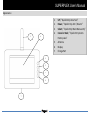
Appearance……………………………………………………………………………………………………………………………………..
Idle menu screen
Setting Up Your Superplex
Power On/Off………………………………………………………………………………………………………………………………….
Battery Charging……………………………………………………………………………………………………………………………..
Interface to External Devices………………………………………………………………………………..
Exploring Quick Button Access Functions
Open Menu……………………………………………………………………………………………………………………………………..
View Events History…………………………………………………………………………………………………………………………
Test Zone Sensors……………………………………………………………………………………………………………………………
Panel Arm and Disarm…………………………………………………………………………………………………………………….
Exploring Menu Functions
Device Memory Delete…………………………………………………………………………………………………………………...
Events History Memory Delete………………………………………………………………………………………………………..
Zone Sensor Bypassing…………………………………………………………………………………………………………………….
New Remote Controller Enrolling…………………………………………………………………………………………………….
Enrolled Remote Controller Removing…………………………………………………………………………………………….
New Zone Sensor Enrolling………………………………………………………………………………………………………………
Enrolled Zone Passive Removing………………………………………………………………………………………………………
Date/Time Configurations………………………………………………………………………………………………………………..
Editing Enrolled Sensors…………………………………………………………………………………………………………………..
Editing Enrolled Remotes………………………………………………………………………………………………………………..
Setting Clock alarm………………………………………………………………………………………………………………………….
Setting Auto Arm and disarm modes……….……………………………………………………………………………………….
Using Features
Away arming VS Stay Arming
Real time alarm viewing and tracking
Understanding events history logging
Remote control button usage
Zone sensor Health routine check
Instant Messaging Notifications
Page 1