1
Import from a Delimited Text File
You will have to configure the import filter only if you select Position Dependent Text Import Filter
or Delimited Text Import. The import filter is automatically configured for all other file types. To
import from a Position Dependent Text File, click [Data][Import] on the main Natural Music screen.
Configuring Delimited Text Import Filter
§
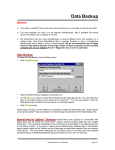
Select this file if the file to be imported has each data field separated by a delimiter character
such as a comma, tab, or pipe character. This file usually will have a .txt or .csv [commaseparated-value] extension and can be commonly created by database programs.
§
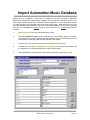
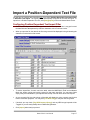
When you open the file, the data for the first song record will be displayed in the grid showing the
field value in each column of the record.
§
To set the import filter, for each row in the table, select the NM5 'Music Field' and tell Natural
Music the record column and for that row's data field. You may leave fields empty if they are
unavailable in your imported data except Title and Artist fields are required.
§
As you set each field, the right column of the table will display the value currently read for that
field for verification purposes. Click [Test Next Song] to verify additional song entries.
§
If desired, you may check [Tag NEW Imported Songs] and any NEW songs imported will be
'Tagged' so you can easily identify them in NM5's Song Browser. Click [Import] when ready to
proceed.
Page 9-8
Natural Music User Manual