1
KOMPAS-3D V9. User manual.
System settings
General system setup
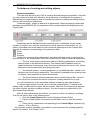
When starting and while running the KOMPAS-3D system, besides the system files
proper, other files are used, including configuration files, library files templates, various
utility files. Default locations of these files and folders for temporary files and documents
are stored in the system in the way of KOMPAS-3D environment variables. If the variable
values are to be other than the default, use the Kompas.ini configuration file containing the
keys with the same names as the variables, and with the desired values. This file is not
included in the installation. You would have created it manually and put in the same folder,
where the Kompas.exe file is located.
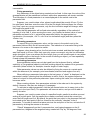
When starting KOMPAS-3D system the Kompas.ini file is searched for only in
the folder containing the file Kompas.exe. Therefore, having the Kompas.ini file in
any other folder is same as not having it at all.
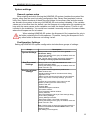
Configuration Settings
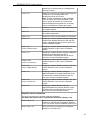
Setting up KOMPAS-3D system configuration includes three groups of settings.
Group
Description
System Settings Settings made on the System tab of the general
Parameters dialog.
If saving the settings of this group is enabled, those are
stored in the file *.cfg.
Note. This file does not store information displayed in
the dialog of viewing system files and folders.
New Document
Settings
Settings made on the New Documents tab of the
general Parameters dialog.
If saving the settings of this group is enabled, those are
stored in the file *.prj.
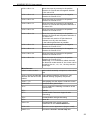
Working window Main system window appearance preferences:
- Main Window Size,
settings
- Interface settings made in the same-name dialog,
- Application Look,
- Status of open documents (window size and position,
cursor's step, scale, local snap settings, grid, scroll
bars),
- Location and composition of the menu bar and
toolbars (including the user defined ones),
- Position and size
- Property Bars,
- Variable Management window,
- Information window,
- Text Templates Librarian window,
- Library windows,
- Document Manager and Layer Filter Settings dialog,
- of the Library Manager,
- Library Manager structure,
- Each library status: connected or detached.
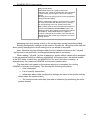
If saving the settings of this group is enabled, those are
stored in the file *.dsk.
Note. This file does not store the information about the
contents of the View and Current Status bars in the
following modes:
when editing a local fragment,
13