1
KOMPAS-3D V9. User manual.
All changes are immediately reflected on the ghost of the hole in the Part Window.
To confirm hole creation, click the Create Object button on the Advanced
Control Panel.
A round hole will be created in the part, and its icon - in the Model Tree.
When creating a hole in the part a sketch is created automatically. It is located on the
face, selected to construct a hole, and contains a construction point located on the hole
axis. If a hole expands on the bend, then the hole will be rebuilt upon changes in the bend
state. The resulting shape of the hole depends on its creation type and on what was the
bend state at the time of creating the hole.
Cut in Sheet Body
Serves to create holes of an arbitrary shape on outer or inner flat faces belonging to
a sheet body or sheet features.
To call the command, click the Cut in sheet body button on the Features of Sheet
Body toolbar or pick it by the name from the menu Operations - Features of Sheet
Body.
The Cut command is available, if at least one sketch is selected.
Cut sketch requirements.
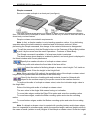
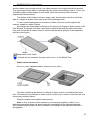
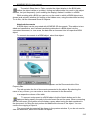
The ghost cut will appear in the Part window, together with an arrow indicating the
material cutting direction. Cannot Change Direction.
Select the cut creation type, by activating one of the switches in the Type
group.
Note. You can create a Through cut, if the following conditions are satisfied: Sketch
must be constructed either on the outer or on the inner flat face of the sheet body only,
The sketch must intersect with the face on which it is created. If a cut is created By depth,
then enter the value in the Depth field on the Options tab of the Property Bar. If a cut is
created To face, then select the object limiting the extrusion, in the Model window. This
object can be represented by a face, surface, a projection or auxiliary plane.
On the Cut tab select the result of the operation: Substraction or intersection.
To confirm cut creation, click the Create Object button on the Advanced Control
Panel.
A cut will be created in the part, and its icon - in the Model Tree.
If a cut expands on the bend, then the cut will be rebuilt upon changes in the bend
state. The resulting shape of the cut depends on its creation type and on what was the
bend state at the time of creating the cut.
Note. A cut expanding on the bend can be created in such a way that the bend state
can no longer be changed.
67