1
3–10
Understanding the Features
Pushbuttons
Pushbutton
Operation
The OP–420 has four user-defined pushbuttons. Pushbuttons may be used to begin
events or tasks within the PLC, such as start/stop control. This section describes
concepts of how to monitor and control the pushbuttons on your OP-panel.
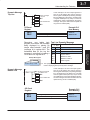
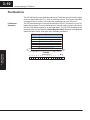
The OP-panel pushbutton inputs are monitored for ON/OFF conditions in your PLC
ladder logic program. From a practical point of view we need to control and monitor
the bits in the status register on an individual basis. The OP–420 pushbuttons are
assigned to the first four bits of the Status Register (M+6). Examine the highlighted
status bits below which show each user definable pushbutton.
Register
M+0
M+1
M+2
M+3
M+4
M+5
M+6
Function
Top line message selection
Bottom line message selection
Top line data
Top line data 2
Bottom line data
Bottom line data 2
Status register
Understanding
the Features
OP–420
Status Register
M+6