1
3–9
Understanding the Features
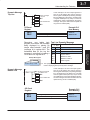
Example: BCD Double
92345678
9234 must be in register M+3
5678 must be in register M+2.
Displaying Floating The OP–420 has the capability to display Floating Point (or Real) numbers if you
select the option Float when the display message is being defined in the
Point Numbers
OP–WINEDIT software.
An IEEE 32-bit floating point number has a range of –3.402823E+38 to
+3.402823E+38. The OP–420 will be able to display any number within that range.
The panel always uses the format X.XXEXX to display the numbers.
The panel does not have the ability to display all the significant digits of a floating
point number, it only displays the first three significant digits. The OP–420 truncates
the remaining digits so you always see the true number. The two examples below
show the data contained in the PLC registers and the corresponding value displayed
on the panel in its format. Notice how the data is truncated.
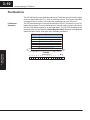
The configuration of a floating point
number message is similar to any other
message. First, you select the message
number, then you type in the text using
nine caret symbols (^) as a place holder
for each of the nine floating point number
symbols. Next, select the Float option for
the data format.
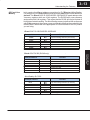
Example: Floating Point Numbers
PLC Registers
OP–420 Display
12301.789
+1.23E+04
123.96783
+1.23E+02
Let’s say you wanted to configure message #58 to display a floating point number.
In the OP–WINEDIT software, select OP–420 as the module type, and then select
message #58 with the mouse. Type in the following message: “Float Pt ^^^^^^^^^”
and select floating point as the message format.
To display a number simply move it into either the top or bottom line data registers
and load the appropriate message number into the corresponding top or bottom
line message selection register. For example, if you display the number 632.15 in
message #58, it will be displayed as “Float Pt # +6.32E+02”.
Understanding
the Features
Floating point numbers can only be used with the D2–250, D3–350, and D4–450
CPUs since they are the only compatible CPUs that support the IEEE 32-bit floating
point number format, which is where the floating point numbers are stored. They
always occupy two 16-bit register locations regardless of the size of the number. See
the PLC User Manual for more information on the IEEE 32-bit floating point number
format.
Entering Programs
When placing a BCD double number in
the display registers, the first register
numerically in the sequence of two
registers (M+2 or M+4) will contain the
four least significant digits of the number.
The second register in the sequence
(M+3 or M+5) contains the data for the
four most significant digits of the BCD
double number.
For example, to display the number
92345678 on the top line of the display,
the top line data registers, M+2 and M+3,
must
contain
5678
and
9234
respectively.