1
REX manual (04/09)
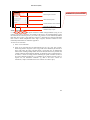
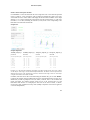
Selects source volumes
Mark Pearrow 5/13/09 9:48 PM
Formatted: Font:11 pt, Font color: Black
Selects regions of interest
Data extraction options
Extracts data from source volumes
Data analyses and display
STEP 1. Selecting ROIs for extraction
Additional analysis plots
rex assumes prior creation of the regions of interest as NIFTI-1 image mask files (*.img or *.nii
formats) or text files (*.tal format). For example, if the goal is to use anatomical ROIs to guide
the functional data extraction process, you can use wfu_pickatlas to create anatomically-defined
ROIs that can be saved as *.img mask files. Note that rex permits the use of labels within mask
files in order to define multiple ROIs with a single *.img file). Alternative methods to create
functionally-defined ROIs are outlined in Appendix I.
To select one or more ROIs:
1) In the rex GUI click ROIs
2) Select one or more ROI files. The supported file types are *.nii, *.img, and *.tal files.
When using NIFTI-1 image files (.nii or .img), ROIs will be defined by the location of
those voxels where the value of the ROI image is greater than zero. In addition ROI
NIFTI-1 files containing multiple labels can also be used (the REX tool is provided with
a sample Talairach Daemon ROI file defining 55 anatomical areas in normalized space).
In contrast, * .tal files are simply text files containing the spatial coordinates (in mm) of
the voxels comprising an ROI (the x,y,z coordinates are in columns, and each voxel is a
separate row; use normalized coordinates -e.g. MNI- if the source volumes are
normalized, or subject coordinates if the source volumes are in native space).
2/9