1
Table of Contents
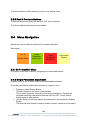
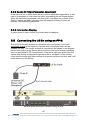
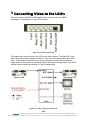
1. System Overview .......................................................................................... 6 1.1 The nanobox chassis .............................................................................. 6 1.2 The LE-2n Product .................................................................................. 7 2 Setting up the LE-2n.......................................................................................... 9 2.1 Associated equipment. ............................................................................ 9 2.2 Connecting the LE-2n using a soft panel. ............................................... 9 2.2.1 Installing the software. ....................................................................... 10 2.2.2 System Requirements........................................................................ 10 2.2.3 Java ................................................................................................... 11 2.2.4 RxTx Serial Drivers ............................................................................ 11 2.2.5 Granting a user permission to open a COM Port in Mac OS X .......... 11 2.2.6 USB to Serial Drivers ......................................................................... 12 2.3 Screen Layout ....................................................................................... 13 2.3.1 Toolbar............................................................................................... 13 2.3.2 Device Info. ........................................................................................ 14 2.3.3 Status Bar .......................................................................................... 15 2.3.4 Display Buttons .................................................................................. 15 2.3.5 Rotary Controls .................................................................................. 15 2.3.6 Next & Previous Buttons .................................................................... 16 2.4 Menu Navigation ................................................................................... 16 2.4.1 Go To Another Menu ......................................................................... 16 2.4.2 Single Parameter Adjustment ............................................................ 16 2.4.3 Double Or Triple Parameter Adjustment ............................................ 17 2.4.4 Information Display ............................................................................ 17 2.5 Connecting the LE-2n using an FP-9. ................................................... 17 2.5.1 Flexipanel controls. ............................................................................ 18 2.5.2 Device Buttons. .................................................................................. 18 2.5.3 Menu Navigation. ............................................................................... 18 2.5.4 Parameter adjustment of a green menu............................................. 18 2.5.5 Parameter adjustment of a red menu................................................. 19 2.5.6 Information display ............................................................................. 19 3 Connecting Video to the LE-2n ........................................................................ 20 -3eyeheight Unit 34 Park House Watford Business Park Greenhill Crescent Watford Herts GB WD18 8PH
Reg. No. 2855535 Telephone: +44 (0) 1923 256 000 Fax: +44 (0) 1923 256 100 email: [email protected]