1
Purpose of Monitoring
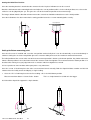
If the different parts of a structure should move uniformly by even large amounts, considerable damage could occur.
Structures affected by construction, or ground effected by a shift in water flow react by exhibiting movement. This movement is the
principal cause of construction related damages because the affected structure may be subjected to forces it was not designed for.
A building, for example, whose footings are settling on one side while the other side settles less or not at all will suffer tilting of some
walls structures. The change in the water table may cause movement of an embankment leading to a slip. The Keynes Controls
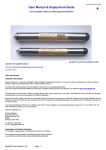
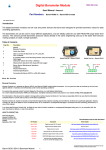
In-place-inclinometers have been designed to measure and report this type of structural movement.
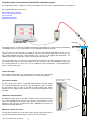
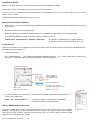
Q-LOG Application Software
Download free at:
http://www.aquabat.net/downloads/QlogSetupv1207.zip
Features
Quick User Guide
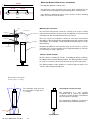
Advanced rugged sensor technology utilising power management.
Lightning Protects as standard
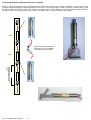
In-line coupling for signal cable installation. Simplifies installation and
maintenance.
Calibrated range ±15 ±10 ±5 Deg
Programmable Sample Period :- removes unwanted vibration
Waterproof to 200 m.
Sensor strings can provide a complete profile of vertical and horizontal
displacements.
Digital data communications to minimise noise
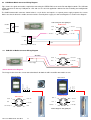
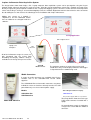
The Keynes Controls range of inclinometers are intelligent devices and
transmit data directly across the RS-485 or SDI-12 digital network. The guide
is not meant as a teaching aid and some prior knowledge of using these two
networks is expected.
SDI-12 Sensor
Unless specified at the time of order a single sensor is set to use ID=0. If the
sensors are supplied as part of a kit then they will be pre-set to unique network
ID numbers.
Connect the sensor to any suitable data logger or PC supporting the SDI-12
network and issue the following commands.
Command: 0An! sets the sensor ID from 0 to ID = n 0A3! new ID=3
0M! start measurement 0D0! Get Data
Data will be returned. If using a Keynes Controls media converter then the
status LED’s will illuminate.
Calibration
RS-485 Sensor
Simple Command Structure
Unless specified at the time of order a single sensor is set to use ID=0. If the
sensors are supplied as part of a kit then they will be pre-set to unique network
ID numbers. This version of the sensor requires a break character to be sent
with the instruction. The break character is identified in the manual as the %
symbol.
All of the I-P-I models use the same command structure.
Connect the sensor to any suitable data logger or PC supporting the RS-485
network and issue the following commands.
aM! – starts a measurement
aC! – starts a concurrent measurement
aD0! – gets data from the sensor
Command: %0An! sets the sensor ID from 0 to ID = n 0A3! new ID=3
%0M! start measurement 0D0! Get Data
All sensors are calibrated at the Keynes Controls facility in the
UK. External calibration can be undertaken upon request.
Data will be returned. If using a Keynes Controls media converter then the
status LED’s will illuminate.
where a = Instrument ID Number
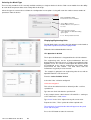
The Q-LOG software automatically inserts the correct break character when
identifying the network being used for communications.
I-P-I User Mnaual V4 Jan 2013
2