1
Contents
Features
2
Calibration
2
Purpose of Monitoring
2
Quick User Guide
2
Q-LOG Application Software
2
Adjusting the Full Scale Range
5
Stand-Alone Data Recorder
6
Expansion Options
6
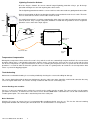
Lightning Protection Scheme
7
Temperature Compensation
7
Troubleshooting
7
Sensor Readings are unstable:
7
Noise Reduction
7
Understanding the Results
8
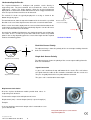
Dual Axis Sensor Polarity
8
Single Axis Sensor Polarity
8
In-Place-Inclinometer Chain Installation
9
Data Averaging
9
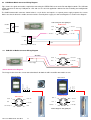
USB-SDI12-Pro Media Converter Connections
9
Connecting the I-P-I to a Data Logger
10
Battery Power Optimisation
10
Fixture Structure - PC Data Acquisition System
12
Product Part Numbers
12
Lightning Protection
12
Connecting In-Place-Inclinometer Sensors Together
13
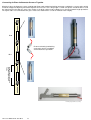
Vertical In-Place-Inclinometer
14
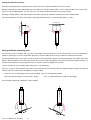
Setting the Initial Zero Position
15
Setting the Datum measuring point
15
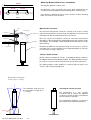
Securing the sensor to a floor
16
Mounting Bracket Dimensions - Installation
16
Mounting the Tilt Sensor
16
Starting - Datum Position
16
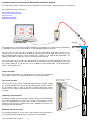
Complete In-place-inclinometer PC Based Data Acquisition System
17
Sensor Kit length
17
First sensor location
17
Uniformity of measurement
17
Maximum number of sensors
17
In-place Inclinometer Data Acquisition System
18
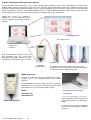
Media Converters
18
Operation in Q-LOG
19
Media Converter Comm Port Number
19
Q-LOG Software
19
SDI-12 / RS485 Network Selection
19
Displaying Engineering Units
20
I-P-I Operation in Q-LOG
20
Selecting the Model Type
20
I-P-I User Mnaual V4 Jan 2013
21