1
Installation/User Manual X529/e529
Part Numbers 02-9487-D & 01-9488.xxx
Revision 3.1, Issued 9/12/06
INNCOM international, inc.
Appendix D – Using the Palm Sneezer to Test and Troubleshoot
e529/X529 Installations
Testing S541 IR Door Position Reporting
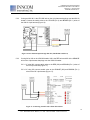
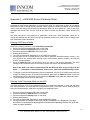
The e529 does not have a door test service function like the e528. However, the Palm PDA sneezer has
an available program called “Door Test Utility” that can be used to completely test S541 door position
reporting to the X529. Refer to the document Palm Door Switch Tester Utility.PDF for complete
instructions.
If using an S541 IR door switch for door position reporting:
1.
2.
3.
4.
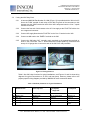
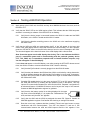
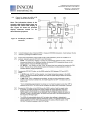
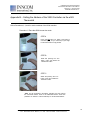
Start the Door Switch Tester program if not already started.
Verify all 3 filters (Door Srv, Swtch Add and Ch) are set to “0”.
Tap the Start button. Running will flash at the bottom of the display.
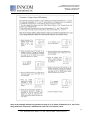
Open the door and verify the following sequence of events:
• 209 should appear as the switch address.
• Jst Open should appear initially as the switch status.
• Open should appear as the door position server status.
• Open should than appear as the door switch status.
5.
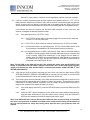
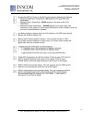
Shut the door and verify the following sequence of events:
• 209 should appear as the switch address.
• Jst Shut should appear initially as the switch status.
• Shut should appear as the door position server status.
• Shut should than appear as the door switch status.
S541 troubleshooting:
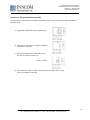
1. If the switch address field remains blank, the Palm tester did not see any door position message
traffic. Try opening and shutting the door again. If you still do not get any switch address or switch
status or it’s intermittent, verify that you are not too far away from the S541, and check to see if
you have a bad line-of-site with the S541. Also verify that the batteries in the S541 are OK. The
last number of the reported switch message indicates the battery state in the S541. If the last
number is 0, the batteries are good. If the last number is 1, the batteries are low and should be
changed.
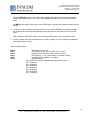
Example of Switch Msg with good batteries: [.500D10060040]
Example of Switch Msg with low batteries: [.500D10060041]
Note: Version 3.0 of the Door Test program will pop up a window indicating Low Battery if
the S541 is reporting its battery is low.
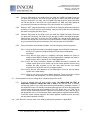
2. If the door server status remains blank for a few seconds and then changes to No Srv!
accompanied by an audible beep, the X529 did not see the door position message from the
S541. It is vital for the room door server (which is the X529) to receive door open/shut status from
the S541 or other door switches in the room. Several other room status servers such as
occupancy and HVAC control use the current entry door status reported by this door server
message to function correctly.
If No Srv! appears for door server status, verify that the installation and position of the X529.
30
277 · West Main Street· Niantic, CT · USA · 860-739-4468 · www.inncom.com