1
4 Bridge Operation
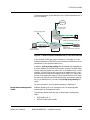
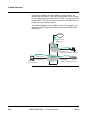
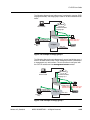
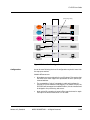
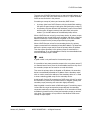
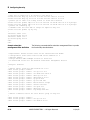
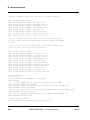
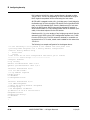
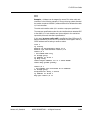
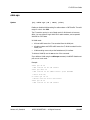
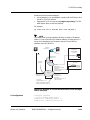
By defining the default cable sub-interface for modem traffic to be
different than the default for CPE traffic, modem traffic can be removed
from the bridge group that contains the CPE traffic. This requires that the
modem DHCP, TFTP, and ToD servers be present on the fastethernet 0/1
interface as in the following example.
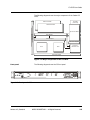
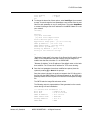
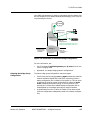
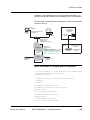
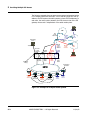
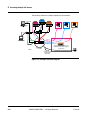
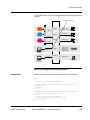
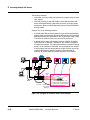
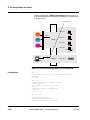
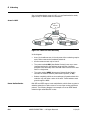
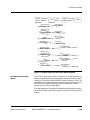
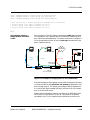
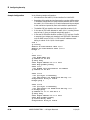
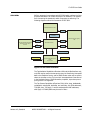
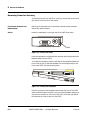
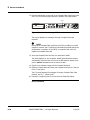
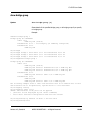
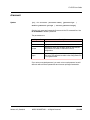
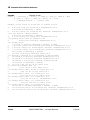
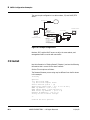
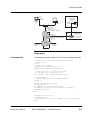
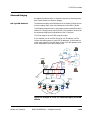
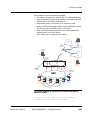
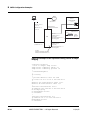
The following diagram shows the default, version 2.0-compatible, operating mode. CMTS management traffic and cable modem traffic share
bridge group 0.
Backbone
fastethernet 0/0.0
bridge-group 1
bridge 1
cable 1/0.1
PC
bridge-group 1
default cpe subinterface cable 1/0.0
fastethernet 0/1.0
boot IP address
bridge-group 0
bridge 0
Cable Operator
DHCP/TFTP/TOD
cable 1/0.0
Modem
bridge-group 0
default cm subinterface cable 1/0.0
Figure 4-8: Default, V2.0 compatible, operating mode
4-12
ARRIS PROPRIETARY — All Rights Reserved
11/14/05