1
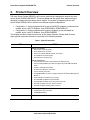
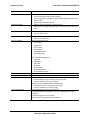
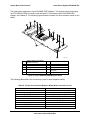
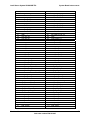
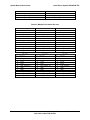
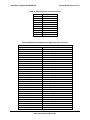
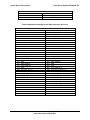
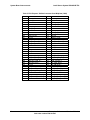
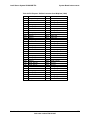
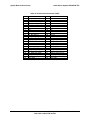
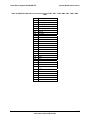
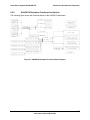
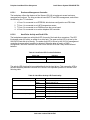
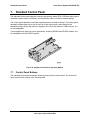
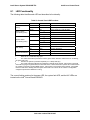
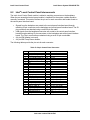
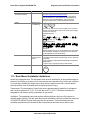
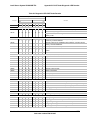
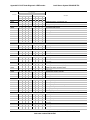
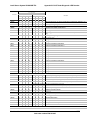
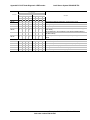
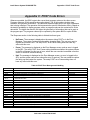
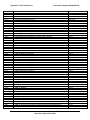
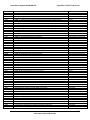
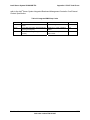
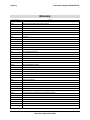
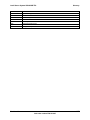
Intel® Server System SR2625UR TPS Appendix C: POST Code Errors Appendix C: POST Code Errors Whenever possible, the BIOS outputs the current boot progress codes on the video screen. Progress codes are 32-bit quantities plus optional data. The 32-bit numbers include class, subclass, and operation information. The class and subclass fields point to the type of hardware that is being initialized. The operation field represents the specific initialization activity. Based on the data bit availability to display progress codes, a progress code can be customized to fit the data width. The higher the data bit, the higher the granularity of information that can be sent on the progress port. The progress codes may be reported by the system BIOS or option ROMs. The Response section in the following table is divided into three types: No Pause: The message is displayed on the screen during POST or in the Error Manager. The system continues booting with a degraded state. The user may want to replace the erroneous unit. The setup POST error Pause setting does not have any effect with this error. Pause: The message is displayed on the Error Manager screen, and an error is logged to the SEL. The setup POST error Pause setting determines whether the system pauses to the Error Manager for this type of error, where the user can take immediate corrective action or choose to continue booting. Halt: The message is displayed on the Error Manager screen, an error is logged to the SEL, and the system cannot boot unless the error is resolved. The user needs to replace the faulty part and restart the system. The setup POST error Pause setting does not have any effect with this error. Table 60. POST Error Messages and Handling Error Code 0012 0048 0108 0109 0113 0140 0141 0146 0192 0194 0195 0196 0197 0198 019F 5220 5221 5224 8110 8111 8120 Error Message CMOS date / time not set Password check failed Keyboard component encountered a locked error. Keyboard component encountered a stuck key error. Fixed Media The SAS RAID firmware cannot run properly. The user should attempt to reflash the firmware. PCI component encountered a PERR error. PCI resource conflict PCI out of resources error L3 cache size mismatch CPUID, processor family are different Front side bus mismatch Processor Model mismatch Processor speeds mismatched Processor family is unsupported. Processor and chipset stepping configuration is unsupported. CMOS/NVRAM Configuration Cleared Passwords cleared by jumper Password clear Jumper is Set. Processor 01 internal error (IERR) on last boot Processor 02 internal error (IERR) on last boot Processor 01 thermal trip error on last boot Response Pause Halt No Pause No Pause Pause Pause Pause Pause Halt Halt Pause Pause Pause Pause Pause Pause Pause Pause Pause Pause Pause 107 Revision 1.2 Intel order number E46130-005