1
C lick&Go A pplication G uidebook
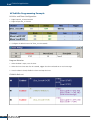
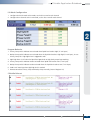
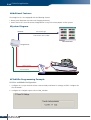
I/O Mode Configuration
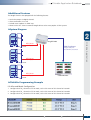
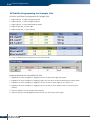
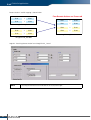
1. Configure the DIO channel to DO mode, set the alias name for each channel
2. Configure the AI channel to 4-20 mA mode, set the alias name for each channel
2
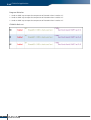
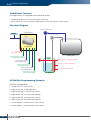
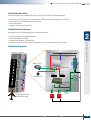
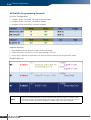
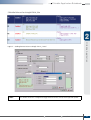
1. Primary Pump and its indicator are activated when liquid level reaches High (15 mA input)
2. Backup Pump and its indicator are activated when the liquid level reaches High-high (18 mA input), in case
Primary Pump fails. High-high Alarm is triggered as well.
3. High-high Alarm is OFF when the liquid level goes back to High, both pumps keep working
4. Primary Pump and its indicator are de-activated when liquid level reaches Low (7 mA input)
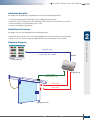
Click&Go Application
Program Behavior
5. Backup Pump and its indicator are de-activated when the liquid level reaches Low (7 mA input)
6. Send e-mail warnings when High-high level is reached
7. Remote control the Primary Pump and Backup Pump manually (Internal Register 0/1)
Click&Go Rule-set
w w w. m o xa . co m
e - m a i l : i n f o @ m o xa . co m
17