1
C lick&Go A pplication G uidebook
ÔÔClick&Go Rules 101
IF-THEN-ELSE
The number one rule in Click&Go programming is “program the way you think.” Just remember that if the result
of the IF logic is true, then the THEN actions will be triggered, but if the result of the IF logic is FALSE, then the
ELSE actions will be triggered.
IF “A” THEN “B”, ELSE “C”
Where There is an ON Logic, There is an OFF Logic
For each action triggered, users must specify the result for when the conditions have been met and when the
conditions have not been met. For example, a simple alarm light application would require an IF statement
to turn the alarm light ON and another IF statement to turn the alarm OFF. Sometimes the OFF logic can be
performed by using the ELSE action.
IF DI_0=ON THEN DO_0=ON
IF DI_0=OFF THEN DO_0=OFF
OR
IF DI_0=ON THEN DO_0=ON, ELSE DO_0=OFF
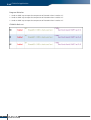
Rules Run in a Loop
The complete list of 24 rules run in a loop. After the last rule, Click&Go will start over from the first rule. To avoid
conflicts, it’s a good idea to check what happens when the cycle restarts at Rule #1.
IF A
Rule #1
IF B
AND / OR
IF C
IF J
Rule #2
IF K
AND / OR
IF L
THEN D
ELSE G
THEN E
ELSE H
THEN F
ELSE I
THEN M
ELSE P
THEN N
ELSE Q
THEN O
ELSE R
Overview of Click&Go
1
Rule #24
w w w. m o xa . co m
e - m a i l : i n f o @ m o xa . co m
5