1
C lick&Go A pplication G uidebook
ÔÔAdditional Features
The ioLogik E2260 is also equipped with the following features:
• Local alarm output via digital channels
• Alarm notifications via e-mail
• Periodic status updates via SNMP trap
• Moxa’s Active OPC Server to connect ioLogik devices to the most popular SCADA systems
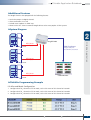
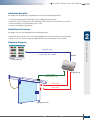
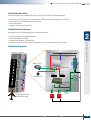
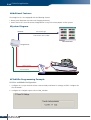
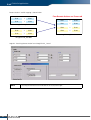
ÔÔSystem Diagram
2
ioLogik E2260
SNMP Trap Report
Freezer
Fridge#1 Temp. 4°C
11:30:52 Mon, 08/12/2008
RTD Sensor
(RTD_1)
Freezer
RTD Sensor
(RTD_2)
Click&Go Application
RTD Sensor
(RTD_0)
Central Monitor
Freezer
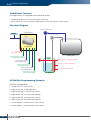
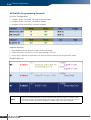
ÔÔClick&Go Programming Example
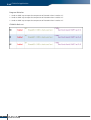
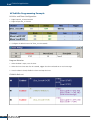
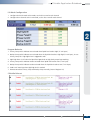
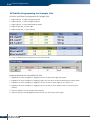
I/O Alias and Mode Configuration
1. Configure the RTD_0 channel to PT100 mode, set the alias name of this channel to Freezer#1
2. Configure the RTD_1 channel to PT100 mode, set the alias name of this channel to Freezer#2
3. Configure the RTD_2 channel to PT100 mode, set the alias name of this channel to Freezer#3
w w w. m o xa . co m
e - m a i l : i n f o @ m o xa . co m
7