1
Overview of Click&Go
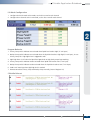
ÔÔClick&Go Configuration
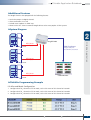
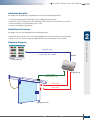
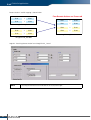
After setting the IP address for the ioLogik Ethernet I/O server, Click&Go logic can be configured by following the
procedure below.
I/O Mode
Configuration
I/O Alias Name
Configuration
I/O Test
Activate
Rule-sets
Define the
Logic
Define Global
Variables
Import/Export
Configuration
ÔÔTHEN/ELSE Operation
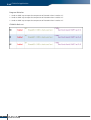
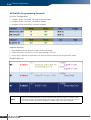
Under the THEN column, you can specify up to 3 actions that will be performed when the conditions under the
IF column are satisfied. You can also specify up to 3 actions that will be performed under the ELSE column when
the IF column is NOT satisfied. Possible actions include changing the status of a DO channel, starting or stopping
an Event Counter, or sending a message by SNMP trap, TCP, UDP, or e-mail. (Note: 1 = True, 0 = False)
IF Conditions
A1
A2
A3
Action
0
0
0
0
Triggers ELSE action
0
0
1
0
Triggers ELSE action
0
1
0
0
Triggers ELSE action
0
1
1
0
Triggers ELSE action
1
0
0
0
Triggers ELSE action
1
0
1
0
Triggers ELSE action
1
1
0
0
Triggers ELSE action
1
1
1
1
Triggers THEN action
A3
Result of
OR Logic
Action
IF Conditions
A1
4
Result of
AND Logic
A2
0
0
0
0
Triggers ELSE action
0
0
1
1
Triggers THEN action
0
1
0
1
Triggers THEN action
0
1
1
1
Triggers THEN action
1
0
0
1
Triggers THEN action
1
0
1
1
Triggers THEN action
1
1
0
1
Triggers THEN action
1
1
1
1
Triggers THEN action