1
backup program can’t back up files that are being used (in this case, by the Spectrum
Server program). Because some files would be backed up and some wouldn’t be, the
backup data would be incomplete. It wouldn’t consist of all the database files necessary
to completely restore the Spectrum database.
Before Spectrum CIRC/CAT 4.0, you could not back up (or have a good backup if you
did so) without first shutting down the Spectrum Server program. Since Spectrum
CIRC/CAT 4.0, Spectrum includes a backup program (Ctdump) that automates and
facilitates the backup process—including letting you make backups while the server
program is running. However, you can still make backups without taking advantage of
Spectrum CIRC/CAT’s backup program.
To back up without using Ctdump
1 Shut down the Spectrum Server program.
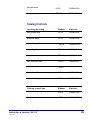
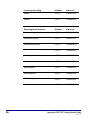
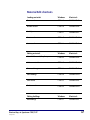
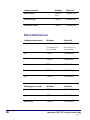
2 Copy all the necessary files (.dat and .idx) to another location.
Or, use a standard backup program to copy all the necessary
files in the Spectrum Server folder. (Note: If you miss any files,
your backup is incomplete, and therefore not capable of
restoring your system to a good condition.)
3 Start the Spectrum Server program again.
Making backups
SCC5gs1200kn
61