1
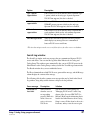
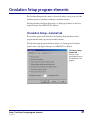
Setup
1
Understanding the setup program elements ........................... 14
Location Setup program elements ........................................... 15
Calendar Setup program elements........................................... 22
Catalog Setup program elements............................................. 27
Circulation Setup program elements........................................ 49
Material Type Setup program elements................................... 57
Password Setup program elements .......................................... 63
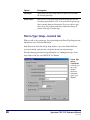
Patron Type Setup program elements ..................................... 67
SLIP Setup program elements .................................................. 72
13
SCC5um1200tb
Understanding the setup program elements
The Setup part of the program lets you determine how your program looks and operates.
For this purpose, Spectrum has several Setup categories: Location, Calendar, Catalog,
Circulation, Material Types, Passwords, Patron Types, and SLIP printer.
About password-protected features
When you try to access the various setups in Spectrum CIRC/CAT, you may be prompted
to enter a password. If you just installed the Spectrum CIRC/CAT program, you are
prompted to enter the master password. The default master password is CIRC (in all
capital letters). We advise that you change the master password to a word more unique to
the person(s) using the master password. See "Setting up passwords" in the Setup chapter
of the Spectrum CIRC/CAT User Manual for more information about passwords.
For help performing setup tasks, see "Setting up the program" in the Setup chapter of the
Spectrum CIRC/CAT User Manual.
14
Spectrum CIRC/CAT Reference Manual
SCC5rm1200tb
Location Setup program elements
In the Location Setup part of the program, you enter your library’s user-defined 1 and 2
fields for your materials and the location code if you use 14-digit barcodes. If your library
participates in a cooperative library system (such as Winnebago Union CAT or Spectrum
Union Catalog) you may need the location code to identify materials from your library.
You can also set up a partition between material and patron records. All of these entries
are optional.
For help performing Location Setup tasks, see "Setting up your location" in the Setup
chapter of the Spectrum CIRC/CAT User Manual.
Location Setup—General tab
The General tab of the Location Setup window prompts for general details about your
local library, such as your library’s location code, name, address, postal code, fax
number, and material user-defined fields. Although it's not required that you set up all the
information in the General tab, we recommend that you enter it here so you can reference
it. Plus, some of the information prints on reports, and the items that you enter in the
user-defined fields are used as additional entry fields in the Holdings window of Material
Edit.
For help setting up your general location information, "Setting general location
information" in the Setup chapter of the Spectrum CIRC/CAT User Manual.
Setup: Location Setup program elements
SCC5um1200tb
15
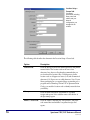
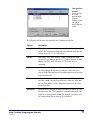
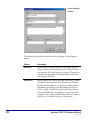
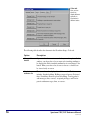
Location Setup—
General tab
Your library
information, including
library name and
address and your
barcode
configurations, are
managed in this
window.
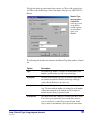
The following table describes the elements in the Location Setup—General tab.
16
Option
Description
Location code
Saves the library location code and incorporates it into printed
material labels. The location code can be one to four
characters long; however, Sagebrush recommends that you
use four character location codes. Valid characters for the
location code are all uppercase letters (A-Z) and all numerical
characters (0-9). Spaces are not valid characters. Note: If your
library participates in a cooperative library system that uses a
program such as Winnebago Union CAT or Spectrum Union
Catalog, you need the location code to identify materials from
your library.
Library name
Saves the name entered here and includes it on printed
receipts and reports. It also adds the name to the title bar of
the Spectrum program.
Address…Postal code
Saves the address, including city, state/province, and postal
code entered here and includes it on printed receipts and
reports.
Spectrum CIRC/CAT Reference Manual
SCC5rm1200tb
Option
Description
Fax number
Saves the fax number entered here. This is for storage and
reference purposes only.
Material user-defined
names
Saves names for the material records’ user-defined fields. For
example, material user-defined fields could be vendor name
(who you bought a book from) or book set (the name of the
book set a book belongs to). The names entered here are used
as additional entry fields in the Holdings window of Material
Edit.
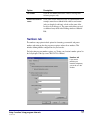
Numbers tab
The numbers setup options include options for formatting your material and patron
numbers and setting up how the program recognizes and uses those numbers. This
includes defining number configurations for your barcodes.
For help setting up your numbers options, see "Setting your location's number options" in
the Setup chapter of the Spectrum CIRC/CAT User Manual.
Numbers tab
If you want to
partition your
materials and patrons,
you can do so in this
window.
Setup: Location Setup program elements
SCC5um1200tb
17
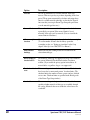
The following table describes the elements in the Location Setup—Numbers tab.
Option
Description
Formatting
Determines whether you want to remove leading zeros from
material and patron barcodes imported into the Spectrum
program. Sagebrush recommends removing leading zeros if
you use 14-digit barcodes in your library. Also determines
whether to exclude 9-digit patron numbers. You may want to
exclude 9-digit patron numbers if you use social security
numbers for your patron numbers. By excluding 9-digit patron
numbers, leading zeros will not be removed from these
barcodes.
Partition material
and patron numbers
Determines whether you want to set partitions for your
program. If ranges are set up, the material and patron numbers
don’t overlap. If you don't set up a partition for your material
and patron numbers, your barcodes could mix together, and it
would be hard to decipher if a number was for a patron or a
material. If you don't set up ranges, we recommend placing the
letter "P" (for patron) before each of your patron barcodes.
Configurations
button
Opens the Configurations window where you can add, edit,
and delete barcode configurations.
Configurations window
You can configure barcodes to include material and patron indicators, the location code,
and the actual number indicators for material or patron numbers. The length, format, and
indicators are defined by the barcode configuration. You add new configurations, edit
existing configurations, and delete configurations in the Configurations window. The
Configurations window has four configurations set up by default, including a 10-, 11-,
13-, and 14-digit barcode configuration. Very rarely do you need to add or edit existing
barcode configurations.
For help setting up your barcode formats, see "Configuring your location's barcodes" in
the Setup chapter of the Spectrum CIRC/CAT User Manual.
18
Spectrum CIRC/CAT Reference Manual
SCC5rm1200tb
Configurations
window
This window lists
all of your
barcode formats.
From this
window, you can
add, edit, or
delete a barcode
format.
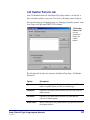
The following table describes the elements in the Configurations window.
Option
Description
Length
This indicates the number of characters in a barcode configuration. By
default, the Configurations window has four different length barcode
configurations: 10-, 11-, 13- and 14-digits.
Format
Indicates the order of the characters within a configuration, with
options of I (type indicator character), L (location character), B (item
number character), and F (fill character). The letters must be
capitalized.
Material
Indicates the number of the material type indicator (I). If two numbers
are in this column, the material type indicator is either one or the
other, not both. This number is used to differentiate material barcodes
from patron barcodes.
Patron
Indicates the number of the patron type indicator (I). If two numbers
are in this column, the patron type indicator is either one or the other,
not both. This number is used to differentiate patron barcodes from
material barcodes.
Add button
Opens the New Configuration window in which you can set up a new
barcode format. Note: You cannot have a barcode format of the same
length as an existing barcode format. For example, you cannot set up
two configurations that are made up of 10 characters.
Setup: Location Setup program elements
SCC5um1200tb
19
Option
Description
Edit button
Opens the Edit Configuration window in which you can modify an
existing barcode format.
Delete button
Removes the currently selected barcode configuration.
New/Edit Configuration window
The New Configuration and Edit Configuration windows are identical except for their
titles. The Edit Configuration window opens with the data for the selected configuration
already in the format and indicator boxes.
You set up how many digits you want in your material and patron numbers and whether
you want material or patron type indicators (I), location indicators (L), item number
indicators (B), or fill characters indicators (F) when you add or edit the configurations.
You can also determine what numbers to use for patron and material type indicators.
Note: The Format box only accepts the letters I, L, B, and F—and they must be
capitalized.
For help adding or editing barcode formats, see "How to add and edit a barcode
configuration" in the Setup chapter of the Spectrum CIRC/CAT User Manual.
New/Edit
Configuration
window
Here you can
either add new or
edit existing
number
configurations.
20
Spectrum CIRC/CAT Reference Manual
SCC5rm1200tb
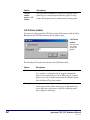
The following table describes the elements in the New/Edit Configuration window.
Option
Description
Format
Indicates the order of the characters within a configuration,
with options of I (indicator character), L (location character), B
(item number character), and F (fill character). The letters must
be capitalized.
Patron indicator(s)
Indicates which number(s) are used as the patron indicator(s)
for patron numbers. If two numbers are listed, the patron
indicator is either one or the other, not both.
Material indicator(s)
Indicates which number(s) is/are used as the material
indicator(s) for material numbers. If two numbers are listed,
the material indicator is either one or the other, not both.
Setup: Location Setup program elements
SCC5um1200tb
21
Calendar Setup program elements
You manage your schedules and library hours in Calendar Setup. In the Calendar Setup
window, you set up different schedules for each patron type. You set up your library’s
open days and hours in the Weekly Hours window. The Circulation part of the program
uses the library hours that you set up to determine material due dates and calculate fines
for overdue materials.
For help performing Calendar Setup tasks, see "Setting up the calendar" in the Setup
chapter of the Spectrum CIRC/CAT User Manual.
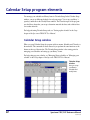
Calendar Setup window
When you open Calendar Setup, the program adds two menus, Schedule and Calendar, to
the menu bar. The commands on these menus let you perform the same functions as the
buttons at the top of the window. The Calendar Setup window is the starting point for
managing your schedules and setting up your library’s hours.
For help setting up your calendar, see "Managing library schedules or "Managing your
calendar" in the Setup chapter of the Spectrum CIRC/CAT User Manual.
Calendar Setup
window
Here you set up
your library's
schedules and
weekly hours.
22
Spectrum CIRC/CAT Reference Manual
SCC5rm1200tb
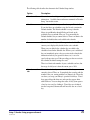
The following table describes the elements in the Calendar Setup window.
Option
Description
Calendar toolbar
Contains buttons that help you set up your calendar. For more
information, "Available button and menu commands in Calendar
Setup" later in this section.
Schedule
Contains the schedules that you add and set up in Calendar Setup.
If you don't have any schedules set up, the list only contains the
Default schedule. The Default schedule is set up so that the
library is open Monday through Friday and closed on the
weekends for every month of the year. You can modify the
Default schedule, but you cannot delete it. There is no limit to the
number of schedules that can be added to the calendar.
Year
Contains the years that you add for a particular schedule. The
current year is displayed by default for the active schedule.
When years are added to the calendar, they are added to the
schedule selected in the Schedule box. When a year is added and
the year immediately prior to that year exists in the calendar, the
information for that year (open/close hours, etc.) is set to be
equal to the previous year. If the preceding year does not exist in
the calendar, the default settings are used.
There is no limit to the number of years a schedule can have, but
the range of valid years is from the current year to 2038.
Calendar month
tabs
Setup: Calendar Setup program elements
SCC5um1200tb
Contain the calendar days on each month tab for the year
currently selected. There are 12 month tabs that correlate with the
months of the year, starting with the Jan (January) tab. These tabs
are where you set up your library's open and closed days. Closed
days appear blue with white text, and open days appear white
with black text. You can change the status of a day (from open to
closed or vise-versa) by clicking it. Closed days are calculated
into the loan period, but materials will never be due on a closed
day.
23
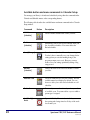
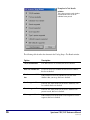
Available button and menu commands in Calendar Setup
You manage your library’s calendar and schedules by using either the commands in the
Calendar and Schedule menus or the corresponding buttons.
The following table describes the available button and menu commands in the Calendar
Setup window.
Command
24
Button
Description
Add New
[Schedule]
Creates another schedule with a name you enter.
Delete
[Schedule]
Permanently removes the selected schedule from your
list of available schedules. You cannot delete the
Default schedule.
Save [Changes]
Saves the currently selected hour and year settings.
You don’t have to manually save your changes before
exiting (when you exit after making changes, the
program prompts you to save). However, you may
want to save your settings periodically during a long
setup process.
Rename
[Schedule]
Changes the name of the selected schedule to a name
you enter.
Add New Year
Creates an additional year for your calendar. The first
available unused year displays by default. You can
choose to add a year to the selected schedule or to all
schedules.
Delete Year
Permanently removes the selected year from your list
of available years. You cannot delete a year to which a
patron type is assigned.
Set [Weekly]
Hours
Opens the Weekly Hours window in which you can set
the opening and closing times for all days of the week
for an entire year.
Spectrum CIRC/CAT Reference Manual
SCC5rm1200tb
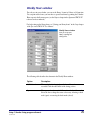
Weekly Hours window
For each year in your calendar, you can set the library’s hours in 12-hour or 24-hour time.
You can print out the hours you enter here as open/closed times by printing the Calendar–
Hours report in the System reports (see the Reports chapter in the Spectrum CIRC/CAT
reference and user manuals).
For help setting up the library hours, see "Setting your library hours" in the Setup chapter
of the Spectrum CIRC/CAT User Manual.
Weekly Hours window
Here you set up your
library's opening and
closing times.
The following table describes the elements in the Weekly Hours window.
Option
Description
24/12 Hour time
The standard of timekeeping by which your library hours are
recorded. Click the radio button of the setting you use.
Open
The open or closed status of the library for each day of the week.
Select the box to change the status as necessary, inserting a check
mark (open) or removing the check mark (closed).
Setup: Calendar Setup program elements
SCC5um1200tb
25
26
Option
Description
Time
Open/Closed
The times (HH:MM) that the library opens and closes.
AM/PM
(Available only if you selected 12 Hour time.) The expression of
time of day for the time entered. Click the button to switch
between AM and PM.
Spectrum CIRC/CAT Reference Manual
SCC5rm1200tb
Catalog Setup program elements
Catalog Setup lets you control the appearance, availability, and content of catalog
windows. The options you choose determine how the catalog functions and what your
patrons can do when using the catalog.
For help performing Catalog Setup tasks, see "Setting up the catalog" in the Setup chapter
of the Spectrum CIRC/CAT User Manual.
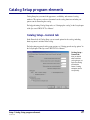
Catalog Setup—General tab
In the General tab of Catalog Setup, you set search options for the catalog, including
limits on patrons’ activities in the catalog.
For help setting up general catalog setup options, see "Setting general catalog options" in
the Setup chapter of the Spectrum CIRC/CAT User Manual.
Catalog Setup—
General tab
Here you decide
what restrictions
you're going to set
up for the catalog
and whether
Patrons' Catalog
computers can be
set up locally.
Setup: Catalog Setup program elements
SCC5um1200tb
27
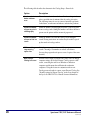
The following table describes the elements in the Catalog Setup—General tab.
28
Option
Description
Number of minutes
before windows
reset
Clears the search window and closes all other catalog windows
after a specified time (in minutes) that the catalog is inactive.
The following items are reset or removed: material type limits,
locked items, search terms and indexes, and window positions.
Maximum number
of items to print in
a bibliography
Limits the number of bibliography materials a patron can print
from a catalog search. Setting this number can reduce the time a
patron uses the printer and the amount of paper used.
Maximum number
of items to find in a
search
Limits the number of records the catalog locates through a
search. Placing restrictions on searches may be useful to speed
up the results of catalog searches.
While searching,
stop counting
copies after
Limits how many copies of a material the program counts in a
search. Choosing a low number can reduce search times
(because the program doesn't process several copies of the same
material).
Open Patrons’
Catalog full-screen
Provides extra security so patrons can’t easily access or change
computer settings. If selected, Patrons' Catalog opens in a fullscreen, concealing the task bar on Windows workstation
computers and the menu bar on Macintosh workstation
computers. Using this feature in conjunction with an exit
Catalog password results in a more secure Patrons' Catalog. See
"Security options for Patrons' Catalog" in the Setup chapter of
the Spectrum CIRC/CAT User Manual for more information.
Spectrum CIRC/CAT Reference Manual
SCC5rm1200tb
Option
Description
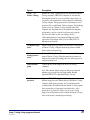
"Setup…" (in
Patrons' Catalog)
Enables the "Setup" command on the Catalog menu at Patrons’
Catalog computers (CIRC/CAT computers are not affected).
Selecting this option lets you access all the setups, where you
(or patrons) can customize the catalog settings for each Patrons’
Catalog computer. The program stores local settings in a local
preference file at each Patrons' Catalog computer. Catalog Setup
options you set at a Patrons’ Catalog computer affect that
computer only. Sagebrush doesn’t recommend selecting this
option unless you also set up the local password so patrons
don’t have the ability to alter your settings. See the
"Relationship between Catalog Setup and Patrons' Catalog"
topic in the Setup chapter of the Spectrum CIRC/CAT User
Manual for more details.
"Set Material Type
Limits"
Enables the Material Type Limits selection in the Catalog menu
of Patrons’ Catalog. Using this menu item, patrons can limit
their searches by material type.
"Set
Reading/Interest
Levels"
Enables the Reading/Interest Levels command in the Catalog
menu of Patrons’ Catalog. Using this menu item, patrons can
limit catalog searches by reading grade level, interest age level,
and interest grade level.
Local passwords
group
Controls the use of the setup password at local catalog
computers.
Note: The contents of the Local passwords group depend on
whether you access the Catalog Setup window through
Spectrum CIRC/CAT or Spectrum Patrons’ Catalog.
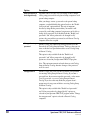
Enable local
passwords
Setup: Catalog Setup program elements
SCC5um1200tb
Spectrum CIRC/CAT only. Lets each lookup computer have a
different setup password. When selected, each Patrons’ Catalog
computer checks for the presence of a local preferences file
(CATSETUP.PRF). If it finds the file, the Patrons’ Catalog requires
that you enter the local password stored in that file—or the
master (level 9) password—before you can access Catalog
Setup. If no local preferences file is found, the Patrons’ Catalog
refers to the system’s standard password setup.
29
Option
Description
Allow passwords to
be changed locally
Spectrum CIRC/CAT only. Lets you change or enter a unique
catalog setup password for each patron lookup computer at each
patron lookup computer.
After you change or enter a password at each patron lookup
computer, you should disable this option (but leave the "Enable
local passwords" option enabled). This step is important
because by doing this the password that you entered is still
accepted by each lookup computer, but patrons won't be able to
change local passwords. If you disabled both the "Enable local
passwords" and "Allow passwords to be changed locally"
options, the password that you entered at each Patrons' Catalog
computer will not be accepted.
Change the setup
password
Patrons' Catalog only. Enables the Setup password box in the
General tab of Catalog Setup in Patrons' Catalog so that you can
enter or edit the local password needed to access Catalog Setup
in Patrons’ Catalog.
This option is only available if both the "Enable local
passwords" and "Allow passwords to be changed locally"
options are selected in your Spectrum CIRC/CAT program.
Note: This option must remain selected when you exit Catalog
Setup in Patrons' Catalog otherwise changes to the password
won’t be saved.
Setup password
Patrons' Catalog only. Lets you enter or edit the local password
for entering Catalog Setup in Patrons' Catalog. If you enter a
password here, the user must enter this password—or the master
(level 9) password —to access Catalog Setup in Patrons'
Catalog. If you leave this entry blank, the program doesn’t
prompt users for any password before accessing Catalog Setup
in Patrons' Catalog.
This option is only available if the "Enable local passwords"
and "Allow passwords to be changed locally" options are
selected in your Spectrum CIRC/CAT program and the "Change
the setup password" option is selected at Patrons' Catalog
computers.
30
Spectrum CIRC/CAT Reference Manual
SCC5rm1200tb
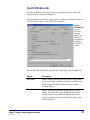
Search Window tab
In the Search Window tab of Catalog Setup, you set up the options for how the main
search window in Catalog looks and operates.
For help setting up search window setup options, see "Setting search window options" in
the Setup chapter of the Spectrum CIRC/CAT User Manual.
Search
Window tab
You can
specify the
searching
abilities, news
information,
and what tabs
to display in
the Catalog
window.
The following table describes the elements in the Catalog Setup—Search Window tab.
Option
Description
Easy search
Enables or disables the Easy Search tab in the Catalog window.
If you select this option, the Easy Search tab is available in the
Catalog window. The Easy Search tab has simple, limited
searching abilities.
Expanded search
Enables or disables the Expanded Search tab in the Catalog
window. If you select this option, the Expanded Search tab is
available in the Catalog window. The Expanded Search tab
allows more detailed searches, such as Boolean searches, than
the Easy Search tab.
Setup: Catalog Setup program elements
SCC5um1200tb
31
32
Option
Description
Default
Displays the selected search tab (Easy Search, Expanded
Search, or Visual Search) by default when you open the Catalog
window. For example, if you choose Easy Search as your
default search tab, the Catalog window displays the Easy Search
tab when you open the Catalog window.
Cross-Reference
Enables or disables cross-referencing capabilities in the
specified search tab(s). With cross-referencing enabled, you can
use the See Also button while searching. Note: The See Also
button is only available if you purchase the Cross Reference
Words Database from Sagebrush Corporation. Contact
Sagebrush's Sales Department at 1-800-533-5430 for more
information.
Visual search
Enables or disables the Visual Search tab in the Catalog
window. If you select this option, the Visual Search tab is
available in the Catalog window. The Visual Search tab lets you
design specific searches and link them to visual search buttons.
Note: The Visual Search option is only available if you
purchase Visual Search from Sagebrush Corporation. Contact
Sagebrush's Sales Department at 1-800-533-5430 for more
information.
Allow visual search
button properties
to be changed
If selected, you have the ability to modify the visual search
buttons in Catalog. Note: If you select this option, you can only
change the properties in Spectrum CIRC/CAT and not in
Patrons' Catalog.
News
Enables or disables the News tab in the Catalog window. You
add news content by clicking the Set news text button and
entering text in the News window. If the News tab is available
at the Catalog Search window, the patron can click it to view the
news text.
Set news text
Button
Lets you access the News window, where you can enter any text
you want patrons to view at catalog computers. You can enter
community and school events or any other newsworthy items.
You can enter up to 30,000 characters in the News window. For
more information, see "Managing library news" in the Setup
chapter of the Spectrum CIRC/CAT User Manual.
Spectrum CIRC/CAT Reference Manual
SCC5rm1200tb
Option
Description
Collections
available
Enables or disables the Collections Available tab in the Catalog
window. Using this tab, you can select the collections to be
searched. Your library collection consists of the material records
of your library. Resource collections contain such items as news
articles and abstracts. Note: You can only access resource
collections if you purchase a subscription. You can purchase the
Resource Collection Subscription program from Sagebrush
Corporation. For more information, contact Sagebrush’s Sales
Department at 1-800-533-5430.
Other libraries
Enables or disables the Other Libraries tab in the Catalog
window. If you select this option, the Other Libraries tab is
available in the Catalog window. The Other Libraries tab let
your patrons search remote databases using Z39.50 technology.
Note: The Spectrum Z39.50 Client feature may be sold
separately from Spectrum CIRC/CAT. For information on
obtaining this feature, contact Sagebrush's Sales Department at
1-800-533-5430.
Use wild card
searching for
author/title/subject
Lets you choose whether your catalog users can use the implied
wildcard. The implied wildcard in Catalog is placed at the end
of each search word. For example, if you enter the search term
cat, the search results would display cat, as well as catamaran
and catacomb (but not bobcat because cat appears at the end of
the word). The default setting is to allow searching with the
implied wildcard.
Automatically
display browse
window after
unsuccessful search
If selected, unsuccessful searches automatically display the
Browse window instead of a "No materials were found" alert
window.
Bottom line
Displays the text you enter in the Bottom line box at the bottom
of the Catalog window. You can enter up to 100 characters.
Note: Your entire message may not be visible in the Catalog
window—it depends on your operating system’s font settings
and the width of the characters.
Setup: Catalog Setup program elements
SCC5um1200tb
33
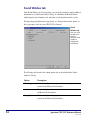
Found Window tab
In the Found Window tab of Catalog Setup, you can specify whether to display additional
information for a found material in the Catalog. At a minimum, the Materials Found
window displays the call number, title, and author of each material found in a search.
For help setting up found window setup options, see "Setting found window options" in
the Setup chapter of the Spectrum CIRC/CAT User Manual.
Found
Window tab
Here you set up
the options for
how the
Materials Found
window in
Catalog looks
and operates.
The following table describes the column options that can be included in the Found
window in Catalog.
34
Option
Description
Material type
If selected, displays the description of the material type for each
material in the Materials Found window.
Location
If selected, displays the location information for each material in
the Materials Found window.
Copyright date
If selected, displays the copyright date information for each
material in the Materials Found window.
Spectrum CIRC/CAT Reference Manual
SCC5rm1200tb
Details Window tab
In the Details tab of Catalog Setup, you choose the record format(s) available in the
Details window in Catalog.
For help setting up details window setup options, see "Setting details window options" in
the Setup chapter of the Spectrum CIRC/CAT User Manual.
Details
Window tab
Here you set
up the options
for how the
Details
window in
Catalog looks
and operates.
The following table describes the elements in the Catalog Setup—Details Window tab.
Option
Description
MARC record
Displays the MARC Record tab in the Details window.
Itemized list
Displays the Itemized List tab in the Details window.
Card image
Displays the Card Image tab in the Details window.
Copies
Displays the Copies tab in the Details window.
Setup: Catalog Setup program elements
SCC5um1200tb
35
36
WebConnect
Includes the WebConnect tab in the Details window. The
WebConnect tab lists web addresses associated with the selected
material. Important! If no web addresses are listed in the selected
material's record, the tab won’t display even if the WebConnect
option is selected in Catalog Setup.
Default
Determines the record format to be displayed when you open the
Details window. You can choose from MARC Record, Itemized
List, Card Image, Copies, or the format most recently displayed.
One of the first four options for which tabs to show in the Details
window must be selected in order to view details about the
materials you find. If you don’t select MARC record, Itemized list,
Card image, or Copies an error message informs you that you must
select one of these options before closing the Catalog Setup
window.
Show Records
group
You can choose how text for search terms and hyperlinks is
displayed in the catalog's Details window. The search terms used to
find the records are emphasized in the Details window by
formatting the word in a specific color, bold, or italic text. This
option helps users see why the record was found during the search
by emphasizing the search term words that appear in the record.
Color (search
terms)
Sets the color for search terms. When you click this button, you
open a window that contains a standard system color palette. Here
you can choose the color you want search terms to be displayed in.
By default, search terms are blue. If you change colors, be sure to
choose a color that can be viewed easily on screen.
Bold (search
terms)
If selected, displays search terms as bolded text. (By default, this
box is checked.)
Italic (search
terms)
If selected, displays search terms as italicized text. (By default, this
box is not checked.)
Spectrum CIRC/CAT Reference Manual
SCC5rm1200tb
Show hyperlinks
in records as
If selected, displays hyperlink text in the color you specify. A
material’s author(s), subject(s), series title, added entry title, and
added entry author hyperlinks in the Spectrum Catalog are
underlined text that when clicked launch a new catalog search on
the text. After you click the underlined text, the Materials Found
window contains all of the materials found in a catalog search using
the selected underlined word as the search term.
Color
(hyperlinks)
Sets the color for hyperlinks. When you click this button, you open
a window that contains a standard system color palette. Here you
can choose the color you want hyperlink text to be displayed in. By
default, hyperlinks are purple. If you change colors, be sure to
choose a color that can be viewed easily on screen.
Important! In order for search terms and hyperlinks to display correctly on a Windowsbased computer, monitor color settings must be set at a minimum of High Color (16 bit)
or higher.
Reserves tab—Catalog Setup
Important! If you do not have any patron records in your database, this tab is not
displayed.
You can choose whether patrons are able to view their circulation status and/or place
reserves. If you select either of these options, you must set up your patron access
information in the Patron Access group. If you don’t select either of these options, you
won’t have to set up patron access information because the Patron Access group will be
unavailable.
For help setting up reserve options, see "Setting reserve options" in the Setup chapter of
the Spectrum CIRC/CAT User Manual.
Setup: Catalog Setup program elements
SCC5um1200tb
37
Reserves tab
Here you
decide whether
patrons can
view their
circulation
status or place
reserves.
The following table describes the elements in the Catalog Setup—Reserves tab.
38
Option
Description
Allow patrons to view
their circulation
status
If selected, lets patrons view their own circulation
information such as the materials they currently have checked
out, fines owed (if any), and so on.
Allow patrons to
place reserves
If selected, lets patrons reserve materials from the catalog.
Important! Only patrons who are assigned to a patron type
that has the "Place reserves in Catalog" option selected in the
Privileges tab of the Patron Type Setup window will be able
to place reserves. For more information, see "Privileges tab"
in the Patron Type Setup section of this chapter.
Spectrum CIRC/CAT Reference Manual
SCC5rm1200tb
Option
Description
Patron number …
User-defined
Lets you choose the information that patrons must provide in
order to access their circulation status and place reserves. If
selected, each field is patron information that the patron must
enter before gaining access to their circulation information.
For this access information you can choose any combination
of the following patron record fields: patron number, last
name, first name, user-defined 1, user-defined 2, and userdefined 3. You must choose at least one of the six patron
record fields. Try to choose an option that has a unique
identifier such as Patron number. For example, if Last name
is the only option you choose, it’s probable that two or more
patrons have the same last name. If patrons with the same last
name try to access circulation information or place a reserve,
an alert informs them that more than one patron matches the
information they entered, and that they must ask the librarian
to reserve materials for them. Note: You can choose all six
options, but that might congest patrons’ use of the catalog.
Maximum login
attempts
The number of times users can incorrectly enter their access
information before the program doesn't let them try again.
You can choose from one to five attempts.
Gale Setup tab
If your library uses a proxy server and has a subscription to Gale multimedia resources,
you set up the proxy server information in the Gale Setup tab of Catalog Setup.
Note: Sagebrush no longer offers Gale multimedia subscriptions, but we continue to
support Gale for those libraries that already have subscriptions to it.
For help setting up proxy options for Gale, see "Setting Gale setup options" in the Setup
chapter of the Spectrum CIRC/CAT User Manual.
Setup: Catalog Setup program elements
SCC5um1200tb
39
Gale Setup
tab
If your library has
a subscription to
Gale multimedia
resources and
uses a proxy
server, you must
set up your
proxy server
information in
this tab.
The following table describes the elements in the Catalog Setup—Gale Setup tab.
Option
Description
Access the internet using
a proxy server
If selected, informs your Spectrum CIRC/CAT program
that you have a proxy server. If this is selected, the other
items in the tab become available.
Address of proxy server
Enter the address of your proxy server in this box.
Available only if the "Access the internet using a proxy
server" option is selected.
A proxy server is a server that connects internal
networks to the Internet. If you extend your network to
the Internet, a proxy server can provide firewall security,
content caching, and management functions.
The format of an IP address is a 32-bit numeric address
written as four numbers separated by periods. Each
number can be zero to 255. For example, 1.160.10.240
could be an IP address.
40
Spectrum CIRC/CAT Reference Manual
SCC5rm1200tb
Option
Description
Port number
Enter the number of your proxy server port number in
this box. Available only if the "Access the internet using
a proxy server" option is selected.
When an Internet message arrives at a proxy server, the
port number identifies where that message should be
forwarded. In other words, the port number identifies
what type of port it is. For example, port 80 is used for
HTTP traffic (port 80 is the most common Internet port
number). If you’re not sure what or where your port
number information is, contact your network
administrator.
Other Libraries (Z39.50) tab
The options in the Other Libraries (Z39.50) tab allow you to set up communication to
remote library databases, such as the Library of Congress or another library in your
district. After you establish communication, you search the remote databases using the
Other Libraries tab in Catalog. Make sure you select the "Other libraries" option in the
Search Window tab of Catalog Setup, otherwise the Other Libraries tab will not be
available in the Search window in Catalog.
For help setting up other library (Z39.50) options, see "Setting up servers and databases
for other libraries (Z39.50)" in the Setup chapter of the Spectrum CIRC/CAT User
Manual.
Setup: Catalog Setup program elements
SCC5um1200tb
41
Other Libraries
(Z39.50) tab
Here you establish
communication to
remote databases
using Z30.50
technology.
The following table describes the elements in the Catalog Setup—Other Libraries
(Z39.50) tab.
42
Option
Description
Server and Database
list
By default, the server and database information for fifteen
Z39.50 servers is included with Spectrum. Red denotes items
that were tested but failed. Green denotes items that were
tested and passed. Black denotes items that haven't been
tested.
Legend
This lets you know that if a server's box is selected its
database(s) are searchable. It also lets you know that the
initial item in the collapsible list is a server and the next level
item is a database. A server can have more than one database
associated with it.
New Server button
Opens the Server Properties window in which you set up the
information for a new Z39.50 server.
New Database button
Opens the Database Properties window in which you enter
information to add a new database to the currently selected
Z39.50 server.
Spectrum CIRC/CAT Reference Manual
SCC5rm1200tb
Delete
Server/Database
button
Removes the currently selected server or database from the
list. The name of this button changes depending on the item
you currently have selected. For example, if you currently
have a server selected, the button is called Delete Server.
Modify
Server/Database
button
Opens the Server Properties or Database Properties window
in which you can edit the information for the currently
selected item in the list. The name of this button and the
window it opens depends on the item you currently have
selected. For example, if you currently have a database
selected, the button is called Modify Database.
Test Server button
Lets you test the database(s) of the currently selected server
or the server of the currently selected database. When you
click this button, a test results window opens and shows you
what items passed and/or failed.
Test All button
Lets you test all the servers and databases listed in the tab.
This process may take a long time to complete. Plus, you
can't stop the process once you start it. Once the process is
finished, the Search Log window opens showing the test
results for all the Z39.50 servers and databases in the list.
Server Properties window
In the Server Properties window, you set up a Z39.50 server (or host). This is the
computer where the Z39.50 server program you're trying to access is located. The name
of the host (or server) can be whatever you want, but try to make it descriptive so you and
your patrons know which server it is in the list. You may need to contact the library
whose Z39.50 server you're trying to connect to in order to get the information you need
to connect to it. Consult your network technician if you need help setting up this
information.
For help with Z39.50 tasks, see "Managing Z39.50 servers" in the Setup chapter of the
Spectrum CIRC/CAT User Manual.
Setup: Catalog Setup program elements
SCC5um1200tb
43
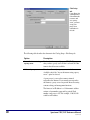
Server Properties
window
The following table describes the elements in the Catalog Setup—Server Properties
window.
44
Option
Description
Name box *
Enter the name of the server in this box. For example, if you're
trying to connect to the library database at New York University,
you could enter "New York University" in this box. The name you
enter here is the one displayed in the Other Libraries tab in both
Catalog Setup and Catalog.
Address box *
Enter the address of the Z39.50 server that you're trying to connect
to in this box. This is usually an IP (or Internet Protocol) address.
The format of an IP address is a 32-bit numeric address written as
four numbers separated by periods. Each number can be zero to
255. For example, 1.160.10.240 could be an IP address. You can
also enter the URL address of the library you're trying to connect
to in this box. For example, the URL for the Library of Congress is
z3950.loc.gov. The address can be up to 100 characters.
Spectrum CIRC/CAT Reference Manual
SCC5rm1200tb
Option
Description
Port box *
Enter the number of your Z39.50 server port number in this box.
When a message arrives at a Z39.50 server, the port number is an
identifier for where that message is to be forwarded. You should
accept the default value of 210 (the default port for most Z39.50compliant programs) unless you know the port number of the
server you're setting up. Contact your network administrator for
more information.
Description box
Lets you enter a description of the Z39.50 server that you're setting
up. You might want to enter a detailed name for the library whose
database you want to search, hours the server is up, and so on. You
can enter up to 200 characters in this box.
Username box
Lets you enter the username to use if authentication is required by
the Z39.50 server that you're setting up. The username is provided
by the remote library whose database you want to search. You can
enter up to 30 characters in this box.
Password box
Lets you enter the password to use if authentication is required by
the Z39.50 server that you're setting up. The password is provided
by the remote library whose database you want to search. You can
enter up to 30 characters in this box.
* Required fields
Test Results window
When you run a test on a Z39.50 server, you're checking to make sure all the items in the
test results window pass. A checked box indicates a passed item. If any boxes other than
the Close supported box are not checked, the site is not available to the Z39.50 client (in
other words, no searches can be performed using the Z39.50 server that didn't pass the
test).
For help testing servers, see "How to test an individual server and its databases" and
"How to test all servers and databases" in the Setup chapter of the Spectrum CIRC/CAT
User Manual.
Setup: Catalog Setup program elements
SCC5um1200tb
45
Example of a Test Results
window
This is what your test results window
would look like if the test for an
individual server passed.
The following table describes the elements in the Catalog Setup—Test Results window.
46
Option
Description
TCP/IP available box
If TCP/IP services are available, this box is checked.
Host was available box
If a Z39.50 server was found at the tested server's address,
this box is checked.
Database was available
box
If the tested Z39.50 server contained at least one of the
databases that you set up, this box is checked.
Search supported box
If at least one of the tested Z39.50 server's database(s) can
be searched, this box is checked.
Present supported box
If at least one of the tested Z39.50 server's databases can
present records, this box is checked.
Close supported box *
If the tested Z39.50 server sends a close response to a close
response, this box is checked.
Spectrum CIRC/CAT Reference Manual
SCC5rm1200tb
Option
Description
Type 1 queries
supported box
If the tested Z39.50 server indicates that it can handle Type1 queries (which are the only type of queries Spectrum
Z39.50 Client supports), this box is checked.
USMARC requests
supported box
If the tested Z39.50 server indicates that it can handle
USMARC present responses (which are the only type
Spectrum Z39.50 Client supports), this box is checked.
BIB1 attributes
supported box
If the tested Z39.50 server indicates that it can handle Bib-1
search attributes (which are the only attributes Spectrum
Z39.50 Client supports), this box is checked.
View Messages button
When clicked, this button opens the Search Log window,
which displays any messages that are communicated
between Z39.50 servers and clients.
* This item has no impact on the success or failure of a test for either a server or database.
Search Log window
The Search Log window tracks any messages that are communicated between Z39.50
servers and clients. You can view this log in the Other Libraries tab in Catalog and
Catalog Setup. This window opens automatically after you test all Z39.50 servers in the
Other Libraries tab in Catalog Setup or when you click the View Messages button in the
Test Results window after you test an individual server.
The Host column indicates which Z39.50 server generated the message, and the Message
column displays the contents of the message.
The following table describes common error messages that may be listed in the Search
Log window, along with possible solutions to help resolve the problems.
Error message
Description
Solution
Connection to
host failed
This is received
when the server is
not responding
properly. Either it is
down, it does not
exist, or it is not a
Z39.50 site.
Test the server in Catalog Setup (see
"Managing Z39.50 servers" in the Setup
chapter of the Spectrum CIRC/CAT User
Manual). Make sure the information that is
listed in the Other Libraries tab in Catalog
Setup is correct. If that doesn't work, wait a
few hours, and try to test the server again.
Setup: Catalog Setup program elements
SCC5um1200tb
47
Error message
Description
Solution
Invalid host
address
Address given for
the server is not a
proper internet
address.
Open the Server Properties window in
Catalog Setup and make sure the address
you listed for the server is correct (see
"Managing Z39.50 servers" in the Setup
chapter of the Spectrum CIRC/CAT User
Manual). If the address listed in the Server
Properties window is correct, contact the
remote library and verify you have the
correct address. Valid server addresses are
either an IP address or a URL.
Host closed
connection
(could also say
"Z-association
not accepted by
the host" or "Zassociation
terminated")
Host has refused the
connection, possibly
because a password
is required and/or
the password
entered is incorrect.
You may get these
messages in a
Z39.50 defined
message.
Open the Server Properties window in
Catalog Setup and make sure you have
entered the correct password (see
"Managing Z39.50 servers" in the Setup
chapter of the Spectrum CIRC/CAT User
Manual). If you didn't enter a password and
one is required or you entered the wrong
password, contact the remote library for the
correct password.
If all else fails…
If you still can't resolve the problem:
1 Document what you were trying to do, the error message, and
what you tried to do to resolve it.
2 Contact Sagebrush Technical Support.
48
Spectrum CIRC/CAT Reference Manual
SCC5rm1200tb
Circulation Setup program elements
The Circulation Setup window consists of several tabs, where you can access all of the
circulation options to customize your library's circulation activities.
For help performing Circulation Setup tasks, see "Setting up circulation" in the Setup
chapter of the Spectrum CIRC/CAT User Manual.
Circulation Setup—General tab
The circulation options in the General tab of Circulation Setup determine how the
program functions when you perform circulation activities.
For help with setting up general circulation options, see "Setting general circulation
options" in the Setup chapter of the Spectrum CIRC/CAT User Manual.
Circulation Setup—
General tab
Here you set up
general options for the
Circulation part of the
program.
Setup: Circulation Setup program elements
SCC5um1200tb
49
The following table describes the elements in the Circulation Setup—General tab.
50
Option
Description
Set privacy option
Suppresses all material titles in the Circulation window,
regardless of material type (material numbers, checkout dates,
and due dates still appear). However, even if you select this
option, you can still find out a material’s title by doing a
material inquiry.
Allow sounds in
circulation
Enables beeps that occur when you do certain circulationrelated actions.
Display an alert when
a patron with fines is
loaded
When selected, opens an alert in the Circulation window
when you load a patron who has outstanding fines.
Display additional
material information
after check in
Opens a program window immediately after you do a checkin
and shows the following information about each material you
just checked in: material number, title, last borrower, name of
any patron who has the material on reserve. From this
window, you also access more details about the material(s)
you checked in, such as date and time checked out, date and
time due, and the patron number of anyone who has the
material on reserve.
Clear patron
information after
each complete
transaction
When selected, removes the patron information and the
materials in the Materials checked out list after all materials
entered in the Materials list are successfully processed.
Spectrum CIRC/CAT Reference Manual
SCC5rm1200tb
Option
Description
Save in-library usage
for materials
When selected, tracks materials used in the library but not
checked out. You record in-library use by simply "checking
in" materials found left around the library after patrons use
them.
To view statistics of the in-library use of a material, load the
material into the Circulation window and click the Material
Inquiry button, or double-click the material. Then, in the
Material Inquiry window, click the Local Information tab.
Overnight checkouts
due __ hours after
library opens
Lets you set the number of hours after the library opens that
overnight checkouts are due. Overnights are materials with an
hourly loan period that can be checked out overnight.
Circulation Setup—Fines tab
You choose circulation fine options in the Fines tab of Circulation Setup.
For help with setting up circulation fine options, see "Setting fine options" in the Setup
chapter of the Spectrum CIRC/CAT User Manual.
Fines tab
Here you choose
how the
Circulation part
of the program
manages fines.
Setup: Circulation Setup program elements
SCC5um1200tb
51
The following table describes the elements in the Circulation Setup—Fines tab.
Option
Description
Accrue fines when the
library is closed
Lets fines for overdue materials accumulate even when the
library is closed. (To specify when the library is open and
closed, see "Setting up the calendar" in the Setup chapter of
the Spectrum CIRC/CAT User Manual.)
Set maximum fine using
Controls how high patrons’ system-generated fines may
accumulate. System-generated fines are fines for overdue
materials that the program accrues according to the fine
rates you set up in Material Type Setup and/or Patron Type
Setup. If you don’t enable this function, the program
continues to accrue fines until they are paid.
Set amount
When selected, lets system-generated fines accrue up to,
but not exceed, the amount you enter.
The price of the
material
Lets system-generated fines accrue up to, but not exceed,
the amount entered in the price field of each material
record. In theory, the maximum fine would be the cost of
the material.
If the price field is blank, the program accrues systemgenerated fines as if you didn’t set a maximum fine. To
avoid this problem, you should also select the option "Use
‘Set amount’ if price of material is unavailable," below.
Use "Set amount" if
price of material is
unavailable
If you set the maximum fine allowable for a material to be
equal to its price but the material’s record doesn’t have any
data available in the price field, you can use the set amount
as the fallback maximum.
Set amount
The amount that fines can accrue up to.
Circulation Setup—Logs tab
In the Logs tab of Circulation Setup, you can choose to log fine and circulation
transactions. To see circulation and fine log information for patrons and materials,
conduct a patron or material inquiry in the Circulation window.
For help with setting up circulation log options, see "Setting log options" in the Setup
chapter of the Spectrum CIRC/CAT User Manual.
52
Spectrum CIRC/CAT Reference Manual
SCC5rm1200tb
Logs tab
You decide if
you want to
create logs
for fine and
circulation
transactions
in this tab.
The following table describes the elements in the Circulation Setup—Logs tab.
Option
Description
Log fine
transactions
Enables the fine log. The fine log maintains a record of patrons’
fine activity. The log lists the patron and material involved in the
transaction, the date, and the amount paid.
Log circulation
transactions
Enables the circulation log. The circulation log maintains a
record of patrons’ and materials’ circulation activity. The log
tracks the dates and times that materials were checked in and out,
by whom, and the date due. Important! If your library is part of a
district using the Spectrum Union Catalog program, you must
have your circulation log turned on in order for the Union
Transaction Agent (UTA) to function properly. For more
information, please refer to the Spectrum Union Catalog
documentation or your district administrator.
Setup: Circulation Setup program elements
SCC5um1200tb
53
Option
Description
Save all
transactions
Stores all transactions in the circulation log. However, you may
not want to have the log keep track of all past transactions.
Saving all transactions may require more disk space.
Save a maximum
of __ transactions
Sets a limit on the number of transactions per material the
circulation log stores. If you set a transaction limit of three, for
example, then a material’s first log record is removed when the
material is checked out for the fourth time. This option does not
limit the log of transactions per patron—all transactions are
automatically logged for all patrons.
Lookup tab
The lookup options that you choose from this tab determine how the Lookup window
functions in Circulation. You can set the default material and patron indexes that the
Lookup window uses each time you open it. You can also choose if you want the Lookup
window to automatically open whenever an invalid barcode is entered in Circulation. In
the Lookup window, you search for a patron or material(s) and return the item(s) to the
Circulation window to process a transaction.
For help with setting up circulation lookup options, see "Setting lookup options" in the
Setup chapter of the Spectrum CIRC/CAT User Manual.
Lookup tab
Here you choose
the options that
determine how
the Lookup
window operates
in the Circulation
part of the
program.
54
Spectrum CIRC/CAT Reference Manual
SCC5rm1200tb
The following table describes the elements in the Circulation Setup—Lookup tab.
Option
Description
Show Lookup window
after entering an
invalid barcode
When selected, opens the circulation Lookup window
automatically when you enter an invalid patron or material
number in the Circulation window.
Set default material
lookup index
When selected, lets you specify the material index that
displays each time you open the circulation Lookup
window. If you don’t select this option, the default index is
Material Number.
Set default patron
lookup index
When selected, lets you specify the patron index that
displays each time you open the circulation Lookup
window. If you don’t select this option, the default index is
Patron Number.
Color tab
The color options that you choose in the Color tab of Circulation Setup determine the
colors of certain circulation attributes. You can set a different color for overdue items in a
patron's checked out list and Check In window, holdings on special reserve, projected
fines in the Fines tab in Patron Inquiry, and so on. If you specify different colors for
options in Circulation Setup, it makes it easy to spot if a patron has expired privileges or
fines, for example, when you load a patron in Circulation.
For help with setting up circulation color options, see "Setting color options" in the Setup
chapter of the Spectrum CIRC/CAT User Manual.
Setup: Circulation Setup program elements
SCC5um1200tb
55
Color tab
Here you can
choose to
display different
elements in
Circulation in
different colors.
The following table describes the elements in the Circulation Setup—Color tab.
56
Option
Description
Change Color
buttons
Open a window that contains a standard system color palette. In this
window, you choose the color you want each circulation attribute to
be displayed in. Each circulation attribute has its own Change Color
button. When you select colors, be sure to choose a color that can
be viewed easily on screen.
Circulation
attributes list
The items that can be displayed in a different color. The list
includes: Overdue holdings, Holdings on special reserve, Projected
fines, Posted fines, Reserves placed on holdings, Text for patron's
with messages, fines, reserves, or expired privileges, and Text for
patron's without messages, fines, or reserves.
Spectrum CIRC/CAT Reference Manual
SCC5rm1200tb
Material Type Setup program elements
Material Type Setup lets you categorize the materials in your collection into types.
Materials of one type all share the same circulation properties, such as their renewal limit.
You should set up material types before you add materials to your database. The program
automatically installs 20 material types you can customize to meet your library’s needs,
and you can add more if necessary.
To access Material Type Setup
Choose Setup > Material Types from the Winnebago menu. The
Material Types window opens.
For help performing Material Type Setup tasks, see "Setting up material types" in the
Setup chapter of the Spectrum CIRC/CAT User Manual.
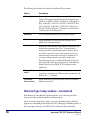
Material Types window
You manage your material types in the Material Types window.
For help using items in this window, see "Managing material types" and "Changing the
default material type" in the Setup chapter of the Spectrum CIRC/CAT User Manual.
Material
Types
window
Here you set up
your library's
material types.
Setup: Material Type Setup program elements
SCC5um1200tb
57
The following table describes the elements in the Material Types window.
Option
Description
Material Types list
Contains the list of material types set up in your library's
database. The program automatically installs 20 material types,
which are: 1–Default, 2–Fiction, 3–Reference, 4–Biography, 5–
Easy, 6–000-099, 7–100-199, 8–200-299, 9–300-399, 10–400499, 11–500-599, 12–600-699, 13–700-799, 14–800-899, 15–
900-999, 16–Story Collection, 17–Juvenile, 18–Audio-Visual,
19–Professional, 20–In-Library Use.
Add button
Lets you add new material types and set up their options.
Edit button
Opens the Material Type Setup window in which you can
modify the selected material type.
Delete button
Removes the selected material type from the material types list
and from the program database. Note: You cannot delete a
material type that is currently being used for materials. If you
try to delete a type that is in use, the program warns that you
must first change all materials of this type to another type. If
you need to change materials of one type to another type,
Sagebrush suggests you use the Material Batch Process part of
the program. See "Batch processing materials" in the Materials
chapter of the Spectrum CIRC/CAT User Manual for more
information.
Change Default
button
When clicked, makes the selected material type the new default
material type and updates the "When no pattern matches the call
number, use ___" statement.
Call Number
Patterns button
Opens the Material Type Setup window with the Call Number
Patterns tab activated.
Material Type Setup window—General tab
In the General tab of the Material Type Setup window, you set the loan period, fine
amounts, and other circulation options for each material type.
After you select the material type options, you set up call number patterns, which the
program uses when adding new material records. See "Managing call number patterns" in
the Setup chapter of the Spectrum CIRC/CAT User Manual for more information.
58
Spectrum CIRC/CAT Reference Manual
SCC5rm1200tb
For help with setting up general material type options, see "How to add a material type"
and "How to edit a material type" in the Setup chapter of the Spectrum CIRC/CAT User
Manual.
Material Type
Setup window—
General tab
In this tab, you can
set up different
circulation options
for each material
type in your
database.
The following table describes the elements in the Material Type Setup window—General
tab.
Option
Description
Type
The material type number. You may not edit this number. This
number is specified when you add a new material type.
Description
The name of the material type (up to 20 characters long). Enter
any term that describes the materials that belong to this type
(such as Fiction, Reference, Art, and so on).
Loan period
The amount of time patrons can have materials of this type out on
loan. You enter either the number of calendar days or the number
of hours that a material can be checked out. The loan period
includes days the library is open and closed.
Grace period
The length of time after a material is overdue before fines accrue.
You can set a grace period of 0 (zero) to make fines accrue as
soon as a material is overdue. The grace period’s unit of time
(days or hours) is determined by your loan period’s unit of time.
Setup: Material Type Setup program elements
SCC5um1200tb
59
60
Option
Description
Fine rate
The rate by which fines for overdue materials of this type
increase. This rate is per day or per hour, depending on the loan
period. The program automatically calculates and assigns these
fines for overdue materials when they are checked in. (Special
fine rates that you set up in Patron Type Setup take precedence
over the material type fine rates.)
Renewal limit
The number of times a material of this type can be checked out
repeatedly by one patron. If the renewal limit is 0 (zero),
materials of this type can’t be renewed. (You can override the
renewal limit in circulation.)
Allow overnight
checkout
Materials with hourly loan periods can be checked out overnight.
(To set the number of hours after the library opens that
overnights are due, see "Setting up circulation" in the Setup
chapter of the Spectrum CIRC/CAT User Manual.)
Allow advance
bookings
Enables the advance booking feature in Circulation for the
selected material type.
Do not display in
checked out list
The materials of this type are suppressed so they’re not visible in
the patrons’ Materials Checked Out list in the Circulation
window. (If you enable the privacy option in circulation, all
material titles—regardless of type—are suppressed.)
Textbook or fixed
asset
This material type is for textbooks or fixed assets. Textbooks and
fixed assets don’t count toward patrons’ checkout limits. (The
checkout limit is the number of items a patron can have checked
out at a time. Checkout limits are specified in the Privileges tab
of the Patron Type Setup window).
Searchable
When a material type is designated for textbooks or fixed assets,
specifies whether materials of this type are searchable through
the catalog. Materials that are not textbooks or fixed assets are
searchable.
Spectrum CIRC/CAT Reference Manual
SCC5rm1200tb
Call Number Patterns tab
In the Call Number Patterns tab of the Material Type Setup window, you add, edit, or
delete call number patterns as necessary. You also test call number patterns in this tab.
For help with setting up call number patterns, see "Managing call number patterns" in the
Setup chapter of the Spectrum CIRC/CAT User Manual.
Call Number
Patterns tab
Here you
manage your
library's call
number
patterns.
The following table describes the elements in the Material Type Setup—Call Number
Patterns tab.
Option
Description
Type
The material type number. You may not edit this number. This
number is specified when you add a new material type.
Add button
Opens the Call Pattern window in which you can set up a new call
number pattern.
Edit button
Opens the Call Pattern window in which you can modify the
selected call number pattern.
Delete button
Removes the selected call pattern from the call pattern list and from
the program database.
Setup: Material Type Setup program elements
SCC5um1200tb
61
Option
Description
Test call
number
pattern—Call
number
Lets you test the call number to verify that it assigns the correct
material type to a material imported into the program. Testing
ensures that the pattern doesn’t conflict with an existing pattern.
Call Pattern window
You enter new call patterns in the Call Pattern window. Each time you click the Add or
Edit button in the Call Number Patterns tab, this window opens.
Call Pattern
window
Here you enter
new or edit
existing call
patterns.
The following table describes the elements in the Call Pattern window.
62
Option
Description
Case-sensitive
Lets you decide if you want the call pattern to be case-sensitive.
Case-sensitive is a setting that tells the program to distinguish
uppercase letters from lowercase letters. When selected, a symbol
appears next to the call number pattern in the Call Number Patterns
tab of the Material Type Setup window.
Enter pattern
Lets you enter a new call pattern. If you enter a pattern that is
already being used by another material type, an alert window asks
you to either enter a new pattern or delete the conflicting pattern
that’s assigned to another type.
Spectrum CIRC/CAT Reference Manual
SCC5rm1200tb
Password Setup program elements
Password Setup is where you set up passwords to protect your program from being
accessed by unauthorized personnel. You can use up to nine passwords throughout your
program.
You provide a password for each level your library wants to set up a password for. Then,
you assign a level to each password-protected part of the program. You can then access
that part of the program by using the assigned level password or any higher level
password.
For help performing Password Setup tasks, see "Setting up passwords" in the Setup
chapter of the Spectrum CIRC/CAT User Manual.
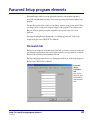
Passwords tab
Before you can assign one of the nine level passwords to a feature, you need to make sure
you designate a password for that level. It is not required to set a password for each level.
However, the level nine password must be filled in.
For help setting up password levels, see "Setting password levels" in the Setup chapter of
the Spectrum CIRC/CAT User Manual.
Password
Setup—
Passwords
tab
Here you can
choose to enter
a password for
each password
level.
Setup: Password Setup program elements
SCC5um1200tb
63
The following table describes the elements in the Password Setup—Passwords tab.
Option
Description
Level
Determines the degree of access given to the password you enter.
Password
Holds the password for the corresponding level. Important! The level
nine box must hold a password. The default level nine password is CIRC.
We recommend you change it to a word more unique to the person(s)
using the level nine password.
Casesensitive
Indicates whether passwords must match the exact case you use. For
example, if you set up HSCirc for the Circulation password, and you
select the case-sensitive option, you must type HSCirc to access
Circulation—HSCIRC or hscirc won’t work.
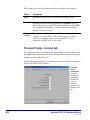
Password Setup—General tab
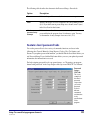
You set the password levels for inventory, file management, key word management, and
auto MARC merge in the General tab of Password Setup. The maximum password entry
attempts is specified in this tab as well.
For help setting up password levels, see "Setting password levels" in the Setup chapter of
the Spectrum CIRC/CAT User Manual.
Password
Setup—
General tab
You set up
passwords for
management
functions and
set up the
maximum
password entry
attempts in this
tab.
64
Spectrum CIRC/CAT Reference Manual
SCC5rm1200tb
The following table describes the elements in the Password Setup—General tab.
Option
Description
Feature
Indicates the specific commands, functions, or areas to protect.
Level
Indicates the degree of access assigned to the corresponding feature
(0-9). If you don't want to password-protect a feature, enter 0 (zero)
in the Level box for that feature.
Maximum
password entry
attempts
Indicates the number of times users can incorrectly enter a
password before the program doesn’t let them try again. You may
set the number of entry attempts from one to five (1–5).
Features level password tabs
You set the password levels for a variety of commands, functions, and areas in the
following tabs: General, Materials, Setup, Reports, Catalog, Circ, Circ Inquiry, and
Patrons. If you update password information, you should click the Save button before you
exit Password Setup. If you click the Exit button before you save your updated password
information, the information is not saved.
For help assigning password levels to program features, see "Protecting your program
features with passwords" in the Setup chapter of the Spectrum CIRC/CAT User Manual.
Password
Setup—
CIRC tab
This is one
example of
the tabs in
password
setup where
you set the
password
levels for
different
commands
and functions
in the
specified area
of the
program.
Setup: Password Setup program elements
SCC5um1200tb
65
The following table describes the elements in the Password Setup—Materials, Setup,
Reports, Catalog, Circ, Circ Inquiry, and Patrons tabs.
66
Option
Description
Feature
Indicates the specific commands, functions, or areas to protect.
Level
Indicates the degree of access assigned to the corresponding feature (09). f you don't want to password-protect a feature, enter 0 (zero) in the
Level box for that feature.
Spectrum CIRC/CAT Reference Manual
SCC5rm1200tb
Patron Type Setup program elements
Patron Type Setup lets you categorize your library’s patrons, so you can specify
circulation privileges for each type. Patrons of one type all share the same circulation
privileges (such as their schedule or whether they can check out with fines). You should
set up patron types before you add patrons to your database.
For help performing Patron Type Setup tasks, see "Setting up patron types" in the Setup
chapter of the Spectrum CIRC/CAT User Manual.
Patron Types window
You manage your patron types in the Patron Types window.
For help performing Patron Type Setup tasks, see "Adding patron types", "Editing patron
types", and "Deleting patron types" in the Setup chapter of the Spectrum CIRC/CAT User
Manual.
Patron
Types
window
Here you set
up your
library's
patron types.
The following table describes the elements in the Patron Types window.
Option
Description
Patron Types list
Contains the list of patron types set up in your library database. By
default, this list is empty.
Add button
Lets you add new patron types and set up their options.
Setup: Patron Type Setup program elements
SCC5um1200tb
67
Option
Description
Edit button
Opens the Patron Type Setup window in which you can modify
the selected patron type.
Delete button
Removes the selected patron type from the patron types list and
from the program database. Note: You cannot delete a patron type
that is currently being used for patrons. If you try to delete a type
that is in use, the program warns that you must first change all
patrons of this type to another type.
Patron Type Setup—General tab
When you add or edit a patron type, the program displays the Patron Type Setup window,
which has two tabs, General and Privileges.
In the General tab of the Patron Type Setup window, you set user-defined fields, the
associated schedule, expiration date, and global due date for each patron type.
For help setting up general patron type information, see "Adding patron types" in the
Setup chapter of the Spectrum CIRC/CAT User Manual.
Patron Type
Setup—
General tab
In this tab, you
can set up
different
options for
each patron
type in your
database.
68
Spectrum CIRC/CAT Reference Manual
SCC5rm1200tb
The following table describes the elements in the Patron Type Setup—General tab.
Option
Description
Type
The number associated with a patron type. You may not edit
this number. It is specified when you add a new patron type.
Description
The full name of a patron type (for example, 01 Class, Faculty,
Youth).
User-defined field
names
Each patron type can have up to three user-defined fields (up to
16 characters long each) for special information. These userdefined fields may be different for each patron type and are in
addition to the fields that already exist in CIRC/CAT patron
records (first and last name, address, city, state, postal code,
patron type, and barcode number). You enter the names of the
fields here and later, in the Patron Edit window, you enter the
data for the three fields (for example, home phone number,
Social Security Number, parent, or classroom).
Schedule
The schedule assigned to a patron type. You must have already
set up your schedules in the Calendar Setup window. The
program assigns the default schedule if you have no other
schedules set up.
Privileges expire on
__
The specific month, day, and year (entered MM/DD/YYYY)
when privileges for a patron type expire.
Privileges expire
after __ months
The number of months until the privileges for a patron type
expire. Note: This start date is assigned when patrons are added.
After a patron type's privileges expire, all patrons assigned to
type have expired privileges. In order to change the expiration
date for these patrons, Sagebrush suggests you use the Patron
Batch Process part of the program. See "Batch processing
patrons" in the Patrons chapter of the Spectrum CIRC/CAT
User Manual for more information.
Global due date
The specific date by which a patron type must return all
checked out materials.
Setup: Patron Type Setup program elements
SCC5um1200tb
69
Privileges tab
In the Privileges tab of the Patron Type Setup window, you set up unique privileges for
each patron type. Privileges are options that determine how a type of patron can use the
library.
For help setting up patron type privilege information, see "Adding patron types" in the
Setup chapter of the Spectrum CIRC/CAT User Manual.
Privileges
tab
In this tab,
you set up
each patron
type's
privileges.
The following table describes the elements in the Patron Type Setup—Privileges tab.
70
Option
Description
Type
The number and description of a patron type whose privileges
you change in this tab. (This field is not editable in this tab.)
Place reserves in
catalog
Lets patrons reserve materials in the catalog as long as the
"Allow patrons to place reserves" option in Catalog Setup is
selected. See "Reserves tab" in the Catalog Setup section of this
chapter for more information.
Check out with
fines
Lets patrons check out materials even if they have fines.
Spectrum CIRC/CAT Reference Manual
SCC5rm1200tb
Option
Description
Check out with
overdues
Lets patrons check out materials even if they have overdue
materials.
Renew overdues
Lets patrons renew overdue materials. (The program still assigns
a fine to a patron for the time the item was overdue before being
renewed.)
Exceed renewal
limit
Lets patrons renew materials more times than normally allowed
for those materials. All materials in your database have a set
number of times that they can be renewed according to the
renewal limits you set in Material Type Setup.
Set their own due
date
Lets patrons set their own due date for materials. When you
check out a material to a patron with this privilege, a window
opens and asks what due date the patron wants. The patron can
use the default loan period, the material’s loan period, or request
a different date.
Checkout limit
Restricts the number of materials a patron can have checked out
at one time to the amount entered here.
Display materials
currently out
Shows in the Circulation window the titles of materials that a
patron has checked out. You may want to suppress this display
for a patron type that typically checks out hundreds of books,
such as another library branch or a classroom. However, the
default option setting is to display the materials.
Set special fine
rate per day or
hour
Lets you specify a different fine rate for overdues to patrons,
which takes precedence over the material type’s fine rate. If you
don’t want to fine certain patron types for overdue materials, you
could enter 0 (zero) for their special fine rate.
Setup: Patron Type Setup program elements
SCC5um1200tb
71
SLIP Setup program elements
To print slips, you need to purchase the Spectrum SLIP add-on program for Spectrum
CIRC/CAT. For details, contact Sagebrush Corporation's Sales Department at 1-800-5335430.
In SLIP Setup, you determine what is printed on your SLIP receipts, notices, and
bibliographies. Spectrum SLIP is an add-on program that produces receipt-sized printouts
for your library patrons to use as a record of their circulation activity, fine amounts, and
catalog searches.
For help performing SLIP Setup tasks, see "Setting up the SLIP printer" in the Setup
chapter of the Spectrum CIRC/CAT User Manual.
SLIP Printing Setup window—Spectrum CIRC/CAT
To print slips, you need to purchase the Spectrum SLIP add-on program for Spectrum
CIRC/CAT. For details, contact Sagebrush Corporation's Sales Department at 1-800-5335430. Installation directions for Spectrum SLIP are included in the Spectrum CIRC/CAT
Installations Guide.
The SLIP Printing Setup window contains three tabs: General, Checkouts, and Fines.
Each tab helps you set up your options for printing fine and checkout receipts and fine
notices from your Spectrum CIRC/CAT program. To set up SLIP options for Spectrum
Patrons' Catalog, you have to set specific SLIP options in the Patrons' Catalog program
on each computer.
For help setting up SLIP for Spectrum CIRC/CAT, see "Setting SLIP printing options in
Spectrum CIRC/CAT" in the Setup chapter of the Spectrum CIRC/CAT User Manual.
SLIP Setup—General tab
The General tab of the SLIP Printing Setup window includes options for printing
checkout and fine receipts as well as bibliographic lists printed from the catalog.
For help setting up general SLIP options for Spectrum CIRC/CAT, see "How to set
general SLIP printing options in Spectrum CIRC/CAT" in the Setup chapter of the
Spectrum CIRC/CAT User Manual.
72
Spectrum CIRC/CAT Reference Manual
SCC5rm1200tb
SLIP Setup—
General tab
Here you
choose which
printer to use
and set up any
additional
comments that
you want to
print on your
SLIP printouts.
The following table describes the elements in the SLIP Setup—General tab in Spectrum
CIRC/CAT.
Option
Description
Printer
The name of the printer where the SLIP data is sent for printing. These
names are based on which printers are currently installed on your
computer.
Advanced
button
Opens the Advanced SLIP Printer Setup window where you can
specify the number of linefeeds to insert before printing starts and
after printing finishes. You may want to add linefeeds if your SLIP
bibliographies are not printing correctly (see SLIP troubleshooting in
the Setup chapter of the Spectrum CIRC/CAT Reference Manual for
details).
Comments
Lets you enter additional information to appear on the SLIPs that you
print, up to five lines in length. You can include any or all of these
lines on each SLIP printout. To include a comment line on a particular
type of SLIP printout, enable it on the respective tab (either Checkouts
or Fines tab).
Setup: SLIP Setup program elements
SCC5um1200tb
73
Advanced SLIP Printer Setup window
The options in the Advanced SLIP Printer Setup window let you add linefeeds before and
after the information on your SLIP printouts.
For help setting up advanced SLIP options for Spectrum CIRC/CAT, see "How to set
advanced SLIP options in Spectrum CIRC/CAT" in the Setup chapter of the Spectrum
CIRC/CAT User Manual.
Advanced SLIP Printer Setup
window
Here you can add linefeeds before printing
begins or after printing finishes.
The following table describes the elements in the Advanced SLIP Printer Setup window.
Option
Description
Linefeeds before
printing starts
The number you enter in this box is the number of times the
cursor is moved down a line before the SLIP printer starts to print.
This inserts a blank line for each linefeed.
Linefeeds after
printing finishes
The number you enter in this box is the number of times the
cursor is moved down a line after the SLIP printer finishes
printing. This inserts a blank line for each linefeed.
Checkouts tab
In the Checkouts tab of the SLIP Printing Setup window, you can print receipts
automatically after every checkout by selecting "Print receipt after checkouts" and then
specifying what information is printed on receipts.
For help setting up checkout receipt options for Spectrum CIRC/CAT, see "How to set
checkout receipt printing options" in the Setup chapter of the Spectrum CIRC/CAT User
Manual.
74
Spectrum CIRC/CAT Reference Manual
SCC5rm1200tb
Checkouts tab
Here you set up
SLIP options for
checkout receipts.
The following table describes the elements in the SLIP Setup—Checkouts tab.
Option
Description
Print receipts after
checkouts
If selected, the program automatically prints receipts after every
checkout. You can choose additional options, so your checkout
receipts print additional information. However, if you don't select
any options or comments, your checkout receipts include only
the patron’s name and barcode number and the date and time of
the printout.
Print options
If the "Print receipts after checkouts" option is selected, the
following options are available:
•
materials being checked out
•
textbooks being checked out
•
materials currently checkout out to patron
•
textbooks currently checkout out to patron
•
available reserves for patron
•
patron's fines
•
library name and address
You can choose any combination of the options above to include
that information on your checkout receipts.
Setup: SLIP Setup program elements
SCC5um1200tb
75
Option
Description
Print comments
(1–5)
If selected, includes the comment lines that you enter in the
General tab on all checkout receipts.
SLIP Setup—Fines tab
You can specify your options for printing fine receipts and notices. The top group in the
Fines tab of the SLIP Printing Setup window contains the options for fine receipts. The
bottom group in the Fines tab contains options for fine notices.
For help setting up fine receipt and notice options for Spectrum CIRC/CAT, see "How to
set fine receipt and notice printing options" in the Setup chapter of the Spectrum
CIRC/CAT User Manual.
Fines tab
Here you set
up SLIP
options for
fine receipts
and notices.
76
Spectrum CIRC/CAT Reference Manual
SCC5rm1200tb
The following table describes the elements in the SLIP Setup—Fines tab.
Option
Description
Print receipt after fine
payment
Automatically prints the fine receipt immediately after a fine
payment is recorded.
Print fines that are
being paid
On the fine receipt, you can include a list of the fines for
which the library has just collected payment.
Print remaining
materials with fines
On the fine receipt, you can include a list of the materials
with fines not yet paid.
Print library name and
address (fine receipts)
On the fine receipt, you can include library information,
including the name, address, city, state, and postal code of
your institution. Spectrum uses the name and address
entered in the Location Setup window. (See "Setting up
your location" in the Setup chapter of the Spectrum
CIRC/CAT User Manual.)
Print comments 1-5
(fine receipts)
If selected, includes the comment lines that you enter in the
General tab on fine receipts.
Print posted fines
On the fine notice, you can include a list of a patron’s
posted fines. (See "Managing fines" in the Circulation
chapter of the Spectrum CIRC/CAT User Manual for more
information.)
Print projected fines
On the fine notice, you can include a list of a patron’s
projected fines. (See "Managing fines" in the Circulation
chapter of the Spectrum CIRC/CAT User Manual for more
information.)
Print library name and
address (fine notices)
On the fine receipt, you can include library information,
including the name, address, city, state, and postal code of
your institution. The program uses the name and address
entered in the Location Setup window. (See "Setting up
your location" in the Setup chapter of the Spectrum
CIRC/CAT User Manual.)
Print comments 1-5
(fine notices)
If selected, includes the comment lines that you enter in the
General tab on fine notices.
Setup: SLIP Setup program elements
SCC5um1200tb
77
SLIP Printing Setup window—Patrons' Catalog
To print slips, you need to purchase the Spectrum SLIP add-on program for Spectrum
CIRC/CAT. For details, contact Sagebrush Corporation's Sales Department at 1-800-5335430.
You set up your SLIP printing options for Patrons' Catalog locally (at each Patrons'
Catalog station).
For help setting up SLIP options for Patrons' Catalog, see "Setting SLIP printing options
in Patrons' Catalog" in the Setup chapter of the Spectrum CIRC/CAT User Manual.
SLIP Printing Setup
window (Patrons'
Catalog)
Here you set up
options for catalog
bibliographies.
The following table describes the elements in the SLIP Printing Setup window in Patrons'
Catalog.
78
Option
Description
SLIP printer
Choose your printer from the SLIP Printer box.
Number of line
feeds before
printing starts
You can add linefeeds before the information on your SLIP
printouts. You may want to add linefeeds if your SLIP
bibliographies are not printing correctly. This inserts a blank
space for each linefeed.
Spectrum CIRC/CAT Reference Manual
SCC5rm1200tb
Option
Description
Number of line
feeds after printing
finishes
You can add linefeeds after the information on your SLIP
printouts. You may want to add linefeeds if your SLIP
bibliographies are not printing correctly. This inserts a blank
space for each linefeed.
Show SLIP Printing
option in Catalog
menu
If you have this option selected, all catalog users are able to
change the SLIP printing settings. If you clear this option, the
SLIP Printing option in the Catalog menu is not available. The
only way to make it available again is to delete the local
sliprint.prf file.
Setup: SLIP Setup program elements
SCC5um1200tb
79
80
Spectrum CIRC/CAT Reference Manual
SCC5rm1200tb