Download Vectorbeam Series

Transcript
Page 270
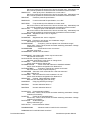
picked up by the pattern generator.
At present , the pattern writing will continue if any of these faults appear except the stage
fault ( 9 ), the last-measured height being used instead.
•
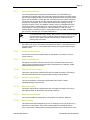
0 - good reading.
• 1 - poor reading from poor video signal. Possible holder shadowing or wrong LHS
calibration table being used (e.g. LHS calibrated on a bright focus mark but now
measuring a dark anti-reflective chrome plate).
• 2 - LHS at limit. Laser gone to max or min brightness. Ignore, recalibration
desirable, but not essential.
• 3 - LHS overrange. Height too great/small, or faulty CCD. Recalibrate or
investigate.
• 4 - LHS measurement fault. No signal. (No plate ?). Investigate.
• 5 - LHS off. LHS has not been calibrated since being switched off or reset.
Recalibrate.
• 6 - LHS PSU fault. PSU faulty - investigate.
• 7 - LHS system fault. H/W faulty - investigate.
• 8 - LHS comms fault. PG cannot establish comms. Faulty PG, LHS or wire joining
them.
• 9 - LHS stage fault. Stage not moved. Not LHS fault.
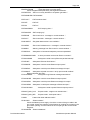
Height sensor reset
Reset the height sensor by pressing the red button on the edge of the PCB located in the
top of Cabinet A and repeat QCAL HEIGHT command.
Check
Ensure that there is a holder on the stage
VB_OPER> MVSP FM move to the Focus Mark
VB_OPER> QCAL HEIGHT /TAB=7
calibrate the height sensor
VB_OPER> QDISP HEIGHT
measure the height
27.5.
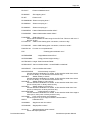
Subfield calibration error
If the subfield calibration fails with an error message and the residual errors are very
large this is because the subfield deflection is not working. There are a number of
possible causes:
1. The subfield calibrations coefficients have got themselves out of range. This could
happen if there is a glitch in the mark locate position or other disturbance to the
tool. Therefore try the command:
VB_OPER>qcal trap/init/load
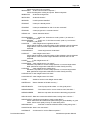
in order to zero the coefficients. Then try running jobcal. If the same error occurs during
the subfield calibration part of jobcal then enter the "qcal trap/init./load" command again
before moving on to point 2 below.
2. Power off and on the PGD, run start and the holder sequence and then try jobcal.
If the same error occurs during jobcal then enter the "qcal trap/init./load"
Part Number:878275
Vectorbeam Operator Manual