1
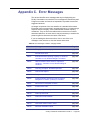
Appendix E. System Permissions
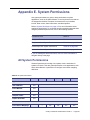
Use system permissions to grant or deny permissions to system
applications, such as the Alarm Monitor, or access points to item that are
not assigned to facilities. Examples of items that are not in facilities
include: alarm colors, alarm instructions, and alarm profiles.
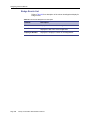
Refer to System Permissions on page 115 for more information about
configuring permissions. To review the specific permissions granted when
using the predefined permissions, refer to the following sections:
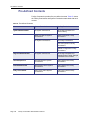
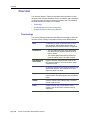
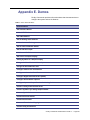
Permission Level
Refer to:
All System Permissions
Table 83
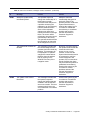
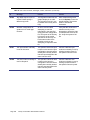
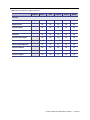
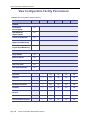
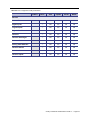
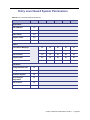
Entry Level Guard System Permissions
Table 84 on page 483
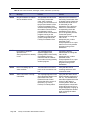
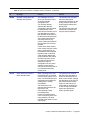
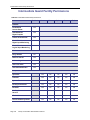
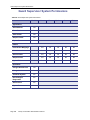
Guard Supervisor System Permissions
Table 85 on page 484
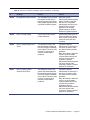
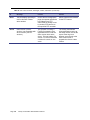
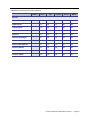
Intermediate Guard System Permissions
Table 86 on page 485
If you are reading this document online, click one of the links above to
navigate directly to the page.
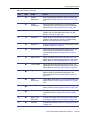
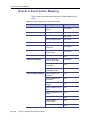
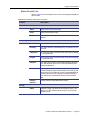
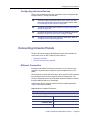
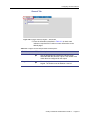
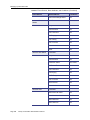
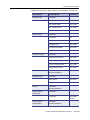
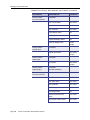
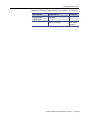
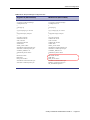
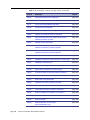
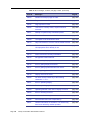
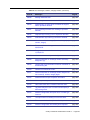
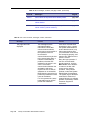
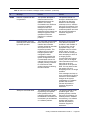
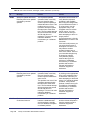
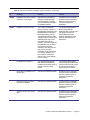
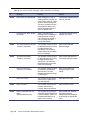
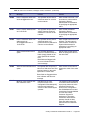
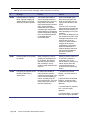
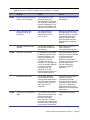
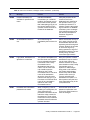
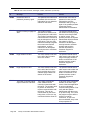
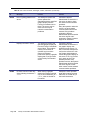
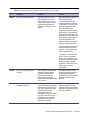
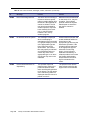
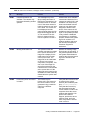
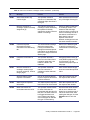
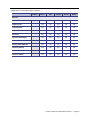
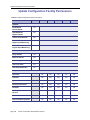
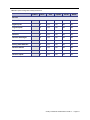
All System Permissions
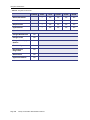
Grants all permissions including view, update, create, and delete for
system level items. This also grants permission to use applications, such
as the Alarm Monitor or permission to configure event action mapping
definitions.
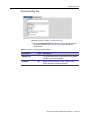
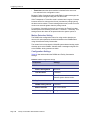
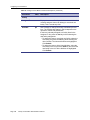
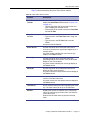
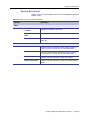
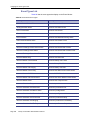
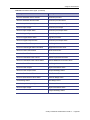
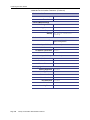
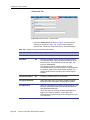
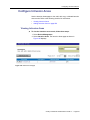
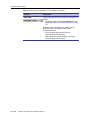
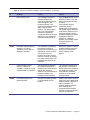
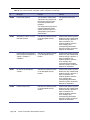
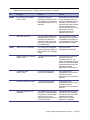
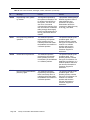
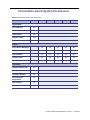
Table 83. All System Permissions
Enabled
None
View
Update
Create
Delete
—
Yes
Yes
Yes
Yes
Applications
Alarm Monitor
Yes
Event Monitor
Yes
Video Viewer
Yes
Graphic Viewer
Yes
Report Generator
Yes
Editors
Event Action Mappings
Facility Commander Administration Guide 2.1
Page 481