1
Simple guide to editing in Audacity - Steeple
24/08/2009 14:29
2 Setting up and recording a sound file
2.1 Equipment
To make a spoken word recording, you need a decent microphone and decent set of speakers. A poor
microphone means that your original sound source will not be good and no amount of editing and
enhancement will make it sound professional. A good pair of speakers with a flat response is also essential.
If your speakers do not faithfully represent the actual sound (for example, they do not play treble very well)
then you may end up boosting frequencies that are actually present but that you cannot hear through your
speakers.
2.2 Configure Audacity
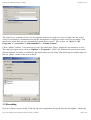
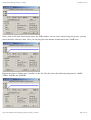
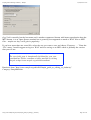
The first thing you (may) need to do is to set the audio input and output; this is done via preferences. It is
probably best to choose your soundcard for output.
As you will be recording via a microphone, select that as the input source. A mono channel should be OK.
http://www.steeple.org.uk/wiki/Simple_guide_to_editing_in_Audacity
Page 3 of 14