1
8068ch07-Migration.fm
Draft Document for Review January 29, 2013 12:52 pm
7.1 Preparing for data migration
In this section, we show you how to prepare external storage systems and IBM Flex System
V7000 Storage Node for data migration. Data migration is always an important step when
setting up new storage systems in an existing storage infrastructure.
Before attaching any external storage systems to IBM Flex System V7000 Storage Node, see
the IBM Flex System V7000 Storage Node support matrix at the following address:
http://www-947.ibm.com/support/entry/portal/overview/hardware/puresystems/pureflex
_system/storage_node/flex_system_v7000
Also always check for supported hardware and driver versions at IBM System Storage
Interoperation Center (SSIC):
http://ibm.com/systems/support/storage/ssic/interoperability.wss
Also available is the IBM Flex System Interoperability Guide, REDP-FSIG which is a Quick
reference for IBM Flex System Interoperability.
When migrating data from an external storage system to the IBM Flex System V7000 Storage
Node, where the external storage system is removed when complete, you can temporarily
configure the external virtualization license setting. Configuring the external license setting
prevents messages from being sent that indicate that you are in violation of the license
agreement. When the migration is complete, the external virtualization license must be reset
to its original limit.
External storage: When external storage is virtualized by IBM Flex System V7000
Storage Node, a per-enclosure external virtualization license is required. Contact your IBM
account team or IBM Business Partner for further assistance, if required.
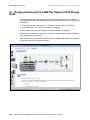
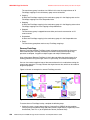
To prepare the data migration, external storage systems need to be configured to be under
IBM Flex System V7000 Storage Node control. Complete the following steps:
1. Stop host I/O to the external storage LUNs that need to be migrated.
2. Remove zones between the hosts and the storage system from which you are migrating.
3. Update your host device drivers, including your multipath driver, and configure them for
attachment to the IBM Flex System V7000 Storage Node system.
4. Create a storage system zone between the storage system being migrated and IBM Flex
System V7000 Storage Node system, and the host zones for the host attachment.
5. Unmap the LUNs in the external storage system to the host and map them to the IBM Flex
System V7000 Storage Node system.
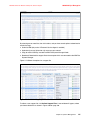
6. Verify that the IBM Flex System V7000 Storage Node has discovered the LUNs as
unmanaged MDisks.
7.2 Migrating the data using the migration wizard
In this section, we describe how to migrate existing data on external storage systems using
the IBM Flex System V7000 Storage Node storage migration wizard.
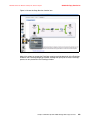
We use the IBM Flex System V7000 Storage Node wizard that has been designed specifically
for this scenario to guide you through the process and describe the steps along the way.
266
IBM Flex System V7000 Storage Node Introduction and Implementation Guide