1
Chapter 1: Building Resources
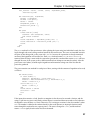
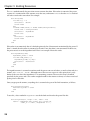
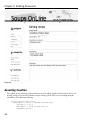
The edit test is changed to be almost identical to the new test, the only difference being the form action
itself. The easiest way to make this test pass is to take the form block from the new.html.erb file and
put it in a partial file called _form.html.erb, and change the new and edit views to refer to it. The
updated edit view would be as follows (the new view is similar):
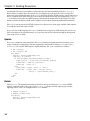
<h1>Editing recipe</h1>
<%= error_messages_for :recipe %>
<%= render :partial => “form” %>
<%= link_to ‘Show’, @recipe %> |
<%= link_to ‘Back’, recipes_path %>
Short and sweet. If you are familiar with the traditional Rails model scaffolding, you know that the _
form partial was automatically created by that scaffold to be used in the edit and new forms. There is
one slight difference. The older version had the actual beginning and ending of the form in the parent
view, and only the insides in partial view. In the RESTful version, @recipe serves as a marker for the
action in both cases, Rails automatically determines the URL action from the context. As a result, the
form block can more easily be entirely contained in the partial view.
Adding a Little Ajax
At this point, the basic CRUD functionality works for recipes with ingredients. I’d like to add one little
piece of in-place Ajax editing, allowing the user to do an in-place edit of the ingredients from the recipe
show page. This will allow the user to switch from what is shown in Figure 1-3 to what is shown in
Figure 1-4.
Figure 1-3
34